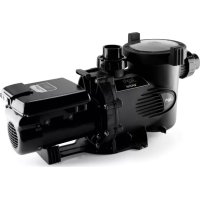
VSSHP220AUT - Pump Jandy - Free user manual and instructions
Find the device manual for free VSSHP220AUT Jandy in PDF.



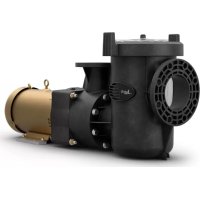
| Product type | Variable speed pool pump |
| Brand | JANDY |
| Model | VSSHP220AUT |
| Rated power | 0.25 to 2.2 HP (1.5 HP at full speed) |
| Supply voltage | 230 VAC |
| Power consumption | 2070 W |
| Speed range | 600 to 3450 rpm |
| Motor type | Regal Beloit variable speed motor |
| Hydraulic connections | 2 1/2 to 3 in (inlet and outlet) |
| Weight (packaged) | 27 kg (59.3 lb) |
| Overall length | 85.1 cm (33 1/2 in) |
| Housing material | High-quality thermoplastic |
| Protection rating | Type 3R (Canada) |
| Use | In-ground or permanent above-ground pools, spas |
| Self-priming | Yes |
| Integrated filter | Hair and debris filter basket |
| Communication | RS-485 for ePump, AquaLink RS, PDA or Z4 controllers |
| Electrical safety | Circuit protected by Ground Fault Circuit Interrupter (GFCI) |
| Entrapment protection | Compliant with ANSI/ASME A112.19.8 / ANSI/APSP-16 (minimum two drains) |
| Routine maintenance | Cleaning of the transparent filter basket |
| Winterization | Drain water, remove drain plugs |
| Available spare parts | Mechanical seal, impeller, diffuser, housing, basket, etc. |
| Auxiliary load | Relay contact 230 V/11 A for heater, chlorinator, etc. |
| Maximum test pressure | 2.4 bar (35 psi) |
Frequently Asked Questions - VSSHP220AUT Jandy
User questions about VSSHP220AUT Jandy
0 question about this device. Answer the ones you know or ask your own.
Ask a new question about this device
Download the instructions for your Pump in PDF format for free! Find your manual VSSHP220AUT - Jandy and take your electronic device back in hand. On this page are published all the documents necessary for the use of your device. VSSHP220AUT by Jandy.
USER MANUAL VSSHP220AUT Jandy
ENGLISH | FRANÇAIS | ESPAÑOL
ePump™ Series Pumps

natural_image
Technical line drawing of a mechanical pump or motor assembly (no text or symbols)
WARNING
FOR YOUR SAFETY - This product must be installed and serviced by a contractor who is licensed and qualified in pool equipment by the jurisdiction in which the product will be installed where such state or local requirements exist. The maintainer must be a professional with sufficient experience in pool equipment installation and maintenance so that all of the instructions in this manual can be followed exactly. Before installing this product, read and follow all warning notices and instructions that accompany this product. Failure to follow warning notices and instructions may result in property damage, personal injury, or death. Improper installation and/or operation will void the warranty. Improper installation and/or operation can create unwanted electrical hazard which can cause serious injury, property damage, or death.

ATTENTION INSTALLER - This manual contains important information about the installation, operation and safe use of this product. This information should be given to the owner/operator of this equipment.
Table of Contents
Section 1. IMPORTANT SAFETY INSTRUCTIONS 3
1.1 Safety Instructions....3
1.2 Pool Pump Suction Entrapment Prevention Guidelines .... 5
Section 2. General Description....6
2.1 Introduction....6
2.2 Description....6
Section 3. Installation Information ...... 7
3.1 Plumbing....7
3.2 Electrical Installation....9
3.3 ePump Dip Switch Settings 11
3.4 Pressure Testing....11
3.5 Conducting Pressure Test.... 13
3.6 Auxiliary Load Operation 13
Section 4. Operation....15
4.1 Start-up....15
Section 5. Service and Maintenance....15
5.1 Routine Maintenance....15
5.2 Winterizing the Pump 16
Section 6. Troubleshooting and Repair ...... 17
6.1 Troubleshooting.... 17
6.2 Service Technician Maintenance ..... 19
Section 7. Product Specifications and Technical Data 24
7.1 Replacement Parts List and Exploded View 24
7.2 Performance Curves....26
7.3 Physical and Operational Specifications 26
7.4 Replacement Motor Guide......27
EQUIPMENT INFORMATION RECORD
DATE OF INSTALLATION
INSTALLER INFORMATION
INITIAL PRESSURE GAUGE READING (WITH CLEAN FILTER)
PUMP MODEL HORSEPOWER
NOTES:
Section 1. IMPORTANT SAFETY INSTRUCTIONS READ AND FOLLOW ALL INSTRUCTIONS
1.1 Safety Instructions
All electrical work must be performed by a licensed electrician and conform to all national, state, and local codes. When installing and using this electrical equipment, basic safety precautions should always be followed, including the following:
| ⚠ WARNINGRISK OF SUCTION ENTRAPMENT HAZARD, WHICH, IF NOT AVOIDED, CAN RESULT IN SERIOUS INJURY OR DEATH. Do not block pump suction, as this can cause severe injury or death. Do not use this pump for wading pools, shallow pools, or spas containing bottom drains, unless the pump is connected to at least two (2) functioning suction outlets. Drain covers must be certified to the latest published edition of ANSI/ASME A112.19.8, or its successor standard ANSI/APSP-16. |
| ⚠ WARNINGTo reduce the risk of injury, do not permit children to use this product. |
| ⚠ WARNINGTo reduce the risk of property damage or injury, do not attempt to change the backwash (multiport, slide, or full flow) valve position with the pump running. |
| ⚠ WARNINGJandy Pro Series Pumps are powered by a high-voltage electric motor and must be installed by a licensed or certified electrician or a qualified swimming pool service technician. |
| ⚠ WARNINGDue to the potential risk of fire, electric shock, or injuries to persons, Jandy Pro SeriesPumps must be installed in accordance with the National Electrical Code® (NEC®), all local electrical and safety codes, and the Occupational Safety and Health Act (OSHA). Copies of the NEC may be ordered from the National Fire Protection Association, 470 Atlantic Ave., Boston, MA 02210, or from your local government inspection agency. |
| ⚠ WARNINGRISK OF ELECTRIC SHOCK, FIRE, PERSONAL INJURY, OR DEATH. Connect only to a branch circuit that is protected by a ground-fault circuit-interrupter (GFCI). Contact a qualified electrician if you cannot verify that the circuit is protected by a GFCI. Make sure such a GFCI should be provided by the installer and should be tested on a routine basis. To test the GFCI, push the test button. The GFCI should interrupt power. Push the reset button. Power should be restored. If the GFCI fails to operate in this manner, the GFCI is defective. If the GFCI interrupts power to the pump without the test button being pushed, a ground current is flowing, indicating the possibility of electrical shock. Do not use the device. Disconnect the device and have the problem corrected by a qualified service representative before using. |
| ⚠ WARNINGIncorrectly installed equipment may fail, causing severe injury or property damage. |
| ⚠ WARNINGDo not connect system to an unregulated city water system or other external source of pressurized water producing pressures greater than 35 PSI.Trapped air in the system can cause the filter lid to be blown off, which can result in death, serious personal injury, or property damage. Be sure all air is out of the system before operating. |

WARNING
To minimize risk of severe injury or death, the filter and/or pump should not be subjected to the piping system pressurization test.
Local codes may require the pool piping system to be subjected to a pressure test. These requirements are generally not intended to apply to the pool equipment, such as filters or pumps.
Jandy Pro Series pool equipment is pressure tested at the factory.
If, however, the WARNING cannot be followed and pressure testing of the piping system must include the filter and/or pump, BE SURE TO COMPLY WITH THE FOLLOWING SAFETY INSTRUCTIONS:
- Check all clamps, bolts, lids, lock rings, and system accessories to ensure they are properly installed and secured before testing.
- RELEASE ALL AIR in the system before testing.
• Water pressure for test must NOT EXCEED 35 PSI.
• Water temperature for test must NOT EXCEED 100°F (38°C). - Limit test to 24 hours. After test, visually check system to be sure it is ready for operation.
Notice: These parameters apply to Jandy Pro Series equipment only. For non-Jandy Pro Series equipment, consult the equipment manufacturer.

WARNING
Chemical spills and fumes can weaken pool/spa equipment. Corrosion can cause filters and other equipment to fail, resulting in severe injury or property damage. Do not store pool chemicals near your equipment.
CAUTION
Do not start pump dry! Running the pump dry for any length of time will cause severe damage and will void the warranty.
CAUTION
- This pump is for use with permanently installed pools and may also be used with hot tubs and spas, if so marked. Do not use with storable pools. A permanently installed pool is constructed in or on the ground or in a building, such that it cannot be readily disassembled for storage. A storable pool is constructed so that it may be readily disassembled for storage and reassembled to its original integrity.
- Do not install beneath the skirt of a hot tub. The pump requires adequate ventilation to maintain air temperature at less than the maximum ambient temperature rating listed on the motor rating plate.
- For Canadian installation, this pump carries a Type 3R enclosure rating and therefore is not intended for installation in areas subjected to windblown dust.
SAVE THESE INSTRUCTIONS
1.2 Pool Pump Suction Entrapment Prevention Guidelines

WARNING
SUCTION HAZARD. Can cause serious injury or death. Do not use this pump for wading pools, shallow pools, or spas containing bottom drains, unless pump is connected to at least two (2) functioning suction outlets.
WARNING
Pump suction is hazardous and can trap and drown or disembowel bathers. Do not use or operate swimming pools, spas, or hot tubs if a suction outlet cover is missing, broken, or loose.
The following guidelines provide information for pump installation that minimizes risk of injury to users of pools, spas, and hot tubs:
Entrapment Protection - The pump suction system must provide protection against the hazards of suction entrapment.
Suction Outlet Covers - All suction outlets must have correctly installed, screw-fastened covers in place. All suction outlet (drain) covers must be maintained. Drain covers must be listed/certified to the latest published edition of ANSI/ASME A112.19.8, or its successor standard ANSI/APSP-16. They must be replaced if cracked, broken, or missing.
Number of Suction Outlets Per Pump - Provide at least two (2) hydraulically-balanced main drains, with covers, as suction outlets for each circulating pump suction line. The centers of the main drains (suction outlets) on any one (1) suction line must be at least three (3) feet apart, center to center. See Figure 1 on page 7.
The system must be built to include at least two (2) suction outlets (drains) connected to the pump whenever the pump is running. However, if two (2) main drains run into a single suction line, the single suction line may be equipped with a valve that will shut off both main drains from the pump. The system shall be constructed such that it shall not allow for separate or independent shutoff or isolation of each drain. See Figure 1 on page 7.
More than one (1) pump can be connected to a single suction line as long as the requirements above are met.
Water Velocity - The maximum water velocity through the suction fitting or cover for any suction outlet must be 1.5 feet per second, unless the outlet complies with the latest published edition of ANSI/ASME A112.19.8, the standard for Suction Fittings For Use in Swimming and Wading Pools, Spas, Hot Tubs, and Whirlpool Bathtub Applications, or its successor standard ANSI/APSP-16. In any case, do not exceed the suction fitting's maximum designed flow rate.
If 100% of the pump's flow comes from the main drain system, the maximum water velocity in the pump suction hydraulic system must be six (6) feet per second or less, even if one (1) main drain (suction outlet) is completely blocked. The flow through the remaining main drain(s) must comply with the latest published edition of ANSI/ASME A112.19.8, the standard for Suction Fittings For Use in Swimming and Wading Pools, Spas, Hot Tubs, and Whirlpool Bathtub Applications, or its successor standard ANSI/APSP-16.
Testing and Certification - Suction outlet covers must have been tested by a nationally recognized testing laboratory and found to comply with the latest published edition of ANSI/ASME A112.19.8, the standard for Suction Fittings For Use in Swimming and Wading Pools, Spas, Hot Tubs, and Whirlpool Bathtub Applications, or its successor standard ANSI/APSP-16.
Fittings - Fittings restrict flow; for best efficiency use fewest possible fittings (but at least two (2) suction outlets).
Avoid fittings that could cause an air trap.
Pool cleaner suction fittings must conform to applicable International Association of Plumbing and Mechanical Officials (IAPMO) standards.

flowchart
graph TD
    A["At Least 3 Feet"] --> B["Listed/certified to the latest published version of ANSI®/ASME® A112.19.8, or its successor standard, ANSI/APSP-16. Anti-entrapment Cover/Grate or Suction Fitting, screw-fastened to Main Drain Sump"]
    B --> C["No valves between Tee and Main Drains"]
    C --> D["Suction Outlet (Main Drain)"]
    D --> E["Suction Outlet (Main Drain)"]
    E --> F["Pump"]
    F --> G["Valves OK between pump and Tee"]
    G --> H["Valves OK between pump and Tee"]
Figure 1. Number of Suction Outlets Per Pump
Section 2. General Description
2.1 Introduction
This manual contains information for the proper installation, operation, and maintenance of Jandy Pro Series ePump Series variable-speed pumps. Procedures in this manual must be followed exactly. To obtain additional copies of this manual, contact Zodiac® Customer Support at 800.822.7933 or visit our website at www.zodiacpoolsystems.com. For address information, see the back cover of this manual.
2.2 Description
The ePump is a variable-speed pump that can be run from 600 RPM to 3450 RPM. When connected to the Jandy Pro Series ePump controller, up to eight (8) speed settings may be programmed and recalled. This allows you to select the most appropriate speed for your application. Even more versatile programming is possible when you use a Jandy Pro Series AquaLink ^® RS controller.
The Jandy Pro Series ePump is designed to meet the needs of today's more hydraulically demanding pool equipment. The pump housing, backplate, diffuser, impeller, and hair and lint pot (pump debris filter basket) are all made from high quality thermoplastic materials. These materials were chosen for their strength and corrosion resistance.
The pump is driven by an electric motor directly attached to the pump impeller. As the electric motor turns, it causes the impeller to turn, which forces water to flow through the pump. The water flows through the pump inlet and then into the filter basket. The basket assembly pre-strains/traps large particles. The water then enters the center of the pump housing, flows through the impeller into the diffuser, and flows out the pump discharge port.
Section 3. Installation Information
3.1 Plumbing
3.1.1 Preparation Information
-
Upon receipt of the pump, check the carton for damage. Open the carton and check the pump for concealed damage, such as cracks, dents or a bent base. If damage is found, contact the shipper or distributor where the pump was purchased.
-
Inspect the contents of the carton and verify that all parts are included. See Section 7.1, Replacement Parts List and Exploded View.
3.1.2 Pump Location
CAUTION
For Canadian installation, this pump carries a Type 3R enclosure rating and therefore is not intended for installation in areas subjected to windblown dust.
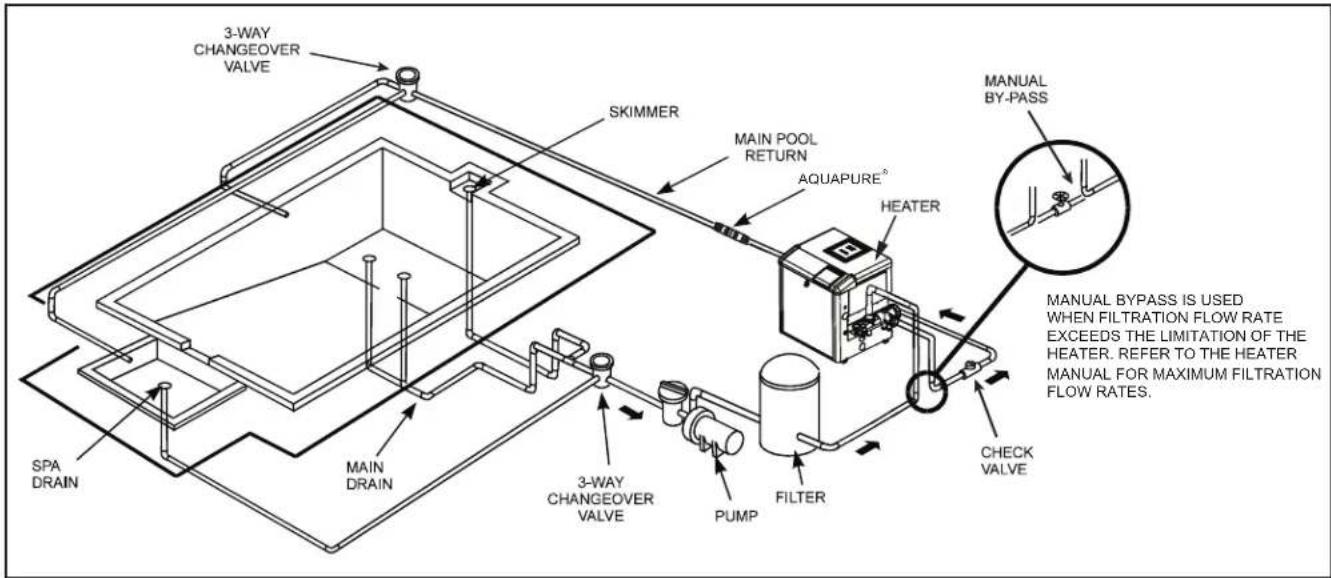
- Zodiac recommends installing the pump within one (1) foot above water level. Refer to Figure 2 for a typical installation. The pump should not be elevated more than a few feet above the water level of the pool. A check valve is recommended on the suction line to the pump.

WARNING
To Reduce the Risk of Fire, install pool equipment in an area where leaves or other debris will not collect on or around the equipment. Keep surrounding area clear of all debris such as paper, leaves, pine-needles and other combustible materials.

WARNING
Some Safety Vacuum Release System (SVRS) devices are not compatible with the installation of check valves. If the pool has an SVRS device, be sure to confirm that it will continue to safely operate when any check valves are installed.
NOTE To achieve better self-priming, install the pump as close as possible to the water level of the pool.
-
If the pump is located below water level, isolation valves must be installed on both the suction and return lines to prevent back flow of pool water during any routine or required servicing.
-
The pump and other circulation equipment must be located more than five (5) feet from the water. Choose a location that will minimize turns in the piping.
NOTE In Canada, the pump must be located a minimum of three (3) meters (approximately 10 feet) from the water (CSA C22.1).
- The pump should be installed on a firm, solid, and level surface to avoid risk of settlement. Do not use sand to level the pump as sand will wash away. Check local building codes for any additional requirements (Ex. Equipment pads in Florida must be concrete and equipment must be secured to the pad.)
NOTE Zodiac Pool Systems, Inc. recommends bolting the pump directly to the foundation.
-
The pump foundation must have adequate drainage to prevent the motor from getting wet. Protect the pump from the rain and sun.
-
Proper ventilation is required for the pump to operate normally. All motors generate heat that must be removed by providing proper ventilation.
-
Provide access for future services by leaving a clear area around the pump. Allow plenty of space above the pump to remove the lid and basket for cleaning.
-
If the equipment is in a potentially dark area, provide adequate lighting.
3.1.3 Pipe Sizing
NOTE All HP ratings given in this section apply to full-rated pumps.
3.1.3.1 Suction Pipe
When the pump is located up to 50 feet from the pool, the recommended minimum pipe size for the suction side of the pump is 2" for .75 to 1.5 HP*. For 2.0 HP* pumps, the recommended pipe size is 2 ½". For 3.0 HP* pumps, the recommended pipe size is 3". *HP refers to full rated pumps.
When the pump is located up to 50 feet from the pool, the recommended minimum pipe size for the discharge side of the pump is 2" for .75 to 1.5 HP*. For 2.0 HP* pumps, the recommended pipe size is 2½". For 3.0 HP* pumps, the recommended pipe size is 3". *HP refers to full rated pumps.
NOTE All pipe sizes are able to withstand the pressures the pump will deliver, but not necessarily the flow. If the pipe is too small for the pump, or is elevated above water, the maximum gallons per minute (GPM) may not be delivered. If this happens, the pump will develop a pocket of air (cavitation) that makes noise. This may shorten the life of the pump.
3.1.3.3 Installation Recommendations
- If the pump is located below water level, isolation valves must be installed on both sides of the pump to prevent the back flow of pool water during any routine or required servicing.
text_image
3-WAY CHANGEOVER VALVE SKIMMER MAIN POOL RETURN AQUAPURE® HEATER MANUAL BY-PASS SPA DRAIN MAIN DRAIN 3-WAY CHANGEOVER VALVE PUMP FILTER CHECK VALVE MANUAL BYPASS IS USED WHEN FILTRATION FLOW RATE EXCEEDS THE LIMITATION OF THE HEATER. REFER TO THE HEATER MANUAL FOR MAXIMUM FILTRATION FLOW RATES.Figure 2. Typical Piping Installation
- To help prevent difficulty in priming, install the suction pipe without high points (above inlet of pump - inverted "U"s, commonly referred to in plumbing as an airlock) that can trap air. For installations of equipment up to 100 feet from the water, refer to Table 1, the pipe sizing chart. For installations of equipment more than 100 feet from the water, the recommended pipe size must be increased to the next size.
Table 1. Pipe Sizing Chart for Schedule 40 PVC
| Pipe Size | Maximum Flow Suction(6 feet per second) | Maximum Flow Discharge(8 feet per second) |
| 1 12 " 37 | GPM (140 LPM) 50 GPM | (189 LPM) |
| 2" 62 | GPM (235 LPM) 85 GPM | (322 LPM) |
| 2 12 " 88 | GPM (333 LPM) 120 GPM | (454 LPM) |
| 3" 136 | GPM (515 LPM) 184 GPM | (697 LPM) |
| 4" 234 | GPM (886 LPM) 313 GPM | (1185 LPM) |
-
ePump™ Series Pumps come equipped with unions on both the suction and discharge ports. This feature simplifies installation and service and eliminates the possibility of leaks at threaded adapters.
-
The Jandy Pro Series ePump must be connected to at least two (2) hydraulically-balanced main drains (suction outlets) for each pool pump suction line. Refer to Figure 2. Each drain must be provided with covers that are listed or certified to the latest published edition of ANSI/ASME A112.19.8, or its successor standard ANSI/APSP-16. The suction outlets of the main drains must be at least three (3) feet apart or at different planes. The suction outlets
can be a drain and skimmer, two (2) drains, two (2) skimmers, or a skimmer with an equalizer line installed. For additional details and guidelines, refer to ANSI/APSP 7, the standard for Suction Entrapment Avoidance in Swimming Pools, Wading Pools, Spas, Hot Tubs, and Catch Basins. Check the local codes for proper installation requirements. Applicable local codes will take precedence over other codes.
NOTE To prevent entrapment, the system must be built so it cannot operate with the pump drawing water from only one (1) main drain. At least two (2) main drains must be connected to the pump when it is in operation. However, if two (2) main drains run into a single suction line, the single suction line may be equipped with a valve that will shut off both main drains from the pump.
-
The piping must be well supported and not forced together where it will experience constant stress.
-
Always use properly sized valves. Jandy Pro Series Diverter Valves and Jandy Pro Series Ball Valves typically have the best flow capabilities.
-
Use the fewest fittings possible. Each additional fitting has the effect of moving the equipment farther away from the water.
NOTE If more than ten suction fittings are needed, the pipe size must be increased.
- Every new installation must be pressure tested according to local codes.
3.2 Electrical Installation
3.2.1 Voltage Checks
The correct voltage, as specified on the pump data plate, is necessary for proper performance and long motor life. Incorrect voltage will decrease the pump's ability to perform and could cause overheating, reduce the motor life, and result in higher electric bills.
It is the responsibility of the electrical installer to provide data plate operating voltage to the pump by ensuring proper circuit sizes and wire sizes for this specific application.
CAUTION
Failure to provide data plate voltage (within 10%) during operation will cause the motor to overheat and void the warranty.
3.2.2 Bonding
-
The motor frame must be bonded to a reliable grounding point using a solid copper conductor, No. 8 AWG or larger. In Canada, No. 6 AWG or larger must be used. If the pump is installed within five (5) feet (1.5 m) of the inside walls of the swimming pool, spa, or hot tub, the motor frame must be bonded to all metal parts of the swimming pool, spa, or hot tub structure and to all electrical equipment, metal conduit, and metal piping within five (5) feet (1.5 m) of the inside walls of the swimming pool, spa, or hot tub.
-
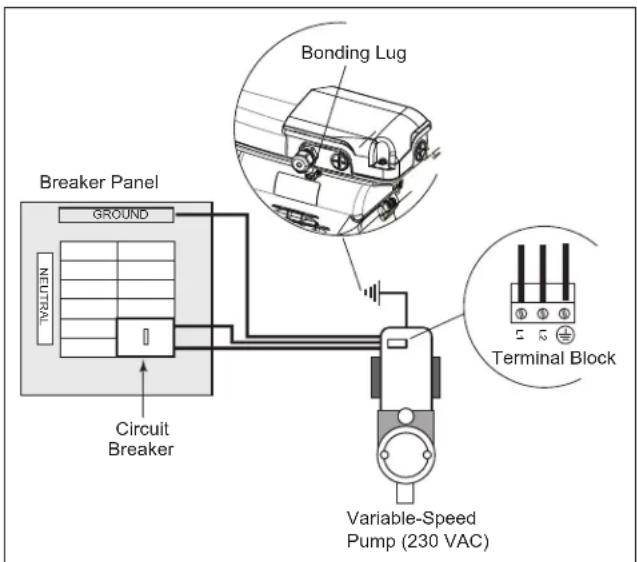
Bond the motor using the provided external lug. See Figure 3.
WARNING
Always disconnect the power source before working on a motor or its connected load.
WARNING
In order to avoid the risk of property damage, severe personal injury, and/or death, make sure that the control switch, time clock, or control system is installed in an accessible location, so that in the event of an equipment failure or a loose plumbing fitting, the equipment can be easily turned off.
text_image
Breaker Panel GROUND NEUTRAL Circuit Breaker Bonding Lug Terminal Block Variable-Speed Pump (230 VAC)Figure 3. Bonding the Motor, Regal Beloit Motor
CAUTION
The pump must be permanently connected to a dedicated electrical circuit. No other equipment, lights, appliances, or outlets may be connected to the pump circuit, with the exception of devices that may be required to operate simultaneously with the pump, such as a chlorinating device or heater.
3.2.3 Electrical Wiring
-
The pump motor must be securely and adequately grounded using the green screw provided. Ground before attempting to connect to an electrical power supply. Do not ground to a gas supply line.
-
Wire size must be adequate to minimize voltage drop during the start-up and operation of the pump. See Table 2 for suggested wire sizes.
-
Insulate all connections carefully to prevent grounding or short-circuits. Sharp edges on terminals require extra protection. For safety, and to prevent entry of contaminants, reinstall all conduit and terminal box covers. Do not force connections into the conduit box.
Table 2. Recommended Wire Size and Maximum Overcurrent for ePumps
| MAXIMUM WIRE SIZE AND MAXIMUM OVERCURRENT PROTECTION FOR ePUMP SERIES PUMPS* | ||
| Distance from Sub-panel 0 - 150 Feet (0-45 meters) | ||
| Model | Inverse - Time Circuit Breaker or Branch Fuse AMPSClass:CC, G, H, J, K, RK, or T Voltage230 VAC 208-230 VAC | |
| VSSHP270AUT JEP2.0, Regal Beloit Motor 20A Max 12 | ||
| VSSHP220AUT JEP1.5, Regal Beloit Motor 20A Max 12 | ||
| *Assumes three (3) copper conductors in a buried conduit and 3% maximum voltage loss in branch circuit. All National Electrical Code®(NEC®) and local codes must be followed. Table shows minimum wire size and branch fuse recommendations for typical installation per NEC. | ||
NOTE Since the pump is operated by either an ePump controller (JEP-R), an AquaLink® RS controller, an AquaLink Pool Digital Assistant (PDA) or a Z4 controller, the pump will not be turned on until it is turned on with one of these controllers.
3.2.4 Installing the Controller
The ePump can be operated by one of three (3) controllers: the ePump controller (JEP-R), the AquaLink RS controller (Rev O or later), the AquaLink PDA (Rev 4.0 or later), or the AquaLink Z4 controller.
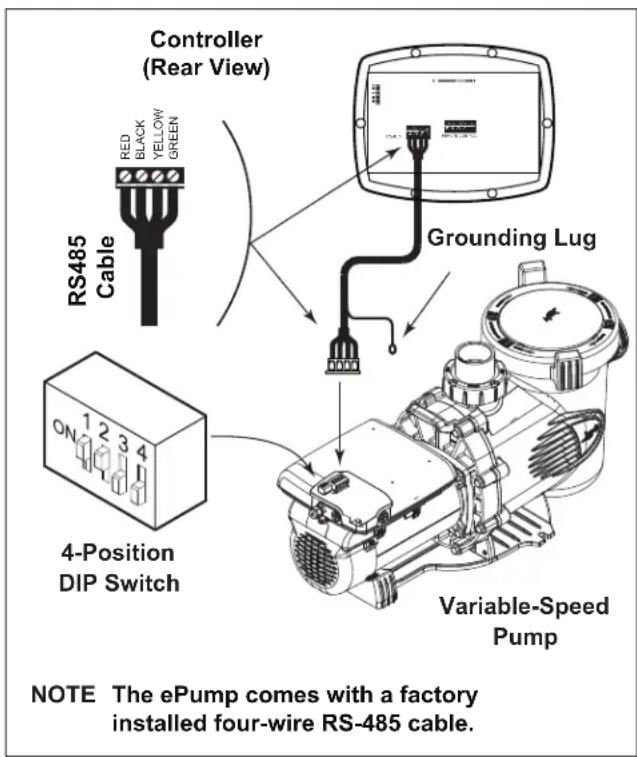
The Jandy Pro Series motor model pump comes equipped with a factory installed four-wire RS-485 cable. This RS-485 cable comes with an additional shielded wire for grounding. The shielded wire is to be grounded ONLY at one end, at the Jandy Pro Series motor model pump. This is pre-installed at the factory. At the other end, the shielded wire is pretrimmed at the factory. If you need to cut the RS-485 cable to any custom length, make sure to peel back and trim the ground shielded wire. The ePump communicates with the controllers via a four-wire RS-485 interface.
To install the ePump controller:
NOTE The ePump controller part no. is JEP-R.
- Remove power from the ePump by disconnecting the high voltage lines or by opening any breaker to which the ePump power is connected.
WARNING
ELECTRICAL SHOCK HAZARD
Turn off all switches and the main breaker in the ePump electrical circuit before starting the procedure. Failure to comply may cause a shock hazard, resulting in severe personal injury or death.
- Remove the cover of the ePump junction box and feed the RS-485 cable into the fitting.
- Unplug the RS-485 connector from the ePump.
- Attach the four (4) wires in the RS-485 cable to the RS-485 connector. Match the wire colors with the positions on the connector: 1- red, 2- black, 3- yellow, and 4- green. See Figure 4.
- Insert the RS-485 connector back into the ePump.
- Slide dip switches 1 and 2 up, so they are in the ON position, and slide switches 3 and 4 down, so they are in the OFF position. See Figure 4.
- Connect the other end of the cable to the controller. Match the colors of the wires with the appropriate connector positions, as described in Step 4.
- Restore power to the ePump and verify the operation of the controller.
- Refer to the ePump Controller Owner's Manual, H0311200, to operate the pump.
text_image
Controller (Rear View) RS485 Cable RED BLACK YELLOW GREEN Grounding Lug 4-Position DIP Switch Variable-Speed Pump NOTE The ePump comes with a factory installed four-wire RS-485 cable.Figure 4. Wiring ePump Controller (JEP-R) to ePump, Regal Beloit Motor
To install an AquaLink ^® RS controller (Rev O or later), an AquaLink PDA (Rev 4.0 or later), or an AquaLink Z4:
- Remove power from the ePump by disconnecting the high voltage lines or by opening any breaker to which the ePump power is connected.
WARNING
ELECTRICAL SHOCK HAZARD
Turn off all switches and the main breaker in the ePump electrical circuit before starting the procedure. Failure to comply may cause a shock hazard, resulting in severe personal injury or death.
- Remove the cover of the ePump junction box and feed the RS-485 cable into the fitting.
- Unplug the RS-485 connector from the ePump and attach the four (4) wires in the RS-485 cable to the RS-485 connector. Match the wire colors with the connector positions as follows: 1-red, 2-black, 3-yellow, and 4-green. See Figures 5A and 5B.
- Insert the RS-485 connector back into the ePump.
- Slide dip switches 1 and 2 down, so they are in the OFF position. See Figure 5A and 5B.
- Select the desired address(es) for the ePump(s) by setting dip switches 3 and/or 4, as shown in Section 3.3, ePump Dip Switch Settings.

text_image
AquaLink® RS RS-485 Connectors Connect to AquaLink RS RS-485 Connector (or Multiplexer Interface Board) RS485 Cable RED BLACK YELLOW GREEN 4-Position DIP Switch Variable-Speed PumpFigure 5A. Wiring AquaLink RS Controller or AquaLink PDA to ePump, Regal Beloit Motor

text_image
AquaLink® Z4 RS-485 Connector Connect to AquaLink RS RS-485 Connector (or Multiplexer Interface Board) RS485 Cable Red BLACK YELLOW GREEN ON 1 2 3 4 4-Position DIP Switch Variable-Speed PumpFigure 5B. Wiring AquaLink Z4 to ePump, Regal Beloit Motor to ePump, Regal Beloit Motor
Note: The AquaLink Z4 Controller works with a single variable-speed pump, so the dip switch settings will use the factory default settings of OFF for all four switches. See Figure 5B.
-
Connect the other end of the cable to an RS-485 connector on the AquaLink® RS (or multiplexer interface board), matching wire colors with connector positions, as described in Step 3.
-
Restore power to the ePump and verify the operation of the controller.
-
Refer to the appropriate manual to operate the pump: AquaLink RS Owner's Manual, 6593, AquaLink PDA Owner's Manual, H0572300, or AquaLink Z4 Controller Owner's Manual, H0386600.
3.3 ePump Dip Switch Settings
As shown in Figures 4, 5A and 5B, the 4-position dip switch is located at the rear of the ePump. This dip switch serves two (2) functions: it selects the pump address, and it determines what type of controller will be used with the pump. The tables below show the dip switch settings.
| Switch 1 | $witch 2 | Controller |
| OFF OFF | AquaLink RS | or AquaLink PDA |
| ON ON eP | ump | Controller (JEP-R) |
| Switch 3 | Switch 4 | Pump Address |
| OFF OFF | PUMP 1 | |
| ON OFF | PUMP 2 | |
| OFF ON | PUMP 3 | |
| ON ON | PUMP 4 |
3.4 Pressure Testing
All Jandy Pro Series model ePumps come with an additional disposable o-ring for pressure testing. This is the blue pressure test o-ring. See Figures 6 and 7.
CAUTION Do not open the pump lid before pressure testing, because the blue pressure test o-ring may fall out. If this happens, you will need to place it back on the lid.
If you have not opened the pump lid, skip to Section 3.5, Conducting Pressure Test.

text_image
Lid with Locking Ring Seal Blue Pressure Test O-ringFigure 6. Blue Pressure Test O-ring in Lid Assembly

text_image
Lid with Locking Ring and Seal Blue Pressure Test O-ring (Note: Discard after pressure test is complete.) Pump Debris Trap Basket (Inside Pump)Figure 7. Exploded View of Pump
3.4.1 Replace Blue Pressure Test O-ring if Necessary
If you open the pump lid before conducting the pressure test, the blue o-ring will probably fall out. If this happens, you will need to install it on the lid again before conducting pressure testing.
There is a risk of damage to the blue o-ring during re-installation. If you damage it when trying to re-install it, you will need to order a new blue pressure test o-ring before you begin conducting the pressure test.
These instructions describe the proper procedures for replacing, using, and disposing of the blue o-ring.
These instructions must be followed exactly. Read through the instructions completely before starting the procedure.
- Make sure that the pump is turned off.
- Make sure that the switch to the circuit breaker that powers the pump motor is turned off.
WARNING ELECTRICAL SHOCK HAZARD
Turn off the pump and the main breaker in the pump electrical circuit before starting the procedure. Failure to comply may cause a shock hazard, resulting in severe personal injury or death.
WARNING ELECTRICAL SHOCK HAZARD
Due to the potential risk of fire, electric shock, or injuries to persons, Jandy Pro Series Pumps must be installed in accordance with the National Electrical Code® (NEC®), all local electrical and safety codes, and the occupational Safety and Health Act (OSHA). Copies of the NEC may be ordered from the National Protection Association, 470 Atlantic Ave., Boston, MA 02210, or from your local government inspection agency.
In Canada, Zodiac Pumps must be installed in accordance with the Canadian Electrical Code (CEC).
- Make sure all necessary isolation valves are closed to prevent pool water from reaching the pump.
- Following the markings on the locking ring, turn the ring counter-clockwise until the 'START' markings align with the ports.
- Carefully remove the lid with locking ring.
text_image
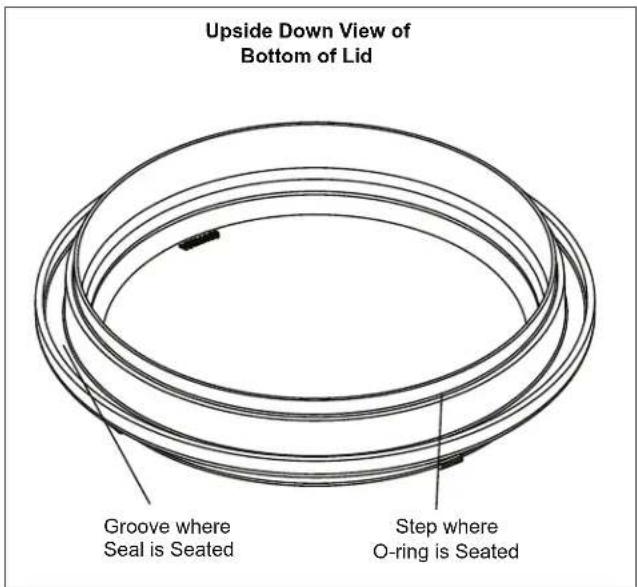
Upside Down View of Bottom of Lid Groove where Seal is Seated Step where O-ring is SeatedFigure 8. Placement of Blue Pressure Test O-ring
3.4.1.2 Replace Blue O-ring
- Turn the lid with locking ring upside down and place it on a stable surface.
- Place the blue o-ring on the step located 14 " from the bottom of the lid. See Figure 8.
- Make sure that the o-ring is properly seated. It helps to "place" the o-ring on the step rather than to "roll" it on. That prevents it from rolling off.
NOTE The blue o-ring sits approximately 14 " away from the seal. See Figure 8.
-
Carefully install the lid, making sure that the blue pressure test o-ring sits in the housing without "binding" or "rolling" off.
-
Following the markings on the locking ring, align 'START' markings with the ports and turn clockwise until 'LOCKED' markings align with the ports. Do not tighten past the 'LOCKED' marking.
3.5 Conducting Pressure Test
WARNING
When pressure testing a system with water, air is often trapped in the system during the filling process. This air will compress when the system is pressurized. Should the system fail, this trapped air can propel debris at a high speed and cause injury. Every effort to remove trapped air must be taken, including opening the bleed valve on the filter and loosening the pump basket lid while filling the pump.
WARNING
Trapped air in the system can cause the filter lid to be blown off, which can result in death, serious injury, or property damage. Be sure all air is properly purged out of the system before operating. DO NOT USE COMPRESSED AIR TO PRESSURE TEST OR CHECK FOR LEAKS.
WARNING
Do not pressure test above 35 PSI. Pressure testing must be done by a trained pool professional. Circulation equipment that is not tested properly might fail, which could result in severe injury or property damage.
WARNING
When pressure testing the system with water, it is very important to make sure that the pump basket lid is completely secure.
- Fill the system with water, using care to eliminate trapped air.
- Pressurize the system with water to no more than 35 PSI.
- Close the valve to trap pressurized water in the system.
- Observe the system for leaks and/or pressure decay.
- If there are lid leaks, repeat Steps 1-3. For technical support, call 800.822.7933.
- After successfully completing the test, discard the blue pressure test o-ring.
3.6 Auxiliary Load Operation
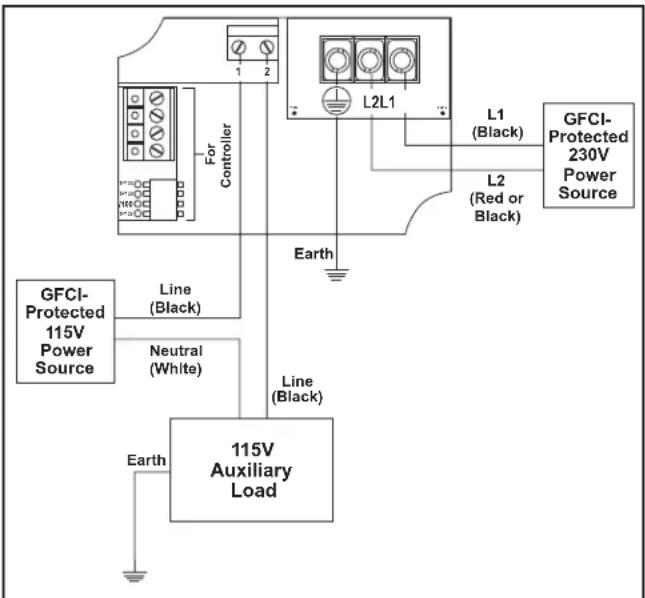
Certain pump models are equipped with a terminal bar that provides user access to a built-in Auxiliary Load relay contact. This normally-open, dry contact is activated under certain operating conditions and is primarily intended to be used to control external devices that require system water flow for proper functioning, such as heaters, booster pumps, salt water chlorinators, etc.
See Figures 4, 5A and 5B for compartment's location details. An access cover with Phillips-head screw must be removed before proceeding.
Auxiliary Load Connection Requirements

WARNING
ELECTRICAL SHOCK HAZARD
Due to the potential risk of fire, electric shock, or injuries to persons, Zodiac® Pumps and any auxiliary loads must be installed in accordance with the National Electrical Code® (NEC®), all local electrical and safety codes, and the occupational Safety and Health Act (OSHA). Copies of the NEC may be ordered from the National Protection Association, 470 Atlantic Ave., Boston, MA 02210, or from your local government inspection agency.
In Canada, Zodiac Pumps must be installed in accordance with the Canadian Electrical Code (CEC).
- The Auxiliary Load relay contacts are rated at 230V/11A RMS. Please ensure the requirements of the equipment to be connected to the Auxiliary Load do not exceed this rating.

text_image
For Controller L1 (Black) L2 (Red or Black) L2L1 L1 (Black) GFCI- Protected 230V Power Source 1 GFCI- Protected 230V Power Source 2 L1 (Red or Black) Line (Black) 230V Auxiliary Load Earth Note: Recommended Wiring ConfigurationFigure 9. 230V Auxiliary Load, Separate Power Source Wiring Diagram
text_image
GFCI-Protected 115V Power Source Line (Black) Neutral (White) Earth For Controller L2L1 L1 (Black) L2 (Red or Black) GFCI- Protected 230V Power Source Line (Black) 115V Auxiliary LoadFigure 10. 115V Auxiliary Load, Separate Power Sources Wiring Diagram
Auxiliary Load Operation Characteristics
Auxiliary Load relay contact activation is speed-dependent, and behaves as follows:
Contact Closure
From a stopped condition, there is a three-minute delay before the Auxiliary Load contact is closed when the motor speed reaches and maintains a speed of at least 1725 RPM.
From a running condition at below 1725 RPM, there is a five-second delay before the Auxiliary Load contact is closed when the motor speed reaches and maintains a speed of at least 1725 RPM.
Contact Opening
If the pump speed is below 1725 RPM, the Auxiliary Load contact is opened. Contact openings are always immediate.
Section 4. Operation
4.1 Start-up
CAUTION
Never run the pump without water. Running the pump "dry" for any length of time can cause severe damage to both the pump and motor and will void the warranty.
If this is a new pool installation, make sure all piping is clear of construction debris and has been properly pressure tested. The filter should be checked for proper installation, verifying that all connections and clamps are secure according to the manufacturer's recommendations.

WARNING
To avoid risk of property damage, severe personal injury or death, verify that all power is turned off before starting this procedure.
- Release all pressure from the system and open the filter pressure release valve.
-
Depending on the location of the pump, do one of the following:
-
If the pump is located below the water level of the pool, open the filter pressure release valve to prime the pump with water.
-
If the pump is located above the water level of the pool, remove the lid and fill the basket with water before starting the pump.
-
Prior to replacing the lid, check for debris around the lid o-ring seat. Debris around the lid o-ring seat will cause air to leak into the system and will make it difficult to prime the pump.
-
Hand-tighten the lid to make an air tight seal. Do not use any tools to tighten the lid: hand-tighten only. Make sure all valves are open and the unions are tight.
- Restore power to the pump. Then turn on the pump by following the instructions in the appropriate manual: ePump Controller Owner's manual, H0311200, AquaLink® RS Owner's Manual, 6593, AquaLink PDA Owner's Manual, H0572300, or AquaLink Z4 Controller Owner's Manual, H0386600.
- Once all the air has left the filter, close the pressure release valve.
-
The pump should prime. The time it takes to prime will depend on the elevation and length of pipe used on the suction supply pipe. See Section 3.1.3.3, Installation Recommendations, for proper elevation and pipe size.
-
If the pump does not prime and all the instructions to this point have been followed, check for a suction leak. If there is no leak, repeat Steps 2 through 7.
- For technical assistance, call Zodiac ^® Technical Support at 800.822.7933.
Section 5. Service and Maintenance
5.1 Routine Maintenance
Inspect the pump debris tray basket for debris by looking through the clear pump lid. Remove any debris, because as debris accumulates, it will begin to block the flow of water through the pump. Keep the basket clean to improve the performance of the pump.
- Turn off the power to the pump. If the pump is located below the water level, close the isolation valves on the suction and discharge sides of the pump to prevent backflow of water.
- Turn the lid's locking ring counter-clockwise until 'START' aligns with the ports. Carefully remove the lid. (You may use a tool for leverage.)
CAUTION
A misaligned basket will cause the lid to be improperly seated, allowing an air leak, which could result in pump damage.
- Lift the basket out of the pump.
- Dispose of the debris and thoroughly clean the basket, making sure all the holes are open. Using a garden hose, spray the basket from the outside to help clear the holes. Remove any remaining debris by hand.
- Replace the basket in the pump by aligning the opening with the suction pipe. If aligned properly, the basket will drop easily into place. Do not force it into place.
- Remove the lid seal and remove debris around the lid seal seat, as this can allow air to leak into the system. Clean the lid seal and place it on the lid.
- Replace the lid with locking ring. Hand-tighten the lid to make an air-tight seal. Do not use any tools to tighten the lid: hand-tighten only.
- Verify that all valves have been returned to the proper position for normal operation.
- Open the pressure release valve on the filter, and make sure it is clean and ready for operation.
- Turn on the power to the pump. Once all the air has been evacuated from the filter, close the pressure release valve.
5.2 Winterizing the Pump
CAUTION
The pump must be protected when freezing temperatures are expected. Allowing the pump to freeze will cause severe damage and void the warranty.
CAUTION
Do not use antifreeze solutions in the pool, spa, or hot tub systems! Antifreeze is highly toxic and may damage the circulation system. The only exception to this is Propylene Glycol. For more information, see your local pool/spa supply store or contact a qualified swimming pool service company.
- Drain all water from the pump, system equipment, and piping.
- Remove the two (2) drain plugs. Store the drain plugs in a safe location and reinstall them when the cold weather season is over. Do not lose the o-rings.
- Keep the motor covered and dry. Do not cover the pump with plastic, because this will create condensation that will damage the pump.
NOTE Zodiac Pool Systems, Inc. recommends having a qualified service technician or electrician properly disconnect the electrical wiring at the switch or junction box. Once the power is removed, loosen the two (2) unions and store the pump indoors. For safety, and to prevent entry of contaminants, reinstall all conduit and terminal box covers.
-
When the system is reopened for operation, have a qualified technician or electrician make sure all piping, valves, wiring and equipment are in accordance with the manufacturer's recommendations. Pay close attention to the filter and electrical connections.
-
The pump must be primed prior to starting. Refer to Section 4.1, Start-up.
Section 6. Troubleshooting and Repair
To order or purchase parts for Jandy Pro Series pumps, contact your nearest Zodiac ^® dealer. If the Zodiac dealer cannot supply you with what you need, contact Zodiac technical support at 1.800.822.7933, or send an e-mail message to productsupport@zodiac.com.
6.1 Troubleshooting
| Symptom Possible Cause/Solution | |
| The cleaning/circulating system is not operating correctly. | Verify that skimmer baskets, pump basket and other screens are clean. Clean as necessary.Check filter and clean as necessary.Check valve positions. Adjust as necessary.NOTE Multiple pieces of equipment operating at one time (for example, waterfalls, spa jets, and surface returns) will affect the proper operation of the cleaning system.Check the cleaning system manual to ensure that the system is adjusted according to the manufacturer's recommendations. |
| Bubbles are present in the pump basket. | Air is in the system. Check the pool or spa water level to ensure that it is at the proper level and air is not being drawn into the suction piping. If the water is at the normal level, turn off the pump. Turn the lid's locking ring counter-clockwise until 'START' aligns with the ports. Remove the lid and check for debris around the lid seal seat OR improper installation of the lid seal, as either condition will allow air to leak into the system. Clean the lid seal and replace it on the lid. Replace the lid on the pump housing. Align 'START' with the ports and turn the locking ring clockwise until 'LOCKED' aligns with the ports.Hand-tightenthe lid to make an air-tight seal.Do not use any tools to tighten the lid. Turn the pump back on. |
| Air leaks are still present. | Check the suction side piping union. While the pump is running, try to tighten the union. If this does not stop the air leak, turn off the pump. Loosen both unions and slide the pump out of the way. Remove, clean, and inspect the union o-rings for excessive wear. Replace the o-ring if it is cracked, brittle, or badly flattened.Reposition the pump next to the piping and secure the union nuts to the pump. |
| There is no air in the system, but the pressure is still low. | It is possible that debris is caught in the pump impeller. The pump impeller moves the water, and the vanes in the impeller can become blocked with debris. See Section 6.2, Service Technician Maintenance, 6.2.1, Blocked Impeller, in this manual for more information. |
| There is no debris blocking the impellerandthe pressure is still low. | The pump impeller and diffuser are showing signs of normal wear. Have a qualified service technician check the impeller and diffuser and replace as necessary.If the pump is part of a relatively new installation, it could be an electrical problem. Contact a qualified service technician. Have the technician check for loose electrical connections and check the voltage at the pump motor while it is in operation. The voltage must be within 10% of the motor's data plate rating. If the voltage is not within 10%, contact a qualified electrician and/or the local power service provider.Pump seal is leaking air. Have a qualified service technician replace the seal. |
| The pump is leaking water between the motor and pump body. | This is caused by a damaged or failed mechanical seal. Replace the seal. See Section 6.2, Service Technician Maintenance, 6.2.3, Mechanical Seal Replacement, in this manual. |
| The pump gets hot and shuts off periodically. | Make sure that there is adequate room around the motor to circulate air and keep the motor cool. Have a qualified electrician check for loose connections and check the voltage at the pump motor while it is in operation. The voltage must be within 10% of the motor's data plate rating. If the voltage is not within 10%, contact a qualified electrician and/or the local power service provider. |
| Pump will not start. No power to pump. | Make sure pump is properly connected to high voltage. See Section 3.2, Electrical Installation, in this manual. |
| Improper low-voltage wiring.Check low-voltage wiring between pump and controller. Correct if necessary. See Section 3.2, Electrical Installation, in this manual. | |
| Improper pump address setting.Make sure that ePump dip switches 3 and 4 are set properly for the installation. Both should be OFF for use with ePump controller or set to the proper address when connected to an AquaLink® RS controller, an AquaLink PDA, or an AquaLink Z4. See Section 3.3, ePump Dip Switch Settings, in this manual. | |
| Fault condition exists.View fault message on controller and correct fault before proceeding. If unsure how to correct fault, contact technical support at 800.822.7933. | |
| ePump controller LCD is not displaying informationor ePump LEDs are not illuminated (Jandy Pro Series Motor model only). | Incorrect dip switch setting.Make sure ePump dip switches 1 and 2 are both ON. See Section 3.3, ePump Dip Switch Settings, in this manual. |
| Improper low-voltage wiring.Check low-voltage wiring between pump and controller. Correct if necessary. See Section 3.2, Electrical Installation, in this manual. | |
| Controller displays "Pump not connected". | Improper low-voltage wiring.Check low-voltage wiring between pump and controller. Correct if necessary. See Section 3.2, Electrical Installation, in this manual. |
| Improper pump address set.Ensure ePump dip switches 3 and 4 are set properly for the installation. Both should be OFF for use with ePump controller or set to the proper address when connected to an AquaLink RS controller, an AquaLink PDA, or an AquaLink Z4. See Section 3.3, ePump Dip Switch Settings, in this manual. | |
| Fault message appears on controller display. | Fault condition exists.View fault message on controller and correct fault before proceeding. If unsure how to correct fault, contact technical support at 800.822.7933. |
6.2 Service Technician Maintenance
WARNING
This pump must be serviced by a professional service technician qualified in pool/spa installation. The following procedures must be followed exactly. Improper installation and/or operation can create dangerous electrical hazards, which can cause high voltages to run through the electrical system. This can cause property damage, serious personal injury, and/or death. Improper installation and/or operation will void the warranty.
6.2.1 Blocked Impeller
WARNING
Before servicing the pump, switch off the circuit breakers at the power source. Severe personal injury or death may occur if the pump starts while your hand is inside the pump.
- Turn off the pump. Switch off the circuit breaker to the pump motor.
- Remove the lid and basket.
- Look inside the pump for debris. Remove any debris found inside.
- Replace the basket and lid.
- Switch on the circuit breaker to the pump motor.
- Turn on the pump, and see if the problem is solved.
- If the impeller is still blocked with debris and it is not possible to remove the debris using Steps 2 through 4, the pump will need to be disassembled in order to access the inlet and outlet of the impeller.
6.2.2 Impeller Removal and Replacement
WARNING
Before servicing the pump, switch off the circuit breakers at the power source. Severe personal injury or death may occur if the pump starts while your hand is inside the pump.
- Turn off the pump. Switch off the circuit breaker to the pump motor. If you are not replacing the motor, do not disconnect the electrical wiring.
NOTE If you are replacing the motor, Zodiac Pool Systems, Inc. strongly recommends that a qualified service technician or electrician properly disconnect the electrical wiring at the pump motor.
text_image
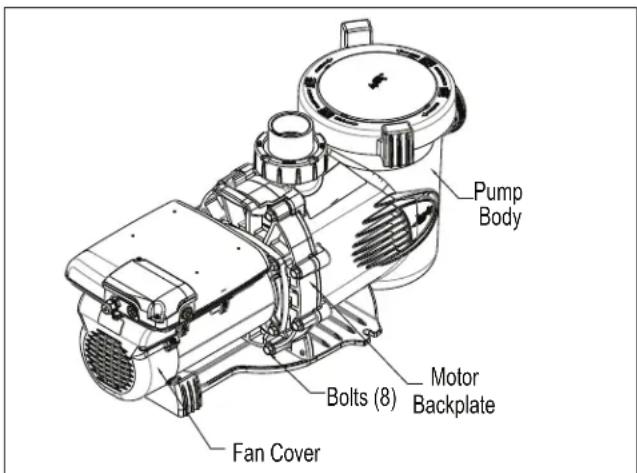
Pump Body Bolts (8) Motor Backplate Fan CoverFigure 11. Remove the Pump Housing, Regal Beloit Motor
- Turn off any valves to prevent pool water from reaching the pump. Drain the water from the pump by loosening the unions or removing the drain plugs.
- Using a 9/16" wrench, loosen the bolts connecting the pump body to the motor backplate. See Figure 11.
- Pull the motor and backplate out of the pump body. Remove the pump body o-ring. The impeller is connected to the motor shaft.
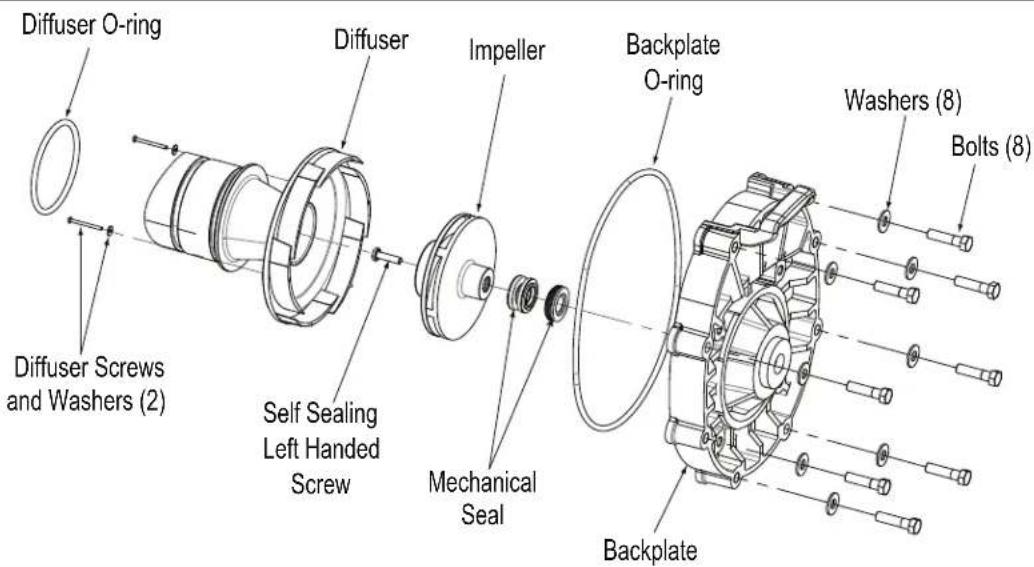
- Using a No. 1 Phillips screwdriver, remove the two (2) screws holding the diffuser. (The diffuser is the cover over the impeller.) Then remove the diffuser. See Figure 12.
- Access the inlet and outlet of the impeller and remove any debris.
- Remove the fan cover on the back of the motor by removing the screws. (See Figure 13.) The motor shaft and fan will be exposed.
- Hold the exposed motor shaft with a 12 " wide flat blade screw driver while removing the impeller center screw. Use a No. 3 Phillips screwdriver and turn the left-hand threaded screw clockwise to loosen it. See Figure 13.
NOTE Do not hold the fan to remove the impeller screw.
-
Hold the motor shaft with a 12 " wide flat blade screw driver while unscrewing the impeller from the motor shaft with your hand. Turn the impeller counter-clockwise to unscrew it.
-
Inspect the impeller and diffuser for signs of rubbing and/or damage. Refer to Figure 14.

text_image
Backplate Diffuser Backplate Screws (2) Diffuser Washers (2) Diffuser O-Ring
text_image
Mechanical Seal Impeller Fan Backplate Self Sealing Left Handed ScrewFigure 13. Remove the Impeller, Regal Beloit Motor
Figure 12. Remove the Diffuser, Regal Beloit Motor
text_image
Diffuser O-ring Diffuser Screws and Washers (2) Self Sealing Left Handed Screw Impeller Mechanical Seal Backplate O-ring Backplate Washers (8) Bolts (8)Figure 14. Diffuser and Impeller Exploded View

text_image
Carbon Seal Surface • Ceramic Face Seal • Backplate Seal • Carbon Face/ Spring Side of Seal • Impeller Side of Mechanical SealFigure 15. Mechanical Seal
6.2.2.1 Impeller Reassembly
- Press the new carbon face seal half (see Figure 15) on the motor shaft using a twisting motion. Make sure the carbon surface is facing toward the ceramic ring in the backplate.
CAUTION
Very Important! To prevent damage to the seal, grasp the lower portion of the seal (opposite the carbon face) when installing it.
NOTE To assist assembly, use only water or soapy water as a lubricant. Any other lubricant will destroy the seal after a short period of time.
NOTE Be sure to keep the seal and mating parts clean.
- While holding the motor shaft with a 12 " wide flat blade screw driver, thread the impeller onto the motor shaft. Hand-tighten the impeller until it is secure. Install the impeller center screw into the center of the impeller. Turn the left-hand threaded screw counter-clockwise and tighten it, using a No. 3 Phillips screwdriver. Do not overtighten.
- Replace the fan cover by replacing the screws.
- Replace the motor shaft cover by inserting the cover tabs into the slots and rotating the cover 90° clockwise.
- Replace the diffuser over the impeller, using care to insert alignment pins into the correct holes. The molded-in arrow must point toward the handle of the backplate.
- Replace the two (2) small Phillips-head screws. Tighten the screws to draw the diffuser against the motor backplate.
- To help prevent an airleak into the system, make sure the diffuser o-ring, o-ring groove, and o-ring seal area are clean and free of debris. If you removed the diffuser o-ring, make sure you install it into the groove you removed it from. (See Figure 16.) If grease is used to retain the o-ring, it must be silicone based. Do not use petroleum-based grease. It will destroy the o-ring.
- Slide the diffuser into the mating hole in the pump body. While supporting the motor, start two (2) screws on opposite sides. (This will hold the motor in position while you start the other six (6) screws.)

text_image
Pump Body Diffuser O-Ring Groove for Diffuser O-ring DiffuserFigure 16. Pump Body and Diffuser Exploded View
- Tighten the screws lightly in a crossing "X" pattern using a 9/16" wrench. Start with the inner (middle) four (4), then the outer (top and bottom) four (4) to draw the backplate to the body in an even manner. Once all the screws are snug, torque in the same order to 18 foot-pounds.
- If the pump is located above the water level of the pool, remove the lid and fill the basket with water before starting the pump.
- To help prevent an air leak into the system, remove any debris around the lid seal seat.
- Hand-tighten the lid to make an air tight seal. Do not use any tools to tighten the lid.
- Open the pressure release valve on the filter and make sure it is clean and ready for operation.
- Switch on the circuit breaker to the pump motor.
- Turn on the pump and check the system for normal operation.
- Once all the air has left the filter, close the pressure release valve.

text_image
Backplate Mechanical Seal Self Sealing Left Handed Screw Impeller Backplate O-ring Diffuser O-ring Diffuser Washers (2) Screws (2)Figure 17. Backplate, Impeller, Diffuser, Mechanical Seal Exploded View
6.2.3 Mechanical Seal Replacement
NOTE This is a two-part replacement process. The mechanical seal must be replaced as a set.
NOTE Refer to Figure 17 for an illustration of the location of the mechanical seal and impeller.
CAUTION
Do not damage the ceramic or carbon surfaces of the seals. If the surfaces are damaged, leaks will occur.
- To access the mechanical seal, follow Steps 1 through 9 of Section 6.2.2, Impeller Removal and Replacement.
- Remove the carbon face seal half from the motor shaft (See Figure 15). This is a spring-loaded seal. Grasp the portion of the seal closest to the impeller body and pull the seal off, using a twisting motion.
- Remove the motor from the backplate, following the steps in Section 6.2.5, Motor Replacement.
- Place the backplate o-ring side down and force the ceramic seal out using a screwdriver or drift.
- Turn the backplate o-ring side up and insert the new ceramic seal side into the backplate. Use great care to press the seal in squarely with your fingers. The ceramic is easily damaged and must be pressed in using only your fingers or soft tools. Do not use any lubricant other than water or soapy water.
- Install the backplate by following the relevant steps in Section 6.2.2.1, Impeller Reassembly.
- Install the motor by following the steps in Section 6.2.4, Motor Replacement.
6.2.4 Motor Replacement
WARNING
To ensure continued safety and reliable operation, Zodiac Pool Systems, Inc. requires that you replace the motor with a motor that has the identical HP rating and service factor (Zodiac Pool Systems, Inc. approved unit only).
- Have a qualified service technician or electrician properly disconnect the electrical wiring at the pump motor.

text_image
Speed Drive Backplate Washers (4) Bolts (4) MotorFigure 18. Backplate Assembly, Regal Beloit Motor
WARNING
ELECTRICAL SHOCK HAZARD
Turn off all switches and the main breaker in the ePump electrical circuit before starting the procedure. Wait five (5) minutes after power is disconnected before opening motor. On the Jandy Pro Series Motor Model Only, do not proceed until the LED on top of the Drive Electronics Unit is completely off. Failure to comply may cause a shock hazard, resulting in severe personal injury or death.
NOTE Zodiac Pool Systems, Inc. recommends that the mechanical seals be replaced at the same time the motor is replaced. See Section 6.2.3, Mechanical Seal Replacement, for details.
- To detach the pump housing from the motor, follow Steps 1 through 10 in Section 6.2.2, Impeller Removal and Replacement.
- Note the alignment of the backplate to the motor, as shown in Figure 18. Place the backplate motor assembly o-ring side down, unscrew the four 9/16" screws, and remove the motor.
- If installing a new motor, remove the protective plastic cap from the motor shaft. Place the motor on the backplate so that the opening in the motor faces the bottom of the backplate. The electronics controller on the motor should be at the 12 o'clock position.
- Replace the four (4) bolts and washers holding the backplate to the motor.
-
To reassemble the backplate assembly to the housing, follow Steps 2 through 9 of Section 6.2.2.1, Impeller Reassembly.
-
If the pump is located above the water level of the pool, remove the lid and fill the basket with water before starting the pump.
- To help prevent an air leak into the system, remove any debris around the lid seal seat.
- Hand-tighten the lid to make an air tight seal. Do not use any tools to tighten the lid.
- Open the pressure release valve on the filter and make sure it is clean and ready for operation.
- Have a qualified service technician or electrician properly connect the electrical wiring at the pump motor.
- Turn on the electrical power to the pump motor using your controller and check the system for normal operation.
NOTE For instructions on operating the controller, refer to the appropriate manual for your controller: the ePump Controller Owner's Manual, H0311200, the AquaLink® RS Owner's Manual, 6593, the AquaLink PDA Owner's Manual, H0572300, or the AquaLink Z4 Controller Owner's Manual, H0386600.
- Once all the air has left the filter, close the pressure relief valve.
Section 7. Product Specifications and Technical Data
7.1 Replacement Parts List and Exploded View
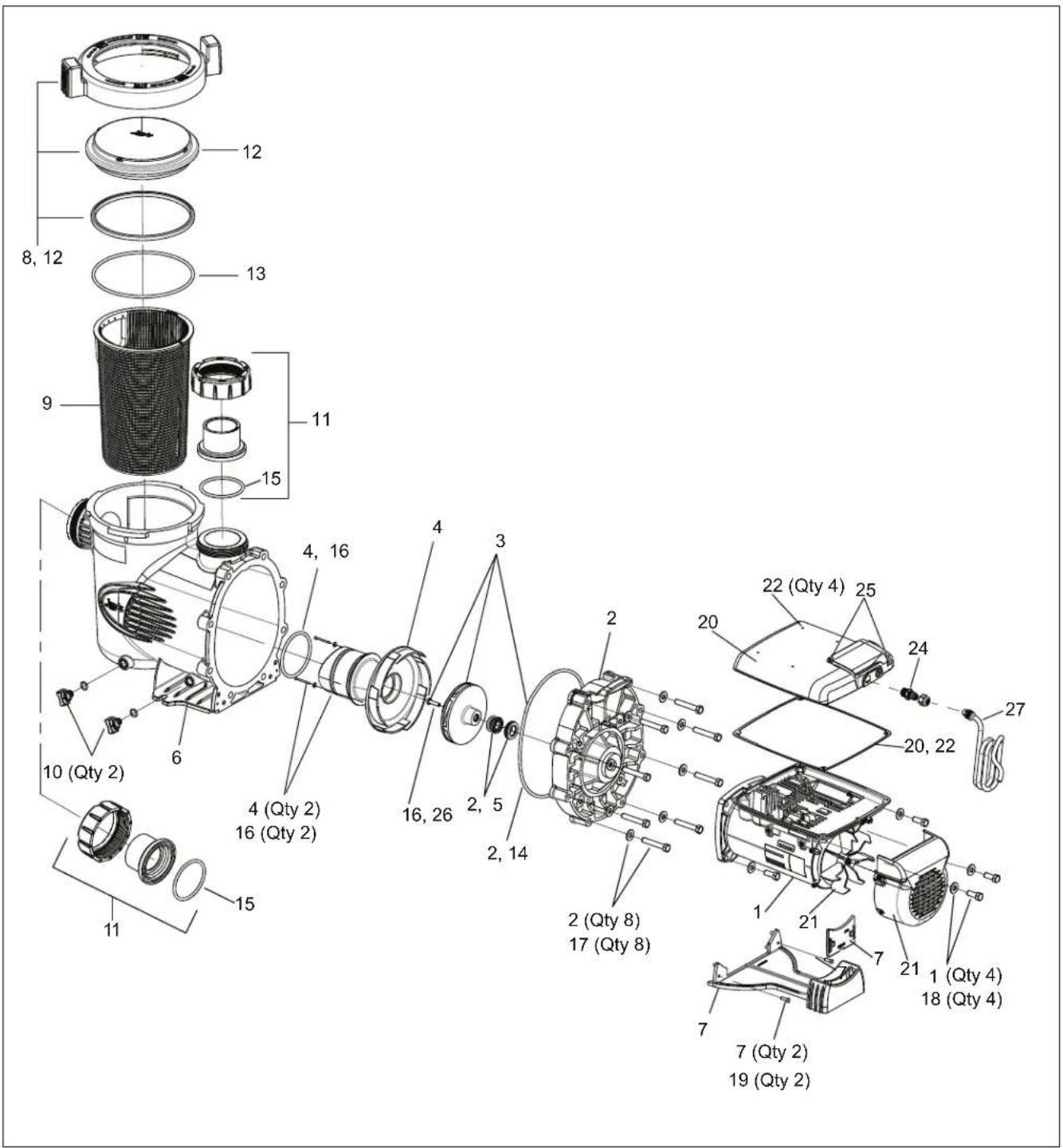
To order or purchase parts for Jandy Pro Series pumps, contact your nearest Zodiac ^® dealer. You can also contact the Zodiac Technical Support at 800.822.7933. Refer to Figure 16 for the Jandy Pro Series ePump model.
Key No. Description Model No. Part No.
| 1 Motor, Variable Speed, Regal Beloit Motor VSSHP270 R0562200 | |||
| 1 Motor, Variable Speed, Regal Beloit Motor VSSHP220 R0562201 | |||
| 2 Backplate, Pump, SHP, PHP/MHP All R0445200 | |||
| 3 | Impeller Replacement Kit VSSHP270 R0807200 | ||
| 3 | Impeller Replacement Kit VSSHP220 R0807201 | ||
| 4 Diffuser with O-ring and Hardware All R0445400 | |||
| 5 Mechanical Seals (Carbon and Ceramic) All R0479400 | |||
| 6 Body, Pump All R0445601 | |||
| 7 Motor Mounting Foot Assembly, SHP All R0445700 | |||
| 8 Locking Ring (With Lid and O-ring) All R0445800 | |||
| 9 Filter Basket | All R0445900 | ||
| 10 | Plug, Drain (Set of 2) | All R0446000 | |
| 11 | Tail Piece (2" by 2 12 ") with Union Nut and O-ring (Set of 2) | All | R0446101 |
| 12 | Seal, Lid | All R0446200 | |
| 13 | Blue Pressure Test O-ring | All R0479000 | |
| 14 | O-ring, Backplate | All R0446300 | |
| 15 | O-ring, Tail Piece (Set of 2) | All R0446400 | |
| 16 | Diffuser/Impeller Hardware Set | All R0446500 | |
| 17 | Backplate Hardware with Set of 8 Bolts and Washers | All R0446600 | |
| 18 | Motor Hardware with Set of 4 Bolts and Washers | All R0446700 | |
| 19 | Screws, Motor Mounting Foot (Set of 2) | All R0446800 | |
| 20 | Cover, Speed Drive (With Hardware), ePump, Regal Beloit Motor | Regal Beloit Motor | R0562300 |
| 21 | Cover, Fan, 1-3 HP, ePump Replacement Kit, Regal Beloit Motor | Regal Beloit Motor | R0562400 |
| 22 | Hardware Speed Drive, ePump, Regal Beloit Motor | Regal Beloit Motor | R0562500 |
| 23 | Connector, Speed Drive, ePump (4-Pin Connector) (Not Shown) | All | R0660900 |
| 24 | Data Cable Bulkhead Fitting | All R0501100 | |
| 25 | Screw, Electrical Box (Set of 2) | Regal Beloit Motor | R0562600 |
| 26 | Screw with O-ring, Self-Sealing | All R0515400 | |
| 27 | Cable, RS485, Replacement Kit | All | R0535100 |
text_image
Exploded view diagram of a mechanical assembly with numbered components and quantity labelsFigure 19. ePump Exploded View, Regal Beloit Motor
7.2 Performance Curves
ePump Series High Head Pumps Full-Rated (JEP)
Total Dynamic Head (Feet of Water) Pounds Per Square Inch (PSI)
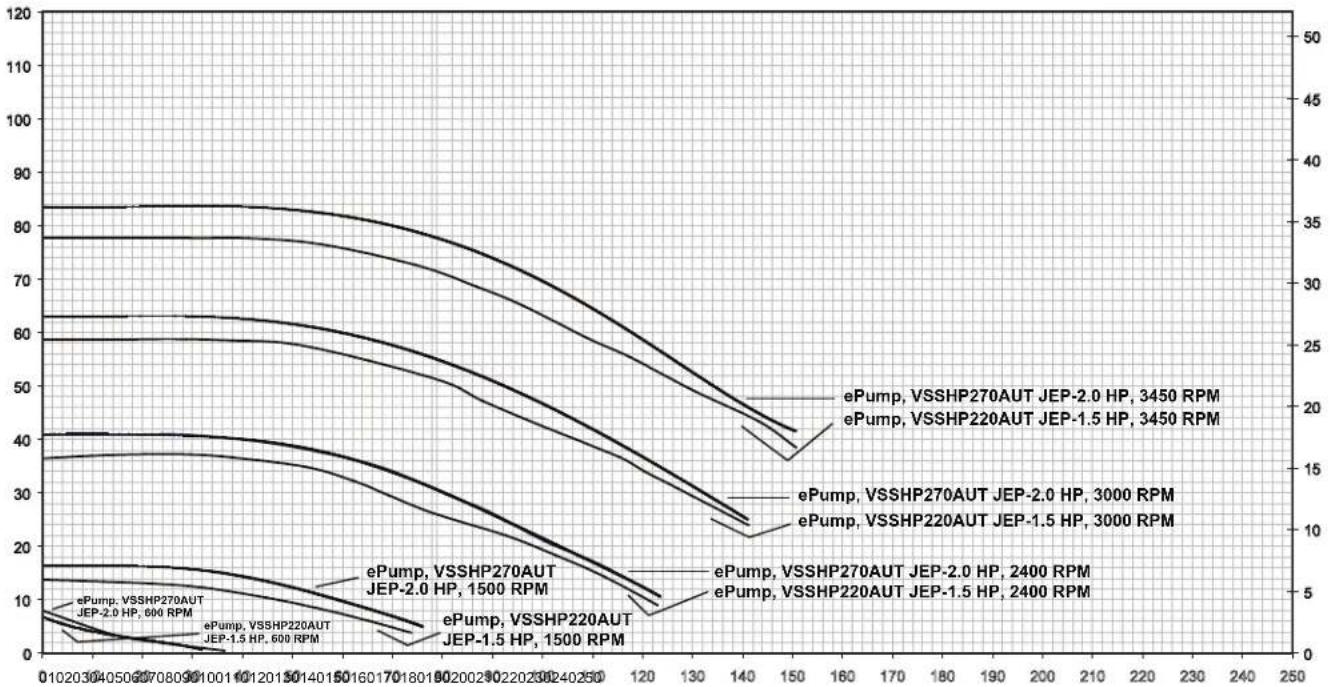
Flow Rated, Gallons Per Minute (GPM)
7.3 Physical and Operational Specifications
7.3.1 Specifications
| Model No. HP Voltage Watts | Pipe Size | Carton Weight | Overall Length | ||
| VSSHP270AUT JEP2.0, Regal Beloit Motor | 0.25 - 2.7 | 230 VAC | 2,400 W | 212 - 3" | 59.3 lbs. |
| VSSHP220AUT JEP1.5, Regal Beloit Motor | 0.25 - 2.2 | 230 VAC | 2,070 W | 212 - 3" | 59.3 lbs. |
7.3.2 Dimensions
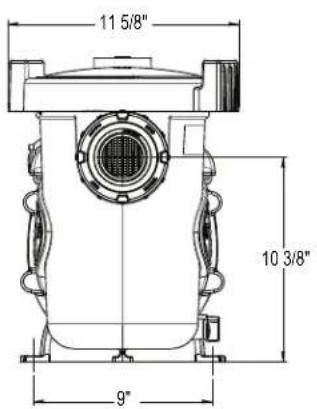
text_image
11 5/8" 10 3/8" 9"
text_image
33 1/2" 16 1/8" 15 1/4" 13 3/4" 32 5/8"NOTE When installing a pump, leave a minimum of 2 feet of clearance above the pump for removal of the strainer basket.
7.4 Replacement Motor Guide
| Pump Model Regal Beloit | |
| VSSHP270AUT JEP2.0, Regal Beloit Motor M48AA66D58 | |
| VSSHP220AUT JEP1.5, Regal Beloit Motor M48AA81D58 | |
Zodiac Pool Systems Canada, Inc.
2-3365 Mainway, Burlington, Ontario L7M 1A6
+ 1 (888) 647-4004 | www.ZodiacPoolSystems.ca
Zodiac Pool Systems LLC
2620 Commerce Way, Vista, CA 92081
1.800.822.7933 | www.ZodiacPoolSystems.com
©2017 Zodiac Pool Systems, Inc. ZODIAC ^® is a registered trademark of Zodiac International,
S.A.S.U., used under license. All trademarks referenced herein are the property of their respective owners.
H0365700 Rev E

Intertek
ETL LISTED
CONFORMS TO
UL STD 1081
CERTIFIED TO
CSA STD C22.2 NO. 108
natural_image
Technical line drawing of a mechanical pump or motor assembly (no text or symbols visible)
AVERTISSEMENT
text_image
Exploded view diagram of a mechanical assembly with numbered components and labeled parts in Chinesetext_image
11 5/8" 10 3/8" 9" 15 1/4" 16 1/8" 33 1/2" 13 3/4" 32 5/8"Zodiac Pool Systems Canada, Inc.
2-3365 Mainway, Burlington, Ontario L7M 1A6
+ 1 (888) 647-4004 | www.ZodiacPoolSystems.ca
Zodiac Pool Systems LLC
2620 Commerce Way, Vista (CA) 92081
1.800.822.7933 | www.ZodiacPoolSystems.com

Intertek
ETL LISTED CONFORMS TO UL STD 1081
CERTIFIED TO CSA STD C22.2 NO. 108

HOTATO
natural_image
Technical line drawing of a mechanical pump assembly (no text or labels)
ADVERTENCIA
natural_image
Diagram of concentric circular pipes with a small black segment inside, no text or symbols presenttext_image
Exploded view diagram of a mechanical assembly with numbered components and Ctd numbersFigure 19. Plano de despiece ePump, Motor Regal Beloit
text_image
11 5/8" 10 3/8" 9" 15 1/4" 16 1/8" 33 1/2" 13 3/4" 32 5/8"Zodiac Pool Systems Canada, Inc.
2-3365 Mainway, Burlington, Ontario L7M 1A6
+ 1 (888) 647-4004 | www.ZodiacPoolSystems.ca
Zodiac Pool Systems LLC
2620 Commerce Way, Vista, CA 92081
1.800.822.7933 | www.ZodiacPoolSystems.com