DL252 - Hand blender Midas - Free user manual and instructions
Find the device manual for free DL252 Midas in PDF.


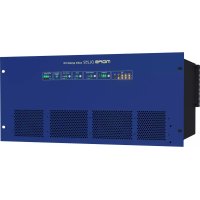
| Product Type | Digital Audio Input/Output System (Stage Box) |
| Model | DL252 |
| Brand | Midas |
| Number of Mic/Line Inputs | 16 (Female XLR) |
| Number of Line Outputs | 48 (Male XLR) |
| Audio Resolution | 24-bit / 96 kHz (128x Oversampling) |
| Network Connectivity | 3 x AES50 EtherCon®, 1 x Ethernet EtherCon® |
| MIDI | 3 x 5-pin DIN (In, Out, Thru) |
| Input Gain Range | -2.5 dB to +45 dB (2.5 dB steps) |
| Maximum Input Level | +24 dBu |
| Maximum Output Level | +21 dBu |
| Output Impedance | 50 Ω |
| Dynamic Range | 107 dB (22 Hz - 22 kHz) |
| Power Supply | Dual Redundant, 100-240 VAC ±10%, 50/60 Hz |
| Power Consumption (2 supplies at 230 V) | 110 W, 135 VA |
| Dimensions (H x W x D) | 5U (222.25 mm) x 482.6 mm (19 inches) x 410 mm |
| Net Weight | 10 kg |
| Shipping Weight | 18 kg |
| Operating Temperature | +5°C to +40°C |
| Cleaning | Dry, lint-free cloth; disconnect from mains required |
| Warranty | 3 years (parts and labor) under conditions |
| Repairability | Reserved for qualified personnel; unauthorized opening voids warranty |
Frequently Asked Questions - DL252 Midas
User questions about DL252 Midas
0 question about this device. Answer the ones you know or ask your own.
Ask a new question about this device
Download the instructions for your Hand blender in PDF format for free! Find your manual DL252 - Midas and take your electronic device back in hand. On this page are published all the documents necessary for the use of your device. DL252 by Midas.
USER MANUAL DL252 Midas
DL251/DL252 Audio System I/O
Operator Manual
(EN, ES, FR, PT, DE)
MUSIC Group Research UK Limited,
Klark Industrial Park,
Walter Nash Road,
Kidderminster.
Worcestershire.
DY11 7HJ.
England.
Tel: +44 1562 741515
Fax: +44 1562 745371
Email: mkt.info@music-group.com
Website: www.midasconsoles.com
DL251/DL252 Audio System I/O — Operator Manual
DOC02-DL251OP1 Issue A — January 2012
© MUSIC Group IP Limited
© 2011 MUSIC Group IP Ltd. Technical specifications and appearances are subject to change without notice and accuracy is not guaranteed. MIDAS and KLARK TEKNIK are part of the MUSIC Group (music-group.com).
EN Important safety instructions

Terminals marked with this symbol carry electrical current of sufficient magnitude to constitute risk of electric shock. Use only
high-quality commercially-available speaker cables with 14 " TS plugs pre-installed. All other installation or modification should be performed only by qualified personnel.

This symbol, wherever it appears, alerts you to the presence of uninsulated dangerous voltage inside the enclosure - voltage that
may be sufficient to constitute a risk of shock.

This symbol, wherever it appears, alerts you to important operating and maintenance instructions in the accompanying literature.
Please read the manual.

Caution
To reduce the risk of electric shock, do not remove the top cover (or the rear section). No
user serviceable parts inside. Refer servicing to qualified personnel.

Caution
To reduce the risk of fire or electric shock, do not expose this appliance to rain and moisture.
The apparatus shall not be exposed to dripping or splashing liquids and no objects filled with liquids, such as vases, shall be placed on the apparatus.

Caution
These service instructions are for use by qualified service personnel only. To reduce the risk of electric
shock do not perform any servicing other than that contained in the operation instructions. Repairs have to be performed by qualified service personnel.
1 Read these instructions.
2 Keep these instructions.
3 Heed all warnings.
4 Follow all instructions.
5 Do not use this apparatus near water.
6 Clean only with dry cloth.
7 Do not block any ventilation openings. Install in accordance with the manufacturer's instructions.
8 Do not install near any heat sources such as radiators, heat registers, stoves, or other apparatus (including amplifiers) that produce heat.
9 Do not defeat the safety purpose of the polarized or grounding-type plug. A polarized plug has two blades with one wider than the other. A grounding-type plug has two blades and a third grounding prong. The wide blade or the third prong are provided for your safety. If the provided plug does not fit into your outlet, consult an electrician for replacement of the obsolete outlet.
10 Protect the power cord from being walked on or pinched particularly at plugs, convenience receptacles, and the point where they exit from the apparatus.
11 Use only attachments/accessories specified by the manufacturer.

natural_image
Silhouette of a person pushing a ladder inside a circular frame (no text or symbols)12 Use only with the cart, stand, tripod, bracket, or table specified by the manufacturer, or sold with the apparatus. When a cart is used, use caution when
moving the cart/apparatus combination to avoid injury from tip-over.
13 Unplug this apparatus during lightning storms or when unused for long periods of time.
14 Refer all servicing to qualified service personnel. Servicing is required when the apparatus has been damaged in any way, such as power supply cord or plug is damaged, liquid has been spilled or objects have fallen into the apparatus, the apparatus has been exposed to rain or moisture, does not operate normally, or has been dropped.
15 The apparatus shall be connected to a MAINS socket outlet with a protective earthing connection.
16 Where the MAINS plug or an appliance coupler is used as the disconnect device, the disconnect device shall remain readily operable.

Legal disclaimer
Technical specifications and appearances are subject to change without notice and accuracy is not guaranteed. MIDAS and KLARK TEKNIK are part of the MUSIC Group (music-group.com). All trademarks are the property of their respective owners. MUSIC Group accepts no liability for any loss which may be suffered by any person who relies either wholly or in part upon any description, photograph or statement contained herein. Colours and specifications may vary slightly from product. Midas products are sold through authorized dealers only. Distributors and dealers are not agents of MUSIC Group and have absolutely no authority to bind MUSIC Group by
any express or implied undertaking or representation. This manual is copyrighted. No part of this manual may be reproduced or transmitted in any form or by any means, electronic or mechanical, including photocopying and recording of any kind, for any purpose, without the express written permission of MUSIC Group IP Limited
ALL RIGHTS RESERVED.
© 2011 MUSIC Group IP Limited
Trident Chambers, Wickhams Cay, P.O. Box 146, Road Town, Tortola, British Virgin Islands
Limited warranty
§ 1 Warranty
- This limited warranty is valid only if you purchased the product from a MUSIC Group authorized dealer in the country of purchase. A list of authorized dealers can be found on MUSIC Group's website www.midasconsoles.com, or you can contact the MUSIC Group office closest to you.
2.MUSIC Group* warrants the mechanical and electronic components of this product to be free of defects in material and workmanship if used under normal operating conditions for a period of three (3) years from the original date of purchase (see the Limited Warranty terms in § 4 below), unless a longer minimum warranty period is mandated by applicable local laws. If the product shows any defects within the specified warranty period and that defect is not excluded under § 4, MUSIC Group shall, at its discretion, either replace or repair the product using suitable new or reconditioned product or parts. In case MUSIC Group decides to replace the entire product, this limited warranty shall apply to the replacement product for the remaining initial warranty period, i.e., three (3) years (or otherwise applicable minimum warranty period) from the date of purchase of the original product.
-
Upon validation of the warranty claim, the repaired or replacement product will be returned to the user freight prepaid by MUSIC Group.
-
Warranty claims other than those indicated above are expressly excluded.
PLEASE RETAIN YOUR SALES RECEIPT. IT IS YOUR PROOF OF PURCHASE COVERING YOUR LIMITED WARRANTY. THIS LIMITED WARRANTY IS VOID WITHOUT SUCH PROOF OF PURCHASE.
§ 2 Online registration
Please do remember to register your new Midas equipment right after your purchase at www.midasconsoles.com and kindly read the terms and conditions of our limited warranty carefully. Registering your purchase and equipment with us helps us process your repair claims quicker and more efficiently. Thank you for your cooperation!
§ 3 Return materials authorization
-
To obtain warranty service, please contact the retailer from whom the equipment was purchased. Should your MUSIC Group dealer not be located in your vicinity, you may contact the MUSIC Group distributor for your country listed at www.midasconsoles.com. If your country is not listed please contact the "United Kingdom (Midas/KT main office)" located under "Service → Service/Repairs" on the www.midasconsoles.com website. Alternatively, please submit the online warranty return form found under "Service → Warranty Registration" on www.midasconsoles.com BEFORE returning the product. All enquires must be accompanied by the description of the problem and the serial number of the product. The warranty eligibility will be verified from the original sales receipt.
-
Subsequently, the product must be returned in its original shipping carton, together with the return authorization number to the address indicated by MUSIC Group.
-
Shipments without freight prepaid will not be accepted.
§ 4 Warranty Exclusions
-
This limited warranty does not cover consumable parts including, but not limited to, fuses and batteries. Where applicable, MUSIC Group warrants the valves or meters contained in the product to be free from defects in material and workmanship for a period of ninety (90) days from date of purchase.
-
This limited warranty does not cover the product if it has been electronically or mechanically modified in any way. If the product needs to be modified or adapted in order to comply with applicable technical or safety standards on a national or local level, in any country which is not the country for which the product was originally developed and manufactured, this modification/adaptation shall not be considered a defect in materials or workmanship. This limited warranty does not cover any such modification/adaptation, regardless of whether it was carried out properly or not. Under the terms of this limited warranty, MUSIC Group shall not be held responsible for any cost resulting from such a modification/adaptation.
-
This limited warranty covers only the product hardware. It does not cover technical assistance for hardware or software usage and it does not cover any software products whether or not contained in the product. Any such software is provided "AS IS" unless expressly provided for in any enclosed software limited warranty.
-
This limited warranty is invalid if the factory-applied serial number has been altered or removed from the product.
5.Free inspections and maintenance/repair work are expressly excluded from this limited warranty, in particular, if caused by improper handling of the product by the user. This also
applies to defects caused by normal wear and tear, in particular, of faders, crossfaders, potentiometers, keys/buttons, guitar strings, illuminants and similar parts.
-
Damage/defects caused by the following conditions are not covered by this limited warranty:
-
improper handling, neglect or failure to operate the unit in compliance with the instructions given in Midas user or service manuals;
- connection or operation of the unit in any way that does not comply with the technical or safety regulations applicable in the country where the product is used;
-
damage/defects caused by acts of God/Nature (accident, fire, flood, etc) or any other condition that is beyond the control of MUSIC Group.
-
Any repair or opening of the unit carried out by unauthorised personnel (user included) will void the limited warranty.
-
If an inspection of the product by MUSIC Group shows that the defect in question is not covered by the limited warranty, the inspection costs are payable by the customer.
-
Products which do not meet the terms of this limited warranty will be repaired exclusively at the buyer's expense. MUSIC Group or its authorized service centre will inform the buyer of any such circumstance. If the buyer fails to submit a written repair order within 6 weeks after notification, MUSIC Group will return the unit C.O.D. with a separate invoice for freight and packing. Such costs will also be invoiced separately when the buyer has sent in a written repair order.
-
Authorized MUSIC Group dealers do not sell new products directly in online auctions. Purchases made through an online auction are on a "buyer beware" basis. Online auction confirmations or sales receipts are not accepted for warranty verification and MUSIC Group will not repair or replace any product purchased through an online auction.
§ 5 Warranty transferability
This limited warranty is extended exclusively to the original buyer (customer of authorized retail dealer) and is not transferable to anyone who may subsequently purchase this product. No other person (retail dealer, etc.) shall be entitled to give any warranty promise on behalf of MUSIC Group.
§ 6 Claim for damage
Subject only to the operation of mandatory applicable local laws, MUSIC Group shall have no liability to the buyer under this warranty for any consequential or indirect loss or damage of any kind. In no event shall the liability of MUSIC Group under this limited warranty exceed the invoiced value of the product.
§ 7 Limitation of liability
This limited warranty is the complete and exclusive warranty between you and MUSIC Group. It supersedes all other written or oral communications related to this product. MUSIC Group provides no other warranties for this product.
§ 8 Other warranty rights and national law
- This limited warranty does not exclude or limit the buyer's statutory rights as a consumer in any way.
- The limited warranty regulations mentioned herein are applicable unless they constitute an infringement of applicable mandatory local laws.
- This warranty does not detract from the seller's obligations in regard to any lack of conformity of the product and any hidden defect.
§ 9 Amendment
Warranty service conditions are subject to change without notice. For the latest warranty terms and conditions and additional information regarding MUSIC Group's limited warranty, please see complete details online at www.midasconsoles.com.
* MUSIC Group Macao Commercial Offshore Limited of Rue de Pequim No. 202-A, Macau Finance Centre 9/J, Macau, including all MUSIC Group companies

natural_image
Silhouette of a person pushing a ladder under a circular frame (no text or symbols)12 Utilisez
© 2011 MUSIC Group IP Limited
Trident Chambers, Wickhams Cay, P.O. Box 146,
natural_image
Silhouette of a person pushing a ladder with a box, enclosed in a circular frame (no text or symbols)© 2011 MUSIC Group IP Limited
Trident Chambers, Wickhams Cay, P.O. Box 146, Road Town, Tortola, Ilhas Virgens Britânicas
Garantia Limitada
§ 1 Garantia
natural_image
Silhouette of a person pushing a ladder with a box, enclosed in a circular frame (no text or symbols)© 2011 MUSIC Group IP Limited
Trident Chambers, Wickhams Cay, P.O. Box 146,
Road Town, Tortola, British Virgin Islands
The following are the license agreements applicable to the Midas Digital Equipment.
End-User Licence Agreement for Midas™ and Klark Teknik™ Software
IMPORTANT - Please read this document carefully before using this Midas™ or Klark Teknik™ Product. This is an agreement governing your use of software or other machine instructions already installed on this Midas™ or Klark Teknik™ Product, as well as other software that we provide for installation on this Product. The Midas™ or Klark Teknik™ Product will not operate in accordance with its documentation without this software.
THIS AGREEMENT ("AGREEMENT" OR "LICENCE") STATES THE TERMS AND CONDITIONS UPON WHICH MIDAS KLARK TEKNIK LIMITED ("COMPANY") OFFERS TO LICENSE THE INSTALLED FIRMWARE, SOFTWARE AND/OR PROGRAMS ("the SOFTWARE") WITH THE MIDASTM OR KLARK TEKNIKTM CONSOLE OR SIGNAL PROCESSING PRODUCT ("PRODUCT") IN WHICH IT HAS BEEN INSTALLED BY, OR FOR WHICH IT IS PROVIDED BY, THE COMPANY. BY USING THIS PRODUCT YOU WILL BE AGREEING TO BECOME BOUND BY THE TERMS OF THIS LICENCE. IF YOU DO NOT AGREE TO THE TERMS OF THIS LICENCE, DO NOT USE THIS PRODUCT AND PROMPTLY RETURN THE PRODUCT TO THE PLACE WHERE YOU OBTAINED IT FOR A FULL REFUND. You agree to notify any persons whom you permit to operate this Product of the terms of this Licence, and to require them to comply with these terms.
The Software is licensed, not sold, to you for use only under the terms of this Licence, and the Company reserves all rights not expressly granted to you. The Company retains ownership of all copies of the Software itself, and all proprietary parts of it, including those stored on or in the Product.
- Licence: Subject to the terms and conditions of this agreement, the Company grants you, and other persons you permit to operate the Product, a personal, limited, non-exclusive, non-transferable licence to use the Software only on the single Product unit in which it has been installed.
- Restrictions: (a) The Software, and the accompanying written materials, are copyrighted and contain trade secrets and other proprietary matter, including confidential information relating to the specifications and performance characteristics of this Product. Save for such elements as may be licensed to the Company, as described in paragraph 5, all rights to copyrights, trade marks and trade secrets in the Software, or any modifications to it, are owned by the Company. Unauthorised use or copying of the Company's proprietary Software, or any portion
thereof, or copying of those written materials, is prohibited. (b) You may not create, market, distribute, or transfer copies of the Company's proprietary Software, or any part of it, to others, or duplicate, rent, lease or loan that Software, or any part of it, except that you may transfer that Software installed in this Product in conjunction with the sale, transfer, loan, rent or lease of this Product, and subject at all times to this Licence. YOU MAY NOT REVERSE ENGINEER, DECOMPILE, DISASSEMBLE, EXTRACT OR SEPARATE OUT, MODIFY, ADAPT, PORT, OR TRANSLATE THE SOFTWARE, DERIVE THE SOURCE CODE OF THE SOFTWARE OR CREATE DERIVATIVE WORKS BASED ON THE SOFTWARE OR ANY ACCOMPANYING WRITTEN MATERIALS, save as is allowed by licences pertaining to component parts of the Software which are licensed by third parties, as described under paragraph 5, or otherwise by law. (c) In the event you violate any term of this Licence, all rights granted herein will automatically and immediately terminate and you must stop using the Software and destroy any copies of the Software.
- Limited Warranty: Subject to your installation of any Software updates issued by the Company as described herein, and the condition below, the Company warrants that the Software will operate in compliance with the Software's material specifications and documentation for a period of 90 days from your purchase of this Product. The Software is provided "as is" and the Company does not warrant that the operation of the Software will meet your requirements or operate free from error. To the greatest extent permissible by law, the Company DISCLAIMS ALL WARRANTIES AND CONDITIONS, EITHER EXPRESS OR IMPLIED, INCLUDING THE WARRANTIES OF MERCHANTABILITY, FITNESS FOR A PARTICULAR PURPOSE, NON-INFRINGEMENT OF THIRD PARTY RIGHTS OR CAPABILITY OF CORRECTLY PROCESSING PROVIDING AND/OR RECEIVING DATE INFORMATION. You understand that the Company may update or revise the Software but in so doing incurs no obligation to furnish such updates to you. However, the Company may in its discretion make updates available from time to time upon such terms and conditions as it shall determine. It is a condition of the above warranty that you install any such Software updates, as may be issued from time to time by the Company for the Software, in accordance with the Company's instructions, and if you do not do so such warranty will cease to apply. You may view current Software updates at http://www.klarkteknik.com and http://www.midasconsoles.com.
- Limited Liability: THE ENTIRE RISK ARISING OUT OF YOUR USE OR PERFORMANCE OF THE SOFTWARE REMAINS WITH YOU. THE LIABILITY OF THE COMPANY FOR ANY CLAIMS ARISING OUT OF THIS LICENCE AND/OR BASED UPON THE SOFTWARE, REGARDLESS OF THE FORM OF ACTION, AND INCLUDING WORK STOPPAGE, PRODUCT FAILURE OF MALFUNCTION OR ANY OTHER COMMERCIAL LOSS OR DAMAGE, SHALL NOT EXCEED THE COST OF THE LICENCE FEE FOR THE SOFTWARE OR THE COST OF THIS PRODUCT. SUBJECT TO THE PROVISIONS OF APPLICABLE LAW, IN NO EVENT SHALL THE COMPANY BE LIABLE FOR ANY LOSS OF DATA, LOST
OPPORTUNITY OR PROFITS, COST OF COVER OR SPECIAL, INCIDENTAL, CONSEQUENTIAL, OR INDIRECT DAMAGES, EVEN IF YOU ADVISE THE COMPANY OF THE POSSIBILITY OF SUCH DAMAGES. THIS IS A FUNDAMENTAL TERM OF THIS AGREEMENT AND YOU ACKNOWLEDGE THAT THE AMOUNT YOU PAID FOR THE SOFTWARE AND/OR THE PRODUCT REFLECTS THIS ALLOCATION OF RISK. NOTHING IN THIS PARAGRAPH PURPORTS TO EXCLUDE OR LIMIT THE COMPANY'S LIABILITY FOR DEATH OR PERSONAL INJURY CAUSED BY NEGLIGENCE OR ANY OTHER LIABILITY WHICH CANNOT BE EXCLUDED OR LIMITED BY LAW.
- Other Third-Party Computer Programs: As referred to herein, the term "Software" refers only to proprietary Midas™ or Klark Teknik™ software, owned by the Company, that has been provided to you for installation on, or already installed in, a Product. In addition to the Software, you may have also been provided, at no additional charge, with a version of the widely-available GNU Linux Operating System, which is a modular operating system made up of hundreds of individual software components, each of which was written, and the copyright and other rights in which are owned individually, by various parties (collectively, "the GNU Linux Programs"). Each component has its own applicable end user licence agreement, and many of these agreements permit you to copy, modify, and redistribute the applicable software, but you must review the on-line documentation that shares a directory or otherwise accompanies each of the GNU Linux Programs provided to you for the specific terms and conditions. Nothing in this Licence limits your rights under, or grants you rights that supersede, the terms of any other applicable end user licence agreement. If you wish to receive a computer-readable copy of the source code for any of the GNU Linux Programs that have been provided with your Midas™ or Klark Teknik™ Product, send a cheque or money order (no cash accepted), your address and [£10.00] to cover the cost of optical media, postage and handling, to:
MUSIC Group Research UK Limited
ATTN: Linux Programs CD for Midas™/Klark Teknik™
Walter Nash Road,
Kidderminster.
Worcestershire.
DY11 7HJ.
England.
In your request, indicate your Product's name and model number, serial number and version/release information. In your request, also indicate the relevant Software version/release information. This offer, made pursuant to the GNU Linux Programs' end user licence agreements, may expire according to the terms of those agreements, in which case your cheque will be returned to you or destroyed at our option. Please note that the GNU Linux Programs that may be available to you under this offer consists of the GNU Linux Operating System components only and none of the proprietary application software developed by Midas or Klark Teknik is included. Other updated Linux distributions containing application software are widely available from a variety of Internet sources, and are often available at minimal or no cost.
- Termination: This Licence will terminate immediately if you violate any of the Licence terms. Upon termination you must discontinue use of the Software, and either destroy, erase or return to Company all copies of the Software in your possession, custody or control, including those in or on the Product.
- General: This Licence constitutes the entire agreement between you and the Company with respect to this Software and, save in the case of fraud, supersedes any other communication (including advertising). Company reserves all rights not expressly granted to you in this licence. If any provision of this Licence is held unenforceable, that provision shall be enforced to the maximum extent permissible so as to give effect the intent of this Licence, and the remainder of this Licence shall continue in full force and effect. This Licence shall be governed by English law and the Courts of England and Wales will have exclusive jurisdiction to hear and decide any dispute concerning it or its formation. No breach by you of any provision of this Licence shall be waived or discharged except with the express written consent of the Company and no failure or delay by the Company to exercise any of its rights under this Licence shall operate as a waiver thereof and no single or partial exercise of any such right shall prevent any other or further exercise of that or any other right. You acknowledge that the Company could be irreparably damaged if the terms of this Licence were not specifically enforced, and agree that the Company may seek appropriate equitable remedies with respect to breaches of this Licence, including injunctive relief, in addition to such other remedies as the Company may otherwise have available to it under applicable laws.
GNU General Public License (GPL)
For details of the Third Party Software License Attribution, Copyright and Terms and Conditions and Notices, and the GNU LESSER GENERAL PUBLIC LICENSE, see the Midas Digital Equipment GNU General Public License (GPL) Booklet part number DOC04-GPL.
DL251/DL252 Introduction
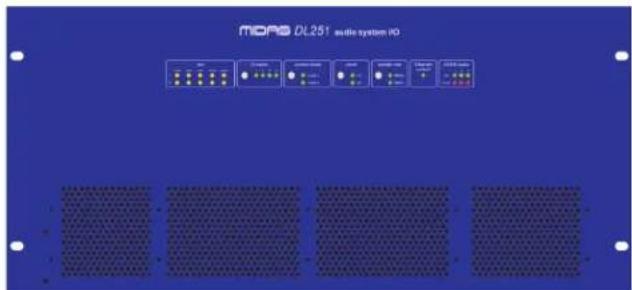
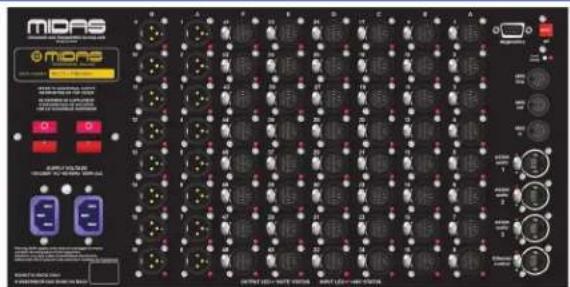
DL251
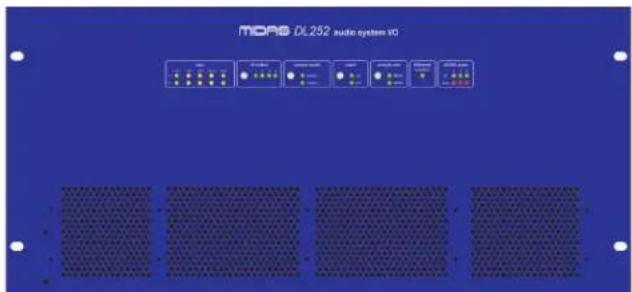
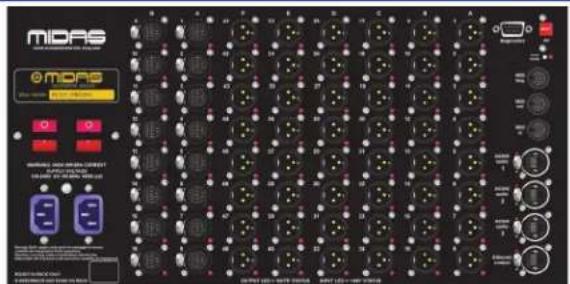
DL252
EN 1. Introduction
Welcome!
Thank you for purchasing a DL251/DL252 Audio System I/O.
The DL251 and DL252 Audio System I/Os are 19" rack units designed for use with Midas digital systems.
Your DL251/DL252 Audio System I/O was conceived by Midas to offer audio professionals high-performance audio equipment, designed to provide no-compromise sonic quality with a feature set that offers all essential facilities and functions. It represents the very best of British design and engineering combined with contemporary, efficient
manufacturing methods, and will give you many years of reliable service.
So, to obtain the best results with a minimum of effort, please read this operator manual and, finally, enjoy your Midas DL251/DL252 Audio System I/O!
Key features
The DL251/DL252 Audio System I/Os have the following key features:
- Mic/line inputs The DL251 has 48 mic/line inputs and the DL252 has 16 mic/line inputs.
• Line outputs The DL251 has 16 outputs and the DL252 has 48 outputs.
- Operator interface A series of sections on the front panel have LEDs to convey operating/configuration status to the operator. Some sections have a configuration button for setting up the unit's parameters, such as clock source, sample rate, etc.
- MIDI Both units have in, out and thru MIDI sockets supplied as standard. (For use with Midas consoles only.)
- AES50 Three AES50 inputs/outputs provide connection to the console/snake via EtherCon® XLRs, which are configured for N+1 cable redundancy.
- Sample rate Switchable between 96kHz and 48kHz sample rates.
- Ethernet An Ethernet control socket on the rear panel allows Ethernet control via Cat 5e cable up to 100 m long.
• A/D Analogue to digital conversion is by default 24-bit, 96kHz.
- Gain range From -2.5dB to +45dB in 2.5dB steps.
- Mute A MUTE button on the rear panel will mute all outputs simultaneously for on-stage patching, if held in for longer than one second.
- Boot mode A recessed boot mode button on the rear panel selects between normal operation and a service personnel-only configuration boot mode.
• Diagnostics A D-type connector on the rear panel allows diagnostics (by service personnel only) to be carried out on the unit.
• Power supplies Dual redundant power supplies, each with dual locking mains connectors.
About this manual
This is the operation manual for the DL251 Audio System I/O and DL252 Audio System I/O. It is intended to help get your unit installed and in operation as quickly as possible by giving you unpacking, installation, connection, setting up and operating instructions. To help familiarise you with the DL251/DL252 there is a description of the front and rear panels, along with easy-to-follow user instructions.
ES 1. Introducción
¡Bienvenido!
DL251/DL252 Getting Started
EN 2. Getting Started
This section shows you how to unpack, install, connect up, switch on and configure the DL251/DL252 unit.

This equipment is supplied by a mains voltage that can cause electric shock injury.
Before installing, setting up or operating this equipment, make sure that you have read and fully understand all of this section and the “Important safety instructions” at the front of this manual.
Refer to additional safety information on the top cover of the unit.
Unpacking
Carefully unpack your DL251/DL252 equipment package.
Then, inspect the DL251/DL252 unit carefully for any signs of damage that may have occurred during transit and notify the courier immediately if you discover any.
Check the contents of your DL251/DL252 equipment package. If there are any parts missing, incorrect or faulty, please contact your local distributor or Midas at the address at the front of this manual.
Please retain the original packing in case you should need to return the equipment to the manufacturer or supplier, or transport or ship the unit later.
Installation
Before installing and operating this equipment, make sure it is correctly connected to the protective earth conductor of the mains voltage supply socket outlet through each mains lead.
Ideally a cool area is preferred, away from power distribution equipment or other potential sources of interference.
Do not install the equipment in places of poor ventilation.
Do not install this equipment in a location subjected to excessive heat, dust or mechanical vibration. Allow for adequate ventilation around the equipment, making sure that its fans and vents are not obstructed. Whenever possible, keep the equipment out of direct sunlight.
Mount in rack only.
Power

Both supply cords must be unplugged to ensure complete de-energisation of the unit.
The internal power supplies are of the switch mode type that automatically senses the incoming mains voltage and will work where the nominal voltage is in the range 100VAC to 240VAC.
Two mains inlets are provided on the rear panel. The correct leads for connection in the area to which the unit was shipped are supplied with the unit. The equipment should only be plugged into the mains outlets using the supplied leads.
Each mains inlet must be sourced from its own separate wall-mounted mains outlet socket. Otherwise, their mains sources must be suitably distributed so as to meet local safety regulations.
Make sure the Volex locking type plugs, fitted on each supplied mains cable, are securely fitted to the mains IEC connectors on the unit. When fitted properly the Volex plug locks into place, preventing it from working loose, or being inadvertently knocked loose or pulled out. When fitting or removing a Volex plug, always hold the plug itself and never use the cable, as this may damage it. Never insert or remove an electric plug with wet hands.
When switching the unit on/off, switch the mains power switches on/off one at a time. Do not switch them on/off simultaneously.
Handling the equipment
When lifting or moving the equipment, always take its size and weight into consideration.
Completely isolate the equipment electrically and disconnect all cables from the equipment before moving it.
Do not insert your fingers or hands in any gaps or openings on the equipment, for example, vents.
Electric fields
In accordance with Part 15 of the FCC Rules & Regulations, “... changes or modifications not expressly approved by the party responsible for compliance could void the user's authority to operate the equipment.”
Should this product be used in an electromagnetic field that is amplitude modulated by an audio frequency signal (20Hz to 20kHz), the signal to noise ratio may be degraded.
Degradation of up to 60dB at a frequency corresponding to the modulation signal may be experienced under extreme conditions (3V/m, 90% modulation).
Connecting up
Connect up the rear panel of your unit as follows (see Chapter 5. Connections on page 34):
- Inputs — connect your XLR mic/line inputs (up to 48 on DL251 and 16 on DL252).
- Outputs — connect your XLR line outputs (up to 16 on DL251 and 48 on DL252).
- AES50 audio — connect the AES50 audio sockets to the console/snake.
- Ethernet — connect the Ethernet control socket to an external computer for remote control when used in a snake configuration if required.
- MIDI — connect the three MIDI 5-pin DIN connectors to the MIDI equipment if required. (For use with Midas consoles only.)
- Mains power — connect the dual redundant IEC connectors of the mains cables into the rear of the unit and then plug them into separate mains power outlets (see
"DL251 and digital console (96kHz operation)" on page 34).
Switching on/off
When switching the unit on/off, press the two mains on/off switches one after the other. Do not press them simultaneously.
After you have connected up your DL251/DL252 it is ready to be switched on.
To switch the DL251/DL252 unit on
Switch on the mains on/off switches on the rear of the unit, one after the other. At the front of the unit, check that the LEDs in the psu panel are all illuminated.
To switch the DL251/DL252 unit off
Switch off the mains on/off switches on the rear of the unit, one after the other.
To fit/remove a Volex locking type mains plug
A Volex locking type plug is fitted on each supplied mains cable, which plugs into a mains IEC connector on the unit. When fitted properly the Volex plug locks into place, preventing it from working loose, or being inadvertently knocked loose or pulled out.
To fit a Volex plug, insert it into the mains IEC connector and push it in until it locks in place. Then, check to make sure it is securely locked in place.
To remove a Volex plug, release its locking device and then pull it out. Don't hold the cable, as this may damage it.
Configuration
After you have switched on the DL251/DL252, you can configure the following as required.
- ID number.
- Control mode.
- Clock source.
• Sample rate of clock source.
To configure an option
In the desired section, press the round button repeatedly to cycle through the options until the LED of the one you want is illuminated.
DL251/DL252 Front Panel
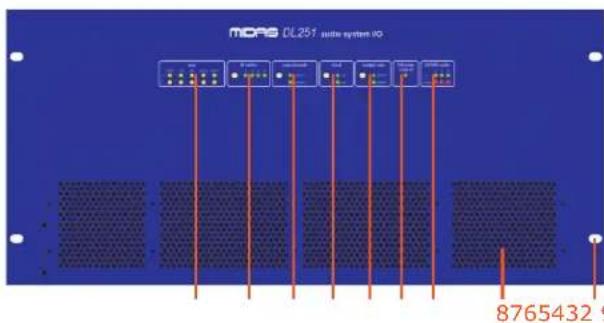
EN 3. Front Panel
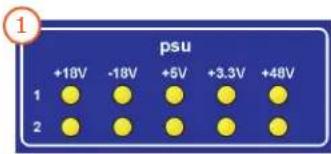
1 The psu panel monitors the two voltage supplies. There are five yellow LEDs per voltage supply, and each LED represents a voltage rail. An LED will illuminate when its respective voltage rail is active.
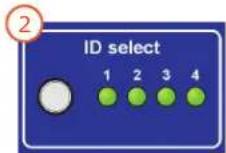
2 The ID select panel lets you select the ID number of the unit. This is a unique number that is recognised by the system and distinguishes it from any other similar unit(s) in the network. One of the four green LEDs will be illuminated to indicate the currently selected ID.
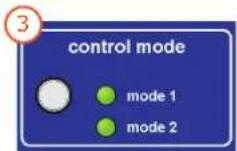
3 This control mode panel lets you select the control mode of the unit. Use this panel's pushbutton to select mode 1 if the unit is connected to a console or mode 2 if the unit is used in a snake configuration. Either of the two green LEDs will illuminate to show which control mode is selected.
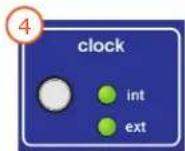
4 The clock panel lets you select the synchronisation source of the unit. Use this panel's pushbutton to select the internal clock of the unit (int) or an external AES50 source (ext). The external source is the clock of the connected device (usually a Midas digital console) whose signal is transmitted via the AES50 audio connector. Either of the two green LEDs will illuminate to show which clock source is selected.
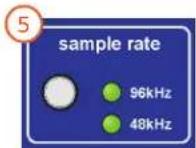
5 The sample rate panel has a two green LEDs, which indicate the currently selected sample rate (96kHz or 48kHz).
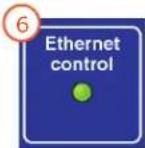
6 The Ethernet control panel has a single green LED, which has three states of illumination: flashing = active; on = connected; and off = not connected.
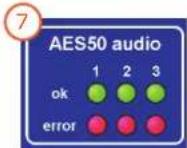
7 The AES50 audio panel shows the health status of the communications of the AES50 connections. If the green ok LED is illuminated, communication is good. However, if the red error LED is illuminated, there is a problem on that connection.
8 There are four air intakes for fan cooling. Do not obstruct.
9 There are four cut-outs for rack mounting fixings.
ES 3. Panel frontal
DL251/DL252 Rear Panel
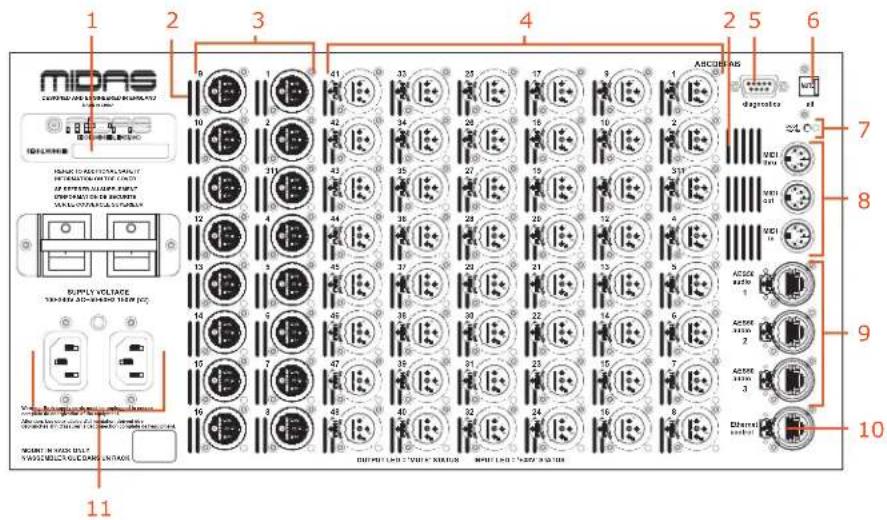
EN 4. Rear Panel
1 Unit serial number label.
2 Ventilation grills, which provide an air outtake for fan cooling of the inside of the unit.
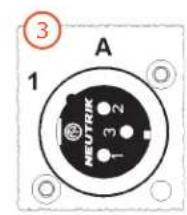
3 Male XLR chassis connectors, which provide outputs for line equipment. Each socket has a red LED that illuminates when mute is on for that output.
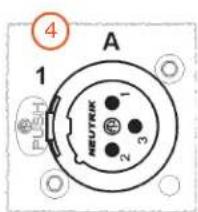
4 Female XLR chassis connectors, which provide inputs for mic/line equipment. Each socket has a red LED that illuminates when +48V phantom power is on for that input.
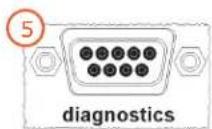
5 The diagnostics connector is a 9-way D-type connector for connecting a laptop/PC by service personnel for diagnostics purposes. This is not an operator function and is only to be used by service personnel.
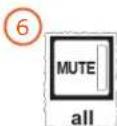
6 The MUTE button mutes all the outputs simultaneously when held down for longer than one second. It has an integral LED that illuminates when mute is active.
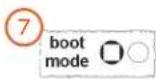
7 The boot mode switch selects between normal operation and a service personnel-only configuration boot mode. It has an adjacent red LED, which illuminates to show when the unit is in service only configuration mode.
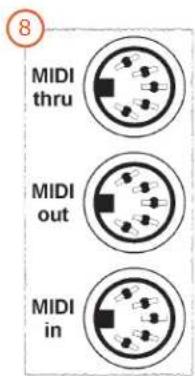
8 There are three MIDI (musical instrument digital interface) sockets — MIDI in, MIDI out and MIDI thru — for connection of a MIDI device, such as a synthesiser. The MIDI in socket receives MIDI data, and the MIDI thru socket gives out the same MIDI data that is received by the MIDI in socket. The MIDI out socket gives out MIDI data generated by the attached Midas Digital Console.
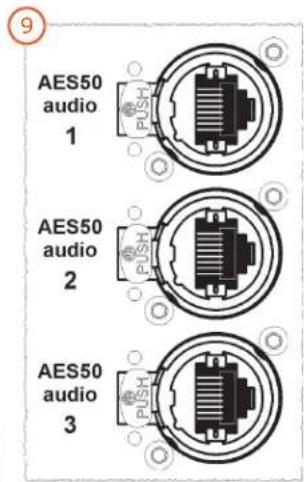
9 Three AES50 audio EtherCon® sockets provide connection to the console/snake and pass audio and control data in both directions. Each socket has a pair of red and green LEDs, which indicate the following:
- Green pulsating and red extinguished = valid audio and valid control data; active link.
- Green constantly illuminated and red extinguished = valid audio and valid control data; standby link.
- Green extinguished and red illuminated = no audio; link has failed.
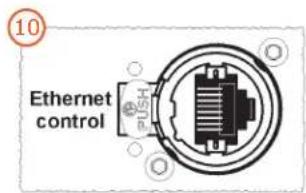
10 The Ethernet control EtherCon® socket provides connection to an external computer for remote control when used in a snake configuration. This socket has a pair of red and green LEDs that indicates the following:
- Green LED illuminated = cable connected at both ends.
- Green LED extinguished = cable not connected at both ends.
Mains power
! Each mains inlet should be sourced from its own separate wall-mounted mains outlet socket. Otherwise, both mains sources must be suitably distributed so as to meet local safety regulations.
The mains is supplied to the DL251/DL252 via dual redundant mains inlets.
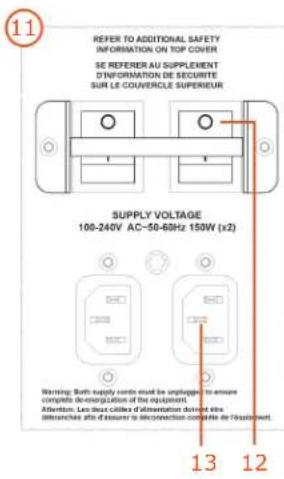
11 Dual redundant power supplies.
12 Mains on/off isolator switch.
13 Mains IEC socket.
Important:
The unit has Volex locking type plugs fitted on their supplied mains cables, which plug into the mains IEC connectors. When fitted properly the Volex plug locks into place, preventing it working loose, or being inadvertently knocked loose or pulled out.
ES 4. Panel trasero
flowchart
graph TD
    A["1: ID select"] --> B["2: control mode"]
    B --> C["3: clock"]
    C --> D["4: sample rate"]
    D --> E["5: ADC/DC"]
    E --> F["6: MDRS"]
    F --> G["7: x48"]
    G --> H["8: x16"]
    H --> I["9: x48"]
    I --> J["10: ADC/DC"]
    J --> K["11: ADC/DC"]
    K --> L["12: ADC/DC"]
    L --> M["13: ADC/DC"]
    M --> N["14: ADC/DC"]
    N --> O["15: ADC/DC"]
    O --> P["16: ADC/DC"]
    P --> Q["17: ADC/DC"]
    Q --> R["18: ADC/DC"]
    R --> S["19: ADC/DC"]
    S --> T["20: ADC/DC"]
    T --> U["21: ADC/DC"]
    U --> V["22: ADC/DC"]
    V --> W["23: ADC/DC"]
    W --> X["24: ADC/DC"]
    X --> Y["25: ADC/DC"]
    Y --> Z["26: ADC/DC"]
    Z --> AA["27: ADC/DC"]
    AA --> AB["28: ADC/DC"]
    AB --> AC["29: ADC/DC"]
    AC --> AD["30: ADC/DC"]
    AD --> AE["31: ADC/DC"]
    AE --> AF["32: ADC/DC"]
    AF --> AG["33: ADC/DC"]
    AG --> AH["34: ADC/DC"]
    AH --> AI["35: ADC/DC"]
    AI --> AJ["36: ADC/DC"]
    AJ --> AK["37: ADC/DC"]
    AK --> AL["38: ADC/DC"]
    AL --> AM["39: ADC/DC"]
    AM --> AN["40: ADC/DC"]
    AN --> AO["41: ADC/DC"]
    AO --> AP["42: ADC/DC"]
    AP --> AQ["43: ADC/DC"]
    AQ --> AR["44: ADC/DC"]
    AR --> AS["45: ADC/DC"]
    AS --> AT["46: ADC/DC"]
    AT --> AU["47: ADC/DC"]
    AU --> AV["48: ADC/DC"]
    AV --> AW["49: ADC/DC"]
    AW --> AX["50: ADC/DC"]
    AX --> AY["51: ADC/DC"]
    AY --> AZ["52: ADC/DC"]
    AZ --> BA["53: ADC/DC"]
    BA --> BB["54: ADC/DC"]
    BB --> BC["55: ADC/DC"]
    BC --> BD["56: ADC/DC"]
    BD --> BE["57: ADC/DC"]
    BE --> BF["58: ADC/DC"]
    BF --> BG["59: ADC/DC"]
    BG --> BH["60: ADC/DC"]

5. DL251 Connections
DL251 and digital console (96kHz operation)
Typical DL251 to digital console connection configuration. The AES50 audio connections provide 96kHz operation and include a redundant spare.

Each mains inlet must be sourced from its own separate wall-mounted mains outlet socket. Otherwise, their mains sources must be suitably distributed so as to meet local safety regulations.
1 Unique unit ID to match the one configured on the control centre's configuration page.
2 Set to ext if DL251 is synchronising with an AES50 connection to a clock master. Set to int if this DL251 is to be clock master.
3 MIDI device (for example, a keyboard).
4 AES50 audio.
5 Redundant spare.
6 Typical Midas digital console (for example, a PRO3).
7 Mic/line inputs.
8 Line outputs.
9 Separate mains outlets.
ES 5. DL251 Conexiones
5. DL252 Connections
DL252 and digital console (96kHz operation)
Typical DL252 to digital console connection configuration. The AES50 audio connections provide 96kHz operation and include a redundant spare.

Each mains inlet must be sourced from its own separate wall-mounted mains outlet socket. Otherwise, their mains sources must be suitably distributed so as to meet local safety regulations.
1 Unique unit ID to match the one configured on the control centre's configuration page.
2 Set to ext if DL252 is synchronising with an AES50 connection to a clock master. Set to int if this DL252 is to be clock master.
3 MIDI device (for example, a keyboard).
4 AES50 audio.
5 Redundant spare.
6 Typical Midas digital console (for example, a PRO3).
7 Line outputs.
8 Mic/line inputs.
9 Separate mains outlets.
ES 5. DL252 Conexiones
PT 5. DL252 Conexões
EN 5. Connectors
To ensure the correct and reliable operation of the equipment, only high quality balanced, screened, twisted pair audio cable should be used.
XLR connector shells should be of metal construction so that they provide a screen when connected to the console/snake and, where appropriate, they should have Pin 1 connected to the cable screen.
1 Line output audio connector. Female XLR plug and male XLR chassis connector with the following pinouts: 1 = ground; 2 = hot; and 3 = cold.
2 Mic/line input audio connector. Male XLR plug and female XLR chassis connector with the following pinouts: 1 = ground; 2 = hot; and 3 = cold.
3 Ethernet socket. RJ45 plug and EtherCon® socket.
4 MIDI connector (in, out or thru). 5-pin plug and socket.
5 Diagnostics. 9-way, D-type plug and socket.
ES 5. Conectores
DL251/DL252 Using The Unit
EN 6. Using The DL251/DL252
Although the DL251/DL252 has only limited user functionality, this section shows how to mute all outputs simultaneously and how to use the boot mode.
To avoid electrical shock, never operate the equipment with the covers removed. Do not operate the equipment or any of its parts if safety guards are ineffective or their effectiveness has been reduced.
Muting all outputs simultaneously
The mute feature mutes all outputs simultaneously and also disconnects all the mic amps from the AES50 interface. This will have the effect of muting any other outputs that are sourced from these inputs.
The MUTE button will activate after being pressed for one second and will de-activate after it has been released for half a second. The button's integral red LED will illuminate to show when mute is active.
Using the boot mode
This service personnel only function is used to select between normal operation and configuration mode.
ES 6. Uso del DL251/DL252
DL251/DL252 Technical Specifications
EN 7. Technical Specifications
This section contains the technical specifications for the DL251 and DL252 units.
Due to a policy of continual improvement, Midas reserves the right to alter the function or specification at any time without notice.
DL251/DL252 general statistics
XLR connections
| DL251 |
| 1 x 5U rack I/O box houses: 48 x (XLR) mic/line inputs |
| 16 x (XLR) line outputs |
| DL252 |
| 1 x 5U rack I/O box houses: 16 x (XLR) mic/line inputs |
| 48 x (XLR) line outputs |
Resilience
N + 1 cable redundancy and dual redundant PSUs
DL251/DL252 general specifications
| Sampling frequency 48kHz/96kHz snake;96kHz with Midas console | |
| Latency delay <1ms direct connection input to output | |
| Dynamic range 107dB, 22Hz to 22kHz (no pre-emphasis) | |
| Maximum voltage gain 45dB | |
| Crosstalk @ 1kHz -100dB physically adjacent input channels | |
| Crosstalk @ 10kHz -90dB physically adjacent input channels | |
| Dimensions DL251: 5U x 410 mm deepDL252: 5U x 410 mm deep | |
| Net weight DL251: 10 kgDL252: 10 kg | |
| Shipping weight DL251: 18 kgDL252: 18 kg | |
| Power requirements 100V to 240V AC ±10%,50 to 60Hz | |
| Power consumption at 115V 1 PSU: 85W, 85VA2 PSU: 110W, 110VA | |
| Power consumption at 230V | 1 PSU: 90W, 100VA2 PSU: 110W, 135VA |
| Operating temperature range | +5°C to +40°C |
| Storage temperature range | -20°C to +60°C |
DL251/DL252 audio performance specifications
| Input | Output | Gain | 20Hz | 20kHz |
| DL251 I/O Box | DL252 I/O Box | 0dB | 0dB to -1.0dB | 0dB to -1.0dB |
| DL251 I/O Box | DL252 I/O Box | 40dB | 0dB to -1.0dB | 0dB to -1.0dB |
| DL252 I/O Box | DL251 I/O Box | 0dB | 0dB to -1.0dB | 0dB to -1.0dB |
| DL252 I/O Box | DL251 I/O Box | 40dB | 0dB to -1.0dB | 0dB to -1.0dB |
Gain error at 1kHz
| Input | Output | Gain | Max. | Min. |
| DL251 I/O Box | DL252 I/O Box | 0dB | +1.0dB | -1.0dB |
| DL251 I/O Box | DL252 I/O Box | 40dB | +1.0dB | -1.0dB |
| DL252 I/O Box | DL251 I/O Box | 0dB | +1.0dB | -1.0dB |
| DL252 I/O Box | DL251 I/O Box | 40dB | +1.0dB | -1.0dB |
Input CMRR
| Input | Output | Gain | 100Hz 1kHz | |
| DL251 I/O Box | DL252 I/O Box | 0dB | 60dB | 60dB |
| DL251 I/O Box | DL252 I/O Box | 40dB | 90dB | 90dB |
| DL252 I/O Box | DL251 I/O Box | 0dB | 60dB | 60dB |
| DL252 I/O Box | DL251 I/O Box | 40dB | 90dB | 90dB |
Distortion at 0dBu
| Input | Output | Gain | 1kHz | 10kHz |
| DL251 I/O Box | DL252 I/O Box | 0dB | 0.01% | 0.01% |
| DL251 I/O Box | DL252 I/O Box | 40dB | 0.03% | 0.03% |
| DL252 I/O Box | DL251 I/O Box | 0dB | 0.01% | 0.01% |
| DL252 I/O Box | DL251 I/O Box | 40dB | 0.03% | 0.03% |
Distortion at +20dBu
| Input | Output | Gain | 1kHz | 10kHz |
| DL251 I/O Box | DL252 I/O Box | 0dB | 0.03% | 0.03% |
| DL251 I/O Box | DL252 I/O Box | 40dB | 0.03% | 0.03% |
| DL252 I/O Box | DL251 I/O Box | 0dB | 0.03% | 0.03% |
| DL252 I/O Box | DL251 I/O Box | 40dB | 0.03% | 0.03% |
Signal path noise 22Hz to 22kHz unweighted (inputs 150R terminated)
Input Output Gain Output noise EIN
| DL251 I/O Box DL252 I/O Box 0dB -86dBu -86dBu |
| DL251 I/O Box DL252 I/O Box 40dB -86dBu -125dBu |
| DL252 I/O Box DL251 I/O Box 0dB -86dBu -86dBu |
| DL252 I/O Box DL251 I/O Box 40dB -86dBu -125dBu |
Dynamic range 22Hz to 22kHz unweighted
| Input Output Gain Output noise EIN |
| DL251 I/O Box DL252 I/O Box 0dB +21dBu 107dB |
| DL251 I/O Box DL252 I/O Box 40dB +21dBu 106dB |
| DL252 I/O Box DL251 I/O Box 0dB +21dBu 107dB |
| DL252 I/O Box DL251 I/O Box 40dB +21dBu 106dB |
DL251/DL252 system inputs and outputs
I/O box inputs
| Connector 3-pin XLR balanced |
| A/D converter 24-bit, 96kHz and 128 times oversampling |
Box analogue outputs
| Connector 3-pin XLR balanced |
| D/A converter 24-bit, 96kHz and 128 times oversampling |
MIDI
| MIDI connector | In, out and through on 5-pin DIN(for use with Midas consoles only) |
48kHz I/O digital system inputs and outputs
| System connector (1) | 1 x AES50 (48 channels of bi-directional digital audio) on EtherCon® XLR |
| Redundant connector (2) 1 x AES50 (48 channels of bi-directional digital audio) on EtherCon® XLR providing redundant back-up | |
| Additional connector (3) | Not used |
96kHz I/O digital system inputs and outputs
| System connector (1 and 2) | 2 x AES50 (24 channels of bi-directional digital audio) on EtherCon® XLR |
| N+1 connector (3) | 1 x AES50 (24 channels of bi-directional digital audio on EtherCon® XLR providing redundant back-up |
DL251/DL252 input and output characteristics
Analogue input characteristics
| Input | Load Z Gain | Max. level Connector | ||
| DL251 I/O Box | 10k | -2.5dB to +45dB | +24dBu | XLR |
| DL252 I/O Box | 10k | -2.5dB to +45dB | +24dBu | XLR |
Analogue output characteristics
| Output | Source Z | Gain | Max. level | Connector |
| DL251 I/O Box | 50R | 0dB | +21dBu | XLR |
| DL252 I/O Box | 50R | 0dB | +21dBu | XLR |
48kHz digital I/O characteristics
| Type | AES50 |
| Channels | 48 |
| Data length | 24-bit |
| I/O | Bi-directional |
| Description notes | Conforms to AES50-2006 |
| Connector EtherCon® XLR | |
96kHz digital I/O characteristics
| Type | AES50 |
| Channels | 24 |
| Data length | 24-bit |
| I/O | Bi-directional |
| Description notes | Conforms to AES50-2006 |
| Connector EtherCon® XLR | |
DL251/DL252 Service Information
EN 8. Service Information
This section gives you servicing information for your unit.
If you are in any doubt or have queries about any of the procedures in this section, contact Midas Technical Support. Contact details can be found at the front of this manual.
Routine maintenance
To help keep your unit in good working order and to make sure it gives you optimum performance, we recommend that you adhere to the following maintenance schedules.
| Action Monthly Yearly | ||
| Clean the unit (see "Cleaning the unit" below). | Yes- | |
| Check all controls, such as pushbuttons, for freedom of operation. | Yes- | |
| Check the functionality of all controls and indicators, such as LEDs. | Yes- | |
| Check the functionality of the equipment. | Yes- | |
| Clean the internal fans (see "Cleaning the internal fans" below). | - | Yes |
Cleaning the unit
! Switch off the unit and electrically isolate it from the mains before cleaning.
Clean the unit using a dry, lint-free cloth. Don't use harsh abrasives or solvents.
Cleaning the internal fans
This procedure must be carried out by a fully qualified service engineer.
The unit's internal fans need to be cleaned regularly to remove the build up of dust, dirt, etc. We recommend that they are cleaned at least once a year, provided the unit has been operated under normal conditions. However, if the operating conditions are more adverse or extreme, for example, if the unit is operated in the vicinity of smoke machines, new carpets, etc., this frequency should be increased accordingly.
Equipment disposal
When this equipment has come to the end of it useful life, its disposal may come under the DIRECTIVE 2002/96/EC OF THE EUROPEAN PARLIAMENT AND OF THE COUNCIL of 27 January 2003 on waste electrical and electronic equipment (WEEE).
Hazardous substances in WEEE contaminate water, soil and air and ultimately put at risk our environment and health. The directive aims to minimize the impacts of WEEE on the environment during their life times and when they become waste.
The WEEE directive addresses the disposal of products when they have reached the end of their life and contributes to the reduction of wasteful consumption of natural resources. This will help to reduce pollution, and protect the environment and ourselves.

If this equipment carries a ‘crossed-out wheelie bin’ (shown left), please do not dispose of WEEE as unsorted municipal waste but collect and dispose of in accordance with local WEEE legislation. The horizontal bar underneath indicates that the product was placed on the EU market after 13th August 2005.
For WEEE disposal, see our website at www.midasconsoles.com for information.
Other important information
EN
Important information
1 Register online. Please register your new Midas equipment right after you purchase it by visiting www.midasconsoles.com. Registering your purchase using our simple online form helps us to process your repair claims more quickly and efficiently. Also, read the terms and conditions of our warranty, if applicable.
2 Malfunction. Should your MUSIC Group Authorized Reseller not be located in your vicinity, you may contact the MUSIC Group Authorized Fulfiller for your country at www.midasconsoles.com. If your country is not listed please contact the "United Kingdom (Midas/KT main office)" located under "Service → Service/Repairs" on the www.midasconsoles.com website. Alternatively, please submit the online warranty return form found under "Service → Warranty Registration" on www.midasconsoles.com BEFORE returning the product. All enquires must be accompanied by the description of the problem and the serial number of the product. The warranty eligibility will be verified from the original sales receipt.
3 Power Connections. Before plugging the unit into a power socket, please make sure you are using the correct mains voltage for your particular model. Faulty fuses must be replaced with fuses of the same type and rating without exception.
ES
MUSIC Group Research UK Limited
DL251 Audio System I/O and DL252 Audio System I/O
Responsible party name: MUSIC Group Research UK
Limited
Address: Klark Industrial Park, Walter Nash
Road, Kidderminster.
Worcestershire. DY11 7HJ.
England.
Phone/Fax No: Phone: +44 1562 741515
Fax: +44 1562 745371
DL251/DL252 Audio System I/O
complies with the FCC rules as mentioned in the following paragraph:
This equipment has been tested and found to comply with the limits for a Class A digital device, pursuant to Part 15 of the FCC Rules. These limits are designed to provide reasonable protection against harmful interference when the equipment is operated in a commercial environment. This equipment generates, uses, and can radiate radio frequency energy and, if not installed and used in accordance with the instruction manual, may cause harmful interference to radio communications. Operation of this equipment in a residential area is likely to cause harmful interference in which case the user will be required to correct the interference at his own expense.
Important information:
Changes or modifications to the equipment not expressly approved by MUSIC Group can void the user's authority to use the equipment.

Thank you for reading through this Operator Manual. We hope you found it useful. Please feel free to send us your comments. Our contact details and website address can be found at the front of this document.