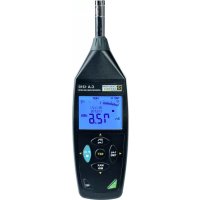
C.A 1310 - Sound level meters CHAUVIN ARNOUX - Free user manual and instructions
Find the device manual for free C.A 1310 CHAUVIN ARNOUX in PDF.


| Product type | Class 2 integrating sound level meter |
| Brand | Chauvin Arnoux |
| Model | C.A 1310 |
| Dimensions (L × D × H) | 262 × 75 × 39 mm |
| Power supply | 4 LR6/AA 1.5 V batteries or USB 5 V DC power adapter |
| Battery life | Approximately 60 hours with alkaline batteries |
| Measurement range | 30 to 130 dB |
| Frequency range | 20 Hz to 8 kHz |
| Frequency weightings | A and C |
| Response time | FAST (125 ms) and SLOW (1 s) |
| Accuracy | ±1.0 dB at 94 dB, 1 kHz under reference conditions |
| Resolution | 0.1 dB |
| Display | LCD 4-digit + 50-segment bar graph |
| Memory capacity | 64,000 recordings |
| Interfaces | USB (micro USB) for PC communication, 3.5 mm AC/DC jack output |
| Provided software | SL-Software for recording and analysis |
| Standards | IEC 61672-1 Class 2, ANSI S1.4 Type 2 |
| Protection rating | IP40 |
| Operating temperature | 0 to 40 °C |
| Operating humidity | 10 to 90% RH |
| Included accessories | Case, windscreen, USB cable, software, batteries, manual |
| Maintenance | Clean with a slightly damp soft cloth, do not use solvents |
| Repairability | No user-replaceable parts (except batteries) |
Frequently Asked Questions - C.A 1310 CHAUVIN ARNOUX
User questions about C.A 1310 CHAUVIN ARNOUX
0 question about this device. Answer the ones you know or ask your own.
Ask a new question about this device
Download the instructions for your Sound level meters in PDF format for free! Find your manual C.A 1310 - CHAUVIN ARNOUX and take your electronic device back in hand. On this page are published all the documents necessary for the use of your device. C.A 1310 by CHAUVIN ARNOUX.
USER MANUAL C.A 1310 CHAUVIN ARNOUX
Sonomètre Intégrateur Integrating sound level meter Integrierender Schallpegelmesser Sonometro integratore Sonómetro integrador
Measure up

English 19
Deutsch 36
Italiano 53
Español 70
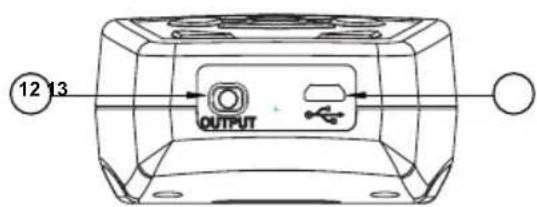
⑬ Interface USB :
SYMBOLE FONCTION
Poids : 390 g (piles incluses)
Barre d'outils


Thank you for purchasing this C.A 1310 sound level meter.
For best results from your instrument:
■ read these operating instructions carefully,
■ comply with the precautions for use.

WARNING, risk of DANGER! The operator must refer to these instructions whenever this danger symbol appears.

Caution! Risk of electric shock. The voltage applied to parts marked with this symbol may be hazardous.

Equipment protected by double insulation. Useful information or tip.

Battery.

The CE marking indicates conformity with European LVD and EMC directives.
The rubbish bin with a line through it means that in the European Union, the product must undergo selective disposal in compliance with Directive WEEE 2002/96/EC.
TABLE DES MATIÈRES
-
PRESENTATION......20
-
PRECAUTIONS FOR USE ....21
2.1. Precautions for use of the sound level meter ....21
2.2. Remark concerning measurement conditions ....21
- DESCRIPTION OF THE INSTRUMENT ..22
3.1. Sound level meter....22
3.2. The display unit .....24
- OPERATION OF THE INSTRUMENT.....25
4.1. Choice of frequency weighting .....25
4.2. Choice of response time .....25
4.3. Recording the data 25
4.4. Adjusting the recording interval .....26
4.5. Erasing the stored data .....26
4.6. Con guring the Leq and the integration time ....26
4.7. Setting the date and time....27
4.8. Calibration procedure .....28
-
POWER SUPPLY....29
-
TECHNICAL CHARACTERISTICS .....30
-
MAINTENANCE....31
-
TO ORDER....31
-
THE SL SOFTWARE ....32
9.1. Getting started ....32
9.2.Main menu 33
9.3. Data Logger Window ......34
9.4. Graph....35
1. PRESENTATION
The C.A 1310 is an integrating sound level meter designed to assess ambient sound and noise and compliant with standards IEC61672-1 class 2 and ANSI S1.4 type 2.
It has many professional and home applications: measuring sound levels in factories, schools, o'ces, airports, studios, auditoriums, etc.
The C.A 1310 is a compact portable instrument that can be held in one hand or, for long-term measurements, mounted on a tripod.
The C.A 1310 can measure and record (memory capacity 64,000 values) sound levels from 30 to 130dB.
If the sound levels of interest are uctuating, the equivalent continuous sound level can be determined, with periods ranging from 10 seconds to 24 hours. It has a USB interface for communication with a PC.
It provides two measurement weighting curves, A and C, to allow for the way the sensitivity of the human ear varies as function of sound frequency. Curve A is the curve commonly used in an industrial environment, while curve C is better suited when low-frequency sounds are of interest.
2. PRECAUTIONS FOR USE
2.1. PRECAUTIONS FOR USE OF THE SOUND LEVEL METER
We recommend reading these instructions before any use of the instrument.
■ The sound level meter is a measuring instrument that must be protected from impacts and severe vibrations
■ The microphone in particular must be protected from exposure to water and dust, and must not be stored in a place that is damp and/or too hot
■ We advise against cleaning the microphone
2.2. REMARK CONCERNING MEASUREMENT CONDITIONS
- If the difference of level between the absence and presence of the sound to be measured is 10dB or more, the influence of background noise on the measurement can be regarded as negligible. If the difference is smaller than this, a compensation correction (see table below) must be applied to the measurement made to allow for the background noise:
| Differences of level (dB) | 4 5 6 | 7 8 9 10 | |||||
| Compensation in (dB) | -2.2 -1.7 | -1.3 -1 | -0.8 | -0.7 0 |
- The microphone must be placed at a distance from any sound-reflecting surface, such as a wall or a floor, in order to minimize errors due to possible spurious reflections. During the measurement, hold the sound level meter at arm's length in order to avoid reflections from your own body, and also to allow unobstructed propagation of the sound in all directions.
- Make sure that there is no obstacle between the point of measurement and the source of the noise.
- Disregard measurement levels that are either too low (sound not significant) or too high (overload).
- Wind striking the microphone will produce extraneous noise. If the instrument is used in a windy place, it is best to fit the windscreen ball on the microphone so as not to pick up unwanted signals.
3. DESCRIPTION OF THE INSTRUMENT
3.1. SOUND LEVEL METER
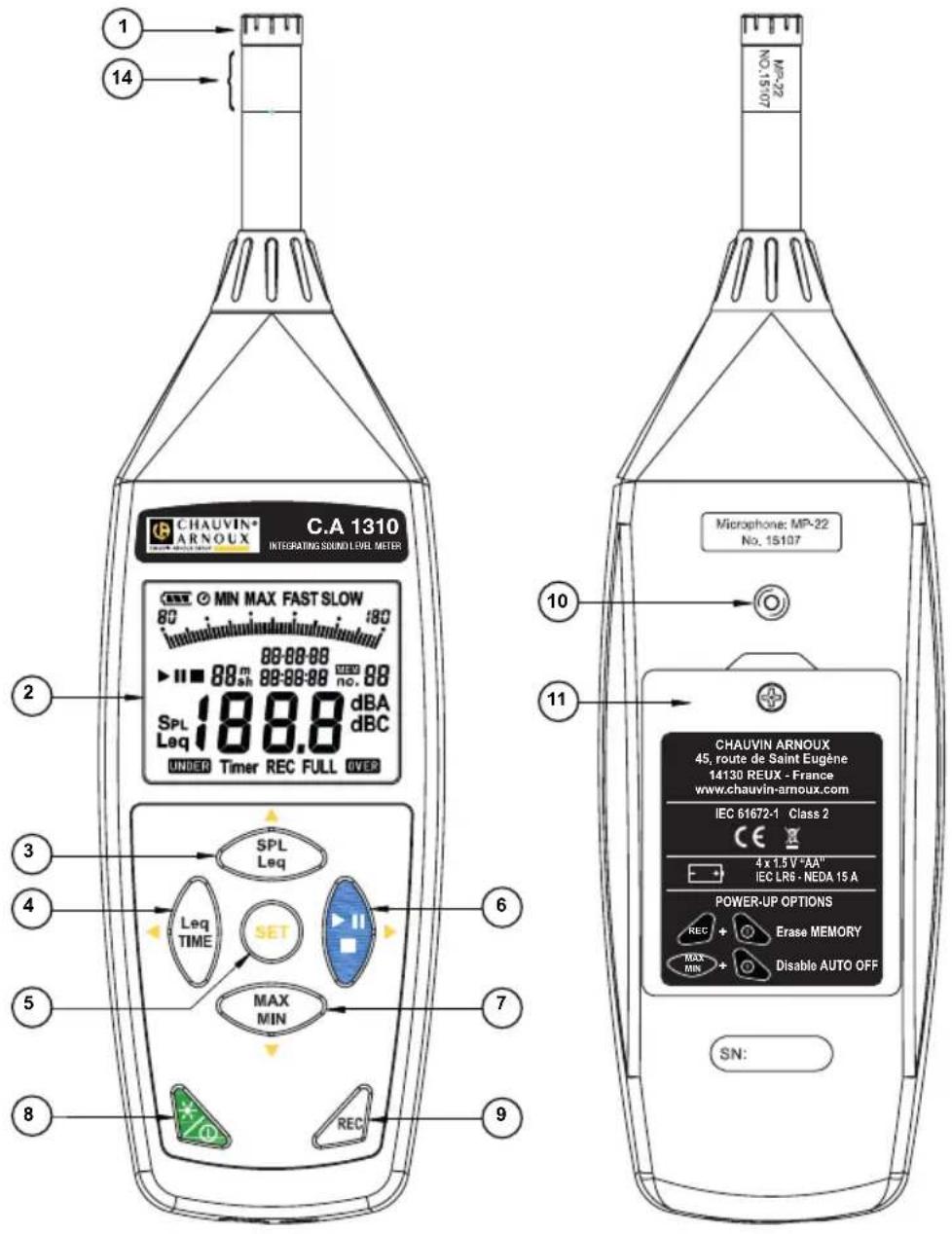
① Microphone: 1/2" electret microphone.
② Display: Liquid-crystal screen
③ Leq/SPL selection key: To toggle between the SPL (Sound Pressure Level) and Leq (equivalent continuous sound level) modes by a long press (>2 seconds).
④ LeqTime key: To set the integration time associated with the Leq measurement.
⑤ SET key: In the settings mode, used to define the frequency and time weightings, the calibration at 94dB, the recording interval, and the date and time.
⑥ Start/Pause/Stop key: Used to start, pause, or stop the acquisition of the equivalent continuous sound level measurement.
⑦ MAX/MIN selection key: Press MAX MIN to activate the maximum and minimum search mode.
Pressing the MAX MIN key displays the "MAX" symbol and the maximum value on the screen. Pressing this key a second time displays the "MIN" symbol and the minimum value.
Pressing the MAX MIN key again causes the MAX and MIN indicators to blink. The instrument is then in the maximum and minimum values acquisition mode. The value displayed on the screen is the measurement in progress.
To exit from this mode, press the MAX MIN key and hold it down until the "MAX MIN" symbol disappears.
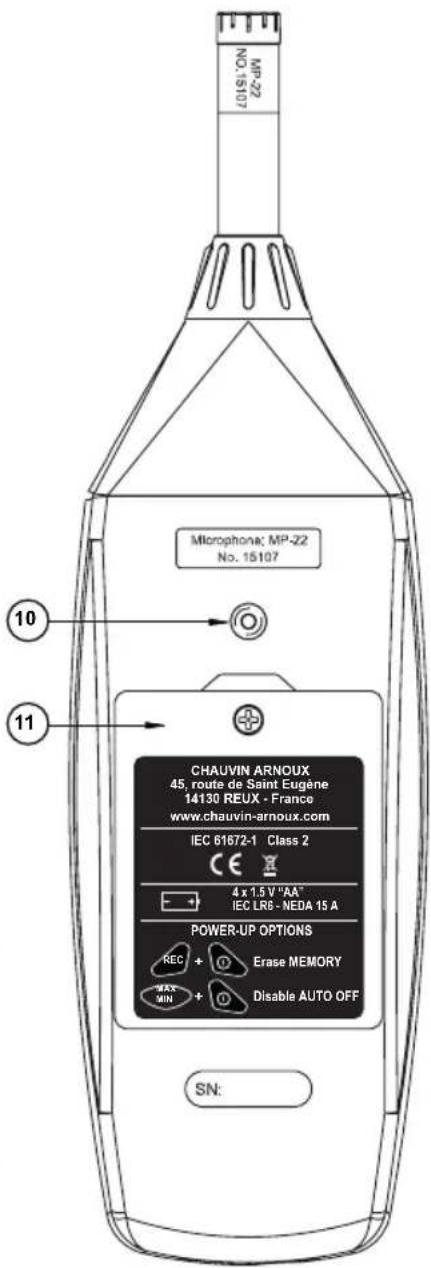
⑧ On/Off key: Press the 🔒 key to switch the device on. To switch it off, press the 🔒 key and hold it down for 3 seconds, until the screen displays "OFF". Press this key to activate the backlight to make it easier to read the instrument in a dark environment. Press again to deactivate it. The backlight is switched off automatically after 30 seconds.
Auto off: To save the batteries, the instrument is in auto off mode when first switched on. It will switch itself off at the end of 30 minutes if no key has been pressed. The auto off mode is deactivated in the following two situations:
(1) When the instrument is connected to a PC.
(2) When a recording function is in progress.
■ Deactivating auto off.
Press the key and hold it down, then switch the instrument on. Keep the key pressed
until the instrument starts working. Check that the auto off symbol disappears from the screen.
Remark: During starting-up, the available memory space is displayed.
⑨ REC key: When you press this key, the instrument starts recording and the "REC" symbol is displayed.
To stop recording, press the key again.
⑩ Tripod insert: For long-term measurements, the sound level meter can be mounted on a camera tripod. Proceed with care so as not to drop the instrument.
⑪ Battery compartment
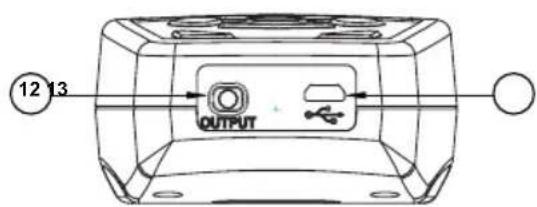
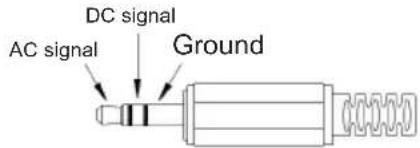
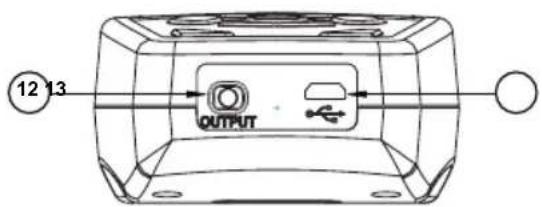
⑫ AC/DC output signal jack:
Connect the sound level recorder to the AC/DC output on the bottom of the instrument.
AC: 1 Vrms represents 130dB (with frequency weighting)
DC: 10mV/dB output
⑬ USB interface:
For connection to a computer or to an external power supply.
⑭ Part to unscrew for the use of the extension accessory.
3.2. THE DISPLAY UNIT
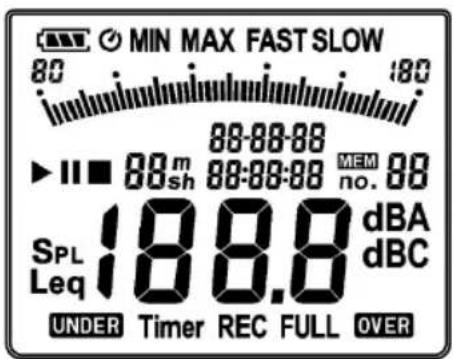
SYMBOL FUNCTION
Battery charge level check light

Auto off check light

Maximum/Minimum check light

F/S time weighting check light
Sound level range indicator

Bargraph analog display
SpL
Time-weighted sound pressure level
Leq
Average equivalent continuous sound level
Time set or elapsed time (hour:minute:second)
Start/Pause/Stop integrated sound level measurement

hms
Integration time


Frequency weighting indicator (A or C)
Sound level reading (30.0-130.0dB)
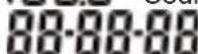
Date set or elapsed time (year-month-day)

Measurement range overshoot indicator
Timer
Integration time meter

Leq recording check light

Memory address
4.1. CHOICE OF FREQUENCY WEIGHTING
The human ear is not equally sensitive to all frequencies, so filters are used to weight or correct the measured levels according to frequency. The C.A 1310 provides two correction curves, A and C. The more widely used is weighting curve A, representing "the international average ear". It is the curve generally used to measure noise levels in an industrial context. The C curve is better suited for detecting the presence of a low-frequency noise (if the level measured is higher in the C setting than in the A setting, it means that the signal contains significant low-frequency components); this curve is well suited to measurement in a musical context.
To change the frequency weighting:
(1) Press the SET key to enter the settings mode, then the ◀ or ▶ key to select the weighting. The “dBA” or “dBC” symbol then appears, blinking.
(2) Choose "dBA" or "dBC" using the ▼ and ▲ keys.
Press the key to confirm.
If you want to abort the setting in progress, press the key to cancel.

4.2. CHOICE OF RESPONSE TIME
A response time appropriate to the nature of the noise to be measured (brief noise such as the beep of a horn or the cry of an animal, or prolonged noise such as that of an industrial machine) must be chosen. The C.A 1310 provides two response times:
- FAST (fast response) if the noise is made up of brief pulses or if only the peak values are of interest to you. This is the setting most often used.
- SLOW (slow response) to measure an average sound level.
To change the response time:
(1) Press the SET key to enter the settings mode, then the ◀ or ▶ key to select the response time. The “FAST” or “SLOW” symbol then appears, blinking.
(2) Choose the appropriate response time using the ▼ and ▲ keys.
Press the key to confirm.
If you want to abort the setting in progress, press the key to cancel.

4.3. RECORDING THE DATA
Press the REC key to start recording the values. They will be stored in the instrument's memory. Press the key to stop recording.
Remark: During recording, most of the keys, such as SET or Leq TIME, are deactivated. All of the other settings must be made before starting to record. The screen displays the FULL symbol when the memory is full.
(1) Press the ⬤ key to enter the settings mode, then the ◀ or ▶ key to select the interval. The "Int" symbol then appears and the seconds display blinks.
(2) Set the desired recording interval, displayed in minutes and seconds. Increase or decrease the interval by pressing the ▲ or ▼ key; the maximum interval is 1 minute and the minimum
is "00:01" (1 second). Press the key to confirm. If you want to abort the setting in
progress, press the key to cancel.
4.5. ERASING THE STORED DATA
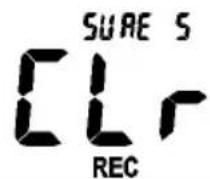
To empty the memory, switch the instrument off, then press

and hold it down, then press and keep it pressed for at least 5 seconds. The "CLr" symbol is then displayed to indicate that the data have been erased.
Remark:
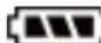
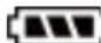
The battery indicator "displays the remaining battery life. The number of black bars decreases as the batteries are depleted. When the batteries are almost fully discharged, the "symbol
disappears. Press the key. The screen displays the "Lo bat" warning. If the instrument is recording, it stops.
lo bAt
4.6. CONFIGURING THE LEQ AND THE INTEGRATION TIME
4.6.1. SETTING THE INTEGRATION TIME
(1) Press the key.
(2) Press the ▲ or ▼ key to increase or decrease the duration.
The selection loop-scrolls through the following values: 10s → 1mn → 5mn → 10mn → 20mn → 30mn → 1h → 2h → 4h → 8h → 16h → 24h.
(3) Then press the key to terminate.
4.6.2. MEASURING THE EQUIVALENT CONTINUOUS SOUND LEVEL (LEQ)
(1) Change from the SPL (Sound Pressure Level) mode to the Leq mode by pressing the key for 2 seconds.

(2) Press the ▶ key to start the measurement. The ▶ symbol is displayed with the elapsed measurement time.
(3) When the time set has elapsed, the measurement automatically terminates and the ■ symbol is displayed.
(4) During these measurements, the √ key can be used to pause and resume the acquisition. The pause intervals are not included in the measurement.
(5) During a pause, the pause symbol II is displayed.
(6) To end the measurement early, press the key for 2 seconds.
(7) If an input signal is outside the range during the measurement, the OVER or UNDER check light appears to indicate that the recorded data include values above or below the measurement range.
(8) When the Leq measurement is over, the data are stored automatically.
(9) In the Leq mode, press ▲ or ▼ to display the previous Leq measurement results, or up to 99 items of data numbered in the form into XX (XX=00\~99).

During this procedure, all of the keys are inactive except for

or

which can
4.7. SETTING THE DATE AND TIME
The instrument has a clock to time-stamp the data.
(1) Press the Ⓗ key to go to the settings mode, then ◀ or ▶ to make the setting; the screen displays the date and time in the form Year-month-day Hour:minute:second.
(2) Press the ▼ or ▲ key to change the first item, then Ⓗ to set the next item.
The order in which they are set is: Year → Month → Day → Hour → Minute → Second. Press the key to confirm. If you want to abort the setting in progress, press the key to cancel.
Remark: An internal reserve backs up the clock when the instrument is off. This reserve is recharged by the batteries. The clock can run for several days on the backup reserve alone. If the instrument is unused for an extended period, the batteries should be removed so that they will not leak and damage it. After reinserting the batteries, remember to set the date and time.
4.8. CALIBRATION PROCEDURE

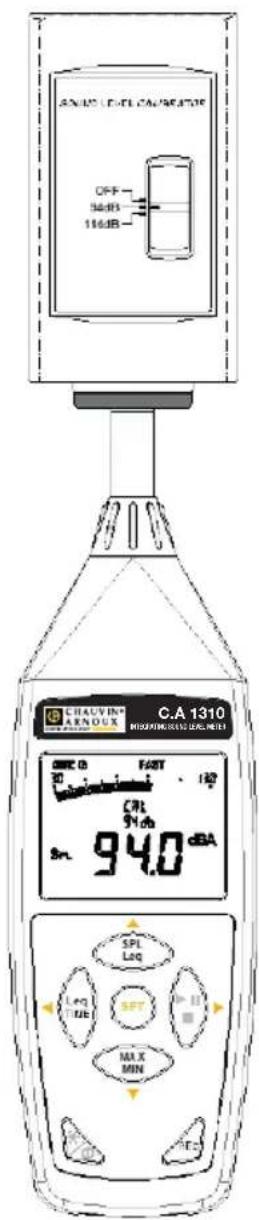
(1) Press the ⬤ key to enter the settings mode, then ◀ or ▶ to select the calibration procedure. The "CAL 94db" symbol is displayed on the screen.
(2) symbol is displayed on the screen calibrator.
(3) Press ▲ or ▼ to increase or decrease the value.
(4) Press the key to confirm.
If you want to abort the setting in progress, press the key to cancel.
Use an acoustic calibrator (94dB, 1KHz sine wave)
(1) Installing the batteries:
(a) Remove the screw on the battery compartment cover and lift the cover off.
(b) Insert the four AA batteries, with the polarities as indicated on the bottom of the compartment.
(c) Put the cover back in place and insert and tighten the screw.
Remark: The instrument is powered by four 1.5V LR6 or AA alkaline batteries. It is possible to use rechargeable NiMH batteries of the same size instead, but the instrument itself does not recharge them. Rechargeable batteries, even fully charged, deliver a slightly lower voltage than primary batteries, and the indicated battery life will be shorter.
(2) Battery life indicator
When the instrument is running on the batteries, check this indicator from time to time to know how much life remains.
Batteries fully charged Batteries partially discharged Time to replace the batteries
![graph LR A["Input"] --> B["Process"] B --> C["Output"]](/content/2026/04/609346/images/b897c611b73cc5a8c16f2eef12ae61229f1b6014b30fe9696c707dc26dfe894a.jpg)
(3) Connecting the mains adapter:
When the mains adapter is used, connect its plug to the 5V DC USB connector on the bottom.
Remark: When the mains adapter is connected, it powers the instrument even if the batteries are in place (the mains adapter takes priority).
Applicable standards: IEC61672-1 Class 2, ANSI S1.4 Type 2.
Frequency range: 20Hz\~8KHz
Measurement levels range: 30\~130dB
Frequency weightings: A/C
Microphone: 1/2 " electret microphone
Display: Liquid-crystal screen
Display of numbers: 4 digits
Resolution: 0.1dB
Screen refresh: 0.5s
Analog display: 50-segment bargraph
Resolution: 2dB
Screen refresh: 50ms
Time weighting: F (125ms), S (1s)
Accuracy: ±1.0dB (under the 94dB, 1KHz reference conditions)
Dynamic range: 100dB
Alarm function: "OVER" when the input is above the upper limit of the range. "UNDER" when the input is below the lower limit.
Data recording capacity: 64,000 records
AC output: 1 Vrms FS (full-scale).
DC output: 10mV/dB
Power supply: Four IEC LR6P batteries (AA format)
Battery life: Approx. 60 hours (alkaline batteries)
Power consumption: Approx. 0.2W
External power supply: 5 VDC (micro USB connector)
Operating temperature: 0 to 40°C (32 to 104°F)
Operating relative humidity: 10 to 90% RH
Storage temperature: -10 to 60 °C (14 to 140 °F)
Storage relative humidity: 10 to 75 % RH
Dimensions: 262(L)×75(W)×39(T) mm; 10.3(L)×2.9(W)×1.5(T) inches
Weight: 390g (with batteries)
7. MAINTENANCE
Electromagnetic compatibility
The device is compliant with standard IEC61326-1.
Mechanical protection
IP40 per IEC 60529
Maintenance
Except for the batteries, the instrument contains no parts that can be replaced by personnel who have not been specially trained and accredited.
Cleaning
Use a soft cloth, dampened with soapy water. Rinse with a damp cloth and dry rapidly with a dry cloth or forced air. Do not use alcohol, solvents, or hydrocarbons.
Warranty
Except as otherwise stated, our warranty is valid for 24 months starting from the date on which the equipment was sold. Extract from our General Conditions of Sale, provided on request.
The warranty does not apply in the following cases:
- Inappropriate use of the equipment or use with incompatible equipment;
- Modifications made to the equipment without the explicit permission of the manufacturer's technical staff;
- Work done on the device by a person not approved by the manufacturer;
- Adaptation to a particular application not anticipated in the definition of the equipment or not indicated in the user's manual;
- Damage caused by shocks, falls, or floods.
8. TO ORDER
The C.A 1310 is delivered with a carrying case, a windscreen ball, a USB cable, the SL software, a jack, batteries, and these operating instructions.
Accessories & spares:
C.A 833 Sound level meter calibrator
Windscreen ball
Microphone-Sound level meter extension cord, 5 metres
Mains-USB adapter (supplied with USB/μUSB cable)
Four AA/LR6 rechargeable batteries + charger
9. THE SL SOFTWARE
9.1. GETTING STARTED
(1) Recording data in real time, in wave form.
- Start by switching on the sound level meter and connecting it to the USB port of the PC using the cable.
- Start the SL software
- If connection succeeds, the program window displays the same value as the integrating sound level meter. If connection fails, the window displays "No Connection".
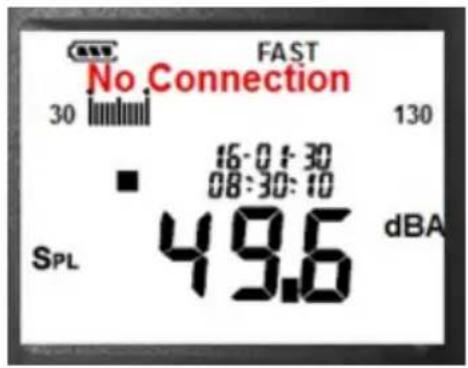
- Click ▶ to start recording the data in real time. A curve appears in the real-time graph window.
- Click ■ to stop recording.
(2) How do you save the data acquired in real time to a file?
- Click the window of the curve you want to save to activate it, then select File/Record in the main menu or click the toolbar.
- A dialogue box opens to let you choose the name and format of the file to be recorded. You have a choice of three formats: binary (*.ghf), text (*.txt) and Excel-compatible text (*.csv). Files in *.ghf format take less disc space than the other two formats, but can be read only by The PC software. Text files can be opened by the software and by any other word processor or text editor, such as Word, Notepad, etc. Files in *.csv format can be opened by the SL software and by Microsoft EXCEL.
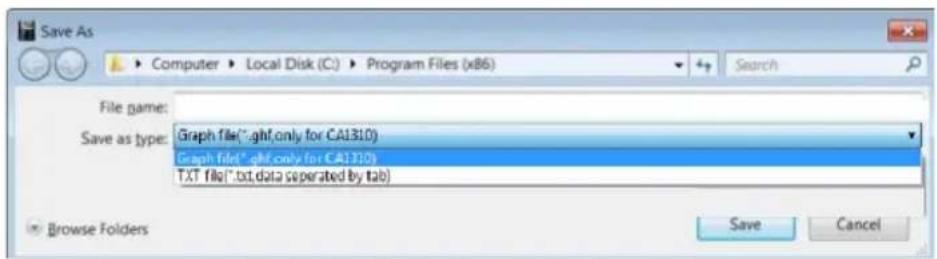
(3) How do you load the data stored in the memory of the sound level meter to save it to a file?
- Switch the sound level meter on.
- Press the REC key of the instrument to start recording the data.
- Press the REC key again when you want to stop recording.
- Connect the sound level meter to the PC.
-
Start the SL software.
-
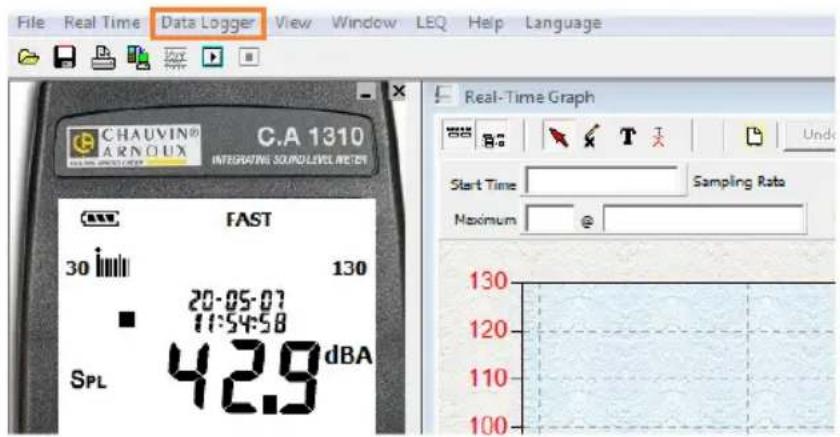
Choose Data Logger in the main menu or click in the taskbar.
9.2. MAIN MENU
File | Opens or recovers files
Save - Saves the data of the active window (the one with the highlighted title bar) to a file.
Print - Prints the curve of the active window.
File | Exit: Exits from the C.A 1310 program.
Real time | Run - Starts the real-time acquisition of data.
Stop - Stops the real-time acquisition of data.
DataLogger: After opening the DataLogger window, the user can load in it the data recorded by the sound level meter and transferred to the PC.
Erase memory: Erases the series of measurements stored in the memory of the instrument.
View | Control panel: After opening the control panel window, the user can control the sound level meter using the buttons in the window.
View | Real time graph: Opens the real time graph window, which displays the data in graphic form.
LEQ: Calculates the LEQ of the data as they are acquired.
9.3. DATA LOGGER WINDOW
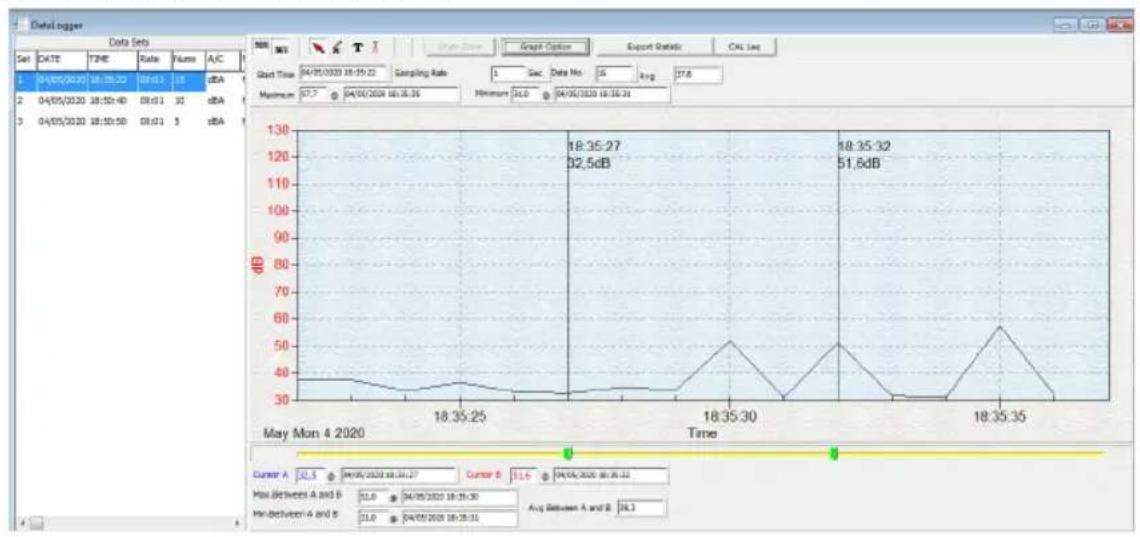
When the data logging integrating sound level meter is connected to the PC and you select "DataLogger"
in the main menu or click in the toolbar to download data recorded in the sound level meter, a progress bar is displayed to indicate the status of the download. If a mistake has been made, simply click "DataLogger" again.
When the data have been loaded, the number of sets of data is displayed on the left side of the screen, with detailed information about each set (starting data no., starting time, sampling interval, number of records).
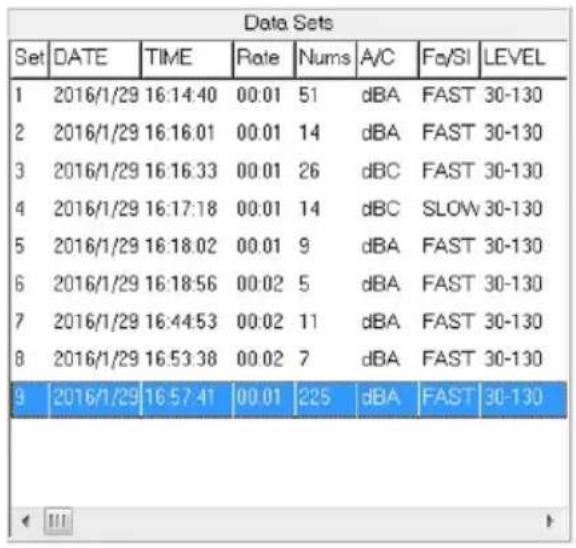
After each download of recorded data from the integrating sound level meter, the first set of data is displayed in a graph and in a table on the right side of the screen and you can then click another set in the list to display its graph.
The set of data you select is displayed on the right side, along with statistical information.
9.4. GRAPH
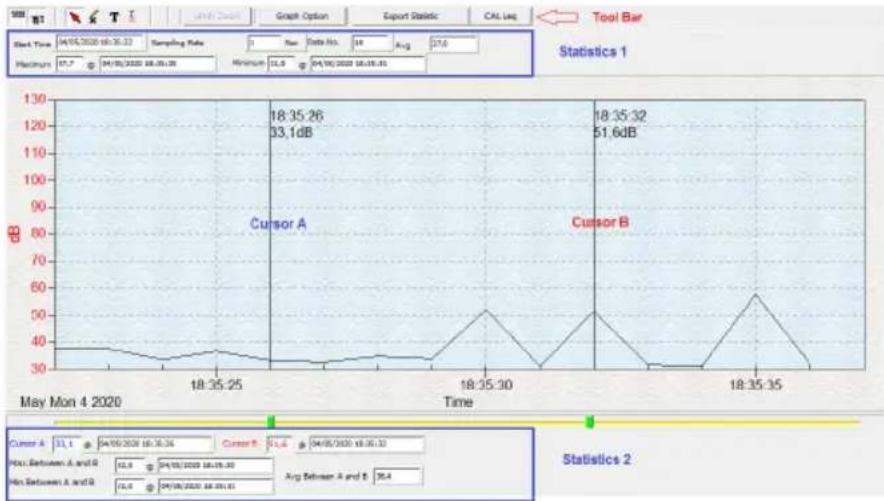
Toolbar

- Display or hide Statistics 1

- Display or hide Statistics 2

- Normal cursor

- When this cursor is selected, it turns into a cross when it is moved over the graph and marks a cross on it if you click.

- When this cursor is selected, it turns into a vertical line when it is moved over the graph, on which you can click to enter an annotation.
You can trace a rectangular zone on the graph using the cursor, to zoom and display details.
The graph has two vertical lines (CURSOR A and CURSOR B). The time and value of the data item is displayed above and to the right of each cursor.
If you move the mouse cursor to cursor A or cursor B, you can drag the latter left or right. There is a slide under cursors A and B. The slide also can be used to move cursor A or B. The statistics are displayed under the slide. They display the starting time, the sampling interval, the number of data items, and the maximum and minimum values of the graph. They also display the maximum, minimum, and mean values between cursors A and B; these data are updated automatically when the cursors are moved.
You can double-click the graph to open a dialogue box. This dialogue box can be used to customize the style of the graph.
And you can also open a context menu by right-clicking the graph (this is impossible on the graph of the data displayed in real time).
You can zoom on the graph with the mouse:
To zoom:
- Press the left mouse button and drag the cursor to select the zone to be displayed.
- Release the mouse button.
To cancel the zoom, right-click the graph to open a context menu, then select Undo Zoom.
Français 2
English 19
Italiano 53
Español 70
FUNKTIONSSYMBOL
![graph LR A["Power Supply"] --> B["Battery"] B --> C["Battery with Charging"] C --> D["Battery without Charging"]](/content/2026/04/609346/images/fc3edd7e5bddb9d637fc05dd73fb562dfa70db85447126ee539a8486256d2228.jpg)
(3) Netzanschluss:
Symbolleiste


SIMBOLO FUNZIONE
![graph LR A["Power Supply"] --> B["Battery"] B --> C["Battery with Charging"] C --> D["Battery without Charging"]](/content/2026/04/609346/images/2551289940373752a29450cdc46a46d12e19fe305b9d40e5ce9d79dfe8ae164a.jpg)
SÍMBOLO FUNCIÓN
Our international contacts
www.chauvin-arnoux.com/contacts

CHAUVIN®
ARNOUX
CHAUVIN ARNOUX GROUP




- SYMBOLE FONCTION
- BARRE D'OUTILS
- TABLE DES MATIÈRES
- PRESENTATION
- PRECAUTIONS FOR USE
- PRECAUTIONS FOR USE OF THE SOUND LEVEL METER
- REMARK CONCERNING MEASUREMENT CONDITIONS
- DESCRIPTION OF THE INSTRUMENT
- THE DISPLAY UNIT
- SYMBOL FUNCTION
- CHOICE OF FREQUENCY WEIGHTING
- CHOICE OF RESPONSE TIME
- RECORDING THE DATA
- ERASING THE STORED DATA
- REMARK
- CONFIGURING THE LEQ AND THE INTEGRATION TIME
- SETTING THE INTEGRATION TIME
- MEASURING THE EQUIVALENT CONTINUOUS SOUND LEVEL (LEQ)
- SETTING THE DATE AND TIME
- CALIBRATION PROCEDURE
- INSTALLING THE BATTERIES
- BATTERY LIFE INDICATOR
- CONNECTING THE MAINS ADAPTER
- MAINTENANCE
- ELECTROMAGNETIC COMPATIBILITY
- MECHANICAL PROTECTION
- CLEANING
- WARRANTY
- TO ORDER
- ACCESSORIES & SPARES
- THE SL SOFTWARE
- GETTING STARTED
- RECORDING DATA IN REAL TIME, IN WAVE FORM
- HOW DO YOU SAVE THE DATA ACQUIRED IN REAL TIME TO A FILE
- MAIN MENU
- DATA LOGGER WINDOW
- GRAPH
- TOOLBAR
- TO ZOOM
- FUNKTIONSSYMBOL
- NETZANSCHLUSS
- SYMBOLLEISTE
- SIMBOLO FUNZIONE
- SÍMBOLO FUNCIÓN
Brand : CHAUVIN ARNOUX
Model : C.A 1310
Category : Sound level meters