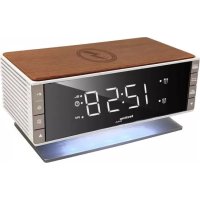
WT 487 - Alarm Clock TECHNOLINE - Free user manual and instructions
Find the device manual for free WT 487 TECHNOLINE in PDF.



| Product type | Clock radio |
| Brand | TECHNOLINE |
| Model | WT 487 |
| Color | Black (estimated) |
| Main power supply | AC/DC adapter 5V-2500mA (included) |
| Backup power supply | 1 CR2032 lithium battery (not included) |
| Display | LED with brightness adjustment (low/high/off) |
| Radio | FM, memory for up to 20 stations |
| Alarms | 2 independent alarms (buzzer or radio) |
| Snooze function | Repeat from 5 to 60 minutes |
| Wireless charging | Qi, compatible with Qi-compatible smartphones |
| USB port | 1 USB type A port for charging (5V, max 2.5A shared) |
| Built-in lighting | Ambiance lamp (on/off by long press) |
| Antenna | FM wire, extendable |
| Time display format | 12H or 24H |
| Alarm duration | 1 hour (radio) / 5 minutes (buzzer) |
| Care and cleaning | Soft cloth dampened with water and mild soap |
| Safety | Do not expose to water, shocks, extreme temperatures |
| Spare parts | AC/DC adapter model HX13-0502500-AG-001 |
| Repairability | Do not open the casing, no user-serviceable parts |
| General information | Compliant with directives 2014/53/EU and ROHS 2011/65/EC |
Frequently Asked Questions - WT 487 TECHNOLINE
User questions about WT 487 TECHNOLINE
0 question about this device. Answer the ones you know or ask your own.
Ask a new question about this device
Download the instructions for your Alarm Clock in PDF format for free! Find your manual WT 487 - TECHNOLINE and take your electronic device back in hand. On this page are published all the documents necessary for the use of your device. WT 487 by TECHNOLINE.
USER MANUAL WT 487 TECHNOLINE
A2: Alarm 1 AN Symbol A3: RADIO/SLEEP Taste
A4: ALARM 1-2 SET/ON-OFF Taste A5: CLOCK SET/MEMORY Taste
A6:DOWN Taste A7:Alarm 2 AN Symbol
PFLEGE IHRES PRODUKTS
LED Clock Radio with Wireless Charging, Mood Light and USB Charging Port
OVERVIEW
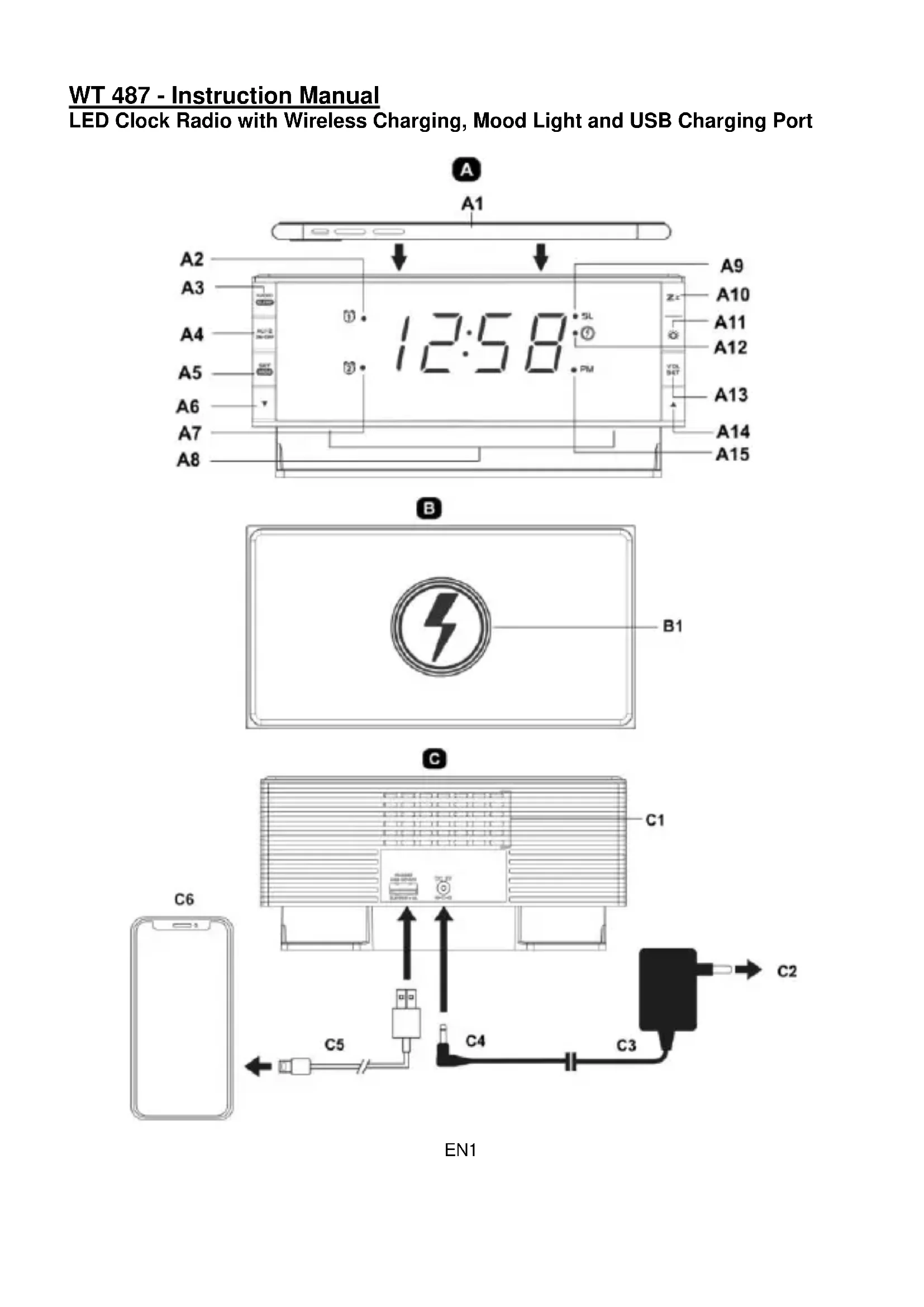
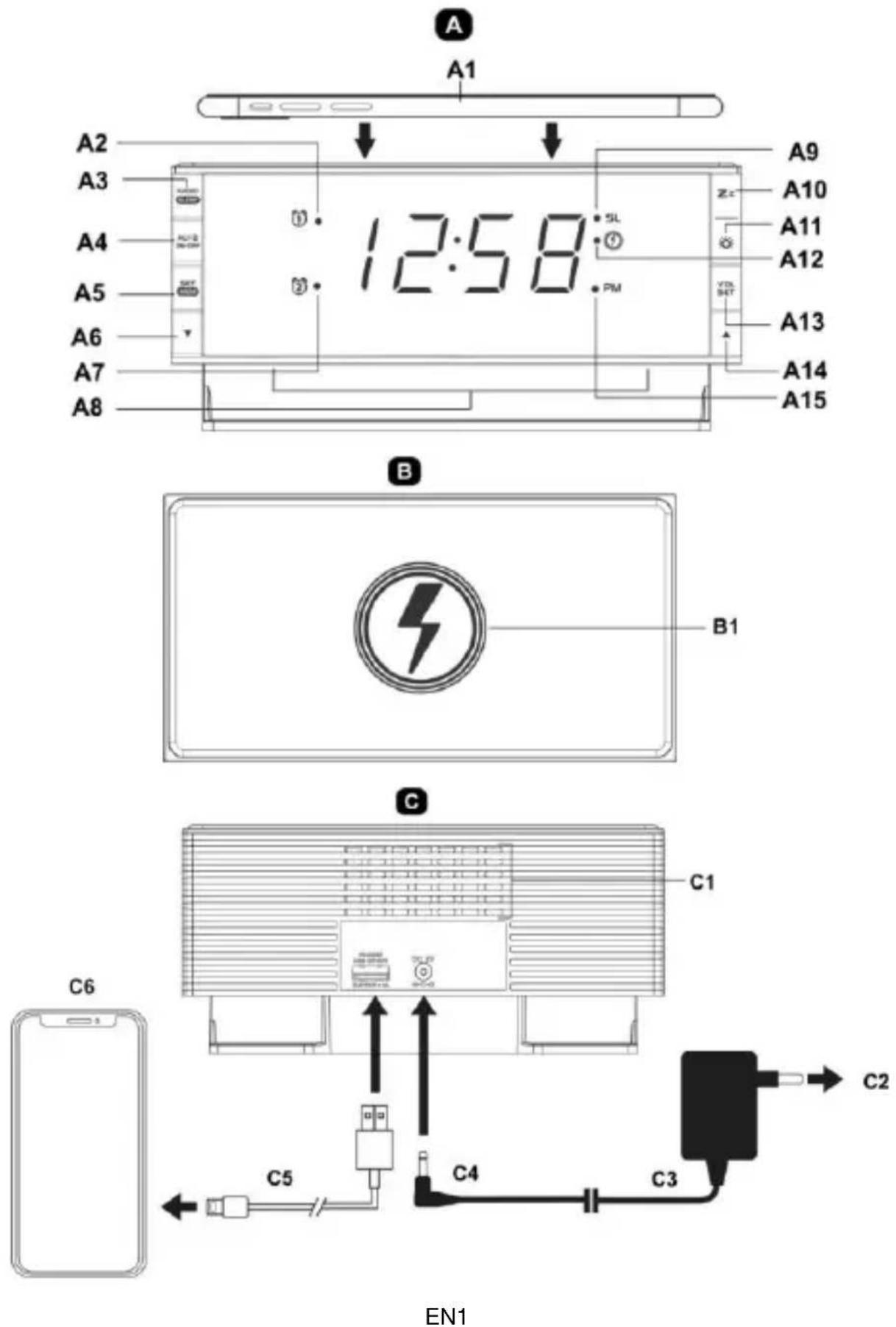
A-Front view
A1: Place mobile device (not included) on top for wireless charging
A2: Alarm 1 ON icon A3: RADIO/SLEEP button
A4: ALARM 1-2 SET/ON-OFF button A5: CLOCK SET/MEMORY button
A6:DOWN button A7:Alarm2ONicon
A8: Mood light A9: SLEEP icon
A10: SNOOZE button A11: DIMMER button
A12: Wireless charging ON icon A13: VOLUME SET button
A14:UP button A15:PM icon
B - Top view
B1:Charging coil (charging target circle)
C-Back view
C1: Heat release vent C2: AC wall outlet
C3: 5V-2500mA AC/DC adapter C4: Insert DC jack to power up your unit
C5: USB charging cable (not included) C6: Mobile devices (not applicable for tablet / iPad)
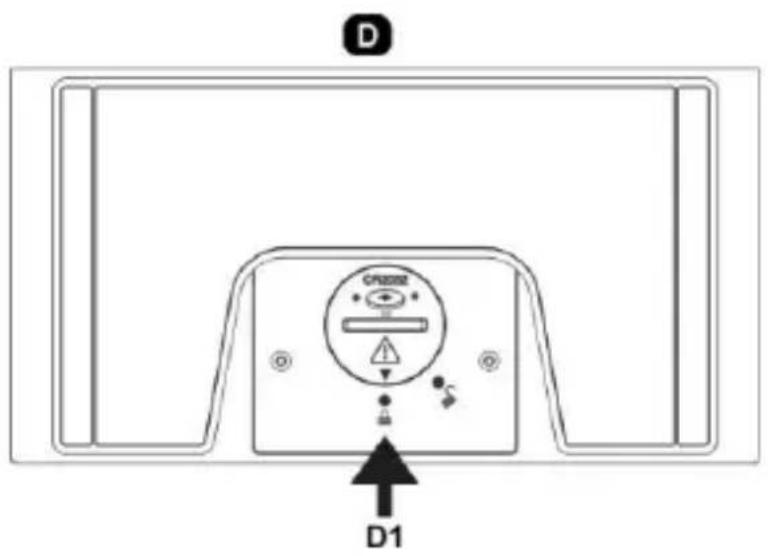
D-Bottom view
D1: Backup battery ( 1x CR2032, not included)
Please read these instructions carefully and keep the manual for future reference.
Plug in the AC/DC adaptor to an AC household outlet, and then plug the DC jack to the back of the unit. The display shows
the default time (at Lo-dim brightness). Press Zz once to turn the time display to high brightness if need.
TO INSTALL BACKUP BATTERY ON YOUR CLOCK RADIO
Your clock radio requires one lithium cell "CR2032" battery (not included) to provide backup power to it in the event of a temporary power interruption.
- Place your clock radio face down on a flat and soft surface.
Use a coin to turn the battery cover anti-clockwise at the back of your unit.
- Insert one new lithium cell "CR2032" battery into the battery compartment by observing the "+" polarity facing upward.
- Replace the battery cover and turn clockwise to lock it.
If AC power is interrupted and backup batteries are being used, the time and all settings of your unit will be kept. The alarm, radio, mood light and wireless charging do not function and the time display does not light up.
TO USE THE WIRELESS CHARGER
This function only works with mobile devices that support Qi technology.
- Make sure your clock radio is connected with the adaptor (5V-2.5A) supplied with this clock radio. Unauthorized chargers or adaptors may cause damage or the wireless charger may malfunction.
Center your mobile device with back side down on the marked charging target circle. The wireless charging indicator is on. - If your mobile device is not charging, the charging indicator is off. Please verify that your mobile device is not shifted too far off center.
- Using the external wireless charging receiver connected to non-Qi compatible mobile device may result in unstable charging.
- Do not put any foreign object (metal) on the charging target circle any time or under the mobile device during charging. The wireless charging indicator flashes and charging will stop.
Note: the wireless charging indicator light alerts you to the wireless chargers status:
| Charging indicator | Status | Mobile device position | Top view |
| ● | Light is on, mobile device is charging properly. Make sure your device is aligned to this units charging area. Center your device with back side down on the marked charging target circle. | √ | Mobile devices |
| Light is off, if: 1 – your mobile device is removed from the wireless charging surface 2 – your mobile device is not placed on the charging surface properly 3 – the radio clock is not connected to a power outlet. | Charging target circle | ||
| Please verify that your mobile device is not shifted too far off centre. Lift up the mobile device from the charging surface and put it back on properly. | X X | ② ② | |
| Light is flashing when not charging properly due to a general error. Do not place foreign materials, such as metal objects, magnets and magnetic stripe cards, between the mobile device and the wireless charging target circle during charging. | X | Do not place any foreign object (metal) on the charging coil at any time or under the mobile device during charging |
CAUTION: -
- Do not place a wireless charging receiver solely on the wireless charging surface. Doing so may overheat the wireless charger and cause a fire. It may also result in serious burn or device malfunction.
If you place a mobile device on the wireless charging surface for an extended period, the wireless charger may overheat and stop charging. - Do not cover or block the heat release vent at the back of the clock radio.
- When the mobile device is fully charged, remove it from the wireless charging surface.
- Do not place foreign materials, such as metal objects, magnets, magnetic stripe cards, paper clips etc. between the mobile device and the wireless charging surface. The mobile device may not charge properly or may be damaged due to overheating.
- Wireless charging may not work properly if you attach a thick case to your mobile device. If your case is thick, remove it before placing your mobile device on the wireless charging surface.
If you connect a charger to the mobile device during wireless charging, the wireless charging feature will be unavailable.
TO CHARGE MOBILE DEVICES WITH THE USB PORT
Connect the charging cable of your mobile phone to the A-type USB port at the back of the unit, then connect the other end to your mobile phone. The clock radio will charge the mobile phone automatically.
Notes :
Make sure to use the original cable of your mobile phone for charging
- Make sure the original adaptor (5V-2.5A) enclosed with your clock radio is being used to power your clock radio. Using other adaptors may not charge your phone.
- iPad and Notepad charging is not applicable.
- Charging one mobile device by the USB port and another mobile device by the wireless charger at the same time will reduce the charging efficiency and extend the charging time.
TO SET TIME AND SNOOZE DURATION (default time is at 0:00)
- Press SET once during time display mode and, the hour digit "0" flashes. Press or to set the hours.
- Press SET once again, the minute digits "00" flash. Press or to set the minutes.
- Press SET once again, press or to select "24Hr" ⇔ "12Hr". A PM indicator will appear to indicate the afternoon time in the 12Hr time format. There is no AM indicator.
- Press SET once again, "n05" flashes, press or to set the snooze duration (from 5 min to 60 min.).
- Press SET again to confirm. The set time is displayed.
Notes:
The clock exits the set mode when no key is pressed in approximate 10 seconds.
- Press and hold or will accelerate setting at high speed.
TO SET ALARM 1 AND ALARM 2 (default alarm time at 6:00)

- Press and hold AL1-2 /ON-OFF, LED and hour digit “6” flash, press or to set the desired hour. Press and hold to accelerate setting at high speed.
- Press AL1-2 /ON-OFF once again, the minute digits "00" flash. Press or to set desired minutes. Press and hold or to accelerate setting at high speed.
- Press hold AL1-2 /ON-OFF once again, LCD displays "bu" (buzzer.), Press ▲ or ▼ to select the wake-up sound sources :-
bu = Buzzer rd = Radio

LED and hour digit "6" flash. Repeat Step 1 to 3
- Press AL1-2 /ON-OFF once again, LED and hour digit “6” flash. Repeat Step 1 to 3 above to set Alarm 2.
- In the middle of setting the alarm, press SET once to store your alarm setting and exit the alarm set mode.
Note: the clock exits the alarm set mode when no key is pressed in approximate 10 seconds.
TO TURN ON OR OFF ALARM 1 AND 2
- Press AL1-2 /ON-OFF once to activate Alarm 1, LED appears.
-
Press once again to activate Alarm 2, I e d appears.
-
Press once again to activate both Alarm 1 and 2. Both LED and LED appear.
- Press once again to deactivate both alarms (both ① LED and ② LED disappear).
TO STOP AND RESET THE ALARM TO COME ON THE NEXT DAY
When alarm 1 or 2 is sounding, the related alarm icon flashes. Press AL1-2 /ON-OFF once to stop
the alarm and reset it to come on the following day. After that both LED and/or LED remain on the display.
TO ACTIVATE THE SNOOZE FUNCTION (default snooze duration is 5 minutes)
When alarm is sounding, press Zz once, the alarm will be silenced momentarily and come on again after the set snooze duration.
Note: if your second alarm activates while the first alarm is sounding or it is in the snooze mode, the second alarm overrides the first alarm (the first alarm is reset to come on the next day).
TO SET UP THE FM ANTENNA
Extend the FM wire antenna fully and vary the direction for best FM reception. Do not strip, alter or attach to other antennas.
TO LISTEN TO THE FM RADIO
To turn on the radio, press RADIO/SLEEP once, the display shows "ON" and then the radio frequency readings in Mhz.
- Press or to tune the radio to a desired station. Press and hold or to scan for the next clear station.
To adjust the volume, press VOL SET once, the display shows "L07", press or to adjust volume from L01 (minimum) to L16 (maximum).
- Press RADIO/SLEEP to turn off the radio.
Note: keep your radio away from fluorescent lamps or other electronic devices, which may cause interference to the radio.
TO STORE FM RADIO STATIONS IN MEMORY
This clock radio features a total of 20 preset memories of FM stations. These allow you to preset your favorite stations and access them quickly.
- Press RADIO/SLEEP once to turn on the radio. Then tune to a FM radio station you like to preset.
Press and hold the SET until "P01" flashes. Press SET once to store to "P01".
Press or to select another station you like to preset (the radio frequency is displayed). - Press and hold SET until “P02” flashes. Press once to select “P02”, then press SET once to store to “P02”.
Repeat Step 2 to 4 to store radio stations to P03 through P20.
To remove a pre-stored station, repeat steps 2 to 4 to store another station in its place.
TO SELECT A PRESET RADIO STATION
When the radio is on, press SET once. Then press or repeatedly to select a preset station.
TO SET THE SLEEP TIMER
- When the radio is on, press and hold RADIO/SLEEP, the sleep time "05" (5 minutes) appears on the display.
- Press RADIO/SLEEP repeatedly to select a period (in minutes) from 05, 10, 15, 30, 45, 60, 75, 90 or OFF.
The clock radio reverts to the time display automatically in a few seconds. Press and hold RADIO/SLEEP to see the sleep time remaining. - Press RADIO/SLEEP once to deactivate the radio and the sleep function before the sleep time has elapsed.
TO USE THE HI-LO DIMMER
At normal time display mode, press Zz once to adjust the brightness (HI / LO / OFF) of the time display.
TO TURN ON AND OFF THE MOOD LIGHT
Press and hold to turn off the mood light. Press again to turn it on again.
TROUBLESHOOTING
If your clock displays irrelevant time or does not function properly, which maybe caused by electrostatic discharge or other interference. Unplug the DC jack at the back of the unit, slide open the battery cover and take out the batteries. Then re-plug the DC jack and reinstall batteries by observing the correct +/- polarity. Your unit will be reset to default settings and you need to set it again.
CARE OF YOUR PRODUCT
- Place your unit on a stable surface, away from sources of direct sunlight or excessive heat or moisture.
- Protect your furniture when placing your units on a natural wood and lacquered finish by using a cloth or protective material between it and the furniture.
Clean your unit with a soft cloth moistened only with mild soap and water. Stronger agents such as Benzine, thinner or similar materials can damage the surface of the unit. Make sure the unit is unplugged before cleaning. - Do not mix old and new batteries. Do not mix alkaline, standard (carbon-zinc), or rechargeable (nickel-cadmium) batteries.
- If the unit is not to be used for a prolonged period, such as a month or longer, remove the batteries to prevent possible corrosion. Should the battery compartment become corroded or dirty, clean the compartment thoroughly and replace the batteries.
Do not open the inner back case or tamper with any components of this clock. - Do not plug in any other AC/AC or AC/DC adaptor with incorrect specifications or voltage.
Hereby, Technotrade declares that this product WT487 is in compliance with the essential requirements and other relevant provisions of Directive 2014/53/EU and ROHS 2011/65/EC. The original EU declaration of conformity may be found at: www.technoline.de/doc/4029665004877
SPECIFICATIONS
Alarm duration 1 hr (wake-to-radio), 5 minute (wake-to-buzzer)
Snoopze duration 5 to 60 minutes
AC/DC adapter
HX13-0502500-AG-001
Default settings:-
Time 24HR format
Alarm 1 and 2 6:00am (OFF)
Snoopze duration 05 (5 minutes)
Precautions
- This main unit is intended to be used only indoors.
- Do not subject the unit to excessive force or shock.
- Do not expose the unit to extreme temperatures, direct sunlight, dust or humidity.
- Do not immerse in water.
- Avoid contact with any corrosive materials.
- Do not dispose this unit in a fire as it may explode.
- Do not open the inner back case or tamper with any components of this unit.
Batteries safety warnings
Install batteries correctly by matching the polarities (+ / - )
Always replace a complete set of batteries.
- Never mix used and new batteries.
- Remove exhausted batteries immediately.
- Remove batteries when not in use.
- Do not recharge and do not dispose of batteries in fire as the batteries may explode.
- Ensure batteries are stored away from metal objects as contact may cause a short circuit.
- Avoid exposing batteries to extreme temperature or humidity or direct sunlight.
- Keep all batteries out of reach from children. They are a choking hazard.
Use the product only for its intended purpose!
Consideration of duty according to the battery law
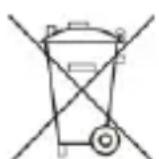
Old batteries do not belong to domestic waste because they could cause damages of health and environment. You can return used batteries free of charge to your dealer and collection points. As end-user you are committed by law to bring back needed batteries to distributors and other collecting points!
Consideration of duty according to the law of electrical devices
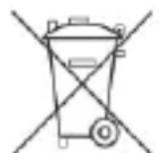
This symbol means that you must dispose of electrical devices separated from the General household waste when it reaches the end of its useful life. Take your unit to your local waste collection point or recycling centre. This applies to all countries of the European Union, and to other European countries with a separate waste collection system.
∴ m = 3/11
6:00am (DESCONECTADA)
05 (5 Minutes)
Precauciones
A12: Icona Ricarica Wireless ON
A13: Pulsante VOLUME SET
A14: Pulsante SU
A15: Icona PM
B - Vista dall'alto
- PFLEGE IHRES PRODUKTS
- LED CLOCK RADIO WITH WIRELESS CHARGING, MOOD LIGHT AND USB CHARGING PORT
- OVERVIEW
- A-FRONT VIEW
- B - TOP VIEW
- C-BACK VIEW
- D-BOTTOM VIEW
- TO INSTALL BACKUP BATTERY ON YOUR CLOCK RADIO
- TO USE THE WIRELESS CHARGER
- CAUTION
- TO CHARGE MOBILE DEVICES WITH THE USB PORT
- TO SET TIME AND SNOOZE DURATION (DEFAULT TIME IS AT 0:00)
- NOTES
- TO SET ALARM 1 AND ALARM 2 (DEFAULT ALARM TIME AT 6:00)
- TO TURN ON OR OFF ALARM 1 AND 2
- TO STOP AND RESET THE ALARM TO COME ON THE NEXT DAY
- TO ACTIVATE THE SNOOZE FUNCTION (DEFAULT SNOOZE DURATION IS 5 MINUTES)
- TO SET UP THE FM ANTENNA
- TO LISTEN TO THE FM RADIO
- TO STORE FM RADIO STATIONS IN MEMORY
- TO SELECT A PRESET RADIO STATION
- TO SET THE SLEEP TIMER
- TO USE THE HI-LO DIMMER
- TO TURN ON AND OFF THE MOOD LIGHT
- TROUBLESHOOTING
- CARE OF YOUR PRODUCT
- SPECIFICATIONS
- PRECAUTIONS
- BATTERIES SAFETY WARNINGS
- CONSIDERATION OF DUTY ACCORDING TO THE BATTERY LAW
- CONSIDERATION OF DUTY ACCORDING TO THE LAW OF ELECTRICAL DEVICES
- PRECAUCIONES
- B - VISTA DALL'ALTO
Brand : TECHNOLINE
Model : WT 487
Category : Alarm Clock