
MultiSync LCD195WXM - Monitor NEC - Free user manual and instructions
Find the device manual for free MultiSync LCD195WXM NEC in PDF.

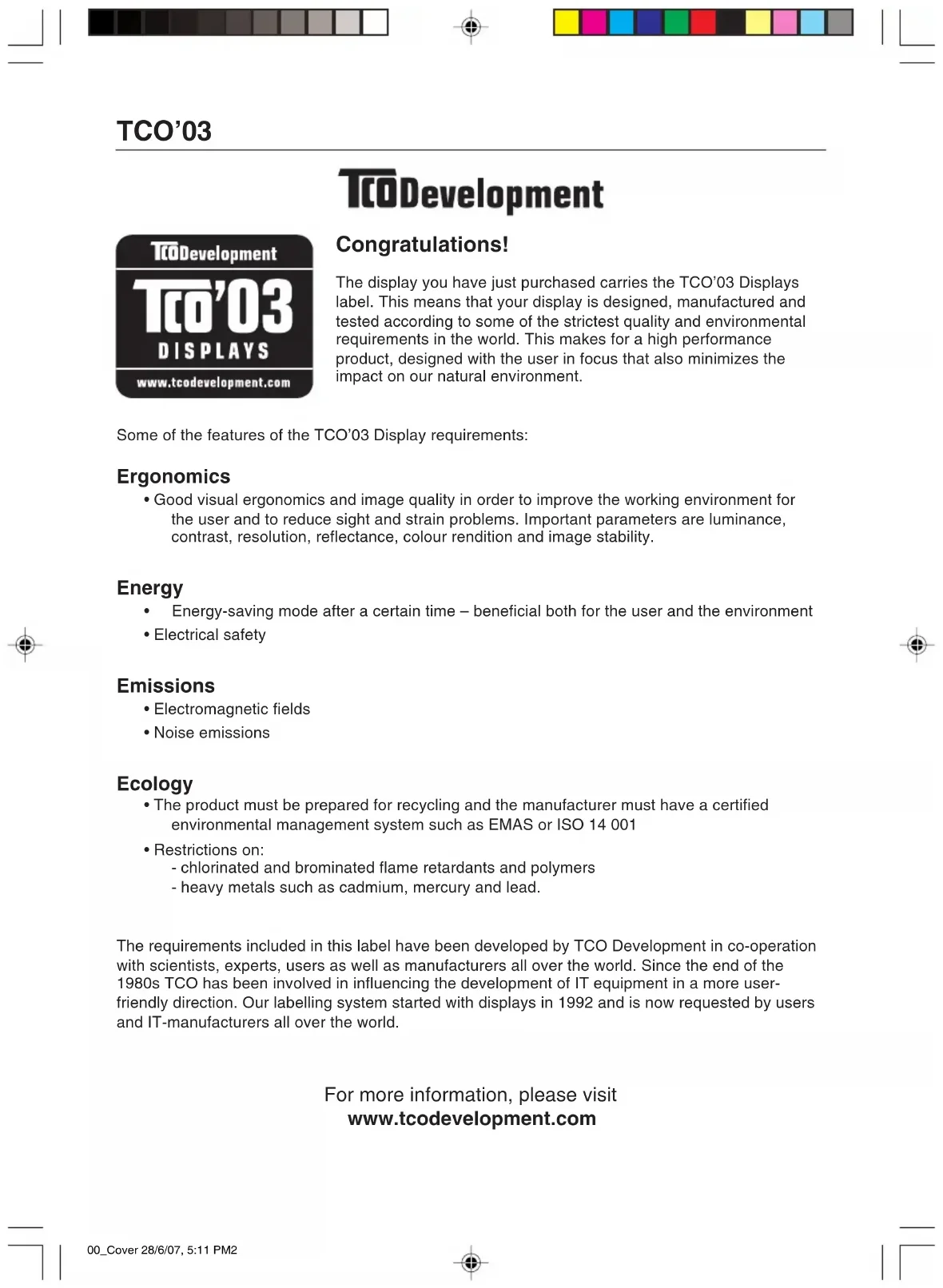


| Product type | LCD Monitor |
| Brand | NEC |
| Model | MultiSync LCD195WXM |
| Screen size | 19 inches (48.26 cm) |
| Weight | 4.6 kg max |
| Power supply | Mains (power cord included) |
| Power consumption | Not specified |
| Video connectivity | D-SUB 15-pin (analog), DVI-D (digital) |
| Audio connectivity | Audio input, headphone output |
| Built-in speakers | Yes |
| Adjustments | Height, tilt, swivel |
| OSD functions | Brightness, contrast, volume, auto adjustment, colors, language |
| Native resolution | Not specified (supported: 1280x768, 1360x768) |
| Safety | Do not expose to moisture, do not open, consult a professional |
| Maintenance | Clean with a soft, dry cloth |
| Spare parts and repairability | Contact an authorized service center |
| Package contents | Monitor with stand, video cables (D-SUB and DVI-D), audio cable, power cord, CD-ROM, manual, cable cover |
| Compatibility | PC, Mac (Mac adapter not included) |
| Standards | CE (EN 60950-1, EN55022, EN61000-3-2, EN61000-3-3, EN55024) |
Frequently Asked Questions - MultiSync LCD195WXM NEC
User questions about MultiSync LCD195WXM NEC
0 question about this device. Answer the ones you know or ask your own.
Ask a new question about this device
Download the instructions for your Monitor in PDF format for free! Find your manual MultiSync LCD195WXM - NEC and take your electronic device back in hand. On this page are published all the documents necessary for the use of your device. MultiSync LCD195WXM by NEC.
USER MANUAL MultiSync LCD195WXM NEC
PykoBoDCTBO POnb3OBaTeJIa

TCO'03
TcODevelopment
Development
T0'03
DISPLAYS
www.tcodevelopment.com
Congratulations!
The display you have just purchased carries the TCO'03 Displays label. This means that your display is designed, manufactured and tested according to some of the strictest quality and environmental requirements in the world. This makes for a high performance product, designed with the user in focus that also minimizes the impact on our natural environment.
Some of the features of the TCO'03 Display requirements:
Ergonomics
- Good visual ergonomics and image quality in order to improve the working environment for the user and to reduce sight and strain problems. Important parameters are luminance, contrast, resolution, reflectance, colour rendition and image stability.
Energy
Energy-saving mode after a certain time - beneficial both for the user and the environment
- Electrical safety
Emissions
- Electromagnetic fields
- Noise emissions
Ecology
- The product must be prepared for recycling and the manufacturer must have a certified environmental management system such as EMAS or ISO 14 001
-
Restrictions on:
-
chlorinated and brominated flame retardants and polymers
- heavy metals such as cadmium, mercury and lead.
The requirements included in this label have been developed by TCO Development in co-operation with scientists, experts, users as well as manufacturers all over the world. Since the end of the 1980s TCO has been involved in influencing the development of IT equipment in a more user-friendly direction. Our labelling system started with displays in 1992 and is now requested by users and IT-manufacturers all over the world.
For more information, please visit
www.tcodevelopment.com
Manufacturer's Recycling and Energy Information
NEC DISPLAY SOLUTIONS is strongly committed to environmental protection and sees recycling as one of the company's top priorities in trying to minimize the burden placed on the environment. We are engaged in developing environmentally-friendly products, and always strive to help define and comply with the latest independent standards from agencies such as ISO (International Organisation for Standardization) and TCO (Swedish Trades Union).
Disposing of your old NEC product
The aim of recycling is to gain an environmental benefit by means of re-use, upgrading, reconditioning or reclamation of material. Dedicated recycling sites ensure that environmentally harmful components are properly handled and securely disposed. To ensure the best recycling of our products, NEC DISPLAY SOLUTIONS offers a variety of recycling procedures and gives advice on how to handle the product in an environmentally sensitive way, once it has reached the end of its life.
All required information concerning the disposal of the product and country-specific information on recycling facilities can be found on our following websites:
http://www.nec-display-solutions.com/greencompany/ (in Europe),
http://www.nec-display.com (in Japan) or
http://www.necdisplay.com (in USA).
Energy Saving
This monitor features an advanced energy saving capability. When a VESA Display Power Management Signalling (DPMS) Standard signal is sent to the monitor, the Energy Saving mode is activated. The monitor enters a single Energy Saving mode.
| Mode Power | consumption LED colour | |
| Normal Operation Approx. 42W Green | ||
| Energy Saving Mode Less than 2W Orange | ||
| Off Mode Less than 1W Unlit | ||
WEEE Mark (European Directive 2002/96/EC)


Within the European Union
EU-wide legislation, as implemented in each Member State, requires that waste electrical and electronic products carrying the mark (left) must be disposed of separately from normal household waste. This includes monitors and electrical accessories, such as signal cables or power cords. When you need to dispose of your NEC display products, please follow the guidance of your local authority, or ask the shop where you purchased the product, or if applicable, follow any agreements made between yourself and NEC.
The mark on electrical and electronic products only applies to the current European Union Member States.
Outside the European Union
If you wish to dispose of used electrical and electronic products outside the European Union, please contact your local authority so as to comply with the correct disposal method.
Chinese RoHS-information relevant for Chinese market
TO PREVENT FIRE OR SHOCK HAZARDS, DO NOT EXPOSE THIS UNIT TO RAIN OR MOISTURE. ALSO, DO NOT USE THIS UNIT'S POLARIZED PLUG WITH AN EXTENSION CORD RECEPTACLE OR OTHER OUTLETS UNLESS THE PRONGS CAN BE FULLY INSERTED REFRAIN FROM OPENING THE CABINET AS THERE ARE HIGH VOLTAGE COMPONENTS INSIDE. REFER SERVICING TO QUALIFIED SERVICE PERSONNEL.

CAUTION

RISK OF ELECTRIC SHOCK·DO NOT OPEN
CAUTION: TO REDUCE THE RISK OF ELECTRIC SHOCK, DO NOT REMOVE COVER (OR BACK). NO USER SERVICEABLE PARTS INSIDE. REFER SERVICING TO QUALIFIED SERVICE PERSONNEL.

This symbol warns user that uninsulated voltage within the unit may have sufficient magnitude to cause electric shock. Therefore, it is dangerous to make any kind of contact with any part inside this unit.

This symbol alerts the user that important literature concerning the operation and maintenance of this unit has been included. Therefore, it should be read carefully in order to avoid any problems.
Declaration of the Manufacturer
We hereby certify that the colour monitor MultiSync LCD195WXM (L195H0) is in compliance with
Council Directive 73/23/EEC: EN 60950-1
and marked with
Council Directive 89/336/EEC: EN 55022
-EN61000-3-2
-EN61000-3-3
-EN55024

NEC Display Solutions, Ltd. 4-13-23, Shibaura,
Minato-Ku
Tokyo 108-0023, Japan
Contents
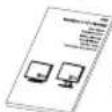
User's Manual

Audio Cable

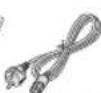
Power Cord

Cable management cover

CD-ROM
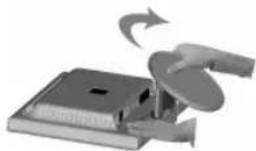
Macintosh Cable Adapter (not included)
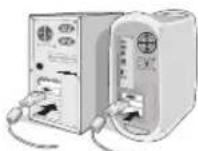
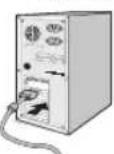
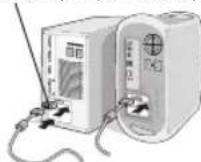
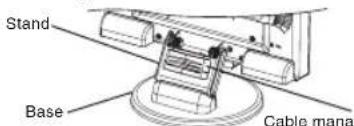
Figure A.1 Figure A.2 Figure A.3
Figure A.3
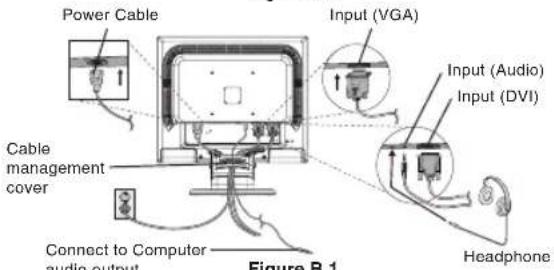
Figure B.1
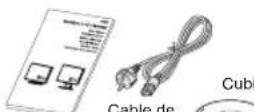
Your new NEC MultiSync LCD monitor box* should contain the following:
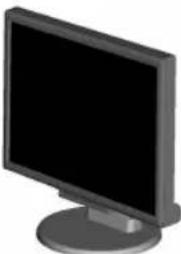
MultiSync LCD monitor with tilt base
Audio Cable
Power Cord
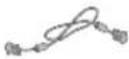
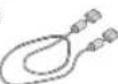
Video Signal Cable (15-pin mini D-SUB male to 15-pin mini D-SUB male)
V ideo Signal Cable (DVI-D to DVI-D)
- User's Manual
CD-ROM
- Cable management cover
Remember to save your original box and packing material to transport or ship the monitor.
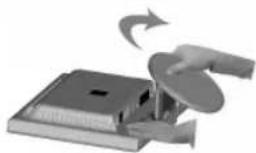
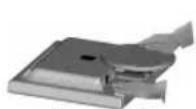
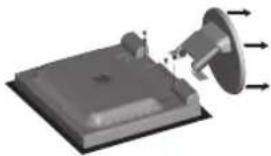
Topull the stand, follow these instructions:
- Place monitor face down on a non-abrasive surface (Figure 1).
- Pull the stand holding the monitor with the other hand until the stand clicks (Figure 2).
NOTE: Handle with care when pulling the stand.
NOTE: Reverse this procedure if you need to re-pack the monitor.
Toattach the MultiSync LCD monitor to your system, follow these instructions:
1. Turn off the power to your computer.
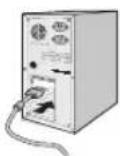
2. For the PC or MAC with DVI digital output: Connect the DVI-D signal cable to the connector of the display card in your system (Figure A.1). Tighten all screws.
For the PC with Analog output: Connect the 15-pin mini D-SUB signal cable to the connector of the display card in your system (Figure A.2). Tighten all screws.
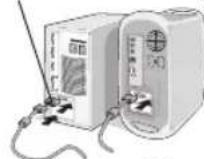
For the Mac: Connect the MultiSync Macintosh cable adapter (not included) to the computer. Attach the 15-pin mini D-SUB signal cable to the MultiSync Macintosh cable adapter (Figure A.3). Tighten all screws.
NOTE: Some Macintosh systems do not require a Macintosh cable adapter.
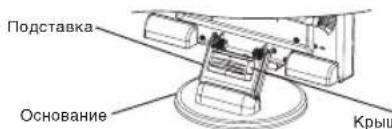
3. To attach the Cable management cover: Insert the tabs of the Cable management cover into the holes of Stand neck and slide the Cable management cover downward into place (Figure A.4).
NOTE: Please confirm that the tabs are completely secure.
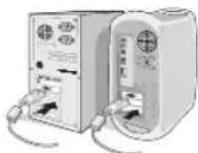
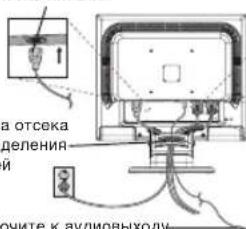
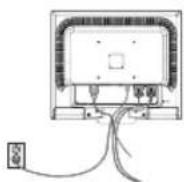
4. Connect all cables to the appropriate connector on the back of the monitor (Figure B.1). Connect the Headphone (not included) to the appropriate connector at the rear side of the monitor (Figure C.1).
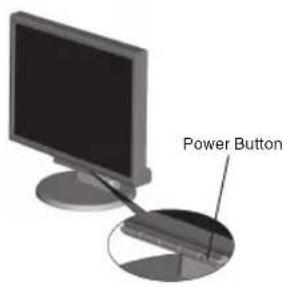
Figure C.1
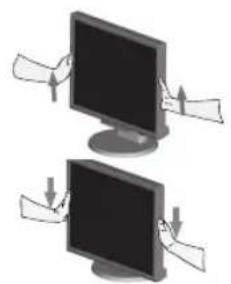
Figure RL.1
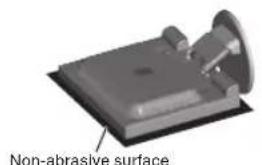
Figure R.1
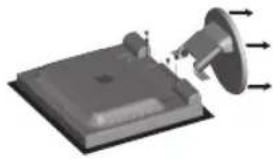
Figure R.2
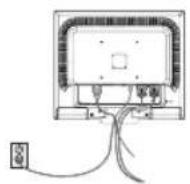
Figure R.3
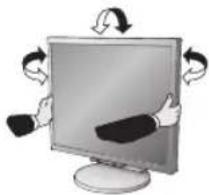
Figure TS.1
Specifications
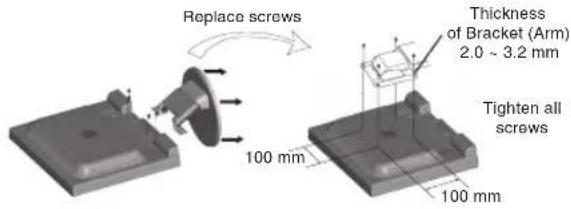
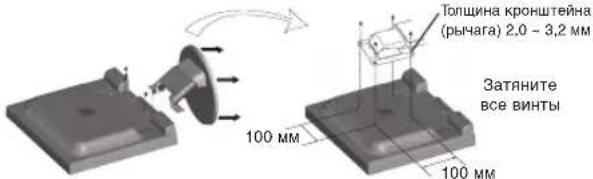
4-SCREWS (M4) MAX depth: 8.5mm If use other screw, check depth of hole.
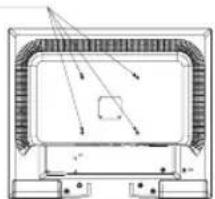
Weight of LCD assembly: 4.6 kg (MAX)
- Connect one end of the power cord to the monitor and the other end to the power outlet. Place the Video Signal Cable, Audio cable and power cord to the Cable management cover (Figure B.1).
NOTE: Adjust position of cable that place under the Cable management cover to avoid damage for cable or monitor.
NOTE: Please refer to Caution section of this manual for proper selection of power cord.
-
Turn on the monitor with the front power button and the computer (Figure C.1).
-
No-touch Auto Adjust automatically adjusts the monitor to optimal settings upon initial setup for most timings. For further adjustments, use the following OSD controls:
-
Auto Adjust Contrast
-
Auto Adjust
Refer to the Controls section of this User's Manual for a full description of these OSD controls.
NOTE: If you have any problem, please refer to the Troubleshooting section of this User's Manual.
Raise and Lower Monitor Screen
The monitor may be raised or lowered. To raise or lower screen, place hands on each side of the monitor and lift or lower to the desired height (Figure RL.1).
NOTE: Handle with care when raising or lowering the monitor screen.
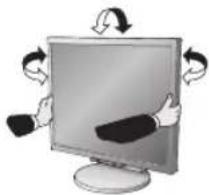
Tilt and Swivel
Grasp both sides of the monitor screen with your hands and adjust the tilt and swivel as desired (Figure TS.1).
NOTE: Handle with care when tilting and swivelling the monitor screen.
Remove Monitor Stand for Mounting
To prepare the monitor for alternative mounting purposes:
-
Disconnect all cables.
-
Place monitor face down on a non-abrasive surface (Figure R.1).
-
Remove the 4 screws connecting the monitor to the stand and remove the stand as indicated (Figure R.2). The monitor is now ready for mounting in an alternative manner.
-
Connect the AC cord and signal cables to the back of the monitor (Figure R.3).
-
Reverse this process to re-attach stand.
NOTE: Use only VESA-compatible alternative mounting method.
NOTE: Handle with care when removing monitor stand.
Connecting a Flexible Arm
This LCD monitor is designed for use with a flexible arm. Please use the attached screws (4pcs) as shown in the picture when installing. To meet the safety requirements, the monitor must be mounted to an arm which guarantees the necessary stability under consideration of the weight of the monitor. The LCD monitor shall only be used with an approved arm (e.g. GS mark).
Controls
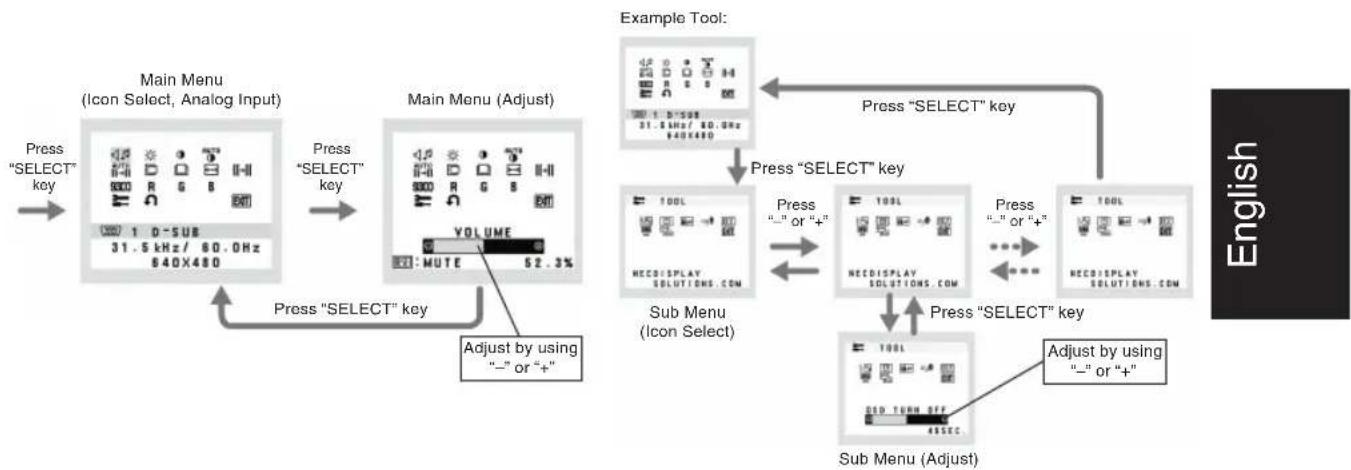
OSD (On-Screen-Display) control buttons on the front of the monitor function as follows:
- Basic function at pressing each key
| Button | SELECT | - | + | 1<-2 / RESET |
| At No OSD showing | Showing OSD. Shortcut to Bright adjust window. | Shortcut to Volume adjust window. | Input signal select. | |
| At OSD showing (Icon selection stage) | Go to Adjustment stage. Cursor goes to left. Cursor goes to right. | |||
| At OSD showing (Adjustment stage) | Go to Icon selection stage. Adjust value decrease or Cursor for adjust goes to left. | Adjust value increase or Cursor for adjust goes to right. | Reset operation. Mute off/on switch on Volume adjustment window. | |
2. OSD structure
AUDIO
Control the sound volume of speakers and headphone. Tomute the speaker sound, press the 1<-2/RESET key.
BRIGHTNESS
Adjusts the overall image and background screen brightness.
CONTRAST
Adjusts the image brightness in relation to the background.
AUTO AUTO CONTRAST (Analog Input only)
Adjusts the image displayed for non-standard video inputs.
AUTO AUTO ADJUST (Analog Input only)
Automatically adjusts the Image Position, the H. Size and Fine setting.
LEFT/RIGHT (Analog Input only)
Controls Horizontal Image Position within the display area of the LCD.
DOWN/UP (Analog Input only)
Controls Vertical Image Position within the display area of the LCD.
H. SIZE (Analog Input only)
Adjusts the horizontal size by increasing or decreasing this setting.
FINE (Analog Input only)
Improves focus, clarity and image stability by increasing or decreasing this setting.
930 COLOUR CONTROL SYSTEMS
Five colour presets (9300/7500/sRGB/USER/NATIVE) select the desired colour setting.
The sRGB and NATIVE, colour presets are standard and cannot be changed.
COLOUR RED
Increase or decreases Red. The change will appear on the screen.
G COLOUR GREEN
Increase or decreases Green. The change will appear on screen.
B COLOUR BLUE
Increase or decreases Blue. The change will appear on the screen.
TOOL
Selecting TOOL allows you to get into the sub menu.
FACTORY PRESET
Selecting Factory Preset allows you to reset all OSD control settings back to the factory settings. The RESET button will need to be held down for several seconds to tage effect. Individual settings can be reset by highlighting the control to be reset and pressing the RESET button.

EXIT
Selecting EXIT allows you exit OSD menu/ sub menu.

LANGUAGE
OSD control menus are available in nine languages.

OSD TURNOFF
The OSD control menu will stay on as long as it is in use. In the OSD Turn OFF submenu, you can select how long the monitor waits after the last touch of a button to shut off the OSD control menu. The preset choices are 10 - 120 seconds by 5 seconds step.

OSD LOCK OUT
This control completely locks out access to all OSD control functions without Brightness and Contrast. When attempting to activate OSD controls while in the Lock Out mode, a screen will appear indicating the OSD are locked out. To activate the OSD Lock Out function, press "1<->2/RESET", then "+" key and hold down simultaneously. To de-activate the OSD Lock Out, press "1<->2/RESET", then "+" key and hold down simultaneously.

RESOLUTION NOTIFIER
If ON is selected, a message will appear on the screen after 30 seconds, notifying you that the resolution is not at optimal resolution.

DDC/CI
Turns ON or OFF the two way communication and control of the monitor.

MONITOR INFO
Indicates the model and serial numbers of your monitor.

INPUT RESOLUTION (Analog Input Only)
1280 x 768 and 1360 x 768.
1280 x 768: Determines the resolution to 1280 × 768 .
1360 x 768: Determines the resolution to 1360 × 768 .
OSD Warning
OSD Warning menus disappear with SELECT button
NO SIGNAL: This function gives a warning when there is no signal present. After power is turned on or when there is a change of input signal or video is inactive, the No Signal window will appear.
RESOLUTION NOTIFIER: This function gives a warning of use with optimized resolution. After power is turned on or when there is a change of input signal or the video signal doesn't have proper resolution, the Resolution Notifier window will open. This function can be disabled in the TOOL menu.
OUT OF RANGE: This function gives a recommendation of the optimized resolution and refresh rate. After the power is turned on or there is a change of input signal or the video signal doesn't have proper timing, the Out Of Range menu will appear.

WARNING

SETZEN SIE DAS GERAT WEDER REGEN NOCH FEUCHTIGKEIT AUS, DA ES ANDERNFALLS ZU FEUER ODER STROMSchLagen KOMMEN KANN. VERWENDEN SIE DEN NETZSTECKER DIEGS GRÄKES NIEKSEFFALS MIT EINERN VELIANGERSKABEL ODER EINER STECKDOSENLEISTE, WENN DIE STECKERSTIFTE NICT VOLLSTÄNDIG EINGEUFHRT WERDEN KONNEN.
EG-Directive 89/336/EG: EN 55022
EN61000-3-2
-EN61000-3-3
-EN55024

NEC Display Solutions, Ltd. 4-13-23, Shibaura,
Minato-Ku
Tokyo 108-0023, Japan
MultiSync LCD-Monitor
Kurzanleitung
NEC Display Solutions, Ltd. 4-13-23, Shibaura,
Minato-Ku Tokyo 108-0023, Japon
Contenido
Manual del usuario
erta para cables.

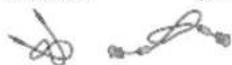
Cable de audio
Mini D-SUB de 15 clavijas macho a mini D-SUB de 15 clavijas macho
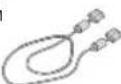
DVI-D a DVI-D
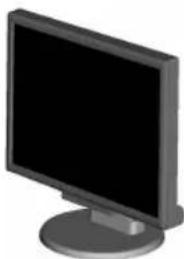
Monitor LCD MultiSync
Inicio=rápido
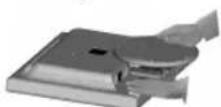
Figura 1 Figura 2
NEC Display Solutions, Ltd.
4-13-23, Shibaura,
Minato-Ku
Tokyo 108-0023, Japan
Sommaire
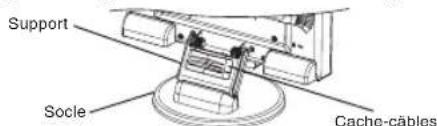
Figure A.1 Figure A.2
Figure A.4
NEC Display Solutions, Ltd. 4-18-20, Shihouqin
4-13-23, Shibaura,
Minato-Ku
m = 311
5 - 12 = 2
m = 311
DVI-D a DVI-D
Monitor LCD MultiSync
Guida rapida
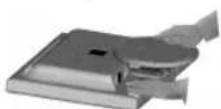
Figura 1 Figura 2
3aBHeHne n3roTOBnTeJIa
HactoamnnnoTBepeKdaem,HTOUBETHOHKK-MONHTOpMultiSync LCD195WXM(L195HO)coOTBeTCTByET
DnpeKtnBe CoBeta 73/23/EEC: ncoepkntOTMeTky
-EN60950-1
DynekeTnBe CobTa 89/336/EEC:
-EN55022
-EN61000-3-2
-EN61000-3-3
-EN55024

ME06

NEC Display Solutions, Ltd.
4-13-23. Shibaura.
Minato-Ku
Tokyo 108-0023, Japan
Copepkmoe
CYKOBIDACTBO nonth2048en

Kabenb
aydnocnHana
KabenbNTaHn


Kbkiya oTceka paonpenedenHH Kabenei
CD-ROM
15-KoHTaKTHbI
HN-pa3beM D-SUB
pduka oTecka aonpcpeJeHnna Kaoben
DVI-D-DVI-D
KK-3kpah MultiSync
Kpatkoe pykoBoDCTBO no haay pa60TbI
PncyHOK 1 PncyHOK 2
AanTepKaBenaMaCintosh(HeBXoDnT B KOMnNeKT)
PucyHok A.1 PucyHok A.2
Pucyok A.3
Pncyok A.4
KpbiKa oTceKa
pacnpedeeneHHaBenei
Kabenb nntahm
PnKIOHIOHTe K AynIOBbXOyO KOMNBoTepa
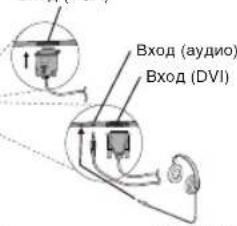
BxoΩ (VGA)
Pucyok B.1
Bynakobouho Kopo6ke HOBOROMOHITOPA NEC MultiSync LCD dONKHO 6bIb CnEduoee:
- MoHITop MultiSync LCD c wapHnHpHoi onopo
Ka6enb aydnocnHana
Ka6eBnTahm
Bndeokakb (15-kohtaKTHbMmH-pa3bEM D-SUB)
BndeokabeNB (DVI-D-DVI-D)
PykoBOCTBO nonb30BaTeN - DnCK CD-ROM
Kpbuoka oTceka pacnpedeJeHnKa6eNei
O63aTeHbHO coOpHAne KOp6KBy uNyaKoBvHbMaTePmHaJn TPAHcONTOHPOBKU HJIpeB03K MOnHToPA.
TObbI BvIDBHyTB NOCTABKy, BvINONHITe CneJeIOUne JeNCTBNA:
1.Noonxnte MOHITOP 3KpaHOM BHN3 Ha NOBepXHOCTb, KOtopaH Noapanaet 3KpAH (PcyHOK 1).
2. PnDepKINBAO OHHpyKO MOHTOP, DpyRO pyKO BbITAHNTe NOCTABKY DO 9JNKA (PcyHOK 2).
IPMMEUAHNE. BbDnraTe noCTabKy octopoXHO.
PIMMEAHNE. UTObI ynaKOBaTb MOHITOp, NOBtOpNte DeiCTBnB O6paTHOMnopAKe.
TTO6bI NOKIOHHTB KKKMOHOTop MultiSync LCD K CNTEMe, BINONHInTe CNEyOuue HNCTpykUnn:
1.OTKIOHNTe NITAHNE KOMNBIOTepa.
2.ДЯ KMnIbOTepe PC nH Macintosh c unfpobBIM bixoDM V1: PdKIOHHTe Ka6eJI BIVdeocINHaV DVI-D K pa3bemy NpTaBH BIDeOaIaTepa B KOMNbItepe (PcCyHOK A.1).3aTaNHTe BCE BNHTb. ⅡA K aHAnorOBbM bIXoDM: IooCoEHNHtate 15-tbIpbKOBbM MnHpa3bEM D-SUB Ka6eJI BIVdeocINHana K pa3bemy NpTaBH BIDeOaIaTepa B KOMNbItepe (PcCyHOK A.2).3aTaNHTe BCE BNHTb. ⅡMa: PioCoEHNHte AaIaTep Ka6eJI dN MaTIuSyMacintosh (He BVOnIT B KOMnNeKT K KCMNbItepe, PioKnHOHte Ka6eJI BIVdeocINHana C 15-tbIb6KbOBeM MmHpa3bEmoM D-SUB K aIaNTPepy Ka6eJI dN MultiSync Macintosh (PcCyHOK A.3).3aTaNHTe BCE BNHTb.
PIMMEAHNE. INHekOTopbIX KOMNbIeTepOB Macintosh aanTep Ka6en Macintosh He Tpe6yETc.
3. Tc0bIy cTahOBnTB KpbIuKy OTeCeKa pacnPepenHn KaBee, BInIOJNHte CneDyUOuNe DeEYCTBn: BCTaBtTe 3aueIkn KpbIKuOToCkEpaPpeHn KaBee B OTBepCTNa CTOnKe NOCTaBKn N, CdBHyB KpbIuKy BHm, ycTaHOBnTE ee Ha MeTO (PucyHOK A.4).
PIMMEUHNE.Y6eTeCb,HTO3aueKnHaJekHoΦKcpyIOT KpbIky.
4.ПОДКЛIOHHTe BCE KABENI K COOTBETCTBYOUM pa3bEMAM Ha 3aDHEI NaHEn MoHITOPa (PucyHOK B.1) POKJIIOHHTe HayuHINKII (HE BXoJAT B KOMNNEKT) K COOTBETCTBYOUcEMy pa3bEmy Ha 3aDHEI NaHEn MOHITOPa (PucyHOK C.1).
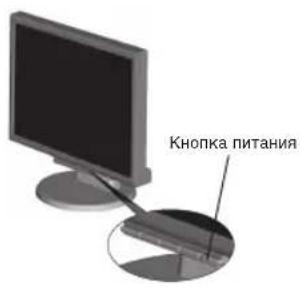
PucyHok C.1
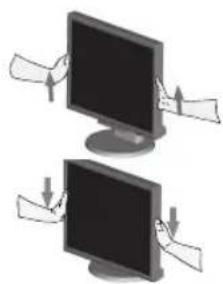
PucyHok RL.1
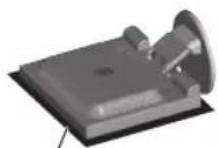
Hea6pa3nBnaHnOBepxHocTb
Pcyhok R.1
Pncyok R.2
PucyHok R.3
PucyHok TS.1
YCTAHOBNTBE BNTbHa MeCTO
XapakTepeNtukn
4-BNHTA (M4)
MAKCMMAJIbHAR
rny6nHa:8,5MM
PnncnoB3OBaHHN
APYINX BHTOB
npoBepBeTny6nHy
OTBepCTUR.
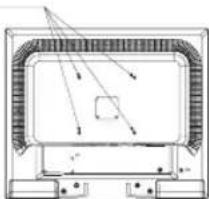
BecKKMOHHTopa Bc6ope:4,6Kr (MAX)
- POKKIOHTE OIN KOHeu KaBEn NITAHN K MOHTOpy, a Dpyro - K pOeTKe 3IeKTPONITAHN. POMecTe BnDEOkaBEn, 3ByKOBoi KaBEn b KaBEn NITAHN NOK kPbIKy OTCeKa pacnpedJeHn KaBEn (PcynHok B.1).
PIMMEAHHE.PacnpedeHnTe Ka6eHn PNO KpbIshKoYTO6bI npedTbpaNTb NobpeXdHeMe Ka6eHnMmOHHTopa.
IPMMEAHHE. PekomeHaHNo npabWbHomy BbBOpy KaBnR nTtAHn CM.Bpa3dene "BHMaHHe" HactoJIeTO pyKOBODCTBa
- BKJIOHHTe MOHITOP C NOMOUsbHO KHONK NITAHN (PucyHcC.1) KOMMbOTep.
7ФyHnJIaBeckoHTHOHAcTpoKnBbIOINHeAETOMaTHeCKyO NOCTPOky ONITMaIbIbIX NapaMTePO BOHITOPa INpeBOHaJIbHOH HACTOPOE, BKNIOHAO60NInHCTBO NaPAMTePOB CnHXPOHNzUIM.ДЯДANBHeIMxHACTOPEKNCONN3yTE CnEDYIOme NapaMePTbO CSD:
Auto Adjust Contrast (ABTOHAcToKa KOHpactHOCTn)
AutoAdjust(ABToHAcTpoKa)
PnonHoe onncaHne 3THN napametpoB OSD cm. B pa3dene "OprhaIynpabHeHNA" 3Toro pykoBOcTBa Nb3OBaTeNA.
PIMMEAHNE. B cnayae kakoi-ni6o Henonaan 06paTntecb Ka pa3deny UctpanHne HncnpabHocte 3TOrO pykooboc7ra Nnbs3OBaTeRn.
YcTaHOBka 3KpaHa MOHTopa B BepxHee H HIXKHee NOIOXKeHn
MOHHTOP MOHO NOHNIMATB INOYCKATB. YoobI NOHNITB NIN ONYCTNTB 3KpAH, BO3bMTE MOHHTOP C DByX CTOPOH NIOHNMMITE INN ONYCTHTE OHA HYKHyo BILCOT (PcynHOK RL-1).
PIMMEUHNE. CoBIOaIte octopoXHOCTb npyycTahOBKe 3KpaHa MOHTOPA B BepxHee H HIXHee NOIOKeHNA.
HaklonuBpaueHne
YCTAHOBITE Heo6xOIMbI HAKIOH 3KpaHa MOHITOpa, PnIDepXINBa erO pykAMC OeHX CTOpOH (PncyHOK TS.1).
PIMMEAHNE. Co6nOdaTe OCTOPOXHOCTb npHakNoHe n BpaueHmKpana.
OToeHHeHne NoCTaBKn MOHITopa nepe yctaHOBkoI
YTO6bI NOJATOBUTb MOHITOP K yCTAHOBKe B DpyROM NOJONOJEHM:
1.OTcoeHNHTe BCE ka6enm.
2.ПОLOЖNTE MOHITOP 3KPAHOM BHN3 HA Hea6pa3NHBYIO NOBepxHOCTb (PucyHOK R.1).
- OTeBepHnTE 4 BnHTa, KpEpaIe MOHITOP K NOCTABKE, N CHIMMTE NOCTABky, KAK NOKa3aHO Ha PNCyHKe (PncyHok R.2).
Teneb MOHITOP roTOB K yCTAHOBKe dpyrM cnoCobom
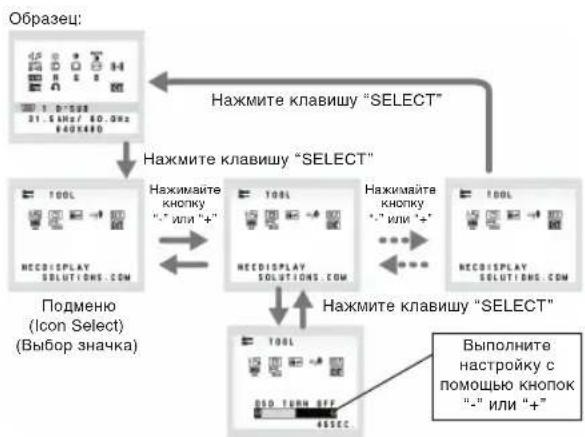
POnMeHIO (Adjust) (HacTpoKa)
LANGUAGE (R3bIK)
MeHIO npaMeTpoB OSD nepeBeDeHbHa DeEBaTbA3bIKOB.
OSD TURN OFF (OTKJIIOUeyHME MEHIO OSD)
MeHIO napAMETPOB OSD 6ydt octabatbca Ha 3kpaHe, noka OHO nOONb3yeTcB. B NOmHEIO OSD Turn Off (OTKNOeHHe 3KPAHnO RO HnDnKATOpa) MOxHO Bb6pTaB PBMr OXnDAHn MOHITOPa nocne nocnEHIro HaxaTHN KHOKN DO 3akpbTIN MeHIO napAMETPOB OSD. NpeBaPteNbHO 3aDaHhIbe 3HaueHH:10-120ceYHc C wArOM B5ceYHd.
OSD LOCK OUT (BJOKNPOBKA MEHIO OSD)
C nOMOuH 3TOro npaMeTp aMoHIO nonHOctbIO 3a6NoKpOBaTb DOCTy Ko BcEM pHyHKUIM npaMeTpOB OSD, KpOME Brightness (HpKocB) n Contrast (KOHtpACTOB).
Pn noBtKe AKTNBAuHN npaMeTpOB OSD b peXmME
6NoKpOBKn NOBHTCA Co06UeHNE, YKa3bIbAOUe, Yo MeHIO OSD 3a6NoKpOBaHb. TTo6b BKIOHTb FHyHKUHO 6NoKpOBKn MEHO OSD, HaxMITE KONKY "1<-2/RESET", 3ATEM "+" uDePKXBaTe O6 KNOKN HaxaTBHM. TTo6b OTKIOHTb FHyHKUHO 6NoKpOBKn MEHO OSD, HaxMITE KONKY "1<-2/RESET", 3ATEM "+" uDePKXBaTe O6 KNOKN HaxaTBHM.
xyRESOLUTION NOTIFIER (NOKA3ATEJIb PA3PEUHEH)
EcnnBb6paHO 3NaeHNE ON(BKn),Yepe30 cekyHa h3kpaHe NOBnBnTcOo6eHNe o TOM,HTo npaMeTp papeSEHHO OTNnAeTc O OTNImaHbHorO papeSEHHI.
DDC/CI
BKnIOueHHe HnOtKnIOueHHe DByXCTOpOHHe rypaBHeHr MOHITOPOM.
MONITOR INFO (MHOPMALI O MOHITOPE)
Hcnpmaa HOMepe moen H cepHHOM HOMep MOHTopa.
INPUT RESOLUTION (BXOJHOE PA3PEUHEHNE) (ToIbKO aHaJorOBbI BXoD)
BbI6Op OJHOrO I3 CNEyUOxN 3HAeHm IIN PApaPseHnRAxoJHOOcHnA:1280 x768 n 1360 x768.1280 x768:ycTaHOBka pa3eHmHa 1280 x768.1360 x768.yCTaHOBka pa3eHmHa 1360 x768.
PpeynpekdeHne OSD
MeHn npEynpEeJHn OSN HCue3aOT pN HauKATn KhoNKn SELECT.
NO SIGNAL (HET CINHAJ) 3Ta yHKUBAIaET npdynpKJENHE NpO TcYCTBn CMHARNA. OKNo Signal (HT CINHARNA) NOBnRETCN pN BKNIOEHN mTaNHn, n3MNEHN BXOHO CINHARNA INN HEAKNTNBOM BHeDeON60paXeHN.
RESOLUTION NOTIFIER (NOKA3ATEJIb PA3PEWEHNA) 3TaФункURA BydaeTnpdynpexDEHMe Ope6OxIMOCn INCONB3OBAHNOTINMMNPOBAHHORo pa3peWHeH.NKHO Resolution Notifier (Noka3aTeJpa3peWHeH) NOBnRETCP INB KJIIOUChEHNIITAHNIA,IMHEMEHNIXXODHO CIRHANA, HENPABINHOM pa3peWHeH bIeOcIRHNA.3TuФyHKNUO MOKHOOTKNOHTBEMHNO TOOL (NHCTPYMEHTbl).
OUT OF RANGE (BHE DONYCTMIMO DAANA3OHA): 3Ta dyHKUH BbIaET peKOMeHN DaUN No IcNoJIb3OBAHIO
OTMNIMNIOBHO paopeeHn mactoI perehepaun. OkHO Out Of Range (Bne DcnoTmro dnaana3OHa) NOBILRETC np BKNIOUeHN NINTAHIN, INMHeHn BXODHO CIRHNA, HENPAIBNbHcINXHPONH3auN BNDOCrHNA.
AUDIO (3BYK)
PerynloBka ypoBb rpoMkoCTa 38yKa DnHaMMKOB n HauYHKnOB.
Ia oTKHOeHHa 38yKa B DnHaMMKax HaKMITE KhoNkY
1<->2/RESET (1<->2/C5POC).
BRIGHTNESS (RPKOCTb)
Hactpoika 06eepKocn n3o6paXeHN m oHa 3kpaHa.
CONTRAST (KOHTPACTHOCTb)
Hactpoika npkoctn n306paxeHH no OTHoehno K pohy
AUTO AUTO CONTRAST (ABTOKOHTPACTHOCTb (ToIbko aHAnorOBbBxOd))
KoppekniuNIO6pajEHHO,COOTBETCTBYUoero HectaHApTbHmBXDhIMBIDEOICRIHJAAm.
AUTO ADJUST (ABTOHACTPOIKA (TOnbko ananorobb BxO)) ABOtOMaTHeCKA nactpoika napametpoB noNoXeHH, rop3HO TaBHoro paMaPeH uYETKcN.
LEFT/RIGHT (BJIIEBO/BIPAPBO (ToIbko aHAnorOBbI BXoD))
KoHTpObnrnpaHTaIbHOro nnoJxehnHa306paXeHN Ha 3KpaHe KK.
DOWN/UP (BHN3/BBEPX (ToIbko aHaIorOBbI BXoD))
KoHTpoNb BepTnKaIbHoro nOIOXeHn I3O6paXeHn Ha 3KpaHe KKd
H. SIZE (Γ. PA3MEP (ToIbKO aHaNoRObBm BxO))
PerynpobkA ropn3oHTaBHoro pa3mepa nytem yBeHneHHN mYMeHbSeHH 3Haehn 3TOr npametpa
FINE (YETKOCTb) (TOnbko aHaNoRoBbI BxOa))
Uyunhe HOpKcPbOBKa,HTckOCTnI yCtOYuOBtCN 3IObApXeHnI TYTEM YBuHEnHINI UmYeMHbEHNH3HaEHN3 TTOr APaMeTPa.
9300 COLOUR CONTROL SYSTEMS (CNCTEMBI PEPYIMPOBKNBETA)
Tb3a3abaaembixBapnHaTcYCTaHOBKnUbeta(9300/7500/sROUSER/NATIVE)JINBbOpaHeo6xoIMMoHacPtoKNubeta.
TbIbtpbUcEBTOsRGBNATIVEHrHOHTCtHaDAPTHBMIMHNHEMMEHBMIM
COLOUR RED (KPACHbI)
YBeneHne Hm yMeHbSeHne KpachORoBETA.
NMeHBeHBe 6yEtod OTo6paXaTbCBA hKpaOe.
G COLOUR GREEN (3EJIeHbI)
YBeHnueHne nn yMeHbWeHne 3eNeHoro uBeta.
N3MeHeHne 6yDenOTO6paXaTbcn Ha 3KpaHe.
B COLOUR BLUE (CNHNI)
YBneHnene Hnn yEmHeHne CnHero cBeta. N3MeHneH 6yEd OTo6paxabcH na 3Kpahe.
TOOL (VHCTPYMEHTbl)
PnBbIbope TOOL (HHTPYMEHTbl) MoXHO BOITN B NODMHeIO.
FACTORY PRESET (3ABOДСКЕ HACTPOДКИ)
Bb6op npapametpa 3abodcknx Hactpoek no3bonnet BblonHnTb c6poc Boex npapametpoos OD 3nauchen, yctahOBneHHx HA 3abeOE. IINI 3TOIHOe6xOIMO B TEueHMe HEckOBkHX CEkyHd YdepKXBaHbAaONKY RESET (C6POC).OTdEBhBe hAcTPOKNMOXHO c6pOCHb. BblEHNb IN Hn HaxAB KONKY RESET.
EXIT(BbIXOa)
Pn Bb6ope KhONK EXIT (BblXOJ) MoXHO 3aKpbTb MeHIO
OSD/nopmeHIO
Pycckn-3






NEC


- TCO'03
- TcODevelopment
- Development
- T0'03
- DISPLAYS
- Congratulations!
- Ergonomics
- Energy
- Emissions
- Ecology
- Manufacturer's Recycling and Energy Information
- Disposing of your old NEC product
- Energy Saving
- WEEE Mark (European Directive 2002/96/EC)
- Within the European Union
- Outside the European Union
- Chinese RoHS-information relevant for Chinese market
- CAUTION
- Declaration of the Manufacturer
- Contents
- Specifications
- Raise and Lower Monitor Screen
- Tilt and Swivel
- Remove Monitor Stand for Mounting
- Connecting a Flexible Arm
- Controls
- OSD structure
- AUDIO
- BRIGHTNESS
- CONTRAST
- AUTO AUTO CONTRAST (Analog Input only)
- AUTO AUTO ADJUST (Analog Input only)
- LEFT/RIGHT (Analog Input only)
- DOWN/UP (Analog Input only)
- SIZE (Analog Input only)
- FINE (Analog Input only)
- COLOUR CONTROL SYSTEMS
- COLOUR RED
- G COLOUR GREEN
- B COLOUR BLUE
- TOOL
- FACTORY PRESET
- EXIT
- LANGUAGE
- OSD TURNOFF
- OSD LOCK OUT
- RESOLUTION NOTIFIER
- DDC/CI
- MONITOR INFO
- INPUT RESOLUTION (Analog Input Only)
- OSD Warning
- WARNING
- Kurzanleitung
- Contenido
- Inicio=rápido
- Sommaire
- Guida rapida
- 3aBHeHne n3roTOBnTeJIa
- Copepkmoe
- Kpatkoe pykoBoDCTBO no haay pa60TbI
- XapakTepeNtukn
- YcTaHOBka 3KpaHa MOHTopa B BepxHee H HIXKHee NOIOXKeHn
- HaklonuBpaueHne
- OToeHHeHne NoCTaBKn MOHITopa nepe yctaHOBkoI
- LANGUAGE (R3bIK)
- OSD TURN OFF (OTKJIIOUeyHME MEHIO OSD)
- OSD LOCK OUT (BJOKNPOBKA MEHIO OSD)
- xyRESOLUTION NOTIFIER (NOKA3ATEJIb PA3PEUHEH)
- MONITOR INFO (MHOPMALI O MOHITOPE)
- INPUT RESOLUTION (BXOJHOE PA3PEUHEHNE) (ToIbKO aHaJorOBbI BXoD)
- PpeynpekdeHne OSD
- AUDIO (3BYK)
- BRIGHTNESS (RPKOCTb)
- CONTRAST (KOHTPACTHOCTb)
- AUTO AUTO CONTRAST (ABTOKOHTPACTHOCTb (ToIbko aHAnorOBbBxOd))
- LEFT/RIGHT (BJIIEBO/BIPAPBO (ToIbko aHAnorOBbI BXoD))
- DOWN/UP (BHN3/BBEPX (ToIbko aHaIorOBbI BXoD))
- SIZE (Γ. PA3MEP (ToIbKO aHaNoRObBm BxO))
- FINE (YETKOCTb) (TOnbko aHaNoRoBbI BxOa))
- COLOUR CONTROL SYSTEMS (CNCTEMBI PEPYIMPOBKNBETA)
- COLOUR RED (KPACHbI)
- G COLOUR GREEN (3EJIeHbI)
- B COLOUR BLUE (CNHNI)
- TOOL (VHCTPYMEHTbl)
- FACTORY PRESET (3ABOДСКЕ HACTPOДКИ)
- EXIT(BbIXOa)
- NEC
Brand : NEC
Model : MultiSync LCD195WXM
Category : Monitor