 ManualGo.com
YTH6320R1023U - Thermostat HONEYWELL - Free user manual and instructions
Find the device manual for free YTH6320R1023U HONEYWELL in PDF.



Download the instructions for your Thermostat in PDF format for free! Find your manual YTH6320R1023U - HONEYWELL and take your electronic device back in hand. On this page are published all the documents necessary for the use of your device. YTH6320R1023U by HONEYWELL.
USER MANUAL YTH6320R1023U HONEYWELL
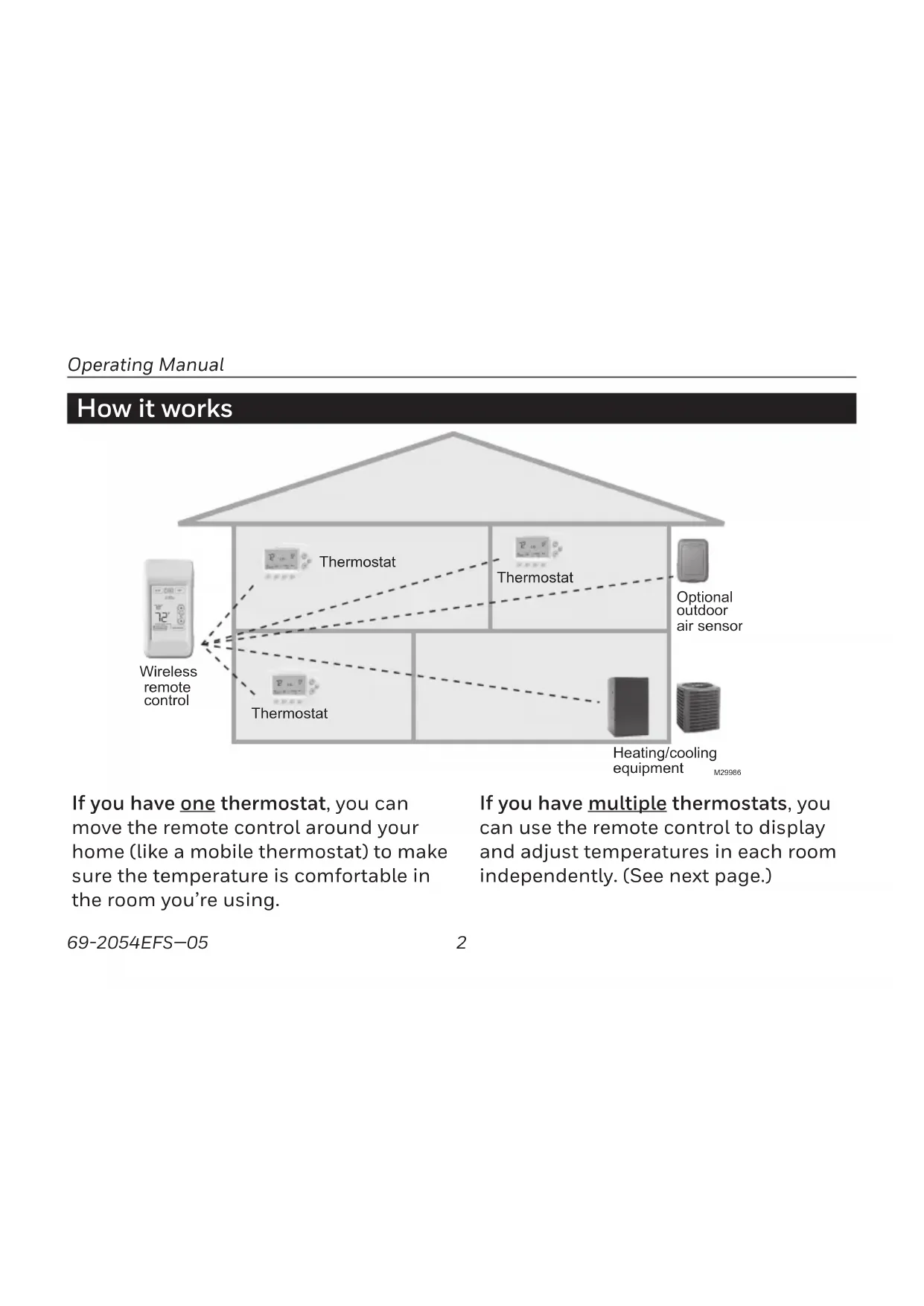
Regulatory information ............................................................................................. 43 ContentsOperating Manual 69-2054EFS—05 2 How it works If you have one thermostat, you can move the remote control around your home (like a mobile thermostat) to make sure the temperature is comfortable in the room you’re using. If you have multiple thermostats, you can use the remote control to display and adjust temperatures in each room independently. (See next page.) Wireles
remote control Thermostat Optional outdoor air senso
M29986 Heating/cooling equipment Thermostat ThermostatWireless Remote Control 3 69-2054EFS—05 About your new thermostatHow it works If you have only one thermostat Temperature is measured at thermostat or remote control, as you choose. You can move the remote control as needed, so the room you are using maintains a comfortable temperature (see page 6). If you have multiple thermostats Temperature is measured at each thermostat. Press TOGGLE ZONE buttons to choose which room to display and adjust (see page 7).
THIS DEVICE LIVINGROOM THERMOSTATSCREENUNLOCKED M28883 Quick reference to display screen System settingCurrent time (set at thermostat)Inside temperatureNote: First press of screen only turns on backlight.Outside temperature (appears only if outdoor sensor is installed)Outside humidity (Press to display for 5 seconds)If “No Signal” appears here, check to make sure there are fresh batteries in the thermo-stat, and HVAC power is on.Screen lock/unlockTemperature settingReplace battery warningTemperature sensor source (appears if you have only one thermostat)Zone control (appears only if you have more than one ther-mostat)Wireless Remote Control 5 69-2054EFS—05 System settings Press to select Press a SYSTEM button to select:
- Heat: Thermostat controls only the heating system.
- Cool: Thermostat controls only the cooling system.
- Off: Heating and cooling systems are off. Press and hold HEAT or COOL for 3 seconds to select Auto Changeover (thermostat automatically selects heating or cooling depending on the indoor temperature). In Auto Changeover mode, you can press HEAT or COOL to display or adjust the settings for each system. To exit Auto Changeover mode, press and hold HEAT or COOL for 3 seconds. Note: The Auto Changeover option is available only if programmed by the system installer. Note: Emergency Heat can only be set at the thermostat. Press and hold either to select AUTO CHANGEOVER HEAT OFFCOOL 8:03 M28886HEAT OFFCOOL 8:03 AUTO M28887Operating Manual69-2054EFS—05 6 OUTDOORSET TOREAD TEMP FROM…
THIS DEVICETHERMOSTATM28888 Temperature control options (one thermostat) Display shows temperature at selected device Press to choose temperature measurement device Note: This option will not appear if you have a zone system (more than one thermostat). In zone systems, temperature is always measured at the thermostats. Both the thermostat and the remote control have built-in temperature sensors. Press a button to choose whether the system responds to temperatures at the thermostat, or at the location of the remote control. If you use the remote control to measure temperature, keep it in an upright position in an area with good air circulation. Do not place it near sources of heat or cold air. Keep away from air ducts, direct sunlight, appli- ances and electronic devices.Wireless Remote Control 7 69-2054EFS—05OUTDOORSET TOTOGGLE ZONE
LIVINGROOMM28889 Temperature control options (multiple thermostats) Display shows temperature in selected zone Press to select a thermostat zone If you have a zone system (more than one thermostat), you can display and adjust the temperature in each zone from the remote control. Press the arrow buttons until the thermo- stat zone you want is displayed. After a short delay, the remote will retrieve information, then display the current temperature in that zone. At the remote control you can change the fol- lowing settings for each zone independently:
- System setting (heat/cool)
- Permanent hold (Fan operation and program schedules can be changed only at the thermostat.)Operating Manual 69-2054EFS—05 8 M28891 HEAT DONE CANCEL
Temperature “hold” (programmable thermostats only) 1 Press to adjust temperature 2 Set temporary hold time period OR press PERM. HOLD Press s or t to adjust the temperature. Temporary hold: Press s or t to set the “Hold Until” time. When the timer expires (or when you press CANCEL), the temperature will revert to the setting you’ve programmed at the thermo- stat. Permanent hold: Press PERM. HOLD to maintain the new tem- perature permanently. The temperature will remain as you set it until you press CANCEL to revert to the setting you’ve programmed at the thermostat. Note: If you have a zone system (more than one thermostat), Hold will only apply to the zone displayed at the bottom of the screen. Scroll to another zone to change the temperature in that zone (see page 7).Wireless Remote Control 9 69-2054EFS—05 HEAT OUTDOORSET TOOFFCOOL 8:03
LOCKEDSCREENLOCKED M28892 Screen lock/unlock Press and hold the SCREEN LOCK button for 3 seconds to lock or unlock the screen. If the remote control is set to use Auto Lock, the screen is re-locked 30 seconds after each use. If set to use Manual Lock, press and hold the SCREEN LOCK button to re-lock the screen after use. You can lock the screen to prevent changes to settings while cleaning. Clean the screen with a soft cloth moistened with warm water or household window cleaner. Note: The screen lock button will not appear if the remote control has not been set to use manual or auto lock options (see pages 1011 to activate this feature). Press and hold until label appearsOperating Manual 69-2054EFS—05 10 Customizing features The remote control has four features that can be turned on or off as desired (see next page). Press and hold the OFF button until the screen changes (about 3 seconds), then press the right arrow button to enter the setup menu. Press and hold until screen changes Press to continue M28894 SETUP MENU HEAT OFFCOOL 8:03 M28893Wireless Remote Control 11 69-2054EFS—05 Customizing features Press arrow buttons to select a feature, then YES or NO to turn it on or off. When finished customizing features, press DONE to exit the menu and restore the home screen.
- Manual Lock: Allows you to lock the screen by pressing and holding the LOCK button.
- Automatic Lock: Always locks the screen 30 seconds after each use.
- Button Click: Audible tone sounds to con- firm each keypress.
- Temp Offset: The remote control displays actual indoor temperature. If you prefer, you can offset the displayed temperature by up to ± 3 degrees (not displayed when used with more than one thermostat). Press arrow buttons to select feature, then YES or NO to enable or disable.
MANUAL LOCK YES M28895 MENU AUTOMATIC LOCK BUTTON CLICK TEMP OFFSETOperating Manual 69-2054EFS—05 12 Battery replacement Install fresh batteries when the REPLACE BATTERY warning flashes on the screen. This warning will flash for approximately two months before the batteries fail. Remove the cover and install 3 fresh AA bat- teries. Make sure the batteries are inserted properly (see polarity marks on illustration at left). After batteries are installed, the remote con- trol will automatically restore communica- tion with the wireless network within a few minutes. M28475 Always use 3 fresh AA batteries
M28896SET TOREPLACEBATTERY
78Wireless Remote Control 13 69-2054EFS—05 In case of difficulty Slow response The thermostat may take up to 15 seconds to respond to commands entered at the remote control. Heating or cooling system does not respond
- Check circuit breaker and reset if necessary.
- Make sure power switch at heating & cooling system is on.
- Make sure furnace door is closed securely.
- Wait 5 minutes for the system to respond. Screen displays “No Signal” Remote control has lost radio contact with the wireless net- work (usually because of a power outage). To restore power:
- Check circuit breaker and reset if necessary.
- Make sure power switch at heating & cooling system is on.
- Make sure furnace door is closed securely. After power is restored, the remote control will automatically restore wireless communication within a few minutes.Operating Manual 69-2054EFS—05 14 1-year limited warranty Resideo warrants this product, excluding battery, to be free from defects in workmanship or materials, under normal use and service, for a period of one (1) years from the date of first purchase by the original purchaser. If at any time during the war- ranty period the product is determined to be defective due to workmanship or materials, Resideo shall repair or replace it (at Resideo’s option). If the product is defective, (i) return it, with a bill of sale or other dated proof of purchase, to the place from which you purchased it; or (ii) call Resideo Customer Care at 1800 4681502. Customer Care will make the determination whether the product should be returned to the following address: Resideo Return Goods, 1985 Douglas Dr. N., Golden Valley, MN 55422, or whether a replace- ment product can be sent to you. This warranty does not cover removal or reinstallation costs. This warranty shall not apply if it is shown by Resideo that the defect was caused by damage which occurred while the product was in the possession of a consumer. Resideo’s sole responsibility shall be to repair or replace the product within the terms stated above. RESIDEO SHALL NOT BE LIABLE FOR ANY LOSS OR DAMAGE OF ANY KIND, INCLUDING ANY INCIDENTAL OR CONSEQUENTIAL DAMAGES RESULTING, DIRECTLY OR INDIRECTLY, FROM ANY BREACH OF ANY WARRANTY, EXPRESS OR IMPLIED, OR ANY OTHER FAILURE OF THIS PRODUCT. Some states do not allow the exclusion or limitation of incidental or consequential damages, so this limitation may not apply to you. THIS WARRANTY IS THE ONLY EXPRESS WARRANTY RESIDEO MAKES ON THIS PRODUCT. THE DURATION OF ANY IMPLIED WARRANTIES, INCLUDING THE WARRANTIES OF MERCHANTABILITY AND FITNESS FOR A PARTICULAR PURPOSE, IS HEREBY LIMITED TO THE ONE YEAR DURATION OF THIS WARRANTY. Some states do not allow limitations on how long an implied warranty lasts, so the above limitation may not apply to you. This warranty gives you specific legal rights, and you may have other rights which vary from state to state. If you have any questions concerning this warranty, please write Resideo Customer Care, 1985 Douglas Dr, Golden Valley, MN 55422 or call
- System setting (heat/cool)
- Reorient or relocate the receiving antenna.
- Increase the separation between the equipment and receiver.
- Connect the equipment into an outlet on a circuit different from that to which the receiver is connected.
Consult the dealer or an experienced radio/TV technician for help. Exposure Limits To comply with FCC and Industry Canada RF exposure limits for gen- eral population/uncontrolled exposure, the antenna(s) used for this transmitter must be installed to provide a separation distance of at least 20 cm from all persons and must not be co-located or operating in conjunction with any other antenna or transmitter. Industry Canada Section 7.1.5 of RSS-GEN Operation is subject to the following two conditions:
this device may not cause interference, and