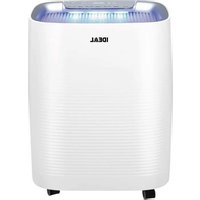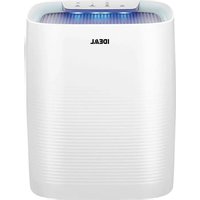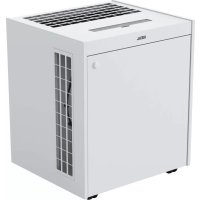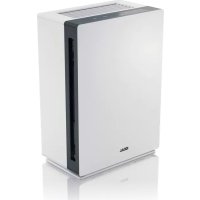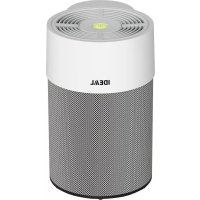
AP40 PRO - Air purifier IDEAL - Free user manual and instructions
Find the device manual for free AP40 PRO IDEAL in PDF.


| Product type | Air purifier |
| Brand | IDEAL |
| Model | AP40 PRO |
| Dimensions (W x D x H) | 298 x 255 x 398 mm |
| Weight | 3.6 kg |
| Power supply | 200-240 V~50/60 Hz or 100-120 V~50/60 Hz |
| Power consumption | 75 W (200-240 V) / 55 W (100-120 V) |
| Recommended surface area | 30 to 50 m² (height 2.50 m) |
| Maximum airflow | 440 m³/h |
| Fan speed levels | 5 (silent, 1, 2, 3, turbo) |
| Filtration system | Pre-filter + HEPA filter with activated carbon (360°) |
| Air quality indicator | LED color (green, yellow, red) |
| Connectivity | WiFi, IDEALAIRPRO app (iOS/Android) |
| Remote control | Yes, with included CR2025 battery |
| Noise level (silent mode) | 16.7 dB(A) |
| Noise level (turbo) | 61.7 dB(A) |
| Special functions | Auto mode, timer, child lock, removable textile cover |
| Pre-filter maintenance | Vacuum cleaning |
| Filter replacement | IDEAL filter cartridge ref. 7310 099 (lifespan approx. 1 year) |
| Optional accessories | High-end textile cover ref. 7310 100 |
| Warranty | According to IDEAL subsidiary conditions |
Frequently Asked Questions - AP40 PRO IDEAL
User questions about AP40 PRO IDEAL
0 question about this device. Answer the ones you know or ask your own.
Ask a new question about this device
Download the instructions for your Air purifier in PDF format for free! Find your manual AP40 PRO - IDEAL and take your electronic device back in hand. On this page are published all the documents necessary for the use of your device. AP40 PRO by IDEAL.
USER MANUAL AP40 PRO IDEAL
EN Operating Instructions
FR Mode d'emploi
natural_image
White and black industrial air purifier with ventilation grille (no visible text or symbols)IDEAL AP40 PRO
natural_image
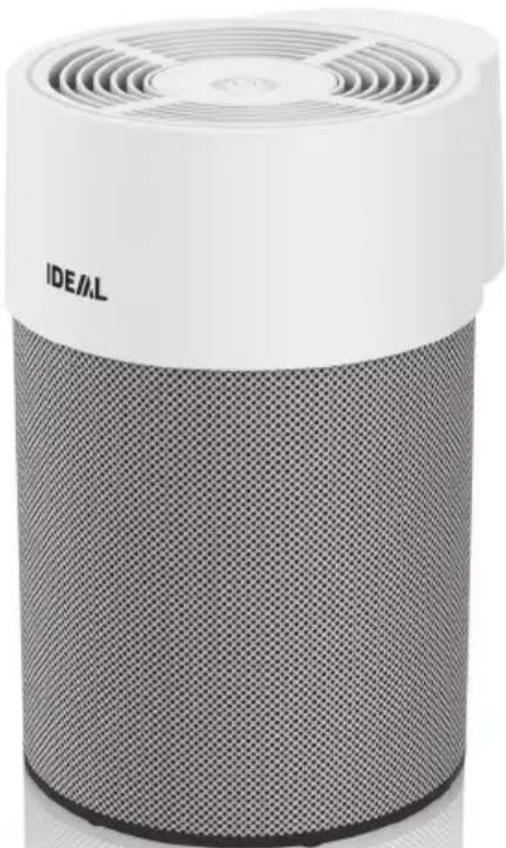
White and gray cylindrical device with perforated grille and ventilation grille (no visible text or symbols)natural_image
Simple line icon of an open book with an information symbol (no text or numbers present)Vorwort
Sicherheitshinweise
Sicherheitshinweise
natural_image
Warning symbol of a lightning bolt inside a triangle (no text or numbers)Achtung
Achtung
natural_image
Warning symbol of a flame inside a diamond shape (no text or numbers)Achtung
natural_image
Line drawing of a cylindrical device with a fan and ventilation slots (no text or symbols)natural_image
Line drawing of a cylindrical container with internal structure and side connectors (no text or symbols)natural_image
Isometric line drawing of a mobile phone with keypad and buttons (no text or symbols)natural_image
Line drawing of a coiled electrical plug with two connectors (no text or symbols)Netzkabel Gedruckte
Betriebsanleitung
natural_image
3D rendered image of a curved, mesh-like structure resembling a rolled paper or sheet (no text or symbols visible)natural_image
Technical line drawing of a mechanical component with internal fan-like structure (no text or symbols)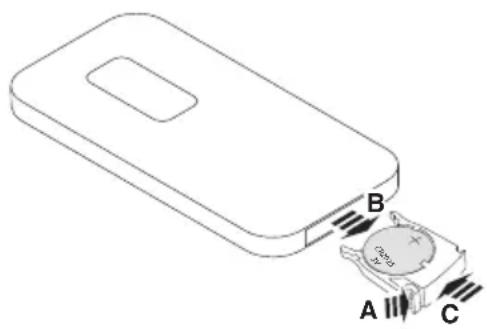
natural_image
Cross-sectional diagram of a mechanical component with internal structure and directional arrow (no text or symbols)natural_image
Technical line drawings of three different mechanical components: a cylindrical component, a circular bucket with internal structure, and a clamp bracket (no text or symbols)→ Kontakt: Service
• www.krug-priester.com
• service@krug-priester.com
IDEAL AP30 PRO:
natural_image
Symbol of a trash bin crossed with two diagonal lines, no text or labels present
D-72336 Balingen (Germany)
EN Operating Instructions (24 – 45)
| Intended use | 25 | |
| Safety instructions | 25 | |
| Product features | 27 | |
| Included in the box 27 | ||
| Unpacking and setting up 28 | ||
| Operation Startup / Fan speeds 30 | ||
| Operation Display | 31 | |
| Air quality indicator | 31 | |
| Filter replacement indicator 31 | ||
| only IDEAL AP 40 PRO: | |||
| Remote control (when using for the first time) 32 | |||
| Remote control (replacing the battery) 33 | |||
| Remote control (function) | |||
| Changing the filter 35 | |||
| App Control | 37 | ||
| WLAN | 37 | ||
| Cleaning and maintenance | 38 | ||
| Accessories | 38 | ||
| Troubleshooting | 39 | ||
| Technical data | 42 | ||

natural_image
Simple line icon of an open book with an information symbol (no text or numbers present)Introduction
Thank you for choosing a device from IDEAL.
Intended use
- The device is used exclusively for cleaning the ambient air indoors.
- Please read these operating instructions before starting to use the device and please follow the safety instructions.
The operating instructions must be kept available with the device at all times.

Safety instructions
- Keep packing material, such as plastic wrapping, away from children! (Risk of suffocation)
- Please follow the safety instructions to prevent fire or electric shock. Only use the device indoors.
- Only use a wall socket that supplies the correct voltage (see rating plate).
- Do not modify or repair the device.
- Do not use the device if the power cable or mains plug is damaged or if the connection at the wall socket is not stable.
- Make sure that the power cable does not get crushed while you are using the device and that it cannot be damaged in any other way. Place the cable so that no one will trip over it. Do not place the power cable under strain.
- Disconnect the plug from the wall socket for cleaning purposes and whenever the device is not in use for a significant period of time.
- Do not touch the plug or the device if you have wet hands.
- Do not spray any insect repellent.
- Do not use in rooms where the device may come into contact with fuel vapour or metal dust.
- Do not use any volatile liquids, petroleum, kerosene, paint thinner or polishing paste to clean the device. Such liquids may damage the surface of the device.
- Do not expose the device to rain, water, moisture or high humidity, and do not set it up in a bathroom or kitchen next to a sink.
- Make sure that no foreign objects get into the outlet grilles.
• Do not use near an open fire or sparks. - The device is not suitable for removing harmful gases (carbon monoxide, e.g. from heating appliances).
- The appliance is not to be used by persons (including children) with reduced physical, sensory or mental capabilities, or lack of experience and knowledge, unless they have been given supervision or instruction.
• Children being supervised not to play with the appliance.
Safety instructions

Safety instructions
- Do not block the air intake and outlet.
- Keep this air purifier away from direct sunlight, naked flames or heat.
- Only use the air purifier in living spaces and within the specified technical parameters. Improper usage may pose a threat to life and health.
- Do not use the unit near a fire alarm. If the outlet air is blowing towards a fire alarm, the alarm may respond late or not at all.
natural_image
Warning symbol of a lightning bolt inside a triangle (no text or numbers)Caution
Risk of injury due to electric shock.
Always disconnect the mains plug prior to:
- Carrying out maintenance work or cleaning
- Moving the device
- Changing the filter

Danger
- Do not use any spray cans with flammable content near to the Air Purifier!

natural_image
Warning symbol of a flame inside a diamond shape (no text or numbers)Danger
- Do not use any flammable cleaning agents.
Product features
- Filter replacement indicator:
The air purifier indicates that the filter cartridge needs to be changed via a switch button (EASY touch) which flashes orange.
• Air purification in 5 speed settings
• 3-stage air purification system:
Pre-filter, HEPA filter coated with activated carbon
- 360^ filter (Pre-filter, HEPA + active carbon)
Easy maintenance and replacement of the filter cartridge.
Included in the box
natural_image
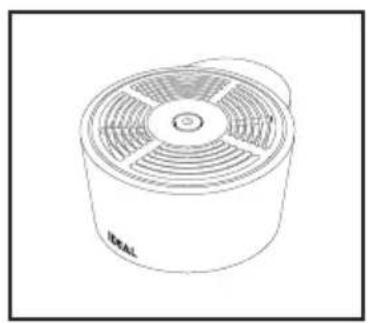
Line drawing of a cylindrical device with a multi-tiered fan and label 'IDEAL' (no text or symbols on the device itself)Air Purifier (Unit head)
natural_image
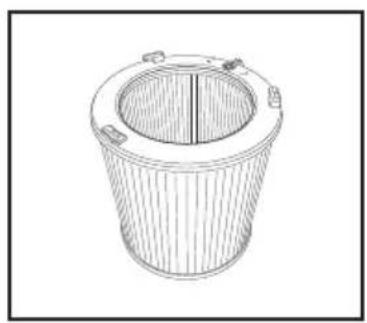
Line drawing of a cylindrical container with internal structure and side handles (no text or symbols)Filter cartridge Remote control
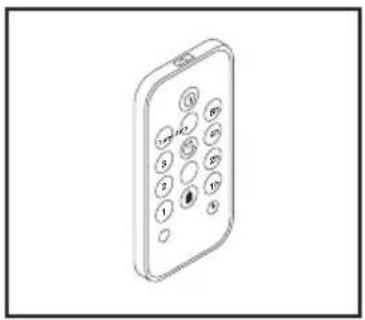
natural_image
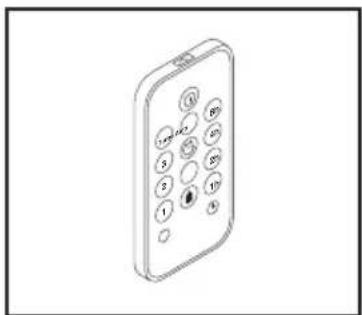
Isometric line drawing of a mobile phone with keypad and buttons (no text or symbols)- With 3V lithium battery (only IDEAL AP40 PRO)
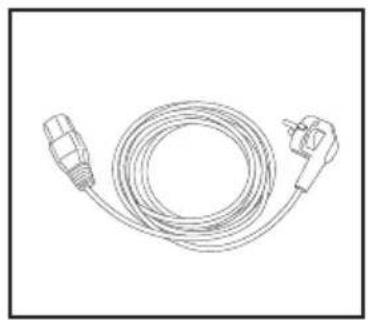
natural_image
Line drawing of a coiled electrical plug with two connectors (no text or symbols)Power cable Printed operating
instructions
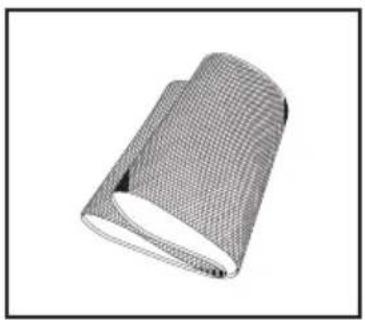
natural_image
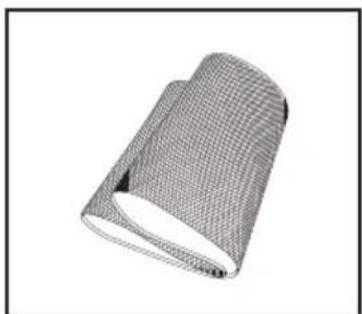
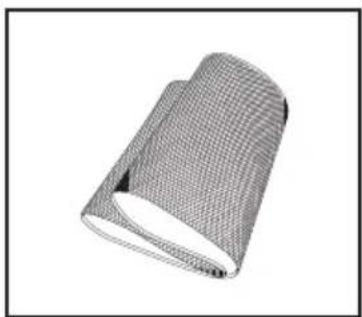
3D rendered image of a rolled-up sheet of mesh material (no text or symbols)Premium textile cover
• with Velcro fastener (only IDEAL AP40 PRO)
Installation guidelines for optimum performance:
- Place the device at least 10 cm away from the wall.
- Keep the device away from areas subjected to draft (wind).
- Make sure that furniture, fabrics or other objects do not come in contact with the air intake/outlet or block them.
- Place the device on a stable, even surface and make sure there is sufficient air circulation.
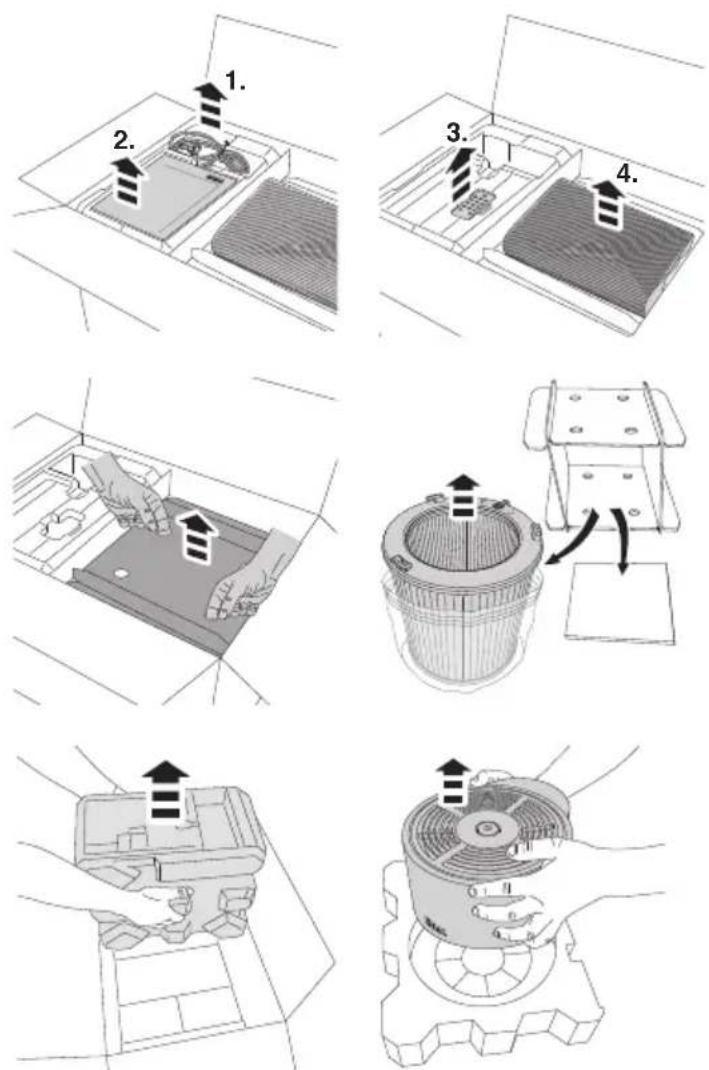
Remove power cable (1.), operating instructions (2.), remote control (3. only IDEAL AP40 PRO) and textile cover (4. only IDEAL AP40 PRO).
Lift the filter cartridge out of the box, unpack it and remove the protective film.
Remove the air purifier (unit head) and unpack.
Unpacking and setting up
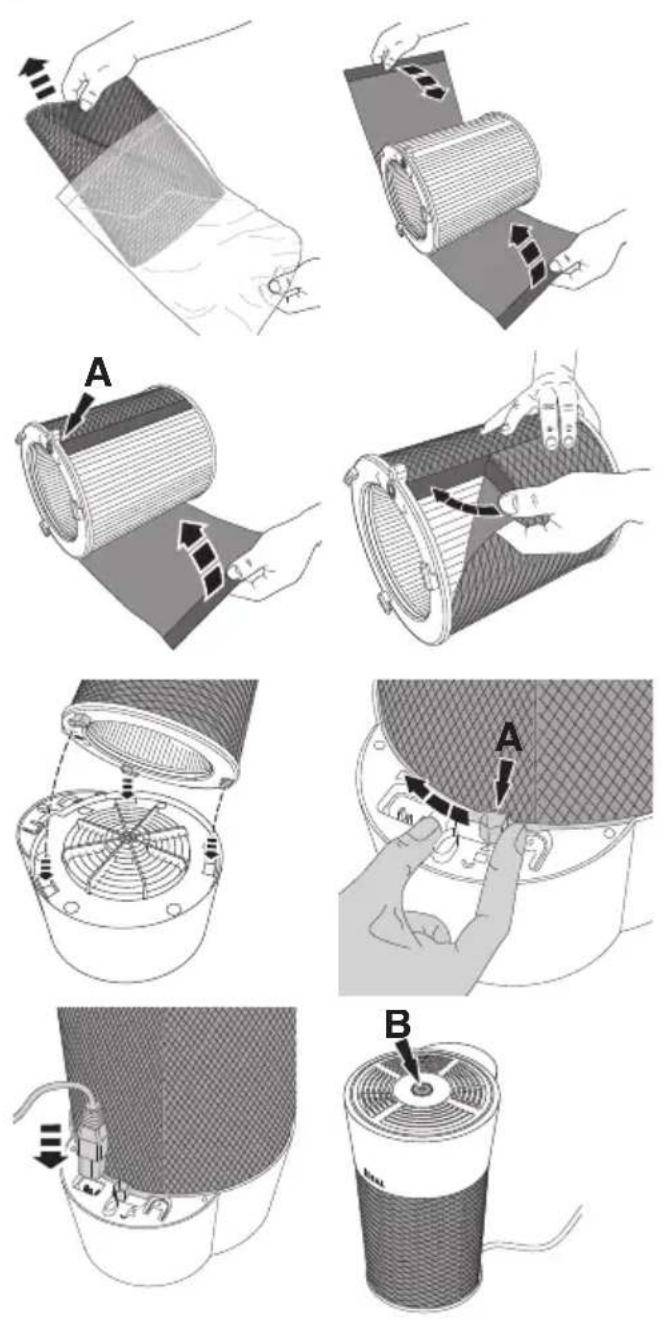
Take the textile cover (only IDEAL AP40 PRO) out of the protective film, place it around the filter cartridge and close it at the back (locking component A).
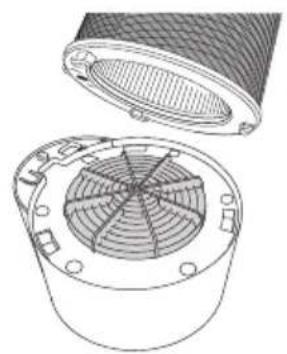
Insert the filter cartridge with the three snap-fit tabs into the three recesses provided for this and lock it at the locking component (A) □.
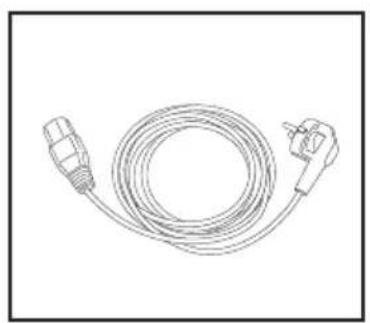
Connect the power cable to the device first, then to the socket.
If the filter cartridge is missing or not installed correctly, the switch button (B) flashes red and the air purifier will not work.
Note:
Use the original packaging to store the air purifier if you are not using it all year round. Pack and store the filter cartridge airtight to protect the activated carbon.
natural_image
Technical line drawing of a mechanical component with internal fan-like structure (no text or symbols)⚠️ Safety information
No operation of the air purifier without the complete and secure attachment of the cladding and safety covers (Motor protection grille, filter cartridge, etc.).
Startup / Fan speeds
-
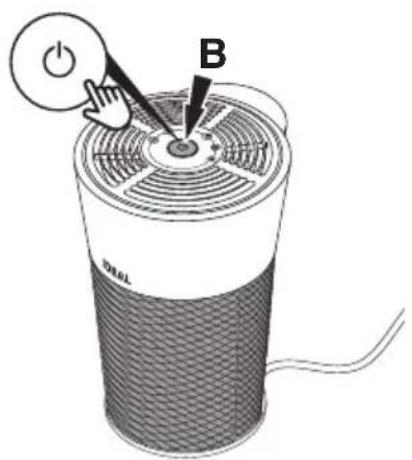
Plug in the power cable, press the switch button (B). The air purifier starts in automatic mode Ⓗ . The switch button lights up.
-
Presstheswitch button to exit automatic mode. The air purifier now runs at fan speed 1. The switch button flashes once.
-
Press again to increase the fan speed to 2 📋. The switch button flashes twice. Press again to increase the fan speed to 3 📋 (flashes 3 times) or to the turbofan speed T 📋 (flashes 4 times).
-
If you press the switch button again, the air purifier switches to the Quiet function ⚙. The switch button lights up, but only dimly.
→ The Quiet function is provided for particularly low-noise, unobtrusive operation (e.g. bedrooms). The air purifier switches to the lowest fan speed.
- Whentheswitch button is pressed again, the air purifier returns to automatic mode
Note:
The air purifier can be switched off by pressing and holding down the switch button. Just press it to switch the device back on.

Display
Air quality indicator
The air quality is displayed in 3 colours (in all fan speeds):
Switch button (B) green: good air quality
Switch button yellow: average air quality
Switch button red: poor air quality
Filter replacement indicator
The switch button (B) flashes orange to indicate that the filter needs changing (flashes at intervals).
- The life expectancy of the filter is approx. 1 year (depending on operation and purification activities).
- If odours are no longer being filtered out, or if the filter produces unpleasant odours, then the filter cartridge needs to be replaced sooner.
- Only use original IDEAL filter cartridge. The device will only function with an original IDEAL filter cartridge.
Note:
If the filter cartridge is missing or not installed correctly, the switch button flashes red and the air purifier will not work.
Battery usage
• Always use 3V lithium batteries CR2025 for the remote control.
- Incorrect battery usage may result in leakage of battery fluid and/or damage.
- If the remote control is not going to be used for a long time, please remove the battery.
Unsuitable location
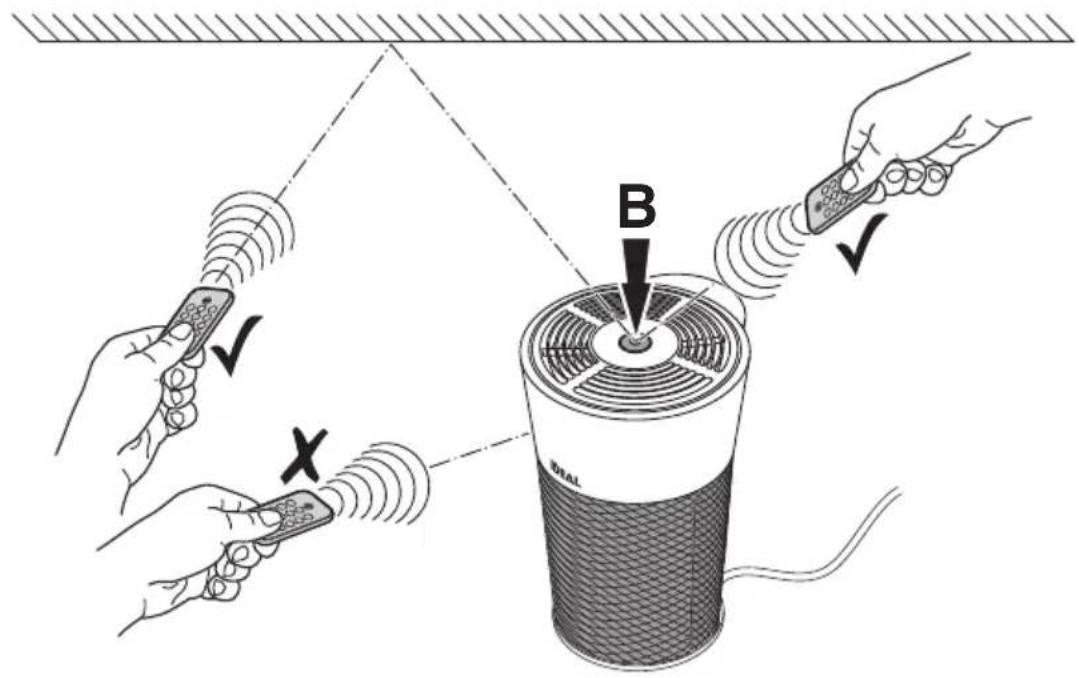
- Make sure that no objects or furnishings are situated between the remote control and the air purifier.
- The air purifier should not be placed in direct sunlight. This could impair the infrared sensor.
- Locations where fluorescent tubes are flickering because they are defective or old.
- Do not store the remote control in direct sunlight and/or close to radiators/heaters.
When using for the first time
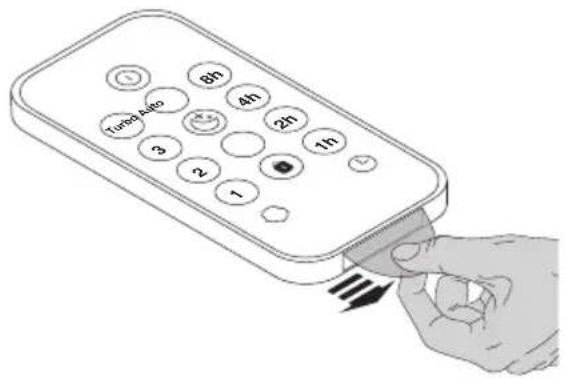
The remote control has a pre battery CR2025. Remove the protective flap to activate the remote control battery.
How to use correctly
- Point the remote control at the air purifier (switch button B).
Replacing the battery
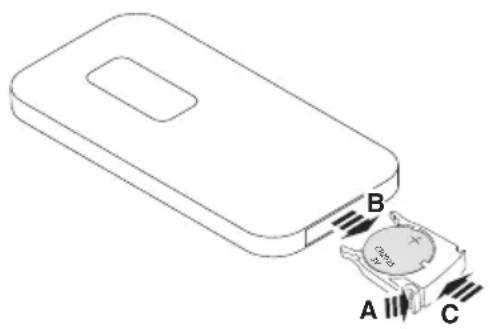
- Open the battery compartment by pressing (A) and pulling out (B) at the same time. Take out the flat battery.
- Insert a new battery into the battery compartment, making sure the polarity is correct (+ / -).
• Always use 3V lithium batteries CR2025. - Slide the battery compartment back into its seating (C).
Important information about the batteries and how to dispose of them
Batteries must NOT be disposed of with household waste. As the user, you are legally obligated to return used batteries for proper disposal. You can hand in your batteries at public collection points in your community or wherever the same type of batteries are sold.
- It is very important that you make sure that the polarity of the batteries is correct. Wrongly inserted batteries could destroy the device – a fire hazard.
- Do not try to open or damage batteries and do not throw batteries into a fire.
- Batteries that are leaking fluid are dangerous. Only touch these with suitable gloves.
- Keep batteries out of the reach of children.
- Take the batteries out of the device if you are not going to be using it for a significant period of time.
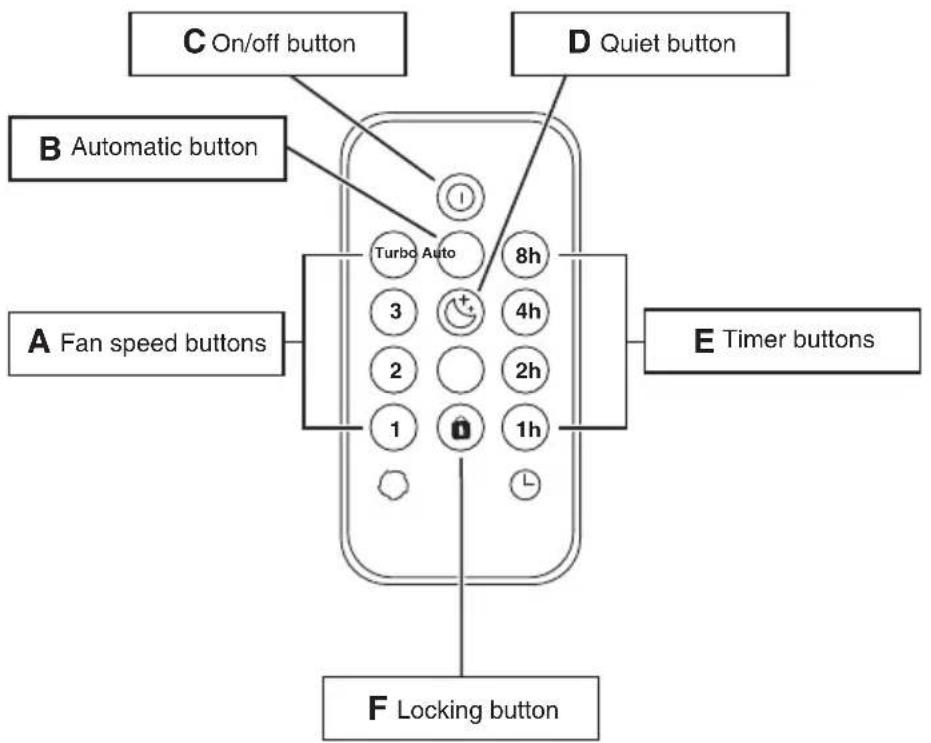
Function
A: Select the required fan speed.
B: Switches the air purifier to automatic mode.
C: Switches the air purifier on/off ⏻.
D: Switches the air purifier to Quiet mode ⚙.
E: Select the required timer time ⏻.
Pressing the timer while the air purifier is switched on activates the "switch-off timer"
→ after the set time, the air purifier switches off.
Pressing the timer button while the air purifier is switched off activates the "switch-on timer"
→ after the set time, the air purifier switches on.
Visualisation only in the app (smartphone / tablet).
F: Press the locking button 🔒 to lock the air purifier switch button. Press the locking button again to unlock.
It can also be unlocked by disconnecting the air purifier from the mains.
Note:
When the remote control is operated, the switch button on the air purifier lights up white for approx. 1 second in acknowledgement. If you press the air purifier switch button when the locking function is activated, it lights up briefly in red.
Filter replacement (e.g. in accordance with the filter replacement indicator, see page 31)
Note:
Only original IDEAL filter cartridges (order from www.ideal.de) may be used. No tools are required to replace the filter cartridge.
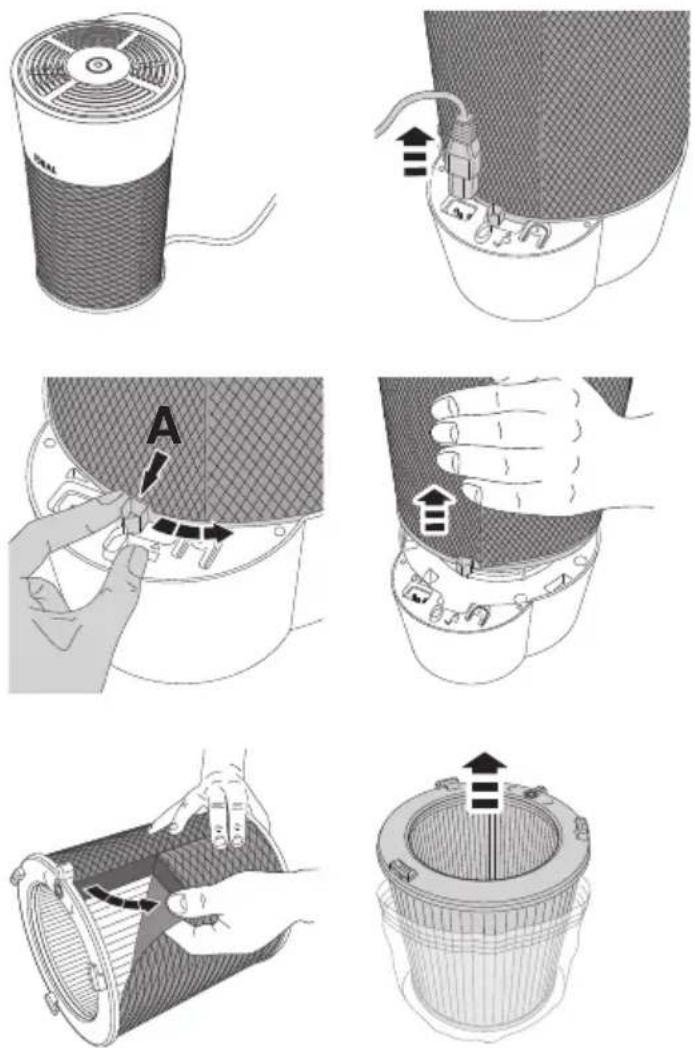
CAUTION!
Take the mains plug out of the socket. Turn the air purifier upside down. Pull the mains plug out of the device.
Unlock the filter cartridge at the locking component (A) ▼ and remove.
Remove the textile cover (only IDEAL AP40 PRO).
Remove the protective film from the new filter cartridge.
Filter replacement
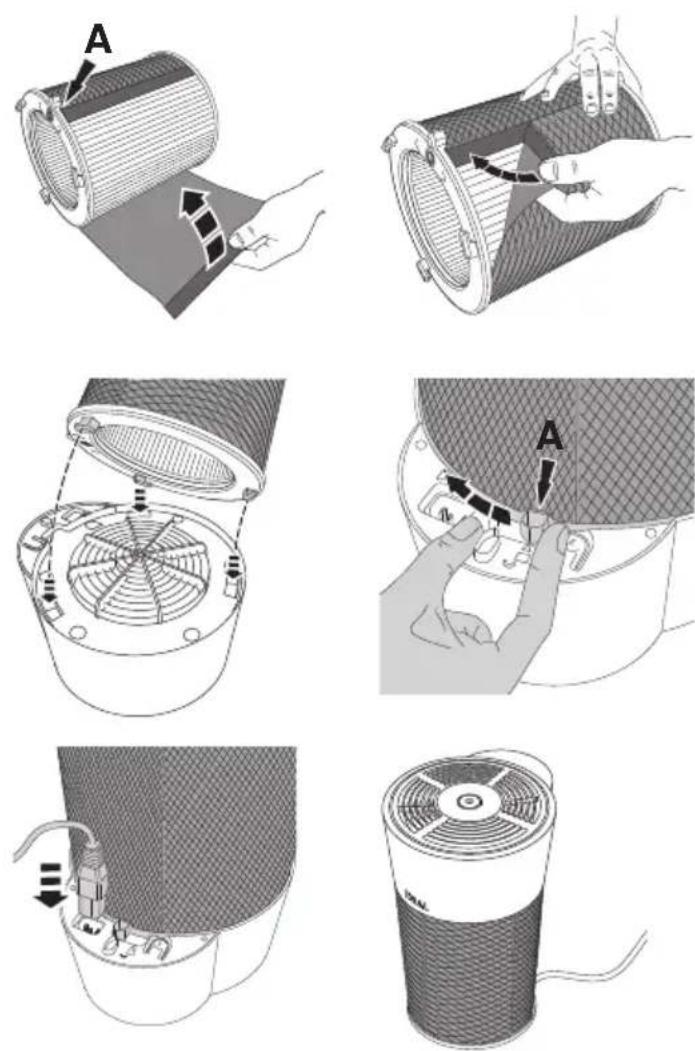
Put the textile cover (only IDEAL AP40 PRO) back on the filter cartridge and close it at the back (locking component A).
Insert the filter cartridge with the three snap-fit tabs into the three recesses provided for this and lock it at the locking component (A) ▼.
Connect the power cable to the device first, then to the socket. The device will only work if the filter cartridge is installed correctly.
Note:
The air purifier automatically detects that a new IDEAL filter cartridge has been inserted and automatically resets the filter replacement indicator.
IDEAL filter cartridge Order no. 7310 099
App Control
Your purifier can additionally be controlled by the "IDEALAIRPRO" App via your smartphone / tablet (iOS /Android).

WLAN
natural_image
Diagram of a mechanical component with internal structure and directional arrow (no text or symbols)Querying the WLAN status:
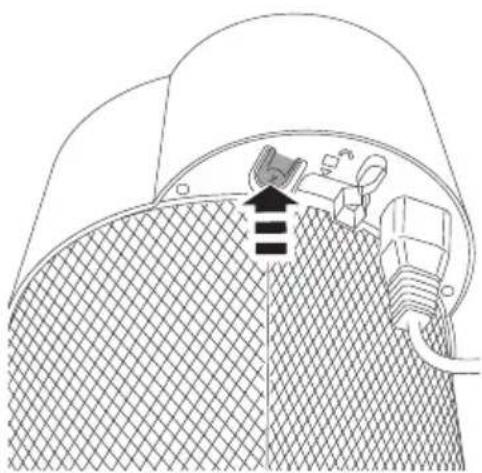
The air purifier is switched on. Press the WLAN button
→ the WLAN is enabled when the switch button flashes blue
→ the WLAN is disabled when the switch button flashes white.
Enabling/disabling WLAN
The air purifier is switched on. Press the WLAN button and while the switch button is flashing (blue or white), press the WLAN button again to enable or disable the WLAN.
Resetting the WLAN:
The air purifier is switched on. WLAN is enabled. Press and hold down the switch button and the WLAN button at the same time until the switch button flashes pink.
Cleaning and maintenance

CAUTION: Disconnect the mains plug prior to any cleaning or maintenance work!
- Replace the filter cartridge as soon as the filter replacement indicator (page 31) lights up. The average life expectancy of the filter is approx. 1 year (depending on operation and purification activities).
- Clean the air purifier housing with a lint-free cloth moistened with soapy water.
- Clean the filter cartridge's pre-filter with a vacuum cleaner.
- Do not use any solvents. These could damage the housing surface.
- Protect the air purifier from water.
- Do not use any substances containing silicone, since this could destroy the air quality sensor.
- Do not test the effectiveness of the air quality sensor with high quantities of gas, or alcohol, since this could destroy the air quality sensor.
- Clean the textile cover with a vacuum cleaner.
- If necessary, the textile cover can also be washed by hand (please refer to the care instructions on the label).
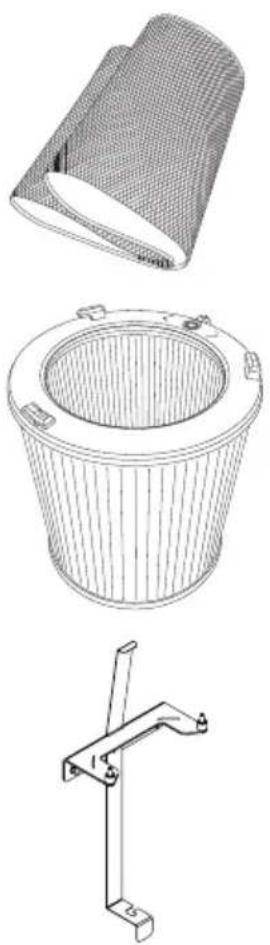
Accessories
You can source accessories via your dealer or at www.ideal.de.
natural_image
Technical line drawings of three different mechanical components: a cylindrical component, a circular bucket with internal structure, and a clamp bracket (no text or symbols)Premium textile cover Order no. 7310 108
IDEAL filter cartridge Order no. 7310 099
Wall mount Order no. 7310 010
| The air purifier won’t switch on. Is the power | cable securely connected to the back of the device?→ Make sure that the power cable is not damaged in any way→ Check both ends of the power cable. Make sure that these are plugged in and that the purifier is connected to the power supply (page 29).Is an original IDEAL filter cartridge installed? Is the filter cartridge also inserted correctly?→ Make sure that an original IDEAL filter cartridge is inserted.→ Make sure that the filter cartridge is clicked in place with all 3 tabs and is fully locked (page 29). |
| The switch button on the air purifier is not working.The buttons on the remote control do not work. (only IDEAL AP40 PRO). | Has the locking function been activated?→ Disable the locking function on the remote control (only IDEAL AP40 PRO) or via the app (Function F Page 34).→ Unplug the power cable and then plug it back in.Is the battery in the remote control?Or is it flat?→ Check the battery (3V lithium CR2025).Are you using it correctly?→ Point the remote control at the air purifier (page 32).→ Having joined the power cord or exchanged the filter, the function of the remote control is blocked for about 10 seconds. |
| The switch button is lit up only dimly or not lit up at all. | Is the air purifier switched on?→ Switch on the air purifier by pressing the switch button (page 30).Has the Quiet function been activated?→ If you press the switch button once, the air purifier switches to automatic mode.→ Disable the Quiet function by selecting a different fan speed via the app or on the remote control (only IDEAL AP40 PRO). |
| Automatic mode is not working properly. The | the air purifier is calibrating the air quality sensor. This happens when you first switch it on and after disconnecting it from the mains.→ Wait until the calibration process has been completed (this may take a few minutes)The air quality sensor is not detecting the air quality reliably.→ Calibrate the air quality sensor by briefly disconnecting it from the mains again! |
| Odours are not being filtered properly. Is the | the air purifier continuously exposed to strong odours?→ The filter needs to be changed (page 35-36) because the activated carbon filter becomes saturated and reliable air purification is no longer guaranteed.Are the odours being drawn in at all?→ Place the air purifier closer to the source of the odours.→ Switch the air purifier manually to a higher fan speed (page 30). |
Troubleshooting
| The air purifier is making loud noises. Is the filter cartridge really dirty?→ Clean the pre-filter with a vacuum cleaner.Is the air purifier located on an even surface?→ Place the device on an even surface.Is the air purifier running at a high fan speed?→ Use the switch button to set a lower fan speed. |
Did none of the specified solutions help you with your problem?
→ Contact: Service
• www.krug-priester.com
• service@krug-priester.com
IDEAL AP30 PRO:
| Power supply 200-240V | ~50/60Hz / 100-120V~50/60Hz |
| Power consumption 30W (200-240V) / 25W (100-120V) | |
| Suitable for rooms 20 to 40 m2 * | |
| Air flow rate (max.) 310 m3/h | |
| Dimensions (L × W × H) 298 × 255 × 398 mm | |
| Weight 3,6 kg | |
| Volume at turbofan speed (max.) | 54,2 dB(A) |
| Volume in Quiet mode (min.) | 16,7 dB(A) |
IDEAL AP40 PRO:
| Power supply 200-240V | ~50/60Hz / 100-120V~50/60Hz |
| Power consumption 75W (200-240V) / 55W (100-120V) | |
| Suitable for rooms 30 to 50 m2 * | |
| Air flow rate (max.) 440 m3/h | |
| Dimensions (L × W × H) 298 × 255 × 398 mm | |
| Weight 3,6 kg | |
| Volume at turbofan speed (max.) | 61,7 dB(A) |
| Volume in Quiet mode (min.) | 16,7 dB(A) |
Subject to technical changes.
* For a room height of 2.50 m
Terms of warranty
IDEAL provides a warranty for this device from the date of purchase.
The terms of warranty are defined by our local representative.
- If a material or design defect occurs during the warranty period, IDEAL shall repair or replace the device, or repay the purchase price, at its discretion.
- The warranty will only be honoured if sufficient evidence is submitted, e.g. sales receipt, and the claim under warranty is made within the warranty period.
- The warranty does not cover wearing parts or parts that need to be replaced regularly.
- The warranty shall be void if the device is not set up, adjusted and cleaned/maintained correctly (in accordance with the operating instructions).
- The warranty shall be void if the device is connected to a power supply that does not comply with the rating plate data.
Storage
We recommend storing the air purifier in its original packaging in a cool, dry place. Pack and store the filter cartridge airtight to protect the activated carbon.
Spare parts and accessories
You can source spare parts via your dealer or at www.ideal.de.
Only use the manufacturer's original parts.
Repairs
Repairs must only be carried out by qualified experts or the customer service department. This also applies if you have a defective power cable. Any attempt by untrained persons to perform repairs may pose considerable risk to the user and invalidate the warranty.
Disposal
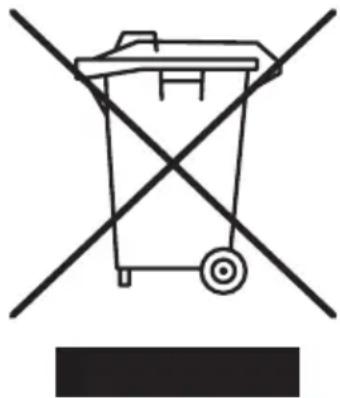
This device must not be disposed of with household waste! Please hand this device in at the collection points provided! Collecting and recycling electrical and electronic waste conserves valuable resources!
The packaging material can be recycled.
Dispose of the packaging in an environmentally friendly manner and take it to the recyclable waste collection.
Thanks!
natural_image
Simple line drawing of a trash bin with crossed diagonals and no text or symbols
The company Krug + Priester has the following certifications:
• Quality management system according to DIN EN ISO 9001:2015
• Environmental management system according to DIN EN ISO 14001:2015
• Energy management system according to DIN EN ISO 50001:2011

This machine is GS-tested and conforms to the following EC guidelines:
• 2014/35/EU for electrical safety
• 2014/30/EU for electromagnetic compatibility.
• 2011/65/EU, 2015/863/EU.
For specific technical data, please refer to the information on the identification plate of the machine.
To file a warranty claim, the device must still bear its original identification plate.
Subject to technical changes.
EC-declaration of conformity
- Herewith we declare that
GS-IDENT. No. UL-IDENT. No.
IDEAL AP30 PRO Made in Germany
11731002
10731002
IDEAL AP40 PRO Made in Germany
11731001
10731001
- complies with the following provisions applying to it
2014/35/EU
Low voltage directive
2011/65/EU, 2015/863/EU
RoHS directive
2014/30/EG
EMV Electromagnetic compatibility directive
- Applied harmonised standards in particular
IEC 61000-3-2; IEC 61000-3-3; EN 61000-3-2; EN 61000-3-3;
EN 60335-2-65; EN 60335-1;
EN ISO 13857; EN 55014-1; EN 55014-2
01.02.2018
Datum
- Geschäftsführer -
Authorized representative for technical documentation:
D-72336 Balingen (Germany)
natural_image
Simple line icon of an open book with an information symbol (no text or numbers present)Préface
natural_image
Warning symbol of a lightning bolt inside a triangle (no text or numbers)Attention
Attention
natural_image
Warning symbol of a flame inside a diamond shape (no text or numbers)Attention
natural_image
Line drawing of a cylindrical device with a fan and ventilation slots (no text or symbols)natural_image
Line drawing of a cylindrical container with internal structure and side connectors (no text or symbols)natural_image
Isometric line drawing of a mobile phone with keypad and buttons (no text or symbols)natural_image
Line drawing of a coiled electrical plug with two connectors (no text or symbols)natural_image
3D rendered image of a curved, mesh-like structure with no visible text or symbolsnatural_image
Technical line drawing of a heat exchanger or fan assembly (no text or symbols)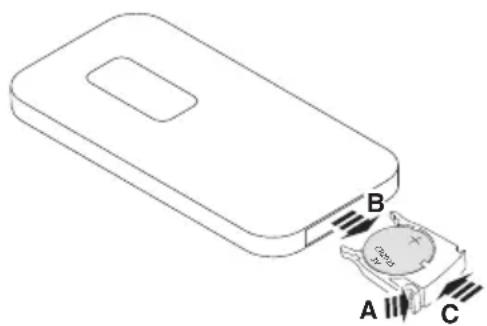
natural_image
Diagram of a device with labeled terminals A, B, and C showing internal components (no text or symbols beyond labels)natural_image
Cross-sectional diagram of a mechanical device with internal components and a directional arrow (no text or symbols)natural_image
3D rendered image of a rolled-up sheet of mesh material (no text or symbols visible)natural_image
Line drawing of a cylindrical container with internal structure and side tabs (no text or symbols)natural_image
Pure mechanical bracket diagram without any text, numbers, or symbolsFixation murale
Réf.
→ Contact : Service
• www.krug-priester.com
• service@krug-priester.com
IDEAL AP30 PRO:
natural_image
Symbol of a trash bin with crossed lines indicating no waste or restriction (no text or labels)
D-72336 Balingen (Germany)
natural_image
Simple line icon of an open book with an information symbol (no text or numbers present)Prólogo
natural_image
Warning symbol of a lightning bolt inside a triangle (no text or numbers)Atención
Atención
natural_image
Warning symbol of a flame inside a diamond shape (no text or numbers)Atención
natural_image
Line drawing of a cylindrical device with a fan and ventilation grille (no text or symbols)natural_image
Line drawing of a cylindrical container with internal structure and side connectors (no text or symbols)- Con pila de litio de 3 V (solo IDEAL AP40 PRO)
natural_image
Line drawing of a coiled electrical plug with two connectors (no text or symbols)natural_image
3D rendered image of a folded paper or mesh structure with no visible text or symbolsnatural_image
Technical line drawing of a mechanical component with internal fan-like structure (no text or symbols)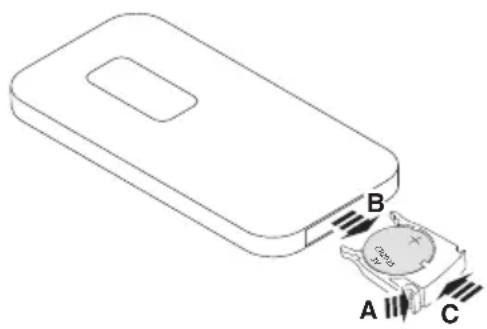
natural_image
Diagram of a mechanical component with internal structure and directional arrow (no text or symbols)natural_image
Technical line drawings of three different mechanical components: a meshed cylindrical component, a circular bucket with internal structure, and a bracket-like bracket (no text or symbols)→ Contacto: Servicio
• www.krug-priester.com
• service@krug-priester.com
IDEAL AP30 PRO:
natural_image
Simple line drawing of a trash bin with two crossed x-axes and a blank base (no text or symbols)
GS-IDENT. No. UL-IDENT. No.
IDEAL AP30 PRO Made in Germany IDEAL AP40 PRO Made in Germany
11731002 11731001
10731002 10731001
D-72336 Balingen (Germany)
natural_image
Simple line icon of an open book with an information symbol (no text or numbers present)Prefazione
natural_image
Warning symbol of a lightning bolt inside a triangle (no text or numbers)Attenzione
Attenzione
natural_image
Black and white symbolic icon of a flame inside a diamond shape (no text or numbers)Attenzione
natural_image
Line drawing of a cylindrical device with a multi-tiered fan and label 'IDEAL' (no text or symbols on the device itself)natural_image
Line drawing of a cylindrical container with internal structure and side handles (no text or symbols)natural_image
Isometric line drawing of a mobile phone with keypad and buttons (no text or symbols)natural_image
Line drawing of a coiled electrical plug with two connectors (no text or symbols)natural_image
3D rendered image of a rolled-up sheet of mesh material (no text or symbols)natural_image
Technical line drawing of a mechanical component with internal fan-like structure (no text or symbols)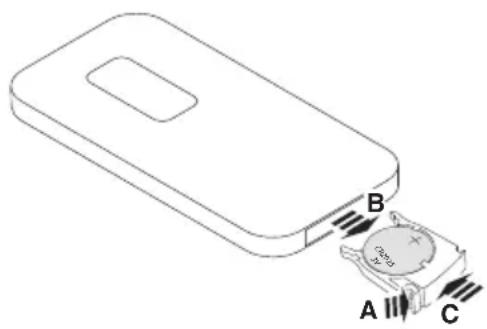
natural_image
Cross-sectional diagram of a mechanical component with internal structure and directional arrow (no text or symbols)natural_image
Technical line drawings of three different components: a mesh-coated cylindrical container, a circular basin filled with material, and a mechanical clamp bracket (no text or symbols)Rivestimento premium in tessuto N. ord. 7310 108
Cartuccia del filtro IDEAL N. ord. 7310 099
Montaggio a parete N. ord. 7310 010
natural_image
Simple line drawing of a trash bin with two crossed X-bracing lines (no text or symbols)

IDEAL AP30 PRO Made in Germany IDEAL AP40 PRO Made in Germany
GS-IDENT. No. UL-IDENT. No.
11731002 11731001
10731002 10731001
D-72336 Balingen (Germany)
natural_image
Simple line icon of an open book with an information symbol (no text or numbers present)Voorwoord
natural_image
Warning symbol of a lightning bolt inside a triangle (no text or numbers)Opgelet
Opgelet
natural_image
Warning symbol of a flame inside a diamond shape (no text or numbers)Opgelet
natural_image
Line drawing of a cylindrical device with a fan and ventilation slots (no text or symbols)natural_image
Line drawing of a cylindrical container with internal structure and side connectors (no text or symbols)Filterpatroon Afstandsbediening
natural_image
Isometric line drawing of a mobile phone with keypad and buttons (no text or symbols)natural_image
Line drawing of a coiled electrical plug with two connectors (no text or symbols)Netsnoer Gedrukte
gebruiksaanwijzing
natural_image
3D wireframe model of a curved, mesh-like structure (no text or symbols)natural_image
Technical line drawing of a mechanical component with internal fan-like structure (no text or symbols)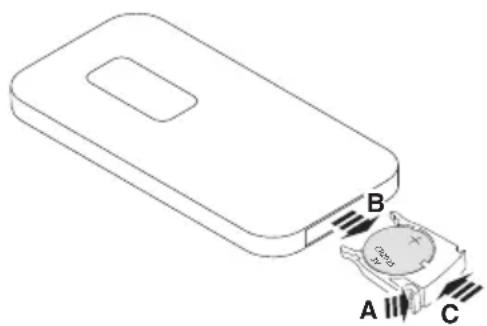
natural_image
Diagram of a device with labeled terminals A, B, and C showing internal components (no text or symbols beyond labels)Batterij vervangen
natural_image
Cross-sectional diagram of a mechanical device with internal components and a directional arrow (no text or symbols)WLAN activeren/deactiveren
natural_image
Technical line drawings of three different mechanical components: a cylindrical component, a circular bucket with internal structure, and a clamp bracket (no text or symbols)→ Contact: Service
• www.krug-priester.com
• service@krug-priester.com
IDEAL AP30 PRO:
| Netspanning 200-240V | ~50/60Hz / 100-120V~50/60Hz |
| Vermogensopname 30W (200-240V) / 25W (100-120V) | |
| Geschikt voor ruimtes 20 tot 40 m2 * | |
| Luchtdebiet (max.) 310 m3/h | |
| Afmetingen (L × B × H) 298 × 255 × 398 mm | |
| Gewicht 3,6 kg | |
| Volume turboventilatorniveau (max.) | 54,2 dB(A) |
| Volume Quiet modus (min.) | 16,7 dB(A) |
IDEAL AP40 PRO:
| Netspanning 200-240V | ~50/60Hz / 100-120V~50/60Hz |
| Vermogensopname 75W (200-240V) / 55W (100-120V) | |
| Geschikt voor ruimtes 30 tot 50 m2 * | |
| Luchtdebiet (max.) 440 m3/h | |
| Afmetingen (L × B × H) 298 × 255 × 398 mm | |
| Gewicht 3,6 kg | |
| Volume turboventilatorniveau (max.) | 61,7 dB(A) |
| Volume Quiet modus (min.) | 16,7 dB(A) |
natural_image
Simple line drawing of a trash bin with crossed lines indicating no waste or restriction (no text or symbols)
D-72336 Balingen (Germany)
Notizen:
Remarks:
Notes :
Notas:
Notizia:
Notities:
©
Immer frische Luft.
For more health, vitality and quality of life. Perceptible. With every breath you take.
D-72336 Balingen (Germany)
www.krug-priester.com