Floc System - Swimming Pool ASTRALPOOL - Free user manual and instructions
Find the device manual for free Floc System ASTRALPOOL in PDF.



| Product type | Automatic dosing system for swimming pools |
| Brand | AstralPool |
| Model | Floc System |
| Dimensions (H x W x D) | 234 x 162 x 108 mm |
| Weight | 1 kg |
| Power supply | 100-240 VAC, 50 Hz, 7 W |
| Max back pressure | 1.5 bar |
| Pump flow rate | 151.2 to 1512 ml/h |
| Dosing modes | Manual, current (mA), pulses, frequency |
| Calibration | Automatic, adjustment -20% to +10% of nominal flow |
| Flow input | 230 VAC, slaved to circulation pump |
| Programming | Via keypad, menu with password, available languages |
| Display | Screen with parameters, alarms and statistics |
| Alarms | Low level (Level Low), no flow (Flow Off), parameter error (Parameter Error) |
| Priming | 3-position switch (OFF-ON-MOM) |
| Package contents | System, PVC suction hose (4m), polyethylene discharge hose (5m), wall plugs, suction filter, non-return valve |
| Safety | Disconnect before servicing, do not mix chemicals, keep out of reach of children |
| Maintenance | Rinse with clean water before storage, protect from frost |
| Reparability | Built-in diagnostics, possibility to restore default parameters |
Frequently Asked Questions - Floc System ASTRALPOOL
User questions about Floc System ASTRALPOOL
0 question about this device. Answer the ones you know or ask your own.
Ask a new question about this device
Download the instructions for your Swimming Pool in PDF format for free! Find your manual Floc System - ASTRALPOOL and take your electronic device back in hand. On this page are published all the documents necessary for the use of your device. Floc System by ASTRALPOOL.
USER MANUAL Floc System ASTRALPOOL
MANUEL D'INSTALLATION
Disconnect power supply before carrying out ANY operation inside the control panel of the system.
NON-OBSERVANCE OF THE INSTRUCTIONS CONTAINED IN THE PRESENT MANUAL COULD CAUSE INJURY TO PEOPLE AND/OR DAMAGE TO THE DEVICE.
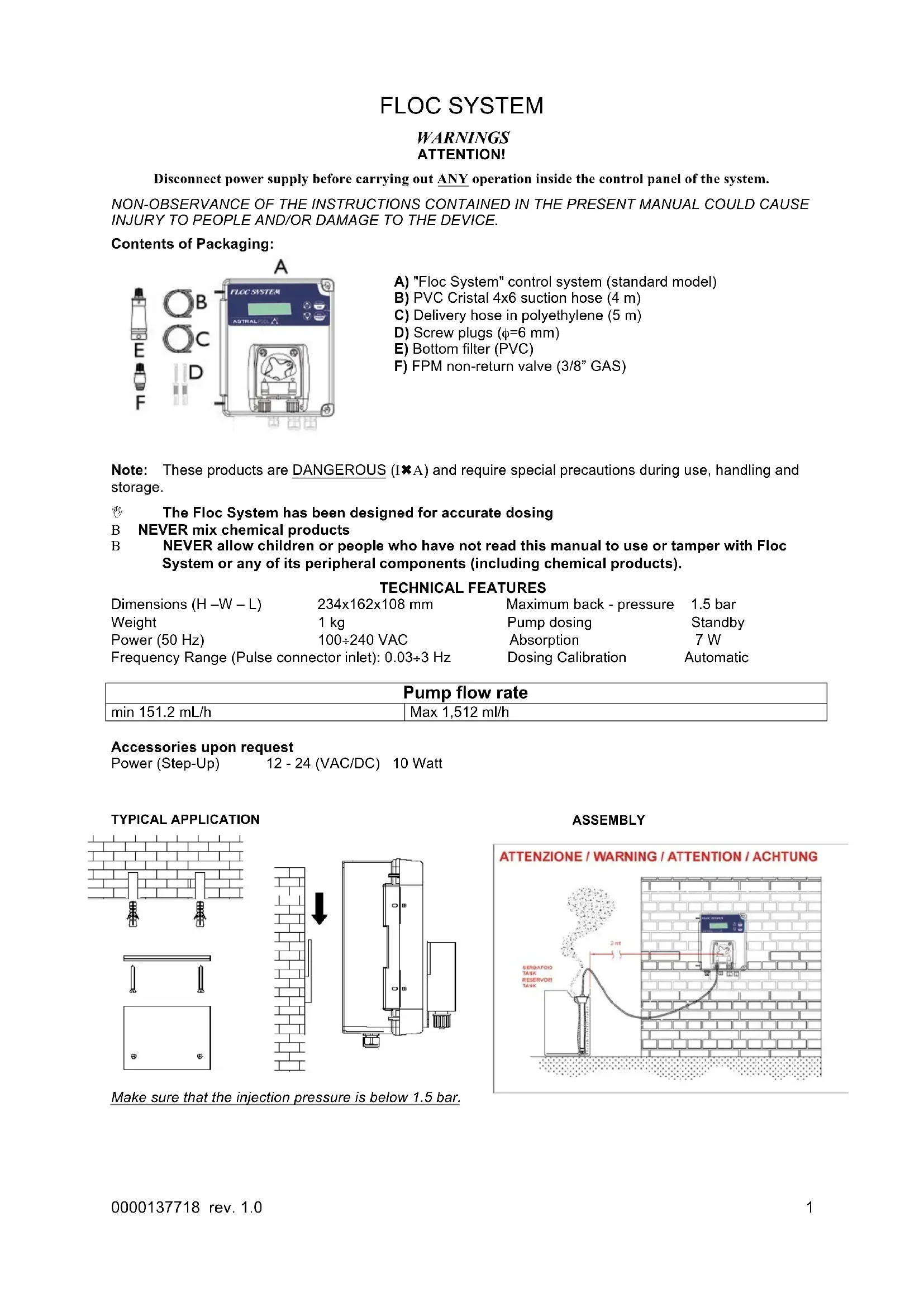
Contents of Packaging:

A) "Floc System" control system (standard model)
B) PVC Cristal 4x6 suction hose (4 m)
C) Delivery hose in polyethylene (5m)
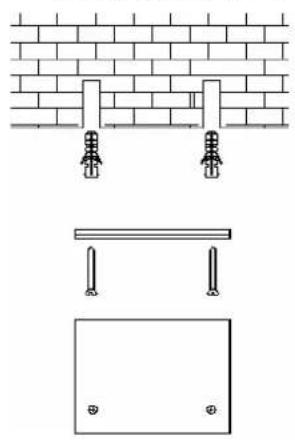
D) Screw plugs ( = 6mm)
E) Bottom filter (PVC)
F) FPM non-return valve (3/8" GAS)
Note: These products are DANGEROUS (IxA) and require special precautions during use, handling and storage.

The Floc System has been designed for accurate dosing

NEVER mix chemical products

NEVER allow children or people who have not read this manual to use or tamper with Floc System or any of its peripheral components (including chemical products).
TECHNICAL FEATURES
| Dimensions (H-W-L) | 234x162x108 mm | Maximum back - pressure | 1.5 bar |
| Weight | 1 kg | Pump dosing | Standby |
| Power (50 Hz) | 100÷240 VAC | Absorption | 7 W |
| Frequency Range (Pulse connector inlet): 0.03÷3 Hz | Dosing Calibration | Automatic | |
| Pump flow rate | |
| min 151.2 mL/h | Max 1,512 ml/h |
Accessories upon request
Power (Step-Up)
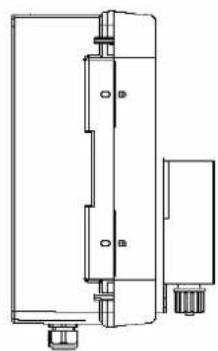
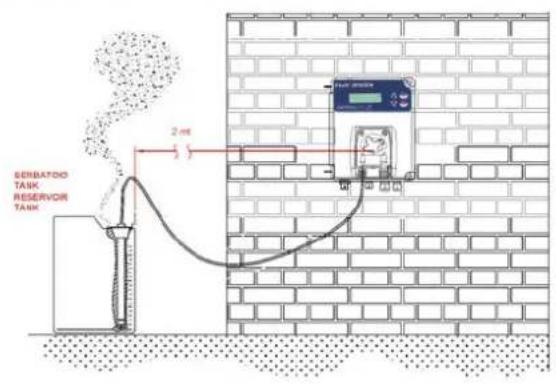
Make sure that the injection pressure is below 1.5 bar.
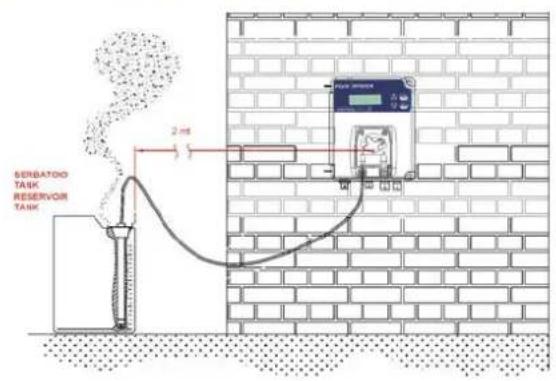
ASSEMBLY
ATTENZIONE / WARNING / ATTENTION / ACHTUNG
Electrical Connection:
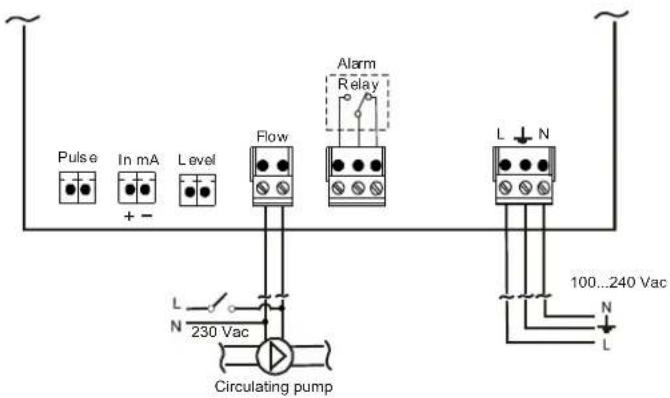
Connect the power supply cable to the general power supply network and in parallel connect the Flow connector to the recirculation pump if present on the system; the Flow inlet (230 Vac) is connected to the Flow function, if enabled (ON) it allows the dosing to be activated when the system recirculation is present.
Programming
The programming menu can be accessed by simultaneously pressing the Enter and Esc keys for at least 5 seconds.
If a password other than 0000 is set, the system will ask for the password to access the programming menu.
Upon release of the keys the display will show:
| Display | Settings |
| Language English | EN, FR, DE, ES, IT |
| Set Point Value 100 % | The dosing is set in % from 10 to 100% |
| Advanced | With Advanced five submenus can be accessed: • Input Config • Set Point Unit • Statistics • Calibration • Flow |
Access the submenu with the Enter key.

| Recommended duration Calibration | Container capacity |
| 60 seconds | 100 cc |
The calibration function allows the nominal flow rate of the pump to be adjusted from -20% to +10% .
E.g.:
[ 160 \, \mathrm{ml/h} - 20\% = 130 \, \mathrm{ml/h} ]
160 ml/h + 10% = 175 ml/h
Digital adjustment of the flow rate in the range:
130 ÷ 175 ml / h
| Advanced Submenus Display | Settings |
| Input Config Manual Mode | The dosing methods can be accessed: • Manual mode • mA mode • Pulse mode • Frequency mode |
| Set Point Unit cc/m3 | The unit of measurement is set, which can be: • cc/m3 • cc/l |
| Statistic | Acc. Num. (Num. of times the system is switched on) Dos. Num. (Number of times the motor is switched on) Flow hours (Num. of flow hours) 100% hours (Hours of work at 100% of the motor) Reset all? (Reset the parameters of the statistics) |
| Calibration On | Whether to activate or deactivate the calibration is set |
| Flow On | The flow sensor is activated or deactivated Inlet 230 Vac |
Once the type of dosing is set keep the SET key pressed for 5 seconds; the range of inlet values is modified, pressing the Enter key and choosing using UP and DOWN, always confirming with the Enter key; the range of values is connected with the speed of the pump (10-100%).
| Dosing Methods | Range of values |
| Input Config Manual Mode | 10 - 100% |
| Input Config mA Mode | 0 - 20 mA |
| Input Config Pulse Mode | 1/1 - 999/999 cc/l or cc/m3* |
| Input Config Frequency Mode | 1 - 200 p/min |
- Units of measurement that can be set
Exit Menu:
To exit from the programming Menu, press the Esc key, and the system will display:
| Display | Settings |
| Exit Save | With Enter it is possible to exit and save the modifications made. |
| Exit No Save | With Enter it is possible to exit and not to save the modifications made. |
Configuration of dosing mode:
The different dosing modes can be set with the Enter key, choosing the dosing type using UP and DOWN and always confirming with Enter.
Manual
| Display | Wiring |
| Advanced Input Congig Manual Mode | Pulse In mA Level Flow + - + - + - + - + - + - + - + - + - + - + - + - + - + - + - + - + - + - + - + - + - + - + - + - + - + - + - + - + - + - + - + - + - + - + - + - + - + - + - + - + - + - + - + - + - + - + - + - + - + - + - - + - + - + - + - + - + - + - + - + - + - + - + - + - + - + - + - + - + - + - + - + - + - + - + - + - + - + - + - + - + - + - + - + - + - + - + - + - + - + - + - + - + - + - + - + - + - + - + - + - + 100...240 Vac N 230 Vac Circulating pump |
| In the 1stlevel menu a new item will appear for setting the motor speed (10-100%) | |
| Set Point Value 10 % |
Input current (mA)
| Display | Wiring |
| Advanced Input Config mA Mode | Alarm Relay L N 100...240 Vac L |
| In the 1st level menu a new item will appear for setting the range of values. The first and second value (0-20 mA) are connected to the speed of the pump; with the first value the pump does not dose and proportionally with the second value the pump doses at the maximum speed. mA Range 4.0/20.0 mA | Circulating pump |

Impulses from water counter

Frequency signal
Priming
Priming is activated and deactivated using a side switch MOM position.
With the switch in the ON position, the system is on and ready for operation.
When the switch is on the OFF position, the pump goes on standby.
The pump:
When the regulation device is stored, it is recommended to pump clean water to rinse the tube. Then, position the roller holder at 45^ , rotating it clockwise. These two precautions will facilitate the subsequent reactivation of the unit.
Keep away from frost.

Alarms
Flow: presence of incoming flow (enslavement by the filter pump).
| Alarm Displayed | Description | Relay | Solutions |
| Level Low | Low level alarm | Relay Alarm Closed | - Press Enter to open the alarm relay - Restore product |
| Flow Off | Instrument waiting | Relay Alarm Open | - Restore Flow |
| Parameter Error | Parameter Errors | Relay Alarm Open | - Press Enter to restore parameters |
For system diagnosis carry out the following steps:
- Turn off the instrument
- Hold down the UP and DOWN keys to turn on the instrument.
The instrument will display

- Press the UP or DOWN keys to avoid resetting the default parameters
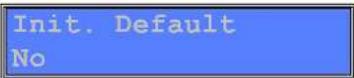
Press Enter to confirm
Default Parameters:
Language: English
Set Point: 100%
Advance:
Input Config:
Manual Mode
Set Point Unit: cm ^3/m^3
Statistic: (Reset all the parameters)
Calibration: On
Flow: Off
FLOC SYSTEM
Alimentation (Step-Up) 12 - 24 (Vca/cc) 10 W
APPLICATION TYPE

MONTAGE
ATTENZIONE / WARNING / ATTENTION / ACHTUNG



Brand : ASTRALPOOL
Model : Floc System
Category : Swimming Pool