Shine Bright SB180BP - Toothbrush Ailoria - Free user manual and instructions
Find the device manual for free Shine Bright SB180BP Ailoria in PDF.


| Product Type | Electric Sonic Toothbrush |
| Brand | Ailoria |
| Model | Shine Bright SB180BP |
| Brush Power | 3 W |
| Charger Power | 1.5 W |
| Battery Capacity | 700 mAh (Lithium) |
| Brush Supply Voltage | 3.7 V DC |
| Charger Supply Voltage | 5 V DC |
| Battery Life | Approx. 21 days (2 uses/day of 2 min) |
| Charging Time | Approx. 16 hours |
| Number of Modes | 3 (Whiten, Clean, Massage) |
| Brushing Speed | 31,000 movements/minute |
| Timer | 2 minutes with Quadpacer (30 s per quadrant) |
| Mode Memory | Yes |
| Brush Head | Wavy Dupont bristles |
| Charging Type | Contactless induction (base with USB cable) |
| Waterproof Rating (handle) | IPX7 |
| Included Accessories | 1 handle, 2 brush heads, 1 charger with USB cable |
| Maintenance | Handle washable under running water; charger wipe with a damp cloth |
| Brush Head Replacement | Every 3 months or as soon as signs of wear |
| Safety | Do not immerse the charger; supervision for children under 8 years |
Frequently Asked Questions - Shine Bright SB180BP Ailoria
User questions about Shine Bright SB180BP Ailoria
0 question about this device. Answer the ones you know or ask your own.
Ask a new question about this device
Download the instructions for your Toothbrush in PDF format for free! Find your manual Shine Bright SB180BP - Ailoria and take your electronic device back in hand. On this page are published all the documents necessary for the use of your device. Shine Bright SB180BP by Ailoria.
USER MANUAL Shine Bright SB180BP Ailoria
natural_image
Purple electric toothbrush with diamond-shaped base and silver bezel, no visible text or symbols on bodynatural_image
Diagram showing two types of toothbrush designs: one with a brush tip and the other with a toothbrush, both with arrows indicating direction (no text or symbols present)2.2 Ladeanweisung
natural_image
Line drawing of a toothbrush with a perforated bristles (no text or symbols)Bürstenkopf
Multifunktionstaste

natural_image
Line drawing of a cylindrical device with a textured base and central circular component (no text or symbols)Griff
Modusanzeige
natural_image
Simple line drawing of a box with a handle and lid, no text or symbols presentLadestation
7 Funktion
natural_image
Abstract geometric design with triangular and star-like elements (no text or symbols)Table of contents
1 Warnings....16
2 Using the sonic toothbrush....17
2.1 Attaching the brush head....17
2.2 Charging Instructions....17
2.3 End of the Charging Process....18
2.4 Brushing Instructions....18
2.5 Mode Memory....19
3 Maintenance and Care....19
4 Accessories / Replacement brushes....20
5 Storage Instructions....20
6 Environmentally friendly disposal 20
7 Function....22
User manual
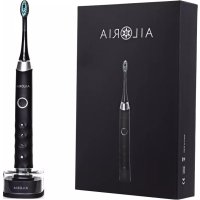
Congratulations on your purchase of the Sonic SHINE BRIGHT SB-180B/P toothbrush! If used daily, SHINE BRIGHT will quickly provide whiter and healthier teeth, thanks to the sonic technology.
Please read this manual carefully before use and keep it for future reference.
Scope of delivery:
- 1 brush head + 1 spare brush head
- The toothbrush handle with on/off switch, mode display and charging display
• 1 charger with USB cable
Product Information
| Brand | AILORIA |
| Product Name | SHINE BRIGHT SB-180B/P |
| Product | Sonic toothbrush |
| Handle power | 3W |
| Charger power | 1.5W |
| Battery capacity | 700mAh |
| Operating voltage for the toothbrush | DC3.7V |
| Operating voltage for the charger | DC5V |
| Handle protection standard (waterproof) | IPX7 |
1 Warnings
• Always keep the charger and USB cable away from water and other liquids.
- Before cleaning the base charger, unplug it from the wall outlet. After cleaning, do not reconnect the charger to the power supply until it is completely dry.
- Please make sure that the specified voltage matches the local voltage before connecting the device.
- The USB cable is firmly attached to the charger and cannot be replaced. If this is damaged, please contact your contract partner and have the device replaced by an original spare part only.
- Do not use the charger on hot surfaces.
- Do not use the Sonic toothbrush if it is damaged (brush head, handle, charger or USB cable). The electric toothbrush and the individual components can only be repaired by the manufacturer.
- Children under 8 years of age and persons with limited physical or mental abilities or lack of experience and knowledge may use SHINE BRIGHT only under adult supervision and instruction. However, cleaning and care of the product may only be carried out by adults with sufficient abilities. Keep the Sonic toothbrush out of the reach of children under 8 years of age.
- Clean the Sonic Toothbrush only under running water. The charger may only be wiped with a damp cloth and may not be submerged in water. Do not place the toothbrush, charger or USB cable in the dishwasher.
- If a surgical procedure has been performed on your teeth or gums during the last 2 months, please consult your dentist before using the toothbrush.
- If excessive bleeding of the gums occurs after using SHINE BRIGHT and persists or pains occur during use, please consult your dentist.
- SHINE BRIGHT should not affect pacemakers in any way, but for maximum safety precautions we recommend that you consult your doctor before use.
- SHINE BRIGHT is only suitable for cleaning teeth, gums and tongue and should not be used for any other purpose.
- Never use damaged brush heads. The brush heads should be replaced approx. every 3 months as soon as signs of use occur. Only use brush heads recommended by the manufacturer.
- After each use, clean the brush heads (especially after using toothpaste containing sodium, peroxide or bicarbonate) thoroughly with warm water to prevent the plastic from cracking.
2 Using the sonic toothbrush
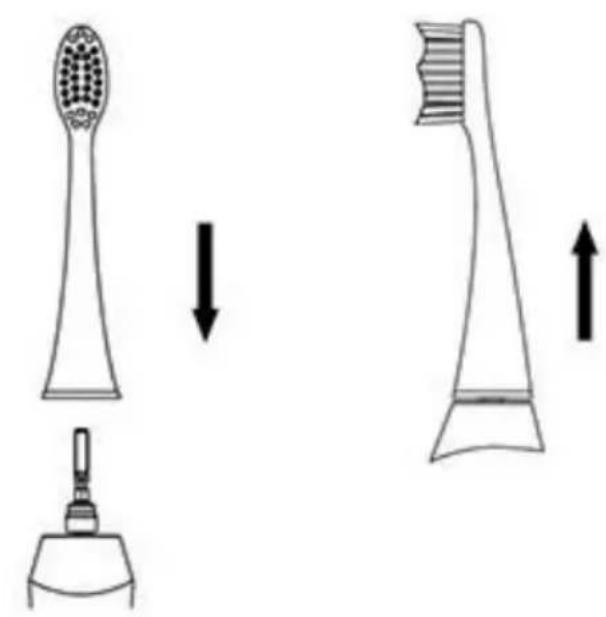
2.1 Attaching the brush head
- Remove the protective cap at the top of the toothbrush to expose the metal shaft.
- Place the front of the brush head on the front of the toothbrush handle.
- Press the brush head onto the metal shaft until it is fixed securely.
natural_image
Diagram showing two types of toothbrush designs: one with a toothbrush head and the other with a toothbrush, both without any text or symbols.2.2 Charging Instructions
Please make sure to charge the sonic toothbrush before use.
- Connect the USB cable of the supplied charging unit to a USB power source (not included). You can use any standard USB adapter or a laptop, etc. for this purpose. The device's input voltage is DC 5V, 500mAh.
- The inductive charger works automatically: simply connect the charging station to the power source, then place your toothbrush in the station to start charging.
- Low battery indicator: If the toothbrush battery is low, after the teeth brushing process is finished, the LED flashes ten times to remind you to recharge your toothbrush.
- Charging indicator: During charging, the LED lights red until the toothbrush is fully charged. When the battery is fully charged, the light turns off.
- The toothbrush cannot be used during the loading process. If you place the brush in the charging station while it is on, the brush will automatically turn off and switch to charging mode.
Note: Fully charging the battery requires approximately 16 hours. A full battery charge lasts for 21 days when used twice daily for two minutes.
2.3 End of the Charging Process
- Remove the charger from the wall outlet.
- Wipe the entire surface of the charger with a damp cloth.
- Do not immerse the charger in water.
2.4 Brushing Instructions
- Moisten the bristles of the sonic toothbrush and apply toothpaste.
- Apply SHINE BRIGHT to the teeth at a slight angle to the gum line.
- To start, press the on/off button (only after the toothbrush is in the mouth, in order to avoid spraying).
- Only light pressure is required for optimal teeth cleaning as SHINE BRIGHT's high-quality, effective Dupont brushes produce excellent results in a gentle manner.
- Move the brush slowly over the teeth in small up and down motions, in order to reach the interdental spaces with the wave-shaped bristles, that are adapted to the teeth's shape.
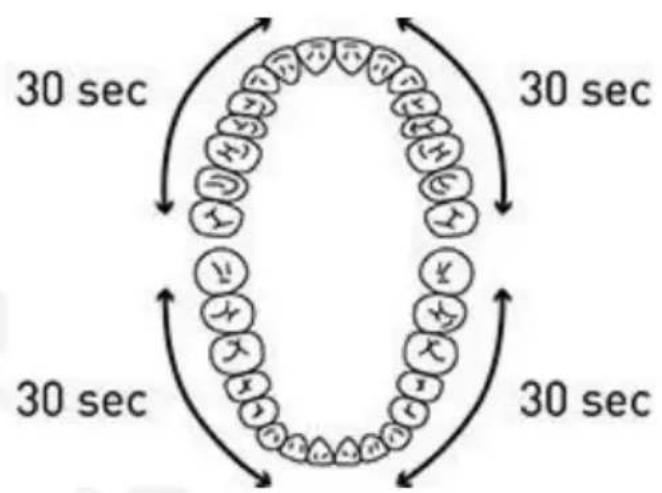
- Proceed to cleaning each quadrant for 30 seconds, with a total cleaning time of 2 minutes. Thanks to the 2-minute smart timer, SHINE BRIGHT automatically switches itself off.
flowchart
graph TD
    A["Start"] --> B{30 sec}
    B --> C["Process Step 1"]
    C --> D["30 sec"]
    D --> E["Process Step 2"]
    E --> F["30 sec"]
    F --> G["End"]
    style A fill:#f9f,stroke:#333
    style G fill:#f9f,stroke:#333
Note: The Quadpacer is an interval timer that reminds you of the regular brushing of the four sections in your mouth. The Quadpacer reminds you to change the quadrant every 30 seconds, by turning off for 0.5 seconds after each interval. This way, you can train the cleaning method and duration recommended by dentists.
-
When you first turn on SHINE BRIGHT (with the On/Off button), your toothbrush will automatically start in the "Whiten" mode.
• To change the mode, press the On/Off button twice within 3 seconds.
• To turn off the Sonic toothbrush, press the power button once. -
Whiten Mode: This mode provides intensive cleaning of the teeth, whitens them successively and is suitable for users with normal teeth sensitivity.
- Clean Mode: This mode is the standard mode for daily thorough cleaning: The vibrations of the bristles are weaker than in whiten-mode.
- Massage Mode: The vibration of the bristles and the intensity vary to stimulate the blood flow in the gums. Use this mode to polish your teeth and massage your gums.
2.5 Mode Memory
You can switch between the different cleaning modes by pressing the start/off switch. The mode can be changed by pressing the button again within 3 seconds after turning the brush on.
The selected mode lights up accordingly and remains active until another cleaning mode is selected. After 2 minutes of cleaning, the Sonic Toothbrush automatically shuts off.
The memory function is always active, therefore, for the next brushing, your toothbrush will automatically start in the mode that you left it in.
3 Maintenance and Care
- Remove the brush head and rinse the metal shaft with warm water. In order to avoid damage to the rubber seal, please do not use any sharp objects near it.
- Wipe the entire surface of the handle with a damp cloth.
- Rinse the brush head and bristles under warm running water after each use. This is possible with the attached brush head. Thanks to the IPX7 protection class standard, the SHINE BRIGHT toothbrush (excluding the charger) is waterproof and can also be used in the shower.
-
Remove the brush head from the handle once a week and rinse it thoroughly with warm water.
-
To clean the charger, remove the transparent cover of the charger and clean it with a damp cloth. Never immerse the charging station in water and do not rinse it under running water.
- To achieve optimum cleaning results, you should replace the brush head every 3 months if signs of use are visible. Please only use replacement brushes recommended by the manufacturer.
4 Accessories / Replacement brushes
Spare brush heads are available from your contract partner or directly from the manufacturer:
https://www.ailoria.de
5 Storage Instructions
If you do not want to use SHINE BRIGHT for a longer period of time, please unplug the USB cable and/or the plug from the socket and clean the toothbrush thoroughly. Please store them in a cool, dry place away from direct sunlight.
6 Environmentally friendly disposal
Please do not throw the sonic toothbrush in your household waste at the end of the life cycle but take it to an official collection point.
The battery in the toothbrush contains substances that can cause environmental damage. For this reason, please remove the battery before handing it over to an official recycling point. Return the used battery to a battery collection point.
Product Specifications
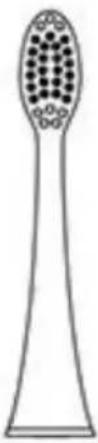
natural_image
Line drawing of a toothbrush with decorative patterns (no text or symbols)Brush head
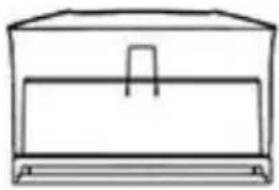
natural_image
Simple line drawing of a box with a handle and base (no text or symbols)Charger
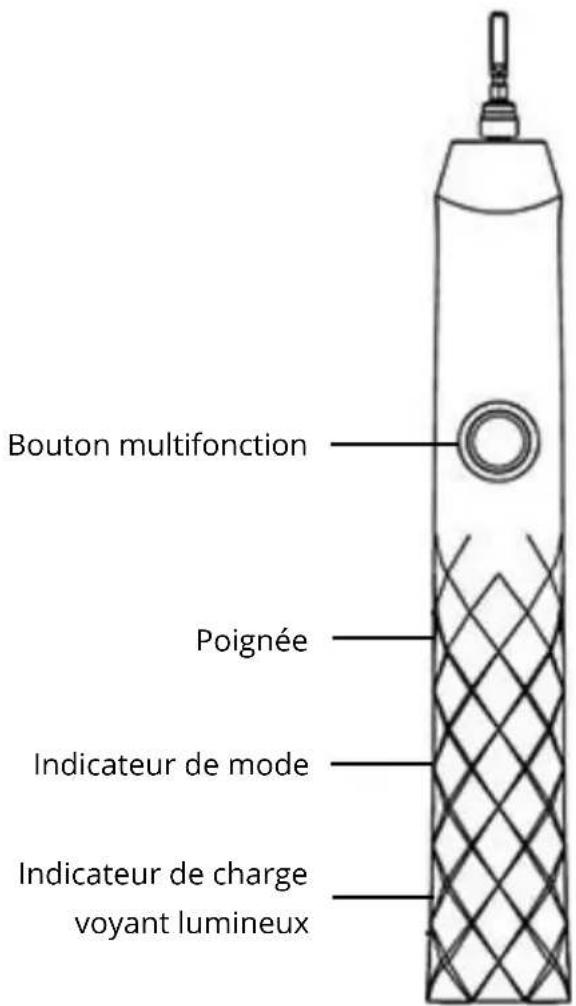
Multifunction button
Handle
Mode indicator
Charge indicator / LED light

natural_image
Line drawing of a cylindrical device with a mesh pattern and a central circular component (no text or symbols)7 Function
- SHINE BRIGHT provides effective cleaning with 31000 brush head movements per minute, thanks to the twin-engine drive and wide bristle oscillation. Studies have shown that this is the optimum speed for thorough cleaning without damaging the teeth enamel.
- SHINE BRIGHT has 3 modes (Whiten, Clean and Massage).
- SHINE BRIGHT has with a 2-minute timer (30-second increments for each of the 4 quadrants). The sonic toothbrush has an automatic memory mode for adaptation to your particular routine.
- Replacement brush head with wave-shaped Dupont bristles for gentle and effective care of teeth and gums.
- Lithium battery and inductive charger with low-power monitoring and overcharge protection.
- IPX 7 handle protection class standard, which can withstand daily cleaning.
The Sonic toothbrush is safe to use in accordance with the latest scientific knowledge, provided that the instructions in this manual are followed at all times, and that the brush is always used properly and only for its intended purpose.
Manufacturer:
VEHNSGROUP
VEHNS GROUP GmbH
Subject to alterations and errors.
The manufacturer assumes no liability in case of faulty installation, improper or incorrect use
© VEHNS GROUP GmbH
Version 1.0 - March 2018
Table des matières
natural_image
Diagram showing two types of toothbrush designs: one with a toothbrush head and the other with a toothbrush, both with directional arrows indicating movement (no text or symbols present)2.2 Instruction de chargement
natural_image
Line drawing of a toothbrush with a perforated circular groove (no text or symbols)Tête de brosse
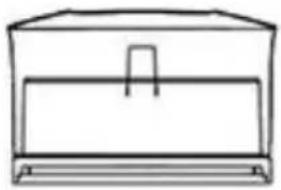
natural_image
Simple line drawing of a rectangular box with a handle and base (no text or symbols)Chargeur
natural_image
Diagram showing two types of toothbrush designs: one with a toothbrush head and the other with a toothbrush, both without any text or symbols.natural_image
Line drawing of a toothbrush with a perforated circular groove (no text or symbols)natural_image
Simple line drawing of a rectangular box with a handle and base (no text or symbols)Caricabatterie