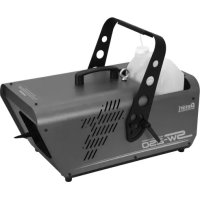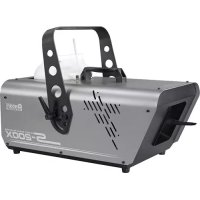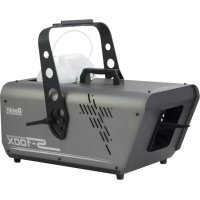
S100X DMX - Snow blower Antari - Free user manual and instructions
Find the device manual for free S100X DMX Antari in PDF.


| Product type | Snow machine |
| Brand | Antari |
| Model | S100X DMX |
| Power supply | 100-120 V AC / 230-240 V AC, 50/60 Hz |
| Power | 770 W (min) - 1000 W (max) |
| Output volume | 180 ml/min |
| Tank capacity | 5 liters |
| Fluid consumption | 5.5 min/liter (100% flow) |
| Weight | 11 kg |
| Dimensions (L x W x H) | 505 x 276 x 280 mm |
| Included remote control | SC-2 with 10 m cable |
| DMX control | Yes, via 3-pin XLR connector (1 channel) |
| DMX addressing | Via DIP switches (1-9) |
| Recommended fluid | Antari SL-5 snow fluid or equivalent water-based fluid |
| Maintenance | Clean the nozzle regularly; flush with distilled water before storage |
| Safety | Protect from moisture; do not open; use only on grounded outlet; do not direct towards people |
| Installation | Floor or ceiling (max tilt 15°); use safety cable if suspended |
| Repairability | No user-serviceable parts; contact a qualified technician |
Frequently Asked Questions - S100X DMX Antari
User questions about S100X DMX Antari
0 question about this device. Answer the ones you know or ask your own.
Ask a new question about this device
Download the instructions for your Snow blower in PDF format for free! Find your manual S100X DMX - Antari and take your electronic device back in hand. On this page are published all the documents necessary for the use of your device. S100X DMX by Antari.
USER MANUAL S100X DMX Antari
Thank you for choosing an ANTARI Special Effects Machine. You now own a rugged and powerful state-of-the-art machine. Prior to use, we suggest that you carefully read all of the instructions. By following the suggestions found in this user manual, you can look forward to the reliable and satisfactory performance of your ANTARI S-100X & S-200X Silent Snow Machine.

CAUTION
DANGER OF ELECTRIC SHOCK!
Keep this device away from rain and moisture!
Never open the housing!
Keep this device dry.
For indoor use only. Not designed for outside use.
Use a grounded electrical outlet only. Prior to use take care to determine that the unit is installed at the rated voltage.
Always unplug your ANTARI Snow Machine before filling its tank.
Turn off or unplug when not in use.
This machine is not water or splash proof. If moisture, water, or snow liquid gets inside the housing, immediately unplug the unit and contact a recommended service technician or your ANTARI dealer before using it again.
There are no user-serviceable parts inside. Refer to your ANTARI dealer or other qualified service personnel.
For adult use only. This machine must be installed out of the reach of children. Never leave the unit running unattended.
Never aim the output nozzle directly at people or animals.
Locate the machine in a well-ventilated area.
DANGER OF BURNING!
Never touch the device during the operation!
Never add flammable liquids of any kind (oil, gas, perfume) to the snow liquid.
Pay attention to all warning labels and instructions printed on the exterior of your ANTARI
S-100X & S-200X Snow Machine.
Use only the high-quality snow liquid that your dealer recommends.
Always make sure there is sufficient liquid in the machine's liquid tank.
If your ANTARI machine fails to work properly, discontinue use immediately. Drain all liquid from the tank, pack the unit securely (preferably in the original packing material), and return it to your ANTARI dealer for service.
Unpacking & Inspection
Open the shipping carton and verify that all equipment necessary to operate the system has arrived intact.
If any equipment is missing contact your ANTARI dealer immediately.
The shipping carton should contain the following items:
- Snow machine with power cable
- SC-2 volume remote controller
- Fluid tank
- Hanging bracket
- Screw set and user manual
Before beginning your initial setup of the ANTARI S-100X & S-200X Snow Machine, make sure that there is no evident damage caused by transportation. In the event that the unit's housing or cable is damaged, do not plug it in and do not attempt to use it until after contacting your ANTARI dealer for assistance.
Setup
- Remove all packing materials from shipping box. Check that all foam and plastic padding is removed.
- Place the machine on a flat surface and follow the steps below.
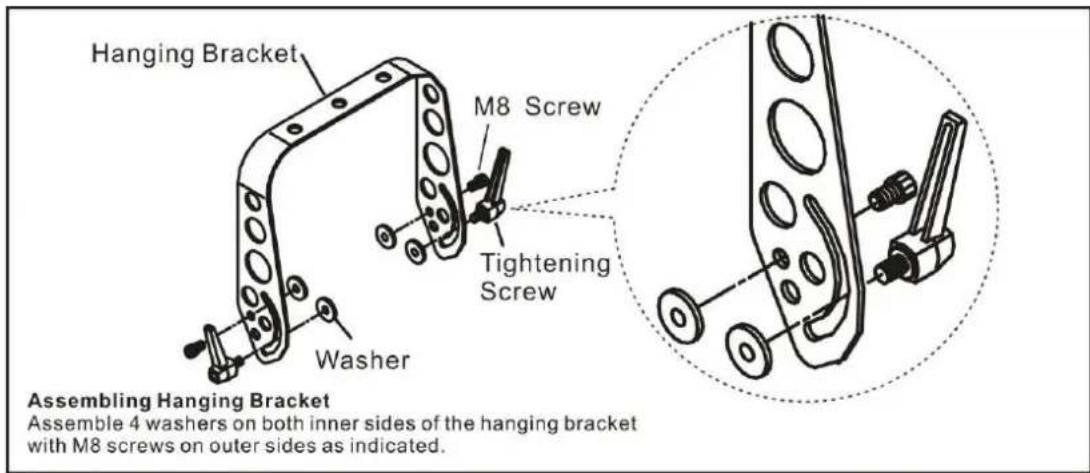
- Assemble the hanging bracket on the machine, use the M8 screws to position the hanging
bracket with the machine, the tightening screws are for adjusting the machine's angle when in the air.
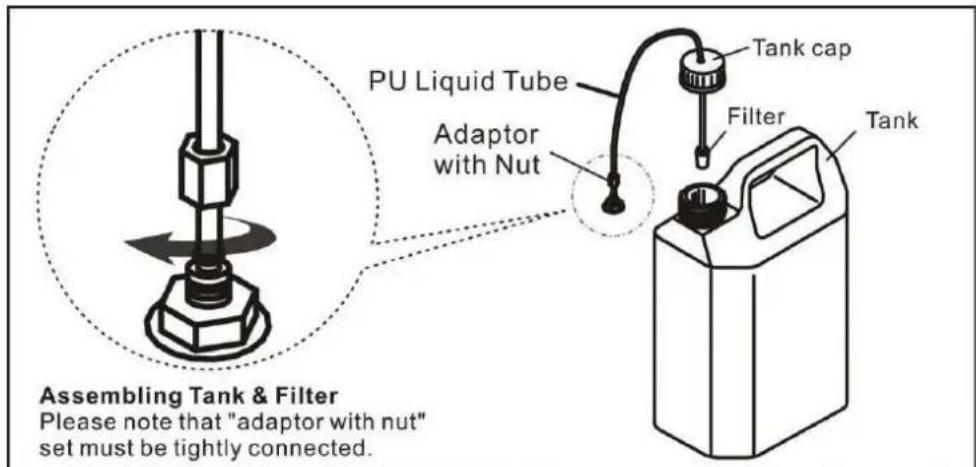
- Fill with ANTARI SL-5 Snow Liquid, ANTARI SL-5A Premium Snow Liquid or other high-quality, water-based snow liquid recommended by your dealer. Any other types of fluid can damage the unit. When filled, place cap back on liquid tank.
- Firmly attach the 4-pin connector on the remote control cable to the proper input on the rear of the machine.
Installation Note
- The snow machine may be installed at floor level or suspended overhead. It is best suggested to mount the machine up high. When mounting the unit overhead, please make sure that it is secured with a safety bond looped through the safety ring. Whatever installation method you choose, do not allow the unit to have more than a 15 degree angle of inclination.
- It is important that the snow does not shoot directly at anyone's face.
- Always monitor tank fluid level during operation. Running a snow machine without fluid can permanently damage the unit. If you experience low output, mechanical noise or no output at all, unplug immediately. Check fluid level, the external fuse, remote connection, and power from the wall. If all of the above appears to be fine, plug the unit in again. If snow does not come out after holding the remote ON/OFF button down, check the hose attached to the tank to make sure there is fluid going through the hose. If you are unable to determine the cause of the problem, do not simply continue pushing the remote button, as this may damage the unit. Return the machine to your Antari dealer.
Operation
-
Plug the power cable into a grounded electrical outlet.
-
Turn on the machine by pressing the red power switch on the rear of the unit and make sure the red indicator that is located above the Power switch is lit.
The units can be controlled by either DMX or the SC-2 volume remote control. See the respective topics below:
- Connect the remote control's male 4-pin plug to the machines' INPUT socket and make sure the red "POWER" indicator is lit.
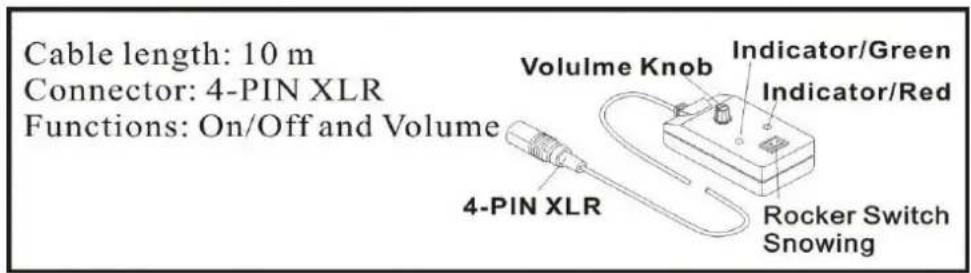
- Press ON/OFF button, the IN USE indicator lights up green and the machine is ready to operate (during this procedure, the machine's fan and motors are operating).
- Use the adjustable knob "OUTPUT VOLUME" on the SC-2 Volume Remote controller to set an output value between 10% and 100% .
- There's a smaller button "AIR VOLUME" located at rear of the machine used for adjusting the fan output volume. In general, when the fan output is increased the snowflakes produced are smaller. In contrast, when the fan output is decreased, bigger snowflakes will be produced. However, the snow output volume will not be affected.
DMX Connector Pin Assignment
The machine provides a 3-pin XLR connector for DMX connection. The diagram below indicates pin assignment information.
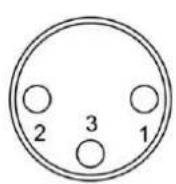
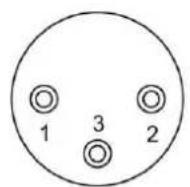
3 Pin XLR
| Pin | Function |
| 1 | Ground |
| 2 | Data- |
| 3 | Data+ |
DMX Control
a) Connect the DMX cord to the DMX IN socket on the rear of the machine.
b) Test the system by activating the snow system's selected DMX channel. When the channel value is increased the snow machine should produce snow at a steadily increasing rate. The unit is OFF when a value between 0-5 is selected. It will reach 100% output once the channel is set to 255.
DMX Protocol
| DMX VALUE | |
| 0-5 | OFF |
| 6-255 | ON |
c) Addressing:
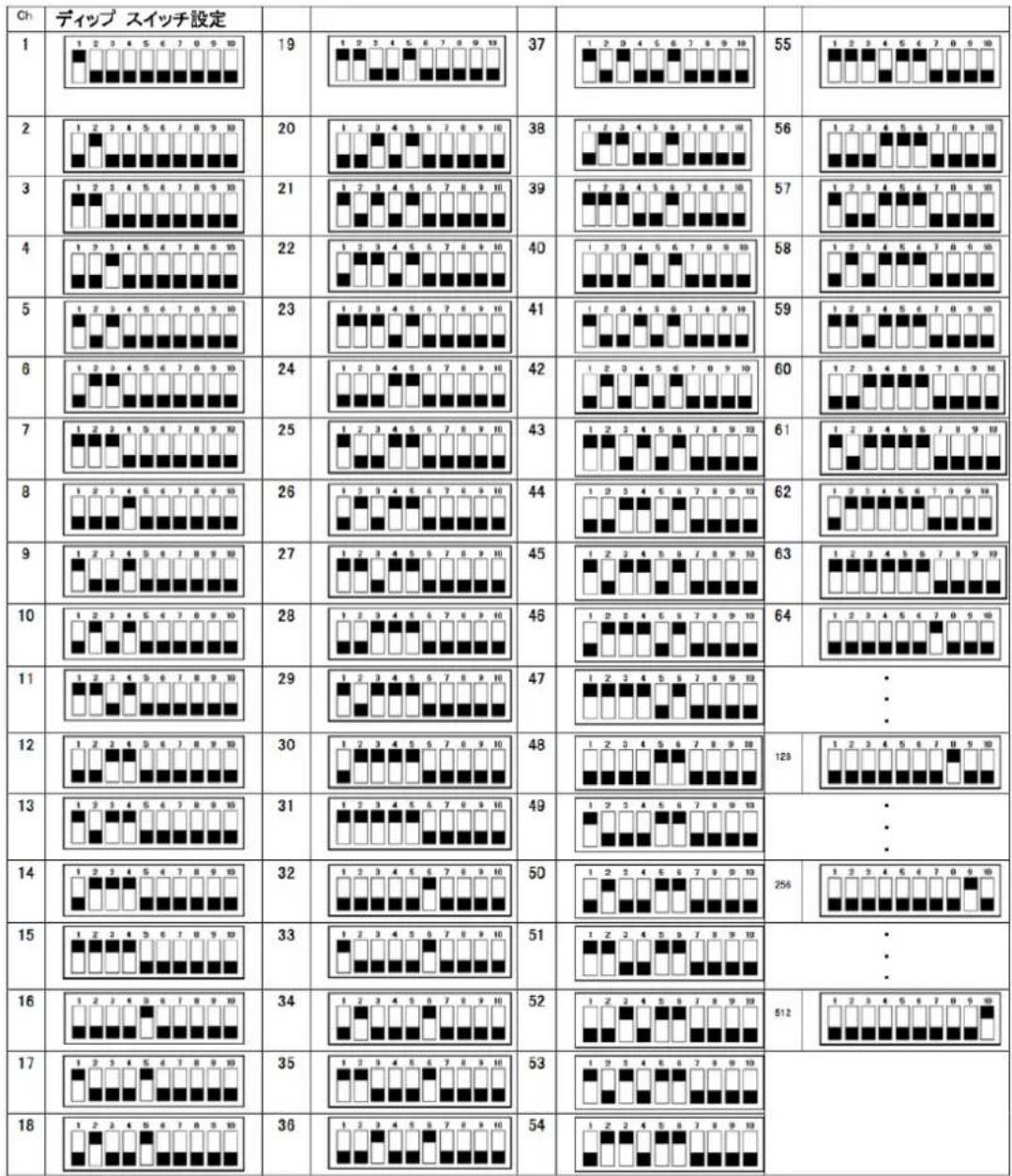
Each device occupies 1 channel. To ensure that the control signals are properly directed to each device, they require addressing. This is to be adjusted for every single device by changing the DIP switches as set out in the table below.
The starting address is defined as the first channel from which the device will respond to the controller. Please make sure that you do not have any overlapping channels in order to control each device correctly and independently from any other fixture on the DMX data link. If two, three or more devices are addressed similarly, they will work similarly.
DMX Address Setting
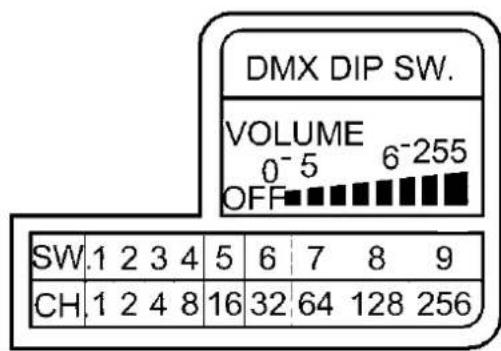

Dip Switch Corresponding Chart
| Channel No. | 1 | 2 | 4 | 8 | 16 | 32 | 64 | 128 | 256 |
| Dip Switch | 1 | 2 | 3 | 4 | 5 | 6 | 7 | 8 | 9 |
Example 1: Set DMX starting address to 69
Dip switch # 7 = 64 channel
Dip switch # 3 = 4 channel
Dip switch # 1 = 1 channel
Total = 64 + 4 + 1 = 69 channel
Maintenance
- Do not allow the snow liquid to become contaminated. Always replace the caps on the liquid container and the snow machine liquid tank immediately after filling.
- Before storing away after each operation, rinse the system with pure water and let it pump for at least 1 or 2 minutes. This step helps to ensure a longer life span of the motor and the nozzle.
- It is strongly recommended to regularly clean the dust/residue around the machines' vent holes (on both sides of the machine). Simply use a small brush, a toothbrush for example, and gently brush in the direction from top to bottom. This step helps to ensure that minimal debris will get into the machine or causes clogging.
Snow Liquid
Depending on the desired effect, use either ANTARI SL-5 Snow/Foam Liquid for normal snow or ANTARI SL-5A Snow Liquid for fast-dissipating snow.
Technical Specifications
| MODEL | S-100X & S-200X |
| Power Supply | 100/120V AC, 230/240V AC, 50/60Hz |
| Motor | 770W (min. output), 1000W (max. output) |
| Output Volume | 180ml/min |
| Tank Capacity | 5 liters |
| Fluid Consumption Rate | 5.5 min/liter (100% output) |
| Weight | 11 kg |
| Dimensions (LxWxH) | L505 W276 H280 mm |
| Remote Included | SC-2 |
| 10 Meter Remote Extension | EXT-6 |
| DMX | On-board |
| Warm-up Time | N/A |
Save these instructions.
Mode d'emploi
Antari S-100X & S-200X Machine Neige
Introduction
Connexion: XLR 4-pole
| Ch | デイressing設定 | ||||||||
| 1 | 19 | 37 | 55 | ||||||
| 2 | 20 | 38 | 56 | ||||||
| 3 | 21 | 39 | 57 | ||||||
| 4 | 22 | 40 | 58 | ||||||
| 5 | 23 | 41 | 59 | ||||||
| 6 | 24 | 42 | 60 | ||||||
| 7 | 25 | 43 | 61 | ||||||
| 8 | 26 | 44 | 62 | ||||||
| 9 | 27 | 45 | 63 | ||||||
| 10 | 28 | 46 | 64 | ||||||
| 11 | 29 | 47 | ·:·:·:·:·:·:·:·:·:·:·:·:·:·:·:·:·:·:·:·:·:·:·:·:·:·:·:·:·:·:·:·:·:·:·:·:·:·:·:·:·:·:·:·:·:·:·:·:·:·:· | 123 | |||||
| 12 | 30 | 48 | ·:·:·:·:·:·:·:·:·:·:·:·:·:·:·:·:·:·:·:·:·:·:·:·:·:·:·:·:·:·:·:·:·:·:·:·:·:·:·:·:·:·:·:·:·:·:·:·:· | 258 | |||||
| 13 | 31 | 49 | ·:·:·:·:·:·:·:·:·:·:·:·:·:·:·:·:·:·:·:·:·:·:·:·:·:·:·:·:·:·:·:·:·:·:·:·:·:·:·:·:·:·:·:·:·:·:·:·:· | ||||||
| 14 | 32 | 50 | 51 | ||||||
| 15 | 33 | 52 | 53 | ||||||
| 16 | 34 | 54 | 512 | ||||||
| 17 | 35 | 53 | 54 | ||||||
| 18 | 36 | 54 | 512 |
Wartung
For current product information visit Antari at:www.antari.com For information requests please contact us at:sales@antari.com