610 - Measuring equipment Testo - Free user manual and instructions
Find the device manual for free 610 Testo in PDF.



User questions about 610 Testo
0 question about this device. Answer the ones you know or ask your own.
Ask a new question about this device
Download the instructions for your Measuring equipment in PDF format for free! Find your manual 610 - Testo and take your electronic device back in hand. On this page are published all the documents necessary for the use of your device. 610 by Testo.
USER MANUAL 610 Testo
0.1^, 0.1^, 0.1% rH
- Genaugkeiten
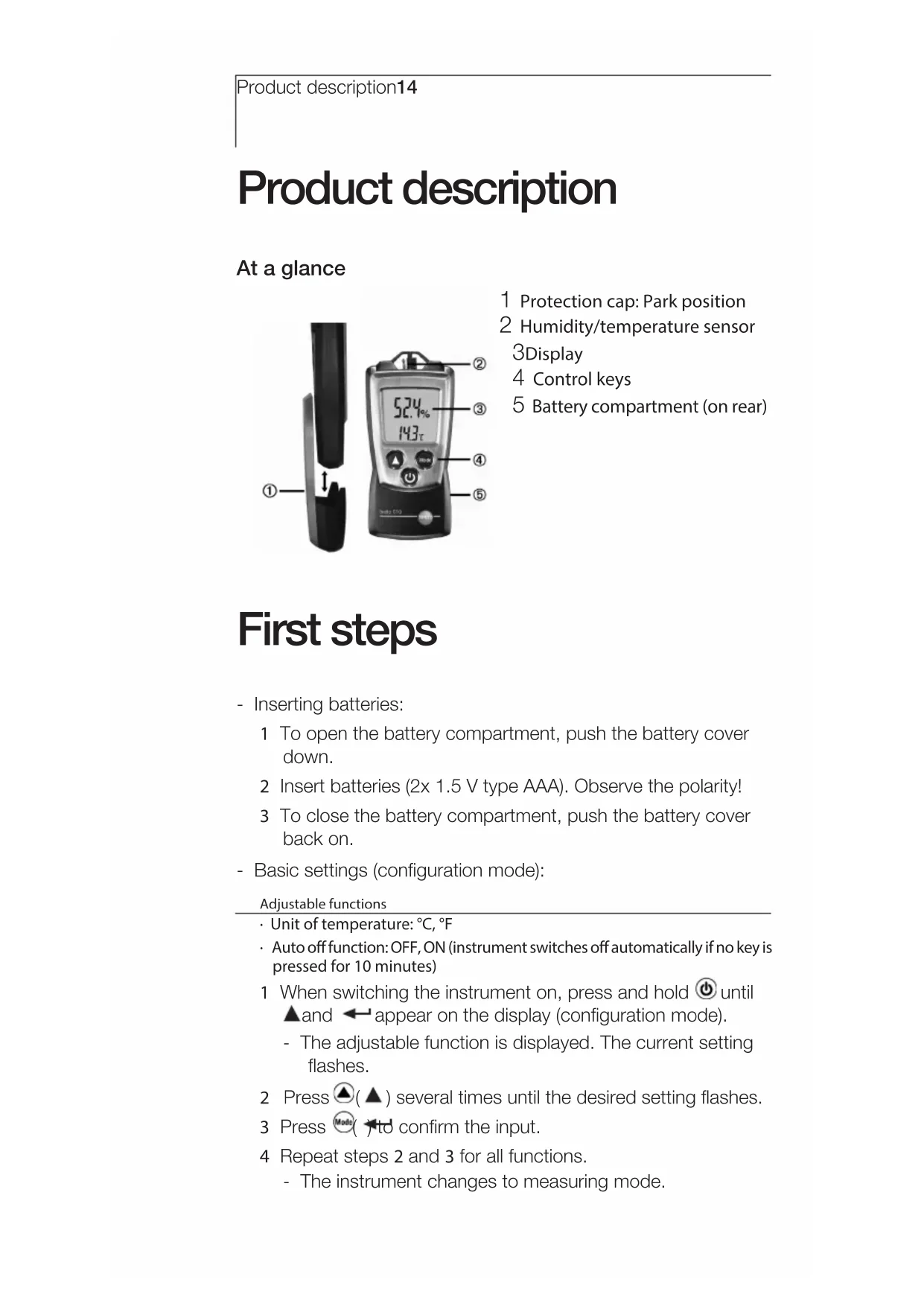
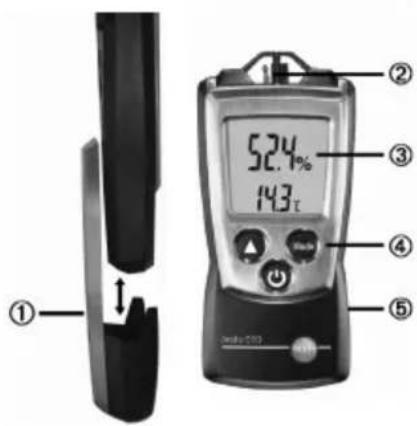
1 Protection cap: Park position
2 Humidity/temperature sensor 3Display
4 Control keys
5 Battery compartment (on rear)
Basic settings
Instrument off > press and hold 2s > select with (▲), confirm with
Unit of temperature: ^ C ^ F > Auto off function: OFF, ON
Switching the instrument on
Press
Switching the display light on (for 10s)
Instrument on > press
Select display size
Instrument on > select with
% (relative humidity), td (dew point temperature), wb (wet bulb temperature)
Select display mode
Instrument on > select with
Current reading > Hold: Readings are held > Max: Maximum values > Min: Minimum values
Switching the instrument off:
Instrument on >press and hold 2s.
Safety and the environment
About this document
Please read this documentation through carefully and familiarise yourself with the product before putting it to use. Keep this document to hand so that you can refer to it when necessary. Hand this documentation on to any subsequent users of the product.
Pay particular attention to information emphasised by the following symbols:
Important.
Avoid personal injury/damage to equipment
Only operate the measuring instrument properly, for its intended purpose and within the parameters specified in the technical data. Do not use force.
Never store the product together with solvents, acids or other aggressive substances.
Only carry out the maintenance and repair work that is described in the documentation. Follow the prescribed steps when doing so. Use only OEM spare parts from Testo.
Do not use the device in a polluted environment (heavily dusty, oil, foreign matter, volatile chemicals).
Protecting the environment
Take faulty rechargeable batteries as well as spent batteries to the collection points provided for them.
Send the product back to Testo at the end of its useful life. We will ensure that it is disposed of in an environmentally friendly manner.
Specifications
uu
Functions and use
The testo 610 is a humidity/temperature measuring instrument. It is normally used to measure the humidity in offices and storerooms, buildings and greenhouses.
Technical data
Measurement data
Sensors:
Testo humidity sensor, NTC temperature sensor
Parameters:
°C, °F, %rH, wet bulb, td
- Measuring ranges:
-10...50°C, 14...122°F, 0...100 %rH
- Resolutions:
0.1°C, 0.1°F, 0.1%rH
Accuracies
(Nominal temperature 25^,± 1 Digit): ± 0.5^,± 0.9^,± 2.5% rH (5...95%rH)
Long-term stability: ±1 %rF / year
- Measuring rate: 1.0 s
Further instrument data
Protection class: IP20
- Ambient conditions: -10...50 °C, 14...122 °F
- Storage/transport conditions: -40...70°C, -40...158°F
Temperature coefficient: type (k = 1) 0.06% rF / K
Voltage supply: 2x 1.5 V type AAA
- Battery life: 200 h (without display light)
Dimensions: 119x46x25 mm (inc. protection cap)
Weight: 90g (inc. batteries and protection cap)
Directives, standards and tests
EC Directive: 2014/30/EU
Product description
At a glance
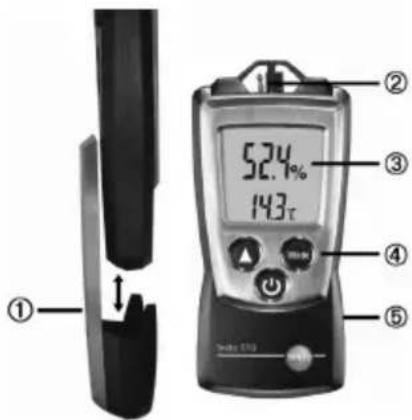
1 Protection cap: Park position
2 Humidity/temperature sensor
3Display
4 Control keys
5 Battery compartment (on rear)
First steps
- Inserting batteries:
1 To open the battery compartment, push the battery cover down.
2 Insert batteries (2x 1.5 V type AAA). Observe the polarity!
3 To close the battery compartment, push the battery cover back on.
- Basic settings (configuration mode):
Adjustable functions
Unit of temperature: ^ C, F
- Auto off function: OFF, ON (instrument switches off automatically if no key is pressed for 10 minutes)
1 When switching the instrument on, press and hold until and appear on the display (configuration mode).
- The adjustable function is displayed. The current setting flashes.
2 Press () several times until the desired setting flashes.
3 Press to confirm the input.
4 Repeat steps 2 and 3 for all functions. - The instrument changes to measuring mode.
Using the product
To guarantee correct readings: Keep temperature and humidity sources which may falsify the measurement (e.g. hands) away from the sensor.
- Switching the instrument on:
Press
-
Measuring mode is opened.
-
Switching the display light on:
-
The instrument is switched on.
Press
- The display light goes out automatically if no key is pressed for 10 seconds.
Changing the parameter:
Adjustable units
- % (relative humidity)
- td (dew point temperature)
- wb (wet bulb temperature)
Press until the desired parameter appears.
- Changing the display view:
Adjustable views
Current reading
- Hold: Readings are held.
Max: Maximum values since the instrument was last switched on or last reset.
- Min: Minimum values since the instrument was last switched on or last reset.
Press several times until the desired view appears.
- Resetting Max/Min values:
1 Press Mode several times until the desired view appears.
2 Press and hold until - - - - appears.
3 Repeat steps 1 and 2 for all values that are to be reset.
- Switching the instrument off:
Press and hold until the display goes out.
Maintaining the product
- Changing batteries:
1.1 To open the battery compartment, push the battery cover down.
2 Remove used batteries and insert new batteries (2x 1.5 V type AAA). Observe the polarity!
3 To close the battery compartment, push the battery cover back on.
- Cleaning the housing:
Clean the housing with a moist cloth (soap suds) if it is dirty. Do not use aggressive cleaning agents or solvents!
Tips and assistance
Questions and answers
Question Possible causes/solutions
Hi or Lo · Readings outside themeasuring range (too high, too
low): Keep to the permitted measuring range.

Residual capacity < 10 min: Change batteries.
If we could not answer your question, please contact your dealer or Testo Customer Service. For contact details, please visit www.testo.com/service-contact.
Notes18
Instructions succinctes testo 610
Question Causes possibles
0.1°C, 0.1°F, 0.1%UR
Ba30BbI He NaCTpoiKn
Pn6op BbIKIOueH>HaXaTb N IepXaTb 2c> BBI6paTb A PNTBepDNTb
Pa3mepHOCTb TeMnepaTpyb: ^ C ^ F> aTBObKIIIOueHne: OFF(BbKl), ON(BKl)
BknoueHne np60pa
Haxatb
BknueHne noCBeTKn nncnpe (Ha 10c)
ПриборВКлочен>нжаь
Bb6op pexima oTo6paKeHH
Pn60p BkIIOueH >BbI6paTb
% (OTHOCHTeBnaB BnaxHoCTb), td (TEMepaTpa TOnKn Pocbl), wb (Tempepatpa BnaxHO TepMometpa)
Bb6paTb pexm oTo6paxeHn
Pn6op BKnIOueH >BbI6paTb
Tekyuuee 3naueHne > Hold: fukcaunn n3mepeHHbIX 3naueHn > Max: makcmaJIbHbIe> Min: MmHmAlhBHe I3mepeHHbIe 3naueHn
BbKJIIOUeHne np6opa:
Pn60p BkHoueH >HaKaTb N DepxKaTb 2c.
Бezonauchoc'tb И OkpykaIoUaJc npda
OДaHHOMДOKymeHTe
CpeIcTBo I3MepeHn 3apeIcnCTpnpoBaHO B ΦeIepaIbHOM IHΦopMaIIOHHOM ΦOHe IIO OBeIeHEnIO eINHCTBa I3MepeHn IOD Homepom N5 53505-13.
IoxaJyNCTa BHIMATEJbHO N3yHITe HAcTOrJUe ee pyKOBOcTBO NO 3KcJIyatauIN (JaIee - pyKOBOcTBO) IpeI TEM KAK PnIcTpyNTb K pa6Ote C np6OpOM. B DaJIbHeM, BceIa IepXHTe pyKOBOcTBO "IOd pyKo". EcIn BBI nepeJaTe pnp6Op IpyrOmy nIb3OBaTeJIIO, O6raTeJIbHO nepeJaTe emy pyKOBOcTBO.
06paTnte oco6oe BHIMAHHe Ha pa3dJIbI, OTMeueHHble CmMBoJAMN:
BaxHo.
I3ROTOBNTeJIb OCTaBJIaR 3a CO6oI npaBO BHOCnTb N3MeHEny B DaHHoe pyKOBODCTBO 6e3 ONOBeUeHry BlaJeBua npi6opa.
CobCTBeHHa 6e3OpacHocTb/NoBpeXdHeNe np60pa
IcnoJb3yIe np60r TOJIbKO no eO npRIMOMy Ha3HaueHnIO n B npedeJax napaMeTPOB, yka3aHHbIX B Ta6JInce MeTpOJIOrNueCKNX n TexHnueCKNX xapakTepcntNK. He IcnoJb3yIe cnily.
He xpaHnTe npnbop BmecTe c paCCTBOpntjAmN, KNCJOTamN IdpYrIMN arpeCCNBbIMN BeIeCTBaMn.
06cnyxnbHne n peMOHT np6bopa pa3peweH ToIbKO B o6beMe, pa3peeHHOM daHHbIM pyKOBOdCTBOM. Co6JIIOaIte IopraDOK 06cnyxNBHaN. NcnoIb3yIte ToIbKO opnHaJIbHbIe 3aIaChIe qactn Testo.
He nCnoB3yIe yCTpOiCTBO B 3aRpy3HeHHo CpeDe (CnIbHO 3aNbJIeHHo, C npNCtYrTCTBnEM MacJa, NocTOPOHHNX BeueCTB, JETyHx XmMnueCKNX BeueCTB).
3aunTa okpykaiouei cpebl
YTNIN3npyTe NcNOJb3OBaHHbIe 3JIeMeHTbI NITaHnB TOJIbKO B CNEUaJIbHO IpeHa3NaueHHbIX DJIg 3TOrO MeCTax.
OTnpabbTe OTCnyxNBuCBo CpOK np60p o6paTHO npoN3BOUnteIIO Testo, rDe n03a60Tcra 0 er0 be30nachOyTNIN3aun.
MetpoIopnueckne n TexHnueckne xapaKTePnCTnKn
Ha3naeHne cpeCTBa n3MepeHn
Ipn6opby KOM6HnHPOBaHHbIe Testo 610 npEHa3HaueHbI dIyN3MepHn TEMpepaTpyi nOTHOCTbHOBHbAaXHOCTn BO3dyxa (OB).
Kak npabnlo nCnoIb3yIOCTdIg I3MepenH TempepaTpybl N OTHOCHTelbHOB BnaJxOCTN B OFNCax IN XpaHNIuXax, 3daHnx IN TePNIuaX.
MeTPOIOrnueckne nTexHnueckne XapaKTepeNCTnKn
OCHOBHbIe xapaKTepeNtIKn
- Cechopbl: cehcop BnaXhoCTn Testo, NTC-tempeatypbI chcp
- N3mepremble napametpb: ^ C,F,% OB PaCyETbIe napaMetpbI: wb, td
-Диаэзн пokа3ани по кану OTHOCHTeIbHOB BIAxHOCTN: ot 0do 100%
ДианазоньиЗмерен TeMнератypы:OT0do 50^ OTHOCHTeJIbHOI BJIaXHOCTNOT15do 85% - Pâzepeùnéne: 0,1°C; 0,1°F; 0,1% OB
- Праздддддддддддддддддддддддддддддддддддддддддддддддддддддддддддддддддддддддддддддддддддддддддддддддддддд徳н:
Темпа typы ±0,5°C,
OTHCINTEJBHON BINAJXHOCTN ±2,5%OB
LInKn n3MepeHn: 1,0c
DOnOJIHITeIbHbIeXapakTePncTnK
CTeneHb (KJIacc) 3aunTbI: IP20
TeMnepaTpa 3KcNnyatauHn: ot-10do+50°C
TemnepaTypexpaHeHn/ TpaHCnOpTnpoBaHn: ot-40do+70°C
Питанne:
2x1,5B6atapenTunaAAA
- Pecypc 6atapei: okolo 200 u (6e3 noDCBETKn dncnpej)
- Ra6apHTbIe pa3mepbl (Д x Lx B), He 6oJIee: 120 x 50 x 25 MM (c 3aUHTbIM YexlOM)
- Macca, He 6oJIee: 90 r (c 6aIapeKamn n 3aUHTbIM YexJOM)
ДиректNBbl,CTaHdapTbI
N3MeHReMbIe npaMepbI
EINHnIbI N3MepeHn TeMnepaTpybI: ^ C F
- ABTOBbIKJIOueHHe: OFF(BbIKJ), ON(BKJ) (npu6op aTOMaTneCKn BbIKJIOHTcR uepe310 MNHT nocIe nocJeHero HaxaTna HA KHOtKN ynpaBJIeHn)
1 PnB KJIIOueHnn npIbopa, HaxMnte n IepXNTe NOABTcHa dncnlee (pexm KOHfrypaun).


- OTo6paXaETcI N3MeHReMbI npaMeTp. MInaET TeKUzA yCTaHOBka.
2 HaxmTe



XOBko pa3 dIy BbIOpa Heo6xOIMoY yCTaHOBKn.
3 HaxmTe



TINIOITBepKdEHN yCTaHOBN.
4 NOBTOPe 3n 3 n 3n octaHbIX npaMeTPOB.
- Pnp6op nepeienB pexim n3mepehen.
Поб的事实изменьш
Pa3MeCTIe np6Op B MeCTe n3MepeHn. Y6eINTecb B TOM, YTO HHTO He MEaET CBO6oHOn cnpKylAun BO3dyxa I He nepeKpbIbAet DoCTyn BO3dyxa K CEHCOPaPnp6opa.
DoxntecbctaBnH3aunnNOKa3AHN.N3MepeHNA BbIOJHrOTc HnpepbIBHO, pe3yIbTaTbN3MepeHNI OTO6paxaOTcHa DCnJIee.
- Bb60p oTo6paKaembIX npaMeTpOB:
BbIpaembe npametpb
·% (OTHOCHTeJIbHaB BJIaXHOCTb)
- td (TemnepaTpa TouKn pOcb)
- wb (TemnepaTypa CMOeHHoro TepMometpa)
HaxmajTe noka He oTo6pa3ntc Heo6xOIMbI npaMeTp.
Ampes: China Merchants Guangming Science & Technology Park, Block A, B4 Building,
No. 3009 Guan Guang Road, Guangming New District, SHENZHEN Postal Code 518107
TelefoH: +86 755 26 62 67 60
E-mail: info@testo.com.cn
Web-cain: www.testo.com
- Testo Instruments Co. Ltd., Kütai, Ленихень,
Ampes: 3-5-F., 19 Building, Xinguan Road, Xili Industrial Zone, Xili Town, Nanshan District, Shenzhen, People republic of China
TeleΦoH: +86 755 26 62 67 60
E-mail: astrittmatter@testo.net.cn
Web-cain: www.testo.com
己
Testo SE & Co. KGaA
Celsiusstraße 2
79822 Titisee-Neustadt
Germany
Telefon: +49 7653 681-0