623 - Measuring equipment Testo - Free user manual and instructions
Find the device manual for free 623 Testo in PDF.



| Product type | Temperature/humidity data logger |
| Brand | Testo |
| Model | 623 |
| Measured parameters | Temperature, relative humidity, dew point (td), wet bulb (wb) |
| Temperature measuring range | -10 to +60 °C |
| Humidity measuring range | 0 to 100% RH (non-condensing) |
| Temperature accuracy | ±0.4 K + 1 digit |
| Humidity accuracy | ±2% RH + 1 digit at 25°C (10 to 90% RH), ±3% RH remainder |
| Temperature resolution | 0.1 °C |
| Humidity resolution | 0.1% RH |
| Measurement rate | 20 s |
| Display | LCD screen with histogram, max/min values, alarms |
| Main functions | Recording and display of measured values, 12-bar histogram, high/low alarms, dew point and wet bulb calculation, display of max/min values with time |
| Power supply | 4 AA batteries (alkaline or rechargeable) |
| Battery life | At least 12 months (normal use) |
| Dimensions (L x W x H) | 185 x 105 x 36 mm (without clip); 185 x 112 x 47 mm (with fold-out clip) |
| Weight | Approx. 240 g (without batteries) |
| Housing material | ABS |
| Protection class | IP30 |
| Maintenance | Clean with a damp cloth; no solvents or harsh cleaners |
| Safety | Do not store with solvents; use in dry indoor environment; observe technical limits |
| Spare parts / accessories | Calibration and configuration software (ref. 0554 6230), humidity calibration certificates |
| Warranty | 24 months (conditions at www.testo.com/warranty) |
Frequently Asked Questions - 623 Testo
User questions about 623 Testo
0 question about this device. Answer the ones you know or ask your own.
Ask a new question about this device
Download the instructions for your Measuring equipment in PDF format for free! Find your manual 623 - Testo and take your electronic device back in hand. On this page are published all the documents necessary for the use of your device. 623 by Testo.
USER MANUAL 623 Testo
testo 623 · Ambient Condition Recorder
Bedienungsanleitung
testo 623 · Ambient Condition Recorder
Instruction manual
German 3
English 25
French 45
Spanish 67
1 Inhalt
Ambient Condition Recorder
Instruction manual
1 Contents
1 Contents 25
2 Safety and the environment. 26
2.1. About this document 26
2.2. Ensure safety 27
2.3. Protecting the environment 27
3 Specifications 27
3.1. Technical data 27
4 Product description. 28
4.1. Overview 28
4.2. Basic properties 30
5 First steps 30
6 Using the product 31
6.1. Commissioning 31
6.2. Setting the limits 32
6.3. Performing settings 32
6.4. Flowchart 33
6.5. Measuring 37
7 Maintaining the product 41
8 Tips and assistance. 42
8.1. Accessories and spare parts 42
8.2. Questions and answers 42
2 Safety and the environment
2.1. About this document
Use
Please read this documentation through carefully and familiarize yourself with the product before putting it to use. Pay particular attention to the safety instructions and warning advice in order to prevent injuries and damage to the products.
Keep this document to hand so that you can refer to it when necessary.
Hand this documentation on to any subsequent users of the product.
Symbols and writing standards
| Representa- tion | Explanation |
| Warning advice, risk level according to the signal word: Warning! Serious physical injury may occur. Caution! Slight physical injury or damage to the equipment may occur. > Implement the specified precautionary measures. | |
| i | Note: Basic or further information. |
| 1. ... | Action: more steps, the sequence must be followed. |
| 2. ... | |
| > ... Action: a step or an optional step. | |
| - ... Result of | an action. |
| Menu | Element of the instrument or instrument display. |
| [Set] | Control keys of the instrument. |
| ... | ... Functions | ns/paths within a menu. |
| “...” | Example entries |
2.2. Ensure safety
Do not store the product together with solvents. Do not use any desiccants.
Only use the device in closed, dry rooms and protect it from rain and moisture.
Only operate the product properly, for its intended purpose and within the parameters specified in the technical data. Do not use any force.
2.3. Protecting the environment
Dispose of faulty rechargeable batteries/spent batteries in accordance with the valid legal specifications.
At the end of its useful life, send the product to the separate collection for electric and electronic devices (observe local regulations) or return the product to Testo for disposal.
3 Specifications
3.1. Technical data
| Characteristic Values | |
| Parameters Temperature / Humidity | |
| Units °C/°F | % RH, td, wb |
| Resolution Temperature: 0.1 °C Humidity: 0.1 % RH | |
| Measuring range Temperature: -10 to +60 °C Humidity: 0 to 100 % RH (non-dewing) | |
| Accuracy | Temperature: ±0.4 K + 1 digit Humidity: ±2 %RH + 1 digit at 25 °C (10 to 90 %), ±3 % RH rest of range |
| Measuring rate 20 s | |
| Operating temperature | -10 to +60 °C |
| Storage temperature | -20 to +60 °C |
| Battery type 4 x AA | |
| Battery life at least | 12 months |
| Housing material ABS | |
| Protection class IP 30 | |
| Weight approx. 240 g (without batteries) | |
| Dimensions(LxWxH in mm) | 185x105x36185x112x47 (mounting clip folded out) |
| Warranty | 24 months, warranty conditions: see website www.testo.com/warranty |
EC Directive 2004/108/EC
4 Product description
4.1. Overview
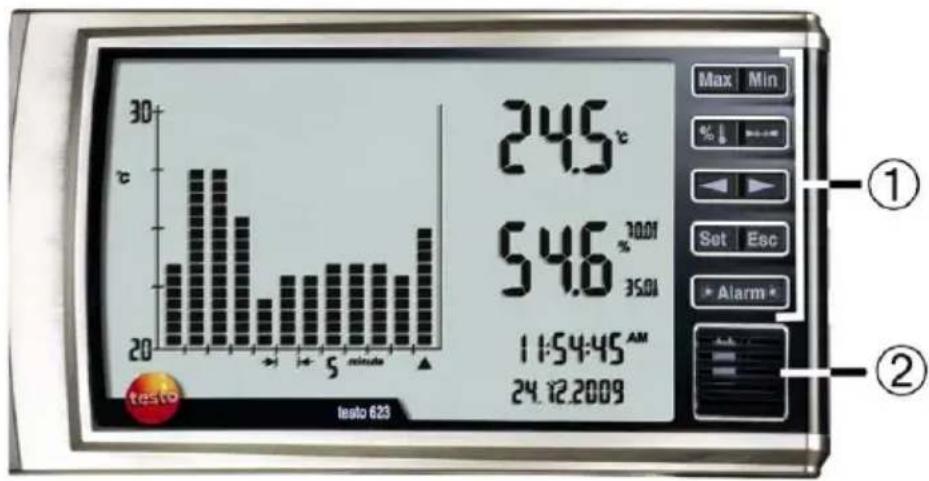
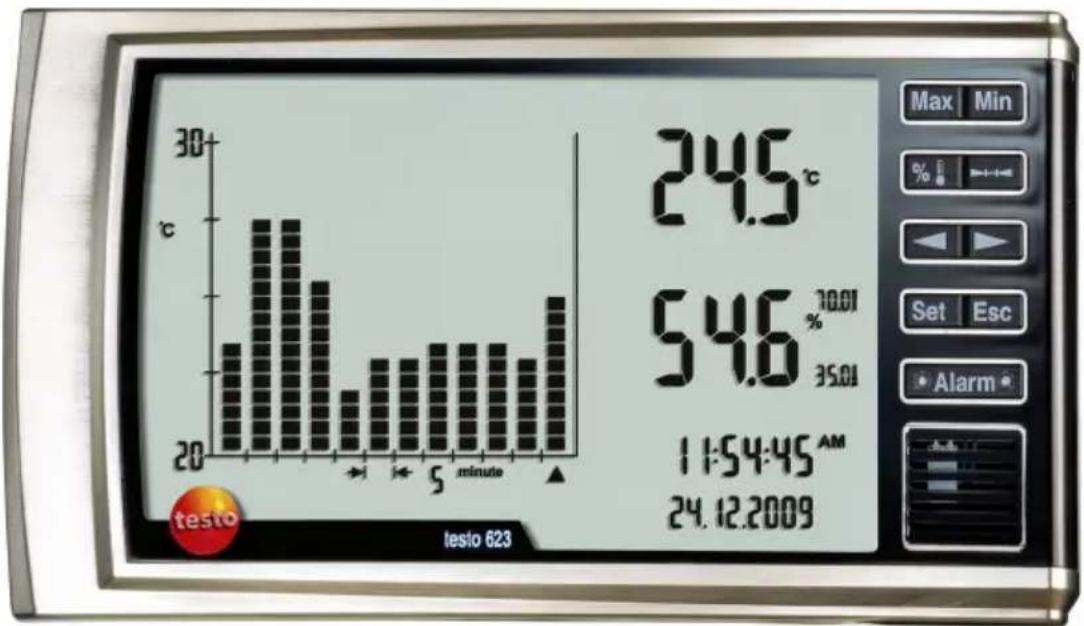
① Keypad
| Key Function | |
| Max | Display max. value |
| Min | Display min. value |
| % | Select histogram for temperature or humidity |
| Select time interval | |
| Change settings / select bar | |
| Change settings / select bar | |
| Confirm settings | |
| Cancel input | |
| Acknowledging an alarm | |
② Sensors
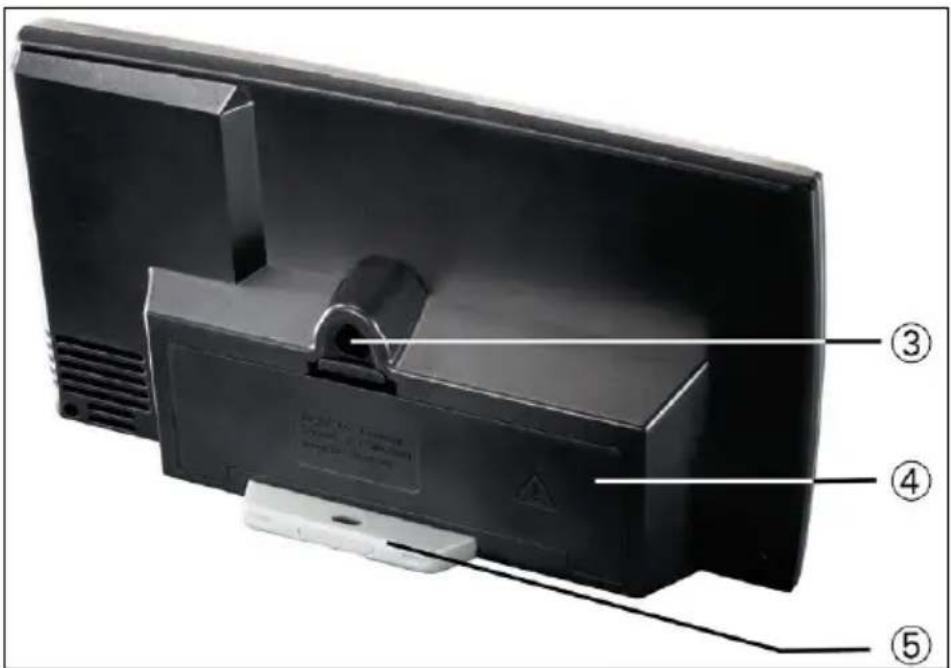
③ Attachment device
④ Battery compartment and instrument interface
⑤ Mounting clip and wall fixture (integrated into housing)
4.2. Basic properties
Power supply
The instrument is powered optionally by:
- 4 batteries / rechargeable batteries, type AA
Wall mounting
The distance between the upper and lower drill hole is 63~mm
5 First steps
Removing the protective film
Remove the protective film from the display
Inserting batteries/rechargeable batteries
- Open the battery compartment on the rear of the instrument.
- Insert batteries/rechargeable batteries (observe the polarity!)
- Close the battery compartment.
6 Using the product
6.1. Commissioning
The date and time must be set on commissioning.
- Select the required function with [Set].
i If no button is pressed >30 sec, the testo 623 changes to Measuring Mode. To perform additional settings, press and hold [Set] for 2 sec.
The adjustable parameter flashes.
- Set values with [<] or [>] and confirm entry with [Set] (for settings, see following table).
To scroll rapidly forward and back in the respective menu, press and hold [or].
Press [Esc] to cancel settings without saving them.
Hold [Set] down for 2 s to save previously set values and leave the menu.
- Instrument returns to the display.
| Display | Function | Setting |
| DD.MM.YYYY flashes or MM.DD.YYYY flashes | Set date format | DD.MM.YYYY = day, month, year MM.DD.YYYY = month, day, year |
| Year flashes | Set year | 2009 - 2099 |
| Month flashes Set month | 01 - 12 | |
| Day flashes | Set day | 01 - 31 |
| 24H or 12H (AM/PM) flash | Set time format | 24h/12h |
| Hour flashes | Set hour value | 00 - 23 or 01 - 12 |
| Minute flashes | Set minute value | 00 - 59 |
| Second flashes | Set second value | 00 - 59 |
| °C flashes | Set unit for temperature | °C/°F |
| If the power supply is interrupted the settings are being saved for at least 3 min. | ||
6.2. Setting the limits
Temperature
When changing the temperature unit from ^ C to ^ , the set limit values are converted
Humidity
When changing the humidity unit (%, td, wb), the set limit values are not converted. The limit values must be reset via the Setup menu.
6.3. Performing settings
- Press and hold [Set] for 2 s.
Display flashes.
- Select the required function with [Set].
The adjustable parameter flashes.
3 Set values with [<] or [>] and confirm entry with [Set] (for settings, see following table).

To scroll rapidly forward and back, press and hold [< or >].
Press [Esc] to cancel settings without saving them.
Hold [Set] down for 2 s to save previously set values and return to the current reading display.
If the entire Setup menu is run through, the settings made are automatically stored.
If no key is pressed within 30 s, the screen reverts to the current reading display automatically. No settings are saved.
- Instrument changes to the next display function
6.4. Flowchart
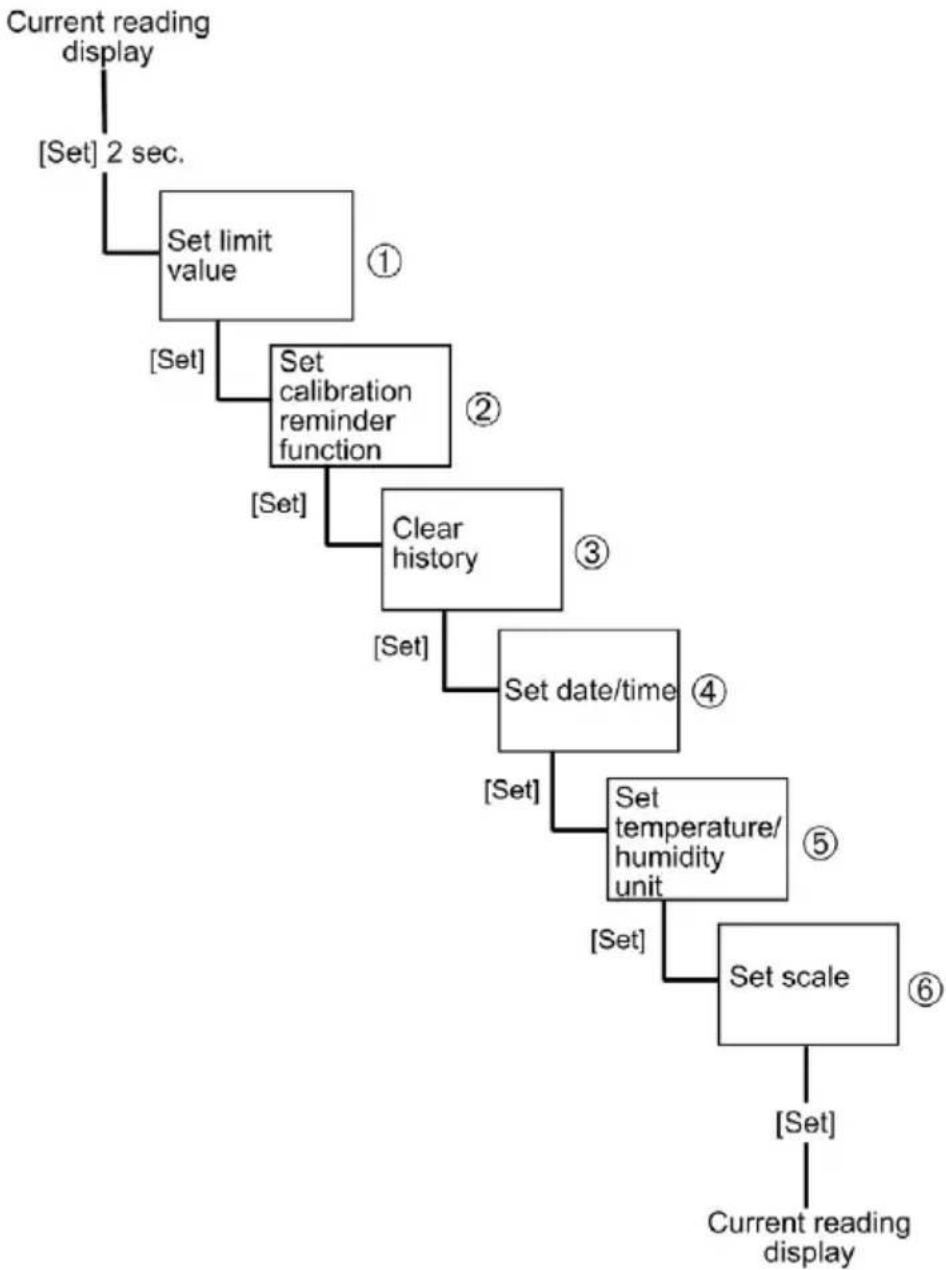
A detailed description of the points ①, ②, ③, ④, ⑤, ⑥ can be found on the following pages.
| No. | Display Function | Setting option/value | |
| 1 | and °C/°F light up, ON or OFF flashes | Activate or deactivate display for upper temperature limit alarm | Deactivate: OFF Activate: ON |
| Only if ON is selected Upper limit value flashes | Set value for upper temperature limit alarm | - | |
| and °C/°F light up, ON or OFF flashes | Activate or deactivate display for lower temperature limit alarm | Deactivate: OFF Activate: ON | |
| Only if ON is selected Lower limit value flashes | Set value for lower temperature limit alarm | - | |
| and % light up, ON or OFF flashes | Activate or deactivate display for upper humidity limit alarm | Deactivate: OFF Activate: ON | |
| Only if ON is selected Upper limit value flashes | Set value for upper humidity limit alarm | - | |
| and % light up, ON or OFF flashes | Activate or deactivate display for lower humidity limit alarm | Deactivate: OFF Activate: ON | |
| Only if ON is selected Lower limit value flashes | Set value for lower humidity limit alarm | - | |
| 2 | Calibration! lights up, ON or OFF flashes | Activate or deactivate calibration reminder function | Deactivate: OFF Activate: ON |
| Only if ON is selected Calibration! lights up, Year flashes | Set year 2009 - 2099 | ||
| Only if ON is selected Calibration! lights up, Month flashes | Set month 01 - 12 | ||
| ③ | Reset Memory flashes | Deleting memory | Deactivate: OFF Activate: ON |
| ④ | Update date & time? lights up, No flashes | Set date and time No change | Select Yes Select No |
| Only if Yes is selected DD.MM.YYYY flashes or MM.DD.YYYY flashes | Set date format | DD.MM.YYYY = day, month, year MM.DD.YYYY = month, day, year | |
| Only if Yes is selected Year flashes | Set year | 2009 - 2099 | |
| Only if Yes is selected Month flashes | Set month | 01 - 12 | |
| Only if Yes is selected Day flashes | Set day | 01 - 31 | |
| Only if Yes is selected24H or 12H (AM/PM) flash | Set time format | 24H/12H | |
| Only if Yes is selectedHour flashes | Set hour value | 00 - 23 or 01 - 12 | |
| Only if Yes is selectedMinute flashes | Set minute value | 00 - 59 | |
| Only if Yes is selectedSecond flashes | Set second value | 00 - 59 | |
| ⑤ | °C flashes Set unit for temperature | °C/°F | |
| % flashes | Set unit for humidity | %, td, wb | |
| 6 | Manual Scale or Auto Scale flashes | Choose between automatic and manual scaling | Manual Scale or Auto Scale |
| Only if Manual Scale is selected: Manual Scale and upper limit value flash | Set value for upper limit | - | |
| Only if Manual Scale is selected: Manual Scale and lower limit value flash | Set value for lower limit | - | |
| i | If the power supply is interrupted the settings are being saved for at least 3 min. | ||
6.5. Measuring
| i | With max./min., the time that it occurred and the corresponding value (°C/% RH) is shown. |
| Displaying max. values | |
| > Press [Max]. | |
| If Max. flashes, the past max. values can be viewed with [▲] or [►]. | |
| i | If the max. temperature value is shown, press [% ] to display the max. humidity value. |
| i | If the [Max] key is not pressed for > 5 min, the screen automatically reverts to the current display |
Displaying min. values
Press [Min].
If Min. flashes, the past min. values can be viewed with [<] or [>.
If the min. temperature value is shown, press [% ] to display the min. humidity value.
If the [Min] key is not pressed for >5min ,the screen automatically reverts to the current display
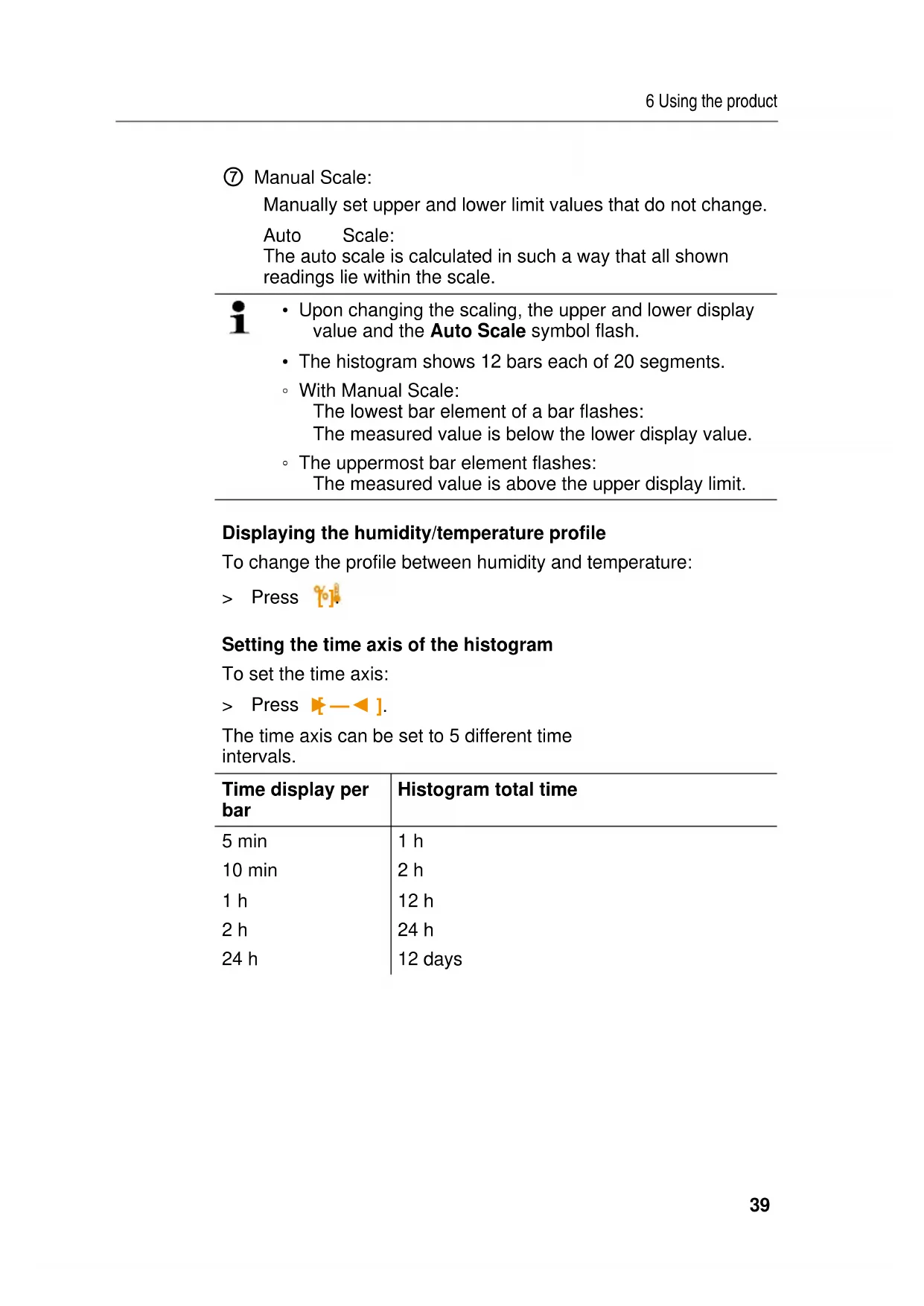
Histogram
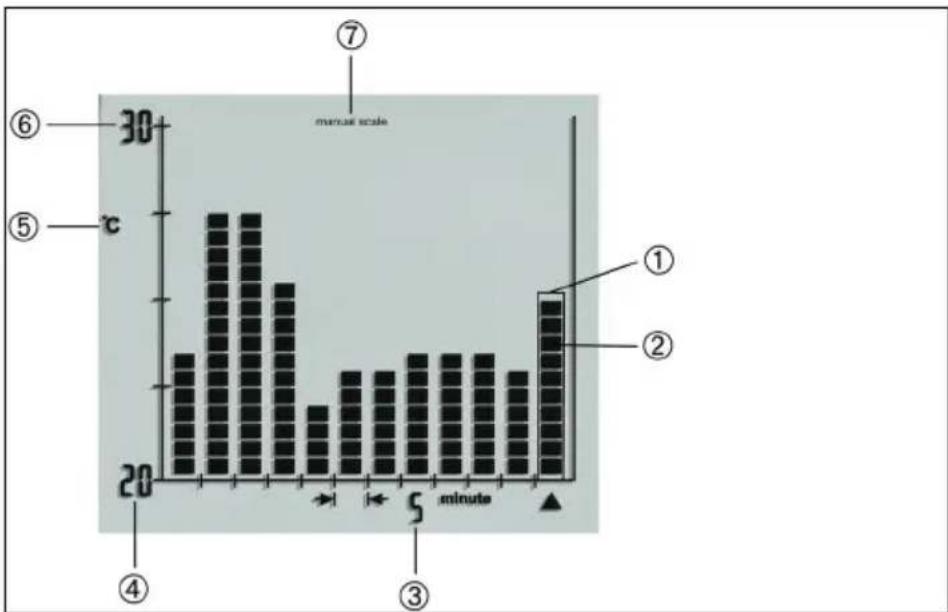
① Bar
② Bar segment
③ Time interval
④ Lower display value
⑤ Displayed unit (temperature or humidity)
⑥ Upper display value
⑦ Manual Scale:
Manually set upper and lower limit values that do not change.
Auto Scale:
The auto scale is calculated in such a way that all shown readings lie within the scale.

- Upon changing the scaling, the upper and lower display value and the Auto Scale symbol flash.
The histogram shows 12 bars each of 20 segments.
With Manual Scale: The lowest bar element of a bar flashes: The measured value is below the lower display value.
The uppermost bar element flashes: The measured value is above the upper display limit.
Displaying the humidity/temperature profile
To change the profile between humidity and temperature:
Press

Setting the time axis of the histogram
To set the time axis:
Press
The time axis can be set to 5 different time intervals.
| Time display per bar | Histogram total time |
| 5 min | 1 h |
| 10 min | 2 h |
| 1 h | 12 h |
| 2 h | 24 h |
| 24 h | 12 days |
Displaying the values of a bar
To display the mean reading:
Press[] or [▶]
- The selected bar or bar element flashes and the relevant readings, start time and start date are displayed.
To display the max. temperature value and max. humidity value:
Press [Max]
To display the min. temperature value and min. humidity value:
Press [Min].
Acknowledging an alarm
Alarm was triggered:
- LED flashes
- The reading that was exceeded or undershot flashes
To clear an alarm:Press[Alarm].
- Alarm is cleared

With the alarm activated and a change to the setup menu, the current alarm is acknowledged.
7 Maintaining the product
Changing batteries/rechargeable batteries
CAUTION
Incorrectly inserted batteries / rechargeable batteries can damage the instrument!
Observe the polarity when inserting the batteries / rechargeable batteries.
- Open the battery compartment on the rear of the instrument.
- Remove spent batteries / rechargeable batteries from the battery compartment and insert new batteries / rechargeable batteries (type AA)
- Instrument turns on automatically.
- Close the battery compartment.
i
If the power supply is interrupted the settings are being saved for at least 3 min.
i
If the instrument is not used over a longer period, the batteries/rechargeable batteries should be removed from the instrument to prevent damage to the instrument and the batteries/rechargeable batteries.
Cleaning the instrument
If the housing of the instrument is dirty, clean it with a damp cloth.
Do not use any aggressive cleaning agents or solvents! Weak household cleaning agents or soap suds can be used.
i
Do not clean the instrument with compressed air, otherwise the sensor may be damaged.
8 Tips and assistance
8.1. Accessories and spare parts
| Description Article no. | |
| Calibration and adjustment software incl. USB cable | 0554 6230 |
| DKD humidity calibration certificate, electronic hygrometer; calibration points 11.3 % RH and 75.3 % RH at 25 °C | 0520 0206 |
| ISO humidity calibration certificate, calibration points 11.3 % RH and 75.3 % RH at 25 °C | 0520 0006 |
8.2. Questions and answers
| Question Possible causes | |
| Instrument displays LO | Below -20 °C |
| Instrument displays HI | Above +70 °C |
If we could not answer your question, please contact your dealer or Testo Customer Service. For contact details see the rear side of this document or the web page www.testo.com/service-contact
testo 623
Directive CE 2004/108/CE
- 4 piles / piles rechargeables, type AA