HT309 - Detector HT Instruments - Free user manual and instructions
Find the device manual for free HT309 HT Instruments in PDF.


User questions about HT309 HT Instruments
0 question about this device. Answer the ones you know or ask your own.
Ask a new question about this device
Download the instructions for your Detector in PDF format for free! Find your manual HT309 - HT Instruments and take your electronic device back in hand. On this page are published all the documents necessary for the use of your device. HT309 by HT Instruments.
USER MANUAL HT309 HT Instruments
HT309
Manuale d'uso
User manual
Manual de instrucciones Bedienungsanleitung Manuel d'utilisation

natural_image
Abstract black-and-white geometric logo with stylized letter 'E' and lightning bolt-like shapes (no text or symbols)Indice generale
General index
Índice general
Inhalt
Table des matières
Normative considerate
1. PRECAUTIONS AND SAFETY MEASURES 2
1.1. Preliminary instructions ......2
1.2. During use....2
1.3. After use 2
2. GENERAL DESCRIPTION....3
3. PREPARATION FOR USE 3
3.1. Initial checks....3
3.2. Instrument power supply .... 3
3.3. Calibration .... 3
3.4. Storage....3
4. OPERATING INSTRUCTIONS......4
4.1. Instrument description .... 4
4.2. Description of function keys....5
4.2.1. HOLD/L.S. (Light Source) key 5
4.2.2. LX/FC/CD key 5
4.2.3. MEM/READ key 6
4.2.4. Deleting the internal memory 6
4.2.5. MAX/MIN/AVG functions 6
4.2.6. Disabling the Auto Power OFF function 6
4.2.7. ZERO key 6
4.3. Measuring operations....7
4.3.1. Illuminance measurement 7
4.3.2. Luminous intensity measurement....7
5. MAINTENANCE 8
5.1. Battery replacement 8
5.2. Cleaning the instrument....8
5.3. End of life 8
6. TECHNICAL SPECIFICATIONS 9
6.1. Technical characteristics 9
6.1.1. Spectrum response 9
6.1.2. Sensor....9
6.1.3. General characteristics.... 10
6.2. Environment 10
6.2.1. Environmental conditions for use 10
6.3. Accessories....10
6.3.1. Accessories provided 10
7. SERVICE....11
7.1. Warranty conditions....11
7.2. Service 11
8. APPENDIX A: RECOMMENDED ILLUMINANCE LEVELS....12
1. PRECAUTIONS AND SAFETY MEASURES
The instrument has been designed in compliance with the safety directives relevant to electronic measuring instruments. In order to prevent damaging the instrument, please carefully follow the procedures described in this manual and read all notes preceded by the symbol ⚠️ with the utmost attention. Before and after carrying out the measurements, carefully observe the following instructions:
- Do not carry out any measurements in case gas, explosive materials or flammables are present, or in dusty environments
- Do not carry out any measurement in humid environments
- Do not carry out any measurement in case you find anomalies such as deformation, breaks, substance leaks, absence of display on the screen, etc.
- Do not touch the photodiode sensor while carrying out measurements, in order to prevent any damage to the instrument caused by static electricity or contamination
The following symbol is used in this manual:

Caution: observe the instructions given in this manual. Improper use could damage the instrument and/or its components.
1.1. PRELIMINARY INSTRUCTIONS
- In order to prevent incorrect reading, replace the battery when the symbol "☐" appears on the display when switching on the instrument.
1.2. DURING USE
Please carefully read the following recommendations and instructions.

CAUTION
Failure to comply with the Caution notes and/or Instructions may damage the instrument and/or its components or be a source of danger for the operator.
- While measuring, if the value or the sign of the quantity being measured remain unchanged, check if the HOLD function is enabled.
1.3. AFTER USE
- When measurement is complete, switch off the instrument.
- If the instrument is not to be used for a long time, remove the battery.
2. GENERAL DESCRIPTION
The instrument HT309 is a precision digital luxmeter, mainly used for measuring illuminance of both white light sources and LED sources of various colours, expressed in Lux (Lx) or Foot-candles (Fc). The instrument complies with CIE (International Commission on Illumination) standards on spectrum response and corrects according to the cosine of the angle of incidence of light. The silicon photodiode sensor guarantees measurement stability.
The instrument has the following functions:
- Illuminance measurement up to 400kLux / 40kFc
• Luminous intensity measurement (expressed in Candles) - Selection of the measuring unit: Lx/Fc/CD
• Light source: white light source and LED sources in their visible spectrum
• High-precision and rapid measurements
• Data HOLD function
• MAX/MIN/AVG functions
• Zeroing of the displayed value - Setting of correction factors of spectrum response
- Internal memory for saving measurement results
- Auto Power OFF
- Autorange
3. PREPARATION FOR USE
3.1. INITIAL CHECKS
Before shipping, the instrument has been checked from an electric as well as mechanical point of view. All possible precautions have been taken so that the instrument is delivered undamaged.
However, we recommend generally checking the instrument in order to detect possible damage suffered during transport. In case anomalies are found, immediately contact the forwarding agent.
We also recommend checking that the packaging contains all components indicated in § 6.3. In case of discrepancy, please contact the Dealer. In case the instrument should be returned, please follow the instructions given in § 7
3.2. INSTRUMENT POWER SUPPLY
The instrument is powered by a single 9V alkaline battery type NEDA1604, JIS006P, IEC6F22 included in the package. In order to prevent battery discharge, it has not been inserted in the instrument. For battery installation, follow the instructions given in § 5.1. The “☐” symbol appears when the battery is flat. Replace the battery by following the instructions given in § 5.1.
3.3. CALIBRATION
The instrument has the technical specifications described in this manual. The instrument's performance is guaranteed for 12 months.
3.4. STORAGE
In order to guarantee precise measurement, after a long storage time under extreme environmental conditions, wait for the instrument to come back to normal condition (see the environmental specifications contained in § 6.2.1 before use).
4. OPERATING INSTRUCTIONS
4.1. INSTRUMENT DESCRIPTION
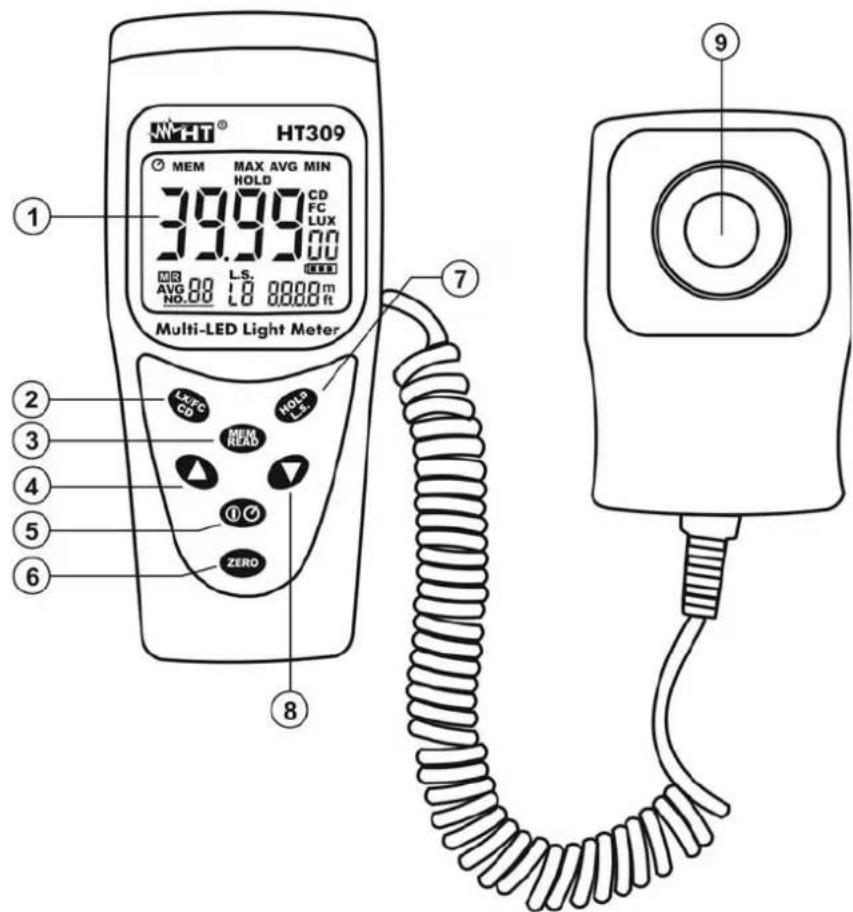
CAPTION:
- LCD display
- LX/FC/CD key
- MEM/READ key
- ▲ arrow key
- (ON/OFF) / (Auto Power OFF) key
- ZERO key
- HOLD/L.S. key
- ▼ arrow key
- Photodiode sensor
Fig. 1: Instrument description
4.2. DESCRIPTION OF FUNCTION KEYS
Some of the function keys on the front panel have a double function, which can be activated by pressing and holding the key for more than 1 second.
4.2.1. HOLD/L.S. (Light Source) key
➢ Press the HOLD/L.S key to freeze the value of the measured quantity on the display. The symbol “HOLD” appears on the display. Press the HOLD/L.S. key again to exit the function.
➢ Press and hold the HOLD/L.S. key for more than 1 second to select the light source to be measured. Proceed as follows:
- On the sub-display, observe the flashing symbol "Lx", where 0 < x < 9 indicates the source number.
- Use the arrow keys ▲ or ▼ to select the desired source among the available options L0 ÷ L9 (see Table 1)
- Press the HOLD/L.S. key to set a possible correction factor on the instrument's reading (only for custom sources L7, L8 and L9). The indication of the parameter value flashes on the display. Use the arrow keys ▲ or ▼ to set (press and hold the keys for rapid operation) the value between 0.001 and 1.999. The values of the sources L0 ÷ L5 cannot be modified.
| Symbol on the display | Source type Correction factor | |
| L0 | Standard | light |
| L1 | White | LED |
| L2 | Red | LED |
| L3 | Yellow | LED |
| L4 | Green | LED |
| L5 | Blue | LED |
| L6 | Purple LED | 1.148 |
| L7 | Custom | 1.000 |
| L8 | Custom | 1.000 |
| L9 | Custom | 1.000 |
Table 1: List of available sources
- Press and hold the HOLD/L.S. key for more than 1 second to confirm the operation. The symbols stop flashing on the display.
4.2.2. LX/FC/CD key
➢ Press the LX/FC/CD key to select the measuring unit of illuminance, choosing between the two available options “LUX” and “FC” (1Fc = 10.764Lux ; 1Lux = 0.09290Fc).
➢ Press and hold the LX/FC/CD key for more than 1 second to select the measuring unit of luminous intensity (see § 4.3.2).
4.2.3. MEM/READ key
➢ Press the MEM/READ key to save the datum shown on the display in the internal memory. The indication of the memory location (max. 99 locations) and the symbol “M” appear at the bottom of the display on the left. The control is not active when the HOLD function is activated. With activated “AVG” function, pressing the MEM/READ key saves the average (AVG) value of the datum on the display in the memory.
➢ Pressing and holding the MEM/READ key for more than 1 second allows recalling the data saved in the internal memory on the display. The symbols “MEM” and “R” together with the number of the last memory location used are shown on the display. Use the arrow keys ▼ or ▲ to select memory locations. The display shows the corresponding saved value. Press the MEM/READ key to exit the function.
4.2.4. Deleting the internal memory
To delete the internal memory, proceed as follows:
- Switch off the instrument using the ON/OFF key.
- Press and hold the MEM/READ key while switching on the instrument with the ON/OFF key. The messages "MEM" and "CLr" are shown on the display for a few seconds and the number of the memory location is taken back to "01".
4.2.5. MAX/MIN/AVG functions
Press the arrow key ▲ to view the Minimum, Maximum and Average values of the measured quantity. The values are constantly updated and are displayed cyclically every time the same key is pressed. The symbols “MIN”, “MAX” and “AVG” appear on the display. Press and hold the ▲ key for more than 1 second to exit the function.
4.2.6. Disabling the Auto Power OFF function
In order to preserve the instrument's internal battery, the instrument switches automatically off approximately 5 minutes after it was last used. The symbol “∅” appears on the display. To disable the Auto Power Off function, proceed as follows:
- Switch on the instrument.
- Press and hold the ON/OFF key for more than 1 second. The symbol “∅” disappears from the display.
- Switch off and then on again the instrument to automatically enable the function.
4.2.7. ZERO key
Press the ZERO key to carry out the automatic zeroing of the value on the display in case the indication “000” should be absent when placing the protection cover onto the photodiode sensor.
The message “AdJ” is shown on the display during this operation. The message “CAP” is shown on the display in case the ZERO key is pressed with the protection cover not positioned on the sensor. Insert the cover and repeat the operation, if necessary.
4.3. MEASURING OPERATIONS
4.3.1. Illuminance measurement
- Insert the protection cover onto the photodiode sensor.
- Switch on the instrument using the ON/OFF key.
- If necessary, zero the display by pressing the ZERO key (see § 4.2.7).
- Select the measuring unit Lux or Fc on the instrument by pressing the LX/FC/CD key (see § 4.2.2).
- Select the type of source to be tested by pressing and holding the HOLD/L.S. key for more than 1 second (see § 4.2.1). Standard source is type "L0".
- Position the sensor horizontally and perpendicularly with respect to the source to be tested. The illuminance value is shown on the display, with automatic scale change.
- Press the HOLD/L.S. key, if necessary (see § 4.2.1) to freeze the value shown on the display.
- Press the MEM/READ key to save the datum, read in real time and shown on the display, in the memory.
- Cover the sensor and switch off the instrument at the end of measurement.
4.3.2. Luminous intensity measurement
Luminous intensity, expressed in Candles (Cd), is calculated by the instrument according to the following formula:
Luminous intensity (Cd) = Illuminance (Lux/Fc) x Distance from source (m²/ft²)
- Insert the protection cover onto the photodiode sensor.
- Switch on the instrument using the ON/OFF key.
- If necessary, zero the display by pressing the ZERO key (see § 4.2.7).
- Select the measuring unit on the instrument by pressing and holding the LX/FC/CD key for more than 1 second. The symbol "CD" is shown on the display.
- Use the arrow keys ▲ or ▼ to select the measuring unit of distance (m or ft) and confirm with LX/FC/CD.
- Set the value of the distance between the measured point and the light source (only of standard type "L0") using the arrow keys ▲ or ▼ (press and hold the arrow keys for a quick setting) and confirm with the LX/FC/CD key.
- Position the sensor horizontally and perpendicularly with respect to the source to be tested. The value of luminous intensity is shown on the display, with automatic scale change.
- Press the HOLD/L.S. key, if necessary (see § 4.2.1) to freeze the value shown on the display.
- Press the MEM/READ key to save the datum, read in real time and shown on the display, in the memory.
- Cover the sensor and switch off the instrument at the end of measurement.
5. MAINTENANCE

CAUTION
- Only expert and trained technicians should perform maintenance operations. Before carrying out maintenance operations, disconnect all cables from the input terminals.
- Do not use the instrument in environments with high humidity levels or high temperatures. Do not expose to direct sunlight.
- Always switch off the instrument after use. In case the instrument is not to be used for a long time, remove the battery to avoid liquid leaks that could damage the instrument's internal circuits.
5.1. BATTERY REPLACEMENT
When the display shows the "1" symbol, replace the battery.
- Switch off the instrument using the ON/OFF key.
- Press the battery compartment cover and slide it in the direction of the arrow.
- Remove the old battery and replace it with a new battery of the same type (see § 6.1.3)
- Restore the battery compartment cover to its position.
- Do not dispose of the batteries together with household waste. According to European Directives, old batteries must be disposed of separately and recycled.
5.2. CLEANING THE INSTRUMENT
Use a soft and dry cloth to clean the instrument. Never use wet cloths, solvents, water, etc. The white plastic lens of the sensor may be cleaned, if necessary, with a wet cloth.
5.3. END OF LIFE

CAUTION: the symbol on the instrument indicates that the appliance, the battery and its accessories must be collected separately and correctly disposed of.
6. TECHNICAL SPECIFICATIONS
6.1. TECHNICAL CHARACTERISTICS
Accuracy is referred to the following reference conditions: temperature 23^ C ± 5°C with relative humidity < 70%RH.
The instrument is calibrated for a standard white light source consisting of an incandescent lamp, at a temperature/colour of 2856^ K in compliance with Class A.
Calibration for LED sources (with spectrum response different from that of standard white light) is based on the calibration for standard white light source in Class A using the appropriate correction factors (see Table 1)
Illuminance measurement (Autorange)
| Full scale (Lux) | 40 400 4000 | 40k 400k | |||
| Resolution (Lux) | 0.01 0.1 1 10 | 100 | |||
| Accuracy | ± | (3%reading) | |||
| Full scale (Fc) | 40 | 400 | 4000 | 40k |
| Resolution (Fc) | 0.01 | 0.1 | 1 | 10 |
| Accuracy | ± | (3%reading) | ||
NOTE 1: 1Fc=10.76Lux, 1Klux=1000Lux, 1Kfc=1000Fc
NOTE 2: for temperature/colours different from the reference one, accuracy becomes 6%reading
Distance range for luminous intensity measurement: 0.01 ÷ 30.47m / 0.01 ÷ 99.99ft
| Accuracy on angular deviation from cosine characteristic | |
| 30° | ± 2% |
| 60° | ± 6% |
| 80° | ± 25% |
6.1.1. Spectrum response
The spectrum response of the photodiode with filter is almost identical to the CIE photo-optical curve V() as shown in the following graph.
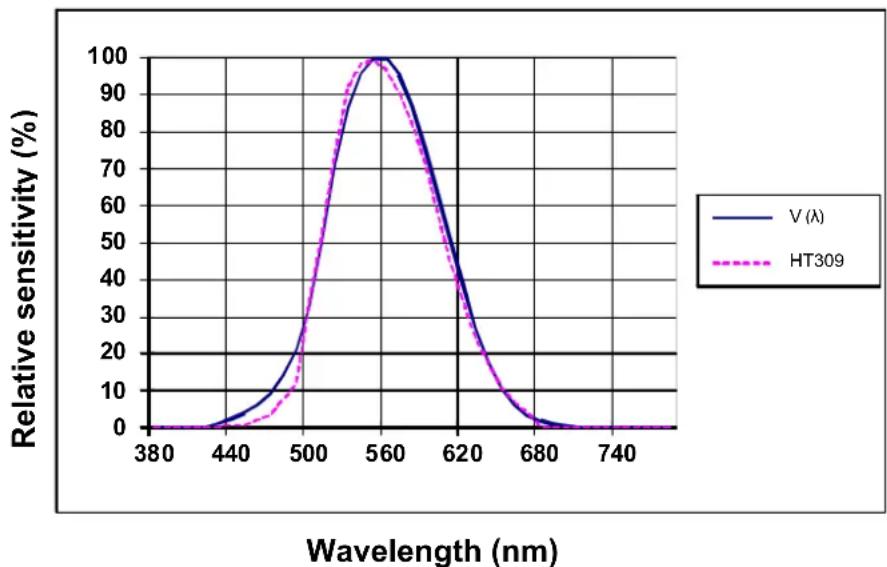
line
| Wavelength (nm) | V (λ) | HT309 | | --------------- | ----- | ----- | | 380 | 0 | 0 | | 440 | 5 | 2 | | 500 | 30 | 35 | | 560 | 100 | 100 | | 620 | 50 | 45 | | 680 | 5 | 2 | | 740 | 0 | 0 |Fig. 2: CIE curve V(λ).
6.1.2. Sensor
The sensor is a silicon photodiode with filter on the spectrum response.
6.1.3. General characteristics
Mechanical characteristics
Size (LxWxH): 130x55x38mm (5x2x1 in)
Sensor size (LxWxH): 80x55x25mm (3x2x1 in)
Cable length: approx 1.5m (39 in)
Weight (battery included): 250g (9 ounces)
Power supply
Battery type: 1x9V battery type NEDA 1604 IEC 6F22
Low battery indication: the display shows symbol " "
Battery life: approx. 200 hours

Display
Characteristics: LCD, 6 digits, 4000 dots plus decimal point
Over range indication: the display shows symbol "OL"
Sampling rate: 2.5 measurements/s
Considered standards
| Reference standard: | JIS C 1609:1993 and CNS 5119 general specification in Class A |
| Pollution level: | 2 |
6.2. ENVIRONMENT
6.2.1. Environmental conditions for use
Reference temperature: 23^ ± 5^ ( 73^ ± 41^ )
Operating temperature: 5^ ÷ 40^ ( 41^ ÷ 104^ )
Allowable relative humidity: < 80%RH
Storage temperature: -10^ ÷ 60^ (14^ ÷ 140^)
Storage humidity: < 70%RH
Max operating altitude: 2000m (6562 ft)
This instrument satisfies the requirements of Directives EMC 2004/108/EC
6.3. ACCESSORIES
6.3.1. Accessories provided
- Carrying bag
- Battery (not inserted)
- User manual
7. SERVICE
7.1. WARRANTY CONDITIONS
This instrument is warranted against any material or manufacturing defect, in compliance with the general sales conditions. During the warranty period, defective parts may be replaced. However, the manufacturer reserves the right to repair or replace the product.
Should the instrument be returned to the After-sales Service or to a Dealer, transport will be at the Customer's charge. However, shipment will be agreed in advance.
A report will always be enclosed to a shipment, stating the reasons for the product's return. Only use original packaging for shipment; any damage due to the use of non-original packaging material will be charged to the Customer.
The manufacturer declines any responsibility for injury to people or damage to property.
The warranty shall not apply in the following cases:
• Repair and/or replacement of accessories and batteries (not covered by warranty).
- Repairs that may become necessary as a consequence of an incorrect use of the instrument or due to its use together with non-compatible appliances.
- Repairs that may become necessary as a consequence of improper packaging.
- Repairs which may become necessary as a consequence of interventions performed by unauthorized personnel.
- Modifications to the instrument performed without the manufacturer's explicit authorization.
- Use not provided for in the instrument's specifications or in the instruction manual.
The content of this manual cannot be reproduced in any form without the manufacturer's authorization.
Our products are patented and our trademarks are registered. The manufacturer reserves the right to make changes in the specifications and prices if this is due to improvements in technology.
7.2. SERVICE
If the instrument does not operate properly, before contacting the After-sales Service, please check the conditions of the battery and replace it, if necessary.
Should the instrument still operate improperly, check that the product is operated according to the instructions given in this manual.
Should the instrument be returned to the After-sales Service or to a Dealer, transport will be at the Customer's charge. However, shipment will be agreed in advance.
A report will always be enclosed to a shipment, stating the reasons for the product's return.
Only use original packaging for shipment; any damage due to the use of non-original packaging material will be charged to the Customer.
8. APPENDIX A: RECOMMENDED ILLUMINANCE LEVELS
Reports the recommended illuminance values (expressed in Lux; divide by 10.76 to obtain the corresponding values in Fc) for the different types of environments:
| ENVIRONMENT ENVIRONMENT LUX | LUX | ||||||
| • AT WORK | • SHOP | ||||||
| Conference hall, reception hall 200 | ~ | 750 | Internal stairs, corridor 150 | ~ | 200 | ||
| Place of worship 700 | ~ | 1500 | Shop window, counter 750 | ~ | 1500 | ||
| Office 1000 | ~ | 2000 | Further than the shop window | 1500 | ~ | 3000 | |
| • FACTORY | • HOSPITAL | ||||||
| Production line | 300 | ~ | 750 | Patients' rooms, store | 100 | ~ | 200 |
| Product verification | 750 | ~ | 1500 | Ambulatory clinic | 300 | ~ | 750 |
| Assembly of electronic parts | 1500 | ~ | 3000 | Operating room | 750 | ~ | 1500 |
| Goods entry/exit | 150 | ~ | 300 | Emergency room | 750 | ~ | 1500 |
| • HOTEL | • SCHOOL | ||||||
| Lounge, TV hall, cloakroom | 100 | ~ | 200 | Auditorium, gymnasium | 100 | ~ | 300 |
| Reception hall | 200 | ~ | 500 | Classroom | 200 | ~ | 750 |
| Cash desk | 750 | ~ | 1000 | Laboratory, library | 500 | ~ | 1500 |
Table 2: Recommended illuminance values