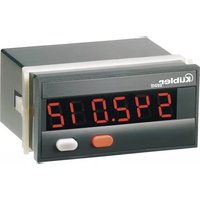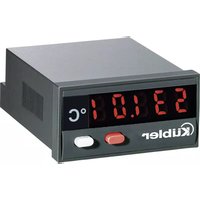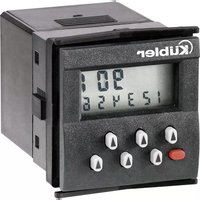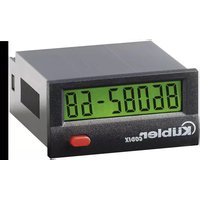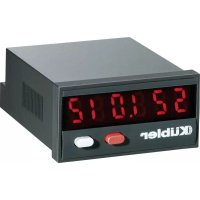
Codix 522 - Measuring equipment Kübler - Free user manual and instructions
Find the device manual for free Codix 522 Kübler in PDF.


| Product Type | Digital Frequency Meter/Tachometer |
| Brand | Kübler |
| Model | Codix 522 |
| Display | Red LED, 6 digits, height 8 mm |
| Display Range | 0 to 999999 |
| Accuracy | < 0.1% |
| Max Input Frequency | 6 kHz (24 V), 20 kHz (12 V), 8 kHz (10-30 V) depending on configuration |
| Power Supply | 10...30 V DC, max. 55 mA |
| Cutout Dimensions | 22.2 x 45 mm |
| Housing Dimensions | 48 x 24 mm (according to DIN 43700) |
| Weight | Approx. 50 g |
| Protection Rating | IP65 (front panel) |
| Operating Temperature | -20 to +65 °C (10-26 V), -20 to +55 °C (>26-30 V) |
| Inputs | INP A programmable NPN/PNP, resistance 5 kΩ |
| Optional Output | NPN optocoupler (open collector/emitter, max. 30 V/10 mA) |
| Measurement Functions | Conversion to 1/s or 1/min, 30 Hz filter, multiplier/divider factors, maximum wait |
| Cleaning | Soft damp cloth |
| Compliance | EN 61010, EN 55011 Class B, EN 61000-6-2 |
| Memory | EEPROM |
Frequently Asked Questions - Codix 522 Kübler
User questions about Codix 522 Kübler
0 question about this device. Answer the ones you know or ask your own.
Ask a new question about this device
Download the instructions for your Measuring equipment in PDF format for free! Find your manual Codix 522 - Kübler and take your electronic device back in hand. On this page are published all the documents necessary for the use of your device. Codix 522 by Kübler.
USER MANUAL Codix 522 Kübler
6.521.01X.3X0
6.522.01X.3X0
6.523.01X.3X0
6.524.01X.3X0
1.1 Safety instructions and warnings
Only use this display

- in a way according to its intended purpose
-if its technical condition is perfect - adhering to the operating instructions and the general safety instructions.
1.2 General safety instructions
- Before carrying out any installation or maintenance work, make sure that the power supply of the digital display is switched off.
- Only use this digital display in a way according to its intended purpose:
If its technical condition is perfect.
Adhering to the operating instructions and the general safety instructions.
- Adhere to country or user specific regulations.
- The digital display is not intended for use in areas with risks of explosion and in the branches excluded by the standard EN 61010 Part 1.
- The digital display shall only operated if it has been correctly mounted in a panel, in accordance with the chapter "Technical features".
1.3 Use according to the intended purpose
The digital display may be used only as a panel-mounted device. Applications of this product may be found in industrial processes and controls, in manufacturing lines for the metal, wood, plastics, paper, glass, textile and other processing industries. Over-voltages at the terminals of the digital display must be kept within the limits in Category II.
If the digital display is used to monitor machines or processes in which, in case of a failure of the device or an error made by the operator, there might be risks of damaging the machine or causing accidents to the operators, it is your responsibility to take appropriate safety measures.
1.4 Description
CODIX 521
Please note: Read first chapter 2 of CODIX 524 and go on on page 2.
CODIX 522
Please note: Read first chapter 2 of CODIX 524 and go on on page 4.
CODIX 523
Please note: Read first chapter 2 of CODIX 524 and go on on page 6.
CODIX 524
CODIX 524 is a multipurpose device. Depending on the programmed basic function, the device operates like
- the pulse counter CODIX 521 (see page2) or
the frequency meter CODIX 522 (see page 4) or
the time meter CODIX 523 (see page 6)
2. Setting of the operating pa ra me ters
a. Press both front side keys keys and switch on the supply voltage or, if the supply voltage is already on, press both keys simultaneously during 5 s.
b. The display shows
P
c. After releasing the keys, the display shows
n0
c1. Hold the left key pressed and press the right key to leave the programming operation.
c2. Press the right key to switch to
yEs
d. Hold the left key pressed and press the right key to switch to the first parameter.
e. After releasing the keys, the display alternates between the menu title and the current menu item setting. After pressing any key, only the menu item setting is displayed.
f. Pressing the right key, the menu item setting will be switched to the next value. If figures are to be input (e.g. when setting the scaling factor), select first the decade using the left key, and then set the value using the right key.
g. Hold the left key pressed and press the right key to switch to the next menu item.
h. The last menu title "EndPro" allows, when selecting "Yes", to exit the programming menu and to take over (store) the new values. If "no" is selected, the programming routine is repeated, the latest values set remaining active. They can now be checked again or modified.
3. Programming routine
The first menu item is the selection of the basic operating mode, which determines the functions of the device.
PnoD
Operating mode pulse counter. Continued in point 4. of CODIX 521 on page 2
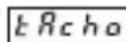
Operating mode frequency meter. Continued in point 4. of CODIX 522 on page 4

Operating mode time meter. Continued in point 4. of CODIX 523 on page 6
Pulse counter/Posi on indicator CODIX 521
(CODIX 524: Operating mode pulse counter)
1.Description
- 6-digit display counter with SET/RESET-function
- Red LED display, character height 8 mm
- Display range from -199 999 to 999 999
- Leading zeros suppression
- Programming via two setting keys on the front side
- During programming, the display guides the user with text prompts
- Counter operating modes:
- Count input INP A + count direction input INP B (Cnt.Dir) Differential count INP A - INP B (up.dn) Totalising INP A + INP B (up.up) Count Up/Down INP A 90^ INP B x 1 (quAd) Count Up/Down INP A 90^ INP B x 2 (quAd2) Count Up/Down INP A 90^ INP B x 4 (quAd4)
- Optional optocoupler output
2. Inputs
INP A
Dynamic count input.
INP B
Dynamic count input.
SET/RESET
Dynamic SET/RESET input. Linked in parallel to the red SET/RESET key. Resets the counter to the predefined setting value.
3. Optocoupler output (optional)
Active if count value < 0 . Simple preset counter can be realized, when using subtract mode.
4. Programming routine
The programmable parameters of the device are described below, in the order in which they can be set. The device is fully programmed after one pass of the routine.
The first values stated correspond to the factor settings
4.1 Polarity of the inputs
InPol
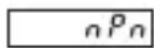
npn: switching for 0V
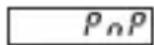
pnp: switching for +U_B
4.2 Switching on the 30Hz filter (INP A, INP B)
F
The filter provides input damping*
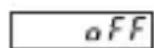
30 Hz filter off (f max)

30 Hz filter on
4.3 Input mode
lnPut

Count input and count direction input
INP A: Count input
INP B: Count direction input
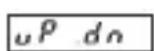
Differential input
INP A: count input adding
INP B: count input subtracting
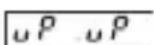
Totalising
INP A: count input adding
INP B: count input adding
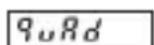
Quadrature input
INP A: count input 0^
INP B: count input 90^
9uRd
Quadrature input with pulse doubling
INP A: count input 0^
INP B: count input 90^
Each pulse edge of INP A will be counted
9uRd 4
Quadrature input with pulse quadrupling
INP A: count input 0^
INP B: count input 90^
Each pulse edge of INP A and
INP B will be counted.
4.4 Multiplying factor
FRec or
0000
It can be set from 00.0001 up to 99.9999.
99999
The decimal point is set to 4 decimal places.
0^ is not accepted!
4.5 Dividing factor
dU5o
010000
It can be set from 00.0001 up to 99.9999.
99999
The decimal point is set to 4 decimal places.
0^ is not accepted!
4.6 Decimal point
dP
The decimal point defines the way of displaying the count values. It does not affect counting.
0 no decimal place
0.0 one decimal place
0.00 two decimal places
0.000 three decimal places
4.7 SET/RESET Mode
rESnnd
PRAeL
manual reset via the red SET/RESET key and electrical reset via the SET/RESET input
no rEs
no reset (red SET/RESET key and SET/RESET input locked)
FL rES
only electrical reset via the SET/RESET input
PnRnrc
only manual reset via the red SET/RESET key
4.8 SET value
5E P
000000
The device will be set to the set point by pressing the red
999999
SET/RESET key or activating the SET/RESET input.
SET value -199999... 999999 (number of decimal places depends on the decimal point option)
For programming the decimal point see 4.6.
4.9 End of programming
EndPro
no
The programming routine is repeated once more. The values set until now can be checked and modified.
YES
The programming routine wil be left and all values set will be stored as new parameters.
Afterwards the device is ready for operation.
Tachometer/Frequency meter CODIX 522
(CODIX 524: Operating mode frequency meter)
1.Description
- 6 digit frequency meter
Red LED display, character height 8 mm - Display range from 0 to 999 999
- Leading zeros suppression.
- Programming via two setting keys on the front side
- During programming, the display guides the user with text prompts
- Value conversion and display in 1/s or 1/min
- Optional optocoupler output
2. Inputs
INP A
Dynamic count input.
3. Optocoupler output (optional)
Active at f = 0 . Can be used e.g. to activate a „No operation“ lamp.
4. Programming routine
The programmable parameters of the device are described below, in the order in which they can be set. The device is fully programmed after one pass of the routine.
The first values stated correspond to the factor settings
4.1 Polarity of the inputs
InPol
nPn
npn: switching for 0V
PnP
pnp: switching for +U_B
4.2 Switching on the 30Hz filter
F1EER
The filter provides input damping*
0FF
30 Hz filter off (f_)
an
30 Hzfilter on
4.3 Multitplying factor
FRCor
010000
It can be set from 00.0001 up to 99.9999.
The decimal point is set to 4 decimal places.
99999
"0" is not accepted!
4.4 Dividing factor
dU50
00001
It can be set from 00.0001 up to 99.9999.
The decimal point is set to 4 decimal places.
0^ is not accepted!
4.5 Decimal point
dP
The decimal point defines the resolution in the selected measuring range 1/min or 1/sec
0 no decimal place
0.0 one decimal place
0.00 two decimal places
0.000 three decimal places
4.6 Display mode
dSPn
SEC
Value conversion and display in 1/s
n-1
Value conversion and display in 1/min
4.7 Max. time to wait until „0“ is displayed
This parameter indicates, how long it takes, when measuring is active, until 0^ is displayed.
UUR
00
Max. time to wait 00.1 s (min. value)
999
Max. time to wait 99.9 s
4.8 End of programming
EndPro
The programming routine is repeated once more. The values set until now can be checked and modified.
YES
The programming routine will be left and all values set will be stored as new parameters. Afterwards the device is ready for operation.
Time meter CODIX 523
(CODIX 524: Operating mode time meter)
1.Description
- 6 digit time meter with SET/RESET function
Red LED display, character height 8 mm - Display range from 0 to 999 999
- Leading zeros suppression.
Operation indicator: the decimal point of the lowest digit blinks while the count is active. - Programming via two setting keys on the front side
- During programming, the display guides the user with text prompts
Time meter operating modes - Counting while INP B is inactive (GAtE.Lo)
- Counting while INP B is active (GatE.hi)
- Count Start/Stop with INP B edge (Inb.Inb)
- Count Start with INP A edge, count Stop with
INP B edge (InA.Inb)
- Counting ranges h; min; s; h.min.s
- Optional optocoupler output
2. Inputs
INP A
Start input (depending on the input mode chosen)
INP B
Start/Stop or gate input (depending on the input mode chosen)
SET/RESET input
Dynamic SET/RESET input. Linked in parallel to the red RESET key. Resets the counter to the predefined setting value.
3. Optocoupler output (optional)
On active counting the output alternates at a frequency of 1Hz between active and inactive.
4. Programming routine
The programmable parameters of the device are described below, in the order in which they can be set. The device is fully programmed after one pass of the routine.
The first values stated correspond to the factor settings
4.1 Polarity of the inputs
InPol
npn: switching for 0V
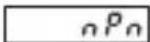
pnp: switching for +U_B
4.2 Switching on the 30Hz filter (INP A, INP B)
FILER

30 Hz filter off
Start/Stop inputs not damped
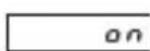
30 Hz filter on Start/Stop inputs damped for use with me cha nical switches.
4.3 Input mode
5kRt
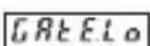
Start/Stop via Inp B. counting while Inp B (Gate) not active or open
GREh
Start/Stop via Inp B. counting while Inp B (Gate) active (High level with pnp; Low level with npn)
Inb Inb
Count Start/Stop via INP B (LOW-HIGH edge with pnp; HIGH-LOW edge with npn). Every active edge changes the counter status.
inR inb
Count start via INP A, stop via INP B. (LOW-HIGH edge with pnp; HIGH-LOW edge with npn)
4.4 Operating mode
tnodeE
SEC
Time unit: seconds (accuracy depending on position of the decimal point*)
P
Time unit: minutes (accuracy depending on position of the decimal point*)
hour
Time unit: hours (accuracy depending on position of the decimal point*)
hPnns
Time units: Hours:Minutes:Seconds (decimal point setting is ignored)
*0, 0.1, 0.01, 0.001 means: time measurement in 0, 0.1, 0.01, 0.001 time units
4.5 Decimal point
dP
The decimal point defines the resolution of the pro gram med time unit.
0 1
0.0 1/10 (0,1)
0.00 1/100 (0,0
0000
0.000 1/1000 (0,001)
4.6 SET/RESET mode
rE5n
PRAEL
manual reset via the red SET/RESET key and electrical reset via the SET/RESET input
no rE5
no reset (red SET/RESET key and SET/RESET input locked)
4.8 SET value
| EL rES | only electrical reset via the SET/RESET input |
| PQRoE | only manual reset via the red SET/RESET key |
4.8 End of programming
| SETPt | The device will be set to the set point by pressing the red SET/RESET key or activating the SET/RESET input. |
| 000000 | SET value 0 ...999 999 or 99.59.59 (number of decimal places depends on the decimal point option) |
- Technical data
| EndPro | |
| no | The programming routine is repeated once more. The values set until now can be checked and modified. |
| yes | The programming routine will be left and all values set will be stored as new parameters. Afterwards the device is ready for operation. |
| Supply voltage DC power supply: | 10 ... 30 V DC/max. 55 mA with inverse-polarity protection |
| Display: | 6 digits, red 7 segment LED display, height 8 mm |
| Data retention: | EEPROM |
| Polarity of the inputs: | |
| Programmable, npn or pnp for all inputs | |
| Input resistance: | appr. 5 kOhm |
| Power supply DC: | 24 V | 12 V | 10 ...30 V |
| Input level: | Standard | 5V | |
| typ. Low Level: | 2,5 V | 2,0 V | 1,0 V |
| typ. High Level: | 22,0 V | 10 V | 4,0 V |
| Fmax*: kHz | kHz | kHz | |
| CntDir | 60 20 | 8 | |
| UpDown | 25 15 | 8 | |
| Up.Up | 25 15 | 8 | |
| Quad1 | 25 15 | 8 | |
| Quad2 | 25 15 | 8 | |
| Quad4 | 15 15 | 8 | |
| Count frequency CODIX 522: | |
| Frequency measurement | |
| Accuracy <0.1 % | |
| Measuring principle: | |
| <38 Hz: | period measurement |
| >38 Hz: | gating time measurement |
| gating time 26,3 ms | |
| Power supply DC: | 24 V | 12 V | 10 ...30 V |
| Input level: | Standard 5V | ||
| typ. Low Level: | 2,5 V | 2,0 V | 1,0 V |
| typ. High Level: | 22,0 V | 10 V | 4,0 V |
| Fmax*: | kHz kHz | kHz | |
| Tacho | 6 | 20 | 8 |
| Counting ranges CODIX 523: | |
| Seconds | 0.001 s ... 999999 s |
| Minutes | 0.001min ... 999999 min |
| Hours | 0.001 h ... 999999 h |
| h.min.s | 00 h 00 min 01 s |
| ... 99 h 59 min 59 s | |
| Accuracy | <50 ppm |
Minimum pulse length for the Reset input: 5 ms
| Input sensitivity: | |
| Standard sensitivity: | |
| Low: 0 ... 0,2 x UB [V DC] | |
| High: 0,6 x UB ... 30 V DC | |
| 4 ... 30 V DC level: | Low: 0 ... 2 V DC |
| High: 4 ... 30 V DC | |
| Pulse shape: | any*, Schmitt-Trigger inputs |
| Optocoupler output (optional): | |
| NPN optocoupler with open collector and open emitter; max. switching performance: | |
| 30 V DC/10 mA | |
| Ambient temperature: | |
| -20 ... +65 °C at | 10 ... 26 V DC |
| -20 ... +55 °C at | >26 ... 30 V DC |
| Storage temperature: | |
| -25 ... +70 °C | |
| Altitude: | to 2000 m |
| EMC: | |
| Noise emission | EN 55 011 Class B |
| Noise immunity | EN 61 000-6-2 |
Housing:
For front panel mounting: 48 × 24 ~mm
acc. to DIN 43700, RAL7021, dark grey
Weight: appr. 50 g
Protection: IP 65 (front)
Cleaning: The front of the units is to
be cleaned only with a soft wet (water!) cloth.
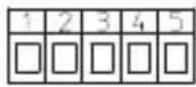
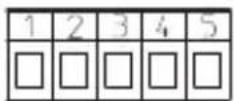
6. Terminal assignment
without optocoupler
1 10 ... 30 V DC
20VGND
3 INP A
4 INP B (Codix 522: n.c.)
5 SET/RESET (Codix 522: n.c.)
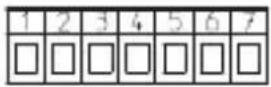
with optocoupler
1 10 ... 30 V DC
20VGND
3 INP A
4 INP B (Codix 522: n.c.)
5 SET/RESET (Codix 522, n.c.)
6 Emitter
7 Collector
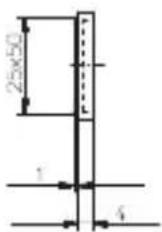
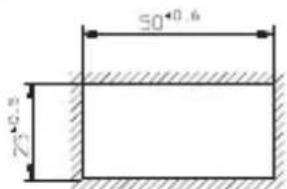
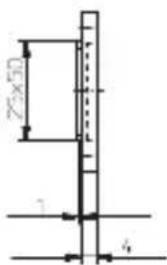
9. Dimensions:
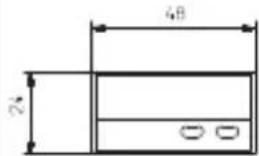
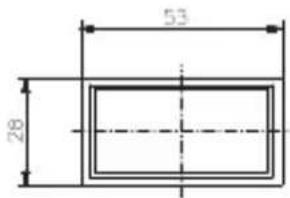
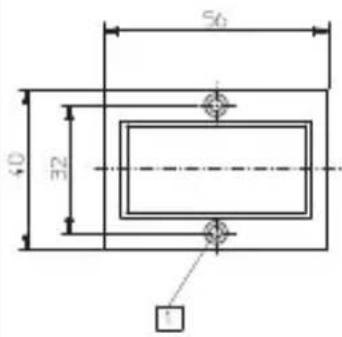
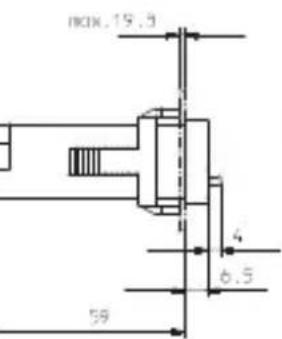
Panel cut-out: 22.2^+0,3 × 45^+0,6 ~mm
Front bezel
7. Delivery includes:
1 Digital display
1 Panel mounting clip
1 Bezel for screw mounting, panel cut out 50 × 25 ~mm
1 Bezel for clip mounting, panel cut out 50 × 25 ~mm
1 Seal
1 Multilingual operating instructions
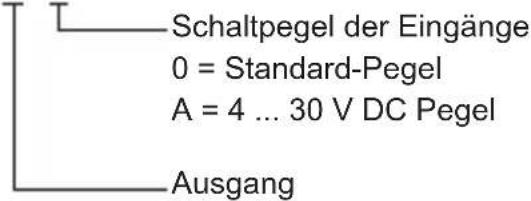
8. Ordering code:
6.521.01X.3X0
6.522.01X.3X0
6.523.01X.3X0
6.524.01X.3X0
Input sensitivity
0 = Standard sensitivity
A = 4 ... 30 V DC level
Output
1 = Optocoupler output
2 = No output

Counter sinking Af3, DIN 74
6.521.01X.3X0
6.522.01X.3X0
6.523.01X.3X0
6.524.01X.3X0
6.521.01X.3X0
6.522.01X.3X0
6.523.01X.3X0
6.524.01X.3X0
6.521.01X.3X0
6.522.01X.3X0
6.523.01X.3X0
6.524.01X.3X0