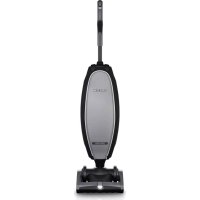
Discover UK30500 - Vacuum Cleaner Oreck - Free user manual and instructions
Find the device manual for free Discover UK30500 Oreck in PDF.


User questions about Discover UK30500 Oreck
0 question about this device. Answer the ones you know or ask your own.
Ask a new question about this device
Download the instructions for your Vacuum Cleaner in PDF format for free! Find your manual Discover UK30500 - Oreck and take your electronic device back in hand. On this page are published all the documents necessary for the use of your device. Discover UK30500 by Oreck.
USER MANUAL Discover UK30500 Oreck
This product is intended for Household use only. If used Commercially warranty is VOID.
For assistance, please call Customer Service:
1-800-989-3535 Canada 1-800-989-3535,
Mon-Fri 9am-6pm EST.
natural_image
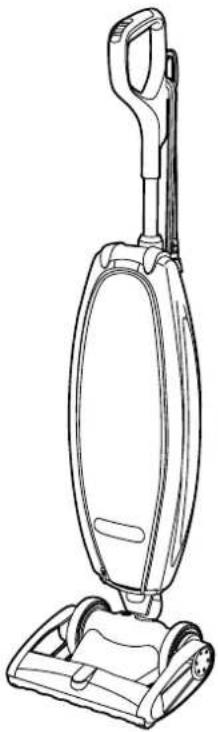
Line drawing of a vacuum cleaner with handle and base (no text or symbols)IMPORTANT SAFETY INSTRUCTIONS SAVE THESE INSTRUCTIONS
READ ALL SAFETY WARNINGS AND INSTRUCTIONS BEFORE USING THIS PRODUCT.
WARNING - WHEN USING AN ELECTRICAL PRODUCT, BASIC PRECAUTIONS SHOULD ALWAYS BE FOLLOWED TO AVOID ELECTRIC SHOCK, FIRE, AND/OR SERIOUS INJURY, INCLUDING THE FOLLOWING:
• Fully assemble product prior to use.
- Operate vacuum only at voltage specified on data plate on bottom of cleaner.
- Do not leave vacuum when plugged in. Unplug from outlet when not in use and before cleaning or servicing.
- Do not use outdoors or on wet surfaces.
- Do not allow to be used as a toy. Not intended for use by children age 12 and under. Close supervision is necessary when used by or near children. To avoid injury or damage, keep children away from product, and do not allow children to place fingers or other objects into any openings.
- Use only as described in this manual. Use only manufacturer's recommended attachments and products.
- Do not use with damaged power cord or plug. If vacuum is not working as it should, has been dropped, damaged, left outdoors, or dropped into water, have the product inspected by an Authorized Oreck® Service Center prior to continuing use. Call
• 1-800-989-3535 for the nearest service center or visit our website at www.oreck.com.
- Do not pull or carry by power cord, use cord as handle, close a door on cord, or pull cord around sharp edges or corners. Do not run vacuum over cord. Keep cord away from heated surfaces.
- Do not unplug by pulling on cord. To unplug, grasp the plug, not the cord.
- Do not handle plug or vacuum with wet hands.
- Do not put any objects into openings. Do not use with any opening blocked; keep free of dust, lint, hair, and anything that may reduce air flow.
- Keep hair, loose clothing, fingers, and all parts of body away from openings and moving
parts. Brushroll continues to operate when in the upright position.
- Turn off all controls before unplugging.
- Use extra care when cleaning on stairs. Do not place vacuum on stairs or furniture, as it may result in injury or damage.
- Do not use to pick up flammable or combustible liquids, such as gasoline, or fine wood sandings or use in areas where they may be present.
- Do not pick up anything that is burning or smoking, such as cigarettes, matches, or hot ashes.
- Do not use without inner filtration bag in place.
CAUTION - TO REDUCE THE RISK OF DAMAGE
- Avoid picking up hard, sharp objects with this product, as they may cause damage.
- Store appropriately indoors in a dry place. Do not expose machine to freezing temperatures.
- With brushroll on, do not allow product to sit in one location for an extended period of time, as damage to floor can result.
- Brush roll continues to turn while product is turned on and handle is in upright position. To avoid damage to carpet, rugs, and flooring, avoid tipping cleaner or setting it on furniture, fringed area rugs, or carpeted stairs during tool use.
WARNING - TO REDUCE THE RISK OF ELECTRIC SHOCK
- This appliance has a polarized plug (one blade is wider than the other). This plug will fit in a polarized outlet only one way. If the plug does not fit fully in the outlet, reverse the plug. If it still does not fit, contact a qualified electrician to install the proper outlet. Do not alter the plug in any way.
ASSEMBLY
1.
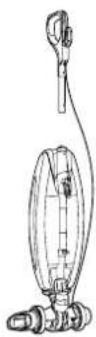
Your new Dreck Discover Vacuum will come with 2 pieces, the body and the handle.
natural_image
Technical line drawing of a mechanical device with no visible text or symbols3.
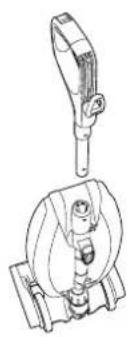
Attach vacuum handle to the upper tube with the power button facing away from the user.
natural_image
Technical line drawing of a mechanical assembly with a hand adjusting a component (no text or symbols)2.
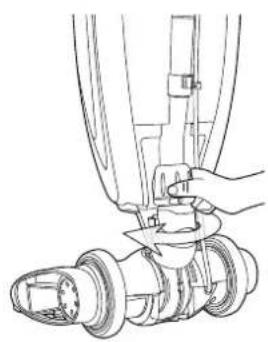
Ensure the lower tube connector is tightened clockwise.
natural_image
Technical line drawing of a mechanical component with an arrow indicating direction (no text or symbols)4.
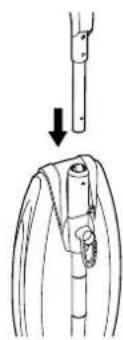
Insert the handle into the upper tube until you hear the *click* and the pushpin is fully through the hole on the upper tube.
OPERATION
Fully assemble or install product prior to use.
OPERATING THE ORECK DISCOVER™
Make sure the disposable inner bag is in place. Do not operate the vacuum without a disposable inner bag. Plug the power cord into an electrical outlet and press the ON/OFF switch on the back of the vacuum when ready to operate. Press the button once to turn the unit on high, press a second time for low speed, and a third time to turn the unit off.

natural_image
Line drawing of a person using a vacuum cleaner (no text or symbols present)1.
Up-Position Lock - Place foot on power head and lean handle back gently to release lock for vacuum use. Return handle to the full upright position to engage lock.
NOTE: Do not operate the vacuum while in the upright and locked position. With brushroll on, do not allow cleaner to sit in one location for an extended period of time, as damage to floor can result.
text_image
Technical diagram of a vacuum cleaner with labeled parts and an inset showing hand positioning detail2.
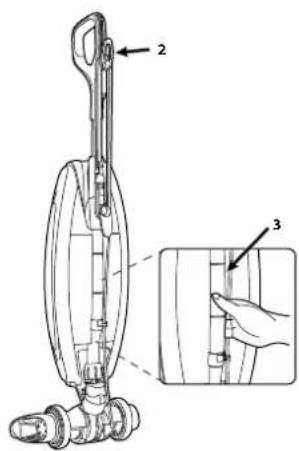
Easy Power Cord Storage - Turn cord release to the up position, wrap power cord around cord release and lower cord bracket located below the carry handle.
3.
Carry Handle - The carry handle is located on back of the vacuum for easy lifting and carrying.
INNER BAG REMOVAL
WARNING: - To reduce the risk of personal injury - Unplug before cleaning or servicing.
natural_image
Line drawing of a vacuum cleaner with a curved arrow indicating motion (no text or symbols)4.
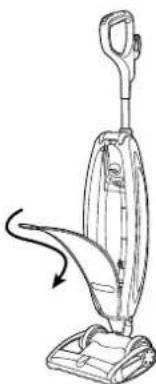
Unzip outer bag completely.
text_image
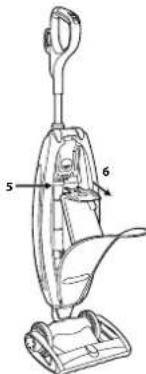
5 6- Pull tab on bag to release bag dock from connector. Bag dock door will hinge downward.
6.
Gently pull bag cardboard collar outward from bag dock. The Saniseal® dust seal will close automatically.
INNER BAG INSTALLATION
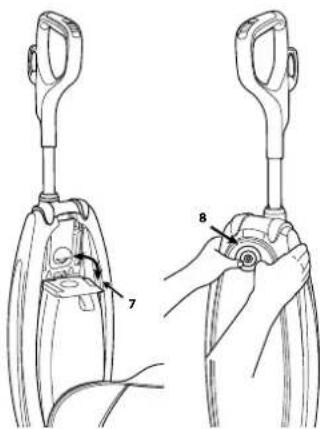
text_image
Technical diagram showing two mechanical assembly steps with labeled parts 7 and 8- Slide the cardboard collar completely onto bag dock door.
- Firmly push bag dock door with both thumbs on indication point until it snaps.
The performance of your new vacuum greatly depends upon care and maintenance. The instructions in this manual will guide you in performing basic care and maintenance. To obtain the most satisfying years of service read the instructions and keep them handy for future reference.
Your Oreck includes HEPA Odor Fighting Inner Bag. The disposable inner bag plays a very important role in efficiency of your Oreck vacuum. The purpose of the disposable inner bag is to trap dirt, but at the same time it must be porous enough to allow air to pass through. If the disposable inner bag becomes clogged, no air can pass through the vacuum and cleaning cannot take place, regardless of the vacuum's power.
To keep your upright vacuum operating at maximum efficiency, change the disposable inner bag frequently.
- Do not fill above the line indicated on the disposable inner bag.
- Be sure the disposable inner bag is installed properly.
NOTE: All disposable inner bags are not the same.
Oreck offers HEPA and non-HEPA inner bags. Your Oreck HEPA or non-HEPA inner bags have been designed to be used with the Oreck upright vacuum. Using bags other than genuine Oreck HEPA or non-HEPA disposable inner a bag will affect the cleaning ability of your vacuum and could cause damage to it.
STUFFING OR BLOCKAGE
IMPORTANT: On plush and new carpets, stuffing may occur inside the intake tube and the lower tube assembly. This is due to excessive fuzz and loose cuttings in the carpet. Stuffing could occur for the first few cleanings until all the loose material is removed. Due to the high efficiency of the vacuum, many older carpets will cause stuffing when the vacuum is first used on them. If your vacuum does not pick up properly, or makes unusual noise and the outer bag does not fluff up or balloon open, follow these steps:
WARNING:
electric shock or injury from moving parts - Unplug before cleaning or servicing.
natural_image
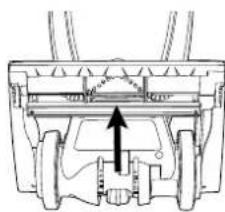
Technical diagram of a mechanical assembly with no visible text or symbols1.
Check for blockage at the mouth of the intake opening. If there is blockage, remove it with long-nose pliers, a screwdriver or coat hanger.
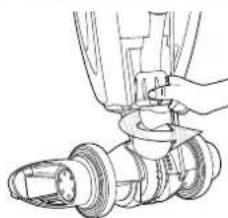
natural_image
Technical line drawing of a mechanical assembly with a hand adjusting a component (no text or symbols)- Twist lower collar counterclockwise to slide up. Pull tube out of base. Check for blockage. If blockage is in the tube, remove with a coat hanger.
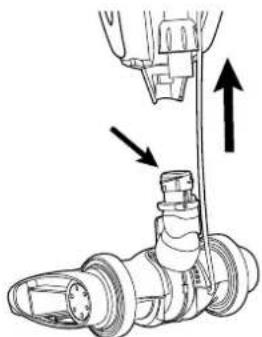
natural_image
Mechanical assembly diagram showing a valve inserted into a cylindrical component with two arrows indicating direction (no text or labels present)3.
If tube is not blocked, look into fan housing. Remove debris with long-nose pliers, a screwdriver or coat hanger.
natural_image
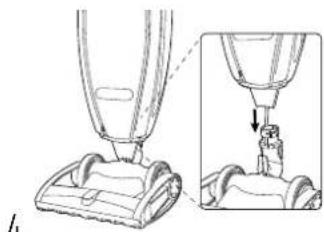
Line drawing of a vacuum cleaner with an inset close-up showing the component (no text or symbols)- Insert tube and push down until the tube is seated. Make sure O-ring is in place against fan housing opening.
natural_image
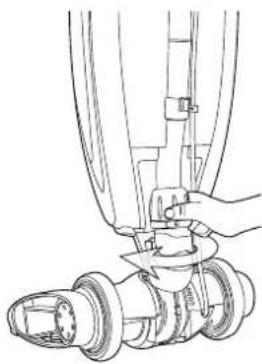
Technical line drawing of a mechanical assembly with a hand operating a component (no text or symbols present)- To finish reassembly, replace and tighten collar clockwise until collar locking tabs are locked in place.
NOTE: Many times, blockage occurs due to a full disposable inner bag causing dirt to back down the air flow system. When that happens, the blockage will be at the top of the system, starting in the area where the disposable inner bag connects to the connector assembly. If the above actions do not correct the problem, contact an Oreck authorized service center or call the customer service center.
US: 1-800-989-3535 Canada : 1-800-989-3535
MAINTENANCE
If appliance is not working as it should, has been dropped, damaged, left outdoors, or dropped into water, take it to a service center prior to continuing use.
Any other servicing should be done by an authorized service representative.
You'll love the way your Oreck cleans under things and is so lightweight and easy to use. The following are a few simple suggestions regarding its operations:
- When inserting a new disposable inner bag, first puff out and open the bag.
- When the disposal inner bag is full, replace it.
- Check the disposable inner bag at least once a month.
- Do not run the vacuum over the cord. The revolving brush could damage the cord.
- Use caution when vacuuming over area rug edges and fringe.
- If at any time the machine does not pick up properly or makes an unusual noise, stop operation and service.
- Although your upright will pick up pins, paper clips, and other small objects, it is recommended that these be removed from the floor before you vacuum. Failure to do so may result in permanent damage to the motor section fan and it's housing.
THE BELT
- Discover™ is equipped with the Enduralife™ Belt, which is designed for a long life and doesn't need changing.
MOTOR PROTECTION/VACUUM SHUT DOWN
A thermal protector has been designed into your cleaner to protect it from overheating. When the thermal protector activates the cleaner will stop running and the headlights will flash.
If this happens proceed as follows:
- Turn cleaner OFF and unplug it from the electrical outlet.
- Check fullness of bag, change if needed.
- Clear any large obstruction or blockage from the vacuum. (Stuffing or Blockage)
- When cleaner is unplugged and motor cools for 30 minutes, the thermal protector will deactivate and cleaning may continue.
If the thermal protector continues to activate after following the above steps, your cleaner needs servicing.
LUBRICATION: The motor and brushroll are equipped with bearings which contain sufficient lubrication for their lifetime. The addition of lubricant could cause damage. Do not add lubricant to motor or brushroll.
CORD STORAGE
Wrap cord around hooks for convenient storage. Attach the plug end to the cord.
WARNING: To reduce the risk of electric shock or injury from moving parts - Unplug before cleaning or servicing.
natural_image
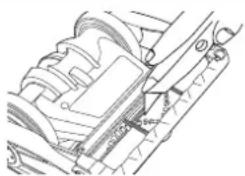
Technical line drawing of a mechanical assembly with no visible text or symbolsAt least once a month, check for and remove excess lint, string or hair from the revolving brushroll. Patented cleaning grooves on the brushroll will allow easier cleaning. Wipe the outside of the vacuum with a damp cloth. Also clean the connector deflector assembly area base of vacuum and fan housing area. If there is dust in the outer bag, vacuum it or shake it out. A little preventative maintenance will keep your upright vacuum looking new and will ensure continued cleaning effectiveness.
REPLACING THE BRUSHROLL
The brush roll is designed for long life. Should it ever become worn or frayed, it can be replaced by an Oreck authorized service center.
TROUBLESHOOTING & PARTS
WARNING: To reduce the risk of personal injury - Unplug before cleaning or servicing.
Service problems that appear to be major can often be solved easily. You can be your own troubleshooting by reviewing this guide.
Any other servicing should be done by an authorized service representative.
If appliance is not working as it should, has been dropped, damaged, left outdoors, or dropped into water, take it to a service center prior to continuing use.
| PROBLEM CHECK WHAT TO DO | ||
| Vacuum will not run. 1. Not plugged in properly.2. No electricity in wall outlet.3. The Brushroll is blocked. | 1. Be sure power cord is firmly plugged into wall outlet.2. Check electrical source - fuse or circuit breaker in home.3. Clear blockage. Unit will reset. (refer to STUFFING OR BLOCKAGE) | |
| Vacuum does not pick up. 1. Did the vacuum shut down on very dense material or large obstruction, and did the lights flash?2. Disposable inner bag is full.3. Nozzle or intake pivot clog.4. Brush is worn.5. Bag tube clogged.6. Big pores are clogged with fine dust.7. Impeller fan is broken.8. Brusroll is not even at both ends. | 1. See steps on clearing an obstruction (refer to STUFFING OR BLOCKAGE). Turn cleaner OFF and unplug it from the electrical outlet.. When cleaner is unplugged and motor cools for 30 minutes, the thermal protector will deactivate and cleaning may continue.2. Replace Disposable Inner Bag (refer to INNER BAG REMOVAL)3. Clear blockage (refer to STUFFING OR BLOCKAGE)4. Contact Dreck Authorized Service Center.5. Clear blockage (refer to STUFFING OR BLOCKAGE)6. Change Disposable Inner Bag (refer to INNER BAG REMOVAL)7. Contact Dreck Authorized Service Center.8. Contact Dreck Authorized Service Center. | |
| Vacuum still does not operate properly. | 1. Check all the above points. | 1. Contact Dreck Authorized Service Center. |
All accessories and replacement parts are sold separately. To order, call our customer service hot line or visit our website. Please have your model number from the data label on the bottom of the unit.
REPLACEMENT PARTS
| ITEM PART NUMBER | |
| HEPA Oder Fighting Inner Bag, 6 Pack(For Discover Upright Vacuume Cleaner) | AK1LW6H |
| HEPA Oder Fighting Inner Bag, 3 Pack(For Discover Upright Vacuume Cleaner) | AK1LW3H |
Customer Service Hot line | USA: 1-800-989-3535 | Canada: 1-800-989-3535 | Website: www.oreck.com
WARRANTY FOR UPRIGHT VACUUMS
(RESIDENTIAL)
ORECK MANUFACTURING COMPANY gives you the following limited warranty for this product only if it was originally purchased for residential use, not resale, from Oreck or an Oreck Authorized Retail Dealer.
Oreck will repair or replace, free of charge, to the original purchaser, any part that is found to be defective in material or workmanship within a limited time period based on the date of purchase and its specific product model number. This limited warranty applies to normal domestic use. Any commercial use of this
product will void this limited warranty.
This limited warranty does not cover the replacement of expendable or consumable parts such as carbon motor brushes, edge brushes, brushrolls drive belts, brushes, bulbs, disposable bags and other parts subject to normal wear unless they are defective in material or workmanship
This limited warranty does not apply to any part subjected to accident, abuse, commercial use, alteration, misuse, damage caused by a
fire or act of God, the use of voltages other than indicated on the serial number displayed on this product or service of this product by other than Oreck or a participating Factory Authorized Service Center. Oreck does not authorize any person or representative to assume or grant any other warranty obligation with the sale of this product.
Oreck's limited warranty is valid only if you retain proof of purchase from Oreck or an Oreck Authorized Retail Dealer for this product. If you purchase this product from any other
source, your purchase is "AS IS," which means Oreck grants you no warranty, and that you, not Oreck, assume the entire risk of the quality and performance of this product, including the entire cost of any necessary servicing or repairs of any defects.
ORECK'S LIABILITY FOR DAMAGES TO YOU FOR ANY COSTS WHATSOEVER ARISING OUT OF THIS STATEMENT OF LIMITED WARRANTY SHALL BE LIMITED TO THE AMOUNT PAID FOR THIS PRODUCT AT THE TIME OF ORIGINAL PURCHASE.
ORECK
DISCOVER™ ASPIRATEUR VERTICAL
MANUEL DE L'UTILISATEUR
MODÈLE: UK30500
IMPORTANT : LIRE ATTENTIVEMENT TOUTES LES
natural_image
Line drawing of a vacuum cleaner with handle and base mount (no text or symbols)INSTRUCTIONS DE SÉCURITÉ IMPORTANTES SAUVEGARDER CES INSTRUCTIONS
LISEZ TOUS LES AVERTISSEMENTS ET INSTRUCTIONS DE SÉCURITÉ AVANT D'UTILISER CE PRODUIT.
AVERTISSEMENT - LORS DE L'UTILISATION D'UN PRODUIT ÉLECTRIQUE, DES PRÉCAUTIONS DE BASE DOIVENT TOUJOURS ÊTRE PRISES POUR ÉVITER LES CHOCS ÉLECTRIQUES, LES INCENDIES ET/OU LES BLESSURES GRAVES, NOTAMMENT LES SUIVANTES :
natural_image
Technical line drawing of a mechanical assembly with a hand operating a component (no text or symbols present)2.
natural_image
Technical line drawing of a mechanical device with no visible text or symbols3.
natural_image
Technical diagram showing a mechanical assembly with a downward arrow indicating motion or force (no text or symbols present)4.
natural_image
Line drawing of a hand using a vacuum cleaner to lift a small object (no text or symbols)1.
text_image
Technical diagram of a mechanical device with labeled parts and an inset showing hand positioning for assembly or repair.2.
natural_image
Line drawing of a vacuum cleaner with a curved arrow indicating motion (no text or symbols)4.
text_image
Technical diagram of a vacuum cleaner with labeled parts 5 and 65.
text_image
Technical diagram showing two mechanical components with labeled parts, including a hand holding a tool and numbered parts 7 and 8.7.
natural_image
Technical diagram of a mechanical assembly with no visible text or symbols1.
natural_image
Technical line drawing of a mechanical assembly with a hand adjusting a shaft (no text or symbols)2.
natural_image
Mechanical assembly diagram showing a shaft and housing with directional arrows indicating motion (no text or labels)3.
natural_image
Technical illustration of a vacuum cleaner with a close-up view showing the component (no text or symbols present)4.
natural_image
Technical line drawing of a mechanical assembly with a hand operating a tool (no text or symbols present)5.
natural_image
Technical line drawing of a mechanical assembly with no visible text or symbolsnatural_image
Line drawing of a vacuum cleaner with handle and base (no text or symbols)natural_image
Technical line drawing of a mechanical assembly with a hand adjusting a component (no text or symbols present)2.
natural_image
Technical line drawing of a mechanical device with two views (top and side), no visible text or symbols3.
natural_image
Technical diagram showing a mechanical assembly with a cylindrical component and a downward arrow indicating motion (no text or symbols present)4.
natural_image
Line drawing of a person using a vacuum cleaner to lift a small object (no text or symbols present)1.
text_image
Technical diagram of a mechanical device with labeled parts and an inset showing a hand holding a component.2.
natural_image
Line drawing of a vacuum cleaner with a curved arrow indicating motion (no text or symbols)4.
text_image
Technical line drawing of a vacuum cleaner with labeled parts 5 and 65.
text_image
Technical diagram showing two mechanical device configurations with labeled parts 7 and 8, likely illustrating a turning or assembly process.7.
natural_image
Technical diagram of a mechanical assembly with no visible text or symbols1.
natural_image
Technical line drawing of a mechanical assembly with a hand adjusting a shaft (no text or symbols)2.
natural_image
Mechanical assembly diagram showing a valve and housing with directional arrows indicating movement (no text or labels)3.
natural_image
Diagram of a vacuum cleaner with a close-up view showing the process (no text or symbols present)4.
natural_image
Technical line drawing of a mechanical assembly with a hand operating a tool (no text or symbols present)5.