RB38A7B5ECE - Freezer SAMSUNG - Free user manual and instructions
Find the device manual for free RB38A7B5ECE SAMSUNG in PDF.


| Product type | Combined refrigerator-freezer |
| Brand | Samsung |
| Model | RB38A7B5ECE |
| Total net capacity | 380 L (estimate) |
| Refrigerator capacity | 270 L (estimate) |
| Freezer capacity | 110 L (estimate) |
| Dimensions (H x W x D) | 1790 x 750 x 720 mm (estimate) |
| Net weight | 75 kg (estimate) |
| Power supply | 220-240 V, 50 Hz |
| Energy class | A (estimate) |
| Main functions | No Frost, rapid cooling, rapid freezing, digital display |
| Defrosting | Automatic (No Frost) |
| Interior lighting | LED |
| Temperature control | Electronic with touch screen |
| Maintenance and cleaning | Clean the seals and interior with a soft cloth and soapy water. Dust the rear grille. |
| Safety | Automatic door closing, door open alarm |
| Spare parts and repairability | Handles, seals, drawers and hinges replaceable by user. Other parts: contact an authorized Samsung service. |
| General information | User manual available in multiple languages. Batteries not included. |
Frequently Asked Questions - RB38A7B5ECE SAMSUNG
User questions about RB38A7B5ECE SAMSUNG
0 question about this device. Answer the ones you know or ask your own.
Ask a new question about this device
Download the instructions for your Freezer in PDF format for free! Find your manual RB38A7B5ECE - SAMSUNG and take your electronic device back in hand. On this page are published all the documents necessary for the use of your device. RB38A7B5ECE by SAMSUNG.
USER MANUAL RB38A7B5ECE SAMSUNG
User servicing manual
- You can check where to buy replacement parts at http://samsung.com
- Visit the part purchase site and enter the model code of your product to check the parts available for purchase. The model code is labelled on the outer side of your product.
- You can check the model code and version on the barcode label at the bottom left of the product.
- For replacement parts, make sure the part name matches that of the illustration in this manual.
- User-serviceable parts are limited to handles (some models only), gaskets, drawers, and hinges.
NOTE
Following the repair by a non-authorised service provider, self-repair or non-professional repair of the product, Samsung is not liable for any damage to the product, any injury or any other product safety issue caused by any attempt to repair the product which does not carefully follow these repair and maintenance instructions. Any damage to the product caused by an attempt to repair the product by any person other than a Samsung certified service provider will not be covered by the warranty.
CAUTION
- The part name listed on the site may differ from that in this manual. Please make sure you choose the right part name.
- Replacing hinges requires extreme caution because it involves detaching the door.
- Be sure to wear safety gloves while making repairs.
English
The actual image and provided parts of the refrigerator may differ, depending on the model and the country.
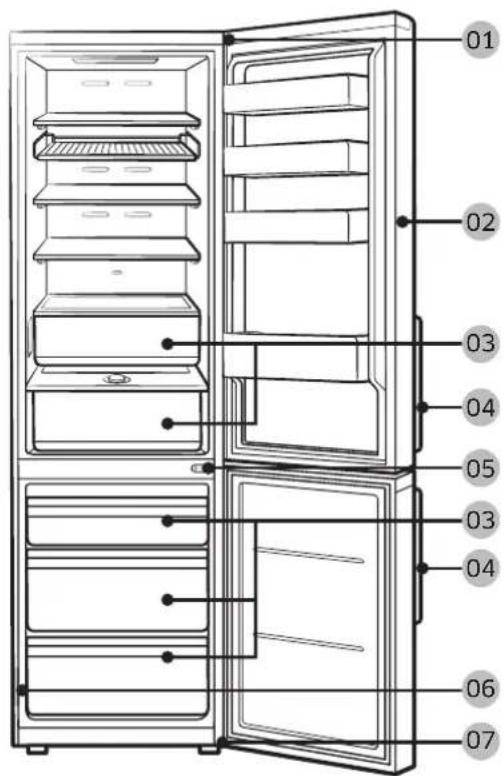
01 Top hinge 02 Gasket
03 Drawer 04 Handles (Applicable models only)
05 Middle hinge 06 Barcode label
07 Bottom hinge
English
Handle replacement
Model name looks like this: RB38**6****, RB38**2****, RL38**6****, RB3L**2****, RB36**6****, RB36**2****, RL36**6****, RL36**2****, RB34**6****, RB34**2****, RL34**6****, RL34**2****
What replaces the asterisks may differ depending the model.
Asterisk(s) in the model code indicate a variant model and may replace (0-9) or (A-Z) in the model code.

CAUTION
- When replacing the door handle, take care not to scratch the front of the door.
- Firmly press the handles at the supports. Make sure there is no gap between the supports and the door.
- Tightly fasten the screws when attaching the handle.
- Check that the handle is firmly attached before using the product.
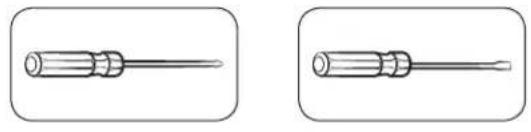
Tools required (not provided)
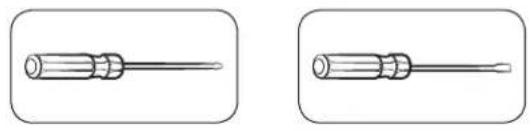
natural_image
Two identical illustrations of a screwdriver with a flat blade, shown in two different angles (no text or symbols)Phillips screwdriver Flat-head
screwdriver
To detach the handles

NOTE
This procedure applies to both the fridge and freezer compartment.
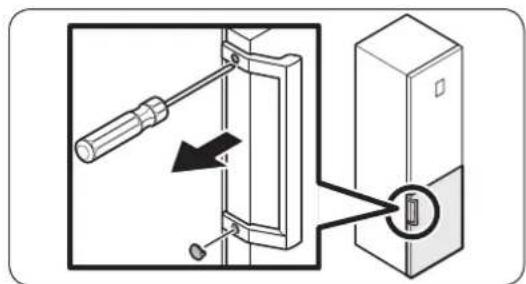
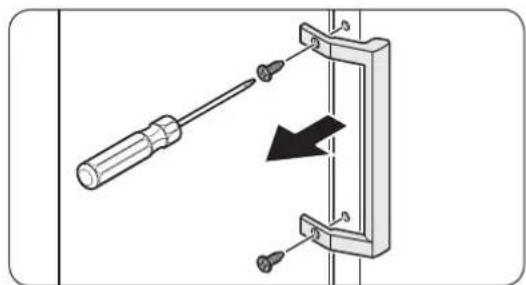
natural_image
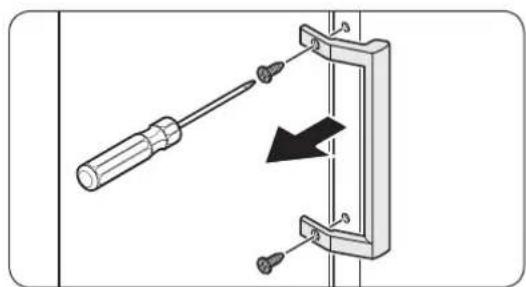
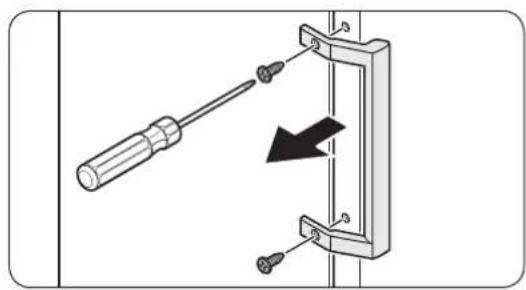
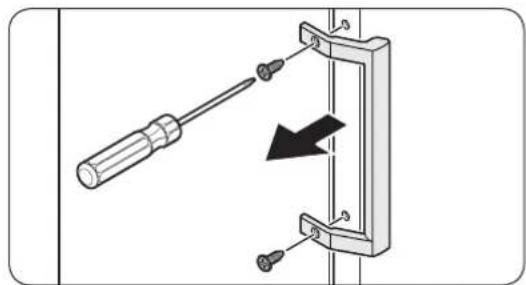
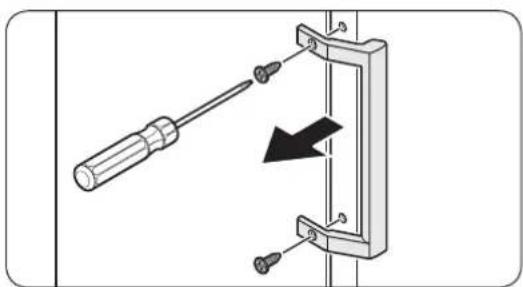
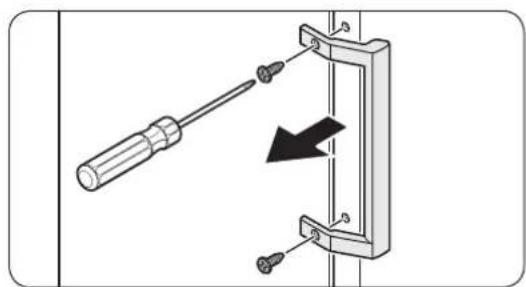
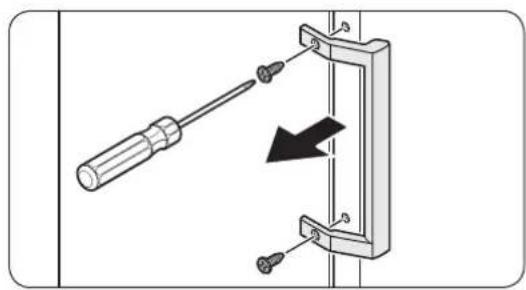
Diagram of a screwdriver inserted into a mechanical bracket with a black arrow indicating direction (no text or symbols present)- Use a flat-head screwdriver to remove the screw covers.
- After detaching the handle, attach the screw covers back on the screw holes.
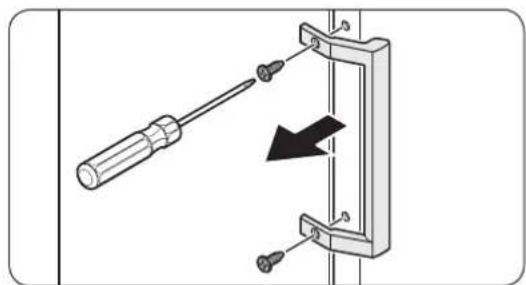
- Use a Phillips screwdriver to remove the screws and detach the handle.

NOTE
Use these screws to fasten the handle on the opposite side.
- Assemble the new handle in the reverse order of disassembly.
English
Gasket replacement

CAUTION
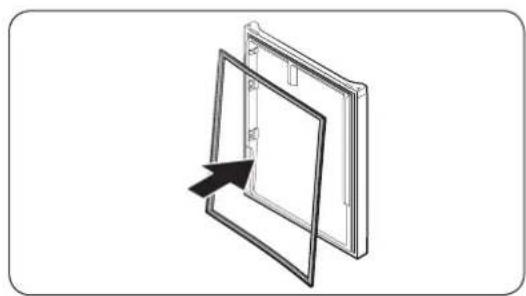
Make sure you firmly attach the gasket. Otherwise, cold air from the refrigerator may leak.
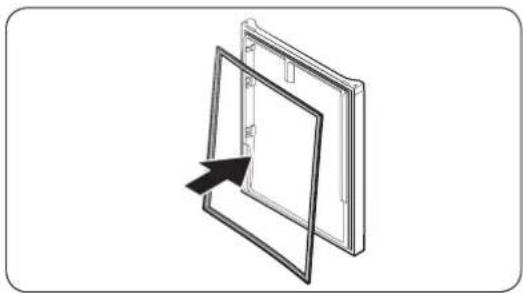
To remove the gasket
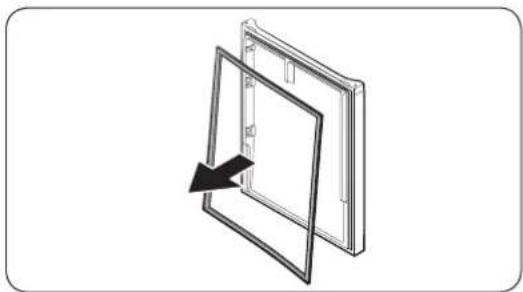
natural_image
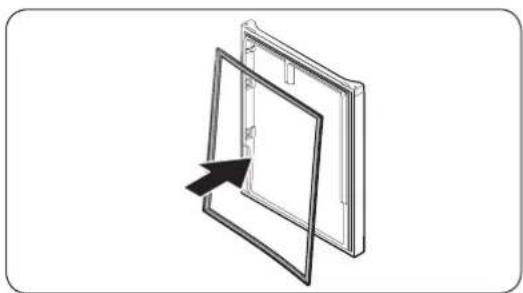
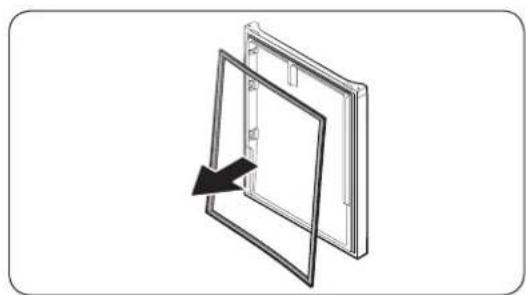
Diagram of a door frame with an arrow indicating direction (no text or symbols)Open the door and remove the gasket from the door.
To replace the gasket
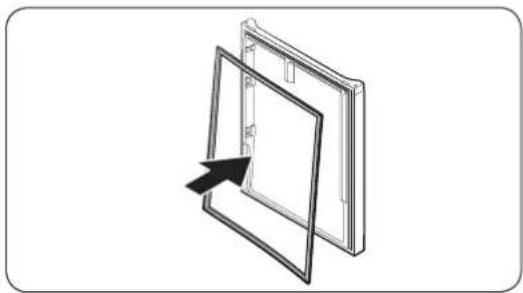
natural_image
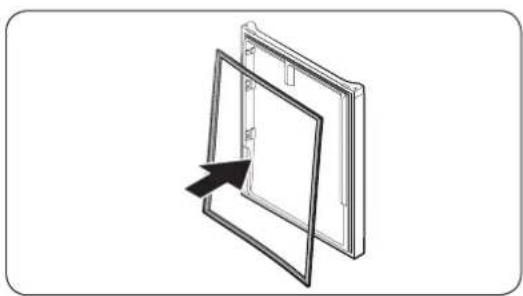
Diagram of a door frame with an arrow pointing to the front panel (no text or symbols)Attach a new gasket to the refrigerator door. Make sure there is no gap between the new gasket and the door.
Drawer replacement

CAUTION
Check that the drawer is inserted properly into the rail during assembly.
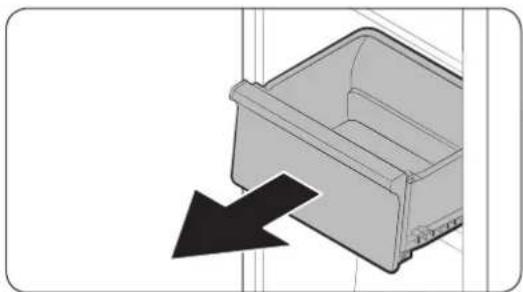
To remove the drawer
natural_image
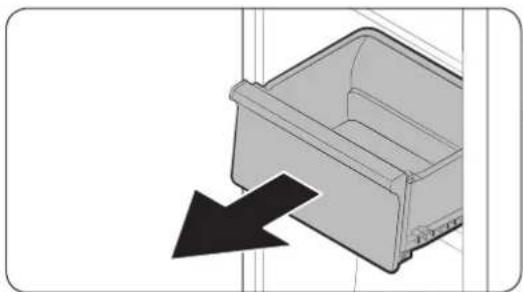
Diagram of a plastic drawer with a black arrow pointing to it, no text or symbols presentGently lift up the front of the drawer and slide it out.
To reattach the drawers
Reattaching the drawers follows the reverse order of their respective removal steps.
English
Hinge replacement
To replace the hinges, you must remove the doors first.

CAUTION
- When removing the doors, take extreme caution because the doors are heavy. - Before replacing the hinges, put a soft pad such as cardboard on the floor to prevent scratches on the door when you place the doors down. - As the hinges must be handled carefully and replaced by two or more persons, we recommend you to call for professional technical service.
- If you remove the hinge without holding the door, the door may fall and cause injury. - Ensure that the shaft is firmly tightened on the hinge. - Check that the hinge is firmly attached to the cabinet. - Make sure the wire connectors are connected properly. - Be careful not to damage the wires when fastening the top cover.

WARNING
- Tilting/laying the refrigerator requires a minimum of 2 people. - Disconnect the power cord before reversing the doors.
Tools required (not provided)
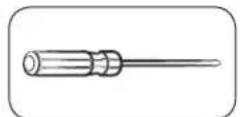
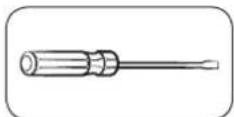
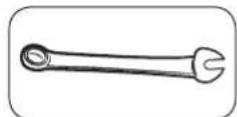
Phillips screwdriver Flat-head screwdriver 11 mm spanner
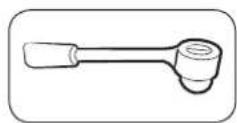
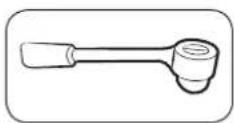
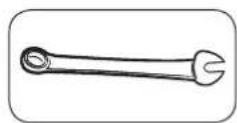
10 mm socket wrench 8 mm socket wrench 10 mm spanner
English
Reversing the door

NOTE
For the models with handles, reverse the handles first. (For detailed information, see the "Handle replacement (For models with bar handles)" section.)
natural_image
Diagram of a battery or switch assembly with screw holes and a labeled component (no text or symbols present)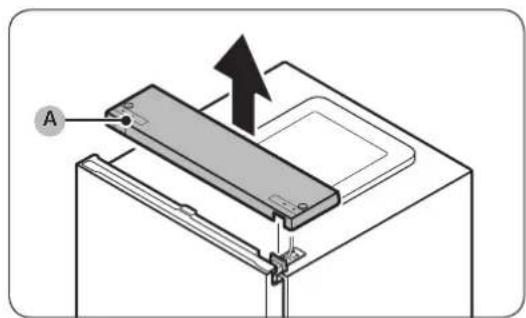
natural_image
Technical diagram of an electronic device showing internal components and wiring (no text or labels)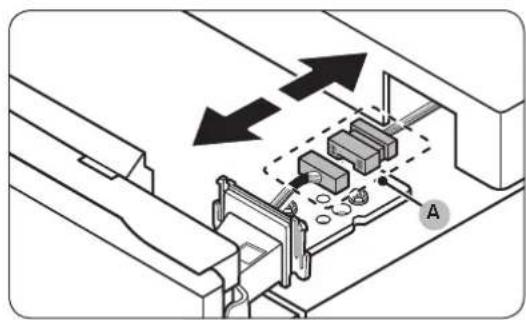
natural_image
Technical diagram showing mechanical assembly with arrows indicating direction (no text or symbols)-
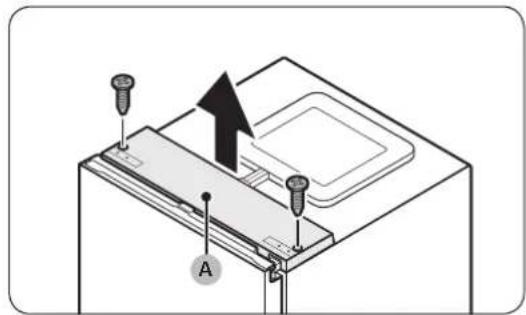
With the fridge door closed, use a Phillips screwdriver to remove the screws fastening the top cover (A).
-
Gently lift the top cover (A) and place it on top of the refrigerator.
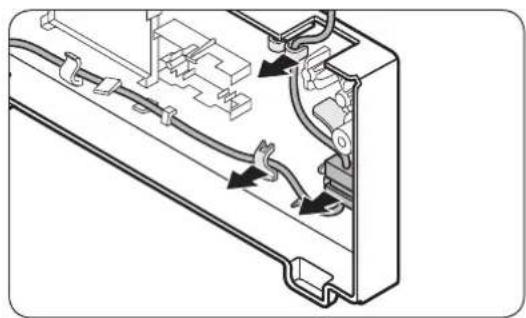
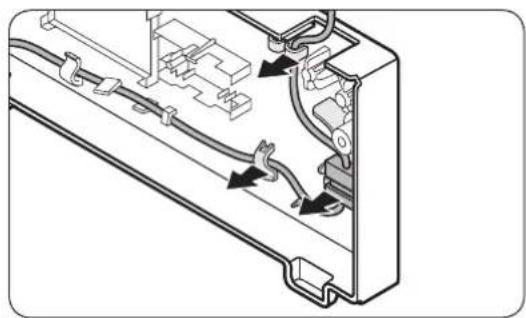
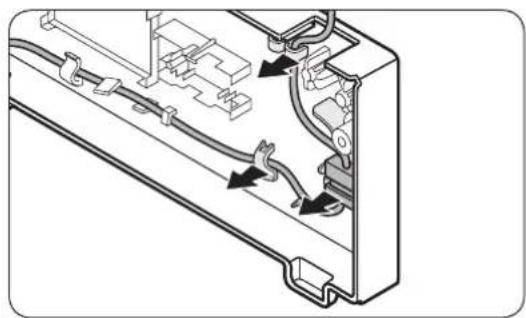
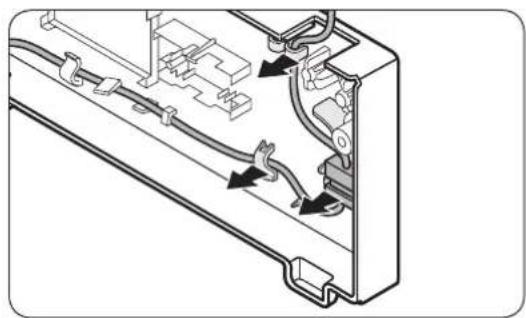
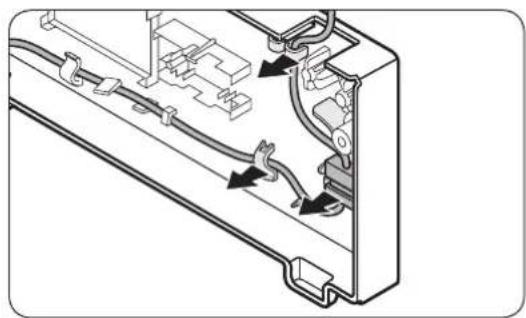
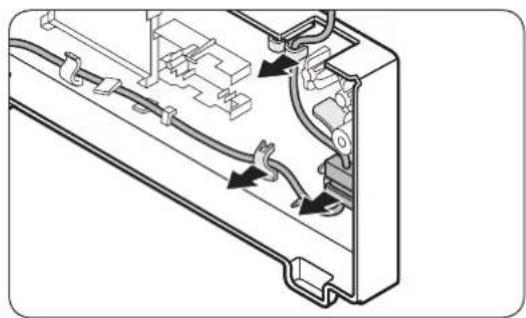
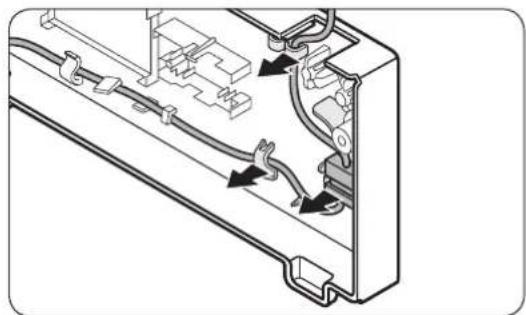
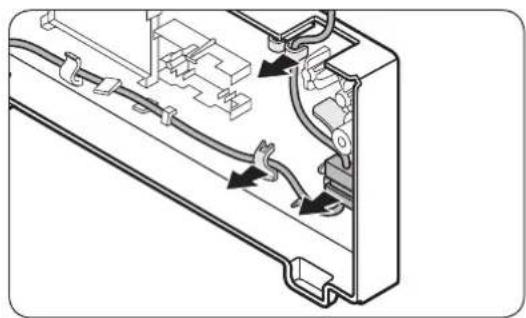
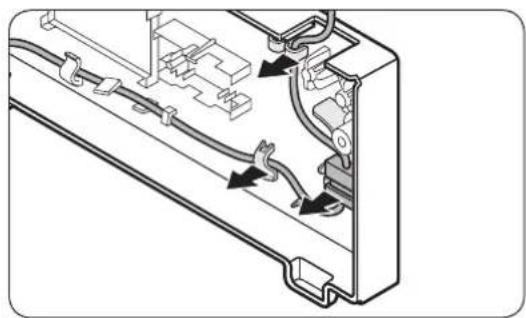
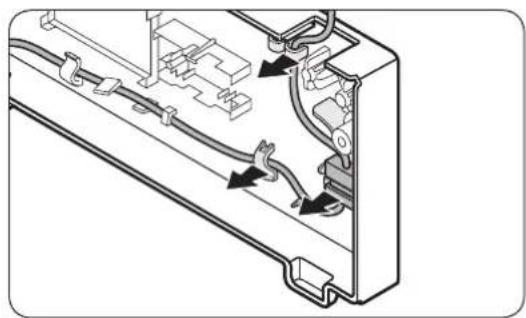
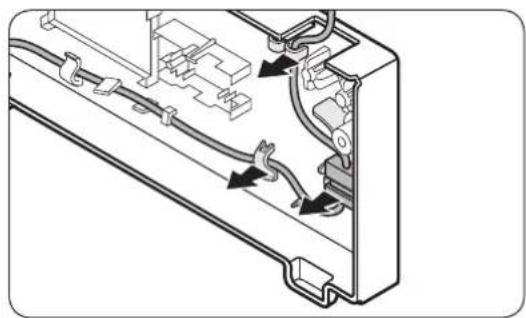
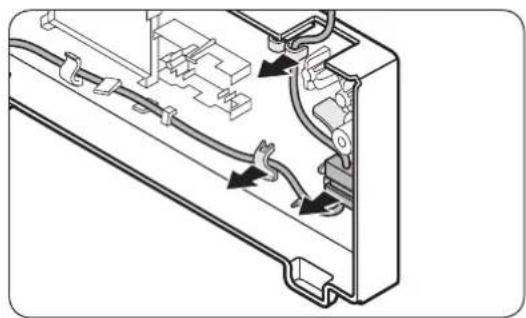
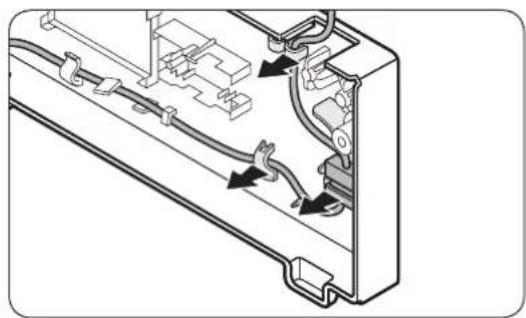
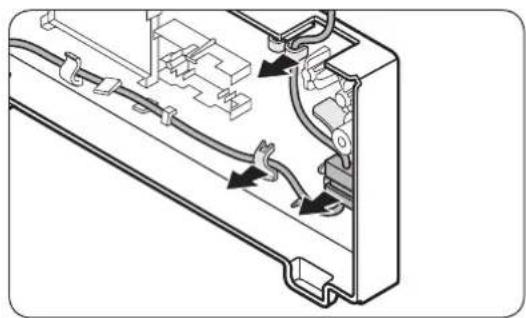
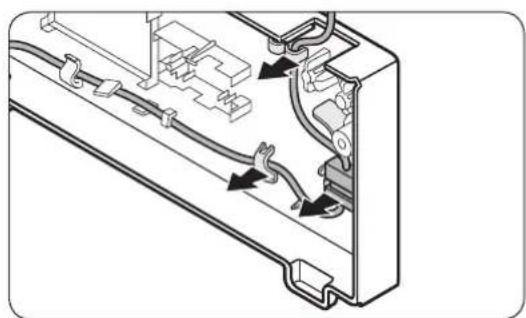
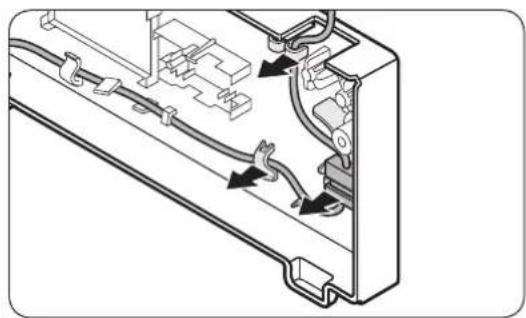
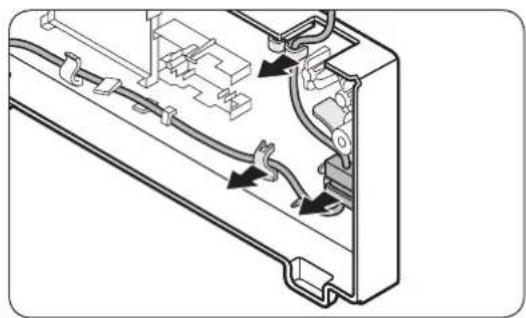
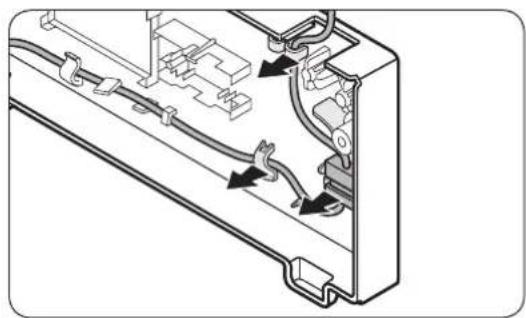
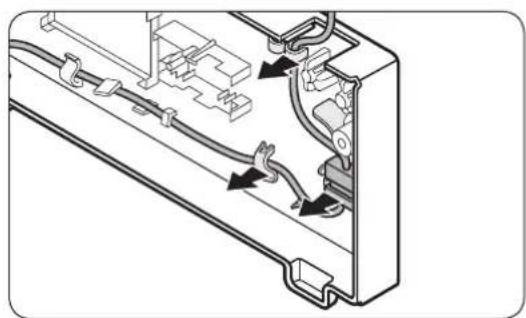
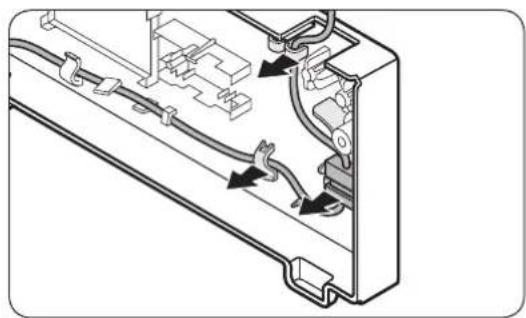
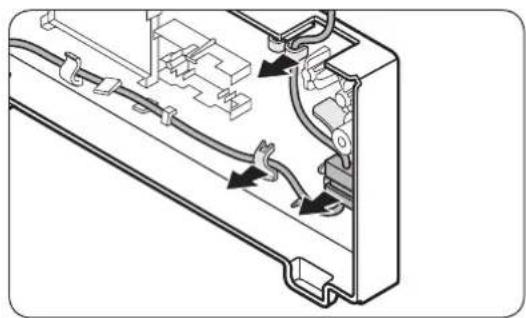
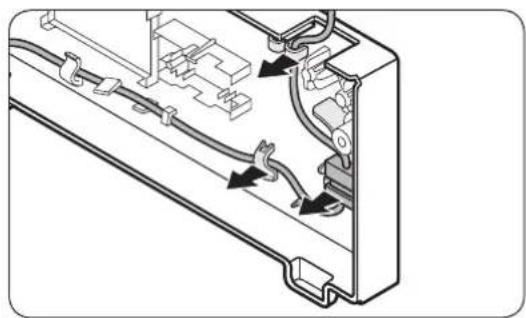
- Be careful when you lift the top cover (A). There is a wire connected underneath it.
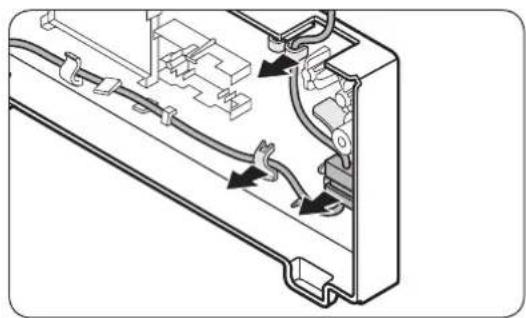
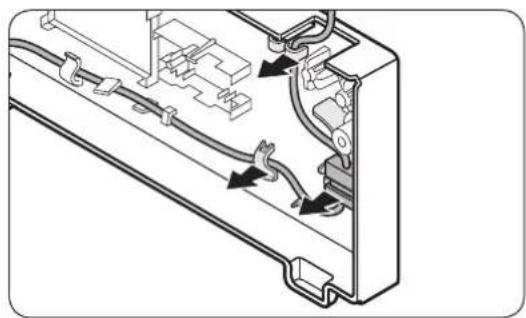
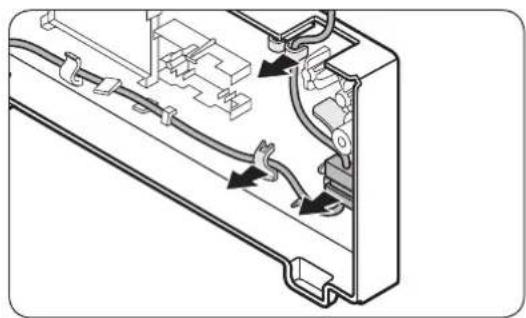
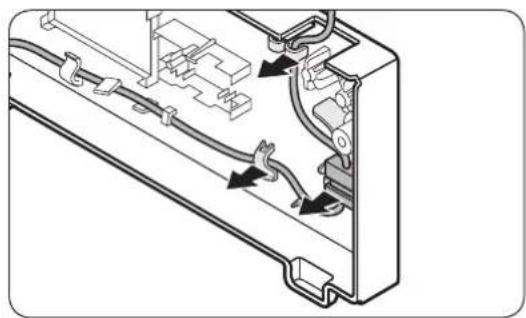
- Remove the wire and the wire connector placed on the holder underneath the top cover.
- This step may not apply to some models.

CAUTION
Do not pull the connectors too hard.
- Disconnect the wire connector (A).
- This step may not apply to some models.
English
natural_image
Diagram of a refrigerator interior showing the door and shelf, with an arrow indicating upward movement (no text or symbols present)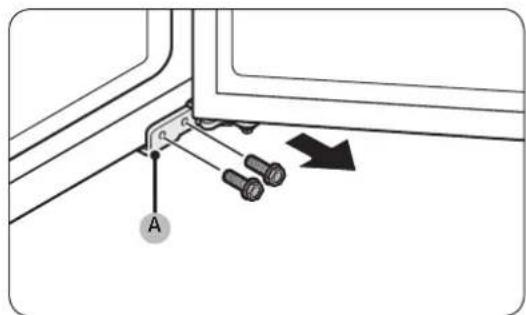
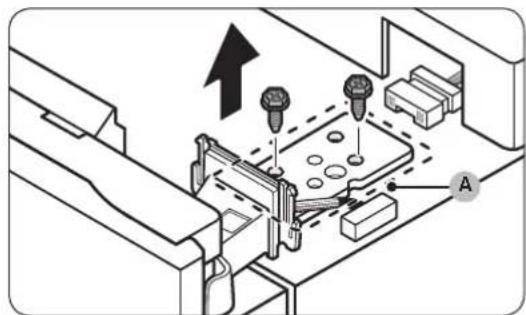
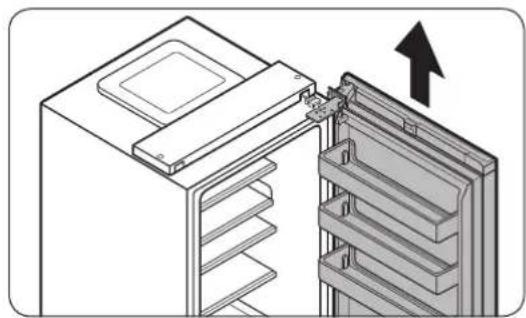
- Use a socket wrench (8 mm) to remove the screws fastening the top hinge (A).
CAUTION
To prevent the fridge door from falling, make sure to hold it tight while removing the screws.
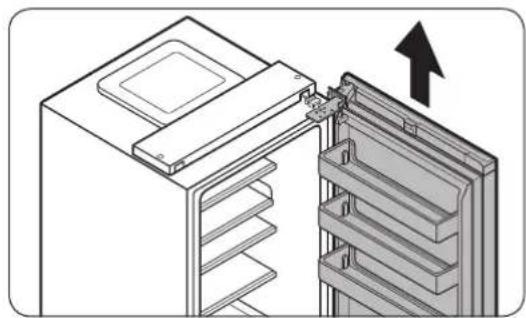
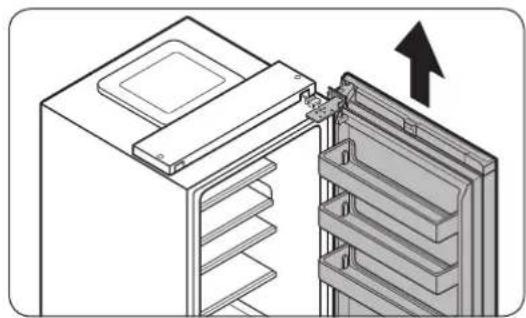
- Open the fridge door, and then lift the door to remove it from the middle hinge. Keep the door in a safe place.
CAUTION
The door is heavy. To prevent damage or injury, use caution while removing the door.
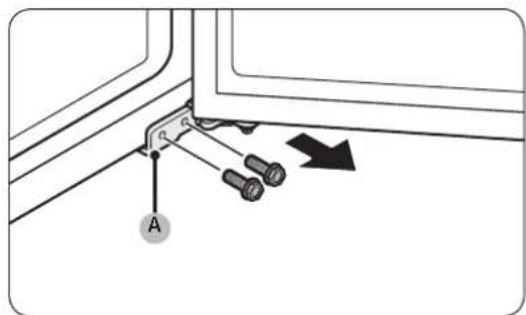
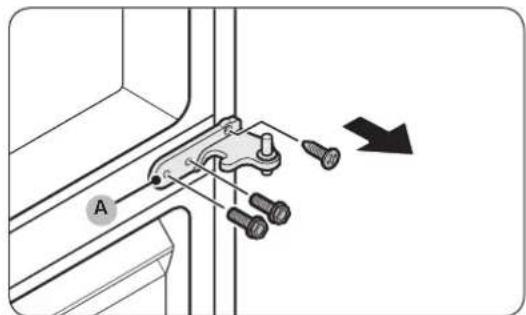
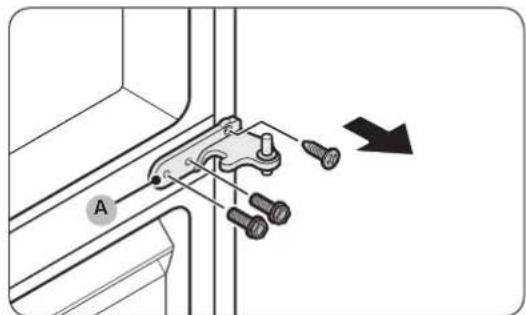
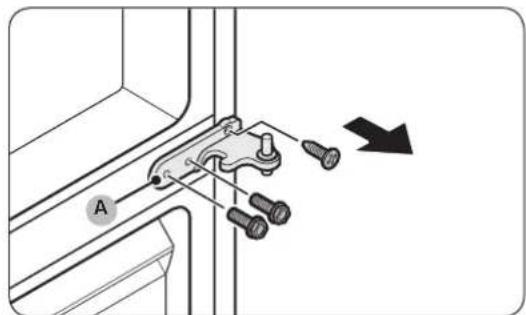
- Open the freezer door, and then use a socket wrench (8 mm) to remove the screws fastening the bottom hinge (A).
English
natural_image
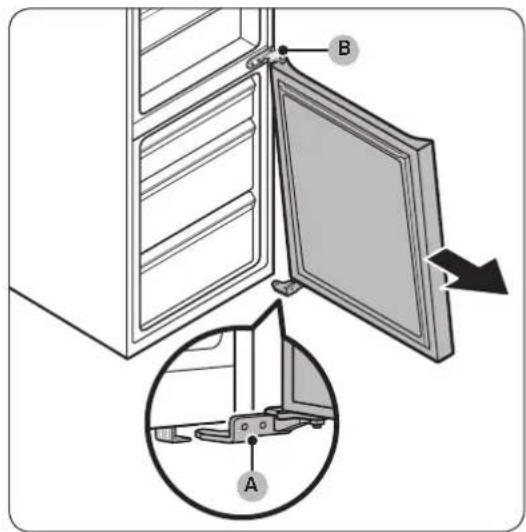
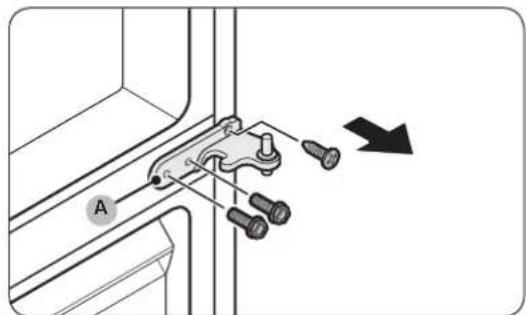
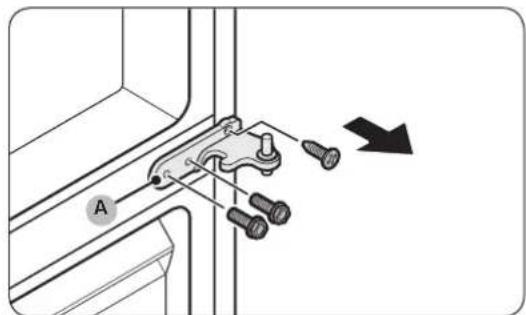
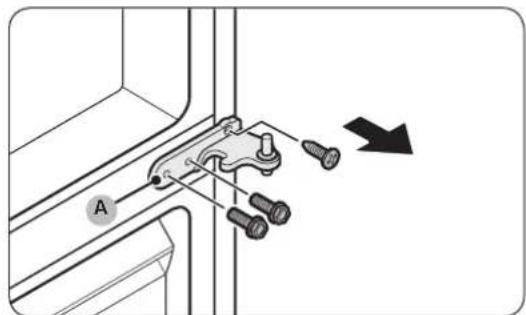
Technical diagram showing a mechanical clamp or bracket with screws and a directional arrow (no text or symbols)- With the freezer door sitting on the bottom hinge (A), slowly pull the bottom hinge (A) to remove it from the holder on the bottom of the refrigerator. Once the bottom hinge (A) is removed from the holder, remove it from the freezer door, and then pull the freezer door down to remove it from the middle hinge (B).
CAUTION
To prevent the freezer door from falling, make sure to hold the freezer door tight until it is safely removed from the middle hinge (B).
-
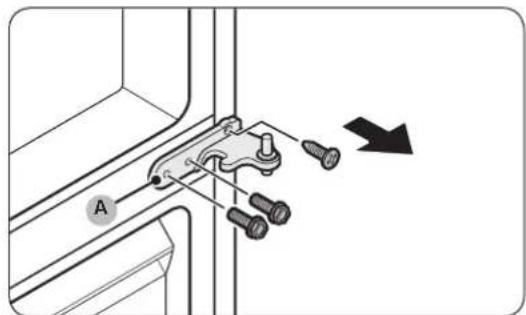
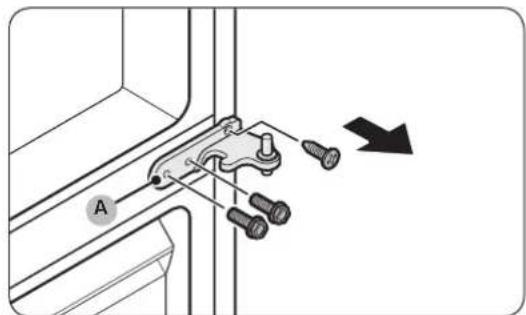
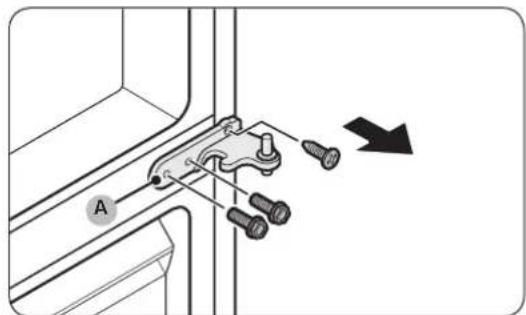
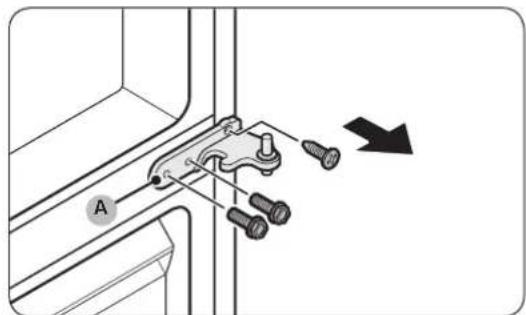
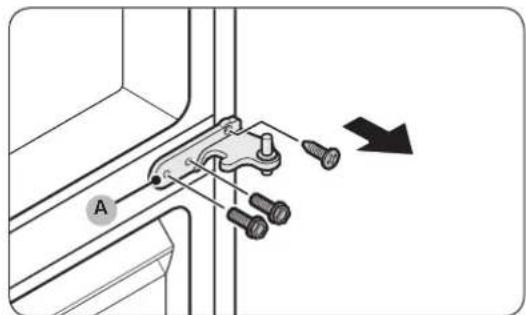
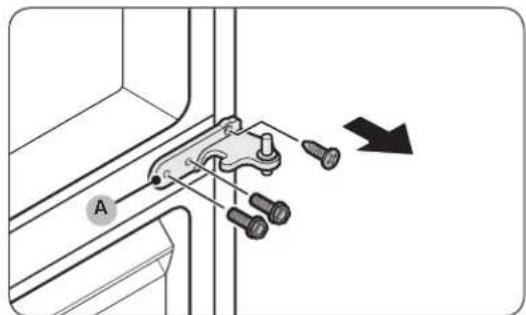
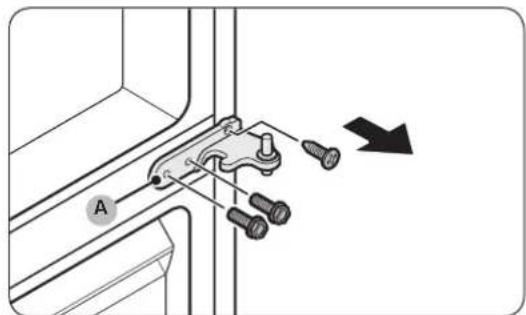
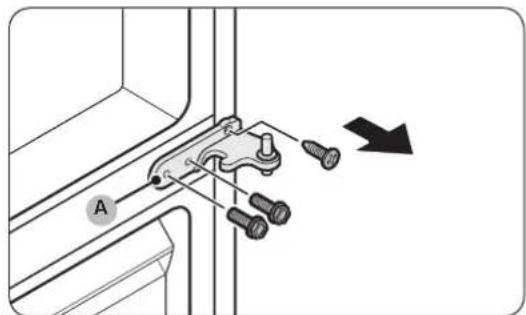
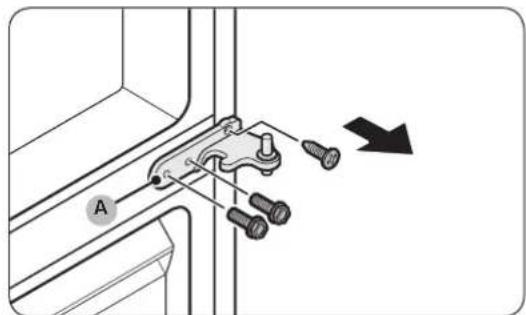
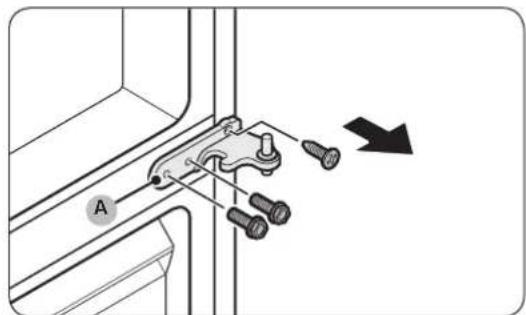
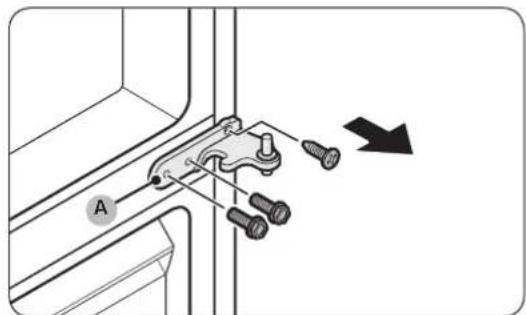
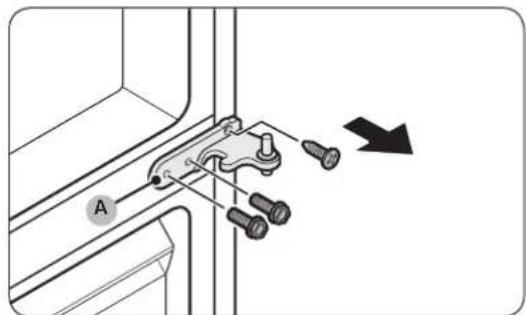
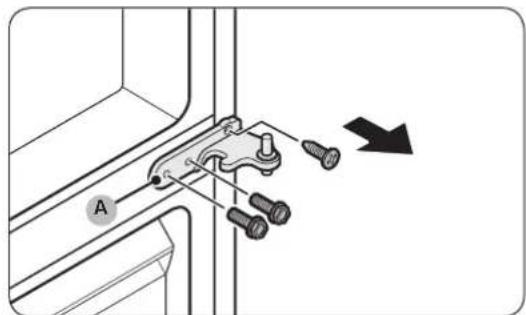
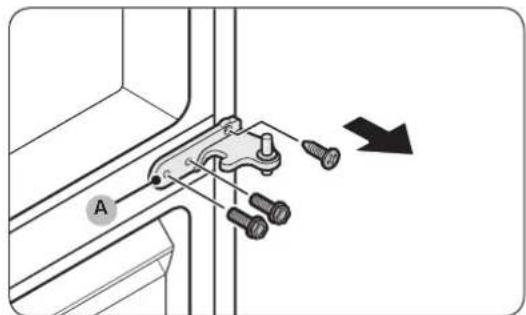
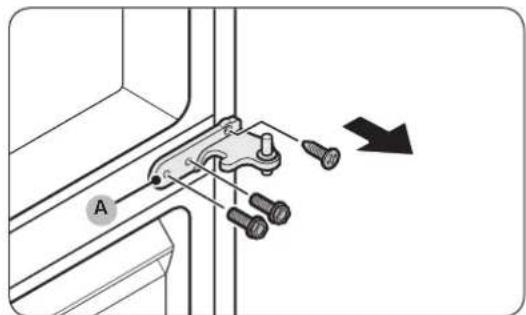
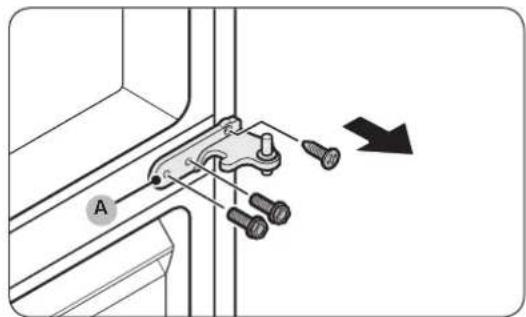
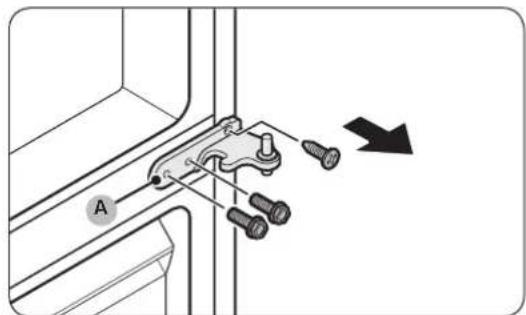
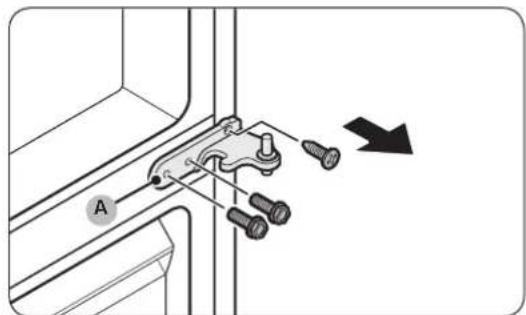
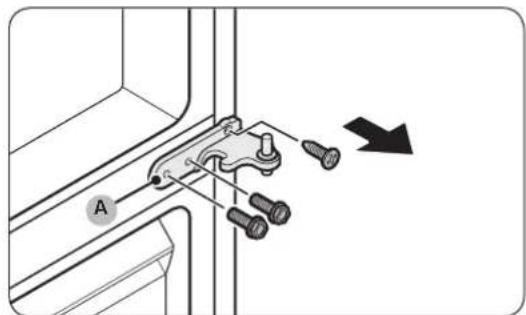
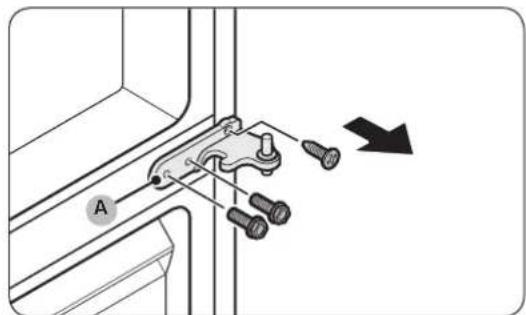
Use a Phillips screwdriver and socket wrench (10 mm) to remove the screws fastening the middle hinge (A).
-
Reassemble in the opposite order of disassembly after replacing the top, middle, and/or bottom hinge.
CAUTION
• Make sure the wire connectors are connected properly.
- Be careful not to damage the wires when fastening the top cover
English
Guide de réparation
natural_image
Two identical illustrations of a screwdriver with a flat blade, shown in two different angles (no text or symbols)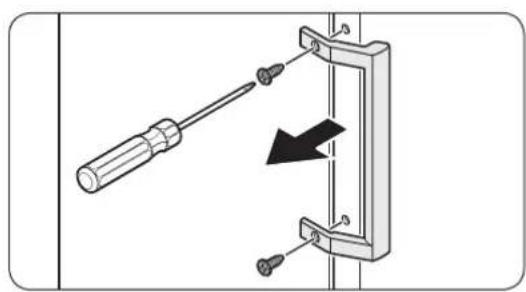
natural_image
Diagram of a screwdriver inserted into a mechanical clamp or bracket, with a black arrow indicating direction (no text or symbols present)natural_image
Diagram of a door frame with an arrow indicating direction (no text or symbols)natural_image
Diagram of a door frame with an arrow pointing to the front panel (no text or symbols)natural_image
Diagram of a plastic drawer with a black arrow pointing to it, no text or symbols presentnatural_image
Diagram of a battery or switch assembly with screw holes and a labeled component (no text or symbols present)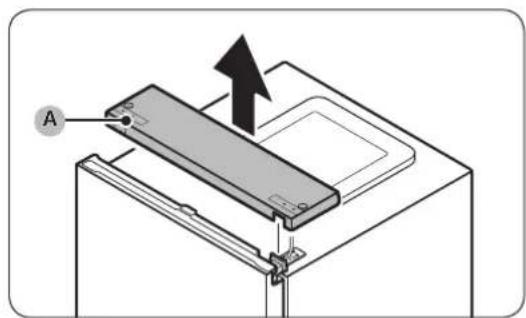
natural_image
Technical diagram of an electrical connector with visible wiring and components (no text or symbols)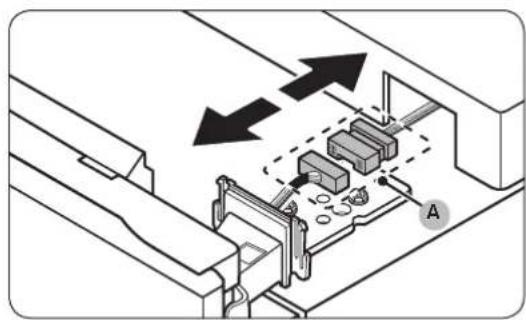
natural_image
Technical diagram of a mechanical assembly with arrows indicating direction, no text or symbols present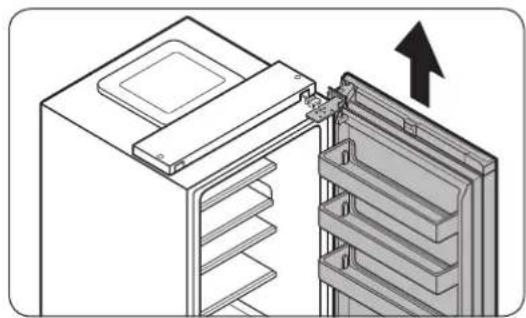
natural_image
Diagram of a refrigerator interior showing the door and shelf arrangement (no text or symbols)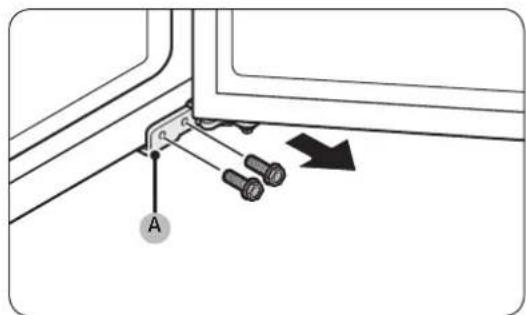
natural_image
Technical diagram showing a mechanical clamp or bracket with screws and a directional arrow (no text or symbols)natural_image
Two identical line drawings of a screwdriver with no text or symbols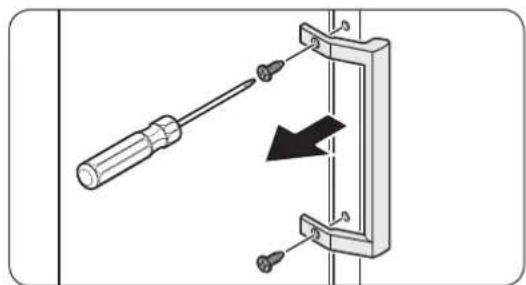
natural_image
Diagram showing a screwdriver inserted into a mechanical bracket with a black arrow indicating direction (no text or symbols present)natural_image
Diagram of a door frame with an arrow indicating direction (no text or symbols)natural_image
Diagram of a door frame with an arrow pointing to the front panel (no text or symbols)natural_image
Diagram of a plastic drawer with an arrow pointing to it, no text or symbols presentnatural_image
Diagram of a battery or switch assembly with screw holes and a labeled component (no text or symbols present)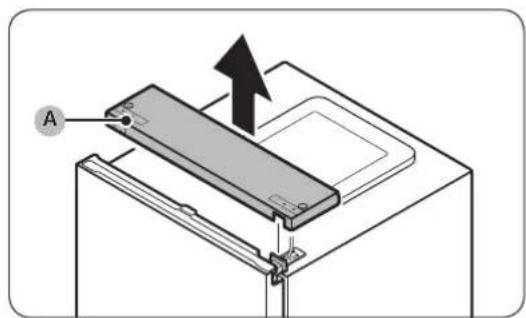
natural_image
Technical diagram of an electrical connector with visible wiring and components (no text or symbols)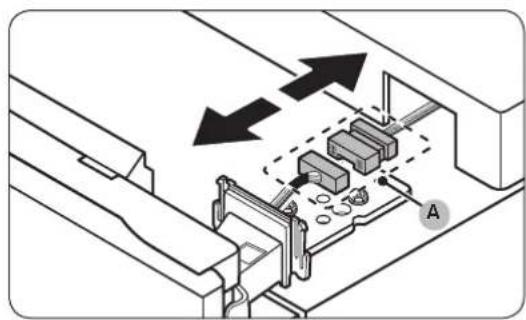
natural_image
Technical diagram of a mechanical assembly with arrows indicating direction, no text or symbols present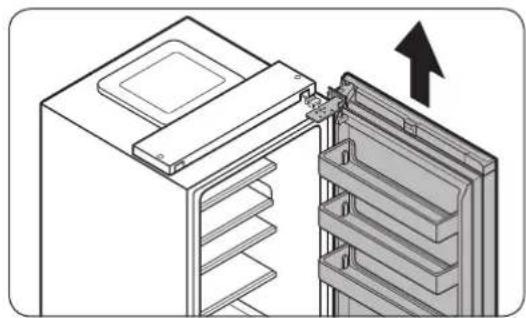
natural_image
Diagram of a refrigerator interior showing the door and shelf, with an arrow indicating upward movement (no text or symbols present)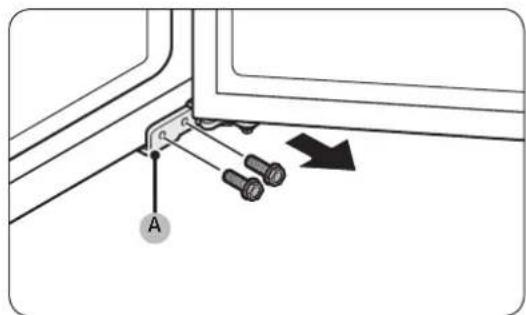
natural_image
Technical diagram showing a mechanical clamp or bracket with screws and a directional arrow (no text or symbols)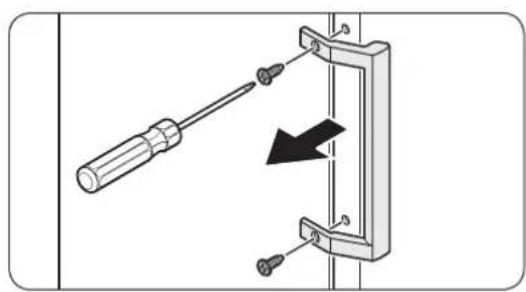
natural_image
Diagram of a screwdriver inserted into a mechanical clamp or bracket, with a black arrow indicating direction (no text or symbols present)natural_image
Diagram of a door frame with an arrow indicating direction (no text or symbols)natural_image
Diagram of a door frame with an arrow pointing to the front panel (no text or symbols)natural_image
Diagram of a plastic drawer with a black arrow pointing to it, no text or symbols presentnatural_image
Diagram of a battery or switch assembly with screw holes and a labeled component (no text or symbols present)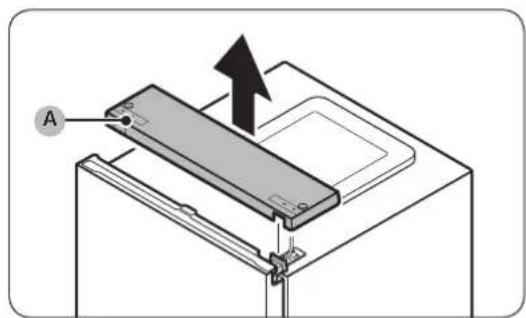
natural_image
Technical diagram of an electronic device showing internal components and wiring (no text or labels)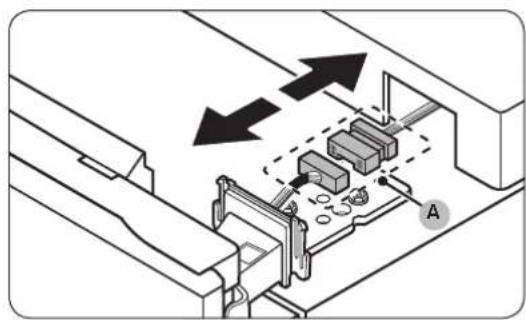
natural_image
Technical diagram of a mechanical assembly with arrows indicating direction, no text or symbols present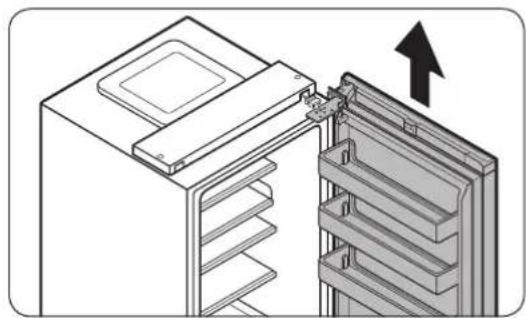
natural_image
Diagram of a refrigerator interior showing the door and shelf arrangement (no text or symbols)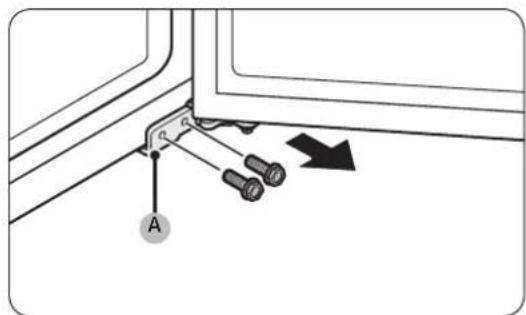
natural_image
Technical diagram showing a mechanical clamp or bracket with pins and a directional arrow (no text or symbols)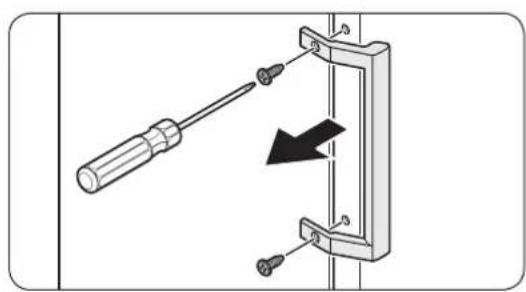
natural_image
Diagram of a screwdriver inserted into a mechanical clamp or bracket, with a black arrow indicating direction (no text or symbols present)natural_image
Diagram of a door frame with an arrow indicating direction (no text or symbols)natural_image
Diagram of a door frame with an arrow pointing to the front panel (no text or symbols)natural_image
Diagram of a plastic drawer with a black arrow pointing to it, no text or symbols presentnatural_image
Diagram of a battery or switch assembly with screw holes and a labeled component (no text or symbols present)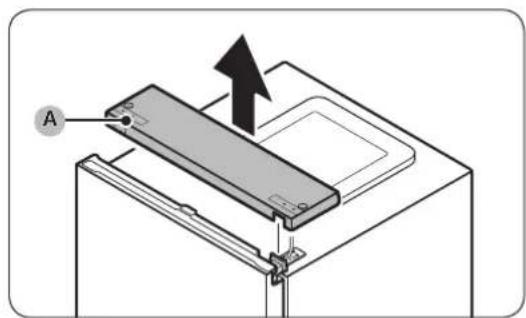
natural_image
Technical diagram of an electrical connector with visible wiring and components (no text or symbols)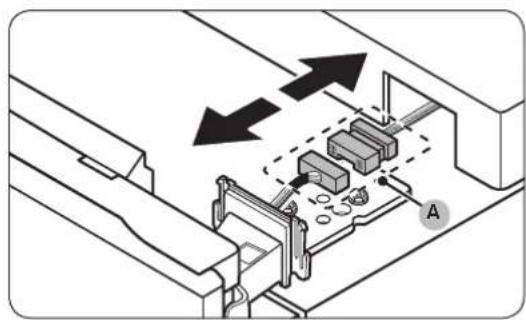
natural_image
Technical diagram of a mechanical assembly with arrows indicating direction, no text or symbols present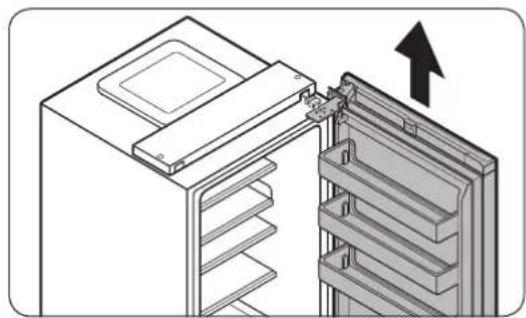
natural_image
Diagram of a refrigerator interior showing the door and shelf arrangement (no text or symbols)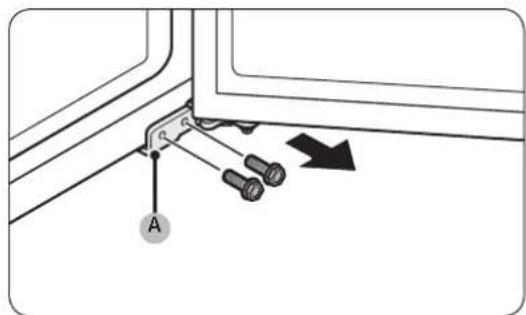
natural_image
Technical diagram showing a mechanical clamp or bracket with screws and a directional arrow (no text or symbols)natural_image
Two identical illustrations of a screwdriver with a flat blade, shown in two different angles (no text or symbols)Destornillador Phillips Destornillador de punta plana
natural_image
Diagram of a screwdriver inserted into a mechanical bracket with a black arrow indicating direction (no text or symbols)natural_image
Diagram of a door frame with an arrow indicating direction (no text or symbols)natural_image
Diagram of a door frame with an arrow pointing to the front panel (no text or symbols)natural_image
Diagram of a plastic drawer with an arrow pointing to it, no text or symbols presentnatural_image
Diagram of a battery or switch assembly with screw holes and a labeled component (no text or symbols present)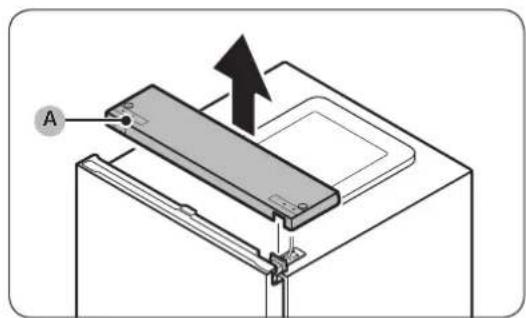
natural_image
Technical diagram of an electrical connector with visible wiring and components (no text or symbols)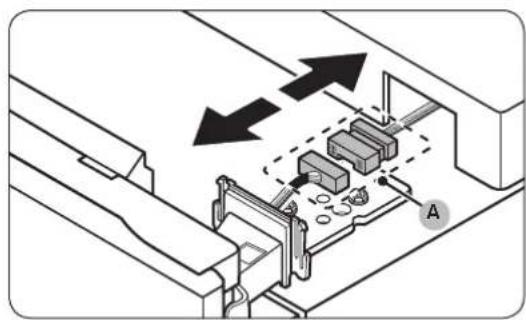
natural_image
Technical diagram of a mechanical assembly with arrows indicating direction (no text or symbols present)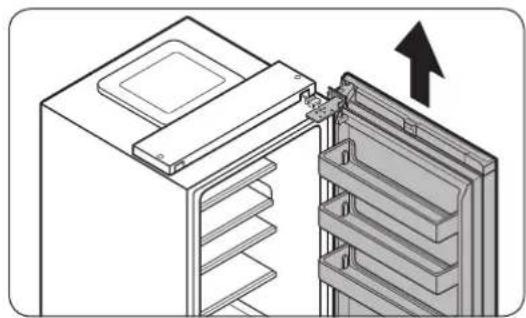
natural_image
Diagram of a refrigerator interior showing the door and shelf arrangement (no text or symbols)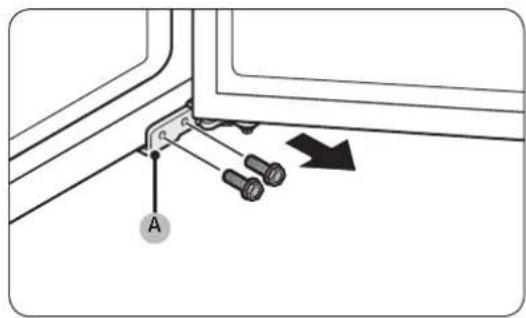
natural_image
Technical diagram showing a mechanical clamp or bracket with screws and a directional arrow (no text or symbols)natural_image
Two identical illustrations of a screwdriver with a flat blade, shown in two different angles (no text or symbols)Chave Phillips Chave de fendas
Remoção das pegas

NOTA
natural_image
Diagram showing a screwdriver inserted into a mechanical clamp or bracket with a black arrow indicating direction (no text or symbols present)natural_image
Diagram of a door frame with an arrow indicating direction (no text or symbols)natural_image
Diagram of a door frame with an arrow pointing to the front panel (no text or symbols)natural_image
Diagram of a plastic drawer with an arrow pointing to it, no text or symbols presentnatural_image
Diagram of a battery or switch assembly with screw holes and a labeled component (no text or symbols present)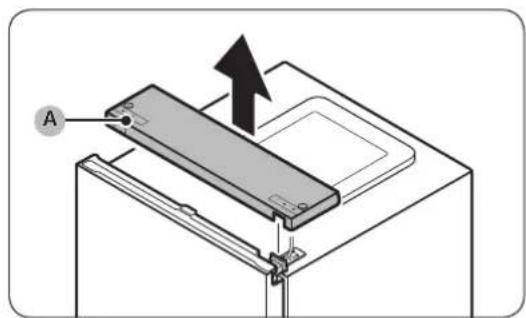
natural_image
Technical diagram of an electrical connector with visible wiring and components (no text or symbols)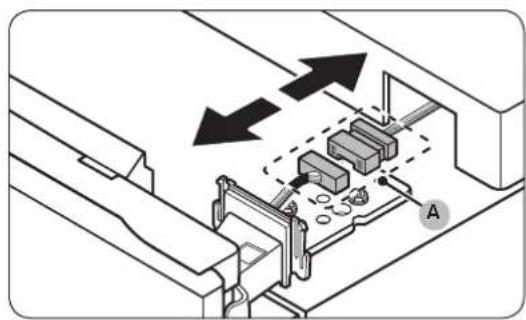
natural_image
Technical diagram of a mechanical assembly with arrows indicating direction, no text or symbols present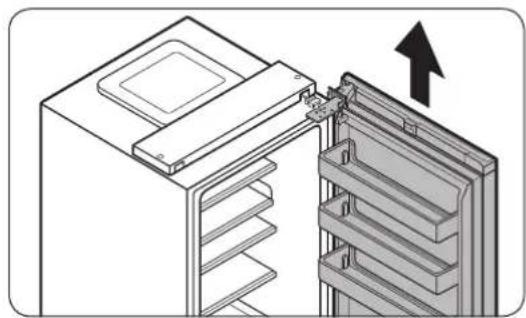
natural_image
Diagram of a refrigerator interior showing the door and shelf, with an arrow indicating upward movement (no text or symbols present)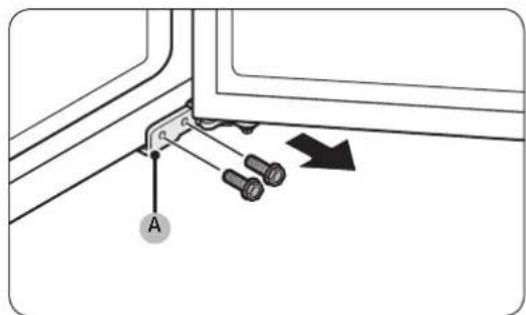
natural_image
Technical diagram showing a mechanical clamp or bracket with screws and a directional arrow (no text or symbols)natural_image
Two types of screwdrivers shown in side-by-side illustrations (no text or symbols)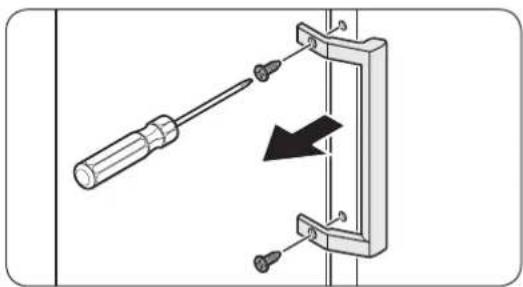
natural_image
Diagram of a screwdriver inserted into a mechanical clamp or bracket, with a black arrow indicating direction (no text or symbols present)natural_image
Diagram of a door frame with an arrow indicating direction (no text or symbols)natural_image
Diagram of a door frame with an arrow pointing to the front panel (no text or symbols)natural_image
Diagram of a plastic drawer with a black arrow pointing to it, no text or symbols presentnatural_image
Diagram of a battery or switch assembly with pins and a black arrow indicating upward movement (no text or symbols)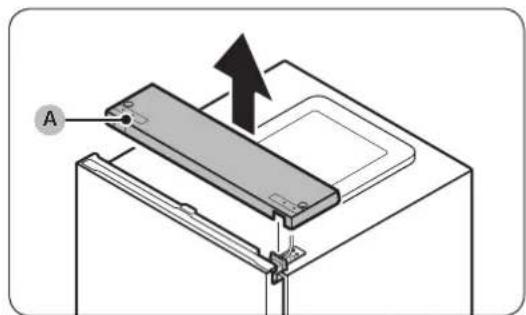
natural_image
Technical diagram of an electrical enclosure with visible wiring and components (no text or labels)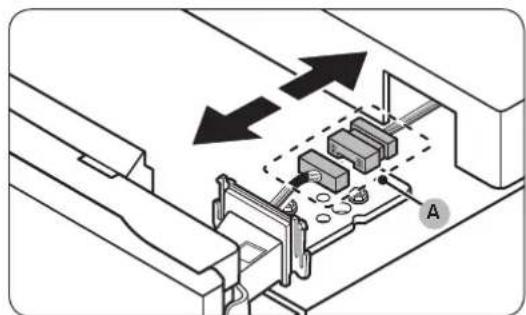
natural_image
Technical diagram showing mechanical assembly with arrows indicating direction (no text or symbols)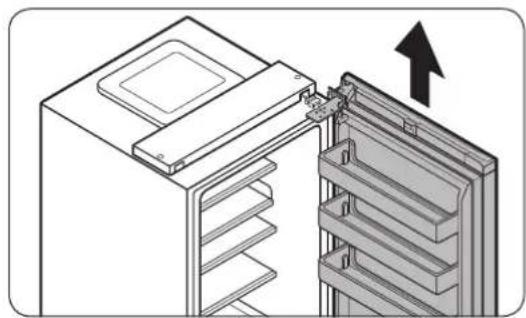
natural_image
Diagram of a refrigerator interior showing the door and drawer with an arrow indicating upward motion (no text or symbols present)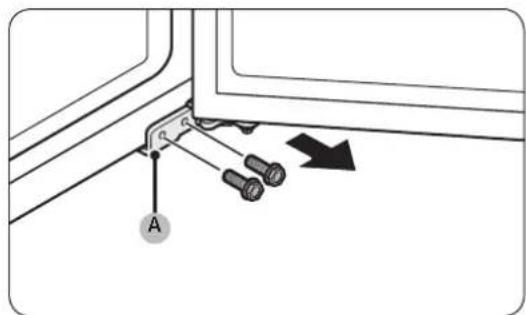
natural_image
Technical diagram showing a mechanical clamp or bracket with screws and a directional arrow (no text or symbols)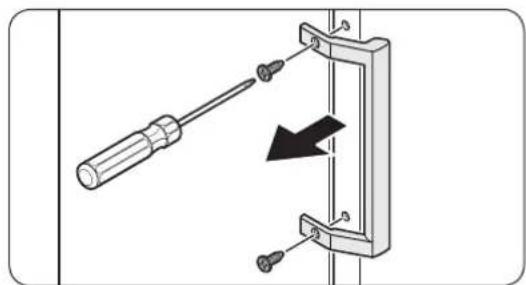
natural_image
Mechanical assembly diagram showing a screwdriver inserted into a bracket with a black arrow indicating direction (no text or symbols)natural_image
Diagram of a door frame with an arrow indicating direction (no text or symbols)natural_image
Diagram of a door frame with an arrow pointing to the front panel (no text or symbols)natural_image
Diagram of a plastic drawer with an arrow pointing downward (no text or symbols)natural_image
Diagram of a battery or switch assembly with screw holes and a labeled component (no text or symbols present)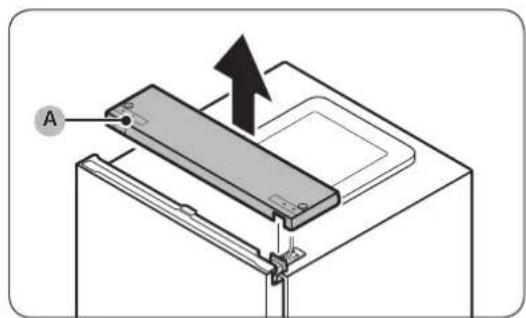
natural_image
Technical diagram of an electrical connector with visible wiring and components (no text or symbols)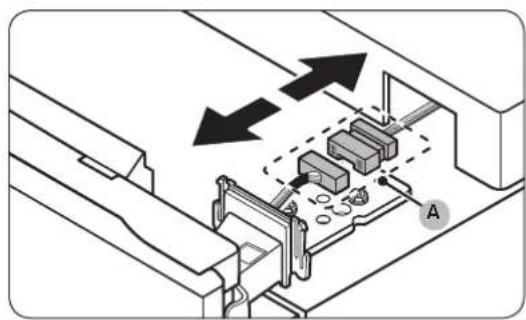
natural_image
Technical diagram of a mechanical assembly with arrows indicating direction, no text or symbols present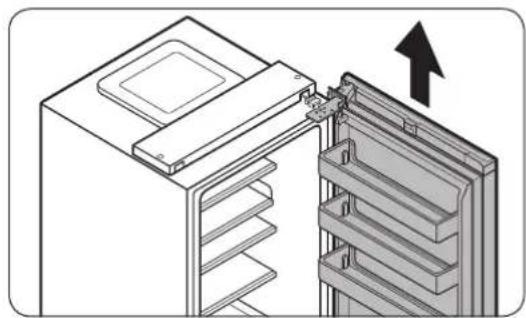
natural_image
Diagram of a refrigerator interior showing the door and shelf arrangement (no text or symbols)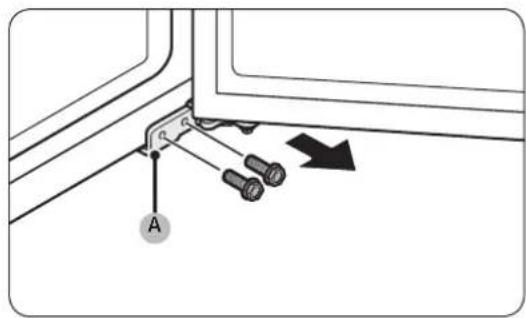
natural_image
Technical diagram showing a mechanical clamp or bracket with screws and a directional arrow (no text or symbols)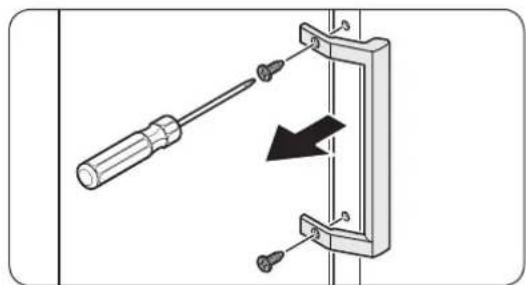
natural_image
Diagram showing a screwdriver inserted into a mechanical bracket with a black arrow indicating direction (no text or symbols present)natural_image
Diagram of a door frame with an arrow indicating direction (no text or symbols)natural_image
Diagram of a door frame with an arrow pointing to the front panel (no text or symbols)natural_image
Diagram of a plastic drawer with an arrow pointing downward (no text or symbols)natural_image
Diagram of a battery or switch assembly with screw holes and a labeled component (no text or symbols present)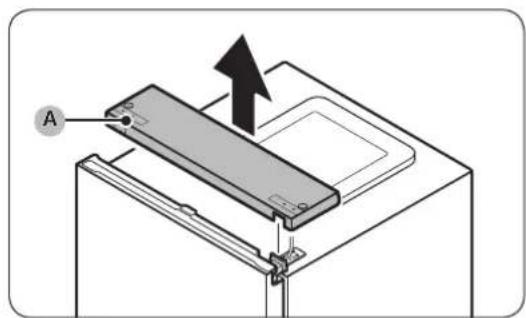
natural_image
Technical diagram of an electrical connector with visible wiring and components (no text or symbols)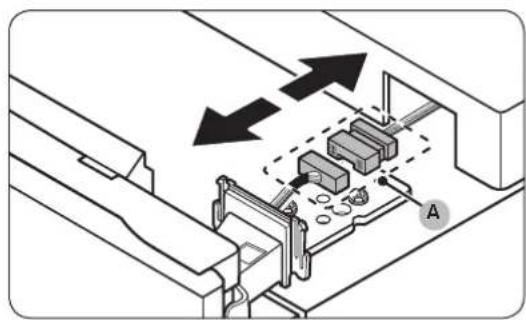
natural_image
Technical diagram of a mechanical assembly with arrows indicating direction, no text or symbols present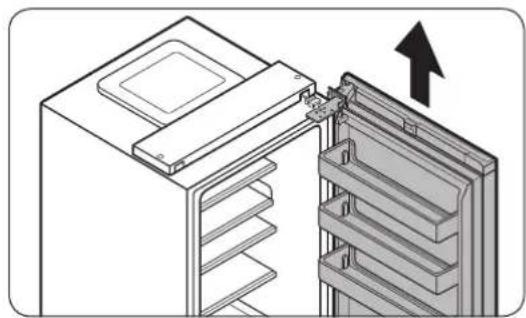
natural_image
Diagram of a refrigerator interior showing the door and shelf arrangement (no text or symbols)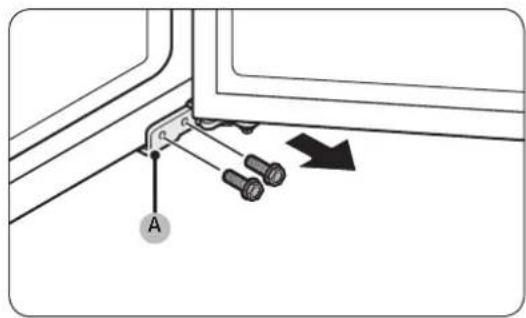
natural_image
Technical diagram showing a mechanical clamp or bracket with screws and a directional arrow (no text or symbols)natural_image
Two identical illustrations of a screwdriver with a flat blade, shown in two different angles (no text or symbols)Stjerneskrutrekker En flat skrutrekker
natural_image
Diagram of a screwdriver inserted into a mechanical clamp or bracket, with a black arrow indicating direction (no text or symbols present)natural_image
Diagram of a door frame with an arrow indicating direction (no text or symbols)natural_image
Diagram of a door frame with an arrow pointing to the front panel (no text or symbols)natural_image
Diagram of a plastic drawer with an arrow pointing to it, no text or symbols presentnatural_image
Diagram of a battery or switch assembly with screw holes and a labeled component (no text or symbols present)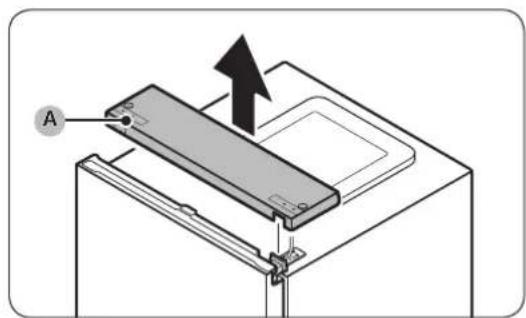
natural_image
Technical diagram of an electrical connector with visible wiring and components (no text or symbols)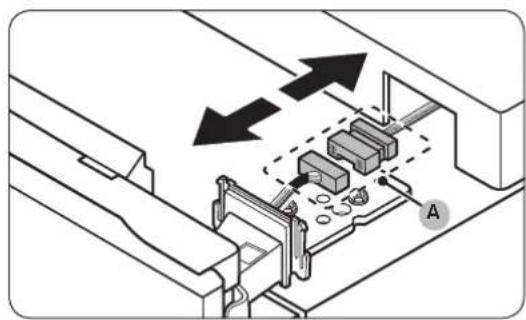
natural_image
Technical diagram of a mechanical assembly with arrows indicating direction, no text or symbols present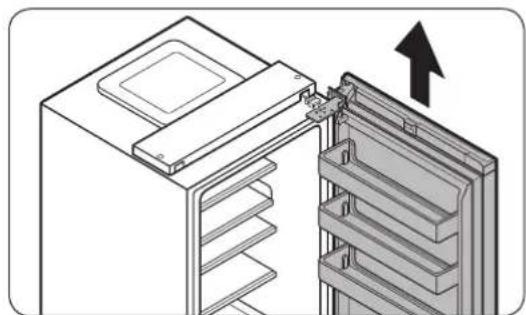
natural_image
Diagram of a refrigerator interior showing the door, rack, and storage panel with an upward arrow indicating direction (no text or symbols present)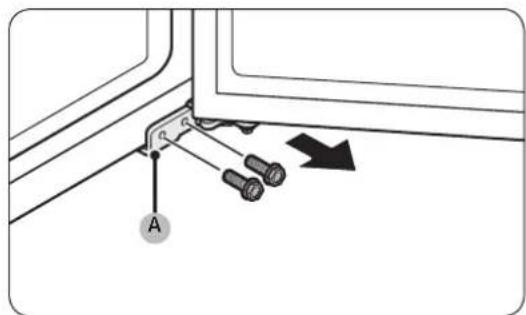
natural_image
Technical diagram showing a mechanical clamp or bracket with screws and a directional arrow (no text or symbols)natural_image
Two identical illustrations of a screwdriver with a flat blade, shown in two different angles (no text or symbols)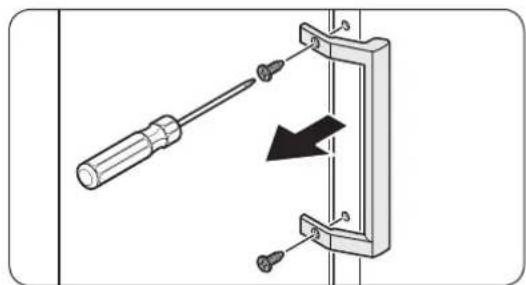
natural_image
Diagram showing a screwdriver inserted into a mechanical bracket with a black arrow indicating direction (no text or symbols present)natural_image
Diagram of a door frame with an arrow indicating direction (no text or symbols)natural_image
Diagram of a door frame with an arrow pointing to the front panel (no text or symbols)natural_image
Diagram of a plastic drawer with a black arrow pointing to it, no text or symbols presentnatural_image
Diagram of a battery or switch assembly with screw holes and a labeled component (no text or symbols present)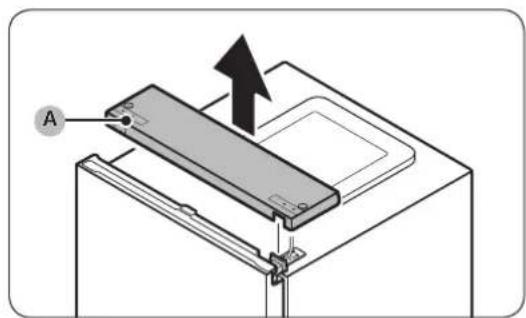
natural_image
Technical diagram of an electrical connector with visible wiring and components (no text or symbols)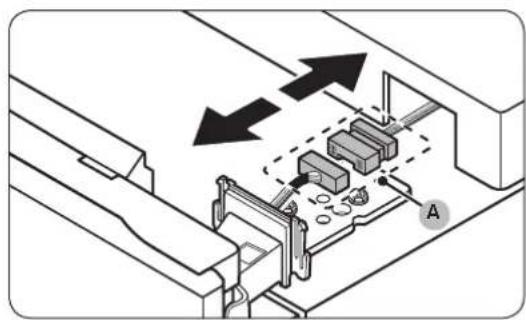
natural_image
Technical diagram of a mechanical assembly with arrows indicating direction, no text or symbols present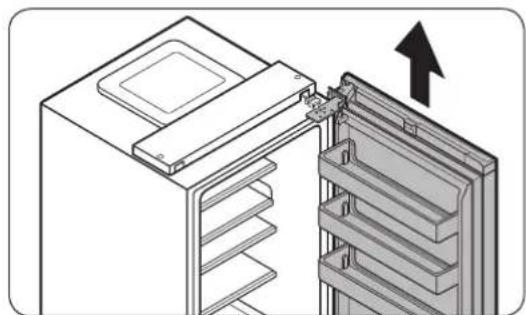
natural_image
Diagram of a refrigerator interior showing the door, rack, and storage panel with an upward arrow indicating direction (no text or symbols present)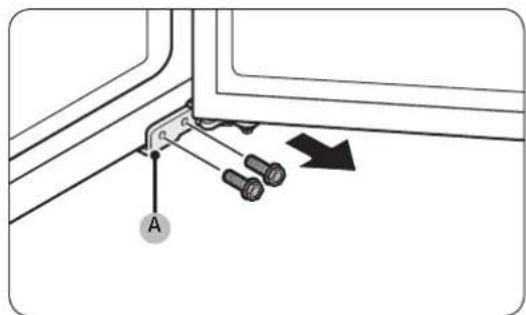
natural_image
Technical diagram showing a mechanical clamp or bracket with pins and a directional arrow (no text or symbols)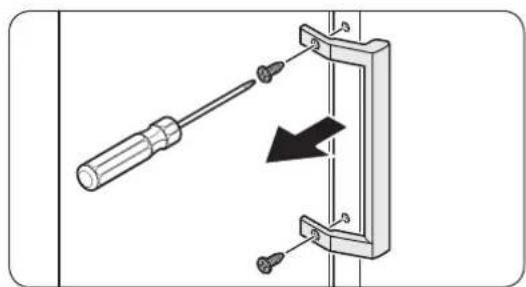
natural_image
Diagram showing a screwdriver inserted into a mechanical clamp or bracket with a black arrow indicating direction (no text or symbols present)natural_image
Diagram of a door frame with an arrow indicating direction (no text or symbols)natural_image
Diagram of a door frame with an arrow pointing to the front panel (no text or symbols)natural_image
Diagram of a plastic drawer with an arrow pointing downward (no text or symbols)natural_image
Diagram of a battery or switch assembly with screw holes and a labeled component (no text or symbols present)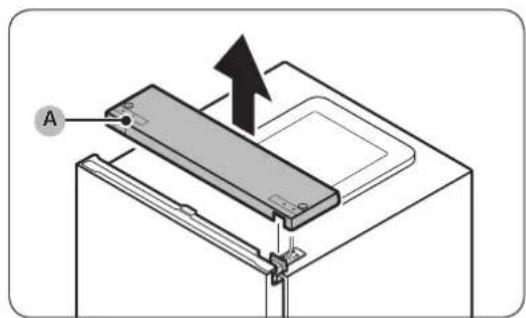
natural_image
Technical diagram of an electrical connector with visible wiring and components (no text or symbols)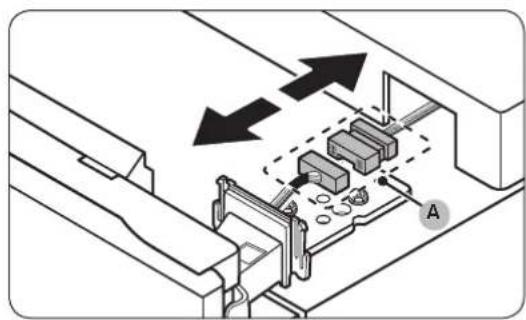
natural_image
Technical diagram of a mechanical assembly with arrows indicating direction, no text or symbols present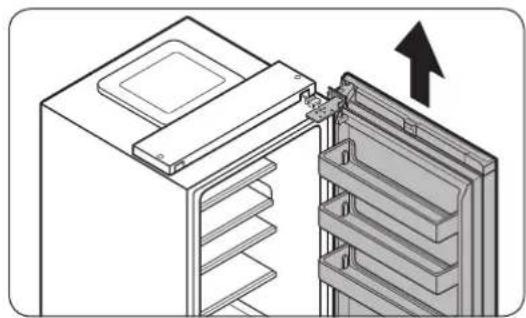
natural_image
Diagram of a refrigerator interior showing the door and shelf arrangement (no text or symbols)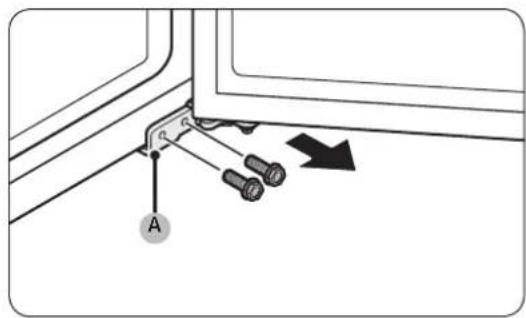
natural_image
Technical diagram showing a mechanical clamp or bracket with pins and a directional arrow (no text or symbols)natural_image
Two identical illustrations of a screwdriver with a pointed tip, shown in two different angles (no text or symbols)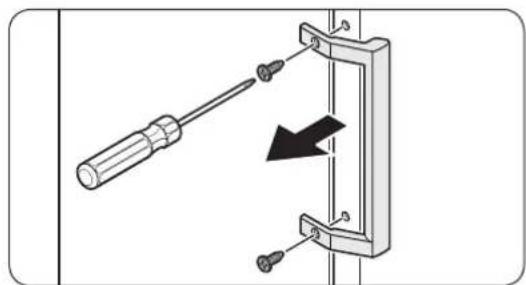
natural_image
Diagram showing a screwdriver inserted into a mechanical bracket with a black arrow indicating direction (no text or symbols present)natural_image
Diagram of a door frame with an arrow indicating direction (no text or symbols)natural_image
Diagram of a door frame with an arrow pointing to the front panel (no text or symbols)natural_image
Diagram of a plastic drawer with an arrow pointing to it, no text or symbols presentnatural_image
Diagram of a battery or switch assembly with screw holes and a labeled component (no text or symbols present)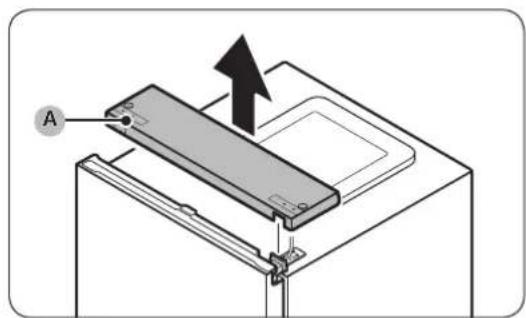
natural_image
Technical diagram of an electrical connector with visible wiring and components (no text or symbols)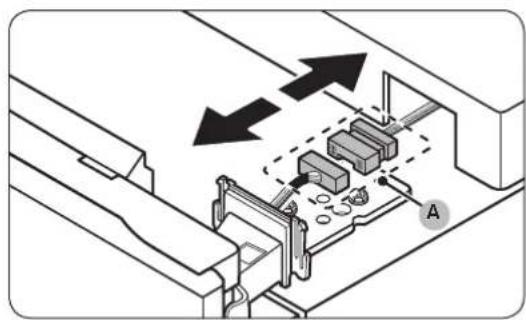
natural_image
Technical diagram of a mechanical assembly with arrows indicating direction, no text or symbols present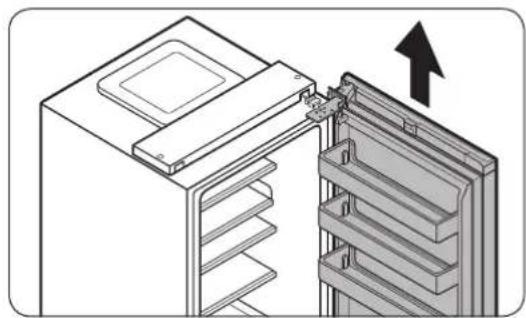
natural_image
Diagram of a refrigerator interior showing the door and shelf arrangement (no text or symbols)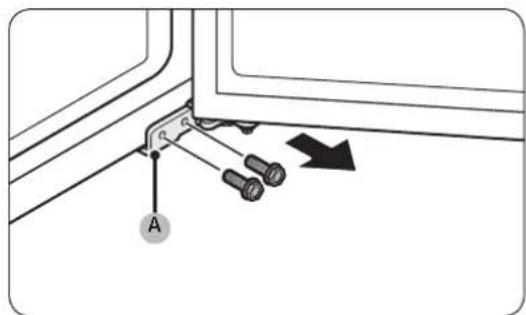
natural_image
Technical diagram showing a mechanical clamp or bracket with screws and a directional arrow (no text or symbols)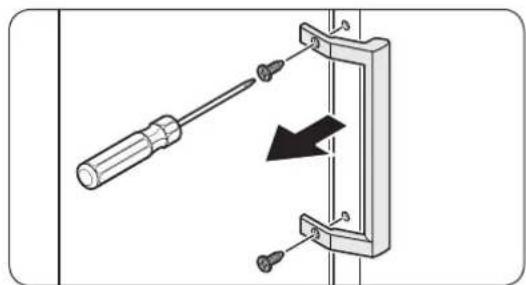
natural_image
Diagram showing a screwdriver inserted into a mechanical bracket with a black arrow indicating direction (no text or symbols present)natural_image
Diagram of a door frame with an arrow indicating direction (no text or symbols)Otvorte dvierka a zložte z nich tesnenie.
Osadenie tesnenia
natural_image
Diagram of a door frame with an arrow pointing to the front panel (no text or symbols)natural_image
Diagram of a plastic drawer with an arrow pointing to it, no text or symbols presentnatural_image
Diagram of a battery or switch assembly with screw holes and a labeled component (no text or symbols present)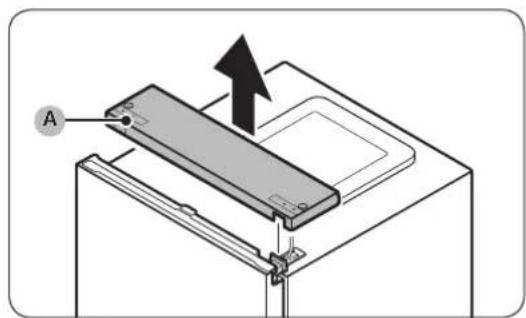
natural_image
Technical diagram of an electrical connector with visible wiring and components (no text or symbols)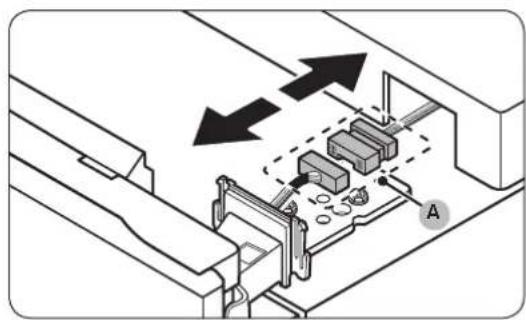
natural_image
Technical diagram of a mechanical assembly with arrows indicating direction, no text or symbols present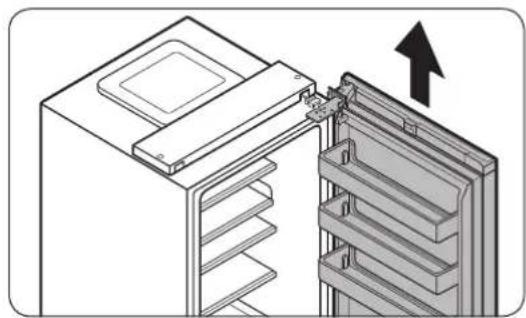
natural_image
Diagram of a refrigerator interior showing the door and shelf, with an arrow indicating upward movement (no text or symbols present)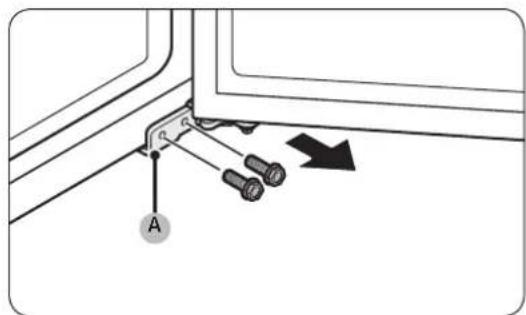
natural_image
Technical diagram showing a mechanical clamp or bracket with screws and a directional arrow (no text or symbols)natural_image
Two identical illustrations of a screwdriver with a pointed tip, shown in two different angles (no text or symbols)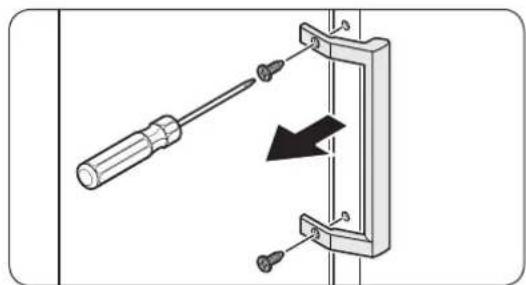
natural_image
Diagram showing a screwdriver inserted into a mechanical bracket with a black arrow indicating direction (no text or symbols present)natural_image
Diagram of a door frame with an arrow indicating direction (no text or symbols)natural_image
Diagram of a door frame with an arrow pointing to the front panel (no text or symbols)natural_image
Diagram of a plastic drawer with a black arrow pointing to it, no text or symbols presentnatural_image
Diagram of a battery or switch assembly with screw holes and a labeled component (no text or symbols present)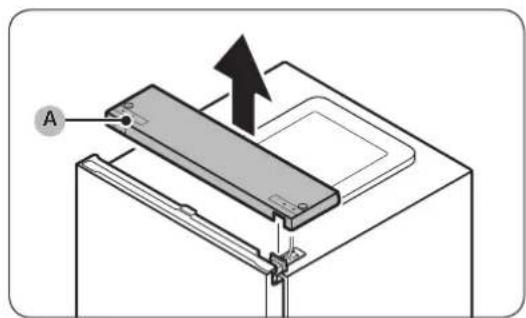
natural_image
Technical diagram of an electrical connector with visible wiring and components (no text or symbols)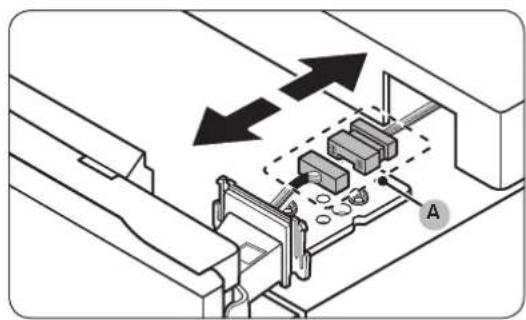
natural_image
Technical diagram of a mechanical assembly with arrows indicating direction, no text or symbols present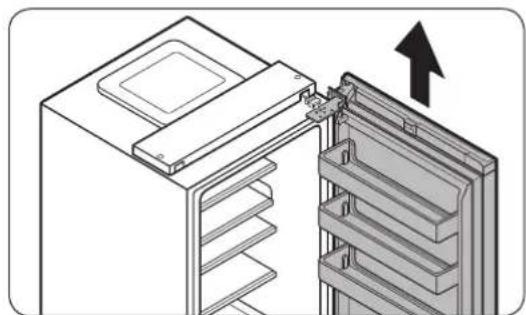
natural_image
Diagram of a refrigerator interior showing the door, rack, and storage panel with an upward arrow indicating direction (no text or symbols present)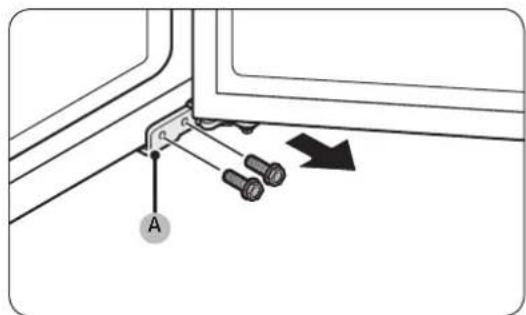
natural_image
Diagram showing a screwdriver inserted into a mechanical clamp or bracket with a black arrow indicating direction (no text or symbols present)natural_image
Diagram of a door frame with an arrow indicating direction (no text or symbols)natural_image
Diagram of a door frame with an arrow indicating direction (no text or symbols)natural_image
Diagram of a plastic drawer with a black arrow pointing to it, no text or symbols presentnatural_image
Diagram of a battery pack with screw holes and an arrow indicating upward movement (no text or symbols)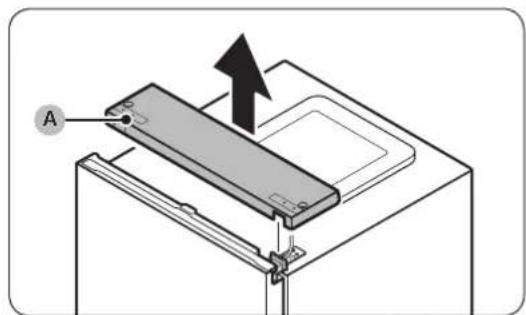
natural_image
Technical diagram of a mechanical or electrical component with internal wiring and mounting brackets (no text or symbols)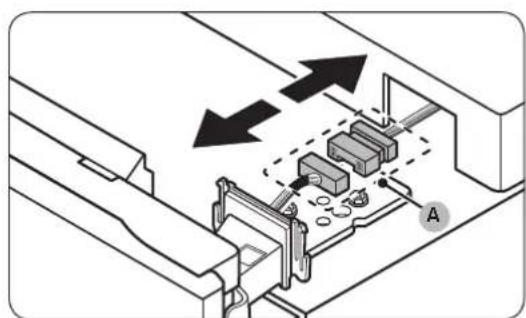
natural_image
Technical diagram of a mechanical assembly with labeled components and directional arrows (no text or symbols)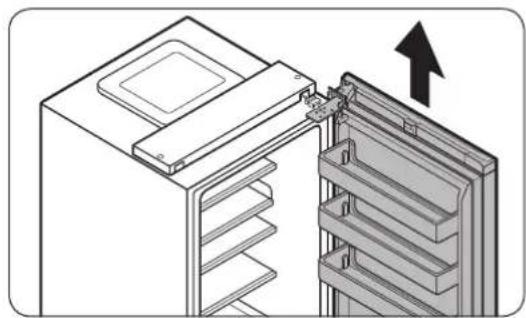
natural_image
Diagram of a refrigerator interior showing the door and drawer with an arrow indicating upward motion (no text or symbols present)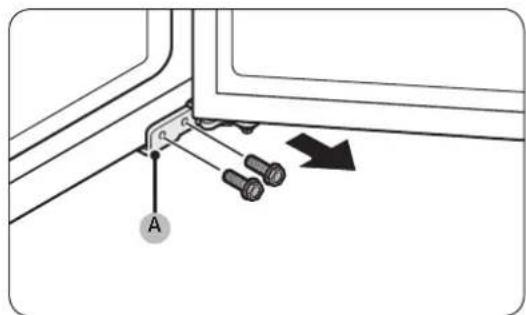
natural_image
Technical diagram showing a mechanical clamp or bracket with screws and a directional arrow (no text or symbols)natural_image
Two identical illustrations of a screwdriver with a flat blade, shown in two different angles (no text or symbols)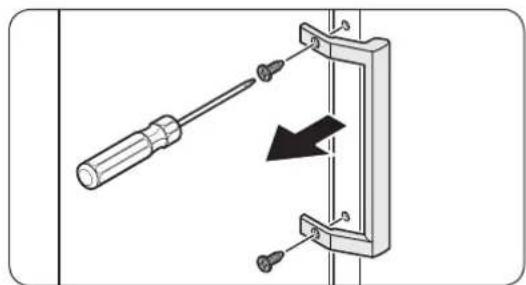
natural_image
Mechanical assembly diagram showing a screwdriver inserted into a bracket with a black arrow indicating direction (no text or symbols)natural_image
Diagram of a door frame with an arrow indicating direction (no text or symbols)natural_image
Diagram of a door frame with an arrow pointing to the front panel (no text or symbols)natural_image
Diagram of a plastic drawer with a black arrow pointing to it, no text or symbols presentnatural_image
Diagram of a battery or switch assembly with screw holes and a labeled component (no text or symbols present)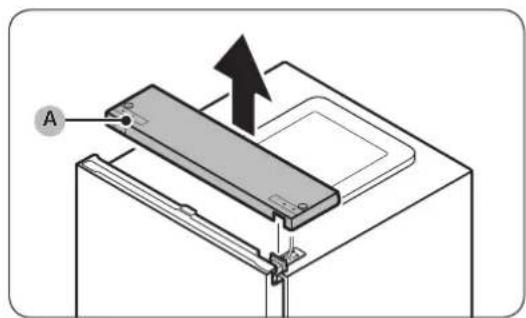
natural_image
Technical diagram of an electrical connector with visible wiring and components (no text or symbols)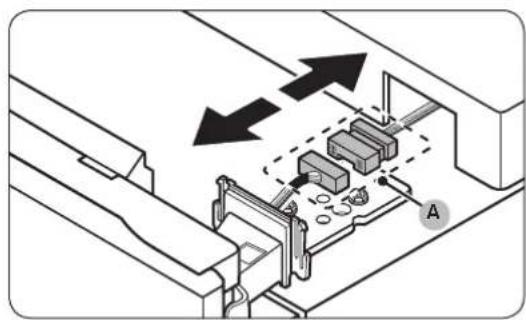
natural_image
Technical diagram of a mechanical assembly with arrows indicating direction, no text or symbols present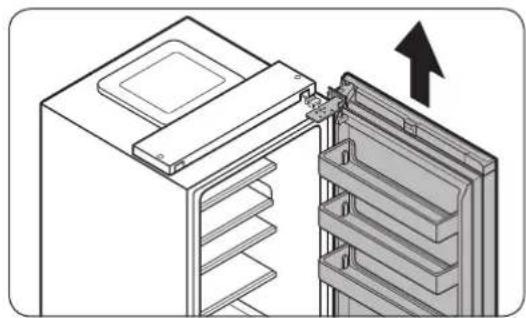
natural_image
Diagram of a refrigerator interior showing the door and shelf arrangement (no text or symbols)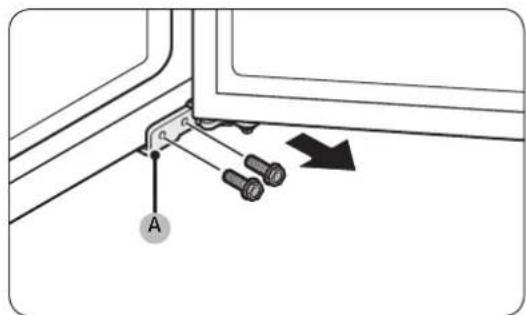
natural_image
Technical diagram showing a mechanical clamp or bracket with screws and a directional arrow (no text or symbols)01 Gornja šarka 02 Zaptivna guma
03 Fioka 04 Ručke (samo odredeni modeli)
05 Srednja šarka 06 Oznaka sa bar-kodom
07 Donja šarka
Srpski
Zamena ručke
Naziv modela izgleda ovako: RB38**6****, RB38**2****, RL38**6****, RB3L**2****, RB36**6****, RB36**2****, RL36**6****, RL36**2****, RB34**6****, RB34**2****, RL34**6****, RL34**2****
Sadržaj koji zamenjuje zvezdice može se razlikovati u zavisnosti od modela.
Zvezdice u šifri modela ukazuju na varijantu modela i mogu biti zamenjene ciframa (0–9) ili slovima (A–Z).

OPREZ
- Prilikom zamene ručke na vratima, pazite da ne napravite ogrebotine na prednjoj strani vrata.
- Čvrsto pritisnite ručke na potpore. Uverite se da između potpora i vrata nema razmaka.
- Čvrsto pritegnite zavrtnje kada postavljate ručku.
- Pre korišćenja proizvoda poverite da li je ručka dobro pričvršćena.
Potrebne alatke (nisu obezbedene)
natural_image
Two identical illustrations of a screwdriver with threaded shafts, shown in two different angles (no text or symbols)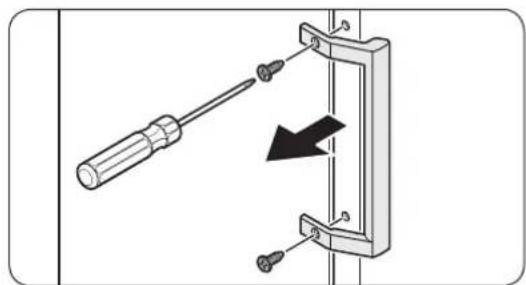
natural_image
Diagram showing a screwdriver inserted into a mechanical bracket with a black arrow indicating direction (no text or symbols present)natural_image
Diagram of a door frame with an arrow indicating direction (no text or symbols)Otvorite vrata i sa njih skinite zaptivnu gumu.
Da biste zamenili zaptivnu gumu
natural_image
Diagram of a door frame with an arrow pointing to the front panel (no text or symbols)Postavite novu zaptivnu gumu na vrata frižidera. Uverite se da između nove zaptivne gume i vrata nema razmaka.
Zamena fioke

OPREZ
Tokom postavljanja, proverite da li je fioka pravilno umetnuta u vodice.
Da biste skinuli fioku
natural_image
Diagram of a plastic drawer with a black arrow pointing to it, no text or symbols presentLagano podignite naviše prednju stranu fioke i izvucite je.
Da biste vratili fioke
natural_image
Diagram of a battery or switch assembly with screw holes and a labeled component (no text or symbols present)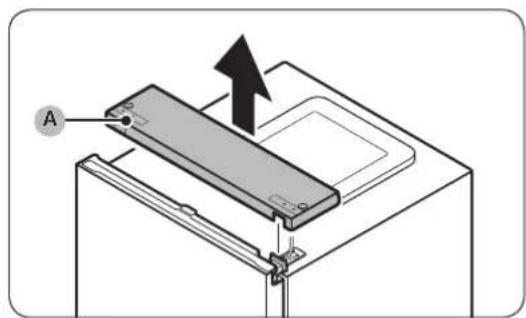
natural_image
Technical diagram of an electrical connector with visible wiring and components (no text or symbols)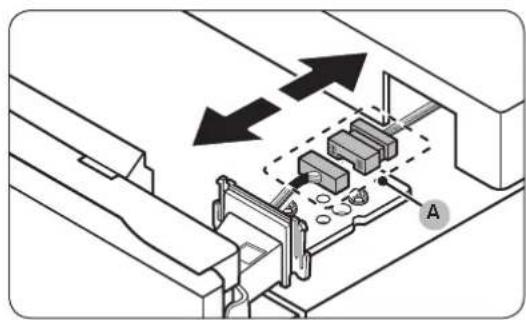
natural_image
Technical diagram of a mechanical assembly with arrows indicating direction, no text or symbols present-
Dok su vrata frižidera zatvorena, pomoću krstastog odvijača uklonite zavrtnje kojima je pričvršćen gornji poklopac (A).
-
Oprezno podignite gornji poklopac (A) i stavite ga na gornju stranu frižidera.
- Budite pažljivi dok podižete gornji poklopac (A). Ispod njega se nalaze povezani kablovi.
- Uklonite kabl i konektor kabla sa držača postavljenog ispod gornjeg poklopca.
- Ovaj korak se ne odnosi na sve modele.

OPREZ
natural_image
Diagram of a refrigerator interior showing the door and shelf arrangement (no text or symbols)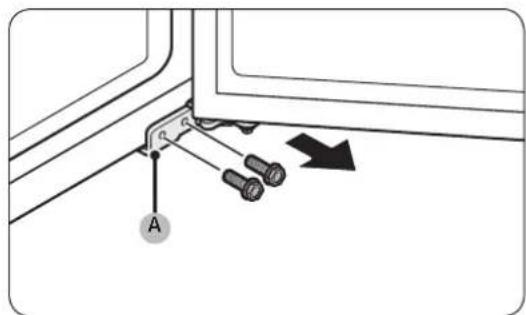
natural_image
Technical diagram showing a mechanical clamp or bracket with pins and a directional arrow (no text or symbols)- Dok vrata zamrzivača leže na donjoj šarci (A), polako povucite donju šarku (A) da biste je izvukli iz držača na donjoj strani frižidera. Kada uklonite donju šarku (A) iz držača, uklonite je iz vrata zamrzivača, a zatim povucite vrata zamrzivača nadole da biste ih skinuli sa srednje šarke (B).
! OPREZ
01 Gornja šarka 02 Brtva
03 Ladica 04 Ručke (samo kod određenih modela)
05 Srednja šarka 06 Naljepnica s crtičnim kodom
07 Donja šarka
Hrvatski
Zamjena ručki
Naziv modela izgleda ovako: RB38**6****, RB38**2****, RL38**6****, RB3L**2****, RB36**6****, RB36**2****, RL36**6****, RL36**2****, RB34**6****, RB34**2****, RL34**6****, RL34**2****
natural_image
Two identical illustrations of a screwdriver with threaded shafts, shown in two different angles (no text or symbols)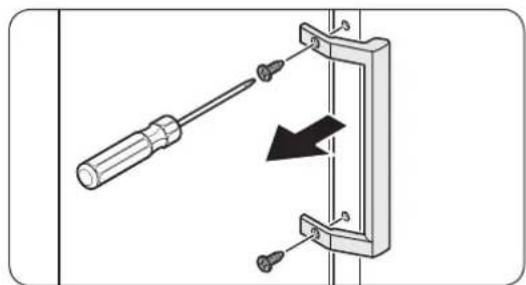
natural_image
Diagram showing a screwdriver inserted into a mechanical bracket with a black arrow indicating direction (no text or symbols present)- Upotrijebite odvijač s ravnom glavom za uklanjanje poklopaca vijaka.
-
Nakon odvajanja ručke, pričvrstite poklopce vijaka natrag na otvore za vijke.
-
Križnim odvijačem uklonite vijke i odvojite ručku.
NAPOMENA
Upotrijebite navedene vijke za pričvršćivanje ručke na suprotnu stranu.
- Sastavite novu ručku obrnutim redoslijedom od odvajanja.
Hrvatski
Zamjena brtve
OPREZ
Pobrinite se da čvrsto pričvrstite brtvu. U suprotnome bi hladan zrak iz hladnjaka mogao izlaziti van.
Za uklanjanje brtve
natural_image
Diagram of a door frame with an arrow indicating direction (no text or symbols)Otvorite vrata i uklonite brtvu s vrata.
Za zamjenu brtve
natural_image
Diagram of a door frame with an arrow pointing to the front panel (no text or symbols)natural_image
3D diagram of a plastic bin with an arrow pointing to the bottom portion (no text or symbols)Pažljivo podignite prednji dio ladice i izvucite je.
Ponovno postavljanje ladica
natural_image
Diagram of a battery or switch assembly with screw holes and a labeled component (no text or symbols present)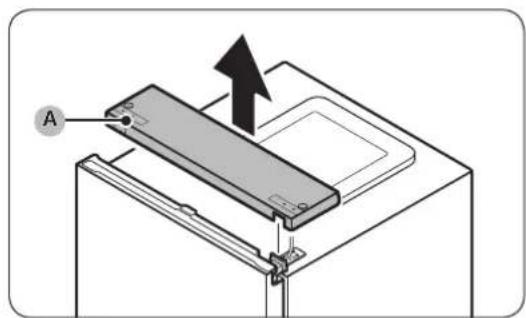
natural_image
Technical diagram of an electrical connector with visible wiring and components (no text or symbols)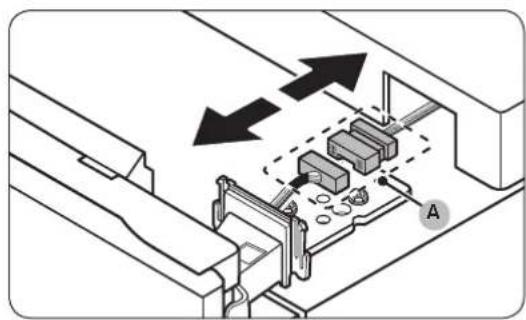
natural_image
Technical diagram of a mechanical assembly with arrows indicating direction, no text or symbols present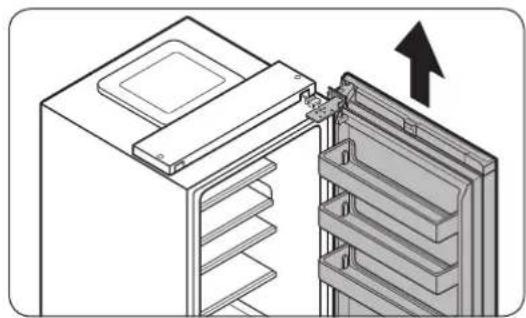
natural_image
Diagram of a refrigerator interior showing the door and shelf, with an arrow indicating upward movement (no text or symbols present)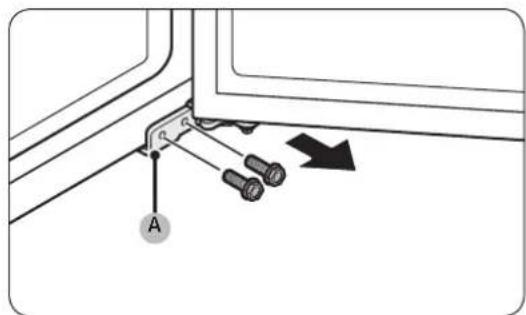
- Ključem s čegrtaljkom (8 mm) uklonite vijke koji učvršćuju gornju šarku (A).
OPREZ
Kako biste spriječili pad vrata, čvrsto ih držite dok uklanjate vijke.
natural_image
Technical diagram showing a bracket with screws and a directional arrow, no text or symbols present01 Mentesha e sipërme 02 Guarnicioni
03 Sirtari 04 Dorezat (vetëm modelet që e kanë)
05 Mentesha e mesit 06 Etiketa e barkodit
07 Mentesha e poshtme
Shqip
natural_image
Two identical illustrations of a screwdriver with a flat blade, shown in two different angles (no text or symbols)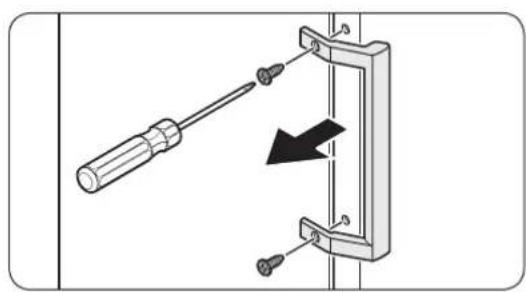
natural_image
Diagram of a screwdriver inserted into a mechanical clamp or bracket, with a black arrow indicating direction (no text or symbols present)natural_image
Diagram of a door frame with an arrow indicating direction (no text or symbols)natural_image
Diagram of a door frame with an arrow pointing to the front panel (no text or symbols)natural_image
Diagram of a plastic drawer with an arrow pointing to it, no text or symbols presentnatural_image
Diagram of a battery or switch assembly with screw holes and a labeled component (no text or symbols present)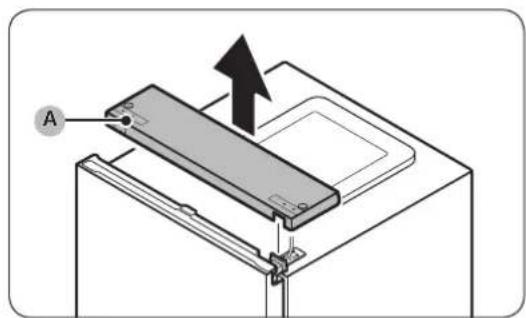
natural_image
Technical diagram of an electrical connector with visible wiring and components (no text or symbols)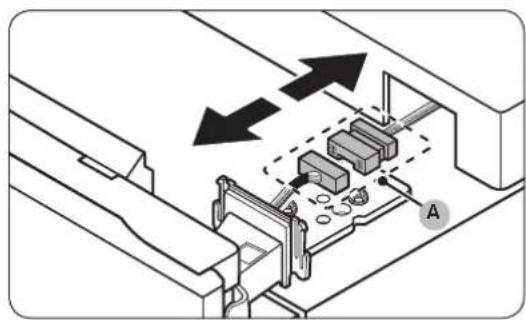
natural_image
Technical diagram of a mechanical assembly with arrows indicating direction, no text or symbols present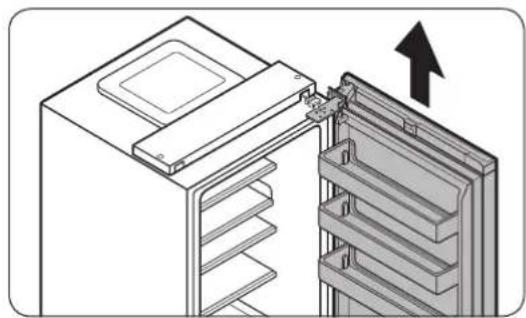
natural_image
Diagram of a refrigerator interior showing the door and shelf, with an arrow indicating upward movement (no text or symbols present)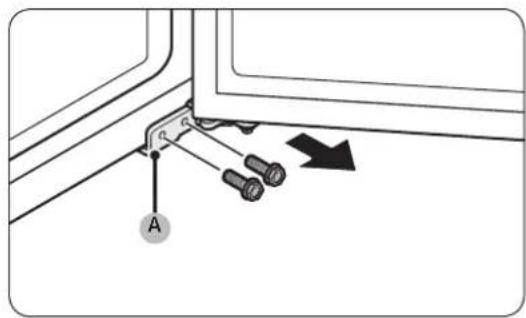
natural_image
Two identical illustrations of a screwdriver with a flat blade, shown in two different angles (no text or symbols)Крстач Плоснат шрафцигер
natural_image
Diagram showing a screwdriver inserted into a mechanical clamp or bracket with a black arrow indicating direction (no text or symbols present)natural_image
Diagram of a door frame with an arrow indicating direction (no text or symbols)natural_image
Diagram of a door frame with an arrow pointing to the front panel (no text or symbols)natural_image
Diagram of a plastic drawer with an arrow pointing to it, no text or symbols presentnatural_image
Diagram of a mechanical assembly with pins and a labeled component (no text or symbols present)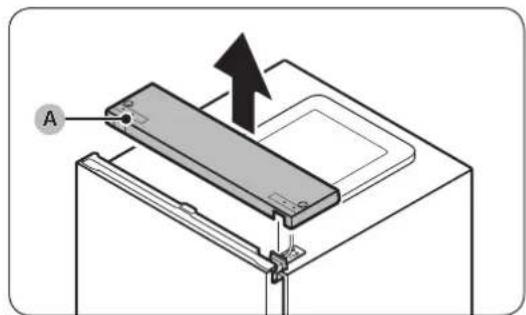
natural_image
Technical diagram of a mechanical assembly with visible wiring and components (no text or symbols)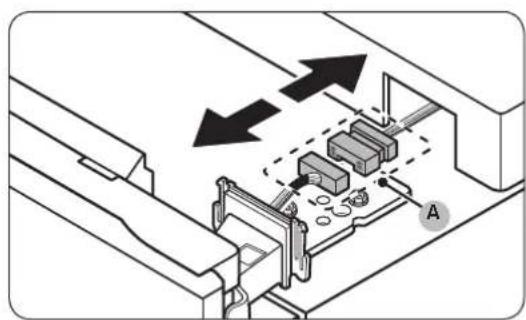
natural_image
Technical diagram showing mechanical assembly with arrows indicating direction (no text or symbols)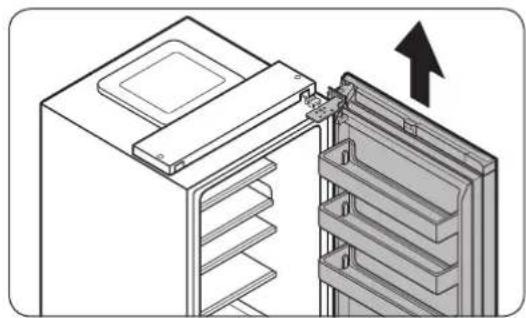
natural_image
Diagram of a refrigerator interior showing the door and shelf arrangement (no text or symbols)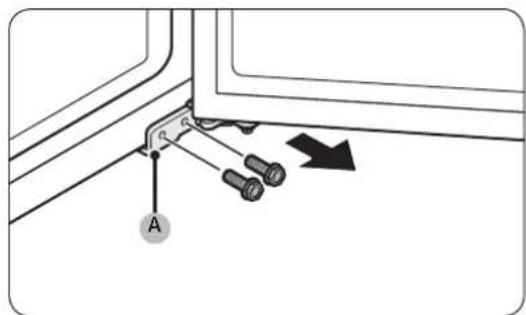
natural_image
Technical diagram showing a mechanical clamp or bracket with screws and a directional arrow (no text or symbols)natural_image
Two identical illustrations of a screwdriver with a flat blade, shown in two different angles (no text or symbols)Ristpeakruvikeeraja Lamepeakruvikeeraja
natural_image
Diagram showing a screwdriver inserted into a mechanical clamp or bracket with a black arrow indicating direction (no text or symbols present)natural_image
Diagram of a door frame with an arrow indicating direction (no text or symbols)natural_image
Diagram of a door frame with an arrow pointing to the front panel (no text or symbols)natural_image
Diagram of a plastic drawer with an arrow pointing to it, no text or symbols presentnatural_image
Diagram of a battery or switch assembly with screw holes and a labeled component (no text or symbols present)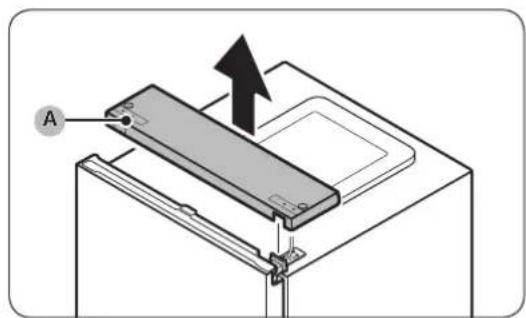
natural_image
Technical diagram of an electrical connector with visible wiring and components (no text or symbols)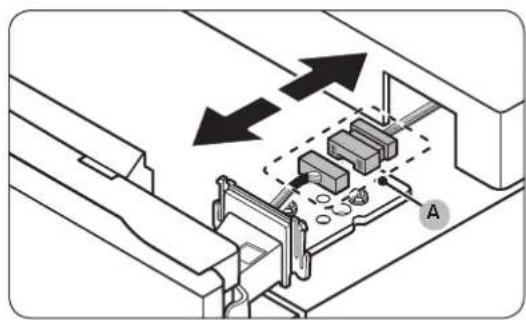
natural_image
Technical diagram of a mechanical assembly with arrows indicating direction, no text or symbols present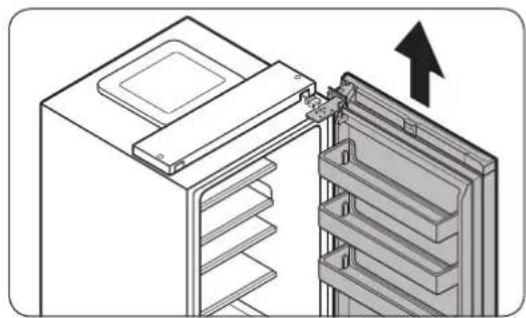
natural_image
Diagram of a refrigerator interior showing the door and shelf arrangement (no text or symbols)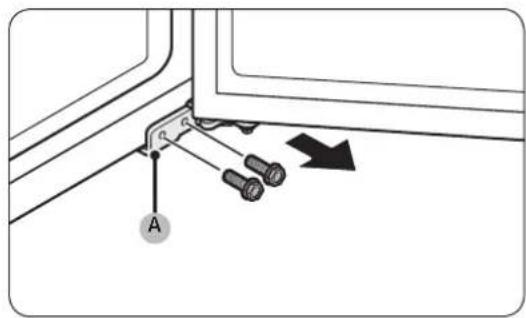
natural_image
Diagram of a screwdriver inserted into a mechanical bracket with a downward arrow indicating compression (no text or symbols present)natural_image
Diagram of a door frame with an arrow indicating direction (no text or symbols)natural_image
Diagram of a door frame with an arrow pointing to the front panel (no text or symbols)natural_image
Diagram of a plastic drawer with a black arrow pointing to it, no text or symbols presentnatural_image
Diagram of a battery or switch assembly with screw holes and a labeled component (no text or symbols present)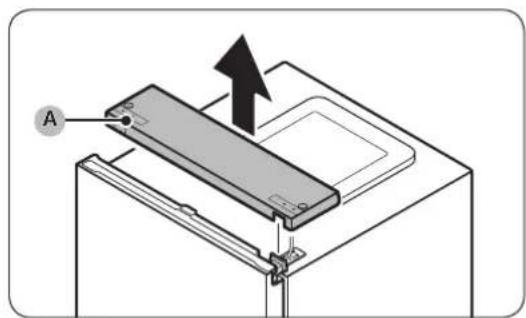
natural_image
Technical diagram of an electrical connector with visible wiring and components (no text or symbols)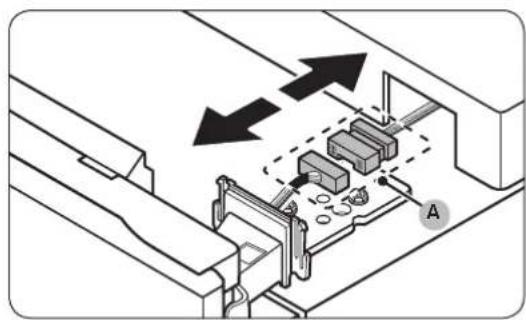
natural_image
Technical diagram of a mechanical assembly with arrows indicating direction, no text or symbols present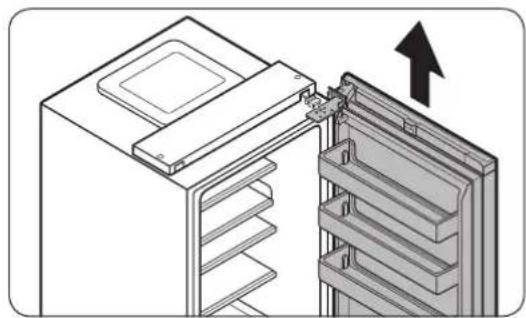
natural_image
Diagram of a refrigerator interior showing the door and shelf arrangement (no text or symbols)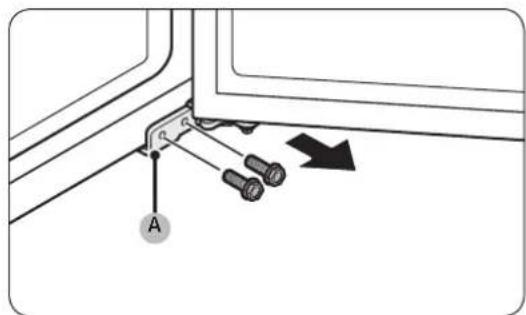
natural_image
Technical diagram showing a mechanical clamp or bracket with pins and a directional arrow (no text or symbols)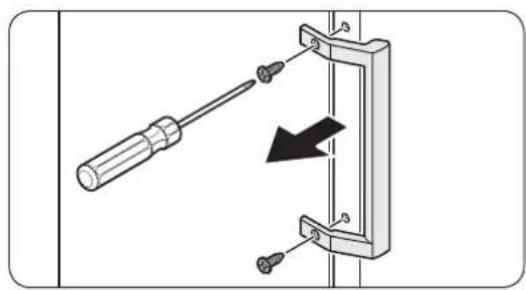
natural_image
Diagram of a screwdriver inserted into a mechanical clamp or bracket, with a black arrow indicating direction (no text or symbols present)natural_image
Diagram of a door frame with an arrow indicating direction (no text or symbols)Atveriet durvis un iznemiet blivi no durvim.
Lai nomainītu blīvi
natural_image
Diagram of a door frame with an arrow pointing to the front panel (no text or symbols)natural_image
Diagram of a plastic drawer with an arrow pointing downward (no text or symbols)natural_image
Diagram of a battery or switch assembly with screw holes and a labeled component (no text or symbols present)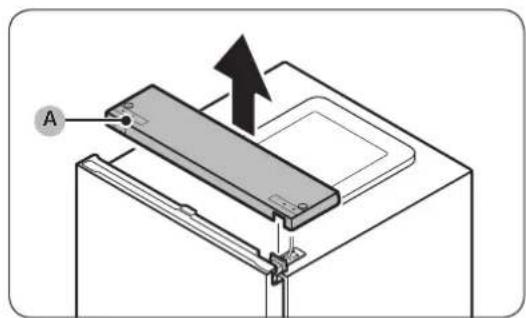
natural_image
Technical diagram of an electrical connector with visible wiring and components (no text or symbols)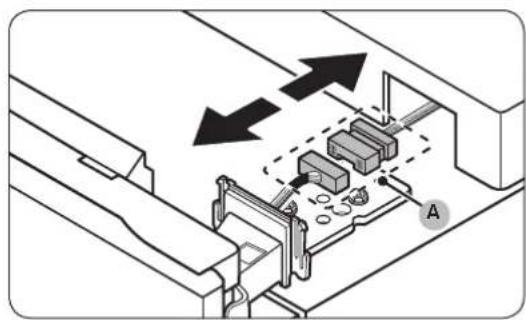
natural_image
Technical diagram of a mechanical assembly with arrows indicating direction (no text or symbols present)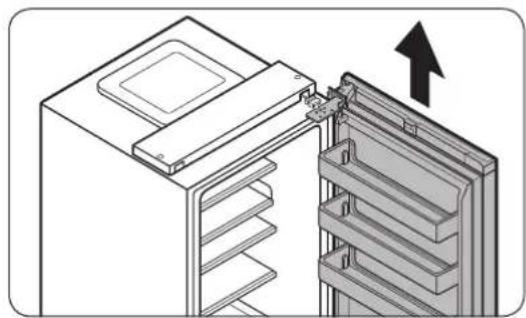
natural_image
Diagram of a refrigerator interior showing the door and shelf arrangement (no text or symbols)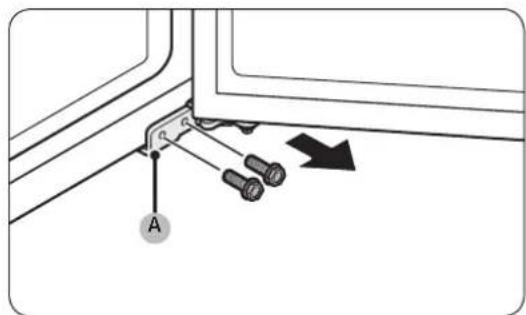
natural_image
Technical diagram showing a mechanical clamp or bracket with pins and a directional arrow (no text or symbols)natural_image
Two identical illustrations of a screwdriver with a pointed tip, shown in two different angles (no text or symbols)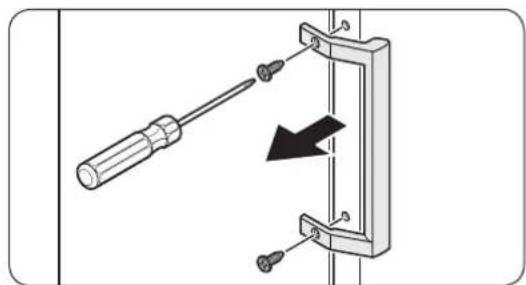
natural_image
Diagram showing a screwdriver inserted into a mechanical clamp or bracket with a black arrow indicating direction (no text or symbols present)natural_image
Diagram of a battery or switch assembly with screw holes and a labeled component (no text or symbols present)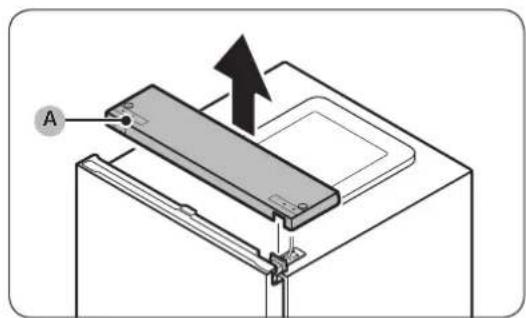
natural_image
Technical diagram of an electrical connector with visible wiring and components (no text or symbols)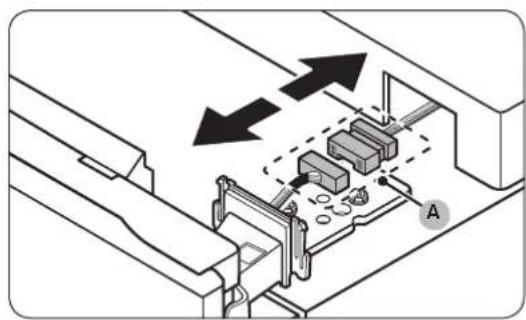
natural_image
Technical diagram of a mechanical assembly with arrows indicating direction, no text or symbols present-
Vrata hladilnika naj bodo zaprta, nato pa s Phillipsovim izvijačem odstranite vijake, s katerimi je pritrjen zgornji pokrov (A).
-
Previdno dvignite zgornji pokrov (A) in ga položite na zgornjo stran hladilnika.
natural_image
Diagram of a refrigerator interior showing the door and shelf arrangement (no text or symbols)