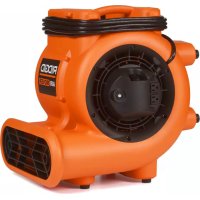
AM2287 - Air Conditioning RIDGID - Free user manual and instructions
Find the device manual for free AM2287 RIDGID in PDF.

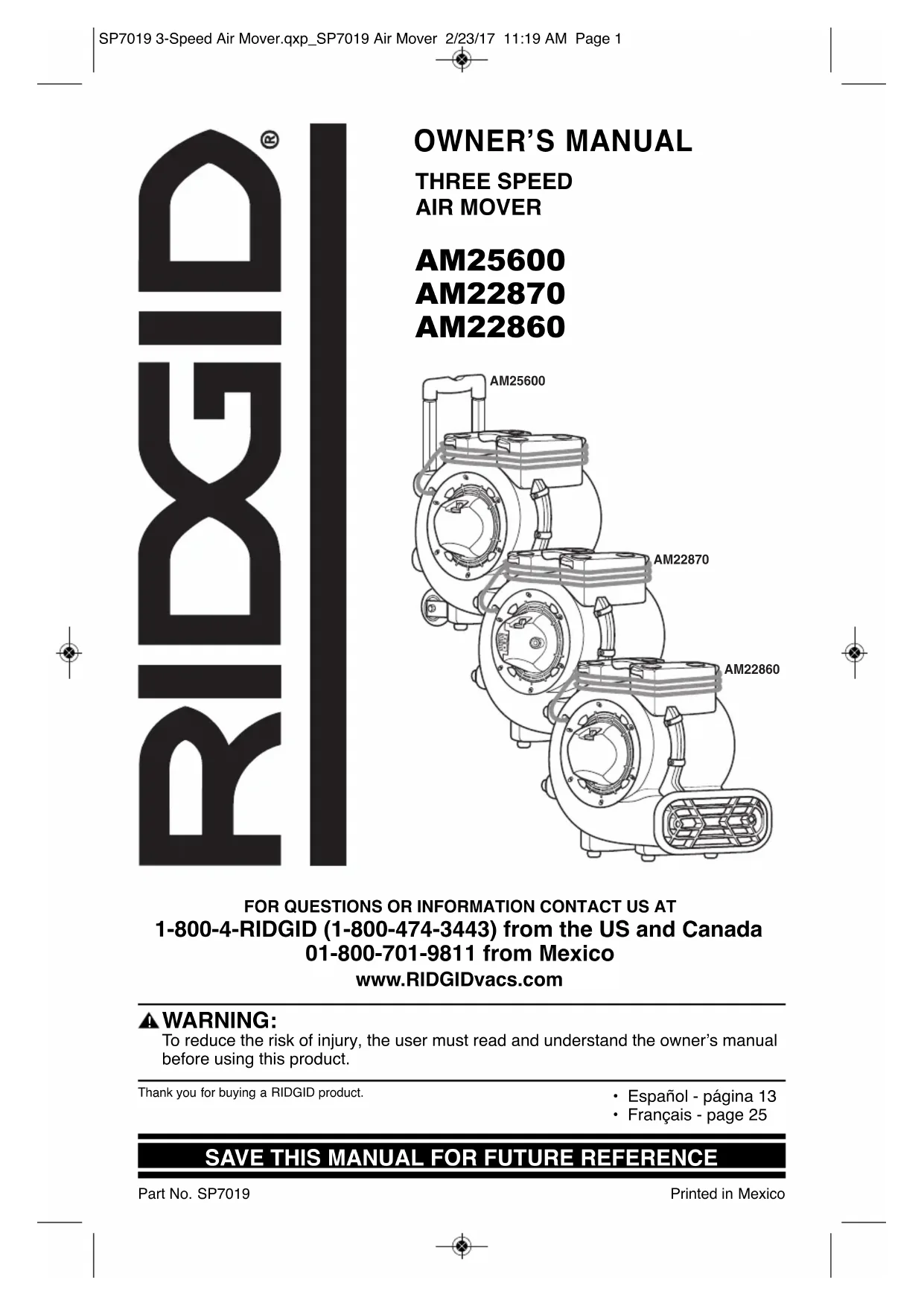


| Product Type | High-speed fan for drying and ventilation |
| Brand | Ridgid |
| Model | AM2287 |
| Power Supply | 115 V, 60 Hz, 7.9 A max |
| Motor | 3-speed induction motor with thermal protection |
| Speeds | Low, Medium, High |
| Convenience Outlets | 2 built-in outlets with 8 A circuit breaker |
| Interconnection | Up to 2 other RIDGID fans (max load 7.9 A) |
| Housing | Polypropylene |
| Feet | 4 rubber bumper feet |
| Stacking | Up to 2 units for storage |
| Power Cord | With grounding plug, wrap-around storage |
| Usage | Indoor only, stable horizontal surface |
| Safety | Thermal protection, built-in circuit breaker, do not use extension cord |
| Maintenance | Wipe housing with a damp cloth |
| Warranty | RIDGID Full Lifetime Warranty |
| Replacement Parts | Available at www.RIDGIDparts.com |
Frequently Asked Questions - AM2287 RIDGID
User questions about AM2287 RIDGID
0 question about this device. Answer the ones you know or ask your own.
Ask a new question about this device
Download the instructions for your Air Conditioning in PDF format for free! Find your manual AM2287 - RIDGID and take your electronic device back in hand. On this page are published all the documents necessary for the use of your device. AM2287 by RIDGID.
USER MANUAL AM2287 RIDGID
FOR QUESTIONS OR INFORMATION CONTACT US AT 1-800-4-RIDGID (1-800-474-3443) from the US and Canada 01-800-701-9811 from Mexico
www.RIDGIDvacs.com
▲ WARNING:
To reduce the risk of injury, the user must read and understand the owner's manual before using this product.
Thank you for buying a RIDGID product.
SAVE THIS MANUAL FOR FUTURE REFERENCE
Table of Contents
Section Page
Important Safety Instructions .....2-3
Motor Specifications and Electrical Requirements .... 3
Introduction 4
Unpacking and Checking Carton Contents 4
Operation 5-6
Section Page
Storage 7
Maintenance 8
Wiring Diagram 9
User Servicing/Troubleshooting Instructions ....10
Repair Parts 11
Warranty 12
IMPORTANT SAFETY INSTRUCTIONS
Safety is a combination of using common sense, staying alert, and knowing how your Air Mover works.
Safety Signal Words
⚠️ DANGER: Indicates a hazardous situation which, if not avoided, will result in death or serious injury.
⚠ WARNING: Indicates a hazardous situation which, if not avoided, could result in death or serious injury.
CAUTION: Indicates a hazardous situation which, if not avoided, could result in minor or moderate injury.
When using your Air Mover, always follow basic safety precautions including the following:
▲ WARNING
- To reduce the risk of fire, electric shock, or injury:
- Read and understand this manual and all labels on the Air Mover before operating.
- Use only as described in this manual.
• To reduce the risk of electric shock, do not expose to rain, or immerse in or use in standing water. Store and use indoors only. - Use only with GFCI-protected outlets.
- When storing, do not stack Air Movers more than 2 units high.
- Do not use an extension cord with this Air Mover.
-
Electrical appliances can ignite flammable vapors or dust. Do not use near combustible liquids, gases, or dusts.
-
Do not leave plugged into outlet when not in use or when servicing. Turn off before unplugging.
• To reduce the risk of stirring up and inhaling toxic vapors, do not use near toxic or hazardous materials. - Never operate with safety grills removed.
- This unit's motor has an automatically-operated thermal protective device which may shut down the unit during operation and can restart at any moment. Unplug before servicing or cleaning.
- Do not use with solid state speed control device.
- This Air Mover is not intended for use by persons (including children) with reduced physical, sensory, or mental capabilities, or lack of experience and knowledge, unless they have been given supervision or instruction concerning use of the appliance by a person responsible for their safety.
- Do not allow to be used as a toy. Close attention is necessary when used by or near children.
- Do not unplug by pulling on cord. To unplug, grasp the plug, not the cord.
- Do not use with damaged cord, plug, or other parts.
- If your Air Mover is not working as it should, has missing parts, has been dropped, damaged, left outdoors, or dropped into water, call customer service.
-
Do not pull or carry by cord, use cord as handle, close a door on cord, or pull cord around sharp edges or corners. Keep cord away from heated surfaces.
-
Do not run cord under carpeting. Do not cover cord with throw rugs, runners, or similar coverings. Do not route cord under furniture or appliances. Arrange cord away from traffic area and where it will not be tripped over.
- Do not handle plug, switch, or the Air Mover with wet hands
- Observe the 8Amp maximum on-board convenience outlet rating when interconnecting units together.
- Do not put any object into air intake openings.
- Keep hair, loose clothing, fingers, and all parts of body away from openings and moving parts.
- Direct air discharge only at work area. Do not direct air at bystanders.
- All disassembly and repairs should be performed by qualified personnel.
- Do not operate any fan with a damaged cord or plug. Discard fan or return to an authorized service facility for examination and/or repair.
CAUTION:
- For dusty operations, wear dust mask.
- Do not move or carry Air Mover when it is operating.
- Only operate on a level and stable surface to prevent it from falling and possibly causing injury or damage to unit.
Observe the following warnings that appear on the motor housing of your Air Mover:
⚠ WARNING: To reduce the risk of electric shock, connect only to a GFCI protected outlet. Do not expose to water or rain. Indoor use only.
CAUTION:
- This Air Mover has an automatic motor shutoff device; it may restart without notice. To reduce the risk of injury, unplug before servicing.
- Do not use an extension cord with this fan.
WARNING: TO REDUCE THE RISK OF TIP-OVER DURING STORAGE, STACK 2-HIGH ONLY.
⚠ WARNING: Do not exceed 8 Amps through the on-board convenience outlets.
SAVE THIS MANUAL
Motor Specifications and Electrical Requirements
This Air Mover is provided with a 3-speed, 115 volt, 60 Hz induction motor with a grounding conductor. It is thermally protected and will automatically shut down if over-heated. Once it cools, the motor will restart automatically if not unplugged.
In the event of a malfunction or breakdown, grounding provides a path of least resistance for electric current to reduce the risk of electric shock.
This Air Mover is equipped with an electric cord having an equipment grounding conductor and a grounding plug. The plug must be plugged into a matching outlet that is properly installed and grounded in accordance with all local codes and ordinances.
Do not modify the plug provided. If it will not fit the outlet, have the proper outlet installed by a qualified electrician.
Introduction
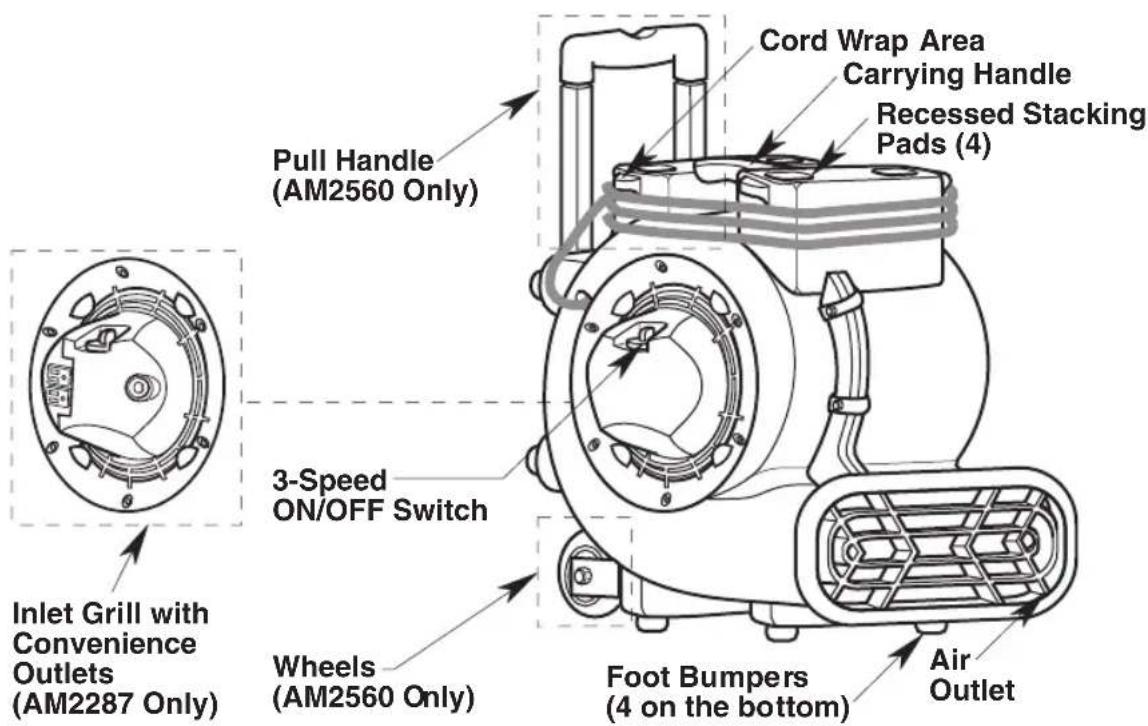
Air Movers are designed to move large volumes of air. They are used to dry wet carpets, floors and furniture. They may also be used for ventilation.
Unpacking and Checking Carton Contents
Carefully unpack and inspect your Air Mover. Call 1-800-4-RIDGID (1-800-474-3443) or E-mail us atinfo@RIDGIDvacs.com if any parts are damaged or missing.
AM2560 Only: If your Air Mover includes a retractable handle, it is packaged in a locked downward position.
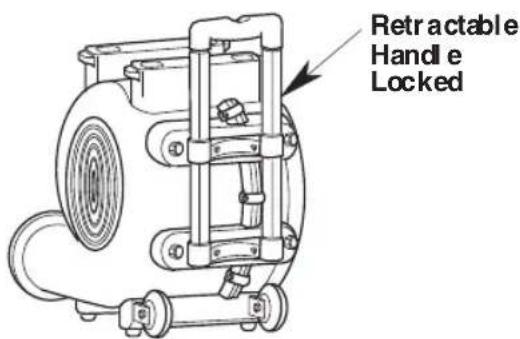
Handle Down Position (AM2560 Only)
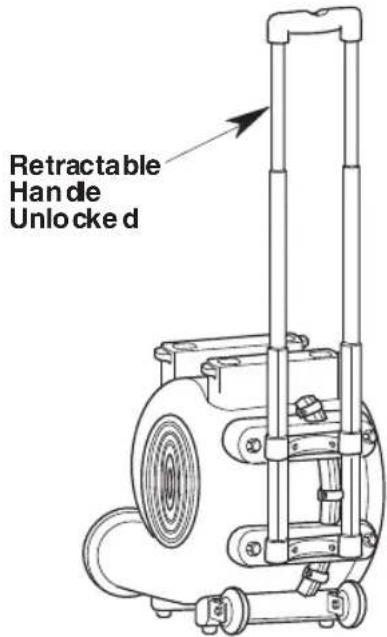
Handle Up Position (AM2560 Only)
Operation
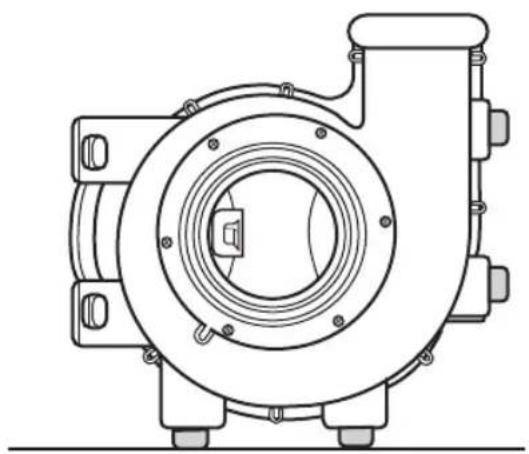
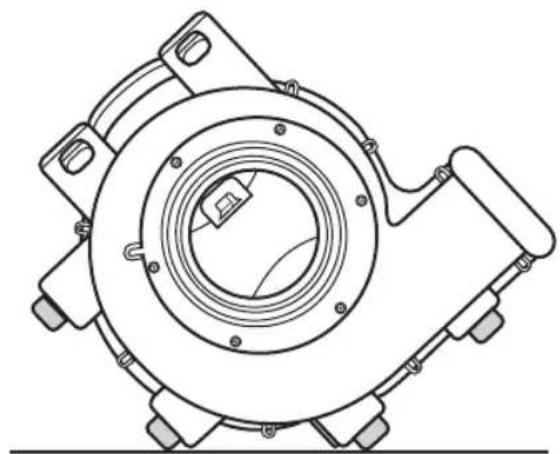
Place Air Mover in desired operating position (Your Unit May Not Be As Illustrated):
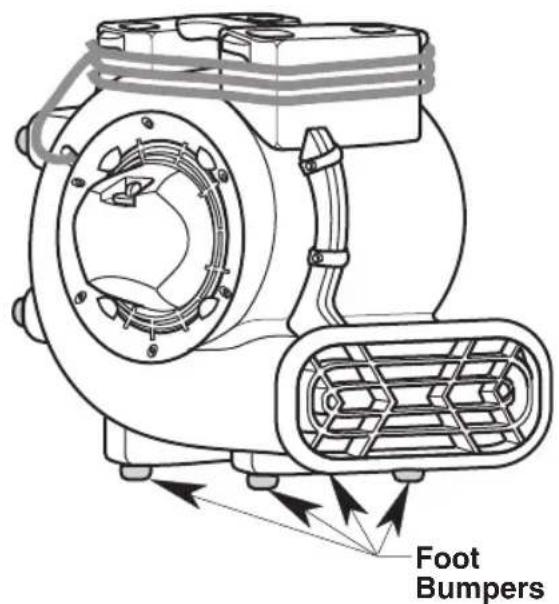
Floor & Carpet
natural_image
Technical line drawing of a mechanical pump or motor assembly (no text or symbols)90° Ceilings & Ventilation
natural_image
Technical line drawing of a mechanical component with concentric rings and mounting flanges (no text or symbols)45° Walls & Ventilation
Operation (continued)
Air Mover Interconnection
RIDGID Air Movers (AM22870) can be interconnected in series using the AM22870 convenience outlets. If utilizing the series interconnection feature, only use Air Movers that total less than the recommended 7.9 Amp maximum convenience outlet rating. The 8 Amp on-board circuit breaker will allow up to two (2) additional RIDGID Air Movers to run on the first Air Mover at the same time.
NOTE: This Air Mover AM22870 is equipped with convenience outlets with an on-board 8 Amp circuit breaker. If the convenience outlet overloads, the circuit breaker will trip. If the circuit breaker does trip, turn the switch to the off position and unplug all units then press the circuit breaker reset button. Plug the units back into the power source. The on-board convenience outlets on the Air Mover will be actively powered when the Air Mover is plugged in and the circuit breaker is properly reset.
Storage
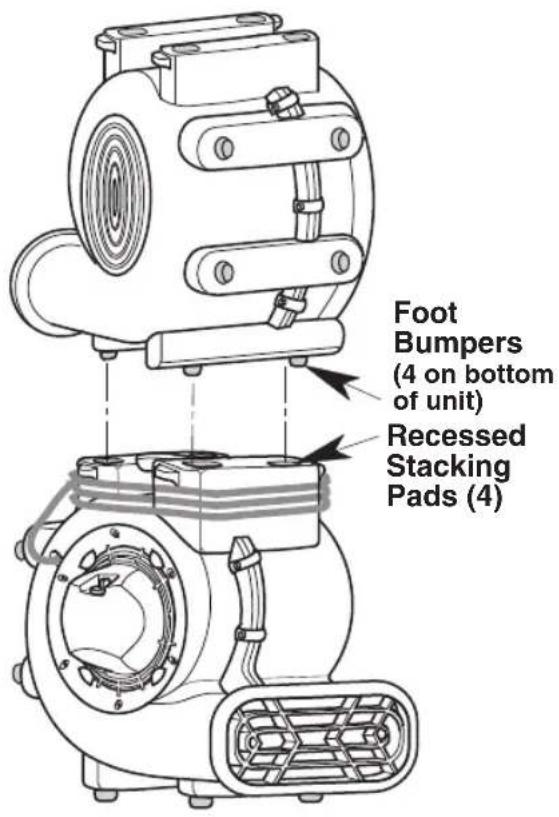
When stacking units, position the four foot bumpers on the recessed stacking pads.
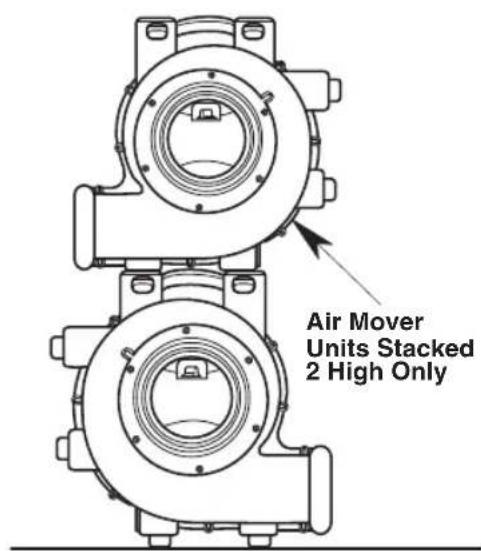
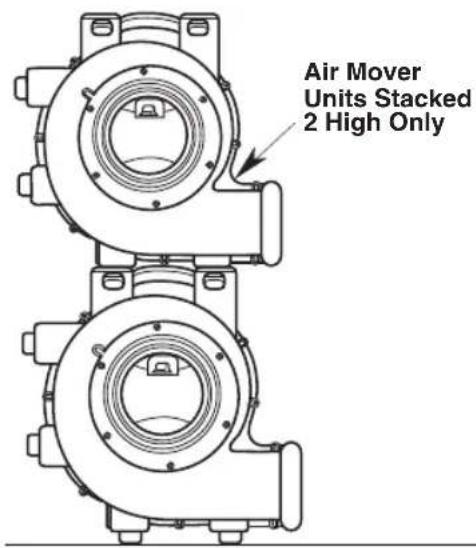
The units conveniently "stack" for storage, as shown.
CAUTION: Do not operate Air Mover when stacked on top of each other. Do not stack more than 2 high.
PREFERRED POSITION
ALTERNATE POSITION
(Your Unit May Not Be As Illustrated)
Maintenance
Cord Maintenance
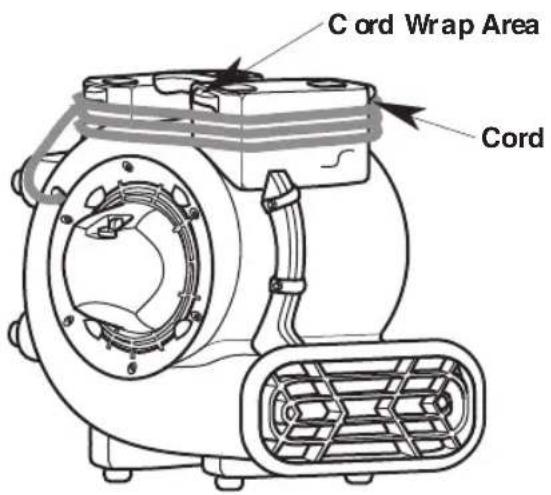
When use is complete, unplug the cord and wrap it around the cord wrap area as shown. If the power cord is damaged, it must be replaced by the manufacture or their service agent or by qualified personnel in order to reduce the risk of accident.
Storage
Before storing your Air Mover, the cord should be wrapped around the unit. The Air Mover should be stored indoors.
Cleaning Your Air Mover
If the polypropylene housing becomes soiled it may be wiped of with a damp cloth.
Wheels (AM2560 Only)
If your wheels are noisy, you may put a drop of oil on the roller shaft to make them quieter.
⚠ WARNING: After servicing, any safety device (includes grilles, impeller, etc.) should be reinstalled or remounted.
Wiring Diagrams
AM2560 & AM2286:
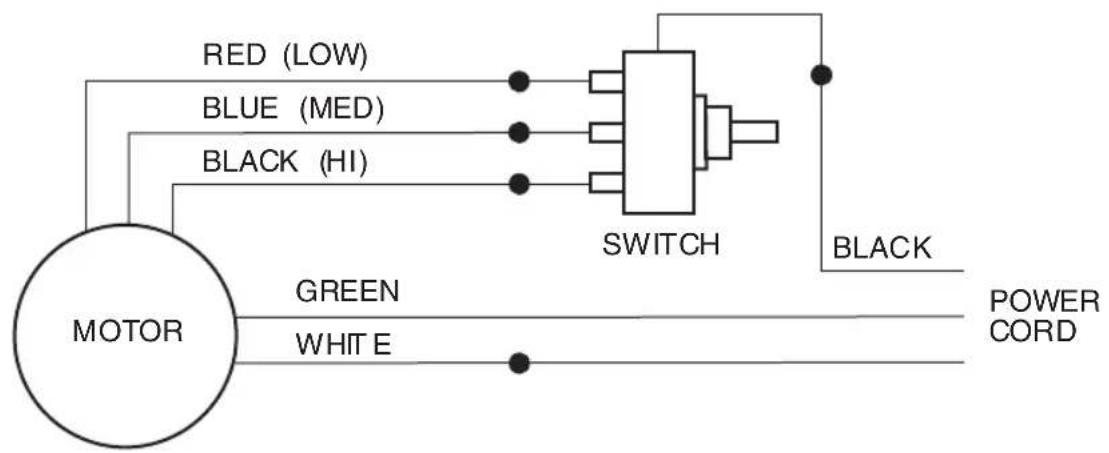
flowchart
graph TD
    A["MOTOR"] --> B["SWITCH"]
    B --> C["POWER CORD"]
    A --> D["RED (LOW)"]
    A --> E["BLUE (MED)"]
    A --> F["BLACK (HI)"]
    A --> G["GREEN"]
    A --> H["WHITE"]
    B --> I["BLACK"]
AM2287:
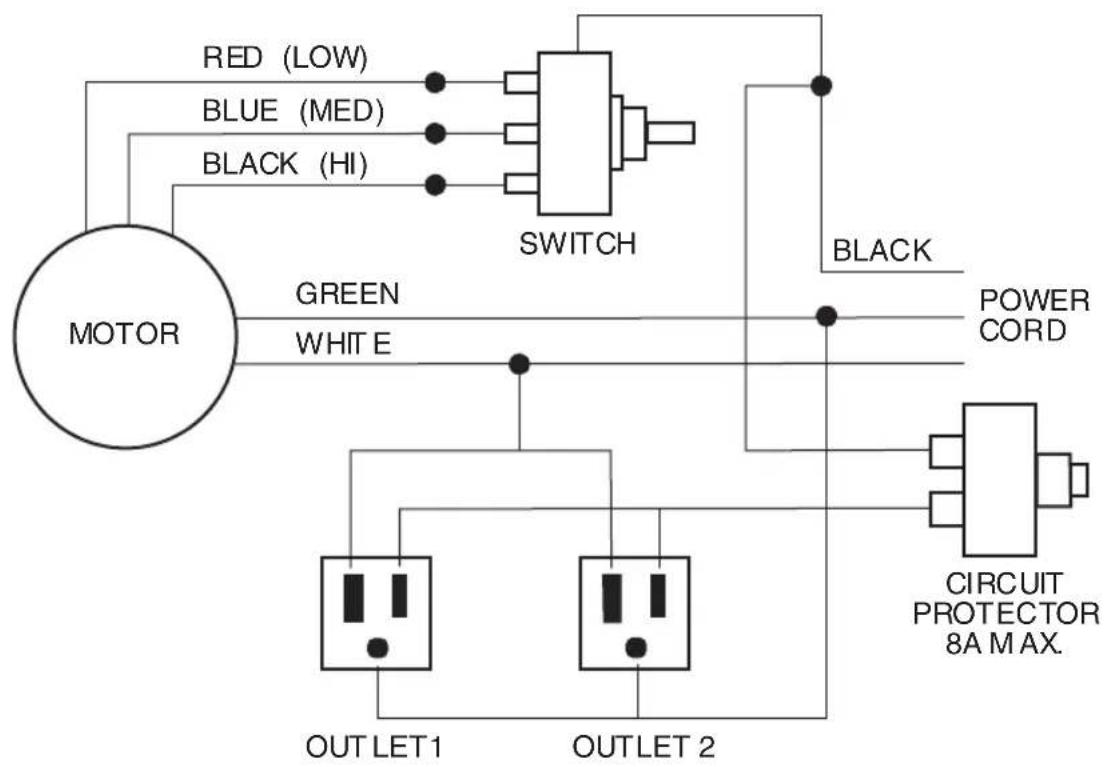
flowchart
graph TD
    A["MOTOR"] --> B["Red (LOW)"]
    A --> C["BLUE (MED)"]
    A --> D["BLACK (HI)"]
    B --> E["Switch"]
    C --> E
    D --> E
    E --> F["POWER CORD"]
    G["CIRCUIT PROTECTOR 8A MAX."] --> H["OUTLET 1"]
    G --> I["OUTLET 2"]
    H --> J["OUTLET 1"]
    H --> K["OUTLET 2"]
    I --> L["OUTLET 1"]
    I --> M["OUTLET 2"]
User Servicing / Troubleshooting Instructions
WARNING: Unplug before any disassembly or servicing.
WARNING: All disassembly and repairs should be performed by qualified personnel.
| PROBLEM | CAUSE | SOLUTION |
| Unt will not run. | 1. No power to unit.2. Switch not on.3. Switch is faulty.4. Faulty/broken cord or motor wire. | 1. Plug unit in. Check circuit breaker.2. Place in “ON” position.3. Replace switch.4. Perform continuity check, using vdt/amp meter. |
| Unt runs but air mover makes loud scraping noise. | 1. Unit has been severely jolted causing blower wheel to rub against housing.2. Unit has been severely jolted causing housing to deform. | 1. Remove motor and replaced amaged motor if necessary.2. Replace blower wheel. |
| Unt runs but vibrates excessively. | 1. Severe jolt has bent motor shaft causing unit to be out of balance.2. Blower wheel blade damaged.3. Dirt build up on one side of Air Mover blower wheel. | 1. Remove and replace motor.2. Replace blower wheel if necessary.3. Clean blower wheel blades. |
| Unit runs but blower wheel does not turn. | 1. Blower wheel is jammed against housing.2. Capacitor wire has broken/come loose, capacitor has failed.3. Housing has been damaged such that it presses on blower wheel. | 1. Adjust and replace blower wheel if necessary.2. Repair/replace motor if necessary.3. Replace unit as necessary. |
| Unit runs briefly, then shut soff on over bad. | 1. Motor bearings are failing or motor has developed an internal electrical fault.2. Intake grille and/or exhaust grille is obstructed. | 1. Replace motor.2. Remove obstruction |
| Convenience outlet not working.(if equipped) | 1. No power to unit.2. Convenience outlet circuit breaker not reset. | 1. Plug unit in.2. Reset circuit breaker. |
Repair Parts
Three Speed Air Mover
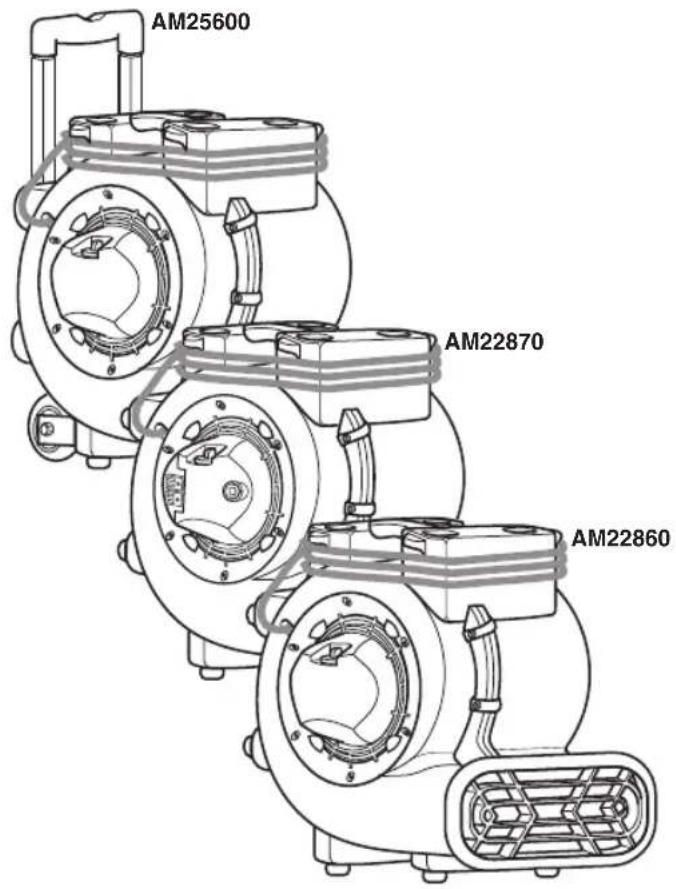
Model Numbers AM22860, AM22870 or AM25600
RIDGID parts are available on-line at www.RIDGIDparts.com
Always order by Part Number - Not by Key Number
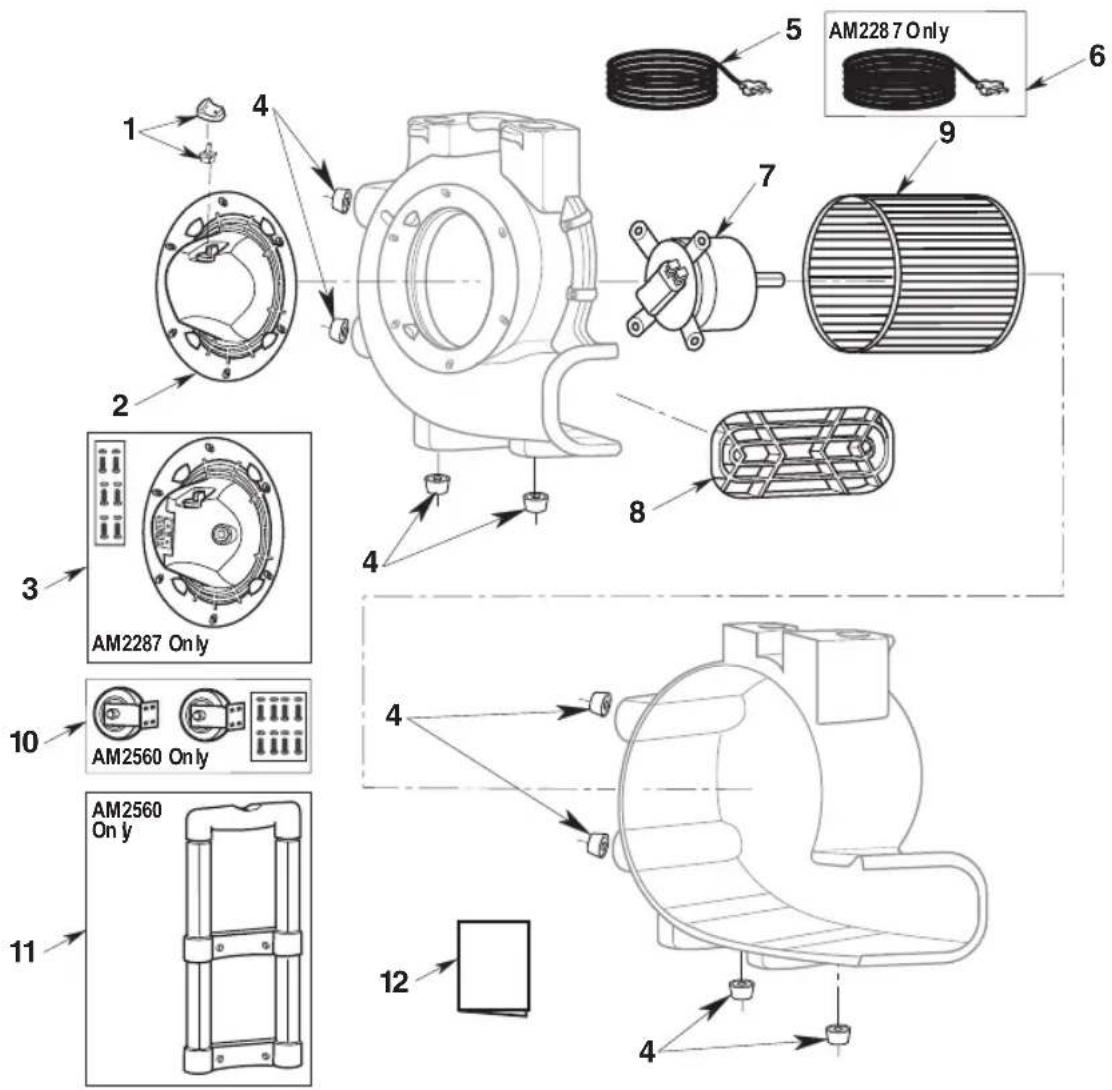
| Key No. | Part Number | Description |
| 1 | 510141 | Switch & Knob |
| 2 | 833658 | Grille, Inlet AM2560 & AM2286 |
| 3 | 510551 | Grille, Inlet (with Convenience Outlets & Hardware), AM2287 |
| 4 | 833690 | Foot Bumpers (4 pack) |
| 5 | 833675 | Cord with Plug |
| Key No. | Part Number | Description |
| 6 | 84 136 8 | Cord with Plug, AM2287 |
| 7 | 83 367 4 | Motor |
| 8 | 83 365 9 | Grille, Exhaust |
| 9 | 83 366 0 | Blower Wheel |
| 10 | 510140 | Wheel Assembly, AM2560 |
| 11 | 833691 | Pull Handle, AM2560 |
| 12 | SP7019 | Owner's Manual |
RIDGID®
Symbol of Quality, Durability and Dependability
What is covered
RIDGID ^® tools are warranted to be free of defects in workmanship and material.
How long coverage lasts
This warranty lasts for the lifetime of the RIDGID ^® tool. Warranty coverage ends when the product becomes unusable for reasons other than defects in workmanship or material.
How can you get service
To obtain the benefit of this warranty, deliver via prepaid transportation the complete product to RIDGE TOOL COMPANY, Elyria, Ohio, or any authorized RIDGIDINDEPENDENT SERVICE CENTER. Pipe wrenches and other hand tools should be returned to the place of purchase.
What we will do to correct problems
Warranted products will be repaired or replaced, at RIDGE TOOL's option, and returned at no charge; or, if after three attempts to repair or replace during the warranty period the product is still defective, you can elect to receive a full refund of your purchase price.
What is not covered
Failures due to misuse, abuse or normal wear and tear are not covered by this warranty. RIDGE TOOL shall not be responsible for any incidental or consequential damages.
How local law relates to the warranty
Some states do not allow the exclusion or limitation of incidental or consequential damages, so the above limitation or exclusion may not apply to you. This warranty gives you specific rights, and you may also have other rights, which vary, from state to state, province to province, or country to country.
No other express warranty applies
This FULL LIFETIME WARRANTY is the sole and exclusive warranty for RIDGID ^® products. No employee, agent, dealer, or other person is authorized to alter this warranty or make any other warranty on behalf of the RIDGE TOOL COMPANY.
Stock No. AM2286, AM2287, AM2560
Model No. AM22860, AM22870, AM25600
Model and serial number may be found on the back of the unit.
You should record both model and serial numbers in a safe place for future use.
FOR QUESTIONS OR INFORMATION CONTACT US AT 1-800-4-RIDGID (1-800-474-3443) from the US and Canada 01-800-701-9811 from Mexico www.RIDGIDvacs.com
Please have your Model Number and Serial Number on hand when calling.

EMERSON™
www.RIDGID.com
© 2017 Emerson
Part No. SP7019
Form No. SP7019
Printed in Mexico 02/17
ID ® ID R
MANUAL DEL USUARIO
DESPLAZADOR DE AIRE
DE TRES VELOCIDADES
AM25600
AM22870
AM22860
natural_image
Technical line drawing of a mechanical pump or motor assembly (no text or symbols)natural_image
Technical line drawing of a mechanical component with mounting flanges and central bore (no text or symbols)EN CAS DE QUESTIONS OU POUR OBTENIR DES INFORMATIONS, VEUILLEZ NOUS CONTACTER AU :
natural_image
Technical line drawing of a mechanical pump or motor assembly (no text or symbols)natural_image
Technical line drawing of a mechanical component with concentric rings and mounting flanges (no text or symbols)
- ▲ WARNING:
- Table of Contents
- Section Page
- IMPORTANT SAFETY INSTRUCTIONS
- Safety Signal Words
- ▲ WARNING
- CAUTION:
- SAVE THIS MANUAL
- Motor Specifications and Electrical Requirements
- Introduction
- Unpacking and Checking Carton Contents
- Operation
- Operation (continued)
- Air Mover Interconnection
- Storage
- Maintenance
- Cord Maintenance
- Cleaning Your Air Mover
- Wheels (AM2560 Only)
- Wiring Diagrams
- User Servicing / Troubleshooting Instructions
- Repair Parts
- Three Speed Air Mover
- Model Numbers AM22860, AM22870 or AM25600
- RIDGID parts are available on-line at www.RIDGIDparts.com
- RIDGID®
- Symbol of Quality, Durability and Dependability
- ID ® ID R
- MANUAL DEL USUARIO
- DESPLAZADOR DE AIRE
- DE TRES VELOCIDADES
- AM25600
- AM22870
- AM22860
Brand : RIDGID
Model : AM2287
Category : Air Conditioning