
R86065 - Sander RIDGID - Free user manual and instructions
Find the device manual for free R86065 RIDGID in PDF.



| Product Type | Cordless Belt Sander |
| Brand and Model | Ridgid R86065 |
| Belt Size | 76 mm x 457 mm (3 in x 18 in) |
| Sanding Surface | 113 cm² (17.5 in²) |
| No-load Speed | 122-285 m/min (400-935 ft/min) – variable |
| Power Source | 18V lithium-ion battery (sold separately) |
| Speed Adjustment | Variable speed selector from A (slow) to F (fast) |
| Adjustable Front Handle | Yes, 3 positions |
| Dust Bag | Included, empty regularly |
| Applications | Wood, metal, plastic, rust/paint/varnish removal |
| Safety | Trigger with lock-off, eye protection recommended |
| Maintenance and Cleaning | Clean with a dry cloth, avoid solvents |
| Spare Parts and Repairability | Genuine RIDGID parts, repair by authorized center |
| Warranty | 3-year limited warranty |
| General Information | Lightweight, two-hand use |
Frequently Asked Questions - R86065 RIDGID
User questions about R86065 RIDGID
0 question about this device. Answer the ones you know or ask your own.
Ask a new question about this device
Download the instructions for your Sander in PDF format for free! Find your manual R86065 - RIDGID and take your electronic device back in hand. On this page are published all the documents necessary for the use of your device. R86065 by RIDGID.
USER MANUAL R86065 RIDGID
natural_image
Technical line drawing of a robotic device with visible internal components and no text or symbolsTo register your RIDGID
product, please visit:
http://register.RIDGID.com
INCLUDES: Belt Sander, Wrench, Operator's Manual
■ General Power Tool Safety
Warnings....2-3
■ Belt Sander Safety Warnings .....3
■ Symbols....4
■ Features....5
■ Assembly 5
■ Operation....5-8
■ Maintenance....9
■ Illustrations ....10-11
■ Parts Ordering and Service....Back page

WARNING: To reduce the
risk of injury, the user must read and understand the operator's manual before using this product.
SAVE THIS MANUAL FOR FUTURE REFERENCE
TABLE DES MATIÈRES
************************
Read all safety warnings and all instructions.
Failure to follow the warnings and instructions may result in electric shock, fire and/or serious injury.
Save all warnings and instructions for future reference. The term “power tool” in the warnings refers to your mains-operated (corded) power tool or battery-operated (cordless) power tool.
WORK AREA SAFETY
- Keep work area clean and well lit. Cluttered or dark areas invite accidents.
■ Do not operate power tools in explosive atmospheres, such as in the presence of flammable liquids, gases or dust. Power tools create sparks which may ignite the dust or fumes. - Keep children and bystanders away while operating a power tool. Distractions can cause you to lose control.
ELECTRICAL SAFETY
■ Power tool plugs must match the outlet. Never modify the plug in any way. Do not use any adapter plugs with earthed (grounded) power tools. Unmodified plugs and matching outlets will reduce risk of electric shock.
■ Avoid body contact with earthed or grounded surfaces such as pipes, radiators, ranges and refrigerators. There is an increased risk of electric shock if your body is earthed or grounded.
■ Do not expose power tools to rain or wet conditions. Water entering a power tool will increase the risk of electric shock.
- Do not abuse the cord. Never use the cord for carrying, pulling or unplugging the power tool. Keep cord away from heat, oil, sharp edges or moving parts. Damaged or entangled cords increase the risk of electric shock.
■ When operating a power tool outdoors, use an extension cord suitable for outdoor use. Use of a cord suitable for outdoor use reduces the risk of electric shock.
If operating a power tool in a damp location is unavoidable, use a ground fault circuit interrupter (GFCI) protected supply. Use of a GFCI reduces the risk of electric shock.
■ Use battery only with charger listed. For use with 18V nickel-cadmium and 18V lithium-ion battery packs, see tool/appliance/battery pack/charger correlation supplement 988000-302.
PERSONAL SAFETY
■ Stay alert, watch what you are doing and use common sense when operating a power tool. Do not use a power tool while you are tired or under the influence of drugs, alcohol or medication. A moment of inattention while operating power tools may result in serious personal injury.
■ Use personal protective equipment. Always wear eye protection. Protective equipment such as dust mask, non-skid safety shoes, hard hat, or hearing protection used for appropriate conditions will reduce personal injuries.
■ Prevent unintentional starting. Ensure the switch is in the off-position before connecting to power source and/or battery pack, picking up or carrying the tool. Carrying power tools with your finger on the switch or energising power tools that have the switch on invites accidents.
■ Remove any adjusting key or wrench before turning the power tool on. A wrench or a key left attached to a rotating part of the power tool may result in personal injury.
■ Do not overreach. Keep proper footing and balance at all times. This enables better control of the power tool in unexpected situations.
■ Dress properly. Do not wear loose clothing or jewellery. Keep your hair, clothing and gloves away from moving parts. Loose clothes, jewellery or long hair can be caught in moving parts.
If devices are provided for the connection of dust extraction and collection facilities, ensure these are connected and properly used. Use of dust collection can reduce dust-related hazards.
- Do not wear loose clothing or jewelry. Contain long hair. Loose clothes, jewelry, or long hair can be drawn into air vents.
■ Do not use on a ladder or unstable support. Stable footing on a solid surface enables better control of the power tool in unexpected situations.
POWER TOOL USE AND CARE
- Do not force the power tool. Use the correct power tool for your application. The correct power tool will do the job better and safer at the rate for which it was designed.
- Do not use the power tool if the switch does not turn it on and off. Any power tool that cannot be controlled with the switch is dangerous and must be repaired.
■ Disconnect the plug from the power source and/or the battery pack from the power tool before making any adjustments, changing accessories, or storing power tools. Such preventive safety measures reduce the risk of starting the power tool accidentally.
■ Store idle power tools out of the reach of children and do not allow persons unfamiliar with the power tool or these instructions to operate the power tool. Power tools are dangerous in the hands of untrained users. - Maintain power tools. Check for misalignment or binding of moving parts, breakage of parts and any other condition that may affect the power tool's operation. If damaged, have the power tool repaired
GENERAL POWER TOOL SAFETY WARNINGS
before use. Many accidents are caused by poorly maintained power tools.
- Keep cutting tools sharp and clean. Properly maintained cutting tools with sharp cutting edges are less likely to bind and are easier to control.
■ Use the power tool, accessories and tool bits etc. in accordance with these instructions, taking into account the working conditions and the work to be performed. Use of the power tool for operations different from those intended could result in a hazardous situation.
BATTERY TOOL USE AND CARE
■ Recharge only with the charger specified by the manufacturer. A charger that is suitable for one type of battery pack may create a risk of fire when used with another battery pack.
■ Use power tools only with specifically designated battery packs. Use of any other battery packs may create a risk of injury and fire.
■ When battery pack is not in use, keep it away from other metal objects, like paper clips, coins, keys, nails, screws or other small metal objects, that can make a connection from one terminal to another. Shorting the battery terminals together may cause burns or a fire.
■ Under abusive conditions, liquid may be ejected from the battery; avoid contact. If contact accidentally occurs, flush with water. If liquid contacts eyes, additionally seek medical help. Liquid ejected from the battery may cause irritation or burns.
SERVICE
■ Have your power tool serviced by a qualified repair person using only identical replacement parts. This will ensure that the safety of the power tool is maintained.
■ When servicing a power tool, use only identical replacement parts. Follow instructions in the Maintenance section of this manual. Use of unauthorized parts or failure to follow Maintenance instructions may create a risk of shock or injury.
BELT SANDER SAFETY WARNINGS
- Hold power tool by insulated gripping surfaces, when performing an operation where the cutting accessory may contact hidden wiring. Cutting accessory contacting a “live” wire may make exposed metal parts of the power tool “live” and could give the operator an electric shock.
- Know your power tool. Read operator's manual carefully. Learn its applications and limitations, as well as the specific potential hazards related to this power tool. Following this rule will reduce the risk of electric shock, fire, or serious injury.
■ Always wear eye protection with side shields marked to comply with ANSI Z87.1 when assembling parts, operating the tool, or performing maintenance. Following this rule will reduce the risk of serious personal injury.
■ Protect your lungs. Wear a face or dust mask if the operation is dusty. Following this rule will reduce the risk of serious personal injury.
■ Protect your hearing. Wear hearing protection during extended periods of operation. Following this rule will reduce the risk of serious personal injury.
■ Battery tools do not have to be plugged into an electrical outlet; therefore, they are always in operating condition. Be aware of possible hazards when not using your battery tool or when changing accessories. Following this rule will reduce the risk of electric shock, fire, or serious personal injury. -
Do not place battery tools or their batteries near fire or heat. This will reduce the risk of explosion and possibly injury.
-
Do not crush, drop or damage battery pack. Do not use a battery pack or charger that has been dropped or received a sharp blow. A damaged battery is subject to explosion. Properly dispose of a dropped or damaged battery immediately.
■ Batteries can explode in the presence of a source of ignition, such as a pilot light. To reduce the risk of serious personal injury, never use any cordless product in the presence of open flame. An exploded battery can propel debris and chemicals. If exposed, flush with water immediately.
■ Do not charge battery tool in a damp or wet location. Following this rule will reduce the risk of electric shock.
For best results, your battery tool should be charged in a location where the temperature is more than 50^ F but less than 100^ F. To reduce the risk of serious personal injury, do not store outside or in vehicles.
■ Under extreme usage or temperature conditions, battery leakage may occur. If liquid comes in contact with your skin, wash immediately with soap and water. If liquid gets into your eyes, flush them with clean water for at least 10 minutes, then seek immediate medical attention. Following this rule will reduce the risk of serious personal injury.
■ Save these instructions. Refer to them frequently and use them to instruct others who may use this tool. If you loan someone this tool, loan them these instructions also.
| The following signal words and meanings are intended to explain the levels of risk associated with this product. | ||
| SYMBOL | SIGNAL | MEANING |
 | DANGER: | Indicates a hazardous situation, which, if not avoided, will result in death or serious injury. |
 | WARNING: | Indicates a hazardous situation, which, if not avoided, could result in death or serious injury. |
 | CAUTION: | Indicates a hazardous situation, that, if not avoided, may result in minor or moderate injury. |
| NOTICE: | (Without Safety Alert Symbol) Indicates information considered important, but not related to a potential injury (e.g. messages relating to property damage). | |
| Some of the following symbols may be used on this product. Please study them and learn their meaning. Proper interpretation of these symbols will allow you to operate the product better and safer. SYMBOL NAME DESIGNATION/EXPLANATION | ||
 | Safety Alert Indicates a potential personal injury hazard. | |
 | Read Operator's Manual | To reduce the risk of injury, user must read and understand operator's manual before using this product. |
 | Eye Protection | Always wear eye protection with side shields marked to comply with ANSI Z87.1. |
 | Wet Conditions Alert Do not expose to rain or use in damp locations. | |
 | Recycle Symbols | This product uses nickel- cadmium (Ni-Cd) and lithium-ion (Li-ion) batteries. Local, state or federal laws may prohibit disposal of batteries in ordinary trash. Consult your local waste authority for information regarding available recycling and/or disposal options. |
| V Volts Voltage | ||
| min Minutes | Time | |
| --- | Direct Current Type or a characteristic of current | |
| n_0 | No Load Speed Rotational speed, at no load | |
| .../min Per Minute | Revolutions, strokes, surface speed, orbits etc., per minute | |
PRODUCT SPECIFICATIONS
Belt Size 3 in. x 18 in.
Sanding Surface....17.5 sq. in.
No Load Speed 400-935 ft./min.
ASSEMBLY

WARNING:
If any parts are damaged or missing do not operate this product until the parts are replaced. Use of this product with damaged or missing parts could result in serious personal injury.

WARNING:
Do not attempt to modify this product or create accessories not recommended for use with this product. Any such alteration or modification is misuse and could result in a hazardous condition leading to possible serious personal injury.
If any parts are damaged or missing, please call 1-866-539-1710 for assistance.
OPERATION

WARNING:
Do not allow familiarity with this product to make you careless. Remember that a careless fraction of a second is sufficient to inflict serious injury.

WARNING:
Always remove battery pack from the tool when you are assembling parts, making adjustments, cleaning, or when not in use. Removing battery pack will prevent accidental starting that could cause serious personal injury.

WARNING:
Always wear eye protection with side shields marked to comply with ANSI Z87.1, along with hearing protection. Failure to do so could result in objects being thrown into your eyes and other possible serious injuries.

WARNING:
Do not use any attachments or accessories not recommended by the manufacturer of this product. The use of attachments or accessories not recommended can result in serious personal injury.
APPLICATIONS
You may use this tool for the purposes listed below:
■ Sanding wood, metals, plastics, and other materials
■ Smoothing rough boards, chamfering, rounding edges
■ Removing rust, paint, varnishes, and stains
TURNING THE SANDER ON/OFF
See Figure 1, page 10.
■ To turn the sander on, depress the switch trigger.
■ To turn the sander off, release the switch trigger.
LOCK-ON BUTTON
See Figure 1, page 10.
The lock-on feature allows you to lock the switch trigger in the on position. Locking the switch trigger on allows you to operate the sander for extended periods of time.
Do not lock the switch trigger if you might need to suddenly stop the sander.
To lock on:
■ Depress the switch trigger.
■ Push in the lock-on button.
■ Release the switch trigger.
■ Release the lock-on button.
NOTE: To disengage the lock, depress the trigger and release.
INSTALLING/REMOVING THE BATTERY PACK
See Figure 2, page 10.

WARNING:
Before installing the battery pack, always make sure the switch trigger is not in the locked-on position. Failure to do so could result in accidental starting of the sander, resulting in possible serious injury.
To install:
■ Make sure the switch is not in the locked-on position.
■ Insert the battery pack.
■ Make sure the latches on each side of the battery pack snap into place and the battery pack is secured in the product before beginning operation.
To remove:
■ Depress the latches on each side of the battery pack.
For complete charging instructions, see the operator's manuals for your battery pack and charger.
SELECTING SANDING BELTS
Selecting the correct size and type of sanding belt is an important step in achieving a high quality sanded finish. Aluminum oxide, silicon carbide, and other synthetic abrasives are best for power sanding.
In general, when sanding, coarse grit removes the most material and fine grit produces the best finish. The condition of the surface to be sanded determines which grit will do the best job. If the surface is rough, start with a coarse grit and sand until the surface is uniform. Then use medium grit to remove scratches left by the coarser grit. Finally, use finer grit for finishing the surface. Always continue sanding with each grit until the surface is uniform.
INSTALLING/CHANGING SANDING BELTS
See Figures 3 - 5, page 10.
■ Remove the battery pack.
■ Position the sander on its side.

WARNING:
Keep hands and fingers clear of both rollers and spring mechanism at all times. Failure to do so could result in fingers getting pinched, causing serious injury.
■ Release belt tension by lifting the tension release lever.
NOTE: If you are changing sanding belts, remove the old sanding belt.
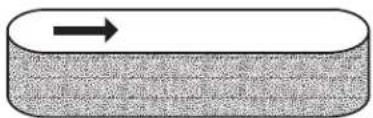
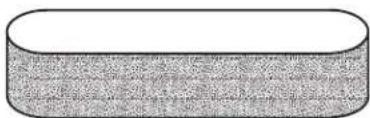
■ Install the sanding belt. Make sure the arrow inside the belt is pointing in the direction of rotation, which is clockwise when looking into the open side of the sander.
NOTE: Match the arrow on the sanding belt to that of the housing.

CAUTION:
If the sanding belt is not a bidirectional belt, ensure that the arrow inside the belt is pointing in the direction of the rotation (clockwise when looking into the open side of the sander). Installing unidirectional sanding belts backwards can create a hazardous condition.
■ Align the sanding belt to its correct position.
■ Lower the tension release lever to secure the sanding belt.
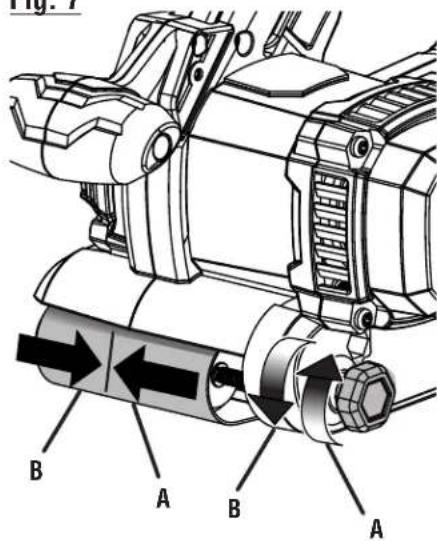
ADJUSTING SANDING BELT TRACKING
See Figures 6 -7, page 11.
After installing a new sanding belt, you may need to adjust the sanding belt tracking several times until the belt becomes conditioned.
Belt life is greatly increased if you regularly adjust the sanding belt tracking. When correctly adjusted, the outer edge of the sanding belt should be even with the outer edge of the base of the sander.
■ Make sure the switch is not in the locked-on position.
■ Install the battery pack.
■ Position the sander upside down.
NOTE: This position is for adjustments only. The sanding belt should not contact a workpiece or any foreign object when you are making belt tracking adjustments.
■ Depress the switch trigger and release immediately.
■ Choose one of these options:
- Sanding belt runs inward: Turn the tracking knob slowly counterclockwise.
- Sanding belt runs outward: Turn the tracking knob slowly clockwise.
NOTE: Turn the tracking knob until you are sure the sanding belt is secure, and it will not come off the sander or contact internal parts.
NOTICE:
If the sanding belt wears excessively on the inner edge it is probably adjusted too far inward and is rubbing against internal parts. If this is the case, readjust with the tracking knob.
■ Start the sander and fine-adjust the tracking knob until the belt stabilizes.

WARNING:
Keep hands and fingers away from a moving sanding belt. Any part of the body coming in contact with a moving sanding belt could result in serious injury. Do not wear loose clothing or jewelry when operating the sander. They could get caught in moving parts and foreign objects could get thrown away from the sander causing injury.
DUST COLLECTION BAG
See Figure 8, page 11.

WARNING:
Do not use the dust collection bag when sanding metal. Using the dust collection bag when sanding metal creates a fire hazard, which could damage the tool and lead to serious personal injury.
To attach the dust collection bag:
■ Remove the battery pack.
■ Slide the dust bag retainer over the blower exhaust hole on the sander.
To empty the dust collection bag:
For more efficient operation, empty the dust collection bag when it is no more than half full. This action permits the air to flow through the bag better. Always empty and clean the dust collection bag thoroughly upon completion of a sanding operation and before placing the sander in storage.

WARNING:
Collected sanding dust from sanding surface coatings such as polyurethanes, linseed oil, etc., can self-ignite in the sander dust collection bag or elsewhere and cause fire. To reduce the risk of fire, always empty the dust bag frequently (10-15 minutes) while sanding and never store or leave a sander without totally emptying its dust bag. Also follow the recommendations of the coatings manufacturers.
■ Remove the battery pack.
■ Remove the dust collection bag from the sander.
■ Unzip the dust bag.
■ Shake out the dust.
■ Zip up the dust bag.
■ Replace the dust collection bag.
NOTE: Periodically turn the dust bag inside out and thoroughly clean it.
ADJUSTING THE FRONT HANDLE
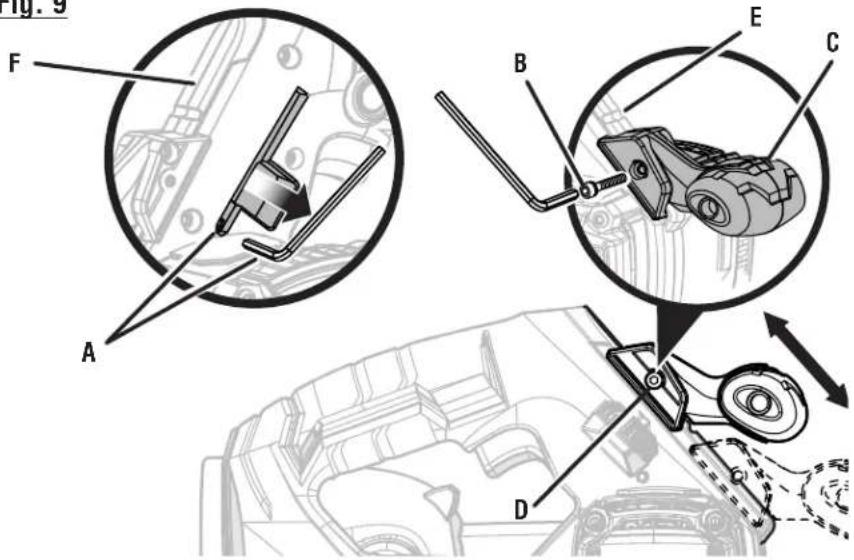
See Figure 9, page 11.
The front handle can be adjusted to one of three positions, depending on operator preference.
■ Remove the battery pack.
■ Remove the hex key from the storage area.
■ Loosen and remove the set screw from the adjustable handle.
■ Slide the handle to the desired operating position. Align the hole in the handle with the channel on the rail.
■ Reinsert and securely tighten the set screw.
NOTE: Always make sure the handle is locked into one of the lock positions.
■ Place the hex key in the storage area.
■ Make sure the sander is not in the locked-on position before reinstalling the battery pack.
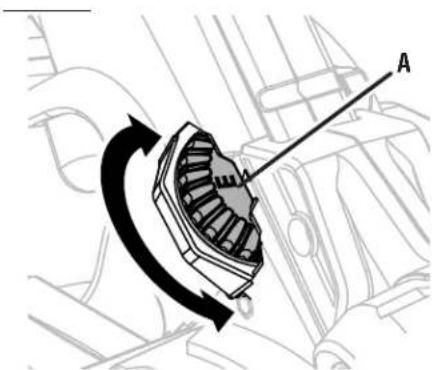
VARIABLE SPEED CONTROL DIAL
See Figure 10, page 11.
The sander has a variable speed control dial, A (slowest) to F (fastest), designed to allow operator control of belt speed. To increase belt speed, turn the variable speed control dial to a higher setting. Turn to a lower setting to decrease belt speed. Refer to the chart on page 8 for proper speed selections.
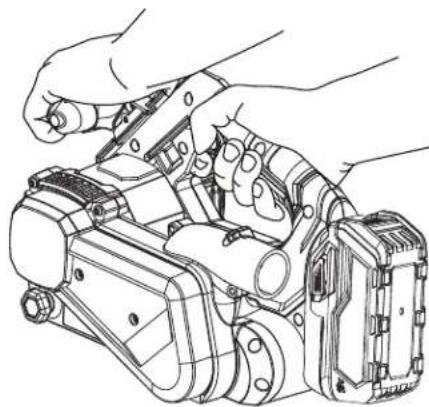
PROPER HAND PLACEMENT
See Figure 11, page 11.
The front and rear handles allow two-handed operation which aids in maintaining control, keeping sander level with workpiece, and keeping hands clear of sanding belt. When carrying or operating the sander always hold the front handle with the left hand and the rear handle with the right hand as shown.

WARNING:
Keep hands and fingers clear of moving sanding belt, front idler roller, and drive roller assembly. Failure to do so will result in serious personal injury.

WARNING:
Do not let your fingers rest over the front or right edge of the sander. If the sanding belt should run off, or if it is not properly adjusted, your fingers could come in contact with the moving sanding belt, resulting in possible serious injury.
| MATERIAL | SPEED BELT GRIT | |||||||||||
| A B C D E F | 40 60 80 100 | 150 | 240 | |||||||||
| UNDRESSED LUMBER | ★ | ★ | ● | ● | ||||||||
| SOFTWOOD | ★ | ● | ● | |||||||||
| CHIPBOARD | ★ | ★ | ● | ● | ||||||||
| LUMBER | ★ | ★ | ● | |||||||||
| RUST REMOVAL | ★ | ★ | ● | ● | ||||||||
| PAINTED SURFACE | ★ | ★ | ● | ● | ||||||||
| NON-FERROUS METAL | ★ | ● | ● | |||||||||

WARNING:
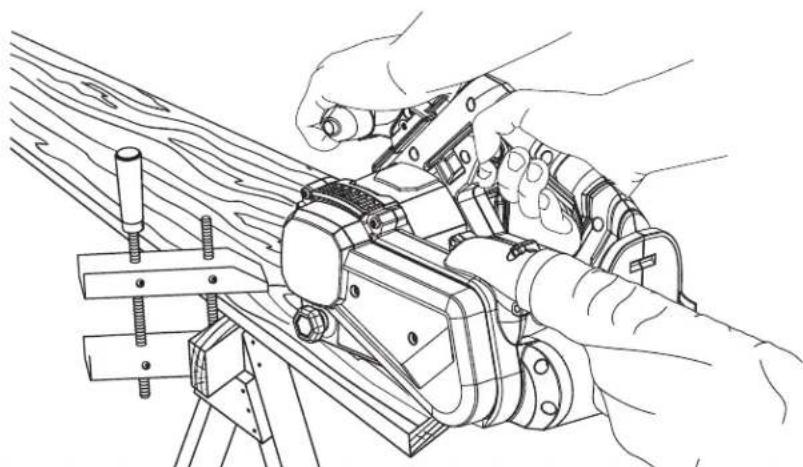
The sander is designed to be operated as shown with both hands on the tool at all times for maximum control. Never operate the tool overhead or inverted from the proper operating position; serious personal injury may result.
- Secure the work to prevent it from moving under the sander.

WARNING:
Unsecured work could be thrown towards the operator, causing injury.
■ Turn the sander on and let the motor reach its maximum speed before placing the sander on the work surface.
■ Lower the sander to the work surface with a slight forward motion.
■ Move the sander slowly over the work surface, using the rear handle to control the sander and the front handle to guide the sander.
NOTE: Allowing the sander to remain in one place will result in an uneven surface.

WARNING:
Keep a firm grip on the sander with both hands at all times. Failure to do so could result in loss of control leading to possible serious injury.
The sander is designed to provide the proper weight on the sanding belt. Excessive pressure will result in the following:
■ Uneven work
■ Clogged sanding belts
■ Premature sanding belt wear
■ Possible motor burnout
■ Irregular sanding belt tracking
HELPFUL TIPS
If the sanding belt slips or does not track while sanding, you may be applying too much pressure. When this occurs, remove the sander from the workpiece. If you properly adjust the belt tracking, the sanding belt will return to its normal and correct position on the drive roller and front roller.
■ Use a coarser sanding belt for heavy sanding, not heavy pressure. The weight of the tool is sufficient to provide adequate pressure at the correct location.
■ The front roller of the sander is not designed for contour sanding. Sanding on the front roller could cause irregularity in the sanding belt tracking.

WARNING:
When servicing, use only identical replacement parts. Use of any other part could create a hazard or cause product damage.

WARNING:
Always wear eye protection with side shields marked to comply with ANSI Z87.1. Failure to do so could result in objects being thrown into your eyes and other possible serious injuries.

WARNING:
To avoid serious personal injury, always remove the battery pack from the tool when cleaning, performing any maintenance, or when storing the tool.
GENERAL MAINTENANCE
Avoid using solvents when cleaning plastic parts. Most plastics are susceptible to damage from various types of commercial solvents and can be damaged by their use. Use clean cloths to remove dirt, dust, oil, grease, etc.

WARNING:
Do not at any time let brake fluids, gasoline, petroleum-based products, penetrating oils, etc., come in contact with plastic parts. Chemicals can damage, weaken or destroy plastic which could result in serious personal injury.
CALIFORNIA PROPOSITION 65

WARNING:
This product and some dust created by power sanding, sawing, grinding, drilling, and other construction activities may contain chemicals, including lead, known to the State of California to cause cancer, birth defects, or other reproductive harm. Wash hands after handling.
Some examples of these chemicals are:
- lead from lead-based paints,
- crystalline silica from bricks and cement and other masonry products, and
• arsenic and chromium from chemically-treated lumber.
Your risk from exposure to these chemicals varies, depending on how often you do this type of work. To reduce your exposure, work in a well-ventilated area and with approved safety equipment, such as dust masks that are specially designed to filter out microscopic particles.
NOTE: ILLUSTRATIONS START ON PAGE 10 AFTER FRENCH AND SPANISH LANGUAGE SECTIONS.
This product has a 90-Day Satisfaction Guarantee Policy, as well as a Three-year Limited Warranty. For Warranty and Policy details, please go to www.RIDGID.com or call (toll free) 1-866-539-1710.
AVERTISSEMENTS DE SÉCURITÉ GÉNÉRALES RELATIVES AUX OUTILS ÉLECTRIQUES

AVERTISSEMENT
natural_image
Technical line drawing of a mechanical device with labeled component A (no text or symbols beyond label)natural_image
Technical line drawing of a car engine compartment with directional arrows indicating assembly or movement (no text or symbols present)Fig. 5
natural_image
Simple diagram of a rectangular block with a horizontal arrow pointing right (no text or symbols)A
natural_image
Simple 3D illustration of a rectangular block with textured surface (no text or symbols)natural_image
Line drawing of a hand holding a device with a scroll, no text or symbols presentFig. 9
text_image
Fig. 9 A B C D E FFig. 7
text_image
Fig. 1 A B A Bnatural_image
Technical line drawing of a mechanical device with no visible text or symbolsA - Hex key and storage area (rangement des clé hexagonale, compartimento de llave hexagonal)
B - Set screw (vis de réglage, tornillos fijadores)
C - Adjustable handle (poignée réglable, mango ajustable)
D - Align hole in handle with the channel on the rail (french, spanish)
E - Channel
F - Rail
text_image
Technical diagram showing a mechanical component with labeled section A and rotational arrow indicating motion or rotation.A - Variable speed control dial [A to F] (commande de vitesse variable [réglages A à F], selector de control de velocidad variable [de la 'A' a la 'F'])
Fig. 11 Fig. 10
natural_image
Line drawing of hands operating a mechanical device with no visible text or symbolsFig. 12
natural_image
Line drawing of hands operating a mechanical tool on a wooden surface (no text or symbols)OPERATOR'S MANUAL
MANUEL D'UTILISATION
MANUAL DEL OPERADOR
18 VOLT BRUSHLESS BELT SANDER
18 V PONCEUSE À BANDE SANS BALAI
Customer Service Information:
For parts or service, do not return this product to the store. Contact your nearest RIDGID® authorized service center. Be sure to provide all relevant information when you call or visit. For the location of the authorized service center nearest you, please call 1-866-539-1710 or visit us online at www.RIDGID.com.
MODEL NO. ____ SERIAL NO. ____
RIDGID is a registered trademark of RIDGID, Inc., used under license.