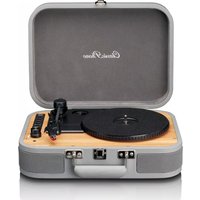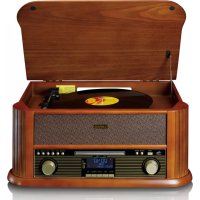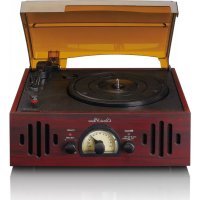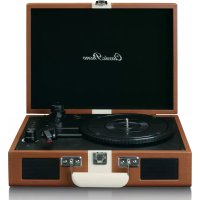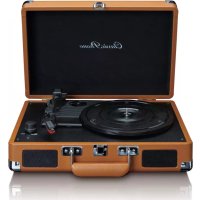
TCD2550 - Turntable Classic Phono - Free user manual and instructions
Find the device manual for free TCD2550 Classic Phono in PDF.



User questions about TCD2550 Classic Phono
0 question about this device. Answer the ones you know or ask your own.
Ask a new question about this device
Download the instructions for your Turntable in PDF format for free! Find your manual TCD2550 - Classic Phono and take your electronic device back in hand. On this page are published all the documents necessary for the use of your device. TCD2550 by Classic Phono.
USER MANUAL TCD2550 Classic Phono
Classic Phono by Lenco
Model: TCD-2550
natural_image
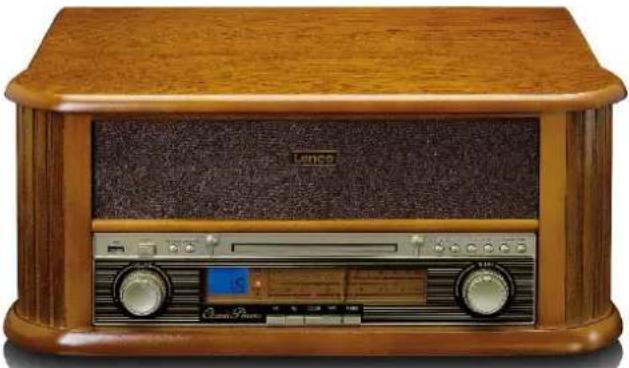
Vintage wooden radio console with analog buttons and a digital display (no visible text or symbols)USER MANUAL- Wooden Turntable with USB Encoding, AM/FM radio, CD and cassette player
Do Usage of controls or adjustments or performance of procedures other than those specified herein may result in hazardous radiation exposure.
KEEP THESE INSTRUCTIONS IN MIND:
- Do not cover or block any ventilation openings. When placing the device on a shelf, leave 5 cm (2") free space around the whole device.
- Install in accordance with the supplied user manual.
- Keep the device away from heat sources such as radiators, heaters, stoves, candles and other heat-generating products or naked flame. The device can only be used in moderate climates. Extremely cold or warm environments should be avoided. Working temperature between 0^ and 35^ C.
- Avoid using the device near strong magnetic fields.
- Electrostatic discharge can disturb normal usage of this device. If so, simply reset and restart the device following the instruction manual. During file transmission, please handle with care and operate in a static-free environment.
- Warning! Never insert an object into the product through the vents or openings. High voltage flows through the product and inserting an object can cause electric shock and/or short circuit internal parts. For the same reason, do not spill water or liquid on the product.
- Do not use in wet or moist areas such as bathrooms, steamy kitchens or near swimming pools.
- The device shall not be exposed to dripping or splashing and make sure that no objects filled with liquids, such as vases, are placed on or near the apparatus.
- Do not use this device when condensation may occur. When the unit is used in a warm wet room with damp, water droplets or condensation may occur inside the unit and the unit may not function properly; let the unit stand in power OFF for 1 or 2 hours before turning on the power: the unit should be dry before getting any power.
- Although this device is manufactured with the utmost care and checked several times before leaving the factory, it is still possible that problems may occur, as with all electrical appliances. If you notice smoke, an excessive build-up of heat or any other unexpected phenomena, you should disconnect the plug from the main power socket immediately.
- This device must operate on a power source as specified on the specification label. If you are not sure of the type of power supply used in your home, consult your dealer or local power company.
- Keep away from animals. Some animals enjoy biting on power cords.
- To clean the device, use a soft dry cloth. Do not use solvents or petrol based fluids. To remove severe stains, you may use a damp cloth with dilute detergent.
- The supplier is not responsible for damage or lost data caused by malfunction, misuse, modification of the device or battery replacement.
- Do not interrupt the connection when the device is formatting or transferring files. Otherwise, data may be corrupted or lost.
- If the unit has USB playback function, the USB memory stick should be plugged into the unit directly. Don't use an USB extension cable because it can cause interference resulting in failing of data.
- The rating label has been marked on the bottom or back panel of the device.
- This device is not intended for use by people (including children) with physical, sensory or mental disabilities, or a lack of experience and knowledge, unless they're under supervision or have received instructions about the correct use of the device by the person who is responsible for their safety.
- This product is intended for non professional use only and not for commercial or industrial use.
- Make sure the unit is adjusted to a stable position. Damage caused by using this product in an unstable position vibrations or shocks or by failure to follow any other warning or precaution contained within this user manual will not be covered by warranty.
- Never remove the casing of this device.
- Never place this device on other electrical equipment.
- Do not allow children access to plastic bags.
-
Only use attachments/accessories specified by the manufacturer.
-
Refer all servicing to qualified service personnel. Servicing is required when the device has been damaged in any way, such as the power supply cord or the plug, when liquid has been spilled or objects have fallen into the device, when the device has been exposed to rain or moisture, does not operate normally, or has been dropped.
-
Long exposure to loud sounds from personal music players may lead to temporary or permanent hearing loss.
-
If the product is delivered with power cable or AC power adaptor:
-
If any trouble occur, disconnect the AC power cord and refer servicing to qualified personnel.
- Don't step on or pinch the power adaptor. Be very careful, particularly near the plugs and the cable's exit point.
Do not place heavy items on the power adaptor, which may damage it. Keep the entire device out of children's reach! When playing with the power cable, they can seriously injure themselves. - Unplug this device during lightning storms or when unused for a long period.
- The socket outlet must be installed near the equipment and must be easily accessible.
- Do not overload ac outlets or extension cords. Overloading can cause fire or electric shock.
- Devices with class 1 construction should be connected to a main socket outlet with a protective earthed connection.
- Devices with class 2 construction do not require a earthed connection.
- Always hold the plug when pulling it out of the main supply socket. Do not pull the power cord. This can cause a short circuit.
-
Do not use a damaged power cord or plug or a loose outlet. Doing so may result in fire or electric shock.
-
If the product contains or is delivered with a remote control containing coin/cell batteries:
Warning:
- "Do not ingest battery, Chemical Burn Hazard" or equivalent working.
- [The remote control supplied with] This product contains a coin/button cell battery. If the battery is swallowed it can cause severe internal burns in just 2 hours and can lead to death.
- Keep new and used batteries away from children.
- If the battery compartment does not close securely, stop using the product and keep it away from children.
-
If you think batteries might have been swallowed or placed inside any part of the body, seek immediate medical attention.
-
Caution about the use of Batteries:
-
Danger of explosion if battery is incorrectly replaced. Replace only with the same or equivalent type.
- Battery cannot be subjected to high or low extreme temperatures, low air pressure at high altitude during use storage or transportation.
- Replacement of a battery with an incorrect type that can result in an explosion or the leakage of flammable liquid or gas.
- Disposal of a battery into fire or a hot oven, or mechanically crushing or cutting of a battery, that can result in an explosion.
- Leaving a battery in an extremely high temperature surrounding environment that can result in an explosion or that leakage of flammable liquid or gas.
- A battery subjected to extremely low air pressure that may result in an explosion or the leakage of flammable liquid or gas.
- Attention should be drawn to the environmental aspects of battery disposal.
INSTALLATION
- Unpack all parts and remove protective material.
- Do not connect the unit to the mains before checking the mains voltage and before all other connections have been made.
WARNING
Class 1 Laser Product
CLASS 1 LASER PRODUCT APPAREIL À LASER DE CLASSE 1 PRODUCTO LASER DE CLASE 1
This product contains a low power laser device.
CAUTION INVISIBLE LASER RADIATION WHEN OPEN AND INTERLOCKS DEFEATED. AVOID EXPOSURE TO BEAM


WARNING: When participating in the traffic listening to a personal music player can make the listener less aware of potential dangers such as approaching cars.
WARNING: To prevent possible hearing damage, do not listen at high volume levels for long periods.
UNPACKING AND SET UP
- Carefully remove the unit from the display carton and remove all packing material from the unit.
• Unwind the AC power cord and extend it to its full length.
• Unwind the FM Antenna wire and extend it to its full length. - Place the unit on a stable, level surface, convenient to an AC outlet away from a strong magnetic field.
- Connect the plug to your AC outlet.
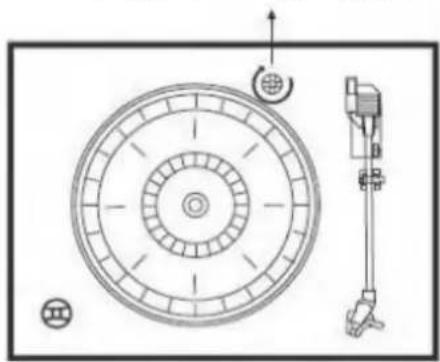
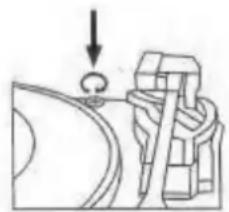
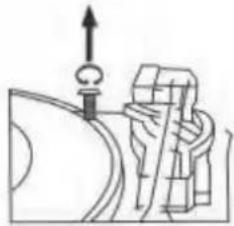
- Raise the lid to expose the phonograph. The phonograph has been secured for shipment with a transit screw. Use a coin or screwdriver to turn the transportation locking screw clockwise. This will allow the turntable to "float".
Transportation locking screw
natural_image
Technical diagram of a circular mechanical component with internal concentric rings and a vertical support structure (no text or symbols)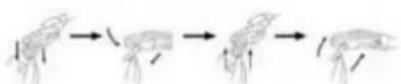
- Remove the opaque white plastic stylus cover from the phonograph stylus by sliding it in the direction of the arrow (refer to the picture on the right side).
- During this operation pay attention to the stylus, because damage to the stylus is not covered by the guarantee.
- Remove the twist-tie that was used to secure the tone arm during shipment.
- Release the tone arm lock lever (see Fig.1 below).
- Connect the plug to your AC 230V, 50Hz outlet.
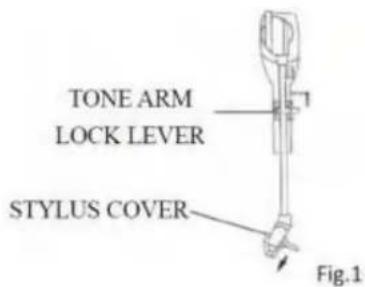
text_image
TONE ARM LOCK LEVER STYLUS COVER Fig.1LITHIUM BATTERY INSTALLATION OF REMOTE CONTROL
- The remote control requires one CR2025 (3V) lithium battery.
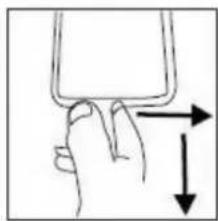
- Hold and lever pressing the clasp with the thumb in the right direction of the arrow in the illustration, and take out the battery compartment by sliding with forefinger in the direction towards you. Take out the battery compartment from the remote control. Install a lithium battery (CR-2025) in the compartment with the positive polarity upturned Level hold and push the battery compartment into the remote control lightly. It's okay once you hear a click.
natural_image
Hand holding a small object with an arrow indicating direction (no text or symbols)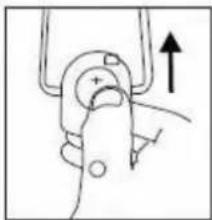
natural_image
Simple line drawing of a mechanical clamp or grip with an upward arrow indicating force (no text or symbols)FRONT
text_image
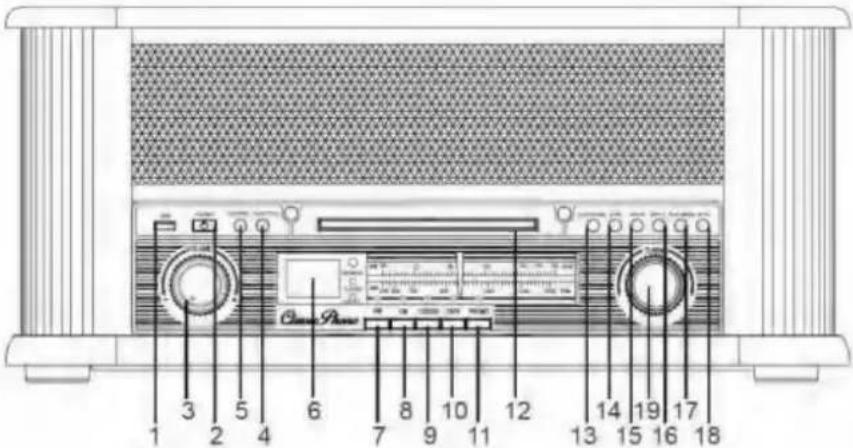
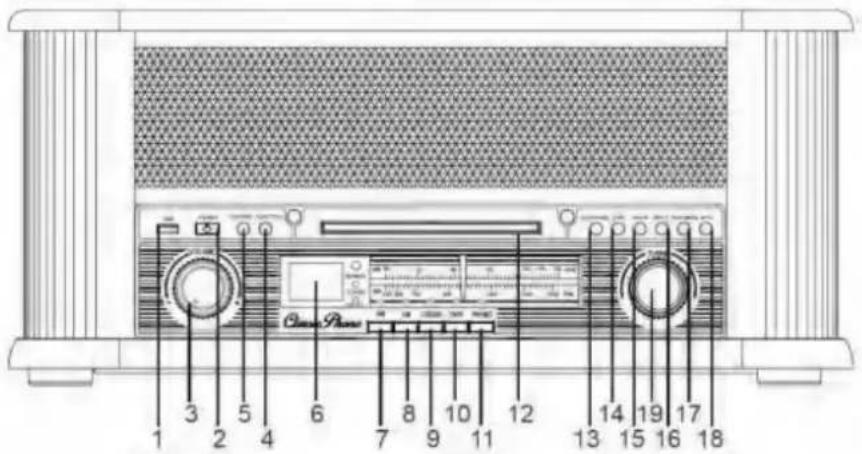
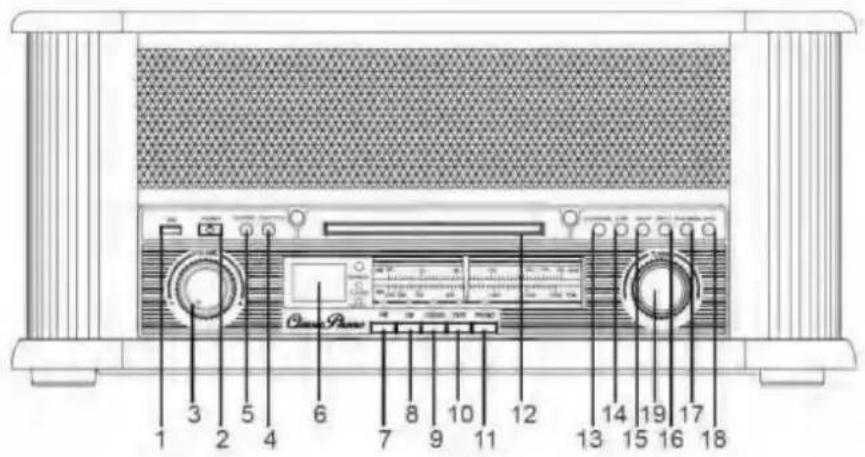
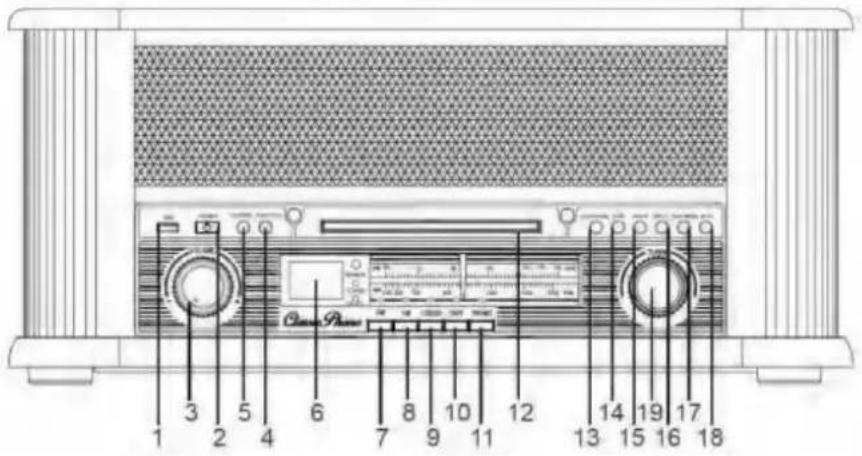
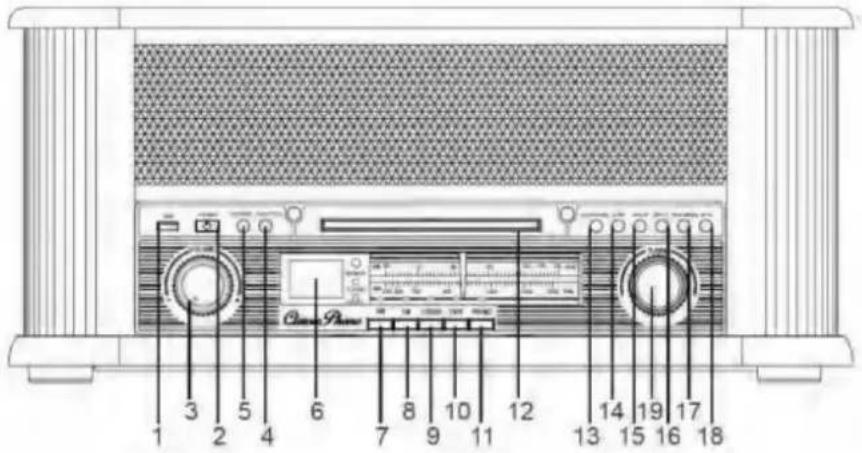
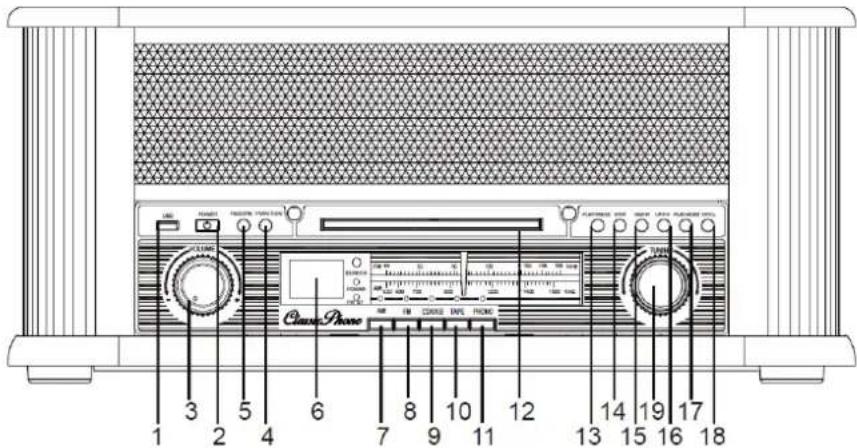
1 2 3 4 5 6 7 8 9 10 11 12 13 14 15 16 17 18 Chord-RadonLEFT SIDE
text_image
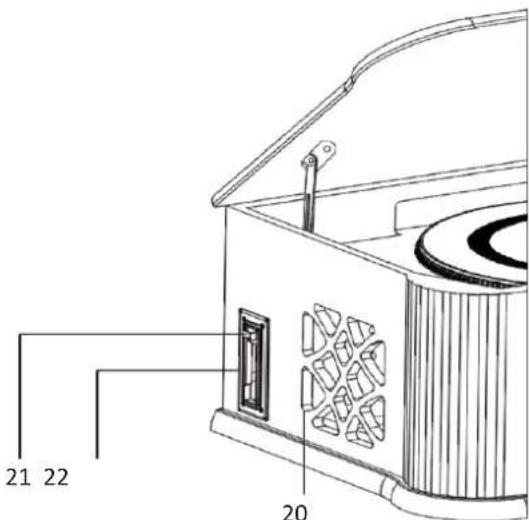
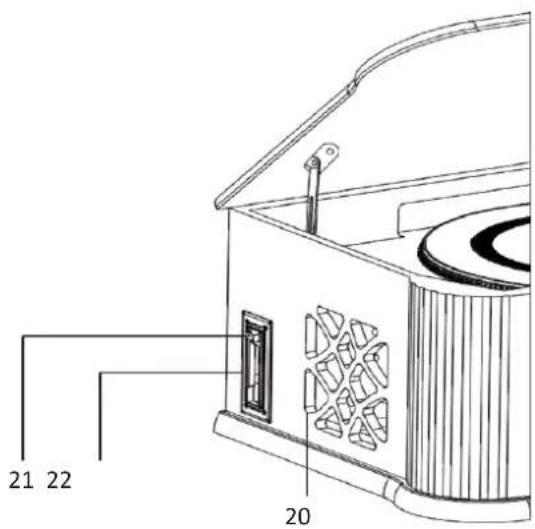
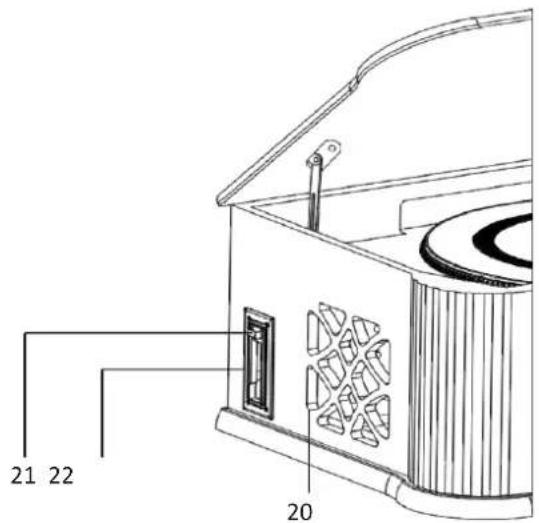
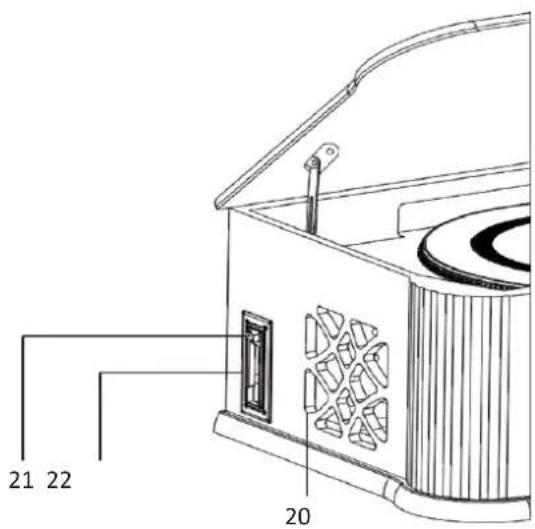
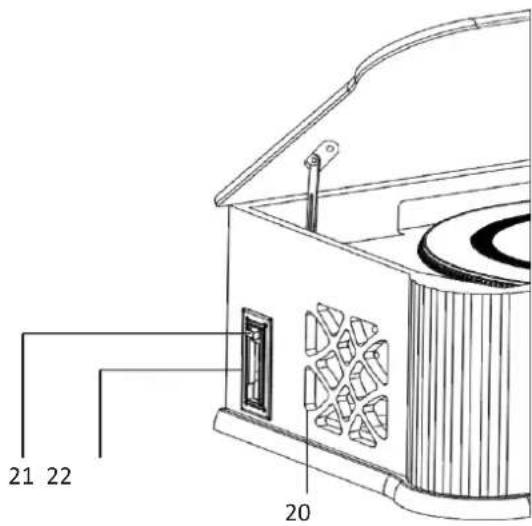
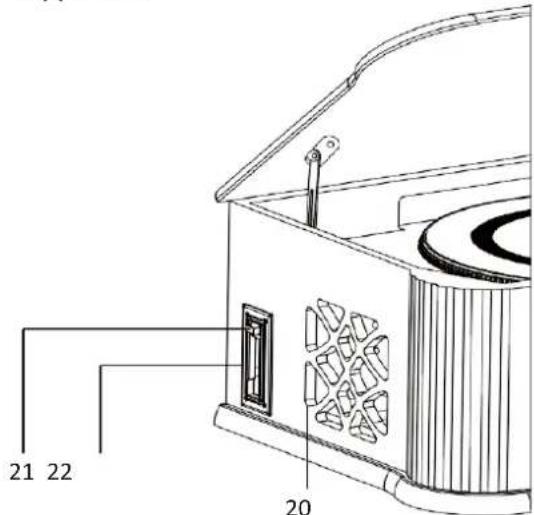
21 22 20REAR
text_image
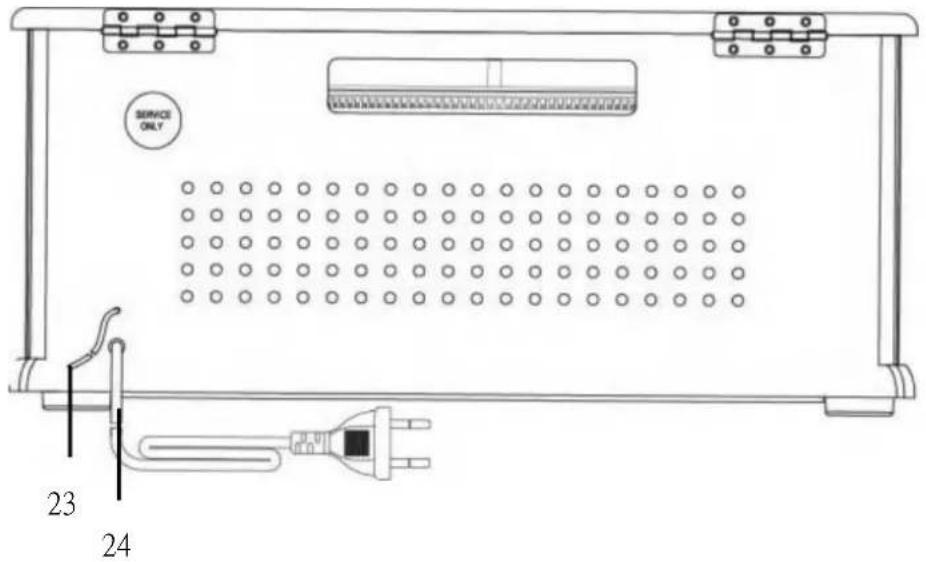
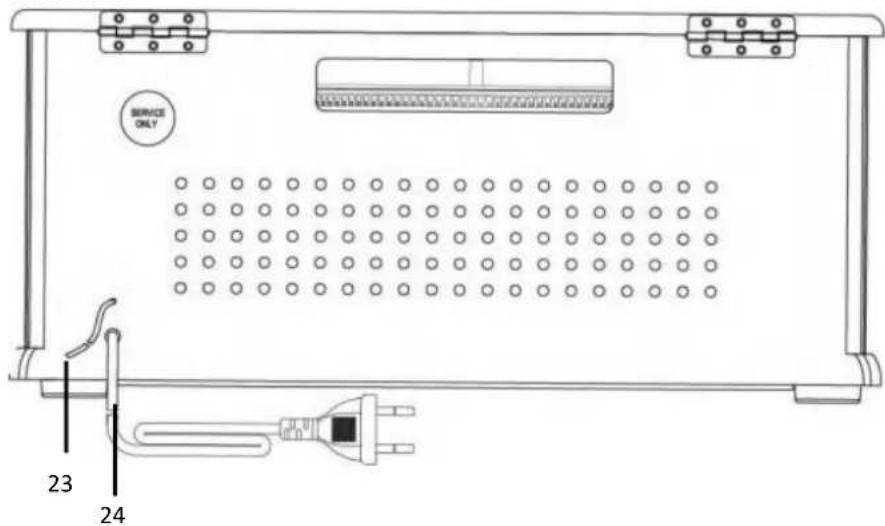
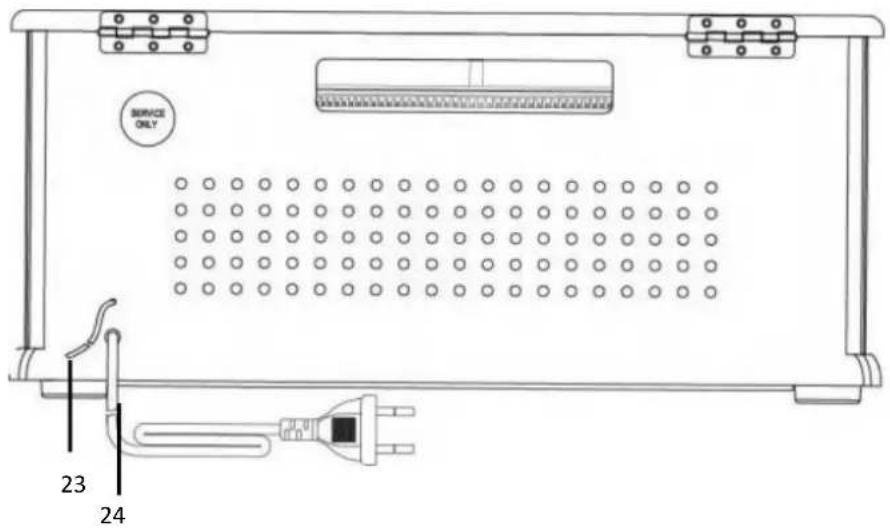
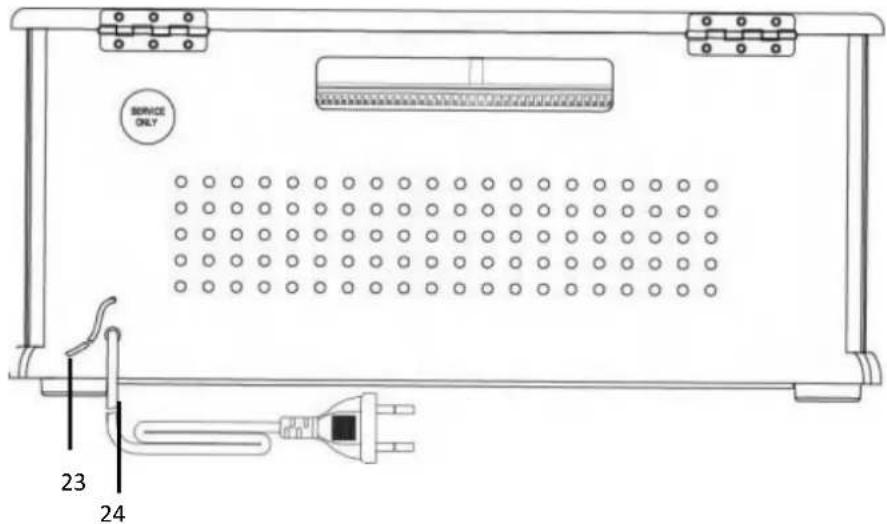
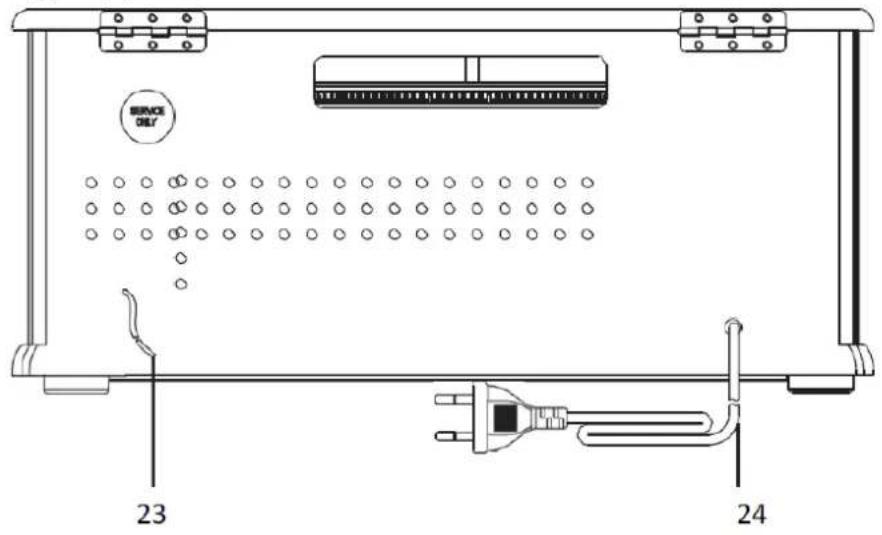
SERVICE ONLY 23 24TOP
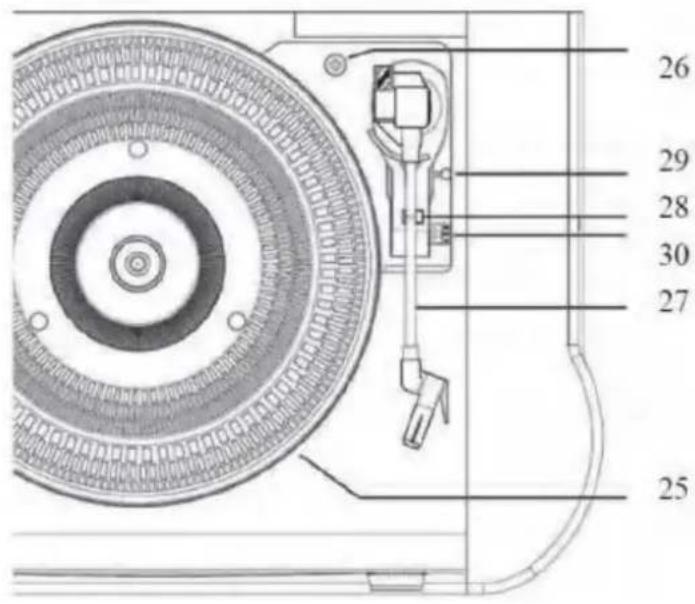
text_image
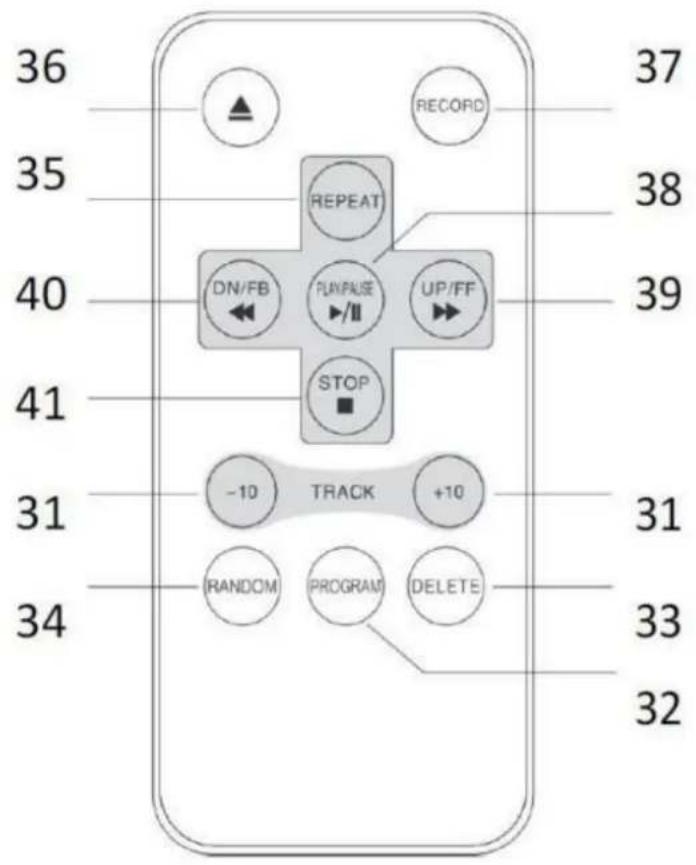
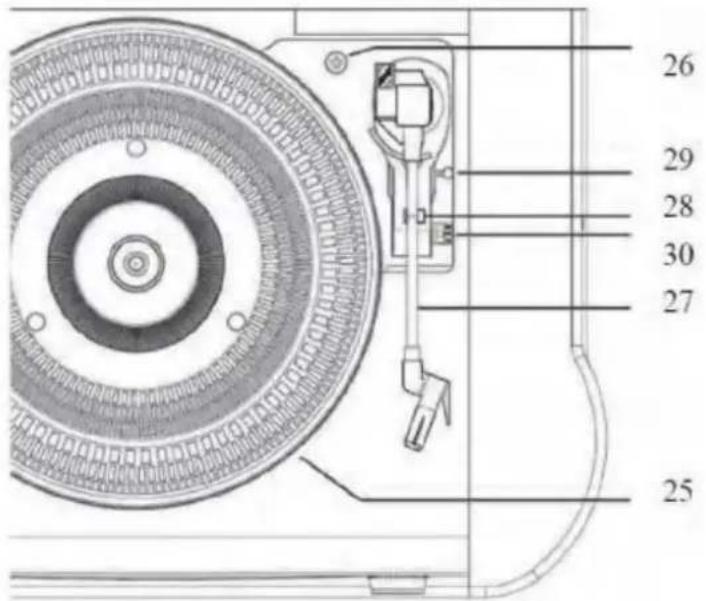
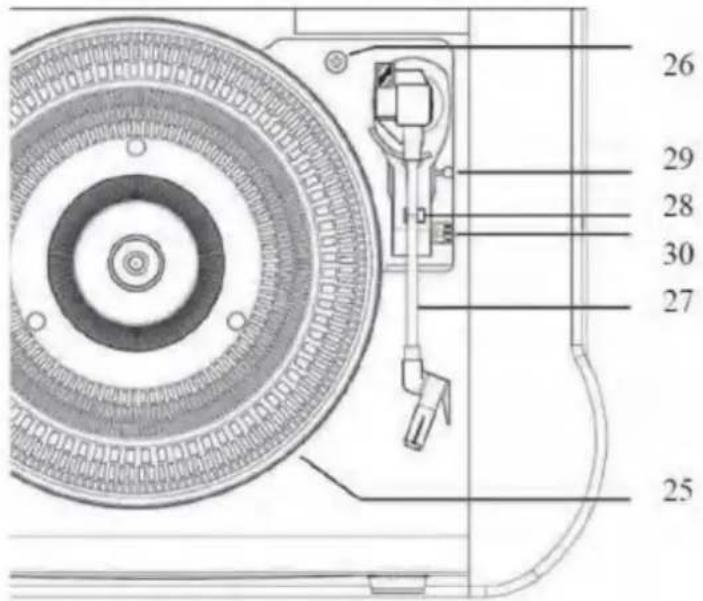
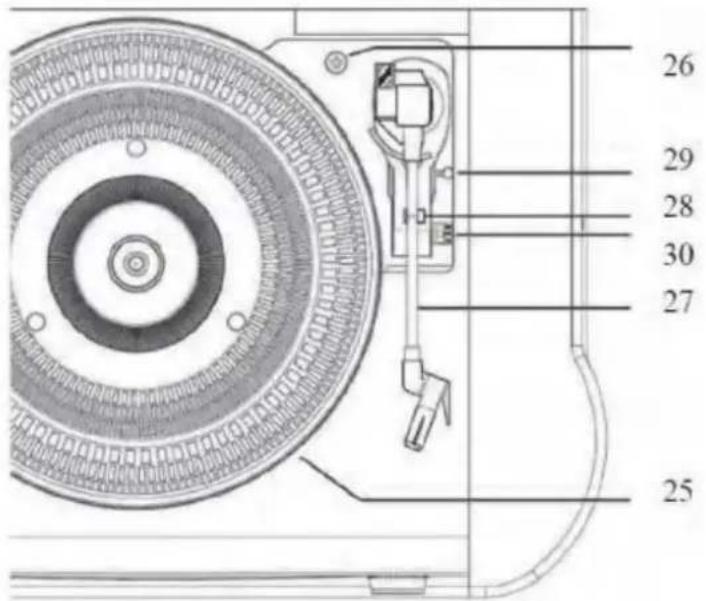
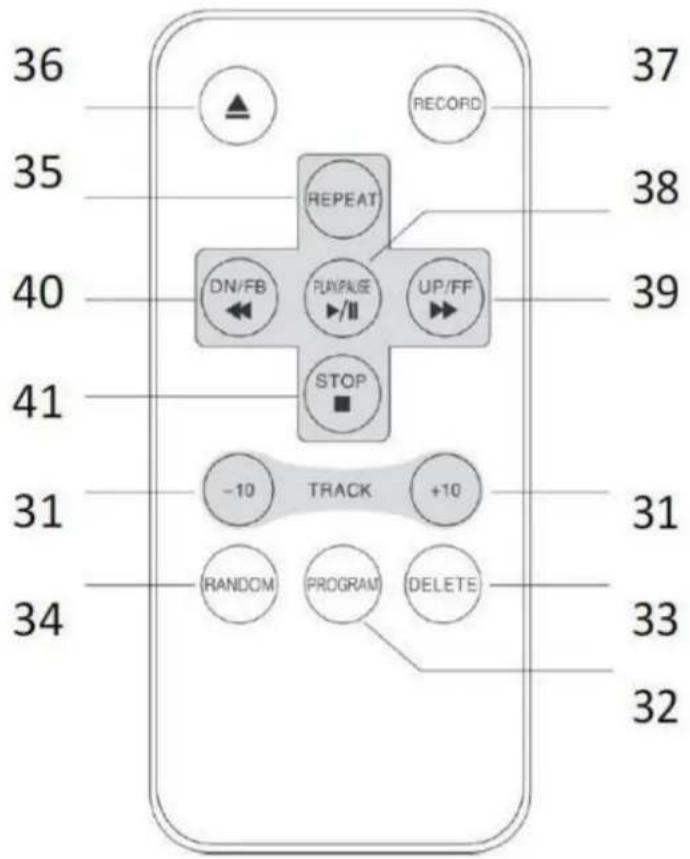
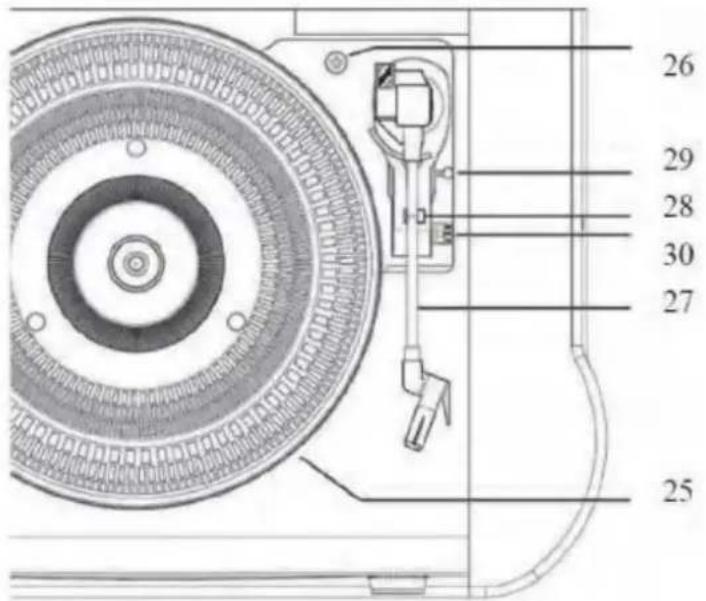
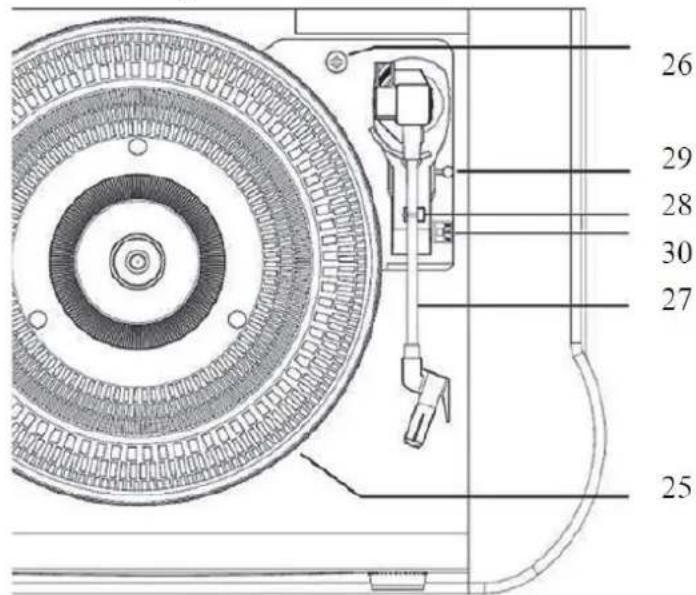
26 29 28 30 27 25REMOTE CONTROL
text_image
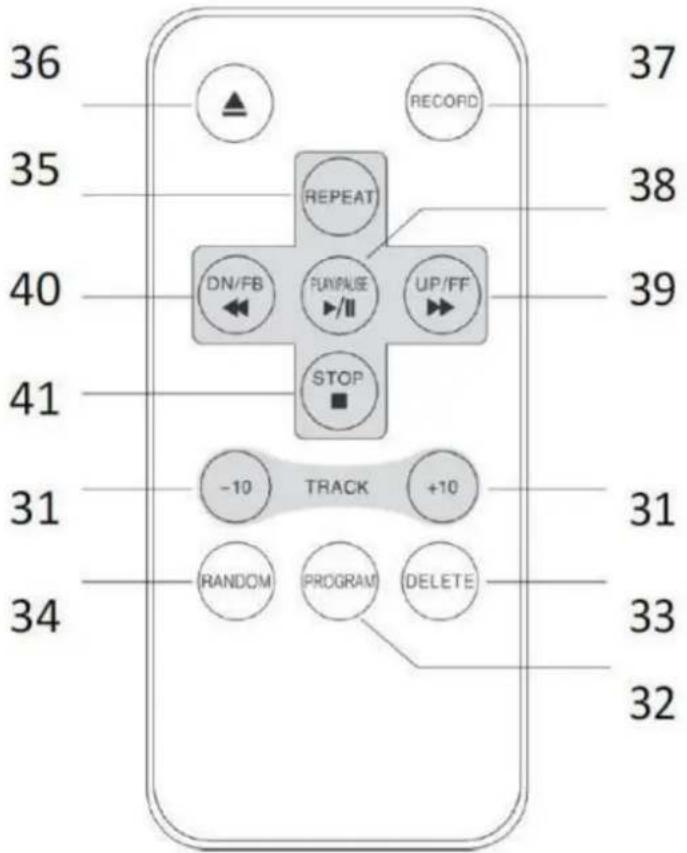
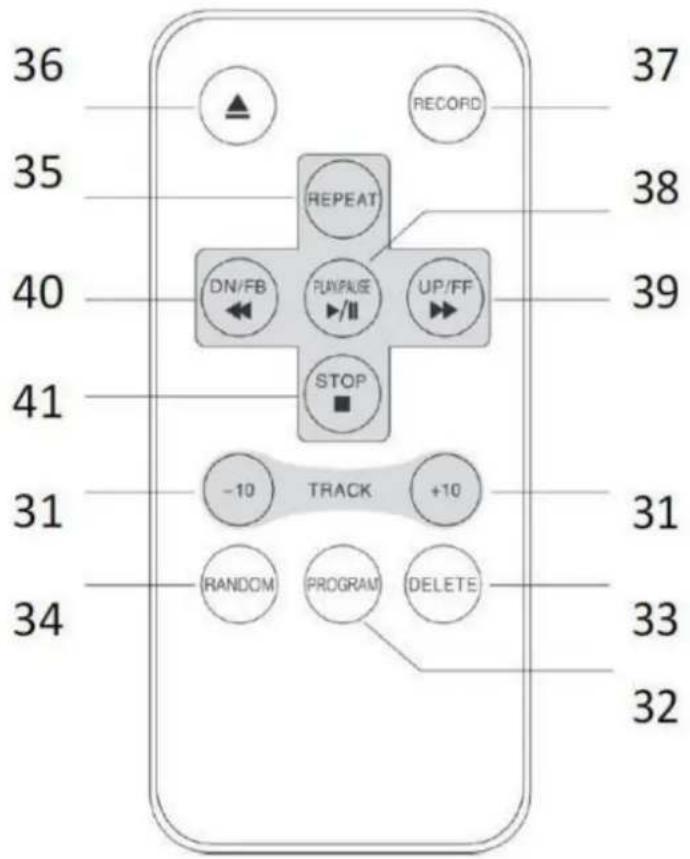
36 35 40 41 31 34 37 38 39 31 33 32 ▲ RECORD REPEAT DN/FB FLN/FAUSE /II UP/FF STOP -10 TRACK +10 RANDOM PROGRAM DELETELOCATION OF CONTROLS
- USB PORT
- POWER ON/OFF BUTTON
- VOLUME KNOB
- FUNCTION BUTTON
- RECORD BUTTON
- LCD DISPLAY
- AM RADIO SOURCE BUTTON
- FM RADIO SOURCE BUTTON
- CD/USB SOURCE BUTTON
- TAPE SOURCE BUTTON
- PHONO SOURCE BUTTON
-
CD DOOR
-
PLAY/PAUSE: Press to play. When it plays, press to stop playback temporarily and press again to resume playback.
-
STOP: Press when you want to finish playback.
-
SKIP -/REWIND: Press to go to the previous track, press & hold to go backfast.
- SKIP +/FAST FORWARD: press to go to the next track, press & hold to fastforward.
- PLAY-MODE: press repeatedly to choose the play-mode (REPEAT, RANDOM)
- CD DOOR OPEN/CLOSE BUTTON
- TUNING KNOB
- SPEAKERS
- CASSETTE FFD/EJECT
- CASSETTE MECHANISM
- ANTENNA WIRE
- POWER CORD
- TURNTABLE PLATE
- TRANSPORTATION LOCK SCREW
- TONE ARM
- TONE ARM LOCK
- LIFT LEVER
- 33/45/78 RPM SPEEDSELECTOR
REMOTE CONTROL
- -/+ 10 TRACK
- PROGRAM BUTTON
- DELETE BUTTON
- RANDOM BUTTON
- REPEAT BUTTON
- CD DOOR OPEN/CLOSE BUTTON
- RECORD BUTTON
- PLAY/PAUSE
- SKIP+/FAST FORWARD
- SKIP-/REWIND
- STOP
POWER SOURCES
AC POWER: You can power your stereo system by plugging the AC power cord (24) into a wall power outlet. Check that the rated voltage of your appliance matches your local voltage.
TO USE THE RADIO
- Press the [POWER] button (2) to turn ON the unit;
- Select the desired audio source by pressing the [SOURCE] button (7 to 11);
- (Please see detailed instructions for each Source in the following chapters);
- Adjust the volume with the [VOLUME KNOB] (3) to the desired level;
- Press and hold the [POWER] button (2) to turn OFF the unit.
Note: When no sound is produced, the unit will switch OFF automat. after 10 minutes.
RADIO OPERATION
- Press the [AM] or [FM] button (7 or 8);
- Adjust radio frequency to your desired station by turning the [TUNING KNOB] (19).
Note: For a better reception FM move the wired antenna (23) around.
For MW reception the signals are picked up through a built-in ferrite antenna. You may have to orient the unit to obtain the best reception.
TURNTABLE OPERATION
Note: When using the turntable for the first time, turn the [TRANSPORTATION LOCK SCREW] (26) clockwise until fully screwed in.
natural_image
Diagram of a mechanical assembly with a hook and connecting rod (no text or symbols)- Press the [PHONO] button (11);
- Place a record on the turntable. Place the EP adapter over the central spindle when playing 45 rpm records;
- Set the [SPEED SELECTOR] (30) to 33, 45 or 78 rpm according to the record;
- Release the [TONEARM CLAMP] (28), and remove the stylus protector;
- Lift up the [TONEARM] (27) with the [LIFT LEVER] (30);
- Move the [TONEARM] (27) to the beginning of the record;
- Lift down the [TONEARM] (27) with the [LIFT LEVER] (29);
- When the record is finished the [TONEARM] (27) will automatically return to the rest support and the [PLATE] (25) will stop turning. To stop manually, lift up the tonearm from the record and return it to the rest support.
NOTE: Do not turn or stop the turntable manually. Moving or jarring the turntable without securing the tone arm clamp could result in damage to the tone arm.
Making the TCS-2550 ready for transportation.
- Lock the [TONEARM] (27) with the [TONEARM CLAMP] (28);
- Place the protective cap on the stylus (even when not in use);
- Turn the [TRANSPORTATION LOCK SCREW] (26) counterclockwise until you feel more resistance (don't remove the screw completely!)
natural_image
Pure mechanical diagram showing a lever and gear assembly without any text or symbolsCD-MP3 OPERATION
- Press the [CD/USB] button (9);
- Press [OPEN/CLOSE] (18) to open the [CD DOOR] (12) and place a CD with the label side facing up in the CD compartment.
- Close the [CD DOOR] (12). CD music search is performed and playback will start automatically from the first track.
PROGRAMMING
Up to 99 tacks (MP3, 20 in CD) can be programmed and play in any order.
- Stop the playback by pressing [STOP] (14 or 41);
- Press [PLAY MODE] (17) or PROGRAM, the display (6) will show "P01" and flash;
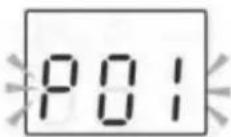
- Select desired track by using [SKIP -/+] buttons (15/16 or 39/40);
- Press [PLAY MODE] (17) or PROGRAM gain to Program the track into the program memory;
- Repeat step 3 and 4 to enter additional tracks into the program memory.
- When all the desired tracks have been programmed, press [PLAY] (13 or 38) to play the disc in the order you have programmed.
Note: Press [STOP] (14 or 41) twice to terminate the programmed play.
USB OPERATION
- Press the [CD/USB] button (9);
-
Plug an USB stick into the [USB PORT] (1);
-
Press the [FUNCTION] button (4) to select USB mode;
- Playback will start automatically from the first track.
PROGRAMMING
The PROGRAMMING operation is the same as that of CD-MP3.
Notes:
- Some mp3 player may not be able to play via the usb socket. this is not a malfunctioning of the system.
- The USB port is not designed for charging smartphones or other devices.
TAPE OPERATION
- Press the [TAPE] source button (10);
- Insert a cassette TAPE into the [CASSETTE MECHANISM] (22);
- The system will start playback automatically;
- Press [TAPE FORWARD/EJECT] button (21) half way during playback to start quick tape winding in forward direction.
- Slightly press the [TAPE FORWARD/EJECT] button (21) again to resume playback.
- Press the [TAPE FORWARD/EJECT] button (21) completely inwards and the cassette tape will be ejected.
DIRECT USB ENCODING Remark:
• Recording speed is 1:1.
- No song title will be recorded during encoding mode.
• To avoid damage to USB memory, remove it only when the radio is turned off.
ENCODE FROM PHONO AND CASSETTE:
- Plug the USB stick into the [USB PORT] (1);
- Perform normal playback of the source you want to encode & record;
- Press the [RECORD] button (5 or 37) twice to start encoding. On the display will flash "REC";
- Once the record is finished, press the [STOP] button (14 or 41) to stop recording.
ENCODE FORM CD:
Encode 1 track:
- Plug the USB stick into the [USB PORT] (1);
- Perform normal playback of the track you want to encode & record;
- Press the [RECORD] button (5 or 37) twice during the playback of the desired track.
The playback will stop and restart automatically. The "USB" text on the top of the display
will flash, indicating the encoding is started.
-
At the end of the track press the [STOP] button (14 or 41) to finish recording the track.
-
Plug the USB stick into the [USB PORT] (1);
- Perform normal playback of the CD you want to encode & record;
- Press the [RECORD] button (5 or 37) twice after the initial music search has been completed;
- The playback will start. The "USB" text on the top of the display will flash, indicating the encoding is started.
Note: When the conversion is completed, the unit will stop playback and recording automatically.
DELETE TRACKS FROM USB
- Perform normal playback of the track you want to delete;
- During playback of the track you want to delete, press the [DELETE] button (33) on the remote control twice.
SPECIFICATIONS
Power requirement : AC 230V \~ 50Hz
Power consumption : 40 Watt (max)
Music Power : 2 x 4.5W
Radio Frequency : AM: 525-1640 KHz
FM: 88-108 MHz
Turntable speed: : 33/45/78 RPM
CD player compatibility : CD/CD-R/CD-RW/MP3
USB connection for Memorystick (no charging) : MP3 files
USB recording from CD, Tape and Record : Bitrate 128 KBPS
1. Guarantee
Lenco offers service and warranty in accordance to European law, which means that in case of repairs (both during and after the warranty period) you should contact your local dealer.
Important note: It is not possible to send products that need repairs to Lenco directly.
Important note: If this unit is opened or accessed by a non-official service center in any way, the warranty expires.
This device is not suitable for professional use. In case of professional use, all warranty obligations of the manufacturer will be voided.
2. Disclaimer
Updates to Firmware and/or hardware components are made regularly. Therefore some of the instruction, specifications and pictures in this documentation may differ slightly from your particular situation. All items described in this guide for illustration purposes only and may not apply to particular situation. No legal right or entitlements may be obtained from the description made in this manual.
3. Disposal of the Old Device
natural_image
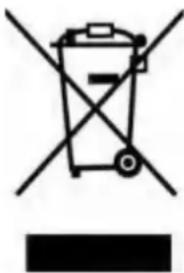
Symbol of a trash bin crossed with no text or numbers, representing waste sorting or disposal (no text present)This symbol indicates that the relevant electrical product or battery should not be disposed of as general household waste in Europe. To ensure the correct waste treatment of the product and battery, please dispose them in accordance to any applicable local laws of requirement for disposal of electrical equipment or batteries. In so doing, you will help to conserve natural resources and improve standards of environmental protection in treatment and disposal of electrical waste (Waste Electrical and Electronic Equipment Directive).
4. CE Marking
Hereby, Lenco Benelux B.V., Thermiekstraat 1a, 6361 HB Nuth, The Netherlands, declares that this product is in compliance with the essential EU directive requirements.
The declaration of conformity may be consulted via techdoc@commaxxgroup.com

5. Service
For more information and helpdesk support, please visit www.lenco.com
Lenco Benelux BV, Thermiekstraat 1a, 6361 HB, The Netherlands.
Nederlands
LET OP:
text_image
Warning sign with black triangular triangle containing a central explosion or virus symbolnatural_image
Hand holding a small object with directional arrows indicating movement or force (no text or symbols)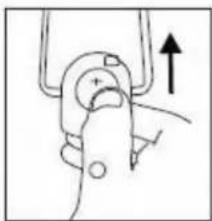
natural_image
Simple line drawing of a mechanical clamp or grip with an upward arrow indicating force (no text or symbols)VOORKANT
text_image
1 2 3 4 5 6 7 8 9 10 11 12 13 14 15 16 17 18LINKERKANT
text_image
21 22 20ACHTERKANT

text_image
SERVICE ONLY 23 24BOVENKANT
text_image
26 29 28 30 27 25AFSTANDSBEDIENING

text_image
36 35 40 41 31 34 RECORD 37 38 39 -10 TRACK +10 -10 RUN/PAGE UP/FF -10 RANDOM PROGRAM DELETE 32 33 31 32natural_image
Simple line drawing of a mechanical component with an arrow indicating direction (no text or symbols)natural_image
Pure mechanical diagram showing a lever and gear mechanism without any text or symbolsBEDIENING CD-MP3
natural_image
Symbol of a trash bin crossed with diagonal lines, no text or numbers presenttext_image
Warning sign with triangular triangle and central sunburst symbol
natural_image
Technical diagram of a circular mechanical component with concentric rings and a vertical rod, shown without any text or symbols.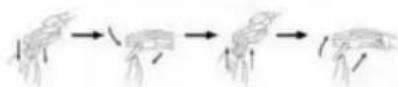
natural_image
Hand holding a small object with directional arrows indicating movement or force (no text or symbols)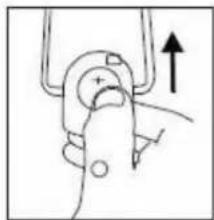
natural_image
Simple line drawing of a hand gripping a device with an upward arrow (no text or symbols)VORDERSEITE
text_image
1 2 3 4 5 6 7 8 9 10 11 12 13 14 15 16 17 18LINKE SEITE
text_image
21 22 20RÜCKSEITE
text_image
SERVICE ONLY 23 24OBERSEITE
text_image
26 29 28 30 27 25FERNBEDIENUNG
text_image
36 35 40 41 31 34 -10 -10 -10 -10 -10 -10 -10 -10 -10 -10 -10 -10 -10 -10 -10 -10 -10 -10 -10 -10 -10 -10 -10 -10 -10 -17 38 39 31 33 32natural_image
Simple line drawing of a mechanical component with an arrow indicating direction (no text or symbols)natural_image
Pure mechanical diagram showing a lever and pivot point without any text or symbolsCD-/MP3-BEDIENUNG
natural_image
Symbol of a trash bin crossed with no visible text or labelsnatural_image
Warning symbol with a sunburst pattern inside a triangle (no text or numbers)
natural_image
Technical line drawing of a circular mechanical component with internal concentric rings and a vertical guide pin (no text or symbols)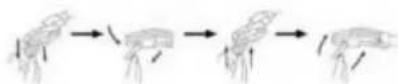
natural_image
Hand pressing a button on a device (no text or symbols visible)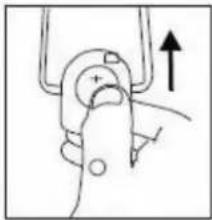
natural_image
Simple line drawing of a hand gripping a tool with an upward arrow (no text or symbols)AVANT
text_image
1 2 3 4 5 6 7 8 9 10 11 12 13 14 15 16 17 18CÔTÉ GAUCHE
text_image
21 22 20ARRIÈRE
text_image
SERVICE ONLY 23 24DESSUS
text_image
26 29 28 30 27 25TÉLÉCOMMANDE
text_image
36 35 40 41 31 34 RECORD 37 38 39 -10 TRACK +10 -10 RUN/PAGE UP/FF -10 RANDOM PROGRAM DELETE 32 33 31 32natural_image
Simple line drawing of a mechanical component with an arrow indicating direction (no text or symbols)natural_image
Pure mechanical diagram showing a lever and pivot point without any text or symbolstext_image
Warning sign with black triangular triangle and central explosion symbolnatural_image
Technical diagram of a circular mechanical component with internal concentric rings and a vertical support mechanism (no text or labels)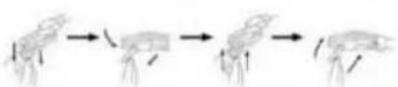
natural_image
Hand holding a small object with directional arrows indicating movement (no text or symbols)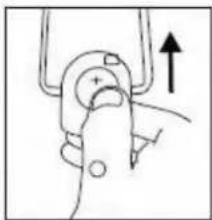
natural_image
Simple line drawing of a mechanical clamp or bracket with an upward arrow indicating motion (no text or symbols)DELANTERAS
text_image
1 2 3 4 5 6 7 8 9 10 11 12 13 14 15 16 17 18LADO IZQUIEDO
text_image
21 22 20PARTE TRASERA
text_image
SERVICE ONLY 23 24PARTE SUPERIOR
text_image
26 29 28 30 27 25MANDO A DISTANCIA
text_image
36 35 40 41 31 34 RECORD 37 38 39 -10 TRACK +10 -10 RUN/PAGE UP/FF -10 RANDOM PROGRAM DELETE 32 33 31 32natural_image
Diagram of a mechanical assembly with a tool and circular component (no text or symbols)natural_image
Pure mechanical diagram showing a lever and gear mechanism without any text or symbolsnatural_image
Symbol of a trash bin crossed out by two crossed lines, with a blank rectangular base below (no text or symbols)natural_image
Technical diagram of a circular mechanical component with concentric rings and a vertical support mechanism (no text or labels)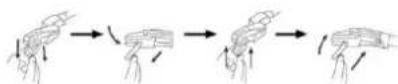
natural_image
Hand holding a small object with directional arrows indicating movement or force (no text or symbols)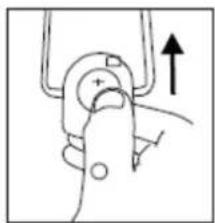
natural_image
Simple line drawing of a hand gripping a mechanical component with an upward arrow (no text or symbols)ВИД СПЕРЕДИ
text_image
1 2 3 4 5 6 7 8 9 10 11 12 13 14 15 16 17 18 CDMA Phone CCDARO BRPL FROSOВИД СЛЕВА
text_image
21 22 20ВИД СЗАДИ
text_image
SPACE OUT 23 24ВИД СВЕРХУ
text_image
26 29 28 30 27 25natural_image
Diagram showing a mechanical device with a rotating component and an arrow indicating direction (no text or symbols)natural_image
Pure mechanical diagram showing a lever and gear mechanism without any text or symbolsnatural_image
Symbol of a trash bin crossed out by two diagonal lines (no text or labels)