USER MANUAL 14448.SL Vimar

VIMAR
4 - ITALIANO

VIMAR
5. UTILIZZO DELL'OROLOGIO PROGRAMMATORE ELETTRONICO.
Space for noting the three-digit PIN number used as the lockout password.
(see "Password", page 13)

CONTENTS
- Description.... 10
- Scope.... 10
- Front view and view of controls 11
- Connections 12
- Using the electronic programmable timer switch
5.1. Operation 13
5.2. Settings.... 13
5.3. Programming 14
- Reset procedure 14
- Characteristics 14
- Installation rules. 15
- Conformity to standards 15

VIMAR
1. DESCRIPTION.
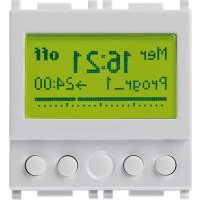
Electronic daily/weekly programmable time switch with 1 channel, 1 change-over relay output 8 A 230 V\~, supply voltage 120-230-V\~ 50-60 Hz - 2 modules.
2. SCOPE.
Equipment to automatically engage and disengage electrical loads at preset times, on a daily/weekly cycle; especially useful for heating and air conditioning systems, irrigation systems, indoor and outdoor lighting, etc.

VIMAR
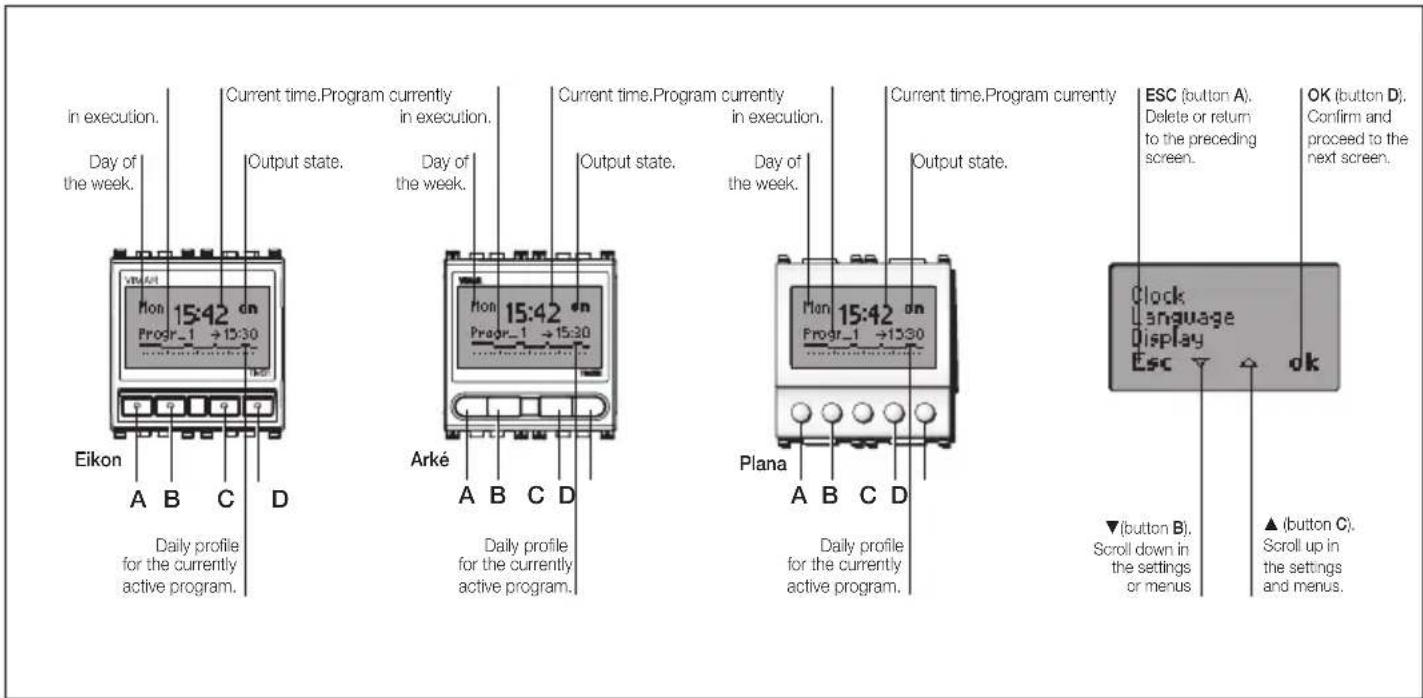
3. FRONT VIEW AND VIEW OF CONTROLS.

VIMAR
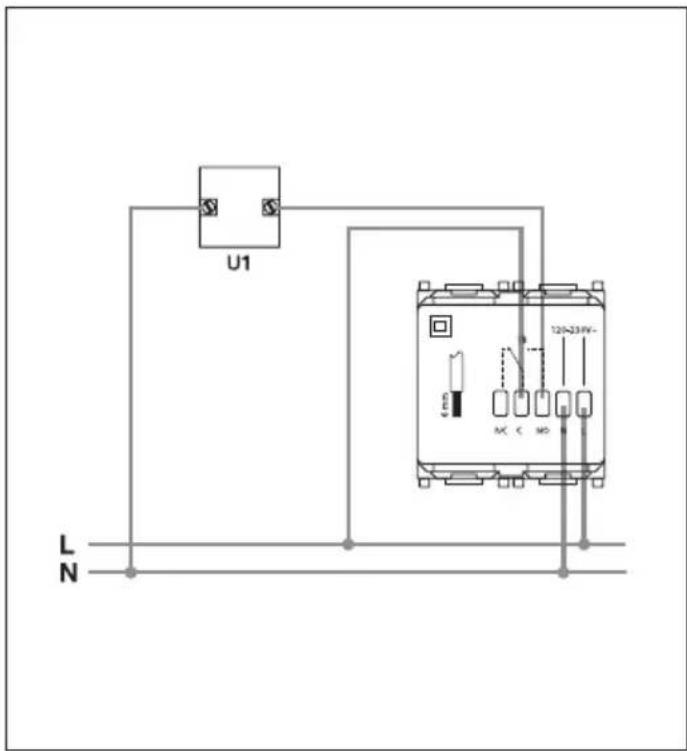
- CONNECTIONS (example).
12 - ENGLISH

VIMAR
5. USING THE ELECTRONIC PROGRAMMABLE TIME SWITCH.
To configure the time switch, from the starting screen of the display, press any one of the four front buttons.
• The following icons appear:
- "Esc" (button A): cancels the selection.
- “▼” (button B): switches the controlled load on or off.
- “▲” (button C): switches the controlled load on or off.
- "Menù" (button D): used for accessing the "Operation" menu.
- Press “▼” (button B): the “Settings” and “Programming” menu items appear; use “▲” (button C) to scroll upward in the menu, or “Esc” (button A) to return to the previous menu.
- Press "Ok" (button D) to confirm.
5.1 OPERATION.
Selection of operating mode for the electronic programmable time switch, choosing between "Automatic" and "Manual".
- AUTOMATIC.
Allows the user to configure the desired program type (see "Programming", page 14).
- MANUAL.
Allows the user to manually switch the controlled load on or off. This can also be done by pressing “▼” (button B) or “▲” (button C) from the main display screen.
5.2 SETTINGS.
Used for setting "Clock", "Language", "Display" and "Password".
- CLOCK.
Used for setting the current date and time.
- LANGUAGE.
Used for setting the language in which the instructions are displayed, choosing between Italiano, English, Français, Español and Deutsch.
• DISPLAY.
Used for choosing the type of icon that indicates the relay state and for adjusting the display contrast.
- PASSWORD.
Allows the user to configure, change or disable a 3-digit PIN password to prevent unauthorized access to the thermostat functions, settings and programs.
Attention!
Remember to make a note of the PIN number in the special space provided on pg. 8.

VIMAR
5.3 PROGRAMMING.
Configuration of 4 different programs: "Reduced", "Cyclic", "Progr_1" (personalised) e "Progr_2" (personalised).
- REDUCED.
For programming a single switch-on and a single switch-off event during the day.
• CYCLIC.
For programming a switch-on and a switch-off period that are repeated cyclically.
For example, entering "On hh mm 1.15" and "Off hh mm 1.30", the contact will continually repeat the sequence "contact ON for 1 hour and 15 minutes" - "contact OFF for 1 hour and 30 minutes".
• PROGR\_1 e PROGR\_2.
Personalised programs. For setting up 2 different switch-on and switch-off programs for each individual day of the week, for a maximum of 35 switch events a day.
Confirm "ok" (button D) = scrolling menu with a choice of "Modify", "Copy" and "Rename".
- Modify.
Allows the user to set up or edit the switch-on and switch-off program, if desired by copying a program from one of the other days.
- Copy.
For copying a program that has already been configured by the user into one of the programs that is still to be configured.
- Rename.
For assigning a name to or renaming the chosen program.
6. RESET PROCEDURE.
- Simultaneously press the four buttons (button A, button B, button C, button D)
- Confirm with "Yes" (button D).
Restores the original first power-up conditions; all parameters are reset to their default values.
7. CHARACTERISTICS.
• Supply voltage: 120-230 V\~ ± 10% 50-60 Hz
• Absorption max: 1 W
- Front controls: "Esc", "▲", "▼", "Set"/"ok"
- Clock backup battery duration: about 20 days, with rechargeable lithium buffer battery
• Output: 8 A 230 V\~ change-over relay output
- controllable loads:
- purely resistive loads - : 8 A
- incandescent lamps ⚙ : 800 W
- magnetic core transformers for very low voltage incandescent

VIMAR
lamps (for example, halogen lamps): 80W
- Not suitable for directly controlling fluorescent lamps
- Timed back-lit display, activated by pressing one of the four buttons.
- instructions in 5 languages (Italian, English, French, Spanish, German)
- device reset
- Clock accuracy: ≤ ± 1 s a day
- Number of switch events: max 35 per day (for a max of 245 switch events per week)
• Minimum duration of each switch event: 1 minute
- Programs:
- 2 programs fully configurable by the user (daily/weekly)
- 1 simple program (1 switch event per day) and 1 cyclic program (one "on" period and one "off" period, continually repeated)
- button lockout function with 3-digit PIN number to prevent unauthorised access to all the device functions and programs (for example, when installed in a public place).
• Number of manual cycles: 3.000
• Number of automatic cycles: 100.000
- Type of contact opening: micro-disconnect
- Type of action: 1BU
- Tracking index: PTI175
• Pollution degree: 2 (normal)
- Protection degree: IP40
- Class II equipment:
- Operating temperature: T40 (0 °C +40 °C)
- Ambient temperature range during transport: -25 °C +60 °C
• Voltage pulse: 4.000 V
- Software class and structure: A
8. INSTALLATION RULES.
Installation should be carried out by qualified personnel in compliance with the current regulations regarding the installation of electrical equipment in the country where the products are installed.
LV Directive. EMC Directive. Standards EN 60730-1, EN 60730-2-7. REACH (EU) Regulation no. 1907/2006 – Art.33. The product may contain traces of lead.

If the crossed-out bin symbol appears on the equipment or packaging, this means the product must not be included with other general waste at the end of its working life. The user must take the worn product to a sorted waste center, or return it to the retailer when purchasing a new one. Products for disposal can be consigned free of charge (without any new purchase obligation) to retailers with a sales area of at least 400 m ^2 , if they measure less than 25 cm. An efficient sorted waste collection for the environmentally friendly disposal of the used device, or its subsequent recycling, helps avoid the potential negative effects on the environment and people's health, and encourages the re-use and/or recycling of the construction materials.
Directive BT. Directive EMC. Normes EN 60730-1, EN 60730-2-7.
• PROGR\_1 e PROGR\_2.
• PROGR\_1 και PROGR\_2.