
01417 - Home Automation Vimar - Free user manual and instructions
Find the device manual for free 01417 Vimar in PDF.


Pick your language and provide your email: we'll send you a specifically translated version.
| Product Type | Home Automation Control Device |
| Brand | Vimar |
| Model | 01417 |
| Dimensions (HxWxD) | 45 x 45 x 25 mm |
| Weight | 50 g |
| Power Supply | 12V DC (SELV) |
| Power Consumption | 0.5 W (standby) / 2 W (active) |
| Communication Protocol | Open Web Net / BUS |
| Operating Temperature | 0°C to 40°C |
| Mounting Type | Wall-mount (flush or surface) |
| Main Functions | Light control, shutter control, scene activation, thermostat adjustment |
| Compatibility | Vimar By-me or By-net home automation systems |
| User Interface | Touch keys with LED feedback |
| Cleaning | Wipe with a soft, dry cloth. Do not use solvents or abrasive cleaners. |
| Safety | Overcurrent protection, surge protection, insulation class II |
| Spare Parts | Faceplate, fixing screws, connection terminals (available from Vimar distributors) |
| Reparability | Replaceable faceplate and internal module; professional repair recommended |
| Certifications | CE, RoHS, REACH |
| Warranty | 2 years (EU) |
Frequently Asked Questions - 01417 Vimar
Is the Vimar 01417 compatible with Alexa or Google Home?
The Vimar 01417 does not natively support voice assistants. It requires a Vimar gateway (e.g., By-me Gateway) for integration with Alexa or Google Home.
How do I reset the Vimar 01417 to factory settings?
Press and hold the SET button (located on the rear) for 10 seconds until the LED flashes red. Release, then wait 30 seconds for the reset to complete.
Can I install the 01417 myself or do I need a professional?
Installation requires connection to the Vimar BUS system. If you are not experienced with low-voltage wiring, it is recommended to hire a qualified electrician.
What does the LED color indicate?
Green: normal operation. Red: fault or communication error. Flashing blue: pairing mode. Off: standby or no power.
How many devices can be controlled by one 01417?
Each 01417 can control up to 32 individual loads (lights, shutters, etc.) via scenes or direct commands.
Is the 01417 compatible with older Vimar systems?
The 01417 works with Vimar By-me (IP-based) and By-net (BUS) systems. It is not compatible with the legacy Vimar Plexus system.
What are the dimensions of the faceplate?
The standard faceplate is 45 mm x 45 mm (square) with a depth of 8 mm. It fits Vimar Arkè or Plana series frames.
How do I update the firmware?
Firmware updates are performed via the Vimar Setup software (Windows). Connect the device to a PC using the Vimar programming cable and follow the instructions in the software.
What is the maximum cable length from the power supply?
The maximum distance from the power supply (12V DC) is 100 meters using 1.5 mm² twisted pair cable.
Can I use the 01417 outdoors?
The 01417 is rated for indoor use only (IP20). For outdoor applications, use a Vimar weatherproof enclosure or select a suitable outdoor model.
User questions about 01417 Vimar
0 question about this device. Answer the ones you know or ask your own.
Ask a new question about this device
No questions yet. Be the first to ask one.
Download the instructions for your Home Automation in PDF format for free! Find your manual 01417 - Vimar and take your electronic device back in hand. On this page are published all the documents necessary for the use of your device. 01417 by Vimar.
USER MANUAL 01417 Vimar
• جهدالمخرج: 0-Vin :Two-3-1-2-1
4-W و 1-R, 2-G, 3-B :B, C, D, E
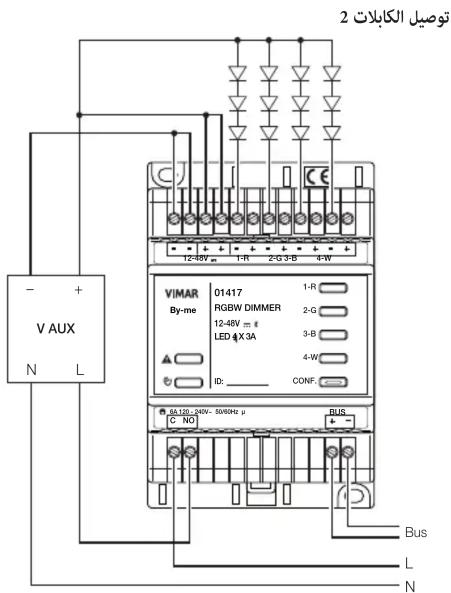
التوصيلات
- أبيض ديناميكي.


Manual assistant
Powered by Anthropic
Waiting for your message
Product information
Brand : Vimar
Model : 01417
Category : Home Automation