 EasyManual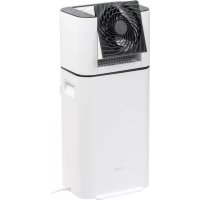
Woozoo DHMDDC50 - Dehumidifier IRIS - Free user manual and instructions
Find the device manual for free Woozoo DHMDDC50 IRIS in PDF.



User questions about Woozoo DHMDDC50 IRIS
0 question about this device. Answer the ones you know or ask your own.
Ask a new question about this device
Download the instructions for your Dehumidifier in PDF format for free! Find your manual Woozoo DHMDDC50 - IRIS and take your electronic device back in hand. On this page are published all the documents necessary for the use of your device. Woozoo DHMDDC50 by IRIS.
USER MANUAL Woozoo DHMDDC50 IRIS
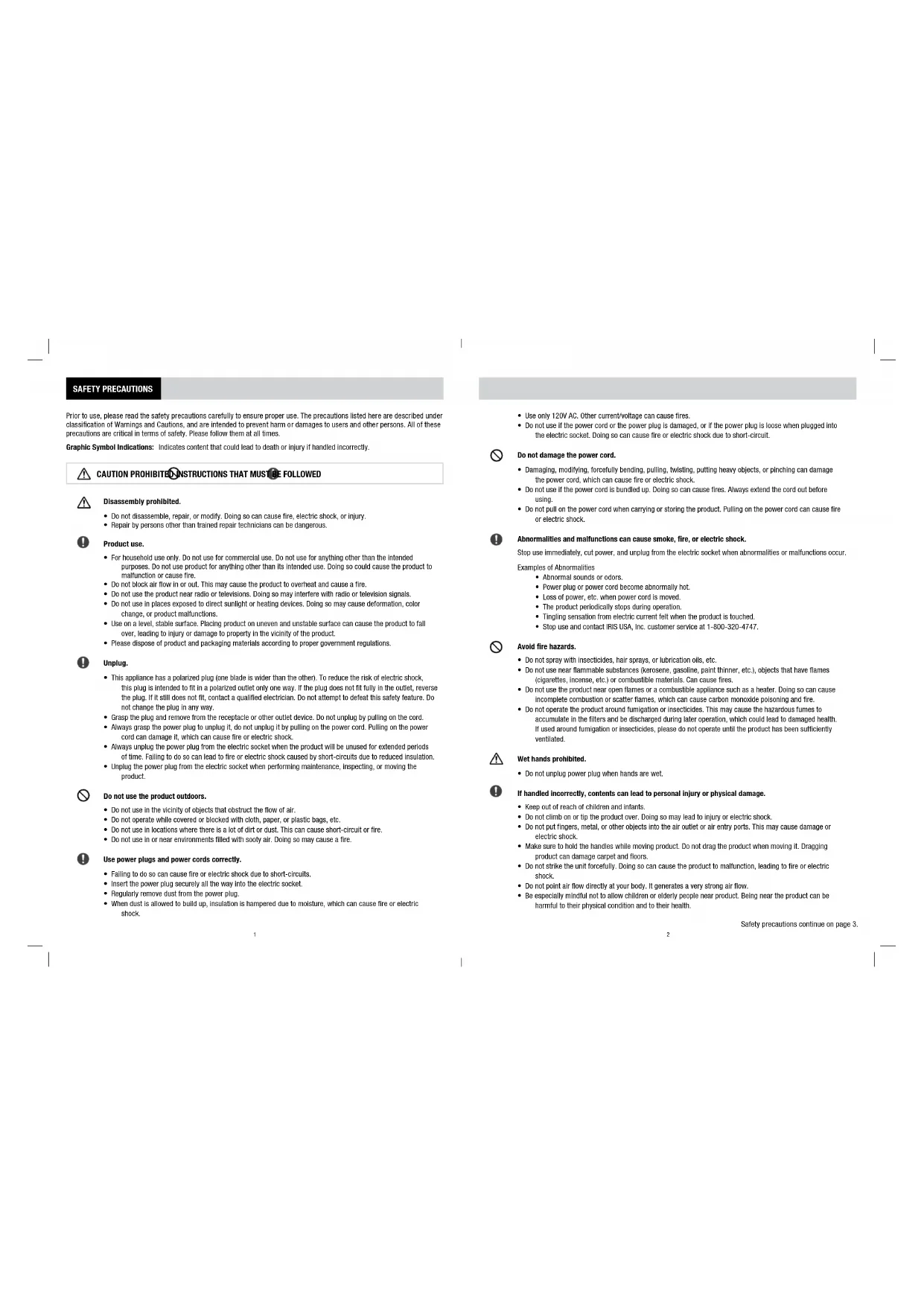
- Do not use if the power cord or the power plug is damaged, or if the power plug is loose when plugged into the electric socket. Doing so can cause fire or electric shock due to short-circuit. Do not damage the power cord.
- Damaging, modifying, forcefully bending, pulling, twisting, putting heavy objects, or pinching can damage the power cord, which can cause fire or electric shock.
- Do not use if the power cord is bundled up. Doing so can cause fires. Always extend the cord out before using.
- Do not pull on the power cord when carrying or storing the product. Pulling on the power cord can cause fire or electric shock. Abnormalities and malfunctions can cause smoke, re, or electric shock. Stop use immediately, cut power, and unplug from the electric socket when abnormalities or malfunctions occur. Examples of Abnormalities
- Abnormal sounds or odors.
- Power plug or power cord become abnormally hot.
- Loss of power, etc. when power cord is moved.
- The product periodically stops during operation.
- Tingling sensation from electric current felt when the product is touched.
- Stop use and contact IRIS USA, Inc. customer service at 1-800-320-4747. Avoid re hazards.
- Do not spray with insecticides, hair sprays, or lubrication oils, etc.
- Do not use near flammable substances (kerosene, gasoline, paint thinner, etc.), objects that have flames (cigarettes, incense, etc.) or combustible materials. Can cause fires.
- Do not use the product near open flames or a combustible appliance such as a heater. Doing so can cause incomplete combustion or scatter flames, which can cause carbon monoxide poisoning and fire.
- Do not operate the product around fumigation or insecticides. This may cause the hazardous fumes to accumulate in the filters and be discharged during later operation, which could lead to damaged health. If used around fumigation or insecticides, please do not operate until the product has been sufficiently ventilated. Wet hands prohibited.
- Do not unplug power plug when hands are wet. If handled incorrectly, contents can lead to personal injury or physical damage.
- Keep out of reach of children and infants.
- Do not climb on or tip the product over. Doing so may lead to injury or electric shock.
- Do not put fingers, metal, or other objects into the air outlet or air entry ports. This may cause damage or electric shock.
- Make sure to hold the handles while moving product. Do not drag the product when moving it. Dragging product can damage carpet and floors.
- Do not strike the unit forcefully. Doing so can cause the product to malfunction, leading to fire or electric shock.
- Do not point air flow directly at your body. It generates a very strong air flow.
- Be especially mindful not to allow children or elderly people near product. Being near the product can be harmful to their physical condition and to their health. Disassembly prohibited.
- Do not disassemble, repair, or modify. Doing so can cause fire, electric shock, or injury.
- Repair by persons other than trained repair technicians can be dangerous. Product use.
- For household use only. Do not use for commercial use. Do not use for anything other than the intended purposes. Do not use product for anything other than its intended use. Doing so could cause the product to malfunction or cause fire.
- Do not block air flow in or out. This may cause the product to overheat and cause a fire.
- Do not use the product near radio or televisions. Doing so may interfere with radio or television signals.
- Do not use in places exposed to direct sunlight or heating devices. Doing so may cause deformation, color change, or product malfunctions.
- Use on a level, stable surface. Placing product on uneven and unstable surface can cause the product to fall over, leading to injury or damage to property in the vicinity of the product.
- Please dispose of product and packaging materials according to proper government regulations. Unplug.
- This appliance has a polarized plug (one blade is wider than the other). To reduce the risk of electric shock, this plug is intended to fit in a polarized outlet only one way. If the plug does not fit fully in the outlet, reverse the plug. If it still does not fit, contact a qualified electrician. Do not attempt to defeat this safety feature. Do not change the plug in any way.
- Grasp the plug and remove from the receptacle or other outlet device. Do not unplug by pulling on the cord.
- Always grasp the power plug to unplug it, do not unplug it by pulling on the power cord. Pulling on the power cord can damage it, which can cause fire or electric shock.
- Always unplug the power plug from the electric socket when the product will be unused for extended periods of time. Failing to do so can lead to fire or electric shock caused by short-circuits due to reduced insulation.
- Unplug the power plug from the electric socket when performing maintenance, inspecting, or moving the product. Do not use the product outdoors.
- Do not use in the vicinity of objects that obstruct the flow of air.
- Do not operate while covered or blocked with cloth, paper, or plastic bags, etc.
- Do not use in locations where there is a lot of dirt or dust. This can cause short-circuit or fire.
- Do not use in or near environments filled with sooty air. Doing so may cause a fire. Use power plugs and power cords correctly.
- Failing to do so can cause fire or electric shock due to short-circuits.
- Insert the power plug securely all the way into the electric socket.
- Regularly remove dust from the power plug.
- When dust is allowed to build up, insulation is hampered due to moisture, which can cause fire or electric shock. SAFETY PRECAUTIONS Prior to use, please read the safety precautions carefully to ensure proper use. The precautions listed here are described under classification of Warnings and Cautions, and are intended to prevent harm or damages to users and other persons. All of these precautions are critical in terms of safety. Please follow them at all times. Graphic Symbol Indications: Indicates content that could lead to death or injury if handled incorrectly. CAUTION PROHIBITED INSTRUCTIONS THAT MUST BE FOLLOWED Safety precautions continue on page 3. 1 2• Air blowing directly on plants may be harmful.
- Do not operate without attaching the vane or the cover. Doing so can cause injury, electric shock, or fire. Water in the water tank.
- Please only install and detach the water tank after the machine stops running and the product is unplugged. Doing so while the machine is running may cause water leakage or damage to the surroundings.
- Do not use dehumidified water for drinking, cooking, or gardening. Doing so can be harmful to health.
- Do not remove the float arm from the water tank. Doing so can cause product malfunction, water leakage, or damage to the surroundings. Placement.
- Please use minimum distances illustrated in the image when placing the product. Do not place the product near heating or cooling devices. Please place in areas with favorable air circulation.
- Do not use the product outdoors.
- Do not use in rooms with high humidity levels such as bathrooms.
- Do not get the unit wet, or put the unit in water. Getting the product wet can cause fire or electric shock.
- Do not use in narrow spaces such as in closets or in gaps between furniture. This may cause fire due to overheating.
- Please do not hold the product by the fan. Doing so may cause fire or electric shock.
- Do not use without the air entry port cover and water tank installed. Doing so may cause injury, electric shock, or fire.
- Do not use product in areas where food, pharmaceuticals, artwork, valuable documents, or other special items are stored. Doing so may lead to degradation of the stored items.
STRUCTURE OF THE DEHUMIDIFIER
This product uses a desiccant dehumidifying structure.
1. The router absorbs moisture from the drawn in air
before blowing the dry air back out.
2. The heater heats up the router and released the
absorbed moisture into the condenser.
3. After cooling in the condenser, the moisture forms
water droplets and drains into the water tank. Product May Increase Room Temperature This product is not an air conditioner. Use in areas exposed to direct sunlight or near sources of heat may cause the temperature in the room to rise. When running only the circulator, it operates as a normal fan. Air Flow After Stopping Operation The dehumidifier will continue to produce air flow for up to 4 minutes after it stops dehumidifying in order to cool internally. Please do not unplug the power plug while product is still running. The product is designed to be used in a closed room. Opening and closing windows and doors can cause changes in room temperatures which can decrease the effectiveness of the dehumidification process. PLACEMENT Please use the minimum distances illustrated in the image when placing the product. Do not place the product near heating or cooling devices. Please place in areas with favorable air circulation. Please do not point the air outlet directly at furniture, walls, curtains, or electrical appliances. Place the product on a level, stable surface. Do not operate if the product is at an angle or falling down. This may lead to injury or damage to the surrounding areas. At least
moist air(air entry port side)dry air(air outlet side) Water Tank Condenser Heater Router (zeolite) Router Blades moistureabsorbedmoisturereleased SAFETY PRECAUTIONS 3 4PARTS Front Power plug Power cord Handle Dehumidifier air outlet Control panel Front guard Circulator fan Air entry port and cover Rear guard Water tank handle Water tank Back Water tank capFloat arm Water Tank Control Panel Tank Full/Not Inserted Indicator Light The indicator light turns on when the water tank is full or when it is not installed correctly. Power Button Press the button to turn the product on or off. Oscillation Button and Indicator Light Press the button to turn the left and right oscillation on or off. Air Flow Strength Button and Indicator Light Press the button to select air flow strength. Pressing the air flow strength button changes the air flow strength as follows: High Medium Circulator Off Low Timer Button and Indicator Light Press the button to choose the desired run time. Pressing timer button changes the preset time as follows: While the timer is running, the indicator light will change according to time remaining. When time runs out, the product will turn off and stop running. 2 4 8 (h) Timer Off Dehumidifier Button and Indicator Light Press the button to select dehumidification level. Pressing the dehumidifier button changes the dehumidification level as follows: High Medium Low Dehumidifier Off The control panel is touch sensitive. If dirt or water is present on the control panel, the product may not respond to selection. Please wipe control panel and hands with a dry cloth. Product may react differently due to room temperature or other electrical appliances operating nearby. Please press the buttons correctly. Pressing for too short a time or in the wrong spot may lead to the product not responding. If that happens, please withdraw hand and try again. NOTE: I - Low II - Medium III - High The roman numerals on the product associate with levels. Please see index to the left for which numerals correspond with which levels.
Place the product upright on a stable surface and insert the power plug into the electrical outlet. Make sure the water tank has been securely installed into the main body. If tank is not properly installed, the Tank Full/Not Inserted indicator light will turn on and the product will not operate. Pressing the air flow strength button changes the air flow strength of the fan. High Medium Circulator OffLow If product is turned off during oscillation, operation will stop once product is facing forward. The oscillation indicator lights will blink until product returns to the forward facing position. The circulator fan and dehumidifier can be run together or on their own. Air from the dehumidifier air outlet may cause the fan vane to rotate even when the circulator fan is not running.
3. Select the Operating Mode
Press the power button during operation to turn the product off. All indicator lights turn off when the product is turned off. When the dehumidifier is turned off, air flow will continue to run for up to 4 minutes. The dehumidifier indicator lights will blink until product stops running. Please do not unplug the power plug until the product stops operating. When the air flow strength and dehumidifier buttons are used to turn the product off, the product will remain in stand-by mode and can be restarted by pressing either button. After 30 seconds, please press the power button to turn the product back on.
2. Start the Product
Press the power button to turn the product on. The product will start running at the last setting used if the power plug has not been pulled out. Start Timer While the timer is running, the indicator light will change according to time remaining. When time runs out, the product will turn off and stop running. Pressing timer button changes the preset time as follows: When the water tank is full or when it is not installed correctly, the indicator light turns on and the timer and product shut off. After the tank is emptied and properly installed, timer will resume where it stopped. Pressing the power button or unplugging the product while the Tank Full/Not Inserted indicator light is on will reset the timer. 2 4 8 (h) Timer Off Select Oscillation Vertical Oscillation Vertical oscillation can be adjusted manually across 6 steps from horizontal to approximately 90 degrees. NOTE: The left and right oscillation cannot be done manually. Please use the oscillation button to change the angle of the product. Forcibly changing the angle will damage the product. Horizontal Oscillation Press the button to turn on the left and right oscillation. Horizontal oscillation operates across a 50 degree range. If product is turned off during oscillation, operation will stop once product is facing forward. The oscillation indicator lights will blink until product returns to the forward facing position. 7 8Emptying the Water Tank The Tank Full/Not Inserted indicator light turns on and the product stops operating when the water tank is full. To reset the indicator light, please remove the water tank, empty it, and reinstall the tank into the water tank slot. The product will resume the previous state of operation.
1. Pull out the water tank slowly.
- Hold the main body with one hand and pull out the water tank slowly to avoid water spillage.
- Please wipe up any water that spills onto the main body.
- When the dehumidifier is turned off, air flow will continue to run for up to 4 minutes to allow the product to cool down internally and to allow the water on the condenser to cool down.
- Do not remove the water tank or unplug the product while the air flow is still running.
2. Empty the water tank.
- Remove the water tank cap to empty the water in the water tank.
- Please drain water out of a corner of the water tank as shown in the figure.
- Please ensure the float arm is in the correct position. Improper positioning could cause failure of the auto stop function when the water tank is full.
- Please see “Cleaning and Maintenance” (P11) for the correct installation of the float arm.
3. Reinstall the water tank.
- Make sure the water tank cap is put back on the water tank. Reinstall the water tank into the water tank slot.
- If tank is not properly installed, the Tank Full/Not Inserted indicator light will turn on and the product will not operate.
- Please make sure water tank cover is installed. There should be no gap between the water tank and tank cover to prevent water from spilling out.
- Please empty out the water regularly. Do not let it sit for extended periods of time. Doing so may lead to abnormal odors and bacterial growth. The air entry port is blocked by something, such as a curtain. The upper portion of the main body is covered by something, such as a cloth. There is a high temperature in the room the product is used in or the product is sitting in direct sunlight.
When All Air Flow Strength or Dehumidier Indicator Lights Are On When the product overheats, all of the air flow strength or dehumidifier indicator lights will turn on and the product will stop operating.
- Please unplug the power plug from the electrical outlet after the lights turn on and reinsert the plug into the outlet after about five seconds. If the indicator lights are still on, please check for the following issues. Float arm Water tank cap Water tank Moving the Product Please unplug the product and let it sit for a while before emptying the water tank. Please make sure to hold both the left and right handles. Lift the product straight up when moving and avoid tilting the product. Handle Safety Mode In order to ensure safe use, the product has an internal power disconnection switch. Safety Mode may be triggered to disconnect the power supply when tilting or shaking is sensed. When Safety Mode is triggered, the Tank Full/Not Inserted indicator light blinks and the product stops operating. Please confirm there are not product abnormalities and that the product is on a flat, stable surface before reconnecting the power supply. Blinking All indicator lights will turn on
When the air entry port has been blocked, remove the blockage and leave the product unplugged. Let it cool down for 1-2 hours before plugging the product back in and turning it on. If the indicator light is still on, please contact IRIS USA, Inc. customer service.
109CLEANING AND MAINTENANCE
Always turn off the power and unplug the power plug from the electric socket when cleaning the product. Do not use paint thinner, alcohol, benzene, alkaline detergent, or bleach, etc. when cleaning the product. Using such substances can cause damage, malfunctions, or changes in color, shape, and quality.
- Always turn off the power and unplug the power plug from the electric socket when cleaning the product.
- Do not handle plug or appliance with wet hands. CAUTIONS How to Store Please follow the following storage instructions when the product will not be used for an extended period of time.
1. Turn the product off and unplug it. Let the product sit for half a day before emptying the water tank.
2. Clean the main body, air entry port and cover, water tank, and circulator fan following the cleaning and maintenance
3. Let the main body and the water tank air dry sufficiently and then wrap the product in a plastic bag or storage box to
protect it from dust.
4. Please store in places with low humidity and no direct sunlight.
- After extended periods of storage, please clean and maintain the product before use.
1. Turn the product off, unplug it, and empty the water tank.
2. Pull the handle of the air entry port cover forward
and then remove the cover.
3. Clean the air entry port and cover with a vacuum
- Do not use a nozzle with a bristle attachment. This may damage the product.
4. Reinstall the air entry port cover.
- Insert the tabs on the underside of the cover into the tab holes on the main body and press the cover back into place. Air Entry Port (Once a Month)
1. Pull out the water tank and remove the cap to empty
the water tank (P9).
2. Clean the water tank and cap with water.
- Please ensure the float arm is in the correct position
- Make sure the water tank cap is put back on the water tank after emptying the cleaning water. Reinstall the water tank into the water tank slot. When Float Arm is Out of Place
- Please insert the tabs on both sides of the float arm into the float arm tab holes. Water Tank (Once a Month) Float arm Tab Hole Wring out a cool or warm damp cloth (under 104°F/40°C) and wipe away dirt.
- Do not spray with water. Doing so may cause electric shock, injury, or product failure.
- When using a cloth made of synthetic fibers to clean the product, please follow directions and warnings on the cloth. Main Body (Once a Month) 11 12Before making repairs, please read the following content carefully to fix common problems. TROUBLESHOOTING
STATUS POSSIBLE CAUSE REMEDY
No power (Indicator is off) Power plug is not securely plugged into the electric socket. Please plug the power plug securely into the electric socket. Stops operating The product will turn off automatically after running with no changes for 12 hours. This is normal. Press the power button to turn the product on. When the air flow strength and dehumidifier buttons are used to turn the product off, the product will remain in stand-by mode for 30 seconds before turning off. Stops operating (Tank Full/Not Inserted indicator light is blinking) Safety Mode for overheating has been triggered. Place the product on a level, stable surface. Press the power button to turn the product on. Product won’t turn on (Tank Full/Not Inserted indicator light is on) The water tank is full. Please empty the water tank. The water tank is not properly installed. Please install the water tank properly. The float arm is not in the proper position. Please install the float arm properly. Product won’t turn on (dehumidier/ air ow indicator lights are on) The main body is overheated. Remove any blockages from the air entry port or air outlet and keep the product away from direct sunlight and sources of heat. Leave the product unplugged and let it cool down for 1-2 hours before plugging the product back in and turning it on. No decrease in humidity level Product is being used in too large of a space. Please run the product in an appropriately sized room. Doors, windows, etc. are open or are being opened and closed too frequently. Please close all doors, windows, etc. Product is being used near a steam emitting appliance. Please avoid using in the same area as steam emitting appliances. Air ow is weak The air entry port cover is clogged. Remove the air entry port cover and clean it. The air entry port or air outlet is blocked. Please remove anything blocking the Air Entry Port or Air Outlet and run the product again. The room has a high or low temperature and a low humidity level. Dehumidifying capability is decreased when used in rooms with a high or low temperature and a low humidity level.
STATUS POSSIBLE CAUSE REMEDY
Product makes loud noise while operating The air entry port cover is clogged. Remove the air entry port cover and clean it. The product is placed on an uneven surface. Place the product on a level, stable surface. The front guard is not securely attached. Attach the front guard properly. Floors near product are wet The main body is tilted sideways. Place the product on a level, stable surface. The product is moved while there is water in the water tank. Empty the water tank before moving the product. The float arm is not properly installed. Please install the float arm properly. The water tank was removed immediately after the product stopped operating. Wait to remove the water tank until product has cooled down and water on the condenser has fallen into the tank. The water tank cap is not properly installed. Please install the water tank properly. Room temperature rises during operation Operation in a closed room may lead to a rise in room temperature. This is normal. Parts of the product heat up during operation The internal heater is running. This is normal. Air ow continues after fan air ow operation is turned off (fan vane continues to turn) The dehumidifier is still operating. To fully stop product operation, please ensure both fan air flow and dehumidifier operations have been turned off or press the power button. The dehumidifier will continue to produce air flow for up to 4 minutes after it stops dehumidifying. Air ow continues after dehumidier operation is turned off (fan vane continues to turn) The dehumidifier will continue to produce air flow for up to 4 minutes after it stops dehumidifying in order to cool internally. This is normal. The fan is still operating. To fully stop product operation, please ensure both fan air flow and dehumidifier operations have been turned off or press the power button. Problems that could not be resolved. Please contact the dealer of purchase or IRIS USA, Inc. Customer Service.
Do not disassemble, repair or modify the product yourself. Any other servicing should be performed by any authorized service representative. 13 14MODEL SPECIFICATIONS RATED VOLTAGE 120VAC RATED CURRENT 4.6A RATED FREQUENCY 60Hz DEHUMIDIFICATION LEVEL About 2.6 QT / 2.5 L per day
APPLICABLE AREA COVERAGE
About 2.6 QT / 2.5 L PRODUCT SIZE (NOT INCLUDING THE POWER CORD)
11.30 x 9.21 x 25.20 in / 287 x 234 x 640 mm
PRODUCT WEIGHT (WITHOUT WATER)
SPECIFICATIONS *Specifications are subject to change without prior notice. *The dehumidification level is the volume measure for running the product for 24 hours at 80°F/27°C and 60% humidity. Product Used Over Long Periods of Time If any of the following problems occur due to use over long periods of time, cut power immediately, unplug from the electric socket, and contact IRIS USA, Inc. customer service at 1-800-320-4747.
- There is no response when power switch is pressed.
- Product makes a strange noise when operating.
- While turning, the vane changes speed irregularly.
- Power cord is bent or damaged.
- Power turns on and off when power cord is touched.
- Product gives off a burnt smell. Various factors can have an impact on the product degradation and malfunction. If abnormalities like those listed above occur even when the product has not been used for the displayed standard period of use, stop use immediately and contact IRIS USA, Inc. customer service at 1-800-320-4747. WARNING
Your IRIS USA, Inc. products are to be free from defects in material and workmanship under normal non-commercial, household use, when operated and cared for in accordance with the Manufacturer’s written instructions provided. THE 1-YEAR WARRANTY (“WARRANTY”) DOES NOT COVER Any damage caused by accident, misuse, or abuse, including without limitation, damage caused by use in a humid area, improper cleaning, neglect, alteration, fire, theft, non-recommended temperature use and does not apply to minor imperfections, scratches, stains, discoloration, surface markings as a result of shipping or other damage to external or internal surfaces which does not impair the utility and/or functionality of the product.
If service should be necessary, you should contact IRIS USA, Inc. Customer Service (“Customer Service”) at 1-800-320-4747. You may then return the properly packaged product(s), (using adequate packing and shipping material to prevent damage in transit), with postage prepaid along with name, address, telephone number, model number, and proof of date of purchase (a copy of the receipt) and a detailed description of the claimed defect. This warranty shall not cover any damage incurred to the products during transit to Customer Service. You shall have the obligation and responsibility to: pay for all services and parts not covered by the warranty.
MANUFACTURER’S OBLIGATION
The Warranty may not be altered, expanded, extended, revised or varied except by written instrument executed by the Manufacturer. THE MANUFACTURER’S LIABILITY UNDER THIS WARRANTY IS LIMITED TO THE REPAIR OR REPLACEMENT OF THE DEFECTIVE PRODUCT(S) AT THE MANUFACTURER’S SOLE AND EXCLUSIVE OPTION. THE MANUFACTURER WILL REPLACE ANY ITEM FOUND TO BE DEFECTIVE IN MATERIAL OR WORKMANSHIP WITH THE MOST COMPARABLE CURRENT ITEM. IRIS USA, INC. DOES NOT ACCEPT SPECIAL REQUESTS, NOR DO WE HAVE THE ABILITY TO UPGRADE IN EXCHANGE FOR MONEY. THE MANUFACTURER SHALL NOT BE LIABLE FOR ANY SPECIAL, INCIDENTAL OR CONSEQUENTIAL DAMAGES, WHETHER DIRECT OR INDIRECT. THE WARRANTIES SET FORTH HEREIN ARE EXCLUSIVE AND NO OTHER WARRANTIES, EXPRESS OR IMPLIED, INCLUDING BUT NOT LIMITED TO ANY WARRANTY OF MERCHANTABILITY OR FITNESS FOR A PARTICULAR PURPOSE OR USE ARE MADE WITH RESPECT TO THE PRODUCTS. Some states do not allow the exclusion of limitation of incidental or consequential damages, so the above limitation exclusions may not apply. This Warranty gives specific legal rights, and there may also be other rights which vary from state to state.
DISCONTINUED ITEM RETURNED
If the item returned is discontinued and is no longer available, IRIS USA, Inc. will automatically replace your item with the most comparable item currently manufactured.