
WTT7110I - Washing machine THOMSON - Free user manual and instructions
Find the device manual for free WTT7110I THOMSON in PDF.



| Product type | Top-loading washing machine |
| Brand | THOMSON |
| Model | WTT7110I |
| Maximum washing capacity | 7 kg (cotton 90°C) |
| Available programs | Cotton, Mixed, Delicate/Wool, Hand wash, Flash 10', Rinse/Spin, etc. |
| Maximum spin speed | 1000 rpm (estimated) |
| Options | Prewash, Extra Smooth, Extra Rinse, Drain, Stop with tank full, Delay start (1-19h) |
| Power supply | 220-240 V, 50 Hz (estimated) |
| Water pressure | 0.1 MPa (1 bar) min - 1 MPa (10 bar) max |
| Water connection | Cold water only (3/4 BSP) |
| Waste water drainage | Drain hose height: 55-75 cm |
| Dimensions (approx.) | 85 x 60 x 60 cm (estimated) |
| Net weight (approx.) | 65 kg (estimated) |
| Noise level | Not specified |
| Transport bolts | 4 screws + crosspiece + wedges, to be removed before use |
| Safety features | Lid lock, water safety, spin safety, anti-foam |
| Routine maintenance | Clean pump filter, detergent drawer, body (water + liquid soap) |
| Spare parts / repairability | Water hoses, pump filter, belt kit (via after-sales service) |
| Repairability index | Not specified |
| General information | Compliant with directives 2006/95/EC and 2004/108/EC |
Frequently Asked Questions - WTT7110I THOMSON
User questions about WTT7110I THOMSON
0 question about this device. Answer the ones you know or ask your own.
Ask a new question about this device
Download the instructions for your Washing machine in PDF format for free! Find your manual WTT7110I - THOMSON and take your electronic device back in hand. On this page are published all the documents necessary for the use of your device. WTT7110I by THOMSON.
USER MANUAL WTT7110I THOMSON
As part of our commitment to constantly improving our products, we reserve the right to make changes to them based on technical advances to their technical and functional features and appearance.
Warning: Before installing and using your appliance, please carefully read this Guide to Installation and Use, which will allow you to quickly familiarise yourself with its operation.
| CONTENTS | Page |
| Removing the transport packing | .12 |
| Moving your machine | .12 |
| Connecting to the cold water supply | .12 |
| Draining away the waste water | .12 |
| Connecting to the electricity supply | .13 |
| Installing your machine | .13 |
| Loading your washing | .13 |
| Loading the washing products | .13 |
| Page | |
| Programming | 14 |
| Details of the programmes and options | 15 |
| Modifying a washing programme | 16 |
| Automatic safety systems | 16 |
| Cleaning the pump filter | 17 |
| Maintaining your machine | 17 |
| Incidents that may arise | 18 |
| Messages shown on the display | 18 |
Dear Customer,
You have just acquired a THOMSON washing machine and we would like to thank you.
With the help of all the experience we have gained over the years, we have designed this machine in order to make your life easier by offering you performance, ease of use and quality.
In the THOMSON product range, you will also find a wide choice of ovens, cooking hobs, ventilation hoods, dryers, dishwashers, fridges and freezers, that you can coordinate with your new THOMSON washing machine.
Of course, we always wish to meet your requirements regarding our products as best we can, and our customer services are therefore at your disposal and ready to listen and answer any questions or suggestions you may have.
For all our products, as well as useful and additional information, you can also visit our website.
THOMSON
SAFETY ADVICE
Important: This machine is only for domestic use and is designed to wash, rinse and spin machine-washable textiles. You must observe the following instructions. We refuse to accept any liability and the guarantee if you do not observe these recommendations since this could result in damage to equipment or physical injury.
- This appliance is not intended for use by persons (including children) with reduced physical, sensory or mental capabilities, or lack of experience and knowledge, unless they have been given supervision or instruction concerning use of the appliance by a person responsible for their safety.
- The machine must only be used in accordance with its normal method of operation in order to avoid damaging your washing and your machine. Only use washing and maintenance products certified for use in domestic washing machines.
- If you pre-treat your washing with stain removers, solvents or, in general, any inflammable or potentially highly explosive product, do not insert them into the machine immediately. Furthermore, you are also recommended not to use solvents or products in aerosol cans near to your washing machine or any electrical appliance in general in a poorly ventilated room (risk of fire and explosion).
- If any incidents occur and you cannot resolve them using the remedies we recommend (see the section "INCIDENTS THAT MAY ARISE"), call in a qualified professional.
- If you have to open your machine during a cycle (for example, to add or remove washing), depending on the stage the programme is at (during washing essentially), be careful of the temperature inside the machine, which may be very high (risk of severe burns).
- When making a new installation, the machine must be connected to the water supply with a new hose: the old hose must not be re-used.
- Do not let children play with the machine and keep your pets away from it.
- You must immediately make any obsolete machine unusable. Disconnect and cut off the power cable flush with the machine. Close the water tap and remove the hose. Disable the door lock.
- If there is a risk of frost, disconnect the water hose and drain off any water that may remain in the drain hose by placing this as low as possible in a bowl.
SAVING ENERGY
- Only programme a prewash when it is absolutely necessary: for example, for very dirty sports or working clothes, etc.
- A low temperature programme is sufficient for impeccable washing results when your washing is only slightly or moderately dirty.
- For washing that is only slightly dirty, select a short washing cycle.
- Use the right amount of washing products for the hardness of the water, the amount of washing and how dirty it is and follow the instructions on the detergent packs.
ENVIRONMENTAL PROTECTION
This appliance's packaging material is recyclable. Help recycle it and protect the environment by dropping it off in the municipal receptacles provided for this purpose.
Your appliance also contains a great amount of recyclable material. It is marked with this label to indicate that in countries that are members of the European Union, used appliances should not be mixed with other waste.
This way, the appliance recycling organized by your manufacturer will be done under the best possible conditions, in compliance with European Directive 2002/96/EC on Waste Electrical and Electronic Equipment. Contact your town hall or your retailer for the used appliance collection points closest to your home.
We thank you for doing your part to protect the environment.
DESCRIPTION OF YOUR MACHINE
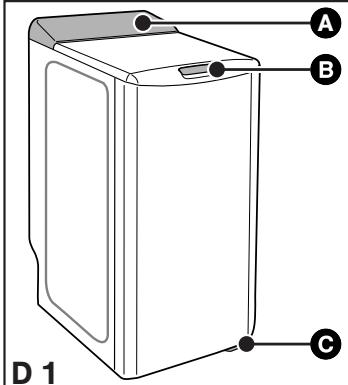
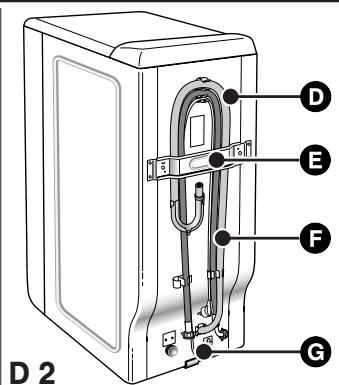
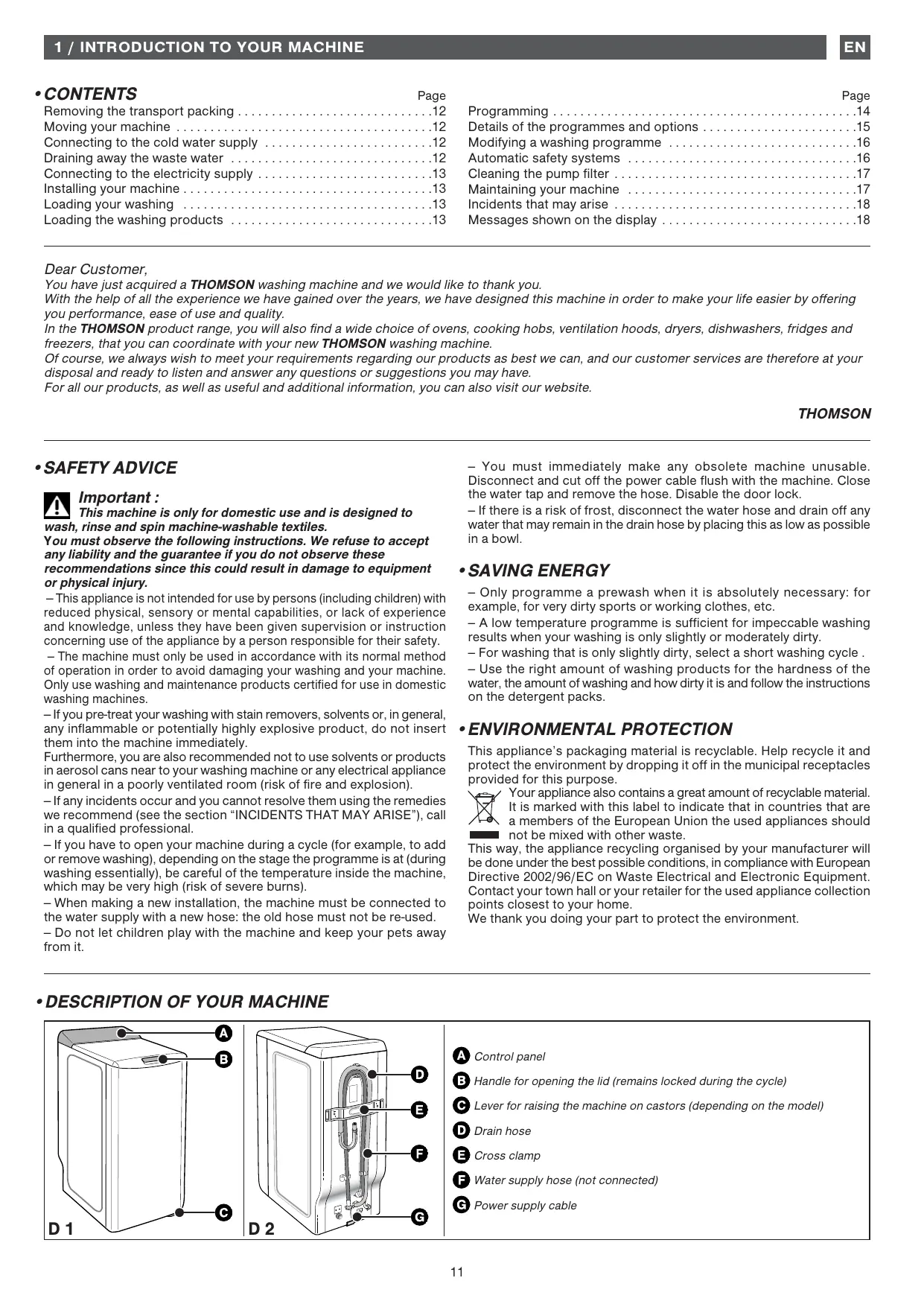
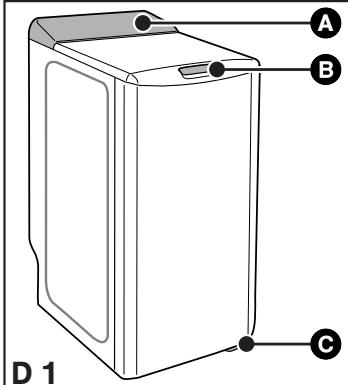
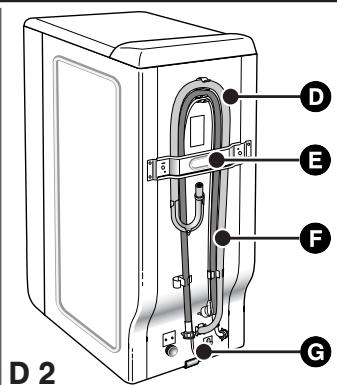
A Control panel B Handle for opening the lid (remains locked during the cycle) Lever for raising the machine on castors (depending on the model) Drain hose Cross clamp Water supply hose (not connected) C Power supply cable
- REMOVING THE TRANSPORT CLAMPS
Important:
Before using the machine in any way, you must first perform
the following operations.
These comprise removing all the components designed to immobilize the drum in your machine during transport.
These so-called "releasing" operations are necessary for your machine to operate correctly and to conform to the prevailing safety standards. If they are not carried out completely, this could cause severe damage to your machine while it is operating.
- Remove the washing machine from its plinth (check that the wedge A supporting the motor is not still inserted in the machine) (Diagram D3)
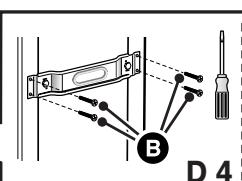
- Remove the 4 screws B with a screwdriver (Diagram D4)
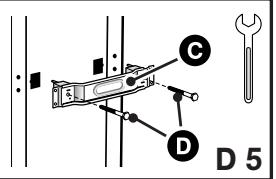
- Remove the cross clamp C by removing the 2 screws (Diagram D5) using a 10 or 13 mm spanner (depending on the model). (Ensure that you remove the two plastic braces fixed on the cross clamp at the same time as the clamp itself).
- Replace the screws B in their initial positions.
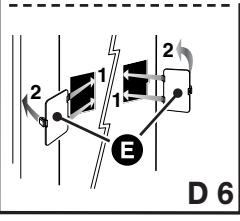
Warning:
You must block off the two holes using the hole covers provided (supplied in the accessories bag) (Diagram D6).
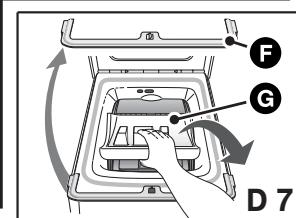
- Remove the drum-tank assembly locking wedge (Diagram D7). To do this:
- Lift the lid on the machine.
- Remove wedge F.
- Remove wedge C.
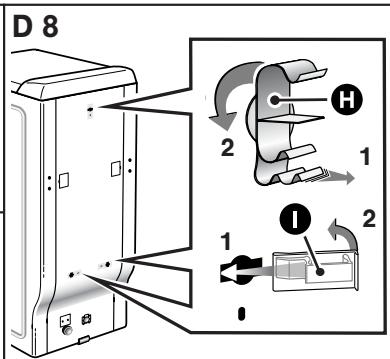
Warning:
7 Remove the pipe support collars R. You must block off the holes revealed with the hole covers supplied in the accessories bag (Diagram D8).
Advice: We would
We would recommend that you keep all the locking components since these must be refitted if you must subsequently transport your machine again.
Information:
Your machine has been scrupulously checked before it left the factory. You may therefore notice a little water still remaining in the tank or the products box.
- MOVING YOUR MACHINE
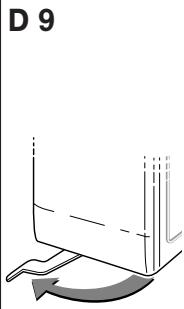
- Mounting it on castors
If your machine is equipped with removable castors, you will be able to move it quite easily.
To mount it on castors, swivel the lever on the bottom of the machine from the right to the far left (Diagram D9).
Important:
The machine must not rest on the "front" castors while it is
operating: remember to return the lever to its initial position.
- CONNECTING TO THE COLD WATER SUPPLY
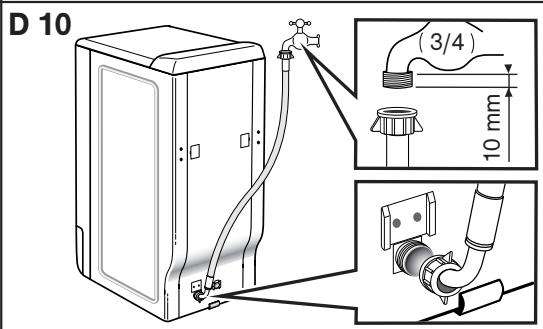
Connect the supply hose (Diagram D10):
- At one end to the connection on the back of the machine
- On the other end, connect to a tap fitted with a threaded end 20 mm dia. x 27 (3/4 BSP).
If you use a self-piercing tap, the useful aperture must have a minimum diameter of 6 mm.
Water supply:
- Minimum water pressure: 0.1 MPa or 1 bar
- Maximum water pressure: 1 MPa or 10 bars
- Replacing a water supply hose
When replacing the hose, ensure that the hose is tightly fastened and that there is a seal at both ends.
- DRAINING AWAY THE WASTE WATER
Fit the hose bracket provided inside your machine to the end of the drain hose and then connect the hose to a ventilated U-bend (Diagram D11). If your installation does not have a ventilated U-bend, check that the connection is not sealed. In fact, to avoid any waste water flowing back into the machine, you are strongly recommended to leave an air gap between the machine's drain hose and the drainpipe.
In any case, the drain hose bracket must be placed at a height of 55 to 75 cm higher than the base of the machine.
Important:
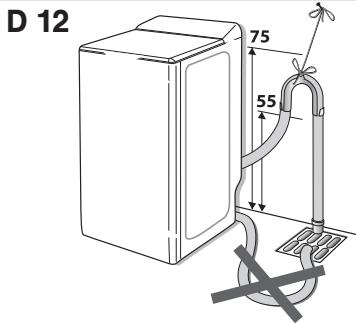
Ensure that the drain hose is tied firmly in place with cord to avoid the bracket coming loose during draining and causing a flood. For correct draining of the waste water, make sure that the drain hose is as straight as possible. In fact, the more bends the less effective the drain pump.
The waste water can be drained away to the ground provided that the drain hose passes through a point 55 to 75 cm higher than the base of the machine (Diagram D12).
A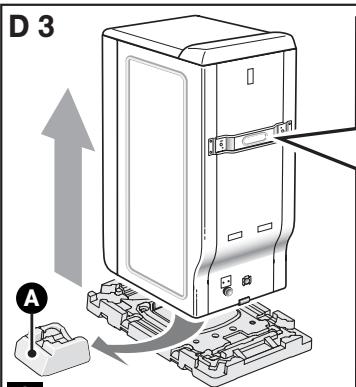
D 11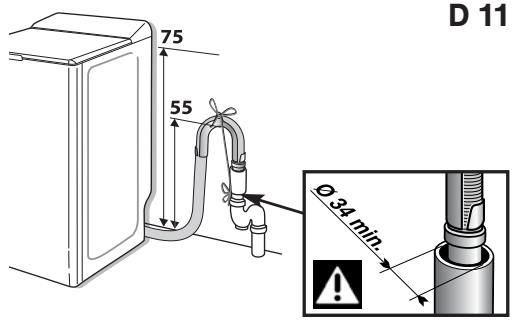
- CONNECTING TO THE ELECTRICITY SUPPLY

Important:
For your safety, you must comply with the instructions below.
- Before connecting your machine, you must ensure that your installation's electrical characteristics match those of your machine (see the details provided on the information plate affixed to the back of the machine).
The electrical installation must comply with the prevailing standards and the Electricity Board's regulations in the country concerned, particularly as regards Earthing and installation in shower rooms.
We cannot be held responsible for any incident caused by the machine being incorrectly earthed.

Advice:
Advice on the electrical installation of your machine
- Do not use an extension lead, adapter or multiple socket.
- Never cut out the Earth wire.
- The socket must be readily accessible but out of the reach of children.
If in any doubt, please contact your installer.

Important:
Your machine conforms to European Directives 2006/95/CE
(Low Voltage Directive) and 2004/108/CE (Electromagnetic Compatibility).
- INSTALLING YOUR MACHINE

Important:
If you are installing your machine next to another machine or a
unit, we recommend that you leave a gap between them to allow for air circulation.

Advice:
We also strongly recommend that you do NOT:
- Install your machine in a damp, poorly ventilated room.
- Install your machine in an area where it could be subject to water splashes.
- Install your machine on a carpeted floor. If you cannot avoid doing this, please take every precaution to avoid blocking air circulation at the bottom of the machine in order to ensure that the internal components are well ventilated.
- Levelling the machine:
Use a spirit level to check that the floor is horizontal: maximum slope 2° , i.e. a discrepancy of approximately 1cm over the width and of 1.5cm over the depth of the machine.
- Adjustable feet
Some machines are fitted with two adjustable feet at the front to enable you to compensate for any unevenness in the floor. Proceed as follows to adjust the feet to level and stabilize your machine:
- Set the machine on its castors (or tilt it slightly backwards if it does not have retractable castors)
- Screw in or unscrew the feet to adjust the height to suit the shape of the floor (Diagram D13)
- Set the machine back on its feet and check that it is stable.
- TEXTILE MAINTENANCE CODES
- Washing: Never exceed the indicated temperatures
- Use of cold diluted bleach possible:
- Iron: Low Medium High
- Dry clean: mineral spirit F perchlorethylene P all solvents A
- NB: A crossed-out code indicates that it is forbidden × × ×
- LOADING YOUR WASHING
Perform these actions in the following order:
- Open the machine
- Check that the Programme selector is correctly positioned on "OFF".
- Depending on the model, lift the opening handle or press the push button on the front of the machine. The lid will open.
- Open the drum by pressing the button on the front door.
- Insert your washing
For optimum washing performance, place your washing, preferably sorted and folded, in the drum, distributing it evenly without heaping it up. Mix large and small items to obtain an optimum, well-balanced spin.
- Close the drum
Ensure that the drum is correctly closed.

Important:
Check that the border of the button is fully visible.
- LOADING THE WASHING PRODUCTS

Important:
(Diagram D14)
- The "WASH" container may contain powder or liquid, but liquid detergent should not be used for programmes with Prewash and/or with "Delayed Start" (depending on the model).
- Concentrated softener should be diluted with warm water.
- To fill the product containers correctly, place the lid fully open.
- Do not exceed the MAX level.
Dispensing the detergent
The amount of detergent to be used depends on the hardness of the water, the extent to which your washing is soiled, and the amount of washing to be washed.
Please refer to the dosing instructions on your pack of detergent.
Warning: in most cases, the detergent manufacturer's recommendations apply to the drum filled to the maximum. Adjust the dosage correctly to the weight of the washing you have placed in the machine.
These recommendations will help you to avoid using too much detergent, which causes foam to be produced. Too much foam can reduce your machine's performance and increase the length of the washing cycle and the consumption of water.
- Detergents for woollens and delicate fabrics
You are recommended to use an appropriate detergent for washing these fabrics (avoid placing such detergents directly on the drum because they have an aggressive action on the metal).
Before your first wash
Before making your first wash, we recommend that you carry out a "COTTON 90 wash without pre-wash" and with no washing in the drum, using a 1/2 measure of your usual detergent in order to eliminate any residues from manufacturing that may remain in your machine.
STANDARD COMPARISON TESTING PROGRAMME
Cotton 60°C - 7 kg - no option - max spin - duration 170 min.
To comply with the statement on the label, the tests are conducted in accordance with European Directive 95/12/EEC.
D 13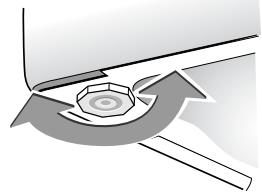
D 14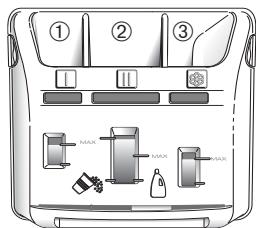
① Pre-wash container (powder) ② Wash container (powder or liquid) ③ Softener

POWDERED DETERGENT

: LIQUID DETERGENT
- PROGRAMMING
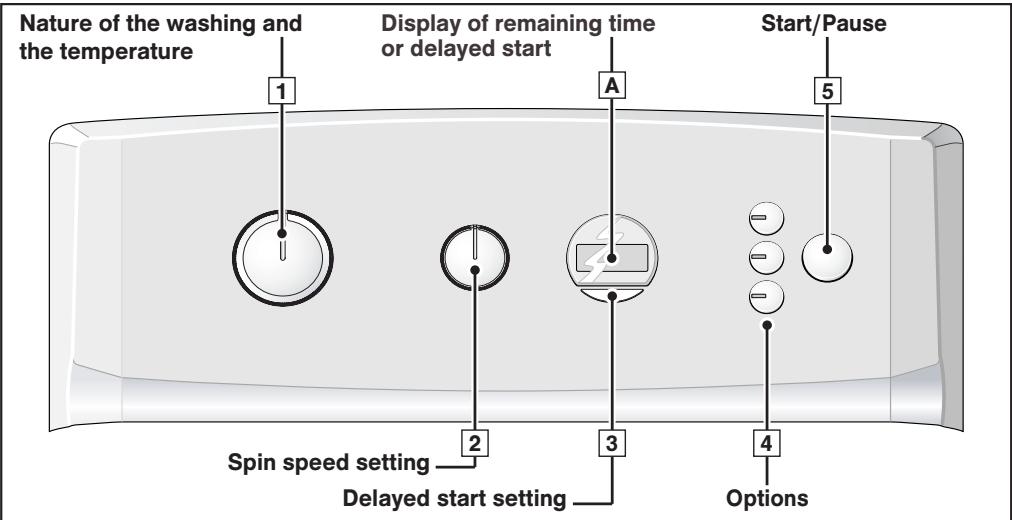

Information:
All the buttons are on micro-switches and do not remain depressed. In any case, the "Start/Pause" button cannot cancel a programme.

Important:
Before starting your machine, check that the power cable is plugged in and the water tap is open. Also ensure that the drum doors are closed correctly and the machine's lid is shut. During the "End of Cycle" phase, any action on one of the controls (the selectors or the buttons) returns you to "Programming" mode. As a safety measure, when the cycle is over, we recommend that you unplug the power cable and turn off the water tap.
- Programming a washing cycle:
- Turn the selector 1 to choose the most suitable programme and washing temperature for the type of fabric to be washed. NB: Turning the selector to any position other than "OFF" provides power to the machine.
- Using the selector 2 , choose:
- Either a suitable spin speed for your type of washing. The spin speed is automatically restricted in the "Mixed", "Delicates/Wool" and "Handwash" programmes.
- Or drip dry. The cycle will finish with a gentle spin at 100 rpm.
- Or stop with tub full of water. Your machine will stop with the tub full of water before the final spin.
- Use the buttons 4 to select any options you wish.
- Select immediate start by pressing "Start/Pause" 5 ...
- ... or select a start delayed by 1 to 19 hours by pressing button 3 (for how to do this, see the section "DETAILS OF THE OPTIONS - Delayed start") and then press "Start/Pause" 5 .
Display and position of the selectors
In A, display of the length of the selected programme
for example:
Selector 2 on
- Position "800" for example
- Position "100"
- Position "U"
Light(s) for the option(s) selected
Countdown in A of the time remaining before the end of the cycle (the two dots flash throughout the whole of the cycle)
Display of the symbol G in A and countdown of the time remaining before the cycle actually starts.
An animation (four small elements turning on themselves) shows the waiting period before the start of the cycle.
- Adding or removing an item during the cycle (impossible during spin):
- Press the "Start/Pause" button 5 to interrupt the cycle.
- Add or remove the items of laundry*.
- Press the "Start/Pause" button 5 to restart the cycle.
(*) The lid may take 1-2 minutes to unlock.
NB: If you have selected a delayed start, you can access the drum instantly at any time in the period before the washing cycle starts without having to interrupt and restart the cycle.
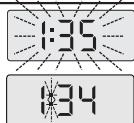
Countdown of the time is stopped in A (the displayed time flashes)
Resumption of the countdown in (the two dots start flashing again)
- Cancelling while programming, washing or during a pause:
- Set the selector 1 to the "OFF" position.
This can be done at any time during the cycle or during programming, or even during a pause.
NB:
- In all cases, after cancelling you must reprogramme everything from the start.
- If you have cancelled during the washing phase, remember to empty the water, if necessary.
Selector 1 set to "OFF"
All the indicator lights and the display are OFF
End of the cycle:
NB: After spinning, some models automatically position the drum opening at the top to provide easy access to the washing. This operation lasts at most 3 minutes.
- Screen A then displays " - 0 -", indicating that the cycle has finished.
Set the selector 1 to the "OFF" position.
You can now open the lid and remove your washing.

- Maintaining your machine's performance (Maintaining the pump filter):
You must clean the drain pump filter regularly (for how to do this, see the section "CLEANING THE PUMP FILTER").

Important:
Your machine's performance can be affected if you do not clean the pump filter regularly.
For more details on the various functions, please refer to the sections "DETAILS OF THE PROGRAMMES" and "DETAILS OF THE OPTIONS".

Information:
After a power failure, when the power is restored, the washing cycle automatically resumes at the point where it was interrupted.
- SOME EXAMPLES OF PROGRAMMES
To select the most suitable programme for your type of washing, follow the instructions on the labels that most textiles bear.
| Programmes table | - | - | + | 1.00 | D | |||
| Type of textile | Temperature (°C) | Maximum weight of dry clothes (kg) | Prewash | Surfliss | Extra rinse | Drip-dry | Rinse hold | |
| COTTON | -90° | 7.0 | ● | ● | ● | ● | ● | |
| MIXED | -60° | 3.0 | ● | ● | ● | ● | ● | |
| DELICATES/WOOL | -30° | 2.0 | ● | ● | ● | |||
| Special programmes | ||||||||
| Excel A39' (1) | 40° | 3.0 | ● | ● | ● | |||
| Handwash | ● | 1.0 | ● | ● | ● | |||
| Flash 10' | 30° | 300 g | ● | ● | ||||
| Stretch | 40° | 3.0 | ● | ● | ● | ● | ● | |
| Additional programmes | ||||||||
| Rinsing / Spinning | - | ● | ● | |||||
These functions can be used alone or in combinations: no illogical combinations can be made. (1) : Short 40°C cotton programme for testing institutes.
- DETAILS OF THE PROGRAMMES
The main programmes provided by the machine are as follows:

If your washing comprises hard-wearing white COTTONS or LIGHT COLOURS.
Important :
When washing coloureds do not exceed a maximum temperature of 60°C .
NB : During the first few minutes of the programme, your machine automatically evaluates the washing load you have introduced and adapts the water consumption and the length of the programme accordingly to provide a perfect wash
- Mixed
If your washing comprises of DELICATE COLOURS, HARD-WEARING SYNTHETICS or MIXED FIBRES.
Delicates /Wool
If your washing comprises NETTING, DELICATE FABRICS, FRAGILE TEXTILES or "MACHINE-WASHABLE WOOLLENS".
NB: A programme with agitation and spin phases specially adapted to these types of fabrics.
- Stretch
This programme is for efficient washing of elastane sports and leisure wear, while retaining its elasticity, using a customised washing cycle and an appropriate washing temperature and spin speed.
- Excel A39
This 40°C cycle washes a normal 3 kg load of cotton and mixed fabrics in 39 minutes, ensuring perfect washing results and maximum energy saving.
- Handwash
If your washing comprises SILK or PARTICULARLY DELICATE FABRICS
NB: A programme with a very gentle mechanical action and no intermediate spins between rinses.
The cycle ends with a very gentle, progressive spin restricted to 600 rpm.
- Flash 10
This programme is designed for small loads of lightly soiled garments (e.g. two T-shirts or a sweatshirt).
It lasts just 10 minutes.
Important:
For this programme, never use fabric conditioner.
Rinsing / Spinning

A separate rinse followed by a choice of:
- Either spin and drain
- Or drain only ("Drip-dry" option)
- Or a stop with the drum full of water.
Important:
In the case of rinse followed by a spin, ensure that you select a suitable spin speed for the type of washing in the machine.
- DETAILS OF THE OPTIONS
-Prewash U
Specially designed for heavily soiled washing (mud, blood, etc.).
A specific initial agitation in cold water precedes a phase of heating to 30°C .
This agitation phase in cold water enables the particles soiling the washing to be removed before the water is heated.

Important :
Detergent must be placed in the" container in the products
box.
- Surflass
This option washes your laundry more gently, but with an identical washing performance. The spin speed is slower so that your laundry creases less.
- Extra rinse
"Especially for sensitive and allergic skin": adds an extra rinse to the washing cycle.
Drip Dry (spin speed "100")
This function, for very delicate linen, enables you to remove spinning and to pass directly to the draining of the washing machine.
- Delayed start
You can delay the start of your programme by 1 to 19 hours so that you can benefit from cheap rate electricity or to have the cycle finish at a desired time.
To do this, select the time that must pass before the cycle starts by pressing successively on button 3 (this is done hour by hour) and then press "Start/Pause" 5.
NB:
- Even if you forget to press the "Start/Pause" button after selecting this option, your choice will still be accepted after a few seconds.
- The time remaining before the start of the cycle is counted down hour by hour from 19 hours to 1 hour and then minute by minute from 59 minutes to 1 minute.
- Throughout the whole waiting period, the delayed start symbol is displayed and the four elements light up in succession.
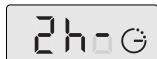
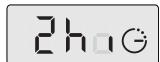


- At the end of the waiting period, the programme starts and the display A shows the duration of the selected cycle.
Rinse hold
This function enables you to remove the washing from your machine before the spin phase or to delay this phase with your washing remaining in water to prevent creasing.
NB: When the machine is stopped with the tub full of water, the display A shows alternately:
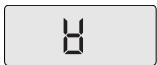

Then:
- If you want to drain after spinning, use the selector 2 to choose a suitable spin speed for your type of washing.
The programme will end automatically.
- If you just want to drain, turn the selector [2] to "Drip Dry" (position "100").
- MODIFYING A WASHING PROGRAMME
- During programming:
Anything can be changed before the "Start/Pause" button [5] is pressed.
After the cycle has started:
You can change the type of textile (for example, switch from "COTTON" to "MIXED", etc.). In this case, check that the options you previously selected are still there.
You must confirm your new selection by pressing the "Start/Pause" button [5].
The machine may then possibly drain off some of its water.
- Throughout the cycle:
Depending on your model, the following changes are possible without pressing the "Start/Pause" button [5].
- You can change the temperature for the same type of textile.
NB: If the temperature achieved by the washing cycle is higher than your new selection, heating the water stops immediately and the cycle continues.
- You can alter the spin speed throughout the cycle.
- You can select "Drip Dry" (100) and "Rinse hold" (10) throughout the washing phase.
- You can activate the "Extra rinse" option until rinsing starts.
- You can deactivate all the options throughout the cycle provided that their action has not already finished.
- During delayed start:
- Any kind of programme modification is accepted during a delayed start's waiting period.
- You can alter the length of a delayed start throughout the waiting period before the cycle effectively starts.
NB:
- During this period, selecting a new time cancels out the previous selection. The new period selected is accepted based on the last selection made.
- If you want to cancel the delayed start completely during this period, first display "19h" using button 3. Then press the button again and briefly press "Start/pause" 5.
The cycle will start immediately.
- If you want to reduce the length of time of the delayed start, proceed in the same way but do not press the "Start/Pause" button. Your machine is then ready for a new setting.
- You can only activate the "Prewash", "Extra rinse" and "Surfliss" options during a delayed start's waiting period.
- When the cycle is over:
When the screen A shows "-0 -", you can programme a new cycle without having to reset the selector 1 to the "OFF" position.
For this, all you have to do is turn one of the selectors or press one of the buttons.
The screen shows the duration of the programme selected.
The machine is then ready to be reprogrammed.
AUTOMATIC SAFETY SYSTEMS
- Lid opening safety system:
As soon as washing commences, the lid on your machine is locked. When the cycle is finished or when the machine has stopped with the drum full of water, the lid unlocks.
If you have programmed a "Delayed start", the lid is not locked until the waiting period is over and the cycle starts.
If you wish to open the lid during the cycle, press button 5 briefly and wait 1-2 minutes for the safety system to unlock the lid.
Important:
Depending on when you wish to open the lid during the cycle, this time delay may be a little longer because a cooling down period may also have to be included.
In fact, to avoid your being severely burnt, the lid safety system will not open during the cycle unless the temperature inside the machine is below a certain threshold.
Water safety system:
During operation, constant control of the water prevents any overflows.
- Spin safety system:
Your washing machine is fitted with a safety system that restricts the spin when poor load distribution is detected.
In this case, your washing may be insufficiently spun. Redistribute your washing in the drum and programme a new spin.
- Anti-foam system:
You machine can detect when too much foam is being produced during spinning.
At such times, spinning stops and the machine drains.
The cycle then restarts, adapting the spin rates and possibly adding an extra rinse.
- CLEANING THE PUMP FILTER
This filter collects the small objects you may have inadvertently left in your clothes and prevents them from disrupting the pump's operation. To clean the filter, proceed as follows:
- Open the drum doors. At the back of the drum, you will see a plastic component A (Diagram D15).
- Release this (Diagram D16).
To do this:
- Insert a rod (a pencil or a screwdriver, for example) into the hole in the component A
- Press down vertically with the rod, while pushing the component A over to the right until it is released from its housing
- Remove the component A
- Turn the drum slightly towards the front of the machine, with the doors open (Diagram D17)
You can access the pump filter B through the openings freed by removing the plastic component A.
- Remove the filter from its housing (Diagram D17)
- Remove the various objects it may have in it
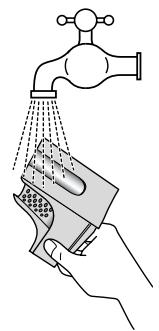
Rinse it under the tap (Diagram D18)
- Re-insert it, pushing it firmly into its housing after checking that the housing is clean
- Re-insert the plastic component A, ensuring that it is positioned correctly in the openings at the bottom of the drum and pushing it to the left until it is fully engaged (Diagram D19).
- CLEANING THE MACHINE

Important:
To clean the casing, the control panel and all the plastic parts in general, use a sponge or a soft cloth dampened only with water or liquid soap.
In general, use a sponge or a soft cloth dampened only with water or liquid soap.
In all cases, do not use: - Abrasive powders - Metal or plastic sponges - Alcohol-based products (alcohol, thinners, etc.)
To ensure better hygiene, we recommend that you:
Leave the lid open for a short time after washing.
- Leave the lid open for a short time after washing.
- Clean the plastic and rubber access components to the tank approximately once a month using a slightly chlorinated product. Run a rinsing cycle to remove any residue of this product.
- Run a washing cycle at 90°C at least once a month.
Clean the products' box regularly.
Clean the products' box regularly.
To do this:
- Press the bosses Θ on each side of the box simultaneously to extract it from its housing (Diagram D20).
- Remove the siphon D from the rear of the box E and separate the box from its front cover F (Diagram D21).
- Rinse everything under the tap (taking care to empty any excess water remaining inside the box).
- Refit all the box's components, ensuring that the box section itself is properly clipped into the cover, and then re-insert the complete assembly into its location under the machine's lid.
PERIODIC CHECKS
To avoid any water damage, we recommend that you regularly check the condition of the water and drain hoses. If you notice the slightest cracking, do not hesitate to replace the hoses with identical ones available from the manufacturer or his After-Sales Service. For how to replace the water supply hose, please refer to the section "CONNECTING TO THE COLD WATER SUPPLY".
- REPLACING THE POWER SUPPLY CABLE
Warning: For your sa
For your safety, the power cable and, depending on the model, the complete electric box and its associated cable must only be replaced by the manufacturer's After-Sales Service or a qualified electrician.
D 15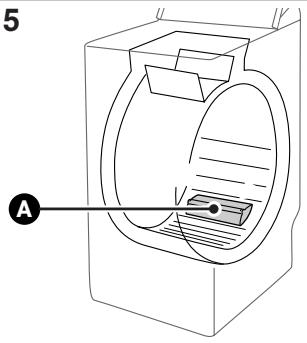
D 17 D 18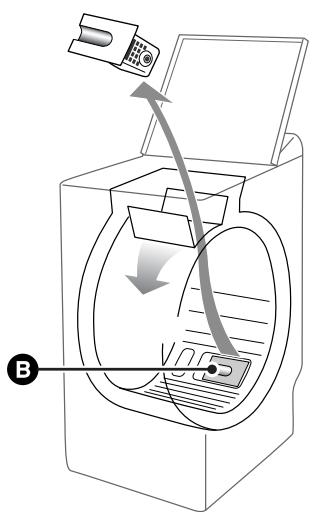
D 20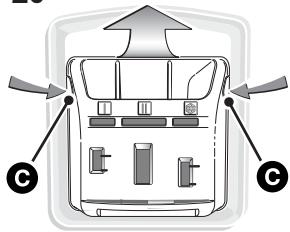
D 19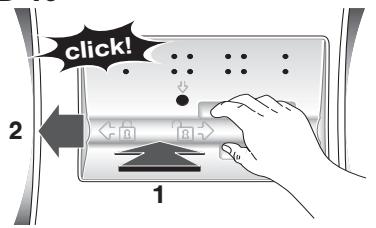
D 21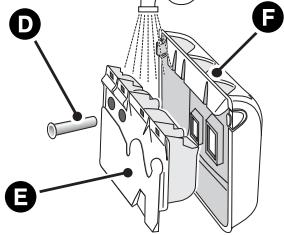
D 16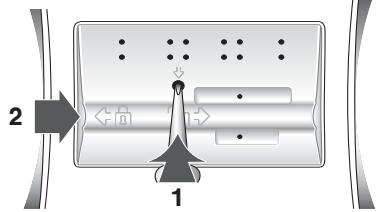
- INCIDENTS THAT MAY OCCUR
- The cycle does not start
- You have not pressed the "Start/Pause" button
- There is no power to the machine:
- Check that the plug is correctly in the socket
- Check the circuit breaker and the fuses.
- The water tap is closed
- The machine's lid is not closed properly
- A puddle of water forms around the machine

Warning:
17 First of all remove the plug and the fuse and shut off the water supply tap.
While the machine is operating, the permanent level control prevents the water from overflowing. If, despite this, water comes out of your machine, it may be that:
- The drain hook is wrongly positioned in the drain pipe.
- The water supply hose is not sealed tightly at the machine or tap end:
- Check that the seals are in place and the connections are tight.
- Heavy vibration during spin
- All the transport materials have not been removed correctly from the machine:
- Check that all the transport wedges have been removed (see "REMOVING THE TRANSPORT CLAMPS").
- The floor is not level.
- Your machine is resting on its two "front" castors (depending on the model):
- Reset your machine on its feet by pushing the castor engagement lever to the right.
- The washing is not spun or not spun enough
- You have selected a programme with no spin, for example "Drip-dry"
- The spin safety system has detected poor distribution of the washing in the drum:
- Untangle the washing and programme a new spin.
- Check the height of the emptying cross-piece (see page 12).
- The machine does not drain
- You have programmed "Full drum stop"
- The pump filter is blocked:
- Clean it (see "CLEANING THE PUMP FILTER" for the relevant procedure)
- The drain hose is kinked or squashed
- The lid does not open
- The programme has not yet finished
The lid remains locked throughout the programme.
The drum doors open very slowly (On machines fitted with gently opening door)
- Your machine has not operated for a long time
- It is located in too cold a position. Detergent residue (powder) is blocking the hinges
- In all cases, everything returns to normal after the doors have opened initially

Important:
As a general rule, whatever the anomaly detected, you
should stop the machine, unplug the power cable and shut off the water tap
NOTE ON OPERATION - THIS IS NOT AN INCIDENT:
- The programme time decreases or increases during the wash
This is not a fault. The length of time displayed at the start of the programme is updated according to the load in the machine (automatic weighing). This guarantees perfect washing results and water and energy consumption appropriate to the load. This is normal. The spin safety and anti-foam systems may extend the initial programme time displayed.
- MESSAGES SHOWN ON THE DISPLAY
- Incidents indicated, which you can rectify yourself
In this section, we explain how you can rectify these incidents very easily yourself.
Your machine automatically detects some operating incidents and indicates these by particular messages shown on the screen.
| Messages | Causes / Remedies |
| do1 | The water tap is closed. Check that the water tap is open and then press the “Start/Pause” button again to restart the cycle. This incident may also be caused by the drain hose being poorly connected (see the section “DRAINING AWAY THE WASTE WATER”). |
| do2 | The pump filter is clogged. Clean the pump filter (for how to do this, see the section “CLEANING THE PUMP FILTER”) and then press the “Start/Pause” button again to restart the cycle. Also check the drain hose’s position in the drain: the connection must not be airtight (see the section “DRAINING AWAY THE WASTE WATER”). |
| do7 | Lid not closed properly. Check that the lid is closed and then press the “Start/Pause” button again to restart the cycle. Drum blocked. Check that a small item of laundry (e.g. a handkerchief or a sock, etc.) has not slipped down between the tub and the drum and is stopping the drum from turning. To access the bottom of the tub, please refer to the section “CLEANING THE PUMP FILTER”. |
| Drum doors not closed correctly. Close them again as per the instructions outlined in the “LOADING YOUR WASHING - Close the drum” chapter. Close the lid of the machine and then press the “Start/Pause” button to restart the cycle. |
NB:
If you have experienced an operating incident which is not mentioned above, we recommend proceeding as follows before calling a breakdown engineer:
- Set the Programme selector to the "OFF" position and remove the electrical plug for at least 10 seconds
- Reconnect the plug and restart a washing cycle.
If the fault persists, call your breakdown engineer.

Important:
Do not restart a washing cycle if the drum remains locked or if you notice water around your machine or if you notice a burning smell.
- AFTER-SALES SERVICE :
Possible maintenance on your washing machine should be undertaken by :
- either your dealer,
- or another qualified mechanic who is an authorized agent for the brand appliances.
When making an appointment, state the complete reference of your equipment (model, type and serial number). This information appears on the manufacturer's nameplate attached to the rear of the equipment.
To keep your appliance in good working order, we recommend that you use Clearit household products.

Professional expertise for the general public
Clearit offers you professional products and adapted solutions for the daily upkeep of your household and kitchen appliances.
You may find them in conventional retail outlets, along with a complete line of by-products and consumables.
DESCRIPTION OF THE APPLIANCE
- MOVING THE APPLIANCE
Delicate wash / Wool
- DEAR CUSTOMER
- SAFETY ADVICE
- IMPORTANT: THIS MACHINE IS ONLY FOR DOMESTIC USE AND IS DESIGNED TO WASH, RINSE AND SPIN MACHINE-WASHABLE TEXTILES. YOU MUST OBSERVE THE FOLLOWING INSTRUCTIONS. WE REFUSE TO ACCEPT ANY LIABILITY AND THE GUARANTEE IF YOU DO NOT OBSERVE THESE RECOMMENDATIONS SINCE THIS COULD RESULT IN DAMAGE TO EQUIPMENT OR PHYSICAL INJURY
- SAVING ENERGY
- ENVIRONMENTAL PROTECTION
- DESCRIPTION OF YOUR MACHINE
- REMOVING THE TRANSPORT CLAMPS
- IMPORTANT
- WARNING
- ADVICE: WE WOULD
- INFORMATION
- MOVING YOUR MACHINE
- CONNECTING TO THE COLD WATER SUPPLY
- DRAINING AWAY THE WASTE WATER
- CONNECTING TO THE ELECTRICITY SUPPLY
- ADVICE
- INSTALLING YOUR MACHINE
- LEVELLING THE MACHINE
- ADJUSTABLE FEET
- TEXTILE MAINTENANCE CODES
- LOADING YOUR WASHING
- OPEN THE MACHINE
- INSERT YOUR WASHING
- CLOSE THE DRUM
- LOADING THE WASHING PRODUCTS
- DISPENSING THE DETERGENT
- DETERGENTS FOR WOOLLENS AND DELICATE FABRICS
- BEFORE YOUR FIRST WASH
- STANDARD COMPARISON TESTING PROGRAMME
- PROGRAMMING
- PROGRAMMING A WASHING CYCLE
- DISPLAY AND POSITION OF THE SELECTORS
- LIGHT(S) FOR THE OPTION(S) SELECTED
- ADDING OR REMOVING AN ITEM DURING THE CYCLE (IMPOSSIBLE DURING SPIN)
- CANCELLING WHILE PROGRAMMING, WASHING OR DURING A PAUSE
- SELECTOR 1 SET TO "OFF
- END OF THE CYCLE
- MAINTAINING YOUR MACHINE'S PERFORMANCE (MAINTAINING THE PUMP FILTER)
- SOME EXAMPLES OF PROGRAMMES
- DETAILS OF THE PROGRAMMES
- MIXED
- DELICATES /WOOL
- STRETCH
- EXCEL A
- HANDWASH
- FLASH
- RINSING / SPINNING
- DETAILS OF THE OPTIONS
- PREWASH U
- DETERGENT MUST BE PLACED IN THE" CONTAINER IN THE PRODUCTS
- BOX
- SURFLASS
- EXTRA RINSE
- DRIP DRY (SPIN SPEED "100")
- DELAYED START
- NB
- RINSE HOLD
- THEN
- MODIFYING A WASHING PROGRAMME
- DURING PROGRAMMING
- AFTER THE CYCLE HAS STARTED
- THROUGHOUT THE CYCLE
- DURING DELAYED START
- WHEN THE CYCLE IS OVER
- AUTOMATIC SAFETY SYSTEMS
- LID OPENING SAFETY SYSTEM
- WATER SAFETY SYSTEM
- SPIN SAFETY SYSTEM
- ANTI-FOAM SYSTEM
- CLEANING THE PUMP FILTER
- CLEANING THE MACHINE
- TO ENSURE BETTER HYGIENE, WE RECOMMEND THAT YOU
- CLEAN THE PRODUCTS' BOX REGULARLY
- PERIODIC CHECKS
- REPLACING THE POWER SUPPLY CABLE
- INCIDENTS THAT MAY OCCUR
- THE CYCLE DOES NOT START
- A PUDDLE OF WATER FORMS AROUND THE MACHINE
- HEAVY VIBRATION DURING SPIN
- THE WASHING IS NOT SPUN OR NOT SPUN ENOUGH
- THE MACHINE DOES NOT DRAIN
- THE LID DOES NOT OPEN
- THE DRUM DOORS OPEN VERY SLOWLY (ON MACHINES FITTED WITH GENTLY OPENING DOOR)
- NOTE ON OPERATION - THIS IS NOT AN INCIDENT
- THE PROGRAMME TIME DECREASES OR INCREASES DURING THE WASH
- MESSAGES SHOWN ON THE DISPLAY
- INCIDENTS INDICATED, WHICH YOU CAN RECTIFY YOURSELF
- AFTER-SALES SERVICE
- PROFESSIONAL EXPERTISE FOR THE GENERAL PUBLIC
- DESCRIPTION OF THE APPLIANCE
- MOVING THE APPLIANCE
- DELICATE WASH / WOOL
Brand : THOMSON
Model : WTT7110I
Category : Washing machine