
WFT8110I - Washing machine THOMSON - Free user manual and instructions
Find the device manual for free WFT8110I THOMSON in PDF.



| Product type | Front-loading washing machine |
| Brand | THOMSON |
| Model | WFT8110I |
| Maximum load capacity | 8 kg |
| Number of programs | 16 (Cotton, Synthetic, Delicate, Wool, Duvet, Quick, Spin, Excel A 45') |
| Available temperatures | Cold, 30°C, 40°C, 60°C, 90°C |
| Wash options | Easy iron, Extra rinse (models with display), Intensive |
| Delayed start | Up to 24 hours (models with display) or 3/6/9 hours (models without display) |
| Spin speed | Adjustable, decrements of 100 rpm (min 400 rpm) |
| Child safety | Key lock (models with display) |
| Anti-unbalance system | Yes, prevents spinning if load is unbalanced |
| Door type | Large opening, tilted drum for ergonomics |
| Detergent drawer | 3 compartments (prewash, wash, fabric softener), with liquid detergent trap |
| Drain filter | Accessible, cleanable |
| Water consumption (cotton program 60°C) | 59 liters |
| Energy consumption (cotton program 60°C) | 1.36 kWh |
| Duration of cotton program 60°C | 80 minutes |
| Required water pressure | 0.05 to 1 MPa (0.5 to 10 kg/cm²) |
| Electrical connection | Grounded outlet |
| Supplied accessories | Water inlet hose, drain hook, hole covers, transport screw wrench |
Frequently Asked Questions - WFT8110I THOMSON
User questions about WFT8110I THOMSON
0 question about this device. Answer the ones you know or ask your own.
Ask a new question about this device
Download the instructions for your Washing machine in PDF format for free! Find your manual WFT8110I - THOMSON and take your electronic device back in hand. On this page are published all the documents necessary for the use of your device. WFT8110I by THOMSON.
USER MANUAL WFT8110I THOMSON
Dear Customer,
WE ALWAYS THINK ABOUT INNOVATION
LCD screens.
You have just acquired a THOMSON washing machine and we would like to thank you.
We have invested all our dedication and know-how in this appliance so that it would best meet your needs. With innovation and performance, we designed it to be always easy to use.
In the THOMSON product range, you will also find a wide choice of ovens, microwaves, cooking hobs, ventilation hoods, dishwashers, driers, fridges and freezers, that you can coordinate with your new THOMSON washing machine.
As part of our commitment to constantly improving our products, we reserve the right to make changes to them based on technical advances to their technical and functional features and appearance.

Warning:
Before installing and using your appliance, please carefully read this
Guide to Installation and Use, which will allow you to quickly familiarise yourself with its operation.
Thank you for placing your trust in us.
Our new range of washing machines has been designed to make life more convenient for you:
WITH YOUR CONVENIENCE ALWAYS IN MIND
Large hatch.
Maximum opening.
- Designed higher than the normal axis and with the drum tilted to achieve maximum ergonomics.
- Its maximum opening makes it much easier to put clothes in.
Easy-access filter.
- And simple maintenance.
WITH SAVINGS ALWAYS IN MIND
8 kg capacity.
- Which allows you to do less washes and make savings.
Washing in less time.
- The wash programmes do not last as long giving you more free time.
Time delay.
- To take advantage of cheap electricity rates.
WITH INNOVATION ALWAYS IN MIND
LCD screens.
- Which allows you to have constant information about the wash programme and its duration.
Detergent dispenser designed to offer maximum convenience.
- Easy to remove for cleaning.
- Possibility of using liquid detergent.
Warnings
To avoid the risk of fire, electrical shocks, injury or damage when using your washing machine, please take the following precautions:
This washing machine comes with a manual that includes operating, maintenance and installation instructions. Please read all the instructions before using the washing machine. - Do not wash items that have previously been cleaned, washed, soaked or treated with petrol, solvents for dry cleaning, other inflammable substances or explosives, as they produce fumes that could catch fire or explode. - Do not add petrol, solvents for dry cleaning or other inflammable or explosive substances to the wash water as they produce fumes that could catch fire or explode. - Do not repair or replace any part of the washing machine or try to carry out any type of servicing unless it is recommended in the maintenance instructions in the manual.
- Do not climb onto the machine or stand on the open hatch door.
- Do not use an extension lead or adaptor to connect your washing machine to the mains supply. The machine should only be used for the purpose it is designed for. ■ Follow the washing instructions recommended by the manufacturer of the garment to be washed.
- Do not turn your washing machine on until you are sure that:
- It has been installed in accordance with the installation instructions.
- All the water, drainage, mains electricity and earth connections meet the local regulations and/or other applicable regulations.
ACCESSIONS LOCATED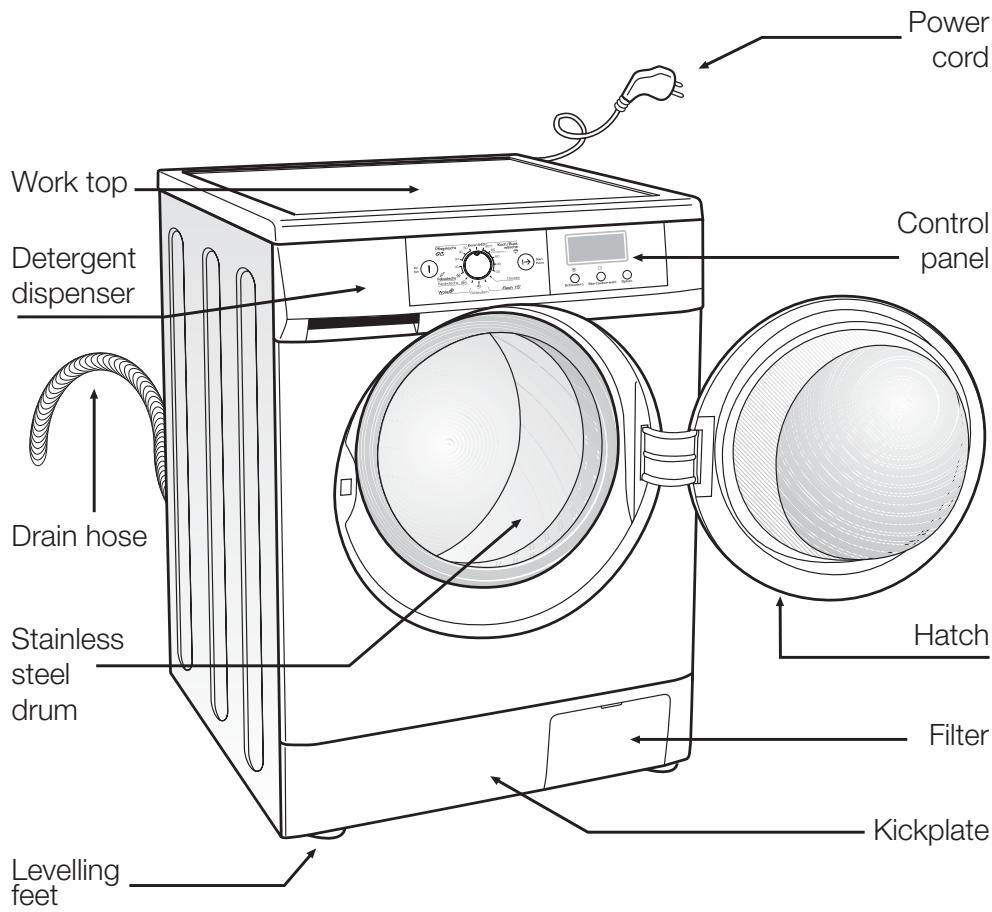
INSIDE THE DRUM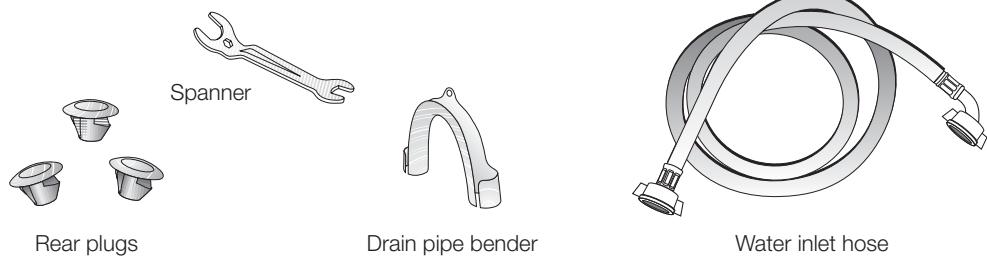
Installation and assembly
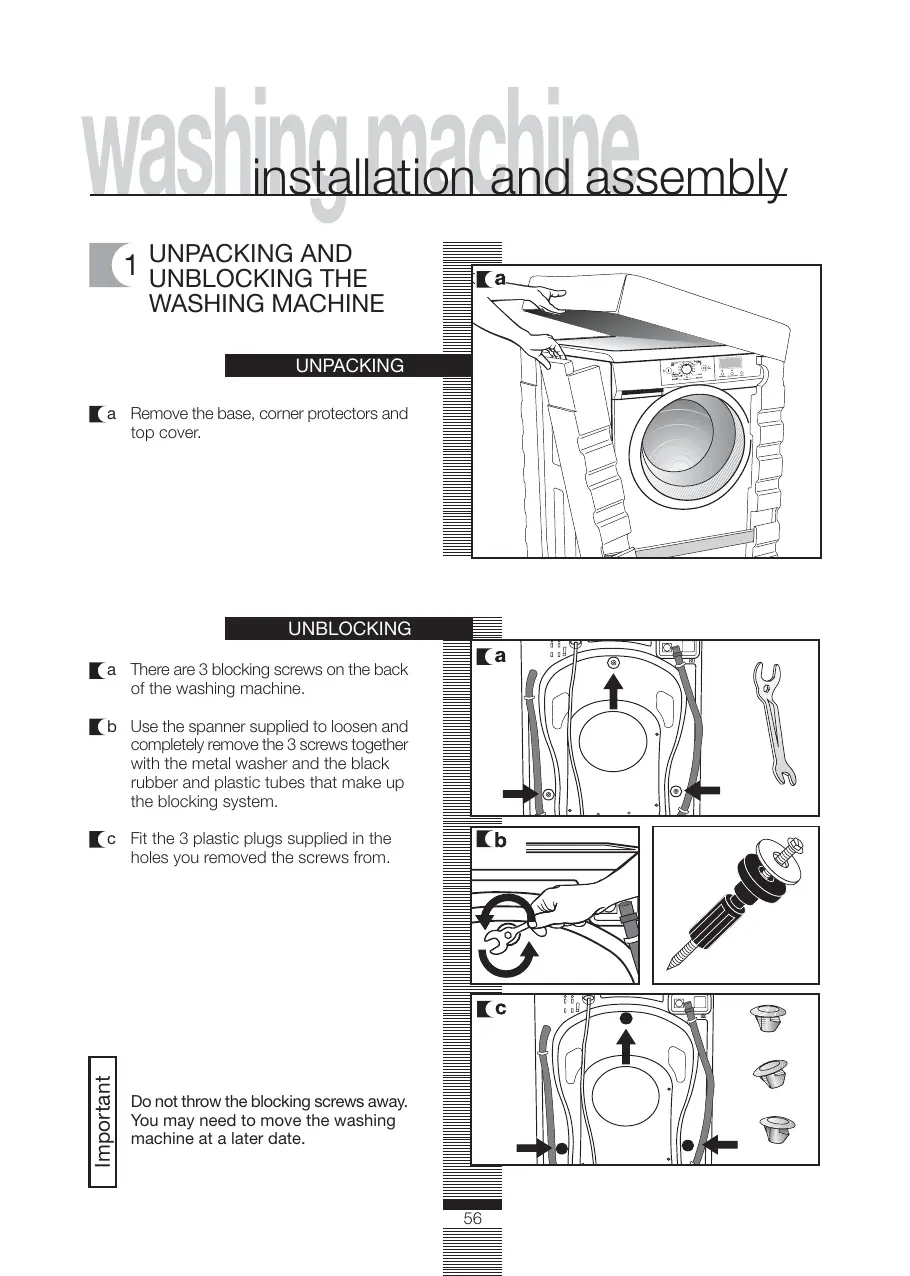
1 UNPACKING AND UNBLOCKING THE WASHING MACHINE
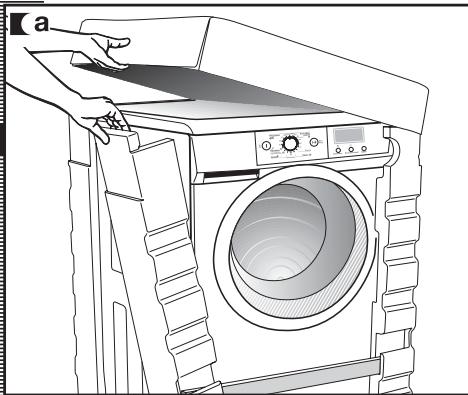
UNPACKING
a Remove the base, corner protectors and top cover.
UNBLOCKING
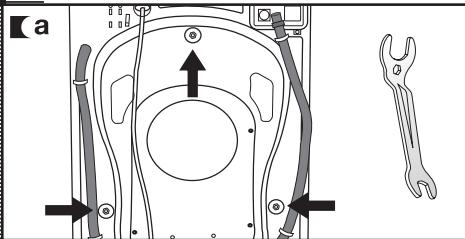
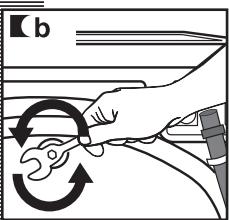
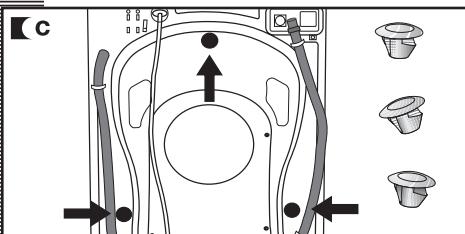
a There are 3 blocking screws on the back of the washing machine. b Use the spanner supplied to loosen and completely remove the 3 screws together with the metal washer and the black rubber and plastic tubes that make up the blocking system. Fit the 3 plastic plugs supplied in the holes you removed the screws from.
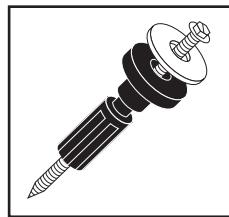
Do not throw the blocking screws away. You may need to move the washing machine at a later date.
CONNECTION TO THE MAINS WATER SUPPLY
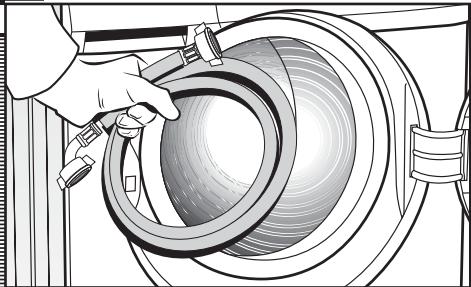
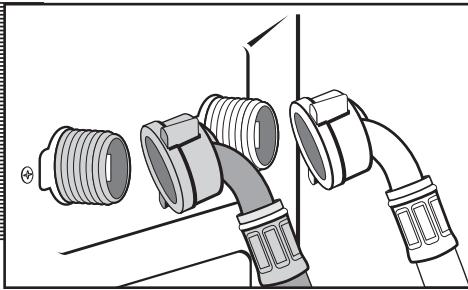
The water supply hose is inside the drum:
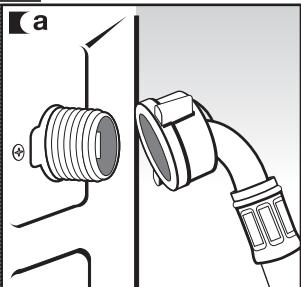
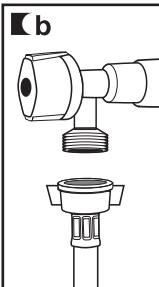
a Connect the bent end of the hose to the threaded inlet of the electrovalve located at the rear of the washing machine. Connect the other end of the hose to the water intake. Then securely tighten the connection nut.
It is important that the drain hose bend is correctly fastened to the outlet, to prevent any risk of it becoming detached and causing flooding.
If your washing machine has a hot water intake, connect the hose with the red threaded end to the hot water tap, and to the electrovalve with the red filter.
The washing machine must be connected to the mains water supply, using the new supply hoses supplied with the appliance. Do not use water supply hoses that have been used before. For your washing machine to work properly, the mains water pressure must be between 0.05 and 1 MPa (0.05 and 10 Kgr/cm²).
DRAINAGE
CONNECTION
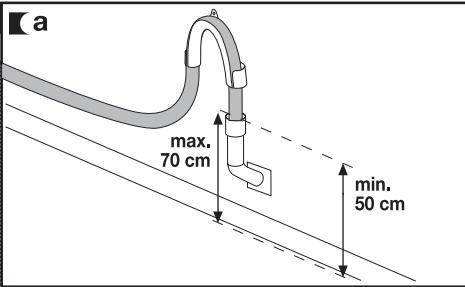
a It is recommended that you have a fixed drainage outlet 50 to 70 cm from the floor.
Avoid the drain hose being too tight, kinked or restricted. Use the bend supplied.
3
LEVELLING THE WASHING MACHINE AND CONNECTING IT TO THE MAINS ELECTRICITY SUPPLY
Installation and assembly
LEVELLING
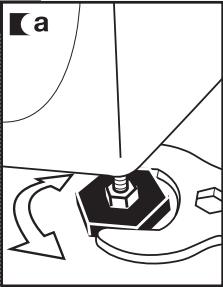
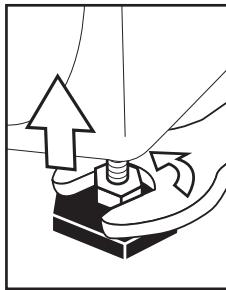
a) First of all, we recommend that you fix and level the rear feet. When they are properly fixed, secure the metal locknut tightly to the top part. b) Put the washing machine into its niche. Dampen the floor to help you move the machine into its final position. c) Finally level and secure the front feet in the same way as you levelled the rear feet. Keep the spanner supplied, in case you need it again.
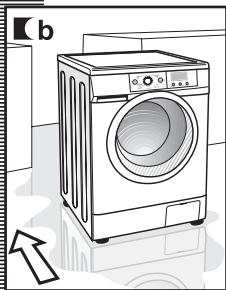
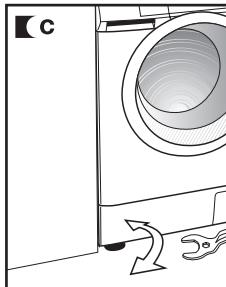
ELECTRICAL CONNECTION
Consult the specifications plate located on the hatch door of the washing machine before making the electrical connections. Ensure that the voltage reaching the plug is the same as that on the plate.
Do not remove the specifications plate. The information on it is important.
It is very important to correctly earth the washing machine.
The electrical installation, plug, socket, fuses or automatic switch and counter must be correctly dimensioned for the maximum power indicated on the specifications plate.
Do not plug the washing machine plug into the socket with wet or damp hands.
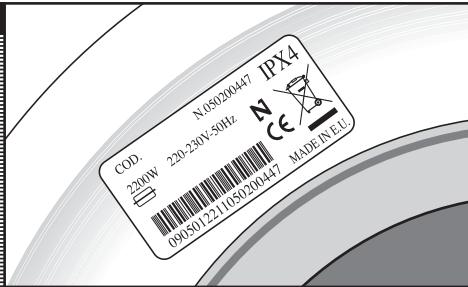
To remove the power cord, pull on the body of the plug.
If the power cord is damaged, it must be replaced by a cord or special unit provided by either the manufacturer or your after-sales service.
With built-in washing machines, the plug must be accessible after installation.
PRE-CLEANING
When your washing machine has been correctly installed, we recommend that you pre-clean the machine.
This is to check that the installation, the connections and the drainage are all correct, and to thoroughly clean the inside of the washing machine before any wash programmes are run (see the operating instructions on the following pages).
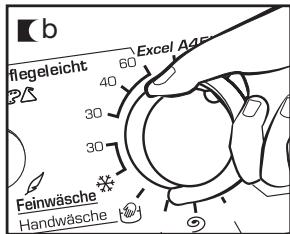
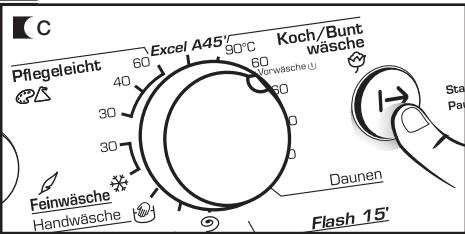
a Press ON/OFF button. b Select the normal programme at 60°C c Press the start/pause button.
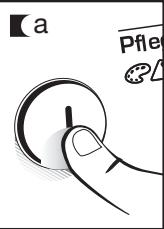
USING THE APPLIANCE AND PRACTICAL TIPS
PREPARING GARMENTS FOR WASHING
PREPARATION
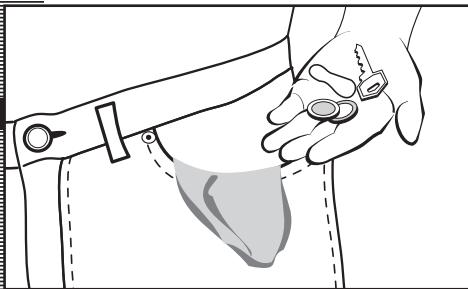
Before placing the clothes in the drum, make sure all the pockets are empty. Any small objects may block the drain pump.
SORTING THE CLOTHES
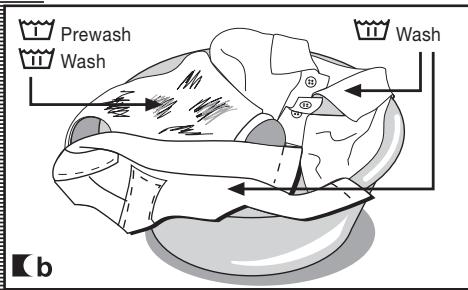
b Sort clothes according to how soiled they are.
a Sort the clothes according to fabric and how they are made. We recommend using the delicate programmes for sensitive fabrics. There is a special wool programme for woollens.
- Wash lightly soiled garments using a short programme.
- Use a programme without prewash for medium-soiled garments.
- Wash heavily soiled garments using a long programme with prewash.
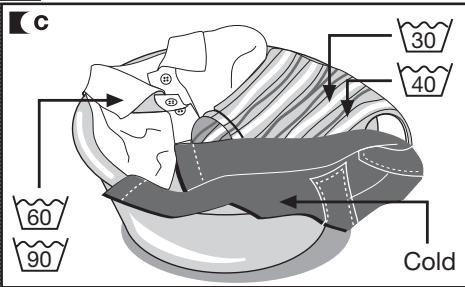
c Sort your clothes according to colour.
Wash whites and coloureds separately.
We recommend loading the washing machine to its full capacity. This means savings on water and energy.
Whenever possible, we recommend that you wash garments of different sizes within the same wash programme. This improves the washing action and also aids the correct distribution of the garments in the drum when spin-drying, and the washing machine will therefore be quieter.
It is a good idea to put small garments in a wash bag.
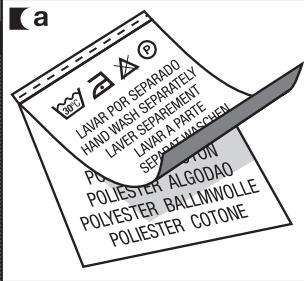

Important: Make sure beforehand that your woollens can be machine-washed.
2 USING DETERGENT AND ADDITIVES
Using the appliance and practical tips
DETERGENT
AND ADDITIVES
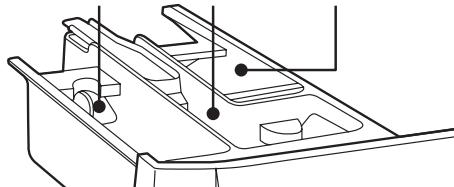
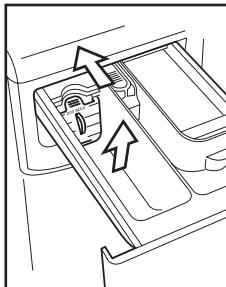
Your washing machine's detergent dispenser has three compartments. If you are going to use liquid detergent, you must close the wash compartment flap. Take the blue tab protruding from the bottom of the compartment between two fingers and pull outwards as far as it will go. Release the flap and it will remain in the vertical position and prevent the liquid detergent from getting out. It must be open for powdered detergent. Put it in the horizontal position, pressing the top tab with your finger and pushing it back as far as it will go. Put the detergent, either liquid or powder, or additive into the detergent dispenser before starting the wash programme.
Important
The liquid level must never be higher than the MAX mark printed on the dispenser wall.
Remember that the amount of detergent to be used will always depend on:
The amount of clothes to be washed. How heavily the clothes are soiled. The water hardness (information about water hardness is available from the relevant local authorities).
Important
We recommend the use of a decalcifying product if the water hardness is high in your area.
WASH FABRIC SOFTENER FABRIC SOFTENER PREWASH
eco-note
Remember that concentrated detergents exist which are more environment- and nature-friendly.
The use of more detergent than necessary will not improve your washing results, and apart from costing you

money it will have a negative effect on the preservation of the environment.
We therefore recommend you follow the detergent manufacturer's instructions.
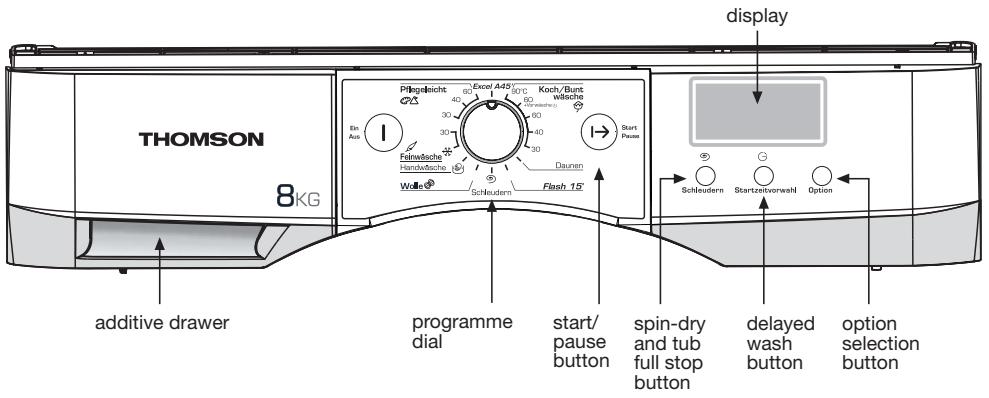
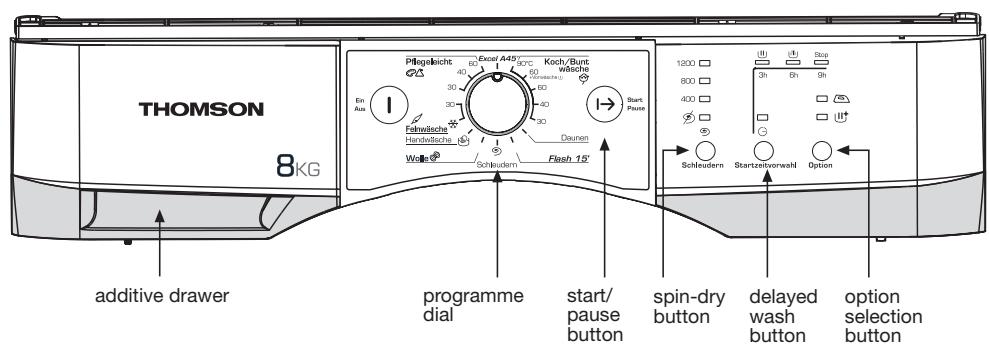
The procedure for selecting a wash programme is as follows:
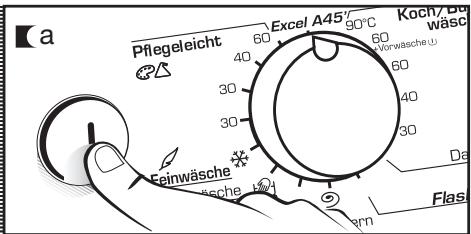
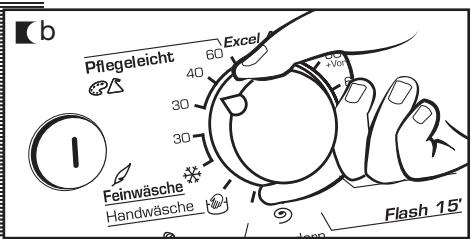
a Press the On/Off button to switch on the washing machine. b Select the desired wash programme by turning the programme selector dial (see programme table).
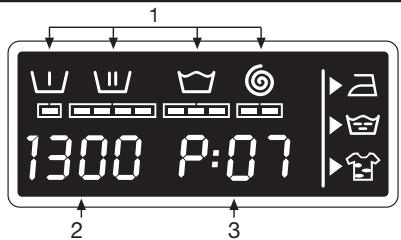
When you select a programme, the following information will appear on the display:
1 Wash programme phases:
display models
Prewash
Wash
Rinse
Spin-dry
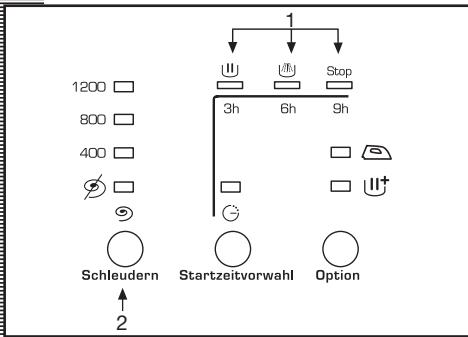
- non-display models
Wash
Rinse
End
2 Spin speed 3 Programme n° (for a few seconds) and then programme duration (display models only).
Options:
display models Easy ironing Extra rinse Intensive - non-display models Easy ironing Intensive
There are five programme types:
Cotton programmes
Synthetic programmes
Delicate programmes
Wool programmes
Complementary programmes
eco-note
We recommend choosing the most suitable programme and avoiding using the prewash whenever possible. This will save you money and help to preserve the environment.
PROGRAMMES
| Cotton | Complem. | Wool | Delicates | Synthetic |
| 1 Cotton 90°C | 6 Duvet | 9 Wool | 11 Delicate | 13 Synthetic |
| 2 Cotton 60°C | 7 Rapid' | 10 Hand | cold | 30°C |
| + prewash | 15 min | 12 Delicate | 14 Synthetic | |
| 3 Cotton 60°C | 8 Spin-dry | 30°C | 40°C | |
| 4 Cotton 40°C | 15 Synthetic | |||
| 5 Cotton 30°C | 60°C | |||
| 16 ExcelA 45' |

| Programme | Recommended temperature | Textile type | Option buttons possible | |||||||
| Extra fine | Intensive wash | Easy ironing | Spindle select | No spin | Tib full stop" | |||||
| Cotton programmes | 1 | Cotton 90°C | 90° | Cotton | YES | |||||
| 2 | Cotton 60°C + prewash | 60° | Cotton | YES | ||||||
| 3 (*) | Cotton 60°C | 60° | Cotton | YES | ||||||
| 4 | Cotton 40°C | 40° | Cotton | YES | ||||||
| 5 | Cotton 30°C | 30° | Cotton | YES | ||||||
| Comp. prog. | 6 | Duvet | 30° | Duvet | YES | |||||
| 7 | Rapid' 15 min | Cold | Synthetic | YES | NO | YES | ||||
| 8 | Spin-dry | - | 9° | NO | YES | NO | ||||
| Wool prog. | 9 | Wool | 30° | Wool | YES | NO | YES | |||
| 10 | Hand wash | Cold | Wool | YES | NO | YES | ||||
| Delicate prog. | 11 | Delicate cold | Cold | Delicate | YES | NO | YES | |||
| 12 | Delicate 30°C | 30° | Delicate | YES | NO | YES | ||||
| Synthetic prog. | 13 | Synthetic 30°C | 30° | Synthetic | YES | |||||
| 14 | Synthetic 40°C | 40° | Synthetic | YES | ||||||
| 15 | Synthetic 60°C | 60° | Synthetic | YES | ||||||
| 16 | ExcelA 45' | 40° | Cotton/ Synthetic | YES | NO | YES | ||||
| Max. load of clothes (kg) | Additive compartments | Programme description | Total consumption KWh/litres | Approx. duration (minutes) |
| 8 | M | Normal wash, rinses, fabric softener added automatically if used and long final spin | 2,20/64 | 110 |
| 8 | M | Prewash, normal wash, rinses, fabric softener added automatically if used and long final spin | 1,50/64 | 100 |
| 8 | M | Normal wash, rinses, fabric softener added automatically if used and long final spin | 1,36/59 | 80 |
| 8 | 0,60/59 | 57 | ||
| 8 | 0,30/59 | 52 | ||
| 8 | Delicate wash, rinses, fabric softener added automatically if used and gentle final spin | 0,20/45 | 50 | |
| 1 | SHORT wash, rinse, fabric softener added automatically if used and long final spin | 0,05/22 | 15 | |
| 8 | - | Draining and long final spin | 0,05/0 | 10 |
| 2 | M | WOOLLENS wash, rinses, fabric softener added automatically if used and gentle final spin | 0,45/55 | 40 |
| 2 | 0,05/55 | 30 | ||
| 4 | Delicate wash, rinses, fabric softener added automatically if used and gentle final spin | 0,10/37 | 50 | |
| 4 | 0,20/37 | 50 | ||
| 4 | Synthetics wash, rinses, fabric softener added automatically if used and gentle final spin | 0,20/45 | 50 | |
| 4 | 0,40/45 | 55 | ||
| 4 | 1,00/45 | 70 | ||
| 4,5 | Normal wash, rinses, fabric softener added automatically if used and gentle final spin | 0,60/40 | 45 |
SPIN DRYING
The wash options must always be selected after choosing the wash programme. Any programme change during selection cancels the previously selected options.
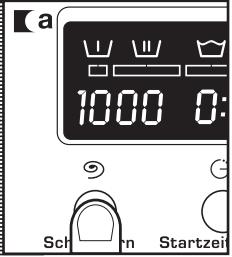
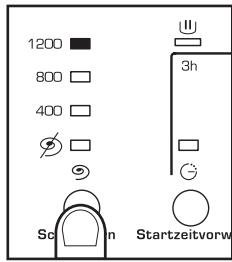
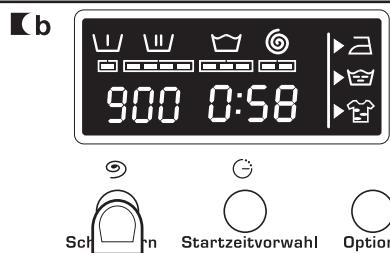
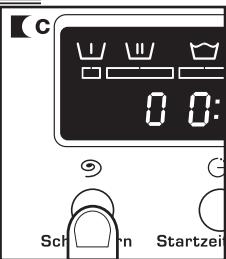
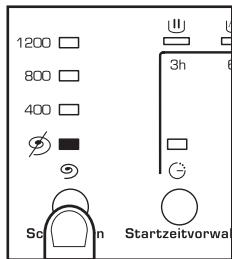
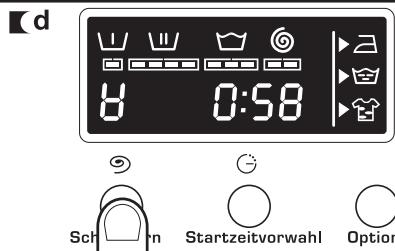
a Spin speed selection
The programme selected is associated with certain spin revolutions, as shown on the display.
It can be modified by pressing the spin button and the number of revolutions will be reduced by 100 revolutions at a time to 400.
No spin
Press the spin button again to get to the no spin option. A programme without a final spin. It is used to prevent creasing when washing special fabrics.
Full tub stop option
The wash programme stops on the last rinse, with the clothes left in water. When the function is deactivated, the washing machine continues the programme, draining and spin-drying. It is used, for example, when you are not at home and want to delay the spin-drying until you get home, to prevent the clothes creasing after spin-drying and being left in the drum to be removed.
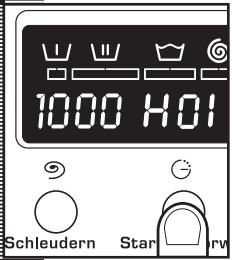
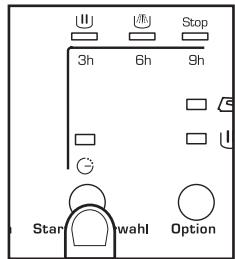
TIME DELAY
Time delay selection button
On display models, a delay of up to 24 hours can be selected. The delay must be selected after choosing the wash programme.
To select the delay time, press the clock button. On display models, the delay will be increased by an hour each time the button is pressed. On non-display models, you can choose a delay of either 3, 6 or 9 hours.
Cancelling the delay
To cancel the delay you have to press the clock button successively. The delay will be cancelled when 24 hours have been reached and the button is pressed once more. If the programme is changed the delay is also cancelled.
ADDITIONAL FUNCTIONS
Additional function selection button depending on programmes
There are either 3 options or 2 options, depending on the model: easy ironing, extra rinse and intensive.
Press the select button to display the option required.
By pressing the button several times you can choose between several combinations of one, two and up to three additional functions at the same time depending on the programme selected.
Button: Easy ironing
This option prevents garments from creasing by means of carrying out a special programme with special turns to fluff out the garments after spin-drying and make them easier to iron.
Button: Extra rinse (on display models)
Increases the level of the final rinse obtained in the clothes; suitable for large loads and garments belonging to people with sensitive skin. Increases water consumption!
Button: Intensive
This option, specially recommended for heavily soiled, stained clothes, achieves better results by extending the normal wash cycle.
STARTING UP
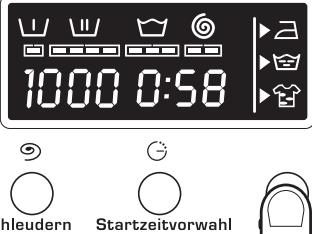
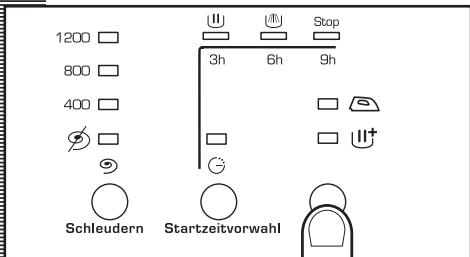
Start/pause button
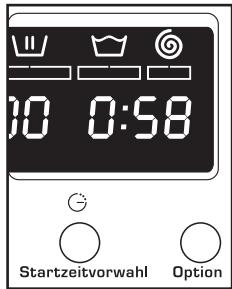
To start up the washing machine you have to press the start / pause button. The display will constantly show the minutes left until the wash is over (on display models).

LOCK FUNCTION
Lock function selection
Available on display models.
The various buttons can be locked to prevent them from being pressed and affecting the selected wash programme and options. This can be used to stop children playing with the buttons, etc.
The lock function should be activated after the wash programme has been selected together with all its options.
Activating the lock function
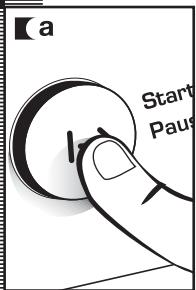
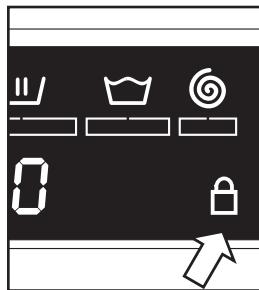
a The lock function is activated by pressing the start/pause button and holding it down for at least 3 seconds. The display will show if it is activated.
Deactivating the lock function
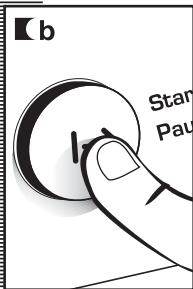
b The lock function is cancelled when the wash programme comes to an end. If you want to deactivate the lock function before the end of the programme, you have to hold the start button down again for at least 3 seconds. After 3 seconds, the lock function indicator will disappear from the display, and it will go into pause status.
The ON/OFF button does not cancel the lock function.
PROGRAMME
PHASES
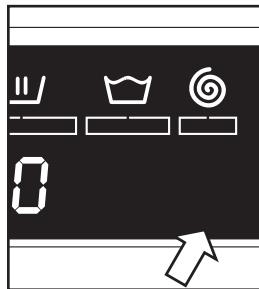
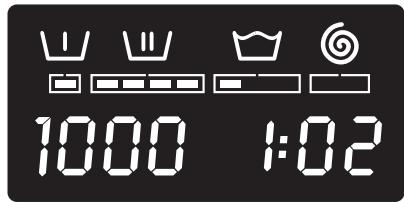
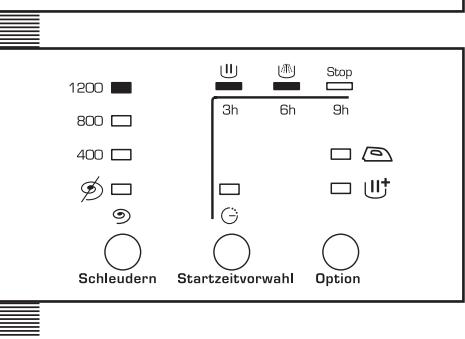
On display models, when the programme is running you can see which phase it is at on the display, as well as how long there is to the end of the programme. On non-display models the phase the programme is at is shown by the LEDs.
The active phases will appear successively at the top of the display as the programme progresses. The time remaining until the end of the programme will also appear on the display. It updates at regular intervals, but not minute by minute.
Any option button can be selected provided the wash phase in which it takes effect has not been passed and when the programme accepts the option.
Pressing the delay button during the wash has no effect on the washing machine.
Pressing the start/pause button during the wash activates the PAUSE function.
If you change the wash programme during the wash using the selector, the PAUSE function is activated and the programme is cancelled.
If you need to add or remove a garment, press the start/pause button and make sure that the water level is not above the door overflow level and that the temperature inside is not high. Press the start/pause button again to restart the wash from the same cycle phase it had stopped at.
POWER CUTS
If there is a power cut, when the electricity comes back on the washing machine will continue to run from where it left off (it has several hours of memory). The same will happen if the ON/OFF button is pressed.
WARNINGS
Level the washing machine by adjusting the feet to reduce the noise caused by spin-drying. Try and wash clothes of different sizes in the same wash programme to favour the distribution of the clothes inside the drum during spin-drying. All the models have a safety system for spin-drying that prevents spin-drying from being carried out if the distribution of the clothes inside the drum is too concentrated. This prevents the appliance from vibrating too much.
If you find that the clothes are not properly wrung out, try spin-drying them again after having distributed the clothes more evenly in the drum.
MAINTENANCE
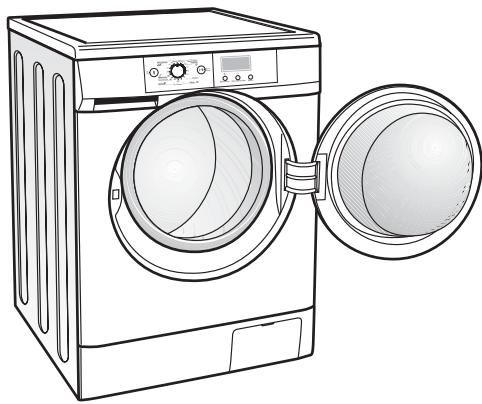
After each wash, leave the door open for a while to allow the air to circulate freely inside the machine.
From time to time, depending on the hardness of your water, it is recommendable to run a full wash cycle using a decalcifying product. This will extend the life of your washing machine.
The washing machine should be disconnected from the mains electricity supply before any cleaning or maintenance is carried out.
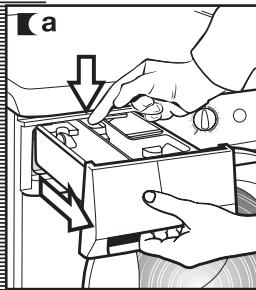
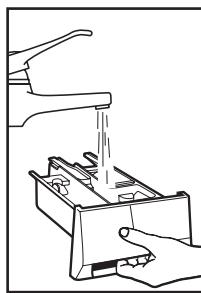
1 CLEANING THE DETERGENT DISPENSER
Clean the detergent dispenser whenever there is any washing product residue left inside.
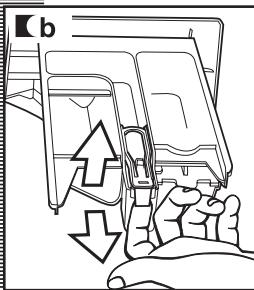
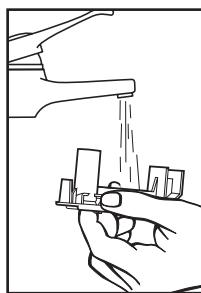
Pull outwards on the handle and press the blue lever with your finger to remove the detergent dispenser completely. Use warm water and a brush to clean the compartments. Also clean the additive compartment siphon. To remove it, pull the flap at the back out. Once it has been cleaned, put it back pressing down to make sure that it fits right in. Put the dispenser back into the washing machine.
A dirty or incorrectly fitted siphon will prevent the additives from being taken in and leave water inside the compartment at the end of the wash.
CLEANING THE FILTER
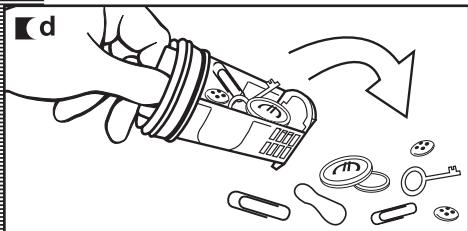
Clean the accessible filter if the drain pump is blocked by any foreign objects.
Open the kickplate cover with the aid of a coin and by pulling gently on it. Place a container under the drain pipe to collect any water that comes out of it. Remove the drain pipe, place it on the container and open the cover. Water will start to come out. When all the water has come out of the machine, turn the filter several times until it can be completely removed, by pulling gently on it. Remove the objects or fluff caught in the filter or the drain pump. Put the filter, the drain pipe and cover back in place again.
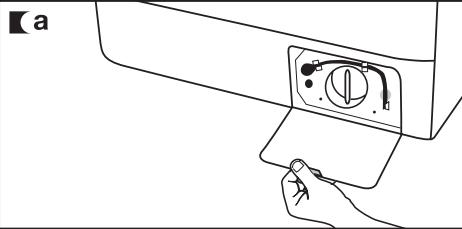
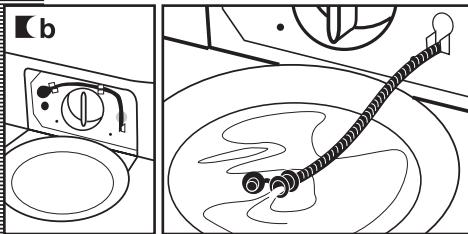
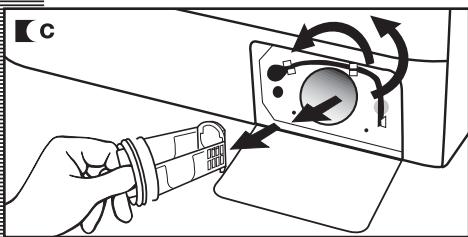
We recommend that you clean the filter at least once a year. To avoid burns, do not carry out this operation when the wash water is at a temperature of over 30°C.
CLEANING THE OUTSIDE
The outside of the washing machine should be cleaned with warm soapy water or a gentle cleaning agent. Do not use abrasive cleaning products or solvents.
It should then be thoroughly dried with a soft cloth.
When there have been spillages of detergent or additives from the dispenser onto the washing machine cabinet, clean them up right away as they are corrosive.
safety and troubleshooting
If you detect any problems with your washing machine, you will probably be able to rectify them yourself by consulting the following instructions.
If this is not the case, unplug the appliance and contact the TECHNICAL ASSISTANCE SERVICE.
Important
Never open up the appliance. There is no fuse or similar component inside that can be replaced by the user.
| Indicator | Problems |
| FO1 | No water coming in |
| FO2 | Does not drain or spin-dry |
| CO3 | Does not spin-dry |
| FO4 | Does not start |
| FO5 | |
| · | Call the Technical Assistance Service |
| · | |
| F10 |
PROBLEMS
Why won't the washing machine start?
Why is the washing machine vibrating or making too much noise?
This may be due to the following:
The washing machine is not plugged into the mains or there is no voltage in the mains supply. The Start/Pause button has not been pressed. - When the washing machine door is not properly closed, F04 appears on the display. Check that the door has been closed properly.
This may be due to the following:
The blocking and transport screws have not been removed. The washing machine has not been correctly levelled. During spin-drying the motor makes a "whistling" noise which is normal due to the mechanical action of the motor itself.
Why doesn't the washing machine take in water?
■ When there is no water coming in F01 will appear on the display. Indicator F01, no water coming in, this may be due to a cut in the water supply, a tap turned off or a blocked water inlet filter. The possible solutions are as follows: wait for the water supply to be reconnected, turn on the tap, or remove the water inlet hose and clean the filter.
Why doesn't the washing machine drain or spin dry?
When F02 appears on the display. The reasons for the F02 indicator may be the following: washing machine drain pump blocked, building drainage pipes blocked, or incorrect pump electrical connection. Solution: if the pump is blocked, gain access to it as described in section 2, maintaining and cleaning the appliance.
Why doesn't the machine spin-dry?
When it does not spin-dry, C03 appears on the display. This may be due to an uneven distribution of clothes in the drum and may cause an excessive level of vibrations. The solution is to select a spin-drying programme.
Why can't I see any water in the drum during the wash?
This is due to the fact that the washing machine is provided with a system which is able to adapt to the load and type of fabrics, adjusting the levels of water and energy used, in order to preserve the environment.
So, although the water level you can see through the hatch may look low, there is no cause for concern as washing and rinsing efficiency will still be optimum.
Why is there still some water in the dispenser?
Why can't I open the hatch immediately after the wash has finished?
Other indications
This may be because the dispenser needs cleaning. This simple operation is described in Maintaining and cleaning the appliance.
- Cleaning the detergent dispenser.
Washing machines today are provided with safety systems for users. One of them is that the washing machine cannot be opened until it is certain that the drum is quite still. This is why the hatch cannot be opened for 2 minutes.
The washing machine can detect other indications. When this happens a number of other indicators appear on the display: F05, F06..., F10. This information may be due to very different reasons. Check if the problem is repeated and in this case call the AUTHORISED SERVICE CENTRE.
eco-note
INFORMATION FOR THE CORRECT DISPOSAL OF WASTE ELECTRICAL AND ELECTRONIC APPLIANCES
When your appliance is of no further use, it should not be disposed of together with general domestic waste.
It can be taken, free of charge, to a specific waste collection centre, run by your local authority, or dealers who provide this service.
Disposing of waste domestic appliances separately means avoiding possible negative consequences for the environment and health, derived from incorrect disposal. This will enable the materials in them to be treated and recycled, obtaining important savings in energy and resources.
To highlight the obligation of collaborating with selective waste collection, the product is marked with a symbol to warn against using traditional containers for disposing of the appliance.
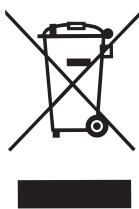
For further information, contact your local authority or the shop where you purchased the product.

This appliance is not designed for use by physically, sensorially or mentally handicapped people or people without experience or knowledge of it (including children), unless they are supervised or instructed in the use of the appliance by a person responsible for their safety.
Children should be watched to ensure they do not play with the appliance.
EN After Sales Service :
Any maintenance on your equipment should be undertaken by:
- either your dealer,
- or another qualified mechanic who is an authorized agent for the brand appliances.
When making an appointment, state the full reference of your equipment (model, type and serial number). This information appears on the manufacturer's nameplate attached to your equipment.
- WE ALWAYS THINK ABOUT INNOVATION
- LCD SCREENS
- WARNING
- THANK YOU FOR PLACING YOUR TRUST IN US
- WITH YOUR CONVENIENCE ALWAYS IN MIND
- LARGE HATCH
- MAXIMUM OPENING
- EASY-ACCESS FILTER
- WITH SAVINGS ALWAYS IN MIND
- KG CAPACITY
- WASHING IN LESS TIME
- TIME DELAY
- WITH INNOVATION ALWAYS IN MIND
- DETERGENT DISPENSER DESIGNED TO OFFER MAXIMUM CONVENIENCE
- WARNINGS
- INSTALLATION AND ASSEMBLY
- UNPACKING AND UNBLOCKING THE WASHING MACHINE
- UNPACKING
- UNBLOCKING
- CONNECTION TO THE MAINS WATER SUPPLY
- DRAINAGE
- CONNECTION
- LEVELLING THE WASHING MACHINE AND CONNECTING IT TO THE MAINS ELECTRICITY SUPPLY
- LEVELLING
- ELECTRICAL CONNECTION
- PRE-CLEANING
- USING THE APPLIANCE AND PRACTICAL TIPS
- PREPARING GARMENTS FOR WASHING
- PREPARATION
- SORTING THE CLOTHES
- USING DETERGENT AND ADDITIVES
- DETERGENT
- AND ADDITIVES
- IMPORTANT
- ECO-NOTE
- SPIN DRYING
- A SPIN SPEED SELECTION
- NO SPIN
- FULL TUB STOP OPTION
- TIME DELAY SELECTION BUTTON
- CANCELLING THE DELAY
- ADDITIONAL FUNCTIONS
- ADDITIONAL FUNCTION SELECTION BUTTON DEPENDING ON PROGRAMMES
- BUTTON: EASY IRONING
- BUTTON: EXTRA RINSE (ON DISPLAY MODELS)
- BUTTON: INTENSIVE
- STARTING UP
- START/PAUSE BUTTON
- LOCK FUNCTION
- ACTIVATING THE LOCK FUNCTION
- DEACTIVATING THE LOCK FUNCTION
- PROGRAMME
- PHASES
- POWER CUTS
- MAINTENANCE
- CLEANING THE DETERGENT DISPENSER
- CLEANING THE FILTER
- CLEANING THE OUTSIDE
- SAFETY AND TROUBLESHOOTING
- PROBLEMS
- INFORMATION FOR THE CORRECT DISPOSAL OF WASTE ELECTRICAL AND ELECTRONIC APPLIANCES
- EN AFTER SALES SERVICE
Brand : THOMSON
Model : WFT8110I
Category : Washing machine