273320 - Electric saw MILWAUKEE - Free user manual and instructions
Find the device manual for free 273320 MILWAUKEE in PDF.



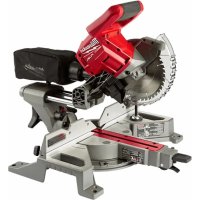
| Product Type | Cordless Sliding Miter Saw |
| Brand | Milwaukee |
| Model | 273320 |
| Power Source | M18™ 18V DC Battery |
| No Load Speed | 5,000 RPM |
| Blade Diameter | 184 mm (7-1/4") |
| Blade Arbor | 5/8" |
| Max Blade Thickness | 3.2 mm (1/8") |
| Weight | 13 kg (28 lbs) |
| Cutting Capacity – Miter 0° | Height 55.8 mm, Width 210 mm |
| Cutting Capacity – Miter 45° | Height 55.8 mm, Width 148.4 mm |
| Cutting Capacity – Bevel 45° Left | Height 39.9 mm |
| Cutting Capacity – Bevel 45° Right | Height 19.5 mm |
| Miter Range | 0° to 45° Left and Right |
| Bevel Range | 0° to 48° Left and Right |
| Electric Brake | Yes (stop in ~4 seconds) |
| Cut Line Indicator | LED Light with Projected Shadow |
| Protection System | Automatic Lower Guard |
| Hands-off Zone | Circles and Guide Handles |
| Operating Temperature | -18°C to 50°C |
| Recommended Battery Type | M18™ |
| Recommended Charger Type | M18™ |
| Warranty | 5 years (except exceptions) |
Frequently Asked Questions - 273320 MILWAUKEE
User questions about 273320 MILWAUKEE
0 question about this device. Answer the ones you know or ask your own.
Ask a new question about this device
Download the instructions for your Electric saw in PDF format for free! Find your manual 273320 - MILWAUKEE and take your electronic device back in hand. On this page are published all the documents necessary for the use of your device. 273320 by MILWAUKEE.
USER MANUAL 273320 MILWAUKEE
text_image
Milwaukee®OPERATOR'S MANUAL MANUEL de L'UTILISATEUR MANUAL del OPERADOR
natural_image
Technical line drawing of a mechanical assembly with no visible text or symbolsCat. No. / No de cat. 2733-20
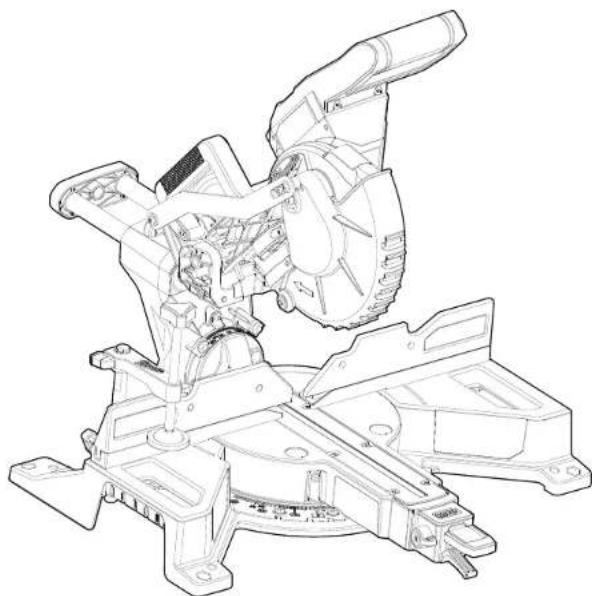
M18 FUEL™ 7-1/4" DUAL BEVEL COMPOUND SLIDING MITER SAW SCIE À ONGLETS COMPOSÉS COULISSANTE À DOUBLE BISEAU DE 184 mm (7-1/4") M18 FUEL™ SIERRA DE INGLETE COMPUESTA DESLIZANTE DE BISEL DUAL DE 184 mm (7-1/4") M18 FUEL™

WARNING To reduce the risk of injury, user must read and understand operator's manual. AVERTISSEMENT Afin de réduire le risque de blessures, l'utilisateur doit lire et bien comprendre le manuel. ADVERTENCIA Para reducir el riesgo de lesiones, el usuario debe leer y entender el manual.
GENERAL POWER TOOL SAFETY WARNINGS
⚠ WARNING Read all safety warnings, instructions, illustrations and specifications provided with this power tool. Failure to follow all instructions listed below may result in electric shock, fi re and/or serious injury. Save all warnings and instructions for future reference. The term "power tool" in the warnings refers to your mains-operated (corded) power tool or battery-operated (cordless) power tool.
WORK AREA SAFETY
- Keep work area clean and well lit. Cluttered or dark areas invite accidents.
- Do not operate power tools in explosive atmospheres, such as in the presence of flammable liquids, gases or dust. Power tools create sparks which may ignite the dust or fumes.
- Keep children and bystanders away while operating a power tool. Distractions can cause you to lose control.
ELECTRICAL SAFETY
- Power tool plugs must match the outlet. Never modify the plug in any way. Do not use any adapter plugs with earthed (grounded) power tools. Unmodified plugs and matching outlets will reduce risk of electric shock.
- Avoid body contact with earthed or grounded surfaces, such as pipes, radiators, ranges and refrigerators. There is an increased risk of electric shock if your body is earthed or grounded.
- Do not expose power tools to rain or wet conditions. Water entering a power tool will increase the risk of electric shock.
- Do not abuse the cord. Never use the cord for carrying, pulling or unplugging the power tool. Keep cord away from heat, oil, sharp edges or moving parts. Damaged or entangled cords increase the risk of electric shock.
- When operating a power tool outdoors, use an extension cord suitable for outdoor use. Use of a cord suitable for outdoor use reduces the risk of electric shock.
- If operating a power tool in a damp location is unavoidable, use a ground fault circuit interrupter (GFCI) protected supply. Use of an GFCI reduces the risk of electric shock.
PERSONAL SAFETY
- Stay alert, watch what you are doing and use common sense when operating a power tool. Do not use a power tool while you are tired or under the influence of drugs, alcohol or medication. A moment of inattention while operating power tools may result in serious personal injury.
- Use personal protective equipment. Always wear eye protection. Protective equipment such as a dust mask, non-skid safety shoes, hard hat or hearing protection used for appropriate conditions will reduce personal injuries.
- Prevent unintentional starting. Ensure the switch is in the off -position before connecting to power source and/or battery pack, picking up or carrying the tool. Carrying power tools with your finger on the switch or energizing power tools that have the switch on invites accidents.
- Remove any adjusting key or wrench before turning the power tool on. A wrench or a key left attached to a rotating part of the power tool may result in personal injury.
- Do not overreach. Keep proper footing and balance at all times. This enables better control of the power tool in unexpected situations.
- Dress properly. Do not wear loose clothing or jewelry. Keep your hair and clothing away from moving parts. Loose clothes, jewelry or long hair can be caught in moving parts.
- If devices are provided for the connection of dust extraction and collection facilities, ensure these are connected and properly used. Use of dust collection can reduce dust-related hazards.
- Do not let familiarity gained from frequent use of tools allow you to become complacent and ignore tool safety principles. A careless action can cause severe injury within a fraction of a second.
POWER TOOL USE AND CARE
- Do not force the power tool. Use the correct power tool for your application. The correct power tool will do the job better and offer at the rate for which it was designed.
• Do not use the power tool if the switch does not turn it on and off. Any power tool that cannot be controlled with the switch is dangerous and must be repaired.
- Disconnect the plug from the power source and/or remove the battery pack, if detachable, from the power tool before making any adjustments, changing accessories, or storing power tools. Such preventive safety measures reduce the risk of starting the power tool accidentally.
- Store idle power tools out of the reach of children and do not allow persons unfamiliar with the power tool or these instructions to operate the power tool. Power tools are dangerous in the hands of untrained users.
- Maintain power tools and accessories. Check for misalignment or binding of moving parts, breakage of parts and any other condition that may affect the power tool's operation. If damaged, have the power tool repaired before use. Many accidents are caused by poorly maintained power tools.
- Keep cutting tools sharp and clean. Properly maintained cutting tools with sharp cutting edges are less likely to bind and are easier to control.
- Use the power tool, accessories and tool bits etc. in accordance with these instructions, taking into account the working conditions and the work to be performed. Use of the power tool for operations different from those intended could result in a hazardous situation.
- Keep handles and grasping surfaces dry, clean and free from oil and grease. Slippery handles and grasping surfaces do not allow for safe handling and control of the tool in unexpected situations.
BATTERY TOOL USE AND CARE
•Recharge only with the charger specified by the manufacturer. A charger that is suitable for one type of battery pack may create a risk of fire when used with another battery pack.
- Use power tools only with specifically designated battery packs. Use of any other battery packs may create a risk of injury and fi re.
- When battery pack is not in use, keep it away from other metal objects, like paper clips, coins, keys, nails, screws or other small metal objects, that can make a connection from one terminal to another. Shorting the battery terminals together may cause bums or a fire.
• Under abusive conditions, liquid may be ejected from the battery; avoid contact. If contact accidentally occurs, flush with water. If liquid contacts eyes, additionally seek medical help. Liquid ejected from the battery may cause irritation or burns.
- Do not use a battery pack or tool that is damaged or modified. Damaged or modified batteries may exhibit unpredictable behavior resulting in fi re, explosion or risk of injury.
- Do not expose a battery pack or tool to fire or excessive temperature. Exposure to fire or temperature above 265°F (130°C) may cause explosion.
- Follow all charging instructions and do not charge the battery pack or tool outside the temperature range specified in the instructions. Charging improperly or at temperatures outside the specified range may damage the battery and increase the risk of fire.
SERVICE
- Have your power tool serviced by a qualified repair person using only identical replacement parts. This will ensure that the safety of the power tool is maintained.
- Never service damaged battery packs. Service of battery packs should only be performed by the manufacturer or authorized service providers.
SPECIFIC SAFETY RULES FOR MITER SAWS
- Miter saws are intended to cut wood or wood-like products, they cannot be used with abrasive cut-off wheels for cutting ferrous material such as bars, rods, studs, etc. Abrasive dust causes moving parts such as the lower guard to jam. Sparks from abrasive cutting will bum the lower guard, the kerf insert and other plastic parts.
- Use clamps to support the workpiece whenever possible. If supporting the workpiece by hand, you must always keep your hand at least 100mm from either side of the saw blade. Do not use this saw to cut pieces that are too small to be securely clamped or held by hand. If your hand is placed too close to the saw blade, there is an increased risk of injury from blade contact.
- The workpiece must be stationary and clamped or held against both the fence and the table. Do not feed the workpiece into the blade or cut "freehand" in any way. Unrestrained or moving workpieces could be thrown at high speeds, causing injury.
- Push the saw through the workpiece. Do not pull the saw through the workpiece. To make a cut, raise the saw head and pull it out over the workpiece without cutting, start the motor, press the saw head down and push the saw through the workpiece. Cutting on the pull stroke is likely to cause the saw blade to climb on top of the workpiece and violently throw the blade assembly towards the operator.
- Never cross your hand over the intended line of cutting either in front or behind the saw blade. Supporting the workpiece "cross handed" i.e. holding the workpiece to the right of the saw blade with your left hand or vice versa is very dangerous.
- Do not reach behind the fence with either hand closer than 100mm from either side of the saw blade, to remove wood scraps, or for any other reason while the blade is spinning. The proximity of the spinning saw blade to your hand may not be obvious and you may be seriously injured.
- Inspect your workpiece before cutting. If the workpiece is bowed or warped, clamp it with the outside bowed face toward the fence. Always make certain that there is no gap between the workpiece, fence and table along the line of the cut. Bent or warped workpieces can twist or shift and may cause binding on the spinning saw blade while cutting. There should be no nails or foreign objects in the workpiece. - Do not use the saw until the table is clear of all tools, wood scraps, etc., except for the workpiece. Small debris or loose pieces of wood or other objects that contact the revolving blade can be thrown with high speed.
- Cut only one workpiece at a time. Stacked multiple workpieces cannot be adequately clamped or braced and may bind on the blade or shift during cutting.
- Ensure the miter saw is mounted or placed on a level, firm work surface before use. Alevel and firm work surface reduces the risk of the miter saw becoming unstable. - Plan your work. Every time you change the bevel or mitre angle setting, make sure the adjustable fence is set correctly to support the workpiece and will not interfere with the blade or the guarding system. Without turning the tool "ON" and with no workpiece on the table, move the saw blade through a complete simulated cut to assure there will be no interference or danger of cutting the fence.
- Provide adequate support such as table extensions, saw horses, etc. for a workpiece that is wider or longer than the table top. Workpieces longer or wider than the miter saw table can tip if not securely supported. If the cut-off piece or workpiece tips, it can lift the lower guard or be thrown by the spinning blade. - Do not use another person as a substitute for a table extension or as additional support. Unstable support for the workpiece can cause the blade to bind or the workpiece to shift during the cutting operation pulling you and the helper into the spinning blade.
•The cut-off piece must not be jammed or pressed by any means against the spinning saw blade. If confined, i.e. using length stops, the cut-off piece could get wedged against the blade and thrown violently.
• Always use a clamp or a fixture designed to properly support round material such as rods or tubing. Rods have a tendency to roll while being cut, causing the blade to "bite" and pull the work with your hand into the blade.
- Let the blade reach full speed before contacting the workpiece. This will reduce the risk of the workpiece being thrown.
- If the workpiece or blade becomes jammed, turn the mitre saw off. Wait for all moving parts to stop and disconnect the plug from the power source and/or remove the battery pack. Then work to free the jammed material. Continued sawing with a jammed workpiece could cause loss of control or damage to the miter saw.
• After fi nishing the cut, release the switch, hold the saw head down and wait for the blade to stop before removing the cut-off piece. Reaching with your hand near the coasting blade is dangerous.
- Hold the handle firmly when making an incomplete cut or when releasing the switch before the saw head is completely in the down position. The braking action of the saw may cause the saw head to be suddenly pulled downward, causing a risk of injury.
*WARNING To reduce the risk of injury in applications that produce a considerable amount of dust, use an OSHA compliant dust extraction solution in accordance with the solution's operating instructions.
• Always use common sense and be cautious when using tools. It is not possible to anticipate every situation that could result in a dangerous outcome. Do not use this tool if you do not understand these operating instructions or you feel the work is beyond your capability; contact Milwaukee Tool or a trained professional for additional information or training.
- Maintain labels and nameplates. These carry important information. If unreadable or missing, contact a MILWAUKEE service facility for a free replacement.
WARNING Some dust created by power sanding, sawing, grinding, drilling, and other construction activities contains chemicals known to cause cancer, birth defects or other reproductive harm. Some examples of these chemicals are: lead from lead-based paint crystalline silica from bricks and cement and other masonry products, and arsenic and chromium from chemically-treated lumber Your risk from these exposures varies, depending on how often you do this type of work. To reduce your exposure to these chemicals: work in a well ventilated area, and work with approved safety equipment, such as those dust masks that are specially designed to filter out microscopic particles.
SYMBOLOGY

Direct Current
n, NoXXmthRevolutions per Minute (RPM)


No Hands Zone - Keep hands out of the No Hands Zone at all times during use. Contact with blade will result in serious injury.
UL Listing for Canada and U.S.
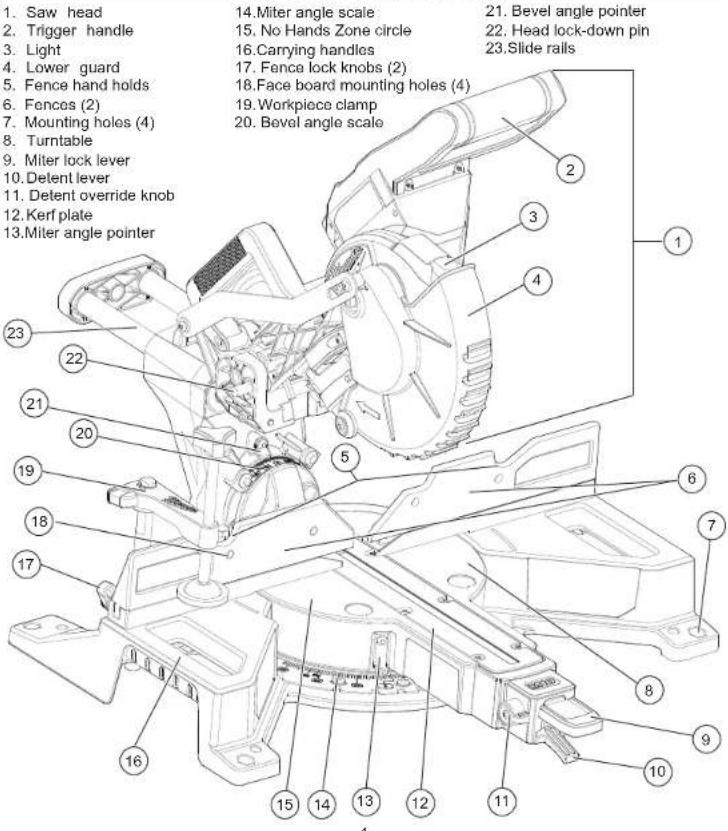
FUNCTIONAL DESCRIPTION
text_image
1. Saw head 2. Trigger handle 3. Light 4. Lower guard 5. Fence hand holds 6. Fences (2) 7. Mounting holes (4) 8. Turntable 9. Miter lock lever 10. Detent lever 11. Detent override knob 12. Kerf plate 13.Miter angle pointer 14.Miter angle scale 15. No Hands Zone circle 16.Carrying handles 17. Fence lock knobs (2) 18.Face board mounting holes (4) 19.Workpiece clamp 20. Bevel angle scale 21. Bevel angle pointer 22. Head lock-down pin 23.Slide rails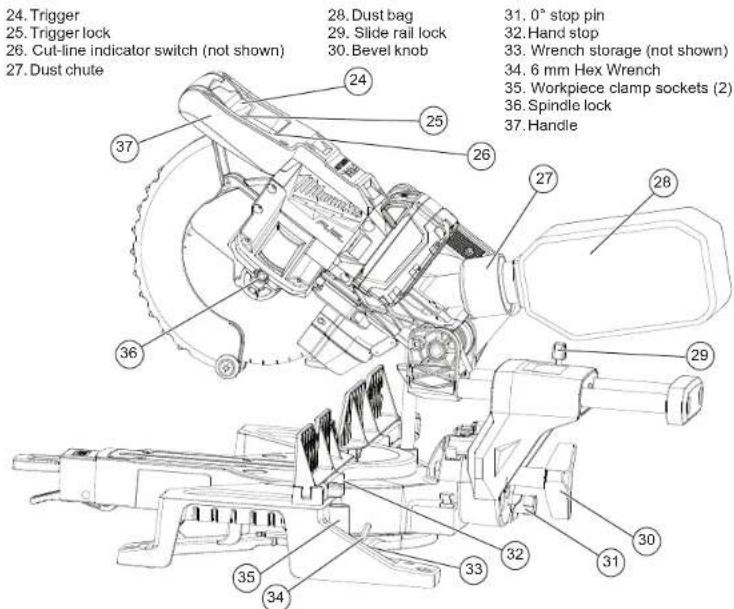
text_image
24. Trigger 25. Trigger lock 26. Cut-line indicator switch (not shown) 27. Dust chute 28. Dust bag 29. Slide rail lock 30. Bevel knob 31. 0° stop pin 32. Hand stop 33. Wrench storage (not shown) 34. 6 mm Hex Wrench 35. Workpiece clamp sockets (2) 36. Spindle lock 37. HandleSPECIFICATIONS
| Cat. No. | 2733-20 |
| Volts | 18 DC |
| Battery Type | M18TM |
| Charger Type | M18TM |
| Recommended Ambient Operating Temperature | 0°F to 125°F |
| No Load RPM | 5000 |
| Arbor Size | 5/8" |
| Blade Size | 7-1/4" |
| Blade Thickness (Kerf) | Max 1/8" |
| Weight | 28 lbs. |
CAPACITIES
| Miter Cuts | |
| Max Height | 2.2" |
| Max Width at 0° Miter | 8.3" |
| Max Width at 45° Miter | 5.8" |
| Bevel Cuts | |
| Max Height at 0° Bevel | 2.2" |
| Max Height at Left 45° Bevel | 1.6" |
| Max Height at Right 45° Bevel | 0.8" |
| Compound Cuts (45° Miter and 45° Bevel) | |
| Left | 5.9" W at 1.6" H |
| Right | 5.9" W at 0.8" H |
| Workpiece Vertical Against Fence | |
| 0° Miter / 0° Bevel | 3.6" W at 0.9" H |
| Left 45° Miter / 0° Bevel | 3.6" W at 0.8" H |
| Right 45° Miter / 0° Bevel | 3.6" W at 0.7" H |
ASSEMBLY
Transporting and Storing
Always lock the saw head and slide rails before transporting and storing the tool. Only carry tools by the carrying handles.
Saw Head
Tolock, press and hold down the saw head and then push in the lock-down pin.
Tounlock, press and hold down the saw head and pull out the lock-down pin. Raise the saw head.
Slide Rails
To unlock, loosen the slide rail lock by turning it counterclockwise.
Tolock, slide the saw head forward and tighten the slide rail lock by turning it clockwise.
Mounting the Miter Saw
To prevent the tool from sliding, falling or tipping from a raised work surface during operation, the saw should be mounted to a supporting surface such as a level, sturdy work table, bench, or miter saw stand. Position the saw and workbench to allow adequate room for cross-cutting long workpieces. To mount the saw to a fl at surface, insert fasteners through the holes in the corners of the saw base and secure. Follow manufacturer instructions when mounting to a miter saw stand.
Dust collection
WARNING Collected sawdust from coated (polyurethanes, linseed oil, etc.) workpieces can self-ignite in the dust bag or elsewhere and cause fl re. To reduce the risk of fl re, empty the dust bag frequently and never store or leave a saw without totally emptying its dust bag.
The dust port at the back of the saw can be connected to a standard workshop vacuum hose or the included dust bag. Leave the dust bag open to direct dust down into a garbage can.
To install, push and twist the hose or dust bag onto the dust port.
Using Face Boards
When using face boards, secure them using the mounting holes in the fences. Face boards place distance between the fence and the workpiece, providing improved support for some workpieces. Workpiece splintering can be reduced by using face boards.
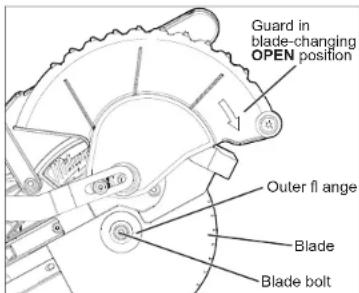
Selecting, Installing, and Changing Blades Always use clean, sharp blades. Dull blades tend to overload the tool, bind, and cause pinching. Use only 7-1/4" sliding miter saw blades rated at least 5000 RPM.
text_image
Guard in blade-changing OPEN position Outer fl ange Blade Blade bolt-
Remove battery pack.
-
Lower the saw head
-
Raise the lower guard and hold up while raising the saw head. Let go of the lower guard. The lower guard will remain up in the blade-changing OPEN position. WARNING! Be careful not to lower the guard head while changing the blade; the lower guard will fall back into place to cover the blade and could pinch hands and fingers.
-
Press in the spindle lock and rotate the spindle/blade until the lock engages.
-
Use the wrench to loosen and remove the left-hand thread blade bolt (clockwise).
-
Remove the outer blade flange and blade. Wipe the flanges and spindle to remove dust and debris. Inspect the parts for damage. Replace if needed.
-
Match the arrow direction on the blade with the arrow direction on the lower guard. Slide the blade onto the spindle.
-
Install the outer blade flange. The flat side of the flange must rest against the blade.
-
Press in the spindle lock and rotate the blade until the lock engages. Insert and securely tighten the blade bolt (counterclockwise) with the wrench.
- Move hands out of the guard area and lower the saw head. The lower guard will fall back into place; verify it moves freely.
- Check the clearance between the blade, ker plate, and fences. Always use the kerf plate. Kerf plates reduce tear-out and splintering along the cut by providing edge support.
⚠ WARNING Recharge only with the charger specified for the battery. For specific charging instructions, read the operator's manual supplied with your charger and battery.
Removing/Inserting the Battery
To remove the battery, push in the release buttons and pull the battery pack away from the tool.
⚠ WARNING Always lock the trigger or remove the battery pack any time the tool is not in use.
To insert the battery, slide the pack into the body of the tool. Make sure it latches securely into place.
⚠ WARNING Only use accessories specifi cally recommended for this tool. Others may be hazardous.
ADJUSTMENTS
⚠ WARNING Always remove the battery pack before changing accessories or making adjustments. Do not defeat the guards.
No Hand Zone
⚠ WARNING Keep hands out of the No Hands Zone at all times during use. Contact with blade will result in serious injury.

If your hand is placed too close to the saw blade, there is an increased risk of injury from blade contact. Use the No Hand Zone indicators to ensure hands are kept a safe distance from the blade.
No Hand Zone Indicators:
- No Hands Zone Circle (groove around turntable) - Fence Hand Holds (notches on top of fences)
- Hand Stops (used when fence is removed) Never cross your hand over the intended line of cutting either in front or behind the saw blade. The proximity of the spinning saw blade to your hand may not be obvious and you may be seriously injured. Saw head may slide/move, putting your safety at risk. Always wait for the blade to stop completely before raising the head, moving workpiece or changing settings.
Select the Workpiece Carefully
Be cautious of pitchy, knotty, wet or warped workpieces. These materials are likely to create pinching conditions. Workpieces that bow and pinch may result in kick back. Inspect for and remove nails before cutting. Always keep blades clean and sharp; otherwise the blade produces a narrow kerf and is likely to be pinched by the workpiece. This tool is not recommended for cutting ferrous metals such as iron and steel. See Applications for a more complete list of materials that can be cut.
Support the Workpiece Properly
Always support the workpiece during operation. Otherwise, the workpiece may pull up and into the saw. WARNING! Use clamps to support the workpiece whenever possible to keep hands far from the blade. Do not use this saw to cut pieces that are held by hand or too small to be securely clamped.
-
Use the Fence: Hold the workpiece flush against the fence to provide a straight path for the saw blade. This will help eliminate the tendency for the blade teeth to bind. The fence can be used as a support for miter, bevel and compound cuts. WARNING! Keep hands out of the No Hands Zone at all times during use. Use the fence hand holds to ensure your hands do not enter the No Hands Zone.
-
Use the workpiece clamp: Clamp the workpiece to the table with the included clamp. The clamp can be moved to either side of the table.
a. Insert the clamp bar into either clamp socket behind the fences.
b. Turn the clamp bar until it seats fully into the socket.
c. Rotate the clamp around so the screw is above the table.
d. Tighten the clamp screw to secure the workpiece to the table.
- Use a C-clamp: Clamp the workpiece to the fence with a C-clamp.
Support of Longer Workpieces
Longer workpieces need support along their full length. If you are using the saw on a level work bench, prop up the workpiece to a height of 3" ((2) 2"x4" stacked flat) from the bottom of the saw feet. There are also many aftermarket work tables specifically designed for miter saws that provide supports for all types of workpieces.
Adjusting the Miter Angle
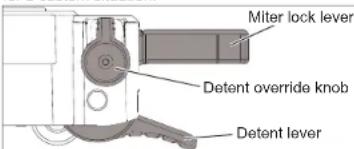
The miter angle can be set using detents for commonly cut angles ( 0^ , 15^ , 22.5^ 31.6^ , and 45^ ), as well as finely adjusted to any angle to compensate for a custom situation.
text_image
Miter lock lever Detent override knob Detent lever-
Remove battery pack.
-
Lift up the miter lock lever to release the turntable.
-
Lift the detent lever and rotate the turntable to the detent angle closest to the desired angle.
-
To make a fine adjustment to the miter angle: a. Lift the delent lever.
b. Rotate the detent override knob forward.
c. Rotate the turntable to the exact angle
- Press down the miter lock lever to lock the adjustment in place and avoid shifting
during use.
If the miter lock becomes loose or begins to slip, insert a fl at screw-driver under the miter lock lever, loosen the jam nut behind the lock
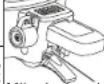
lever, and tighten the miter lock[Miter lock rod] rod, as desired (1/4 turn at a time). Re-tighten the jam nut after adjusting the lock rod.
Adjusting the Bevel Angle
The bevel can be adjusted to any angle from 0° to 48°, left or right.
-
Remove battery pack.
-
Loosen the bevel knob.
-
Tilt the saw head to the desired angle.
NOTE: To overcome the 0^ stop, hold the saw head left of 0^ , then pull out the 0^ stop pin and tilt the saw head to the desired angle.
- Tighten the bevel knob securely to lock the bevel adjustment in place.
The maximum left and right bevel can be adjusted using the stop bolts. To adjust, loosen the lower nut, tighten or loosen the stop bolt, then tighten the lower nut to lock securely.
Adjusting the Fences
Every time the bevel or miter angle settings are changed, make sure the fences are set correctly.
Fences MUST:
• Support the workpiece
• Not interfere with the blade or lower guard
- Be adjusted to keep hands out of the No Hand Zone To adjust the Fences
-
Remove battery pack.
-
Loosen the fence lock knobs.
-
Slide the fences side-to-side to the desired position to allow for a bevel or compound miter cut. Position the fences properly for maximum work support while maintaining hand safety. WARNING! Ensure fence hand holds are positioned to keep hands out of the No Hand Zone.
-
Tighten the fence lock knobs securely before making a cut.
NOTE: If either fence has any movement forward to backward, tighten the fence set screw, located on the back of each fence slot.
- With the saw OFF and the workpiece removed from the table, slowly lower the saw head completely to ensure the guard and blade do not contact the fences when making miter and bevel cuts.
Guards
The lower guard should cover the blade when the saw head is up and it should move freely and open automatically as the saw head is lowered into the workpiece. WARNING! Never disable or remove guards. Only push the lower guard into the OPEN position when changing blades.
If the lower guard appears loose, sticks, or does not cover the blade when the saw head is up, take the saw to an authorized service center for repairs.
Ensure the Fences are adjusted properly to allow for free-movement of the guards during the complete movement of the cut.
Setting for Chop Cuts
The slides can be locked and the saw head set in the proper position to use the saw for chop cuts (cuts not requiring the use of the slides).
1. To lock, pull the head forward and tighten the slide rail lock.
2. To unlock, pull the head forward and loosen the slide rail lock.
OPERATION
⚠ WARNING To reduce the risk of injury, always wear proper eye protection marked to comply with ANSI Z87.1.
When working in dusty situations, wear appropriate respiratory protection or use an OSHA compliant dust extraction solution.
Keep hands and body out of the path of the saw blade. Contact with blade will result in serious injury. Check guarding system to make sure it is functioning correctly. Do not operate saw without guards in place. Do not perform any operation freehand. Never reach around saw blade. Turn off tool and wait for saw blade to stop before moving workpiece or changing settings. Tighten all adjustments prior to use.
Cut Line Indicator
The cut-line indicator shines down the blade, casting a shadow where the blade will meet the workpiece. No calibration/adjustments will be needed as the shadow will always be true to the blade location. Use the cut-line indicator switch to turn on the light before making a cut. The light will go off automatically about 9 seconds after use.
⚠ WARNING To reduce the risk of injury, do not rely on the brake as a safety feature. Always wait until the blade stops completely before allowing anything near the blade.
To reduce the risk of injury, make sure all adjustments are securely locked before making a cut.
Starting and Stopping the Tool
Always hold the trigger handle firmly because the starting and stopping action of the motor may cause the handle to move up or down slightly. WARNING! Always press down miter lock lever and tighten all adjustments prior to use. WARNING! Ensure hands are out of the No Hands Zone.
-
To start the motor, push down the trigger lock and pull the trigger.
-
To stop the motor, release the trigger. The electric brake will stop the blade in about 4 seconds. WARNING! The brake is not a substitute for the guards and could fail; always wait for the blade to stop completely before removing the blade from the workpiece. If the brake fails to stop the blade or misses frequently, return the tool to a MILWAUKEE service facility for repair.
Making a Chop Cut
Cut workpieces with chop cuts whenever possible. Only use sliding cuts (cross cuts) when necessary. 1. Select the desired angles and adjust the fences to ensure fence hand holds are positioned to keep hands out of the No Hand Zone.
-
Place the workpiece on the turntable and line up the cut.
-
Insert battery pack.
-
Support the workpiece using any of the methods described in "Support the Workpiece Properly".
-
WARNING! Keep hands out of the No Hands Zone at all times during use. Contact with blade will result in serious injury.
-
Start the motor. Wait a few seconds for the blade to reach full speed. Then gently lower the saw head into the workpiece all the way through the cut. WARNING! Do not allow the blade to contact the workpiece while tool is ramping up.
-
Always allow the saw to do the work. Forcing the tool may stall or overheat the motor.
-
After the cut is complete, release the trigger and wait for the blade to stop completely. Raise the saw head and remove the workpiece. WARNING! If small cut-off pieces get caught in the guard area, remove battery pack before clearing.
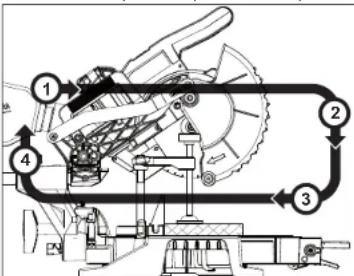
Making a Sliding Cut (Cross Cut)
Wider workpieces can be cut using the sliding mechanism. Always use chop cut whenever possible.
text_image
Technical diagram of a mechanical device with numbered components and directional arrows indicating flow or movement.-
Make sure that the slide rail transport lock is loose, and the saw head moves freely back and forth.
-
Select the desired angles and adjust the fences to ensure fence hand holds are positioned to keep hands out of the No Hand Zone.
-
Place the workpiece on the turntable and line up the cut.
-
Insert battery pack.
-
Support the workpiece using any of the methods described in "Support the Workpiece Properly".
-
WARNING! Keep hands out of the No Hands Zone at all times during use. Contact with blade will result in serious injury.
-
Raise saw head and pull it out OVER the workpiece WITHOUT cutting.
-
Start the motor. Wait a few seconds for the blade to reach full speed. WARNING! Do not allow the blade to contact the workpiece while tool is ramping up.
-
Press down on saw head.
-
Push saw through the cut. WARNING! Return saw head to the full rear position after each crosscut operation.
-
After the cut is complete, release the trigger and wait for the blade to stop completely. Raise the saw head and remove the workpiece. WARNING! If small cut-off pieces get caught in the guard area, remove battery pack before clearing.
APPLICATIONS
⚠ WARNING Do not cut stone, brick, concrete, magnesium, or ferrous metals (iron, steel, stainless steel, or alloys of these metals) with this saw.
Do not use abrasive wheels with this saw.
Dust created by cutting these materials and/or using abrasive cut-off wheels can jam the blade guard and possibly cause personal injury.
Recommended Materials and Applications The following materials can be cut with the compound sliding miter saw. There are many types of saw blades available. Always use the proper blade for the particular material and application. Use only 7-1/4" sliding miter saw blades rated at least 5000 RPM.
- Wood - solid wood, plywood, particle board, MDF (medium density fi berboard), HDF (high density fi berboard), melamine laminated particle board, formica laminates, hardboard (masonite).
- Plastics - PVC, CPVC, ABS, solid surfacing materials (such as Corian ^® ), and other plastic materials. When cutting plastic, avoid overheating the blade and blade teeth to prevent melting the workpiece.
• Nonferrous Metals - aluminum, brass, copper, and other non-ferrous materials.
Cutting Non-Square Materials
Cutting Round (Cylindrical) Materials
"V" shaped blocks can be used to support round materials like closet rod and plastic pipe.
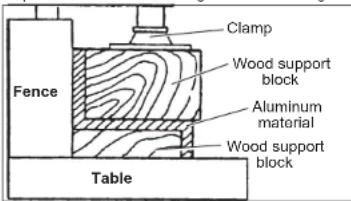
Aluminum Sash and Other
Channel Type and Materials
Aluminum sash material can be supported with blocks to prevent it from deforming while it is being cut.
text_image
Clamp Wood support block Aluminum material Wood support block Fence TableMiter Range Miter Detents (Stops)
| 0° to 45° Left0° to 45° Right | 0°, 15°, 22.5°, 31.62°, 45° Left0°, 15°, 22.5°, 31.62°, 45° Right |
Bevel Range Bevel Detents (Stops)
| 0° to 48° Left0° to 48° Right | 0°, 45° Left0°, 45° Right |
| Base Molding Capacity | Nested Crown Capacity |
| 3-1/2" at 0°3-1/2" at 45° Left3-1/2" at 45° Right | 3-5/8" |
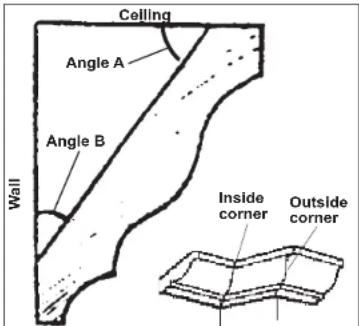
Two Methods for Cutting Crown Molding The angles created on a piece of crown molding that fits flat against the ceiling and wall will, when added together, equal 90^ (A + B = 90^) .The most common crown molding angles are:
52°/38°: A 52° angle against the ceiling (A) and a 38° angle against the wall (B). The miter saw has special miter settings at 31.6° left and right and a bevel setting at 33.9° to use when cutting 52°/38° crown molding fl at on the miter saw table. These settings are identified with a diamond mark.
45/45°: A 45° angle against the ceiling (A) and a 45° angle against the wall (B). The miter saw has special miter settings at 35.3° left and right and a bevel setting at 30° to use when cutting 45°/45° crown flat on the miter saw table. These settings are identified with a black circle.
NOTE: Even though all of these angles are standard, rooms are very rarely constructed so the corners are exactly 90°. You will need to "fi ne tune" these settings and make necessary adjustments to the cutting angles.
text_image
Ceiling Angle A Angle B Wall Inside corner Outside cornerCutting Crown Molding Flat on the
Miter Saw Table
The advantage of cutting crown molding fl at on the table is that it is easier to secure the molding at the correct cutting position. Also larger pieces of crown molding may be cut lying fl at on the miter saw table. 1. Set the bevel and miter angles using the Crown Molding Miter Angles chart. Tighten the miter lock lever and the bevel adjustment lever.
- Using the Positioning section below, correctly positions the molding.
NOTE: Always make a test cut on scrap material to confirm all angles are correct.
- Make the cut according to "Making a Chop Cut".
Cutting Crown Molding Angled Against
the Fence (Nested – in position)
Bevel settings are not required when cutting crown molding against the fence. Small changes in the miter angle can be made without affecting the bevel angle. When using this method the saw can be quickly and easily adjusted for comers that are not 90^ (square).
Positioning
Standard (U.S.) crown molding with 52° and 38° angles (set bevel angle to 33.85°)
Left side, inside corner
-
Top edge of molding against fence
-
Miter table set right 31 62
-
Water table set right
-
Save left end of cut
-
Save left end of cut Right side, inside corner
Right side, inside corner
-
Bottom edge of molding
-
Miter table set left 3
-
Save left end of cut
Left side, outside corner
-
Bottom edge of molding against fence
-
Miter table set left 31.62
-
Save right end of cu
Right side, outside corner
-
Top edge of molding against force
-
Top edge of molding again
-
Miles table set right 34,62
-
Miter table set right 31.62
-
Save right end of cut
Standard (U.S.) crown molding with 45 angles (set
bevel angle to 0°)
Left side, inside corner
-
Top edge of molding against fence
-
Miter table set right 45
-
Save left end of cut
-
Save left end of cut Right side, inside corner
-
Bottom edge of molding against fence
-
Bottom edge of molding against fence
-
Miter table set left 45
-
Save left end of cut
Left side, outside corner
-
Bottom edge of molding against fence
-
Miter table set left 45
-
Save right end of cut
Right side, outside corner
-
Top edge of molding against fence
-
Miter table set right 45
-
Water table set right 4
-
Save right end of cut
-
Save right
MAINTENANCE
⚠ WARNING To reduce the risk of injury, always unplug the charger and remove the battery pack from the charger or tool before performing any maintenance. Never disassemble the tool, battery pack or charger. Contact a MILWAUKEE service facility for ALL repairs.
Maintaining Tool
Keep your tool, battery pack and charger in good repair by adopting a regular maintenance program. Inspect your tool for issues such as undue noise, misalignment or binding of moving parts, breakage of parts, or any other condition that may affect the tool operation. Return the tool, battery pack, and charger to a MILWAUKEE service facility for repair. After six months to one year, depending on use, return the tool, battery pack and charger to a MILWAUKEE service facility for inspection.
If the tool does not start or operate at full power with a fully charged battery pack, clean the contacts on the battery pack. If the tool still does not work properly, return the tool, charger and battery pack, to a MILWAUKEE service facility for repairs.
Adjusting the Miter Saw
This Miter Saw is fully adjusted at the factory. If it is not accurate due to shipping and handling, please follow these steps to accurately set up your saw. Once the saw is properly adjusted, it should remain accurate under normal jobsite and transportation conditions.
Squaring the Blade (90°) to the Fence (0° Miter) 1. Remove battery pack.
- Place a square against the fence and blade and
ensure that the square is not touching blade teeth as this will cause an inaccurate measurement.
-
Loosen the miter lock lever and move the saw to the 0° miter position. Do not tighten the lock lever.
-
If the saw blade is not exactly perpendicular to the fence, use the supplied wrench to loosen the screws that hold the miter scale to the table. Move the scale left or right until the blade is perpendicular to the fence. Use the square to verify that the blade is perpendicular to the fence. Retighten the screws.
-
Loosen the miter pointer adjustment screw and reposition the pointer the so that it indicates exactly zero. Once the pointer is properly positioned, relighten the miter pointer adjustment screw.
Squaring the Blade (90°) to the Table (0° Bevel) 1. Remove battery pack.
-
Remove the chip defl ector and dust chute as-sembly.
-
Move the bevel adjustment lever to the middle position and wedge in a tool (screw driver etc.) so the handle stay in the middle position. Move the saw head so that the bevel detent mechanism locks into the 0° bevel detent.
-
Place a square against the table and blade and ensure that the square is not touching blade teeth as this will cause an inaccurate measurement.
-
Loosen 2 screws (T25) on the front of the bevel arm, these screws are used to clamp the detent body.
-
Using a T25 wrench you can adjust the bevel setting of the blade-to-table. Clockwise tilts blade to the right, counterclockwise tilts blade to the left.
-
When you have the blade set to the 0° bevel, torque the 2 screws to 95-105 in lbs.
-
Remove the tool used to wedge the bevel adjustment lever.
-
Move the bevel adjustment lever to "lock"
-
Reassemble the chip defl ector and dust chute assembly, tightening the screws securely.
-
If necessary, loosen the left and right bevel pointer adjustment screws and reposition the pointers the so that they indicates exactly zero. Once the pointers are properly positioned, re-lighten the bevel pointer adjustment screw.
⚠WARNING To reduce the risk of personal injury and damage, never immerse your tool, battery pack or charger in liquid or allow a liquid to flow inside them.
Cleaning
Clean dust and debris from vents. Keep handles Clean dust and debris from any vents. Keep tool clean, dry and free of oil or grease. Use only mild soap and a damp cloth to clean, since certain cleaning agents and solvents are harmful to plastics and other insulated parts. Some of these include gasoline, turpentine, lacquer thinner, paint thinner, chlorinated cleaning solvents, ammonia and household detergents containing ammonia. Never use flammable or combustible solvents around tools.
Repairs
For repairs, return the tool, battery pack and charger to the nearest authorized service center.
ACCESSORIES
⚠WARNING Use only recommended accessories. Others may be hazardous.
For a complete listing of accessories, go online to www.milwaukeetool.com or contact a distributor.
SERVICE - UNITED STATES
1-800-SAWDUST (1.800.729.3878)
Monday-Friday, 7:00 AM - 6:30 PM CST
or visit www.milwaukeeetool.com
Contact Corporate After Sales Service Technical Support with technical, service/repair, or warranty questions.
Email: metproductsupport@milwaukeeetool.com
Become a Heavy Duty Club Member at www.milwaukeetool.com to receive important notifications regarding your tool purchases.
SERVICE - CANADA
Milwaukee Tool (Canada) Ltd
1.800.268.4015
Monday-Friday, 7:00 AM - 4:30 PM CST
or visit www.milwaukeetool.ca
LIMITED WARRANTY
USA & CANADA
Every MILWAUKEE power too" (see exceptions below) is warranted to the original purchaser only to be free from defects in material and workmanship. Subject to certain exceptions, MILWAUKEE will repair or replace any part on an electric power tool which, after examination, is determined by MILWAUKEE to be defective in material or workmanship. The company is not necessarily a member of the company, otherwise noted. Return of the power tool to a MILWAUKEE factory Service Center location or MILWAUKEE Authorized Service Station, freight prepaid and insured. Is required. A copy of the proof of purchase should be included with the return product. This warranty does not apply to damage that MILWAUKEE determines to be from repairs made or attempted by anyone other than MILWAUKEE authorized customers, purchases, abuse, normal wear and tear, lack of maintenance, or accidents.
Normal Wear: Many power tools need periodic parts replacement and service to achieve best performance. This warranty does not cover repair when normal use has exhausted the life of a part including, but not limited to, chucks, brushes, cords, saw shoes, blade clamps, o-rings, seals, bumpers, driver blades, pistons, strikers, litters, and bumper cover washers.
*This warranty does not cover Air Nailers & Staplers; Airless Paint Sprayer; Cordless Battery Packs; Gasoline Driven Portable Power Generators; Hand Tools; Holst - Electric, Lever & Hand Chain; M12™ Heated Gear; Reconditioned Product; and Test & Measurement Products. There are separate and distinct warranties available for these products.
"The warranty period for Job Site Radios, M12 ^TM Power Port, M16 ^TM Power Source, Jobsite Fan and Trade Titan ^TM Industrial Work Cards is one (1) year from the date of purchase. The warranty period for the M18 FUEL ^TM C-Handle High Torque Impact Wrenches, Drain Current, A102, L122, L134, L157, L169, L180, L181, L182, L183, L184 and REDLITH(UM ^TM USB Laser Levels is two 12) years from the date of purchase. The warranty period for the M18 ^TM Compact Heat Gun, 8 Gallon Dust Extractor, M15 ^TM Framing Nailers, M18 FUEL ^TM 1/2 Ext. Anvil Controlled Torque Impact Wrench w/ ONE-KEY ^TM M16 FUEL ^TM 1/4 High Torque Impact Wrench w/ ONE-KEY ^TM , M18 FUEL ^TM 2 Gal. Compact Outlet Compressor, M12 Low Speed Tires, M165 Laser Detection (WPC) w/ ONE-KEY ^TM , M18 FUEL ^TM 2/4 High Torque Impact Wrench w/ ONE-KEY ^TM , M18 FUEL ^TM Low Speed Tire Buffer is three (3) years from the date of purchase. The warranty period for the LED in the LED Work Light and the LED Upgrade Bulb for the Work Light is the lifetime of the product subject to the limitations above. If during normal use the LED or LED Bulb tails, the part will be replaced free of charge. Warranty Registration is not necessary to obtain the applicable warranty period for the product. The warranty period for the product will be used to determine the warranty period if no proof of purchase is provided at the time warranty service is requested.
ACCEPTANCE OF THE EXCLUSIVE REPAIR AND REPLACEMENT REMEDIES DESCRIBED HEREIN IS A CONDITION OF THE CONTRACT FOR THE PURCHASE OF EVERY MILWAUKEE PRODUCT. ANY THIS PROPERTY HAS BEEN SOLD AT THE END OF THE PURCHASE THE PRODUCT. IN NO EVENT SHALL MILWAUKEE BE LIABLE FOR ANY INCIDENTAL, SPECIAL, CONSEQUENTIAL OR PUNITIVE DAMAGES, OR FOR ANY COSTS, ATTOVNEY FEES, EXPENSES, LOSSES OR DELAYS ALLEGED TO BE AS CONSENTARY ITEMS OF THE PREVENTION OF ANY OTHER ANY PRODUCT INCLUDING, BUT NOT LIMITED TO ANY CLAIMS FOR LOSS OF PROFITS. SOME STATES DO NOT ALLOW THE EXCLUSION OR LIMITATION OF INCIDENTAL OR CONSEQUENTIAL DAMAGES. SO THE ABOVE LIMITATION OR EXCLUSION MAY NOT APPLY TO ANY THIS WARRANTY IS EXCLUSIVE AND IN LIEU OF ANY OTHER EXPENSES WARRANTY. ANY THIS WARRANTY IS NOT LIMITED TO THE EXTENT PERMITTED BY LAW, MILWAUKEE DISCLAIMS ANY IMPLIED WARRANTIES, INCLUDING WITHOUT LIMITATION ANY IMPLIED WARRANTY OF MERCHANTABILITY OR FITNESS FOR A PARTICULAR USE OR PURPOSE; TO THE EXTENT SUCH WARRANTY IS AVAILABLE TO ANY IMPLIANT WARRANTIES ARE LIMITED TO THE DURATION OF THE APPLICABLE EXPRESS WARRANTY AS DESCRIBED ABOVE. SOME STATES DO NOT ALLOW LIMITATIONS ON HOW LONG AN IMPLIED WARRANTY LASTS, SO THE ABOVE LIMITATION MAY NOT APPLY TO ANY THIS WARRANTY GIVES YOU SPECIFY LEGAL RIGHTS AND/OR ANY INFORMATION SHOULD HAVE OTHER RIGHTS WHICH VARY PROSTATE TO STATE.
This warranty applies to product sold in the U.S.A. and Canada only. Please consult the 'Service Center Search' in the Parts & Service section of MILWAUKEE's website www.milwaukeetool.com or call 1.800.SAWDUST (1.800.729.3878) to locate your nearest service facility for warranty and non-warranty service on a Milwaukee electric power tool.
RÈGLES DE SÉCURITÉ GÉNÉRALES RELATIVES AUX OUTILS ÉLECTRIQUES
AVERTISSEMENT Keep hands out of the No Hands
Zone at all times during use. Contact with blade will result in serious injury.

text_image
Technical diagram of a mechanical device with numbered components and directional arrows indicating flow or movement.Milwaukee Tool (Canada) Ltd
1.800.268.4015
Monday-Friday, 7:00 AM - 4:30 PM CST
www.milwaukeetool.ca
GARANTIE LIMITÉE -
AUX ÉTATS-UNIS ET AU CANADA
text_image
Technical diagram of a mechanical device with numbered components and directional arrows indicating flow or movement.Lunes a Viernes (9am a 6pm)
13135 West Lisbon Road
Brookfi eld, WI 53005 USA
58140083d5
01608200101Q-05(A)
03/21 Printed in China