OA0111 - Photoelectric sensor IFM - Free user manual and instructions
Find the device manual for free OA0111 IFM in PDF.


| Product type | Direct reflection photoelectric sensor |
| Brand | IFM |
| Model | OA0111 |
| Category | Photoelectric sensor |
| Range | Up to 200 mm (on white 200x200 mm) |
| Supply voltage | 10...36 V DC |
| Current consumption | < 30 mA |
| LED indication | Green (power), Red (reception), Yellow (output) |
| Output | PNP or NPN depending on wiring |
| Response time | < 1 ms |
| Protections | Short circuit, reverse polarity |
| Housing material | Nickel-plated brass |
| Dimensions | Diameter 18 mm, length 60 mm |
| Weight | Approx. 50 g |
| Operating temperature | -25...+60 °C |
| Protection rating | IP67 |
| Adjustment | Sensitivity potentiometer, timer function selector |
| Timer functions | On-delay (A) or off-delay (b) |
| Maintenance | Regular cleaning of lenses with a soft cloth |
| Safety | Disconnect power before connection, use a miniature fuse |
| Connection | Cable or connector (depending on version) |
Frequently Asked Questions - OA0111 IFM
User questions about OA0111 IFM
0 question about this device. Answer the ones you know or ask your own.
Ask a new question about this device
Download the instructions for your Photoelectric sensor in PDF format for free! Find your manual OA0111 - IFM and take your electronic device back in hand. On this page are published all the documents necessary for the use of your device. OA0111 by IFM.
USER MANUAL OA0111 IFM
Functions and features
The diffuse-reflection sensor detects objects and materials without contact and indicates their presence by a switched signal.
Range: see type label (value referred to white paper 200mm× 200mm ).
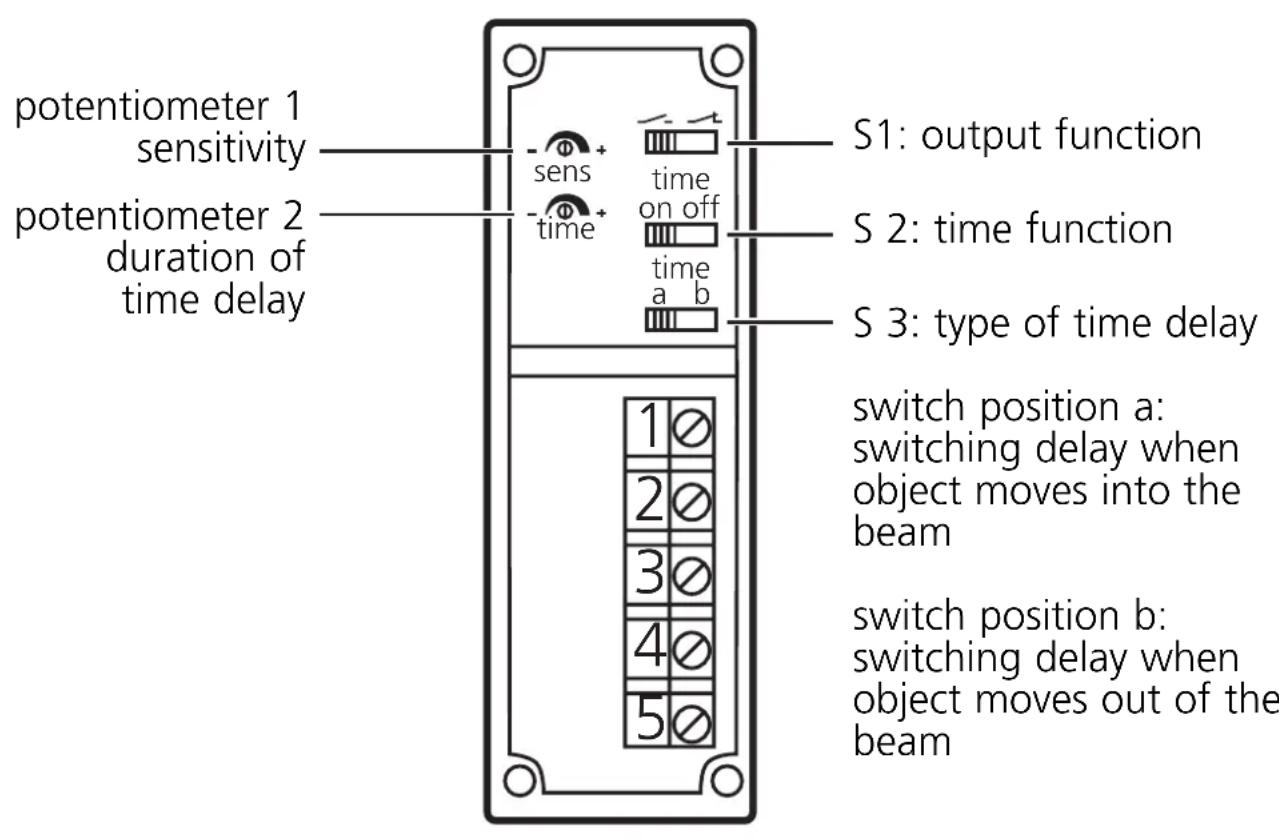
Controls and indicators
Electrical connection

Disconnect power before connecting the sensor.
Connection strictly to the indications on the type label.
Note: insert a miniature fuse according to the technical data sheet, if specified.
Recommendation: check the unit for reliable function after a short circuit
Installation
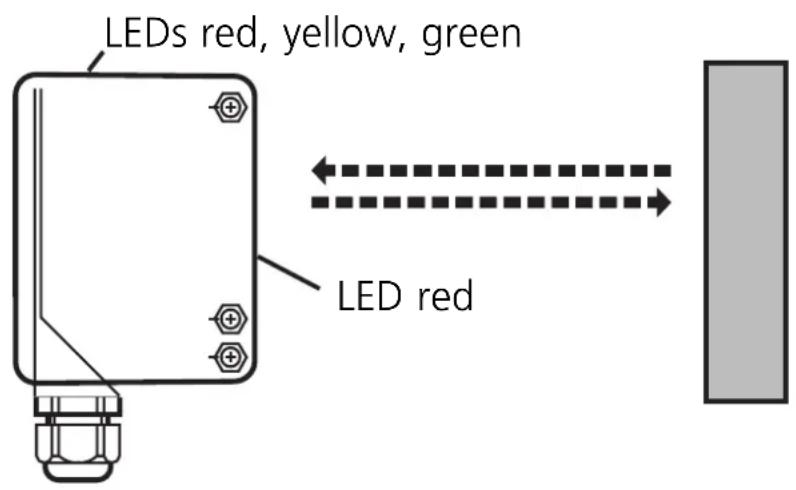
Align the photocell towards the object to be detected and fix it by means of a mounting device.
Following electrical connection the photocell can be set exactly by means of the LED display:
- The red LEDs light if setting is exact.
- They flash if setting is inexact.
Maximum range only with precise alignment.
Setting
Set the sensitivity, the output function, the time function as well as the type and duration of the time delay.
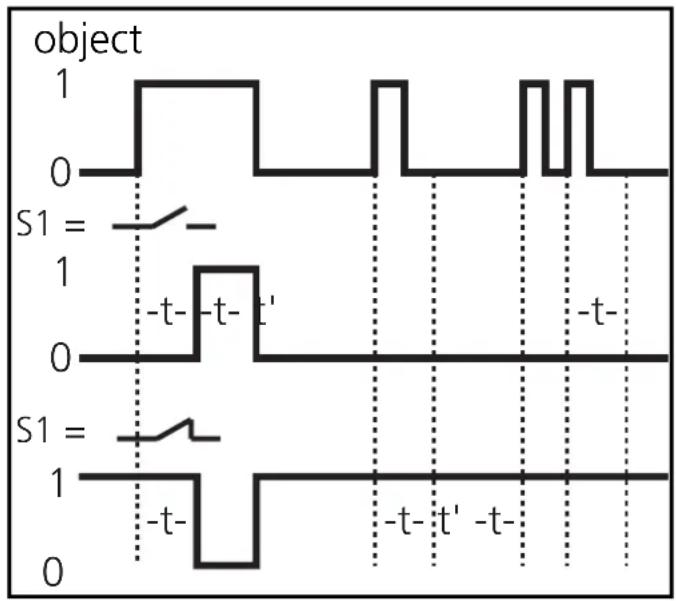
Switch 3 = a
The signal "object present" is transferred to the switching output after a delay.
In the case of S1 = the output switches ON after the rising edge + t.
- In the case of S1 = the output switches OFF after the rising edge + t.
A pulse during the time t triggers the timer again.
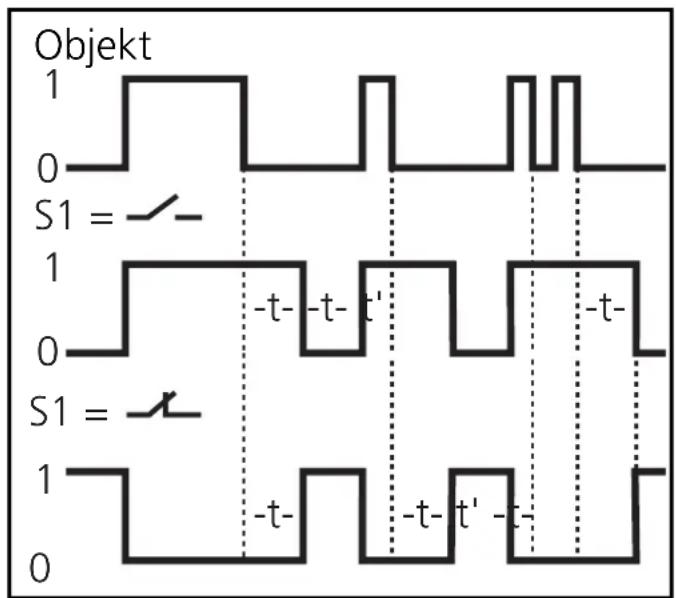
Switch 3 = b
The signal "no object present" is transferred to the switching output after a delay.
In the case of S1 = the output switches OFF after the falling edge + t.
- In the case of S1 = the output switches ON after the falling edge + t.
A pulse during the time t triggers the timer again.
Operation
Check the safe functioning of the photocell.
Display by LEDs and function-check output.
- Green LED is lit = supply voltage o.k.
- Red LEDs are lit = light reception (object present).
- Red LEDs flashing = reception deteriorating (e.g. by soiling of the lenses or maladjustment).
- Yellow LED is lit = output switched.
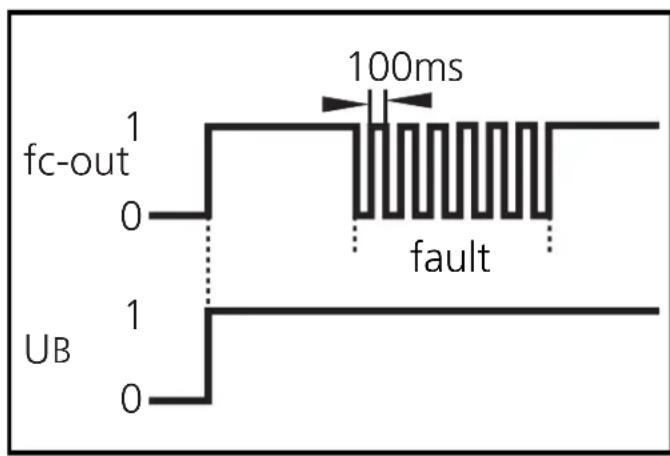
The function check output indicates a wrong object detection (soiling of the lenses, maladjustment) by means of a 5Hz signal. When the object is again clearly detected, the output provides again a continuous signal.
Maintenance: Keep the lens of the sensor free from soiling.