OG5069 - Photoelectric sensor IFM - Free user manual and instructions
Find the device manual for free OG5069 IFM in PDF.


| Brand | IFM |
| Model | OG5069 |
| Category | Photoelectric sensor |
| Series | efector200 |
| Detection type | Photoelectric barrier (emitter/receiver) |
| Range | See label on device (varies by version) |
| Power supply | Galvanically isolated power supply with overload protection (UL 508 standard) |
| Supply voltage | Typically 10–30 V DC |
| Current consumption | < 50 mA |
| Switching output | Programmable function via wiring (BK pin) |
| Diagnostic output | 10 mA max. (BU pin) |
| LED indicators | Green (operational), yellow (switched output), red (error) |
| Housing material | Plastic (plastic lenses) |
| Dimensions (L x W x H) | Approx. 60 x 20 x 40 mm |
| Weight | Approx. 50 g |
| Protection rating | IP67 (estimated) |
| Operating temperature | -25 to 60 °C |
| Main functions | Contactless detection of objects and materials, sensitivity programming (static/mobile), light adjustment aid, lock/unlock |
| Connection | 3-wire cable (BN = brown, BU = blue, BK = black) |
| Mounting | With mounting bracket; precise alignment required |
| Maintenance and cleaning | Clean lenses with a soft cloth; do not use solvents |
| Safety | Do not look into the light source axis; apply laser warning labels |
| Spare parts and repairability | Not specified; contact manufacturer |
Frequently Asked Questions - OG5069 IFM
User questions about OG5069 IFM
0 question about this device. Answer the ones you know or ask your own.
Ask a new question about this device
Download the instructions for your Photoelectric sensor in PDF format for free! Find your manual OG5069 - IFM and take your electronic device back in hand. On this page are published all the documents necessary for the use of your device. OG5069 by IFM.
USER MANUAL OG5069 IFM
Through-beam sensor OG laser
Function and features
The through-beam sensor detects objects and materials without contact and indicates their presence by a switched signal.
Range (r): see type label.
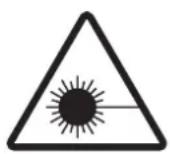
Laser radiation; laser protection class 2.
Do not look directly into the beam!
The enclosed labels (warning laser) must be applied in close proximity to the unit.
Electrical connection

The device shall be supplied from an isolating source and protected by an overcurrent device such that the limited voltage circuit requirements in accordance with UL 508 are met.
Isolate power, then connect the unit (see page 17 or type label). Core colours: BN = brown, BU = blue, BK = black.
Programming of the output function by wiring (see page 17 or type label).
Load of the function check output (fc output): max. 10mA.
Installation and alignment
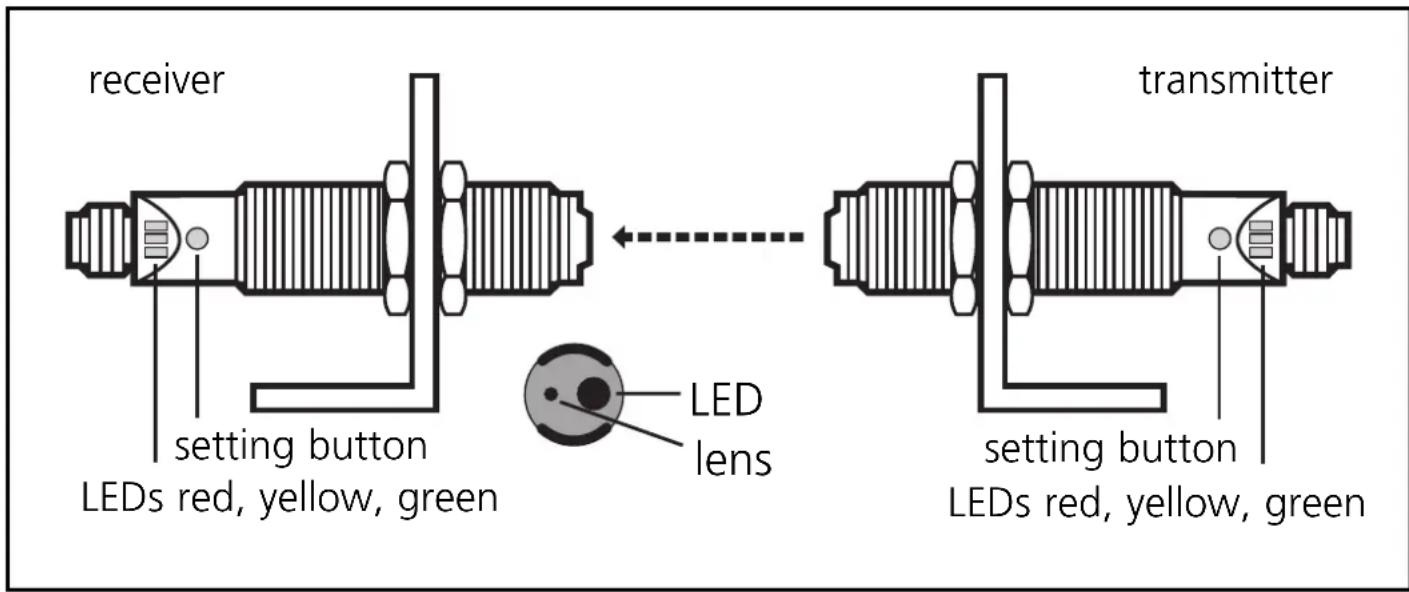
Fix the receiver (type OGEL...) in position.
Align the transmitter (type OGES...) towards the receiver; the light spot must hit the receiver lens (confirmation by LED).
Adjustment aid
For the alignment the transmitter incorporates an adjustment aid.
After pressing the setting button on the transmitter the red LED flashes, then the green LED and the yellow LED flash alternately. The intensity of the transmitted light is increased and the light spot is clearly visible. After pressing the button again the green LED is on again and the transmitted light is set again to normal intensity.
If the button is not pressed again, the transmitted light is set to normal intensity after about 15 min.
NB: Commissioning
The through-beam sensor is supplied ready to operate (plug and play) set at the max. sensing range. This is sufficient if the through-beam sensor can operate with maximum excess gain (highest contrast). The following setting procedures should only be necessary in less straightforward applications, for example if partly transparent objects must be detected.
Setting of the sensitivity with stationary objects
| 1 | Activate the programming mode of the unit. 接收er transmitter Press for about 2s until the red LED flashes. |
| The red LED goes out; the yellow and green LEDs flash alternately. The unit is in the programming mode. | |
| 2 | Set the sensitivity with object. 接收 Press once. |
| The yellow and green LEDs go out for approx. 1s, then flash again alternately. |
| 3 | Set the sensitivity without object. receiver transmitter Press once. |
| The yellow and green LEDs go out for approx. 1s, then the green LED is on. The unit is in the operating mode. |
You can also proceed in reverse order: first setting without the object, then with the object.

If the setting of the sensitivity is not possible (e.g. object signal and background signal are about the same), the red LED flashes after step 3 for approx. 2s. The unit then passes into the operating mode with the sensitivity being unchanged.
Setting of the sensitivity with moving objects
| 1 | Activate the programming mode of the unit. 接收er transmitter Press for about 2s until the red LED flashes. |
| The red LED goes out; the yellow and green LEDs flash alternately. The unit is in the programming mode. |
| 2 | During the measurement (approx. 1s) allow at least two objects to move through the sensing area of the lens. Press once. | |
| The yellow and green LEDs go out for approx. 1s, then flash again alternately. | ||
| 3 | During the measurement (approx. 1s) allow at least two objects to move through the sensing area of the lens. Press once. | |
| The yellow and green LEDs go out for approx. 1s, then the green LED is on. The unit is in the operating mode. | ||

If the setting of the sensitivity is not possible (e.g. object signal and background signal are about the same), the red LED flashes after step 3 for approx. 2s. The unit then passes into the operating mode with the sensitivity being unchanged.
Setting of the maximum sensitivity
- Go into the programming mode (step 1).
- Interrupt the light beam.
- Press the setting button twice (see steps 2 and 3).
Locking
| receiver Press for 10s. | The red LED flashes for a short time, then the yellow and green LEDs flash alternately; after 10s the LEDs go out, the unit is locked. | |
Unlocking
| receiver Press for 10s. | → | After 10s the LEDs go out, locking is cancelled. |
Operation
Check the safe functioning of the diffuse reflection sensor. Display by LEDs and by the function check output.
| LED green is lit Unit is ready for operation. | |
| LED yellow is lit Output is switched. | |
| LED red is lit | Error in object detection, e.g. maladjustment, soiling of the lenses. |
| LEDs yellow + red | Flash alternately, 2 Hz: output short-circuited. Flash alternately, 1 Hz: internal malfunction (output is not switched). |
Function check output
(not for sensors with cable connection)
- Switches in the case of incorrect object detection (error in object detection, maladjustment, soiling of the lenses) after approx. 4 s, it switches back approx. 4 s after the object is again correctly detected.
- Immediately switches in the case of a short circuit of the switching output, it switches back approx. 2 s after the fault has been rectified.
- Immediately switches in the case of an internal fault, it is only switched back by turning off the operating voltage and then on again.
Maintenance
Keep the lens of the sensor free from soiling. For cleaning do not use any solvents or cleaning agents which could damage the plastic lenses.
Appuyer pendant 10s.