Acqua Scooter - Scooter NILOX - Free user manual and instructions
Find the device manual for free Acqua Scooter NILOX in PDF.



| Product type | Cargo electric assisted bicycle |
| Brand | Nilox |
| Model | Acqua Scooter |
| Total bicycle weight | 27.5 kg |
| Dimensions (wheels) | 20" x 2.25 / 27.5" x 2.20 |
| Battery | Lithium 36V – 10 Ah |
| Range | Approximately 40 to 60 km |
| Maximum assisted speed | 25 km/h |
| Motor | 250 W – 45 Nm, rear wheel |
| Maximum load capacity (total) | 180 kg (user + load + bicycle) |
| Front rack capacity | 15 kg max |
| Rear rack capacity | 80 kg max |
| Brakes | Hydraulic disc brakes, diameter 160 mm |
| Transmission | Rear derailleur, multiple gears |
| Frame and rigid fork warranty | 5 years |
| Electrical parts warranty | 2 years |
| Battery warranty (cells / electrical) | 6 months / 24 months |
| Recommended maintenance | Service every 6 months by a professional |
| Cleaning | With fresh water and sponge, no high-pressure cleaner |
| Lighting | Integrated front headlight and rear light, control from the display |
| Bell | Installed on the handlebar, audible at 50 m |
| Safety | Helmet strongly recommended, mandatory under 14 years |
| Intended use | Urban and suburban, on roads or paved surfaces |
| Battery charging temperature | 0 °C to +40 °C |
| Connectivity | Bluetooth, BAFANG Go app |
Frequently Asked Questions - Acqua Scooter NILOX
User questions about Acqua Scooter NILOX
0 question about this device. Answer the ones you know or ask your own.
Ask a new question about this device
Download the instructions for your Scooter in PDF format for free! Find your manual Acqua Scooter - NILOX and take your electronic device back in hand. On this page are published all the documents necessary for the use of your device. Acqua Scooter by NILOX.
USER MANUAL Acqua Scooter NILOX
natural_image
Illustration of a person performing a high kick exercise, showing two panels (A and B) with no text or symbols.Manubrio
natural_image
Close-up of a robotic arm joint with a red arrow pointing to a circular component (no text or symbols visible)Pneumatici
natural_image
Pure mechanical diagram showing a shaft and housing with blades radiating outward (no text or symbols)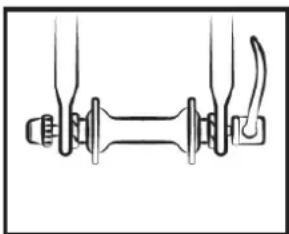
natural_image
Pure mechanical diagram showing two connected components with no text or symbols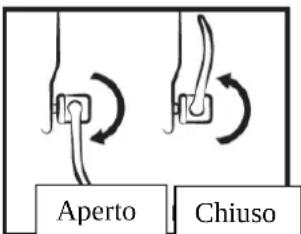
natural_image
Three black plastic clip components with mounting holes, shown in different orientations (no text or symbols)natural_image
Close-up of a bicycle handle mechanism with motion arrows and a small inset image showing bicycle symbols (no readable text or labels)natural_image
Close-up of a black remote control device with LED display and power button (no readable text or symbols)natural_image
Four identical black digital display units with LED indicators and power button icons, arranged horizontally (no text or symbols on devices)Illuminazione
natural_image
Two identical black electronic devices with LED display and power button icons, no visible text or symbols.NOTE
natural_image
Close-up of a mechanical component with metallic and black components, no visible text or symbolsnatural_image
Technical line drawing of a mechanical component with an inset close-up showing a labeled part (no text or symbols present)natural_image
Technical line drawing of a mechanical component with a close-up view of its side panel (no text or symbols)natural_image
Close-up of a circular mechanical knob with a red circle highlighting a specific point (no text or symbols visible)Blocco
natural_image
Close-up of a circular mechanical knob with a vertical bar and a green circle highlighting a small feature (no text or symbols visible)Sblocco

natural_image
Line drawing of a rectangular metal tray or container with internal structural ribs and a handle (no text or symbols)natural_image
Technical line drawings of a bicycle showing front and side views (no text or symbols)natural_image
Technical line drawing of a mechanical bracket assembly (no text or symbols)natural_image
Diagram showing two hand gestures operating a mechanical device with spring and rod components (no text or symbols)Poggiapiedi
Caratteristiche:
natural_image
Technical line drawing of a mechanical bracket or support frame (no text or symbols)
natural_image
Technical line drawing of a bicycle wheel assembly with suspension components (no text or labels)natural_image
Line drawing of a hand pointing at a mechanical component inside a circular frame (no text or symbols)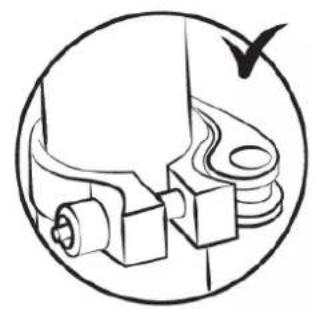
natural_image
Technical line drawing of a mechanical assembly with no visible text or symbols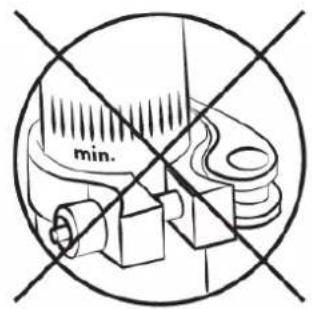
natural_image
Illustration of a person's legs and feet in a bicycle, showing motion lines (no text or symbols)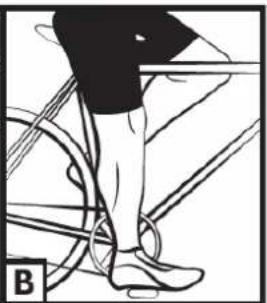
natural_image
Illustration of a person's lower legs and foot wearing a bicycle, with no visible text or symbolsGuidon
natural_image
Close-up of a robotic arm joint with a red arrow pointing to the knob (no text or symbols visible)Pneumatiques
natural_image
Pure mechanical diagram showing a shaft and flange assembly without any text, numbers, or symbols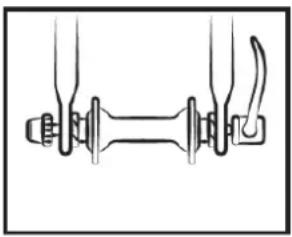
natural_image
Pure mechanical diagram showing two connected components with no text or symbols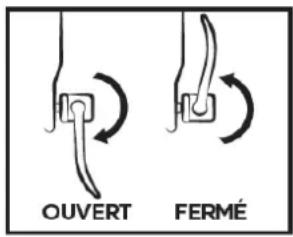
Réglage des freins
natural_image
Three electronic components: a rectangular package, a black plastic clip, and a coiled spring (no text or symbols)natural_image
Close-up of a bicycle lever mechanism with motion arrows and component outlines (no readable text or symbols)natural_image
Close-up of a black remote control device with LED display and power button (no readable text or symbols)natural_image
Four identical black digital display units with LED indicators and power button icons, arranged horizontally (no text or symbols on devices)natural_image
Two identical black-and-white display devices with LED indicators and power button icons, no visible text or symbols.natural_image
Close-up of a mechanical component with a yellow arrow pointing to a circular button containing a color-coded sensor or indicator (no text or symbols visible)natural_image
Technical line drawing of a mechanical component with an inset close-up showing a labeled part (no text or symbols on the diagram itself)natural_image
Technical line drawing of a vehicle door panel with mounting bracket and side-mounted lock (no text or symbols)natural_image
Close-up of a circular mechanical knob with a red circle highlighting a specific point (no text or symbols visible)Verouiller
natural_image
Close-up of a mechanical knob or dial with a green circular annotation highlighting a small component (no text or symbols visible)Deverrouiller

natural_image
Line drawing of a rectangular metal tray or basket structure with no text or symbols
natural_image
Technical line drawings of a bicycle showing front and side views (no text or symbols)natural_image
Technical line drawing of a mechanical frame assembly (no text or symbols)
natural_image
Technical line drawing of a mechanical device with a magnified inset showing internal components (no text or symbols)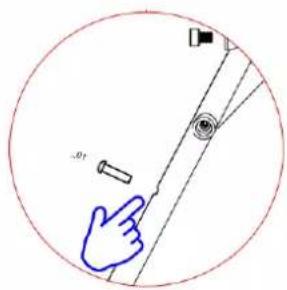
natural_image
Technical line drawing of a bicycle frame with hand gestures and structural details (no text or symbols)natural_image
Diagram showing two hand gestures interacting with a mechanical device, one with spring and the other with a handle (no text or symbols)Repose-pieds
Caractéristiques:
natural_image
Technical line drawing of a mechanical frame or support structure (no text or symbols)natural_image
Technical line drawing of a bicycle wheel assembly with suspension components (no text or labels)Remarques:
Translation of the original notice
The purpose of this manual is to give you the information necessary for the proper use, adjustment and maintenance of your bike.
Please take the time to read these instructions carefully before riding and keep them for the life of the bike. They contain important safety and maintenance instructions.
It is the user's responsibility to read this manual before using the product.
Failure to follow these instructions exposes you to the risk of improper use of your bike, premature wear of certain components which could lead to a fall and/or an accident.
In the event that an original part proves to be defective in workmanship within its warranty period, we promise to replace it. The warranty period for e-bikes is as follows:
frames and forks : 5 years
Electrical parts: 2 years with proper care and maintenance
All other components: 2 years with proper care and maintenance
As for the battery, it is guaranteed against manufacturing defects for 6 months on the pieces consumables (cells) and 24 months on pieces electrical, under reserve of respect of the instructions for use and storage indicated below:
√ Do not connect not the positive terminal directly to the terminal negative of this battery;
√ Do not place not battery in a high temperature place, in an exposed environment in or near the sun of fire;
√ Do not place not battery in a humid environment Or immersed in a liquid;
√ Do not disassemble not the battery pack without the guidance of a technician professional;
√ keep battery in a dry and temperate environment. Load battery all the month;
√ Please load this battery with charger exclusive accompanied by your bike.
√ Report your used battery at the house of your reseller.
This warranty does not include labor or transportation costs. The company assumes no liability for consequential or special damages. This warranty is applicable only to the original retail purchaser with proof of purchase validating any claim. This warranty is applicable only in case of defective parts and does not cover the effects of normal use, rental use, professional use, or damage caused by accidents, abuse, excessive loads, negligence, improper assembly, improper maintenance or addition objects inconsistent with normal use of the bicycle.
No bicycle is indestructible and no claim can be accepted for damage caused by improper use, rental use, professional use, use in competitions, stunts, ramp jumps, jumps or similar activities. Complaints must be made to the dealer. Your legal rights are not affected.
The company reserves the right to change or correct any details without notice. All information and details in this manual are correct at the time of printing.
He is forbidden to modify or tamper with the manual provided with the bike.
The bike is certified according to the standards of the law in force.
It is absolutely forbidden to change the parameters and specifications of the assembled electrical/mechanical components and standard functions of the motorcycle because this would compromise the proper operation of the vehicle and the safety of the user himself.
Should this happen, the user will be fully responsible for everything related to shaming.
Conditions of use of this electrically assisted bicycle
This electrically assisted bicycle is designed for urban and peri-urban use, it allows you to move around town, on the road or on a paved surface where the tires are always in contact with the ground. It is equipped with electric pedaling assistance which will make all your daily trips easier, to go further and for longer. Your electric bike is an adult bike, for people over 14 years old. In the event that the bicycle is used by a child, the responsibility is with the parents and must ensure that the user is able to use the bicycle safely.
Your bike is not intended for use on unpaved or rough terrain. It is not designed for "all-terrain" use, nor for competition. Failure to comply with this practice may result in a fall or accident and may prematurely and potentially irreversibly deteriorate the condition of your electric bike.
Your e-bike is not a moped. The purpose of the assistance is to provide a complement to the pedalling. The moment you start pedaling, the motor kicks in and helps you in the effort. The assistance varies according to the speed of the bike, high at start-up, less sustained when the bike is launched then disappears when the bike reaches 25 km/h. The assistance is cut off as soon as one of the two brake levers is actuated or the speed is greater than 25 km/h. This will resume automatically below 23 km/h with pedalling.
It must be properly maintained according to the instructions in this manual.

WARNING: Like any mechanical component, a bicycle is subject to high stress and wear. Different materials and components may react differently to wear or fatigue. If the expected lifespan of a component has been exceeded, it may break suddenly, risking injury to the cyclist. Cracks, scratches and discoloration in high stress areas indicate that the component has exceeded its life and should be replaced.
Recommendation: Safe and secure use
Before using your e-bike, make sure it is in good working order. Check the following points in particular:
- Position should be comfortable
- Nuts, screws, clamping levers, clamping components
• The brakes are in working order - The handlebar travel is good without too much play, the handlebar is correctly fixed to the stem
- Wheels are unobstructed and bearings are properly adjusted
- The wheels are properly tightened and attached to the frame/fork
- The tires are in good condition and their pressure is good.
• The condition of the rims -
The pedals are firmly attached to the crankset
-
The operation of the transmission
- The reflectors are in the correct position.

RECOMMENDATION: Your electrically assisted bicycle must be serviced every 6 months by a professional to ensure that it is in good working order and safe to use. It is the user's responsibility to ensure that all components are in good working order before use.
Pick a safe place away from traffic to familiarize yourself with your new bike. The assistance can be triggered with force, check that your handlebars are straight and that the path is clear.
Make sure you are in good health before getting on your bike.
In the case of unusual weather conditions (rain, cold, night, etc.), be particularly vigilant and adapt your speed and reactions accordingly.
When transporting your bike outside your vehicle (bike carrier, roof rack, etc.), it is strongly recommended to remove the battery and store it in a temperate place.
The user must comply with the requirements of national regulations when the bicycle is used on public roads (lighting and signaling for example).

WARNING: You acknowledge that you are responsible for any loss, injury or damage caused by failure to follow the above instructions and that this will automatically void the warranty.

Usage limits
WARNING: Do not exceed a speed of 45 km/h when using the bicycle downhill or on level ground with a full load or without any added load.
Structure of power - assisted bicycles electric
ALPA E-Cargo Components
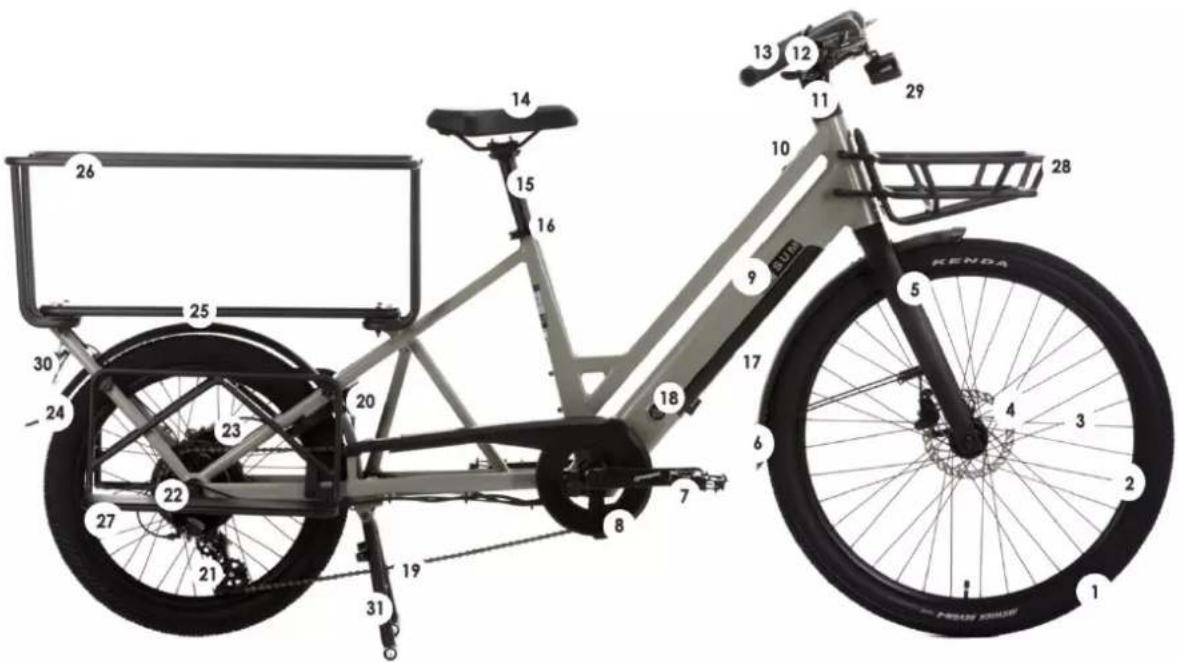
- Tire and inner tube
- Rim
- Spokes
- Front brake
- Fork
- mudguard
- Pedals
- Crankset and cranks
- Frame
- Display
- Handlebar and stem
- Brake levers
- Handles
- Saddle
- Seatpost
-
Saddle clamp
-
Main Battery
- Lock
- Chain
- Anti-theft
- Rear derailleur
- Rear hub motor
- Rear brake
- Mudguard
- Luggage rack loading plan back
- Large rear rack
- Footrest
- Front luggage rack
- Headlight
- Tail light
- Kickstand
First start -up and settings
Installation of security elements
Lighting
Lighting is provided to you, it consists of two reflectors (a white one included in the front headlight and a red fixed on the rear mudguard), a front headlight, a rear light, reflectors positioned between the spokes of the wheels.
The lighting system is a safety feature of your bike, it must be present on your bike. Check that your lighting system is working properly before setting off.
Headlight
Front lighting is activated directly from the screen. See chapter "Display" on the following pages.
Taillight
lighting back is activated directly Since the screen. See "Display" chapter on the pages following.
doorbell
A bell is installed on your handlebars. It will allow you to be heard 50 m away.
The bell is a security feature of your bike, it must be present on your handlebars.
Wearing a helmet
For safe use, wearing a bicycle helmet is strongly recommended. It guarantees a reduction in head trauma in the event of a fall and augment the user safety.

WARNING: Wearing a helmet is compulsory for children under 14 as drivers or passengers.
For more information, ask your dealer.
Saddle and handlebar adjustment
It is important to adapt the settings of your bike to your morphology.
Saddle
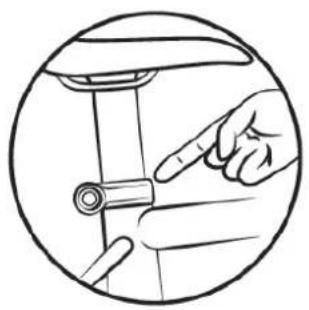
Open the quick release system (see paragraph for the methodology for using the quick release).
When adjusting the saddle to its lowest position, make sure that it does not touch any component of the bicycle, such as the luggage rack. Likewise, take care not to exceed the minimum seat tube insertion mark. This insertion mark should never be visible when using the bike.
natural_image
Illustration of a hand adjusting a bicycle wheel (no text or symbols)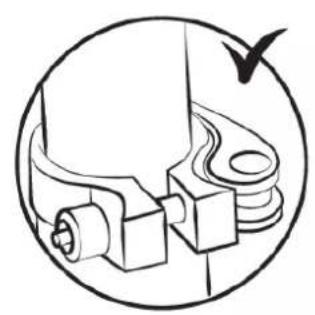
natural_image
Technical line drawing of a mechanical assembly with no visible text or symbols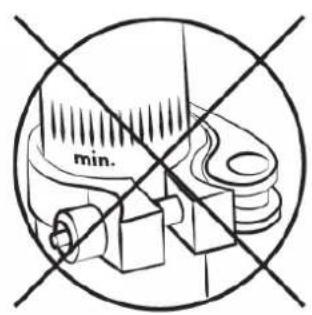
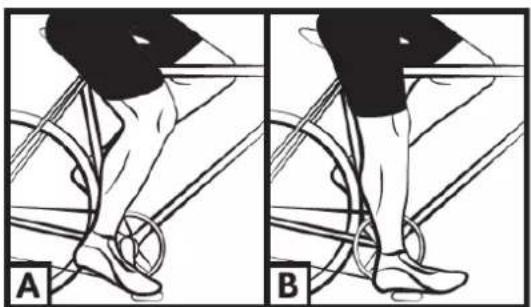
To check the correct saddle height, sit with your legs stretched out, heel resting on the pedal (fig. B). When pedalling, the knee will be slightly bent with the foot in the low position (fig. A).
natural_image
Illustration of a person performing a high kick exercise, showing two stages (A and B) with no text or symbols present.Handlebar
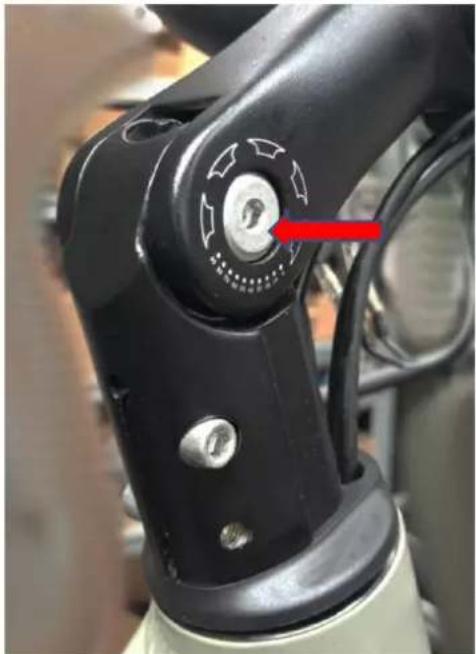
The bicycle is equipped with a handlebar stem called "Aheadset", you can adjust the height of the stem by increasing or removing the adjustment rings located between the stem and the upper steering bearing.
The inclination of the steering column can be adjusted by acting on the screw indicated in the image to the side.
It is recommended that these operations be carried out by a qualified technician.
Make sure the handlebar is perpendicular to the front wheel axle.
ATTENTION: The handlebar can have a negative influence on the response time of the cyclist during braking and in turns.
natural_image
Close-up of a robotic arm joint with a red arrow pointing to a keyhole (no text or symbols visible)Tires
Check tire pressure regularly. Driving with under-inflated or over-inflated tires can affect performance, cause premature wear, reduce range or increase the risk of an accident.
If significant wear or a nick is visible on one of the tires, replace it before riding the bike. A pressure range is indicated on the sidewall of the tire by the manufacturer and in the following table. The pressure must be adapted according to the weight of the user.
| Pressure | |||||
| Model | Bike size | Air chamber size | Tire size | PSI | Bar |
| City Cargo | 20" | 20x2.25 | 20x2.25 | 30 – 50 | 2.0 – 3.5 |
| 27.5" | 27.5x2.20 | 27.5x2.20 | 40 - 65 | 2.8 – 4.5 | |
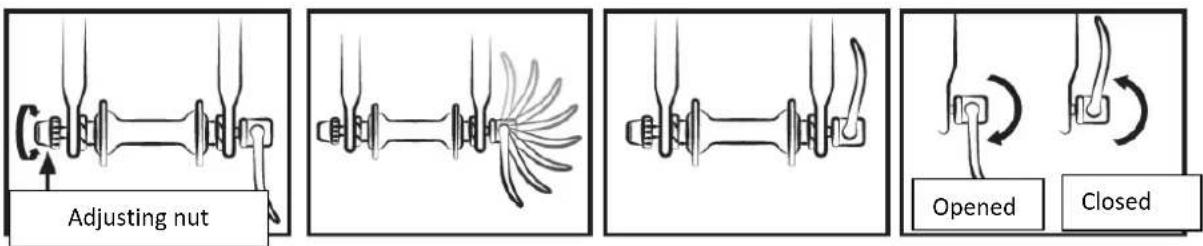
Method for determining correct adjustment of quick-release mechanisms (wheel and seat clamp)
Quick release devices are designed to be operated by hand. Never use tools to block or unblock the mechanism so as not to damage it.
To adjust the clamping force of the wheel axle, you must use the adjusting nut and not the quick release lever. If the lever can be moved with minimal hand pressure, it is not tight enough. It is therefore necessary to tighten the adjusting nut.
The quick-release system must mark the fork dropouts when closed in the locked position.
At each adjustment operation, check that the front wheel is correctly centered in relation to the fork. To adjust, close and open the quick-release mechanisms, apply the following method:
Adjusting the brakes
Before each use, check that the front and rear brakes are in perfect working order.
The right handle activates your rear brake. The left handle activates the front brake.
It is recommended to distribute your braking force on average 60/40 between the front and the rear. The brake lever must not come into contact with the handlebars and the sheaths must not be subject to closed angle trajectories so that the cables slide with the minimum of friction. Damaged, frayed, rusted cables should be changed immediately.
WARNINGS:

- In the event of rain or wet weather, braking distances are extended. It is recommended to anticipate braking in such a situation.
- When cornering and braking, the handlebars can have a negative influence on the cyclist's response time.
- Do not touch the disc brakes after intensive use of the braking system of your electric bike at the risk of being burned.
Adjusting the hydraulic disc brakes
The brake pads exert pressure on a disc fixed in the hub of the wheel. The intensity of the pressure is regulated by a brake lever with a liquid via the pressure exerted via the water hose. Do not apply the brake lever when the wheel is detached from the frame or the fork.
To align the automatic disc brake bracket, unscrew the bracket fixing screw from the brake bracket. Brake with the corresponding brake lever (the brake bracket is correctly positioned) and hold the brake handle in this position by tightening the fixing screws of the bracket bracket.
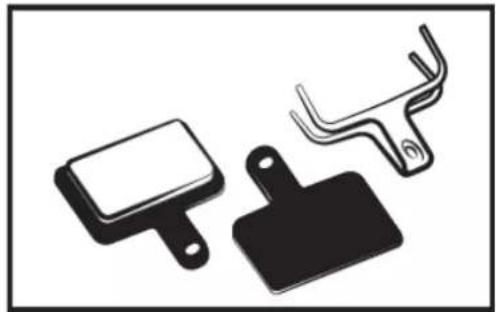
Check that the inner pad (inside the wheel) is 0.2 - 0.4mm from the disc. If this is not the case and you are not comfortable with this operation, contact a qualified technician. It is recommended that you never pour oil or lubricating material on the disc or pads (when servicing the chain or derailleur, for example). If this happens, the pads or rotor should be degreased or replaced. Check the alignment of the pads by spinning the wheel to use the bike on the road. Discs: the bike is equipped with discs with a diameter of 160 mm.
brake pads are standard, replace them when the pad no longer has any friction elements.
natural_image
Three electronic components: a rectangular package, a black clip, and a coiled spring (no text or symbols)Don't forget not only new brake pads must be lapped. Breaking -in is done by using the bike for a few minutes and applying the alternating brakes between stops abrupt and light braking.
Replacement of brake pads
Remove the wheel and remove thr old brake caliper pads. Place the pads new In the stirrup so that that the braking surfaces are touching. Don't touch not the braking surfaces. Insert the pads one by one In the brake caliper.
Wheel wear
As all piece wear, the rim must be controlled regularly. The hoop can weaken and break, you doing lose control or fall.

NB: it is important to check the state of wear of the rims. A rim damaged can be dangerous and must be replaced.
Adjusting the shift system
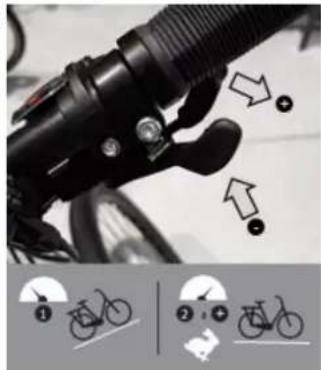
The bike has several gears interchangeable manually with a derailleur system back.
Be careful, never pedal in back when changing gear and never force the control lever.
Use the right handle to change the rear chainring and the left handle to change the front chainring.
On the slope, the small plateau and the large gable make pedaling easier.
Adjust the transmission ratio (crown/ pinion) according to your needs
Be careful, never pedal in back when changing gear and never force the control lever.
For optimum use of the gear change system, it is advised avoid changing gears except when pedaling intense.
natural_image
Close-up of a bicycle lever mechanism with motion arrows and a close-up of cycling lane markings (no text or symbols)Adjusting the stops
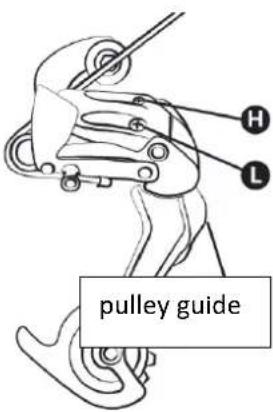
The derailleur travel is adjusted using the H and L screws.
Screw L is used to adjust the upper stop (large gear side).
By loosening screw L, the chain is positioned further outside the large sprocket.
Screw H is used to adjust the lower stop (small pinion side).
By loosening screw H, the chain is positioned further outside the small sprocket.
These manipulations are carried out by quarter turn. With each adjustment, you must obtain perfect alignment between the sprocket, the chain and the pulley of the rear derailleur.
Cable tension adjustment
To set a correct sprocket change, use the knob present on the rear derailleur or the grip. This wheel allows you to adjust the tension of the derailleur cable and allows you to position the derailleur correctly according to the speed chosen.
Chain setting
Your bike is fitted with an external rear derailleur, the chain is automatically tensioned.
New chains are sold with too many links, the first step is to reduce it to the correct length. The safest method is to count the number of links in the old chain in order to adjust the new one. To disassemble the old chain, simply bypass it (remove a rivet).
Once it is removed, the new one must be mounted. To do this, it must be passed around the chainring of the crankset and the rear pinion so that it meshes correctly with the other elements of the transmission. To close the chain we recommend using a quick release. This acts as a female link that fits between two male links. Subsequently, the quick release will also make it easier to remove the chain for cleaning.
In order to check if the length of the chain is correct, it must be put on the small sprocket. In this configuration, the virtual line drawn between the hub of the rear wheel and the axle of the lower pulley of the derailleur must be vertical.
Change of pedals
To change your pedals, identify the pedals by looking at the letter noted on the pedal. The right pedal is marked “R” (Right) and the left pedal “L” (Left). Turn the “R” pedal clockwise to secure it to the crank. Turn the L pedal counterclockwise.
wheel and motor
After the first month of use, it is advisable to tighten your spokes to limit the impact of engine traction on your rear wheel. When starting the engine, a slight noise may occur. This noise is normal because the motor starts and assists pedalling. This noise can become more prominent when fully loaded.
Interview
Your bike requires regular maintenance for your safety but also to increase its lifespan. It is important to check the mechanical elements periodically in order to ensure, if necessary, replacement of worn parts or parts showing signs of wear.
When replacing components, it is important to use original parts in order to maintain the performance and reliability of the bicycle. Be sure to use appropriate spare parts for tyres, tubes, transmission components and the various components of the braking system.
It is the responsibility of the user to use parts different from the original parts.
WARNINGS: Always remove the battery before any maintenance operation.
Cleaning
In order to avoid corrosion of the bike, it is necessary to rinse your bike regularly with fresh water, especially if it has been exposed to sea air.
Cleaning must be done with a sponge, a basin of warm soapy water and a jet of water (no pressure).

RECOMMENDATION : Take special care not to use a high pressure water jet cleaner.
Lubrication
Lubrication is essential on the various components that are in motion in order to avoid corrosion. Oil the chain regularly, brush the sprockets and chainrings, periodically introduce a few drops of oil into the brake and derailleur cable sheaths.
It is advisable to start by cleaning and drying the elements to be lubricated.
It is advisable to use specific oil for the chain and the derailleur. Grease must be used for the other components.
Regular checks
Regarding the tightening of the bolts: lever, crank, pedals, stems.
The tightening torques to be applied are as follows:
| COMPONENTS | RECOMMENDED TORQUE (Nm) | SPECIAL INSTRUCTIONS |
| Pedals on crank arms | 10 – 15 | Grease the threads |
| Crank arm on bracket | 18 - 20 | Grease the threads |
| Stem/handlebar tightening | 9 - 10 | |
| Headset tightening | 4 – 5 | |
| Brake lever | 6 – 8 | Plunger screw (stem) |
| Brake callipers | 6 – 8 | |
| Seat | 20 – 22 | |
| Seat post clamp | --- | Quick release |
| Wheel | 30 | Quick release |
Other tightening torques depend on the size of the nuts: M4: 2.5 to 4.0 Nm, M5: 4.0 to 6.0 Nm, M6: 6.0 to 7.5 Nm. Tighten the screws evenly to the required torque.
Regularly check the tires and in particular the condition of the rear tire teeth: wear, cuts, cracks, pinching. Replace the tire if necessary. Check the rims and the absence of excessive wear, deformations, blows, cracks...
Revisions
To ensure safety and keep components in good working condition, you should have your e-bike checked periodically by your dealer. In addition, maintenance of your bicycle should be carried out regularly by a qualified technician.
First service: 1 month or 150 km
- Verification of the tightening of the elements: crank, wheel, stem, pedals, handlebars, saddle clamp,
- Checking the operation of the electric assistance,
- Checking and adjusting the brakes,
- Wheel tension and/or runout.
Every year or 2000 km:
• Verification of wear levels (brake pads, transmission, tyres),
- Checking the operation of the electric assistance,
- Checking the bearings (bottom bracket, wheels, steering, pedals),
• Cable control (brakes, derailleur),
- Lighting check,
- Wheel tension and/or runout.
Every 3 years or 6000 km:
- Changing the transmission (chain, freewheel, chainring),
- Checking the operation of the electric assistance,
- Changing tires,
- Wheel wear control (spokes, rim),
- Spoke tension and/or wheel trueing,
- Change of pads or brake pads,
• Control of electrical functions.
Pedal assistance and battery
The user must rotate the crank forward to benefit from the motorized assistance. This is an important safety aspect. This electric-assisted bicycle provides motorized assistance up to a speed of 25 km/h. Beyond that, the motor will stop. You can go faster, but you will have to do it on your own without power assistance.
The motor will not run until you turn the crankset one full turn. This feature protects the motor and its controller and extends the life of electrical components.
Pedal assist
To start the bike, turn on the main switch on the side of the ON/OFF battery
The rest of the settings and information are done directly on the display located on the handlebars.

Recommendation: Please turn off the main switch on the battery when you are no longer in the saddle. This saves battery charge.
Display
Below is a description of the various commands and display functions.
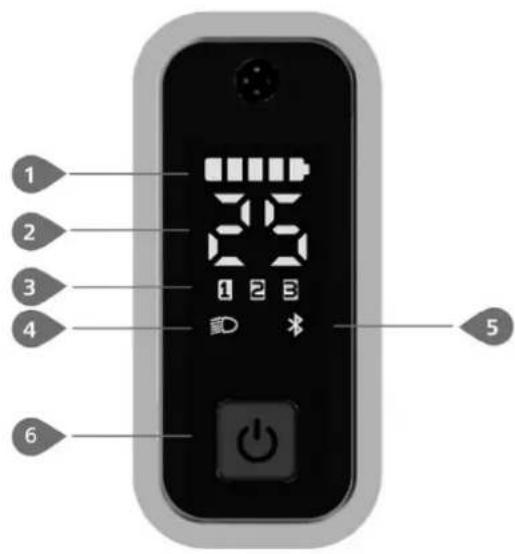
1 Battery capacity indicator
2 Speed indicator
3 Assisted level indicator
4 Lighting system indicator
5 Indicator bluetooth
6 Activation /deactivation button
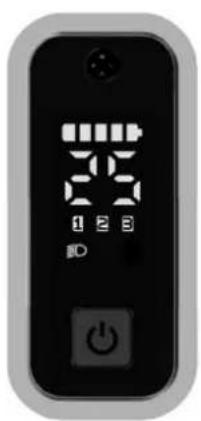
Activation/deactivation of display
Press and hold (S) on the screen to turn on the system.
Press and hold (S) again to turn off the system.
natural_image
Close-up of a black remote control device with digital display and power button (no readable text or symbols)Assisted level selection
When the screen is on, press the button (PULS) to change the assisted level, the lowest level is 1, the highest level is 3. When the assisted level indicator does not light up, there is no electric assistance.
Notes :
Only use assistance level 3 when the bike is fully loaded.
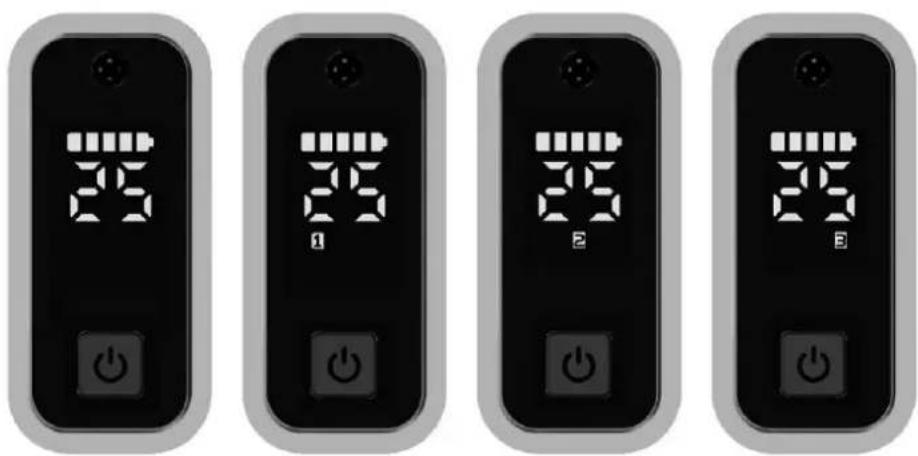
natural_image
Four identical black-and-white digital display units with LED indicators and power button icons, arranged side by side (no text or symbols on devices)Turn on and off the lighting system
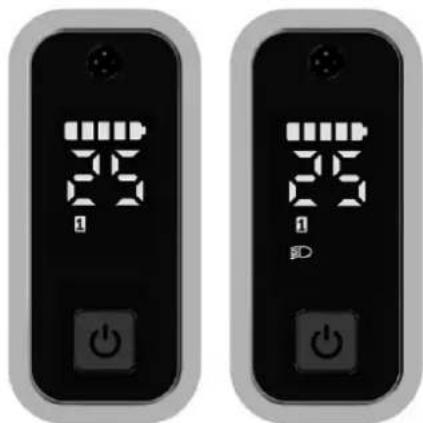
Double-click the button 🤒️ turn on the headlight, and the display interface will darken.
Double-click the button again to turn off the headlight, and the display interface lights up.
NOTES
The display is internally equipped with a twilight sensor sensitive to variations in light intensity, which allows the general lighting to be switched on and off independently.
It is still possible to act manually by pressing the on/off button.
natural_image
Two identical black electronic devices with digital display and power button icons, no visible text or symbols.Battery capacity indication
The battery capacity is indicated with 5 levels. When the lowest level indicator flashes, it means the battery needs to be recharged. The battery capacity is indicated as follows:
| Load lines | LOAD LEVEL | Display icon |
| 5 | 80%-100% | |
| 4 | 60%-80% | |
| 3 | 40%-60% | |
| 2 | 20%-40% | |
| 1 | 5%-20% | |
| 1 flashes | <5% |
Bluetooth function
This display can interface with the dedicated application "BAFANG Go" via bluetooth, it is possible to download the application for Android and iOS systems and proceed with the connection.
It is equipped with the OTA function to automatically update the firmware of the display.
Using the application in question, it is possible to view from your smartphone the main system data, the simultaneous values of the bike and various customizations of display and use.
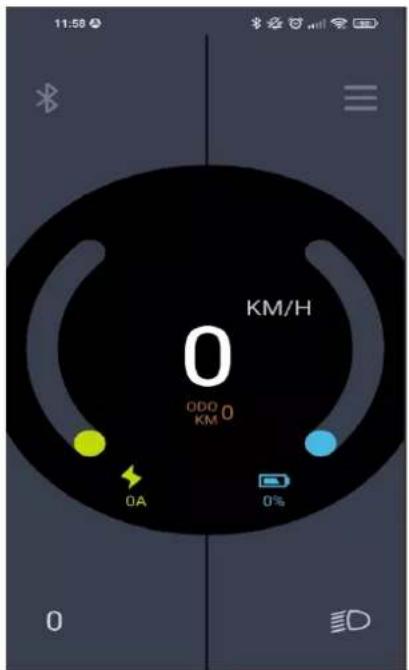
Below is the list of accessible data displayed through the application:
| NOT. | Function | NOT. | Function |
| 1 | Speed | 8 | Align |
| 2 | Level assistance | 9 | heartbeat |
| 3 | Battery | 10 | calories |
| 4 | Fluent | 11 | Sensor signal |
| 5 | Lighting | 12 | Battery information |
| 6 | Journey | 13 | System information |
| 7 | ODO | 14 | Error code |
ERROR CODE DEFINITION
| Error code | Cause | Hubmotor System |
| "05" | The accelerator is not not in place | 1. Check if the accelerator is in place .2. Check if the cable accelerator is properly connected or if the cable (from throttle to controller ) is damaged .3. Troubleshoot the room defective :1) Replace the accelerator2) Replace the controller |
| "07" | System over voltage protection | 1. Check if the nominal voltage of the battery is the same as that of the controller .2. Troubleshoot the defective part :1) Replace the battery2) Replace the controller |
| "08" | The Hall signal in the motor is abnormal | 1. Check if the motor cable is properly connected Or if the cable (from the motor to the controller ) is damaged .2. Troubleshoot the defective part :1) Replace the motor2) Replace the controller |
| "09" | Phase wire in motor abnormal | 1. If you ride for a long time , turn off the system and let the engine cool .2. If you do not ride or ride for a short period, troubleshoot the faulty part:1) Replace the motor2) Replace the controller |
| "10" | Motor overheat protection (occurs uniquely when the engine is crew of one temperature sensor.) | 1. If you roll during a long time, turn off the system and let the engine cool.2. If you don't ride not or don't ride not during a short period, troubleshoot the part defective:1) Replace the motor2) Replace the controller |
| "11" | Engine temperature sensor abnormal (occurs uniquely when the engine is equipped with the temperature sensor.) | 1. Check if the motor cable is properly connected or if the cable (from the motor to the controller) is damaged.2. Troubleshoot the defective part:1) Replace the motor2) Replace the controller |
| "12" | Controller current sensor abnormal | Replace Controller |
| "14" | Controller overheating protection | 1. If you ride for a long time, turn off the system and let the controller cool.2. If you are not riding or ride for a short period, replace the controller. |
| "15" | Controller Temperature Sensor Abnormal | Replace Controller |
| "21" | Abnormal speed sensor | 1. Check if the motor cable is properly connected Or if the cable (from the motor to the controller) is damaged.2. Troubleshoot the defective part:1) Replace the motor2) Replace the controller |
| "26" | Torque sensor abnormal (occurs uniquely when the system workout is equipped with the torque sensor.) | 1. Check if the torque sensor cable is properly connected or if the cable (from sensor to controller) is damaged.2. Troubleshoot the room defective:1) Replace the torque sensor2) Replace the controller |
| "30" | Abnormal communication | 1. Check if the HMI cable is properly connected or if the cable (from the HMI to the controller) is damaged.2. Troubleshoot the defective part:1) Replace the controller whether the HMI goes out automatically after displayed an error code for 20 seconds.2) Replace the HMI whether the HMI does not shut down automatically after an error code appears for 20 seconds . ( go to next page )3) If the BESTT tool is available, connect it to the HMI and the controller , read the information of the HMI and the controller , and replace the part that cannot not read the information . |
| "35" | The 15V detection circuit has a error | Using the BESTT tool , update the controller For see if the problem is resolved . Whether This is not not the case , change the controller Or contact the supplier . |
| "36" | Abnormal on / off button detection circuit ( occurs uniquely when the system workout is equipped with the communication protocol Bafang CAN.) | 1. If you keep pressing the ON /OFF button when the HMI lights up , the error code will be triggered . Release the button and see if the code disappears .2. Troubleshoot the room defective :1) Replace the HMI2) Replace the controller |
| "37" | WDT (Watch Dog Timer) in controller is abnormal | Replace Controller |
| "42" | Battery discharge voltage is too low | 1. Charging the battery2. Replace the battery |
| "49" | The discharge voltage of each cell is too low. | 1. Charging the battery2. Replace the battery |
| "4C" | difference between individual cells | Replace battery |
Battery
Reading the battery charge level
To check the charge level, press a the charge button on top of the battery.
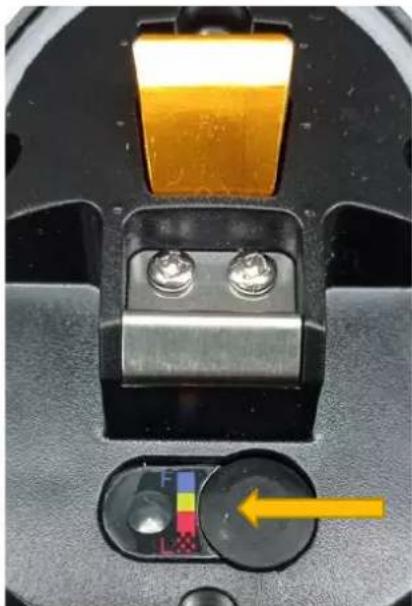
natural_image
Close-up of a mechanical device with two metallic components and a yellow arrow pointing to a circular component (no visible text or symbols)The 4 LEDs light up to indicate the charge according to the level correspondent.
| LEDs | LOAD LEVEL |
| BLUE | 100% |
| GREEN | 75% |
| RED | 50% |
| Flashing LED | < 25% need to recharge |
Insert/remove battery
For correct insertion, the battery must be connected, ensuring that all pins are properly connected to the battery holder. When you push the battery into position. Make sure the battery clicks into the locking mechanism before you go.
- Hold both sides of the battery to seat the bottom of the battery into the frame, making sure it sits comfortably on the bottom bracket.
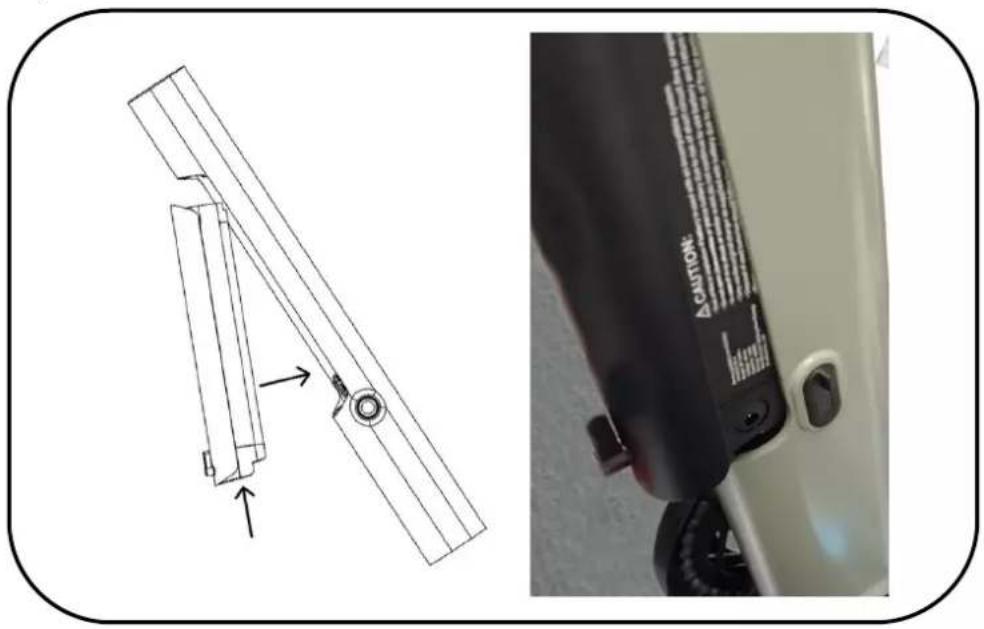
natural_image
Technical line drawing of a mechanical component with an inset close-up showing a labeled part (no text or symbols on the diagram itself)- Push the top of the battery into the frame until you hear the battery click into place. Rotate the limiting cap to prevent the battery from falling.
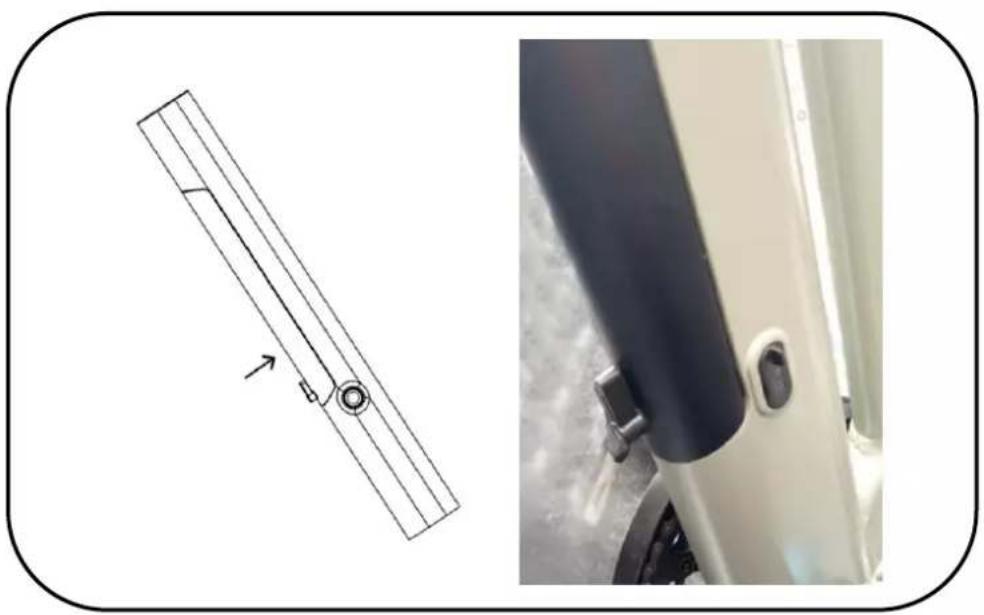
natural_image
Technical diagram showing a mechanical component with an arrow indicating direction, alongside a close-up of the side panel (no text or symbols)To remove the battery, reverse the procedure as indicated below :
-
Turn the key in the lock For open the first battery locking mechanism . Note than the top of the battery comes a few centimeters from the frame .
-
Make turn the limit stop for free the second lock and hold mechanism both sides of the battery to get it out of the frame .
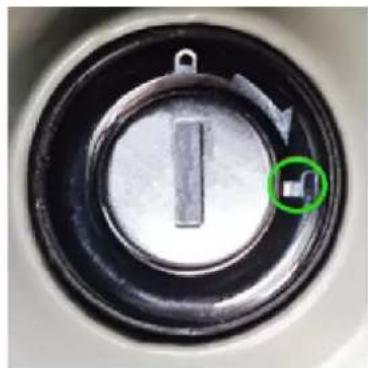
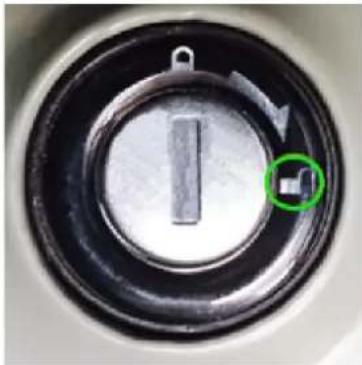
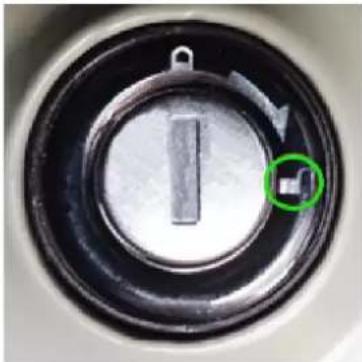
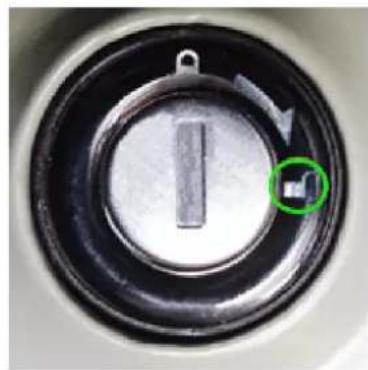
To release the battery, turn the key to the unlock symbol noted on the ratchet (see picture below), for free the battery from sound compartment, turn the lever black on the battery.
To lock the battery, reinsert the battery In her compartment, press on the upper part to fix it in her housing, turn the key in correspondence with padlock symbol noted on the ratchet (see picture below).
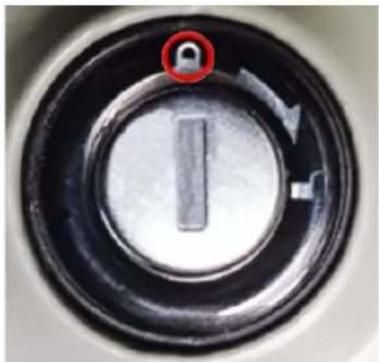
natural_image
Close-up of a circular mechanical knob with a red circle highlighting a specific point (no text or symbols visible)To lock
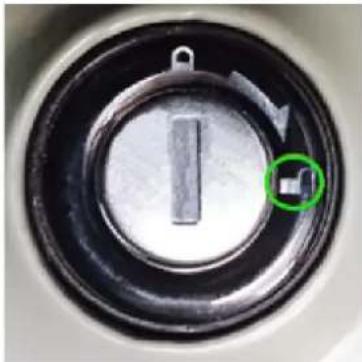
natural_image
Close-up of a circular mechanical knob with a vertical slot and a green circle highlighting a small square (no text or symbols)Unlock

CAUTION : Be sure to remove the key and keep it safe after remove the battery !
Remarks:
To prevent the battery from losing too much charge, it is placed in sleep mode after a period of non-use extended.
Accessories
The E-cargo ALPA model is equipped with various functional accessories to enrich the type of use of this bicycle in everyday life.
Below is the assembly procedure for the various accessories supplied with the bicycle.
Luggage rack
Features:
√ Maximum load capacity 15 kg
√ Convenient to load items
√ excellent load capacity
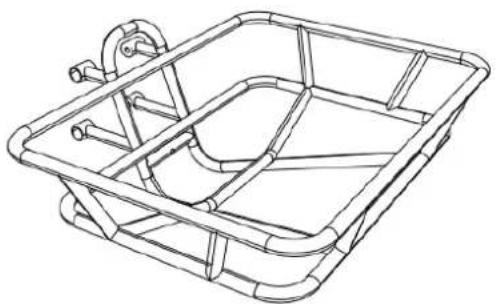
natural_image
Line drawing of a rectangular metal tray or basket structure with no text or symbols
Warning: do not exceed the maximum load allowed 15 kg
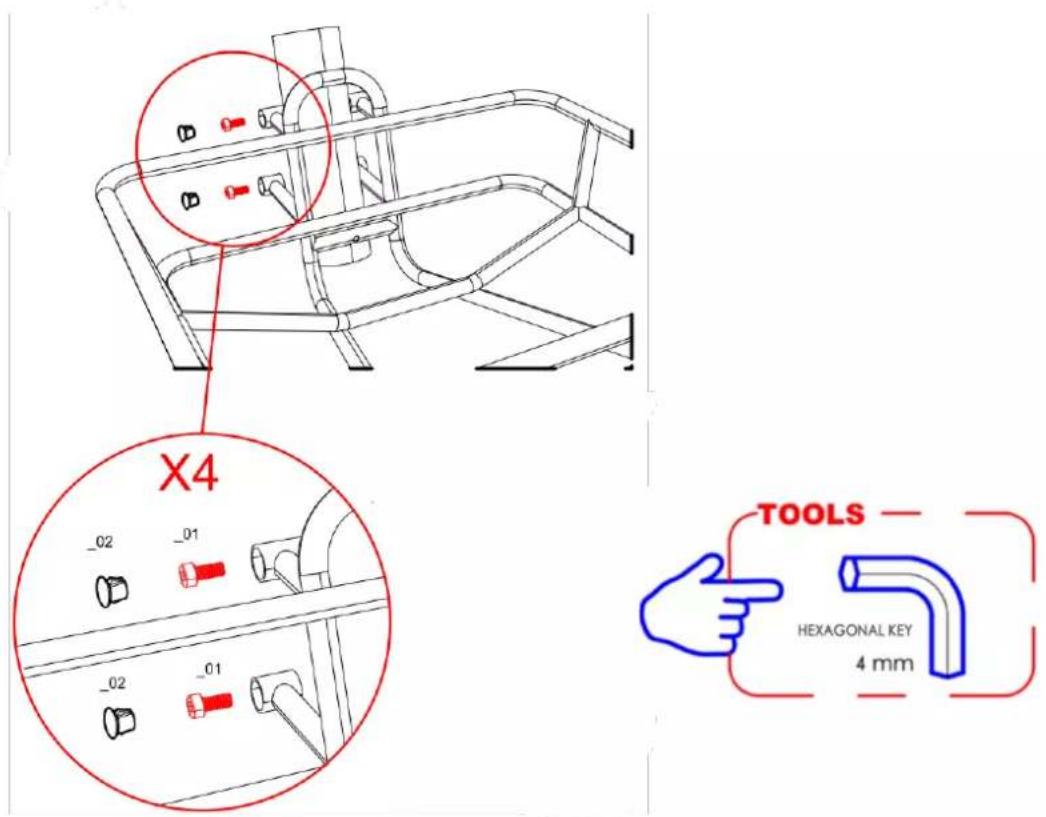
Accessories supplied for correct assembly
| CODE | Q.TY | COMPONENT | |
| _01 | 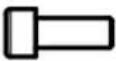 | x4 | M5X15 |
| _02 |  | x4 | RUBBER PLUG |
| _03 | 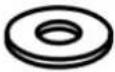 | x4 | M5 Washer |
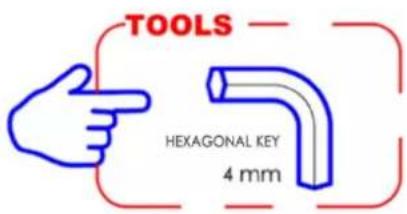
Below is the assembly procedure:
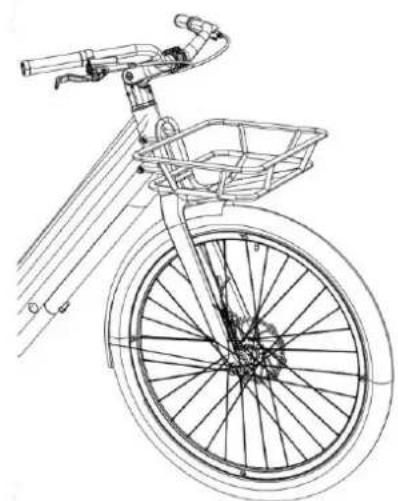
1- Unscrew the screws already mounted on the bike, place the luggage rack front on the frame like shown in the pictures below.
natural_image
Line drawing of a bicycle with front wheel, basket, and handle (no text or symbols)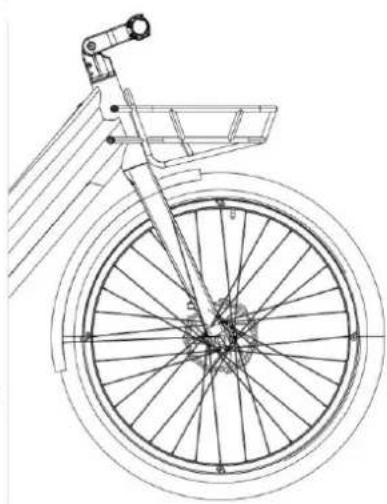
natural_image
Line drawing of a bicycle wheel with spokes and a basket, shown from top and side (no text or symbols)2- Secure the front rack with the screws provided as shown in the pictures below.
Large luggage rack back
Features:
√ maximum load capacity 80 kg
√ convenient for loading items
√ excellent load capacity
√ Possibility of attaching two seats for transporting babies (not available as optional accessories)

Warning: do not exceed the maximum load allowed 80 kg
natural_image
Technical line drawing of a mechanical bracket assembly (no text or symbols)Accessories supplied for correct assembly
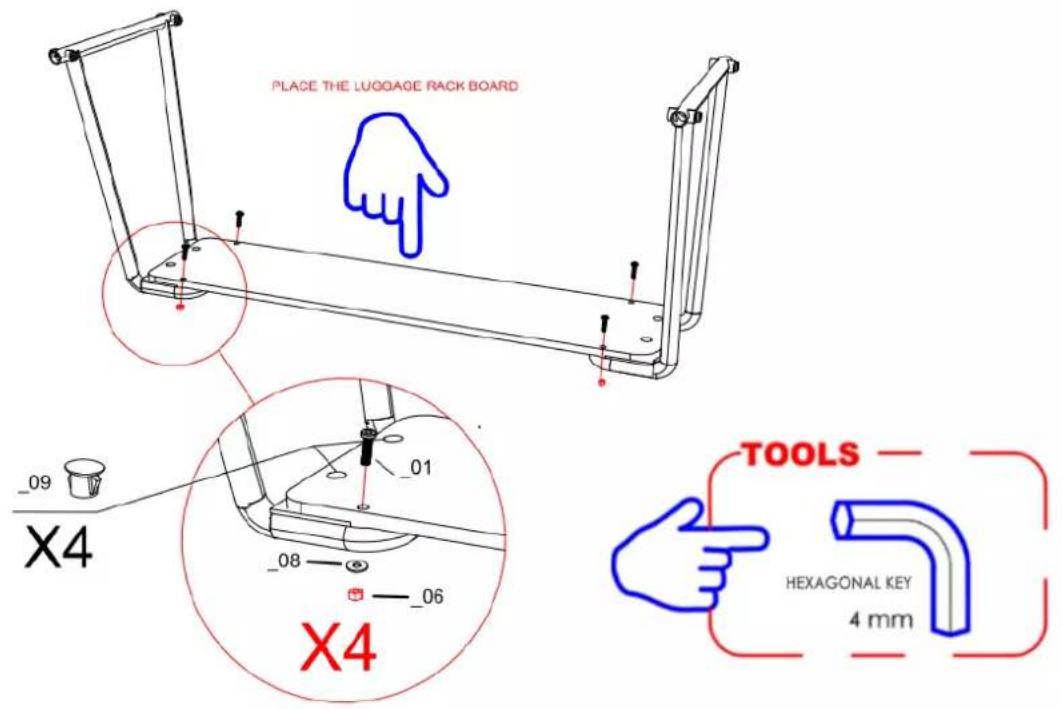
| CODE | Q.TY | COMPONENT | |
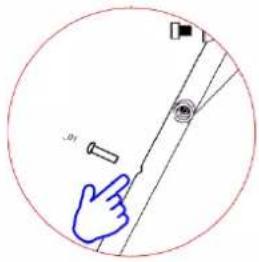
| _01 | 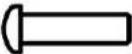 | x4 | M6X50 |
| _02 | 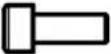 | x2 | M5X20 |
| _03 | 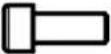 | x2 | M5X15 |
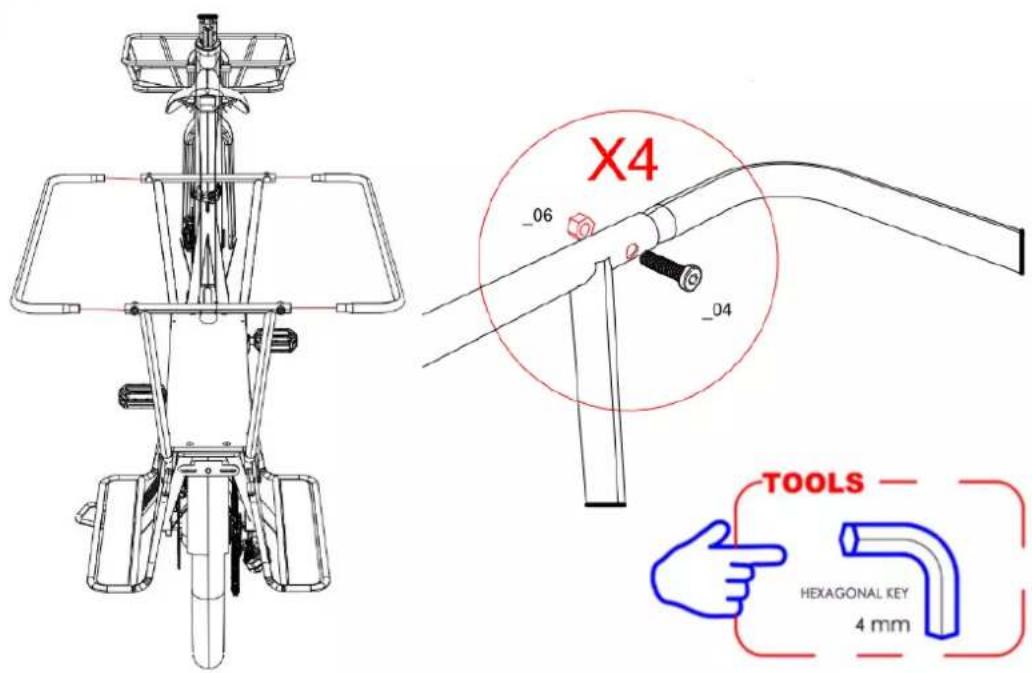
| _04 | 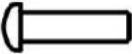 | x4 | M6X20 |
| _06 | 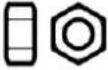 | x8 | M6 NUT |
| _07 | 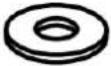 | x4 | M5 Washer |
| _08 | 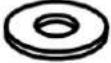 | x4 | M6 Washer |
| _09 |  | x4 | RUBBER PLUG |
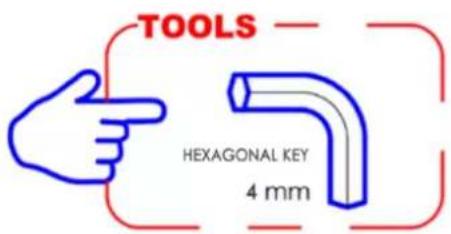
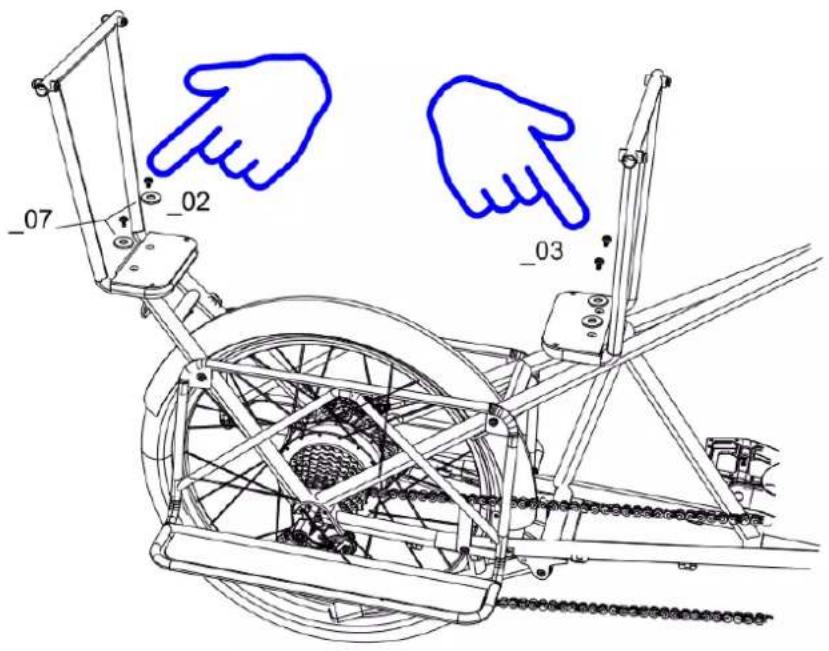
Below is the assembly procedure:
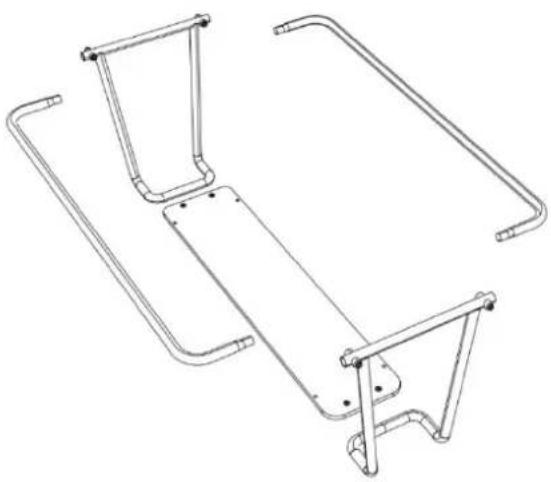
1- Place the Large Rear Rack components onto the frame as shown in the images below.
2- Place the luggage board
3- Mount the side bars and secure them with the supplied screws as shown in the pictures below.
Kickstand
Features:
√ convenient to use
√ safe and stable
natural_image
Technical line drawing of a mechanical device with a circular inset showing a spring mechanism (no text or symbols)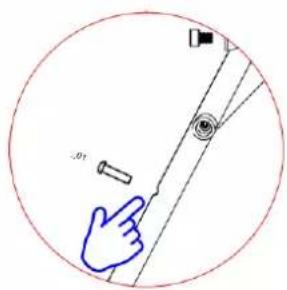
Accessories supplied for correct assembly
| CODE | Q.TY | COMPONENT | |
| _01 | 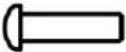 | x1 | M8X25 |
| _02 | 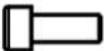 | x2 | M8X15 |
| _03 | 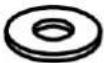 | x2 | M8 Washer |
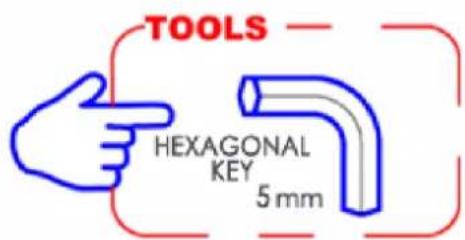
Below is the assembly procedure:
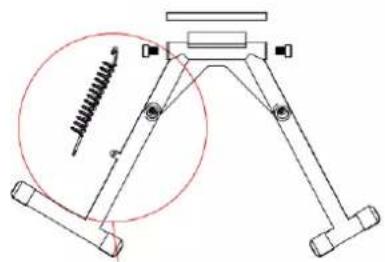
1- Place the kickstand on the frame
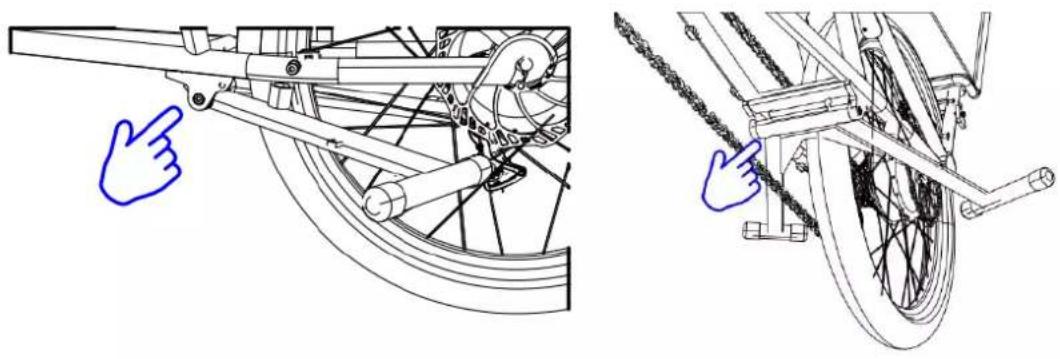
natural_image
Technical line drawings of bicycle wheel components, showing front and side views with no text or symbols2- Mount the bracket by inserting the internal bar with the spring and secure it with the screws provided as shown in the images below.
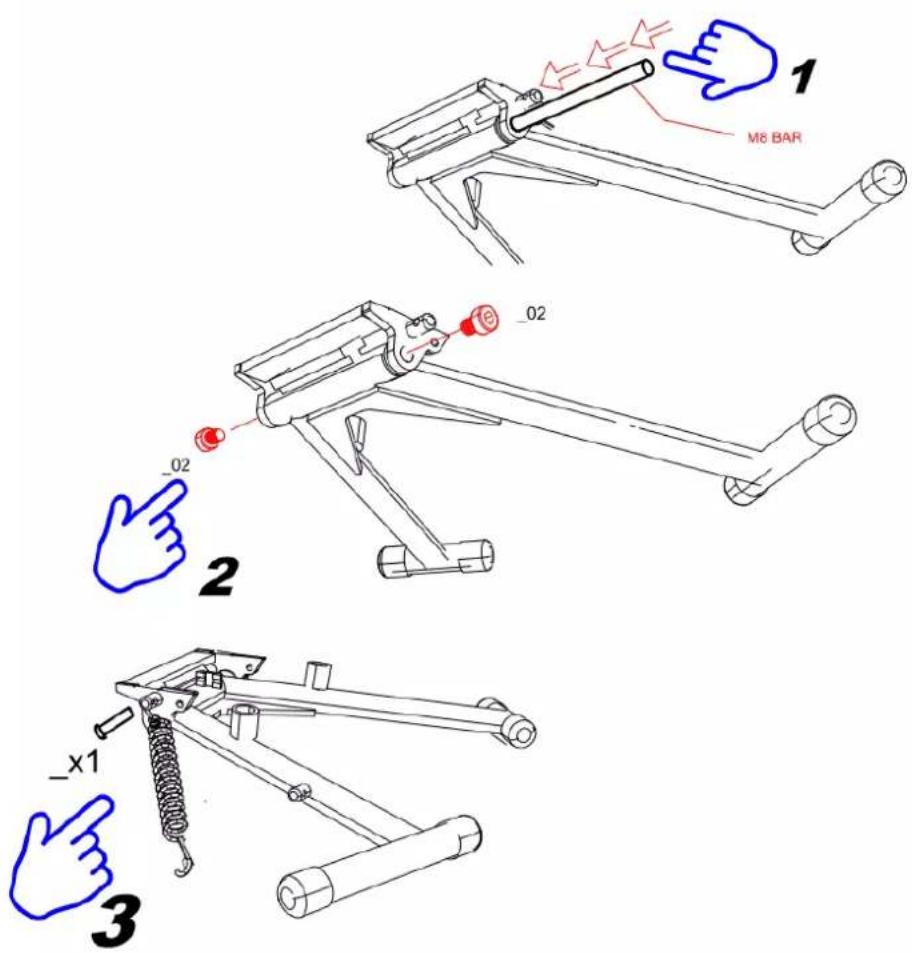
3- Follow the method described in the images below to complete the assembly.
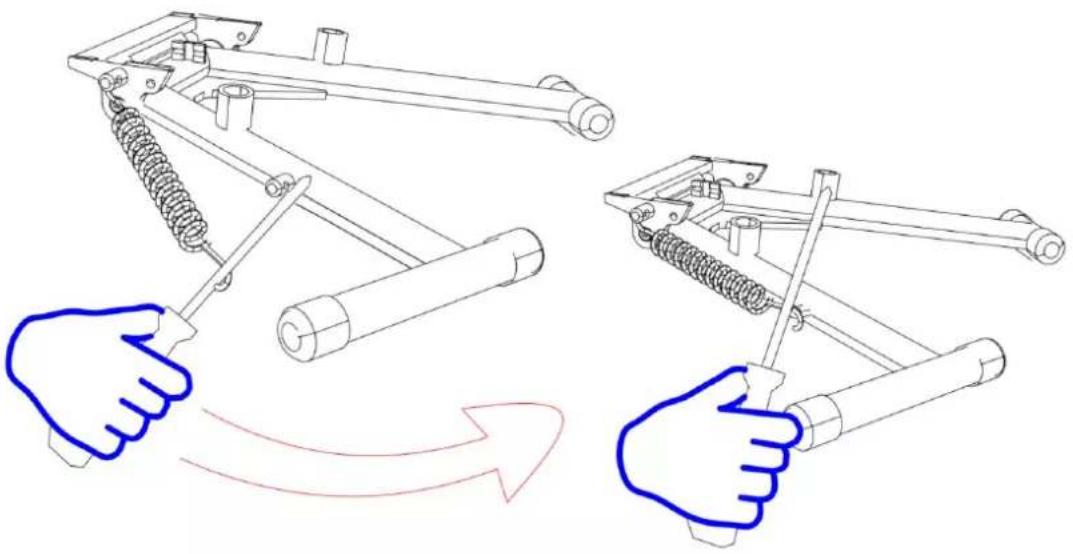
natural_image
Diagram showing two hand gestures operating a mechanical device with spring and rod components, no text or symbols presentFootrest
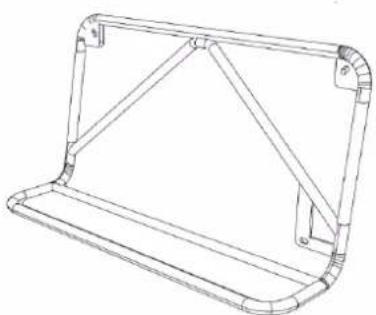
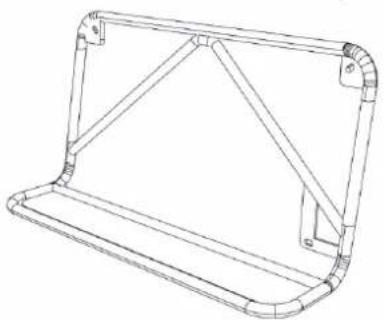
Features:
√ Maximum load capacity of 35 kg on each footrest
natural_image
Technical line drawing of a mechanical bracket or support frame (no text or symbols)
Warning: do not exceed the maximum load allowed 35 kg
Accessories supplied for correct assembly
| CODE | Q.TY | COMPONENT | |
| _01 |  | x6 | M5X20 |
| _02 |  | x10 | M5 Washer |
| _02 |  | x6 | M5 |
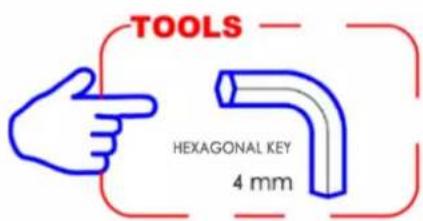
Below is the assembly procedure:
1- Unscrew the screws already mounted on the bike, place the footrest on the frame as shown in the pictures below.
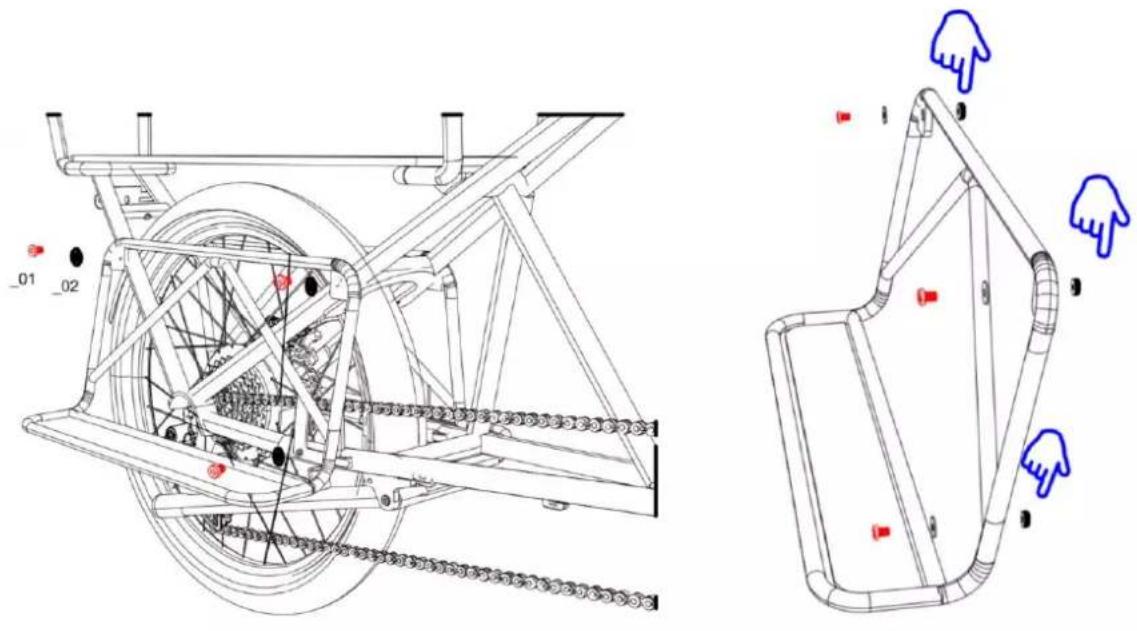
2- Mount the footrest and secure it using the screws provided.
natural_image
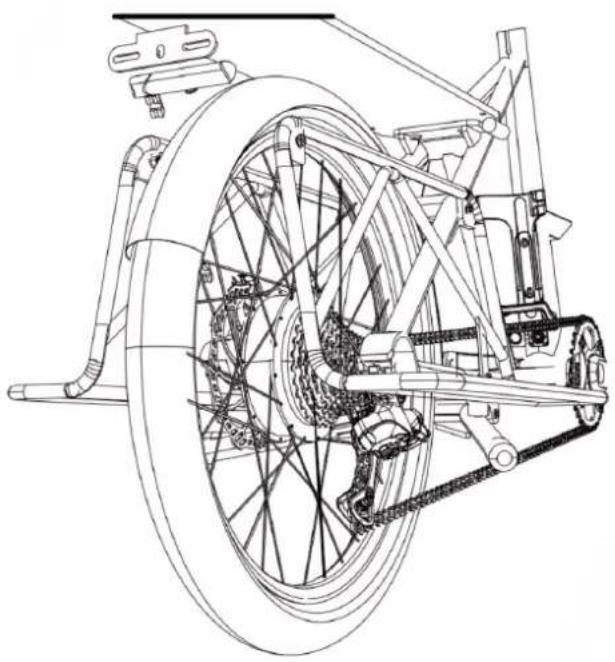
Technical line drawing of a bicycle wheel assembly with suspension components (no text or labels)Using the Charger
Before charging the battery, please read the user manual and the charger manual, if they came with your bike. Please also note the following points regarding the battery charger :
- Follow the instructions on the battery charger label.
- Do not use this charger near explosive gases or corrosive substances.
- Do not shake the charger, do not subject it to shocks and avoid falls.
• Always protect the charger from rain and humidity, for indoor use. - The temperature tolerance of this charger is between 0 and +40^ .
- It is forbidden to disassemble the charger, in the event of a problem, entrust the device to a qualified repairer.
- You should only use the charger supplied with your e-bike to avoid damage. Note that failure to comply with this constraint will void the warranty.
- When recharging, the battery and charger should be at is 10cm away from the wall and in a dry and ventilated place. Do not place anything in direct proximity to the charger during use.
- Do not touch the charger for too long during charging (risk of superficial burns).
- Do not position the charger unstable.
- Do not cover the charger to avoid overheating while charging.
- Do not immerse the product
- Avoid contact with water while charging the battery. Do not touch the charger with wet hands.
- Do not use charger with damaged power cord or plugs. Make sure the charger plug is properly connected to the mains for charging.
- Do not short the charger pins using a metal object.
- Disconnect power before connecting or disconnecting battery connections.
- This charger is designed to charge Lithium batteries, do not charge the wrong type of battery. Do not use on a non-rechargeable battery.
- This device can be used by children aged of at under 8 years and by people having abilities reduced physical, sensory or mental Or devoid of experience or knowledge, if they (if they) are properly monitored or if instructions relating to the safe use of the device security their have summer data and if the risks incurred have summer apprehended. THE children should not play with the device. Cleaning and maintenance by the user must not be made by children without monitoring.
- It should be monitored THE children For make sure they don't play not with the device.
- Keep out of reach of children, this product is not a toy.
- The external flexible cable of this product cannot be replaced; in the event of damage to the cord, the product must be scrapped.
- At the end of its life, take the product to a recycling centre.
Recharge procedure
If a power outlet is available near your bike, you can charge the battery directly on the bike without detaching it. The charger socket is covered by a plastic cap, you just need to open it to charge the battery directly.
Removing the battery can be useful in places that cannot accommodate your bike or when it is not near a power outlet.

RECOMMENDATION: Charging the battery should be done indoors in a ventilated area.
Please charge the bicycle battery according to the following procedure:
- The battery can be recharged using a standard power outlet. It is not necessary to activate its switch.
- Insert the charger plug into the battery and plug the charger power cable into a nearby outlet.
- When charging, the LED on the charger will be red to indicate proper operation. When it turns green, it means the battery is charged.
- To finish charging, you must disconnect the power plug, then the plug connected to the battery. Finally close the battery socket cap.
Battery life
This e-bike is equipped with a high quality Li-ion battery. Li-ion batteries have memory-free charging and a wide temperature tolerance range of -10 to +40°C.
To ensure maximum battery life and to protect it from damage, please follow the use and care instructions below.
Battery life
After charging your battery, it is advisable to let it rest for 20 to 30 minutes before use.
Your battery life depends on several usage factors:
• The choice of assistance mode
- User's weight
• The elevation of the road
- Tire inflation
- The wind
• The pedaling effort provided
- Starting and frequency of stops
• The outside temperature
Warning, precautions
It is recommended to recharge the batteries on a regular basis, or after each use. There is no memory effect on these batteries. In order to maximize the life of your battery, it is recommended:
- Avoid hot places (ideal charging temperature 20^ )
- Let the battery cool down 30 minutes after using the bike
Precautions for use:
- Use the battery only for this bike.
- Only use the specific charger delivered to charge the battery.
- Only charge the battery in a well-ventilated area.
- Do not expose the battery to heat or charge it in direct sunlight.
- Do not disassemble or modify the case and the battery which is integrated in the case.
- Do not connect the (+) and (-) connections of the battery with a metal object.
- Do not expose the battery to liquids.
- Do not use a damaged battery.
- Do not continue to charge the battery if the charge is not complete after the theoretical charge time.
- Do not use the battery if it emits an unusual odor, heats up unusually, or if anything appears abnormal.
- Do not leave the battery within the reach of children.
- Recharge your battery before prolonged storage and carry out the same operation after this storage.

Battery life
Batteries can suffer from performance aging after a large number of charges. This will depend on the usage habits of the pedelec.
You must drop off your used batteries at your store or at specialized recycling drop-off points. Above all, do not throw your battery at the end of its life into the environment.
Battery maintenance
To ensure maximum battery life and to protect it from damage, please follow these use and care instructions:
When you notice that the charge drops to 10%, the battery needs to be recharged quickly.

RECOMMENDATION: If the bike is not used frequently over a period of time, it should be fully charged every month. The battery case should be stored in a dry, protected place at a temperature between 5 and 35°C.
WARNING:

- Battery life may be reduced by prolonged storage without regular recharging as mentioned above.
- Do not use any metal to directly connect two poles of the battery, which may cause a short circuit.
- Never place the battery near a fireplace or any other heat source.
- Do not shake the battery, subject it to shock or drop it.
- When the battery pack is removed from the bike, keep it out of the reach of children to avoid accidents.
- It is forbidden to open the battery.
Use and maintenance of the electric motor
Our e-bikes are programmed to start the e-assist after half a turn of the pedal.
Do not use the bike in flooded places or during thunderstorms. Do not immerse electrical components in water to avoid damage.
Avoid knocks on the engine to avoid damaging it.
Controller Maintenance
It is very important to take good care of the controller according to the following instructions:
- Protect the controller from water ingress and submersion.
Note: If you suspect water may have entered the case, please turn off the battery immediately and continue without assistance. You can restart it as soon as the controller is dry.
- Do not shake the controller, do not subject it to shock and avoid dropping.

WARNING: Do not open the controller enclosure. Any attempt to open the controller enclosure, modify it or adjust it will void the warranty. Please ask your dealer or qualified professional to carry out repairs.
Any modification of the parameters of the electric management system, in particular the change of the speed limit, is strictly prohibited and will invalidate the guarantee of your bike.
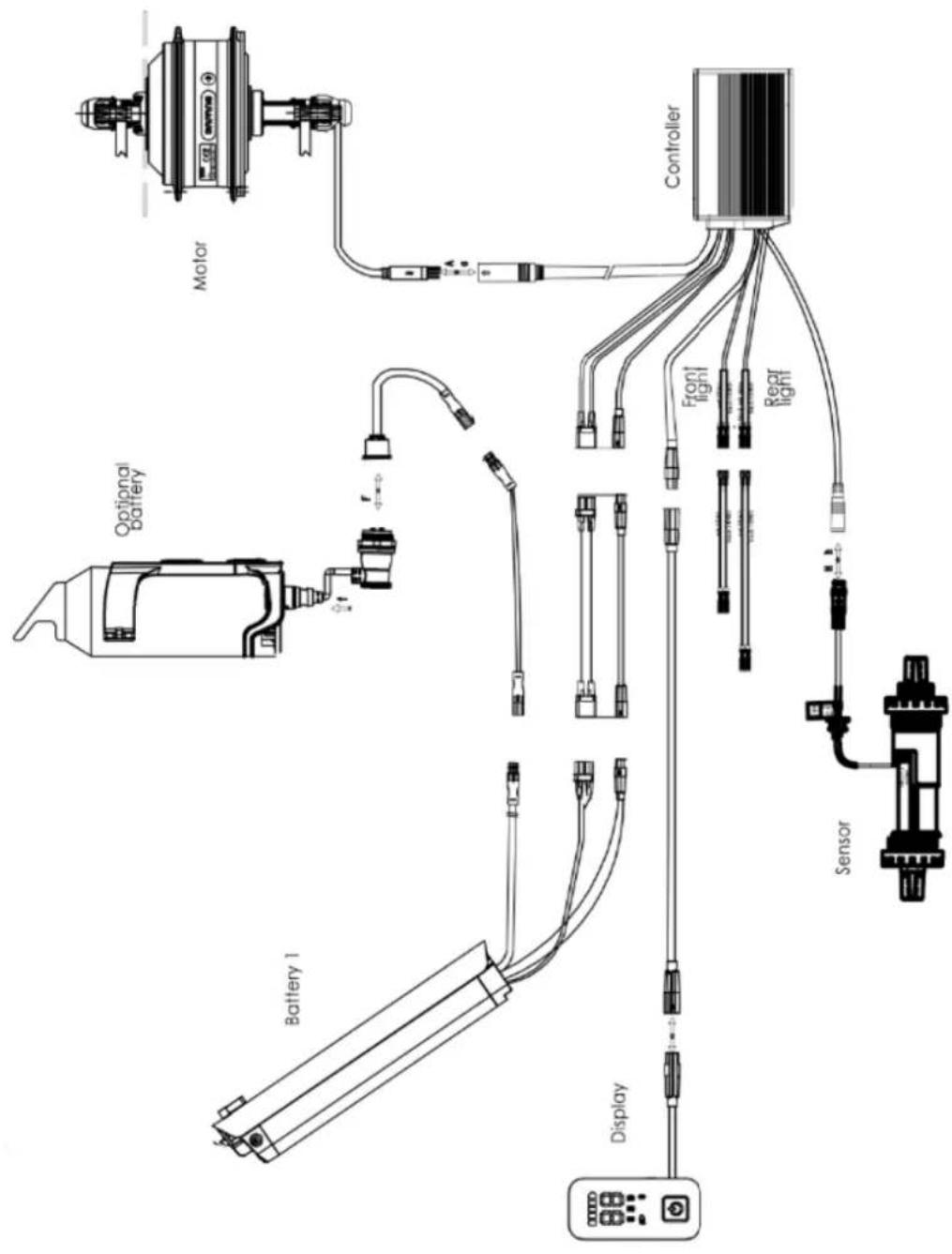
Electrical diagram and specifications
We reserve the right, without notice, to modify this product. For further information, please contact your retailer
Main data sheet
| Features | ALPA e-cargo | |
| weight : User + Cargo + bike | 180kg | |
| speed with assistance | 25 km/h | |
| Autonomy | Approx . 40 - 60km | |
| Motorization | Max power | 250W – 45Nm |
| Voltage | 36V | |
| Maximum noise in use | <70dB | |
| Battery | type | Lithium |
| Voltage | 36V | |
| Ability | 10Ah | |
| Weight | 2.4kg | |
| Charging time | 6 hours | |
| Number of cycles (≥70% capacity) | 500 cycles | |
| Charger | Input voltage | 100-240V |
| Output voltage | 36V | |
| Total bike weight | 27.5kg | |
| Size of the bike | 20" - 27.5" | |
| Size tires / wheels | 20" x 2.2527.5" x 2.20 | |
| User size | 160 - 190 | |
After- sales
Wear part
The different wear elements are standard elements. Always replace worn parts and/or parts to be changed with identical components sold on the market or from your dealer.
Basic troubleshooting
Do not attempt to access or repair any electrical component yourself. Contact the specialist closest to you for maintenance by a qualified person.
The information below is for explanatory purposes and not instructions to assist the user in repairs. Any troubleshooting procedure mentioned should be performed by a qualified professional who is aware of safety issues and familiar with electrical maintenance.
| Description of the problem | Possible causes | Resolution |
| After the battery is turned on, the motor does not assist pedaling. | 1) the motor cable (waterproof connection joint) is connected incorrectly2) the brake lever did not properly return to the normal position, forcing the switch off3) the battery fuse is blown4) the speed sensor is too far from the magnetic disk on the BB axis5) The connection between the sensor and the controller is not established or has a bad contact. | First, check that the battery is charged. If not, reload it.1) check that the connection is well established, without any play2) return the brake lever to its normal position carefully without braking3) Open the top of the battery pack and check the condition of the fuse. If blown, contact your authorized retailer or professional for a replacement.4) Adjust the distance between the sensor and the magnetic strip to be no more than 3mm5) Make sure the controller and sensor are well connected. |
| Battery life shortens (note: battery performance is directly influenced by the weight of the user, luggage, wind strength, type of road, constant braking). | 1) the reload time is not enough2) the ambient temperature is too low and influences the battery operation3) frequent hills or headwinds as well as poor road conditions4) the tire pressure is not sufficient (re-inflate them)5) frequent shutdowns and restarts6) the battery has been stored without recharging for a long time. | 1) please recharge the battery following the instructions (chapter 7.3)2) In winter or temperature below 0°C, your battery should be kept indoors3) This is a normal cause and the problem will resolve as conditions improve4) inflate the tires to a pressure of 3.1 bar5) The problem will resolve with the improvement of usage situations6) Carry out regular recharging in accordance with the instruction manual. If this does not solve the problem, contact your dealer or qualified professional. |
| After plugging in the charger, the charging LEDs do not light up. | 1) problem with the electrical outlet2) poor contact between the charger input socket and the electrical outlet3) the temperature is too low. | 1) inspect and repair electrical outlet2) inspect and insert the plug fully3) Charge indoors.If the above solutions have no effect, contact your dealer or qualified professional. |
| After charging for more than 4/5 hours, the charging indicator LED is still red (note: it is very important to recharge the battery following the instructions to avoid damaging the equipment). | 1) ambient temperature is 40°C or more2) ambient temperature is 0°C or less3) the bike was not recharged after use which exaggerated the unloading4) the output voltage is too low to be able to recharge the battery. | 1) Charge the battery under temperature below 40°C and in accordance with the instructions2) recharge the battery indoors and in accordance with the instructions3) Properly maintain the battery to avoid over-discharging4) Do not perform recharging with voltage lower than 100V.If the above solutions have no effect, contact your dealer or qualified professional. |
| LCD display :The speed is not displayed on the LCD screen. | The magnetic ball on the spoke of the wheel is too far from the sensor (attached to the rear of the frame or to the front fork) which prevents the sensor from receiving the signal when the wheel is spinning. | Check the distance between the magnetic ball and the sensor and make sure it does not exceed 5mm . |
Troubleshoot charger issues:
- The Red light does not work during charging: check that the connectors are correctly connected. Check if the normal voltage is passed at once, if so, please check the charger repair. If the above is correct, the battery is definitely faulty.
- Red light does not turn green: turn off the power, after 5 seconds then connect the AC power, it can continue to charge. The battery can no longer be charged, the battery is definitely defective.
- The Red light immediately turns green: check that the battery is fully charged. If not, the battery or charger is faulty.
Notes

natural_image
Illustration of a person performing a high kick exercise, showing two sequential stages (A and B) with no text or symbols.Manillar
natural_image
Close-up of a robotic arm joint with a red arrow pointing to a specific knob (no text or symbols visible)Llantas
natural_image
Three black plastic components with mounting holes, shown in 3D rendering (no text or symbols)natural_image
Close-up of a bicycle lever mechanism with motion arrows and a close-up of the bicycle (no text or symbols visible)natural_image
Close-up of a black electronic device with a digital display showing 25 and 1/2/3 indicators, plus a power button (no readable text or symbols)natural_image
Four identical black remote control buttons with white LED display icons, each with a power button (no text or symbols)Encendiendo
natural_image
Two identical black-and-white digital display units with LED indicators and power button icons, no visible text or symbols.natural_image
Close-up of a mechanical component with two metallic pins and a color-coded sensor display (no visible text or symbols)natural_image
Technical line drawing of a mechanical bracket assembly with a close-up view of the side panel (no text or symbols)natural_image
Technical line drawing of a vehicle door panel with mounting bracket and side-mounted lock (no text or symbols)natural_image
Close-up of a circular mechanical knob with a red circle highlighting a specific point (no text or symbols visible)Bloquear
natural_image
Close-up of a circular mechanical knob with a green circular icon highlighting a specific section (no text or symbols visible)desbloquear

natural_image
Line drawing of a rectangular metal tray or basket structure with internal ribs and connectors (no text or symbols)
natural_image
Technical line drawings of a bicycle showing front and side views (no text or symbols)natural_image
Technical line drawing of a mechanical bracket assembly (no text or symbols)
natural_image
Technical line drawing of a bicycle frame structure (no text or symbols)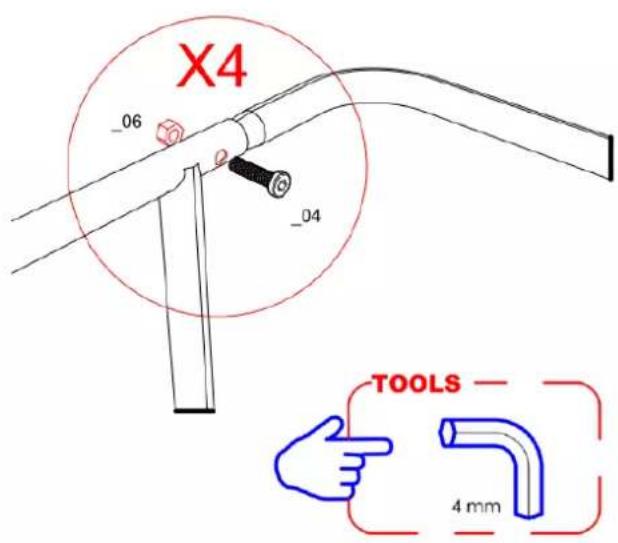
Caballete
Características :
natural_image
Technical line drawings of bicycle wheel components, showing hand positioning and assembly (no text or symbols)natural_image
Diagram showing two mechanical arms with springs and joints, one being lifted by blue thumbs-up (no text or symbols)Escabel
Características :
natural_image
Technical line drawing of a mechanical bracket or frame structure (no text or symbols)natural_image
Technical line drawing of a bicycle wheel assembly with suspension components (no text or labels)natural_image
Illustration of a hand pointing at a mechanical component inside a circular frame (no text or symbols)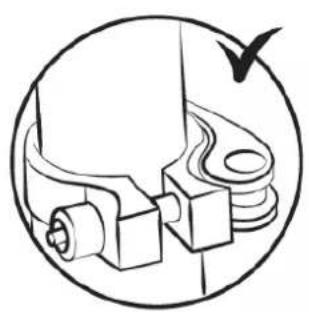
natural_image
Technical diagram of a mechanical assembly with no visible text or symbols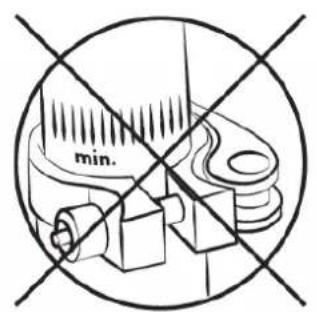
natural_image
Illustration of a person performing a bicycle leg lift exercise, labeled A and B (no text or symbols on the diagram itself)Lenker
natural_image
Close-up of a robotic arm joint with a red arrow pointing to a keyhole (no text or symbols visible)Reifen
natural_image
Three black plastic clip components with mounting holes, shown in 3D rendering (no text or symbols)natural_image
Technical line drawing of a mechanical component with directional arrows indicating motion (no text or symbols)H Schraube
L Schraube
natural_image
Close-up of a black remote control with indicator lights and a power button (no readable text or symbols)natural_image
Four identical black remote control buttons with '25' and '35' display indicators, each with a power button (no text or symbols beyond icons)Beleuchtung
natural_image
Two identical black electronic devices with LED display and power button icons, no visible text or symbols.natural_image
Close-up of a mechanical component with two metallic screws and a circular dial, no visible text or symbolsnatural_image
Technical line drawing of a mechanical assembly with an inset close-up showing a component detail (no text or symbols)natural_image
Technical line drawing of a vehicle door panel with a side-mounted bracket and mounting bracket (no text or symbols)natural_image
Close-up of a circular mechanical knob with a red circle highlighting a specific point (no text or symbols visible)Block
natural_image
Close-up of a circular mechanical knob with a vertical bar and a green circle highlighting a small feature (no text or symbols visible)Freischalten

natural_image
Line drawing of a rectangular metal basket with handles and structural ribs (no text or symbols)
natural_image
Technical line drawings of a bicycle showing front and side views (no text or symbols)natural_image
Technical line drawing of a mechanical bracket assembly (no text or symbols)
erhältlich )
natural_image
Technical line drawing of a bicycle with front wheel, rear seats, and overhead platform (no text or symbols)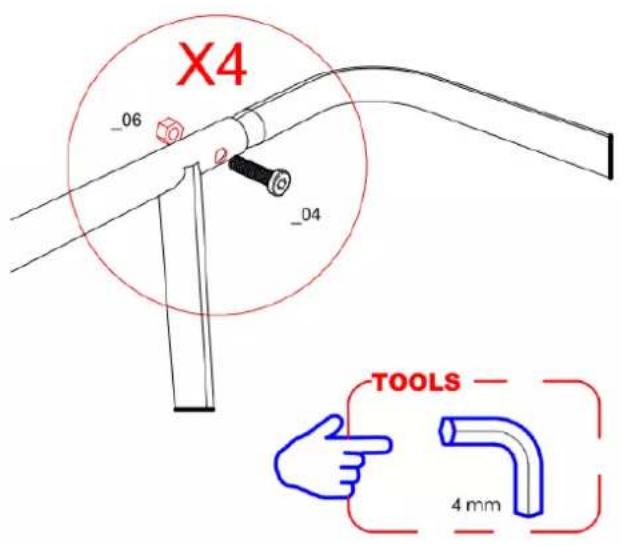
Staffelei
Merkmale:
natural_image
Technical line drawing of a mechanical device with a circular inset showing a spring or screw mechanism (no text or symbols)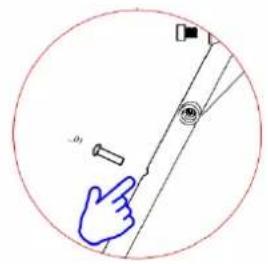
natural_image
Technical line drawings of mechanical components, showing front and side views with no visible text or symbolsnatural_image
Diagram showing two hand gestures interacting with a mechanical device, one with a spring and the other with a handle (no text or symbols)Fußbank
Merkmale :