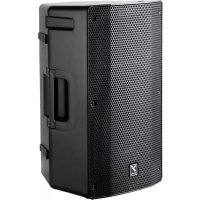
YXL10P - Loudspeaker YORKVILLE - Free user manual and instructions
Find the device manual for free YXL10P YORKVILLE in PDF.


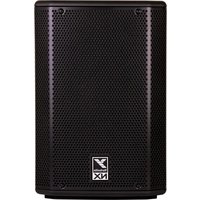
| Product Type | Active wideband powered speaker |
| Brand | Yorkville |
| Model | YXL10P |
| Power (program/peak) | 500 W / 1000 W |
| Amplification | Bi-amplified, Class D |
| Woofer | 10 inches with 2-inch voice coil |
| HF Compression | 1-inch compression driver, 90° x 60° horn |
| Frequency Response | Not explicitly specified, wideband coverage |
| Audio Inputs | 2 microphone inputs (XLR), 1 instrument input (TRS 1/4"), 1 line input (TRS 1/4"), 1 auxiliary input (1/8" stereo), 1 main input (XLR) |
| Bluetooth | Yes, audio streaming and pairing |
| Operating Modes | Concert, Club, Monitor |
| Low-Cut Filter | Selectable (100 Hz) for subwoofer |
| Link Function | Up to 16 speakers linked, max 3 mixers |
| Dimensions (W x H x D) | 11 x 13.25 x 20.5 inches (28 x 33.5 x 52 cm) |
| Weight | 31 lb (14 kg) |
| Enclosure Material | Polypropylene / ABS, sturdy metal grille |
| Power Supply | Mains, polarized plug, voltage according to country |
| Consumption (typical/max) | Consumption not specified |
| Protection | DSP with multiband limiter, thermal and overload protection |
| Mounting | Pole mount (1 3/8"), suspension points (optional) |
| Warranty | 2 years (electronics), 10 years (cabinet) |
Frequently Asked Questions - YXL10P YORKVILLE
User questions about YXL10P YORKVILLE
0 question about this device. Answer the ones you know or ask your own.
Ask a new question about this device
Download the instructions for your Loudspeaker in PDF format for free! Find your manual YXL10P - YORKVILLE and take your electronic device back in hand. On this page are published all the documents necessary for the use of your device. YXL10P by YORKVILLE.
USER MANUAL YXL10P YORKVILLE
IMPORTANT SAFETY INSTRUCTIONS

This lightning flash with arrowhead symbol, within an equilateral triangle, is intended to alert the user to the presence of unanalized "dangerous voltage" within the product's enclosure that may be of sufficient magnitude to constitute a risk of electric shock to persons.
The exclamation point within an equilateral triangle is intended to alert the user to the presence of important operating and maintenance (servicing) instructions in the literature accompanying the appliance.
Instructions pertaining to a risk of fire, electric shock, or Injury to a person
CAUTION:TO REDUCE THE RISK OF ELECTRIC SHOCK,DO NOT REMOVE COVER (OR BACK). NO USER SERVICEABLE PARTS INSIDE. REFER SERVICING TO QUALIFIED SERVICE
PERSONNEL. THIS DEVICE IS FOR INDOOR USE ONLY!
INSTALLED BATTERY PACKS SHALL NOT BE EXPOSED TO EXCESSIVE HEAT
SUCH AS SUNSHINE, FIRE OR THE LIKE.

Read Instructions: The Owner's Manual should be read and understood before operation of your unit. Please, save these instructions for future reference and heed all warnings.
Clean only with dry cloth.
Packaging: Keep the box and packaging materials, in case the unit needs to be returned for service.
Warning: To reduce the risk or fire or electric shock, do not expose this apparatus to rain or moisture. Do not use this apparatus near water!
Warning: When using electric products, basic precautions should always be followed, including the following:
Power Sources
Your unit should be connected to a power source only of the voltage specified in the owners manual or as marked on the unit. This unit has a polarized plug. Do not use with an extension cord or receptacle unless the plug can be fully inserted. Proceedings should be taken so that the grounding scheme on the unit is not defective. An apparatus with CLAS1 or CLAS2 or CLAS3 or CLAS4 or CLAS5 or CLAS6 or CLAS7 or CLAS8 or CLAS9 or CLAS10 or CLAS11 or CLAS12 or CLAS13 or CLAS14 or CLAS15 or CLAS16 or CLAS17 or CLAS18 or CLAS19 or CLAS20 or CLAS21 or CLAS22 or CLAS23 or CLAS24 or CLAS25 or CLAS26 or CLAS27 or CLAS28 or CLAS29 or CLAS30 or CLAS31 or CLAS32 or CLAS33 or CLAS34 or CLAS35 or CLAS36 or CLAS37 or CLAS38 or CLAS39 or CLAS40 or CLAS41 or CLAS42 or CLAS43 or CLAS44 or CLAS45 or CLAS46 or CLAS47 or CLAS48 or CLAS49 or CLAS50 or CLAS51 or CLAS52 or CLAS53 or CLAS54 or CLAS55 or CLAS56 or CLAS57 or CLAS58 or CLAS59 or CLAS60 or CLAS61 or CLAS62 or CLAS63 or CLAS64 or CLAS65 or CLAS66 or CLAS67 or CLAS68 or CLAS69 or CLAS70 or CLAS71 or CLAS72 or CLAS73 or CLAS74 or CLAS75 or CLAS76 or CLAS77 or CLAS78 or CLAS79 or CLAS80 or CLAS81 or CLAS82 or CLAS83 or CLAS84 or CLAS85 or CLAS86 or CLAS87 or CLAS88 or CLAS89 or CLAS90 or CLAS91 or CLAS92 or CLAS93 or CLAS94 or CLAS95 or CLAS96 or CLAS97 or CLAS98 or CLAS99 or CLAS100 or CLAS101 or CLAS102 or CLAS103 or CLAS104 or CLAS105 or CLAS106 or CLAS107 or CLAS108 or CLAS109 or CLAS110 or
Hazards
Do not place this product on an unstable cart, stand, tripod, bracket or table. The product may fall, causing serious personal injury and serious damage to the product. Use only with cart. stand, tripod, bracket, or table recommended by the
manufacturer or sold with the product. Follow the manufacturer's instructions when installing the product and use mounting tools to secure the headphones. If the headphones are not properly mounted by the manufacturer, Prolonged use of headphones at a high volume may cause health damage on your ears.
The apparatus should not be exposed to dripping or splashing water; no objects filed with liquids should be placed on the apparatus.
Terminals marked with the "lightning ball" are hazardous live, the external wiring connected to these terminals require installation by an instructed person or the use of ready made leads or cords.
Ensure that proper ventilation is provided around the appliance. Do not install near any heat sources such as radiators, heat registers, stoves, or other apparatus (including amplifiers) that produce heat.
No naked flame sources, such as lighted candles, should be placed on the apparatus.
Power Cord
Do not defeat the safety purpose of the polarized or grounding-type plug. A polarized plug has two blades with one wider than the other. A grounding type plug has two blades and a third grounding prong. The wide blade or the third prong are provided for your safety. If the provided plug does not fit into your outlet, consult an electrician for replacement of the obsolete outlet. The AC supply cord should be routed so that it is unlikely that it will be damaged. Protect the power cord from being walked on or pinched particularly at plugs. If the AC supply cord is damaged DO NOT OPERATE THE UNIT. To completely disconnect this apparatus from the AC Mains, disconnect the power supply cord plug from the AC receptacle. The mains plug of the power supply cord shall remain readily operable.
Unplug this apparatus during lightning storms or when unused for long periods of time.
Service
The unit should be serviced only by qualified service personnel. Servicing is required when the apparatus has been damaged in any way, such as power-supply cord or plug is damaged, liquid has been spilled or objects have fallen into the apparatus, the apparatus has been exposed to rain or moisture, does not operate normally, or has been dropped. Disconnect power before servicing!
IMPORTANT SAFETY INSTRUCTIONS

The Lightning Flash with arrowhead symbol within an equalled triangle. s Intended to alert the user to the presence of uninsulated "dangerous voltage" within the product enclosure that may be of sufficient magnitude to constitute a risk of shock to persons

The axiomation point within an equilateral triangle is intended to alert the user to the presence of important operating and maintenance (servicing) instructions in the literature accompanying the product.
- Read these instructions.
- Keep these instructions.
- Heed all warnings.
- Follow at In:
- Do not use this apparatus near water.
-
Clean only with dry cloth.
-
Do not block any ventilation openings. Install in accordance with the manufacturer's instructions.
-
Do not install near any heat sources such as radiators, heat registers, stoves, or other apparatus (including amplifiers) that produce heat.
-
Do not defi the safety of the polarized or groundn-type plug. A polarized plug has two blades with one wider than the other. A. ground type plug has two blades and a third grounding plug. The wide blade or this third prongs are provided for your safety if the provided
-
Protect this pewer cord from being walked on or pinched particularly at pigs, conveurance receptacles, and the point where they exit from the apparatus.
-
Only use attachments/accessories specified by the manufacturer.
-
Use only with the cart, stand, hipped, bracket, or table specified by the manufacturer, or sold with the apparatus When a cart is used, use caution when moving the cart/uppermost combination to avoid injury from lip-over.
13.Unplug the apparatus during lightning storms or when unused for long periods of time.
- Refer all servicing to qualified service personnel. Servicing is required when the apparatus has been damaged in any way, such as
power-supply cord or plug is damaged, liquid has been soiled or objects have fallen into the apparatus, the apparatus has been exposed to rain or moisture, does not operate normally, or has torn掉.
WARNING:
To reduce the risk of fire or electric shock, do not expose this apparatus to rain or moisture and objects filled with liquids, such as vases, should not be placed on this apparatus.
To completely disconnect this apparatus from the ac maln, disconnct the power supply cord plug from the ac receptacle
The mane pug of the power supply cord or appliance coupler shall remain readily accessible.

- Liao ccs Instructions.
2 Conservedness Indractions
YXL Series Powered Active Speakers
The YXL Series offers our best ratio of power, performance and value for full-range active loudspeaker enclosures. Providing 500 watts (1000 watts peak) with efficient speaker components, the YXL Series is extremely loud for their sizes. There are several different input options for connecting audio sources including Bluetooth® microphones, musical instruments and other audio sources. While the onboard audio mixer may has a minimum of controls, it's tremendously useful and provides great versatility. The YXL Series can be easily used in any situation, close to walls, floors, in arrays with multiple enclosures and as a stage monitor. With all these options, the YXL Series is the solution for all of your audio applications.
Up to 16 YXL Series Powered speakers can be linked together with a maximum of three 'mixers' active at any one time. This means up to 6 mic sources and 6 instrument/line sources are available in an array of three or more enclosures. The Master level controls are used to adjust the levels of individual powered enclosures. This is invaluable in applications where large numbers of enclosures are used such as in clusters or in trade show applications (or when YXL Series powered speakers are used as repeater enclosures or side-fill).
NOTE: Our Link system allows additional powered YXL Series powered speakers to be driven from a single source (up to a maximum of 16 YXL Series powered enclosures). A maximum of 3 mixers can be used when Linking YXL Series powered enclosures
USER TIP: When a pair of YXL Series powered speakers are Linked you can use both mixers integrated on each cabinet.
A 100Hz high pass filter can be activated to make it easier to add subwoofer to the YXL-Series powered enclosures. This allows the speakers to be used more efficiently with almost any active subwoofer.
Features
1000 watts (peak) 500 watts (program)
- Superior DSP processing with component protection
10, 12 or 15-inch woofers with 2-inch voice coils
1-inch HF compression drivers
90°× 60° HF dispersion Horns
- Dual purpose full-range and wedge monitor speaker
- Ultra-clear reproduction throughout the whole audio bandwidth
- Lightweight and high efficiency bi-amped power module
- Low distortion and high power-handling 10, 12 and 15-inch woofers
- Recessed control panel
- Master Level control with Activity indicator (cabinet level adjustment)
3 Performance modes, Concert, Club and Monitor
- Defeatable 3 channel mixer with level controls and Clip indicators
- Bluetooth® input / streaming, not affected by Mixer Defeat
- 2 Microphone Inputs with level control and phantom power
1/4-inch TRS Instrument and Line Inputs
1/8-inch Aux Input for connecting mono or stereo audio sources
An XLR Main In and Link output for easy connection and looping
- Selectable Sub filter (HPF) for connecting a subwoofer
ABS / Polypropylene cabinet construction
- Tough, full length metal grille
1. Power Switch and Mode LED
The AC power switch on the rear panel turns the power On or Off. The Mode LED turns on to indicate power is supplied to the unit.
2. Mode Switch
The Mode Selector applies specific EQ and tone settings for the YXL Series powered enclosure, effectively custom tailoring the speaker for any environment.
Concert: Allows instruments and vocals to be equally and naturally reproduced which is best for live performance.
Club: Boosted bass and enhanced highs make this mode ideal for music playback.
Monitor: Optimized for use as a stage monitor and the human voice while minimizing feedback.
3. Master Control
The Master control sets the level of ALL sound coming out of the YXL Series enclosure. If there are multiple YXL Series speakers in a system, the volume of each speaker is individually set by using each enclosure's Master control.
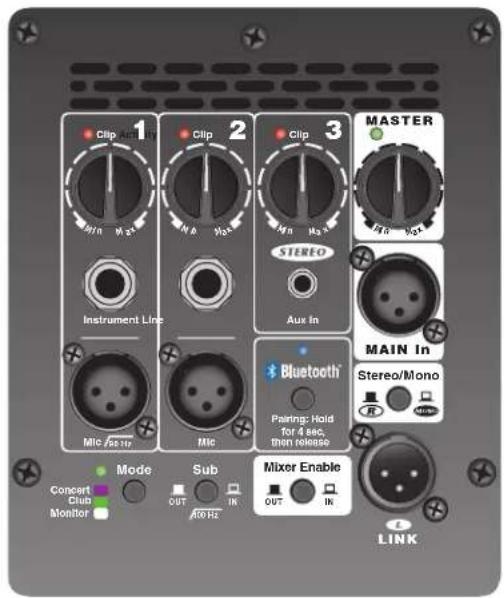
4. Activity LED
This LED illuminates when audio signal is present from all sources being sent to the Master.
NOTE: If the Master is turned to Min, the Activity LED will not illuminate.
5. Bluetooth®
The Yorkville YXL Series is capable of receiving streaming audio over Bluetooth® from devices such as smart phones, tablets and laptops. Pairing your device with the YXL Series is simple and gives you the freedom to play your music wirelessly.
6. Bluetooth® Pairing
To pair your Bluetooth® device, depress the Bluetooth® switch for approximately 4-seconds. The blue LED will flash to indicate the YXL speaker is ready to be paired.
7. Linking Multiple Cabinets Using Bluetooth®.
Bluetooth® can be used along with the Link feature only when the first cabinet in the Link chain is paired and the mixer is enabled. Pair with the first cabinet using Bluetooth® and leave the others unpaired. Then, use the appropriate XLR cables to Link between the multiple cabinets by wire through the Link/left channel connection. If Stereo Bluetooth® is desired, set the "paired" cabinet to Stereo Mode, the right channel will play on the paired cabinet and the Left signal will play on the cabinet connected to the L/Link jack.
8. Onboard Mixer and Mixer Enable Switch
The Mixer Enable switch turns the onboard mixer 'on' or 'off.' When the Mic or Line inputs are used, this switch must be set to the 'on' position. If these inputs are not being used, the mixer should be turned 'off,' this will help prevent the mixer from contributing noise to the system. The onboard mixer should not be used when a source other than another YXL Series powered speaker (or similar) is connected to the LINK jack. Remember, a maximum of 3 mixers, in a chain of enclosures, should be used! A much larger number of enclosures may be used with the mixers disabled on the additional enclosures.
9. Mixer
Channel Level Controls & Clip LEDs
The channel level controls adjust the input sensitivity and the level of the channel's signal being sent to the Master. The clip LEDs illuminate 3 dB before clipping and are affected by both the source's gain signals and each corresponding channel level control.
USER TIP: When using the mixer, the Master control should be adjusted to control the suitable overall level of the YXL Series Powered Enclosure for the application.
NOTE: Adjustments of the gain for the Bluetooth® source can be made on the source device.
Channel 1 Mic / Instrument In
Any standard dynamic, condenser or phantom powered microphone may be connected to the Mic input, phantom power is built-in. The 1/4-inch TRS Instrument input is optimized for instruments such as guitars, basses or keyboards. Do NOT use both XLR and 1/4-inch inputs simultaneously.
NOTE: Some condenser microphones, that don't use batteries, may require phantom power.
TECH NOTE: The function of the fixed 90Hz high pass filter on Channel 1 is to minimize low frequency rumble when an acoustic instrument is used. It also helps remove the boominess when using the Microphone.
Channel 2 Mic / Line In
Any standard dynamic, condenser or phantom powered microphone may be connected to the Mic input, phantom power is built-in. The 1/4-inch TRS input can be used with any line source such as a CD player or an electronic instrument with a line output. It is always recommended to use balanced sources. This helps prevent the risk of hum or buzz associated with unbalanced connections, especially if the cable is long or the source is operated from a separate AC power connection. Do NOT use both XLR and 1/4-inch inputs simultaneously.
Channel 3 Stereo Aux In
The 1/8-inch Line input jack is a typical 'stereo' audio input which properly sums the left and right signals from stereo sources such as MP3 players. When the mixer is set in Stereo Mode the right output will appear at the Link Output allowing a pair of linked YXL cabinets to give you stereo playback.
NOTE: Channel 3's 1/8-inch TRS Line input and Bluetooth® can be used simultaneously.
10. Sub Switch
For operation with a subwoofer, the Sub switch shuts off the low frequency boost and filters out signals below 100Hz . This switch only affects the signals to the internal amplifier and does not affect signals going out from the onboard mixer, or to signals passing through the Link connections.
11. Main In
The Main In and L/Link connectors allow additional powered enclosures to be driven from a single source. You can Link up to 16 YXL Series powered enclosures! The Main In jack is the correct input to use when driving the YXL Series Powered Speaker with an external mixer or from another YXL link output.
TECH NOTE: The Main In and L/Link jacks operate at line level (+4 dBu) to achieve full power. When operating from signals that are not as strong, use the Line inputs of the first cabinet in the chain. The Link jacks are high quality balanced inputs with very good common mode (hum) rejection. To ensure maximum hum rejection, the proper balanced cables must be used.
NOTE: A maximum of 3 YXL Series Control Panel mixers can be used when Linking YXL Series Powered Enclosures.
12. Stereo/Mono Switch
The Stereo/Mono Switch works in conjunction with the L/Link out jacks. If a single YXL Series Powered Enclosure is used as the signal source, the originating cabinet will either be mono or Right channel only depending on the switch position. When in the out position (R), the Left channel is routed to the output of the link. When the switch is selected, the output of the Link is Mono (stereo signals summed). This allows a pair of "Linked" YXL cabinets to give you stereo playback. Mono sources will still play normally through both cabinets.

connig-01eYXLP-1v0.cps
MICROPHONE with MULTIPLE YXLPs

c074g-02c-YXLP-1x0.5%
STEREO P.A., with EXTERNAL MIXER

centg-C32-YXLP-100cpcs
ONE MIC and/or Bluetooth® MEDIA PLAYER

Stereo Operation with Bluetooth® MEDIA PLAYER

ONE MIC and/or MEDIA PLAYER

ONE MIC and/or MUSICAL INSTRUMENT
Specifications
YXL10P/YXL12P/YXL15P
System Type
Active or Passive
Program Power (watts)
Max SPL (dB) 126dB continuous
Frequency Response (Hz +/- 3dB)
HF Dispersion (°H× °V)
Crossover Frequency (Hz)
HF Impedance (ohms)
HF Horn
LF Driver(s) YXL10P 10-inch (2-inch voice coil)
YXL12P 12-inch (2.3-inch voice coil)
YXL15P 15-inch (2.5-inch voice coil)
er(watts) 450 walls program (900 walls peak)
LF Impedance (ohms)
HF Power Amplifier (watts)
HF Amp Iifler Type
LF Amp lifer Type Class D
Cooling Scheme Speed controlled fan
Power Cable
Power Switch Yes - back
option (typ/max) 120/180
Mixer Controls 3 recessed dial controls
Level Controls Channels 1-3 and Master
EQ Controls Pushbutton select, Concert, Club, Monitor
Limiter Multiband excursion, RMS, rail
Other Controls / Features
2 Mic Inputs. Instrument In, Line In, 3.5mm Aux in, Bluetooth streaming
Sub In/Out, Mixer In/Out, Stereo/Mono Out
Feet Rubber
Bar Handles 1xSide/1xBack
1 Bottom (dual angle 1 3/8-inch/3.5cm) 90° and -5°
2(top),1(pullback)
Enclosure Materials
Polypropylene Cabinet, ABS baffle metal grille
Grille Powder Coated Steel with Grille Cloth
Other Details Rubber feet on bottom and side with the monitor Wedge
YXL10P 11x13.25x20.5; YXL12P 13.5x14x23; YXL15P (TBD)
YXL10P 28x33.5x52; YXL12P 34x35.5x 58.5; YXL15P (TBD)
YXL10P 31/14;YXL12P 37/16.8;YXL15P (TBD)
Specifications subject to change without notice
Specifications
Type de système
Active ou Passive
Pulssance(watts)
Max SPL (dB)
YXL10P/YXL12P/YXL15P
Enceinte active
Active
500 watts program (1000 watts pointe
126dB continue
43-16k (Hz+/-3dB)
90° × 60°
1.6kHz
Integre au baffle
YXL10P 10-pouces (bobine 2-poucesl)
YXL12P 12-pouces (bobine 2.3 pouces)
YXL15P 15-pouces (bobine 2.5 pouces)
450 watts programme (900 watts pointe)
4
40
Classe A/B
Classe D
Many of the popular models in the Yorkville speaker cabinet line are now equipped with flying hardware for overhead suspension applications. Depending on the model, two or more internal braces have been provided for rigging purposes. Each brace contains two bolt holes and provides center-of-gravity fly-points for use with in-line or angular loads. Many of the models will support additional suspended cabinets according to their specified working load limits.

IMPORTANT!!
THE RIGGING OF LOUDSPEAKER SYSTEMS IS AN EXTREMELY SERIOUS MATTER. OVERHEAD RIGGING REQUIREES EXTENSIVE EXPERIENCE, INCLUDING (BUT NOT LIMITED TO) CALCULATING WORKING LOAD LIMITS, HARDWARE INSTALLATION, AND PERIODIC SAFETY INSPECTION OF ALL HARDWARE AND CABINETRY. IF YOU LACK THESE QUALIFICATIONS, DO NOT ATTEMPT THE INSTALLATION YOURSELF, BUT INSTEAD USE A PROFESSIONAL STRUCTURAL RIGGER. IMPROPER INSTALLATION CAN RESULT IN BODILY INJURY OR DEATH. CONSULT A STRUCTURAL ENGINEER TO CALCULATE ADDED LOADS FOR A BUILDING. STRUCTURAL REINFORCEMENT MAY BE NECESSARY TO INSURE A SAFE INSTALLATION.
2. REQUIRED TOOLS
4.5mm (7/32") Hex Wrench
Thread lock adhesive (Removable Type)
3. EYEBOLT INSTALLATION
a) Using a 4.5mm (7 / 32 ) hex wrench, remove the flat head bolts from the top or bottom of the speaker enclosure to expose the tapped holes (on TX models, the flat head bolts are located within the track rails), as shown below. Be sure to keep these handy as they will be needed to seal the cabinet after the eyebolts are removed.

IMPORTANT!!
USE ONLY LOAD RATED FORGED EYEBOLTS. THESE MAY BE PURCHASED THROUGH YORKVILLE SOUND OR ATM FLY-WARE™ TO INSURE CABINET-BRACING STRENGTH, MAKE SURE ALL FLY-POINTS ARE SECURED WITH EITHER AN EYEBOLT OR FLAT HEAD HEX BOLT.
b) Place a drop of thread-lock adhesive on the threads of the eyebolt and insert one into exposed hole. Tighten each eyebolt by hand until its fits snugly against the cabinet. Further tighten each eyebolt by rotating it another half turn. Be sure to insert eyebolts in the threaded hole directly in-line with the suspension cable. Always follow the eyebolt manufacturers installation and use instructions.
c) Suspend each cabinet according to working load calculations and practices recommended by the rigging hardware manufacturer.

IMPORTANT!!
ON MODELS WITH ONLY TWO TOP SUSPENSION POINTS THE SUPPLIED PULL BACK AT THE REAR OF THE BOTTOM CENTER PANEL OF THE CABINET IS NOT TO BE USED AS A SUSPENSION POINT. THIS POINT TO BE USED FOR PULL BACK PURPOSES ONLY.

Remove Flat-Head Bolt and replace with Forged Shoulder Eyebolt!
DO NOT Remove Flat-Head Bolts on the Side of Cabinet's.
4. WORKING LOAD LIMITS
Specified working load limits have been determined for the enclosure as follows:
| YXL10P | 3 top M8 | weight of cabinet only | ||
| YXL12P | 2 top, 1 pullback M8 | weight of cabinet only | ||
| YXL15P | 2 top, 1 pullback weight of cabinet onlyM8 |

IMPORTANT!! READ ALL ENCLOSED INSTRUCTIONS ABOUT PROPER USE OF HARDWARE. TO INSURE PROPER INSTALLATION, FOR TECHNICAL INFORMATION ON SUSPENSION TECHNIQUES AND EXTERIOR ACCESSORY INFORMATION WE SUGGEST CALLING ATM FLY-WARES TECHNICAL SERVICES IN THE UNITED STATES AT (310)639-8282 MONDAY THROUGH FRIDAY FROM 9 AM TO 6 PM (PST) OR FAX AT (310)639-8284. YORKVILLE SOUND MAKES NO CLAIMS AS TO THE SAFETY OF THE ENCLOSURES IF RECOMMENDED LOAD LIMITS AND HARDWARE ARE NOT STRICTLY ADHERED TO. NOR DOES IT MAKE ANY SAFETY CLAIMS TO THE RESULTANT INSTALLATION.

IMPORTANT!! TRACK RAILINGS: UNITS THAT INCORPORATE THE TRACK RAILING SYSTEM HAVE THE SAME WORKING LOAD LIMITS AS THEY DO WHEN THEY ARE USED WITH EYEBOLTS. THESE RATINGS MAY BE LIMITED AND BASED ON THE RATINGS OF THE TRACK FITTINGS THEMSELVES. PLEASE ENSURE THAT THE RATING OF THE CERTIFIED TRACK FITTINGS EXCEEDS NECESSARY WORKING LOAD LIMITS.
EYEBOLT INSTALLATION

1.DESCRIPTION
| YXL10P | 3 top M8 | weight of cabinet only | ||
| YXL12P | 2 top, 1 pullback M8 | weight of cabinet only | ||
| YXL15P | 2 top, 1 pullback weight of cabinet onlyM8 |


IMPORTANT! LIRE TOUTLA DOCUMENTION INCLUSE AU SUJET DE L'UTILISATION APPROPRIÉ DE LA QUINCAILLERIE. POUR ASSURER UNE BONNE INSTALLATION, POUR OBTENIR DE L'INFORMATION TECHNIQUE SUR LES DIVERSSES TECHNIQUES DE SUSPENSION ET POUR OBTENIR DE L'INFORMATION SUR LES ACCESOIRES EXTERIEURS NOUS VOUS SUGGÉRONS D'APPELER LE SERVICE TECHNIQUE DE ATM FLY-WARE AUX ETATS-UNIS AU (310)639-8282 DU LUNDI AU VENDredi DE 9 AM A 6 PM (HSP) OU PAR FAX AU (310)639-8284. YORKVILLE SOUND NE GARANTIE PAS UNE UTILISATION SECURITaire DES ENCEINTES SI LES LIMITES DE CHARGE RECOMMANDÉES NE SONT PAS RESPECTÉES ET SI VOUS N'ADHÉRÉZ PAS STRICTEMENT À LA LISTE DE QUINCAILLERIE RECOMMANDÉE.
IMPORTANT!! RAILS DE MONTAGE (TRACK RAILINGS): LES ENCEINTES INCORPORANT LE SYSTEME DE RAIL DE MONTAGE ONT LES MEMES LIMITES DE CHARGE DE TRAVAIL QUILS SOIENT SUSPENDUS AVEC LE SYSTEME DE RAIL OU AVEC LES BOULONS A OEIL. CES VALEURS ASSIGNÉES DE LIMITE DE CHARGE PEUVERT ÉTRES limités ET BASES SUR LA VALEUR DE LIMITE DE CHARGE ASSIGNÉE AUX APPAREILLAGES DE RAIL (TRACK FITTINGS) ELLE-MÉMES, ASSUREZ-VOUS S.V.P. QUE LA VALEUR ASSIGNÉE DE LIMITE CHARGE DE TRAVAIL SUR LES APPAREILLAGES CERTIFIÉS DE RAIL (TRACK FITTINGS) EXÉDE LES LIMITES NÉCESSAIRES DE CHARGE DE TRAVAIL.

00-00-00-00-00-00-00-00-00-00-00-00
ONNOS 77XnRnRnRnRnRnRnRnRnRnRnRnRnRnRnRnRnRnRnRnRnRnRnRnRnRnRnRnRnRnRnRnRnRnRnRnRnRnRnRnRnRnRnRnRnRnRnRnRnRnRn
Two & Ten Year Warranty
Unlimited Warranty
Yorkville's two and ten-year unlimited warranty on this product is transferable and does not require registration with Yorkville Sound or your dealer. If this product should fail for any reason within two years of the original purchase date (ten years for the wooden enclosure), simply return it to your Yorkville dealer with original proof of purchase and it will be repaired free of charge. This includes all Yorkville products, except for the YSM Series studio monitors, Coliseum Mini Series and TX Series Loudspeakers.
Freight charges, consequential damages, weather damage, damage as a result of improper installation, damages due to exposure to extreme humidity, accident or natural disaster are excluded under the terms of this warranty. Warranty does not cover consumables such as vacuum tubes or par bulbs. See your Yorkville dealer for more details. Warranty valid only in Canada and the United States.
Garantie Illimitée
Voice: (905) 837-8481 Voice: (716) 297-2920
Fax: (905) 837-8746 Fax: (716) 297-3689

ww . y o rkkvili llee. ccoorm
Yorkville Sound
Yorkville Sound Inc.
550 Granite Court
4625 Witmer Industrial Estate
Pickering, Ontario
Niagara Falls, New York
L1W-3Y8 CANADA
14305 USA


WEB: www.yorkville.com
WORLD HEADQUARTERS
CANADA
Yorkville Sound Limited
550 Granite Court
Pickering, Ontario
L1W 3Y8 CANADA
Voice: 905-837-8481
Fax: 905-837-8746
U.S.A.
Yorkville Sound Inc.
4625 Witmer Industrial Estate
Niagara Falls, New York
14305, USA
Voice: 716-297-2920
Fax: 716-297-3689
- IMPORTANT SAFETY INSTRUCTIONS
- CAUTION:TO REDUCE THE RISK OF ELECTRIC SHOCK,DO NOT REMOVE COVER (OR BACK). NO USER SERVICEABLE PARTS INSIDE. REFER SERVICING TO QUALIFIED SERVICE
- POWER SOURCES
- HAZARDS
- POWER CORD
- SERVICE
- WARNING
- YXL SERIES POWERED ACTIVE SPEAKERS
- FEATURES
- POWER SWITCH AND MODE LED
- MODE SWITCH
- MASTER CONTROL
- ACTIVITY LED
- BLUETOOTH®
- BLUETOOTH® PAIRING
- LINKING MULTIPLE CABINETS USING BLUETOOTH®
- ONBOARD MIXER AND MIXER ENABLE SWITCH
- MIXER
- CHANNEL LEVEL CONTROLS & CLIP LEDS
- CHANNEL 1 MIC / INSTRUMENT IN
- CHANNEL 2 MIC / LINE IN
- CHANNEL 3 STEREO AUX IN
- SUB SWITCH
- MAIN IN
- STEREO/MONO SWITCH
- SPECIFICATIONS
- IMPORTANT
- REQUIRED TOOLS
- EYEBOLT INSTALLATION
- WORKING LOAD LIMITS
- 1.DESCRIPTION
- TWO & TEN YEAR WARRANTY
- UNLIMITED WARRANTY
- GARANTIE ILLIMITÉE
- WORLD HEADQUARTERS
- CANADA
- U.S.A
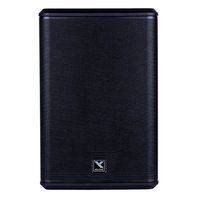
Brand : YORKVILLE
Model : YXL10P
Category : Loudspeaker