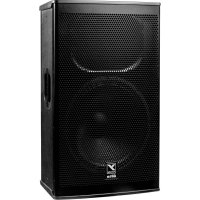
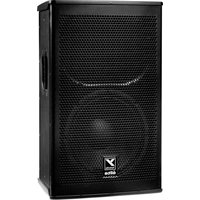
Elite EF15P - Loudspeaker YORKVILLE - Free user manual and instructions
Find the device manual for free Elite EF15P YORKVILLE in PDF.


| Product Type | 2-way active amplified speaker |
| Brand | Yorkville |
| Model | Elite EF15P |
| Power (RMS / Peak) | 1200 W / 2400 W |
| Max SPL (Peak / Continuous) | 133 dB / 127 dB |
| Frequency Response (±3 dB) | 43 Hz – 16 kHz |
| Crossover Frequency | 1100 Hz |
| Woofer | 15-inch neodymium with 3-inch voice coil |
| HF Driver | 3-inch voice coil (titanium diaphragm) |
| LF / HF Amplifier | Class D 900 W / Class H 300 W |
| HF Dispersion | 90° x 90° |
| Input Connectors | 2 x Combo XLR & 6.35 mm (line), 1 x XLR (mic), 1 x XLR (Main In/Thru) |
| Output Connectors | 1 x XLR male (Thru/Link) |
| Input Impedance | 95 kΩ balanced / 90 kΩ unbalanced |
| Controls | Mixer Enable, Mic Level, Line Level, Master, Mode (Club/Concert/Vocal/User), HP Sub 100Hz, Bluetooth ON/OFF, Power switch |
| Bluetooth | Yes (for control via Yorkville app) |
| Enclosure Material | Birch plywood with AIS coating |
| Suspension Points | 9 x M10 (2 top, 2 bottom, 2 each side, 1 rear) |
| Pole Adapter | 1 x 3.8 cm (1.5 in) included |
| Dimensions (W x D x H) | 36.9 x 47 x 76 cm |
| Weight | 84 kg (approx. 185 lb) |
| Power Supply | 100-240 V AC, 50/60 Hz (IEC C14 connector) |
| Cleaning | Dry cloth only |
| General Information | Built-in 2-channel mixer, daisy-chaining up to 16 speakers, overload protection, Clip/Limit LED |
Frequently Asked Questions - Elite EF15P YORKVILLE
CAUTION: Incorrect installation could cause serious injury.
User questions about Elite EF15P YORKVILLE
0 question about this device. Answer the ones you know or ask your own.
Ask a new question about this device
Download the instructions for your Loudspeaker in PDF format for free! Find your manual Elite EF15P - YORKVILLE and take your electronic device back in hand. On this page are published all the documents necessary for the use of your device. Elite EF15P by YORKVILLE.
USER MANUAL Elite EF15P YORKVILLE

WEB: www.yorkville.com
WORLD HEADQUARTERS
CANADA
Yorkville Sound Limited
550 Granite Court
Pickering, Ontario
L1W 3Y8 CANADA
Voice: 905-837-8481
Fax: 905-837-8746
U.S.A.
Yorkville Sound Inc.
4625 Witmer Industrial Estate
Niagara Falls, New York
14305, USA
Voice: 716-297-2920
Fax: 716-297-3689
Quality and Innovation Since 1963
Printed in Canada

SERVICE MANUAL
EF15P
SMT Disclaimer
Due to the complex nature of the use of SMT installed components in Yorkville equipment, we highly caution all service technicians in attempting to repair or replace SMT factory installed components.
Many of these components may be glued prior to initial soldering
Replacing SMT components requires expensive
specialized de-soldering equipment and training.
Yorkville Sound will repair and replace defective SMT components to ensure proper quality assurance and installation is maintained.
Manual-Service-EF15P-00-195 • October 23, 2023
IMPORTANT SAFETY INSTRUCTIONS

This lightning flash with arrowhead symbol, within an
equilateral triangle, is intended to alert the user to the presence of uninsulated "dangerous voltage" within the product's enclosure that may be of sufficient magnitude to constitute a risk of electric shock to persons.
The DO NOT STACK symbol is inlanded to alert the user that the product shall not be vertically slacked because of the nature of the product.
The excitation point within an equilateral triangle is intended to alert the user to the presence of important operating and maintenance (servicing) instructions in the literature accompanying the appliance.
Instructions pertaining to a risk of fire, electric shock, or injury to a person
CAUTION: TO REDUCE THE RISK OF ELECTRIC SHOCK, DO NOT REMOVE COVER (OR BACK). NO USER SERVICEABLE PARTS INSIDE. REFER SERVICING TO QUALIFIED SERVICE
PERSONNEL. THIS DEVICE IS FOR INDOOR USE ONLY! INSTALLED BATTERY PACKS SHALL NOT BE EXPOSED TO EXCESSIVE HEAT SUCH AS SUNSHINE, FIRE OR THE LIKE.
Read Instructions: The Owner's Manual should be read and understood before operation of your unit. Please, save these instructions for future reference and heed all warnings.
Cleaning: Clean only with dry cloth.
Packaging: Keep the box and packaging materials, in case the unit needs to be returned for service.
Warning: To reduce the risk or fire or electric shock, do not expose this apparatus to rain or moisture. Do not use this apparatus near water!
Warning: When using electric products, basic precautions should always be followed, including the following:
Power Sources
Your unit should be connected to a power source only of the voltage specified in the owners manual or as marked on the unit. This unit has a polarized plug. Do not use with an extension cord or receptacle unless the plug can be fully inserted. Precautions should be taken so that the grounding scheme on the unit is not defeated. An apparatus with CLASS I construction shall be connected to a Mains socket outlet with a protective sarthing connection. Where the MAINS plug or an appliance coupler is used as the disconnect device, the disconnect device shall remain readily operable.
Hazards
Do not place this product on an unstable cart, stand, tripod, bracket or table. The product may fail, causing serious personal injury and serious damage to the product. Use only with cart, stand, tripod, bracket, or table recommended by the manufacturer or sold with the product. Follow the manufacturer's instructions when installing the product and use mounting accessories recommended by the manufacturer. Only use attachments/absaccessories specified by the manufacturer.
Equipment that is suspended overhead must use a secondary safeguard to prevent personal injury in the event the primary mounting mechanism fails. Safety eyelots attached to the equipment and galvanized steel wire can be used together to implement a fallsafe mounting thus ensuring the safety of the equipment and anyone positioned below the equipment.
Improper installation can result in bodily injury or death. If you are not qualified to attempt the installation get help from a professional structural rigger. Notes: Prolonged use of headphones at a high volume may cause health damage to your ears.
The apparatus should not be exposed to dripping or splashing water; no objects filled with liquids should be placed on the apparatus.
Terminals marked with the "lightning bolt" are hazardous live; the external wiring connected to these terminals require installation by an instructed person or the use of ready made leads or cords.
Ensure that proper ventilation is provided around the appliance. Do not install near any heat sources such as radiators, heat registers, sloves, or other apparatus (including amplifiers) that produce heat.
No naked flame sources, such as lighted candles, should be placed on the apparatus.
Power Cord
Do not defeat the safety purpose of the polarized or grounding-type plug. A polarized plug has two blades with one wider than the other. A grounding type plug has two blades and a third grounding prong. The wide blades or the third prong are provided for your safety. If the provided plug does not fill into your outlet, consult an electrician for replacement of the obsolete outlet. The AC supply cord should be routed so that it is unlikely that it will be damaged. Protect the power cord from being walked on or pinched particularly at plugs. If the AC supply cord is damaged DO NOT OPERATE THE UNIT. To completely disconnect this apparatus from the AC Mains, disconnect the power supply cord plug from the AC receptacle. The mains plug of the power supply cord shall remain readily operable.
Unplug this apparatus during lightning storms or when unused for long periods of time.
Service
The unit should be serviced only by qualified service personnel. Servicing is required when the apparatus has been damaged in any way, such as power-supply cord or plug is damaged, liquid has been spilled or objects have fallen into the apparatus, the apparatus has been exposed to rain or moisture, does not operate normally, requires battery pack replacement or has been dropped. Disconnect power before servicing!
IMPORTANT SAFETY INSTRUCTIONS

The Lightning Flash with arrowhead symbol within an equilateral triangle, is intended to alert the user to the presence of uninsulated "dangerous voltage" within the product enclosure that may be of sufficient magnitude to constitute a risk of shock to persons

The exclamation point within an equilateral triangle is intended to alert the user to the presence of important operating and maintenance (servicing) instructions in the literature accompanying the product
-
Read these instructions.
-
Keep these instructions.
-
Head all warnings.
-
Follow all instructions.
-
Do not use this apparatus near water.
-
Clean only with dry cloth.
-
Do not block any ventilation openings. Install in accordance with the manufacturer's instructions.
B. Do not install near any heat sources such as radiators, heat registers, stoves, or other apparatus (including amplifiers) that produce heat.
-
Do not defeat the safety purpose of the polarized or grounding-type plug. Apolarized plug has two blades with one wider than the other. A grounding type plug has two blades and a third grounding prong. The wide blade or the third prongs are provided for your safety. If the provider plug does not fit into your outlet, consult an electrician for replacement of the obsolete outlet.
-
Protect the power cord from being walked on or pinched particularly at plugs, convenience receptacles, and the point where they exit from the apparatus.
-
Only use attachments/accessories specified by the manufacturer.
-
Use only with the cart, stand, tripod, bracket, or table specified by the manufacturer, or sold with the apparatus. When a cart is used, use caution when moving the cart/apparatus combination to avoid injury from tip-over.
-
Unplug this apparatus during lightning storms or when unused for long periods of time.
-
Refer all servicing to qualified service personnel. Servicing is required when the apparatus has been damaged in any way, such as power-supply card or plug is damaged, liquid has been spilled or objects have fallen into the apparatus, the apparatus has been exposed to rain or moisture, does not operate normally, or has been dropped.
WARNING
• To reduce the risk of fire or electric shock, do not expose this apparatus to rain or moisture and objects filled with liquids, such as vases, should not be placed on this apparatus.
• To completely disconnect this apparatus from the ac mains, disconnect the power supply cord plug from the ac receptacle.
- The mains plug of the power supply cord or appliance coupler shall remain readily accessible.


m = 311


图


élite EF15P
1200 WATT ACTIVE LOUDSPEAKER ENCLOSURE
www.yorkville.com


公司网站:16



Enable/Disable
Held & Sun, for more
= LED Flashing
www.ft.com
Connected
NOTE: THE YORKVILLE APP IS NEEDED TO CONTROL FUNCTIONS THROUGH BLUETOOTH™ AND IS NOT FOR STREAMING AUDIO!


flowchart
graph TD
    A["LIME IN"] --> B["Switch"]
    C["MIC IN"] --> D["Switch"]
    E["MAIN IN"] --> F["Switch"]
    G["LINK"] --> H["Switch"]
    I["BLUTYON CONTROL"] --> J["Control Block"]
    K["FI50"] --> L["Output"]
    M["FI50"] --> N["Mixer Enable"]
    O["FI50"] --> P["BSP"]
    Q["FI50"] --> R["MAIN"]
    S["FI50"] --> T["FI50"]
    U["FI50"] --> V["FI50"]
    W["FI50"] --> X["FI50"]
    Y["FI50"] --> Z["FI50"]
    style A fill:#f9f,stroke:#333
    style C fill:#f9f,stroke:#333
    style E fill:#f9f,stroke:#333
    style G fill:#f9f,stroke:#333
    style I fill:#f9f,stroke:#333
    style J fill:#ccf,stroke:#333
    style K fill:#ccf,stroke:#333
    style L fill:#ccf,stroke:#333
    style M fill:#ccf,stroke:#333
    style N fill:#ccf,stroke:#333
    style O fill:#ccf,stroke:#333
    style P fill:#ccf,stroke:#333
    style Q fill:#ccf,stroke:#333
    style R fill:#ccf,stroke:#333
    style S fill:#ccf,stroke:#333
    style T fill:#ccf,stroke:#333
    style U fill:#ccf,stroke:#333
    style V fill:#ccf,stroke:#333

POWER

natural_image
Two black electrical switch buttons with indicator lights, one above and one below (no text or symbols visible)
ON
OFF

AUTION: REPLACE FUSE WITH SAME TYPE AND RATING
ATTENTION: REMPLACER LE FUSIBLE DU MEME TYPE ET DU MEME COURANT NOMINAL


DOUBLE INSULATED, U-GND REQUIRED FOR PERFORMANCE. NOT SAFETY.


| Specifications | ||||
| EF10P EF12P EF15P EF215P | ||||
| System Type | 2-Way 2-Way | 2-Way 2-Way | ||
| Active or Passive Active Active | Active Active | |||
| Program Power (watts) 500 watts (1000 watts Peak) | 1200 watts (2400 watts Peak) 1200 watts (2400 watts Peak) 1200 watts (2400 watts Peak) | |||
| Max SPL (dB) | 128dB Peak (122dB Continuous) 131dB Peak (125dB Continuous) 133dB Peak (127dB Continuous) 133dB Peak (127dB Continuous) | |||
| Frequency Response (Hz +/- 3dB) | 56 - 20k (Hz +/- 3dB) | 47 - 16k (Hz +/- 3dB) | 43 - 16k | 40 - 16k (Hz +/- 3dB) |
| Crossover Frequency (Hz) | 1800 1100 1100 1100 | |||
| Driver Configuration | 10-inch, 1.3-inch Diaphragm 12-inch, 3-inch Diaphragm | 15-inch, 3-inch Diaphragm 2 X 15-inch, 3-inch Diaphragm | ||
| HF Driver(s) | 1.3-inch Voice coil (Titanium Diaphragm) | 3-inch Voice coil (Titanium Diaphragm) | 3-inch Voicecoil (Titanium Diaphragm) | 3-inch Voicocell (Titanium Diaphragm) |
| HF Dispersion (H 3 X 3 V) 100x40 | 60x40 60x40 60x40 | |||
| LF Driver(s) | 10-inch Neo magnet w/2.5-inch Voice coil | 12-inch Neo magnet w/3-inch Voice coil | 15-inch neo magnet w/3-inch Voice coil | 2 X 15-inch neo magnet w/3-inch Voice coil |
| HF Power Amplifier (watts) | 100 | 300 | 300 | 300 |
| HF Amplifier Type | 2-Tier Class H | 3-Tier High Headroom | 3-Tier High Headroom | 3-Tier High Headroom |
| LF Power Amplifier (watts) 400 | 900 | 900 | 900 | |
| LF Amplifier Type | Class-D | Class-D | Class-D | Class-D |
| Power Cable | 25 ft (7.6m) Heavy Gauge Detachable IEC | 25 ft (7.6m) Heavy Gauge Detachable IEC | 25 ft (7.6m) Heavy Gauge Detachable IEC | 25 ft (7.6m) Heavy Gauge Detachable IEC |
| In / Out Connections | 1 x XLR & 1/4 inch Comb-jack Line Input | 1 x XLR & 1/4-inch Comb-jack Line Input | 1 x XLR & 1/4-inch Comb-jack Line Input | 1 x XLR & 1/4-inch Comb-jack Line Input |
| 1 x XLR microphone Input | 1 x XLR microphone Input | 1 x XLR microphone Input | 1 x XLR microphone Input | |
| 1 x XLR & 1/4-inch Comb-jack Main Input | 1 x XLR & 1/4-inch Comb-jack Main Input | 1 x XLR & 1/4-inch Comb-jack Main Input | 1 x XLR & 1/4-inch Comb-jack Main Input | |
| 1 x XLR-M Tinput | 1 x XLR-M Tinput | 1 x XLR-M Tinput | 1 x XLR-M Tinput | |
| Input Impedance (Bal/UnBal) | 95Kohms / 90kohms | 95Kohms / 90kohms | 95Kohms / 90kohms | 95Kohms / 90kohms |
| Input Sensitivity (Vrms Sine) | +4dBv / 1.23V | +4dBv / 1.23V | +4dBv / 1.23V | +4dBv / 1.23V |
| Controls | Mixer Enable | Mixer Enable | Mixer Enable | Mixer Enable |
| Mic Input w/level | Mic Input w/level | Mic Input w/level | Mic Input w/level | |
| Line Input w/level | Line Input w/level | Line Input w/level | Line Input w/level | |
| DSP Mode (Club, Concert, Vocal, Custom) | DSP Mode (Club, Concert, Vocal, Custom) | DSP Mode (Club, Concert, Vocal, Custom) | DSP Mode (Club, Concert, Vocal, Custom) | |
| Sub (100Hz HP Filter) | Sub (100Hz HP Filter) | Sub (100Hz HP Filter) | Sub (100Hz HP Filter) | |
| Bluetooth Control Enable | Bluetooth Control Enable | Bluetooth Control Enable | Bluetooth Control Enable | |
| Master Level | Master Level | Master Level | Master Level | |
| Bar Handles | 1 x Side / 1 x Top | 2 x Side / 1 x Top | 2 x Side / 1 x Top | 4 x Side / 1 x Top |
| Flypoints | 7 x 1⁄4-20 (2 Top, 2 Bottom, 2 Each Side, 1 Pullback) | 8 x 1⁄4-20 (2 Top, 2 Bottom, 2 Each Side, 2 Pullback) | 8 x 1⁄4-20 (2 Top, 2 Bottom, 2 Each Side, 2 Pullback) | 8 x 1⁄4-20 (2 Top, 2 Bottom, 2 Each Side, 2 Pullback) |
| Pole Mount Adapter (1 3/8"-3.5cm) | 1 Bottom (1 3/8-inch / 3.5cm) | 1 Bottom (1 3/8-inch / 3.5cm) | 1 Bottom (1 3/8-inch / 3.5cm) | N/A |
| Enclosure Materials | ABS Costed Baltic Birch Plywood | ABS Costed Baltic Birch Plywood | ABS Costed Baltic Birch Plywood | ABS Coated Baltic Birch Plywood |
| Dimensions (DWH xbackW, inches) | 13 x 13.7 x 20 x 9.5 | 14.25 x 16.25 x 25.5 x 9.75 | 14 x 18.5 x 30 x 12 | 14 X 18.5 X 44.5 X 12 |
| Dimensions (DWH xbackW, cm) | 33 x 34.6 x 50.8 x 24 | 36.2 x 41.3 x 64.8 x 24.8 | 35.6 x 47 x 76 x 30.5 | 35.6 X 47 X 113 X 30.5 |
| Weight (lbs/kg) | 42 / 19.1 | 59 / 26.8 | 64 / 29 | 93 / 42 |
Specifications subject to change without notice
Specifications systems a management auto press
Block Diagram for EF12P & EF15P (REV1)
DESIGNED & MANUFACTURED BY YORKVILLE SOUND

flowchart
graph TD
    subgraph_Combiner_1["Combi-Jack"]
        A1["Line"] --> B1["1 2"]
        B1 --> C1["+"]
        C1 --> D1["Level"]
        D1 --> E1["Σ"]
        E1 --> F["Mixer Enable"]
    end

    subgraph_Combiner_2["Combi-Jack"]
        A2["Line"] --> B2["1 2"]
        B2 --> C2["+"]
        C2 --> D2["Level"]
        D2 --> E2["Σ"]
        E2 --> F
        F --> G["Mixer Enable"]
    end

    subgraph_Microcontroller["Microcontroller"]
        A3["Main In / Link"] --> B3["1 2"]
        B3 --> C3["+"]
        C3 --> D3["Level"]
        D3 --> E3["Σ"]
        E3 --> F
        F --> G
        G --> H["DAC"]
        H --> I["DSP"]
        I --> J["DAC"]
        J --> K["Master Level"]
        J --> L["Mode Sub Bluetooth™"]
        J --> M["Bluetooth"]
    end

    subgraph_Audio_Scope["Audio System"]
        N1["HF AMP"] --> O1["Speaker"]
        P1["LF AMP"] --> Q1["Speaker"]
    end

    style Combiner_1 fill:#f9f,stroke:#333
    style Combiner_2 fill:#f9f,stroke:#333
Block-Diag-EF12P-EF15P-00-1v1
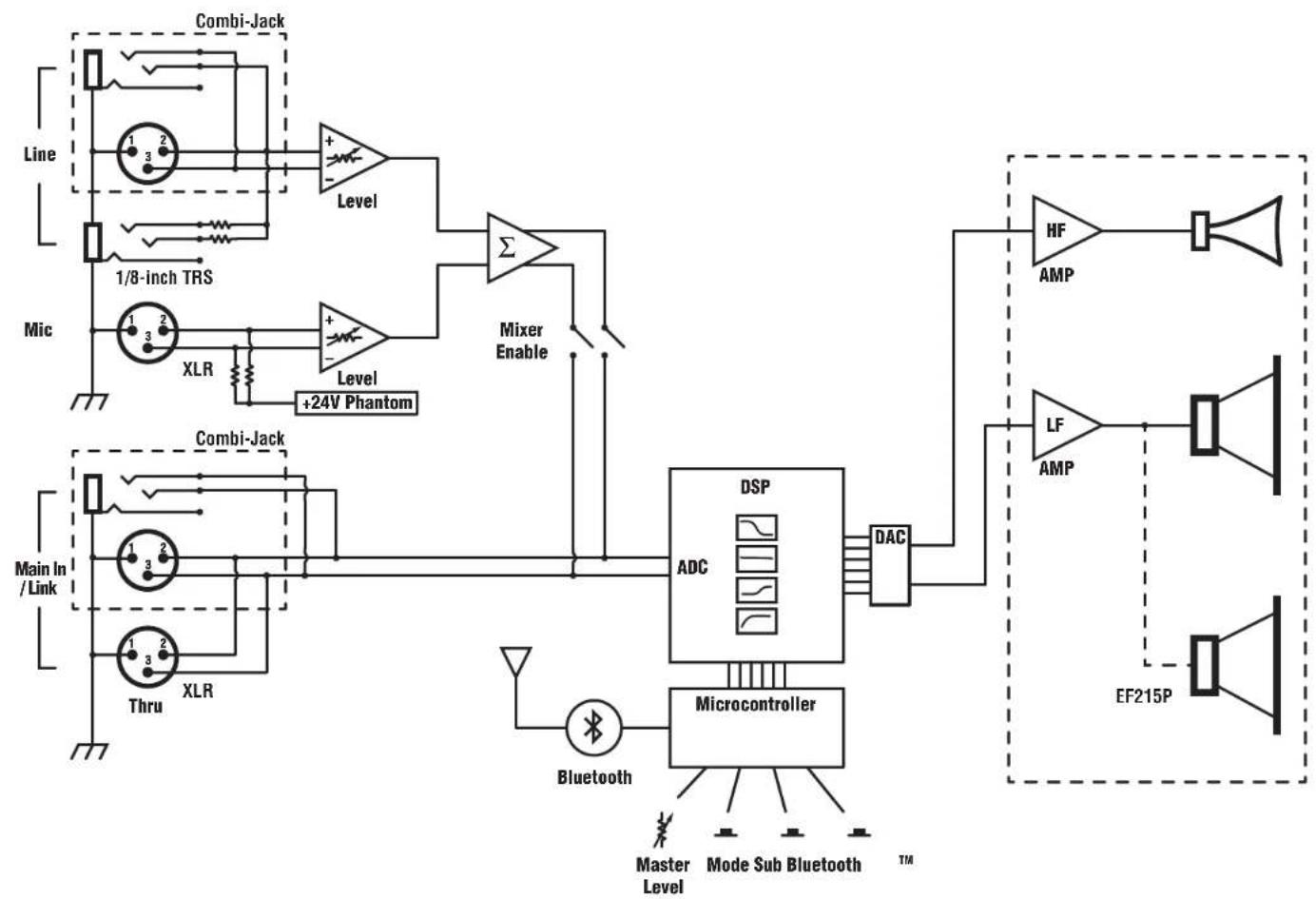
Block Diagram for EF10P, EF12P, EF15P (REV2) & EF215P
DESIGNED & MANUFACTURED BY YORKVILLE SOUND
flowchart
graph TD
    subgraph_Combiner_Jack["Combini-Jack"]
        A1["Line"] --> B1["1/8-inch TRS"]
        A2["Line"] --> B2["1/8-inch TRS"]
        A3["Line"] --> B3["1/8-inch TRS"]
        A4["Line"] --> B4["1/8-inch TRS"]
        A5["Line"] --> B5["1/8-inch TRS"]
        A6["Line"] --> B6["1/8-inch TRS"]
        A7["Line"] --> B7["1/8-inch TRS"]
        A8["Line"] --> B8["1/8-inch TRS"]
        A9["Line"] --> B9["1/8-inch TRS"]
        A10["Line"] --> B10["1/8-inch TRS"]
        A11["Line"] --> B11["1/8-inch TRS"]
        A12["Line"] --> B12["1/8-inch TRS"]
        A13["Line"] --> B13["1/8-inch TRS"]
        A14["Line"] --> B14["1/8-inch TRS"]
        A15["Line"] --> B15["1/8-inch TRS"]
        A16["Line"] --> B16["1/8-inch TRS"]
        A17["Line"] --> B17["1/8-inch TRS"]
        A18["Line"] --> B18["1/8-inch TRS"]
        A19["Line"] --> B19["1/8-inch TRS"]
        A20["Line"] --> B20["1/8-inch TRS"]
        A21["Line"] --> B21["1/8-inch TRS"]
        A22["Line"] --> B22["1/8-inch TRS"]
        A23["Line"] --> B23["1/8-inch TRS"]
        A24["Line"] --> B24["1/8-inch TRS"]
        A25["Line"] --> B25["1/8-inch TRS"]
        A26["Line"] --> B26["1/8-inch TRS"]
        A27["Line"] --> B27["1/8-inch TRS"]
        A28["Line"] --> B28["1/8-inch TRS"]
        A29["Line"] --> B29["1/8-inch TRS"]
        A30["Line"] --> B30["1/8-inch TRS"]
        A31["Line"] --> B31["1/8-inch TRS"]
        A32["Line"] --> B32["1/8-inch TRS"]
        A33["Line"] --> B33["1/8-inch TRS"]
        A34["Line"] --> B34["1/8-inch TRS"]
        A35["Line"] --> B35["1/8-inch TRS"]
        A36["Line"] --> B36["1/8-inch TRS"]
        A37["Line"] --> B37["1/8-inch TRS"]
        A38["Line"] --> B38["1/8-inch TRS"]
        A39["Line"] --> B39["1/8-inch TRS"]
        A40["Line"] --> B40["1/8-inch TRS"]
        A41["Line"] --> B41["1/8-inch TRS"]
        A42["Line"] --> B42["1/8-inch TRS"]
        A43["Line"] --> B43["1/8-inch TRS"]
        A44["Line"] --> B44["1/8-inch TRS"]
        A45["Line"] --> B45["1/8-inch TRS"]
        A46["Line"] --> B46["1/8-inch TRS"]
        A47["Line"] --> B47["1/8-inch TRS"]
        A48["Line"] --> B48["1/8-inch TRS"]
        A49["Line"] --> B49["1/8-inch TRS"]
        A50["Line"] --> B50["1/8-inch TRS"]
        A51["Line"] --> B51["1/8-inch TRS"]
        A52["Line"] --> B52["1/8-inch TRS"]
        A53["Line"] --> B53["1/8-inch TRS"]
        A54["Line"] --> B54["1/8-inch TRS"]
        A55["Line"] --> B55["1/8-inch TRS"]
        A56["Line"] --> B56["1/8-inch TRS"]
        A57["Line"] --> B57["1/8-inch TRS"]
        A58["Line"] --> B58["1/8-inch TRS"]
        A59["Line"] --> B59["1/8-inch TRS"]
        A60["Line"] --> B60["1/8-inch TRS"]
        A61["Line"] --> B61["1/8-inch TRS"]
        A62["Line"] --> B62["1/8-inch TRS"]
        A63["Line"] --> B63["1/8-inch TRS"]
        A64["Line"] --> B64["1/8-inch TRS"]
        A65["Line"] --> B65["1/8-inch TRS"]
        A66["Line"] --> B66["1/8-inch TRS"]
        A67["Line"] --> B67["1/8-inch TRS"]
        A68["Line"] --> B68["1/8-inch TRS"]
        A69["Line"] --> B69["1/8-inch TRS"]
        A70["Line"] --> B70["1/8-inch TRS"]
        A71["Line"] --> B71["1/8-inch TRS"]
        A72["Line"] --> B72["1/8-inch TRS"]
        A73["Line"] --> B73["1/8-inch TRS"]
        A74["Line"] --> B74["1/8-inch TRS"]
        A75["Line"] --> B75["1/8-inch TRS"]
        A76["Line"] --> B76["1/8-inch TRS"]
        A77["Line"] --> B77["1/8-inch TRS"]
        A78["Line"] --> B78["1/8-inch TRS"]
        A79["Line"] --> B79["1/8-inch TRS"]
        A80["Line"] --> B80["1/8-inch TRS"]
        A81["Line"] --> B81["1/8-inch TRS"]
        A82["Line"] --> B82["1/8-inch TRS"]
        A83["Line"] --> B83["1/8-inch TRS"]
        A84["Line"] --> B84["1/8-inch TRS"]
        A85["Line"] --> B85["1/8-inch TRS"]
        A86["Line"] --> B86["1/8-inch TRS"]
        A87["Line"] --> B87["1/8-inch TRS"]
        A88["Line"] --> B88["1/8-inch TRS"]
        A89["Line"] --> B89["1/8-inch TRS"]
        A90["Line"] --> B90["1/8-inch TRS"]
        A91["Line"] --> B91["1/8-inch TRS"]
        A92["Line"] --> B92["1/8-inch TRS"]
        A93["Line"] --> B93["1/8-inch TRS"]
        A94["Line"] --> B94["1/8-inch TRS"]
        A95["Line"] --> B95["1/8-inch TRS"]
        A96["Line"] --> B96["1/8-inch TRS"]
        A97["Line"] --> B97["1/8-inch TRS"]
        A98["Line"] --> B98["1/8-inch TRS"]
        A99["Line"] --> B99["1/8-inch TRS"]
    end

    subgraph Microcontroller
            DSP
            ADC
            DAC
            Bluetooth
            MasterLevel
            ModeSubBluetooth
            TM
            EF2IP
            AMP
            LF
            AMP
            EF2IP
    end

    %% Note: The diagram shows connections between lines and components of the microcontroller and audio signal processing system.


other
Low Energy Bluetooth | Pin | Power Line | Label | |---|---|---| | W1 | +3V3 | BLE | | VCC | 1 | +3V3 | | DIO | 2 | - | | RST | 3 | - | | CLK | 4 | - | | GND | 5 | - | | SWO | 6 | - | | BT_Pgm | - | - | | D | - | - | | GND | - | - | | D_GND | - | - | | U1 | P0.6 | 21 | | P0.4 | 24 | 21 | | P0.6 | 23 | 24 | | P0.7 | 22 | 23 | | P0.5 | 22 | 22 | | P0.7 | 20 | 20 | | P1.4 | 19 | 19 | | P1.5 | 18 | 18 | | P1.6 | 17 | 17 | | P1.7 | 16 | 16 | | P1.0 | 3 | 3 | | P1.4 | 2 | 2 | | P1.5 | 30 | 30 | | P5.0 | 31 | 31 | | P5.1 | 14 | 14 | | P2.0 | 13 | 13 | | P2.2 | 12 | 12 | | P2.3 | 11 | 11 | | P2.4 | 9 | 9 | | XRES | - | - | | GND | - | - | | GND_R | - | - | | GND_GND_GND_GND_GND_VDD_VDD_VDD_VREF_VREF_VREF_VREF_VREF_VREF_VREF_VREF_VREF_VREF_VREF_VREF_VREF_VREF_VREF_VREF_VREF_VREF_VREF_VREF_VREF_VREF_VREF_VREF_VREF_VREF_VREF_VREF_VREF_VREF_VREF_VREF_VREF_VREF_VREF_VREF_VREF_VREF_VREF_VREF_VREF_VREF_VREF_VREF_VREF_VREF_VREF_VREF_VREF_VREF_VRef: +3V3, BLE, L1, F:005, +3V3, +3V3_BLE, C4, C3, C2, C1, C2, C1, C2, C1, C2, C3, C2, C1, C2, C3, C2, C3, C2, C3, C2, C3, C2, C3, C2, C3, C2, C3, C2, C3, C2, C3, C2, C3, C2, C3, C2, C3, C2, C3, C2, C3, C2, C3, C2, C3, C2, C3, C2/600R_+3V3_+3V3_BLE_+3V3_BLE_+3V3_BLE_+3V3_BLE_+3V3_BLE_+3V3_BLE_+3V3_BLE_+3V3_BLE_+3V3_BLE_+3V3_BLE_+3V3_BLE_+3V3_BLE_+3V3_BLE_+3V3_BLE_+3V3_BLE_+, +3V3_+, +3V3_BLE_+, +3V3_BLE_+, +3V3_BLE_+, +3V3_BLE_+, +3V3_BLE_+, +3V3_BLE_+, +3V3_BLE_+, +3V3_BLE_+, +3V3_BLE_+, +3V3_BLE_+, +3V3_BLE_+, +3V3_BLE_+, +3V3_BLE_+, +600R_+, +600R_BLE_+, +600R_BLE_+, +600R_BLE_+, +600R_BLE_+, +600R_BLE_+, +600R_BLE_+, +600R_BLE_+, +600R_BLE_+, +600R_BLE_+, +600R_BLE_+, +600R_BLE_+, +600R_BLE-+600R_+, +600R_BLE-+600R_BLE-+600R_BLE-+600R_BLE-+600R_BLE-+600R_BLE-+600R_BLE-+600R_BLE-+600R_BLE-+600R_BLE-+600R_BLE-+600R_BLE-+600R_BLE-+600B_L1_+, +600R_+, +600B_L1_+, +600B_L1_+, +600B_L1_+, +600B_L1_+, +600B_L1_+, +600B_L1_+, +600B_L1_+, +600B_L1_+, +600B_L1_+, +600B_L1_+, +600B_L1_+, +600B_L1_A- | Label: Low Energy Bluetooth Product(s): EF10P-EF12P-EF15P M1497 6 11 V01 EML Rev#: 01 Sheet OfPCB#: Rev#: Modified: File:2 BL#E#Doc Tmp Rev: V031 Yorkville

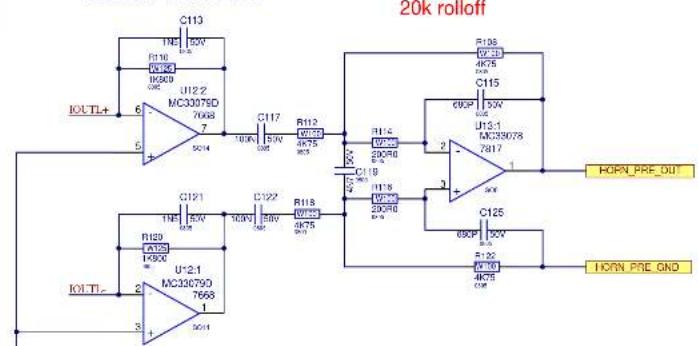
HORN OUTPUT
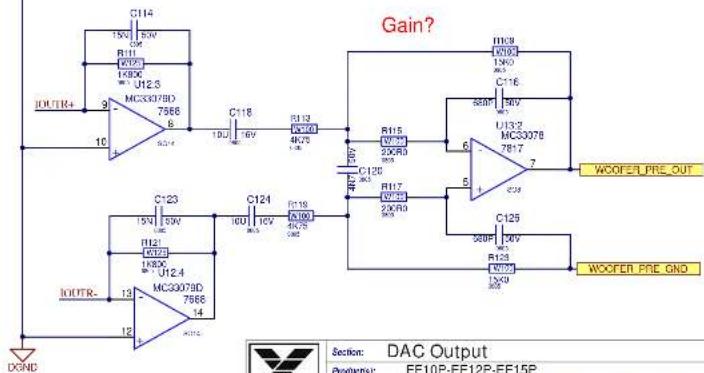
WOOFER OUTPUT
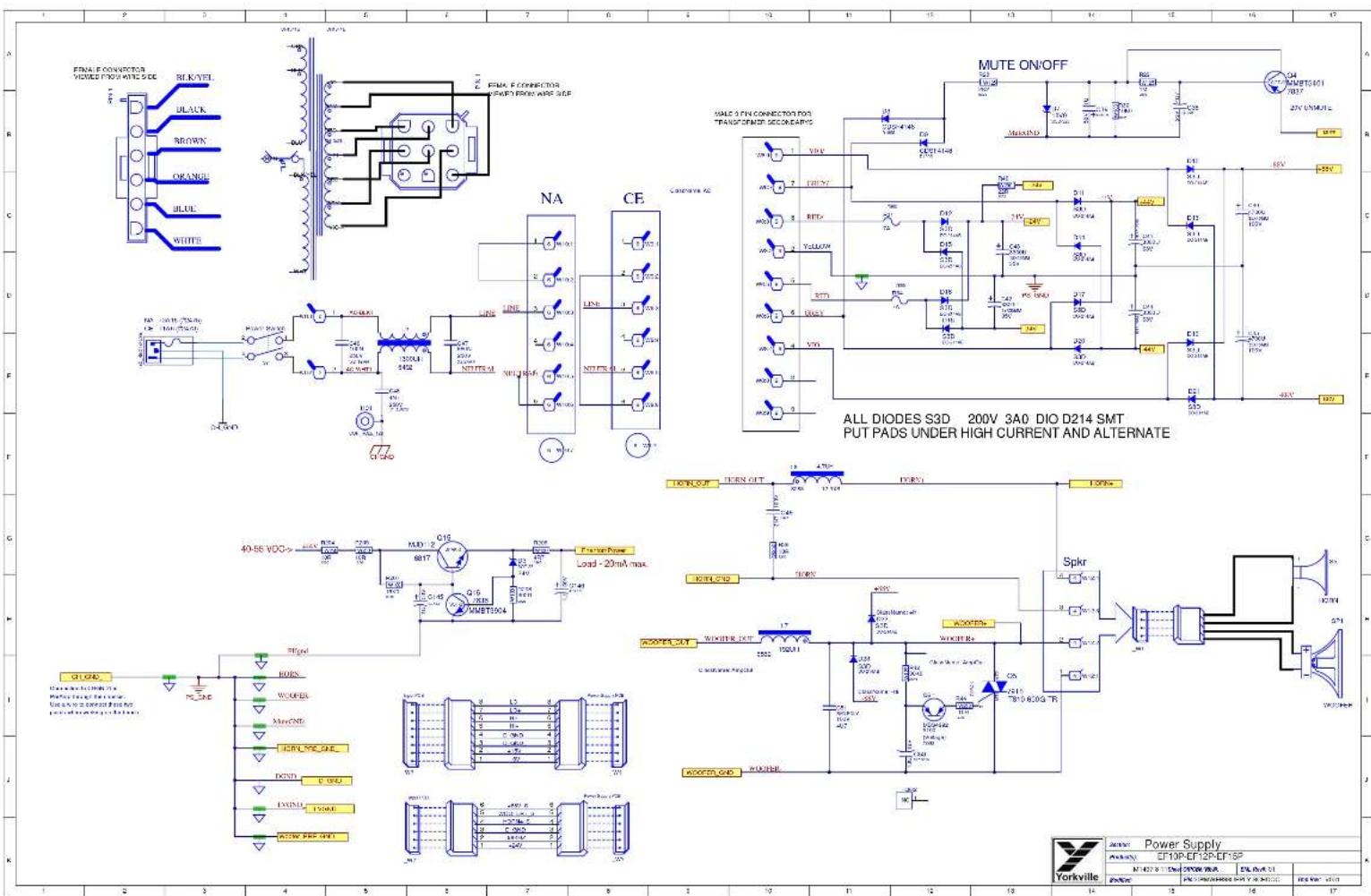
| Yorkville | Section: DAC Output | ||||
| Product(s): EF10P-EF12P-EF15P | |||||
| PCBA: M1497 | Rev: V01 | ENL Rev: C1 | Sheet 7 OF 11 | ||
| Modified: | File:20Output@SchDoc | Temp Rev: V03: | |||
| 12 | 13 | 14 | 15 | 16 | 17 |
PCB ASSEMBLY DOCUMENTATION
SPECIAL PRODUCTION NOTES
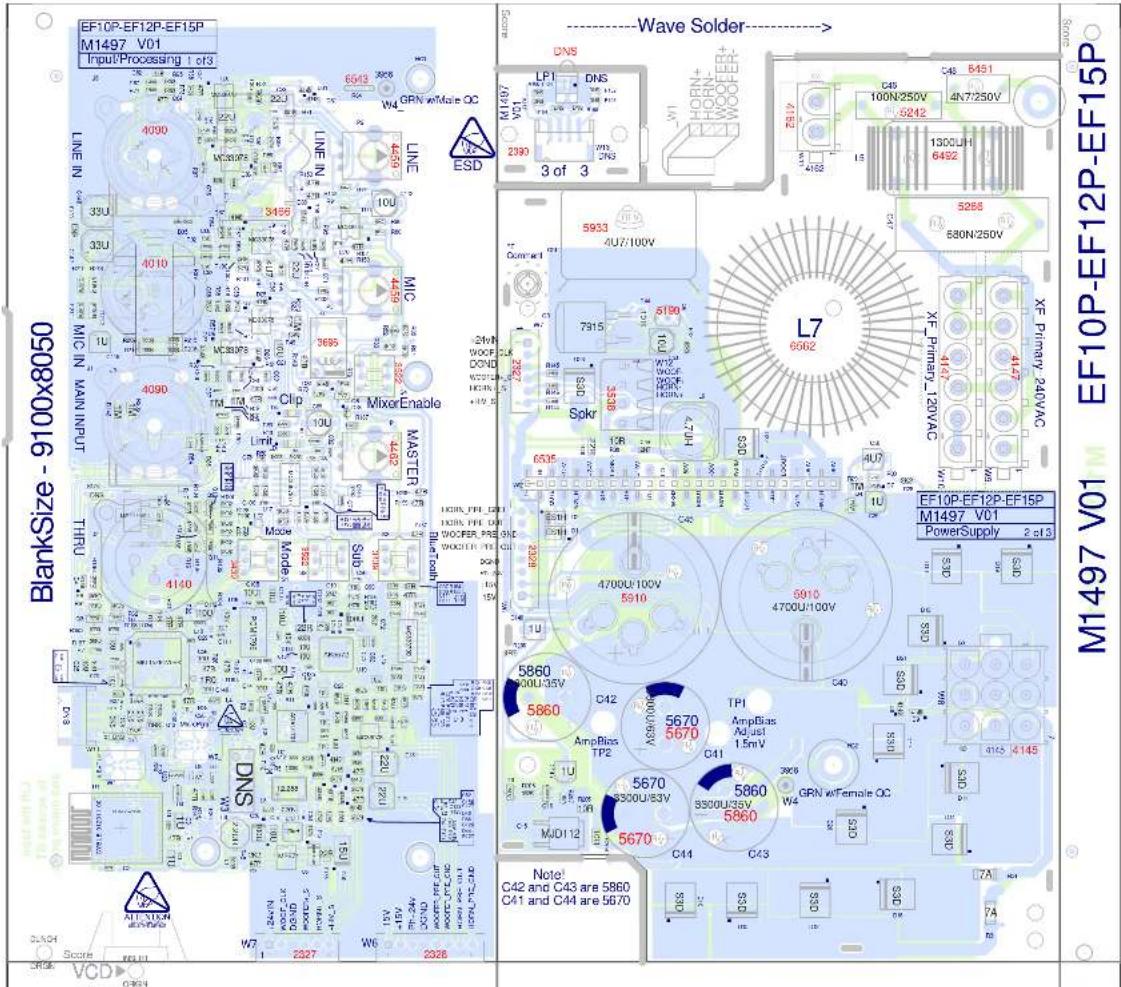
- ADD RTV BETWEEN ALL TALL COMPONENTS AND AREAS WHERE INDICATED.
- BEND C51 TO BOARD AND APPLY RTV TO HOLD IT.
PCB HARDWARE
THIS SHEET CONTAINS SPECIAL PRODUCTION NOTES AND A LIST OF PCB HARDWARE PARTS REQUIRED FOR THE BUILD.

Assembly Documentation
085N ET10P-EF12P-EF15P
N1402 9 1156w CYPON WHA EML P#A 01
[Unreadable]
icg S###
DESIGN HISTORY AND INFORMATION
CHANGE HISTORY
| # | DATE | VER# | PC# | DESCRIPTION OF CHANGE |
| 1 | 03-MAR-2017 | V01 | RELEASED FOR PRODUCTION | |
| 2 | OCT-26-2017 | V01 | 9116 | MARKED W3 CONNECTOR - YS PART# 4018 AS DNS |
| 3 | NOV-14-2017 | V01 | CHANGE FUSE PART NUMBER FOR CE FROM 2475 TO 2473 (T1.6A) | |
| 4 | Oct-09-2019 | 9434 | Update labels on W6 and W7 connector print drawings. | |
| 5 | ||||
| 6 | ||||
| 7 | ||||
| 8 | ||||
| 9 | ||||
| 10 | ||||
| 11 | ||||
| 12 | ||||
| 13 | ||||
| # | DATE | VER# | PC# | DESCRIPTION OF CHANGE |
| 1 | ||||
| 2 | ||||
| 3 | ||||
| 4 | ||||
| 5 | ||||
| 6 | ||||
| 7 | ||||
| 8 | ||||
| 9 | ||||
| 10 | ||||
| 11 | ||||
| 12 | ||||
| 13 | ||||
| # | DATE | VER# | PC# | DESCRIPTION OF CHANGE |
| 1 | ||||
| 2 | ||||
| 3 | ||||
| 4 | ||||
| 5 | ||||
| 6 | ||||
| 7 | ||||
| 8 | ||||
| 9 | ||||
| 10 | ||||
| 11 | ||||
| 12 | ||||
| 13 | ||||
POTENTIOMETERS AND KNOBS
| POTENTIOMETERS AND KNOBS | |||
| REF | FUNCTION | POT# | KNOB# |
| P1 | MASTER LEVEL | 4462 | 8653 |
| P2 | LINE LEVEL | 4459 | 8655 |
| P3 | MIC LEVEL | 4459 | 8653 |

PINOUT DIAGRAMS
THIS SHEET CONTAINS A CHANGE HISTORY LOG, A LIST OF THE POTS & KNOBS AND A LEADS & PINS REFERENCE SECTION.

| Design Information And History | |||
| ENGLY EF10P-EF12P-EF15P | |||
| N 1427 10 115M ECFOR/ENL | EIL ENL 01 | ||
| ENGLY | PN 5-143489999999999999999999999999999999999999999999999999999999999999999999999999999999999999999999999999999 | ENL ENL 01 | ENL ENL 01 |

PCB ASSEMBLY DOCUMENTATION
SPECIAL PRODUCTION NOTES
- ADD RTV BETWEEN ALL TALL COMPONENTS AND AREAS WHERE INDICATED.
- BEND C51 TO BOARD AND APPLY RTV TO HOLD IT.
PCB HARDWARE
THIS SHEET CONTAINS SPECIAL PRODUCTION NOTES AND A LIST OF PCB HARDWARE PARTS REQUIRED FOR THE BUILD.

Assembly Documentation
EF10P-EF12P-EF15P
N427 915600000000000000000000000000000000
[Unreadable]
Irs var. c101
DESIGN HISTORY AND INFORMATION
CHANGE HISTORY
| # | DATE | VER# | PC# | DESCRIPTION OF CHANGE |
| 1 | 03-MAR-2017 | V01 | RELEASED FOR PRODUCTION | |
| 2 | OCT-26-2017 | V01 | 9116 | MARKED W3 CONNECTOR - Y5 PART# 4018 AS DNS |
| 3 | NOV-14-2017 | V01 | CHANGE FUSE PART NUMBER FOR CE FROM 2475 TO 2473 (T1.5A) | |
| 4 | Oct-09-2019 | 9434 | Update labels on WS and W7 connector pinout drawings. | |
| 5 | ||||
| 6 | ||||
| 7 | ||||
| 8 | ||||
| 9 | ||||
| 10 | ||||
| 11 | ||||
| 12 | ||||
| 13 | ||||
| # | DATE | VER# | PC# | DESCRIPTION OF CHANGE |
| 1 | ||||
| 2 | ||||
| 3 | ||||
| 4 | ||||
| 5 | ||||
| 6 | ||||
| 7 | ||||
| 8 | ||||
| 9 | ||||
| 10 | ||||
| 11 | ||||
| 12 | ||||
| 13 | ||||
| # | DATE | VER# | PC# | DESCRIPTION OF CHANGE |
| 1 | ||||
| 2 | ||||
| 3 | ||||
| 4 | ||||
| 5 | ||||
| 6 | ||||
| 7 | ||||
| 8 | ||||
| 9 | ||||
| 10 | ||||
| 11 | ||||
| 12 | ||||
| 13 | ||||
POTENTIOMETERS AND KNOBS
| POTENTIOMETERS AND KNOBS | |||
| REF | FUNCTION | POT# | KNOB# |
| P1 | MASTER LEVEL | 4462 | 8653 |
| P2 | LINE LEVEL | 4459 | 8655 |
| P3 | MIC LEVEL | 4459 | 8653 |
PINOUT DIAGRAMS
THIS SHEET CONTAINS A CHANGE HISTORY LOG, A LIST OF THE POTS & KNOBS AND A LEADS & PINS REFERENCE SECTION.

| Design Information And History | |||
| EF10P-EF12P-EF15P | |||
| N°437 10'15" | M°-HISTORY-CH | SIL R#A.21 | |
| R#N# | PH- | L#s R#A- L#C# | |


| Product(s): EF12_15_215P-PSA1-SA102_153 | ||||
| Description: Powered speaker cabinet | ||||
| PCB#: M1498 | Rev#: V05 | EML Rev#: 01 | Sheet 1 Of 5 | |
| Modified: 2020-02-03 | File: Top Sheet.SchDoc | Tmp Rev: V032 | ||

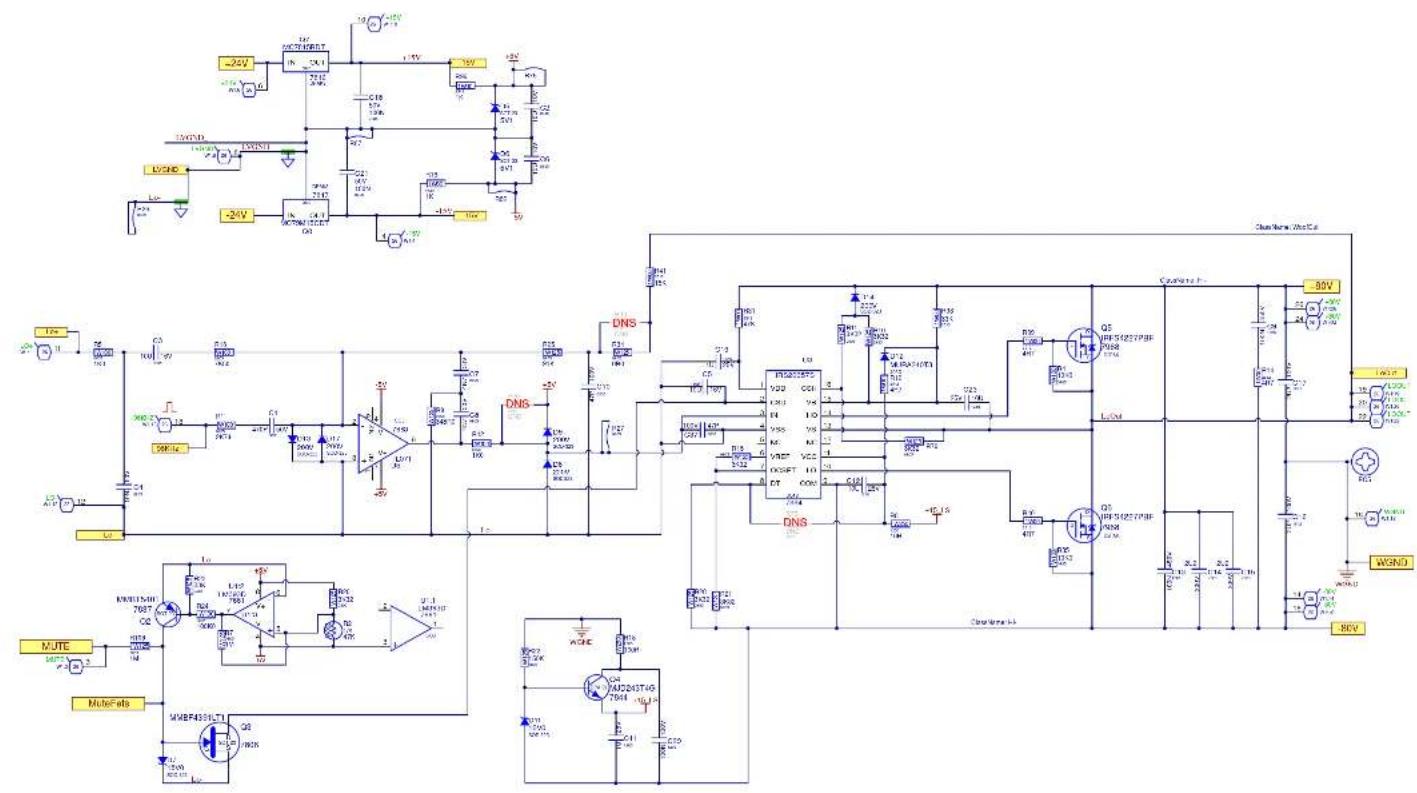
| Yorkville | Sector: Woofer Amplifier/PS | |||
| Pctor(s) EF12 15 215P-PSA1-SA102 153 | ||||
| PCB# M149B | Pst#: VCC | PNZ-Sa# 01 | Shet 3 OF 5 | |
| WFC# 2023-02-05 | N#: WOOFER AMF/SCN EOC | Top: N#: V32 | ||
| 14 | 15 | 16 | 17 | |
DESIGN HISTORY AND INFORMATION
CHANGE HISTORY
| # | VER#D | ATB# | DESCRIPTION OF CHANGE | |
| 1 | OCT-4-2017 | V02 | RELEASED VERSION 2. | |
| 2 | APR-27-2018 | V03 | 9129 | MOVED R61_ST AWAY FROM 80V CONNECTOR PAD |
| 3 | Aug-08-2019 | V04 | 9449 | C12&C23 to 10U/25V Change VBE res to center trim pot. Add D4 to cut turn off noise. |
| 4 | FEB-03-2020 | V05 | 9508 | Added 1N cap and 47R resistor between gate and source of Q10 |
| 5 | NOV 04-2021 | 9660 | FOR DETAILS SEE PC49660 FOR M1501. | |
| 6 | ||||
| 7 | ||||
| 8 | ||||
| 9 | ||||
| 10 | ||||
| 11 | ||||
| 12 | ||||
| 13 | ||||
| # | VER#D | ATB# | DESCRIPTION OF CHANGE | |
| 1 | ||||
| 2 | ||||
| 3 | ||||
| 4 | ||||
| 5 | ||||
| 6 | ||||
| 7 | ||||
| 8 | ||||
| 9 | ||||
| 10 | ||||
| 11 | ||||
| 12 | ||||
| 13 | ||||
| # | VER#D | ATB# | DESCRIPTION OF CHANGE | |
| 1 | ||||
| 2 | . | |||
| 3 | ||||
| 4 | ||||
| 5 | ||||
| 6 | ||||
| 7 | ||||
| 8 | ||||
| 9 | ||||
| 10 | ||||
| 11 | ||||
| 12 | ||||
| 13 |
POTENTIOMETERS AND KNOBS
PINOUT DIAGRAMS
THIS SHEET CONTAINS A CHANGE HISTORY LOG, A LIST OF THE POTS & KNOBS AND A LEADS & PINS REFERENCE SECTION.

| Design Information And History | |||||
| Pre-Knayr rations | |||||
| NOSR | [No V] | Rev. 105 | 2M Rev. 01 | 5mm | 4 OF 5 |
| WetNet | 202-11-04 | 5kg Inventory Sun-3us | Top Ave: 1052 | ||
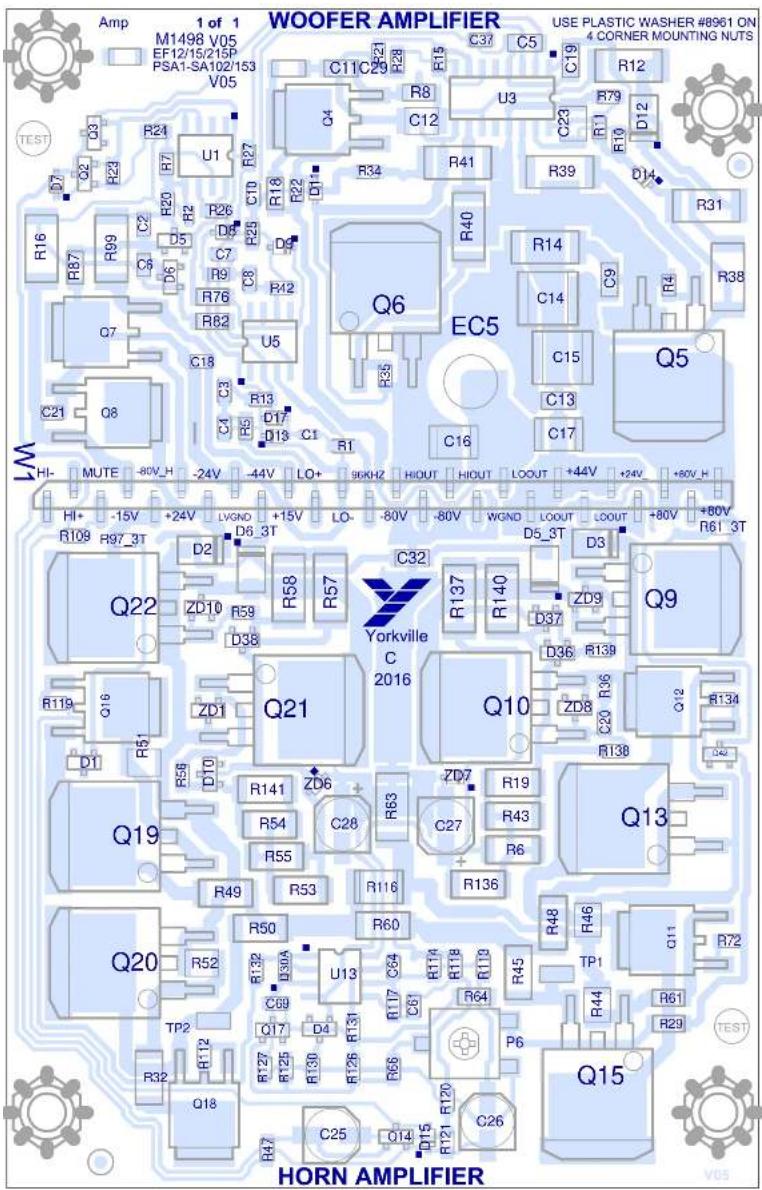
Design/ tors

V/ lues
PCB ASSEMBLY DOCUMENTATION
SPECIAL PRODUCTION NOTES
1-Place Connector (#7883) on all boards on panel BEFORE Rework Oven.
PCB HARDWARE
SCREWS AND BOLTS
THIS SHEET CONTAINS SPECIAL PRODUCTION NOTES AND A LIST OF PCB HARDWARE PARTS REQUIRED FOR THE BUILD.

DESIGN HISTORY AND INFORMATION
CHANGE HISTORY
| # | VER#D | ATB# | DESCRIPTION OF CHANGE | |
| 1 | OCT-4-2017 | V02 | RELEASED VERSION 2. | |
| 2 | APR-27-2018 | V03 | 9129 | MOVED R61_ST AWAY FROM 80V CONNECTOR PAD |
| 3 | Aug-08-2019 | V04 | 9449 | C12&C23 to 10U/25V Change VBE res to center trim pot. Add D4 to cut turn off noise. |
| 4 | FEB-03-2020 | V05 | 9508 | Added 1N cap and 47R resistor between gate and source of Q10 |
| 5 | NOV 04-2021 | 9660 | FOR DETAILS SEE PC49660 FOR M1501. | |
| 6 | ||||
| 7 | ||||
| 8 | ||||
| 9 | ||||
| 10 | ||||
| 11 | ||||
| 12 | ||||
| 13 | ||||
| # | VER#D | ATB# | DESCRIPTION OF CHANGE | |
| 1 | ||||
| 2 | ||||
| 3 | ||||
| 4 | ||||
| 5 | ||||
| 6 | ||||
| 7 | ||||
| 8 | ||||
| 9 | ||||
| 10 | ||||
| 11 | ||||
| 12 | ||||
| 13 | ||||
| # | VER#D | ATB# | DESCRIPTION OF CHANGE | |
| 1 | ||||
| 2 | . | |||
| 3 | ||||
| 4 | ||||
| 5 | ||||
| 6 | ||||
| 7 | ||||
| 8 | ||||
| 9 | ||||
| 10 | ||||
| 11 | ||||
| 12 | ||||
| 13 |
POTENTIOMETERS AND KNOBS
PINOUT DIAGRAMS
THIS SHEET CONTAINS A CHANGE HISTORY LOG, A LIST OF THE POTS & KNOBS AND A LEADS & PINS REFERENCE SECTION.

| Design Information And History | |||||
| Pre-Knayr rations | |||||
| NOSR | [No V] | Rev. 105 | 2M Rev. 01 | 5mm | 4 OF 5 |
| WetNet | 202-11-04 | 5kg Inventory Set-Box | Top Area: V032 | ||



| 10-Pin Cortex Debug Connector | 6-Pin TC2030 Footprint | |
| 1 VCC | 2 SWO/O / TMS | 1 VCC |
| 3 GND | 4 SWCLK / TCK | 2 SWO/O / TMS |
| 5 GND | 6 SWO / TDO | 3 mRESET |
| 7 NC / RTCK | 8 NC / TDI | 4 SWCLK / TCK |
| 9 GNDDetect | 10 mRESET | 5 GND (also connected to GNDDetect) |
| 6 SWO / TDO | ||
| Yorkville | Section: Microcontroller | ||||
| Product#: EF10P-EF12P-EF15P | |||||
| PCBA: M1802 | Rev: V31 | ENL Rev: 01 | Sheet 5 Of 11 | ||
| Modficar: | File:2020-6-6-0@roller.SchDoc | Tmp Rev: V31 | |||
| 12 | 13 | 14 | 15 | 16 | 17 |
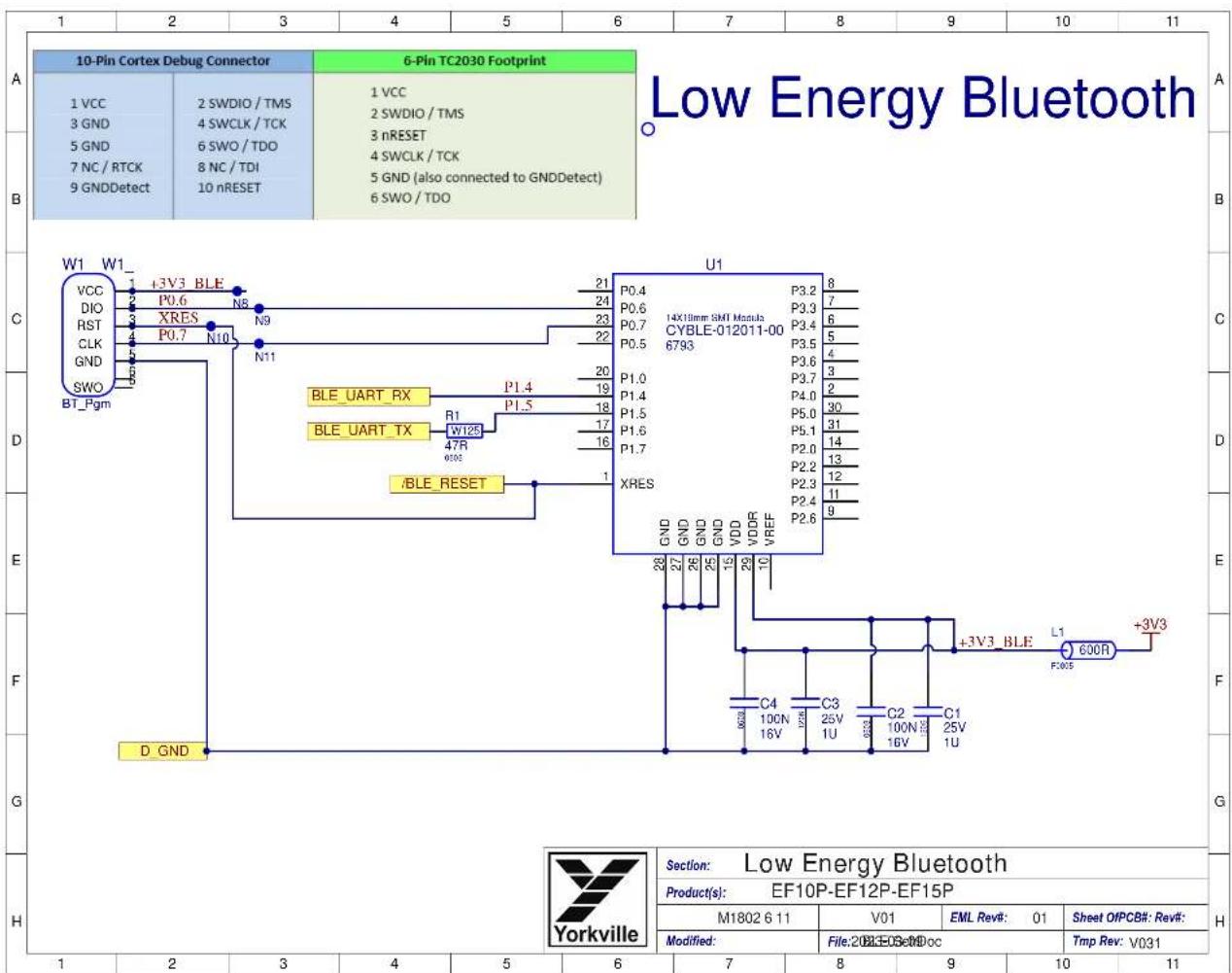
other
Low Energy Bluetooth | Component | Value | | :--- | :--- | | P0.4 | 8 | | P0.6 | 7 | | P0.7 | 6 | | P0.5 | 5 | | P3.2 | 4 | | P3.3 | 3 | | P3.4 | 2 | | P3.5 | 1 | | P3.6 | 0 | | P3.7 | -1 | | P4.0 | -2 | | P5.0 | -3 | | P5.1 | -4 | | P2.0 | -5 | | P2.2 | -6 | | P2.3 | -7 | | P2.4 | -8 | | P2.6 | -9 | | Category | Description | | :--- | :--- | | W1 | +3V3 BLE | | VCC | +3V3 BLE | | DIO | +3V3 BLE | | RST | +3V3 BLE | | CLK | +3V3 BLE | | GND | +3V3 BLE | | SWO | +3V3 BLE | | BT_Pgm | +3V3 BLE | | D_GND | +3V3 BLE | | U1 | 14X19mm SMT Modula CYBLE-012011-00 6793 | | P0.4 | 8 | | P0.6 | 7 | | P0.7 | 6 | | P0.5 | 5 | | P3.6 | 4 | | P1.0 | 3 | | P1.4 | 2 | | P1.5 | 1 | | P1.6 | 0 | | P1.7 | -1 | | XRES | -2 | | /BLE_RESET | -3 | | Label/Description: Low Energy Bluetooth Product(s): EF10P-EF12P-EF15P M1802 6 11 V01 EML Rev#: 01 Sheet OfPCB#: Rev#: Modified: File:202E0SetDoc Tmp Rev: V031 C4 C3 C2 C1 10CN 12V 16V 16V 16V 16V 25V 1U 1U 1U 25V 1U 1U 1U C4 C3 C2 C1 10CN 12V 16V 16V 16V 16V 25V 1U 1U 1U C4 C3 C2 C1 10CN 12V 16V 16V 16V 16V C4 C3 C2 C1 10CN 12V 16V 16V 16V 16V C4 C3 C2 C1 10CN 12V 16V 16V 16V 16V C4 C3 C2 C1 10CN 12V 16V 16V 16V 16V

HORN OUTPUT
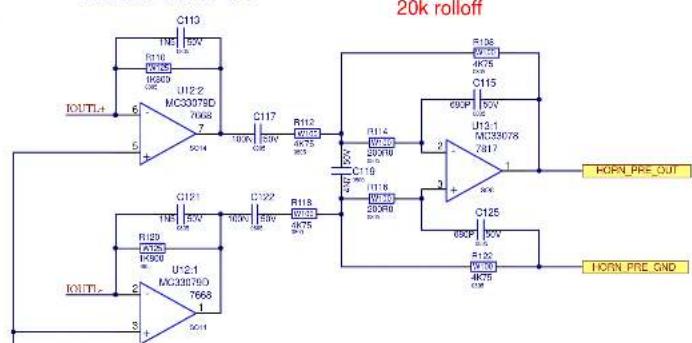
WOOFER OUTPUT

| Yorkville | Section: DAC Output | ||||
| Product(s): EF10P-EF12P-EF15P | |||||
| PCB4: M1802 | Rev: V01 | ENL Rev: 01 | Sheet 7 Of 11 | ||
| Modification: | File:2/2026G-SSEIDoc | Tmp Rev: V001 | |||
| 12 | 13 | 14 | 15 | 16 | 17 |
DESIGN HISTORY AND INFORMATION
CHANGE HISTORY
| # | DATE | VER# | PC# | DESCRIPTION OF CHANGE |
| 1 | 2017-03-03 | V01 | RELEASED FOR PRODUCTION | |
| 2 | 2017-09-15 | V01 | 9116 | MARKED W3 CONNECTOR - VS PART# 4016 AS DNS |
| 3 | 2017-11-14 | V01 | CHANGE FUSE PART NUMBER FOR CE FROM 2475 TO 2473 (T1.8A) | |
| 4 | 2017-10-03 | V02p1 | 9098 | Change RCA to 1/8', Move motor switch to make room for Master pot contor mark |
| 5 | 2018-02-24 | V01P0 | BOARD BLANK AND PROJECT RENAMED P8002. SECTIONS NAMED M1802 (INPUT),M1803 (POWER SUPPLY) AND M1804 (AC FILTER) | |
| 6 | ||||
| 7 | Added a 0.4A fuse in series with 15v supply track followedby a 20V 3W zonor to ground to protect if 80v shorts to ~15v. | |||
| 8 | ||||
| 9 | 2018-04-20 | V01P1 | Part additions for safety and value modifications to reduce parts count. | |
| 10 | 2018-03-10 | Unpanolized P8802 into M1802, M1803, and M1804 | ||
| 11 | 2018-10-12 | V01 | Released M1802V01 | |
| 12 | 2019-02-19 | 9333 | Chanc pots P1, P2 (10K, #4434), and P3 (10K, #4432) to YS #4459 (10K) | |
| 13 | 2019-10-08 | 9434 | Update labels on WS and W7 connector pincut drawings. |
| # | DATE | VER# | PCA | DESCRIPTION OF CHANGE |
| 1 | 2019-10-08 | 9445 | Remove R125, R131, R133 in LD2 drive circuit | |
| 2 | 2023-03-09 | 9607 | #7619 10U/10V replaced with #7738 10U/16V Cheaper / Better option.. | |
| 3 | C21,C57,C104,C105,C107,C109,C112. | |||
| 4 | ||||
| 5 | ||||
| 6 | ||||
| 7 | ||||
| 8 | ||||
| 9 | ||||
| 10 | ||||
| 11 | ||||
| 12 | ||||
| 13 |
| # | DATE | VER# | PC# | DESCRIPTION OF CHANGE |
| 1 | ||||
| 2 | ||||
| 3 | ||||
| 4 | ||||
| 5 | ||||
| 6 | ||||
| 7 | ||||
| 8 | ||||
| 9 | ||||
| 10 | ||||
| 11 | ||||
| 12 | ||||
| 13 |
POTENTIOMETERS AND KNOBS
| POTENTIOMETERS AND KNOBS | |||
| REF | FUNCTION | POTJ | KNOBJ |
| P1 | MASTER LEVEL | 4434 | 8653 |
| P2 | LINE LEVEL | 4432 | 8653 |
| P3 | MIC LEVEL | 4432 | 8653 |

81Y F 40
PINOUT DIAGRAMS
THIS SHEET CONTAINS A CHANGE HISTORY LOG, A LIST OF THE POTS & KNOBS AND A LEADS & PINS REFERENCE SECTION.


PCB ASSEMBLY DOCUMENTATION
SPECIAL PRODUCTION NOTES
The input section needs to be air tight. All Vias and Part Holes must be filled with solder.
PCB HARDWARE
SOREWS AND BOLTS
NUTS
STANDOFFS
MISCELLANEOUS
THIS SHEET CONTAINS SPECIAL PRODUCTION NOTES AND A LIST OF PCB HARDWARE PARTS REQUIRED FOR THE BUILD.

Assembly Documentation
0810P-EP12P-EF15P
N 2022.9.1.5nd CYPSE TPR
[Unreadable]
1.2.3.4.5.6.7.8.9.10.11.12.13.14.15.16.17.18.19.20.21.22.23.24.25.26.27.28.29.30.31.32.33.34.35.36.37.38.39.40.41.42.43.44.45.46.47.48.49.50.51.52.53.54.55.56.57.58.59.60.61.62.63.64.65.66.67.68.69.70.71.72.73.74.75.76.77.78.79.80.81.82.83.84.85.86.87.88.89.90.91.92.93.94.95.96.97.98.99.100
18.6.20
DESIGN HISTORY AND INFORMATION
CHANGE HISTORY
| # | DATE | VER# | PC# | DESCRIPTION OF CHANGE |
| 1 | 2017-03-03 | V01 | RELEASED FOR PRODUCTION | |
| 2 | 2017-09-15 | V01 | 9116 | MARKED W3 CONNECTOR - VS PART# 4016 AS DNS |
| 3 | 2017-11-14 | V01 | CHANGE FUSE PART NUMBER FOR CE FROM 2475 TO 2473 (T1.8A) | |
| 4 | 2017-10-03 | V02p1 | 9098 | Change RCA to 1/8', Move motor switch to make room for Master pot contor mark |
| 5 | 2018-02-24 | V01P0 | BOARD BLANK AND PROJECT RENAMED P8002. SECTIONS NAMED M1802 (INPUT),M1803 (POWER SUPPLY) AND M1804 (AC FILTER) | |
| 6 | ||||
| 7 | Added a 0.4A fuse in series with 15v supply track followedby a 20V 3W zonor to ground to protect if 80v shorts to ~15v. | |||
| 8 | ||||
| 9 | 2018-04-20 | V01P1 | Part additions for safety and value modifications to reduce parts count. | |
| 10 | 2018-09-10 | Unpanolized P8802 into M1802, M1803, and M1804 | ||
| 11 | 2018-10-12 | V01 | Released M1802V01 | |
| 12 | 2019-02-19 | 9333 | Chanc pots P1, P2 (10K, #4434), and P3 (10K, #4432) to YS #4459 (10K) | |
| 13 | 2019-10-08 | 9434 | Update labels on WS and W7 connector pincut drawings. |
| # | DATE | VER# | PCA | DESCRIPTION OF CHANGE |
| 1 | 2019.10.08 | 9445 | Remove R125, R131, R133 in LD2 drive circuit | |
| 2 | 2023-03-09 | 9607 | #7619 10U/10V replaced with #7738 10U/16V Cheaper / Better option.. | |
| 3 | C21,C57,C104,C105,C107,C109,C112. | |||
| 4 | ||||
| 5 | ||||
| 6 | ||||
| 7 | ||||
| 8 | ||||
| 9 | ||||
| 10 | ||||
| 11 | ||||
| 12 | ||||
| 13 |
| # | DATE | VER# | PC# | DESCRIPTION OF CHANGE |
| 1 | ||||
| 2 | ||||
| 3 | ||||
| 4 | ||||
| 5 | ||||
| 6 | ||||
| 7 | ||||
| 8 | ||||
| 9 | ||||
| 10 | ||||
| 11 | ||||
| 12 | ||||
| 13 |
POTENTIOMETERS AND KNOBS
| POTENTIOMETERS AND KNOBS | |||
| REF | FUNCTION | POTJ | KNOBJ |
| P1 | MASTER LEVEL | 4434 | 8653 |
| P2 | LINE LEVEL | 4432 | 8653 |
| P3 | MIC LEVEL | 4432 | 8653 |

81Y F 40
PINOUT DIAGRAMS
THIS SHEET CONTAINS A CHANGE HISTORY LOG, A LIST OF THE POTS & KNOBS AND A LEADS & PINS REFERENCE SECTION.


| Yorkville | Yorkville & Sound Ltd.900 Grantry CourtPulming, OHConstance, 140, 150Ward your sell in now | AFM-ML EF10P-EF12P-EF15P | |||
| PS and Ins/Desc/Ins | |||||
| PCR N1369 | PAV VCL | EFLNrl-01 | Stud I Of IT | ||
| Aurfaa Dsg-11-17 | Top Sheet ConDisc | Tera Fm V108 | |||

DESIGN HISTORY AND INFORMATION
CHANGE HISTORY
| # | DATE | VER# | PCI# | DESCRIPTION OF CHANGE |
| 1 | 2017/03/03 | V01 R | RELEASED FOR PRODUCTION | |
| 2 | 2017/09/15 | V01 | 9116 | MARKED W3 CONNECTOR - YS PART# 4018 AS DNS |
| 3 | 2017/11/14 | V01 | - | CHANGE FUSE PART NUMBER FOR CE FROM 2475 TO 2473 (T1.5A) |
| 4 | 2018-10-12 | V01 | - | Released M1803V01 |
| 5 | - | 9390 | Schematic error fixed | |
| 6 | ||||
| 7 | ||||
| 8 | ||||
| 9 | ||||
| 10 | ||||
| 11 | ||||
| 12 | ||||
| 13 |
| # | DATE | VER# | PC# | DESCRIPTION OF CHANGE |
| 1 | .. | |||
| 2 | .. | |||
| 3 | .. | |||
| 4 | .. | |||
| 5 | .. | |||
| 6 | .. | |||
| 7 | .. | |||
| 8 | .. | |||
| 9 | .. | |||
| 10 | .. | |||
| 11 | .. | |||
| 12 | .. | |||
| 13 | .. |
POTENTIOMETERS AND KNOBS
| POTENTIOMETERS AND KNOBS | |||
| REF | FUNCTION | POT# | KNOB# |
PINOUT DIAGRAMS
THIS SHEET CONTAINS A CHANGE HISTORY LOG, A LIST OF THE POTS & KNOBS AND A LEADS & PINS REFERENCE SECTION.
| Yorkville | Design Information And History | |||
| Product: EF10P-EF12P-EF15P | ||||
| 201406-11&107008/Bins | EML 201407 | Tres Fw: W001 | ||
| Product: 2021-11-17 | Fw: History/SchDoc | |||

PCB ASSEMBLY DOCUMENTATION
SPECIAL PRODUCTION NOTES
- PCBSA: ADD RTV BETWEEN POWER SUPPLY CAPS AS SHOWN HERE.

PCB HARDWARE
SCREWS AND BOLTS
NUTS
STANDOFFS
MISCELLANEOUS
THIS SHEET CONTAINS SPECIAL PRODUCTION NOTES AND A LIST OF PCB HARDWARE PARTS REQUIRED FOR THE BUILD.
| Yorkville Assembly Documentation | ||||
| Production EF10P-EF12P-EF15P | ||||
| Production 2021-11-17 | File | Assembly Certificate | Ex. No. | Date |
| 14 | 15 | 16 | 17 | |
DESIGN HISTORY AND INFORMATION
CHANGE HISTORY
| # | DATE | VER# | PCI# | DESCRIPTION OF CHANGE |
| 1 | 2017/03/03 | V01 R | RELEASED FOR PRODUCTION | |
| 2 | 2017/09/15 | V01 | 9116 | MARKED W3 CONNECTOR - YS PART# 4018 AS DNS |
| 3 | 2017/11/14 | V01 | - | CHANGE FUSE PART NUMBER FOR CE FROM 2475 TO 2473 (T1.5A) |
| 4 | 2018-10-12 | V01 | - | Released M1803V01 |
| 5 | - | 9390 | Schematic error fixed | |
| 6 | ||||
| 7 | ||||
| 8 | ||||
| 9 | ||||
| 10 | ||||
| 11 | ||||
| 12 | ||||
| 13 |
| # | DATE | VER# | PC# | DESCRIPTION OF CHANGE |
| 1 | .. | |||
| 2 | .. | |||
| 3 | .. | |||
| 4 | .. | |||
| 5 | .. | |||
| 6 | .. | |||
| 7 | .. | |||
| 8 | .. | |||
| 9 | .. | |||
| 10 | .. | |||
| 11 | .. | |||
| 12 | .. | |||
| 13 | .. |
POTENTIOMETERS AND KNOBS
| POTENTIOMETERS AND KNOBS | |||
| REF | FUNCTION | POT# | KNOB# |
PINOUT DIAGRAMS
THIS SHEET CONTAINS A CHANGE HISTORY LOG, A LIST OF THE POTS & KNOBS AND A LEADS & PINS REFERENCE SECTION.
| Yorkville | Design Information And History | |||
| Product: EF10P-EF12P-EF15P | ||||
| 201406-11&10C008/Bnd. | EMLand-01 | Tres Fw: 2004 | ||
| Product: 2021-11-17 | Fw: History/SchDoc | |||
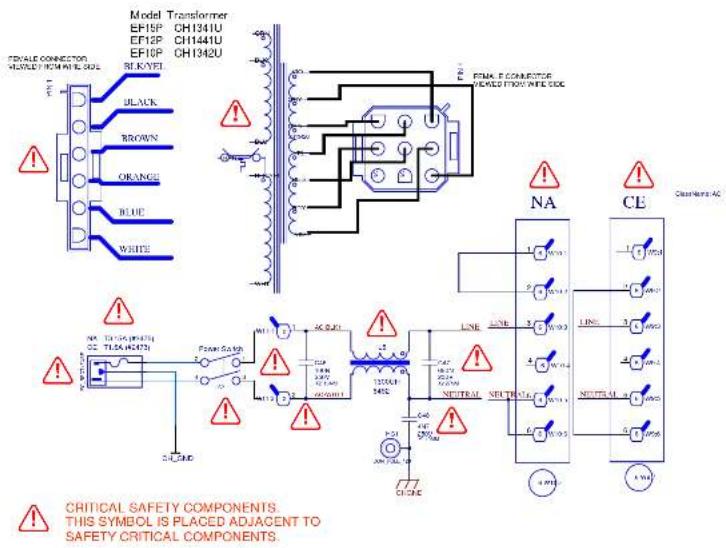

Power Supply
000x EF10P EF12P EF15P
123480569000000000000000000000000000000000
| # | DATE | VER# | PC# | DESCRIPTION OF CHANGE |
| 1 | SEP-02-2016 | M1804 was part of P6802, P6802 is now de panelized into M1802, M1803, M1804 | ||
| 2 | OCT-12-2015 | V01 | V01 RELEASED FOR PRODUCTION | |
| 3 | MAR-12-2019 | V01 | 9277 | CHANGED W9 AND W10 FROM 4147 TO 4243. |
| 4 | Sept-17-2019 | and changed W11 from 4162 to 4244. | ||
| 5 | ||||
| 6 | ||||
| 7 | ||||
| 8 | ||||
| 9 | ||||
| 10 | ||||
| 11 | ||||
| 12 | ||||
| 13 |
| # | DATE | VER# | PC# | DESCRIPTION OF CHANGE |
| 1 | ||||
| 2 | ||||
| 3 | ||||
| 4 | ||||
| 5 | ||||
| 6 | ||||
| 7 | ||||
| 8 | ||||
| 9 | ||||
| 10 | ||||
| 11 | ||||
| 12 | ||||
| 13 |
| # | DATE | VER# | PC# | DESCRIPTION OF CHANGE |
| 1 | ||||
| 2 | ||||
| 3 | ||||
| 4 | ||||
| 5 | ||||
| 6 | ||||
| 7 | ||||
| 8 | ||||
| 9 | ||||
| 10 | ||||
| 11 | ||||
| 12 | ||||
| 13 |
POTENTIOMETERS AND KNOBS
| POTENTIOMETERS AND KNOBS | |||
| REF | FUNCTION | POT# | KNOB# |
PINOUT DIAGRAMS
THIS SHEET CONTAINS A CHANGE HISTORY LOG, A LIST OF THE POTS & KNOBS AND A LEADS & PINS REFERENCE SECTION.

| Name: Design Information And History | |||
| Company: EF10P, EF12P, EF15P | |||
| N1824 10 115m DF25837me | E% Ref. 01 | ||
| Date: 2019-08-17 | P#: H258376258 | Tgt Ref: 2019 | |

scatter
| Label | Description | Description | | :--- | :--- | :--- | | A | | | | B | | | | C | | | | D | | | | E | | | | F | | | | G | | | | H | | | | Description | Description | | :--- | :--- | | PCB1 | Blank PCB | | Documentation | Blank PCB | | PlasticPin | PlasticPin | | RTV_Holes | RTV_Holes | | Break | Breakholes | | ChassisScrew | ChassisScrew | | Section: Product(s): EF10P - EF12P - EF15P PCB#: M1804 Rev#: V01 EML Rev#: 01 Sheet 11 Of 11 Modified: 2019-09-17 File: ECO.SCHDOC Tmp Rev: V031M1804 V01

DESIGN HISTORY AND INFORMATION
CHANGE HISTORY M1804V01
| # | DATE | VER# | PC# | DESCRIPTION OF CHANGE |
| 1 | SEP-02-2016 | M1804 was part of P6802, P6802 is now de panelized into M1802, M1803, M1804 | ||
| 2 | OCT-12-2015 | V01 | V01 RELEASED FOR PRODUCTION | |
| 3 | MAR-12-2019 | V01 | 9277 | CHANGED W9 AND W10 FROM 4147 TO 4243. |
| 4 | Sept-17-2019 | and changed W11 from 4162 to 4244. | ||
| 5 | ||||
| 6 | ||||
| 7 | ||||
| 8 | ||||
| 9 | ||||
| 10 | ||||
| 11 | ||||
| 12 | ||||
| 13 |
| # | DATE | VER# | PC# | DESCRIPTION OF CHANGE |
| 1 | ||||
| 2 | ||||
| 3 | ||||
| 4 | ||||
| 5 | ||||
| 6 | ||||
| 7 | ||||
| 8 | ||||
| 9 | ||||
| 10 | ||||
| 11 | ||||
| 12 | ||||
| 13 |
| # | DATE | VER# | PC# | DESCRIPTION OF CHANGE |
| 1 | ||||
| 2 | ||||
| 3 | ||||
| 4 | ||||
| 5 | ||||
| 6 | ||||
| 7 | ||||
| 8 | ||||
| 9 | ||||
| 10 | ||||
| 11 | ||||
| 12 | ||||
| 13 |
POTENTIOMETERS AND KNOBS
| POTENTIOMETERS AND KNOBS | |||
| REF | FUNCTION | POT# | KNOB# |
PINOUT DIAGRAMS
THIS SHEET CONTAINS A CHANGE HISTORY LOG, A LIST OF THE POTS & KNOBS AND A LEADS & PINS REFERENCE SECTION.

| Name: Design Information And History | |||
| Company: EF10P, EF12P, EF15P | |||
| N1824 10 115m DF25837me | E% Ref. 01 | ||
| Date: 2019-08-17 | P#: H258376258 | Tgt Ref: 2019 | |

élite
Powered EF-Series
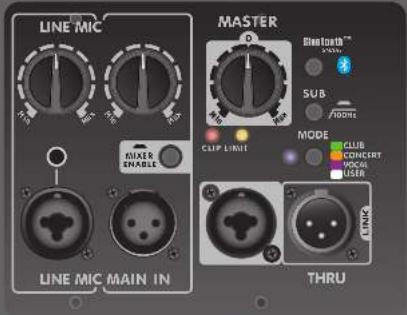
The élite EF-Series powered cabinets include a built in mixer allowing microphones and/or line sources to be used directly. The Link connectors allow up to 16 EF-Series powered cabinets to be driven from a single source (a maximum of 3 mixers can be used simultaneously when Linking). To add a subwoofer to the system a 100 Hz high pass filter can be activated.
Power Switch & Mode LED The switch turns the power On or Off and the illumination of the Mode LED indicates that unit is on.

Limit LED The amber Limit LED indicates that the cabinet is operating at full power and the limiter(s) are actively reducing the signal level.
Clip LED The red Clip LED indicates that the signal level is excessive and is causing distortion. To reduce clipping, turn down the mixer levels.
Main In/ Thru (Link) Connectors The Main In / Thru (Link) connectors allow powered cabinets to be driven from a single source. You can Link up to 16 EF-Series powered cabinets! The Main In / Thru (Link) jacks are the correct input to use when using an external mixer.
Note: When operating from weaker signals, use the Line inputs of the first cabinet in the chain. To ensure maximum hum rejection, the proper balanced cables must be used.
Mixer On/Off This switch turns the internal mixer 'on' or 'off.' When the Mic or Line inputs are used, this switch must be set to the 'on' position. If these inputs are not being used, the mixer should be turned 'off.'
Line Inputs The Line inputs allow line level sources such as digital media players (lap tops, tablets or smart phones) and CD players to be connected.
Note: If a microphone is connected to Channel 1 it will have lower gain compared to Channel 2's Mic input (Phantom power is NOT available on Channel 1).
Line Control The Line control adjusts the input volume level of devices plugged into the Line input.
Mic Inputs Any standard microphone may be connected to the Mic input. Phantom power is built-in.
Mic Control The Mic control adjusts the volume level for the Mic input.
Master Control This control adjusts the level of the individual cabinet. When Linking multiple cabinets use this control to individually adjust the relative volumes of each cabinet.
Note: The Master control is designed to be used in the 12 o'clock (middle) position, only minor adjustments are recommended.
Mode Selector The Mode Selector applies specific EQ and tone settings for the EF-Series powered cabinet.
Club: Boosted bass and enhanced highs make this mode ideal for music playback.
Concert: Allows instruments and vocals to be equally and naturally reproduced which is best for live performance.
Vocal: Shaped response specifically for the human voice range ensures vocal intelligibility.
User: Flat by default, can be customized by a user through the Yorkville app with a maximum of five different parametric equalization points with adjustable boost, cut and Q.
Sub Switch For operation with a subwoofer, this switch shuts off the low frequency boost and filters out signals below 100 Hz. This only affects the signals to the internal amplifier and does not affect signals going out from the internal mixer, or to signals passing through the Link connections.
Bluetooth™ Control This control enables or disables the Bluetooth™ connection between a tablet or a smartphone using the Yorkville App. Pressing this control button for more than 4 seconds resets the EF-Series powered cabinet to factory settings.
Faults and Internal Fuse A blown fuse generally means that excessive mains voltage has been applied or there's a serious fault with the unit. Self re-setting thermal switches are built into the power transformer. These will not trip even under the most extreme operating conditions and are provided only for safety reasons.
To get the full Owner's Manual please visit our website at
http://www.yorkville.com/manuals/ or, if you need a printed version call 905-837-8777
REAL Gear.

REAL People.
Canada Voice: 905-837-8481 Fax: 905-839-5776
U.S.A. Voice: 716-297-2920 Fax: 716-297-3689
www.yorkville.com
Yorkville Sound
550 Granite Court
Pickering, Ontario
LIW-3Y8 CANADA
Yorkville Sound Inc.
4625 Witmer Industrial Estate
Niagara Falls, New York
14305 USA
Printed In CANADA
QuickStart-EF_P-Series-1v7 • YS#QSTART-EFP • October 23, 2023


élite
Powered EF-Series
Niagara Falls, New York
14305 USA
Yorkville.
EYEBOLT INSTALLATION
1. DESCRIPTION
Many of the popular models in the Yorkville speaker cabinet line are now equipped with flying hardware for overhead suspension applications. Depending on the model, two or more internal braces have been provided for rigging purposes. Each brace contains two bolt holes and provides center-of-gravity fly-points for use with in-line or angular loads. Many of the models will support additional suspended cabinets according to their specified working load limits.

natural_image
Abstract diagram with interlocking gears inside a square frame, enclosed by an oval (no text or symbols)
IMPORTANT!!
THE RIGGING OF LOUDSPEAKER SYSTEMS IS AN EXTREMELY SERIOUS MATTER. OVERHEAD RIGGING REQUIRES EXTENSIVE EXPERIENCE, INCLUDING (BUT NOT LIMITED TO) CALCULATING WORKING LOAD LIMITS, HARDWARE INSTALLATION, AND PERIODIC SAFETY INSPECTION OF ALL HARDWARE AND CABINETRY. IF YOU LACK THESE QUALIFICATIONS, DO NOT ATTEMPT THE INSTALLATION YOURSELF, BUT INSTEAD USE A PROFESSIONAL STRUCTURAL RIGGER. IMPROPER INSTALLATION CAN RESULT IN BODILY INJURY OR DEATH. CONSULT A STRUCTURAL ENGINEER TO CALCULATE ADDED LOADS FOR A BUILDING. STRUCTURAL REINFORCEMENT MAY BE NECESSARY TO INSURE A SAFE INSTALLATION.
2. REQUIRED TOOLS
4.5mm (7/32") Hex Wrench
Thread lock adhesive (Removable Type)
3. EYEBOLT INSTALLATION
a) Using a 4.5mm (7/32") hex wrench, remove the flat head bolts from the top or bottom of the speaker enclosure to expose the tapped holes (on TX models, the flat head bolts are located within the track rails), as shown below. Be sure to keep these handy as they will be needed to seal the cabinet after the eyebolts are removed.

IMPORTANT!!
USE ONLY LOAD RATED FORGED EYEBOLTS. THESE MAY BE PURCHASED THROUGH YORKVILLE SOUND OR ATM FLY-WARE TO INSURE CABINET-BRACING STRENGTH, MAKE SURE ALL FLY-POINTS ARE SECURED WITH EITHER AN EYEBOLT OR FLAT HEAD HEX BOLT.
b) Place a drop of thread-lock adhesive on the threads of the eyebolt and insert one into exposed hole. Tighten each eyebolt by hand until its fits snugly against the cabinet. Further tighten each eyebolt by rotating it another half turn. Be sure to insert eyebolts in the threaded hole directly in-line with the suspension cable. Always follow the eyebolt manufacturers installation and use instructions.
c) Suspend each cabinet according to working load calculations and practices recommended by the rigging hardware manufacturer.

IMPORTANT!!
ON MODELS WITH ONLY TWO TOP SUSPENSION POINTS THE SUPPLIED PULL BACK AT THE REAR OF THE BOTTOM CENTER PANEL OF THE CABINET IS NOT TO BE USED AS A SUSPENSION POINT. THIS POINT TO BE USED FOR PULL BACK PURPOSES ONLY.
Remove Flat-Head Bolt and replace with Forged Shoulder Eyebolt!
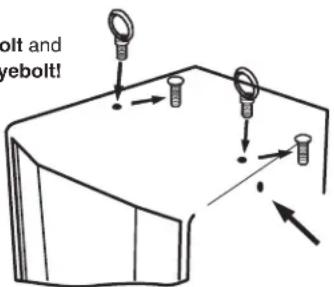
DO NOT Remove Flat-Head Bolts on the Side of Cabinet/s.
4. WORKING LOAD LIMITS
Specified working load limits have been determined for the enclosure as follows:
| EF10P | 2 Top, 2 Bottom, 2 Each Side, 1 Pullback (bottom) 8 | 14 -20 | weight of cabinet only | |
| EF12P+EF15P | 2 Top, 2 Bottom, 2 Each Side, 2 Pullback 8 x 14 -20 | weight of cabinet only | ||
| EF215P | 2 Top, 2 Bottom, 2 Each Side, 2 Pullback | 8 x 14 -20 | weight of cabinet only |

IMPORTANT!! READ ALL ENCLOSED INSTRUCTIONS ABOUT PROPER USE OF HARDWARE. TO INSURE PROPER INSTALLATION, FOR TECHNICAL INFORMATION ON SUSPENSION TECHNIQUES AND EXTERIOR ACCESSORY INFORMATION WE SUGGEST CALLING ATM FLY-WARES TECHNICAL SERVICES IN THE UNITED STATES AT (310)639-8282 MONDAY THROUGH FRIDAY FROM 9 AM TO 6 PM (PST) OR FAX AT (310)639-8284. YORKVILLE SOUND MAKES NO CLAIMS AS TO THE SAFETY OF THE ENCLOSURES IF RECOMMENDED LOAD LIMITS AND HARDWARE ARE NOT STRICTLY ADHERED TO. NOR DOES IT MAKE ANY SAFETY CLAIMS TO THE RESULTANT INSTALLATION.

IMPORTANT!! TRACK RAILINGS: UNITS THAT INCORPORATE THE TRACK RAILING SYSTEM HAVE THE SAME WORKING LOAD LIMITS AS THEY DO WHEN THEY ARE USED WITH EYEBOLTS. THESE RATINGS MAY BE LIMITED AND BASED ON THE RATINGS OF THE TRACK FITTINGS THEMSELVES. PLEASE ENSURE THAT THE RATING OF THE CERTIFIED TRACK FITTINGS EXCEEDS NECESSARY WORKING LOAD LIMITS.
EYEBOLT INSTALLATION

natural_image
Abstract diagram with two interlocking gears inside a square frame, enclosed by an oval (no text or symbols)1. DESCRIPTION
| EF10P | 2 Top, 2 Bottom, 2 Each Side, 1 Pullback (bottom) 8 x 1⁄4-20 | weight of cabinet only | ||
| EF12P+EF15P | 2 Top, 2 Bottom, 2 Each Side, 2 Pullback 8 x 1⁄4-20 | weight of cabinet only | ||
| EF215P | 2 Top, 2 Bottom, 2 Each Side, 2 Pullback | 8 x 1⁄4-20 | weight of cabinet only |

IMPORTANT!! LIRE TOUTE LA DOCUMENTATION INCLUSE AU SUJET DE L'UTILISATION APPROPRIÉ DE LA QUINCAILLERIE. POUR ASSURER UNE BONNE INSTALLATION, POUR OBTENIR DE L'INFORMATION TECHNIQUE SUR LES DIVERSES TECHNIQUES DE SUSPENSION ET POUR OBTENIR DE L'INFORMATION SUR LES ACCESOIRES EXTÉRIEURS NOUS VOUS SUGGÉRONS D'APPELER LE SERVICE TECHNIQUE DE ATM FLY-WARE AUX ETATS-UNIS AU (310)639-8282 DU LUNDI AU VENDREDI DE 9 AM À 6 PM (HSP) OU PAR FAX AU (310)639-8284. YORKVILLE SOUND NE GARANTIE PAS UNE UTILISATION SÉCURITAIRE DES ENCEINTES SI LES LIMITES DE CHARGE RECOMMANDÉES NE SONT PAS RESPECTÉES ET SI VOUS N'ADHÉREZ PAS STRICTEMENT À LA LISTE DE QUINCAILLERIE RECOMMANDÉE.

IMPORTANT!! RAILS DE MONTAGE (TRACK RAILLINGS): LES ENCEINTES INCORPORANT LE SYSTEME DE RAIL DE MONTAGE ONT LES MÊMES LIMITES DE CHARGE DE TRAVAIL QU'ILS SOIENT SUSPENDUS AVEC LE SYSTÈME DE RAIL OU AVEC LES BOULONS À OEIL. CES VALEURS ASSIGNÉES DE LIMITE DE CHARGE PEUVENT ÉTRES LIMITÉS ET BASÉS SUR LA VALEUR DE LIMITE DE CHARGE ASSIGNÉE AUX APPAREILLAGES DE RAIL (TRACK FITTINGS) ELLE-MÊMES. ASSUREZ-VOUS S.V.P. QUE LA VALEUR ASSIGNÉE DE LIMITE CHARGE DE TRAVAIL SUR LES APPAREILLAGES CERTIFIÉS DE RAIL (TRACK FITTINGS) EXÈDE LES LIMITES NÉCESSAIRES DE CHARGE DE TRAVAIL.
- WORLD HEADQUARTERS
- CANADA
- U.S.A.
- SERVICE MANUAL
- EF15P
- SMT Disclaimer
- IMPORTANT SAFETY INSTRUCTIONS
- Power Sources
- Hazards
- Power Cord
- Service
- WARNING
- élite EF15P
- Block Diagram for EF12P & EF15P (REV1)
- DESIGNED & MANUFACTURED BY YORKVILLE SOUND
- Block Diagram for EF10P, EF12P, EF15P (REV2) & EF215P
- PCB ASSEMBLY DOCUMENTATION
- SPECIAL PRODUCTION NOTES
- DESIGN HISTORY AND INFORMATION
- PCB HARDWARE
- PINOUT DIAGRAMS
- élite
- Powered EF-Series
- EYEBOLT INSTALLATION
- DESCRIPTION
- IMPORTANT!!
- REQUIRED TOOLS
- EYEBOLT INSTALLATION
- WORKING LOAD LIMITS
Brand : YORKVILLE
Model : Elite EF15P
Category : Loudspeaker