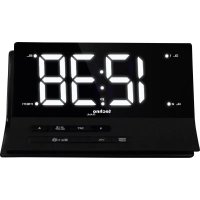
WT 482 - Alarm Clock TECHNOLINE - Free user manual and instructions
Find the device manual for free WT 482 TECHNOLINE in PDF.


| Product type | Clock radio |
| Brand | TECHNOLINE |
| Model | WT 482 |
| Power supply | AC/DC adapter (included), CR2032 backup battery (not included) |
| Backup battery | Lithium CR2032, maintains time and settings for about 3 days |
| Display | LED, brightness adjustment (LO/HI) and fine adjustment of low backlight |
| Time reception | Radio-controlled DCF (77.5 kHz) with automatic and manual reception |
| Time format | 12h/24h, selectable, with PM indicator |
| Time zone | Adjustable: -01 (GMT), 00 (GMT+1), 01 (GMT+2) |
| Alarms | 2 independent alarms (A1 and A2) |
| Alarm sources | Radio (FM) or buzzer |
| Alarm duration | 1 hour maximum |
| Snooze | Adjustable from 5 to 60 minutes (default 5 minutes) |
| FM radio | FM range, manual tuning and automatic search |
| Radio memory | 10 FM presets |
| Volume | Levels L01 (min) to L15 (max), adjustable |
| Sleep timer | Duration: 5, 15, 30, 45, 60, 75, 90 minutes or off |
| Antenna | FM antenna wire, fully extend for best reception |
| Approximate dimensions | Approximately 15 x 8 x 8 cm (estimated) |
| Approximate weight | Approximately 300 g (estimated) |
| Care and cleaning | Wipe with a soft, dry cloth. Do not use abrasive cleaners or solvents. |
| Safety | Use only indoors. Do not expose to moisture, shocks, or extreme temperatures. Do not open the casing. |
| Spare parts and repairability | AC adapter and backup battery replaceable. For any other repairs, contact customer service. |
| General information | Manual available in multiple languages. Comply with WEEE and battery recycling regulations. |
Frequently Asked Questions - WT 482 TECHNOLINE
User questions about WT 482 TECHNOLINE
0 question about this device. Answer the ones you know or ask your own.
Ask a new question about this device
Download the instructions for your Alarm Clock in PDF format for free! Find your manual WT 482 - TECHNOLINE and take your electronic device back in hand. On this page are published all the documents necessary for the use of your device. WT 482 by TECHNOLINE.
USER MANUAL WT 482 TECHNOLINE
Words in the figure:
| ENGLISH | German | |
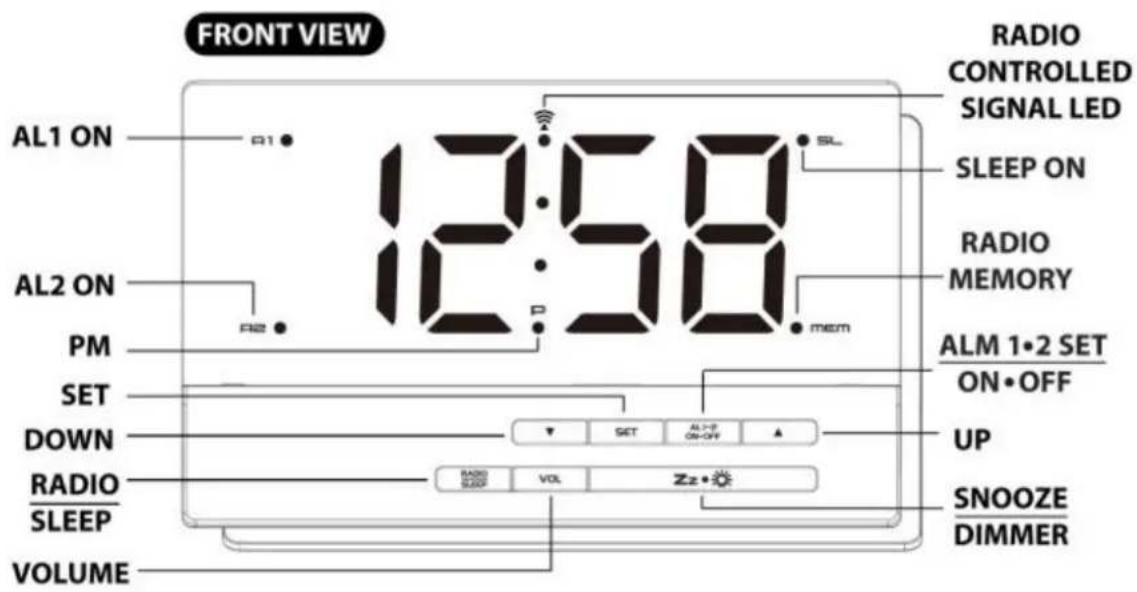
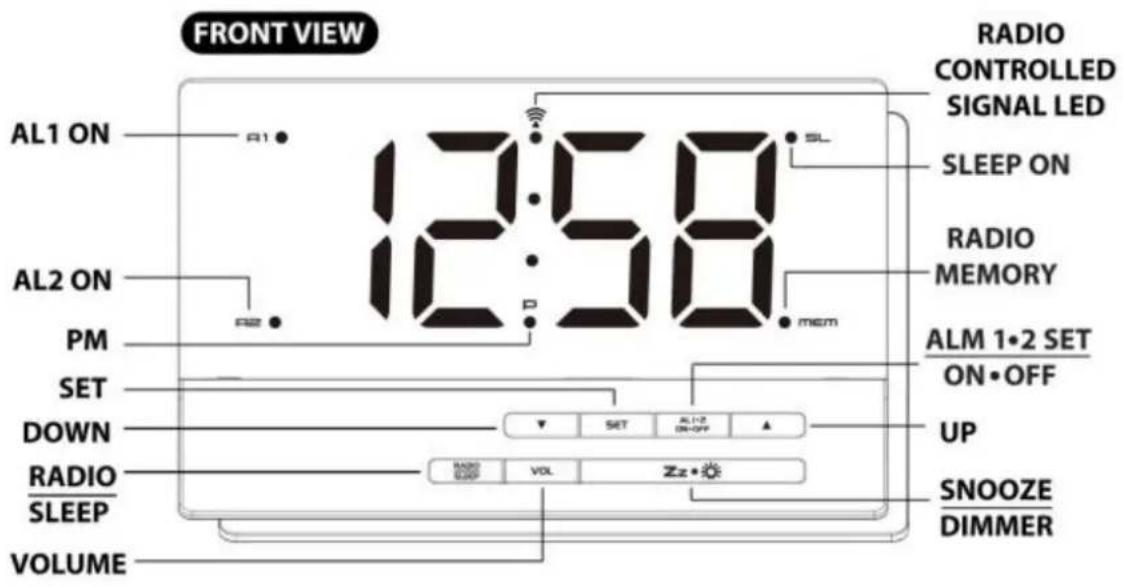
| FRONT VIEW | VORDERANSICHT | |
| Alarm 1 ON | Alarm 1 AN | |
| Alarm 2 ON | Alarm 2 AN | |
| PM | PM | |
| Set | Set | |
| Down | Runter | |
| Radio/ Sleep | Radio / Sleep | |
| Volume | Lautstärke | |
| Radio Controlled Signal LED | Funksignal-LED | |
| Sleep ON | Sleep ON | |
| Radio Memory | Radiospeicherung | |
| Alarm 1.2 Set/ On.Off | Alarm 1.2 Set/ On.Off | |
| Up | Hoch | |
| Snooze/ Dimmer | Snooze/ Dimmer | |
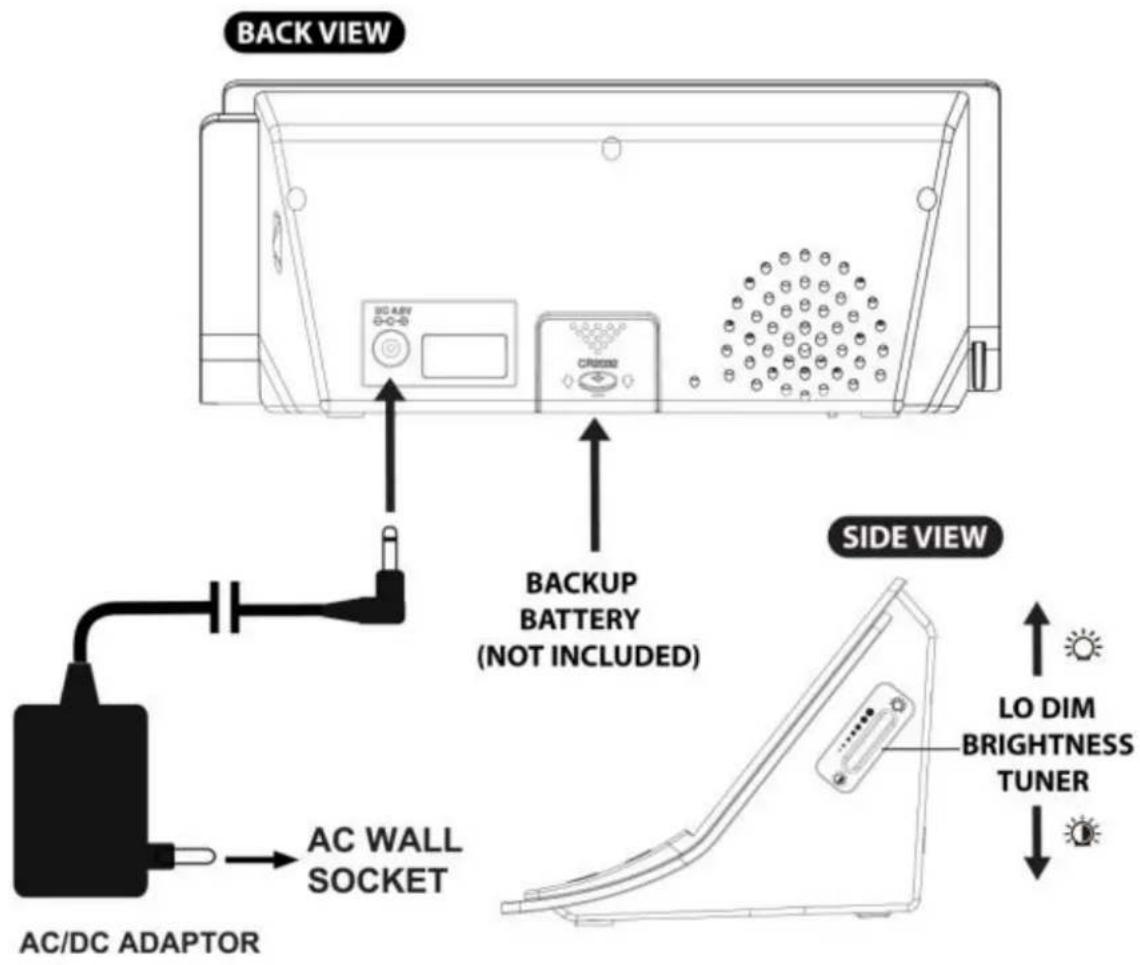
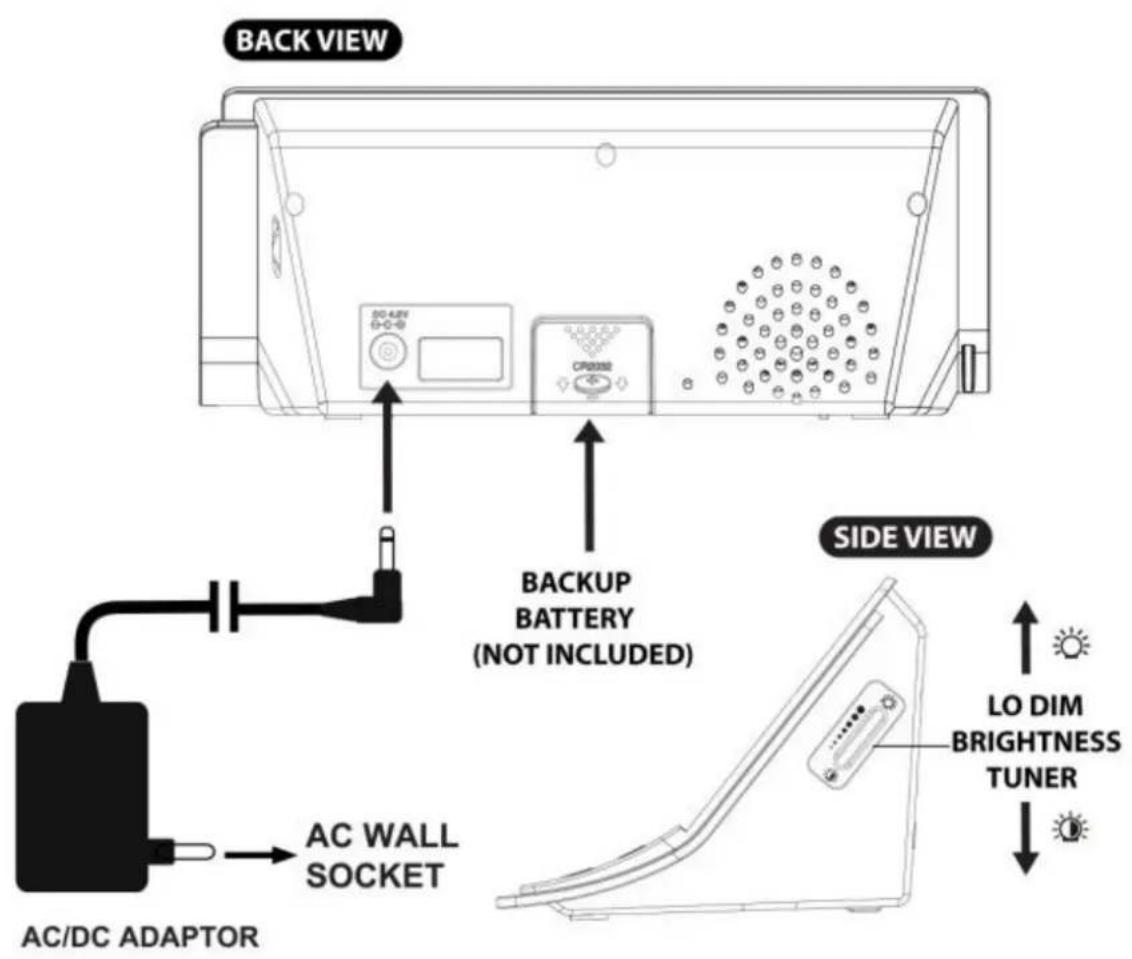
| SIDE VIEW | SEITENANSICHT | |
| Low dime brightness tuner | Helligkeitsdimmer | |
| BACK VIEW | RÜCKANSICHT | |
| Back up battery (not included) | Backup-Batterie (nicht enthalten) | |
| AC/ DC adaptor | Netzteil | |
| AC wall socket | Wandsteckdose |
INBETRIEBNAHME
LED DIGITAL FM CLOCK RADIO WITH DUAL ALARM
Words in the figure:
| ENGLISH | Other Language | |
| FRONT VIEW | ||
| Alarm 1 ON | ||
| Alarm 2 ON | ||
| PM | ||
| Set | ||
| Down | ||
| Radio/ Sleep | ||
| Volume | ||
| Radio Controlled Signal LED | ||
| Sleep ON | ||
| Radio Memory | ||
| Alarm 1.2 Set/ On.Off | ||
| Up | ||
| Snooze/ Dimmer | ||
| SIDE VIEW | ||
| Low dime brightness tuner | ||
| BACK VIEW | ||
| Back up battery (not included) | ||
| AC/ DC adaptor | ||
| AC wall socket |
- Place your unit face down on a flat surface.
- Slide and remove the battery cover at the bottom of your unit.
- Insert one new CR2032 lithium battery into the battery compartment with the “+” side facing up as indicated.
- Replace the battery cover.
If AC power is interrupted, the LED display will go off and both the radio and the alarm will not function. The backup battery will keep the time and all settings of your unit. Make sure a fresh CR2032 lithium battery is used. A fresh CR2032 battery could backup your clock continuously for around 3 days.
ENVIRONMENTAL RECEPTION EFFECTS
Your radio controlled clock radio obtains the accurate time with wireless technology. Same as all wireless devices, the receiving ability maybe affected by, but not limited to, the following circumstances:
● Long transmitting distance ● Nearby mountains and valleys - Among tall buildings ● Near railway, high voltage cable etc. ● Near freeway, airport, etc ● Near construction site ● Inside concrete buildings ● Near electrical appliances - Near computers and TV's ● Inside moving vehicles ● Near metallic structures
Place your clock at a location with optimal signal, i.e. close to a window and away from metal surfaces or electrical appliances.
DCF SIGNAL RECEPTION AND SIGNAL INDICATOR
After your clock is powered up, it starts to receive DCF signal. The icon flashes.
Receiving DCF signal (LED flashing) Successful Reception (LED becomes static) Failed Reception (LED disappears)
During reception, press ▼ / WAVE once will display reception mode and signal strength indication:-
When strong DCF signal is detected, display shows with 3 bars
When weak or no DCF signal is detected, display shows -00 -00
During reception, the signal strength may move from 1 bar to 2 bars to 3 bars. This is normal since the clock is detecting DCF signal and other signals in the air at the same time.
Press SET will return to the time display with LED flashing.
Successful reception or failed reception

LED becomes static on (stop blinking) when reception is successful
LED disappears when reception is failed
Automatic reception and Manual Reception
Your clock starts automatic reception everyday at 1:00, 2:00, and 3:00. If it fails to receive the DCF time signal at 3:00, it will start reception at 4:00. If it fails again, it will start reception at 5:00. If it fails again, it will start automatic reception at 1:00 again in the next day.
Manual reception: simply press and hold ▼ / WAVE, your clock starts manual reception. Press and hold ▼ WAVE to stop DCF reception.
When your clock radio is receiving the radio controlled time signal, the display will turn dimmer. It will resume to the brightness level which you originally selected after the radio controlled time reception is completed.
During RCC reception, LED becomes dim and all buttons do not function except the Zz ● 🌐 button.
SETTING TIME, 12/24HR TIME AND THE SNOOZE DURATION
- Press SET once, 00 flash, press ▼ / ▲ to set the time zone: -01 or 00 (default) or 01.
"00" = GMT + 1 hour (e.g. Germany)
"01" = GMT + 2 hours (e.g. Finland)
"-01" = GMT 00 hour (e.g. U.K.)
- Press SET again, the hour digits flash. Press ▲ or ▼ to set the current hour (hold to advance rapidly).
- Press SET again, the minute digits flash. Press ▲ or ▼ to set minutes. (hold to advance rapidly).
- Press SET again, the display shows "24Hr" and flashes. Press ▲ or ▼ to select "12Hr" or "24H" time format.
- Press SET again, the display shows "05" and flashes. Press ▲ or ▼ to select your snooze time from 5 to 60 minutes.
- Press SET again or if no key pressed for approx. 10 seconds to exit the setting mode.
Note: when 12-hour time format is selected, the PM LED will appear on the lower middle time display to indicate the afternoon time; there is no AM indicator.
SETTING THE ALARMS
- Press AL 1.2 / ON.OFF once, the A1 LED and the hour digits flash. Press ▲ or ▼ to set the Alarm 1's hours. (hold to advance rapidly).
- Press AL 1.2/ ON.OFF again to adjust minutes. Press ▲ or ▼ to set the Alarm 1's minutes. (hold to advance rapidly).
- Press AL 1.2/ ON.OFF again, LED displays "OFF" (alarm off). To select wake to sound sources, press ▲ or ▼ to select :-
rd = wake-by-radio
bu = wake-by-buzzer
OFF = alarm off
- Press AL 1.2/ ON.OFF again, the A2 LED and the hour digits flash. Press ▲ or ▼ to set the Alarm 2's hours. Repeat step 2 and 3 above to set alarm 2.
- Press AL 1.2/ ON.OFF again or no button around 10 seconds to exit alarm setting mode. When wake-by-radio or wake-by-buzzer is selected, the related alarm is turned on, indicated by appearance of the A1 and / or the A2 LED on the left side of the display.
Note: Alarm function just operates at AC mode only.
STOPPING AND RESETTING THE ALARM TO COME ON THE NEXT DAY
When alarm 1 or 2 is sounding, the related A1 or A2 LED flashes. Press the RADIO/ SLEEP or AL 1.2/ ON.OFF once to stop the alarm and reset it to come on the following day. After that A1 or A2 icon keep lighting up on the display.
SNOOZE OPERATION (default snooze duration is 5 minutes)
When alarm is sounding, press once, be alarm will be silenced and come on again after the set snooze duration.
Note: if your second alarm activates while the first alarm is sounding or it is in the snooze mode, the second alarm overrides the first alarm (the first alarm is reset to come on the next day).
USING THE HI-LO DIMMER
Press to adjust the brightness (LO / HI) of the LED display. This can only be done when the radio is off.
ADJUSTABLE LO DIM LED BRIGHTNESS
When LO dim brightness is selected by pressing Zz • once, turn the knob at the right side to adjust your desired LO dim LED brightness. Rotate downwards to reduce and upwards to increase the Lo dim brightness. Note: HI LED brightness is not adjustable.
SETTING UP THE FM ANTENNA
Extend the FM wire antenna fully and vary the direction for best FM reception. Do not strip, alter or attach to other antennas.
LISTENING TO THE FM RADIO
- To turn on the radio, press RADIO/SLEEP once, the display shows "ON" and then the radio frequency readings in MHz.
- Press ▲ / ▼ to tune the radio to a desired station. Press and hold ▲ / ▼ to scan for the next clear station.
- To adjust the volume, press VOL once, the display shows "L10", press ▲ / ▼ to adjust volume from L01 (minimum) to L15 (maximum).
- Press to turn off the radio.
Remark: keep your radio away from fluorescent lamps or other electronic devices, which may cause interference to the radio.
USING THE PRESET MEMORY
This clock radio features a total of 10 preset memories of FM stations. These allow you to preset your favorite stations and access them quickly.
- Turn on the radio and select a radio station you like to memorize.
- Press and hold the SET until "MEM" LED appears and "01" flashes. Press SET once to store Memory 1.
- Press ▲ or ▼ to select another station you like to memorize. Then press and hold SET until "MEM" LED appears and "01" flashes. Press ▲ once, "02" appears. Press SET once to store Memory 02.
- Repeat Step 2 to 3 to preset memories 3 through 10.
- To access a preset station at any time, press the SET one at a time while the radio is on.
- To edit a preset station, select another station and then repeat Steps 2 to 4. This overrides the original settings.
USING THE SLEEP TIMER
- At normal time display mode, press the RADIO/SLEEP twice to enter the sleep mode. The SL LED appears and the sleep time "05" (5 minutes) flashes on the display.
- Press the RADIO/SLEEP again as needed to adjust the sleep timer from 5, 15, 30, 45, 60, 75, 90 or OFF.
- When the display changes back to show the time, press the RADIO/SLEEP twice to show the sleep time remaining.
- The radio will play for the programmed sleep time and then shut off.
- To turn off the radio before the sleep time has elapsed, press once.
TROUBLESHOOTING
If your clock displays irrelevant time or does not function properly, which may be caused by electrostatic discharge or other interference, unplug the DC jack to disconnect the AC power (and remove the backup battery). The clock radio will be reset to default settings and you need to set it again.
PRECAUTIONS
- This main unit is intended to be used only indoors.
- Do not subject the unit to excessive force or shock.
- Do not expose the unit to extreme temperatures, direct sunlight, dust or humidity.
- Do not immerse in water.
- Avoid contact with any corrosive materials.
- Do not dispose of this unit in a fire as it may explode.
- Do not open the inner back case or tamper with any components of this unit.
BATTERY SAFETY WARNINGS
- Use only alkaline batteries, not rechargeable batteries. Install batteries correctly by matching the polarities (+/-).
- Always replace a complete set of batteries.
- Never mix used and new batteries.
- Remove exhausted batteries immediately.
- Remove batteries when not in use.
- Do not recharge and do not dispose of batteries in fire as the batteries may explode.
- Ensure batteries are stored away from metal objects as contact may cause a short circuit.
- Avoid exposing batteries to extreme temperature or humidity or direct sunlight.
- Keep all batteries out of reach from children. They are a choking hazard.
SPECIFICATIONS
Alarm duration 1 hour
Snooze duration 5 to 60 minutes
Sleep timer selections 5, 15, 30, 45, 60, 75, 90 minutes to OFF
Volume L01 (minimum) to L15 (maximum)
Preset Memories of radio 10
Default settings:-
Time format 24 hour
Time 0:00
Alarm 1 and 2 0:00
Volume L10 (Level 10)
Snooze duration 05 (5 minutes)
Use the product only for its intended purpose!
Consideration of duty according to the battery law
Old batteries do not belong to domestic waste because they could cause damages of health and environment. You can return used batteries free of charge to your dealer and collection points.
As end-user you are committed by law to bring back needed batteries to distributors and other
collecting points!
Consideration of duty according to the law of electrical devices

This symbol means that you must dispose of electrical devices separated from the General household waste when it reaches the end of its useful life. Take your unit to your local waste collection point or recycling centre. This applies to all countries of the European Union, and to other European countries with a separate waste collection system.
USER GUIDE FOR WT 482
FM RADIO ALARM CLOCK WITH LED DISPLAY AND DUAL ALARM
Words in the figure:
Words in the figure:
Words in the figure:
| ENGLISH | Spanish |
| FRONT VIEW | VISTA FRONTAL |
| Alarm 1 ON | Alarma 1 CONECTADA |
| Alarm 2 ON | Alarma 2 CONECTADA |
| PM | PM |
| Set | Fijar |
| Down | Abajo |
| Radio/Sleep | Radio/Retardo |
| Volume | Volumen |
| Radio Controlled Signal LED | LED por señal por radio control |
| Sleep ON | Retardo CONECTADO |
| Radio Memory | Memoria de la radio |
| Alarm 1.2 Set/On.Off | Alarma 1•2Fijar/Conectada•Desconectada |
| Up | Arriba |
| Snooze/Dimmer | Retardo/Atenuador |
| SIDE VIEW | VISTA LATERAL |
| Low dime brightness tuner | Sintonizador de brillo tenue bajo |
| BACK VIEW | VISTA POSTERIOR |
| Back up battery (not included) | Batería de soporte (no incluida) |
| AC/DC adaptor | Adaptador CA/CC |
| AC wall socket | Toma de pared CA |
INSTALLATION
Words in the figure:
| ENGLISH | Dutch |
| FRONT VIEW | VOORAANZICHT |
| Alarm 1 ON | Alarm 1 AAN |
| Alarm 2 ON | Alarm 2 AAN |
| PM | PM |
| Set | Instellen |
| Down | Omlaag |
| Radio/Sleep | Radio/Slapen |
| Volume | Volume |
| Radio Controlled Signal LED | Radiogestuurde signaalaanduiding |
| Sleep ON | Slapen AAN |
| Radio Memory | Geheugen radio |
| Alarm 1.2 Set/On.Off | Alarm 1•2 instellen/aan•uit |
| Up | Omhoog |
| Snooze/Dimmer | Sluimer/dimmer |
| SIDE VIEW | ZIJAANZICHT |
| Low dime brightness tuner | Dimmer helderheid tuner |
| BACK VIEW | ACHTERAANZICHT |
| Back up battery (not included) | Back-upbatterij (niet inbegrepen) |
| AC/DC adaptor | Lichtnetadapter |
| AC wall socket | Stopcontact |
INSTALLATION
Words in the figure:
Words in the figure:
- INBETRIEBNAHME
- LED DIGITAL FM CLOCK RADIO WITH DUAL ALARM
- ENVIRONMENTAL RECEPTION EFFECTS
- DCF SIGNAL RECEPTION AND SIGNAL INDICATOR
- SUCCESSFUL RECEPTION OR FAILED RECEPTION
- AUTOMATIC RECEPTION AND MANUAL RECEPTION
- SETTING TIME, 12/24HR TIME AND THE SNOOZE DURATION
- SETTING THE ALARMS
- STOPPING AND RESETTING THE ALARM TO COME ON THE NEXT DAY
- SNOOZE OPERATION (DEFAULT SNOOZE DURATION IS 5 MINUTES)
- USING THE HI-LO DIMMER
- ADJUSTABLE LO DIM LED BRIGHTNESS
- SETTING UP THE FM ANTENNA
- LISTENING TO THE FM RADIO
- USING THE PRESET MEMORY
- USING THE SLEEP TIMER
- TROUBLESHOOTING
- PRECAUTIONS
- BATTERY SAFETY WARNINGS
- SPECIFICATIONS
- CONSIDERATION OF DUTY ACCORDING TO THE BATTERY LAW
- CONSIDERATION OF DUTY ACCORDING TO THE LAW OF ELECTRICAL DEVICES
- USER GUIDE FOR WT 482
- FM RADIO ALARM CLOCK WITH LED DISPLAY AND DUAL ALARM
- INSTALLATION
Brand : TECHNOLINE
Model : WT 482
Category : Alarm Clock