DF20K - Surveillance Camera Pentatech - Free user manual and instructions
Find the device manual for free DF20K Pentatech in PDF.


| Product type | Additional digital wireless surveillance camera |
| Brand | Pentatech |
| Model | DF20K |
| Dimensions (without antenna) | 92 x 42 mm |
| Power supply | 5 V DC, 1.0 A adapter |
| Power consumption | 340 mA |
| Image sensor | 1/10" CMOS |
| Horizontal viewing angle | Approximately 39° |
| Light sensitivity (without IR) | 1 to 8 lux |
| Infrared illumination | 9 infrared LED diodes |
| Night range (IR) | 3 m |
| Built-in microphone | Yes |
| Protection rating | IP66 |
| Operating temperature | -10 °C to +40 °C |
| Transmission frequency | 2.4 GHz (frequency hopping) |
| Max radio range (line of sight) | Up to 100 m (150 m under optimal conditions) |
| Number of channels | 4 |
| Usage | Indoor and outdoor (protected mounting) |
| Main functions | Digital wireless transmission, infrared night vision, pairing with monitor, twilight detection |
| Maintenance | Clean with a soft, slightly damp cloth after disconnecting; do not open |
| Included parts | Camera, antenna, adapter, bracket, mounting hardware, manual |
| Safety | Adapter to be connected to mains 230 V ~ 50 Hz; keep out of reach of children; protect from moisture |
Frequently Asked Questions - DF20K Pentatech
User questions about DF20K Pentatech
0 question about this device. Answer the ones you know or ask your own.
Ask a new question about this device
Download the instructions for your Surveillance Camera in PDF format for free! Find your manual DF20K - Pentatech and take your electronic device back in hand. On this page are published all the documents necessary for the use of your device. DF20K by Pentatech.
USER MANUAL DF20K Pentatech
GB Additional Digital Wireless Observation Camera
Operating instructions page 12
natural_image
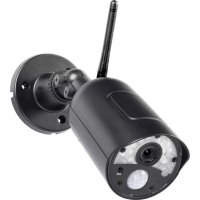
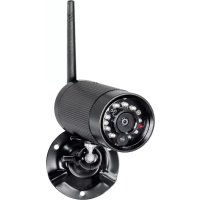
Close-up of a black cylindrical device with LED array and antenna, mounted on a circular base (no visible text or symbols)1. Einleitung
natural_image
Two black industrial sensors labeled I and II, shown from different angles (no text or symbols on the devices themselves)Read through these operating instructions fully and carefully. The operating instructions belong to this product and contain important points concerning bringing the appliance into service and ist operation. Also read the operating instructions of the basic set.
Always pay attention to all safety instructions. Should you have any questions or be unsure about operating the appliance ask a specialist. Keep these instructions in a safe place and should the need arise pass them on to a third party.
2. Proper use
The digital wireless camera set consists of the camera DF20K and the mains adaptor. The additional camera is an optional accessory for DF25 Set, DF25A Set, DF15 Set and DF15A Set. It is to be used for the surveillance of rooms, entrance hallways, driveways etc. through video pictures and sound. The video and audio transmission is wireless using a frequency of 2.4GHz.
The power for the DF20K is supplied through the supplied mains adapter connectedtoa230VAC,50Hzmainssupply.
If there is sufficient light a colour picture will be transmitted. At low ambient light levels the integrated Infrared LEDs are automatically switched on. In this case the immediate area (max. 3 m) will be illuminated and the video picture switches to black and white mode for improved light sensitivity. Due to the sensitivity to infrared light some colours may vary on the camera picture. If the surveillance is specifically required in a dark environment, then additional lightingshouldbeinstalled.
Upto fourwirelesscameras DF20KA can be used with anemonitor. The camera channels can be manually selected or automatically displayed in sequence if the scan mode is selected. The camera pictures can also be observed simultaneously in quad-splitscreenmode.
The wireless transmission is digital and on constantly changing frequencies (frequency hopping) which are synchronised between the camera and the monitor. Only thereceiver which has been "paired" with the cameracan receive the synchronised signals. This security feature prevents access of the camera signal by third parties.
The camera is weatherproof (Protection class IP66) and can be used not only indoors but also form mounting outside. Wherever possible it should be protected from direct rainfall. The receiver and both mains adapters are for indoor use only and must be protected from moisture. The set is for use in private households. A video surveillance system does not replace your duty of care or supervision. Observe the regulations concerning video surveillance in commercial and public areas.
Any other use or modification of the device is not authorised. Noliability will be accepted for consequential damages or for damages caused by improper use or incorrect operation. No liability will be accepted for consequential damages caused by any function or by malfunction. Unless any liability is specifically required by law, claims for damages, in particular those for personal injury or property damage caused by non-functioning or malfunctioning of the machine, are excluded.
This appliance is not intended to be used by people (including children) with restricted physical, sensory or mental capacities, or a lack of experience and/or knowledge, unless they are supervised by, or receive instructions show to set the appliance from person responsible for their safety.
6. Safetyinstructions
The following instructions are provided for your safety and satisfaction during operation of the device. Note that non-observance of these safety instructions results in significant risks of accident.

Danger! If this point is not heeded life and health is endangered.
- Do not leave small children unsupervised with the device, packaging material or small parts. Otherwise there is a risk of fatal injury due to choking or suffocation.
- Do not damage any gas, electricity, water or telecommunication lines during drilling and fixing work. Otherwise there are dangers of fire, personal and fatal injury.
- Treat the cables carefully. Lay these so that they cannot be damaged and do not present any tripping hazard. Otherwise there are dangers of fire, personal and fatal injury.
- If you use the device for monitoring babies or small children ensure that the camera and cable are out of reach of children. Otherwise there is a risk to life and limb!
- Do not pull the cables over sharp edges and do not crush or crimp them elsewhere. Otherwise there are dangers of fire, personal and fatal injury.
- Prevent the device from coming into contact with moisture and do not submerge in water. Otherwise there is a danger of fatal injury.
- Only operate the device from the supplied power supply. Before connecting the power supply to the mains, ensure that the mains current complies with 230 V \~, 50 Hz and is fitted with a fuse according to regulations. Otherwise there are dangers of fire and fatal injury.

Attention! Non-observance of these instructions puts property at risk of damage.
- Protect the equipment and the cables against strong magnetic or electrical fields and against strong mechanical loads and vibrations.
- Do not place the equipment near fire, heat or in areas of high temperature.
- Only use the equipment with the supplied original parts or original accessories.
- Do not connect any damaged device (e.g. damage in transit). Repairs to the equipment must only be performed by specialists.
- Remove the mains adapter from the mains outlet when the device is not required for a longer time.
7. Location of the camera
Before mounting the camera check the wireless reception from the desired location.
Observe the following points:
- Position the camera so that no direct light or sunshine falls on the lens otherwise the picture may become overexposed. Remember that the position of the sun changes. Check the camera image before mounting. Provisionally connect and commission the device and hold the camera in the desired position. If necessary, change the camera position until you have found the desired view.
-
Select the distance between the camera and the subject according to the level of detail desired.
-
The camera has infrared illumination [3] for the close range. This is activated by the daylight sensor [14]. You can improve the quality of the image at night by using additional illumination. Please note that light coloured objects close to the camera will reflect the infrared light and may give overexposed picture.
- If you want to install the camera outdoors, then protect the camera against direct rainfall if possible. The mains adapter must be in a dry location. The connection between camera and mains adapter cable must be protected against moisture.
- Ensure that there is a possible cable routing at the installation location.
- The maximum range of the wireless signal is approx. 100 m (and up to 150 m in optimal conditions) with line of sight contact between camera and monitor. Within buildings the range is greatly reduced by walls and floors, in particular those made of steel reinforced concrete, to a maximum of 20 m. Metal housings, shelves and mirrors also block the wireless signal.
- The wireless transmission can also be affected by strong electric fields and other wireless equipment. Ensure an adequate distance of the camera and receiver to microwave ovens, cordless phones, mobile phones, wireless devices in the 2.4 Ghz frequency band, electric motors and high voltage devices or power cables.
8. Installation and connection of the camera
The camera can be wall or ceilingmounted .(s. fig. B: I and II)
- For wall or ceiling installationmountthebracket[7]at a suitable location usingthescrews[17]andifnecessarythewallplugs[16]provided.
- Screw the bracket into the appropriate threaded hole in the camera housing.
- Adjust the angle of the camera to give the required view and then tighten the triangular nut[5]andthewingscrew[6].
- Screw the antenna [15] into the antenna connection [9] so that the antennaisinanuprightposition.
- ConnecttheDC-plugofthemainsadapter cable [12] to the mainsadapter connection[11]ofthecameracable.
- Connectthemainsadapterwithasuitablemainsoutlet.
• ThePOWERLED[2]lightsred.
9. Connectionpairing
The additional camera and the monitor DF25M must be paired with each other to establish the wireless connection. The camera delivered in the DF25 Set is already paired with the monitor on channel 1. In order to connect an additional cameratothemonitor (maximum3 additional cameras) proceeds as follows:
- OpentheOSDmenubypressingthemenubutton.
- Select"Pairing"usingthedirectionbuttons.
- ConfirmusingtheOKbutton.
- Selectthedesiredchannelusingthedirectionbuttons.
- ConfirmusingtheOKbutton.
- Pressthepairingbutton[10]ofthecamerawithin60seconds.
10. Maintenance and cleaning
- The products are maintenance-free: do not open the housings
- Check the safety and function regularly
- Remove the mains adapters from the mains sockets before cleaning
- Use a soft, slightly moist cloth or brush to clean the surfaces
11. Disposal

Packaging material or electrical products must not be disposed of as household waste. Use your recycling system. Details are available from your local authority.
12. DiedplidtechEdf conformity
CE Ⓘ
Hereby, INDEXA GmbH declares that the radio equipment type DF20K is in compliance with Directive 2014/53/EU. The full text of the EU declaration of conformity is available at the following internet address: http://www.pentatech.de/de/downloads/cat_view/13-ce-erklaerungen.html.
This product can be used in the following countries: