477 - Odometer Testo - Free user manual and instructions
Find the device manual for free 477 Testo in PDF.



User questions about 477 Testo
0 question about this device. Answer the ones you know or ask your own.
Ask a new question about this device
Download the instructions for your Odometer in PDF format for free! Find your manual 477 - Testo and take your electronic device back in hand. On this page are published all the documents necessary for the use of your device. 477 by Testo.
USER MANUAL 477 Testo
testo 477·LED Handstroboskop
Bedienungsanleitung
testo 477 · LED hand stroboscope
Instruction manual
testo 477 · Stroboscope portatif DEL
Mode d'emploi
German 3
English 25
French 47
Spanish 69
1 Inhalt
- 0 = positive Flanke
- 1 = negative Flanke
6.1.2. Werksreset
LED hand stroboscope
Instruction manual
1 Contents
1 Contents 25
2 Safety and the environment. 26
2.1. About this document 26
2.2. Ensure safety. 27
2.3. Protecting the environment 28
3 Specifications 29
3.1.Use 29
3.2. Scope of delivery 29
3.3. Technical data 30
4 Product description. 32
4.1. Overview 32
4.2.Status displays 33
5 First steps 33
5.1. Commissioning 33
5.1.1. Inserting batteries/rechargeable batteries 33
5.1.2. Switching the instrument on 34
5.1.3. Connecting the trigger cable 34
6 Using the product 35
6.1. Performing settings 35
6.1.1. Setting options 36
6.1.2. Factory reset 37
6.1.3.Key lock 37
6.1.4. Internal/external trigger signal 37
7 Application information 38
7.1. General application information 38
7.1.1. Slowing down motion 38
7.1.2. Apparent direction of movement 38
7.1.3.Harmonics 39
7.1.4. Determining an object's true RPM 39
7.2. Instructions for use for the special functions of the instrument.....42
8 Maintaining the product 43
8.1. Changing batteries/rechargeable batteries 43
2 Safety and the environment
2.1. About this document
Use
Please read this documentation through carefully and familiarize yourself with the product before putting it to use. Pay particular attention to the safety instructions and warning advice in order to prevent injuries and damage to the products.
Keep this document to hand so that you can refer to it when necessary.
Hand this documentation on to any subsequent users of the product.
Symbols and writing standards
| Representation | Explanation |
| ! | Warning advice, risk level according to the signal word:Warning! Serious physical injury may occur. Caution! Slight physical injury or damage to the equipment may occur. > Implement the specified precautionary measures. |
| i | Note: Basic or further information. |
| 1. ... | Action: more steps, the sequence must be followed. |
| 2. ... | |
| > Action: a step or an optional step. | |
| - Result of an action. | |
| Menu Elements of the instrument, the instrument display or the program interface. | |
| [OK] Control keys of the instrument or buttons of the program interface. | |
| ... | ... Functions/paths within a menu. | |
| “...” | Example entries |
2.2. Ensure safety
Only operate the product properly, for its intended purpose and within the parameters specified in the technical data. Do not use any force.
WARNING
Danger of injury!
Use of stroboscopes may trigger epileptic seizures in people susceptible to these.
WARNING
Danger of injury!
Do not touch observed machines/objects.
WARNING
Danger of injury!
Do not look into the LED beam and never point the beam at people or animals.
Never point the LED beam at mirrors or other reflective surfaces. The beam, deflected uncontrollably, could hit people or animals.
CAUTION
Loss of the warranty claim!
Do not open instrument. There are no parts in the instrument that can be maintained by the user.
CAUTION
Damage to equipment!
If the instrument is not used for a longer period, remove all batteries/rechargeable batteries from the instrument.
2.3. Protecting the environment
Dispose of faulty rechargeable batteries/spent batteries in accordance with the valid legal specifications.
At the end of its useful life, send the product to the separate collection for electric and electronic devices (observe local regulations) or return the product to Testo for disposal.
3 Specifications
3.1. Use
The testo 477 can be used in many areas of industry, research & development, in laboratories and universities.
Normally, the testo 477 is used when the aim is to show fast-moving objects in slow motion. In this case, you can analyze their movement securely and smoothly, check for proper procedures and determine undesirable sources of vibrations etc.
You can also use the testo 477 to seemingly "freeze" the movement of an object. Without making contact with the object, you can precisely determine its rotational speed or the frequency of shifts in direction.
Compared to other portable stroboscopes, the testo 477 LED stroboscope can be operated with just one hand.
Customary uses/applications:
- High-speed assembly lines, feed systems, filling systems etc.
- Presses and looms
- Motors, fans, pumps and turbines
- Calibration and test instruments
Monitoring laboratory and research facilities
3.2. Scope of delivery
The testo 477 is delivered with the following accessories:
- testo 477 LED stroboscope
- Cable with connector for external trigger signals
Case
Instruction manual - Calibration report
- 6 batteries (AA)
3.3. Technical data
| General parameters | |
| Protection class IP 65 | |
| Frequency range 30 | -300,000 FPM (flashes per minute) |
| Display | LCD, multiline |
| Accuracy 0.02% (+/-1 digit) | |
| Resolution +/-0.1 (30 to 999 FPM) | +/-1 (1000 to 300,000 FPM) |
| Flash parameters | |
| Flash duration adjustable | |
| Flash strength 1500 | lux @ 6000 FPM/20 cm |
| Flash colour approx. | 6500 K |
| Voltage supply | |
| Voltage supply | 3 x AA batteries or 3 x NiMH rechargeable batteries (AA) |
| Operating time (depending on settings) | NiMH rechargeable battery: approx. 11 h @ 6000 FPM Batteries: approx. 5 h @ 6000 FPM |
| Housing | |
| Material | Aluminium |
| Dimensions 191 x 8 | 2 x 60 mm |
| Weight approx. 400 | g (with batteries) |
| Ambient conditions | |
| Temperature 0 to 45 °C | |
| Humidity Protection | class IP 65 |
| Trigger input | |
| Principle | Optocoupler |
| Low level < 1 V | |
| Level 3 to 32 V (square wave voltage), NPN+PNP | |
| Minimum pulse length | 50 μs |
| Reverse voltage protection | Yes |
| Trigger output | |
| Principle | Short-circuit and overvoltage-proof transistor output |
| Level NPN, max. 32 | V |
| Pulse length adjustable | |
| Maximum power 50 | mA |
| Reverse voltage protection | Yes |
| Warranty | |
| Warranty period 2 years | |
| Warranty conditions | see website www.testo.com/warranty |
4 Product description
4.1. Overview
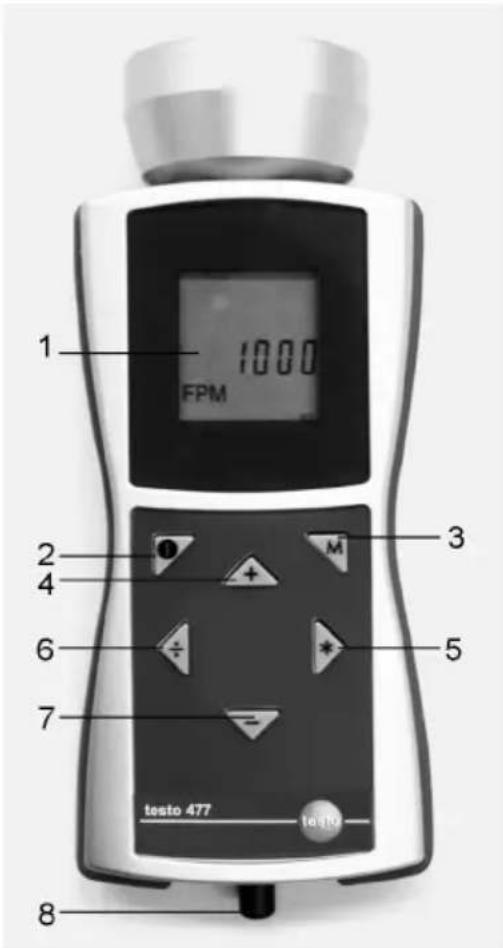
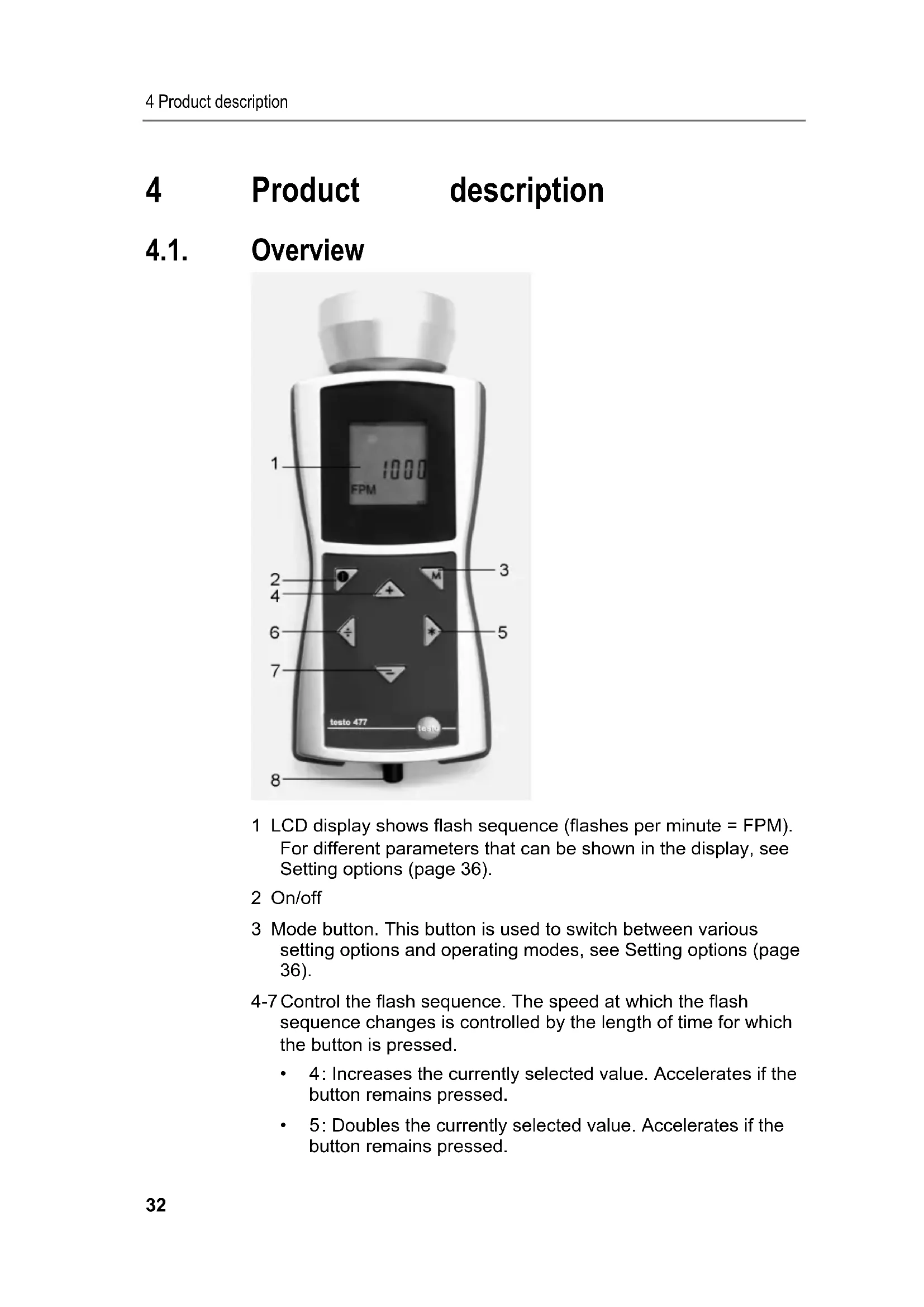
1 LCD display shows flash sequence (flashes per minute = FPM). For different parameters that can be shown in the display, see Setting options (page 36).
2 On/off
3 Mode button. This button is used to switch between various setting options and operating modes, see Setting options (page 36).
4-7 Control the flash sequence. The speed at which the flash sequence changes is controlled by the length of time for which the button is pressed.
- 4: Increases the currently selected value. Accelerates if the button remains pressed.
-
5: Doubles the currently selected value. Accelerates if the button remains pressed.
-
6: Halves the currently selected value. Accelerates if the button remains pressed.
- 7: Decreases the currently selected value. Accelerates if the button remains pressed.
8 The trigger signal input socket is used if an external trigger (e.g. rotational speed sensor) is used to control the flash sequence.
4.2. Status displays
The following status displays may appear in the lowest line in the display:
- LOBAT: lights up if the rechargeable battery must be charged again or the battery must be exchanged.
- INT: lights up when the flashing frequency is generated by the instrument. The units are displayed with FPM as standard.
- EXT: lights up upon switching to an external trigger signal. The units are displayed as standard with 1/min (revolutions per minute).
- RANGE: lights up when the external trigger signal causes a flashing frequency that is too high.
5 First steps
5.1. Commissioning
5.1.1. Inserting batteries/rechargeable batteries
i Only operate and store instrument with battery compartment cover.
If the instrument is not used for a longer period, remove all batteries/rechargeable batteries from the instrument.
Incompletely charged batteries/rechargeable batteries reduce the operating time.
- Loosen screws on the bottom of the instrument.
2 Remove battery compartment cover. - Insert batteries (AA)/NiMH rechargeable batteries (AA) (observe the polarity!)
- Close the battery compartment cover.
- Tighten screws.
5.1.2. Switching the instrument on
Batteries/rechargeable batteries are installed.
1. Aim testo 477 at the moving object.
2 Press ( ) for approx. 3 s.
- A display test is performed.
-
testo 477 flashes with the value set at the factory.
-
Press the [+] , [] , [÷] or [-] buttons to set the flash sequence until the object appears to be motionless (when nearing the movement frequency, the object appears to move slower).
-
The value is shown in the LCD display.
Unit: "flashes per minute (FPM)" = rpm.
To obtain the unit "flashes per second" = 1/s = Hz: see
Setting options (page 36).

Motionless images do not only appear when the movement frequency is reached, but also when a multiple or fraction of the movement frequency is reached.
For more information on the visual slowing down of the movement of an object as well as the use of youresto 477 as a rev counter can be found under Instructions for use for the special functions of the instrument (page 42).
5.1.3. Connecting the trigger cable
CAUTION
Damage to equipment!
Do not trigger the instrument with signals greater than 300,000 FPM.

For trigger signal connection, only use the original material from the manufacturer.
The trigger input is designed to be potential-free. The potential-free input is suitable for PNP and NPN signals.
- Remove protection cap from the trigger socket.
- Insert connector of trigger cable into the trigger socket.
- Screw on connector of trigger cable.
- Connect trigger cable according to the terminal diagram.
Terminal diagram
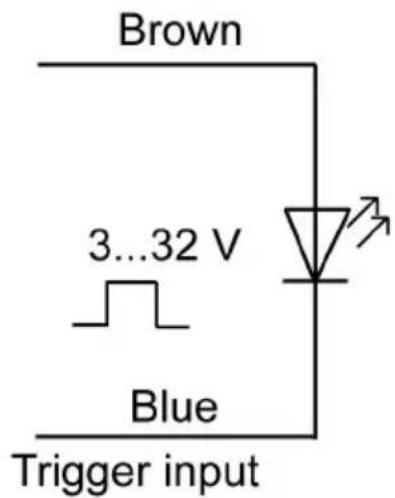
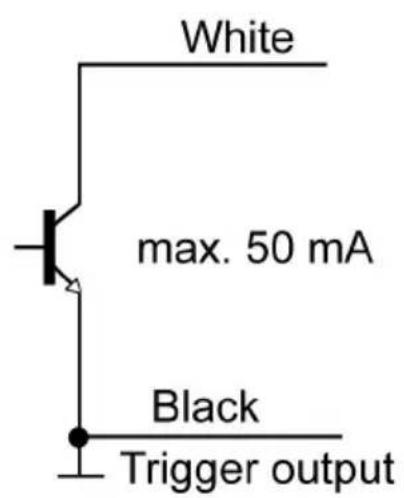

The instrument must be manually switched between the external and internal trigger signal, see Internal/external trigger signal (page 37).
6 Using the product
6.1. Performing settings
The instrument is switched on.
- Press [M].
Setting option (e.g. Hz) is shown (for settings, see following section Setting options).
-
Set values with [+ , [] , [÷] or [-] and confirm entry with [M].
-
Instrument changes to the next setting option.

A parameter set differently than the factory setting flashes during operation.
- Repeat steps 1-2 until the desired settings are performed.
-
Press [O].
-
Instrument returns to Measuring Mode.
6.1.1. Setting options
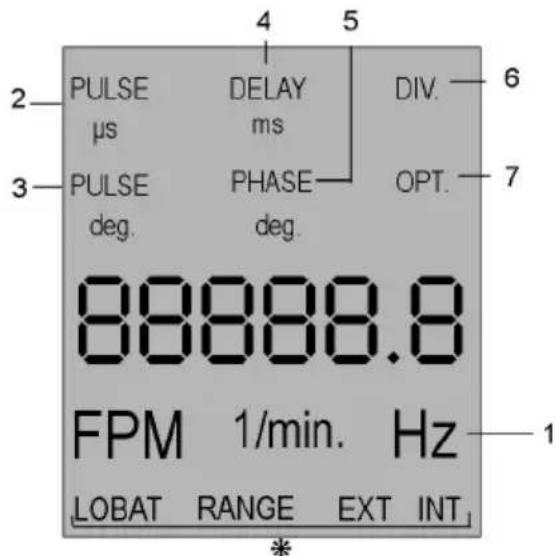
- For status displays see Status displays (page 33).

All setting options in the display are shown in the image.
The numbering corresponds to the sequence in which they succeed one another by pressing the [M] button.

A parameter set differently than the factory setting flashes during operation.
1 Hz: Frequency of the movement per second (flashes per second).
2 PULS s : On-time of the flash (in microseconds).
3 PULS deg: On-time of the flash (in degrees).
4 DELAY ms: Setting of the delay time (in milliseconds) between the internal or external trigger signal and the flash.
5 PHASE deg: Setting of the phase shift (in degrees, relative to frequency) between the internal or external trigger signal and the flash.
6 DIV (only with external trigger signal): Pulse divider, max. value 255.
7 OPT (only with external trigger signal): Edge selection of the trigger signal. With this option, the polarity of the trigger signal can be defined.
The instrument is switched on.
- Press [M] + [-].
- Instrument is reset to the factory settings.
- Instrument returns to Measuring Mode.
6.1.3. Key lock
The instrument is switched on.
- Press [O] + [-].
- Key lock is activated.
- Press [ ] + [-]
- Key lock is deactivated.
6.1.4. Internal/external trigger signal

The instrument is set to an internal trigger signal at the factory.
The instrument is switched on.
- When switching to an external trigger signal: Trigger cable is connected, see Connecting the trigger cable (page 34).
-
Press [M] + [÷].
-
The instrument switches from internal trigger signal to external trigger signal.
-
The status display EXT appears in the display and the unit changes to 1/min.
-
Press [M] + [÷].
-
The instrument switches from external trigger signal to internal trigger signal.
- The status display INT appears in the display and the unit changes to FPM.
7 Application information
7.1. General application information
7.1.1. Slowing down motion
As discussed, the primary use of the testo 477 is to slow down or "freeze" the apparent motion of moving objects. This allows you to analyse their run-time performances safely and easily.
To make an object appear to move in slow motion, you need to strobe it at a rate slightly above or slightly below its actual speed (or any harmonic of its speed as discussed below). Simply use the four buttons until you achieve the desired apparent movement.
Helpful Hints:
The speed at which the object appears to move can be determined by subtracting the flash rate from the object's actual rate.
Example:
If an object is rotating at 1,000 RPM and you strobe it at a rate of 1,005 flashes per minute (FPM), the object will appear to be moving at a rate of 5 RPM.
Speed = Actual Rate - Flash Rate
= 1,000 PRM - 1,005 PRM
= 5 RPM
7.1.2. Apparent direction of movement
The direction (clockwise vs. counterclockwise or forward vs. backward) at which the object appears to move is determined by the flash rate, the object's actual direction of movement and the orientation of the stroboscopic beam to the object.
Example: Assume you wish to visibly slow down the movement of a fan which is rotating clockwise at 1,000 RPM.
Case 1: If you stand in front of it and strobe it at a rate of 1,005 flashes per minute (FPM), the object will appear to be moving at a rate of 5 RPM in a counterclockwise direction.
Case 2: If you stand in front of it and strobe it at a rate of 995 FPM, it will appear to move at a rate of 5 RPM in a clockwise direction.
Case 3: If you stand behind it and strobe it at a rate of 1,005 RPM, it will appear to move in a clockwise direction at a rate of 5 RPM.
Case 4: If you stand behind it and strobe it at a rate of 995 FPM, it will appear to move in a counterclockwise direction at a rate of 5 RPM.
7.1.3. Harmonics
If you continuously increase the flash rate while strobing an object, it may appear to freeze, slow down, speed up, go forward, freeze again, go backwards, form multiple images, etc. These images appear at mathematically determined multiples or harmonics of the object's actual speed.
Example: Assume you wish to slow the motion of the fan used in the last example, but you want it to be brighter.
Technique: Starting from 1,000 FPM, slowly increase the flash rate. At 1,500 FPM the image will appear to freeze again. Continue to increase the rate.
The image will appear to freeze again at 3,000 FPM. At this rate, the fan appears to be very bright. You can now use the four buttons to vary the rate above and below 3,000 to make the fan appear to move both clockwise and counterclockwise.
Helpful Hints:
- Harmonic images appear at both whole number multiples as well as fractional intervals of the object's actual rate. For example, a fan rotating at 1,000 RPM will appear to be frozen at the whole number multiples of 2,000 (2x), 3,000 (3x), 4,000 (4x) etc., as well as at the fractional rates of 500 (1/2x), 750 (3/4x) and 1,500 (1 1/2x), etc.
- Some of the harmonic images are "singular" in appearance while others are "multiple". This becomes important if you want to determine the objects actual rate as discussed in chapter Determining an object's true RPM.
7.1.4. Determining an object's true RPM
The testo 477 can be used as a digital tachometer to determine the true RPM and/ or the reciprocation rate of an object. This is done by visually "freezing" the object's movement and then reading the LCD display. As with all stroboscopes, it is important to verify that this frozen image is not a harmonic of the object's actual rate.
Helpful Hints:
- Knowing the approximate rate of the object in advance gives you a useful starting point.
- If the object has a uniform shape, like a multi-blade fan or motor shaft, you must give it an identifying mark (using paint or
reflective tape or equivalent) in order to differentiate its orientation.
- A singular image always appears at exactly one half of the object's true RPM!
Example 1 (mark needed):
This example shows why identifying marks are important. Suppose you want to determine the true RPM of this fan. The only thing you know is that its speed is less than 3,500 RPM. If you slowly decrease the flash rate starting from 3,500 FPM, the following "frozen" images appear:
Image No.: 1234

Flash Rate: 3,300 2,200 1,650 1,320
Image No.: 1 2 3 4
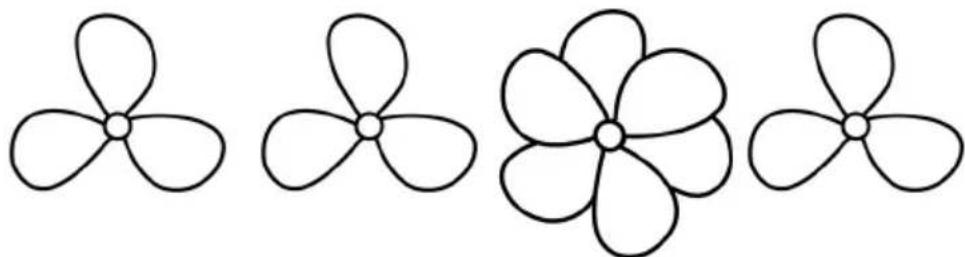
Flash Rate: 1,100 825 733.3 550
What is the actual rate of the fan? Images 1, 3, 5, 6 and 8 are all "frozen," so the rate could be taken as 3,300, 1,650, 1,100, 825 and 550.
Which is correct?
In order to determine the fan's actual speed, a mark is added to one of the blades and the test is run again.
| Image No.: | 1 | 2 | 3 | 4 |
| Flash Rate: | 3,300 | 2,200 | 1,650 | 1,320 |
| Image No.: | 5 | 6 | 7 | 8 |
| Flash Rate: | 1,100 | 825 | 733.3 | 550 |
Using the orientation mark, it is now clear that the images appearing at 3,300, 1,650 and 825 RPM are multiple image harmonics. In each of these cases, three identification marks appear. On the other hand, a singular image appears at 1,100 and again at 550.
Here, only one mark appears. Recall that "a singular image always appears at exactly one half of the object's true RPM". 550 is one half of 1,100. Therefore, the rate of the fan must be 1,100 RPM.
Example 2 (no mark needed):
This example illustrates how the actual speed of an object can be determined without the use of an orientation mark - provided that the object has a suitable shape.
Assume that the speed of this cam is known only to be less than 7,000 RPM. Because it has a unique shape, it does not need an identifying mark. As the flash rate is lowered from 7,000, the following harmonic images appear:
Image No.: 1234



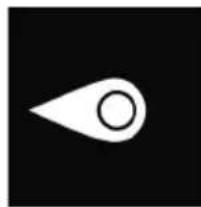
Flash Rate: 6,000 4,000 3,000 1,500
The harmonic images at 6,000 and 4,000 RPM are not singular, but double and quadruple. A singular image does appear at 3,000 and again at 1,500 RPM.
1,500 is one half of 3,000. Therefore, the rate is 3,000 RPM.
7.2. Instructions for use for the special functions of the instrument
PULS μs/PULS deg
On-time of the flash. With this function, the on-time of the flash can be set. You hereby influence the brightness and focus of the object being observed. This setting can either be performed absolutely (microseconds) or relatively (degree).
DELAY ms
Setting of the delay time between the trigger signal and the flash (in milliseconds). A fixed delay time between the trigger signal and flash can be set using this value.
Example: The external trigger signal is generated at a position that is in front of the desired observation point (= flash position of the stroboscope). In this case, the connected stroboscope would regularly flash too early. With DELAY ms the value can be set by which the flash should be delayed.
PHASE deg
Setting of the phase shift (in degrees, relative to frequency) between the trigger signal and flash. With this value, a fixed angle between the trigger signal and flash can be set.
Example: The external trigger signal is generated at a position that is in front of the desired observation point (= flash position of the stroboscope). In this case, the connected stroboscope would regularly flash too early. With PHASE deg the delay can be set so that the stroboscope flashes at a position shifted by the set angle. This setting is independent of the current rotational speed. With
this, a stroboscope flash can be triggered at the desired position even with fluctuating rotational speeds or when the system is starting up.
DIV (pulse divider)
This function is only active with an external trigger signal. A value x can be set with the pulse divider. The external trigger signal is then divided by this value.
Example: An external trigger (e.g. rotational speed sensor) that scans a gear wheel provides a signal with every tooth. With DIV value = 10 , a flash is only triggered with every 10th signal.
OPT
Edge selection of the trigger signal. 0 = positive edge, 1 = negative edge. With this option, the polarity of the trigger signal can be defined.
8 Maintaining the product
8.1. Changing batteries/rechargeable batteries
i Only operate and store instrument with battery compartment cover.
If the instrument is not used for a longer period, remove all batteries/rechargeable batteries from the instrument.
Incompletely charged batteries/rechargeable batteries reduce the operating time.
- Loosen screws on the bottom of the instrument.
2 Remove battery compartment cover. - Remove batteries/rechargeable batteries.
- Insert new batteries (AA)/charged NiMH rechargeable batteries (AA) (observe the polarity!)
- Close the battery compartment cover.
- Tighten screws.
Cleaning the instrument
If the housing of the instrument is dirty, clean it with a damp cloth.
Do not use any aggressive cleaning agents or solvents! Weak household cleaning agents and soap suds may be used.
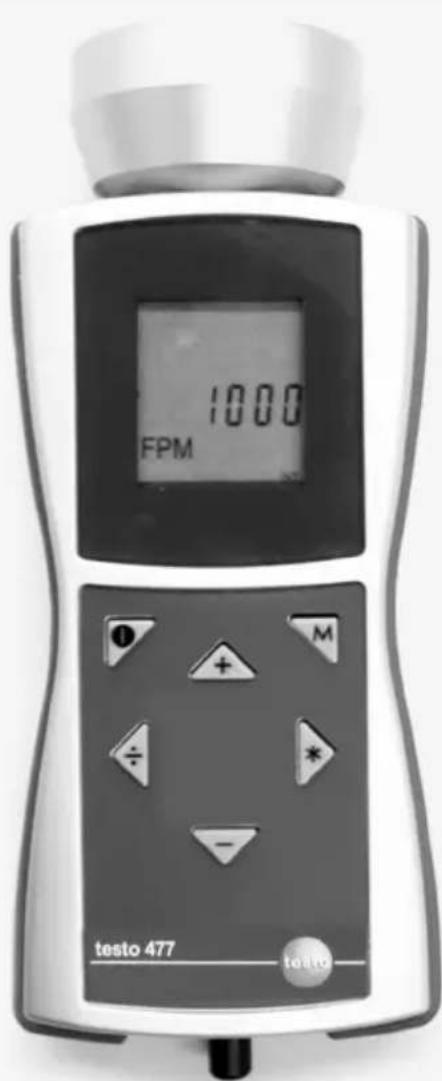
testo 477
Stroboscope portatif DEL
Mode d'emploi
1 Sommaire
Impulsion μs/Impulsion deg
Paraocular:
Paraocular is a visual system that consists of a set of lenses, which are used to focus on the eye. It consists of a lens, an objective, and a set of lenses. The objective is the optical field, which is composed of a set of lenses (or lenses) that can be used to focus on the eye. The objective is a set of lenses that can be used to focus on the eye.
Trucos utiles:
$$ \begin{array}{l} = 1. 0 0 0 \text {P R M} - 1. 0 0 5 \text {P R M} \ = 5 R P M \ \end{array} $$