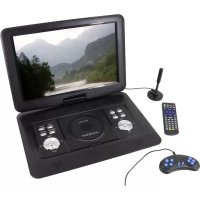
Soundmaster PDB1600 - TV

PDB1600 - TV Soundmaster - Free user manual and instructions

Find the device manual for free PDB1600 Soundmaster in PDF.

English EN Download 💬 AI Question 10 questions ⚙️ Specs
📄

Document temporarily unavailable

The manual is currently being transferred to our new server. It will be accessible again in a few hours. Thank you for your patience.

Pick your language and provide your email: we'll send you a specifically translated version.
Product Type Portable TV with DVD/CD player, DVB-T2 tuner, USB/SD reader, built-in game console
Brand Soundmaster
Model PDB1600
Power supply 12V mains adapter (supplied) and built-in rechargeable battery (charges via adapter)
Battery Built-in rechargeable lithium-ion battery, LED charging indicator
Tuner DVB-T2 (Freeview HD), free reception; telescopic antenna supplied
Playback functions DVD, CD, Audio CD, USB/SD files (photo, music, video), games on CD (300 games)
USB recording Direct recording of TV programs to USB stick, Time Shift function (pause and resume)
Audio encoding Encoding Audio CD to SD card (MP3, bitrate choice, speed)
Connectivity USB port, SD slot, AV input (3.5mm jack to RCA), AV output (3.5mm jack to RCA), 3.5mm headphone jack, game port
Outputs AV OUT (for DVD/SD playback), headphone
Inputs AV IN (for external source), TV antenna
Remote control Infrared, AAA batteries (not supplied)
Safety Class 1 laser (do not open), risk of electric shock, do not expose to moisture, do not place liquid objects or open flames on the device
Maintenance and cleaning Clean with a dry cloth only; do not use detergents or abrasive products
Operating conditions Dry indoor, moderate climates, room temperature, good ventilation, do not expose to sun or heat sources
Package contents Main unit, 12V mains adapter, remote control, DVB-T2 antenna, AV cable (jack/RCA), game controller, game CD, instruction manual
General information Manufacturer: Wörlein GmbH, 90556 Cadolzburg, Germany; www.soundmaster.de; CE certified, compliant with directive 2014/53/EU

Frequently Asked Questions - PDB1600 Soundmaster

How to install the remote control batteries?
Remove the battery compartment cover on the back of the remote control. Insert two AAA batteries observing polarity (indicated inside the compartment). Close the cover.
How to turn the device on and off?
Use the ON/OFF switch on the right side to turn the device fully on or off. The STANDBY/ON button on the device or remote control puts it into standby mode.
How to start the DTT channel search?
Connect the antenna, select the DTV source via the INPUT button. If first use, the setup menu appears. Choose language and country, then automatic search starts. You can also start a manual search in the CHANNEL menu.
How to record a TV program to a USB stick?
Insert a formatted USB stick (preferably FAT32). In DTV mode, press REC. The control keys appear; press REC again to start recording. To stop, press REC, select STOP and confirm with OK.
How to use the Time Shift function (TV pause)?
During a program broadcast, press the PLAY/PAUSE (▶II) button to pause. The device records the current program to the USB stick. To resume, press PLAY/PAUSE again. To end, press REC then select STOP.
How to play the built-in games?
Connect the game controller to the GAME port. Insert the game CD into the DVD player. Select the DVD source via INPUT. The screen displays a game list; use the numeric keys to choose a game, then press OK to start. To exit, press STOP/EXIT.
How to encode an Audio CD to an SD card?
Insert an Audio CD and an empty SD card. Press COPY. The encoding menu appears. Set speed, bitrate, then select tracks. Choose START and confirm with OK. The MP3 files will be copied to the SD card.
What to do if the device finds no channels?
Check that the antenna is properly connected and extended. Try moving the device or antenna. If reception is weak, use an outdoor antenna. Ensure you are in a DVB-T2 coverage area. Keep the device away from interference sources (microwaves, refrigerators).
How to clean the device?
Use a soft, dry cloth to clean the screen and casing. Never use detergents, alcohol, or abrasive cloths as they may damage the surface.
What are the important safety precautions?
Do not open the device (risk of electric shock and exposure to invisible Class 1 laser radiation). Use only the supplied adapter. Protect the device from moisture, heat, and open flames. Keep batteries out of reach of children. Disconnect the device during thunderstorms.

User questions about PDB1600 Soundmaster

0 question about this device. Answer the ones you know or ask your own.

Ask a new question about this device

The email remains private: it is only used to notify you if someone responds to your question.

No questions yet. Be the first to ask one.

Download the instructions for your TV in PDF format for free! Find your manual PDB1600 - Soundmaster and take your electronic device back in hand. On this page are published all the documents necessary for the use of your device. PDB1600 by Soundmaster.
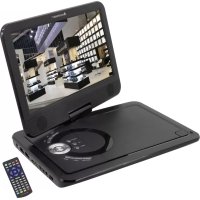
USER MANUAL PDB1600 Soundmaster

Manual assistant
Powered by Anthropic
Waiting for your message
Product information

Brand : Soundmaster

Model : PDB1600

Category : TV