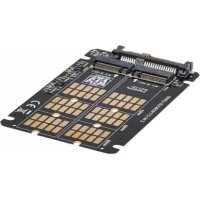
P970U2M2 - Computer accessory Tripp Lite - Free user manual and instructions
Find the device manual for free P970U2M2 Tripp Lite in PDF.



| Product Type | M.2 to U.2 SSD Adapter |
| Brand | Tripp Lite |
| Model | P970U2M2 |
| U.2 Connector | SFF-8639 |
| M.2 Connector | M.2 (B, B+M, M Key) |
| Supported SSD Types | SATA M.2 and NVMe M.2 |
| Supported SSD Sizes | 2242, 2260, 2280 |
| Dimensions (L x W x H) | 99 x 66 x 5.5 mm |
| Operating Temperature | 10 to 70 °C |
| Storage Temperature | 0 to 65 °C |
| Relative Humidity | 10 to 80% non-condensing |
| Certifications | FCC, CE |
| Supported Operating Systems | Windows 7, 8.1, 10, 11 ; macOS High Sierra and later |
| Warranty | 1 year limited |
| Power | No external power required |
| Package Contents | Adapter, mounting hardware, quick start guide |
| Compatibility | Motherboards with U.2 port or PCE-U2-PX4 adapter (sold separately) |
| Maintenance and Cleaning | No special maintenance; avoid dust and moisture |
| Safety | Use an anti-static wrist strap when handling to prevent electrostatic discharge |
| Spare Parts and Repairability | Not available separately; contact the manufacturer for any issues |
Frequently Asked Questions - P970U2M2 Tripp Lite
User questions about P970U2M2 Tripp Lite
0 question about this device. Answer the ones you know or ask your own.
Ask a new question about this device
Download the instructions for your Computer accessory in PDF format for free! Find your manual P970U2M2 - Tripp Lite and take your electronic device back in hand. On this page are published all the documents necessary for the use of your device. P970U2M2 by Tripp Lite.
USER MANUAL P970U2M2 Tripp Lite
Register your product today and be automatically entered to win an ISOBAR® surge protector in our monthly drawing! tripplite.com/warranty

1111 W. 35th Street, Chicago, IL 60609 USA • triplite.com/support Copyright © 2022 Tripp Lite. All rights reserved.
Features
- Enhance your PC's speed and increase internal storage by adding an M.2 NVMe SSD via an available U.2 (SFF-8639) compatible interface on your motherboard
Supports B+M Key SATA M.2 SSD and M-Key NVMe M.2 SSD - Compatible with 2242, 2260 and 2280 SSD sizes
- Compatible with Tripp Lite's PCE-U2-PX4 (sold separately) U.2 to PCIe adapter to assemble an NVMe M.2 SSD into a motherboard's PCIe port
- PCIe M.2 SSD speeds provide ultra-fast data access to your computer
- Compatible with PCIe 3.0 motherboards; backward compatible with PCIe 2.0 and PCIe 1.0
- Compatible with Windows 7 and above and macOS High Sierra and above
- No external power required
Package Contents
- P970-U2M2 M.2 to U.2 PCIe NVMe SSD Adapter
- SSD Mounting Hardware
- Quick Start Guide
System Requirements
- Computer with an available U.2 port on its motherboard (or M.2 to U.2 adapter, such as Tripp Lite's PCE-U2-PX4, sold separately. See tripplite.com for details.)
- B-Key or B+M Key SATA M.2 SSD or M-Key NVMe M.2 SSD
- Computer running Windows 7 or above, or macOS High Sierra and above
Optional Hardware
- PCE-U2-PX4 U.2 to PCIe Adapter (Sold Separately)
Installation
Notes:
- The following installation diagrams and instructions refer to the P970-U2M2 being used with Tripp Lite's PCE-U2-PX4 U.2 to PCIe Adapter (sold separately) to establish an M.2 module in a computer's PCIe port. The P970-U2M2 can be used directly with a motherboard that features an available U.2 port or other M.2-to-U.2 docks.
- PCI Express cards are static-sensitive devices that require proper handling. An anti-static ESD wrist strap (such as Tripp Lite's P999-000, sold separately) or similar device should always be used when handling.
- Handle the card with care when installing. Hold it by the edges and not the interface connectors.
- When disconnecting the drive, go through the proper disconnection steps of your operating system to safely remove it. Removing the drive prior to proper disconnection can result in losing or corrupting data stored on the drive.
- If your drive has not been formatted, you will first need to format it using your computer's disk management utility to copy and access files.

Installation
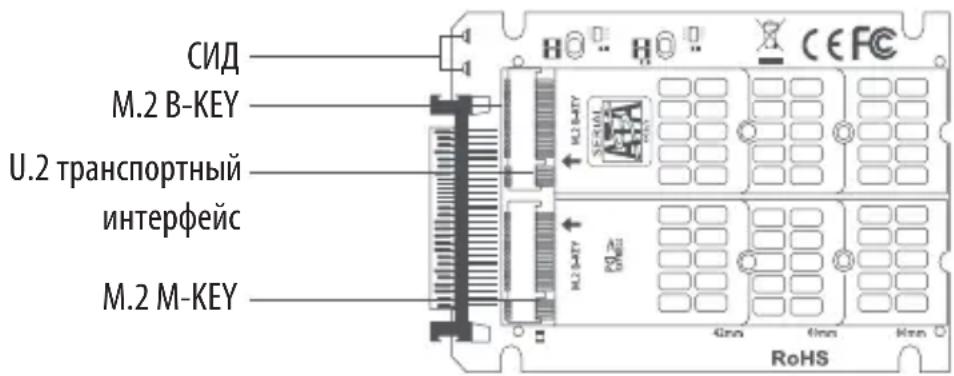
- Connect an M-Key M.2 and/or B-Key M.2 SSD, or B+M Key SSD, to the appropriate slots on the P970-U2M2.
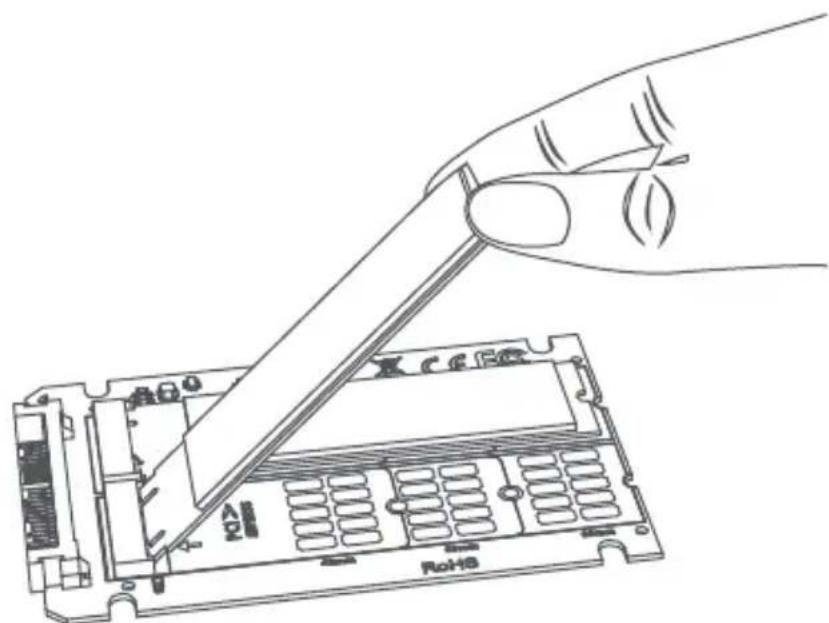
- Secure the SSD into place using the included SSD mounting hardware.
Installation
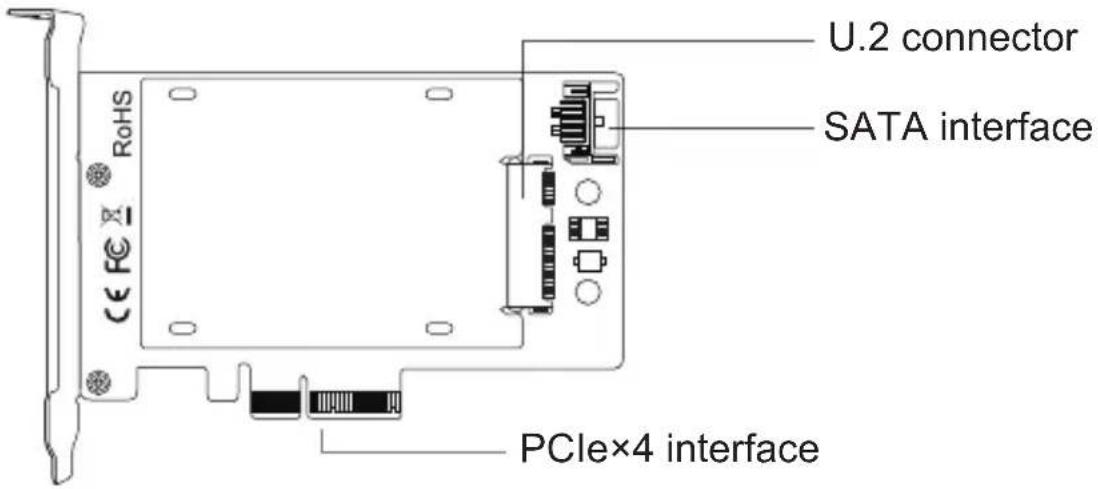
- Connect the U.2 connector of the P970-U2M2 into the U.2 input slot of the PCE-U2-PX4 (sold separately). Be sure to follow the instructions in the notes above to ensure the equipment is not damaged by static discharge or improper handling.
Note: The P970-U2M2 inserts into the U.2 slot of the PCE-U2-PX4 with the M.2 SSD(s) facing downward.
Installation
- Secure the P970-U2M2 into place with the PCE-U2-PX4 using the mounting hardware that is included with the PCE-U2-PX4 (sold separately)
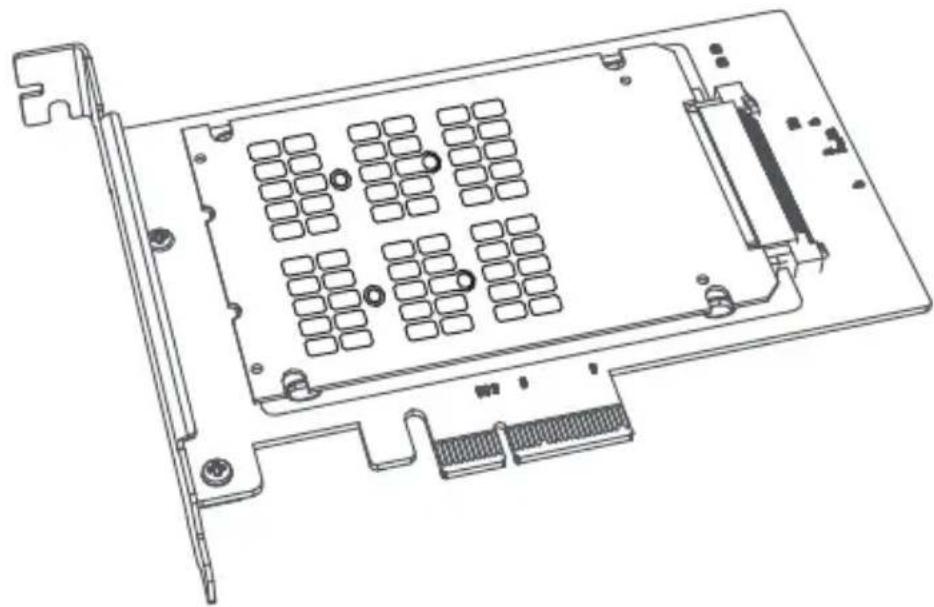
-
Power down the desired computer and unplug its power cord. Then, disconnect all peripheral devices (monitor, keyboard, mouse, etc.).
-
Remove the cover from your PC to locate the motherboard and available PCI Express ports.
Installation
- Insert the PCIe x4 interface of the PCE-U2-PX4 into the open PCI Express port of the computer's motherboard.
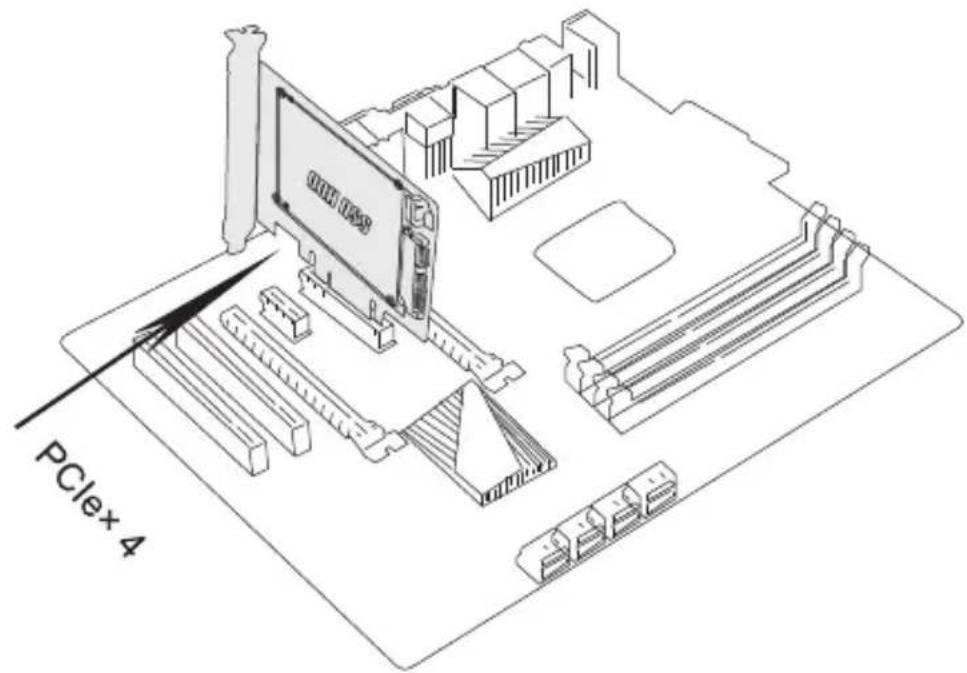
- Connect the 7-pin SATA cable included with the PCE-U2-PX4 between the SATA interface port on the PCE-U2-PX4 and the 7-pin SATA port on the computer's motherboard.
Installation
- Fix the full-profile bracket of the PCE-U2-PX4 into place in the computer's tower panel using the bracket screws included with the PCE-U2-PX4 (if applicable).
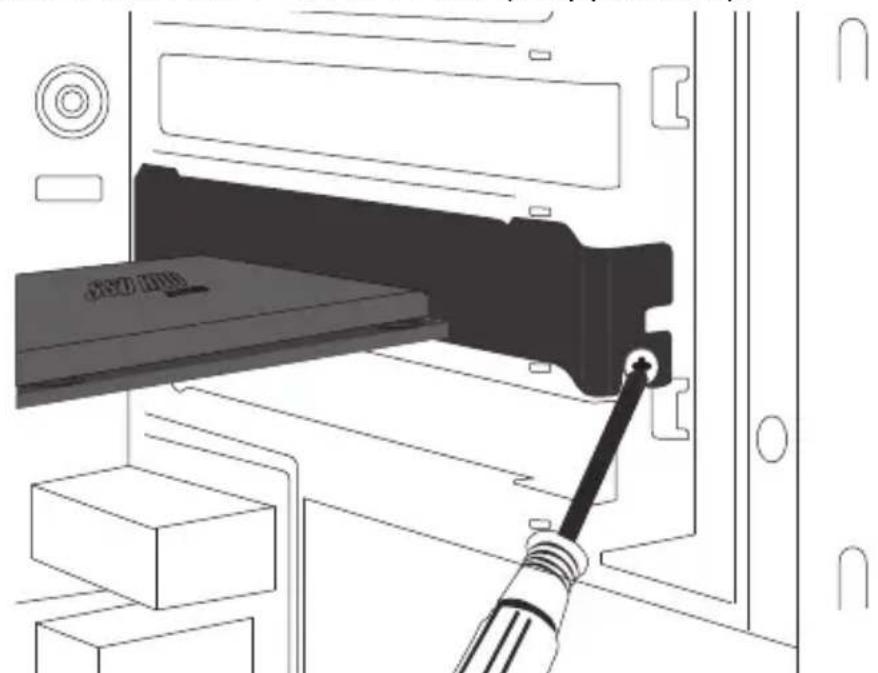
- Place the cover back onto the computer and reconnect its power cord and peripheral devices.
- Your adapter is now ready for use.
Operation
- After turning your computer back on, locate the "Computer Management" system tool and go to the "Disk Management" dropdown menu to find the new disk.
- Before formatting the new disk, make sure to delete the volume.
- Right-click the External Disk icon you want to format. Click on "New Simple Volume".
- Follow the instructions on the screen, choose the partition size and click "Next" to finish.
- The new hard disk volume will be found in the list of drive locations on your computer.
- Once found, it is ready for use.
Specifications
| Drive Connection U.2 SFF- | 8639 to M.2 NVMe/SATA |
| PCIe Card Connection PCIe X4 | |
| Supported SSD B-Key, B+M Key or M-Key (NVMe) M.2 | |
| Supported Drive Sizes M.2 | 2242, 2260 or 2280 |
| Operating Temperature Range | 50°F to 158°F (10°C to 70°C) |
| Storage Temperature Range | 32°F to 149°F (0°C to 65°C) |
| Relative Humidity 10 to 80% RH, Non-Condensing | |
| Unit Dimensions [L x W x H] | 3.9 x 2.6 x 0.22 in. (99 x 66 x 5.5 mm) |
| Certifications FCC, CE | |
| Supported Operating Systems | Windows (7, 8.1, 10, 11), Mac (macOS High Sierra and above; older macOS versions do not support NVMe) |
Warranty and Product Registration
1-YEAR LIMITED WARRANTY
Tripp Lite warrants its products to be free from defects in materials and workmanship for a period of one (1) year from the date of initial purchase. Tripp Lite's obligation under this warranty is limited to repairing or replacing (at its sole option) any such defective products. To obtain service under this warranty, you must obtain a Returned Material Authorization (RMA) number from Tripp Lite or an authorized Tripp Lite service center. Products must be returned to Tripp Lite or an authorized Tripp Lite service center with transportation charges prepaid and must be accompanied by a brief description of the problem encountered and proof of date and place of purchase. This warranty does not apply to equipment, which has been damaged by accident, negligence or misapplication or has been altered or modified in any way.
EXCEPT AS PROVIDED HEREIN, TRIPP LITE MAKES NO WARRANTYES, EXPRESS OR IMPLIED, INCLUDING WARRANTYES OF MERCHANTABILITY AND FITNESS FOR A PARTICULAR PURPOSE.
Some states do not permit limitation or exclusion of implied warranties; therefore, the aforesaid limitation(s) or exclusion(s) may not apply to the purchaser.
EXCEPT AS PROVIDED ABOVE, IN NO EVENT WILL TRIPP LITE BE LIABLE FOR DIRECT, INDIRECT, SPECIAL, INCIDENTAL OR CONSEQUENTIAL DAMAGES ARISING OUT OF THE USE OF THIS PRODUCT, EVEN IF ADVISED OF THE POSSIBILITY OF SUCH DAMAGE. Specifically, Tripp Lite is not liable for any costs, such as lost profits or revenue, loss of equipment, loss of use of equipment, loss of software, loss of data, costs of substitutes, claims by third parties, or otherwise.
PRODUCT REGISTRATION
Visit tripplite.com/warranty today to register your new Tripp Lite product. You'll be automatically entered into a drawing for a chance to win a FREE Tripp Lite product!*
- No purchase necessary. Void where prohibited. Some restrictions apply. See website for details.
Use of this equipment in life support applications where failure of this equipment can reasonably be expected to cause the failure of the life support equipment or to significantly affect its safety or effectiveness is not recommended.
Tripp Lite has a policy of continuous improvement. Specifications are subject to change without notice. Photos and illustrations may differ slightly from actual products.

1111 W. 35th Street, Chicago, IL 60609 USA · tripplite.com/support
22-06-268 934590_RevA
1111 W. 35th Street, Chicago, IL 60609 USA • tripplite.com/support
KpaTKoe pyKOBoDCTBO N0JIb30BaTeJЯ
Aдаптер M.2 - U.2 за SSD M.2 PCIe NVMe, SFF-8639
MödeNb: P970-U2M2
English 1 • Espanol 13 • Français 25 • Deutsch 49

1111 W. 35th Street, Chicago, IL 60609 USA · triplite.com/support
Copyright © 2022 Tripp Lite. Пелениатka запешаетя.
ФункцюньНbie BO3MOXHOCTN
-Улчшіte ckopoctb pa60tBI yBelenuhte obbem BHyTpeneHne namrBaWero PIK 3a cHT IO6abIeHnra TbePtoTeBHorO hakOnnteM.2 NVMe uepe3 Cbo6oDhbl INHTepfeic, coBmecTmblc U.2 (SFF-8639) ha MaTePNHcko nnate
- Повдерхивает B+M Key SATA M.2 SSD и M-Key NVMe M.2 SSD
CobmeTcTBepTeBbIMnHaKoNTeMaPa3Mepom 2242,2260 n 2280
CobmeTcM cdaanTePom Tripp Lite PCE-U2-PX4 (npoaeTcra otJeNbHO) U.2 - PCIe dny yctaHOBKn TBepdoTeJbHoro hakonntela NVMe M.2 B npot PCIe maTepnHckoi nlaTbi
- Ckopocn npepaH daHHbIX, noaepKuBaembIe TBepOTeNbHbIMn HaKoNTeJIAMn
- opmata M.2 uepe3 uHny PCIe, o6ecneuBAIoT cBepx6bICTpbI N doCTyn K daHHbIM, xpaHraumcna H KOMnbIOtepe
- COBMeCTUMOcTB c MaTePunHCKmN PnIaTAmN PCIe 3.0; o6paTHaY COBMeCTUMoCTb c nHTepfeyCamN PCIe 2.0 n PCIe 1.0
- CoBMeCTUMOCTb C onepaunOHbIMn CNTeMaMn Windows 7 n Bblwe n macOS High Sierra n Bblwe
He tpe6yeT BHeuHero NCTOuHnKa nTaHnA
CopeKIMoe ynaKOBKN
- AdaanTep P970-U2M2 M.2 - U.2 PCIe NVMe SSD
- MohtaxHbIe npucno6JeHnra SSD
KpaTKoe pyKOBoDCTBO nOJIb30BaTeJRA
CnCTeMHbIe Tpe6OBaHnIa
- Komlbótep co cbo6oHbIM nopToM U.2 Ha MaTePuncko IIaTe (nHa aAnTePOM M.2 -U.2 (HapnPmep, Tripp Lite PCE-U2-PX4) npOdaetc oTdeIbHo. NOppo6HocTn cm. HacaiTe tripplite.com.)
B-Key nn B+M Key SATA M.2 SSD nn M-Key NVMe M.2 SSD - KompliTEp c OC Windows 7 uui BbIe uui macOS High Sierra u BBIe
Дононтульhoe obopydobahne
- AdaanTep PCE-U2-PX4 U.2 - PCIe (npojaetc oTdeNbHo)
yCTaHOBka
Ipumeyanua:
- П汞�еehнble Huxe cxembl ycmaHOBku u uHcmpykuu omnoa mcr K modeu P970-U2M2, ucnolb3yEmou cobmecmho c adanmepom Tripp Lite PCE-U2-PX4 U.2 - PCIe (npodaemcr omdelho) dny ycmaHOBku moyra M.2 6 nopm PCIe komnbomepa. Ycmpoucmeo modeu P970-U2M2 moxem ucnolb3Oambcra HenocpecdmbeHHo c MamepuHckou namou, ochaueHHou cbo6oDbim nopmom U.2 unu dpyzmu doK-cmaHuaMu M.2-U.2.
Kapmbi PCI Express yecmbumelhki K 803deucmbuO cmmuueckko2 Oekmpuuecmba umpe6yom hadnexaaezo obpauen. Ipu pa6ome o63amelenbno cedeym ucnno3obamb anmucmatmuueckui 6pacnem (muna Tripp Lite P999-000, npodaemcr omdenho) unu ananoouHoe 3aemnaouee npucnoc6neue. - Ipu ycmahoeke Kapmbi co6nodaume ocmopoxhocmb. Ydepkubaime ee 3a Kpar, a He 3a uhmepeuchble pa3bembl.
- Ipu omcoedunehuHa konumema Heobxodmo 8bnoHumb 3ce 3manbi omknouheny, ycmaohoblenhble dna ucnonb3yeMoou onepaouhoHou cucmembu o6ecneyuabaioue bezonachoe omcoedunehue. Omcoedunehue hakonumela 63 npedbapumelbHO2O omknIOUeHua om cucmembi moxem npubecmu K nomepe unu noBpeKdeHuo xpanauxxra Ha hem daHHbx.
- Ecnu hakonumelb uehe he omphiopmamupoban, mo chayana Heo6xodmo omphiopmamupobamb e2oc uonol30baHuem ycmahOBneHHou Ha KomnbIomepe ymunmbi Disk Management, obecneubaioueui konupobAHue faioB u docmyn K Hum.
yCTaHOBka
- Пдклочи Тьердотьньн ha konntelb M-Key M.2 n/nn B-Key M.2 SSD nnn B+M Key SSD K cootbetctbyuomm cnotam yctpoiCTBa moI. P970-U2M2.
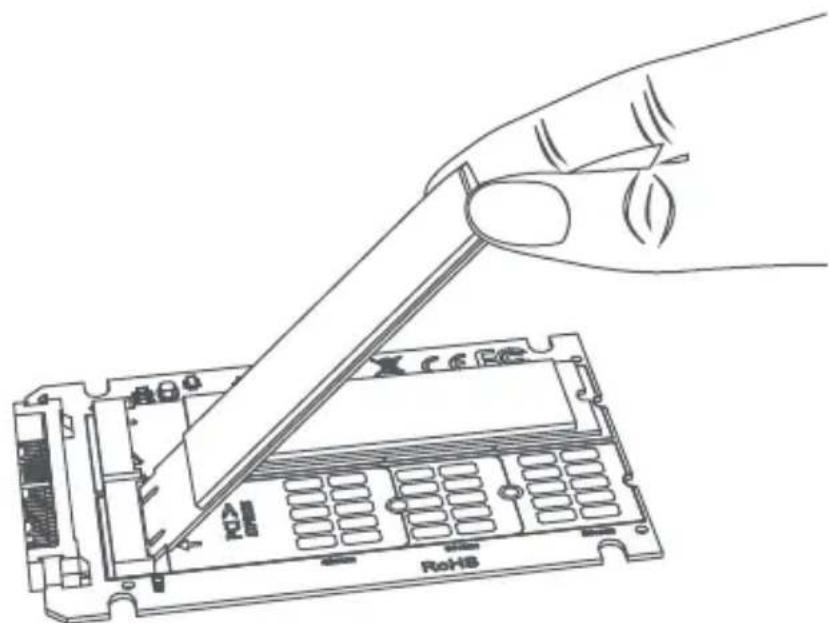
- 3aФИКСИРУТЕ TВЕРДОТЕЛБИн HaKONITeB C NOMOUI NOCTABLЯmOrO B KOMПЕКTe MOHTaXHOrO O6OpyIDOBAHnI.
yCTaHOBka
- BCTaBbTe pa3bEm U.2 yctpoiCtBa moJeN P970-U2M2 Bo BXoHoi cIOT U.2 yctpoiCtBa PCE-U2-PX4 (npOdaetc oTdeNbHo).Bo n36eJHne BbIXoJa 06opyIOBaHnI u3 CTPOB B pe3yIbTaTe CtaTnueckOro pa3praJa nn HnPaBnIbHOro 06paSeHnI O6aTeMbHO CneDyIte yKa3aHnIaM, n3IoJKeHHbIM B npImeHaHnx BblIe.
Ipumueaue. Ucmpoucmeo mod. P970-U2M2 bcmaeemca 8 crom U.2 ycmpoucmeba PCE-U2-PX4 makum o6pa3om, m06bl mepdomehbln hakonumeb M.2 6bl HanpaBneH BHu3.
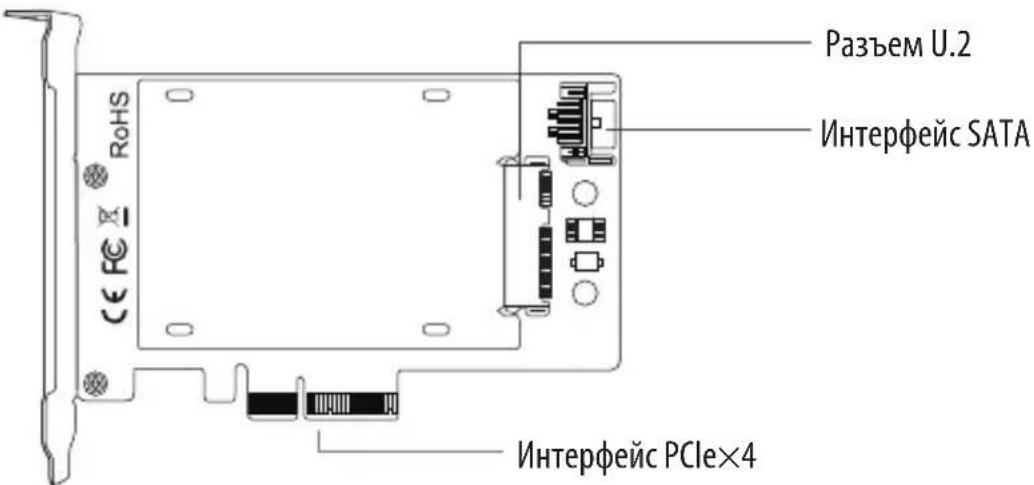
yCTaHOBka
- 3aKpeHnTe yctpoIcTBo P970-U2M2 c nOmoUbIO PCE-U2-PX4 n MoHTaXHoTo o6OpyIOBaHn, noCTaBnE moRo B KOMnJIeKTe C yctpoIcTBom PCE-U2-PX4 (npoJaTeC r OTdJIbHO)
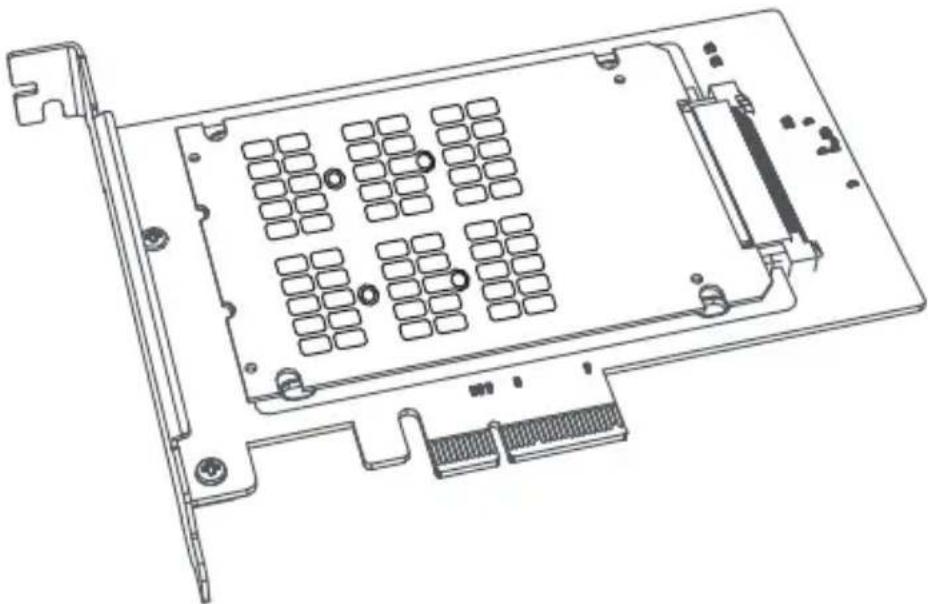
- BbIKHIOUHTe KOMNbIOTep N OTCOeHNHTe SHHyP NITaHnA. 3aTeM OTKIIIOHTe BCE nepuΦepuHbIe yCTpOJCTBa (MOHtOp, KnaBnAtypy, Mbls n np.).
- Chmnte KpbuKy c PK dJa haoXKeHna MaTepuHcKo II NaTbI IN DOCTynHbIX NOpTOB PCI Express.
YCTaHOBka
- BCTaBbTe nHTepfeicn PCIe x4 yctpoiCtBa PCE-U2-PX4 B oTKpbIbI nopt PCI Express MaTePNHcKo NlaTbI KOMNbIOTepa.
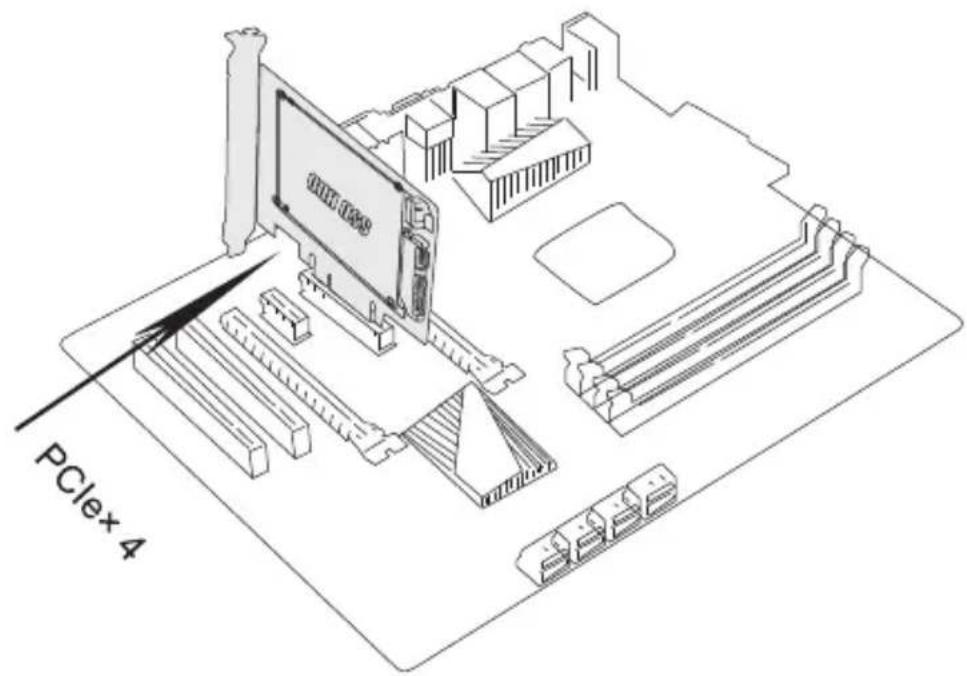
- ПОДКИОЧITE 7-KOHTAKTHbI Ka6eNB SATA, NOCTaBJIeMbI B KOMПЛeKTe C yCTpoiCTBOM PCE-U2-PX4, MeJdY INHTepfEiChbIM NOPTom SATA yCTpoiCTBa PCE-U2-PX4 n 7-KOHTAKTHbIM NOPTom SATA Ha MaTePnHcKo INaTe KOMNbIOTepa.
Poprajok MoHTaJa
- 3akpenite noHnonpofohnbHbI depkaTeIb yctpoiCTBa PCE-U2-PX4Ha MeTo B BePTnKaIbHOI NaHeJI KOMNbIOTepa C NOMOUI BO BNHTOB IJRA KpeJIeHnI DEpkaTeIe, noCTaBIAEbIX B KOMIIeKTe cyCTpoiCTBOM PCE-U2-PX4 (ecn npimeHmo).
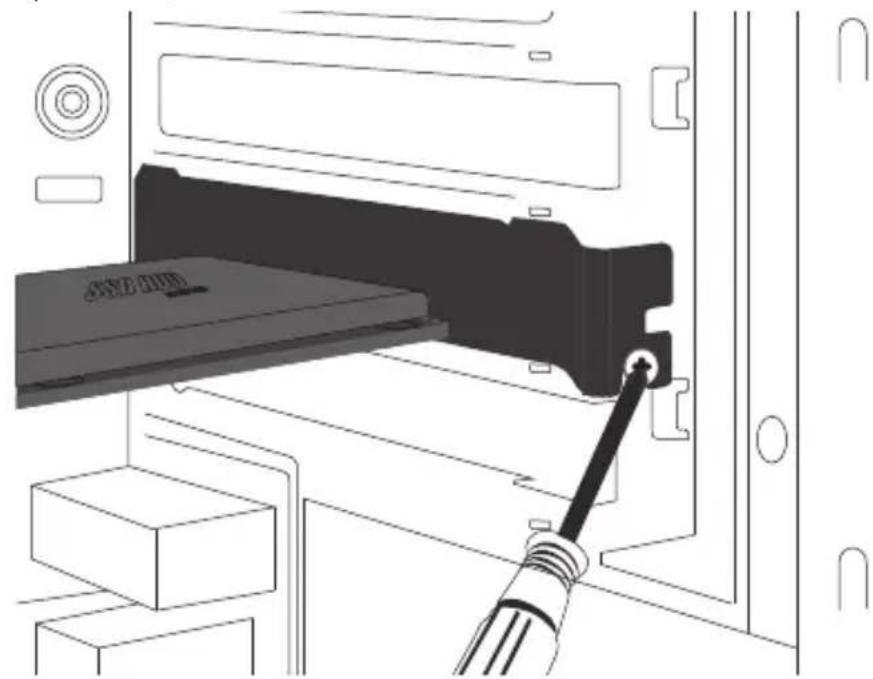
-
HadehTe KoJyX o6paTHo Ha KOMNbIOTep n CHOba NODcoEINHITe 7Hypbl K HeMy NHTAHn I nepuΦepnHbIe yCTpOJCTBa.
-
AdaanTep roTOB K nCnoJIb3OBAHnIO.
PopraokKcnnyatau
- После NOBTOPORBOKIOUeHnRA KOMNbIOTepa HauINTe CNTeMHbIM INHCTpyMeHT «YnpabJIeHne KOMNbIOTepOM» I nepeiINTe B BblaIOuOee MeHIO «YnpabJIeHne DnCKOM» YTO6bl HaInTn HOBbIM DNCK.
2.Перед Форматураим Нового диска обаятейно уданные erо ТOM. - Κεηκητe πραθουν ΚΗΝΚΟΥ ΜΜΙΙΝ ΠΟΒΗΝΗΕΜΥ ΑΝΥ, ΚΟΤΟβΙ Βυ ΚΟΤΑγοι ΕτόρμαπιροΒατή. ḀλχΜιτε Ḁν «HΟΒΙ προστού τΟΜ».
- CnéduyTe nHCTpykCnM Ha éKpaHe, BbI6paB pa3Mep pa3dena, n HaxMMte «ДаLEE» ДЯ 3aBepseHn.
- HOBBI TOM JXECTKORO DnCKa 6ydt HaJdeH B CnNcKe MeCT paCNOJoxeHnHaKoNTeJeH BaWeM KOMNbIOTepe.
- После обнаружени OH roTOB K ИСПОЛБ3OBAHИ.
TexHnueckneXapakTepnCTnKN
TapaHTnHbIe 06aTeJIbCTBa
OPAHUeyHHAR TAPAHTR CPOKOM 1TOI
Komnann Tripp Lapeahtpyet OcytctBne deektoB Maepanax TexHONrnx B TeueHne Ondro rda ot dtaI npbo npdoaKn. 063aTebnCTBa Komnann Tripp Lite no Hactoae rapantm OrpaunmbaOTcpeMOHTOM nnn 3amHeoi (no ee eHNIOHUMO yCMotpeHH) IIObIX TaKHX deekthbIX n3denn. IInn nonyehnny cuyr no daHHOI rapaTHm Heo6xqDmIO nonyHTb HomeP Rurned Material Authorization (RMA - pa3peweHne Ha Bo3bpat MaepanAOB) or Komnann Tripp Lite nnn ee ABTOINBOAHORO cepBCHORO CEHTPA. N3denn DOJHKb6bTb BO3pauhenb B Komnann Tripp Lite nnn ee abTOPN3OBAHBBn cepBCHBn CEHTPc PnpOnnatoT TpaHcnpTHbX paXoBDn COpiPOBXDaTcKpATKM ONCAHEM Bo3NHkse np6bembl DOKyMeHTo, NOITBePxxDAIOUIM DaTy mMeTO erO pnpOpeTeHH. DeiCTMB NaCTOe TAPANTHn He paCnpoCTpaHReTa Ha o6OpoyobHne, NobpeXDeHoe B pe3yNbTaTe aBapn, He6peXHOO obpaAeeHH INn HnepaBnHBOHO NCNOB3OBAHnA, a TAKKe BuDNOM3MeHHeo KaKIM 6bl To Hn 6blIO 6pa3OM.
3A INCKJIIOUYEHEM IPEIYCMOTPEHHbIX 3DEC BCLYAAEB KOMNAHNA TRIPP LITE HE IPEIOCTABJAEKAXNX-IMBO ABHBIX INIINIPOIPA3UMEBAEMBIX IAPAHTNI, BKJIOUAYI PAHTNI KOMMEPUECKOIPNFOHOCTNI PIPNOHOCTNI JIA KAKOJ-NI50 KOHKPETOH UELIM.
B HeKoTOpbix Wtatax/rocydapcTBax OrpaHueHne IIN NCKIIOueHne NOpa3yMeBaembIX rapaHTn HeOnyckaTc; CJeDObaTeNbHO, Bblweyka3aHaHoe(-bie) OrpaHueHne(-r) INN NCKIOueHne(-) MOYr He paocpTaRaTbca Ha NokyaTeN.
3A INCKJIOUYEHME IPEYCMOTPEHbIX BblIe CIIyAEB KOMNAHNA TRIPP LITE HN PNI KAKX OBCTOATEJBCTBAX HE HECET OTBETCTBEHHOCTM 3A IPRMbIE, KOCBEHNbIE, CIIyAHNBIE NIN NIOBOYHbE YbItKN Nl60 YbItKN, ONPEDEJIREMBE OC6bIMN OBCTOATEJBCTBAMM, BO3NHKAIOUINE BCB3N CNCIOJIb3OBAHMe DAnHO N3DEJIN, JAXE B CIYAE EE NHΦOPMIOBAHNA OBO3MOXHOCTN HACTYPIENH TAKNX Yb1TKOB. B acThnctN, KOMNAHNA Tripp Lite He Hecet OTBETCTBEHOctn 3a KaKne-NN6o N3dePjKn, TaKe KaK yNuIeHHBe np6blIn Nn DoxoIbl, NoTepr OobpyOBAHn, NoTepr BO3MOXHOCTN NcNoJIb3OBAHn OobpyOBAHn, NoTepr npOrpaMMHO o6ceJeHn, NoTepr daHHbx, paXoIbl Ha 3aMeHHTeIN, UperynipOBaHne ppeTHeN TIpeTBx NIIu n Ip.
He peKomeHdyetra nCnOlb3OBaHnE daHrO obOpuyobAHnB CnCTeMaX KIn3Heo6ecneeyHn, rTe eTo bIxOu 3Tcpo npDnIONoKUteBHO MOKeT npBeCTN K nepe6oAM B pa6Ote obOpuyobAHn KIn3Heo6ecneeyHn IM B 3NaHTeBHO Mepe CHM3NTb e0e 3oNaCHOTb m 3f oekmTBHOCTb.
Komnau Tripp Lite noctoHNO coBepueHCTByeT cBOIO npOdyKzIO. B CBA3N C 3MM BO3MOXHO u3MeHeHneTexHMuecknx xapaKTePcTtK 6e3 npedbapntbHor yBeDOMHeH.NBEHN BnD peaHbIX N3dJIIM MoKeT HeCKoJIbKO OTNIWATbCnO T npedCTabNEHHORo Ha foToIrpAfoJx nIIIOCTpaUAX.

1111 W. 35th Street, Chicago, IL 60609 USA · triplite.com/support
22-06-268 934590_RevA
Kurzanleitung
1111 W. 35th Street, Chicago, IL 60609 USA • tripplite.com/support

- FEATURES
- PACKAGE CONTENTS
- SYSTEM REQUIREMENTS
- OPTIONAL HARDWARE
- INSTALLATION
- NOTES
- OPERATION
- SPECIFICATIONS
- WARRANTY AND PRODUCT REGISTRATION
- 1-YEAR LIMITED WARRANTY
- PRODUCT REGISTRATION
- KPATKOE PYKOBODCTBO N0JIB30BATEJЯ
- AДАПТЕР M.2 - U.2 ЗА SSD M.2 PCIE NVME, SFF-8639
- ФУНКЦЮНЬНBIE BO3MOXHOCTN
- COPEKIMOE YNAKOBKN
- CNCTEMHBIE TPE6OBAHNIA
- ДОНОНТУЛЬHOE OBOPYDOBAHNE
- YCTAHOBKA
- IPUMEYANUA
- POPRAJOK MOHTAJA
- POPRAOKKCNNYATAU
- TEXHNUECKNEXAPAKTEPNCTNKN
- TAPAHTNHBIE 06ATEJIBCTBA
- OPAHUEYHHAR TAPAHTR CPOKOM 1TOI
- KURZANLEITUNG
Brand : Tripp Lite
Model : P970U2M2
Category : Computer accessory