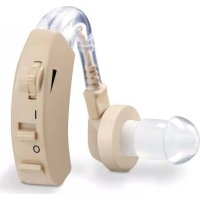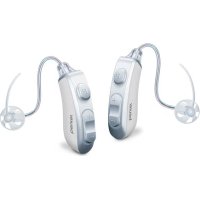
HA 85 - Hearing aid BEURER - Free user manual and instructions
Find the device manual for free HA 85 BEURER in PDF.


User questions about HA 85 BEURER
0 question about this device. Answer the ones you know or ask your own.
Ask a new question about this device
Download the instructions for your Hearing aid in PDF format for free! Find your manual HA 85 - BEURER and take your electronic device back in hand. On this page are published all the documents necessary for the use of your device. HA 85 by BEURER.
USER MANUAL HA 85 BEURER
natural_image
Two BEUER devices with attached earbuds and control buttons, shown from different angles (no text or symbols visible)HA 85 Pair
EN Digital hearing amplifiers Instructions for use......26
natural_image
Open black medical device with multiple sensors and a central display (no visible text or symbols)2. Zeichenerklärung
natural_image
Line drawing of two hands holding a small object, no text or symbols present
natural_image
Line drawing of a hand holding a medical device attached to a curved anatomical structure (no text or symbols)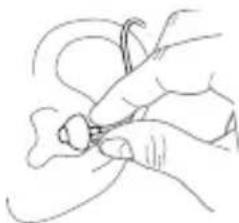
natural_image
Line drawing of a hand holding a small object with curved lines, no text or symbols presentnatural_image
Simple line drawing of a curved mechanical component with directional arrows (no text or symbols)natural_image
Line drawing of a beep device with a musical note and label (no text or symbols on the device itself)Akku wechseln
natural_image
Illustration of hands using a handheld device to adjust a component (no text or symbols present)natural_image
Simple line drawing of a cylindrical object with concentric rings (no text or symbols)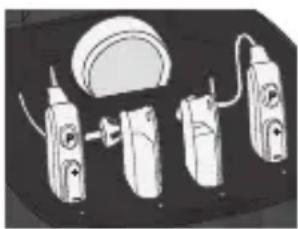
natural_image
Illustration of three electric shock absorbers with attached wires and a dome-shaped component (no text or symbols)natural_image
Illustration of two hands holding a pen, showing motion direction (no text or symbols)Read these instructions for use carefully and keep them for later use, be sure to make them accessible to other users and observe the information they contain.
Dear customer,
Thank you for choosing a product from our range. Our name stands for high-quality, thoroughly tested products for applications in the areas of heat, weight, blood pressure, blood glucose, body temperature, pulse, gentle therapy, beauty, massage and air.
With kind regards,
Your Beurer team
Getting to know your device
Hearing amplifiers are intended to help people hear better, which they do by amplifying sounds and then transmitting them to the ear. Hearing amplifiers can neither prevent nor alleviate organically occurring hearing loss.
Nevertheless, they offer various fields of application. Whether you want to watch a film, chat with friends or just feel like listening to the sounds of nature in the woods, hearing amplifiers help you to hear sounds louder and more clearly.
Table of contents
- Included in delivery....28
- Signs and symbols....28
- Warnings and safety notes......30
- Intended use....34
- Device description....34
- Initial use ....36
- Usage 37
- Cleaning and maintenance......41
- Accessories and replacement parts .....45
- What if there are problems?......46
- Disposal....48
- Technical specifications ....48
1. Included in delivery
Check that the exterior of the cardboard delivery packaging is intact and make sure that all contents are present. Before use, ensure that there is no visible damage to the devices or accessories and that all packaging material has been removed. If you have any doubts, do not use the device and contact your retailer or the specified Customer Service address.
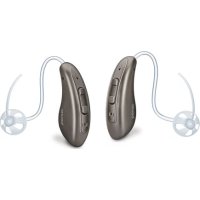
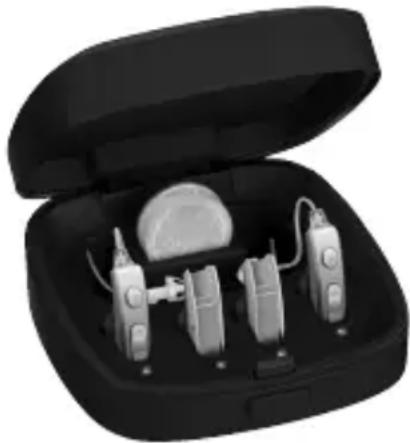
• 2 x HA 85 digital hearing amplifiers
- 8 x earplugs
(in different sizes and designs)
- 2 x interchangeable batteries
- 1 x cleaning brush
- 1 x drying capsule
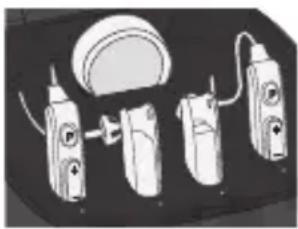
- 1 x storage box with charging function
- 1 x instructions for use
natural_image
Black open case containing a medical or electronic device with multiple sensors and a spherical device (no visible text or symbols)2. Signs and symbols
The following symbols are used on the device, in these instructions for use, on the packaging and on the type plate for the device:
| WARNING | Warning notice indicating a risk of injury or damage to health. |
| IMPORTANT | Safety note indicating possible damage to the device. |
| Note | Note on important information. |
 | Observe the instructions for use. |
 | Serial number |
 | Application part type B |
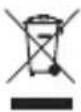 | Disposal in accordance with the Waste Electrical and Electronic Equipment EC Directive – WEEE |
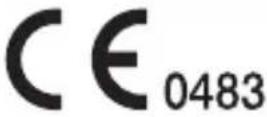 | CE labellingThis product satisfies the requirements of the applicable European and national directives. |
 | Manufacturer |
Storage/Transport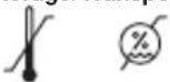 | Permissible storage and transport temperature and humidity |
Operating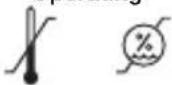 | Permissible operating temperature and humidity |
 PAP PAP | Dispose of packaging in an environmentally friendly manner. |
| IP21 | Protected against foreign objects ≥ 12.5 mm and against vertically falling drops of water |
 | Use by |
3. Warnings and safety notes

WARNING
- You must have your hearing checked by a doctor or qualified hearing care professional before using the hearing amplifiers. The settings of the hearing amplifiers should only be adjusted by a trained expert, for example an ENT specialist, an audiologist or a qualified hearing amplifier retailer.
- In the event of an existing or previous ear problem, you should consult your doctor before using the hearing amplifiers.
- Use for patients suffering from an ear inflammation or infection is NOT permissible.
- Do NOT use the hearing amplifiers if you are suffering from an inflammation of the middle ear or ear canal.
- If you feel unwell or experience pain when wearing the hearing amplifiers, stop using them immediately and contact your doctor.
- If your ear becomes inflamed or your skin irritated or you experience an increased accumulation of earwax when wearing the hearing amplifiers, stop using them immediately and contact your doctor.
-
Stop using the hearing amplifiers and seek medical attention if the following occurs:
-
Rash or eczema on areas of skin that come into contact with the hearing amplifiers. (The hearing amplifiers are made from a material that is kind to the skin. In rare cases, however, allergic reactions may occur that appear in the form of eczema.)
- Use of the hearing amplifiers results in discharge from the ear and/or necessitates ear treatment.
- Sudden, significant decrease in hearing ability.
- If parts of the hearing amplifier become stuck in the ear, seek medical attention immediately. Do not attempt to remove the parts yourself.
- At first, set the volume to a low setting and increase it gradually once you have become accustomed to the hearing amplifiers.
- Do NOT set the volume button too high, as this may cause further damage to your hearing over an extended period of time.
- Do NOT lend your hearing amplifiers to others or use the hearing amplifiers of others, as there is a risk of hearing damage and infection.
- Do NOT pass on your hearing amplifiers for use by other persons. The use of a hearing amplifier that was designed for someone else may cause hearing damage.
- The hearing amplifiers are NOT suitable for use by small children below the age of 36 months.
- It is particularly difficult to diagnose hearing problems in children. Children should only be provided with a hearing amplifier following a thorough examination by an ENT specialist.
- Keep the hearing amplifiers, the accessories and the batteries away from children, as there is a risk of injury and choking.
- This device is NOT intended for use by people (including children) with restricted physical, sensory or mental skills or a lack of experience and/or a lack of knowledge, unless they are supervised by a person who has responsibility for their safety or they receive instructions from this person on how to use the device. Supervise children around the device to ensure they do not play with it.
- Do NOT use the hearing amplifiers in potentially explosive and hazardous environments.
- Do NOT use the devices in oxygen-rich environments and over an extended period of time.
- Please contact the manufacturer in the event of the following:
- if you require assistance in the set-up, use or maintenance of the hearing amplifiers; or
- if the devices behave unexpectedly during operation or otherwise.
- If you have any doubts, do NOT use a damaged hearing amplifier; contact your retailer or the specified Customer Services address.
- Switch the devices off immediately if they are faulty or not working properly.
- Do not attempt to open and/or repair the hearing amplifiers yourself. Repairs may only be carried out by Customer Services or authorised retailers. Failure to comply will invalidate the warranty.
Notes on handling batteries:
- If your skin or eyes come into contact with fluid from a battery cell, flush out the affected areas with water and seek medical assistance.
Choking hazard! Small children may swallow and choke on batteries. Therefore, store series out of the reach of small children. - If a battery leaks, put on protective gloves and dispose of the device.
- Protect batteries from excessive heat.
k of explosion! Never throw batteries into a fire. - Remove the batteries from the device if you do not intend to use the device for an extended period of time.
- Do not disassemble, split or crush the batteries.
- Only use chargers specified in the instructions for use.
- Batteries must be charged correctly prior to use. The instructions from the manufacturer and the specifications in these instructions for use regarding correct charging must be observed at all times.
- Fully charge the battery prior to initial use (see section 6).
- In order to achieve the longest battery service life possible, fully charge the battery at least 4 times a year.

IMPORTANT
- Do NOT wear the hearing amplifiers in the vicinity of strong electromagnetic fields or X-rays.
- Do NOT wear the hearing amplifiers while bathing, showering or swimming.
- Protect the devices from impacts, humidity, dirt, marked temperature fluctuations, direct sunlight and high levels of air humidity.
- High temperatures may develop in closed vehicles during summer. You should therefore never leave your hearing amplifiers inside a vehicle.
- Do NOT drop the devices or subject them to any shocks.
- If the hearing amplifiers fall into water, dry them with a cloth and then have them inspected by your retailer.
- Never attempt to dry the hearing amplifiers in a microwave, a tumble dryer or with a hair dryer. The hearing amplifiers may otherwise become damaged.
- Do NOT use the hearing amplifiers together with a mobile phone. (The radio waves of the mobile phone may cause background noise or a loss of volume.)
- Do NOT wear the hearing amplifiers while applying cosmetics (e.g. make-up, hairspray, perfume or sun cream).
- Do NOT wear the hearing amplifiers while undergoing shortwave therapy or medical treatments that involve strong radio frequency or magnetic fields.
• Take care when operating the buttons. Do NOT press too firmly. - Do not insert any sharp objects into the microphone opening as this may damage the microphone.
- Do NOT touch the magnets of the hearing amplifier as this may damage the device.
- Do NOT touch the inside of the device. There are many sensitive components that have been precisely configured. Under no circumstances should you poke at the inside of the hearing amplifier with a needle or similar object.
- Service your hearing amplifiers at regular intervals. Make sure there are no foreign objects in between the earplug and speaker, as this could impair the sound.
4. Intended use
The hearing amplifiers are only to be used to help people to hear better. The devices are only intended for the purpose described in these instructions for use. The manufacturer is not liable for damage resulting from improper or careless use.
5. Device description
Hearing amplifier
| 1 Minus button2 Plus button3Programselectionbutton4 Microphone5 RIC sound tube6 Fixing tube7 Speaker8 Earwax guard9 Earplug10Interchangeablebattery | 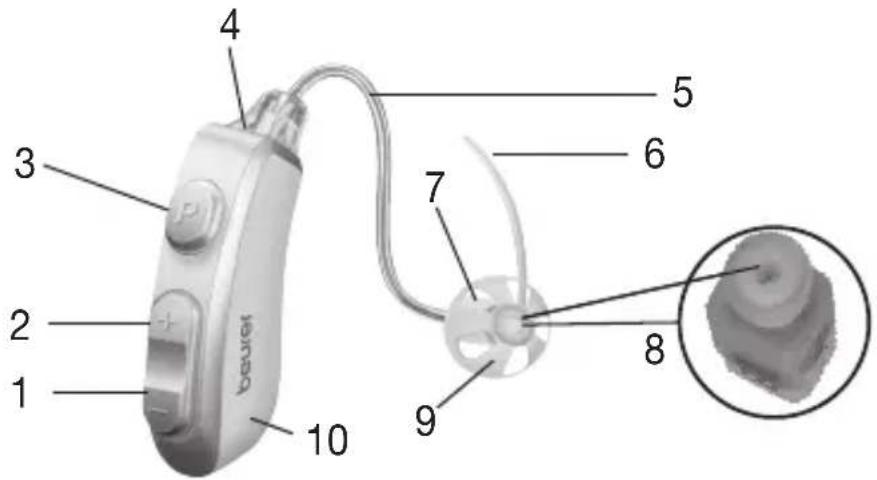 |
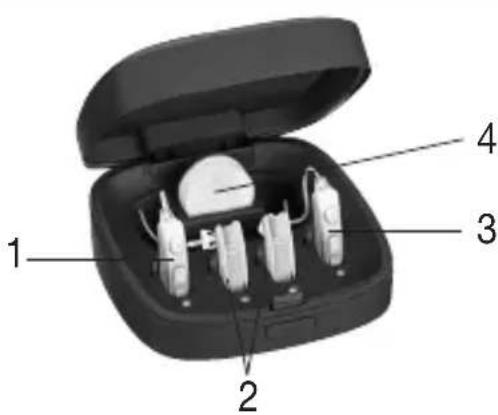
Storage box with charging function
1 Charging position of left hearing amplifier
2 Charging position of interchangeable batteries
3 Charging position of right hearing amplifier
4 Storage position for drying capsule
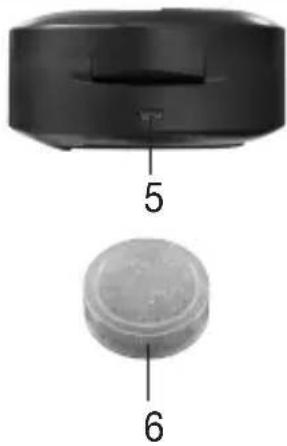
5 Micro-USB connection
6 Drying capsule
natural_image
Two labeled components: a black cylindrical device with a handle and a circular base with a textured center, both without any text or symbols.Cleaning brush
natural_image
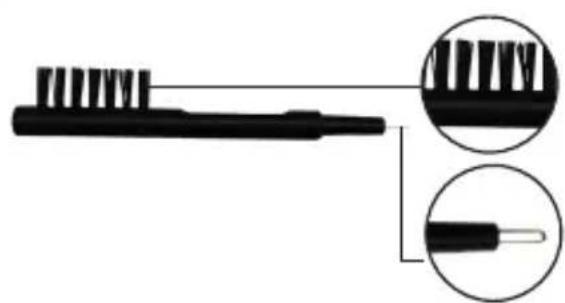
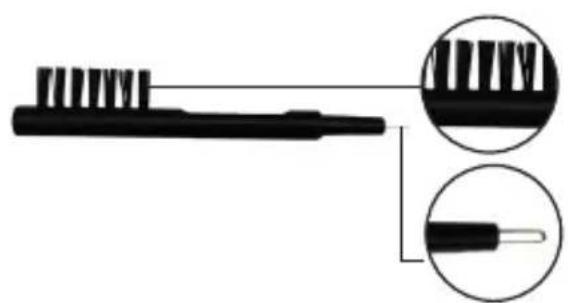
Illustration of a toothbrush with magnified inset showing detailed teeth structure (no text or symbols)Brush
For cleaning the hearing amplifiers
Loop
For removing earwax in the earplug
6. Initial use
Remove the hearing amplifiers from the packaging and check that the devices and all accessories are included and not damaged.
Charging the hearing amplifiers with the storage box with charging function
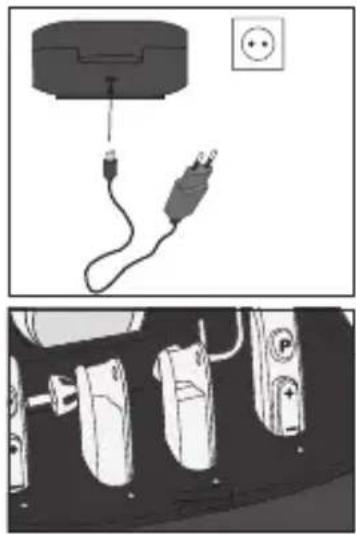
To charge the devices and batteries, connect the mains part to a socket, plug in the supplied micro-USB cable and connect it with your storage box with charging function.
Flashing green light:
Devices and batteries are charging.
Permanent green light:
Devices and batteries are fully charged.
In general, it takes 2 hours until the devices and batteries are fully charged.
natural_image
Diagram showing a cable being inserted into a device with an electrical outlet, alongside a close-up of three connected devices (no text or symbols visible)Make sure the volume button is initially set to the lowest setting before operating the hearing amplifier.
Note:

- The charging process can be carried out with the lid open or closed.
- The hearing amplifiers should be stored in the storage box with charging function after they have been charged fully and whilst you are not wearing them.
7. Usage
Adjusting your hearing amplifier
-
The hearing tubes are printed with "2B" in red and blue respectively. "Red" is for the right and "blue" is for the left ear.
-
Attach the earplug to the sound tube by pushing it over the grooves on the tube until it sits securely in place.
-
Place the hearing amplifier case behind your ear. The curved part of the sound tube should sit comfortably on the ear (next to the arm of the glasses for glasses wearers).
-
Hold the sound tube in place and carefully position the earplug in the ear canal. Make sure not to insert the earplug too deeply into the ear canal. If the earplug is not properly in place or feels uncomfortable, try a different earplug.
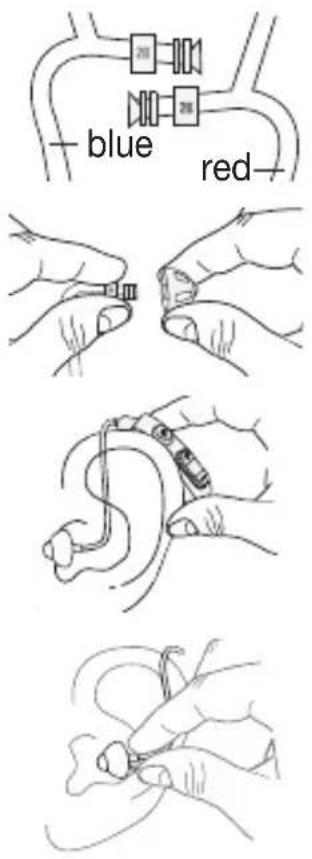
- Place the fixing tube along your outer ear. This ensures the earplug sits more tightly in your ear. If the fixing tube bothers you, you can remove it at the connecting point to the speaker. It is not absolutely necessary.
natural_image
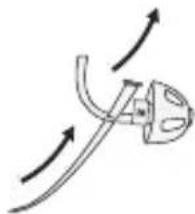
Simple line drawing of a curved mechanical component with directional arrows indicating motion (no text or symbols)Check whether you have selected the correct size of earplug by moving your head slowly up and down and then left and right while opening and closing your jaw. If the earplug slips out, it is too small. If you wear glasses, place the arm of the glasses between your head and the hearing amplifier.
i IMPORTANT
Never insert the sound tube into the ear canal without an earplug. Make sure also not to press the tube and earplug too deeply into the ear canal.
Switching on/off
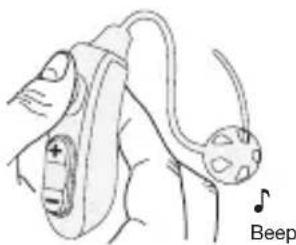
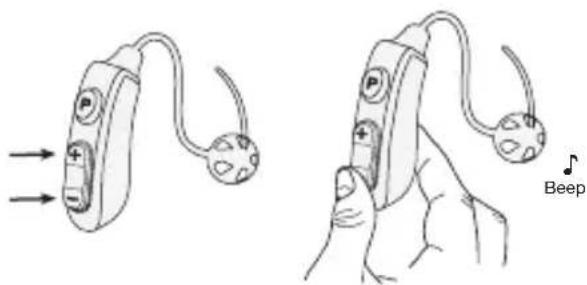
In order to switch the hearing amplifiers on/off, hold down the program selection button on the device for three (3) seconds until you hear a beep.
natural_image
Line drawing of a beep device with a musical note and label (no text or symbols on the device itself)Adjusting the volume
Plus button:
Increases the volume (press briefly)
Minus button:
Decreases the volume (press briefly)
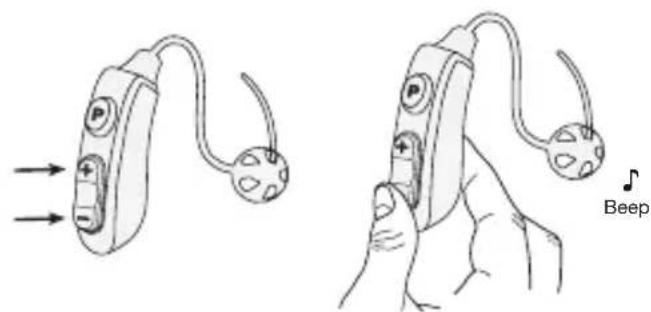
Use the volume button to adjust the volume to the desired level so that you can hear sounds clearly and distinctly.

Note:
- If you hear a slight whistling sound when wearing the hearing amplifier, check that your earplug is fitted properly in your ear. If it is not snug enough, use a different earplug.
- The hearing amplifier does not heal an existing hearing impairment, but it does improve hearing and speech understanding.
- If you hear a single beep, the volume has been increased or reduced.
- If two beeps sound in succession, the highest or lowest possible volume has been reached.
Setting the hearing programmes
To change the hearing program, press the program selection button.
P1: Normal mode (1x beep):
Suitable for quiet environments, e.g. at home or in the office.
P2: Noise reduction mode (2x beep):
Suitable for outside areas, e.g. on the move, in the supermarket or restaurant.

Changing the battery
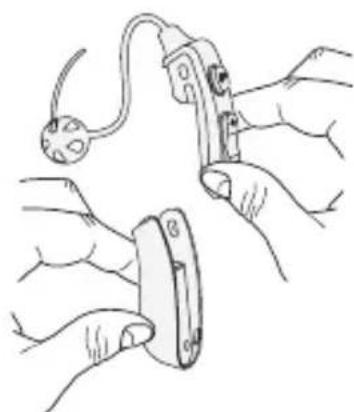
To change the battery of the hearing amplifier, hold the battery firmly with one hand, and with the other hand push the upper part of the hearing amplifier in the opposite direction. Now take the fully charged spare battery and slide it onto the hearing amplifier. The hearing amplifier is now ready to use again.
natural_image
Line drawing of hands using a tool to adjust or install a component, no text or symbols presentInserting the drying capsule
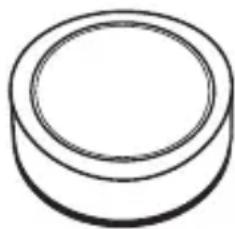
A drying capsule is included in delivery. Wearing the hearing amplifiers behind your ear means they come into contact with your skin, and therefore also with sweat, for example. As a result, you should dry the devices after each application to care for them properly.
Remove the drying capsule from the packaging and place it with slight pressure inside the storage slot intended for this purpose.
The capsule has a colour indicator. As the drying capacity decreases over time, the colour changes from bright orange to white. If the capsule is a whitish colour, it no longer has any drying capacity and has to be exchanged.
natural_image
Simple line drawing of a cylindrical object with concentric rings (no text or symbols)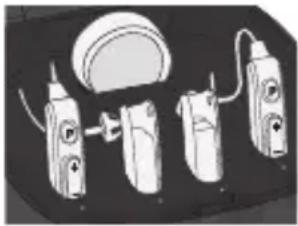
natural_image
Illustration of four different hair care devices with no visible text or symbolsTo find out where to obtain a new drying capsule, see section “9. Accessories and replacement parts”.
Note: To ensure the best possible drying performance, close the lid of the storage box with charging function after placing the hearing amplifiers inside.
8. Cleaning and maintenance

IMPORTANT
• Always keep the hearing amplifier clean.
- Always treat the products with care and prevent the earplug and microphone from becoming blocked with foreign matter. This impairs the function of the sound amplification.
- Clean the hearing amplifiers and earplugs with a clean, dry cloth after each use. If they are very dirty, you can also moisten the cloth with a mild soapy solution. Never use abrasive, corrosive or solvent-based cleaning products.
- Under no circumstances should you hold the hearing amplifier under water, as this can cause liquid to enter and damage the hearing amplifier.
- The supplied cleaning brush is suitable for removing earwax stuck in the earplug (see device description).
- Allow the hearing amplifier to dry fully after cleaning. Store the hearing amplifiers in a safe, dry and clean place in the relevant storage box with charging function with the drying capsule.
- The drying capsule has to be replaced if the colour of the granulate changes from orange to white (you can find out where to obtain a new drying capsule in section “9. Accessories and replacement parts”).
- When the earplug has been removed, you can identify whether the earwax guard is covered with earwax. If this is the case, replace the earwax guard (you can find out where to obtain a new earwax guard in section “9. Accessories and replacement parts”).
Changing the earwax guard
Earwax is one of the main causes of problems with hearing amplifiers. During use, earwax can get into your hearing amplifiers and partially or completely block the passage of sound.
The HA 85 RIC hearing amplifiers are particularly susceptible to this type of problem due to the position of the speaker deep in the ear canal. By using an earwax guard, you can prevent damage to your hearing amplifiers caused by earwax and thereby keep the devices functioning long term.
When should you change the earwax guard?
As the amount of earwax produced by people can vary greatly, it is recommended that you check the earwax guard before every use. As soon as the sound output of the hearing amplifiers seems to be weaker or quieter or if earwax is already visible, the earwax guard must be changed.
Components of the accessory and replacement part
The earwax guards are provided on sticks in a handy storage box for simple handling.
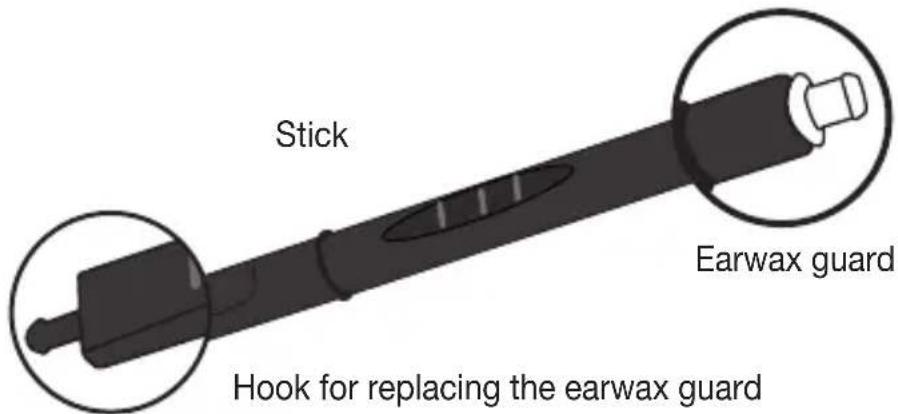
The stick has two different sides. On one end of the stick there is a white earwax guard. On the opposite side of the stick there is a hook to remove the used earwax guard from the hearing amplifier with ease.
| 1. Remove the dirty earwax guard. | 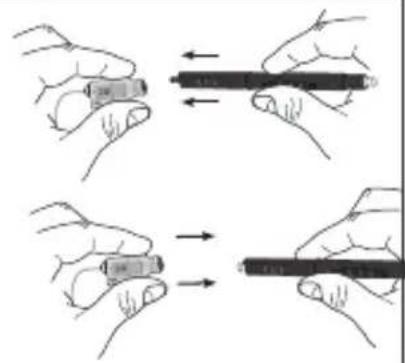 |
| 2. Insert the new guard. |  |
| 3. The stick with the used guard can be disposed of. | 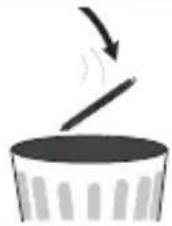 |
9. Accessories and replacement parts
Accessories and replacement parts are available from the corresponding listed service address under the stated material number.
| Designation Item number and/or order number | |
| Drying capsules, HA 55/60/80/85 8 pcs. 641.15 | |
| Earwax guard, HA 60/85 32 pcs. 641.16 | |
| Sound tubes size S | 164.343 |
| Sound tubes size L | 164.344 |
| Sound tubes size M | 164.380 |
| Earplugs 8 pcs. | 164.369 |
- What if there are problems?
| Problem Possible | causes Solution | |
| No sound can be heard from the hearing amplifier. | Hearing amplifier is not switched on. | Switch on the hearing amplifier as described in section 7. |
| Battery is not properly connected to the hearing amplifier. | Check whether the battery is properly connected to the hearing amplifier. | |
| Battery is empty. | Replace the battery and charge the empty battery in the storage box with charging function as described in section 6. | |
| Microphone is dirty. | Clean the microphone opening carefully with the cleaning brush. | |
| Hearing amplifier is damaged. | Contact Customer Services. | |
| The sound is very weak and faint. | Volume setting on the hearing amplifier is too low. | Increase the volume as described in section 7. |
| Battery is almost empty. | Replace the battery and charge the empty battery in the storage box with charging function as described in section 6. | |
| Earplug is dirty. | Pull off the earplug and remove coarse impurities from the earplug and front end of the tube with the cleaning brush. Then clean the earplug under running water. | |
| The sound is very weak and faint. | Microphone is dirty. | Clean the microphone opening carefully with the cleaning brush. |
| Battery is not properly connected to the hearing amplifier. | Check whether the battery is properly connected to the hearing amplifier. | |
| The integrated speaker may be damaged. | Contact Customer Services. | |
| Hearing amplifier emits unpleasant whistling sounds. | The earplug of the hearing amplifier does not fit in your ear properly. This may cause unpleasant whistling sounds (acoustic feedback) and impair the functioning. | Try again with another earplug. It is recommended to use an earplug that fits properly. If you have any doubts, please contact Customer Services. |
| The hearing amplifier microphone is covered. | Do not cover the hearing amplifier microphone with parts of the ear or large portions of hair. This may encourage acoustic feedback. | |
| The hearing amplifier is set too loud. | Lower the hearing amplifier volume as described in section 7. | |
| LEDs of the charger do not light up | The hearing amplifier could not sit correctly in the opening or the USB cable is not correctly connected. | Check whether the hearing amplifier is sitting correctly in the opening and check whether the USB cable is correctly connected to the storage box and the mains part. |
| The charging contacts in the storage box with charging function are dirty. | Clean the charging contacts carefully with a dry towel. Then reinsert the hearing amplifiers into the opening. |
11. Disposal
General disposal
For environmental reasons, do not dispose of the device in the household waste at the end of its useful life. Dispose of the device at a suitable local collection or recycling point in your country. Dispose of the device in accordance with EC Directive – WEEE (Waste Electrical and Electronic Equipment). If you have any questions, please contact the local authorities responsible for waste disposal.
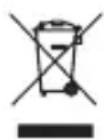
Battery disposal
- The empty, completely flat batteries must be disposed of using specially designated collection boxes, recycling points or electronics retailers. You are legally required to dispose of the batteries:
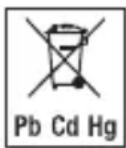
- The codes below are printed on batteries containing harmful substances:
Pb = Battery contains lead
Cd = Battery contains cadmium
Hg = Battery contains mercury
12. Technical specifications
Max. sound pressure level
(OSPL90): 111 dB ± 3 dB
Sound amplification: 33 dB ± 5 dB
Overall harmonic
distortion: ≤3% @ 1600 Hz
Frequency range: 200\~8000 Hz
Input noise: ≤32 dB
Voltage: 1.5 V
Power supply: ≤3 mA
Operation period: ≥ 26 hours
Operating conditions: Temperature: -10^ +40^
Relative humidity: 10% \~ 90%
Atmospheric pressure: 700 \~ 1600 hPa
Storage and
transportation conditions
Temperature: -10°C \~ +55°C
Relative humidity: 10% \~ 90%
Atmospheric pressure: 500 \~ 1600 hPa
The serial number is located on the device.
FRANÇAIS

natural_image
Open black medical device with multiple sensors and a central display (no visible text or symbols)natural_image
Illustration of a toothbrush with magnified close-ups showing tooth structure (no text or symbols)Brosse
natural_image
Diagram showing a cable being inserted into a device with an outlet, alongside a close-up of electrical connectors (no text or symbols present)natural_image
Simple line drawing of a mechanical device with curved arrows indicating motion (no text or symbols)natural_image
Illustration of a hand holding a beep device with a musical note and label 'Beep' (no text or symbols on the diagram itself)Régler le volume
Touche Plus :
augmenter le volume (pression brève)
Touche Moins :
diminuer le volume (pression brève)
natural_image
Illustration of hands using a handheld device to adjust or install a component (no text or symbols visible)natural_image
Simple line drawing of a cylindrical object with concentric rings (no text or symbols)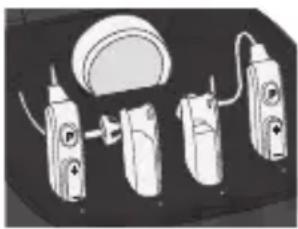
natural_image
Illustration of four electric toothbrushes with a circular component, no text or symbols presentnatural_image
Open black medical device with multiple sensors and a central body (no visible text or symbols)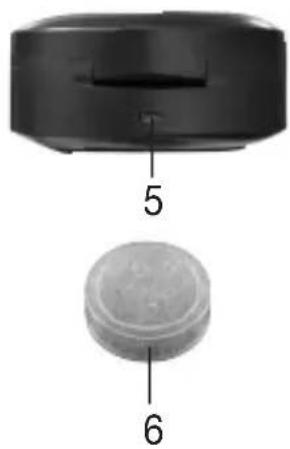
natural_image
Close-up of a black electronic device with a circular component, labeled with parts 5 and 6 (no text or symbols on the device itself)Cepillo de limpieza
natural_image
Illustration of a toothbrush with magnified close-up insets showing detailed teeth structure (no text or symbols)Cepillo
natural_image
Diagram showing a cable being inserted into a wall socket and connected to a power plug, with no visible text or symbols.natural_image
Simple line drawing of a mechanical device with curved arrows indicating motion (no text or symbols)natural_image
Illustration of a beep device with a musical note and label (no text or symbols on the device itself)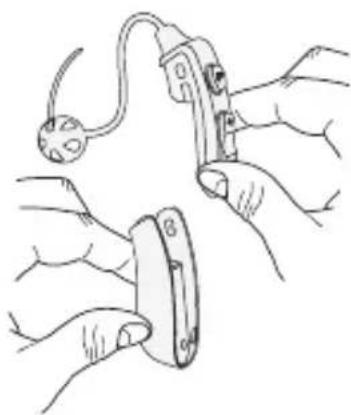
natural_image
Line drawing of hands using a power tool to install a component (no text or symbols present)natural_image
Simple line drawing of a cylindrical object with concentric rings (no text or symbols)