P2 - Wood stove ADURO - Free user manual and instructions
Find the device manual for free P2 ADURO in PDF.



| Product type | Pellet stove |
| Brand | Aduro |
| Model | P2 |
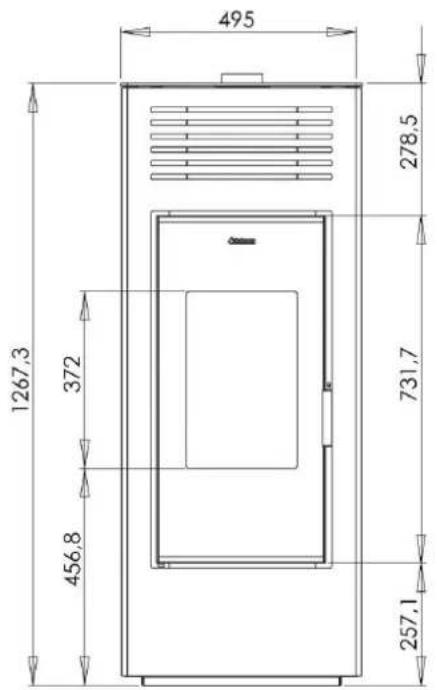
| Dimensions (HxWxD) | 127 x 52 x 58 cm |
| Weight | 100 kg |
| Nominal power | 7.5 kW (max) / 3.13 kW (min) |
| Efficiency | 87% (max) / 90% (min) |
| Hopper capacity | 15 kg |
| Pellet consumption | 1.77 kg/h (max) / 0.7 kg/h (min) |
| Exhaust pipe diameter | 80 mm |
| Power supply | 230 V ~ 50 Hz |
| Electrical power (operation) | 25 W |
| Electrical power (ignition) | 312 W |
| Ambient operating temperature | 7 °C to 40 °C |
| Recommended fuel | Wood pellets ∅6 mm, L 6-30 mm, compliant with DIN+/EN+ A1 |
| CO emissions (at 13% O2) | 0.005% (max) / 0.016% (min) |
| Dust emissions | 18.3 mg/m³ (max) / 19.7 mg/m³ (min) |
| Energy class | A+ (EEI 122.2) |
| Standards | EN14785, CE, Ecodesign 2022 |
| Display | LCD screen with control buttons |
| Programming functions | Daily, weekly, weekend |
| Stand-by mode | Yes, automatic on/off based on temperature |
| Safety | Safety thermostat, temperature and pressure sensors, automatic shutdown in case of error |
| Cleaning and maintenance | Daily cleaning of brazier and ash pan; annual flue cleaning; recommended annual service |
| Original spare parts | Available at www.aduroshop.fr |
Frequently Asked Questions - P2 ADURO
User questions about P2 ADURO
0 question about this device. Answer the ones you know or ask your own.
Ask a new question about this device
Download the instructions for your Wood stove in PDF format for free! Find your manual P2 - ADURO and take your electronic device back in hand. On this page are published all the documents necessary for the use of your device. P2 by ADURO.
USER MANUAL P2 ADURO
natural_image
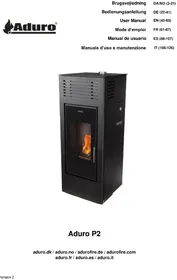
Exterior view of a black industrial stove with a flame inside the glass door (no visible text or symbols)Aduro P2
aduro.dk / aduro.no / adurofire.de / adurofire.com aduro.fr / aduro.es / aduro.it
natural_image
Pile of brown granular material, possibly corn kernels or similar grains, with no visible text or symbols.1. Produktsikkerhed
1.1 Godkendelser
text_image
Technical diagram of an open refrigerator with numbered parts labeled 1 through 7- Topafgang
- Bagafgang
- Luftilførsel
- RS232 port
- Stik 230V
- Sikkerhedstermostat
- Rumtemperatursensor
text_image
8 9 10 11 12 13 147.2.4 Weekend-program
Industry Division Manager
Reserved for the chimney sweeper
natural_image
Pile of brown granular material, possibly corn kernels or similar grains, with no visible text or symbols.text_image
Technical diagram of an open industrial refrigerator with numbered parts labeled 1 through 7natural_image
Architectural cross-section diagram showing pipe connection and wall construction (no text or symbols)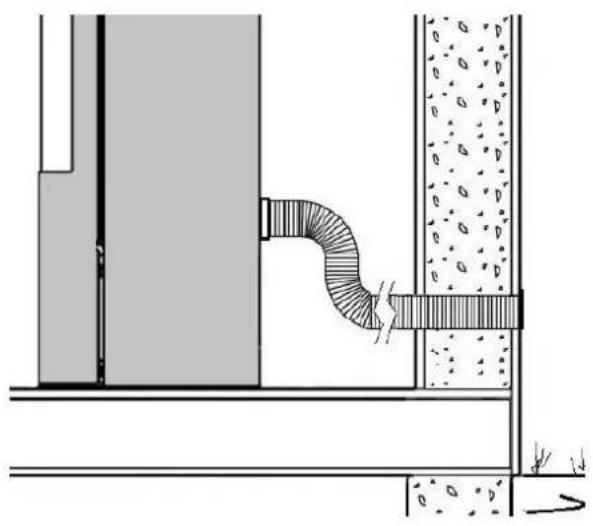
natural_image
Technical diagram of a pipe connection with embedded material, showing structural components and flow direction (no text or labels)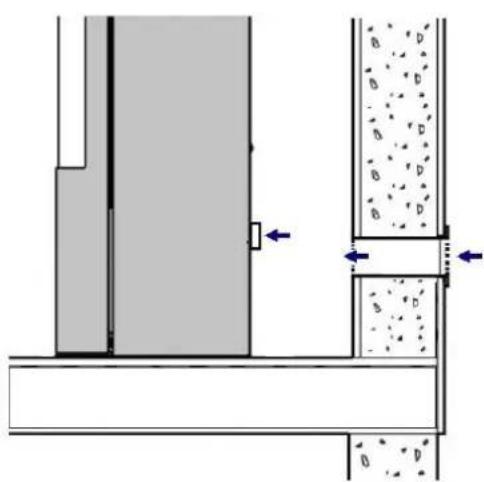
natural_image
Architectural cross-section diagram showing structural components and material movement (no text or labels)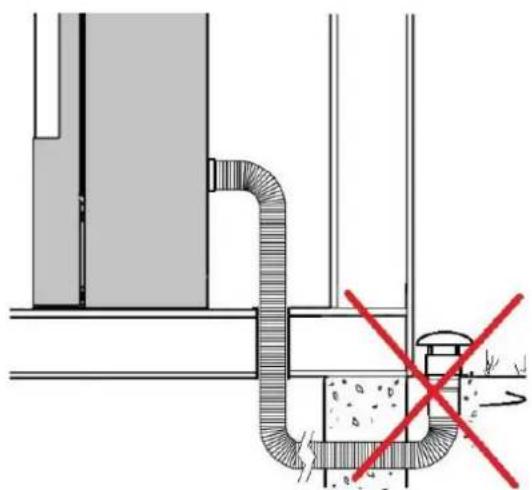
natural_image
Technical diagram of a pipe system with a red X mark indicating a failure or rejection point (no text or symbols present)Etwaige
Congratulations on your new Aduro Pellet Stove!
To get the best possible experience and benefit from your new Aduro Pellet Stove, it is important that you read the user manual thoroughly before you install the stove and start using it. Errors or incorrect settings can cause hazardous conditions and/or poor operation.
For further information, please go to www.adurofire.com.
At the back of the stove, you can find the production number and serial number. We recommend that you note down these numbers in the box below before mounting the stove. For the purposes of the warranty and for other enquiries, it is important that you are able to quote the production number as well as the serial number.
Production number:
Serial number:
Enjoy!
HOW TO SUCCEED WITH YOUR NEW ADURO PELLET STOVE
In our customer service centre Aduro Customer Service you will find tips and tricks on how to succeed with your new Aduro stove. Here, you will have direct access to interesting content about installation and maintenance of your stove as well as support related information. Find us here and make the most of your Aduro stove.
natural_image
Pile of brown granular material, possibly corn kernels or similar grains, on a plain white background (no text or symbols visible)1. Product safety
1.1 Compliance
The stove is built in compliance with standard EN 14785, CE and Ecodesign 2022 is thereby approved for installation and use in Europe. Meanwhile, the manufacturing process is subject to external quality control. DoP (Declaration of Performance) can be downloaded at www.adurofire.com/download.

Retain this manual for future reference. For any requirement or clarification, please contact the authorised retailer.
1.2 Safety warnings
- We recommend that the installation and connection is carried out by an authorized service partner in compliance with local regulation, national and European standards and with the annexed installation instructions.
- During transportation, it may happen that the baffle plate in steel falls out of place. Therefore, before using the pellet stove, please make sure that the baffle plate is properly placed on the screws for optimum combustion and for preventing soot on the glass. The baffle plate is located at the bottom front of the stove behind the cover plate which is secured by four hand screws. Unscrew the four screws to check that the baffle plate is correctly placed on the two screws inside.
- The combustion of waste, especially of plastic materials, damages the stove and the flue pipe. Moreover, it is forbidden by the law against the emission of harmful substances.
- Use only the fuel recommended by Aduro A/S. It is forbidden to use any liquid fuels and bioethanol fluids for lighting/rekindling pellets.
- Do not introduce a greater amount of pellets into the stove than the amount recommended (see below).
- It is forbidden to use the stove with the door open or the glass broken.
- Do not use the stove as, for example, a clothes' drying rack or bearing surface.
- Do not install the stove in bathrooms.
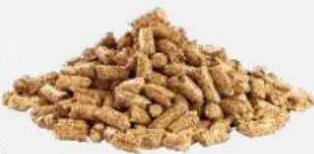
The pellets to be used are the following:
- The pellet stoves operate exclusively with wood pellets complying with the standards DIN plus or EN plus 14961-2 A1 or PEFC/04-31-0220 or ONORM M7135 or having the following characteristics:
- Min calorific value 4.8 kWh/kg (4180 kcal/kg)
• Density 630-700 kg/m3
• Maximum humidity: 10% of the weight
• Diameter: 6 ±0.5 mm
• Percentage ash: max 1% of the weight
• Length: min 6 mm - max 30 mm - Composition: 100% untreated wood from the industry of wood or post-consumption without the addition of binders, bark-free and compliant with current regulations.
1.3 General safety precautions
- Use the stove only as described in this manual. Any other use not recommended by the manufacturer may cause fires or accidents to people.
- Make sure that the electrical power available corresponds to the value indicated on the data plate (230V\~/50Hz).
- This stove can be used by children from age 15 years and older. Children must not play with the stove. Children should not carry out cleaning and maintenance without supervision.
- People with reduced physical, sensory or mental capabilities or lack of experience and knowledge can use the stove if they have been given supervision or instruction concerning use of the stove in a safe way and understand the hazards involved.
- Make sure children are not left unattended and do not use the stove as a toy.
- Persons with reduced physical, sensory or mental capabilities or lack of experience and knowledge can use the stove if they have been given supervision or instruction concerning use of the stove in a safe way and understand the hazards involved.
- Turn off the stove, disconnect it from the power supply and wait until it has cooled down completely before performing any maintenance operations. Pull the plug, not the cable.
- Never block the combustion air inlets and flue outlets.
- Since the stove is fitted with electrical components, do not touch it with wet hands.
- Do not use the stove in case of damaged cables or plugs. Should the power supply cable be damaged, it can be replaced only by the manufacturer or by an authorised service partner.
- Do not place any object on the cable and do not bend it.
- ATTENTION! DO NOT TOUCH the FIRE DOOR, the GLASS, the HANDLE or the FLUE OUTLET DURING FUNCTIONING if not wearing adequate protective devices since they become extremely hot.
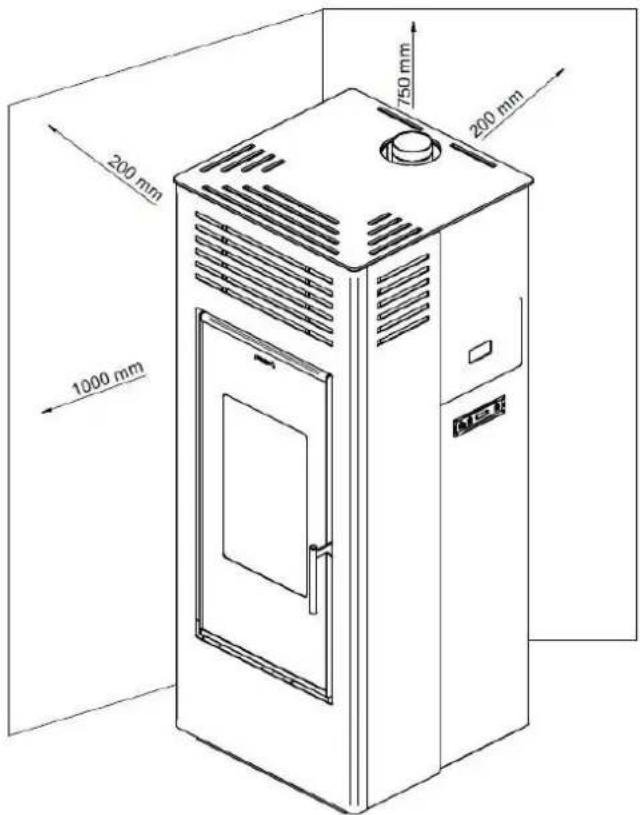
- Keep inflammable materials, such as furniture, cushions, pillows, blankets, paper, clothing, curtains, etc., at least 100 cm away from the stove front and 20 cm from the stove sides and back.
- Do not immerse the cable, plug or any other stove component in water or other liquids.
- Do not use the stove in dusty environments or wherever inflammable vapours are generated (e.g. in a workshop or garage).
- The stove is fitted with components that generate arcs and sparks. Do not install the stove in areas posing a significant fire or explosion hazard due to a high chemical substance concentration or to a high humidity level.
- Do not use the stove close to bathtubs, showers, basins, sinks or swimming pools.
- Do not install the stove underneath an air vent.
- Do not install the stove outdoors.
- Do not repair, disassemble or modify the stove. The stove is not fitted with components that can be repaired by users.
- ATTENTION! This stove operates exclusively on pellets; DO NOT USE OTHER FUELS: any other material that may be burnt will result in failure and malfunction of the stove.
- Keep the pellets in a fresh, dry place: storing pellets in a place that is damp or excessively cold may reduce the stove's potential heat output. Be careful when storing and handling pellet bags to prevent pellet crushing and consequent sawdust production.
- The use of different types of pellets may result in a slight, sometimes even undetectable, change in the stove efficiency. This change can be counterbalanced by increasing or decreasing the stove's heat output by only one step.
- Clean the brazier on a regular basis upon every ignition or pellet refuelling.
- Do not switch the stove on and off intermittently to avoid damaging its electrical and electronic components.
- Do not use liquid fuels.
- Use only original spare parts provided by Aduro A/S.
- Avoid any improper transfers or knocks that may damage the structure or the components.
- The metal structure is coated using high temperature paints. When using the stove for the first few times, unpleasant odours may be given off due to the paint of the metal parts that is drying: this is in no way dangerous and if it happens, simply ventilate the premises. After the first heating cycles, the paint will reach its maximum adhesion and all its chemical and physical features.
- To reload the pellet container, simply open the access lid and pour in the pellets. This can also be done during normal operation. Make sure not to come into contact with hot parts.
- Whenever the pellet container and the auger become completely empty, the stove will be automatically switched off. Upon the next ignition, you must load pellets onto the auger (see 7.6).
- ATTENTION! If the stove is not installed properly, power outages may result in fume spillages. Under specific circumstances, an uninterrupted power supply unit must be installed.
Aduro A/S declines all responsibility for any damage which may be caused, directly or indirectly, to persons, animals, or objects as due to non-compliance with any provision specified in the manual, especially warnings regarding installation, use, and maintenance of the stove.
The responsibility for improper use of the product is entirely borne by the user and relieves the manufacturer from any civil and criminal liability. Tampering or unauthorized replacement with non-original spare parts could be hazardous for the operator's safety and relieves the company from any civil and criminal liability.
2. Technical specifications
| Power | 7,5 kW | 3,13 kW |
| Dimensions (HxWxD) | 127 x 52 x 58 cm | |
| Weight | 100 kg | |
| Fuel (dimension) | Wood pellets (∅6 mm L 30 mm) | |
| Exhaust / Inlet | ∅80 / ∅40 mm | |
| Draft | 10 PA | |
| Pellet container capacity | 15 kg | |
| Voltage / Frequency | 230V / 50 Hz | |
| Electrical power during operation | 25W | |
| Electrical power during initialization | 312W | |
| Maximal efficiency | 87% | 90% |
| Nominal use of pellet | 1,77 kg/H | |
| Minimal use of pellet | 0,7 kg/H | |
| CO emission reduced on 13% | 0,005% | 0,016% |
| Maximal exhaust gas temperature | 193°C | 104°C |
| Dust content | 18,3 mg/m3 | 19,7 mg/m3 |
| Mass flow | 5,6 g/s | 3,1 g/s |
| Operating temperature | 7 – 40 °C | |
| Storage temperature | Max 80°C | |
| Max. relative humidity (with no condensation) | - | |
| Flamme verte class | ★★★★★★★ | |
| Energy Efficiency Index (EEI) / Class | 122,2 / A+ | |
text_image
495 1267,3 372 456,8 731,7 257,1 278,5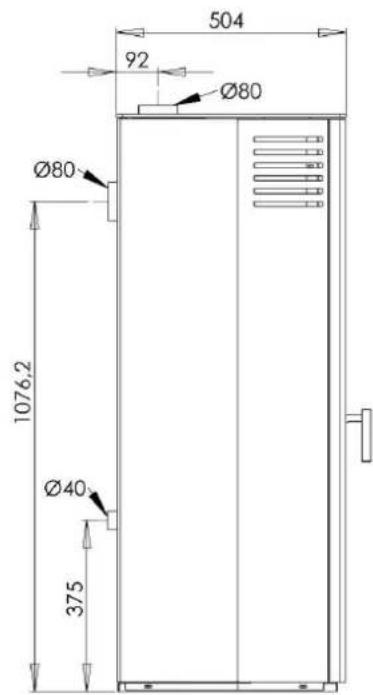
text_image
504 92 Ø80 Ø80 1076,2 Ø40 3752.1 Transportation
When taking your stove home, please ensure that it travels in an upright position. The packaging must be disposed according to national rules regarding disposal of waste.
3. Basic features of the stove
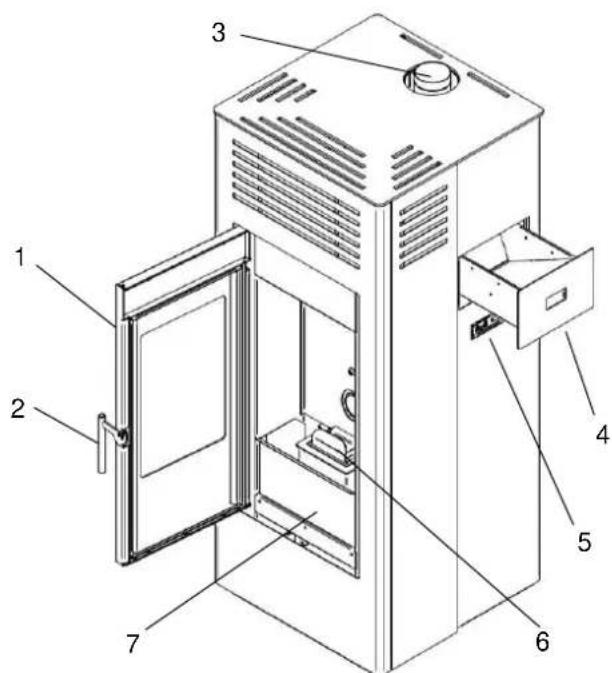
- Door
- Door handle
- Exhaust outlet
- Refill drawer
- Display
- Brazier
- Ashpan
text_image
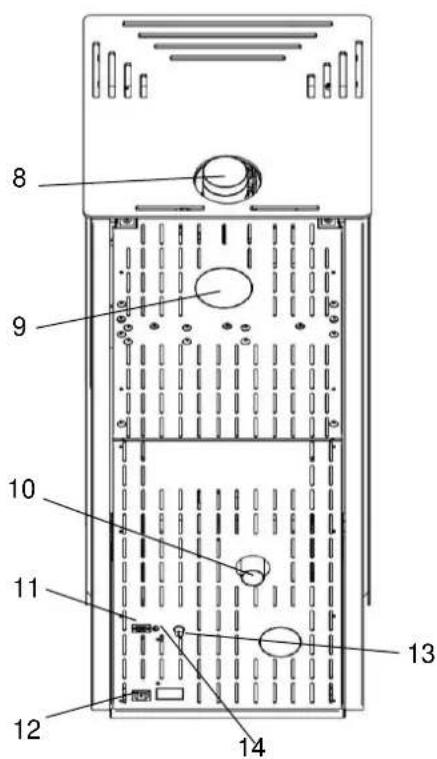
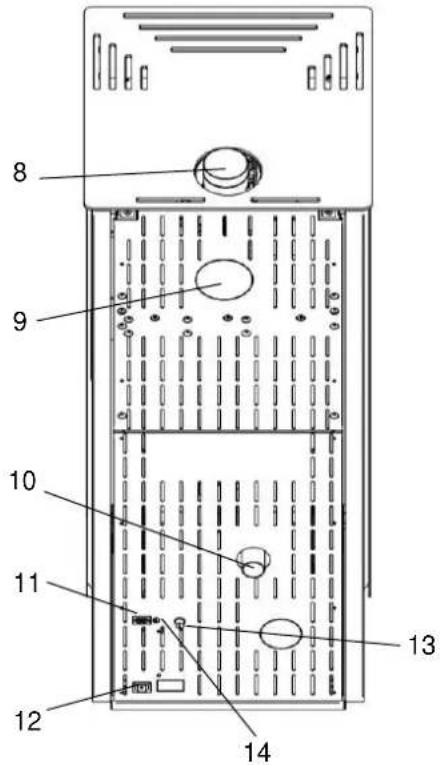
Technical diagram of an open refrigerator with numbered parts labeled for identification.- Top outlet
- Back outlet
- Air intake
- Communication port (RS232)
- Socket 230V
- Safety thermostat
- Room temperature senso
text_image
8 9 10 11 12 13 144. Installation of the stove
4.1 Installation
We recommend that the installation and connection is carried out by an authorized service partner in compliance with local regulation, national and European standards and with the annexed installation instructions. Your dealer can also provide you with installation advice. Remember, it is your responsibility that rules in force are complied with.
To ensure a clean and efficient combustion, the stove needs a constant uninterrupted air supply. This is often a problem in modern energy-efficient houses that are very airtight. The amount of air needed for combustion is 25 m3/h. This stove can be provided with combustion air through a channel from the outside which is connected to the connecting pipe behind the stove.
If there are any problems with the functioning of the chimney, these must be solved before installing the stove.
When connecting the stove to the smoke drain and flue tubes, carefully check if all connections are sealed to make sure that no gasses escape to the room.
4.2 Position of the stove/distance requirements
Distance requirements will only apply if the stove is to be placed close to flammable materials. See the table and illustration below:
| Distance to flammable material (see also illustration below) | |||
| Behind the stove | To the sides | To furniture | To the top |
| 200 mm | 200 mm | 1000 mm | 750 mm |
text_image
200 mm 1000 mm 750 mm 200 mm MISTMake sure the stove stands stable, using the four adjustable feet.
If stove is to be placed close to flammable material such as a wooden floor or carpet it must be placed on a non-flammable base. The floor plate should extend for at least 30 cm in front of the stove and 15 cm on each side – measured from the combustion chamber opening.

The stove must be installed on a floor with the adequate load-bearing capacity. If the existing construction does not meet this requirement, appropriate adaptation measures must be taken (e.g. a load-distributing plate).
4.3 Flue pipe and chimney
The flue pipe is one of the key features for guaranteeing the proper functioning of the stove.
- The stove is fitted with a ∅80mm round flue outlet and a joint connection to be connected to the flue pipe.
- You must be able to clean all the pipes and corners. T-fittings and inspection doors should be used to make sure all parts of the flue pipe can be reached for cleaning purposes.
- Use telescopic joint connections to connect the steel rigid flue pipe. It is important to ensure that no dust or soot from the chimney ends up in the exhaust pipe/fan on the stove when the chimney is cleaned.
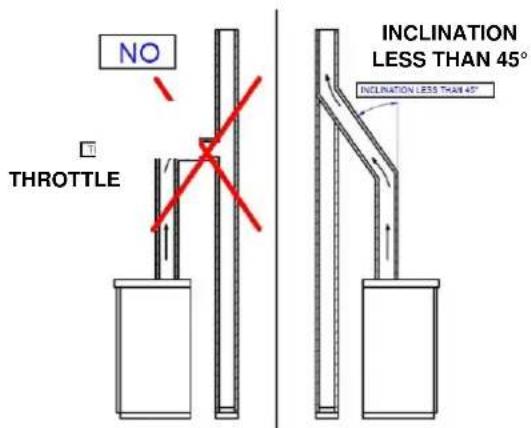
- Seal the flue pipe joint connection with high temperature silicone sealant (1,000°C). Should the existing flue opening not be perfectly perpendicular to the firebox flue outlet, use an elbow to connect them. Inclination must never exceed 45°, with respect to the vertical axis. No constrictions.
- The chimney must be insulated along its entire length. Thanks to the chimney insulation fume temperature will remain high optimizing draft, preventing condensation and reducing build-up of barely ignited particles along the flue pipe walls.
- The flue pipe in the room can be uninsulated for maximum 200 cm.
• The chimney must be weather-proof and as linear as possible.
• The chimney flue must be CE marked according to EN1443.
Flexible metal pipes may not be used.
Examples of flue pipes:
text_image
NO THROTTLE INCLINATION LESS THAN 45° INCLINATION LESS THAN 45°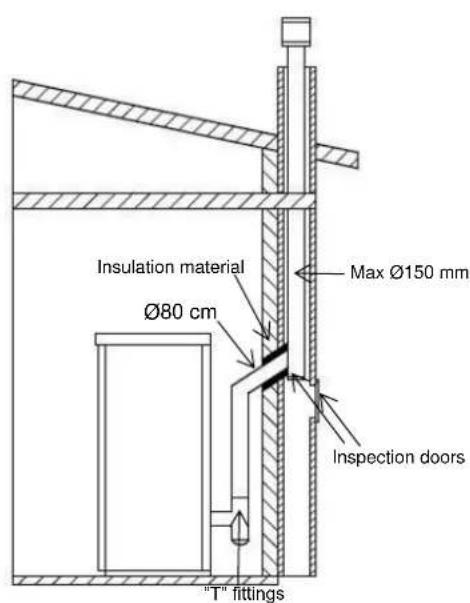
text_image
Insulation material Ø80 cm Max Ø150 mm Inspection doors "T" fittings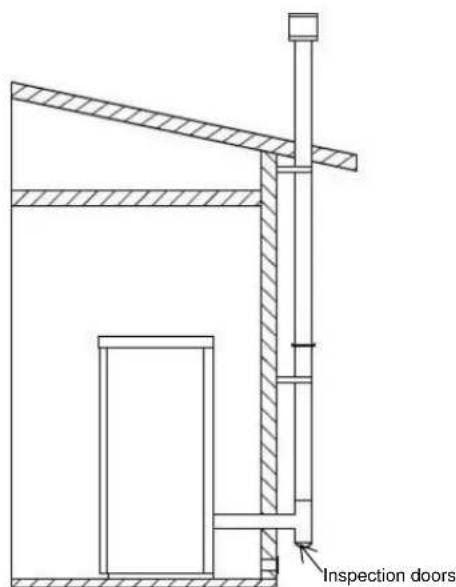
text_image
Inspection doors4.4 Draft
Fumes heat up during combustion, increasing their volume. Their density is therefore lower than the one of the surrounding colder air.
This difference between the inside and outside temperatures of the chimney results in the chimney draft.
The draft must be stronger than the fume circulation resistance so that all exhaust fumes generated during combustion inside the stove are drawn upwards through the outlet and the flue pipe. Many weather conditions affect the vent pipe functioning, such as rain, fog, snow, and wind being the most important as it can create negative pressure.
Read more at adurofire.com.
Excess draft causes an increase in the combustion temperature and consequently a loss in stove efficiency. At the same time the high fuel temperature, due to an excess amount of oxygen, wears down the combustion chamber sooner than expected. A high chimney draft may also result in vibrations from the exhaust fan.
On the other hand, poor draft slows down combustion resulting in a decrease in the stove temperature, fume spillage inside the room, a loss of stove efficiency and dangerous build-up of soot in the flue pipe.
5. Display
The display shows basic information about the operation of the stove and has 3 buttons for various settings (see the description below).

text_image
Room temperature setting LED Heat output setting LED Auger LED Exchanger LED (inactive) Igniter LED ON/OFF LED Button 2: increase/stove status/heat output setting 20.8°C Button 3: ON/OFF/confirm/exit Display: Current status/parameters Button 1: decrease/menu/room temperature setting Timer LED Alarm LED6. Using the stove
Make sure the stove is connected to the power source and the chimney.
6.1 Turning the stove on and off
To turn on the stove, press and hold button 3. The ON/OFF LED starts flashing.
During the pre-heating phase, the igniter and the exhaust fan start to work, indicated by the respective LED on the display. After approximately 1 minute, the auger starts to turn and transport pellets into the brazier.
Once the needed smoke temperature is reached, the stove enters the fire-on phase and the igniter turns off. When the smoke temperature remains above the minimum for a certain period, the stove will enter the normal operation phase. This is indicated by the ON/OFF LED shining permanently.
Now, the heat level and the room temperature can be changed according to the instructions under section 6.2.
From time to time, the stove will clean the brazier by reducing the auger speed and increasing the exhaust fan speed. The stove automatically returns to the normal operation phase.
To turn off the stove, press and hold button 3. The ON/OFF LED starts flashing. The stove starts the final cleaning phase, while the auger stops and the exhaust fan speed increases. After the final cleaning is completed, the stove is turned off.
6.2 Temperature and heat level settings
The wanted room temperature can be changed by pressing button 1 followed by button 2 to increase or button 1 to decrease the temperature. Press button 3 to exit or wait a few seconds for the set room temperature to disappear from the display.
Once the set room temperature has been reached, the stove will automatically reduce the heat level to the minimum (1). If the room temperature falls below the set value the stove will return to the previously set heat level.
The heat level can be changed by pressing button 2 followed by button 2 to increase or button 1 to decrease the level (1-5). Press button 3 to exit or wait a few seconds for the set heat level to disappear from the display.
7. Settings
In order to access the general programming menu, press and hold button 1. Press button 1 (down) or button 2 (up) to scroll through the menus 1-9. Use button 3 to confirm and enter the chosen menu.
7.1 Clock settings
Use this function to set the current time and date.
Enter menu 1, then use button 1 or 2 to switch between the weekdays Monday-Sunday. Press button 3 to confirm and continue to the hour settings.
Change the hour, minute, day, month, and year with the buttons 1 and/or 2. Confirm each value by pressing button 3.
7.2 Timer settings

Make sure that the starting up and shutting down time does not overlap. Be aware that at least 30 minutes need to pass between the two time periods.
There are three kinds of timer settings:
• Daily - allows you to define 2 time periods per day.
- Weekly - allows you to define 4 time periods which can be chosen for all 7 days of the week individually.
- Weekend - allows you to define 2 time periods, one that applies for Saturday and one that applies for Sunday.
7.2.1 How to turn the timer on and off
Enter menu 2, press button 3 to confirm and to enter menu 2-1 (n2-1), then switch between ON and OFF using button 1 or 2. Confirm your choice with button 3. The stove will only work according to the different timer settings if the timer is turned ON.
7.2.2 Daily programming
Enter menu 2, then press button 2 to continue to menu 2-2, the daily programming menu. Use button 3 to scroll through the different settings within this menu in the order shown in the table below (n2-2-01 to n2-2-09). Use the buttons 1 and 2 to change the respective values.
The daily programming mode must be enabled (n2-2-01 □ ON) in order for the stove to work according to the timer.
| DAILY PROGRAMMING | |||
| menu level | setting | meaning | available values |
| n2-2-01 | DAYLY CHRONO | Enable daily chrono | ON/OFF |
| n2-2-02 | START 1 Day | Start time | OFF-00:00-23:50 |
| n2-2-03 | STOP 1 Day | Stop time | OFF-00:00-23:50 |
| n2-2-04 | Set Pot 1 | Heat level | 01-05 |
| n2-2-05 | Set Temp. 1 | Wanted room temperature | ...□C |
| n2-2-06 | START 2 Day | Start time | OFF-00:00-23:50 |
| n2-2-07 | STOP 2 Day | Stop time | OFF-00:00-23:50 |
| n2-2-08 | Set Pot 2 | Heat level | 01-05 |
| n2-2-09 | Set Temp. 2 | Wanted room temperature | ...□C |
7.2.3 Weekly programming
The weekly programming allows you to create up to four time periods that can be activated or deactivated for every single weekday. If you activate more time periods for the same day, make sure that these periods do not overlap.
Enter menu 2, then press button 2 (two times) to continue to menu 2-3. Use button 3 to scroll through the different levels within this menu in the order shown in the table below (n2-3-01 to n2-3-45). Use the buttons 1 and 2 to change the respective values.
The weekly programming mode must be enabled (n2-3-01 □ ON) in order for the stove to work according to the timer.
| WEEKLY PROGRAMMING | |||
| menu level | setting | meaning | available values |
| n2-3-01 | WEEKLY CHRONO | Enable weekly chrono | ON/OFF |
| n2-3-02 | START PRG 1 | Start time | OFF-00:00-23:50 |
| n2-3-03 | STOP PRG 1 | Stop time | OFF-00:00-23:50 |
| n2-3-04 | Set Pot PRG 1 | Heat Level | 01-05 |
| n2-3-05 | Set Temp. PRG 1 | Wanted room temperature | ... [C] |
| n2-3-06 | MONDAY | ON/OFF | |
| n2-3-07 | TUESDAY | ON/OFF | |
| n2-3-08 | WEDNESDAY | ON/OFF | |
| n2-3-09 | THURSDAY | ON/OFF | |
| n2-3-10 | FRIDAY | ON/OFF | |
| n2-3-11 | SATURDAY | ON/OFF | |
| n2-3-12 | SUNDAY | ON/OFF | |
| n2-3-13 | START PRG 2 | Start time | OFF-00:00-23:50 |
| n2-3-14 | STOP PRG 2 | Stop time | OFF-00:00-23:50 |
| n2-3-15 | Set Pot PRG 2 | Heat Level | 01-05 |
| n2-3-16 | Set Temp. PRG 2 | Wanted room temperature | ... [C] |
| n2-3-17 | MONDAY | ON/OFF | |
| n2-3-18 | TUESDAY | ON/OFF | |
| n2-3-19 | WEDNESDAY | ON/OFF | |
| n2-3-20 | THURSDAY | ON/OFF | |
| n2-3-21 | FRIDAY | ON/OFF | |
| n2-3-22 | SATURDAY | ON/OFF | |
| n2-3-23 | SUNDAY | ON/OFF | |
| n2-3-24 | START PRG 3 | Start time | OFF-00:00-23:50 |
| n2-3-25 | STOP PRG 3 | Stop time | OFF-00:00-23:50 |
| n2-3-26 | Set Pot PRG 3 | Heat Level | 01-05 |
| n2-3-27 | Set Temp. PRG 3 | Wanted room temperature | ... [C] |
| n2-3-28 | MONDAY | ON/OFF | |
| n2-3-29 | TUESDAY | ON/OFF | |
| n2-3-30 | WEDNESDAY | ON/OFF | |
| n2-3-31 | THURSDAY | ON/OFF | |
| n2-3-32 | FRIDAY | ON/OFF | |
| n2-3-33 | SATURDAY | ON/OFF | |
| n2-3-34 | SUNDAY | ON/OFF | |
| n2-3-35 | START PRG 4 | Start time | OFF-00:00-23:50 |
| n2-3-36 | STOP PRG 4 | Stop time | OFF-00:00-23:50 |
| n2-3-37 | Set Pot PRG 4 | Heat Level | 01-05 |
| n2-3-38 | Set Temp. PRG 4 | Wanted room temperature | ... [C] |
| n2-3-39 | MONDAY | ON/OFF | |
| n2-3-40 | TUESDAY | ON/OFF | |
| n2-3-41 | WEDNESDAY | ON/OFF | |
| n2-3-42 | THURSDAY | ON/OFF | |
| n2-3-43 | FRIDAY | ON/OFF | |
| n2-3-44 | SATURDAY | ON/OFF | |
| n2-3-45 | SUNDAY | ON/OFF | |
7.2.4 Weekend programming
This program allows you to set one time period for Saturday and one for Sunday.
Enter menu 2, press button 2 (three times) to continue to menu 2-4. Then use button 3 to scroll through the different levels within this menu in the order shown in the table below (n2-4-01 to n2-4-09). Use the buttons 1 and 2 to change the respective values.
The weekend programming mode must be enabled (n2-4-01 □ ON) in order for the stove to work according to the timer.
| WEEKEND PROGRAMMING | |||
| menu level | setting | meaning | available values |
| n2-4-01 | WEEKEND CHRONO | Enable weekend chrono | ON/OFF |
| n2-4-02 | START 1 WEEKEND (SAT) | Start time | OFF-00:00-23:50 |
| n2-4-03 | STOP 1 WEEKEND (SAT) | Stop time | OFF-00:00-23:50 |
| n2-4-04 | Set Pot 1 | Heat Level | 01-05 |
| n2-4-05 | Set Temp. 1 | Wanted room temperature | ...□C |
| n2-4-06 | START 2 WEEKEND (SUN) | Start time | OFF-00:00-23:50 |
| n2-4-07 | STOP 2 WEEKEND (SUN) | Stop time | OFF-00:00-23:50 |
| n2-4-08 | Set Por 2 | Heat Level | 01-05 |
| n2-4-09 | Set Temp. 2 | Wanted room temperature | ...□C |
7.3 Language settings
Enter the language setting menu by pressing and holding button 1. Press button 2 until you reach menu 3 and confirm with button 3. Scroll through the languages with button 2 and confirm the chosen language with button 3.
The available languages are listed in the following order: ITA, ENG, FRE, DEU, SPA, POR.
7.4 Stand-by mode
The STAND-BY mode allows the stove to automatically turn off when the measured temperature exceeds the set room temperature with 2 °C and will turn back on when the measured room temperature is 2 °C below the set room temperature.
Enter menu 4, then choose ON or OFF by pressing button 1 or 2. Confirm your choice with button 3.
7.5 Sound alerts
The stove will make you aware of any potential alerts with a beep sound.
Enter menu 5, then choose ON or OFF by pressing button 1 or 2. Confirm your choice with button 3.
7.6 Initial pellet loading
Enter menu 6, then press button 2. The exhaust fan will turn on and the auger starts to turn. A 90 seconds count-down will appear on the display. The initial pellet loading stops automatically after the 90 seconds. If necessary, it can be stopped before by pressing button 3. This function is available only when the stove is switched OFF. Upon the first stove start-up the auger tube must be loaded with pellets.
If the pellet container runs completely empty during use, it is necessary to load the auger as described above. Stop the initial pellet loading as soon as you can hear/see pellets falling into the brazier.
7.7 Information on the operation of the stove
When entering menu 7, you can scroll through a few parameters on the display. The table below contains an example of the values shown on the display together with their meaning.
| Displayed status (example) | meaning |
| 3.1” | Auger/Pellet loading status |
| 52’ | Max. time for ignition phase |
| Toff | Thermostat status |
| 106° | Smoke temperature |
| 1490 | Exhaust fan speed |
7.8 Technical settings
IMPORTANT!
Menu 08 is reserved only for authorised service partners. Any change in the parameters that was made by unauthorized persons will result in the loss of warranty!
8. Potential errors
When an error occurs, the Alarm LED turns on and the stove automatically stops working.
The respective alarm will show on the display for a certain time followed by the buzzer (if activated). The alarm can be cleared by pressing and holding button 3. Whenever an alarm is cleared, the stove automatically enters the final cleaning phase and shuts down completely for safety reasons. The Alarm LED will remain on and the buzzer (if activated) will sound intermittently during the entire alarm phase. If the alarm is not cleared by pressing button 3, the stove will initiate the final cleaning phase and the alarm message will remain on the display.
The table below shows all 8 potential errors. Every error is explained in detail below.
| Cause | Display shows |
| Power outage | AL 1 BLAC-OUT |
| Smoke temperature sensor failure | AL 2 PROBE EXHAUST |
| Overheating | AL 3 HOT EXHAUST |
| Exhaust fan failure | AL 4 FAN FAILURE |
| Ignition failure | AL 5 NO LIGHTIN- |
| No pellets | AL 6 NO PELLET |
| Thermal safety overheating | AL 7 SAFETY THERMAL |
| No negative pressure | AL 8 FAILURE DEPRESS |
8.1 Alarm 1: Power outage
When a power outage occurs during operation, there are two ways the stove may react.
If the period without power is shorter than the one set in the technician settings, the stove will continue its operation once the power is on again.
If the period without power exceeds the pre-set limit, the stove will trigger alarm 1.
8.2 Alarm 2: Smoke temperature sensor failure
This alarm is triggered in case of a faulty smoke temperature sensor.
8.3 Alarm 3: Overheating
This alarm is triggered if the measured smoke temperature is beyond a certain value.
8.4 Alarm 4: Exhaust fan failure
This alarm is triggered in case of a faulty exhaust fan.
8.5 Alarm 5: Ignition failure
This alarm is triggered if the ignition phase fails, meaning that the minimum smoke temperature has not been reached during the ignition phase.
8.6 Alarm 6: No pellets
This alarm is triggered if the smoke temperature falls below the minimum smoke temperature needed during operation.

This alarm can also happen due to jamming of pellets of inadequate dimensions.
8.7 Alarm 7: Thermal safety overheating
This alarm is triggered if the safety thermostat detects a temperature beyond 100^ C.
8.8 Alarm 8: No negative pressure
This alarm is triggered if the external pressure sensor detects a pressure value below the pre-set limit.
9. Cleaning and maintenance

All maintenance and cleaning of the stove should be carried out when the stove is cold, and the power is disconnected.
Before using an ash vacuum cleaner make sure there are no embers left.
9.1 General maintenance
Glass
Soot and dust can easily be removed using a damp cloth that you dip in cold ash and rub on the sooty glass. Special cleaning agents are also available to remove soot from the glass, e.g. the Aduro Easy Clean pad.
The pad neither scratches nor damages the glass, and it can be used multiple times. Water or other cleaning agents are not necessary.
It is common maintenance to tighten the glass fittings shortly after the stove has been installed as well as to check if the gaskets are properly placed.
Gaskets
With time, gaskets around glass and door will wear. We recommend that you inspect them regularly. If leakages appear, they must be replaced.
Flue pipe
Annual cleaning of the flue pipe is essential as dust may cover the pipes – especially the horizontal ones. Use the inspection doors and T-fittings to reach all parts of the flue pipe.
Make sure that the dust released from the pipe during chimney sweeping does not reach and contaminate the exhaust fan.
After the last use before a longer period of inactivity, make sure to:
- Clean the stove properly
- Remove any remaining pellets from the pellet container
• Completely empty the auger for pellets - Unplug the power cable
9.2 Daily cleaning/maintenance
Clean the brazier thoroughly to avoid residues of ashes and partly burnt pellets.
We recommend emptying the ash tray and to vacuum clean the combustion chamber and the door (around the gaskets) on a daily basis.
Upon every ignition, the brazier must be checked for ashes and unburnt/partly burnt pellets, as residues may affect the ignition negatively.
The frequency of cleaning periods depends on the quality of the pellets and the combustion thereof. The better the combustion, the less residues will settle in the combustion chamber, the air channels and flue pipes.
9.3 Surface maintenance
The stove's surface is treated with a powder coat paint. When cleaning the stove, avoid strong detergents and abrasives, and all products containing solvents, alcohols, acids, or any solvent.
Painted and plastic parts can be cleaned with a slightly damp cloth and use only a mild detergent diluted with water.
9.4 Annual service visit
The annual service visit must be conducted by an authorised service partner. Contact your retailer for further information.
9.5 Spare parts and unauthorized alterations
You may only use original spare parts for your stove. All forms of unauthorized alterations to the stove are strictly forbidden, as the stove will no longer comply with the approved specifications. At www.aduroshop.com you can buy original spare parts for your stove.
10. Accessories
For Aduro stoves we offer a wide product range of accessories to fulfil the experience: Companion sets, fireplace grid, briquette buckets, floor hearths in glass and steel, flue pipes, Aduro Easy Firelighter, and Aduro Easy Clean pads. For further information, go to www.adurofire.com/accessories.
11. Right of complaint
In accordance with the Danish Sale of Goods Act, the right to claim is valid for two years from the date of purchase of the stove. Receipt with date is valid as proof.
All pellet stoves may require adjustment of combustion air and auger speed in order to optimize function and in order to reach effective and clean combustion. Aduro and our service partners can monitor and adjust stoves in the Aduro Cloud. However, it is only possible if the stove is connected to the cloud via Wi-Fi. Aduro can therefore not treat complaints regarding function and combustion if the stove is not online.
If you have difficulties getting the stove online, it might be because of your local Wi-Fi network, router or phone setup. You find guidance about Wi-Fi on adurofire.com – but it is not the responsibility of Aduro AS to secure a connection. You can purchase a service visit in order to get the stove online. It is a requirement that the stove is online, if you want to file a complaint regarding the combustion and functioning of the stove. Alternatively, some Aduro resellers offer this assistance.
The right of complaint does not cover:
- Damages resulting from incorrect installation and use of the stove, overheating and wrong or missing maintenance of the stove etc. (including the annual service visit).
- Consumable service parts (glass, gaskets, firebricks, handles, painted surfaces, electrical igniter, sensors/switches, cast iron grate), which are subject to normal wear and tear. You can buy these parts in our online shop www.aduroshop.com.
- Damages caused by electrical surcharge, (condensation) water in and around the chimney, too much or too little draught in the chimney and missing maintenance/cleaning.
-
Mounting or demounting in connection with warranty repairs.
-
Problems due to exposure to rain, snow etc.
- Transportation costs in connection with repairs within the warranty period.
- Damages to the stove caused by external influences or damages caused by the stove on other objects.
12. Disposal of your Aduro stove
When disposing your stove, metal, vermiculite, ceramic glass, and electronics must be sorted separately. Dispose hereafter the materials according to the regulations at your nearest recycling depot.