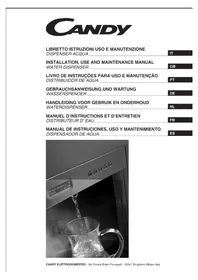
CWP60X - Water dispenser CANDY - Free user manual and instructions
Find the device manual for free CWP60X CANDY in PDF.


| Brand | Candy |
| Model | CWP60X |
| Product type | Water dispenser |
| Power supply | Domestic mains (230 V / 50 Hz) |
| Required water pressure | 2.0 to 3.5 bar |
| Max ambient temperature | 45 °C |
| Types of dispensed water | Still (flat), cold, hot, sparkling |
| Adjustable cold water temperature | 1 °C to 10 °C |
| Adjustable hot water temperature | 50 °C to 85 °C |
| Filtration system | Pre-filter (fabric) + composite filter + UV sterilization |
| Sterilization | UV lamp |
| Programmable dispense capacity | 15 seconds by default (adjustable) |
| Display | LCD screen with temperatures and indications |
| Alarms | Water shortage, low pressure, leak, defective probe, filter change |
| Periodically replaceable parts | Pre-filter (6 months), composite filter (12 months), UV lamp (7000 h), CO2 bottle (if needed) |
| Cleaning | Soft damp cloth with warm water and mild detergent or stainless steel cleaner |
| Safety instructions | Do not let children play, unplug before maintenance, do not block air intakes |
| Weight | Heavy, move with caution (weight not specified) |
| Dimensions | Not specified in this manual |
| Repairs | Authorized after-sales service only, original parts |
| Warranty | Compliance with CE, IMQ, NSF standards |
Frequently Asked Questions - CWP60X CANDY
User questions about CWP60X CANDY
0 question about this device. Answer the ones you know or ask your own.
Ask a new question about this device
Download the instructions for your Water dispenser in PDF format for free! Find your manual CWP60X - CANDY and take your electronic device back in hand. On this page are published all the documents necessary for the use of your device. CWP60X by CANDY.
USER MANUAL CWP60X CANDY
INSTALLATION, USE AND MAINTENANCE MANUAL
WATER DISPENSER
GB
LIVRO DE INSTRUÇÕES PARA USO E MANUTENÇÃO
DISTRIBUIDOR DE ÁGUA
PT
AVVERTENZE GENERALI
Manufacturer is member of WATER QUALITY ASSOCIATION
Premendo il tasto
It is fundamental that this instruction manual is stored together with the equipment for any future consultation.
In case the equipment is sold or given to third parties, make sure that this instruction manual is given to the new user, in order to allow him/her to get all necessary information on the equipment operation and relevant notices.
Before using the equipment, carefully and thoroughly read this manual.
Being aware of all the information and prescriptions contained in this manual is of fundamental importance to correctly use the equipment.
These symbols will help you find in a quick way most important information.

Safety information Useful advices and suggestion

Information on environment protection
DICLARATION OF CONFORMITY
The equipment complies with the following standards
- for parts that get in contact with food substances, it complies with the prescription of the EEC Directive 89/109 and of the law by decree n.108 of 25/01/92;
to what prescribed by the EEC Directives 73/23 (Low Tension), 89/336 (Electromagnetic Compatibility), including the latest modifications introduced by the EEC Directives 93/68, 90/396 and further modifications.

This equipment complies with the safety norm IMQ-CSv

This equipment is fitted with components complying with NSF norms (Food products)

Manufacturer is member of WATER QUALITY ASSOCIATION
CE mark validity is subject to the product integrity and to the respect of the assembly conditions and use indicated in the installation, use and maintenance manual. Any unauthorized modifications will cause the lost of the CE marking.
FOR YOUR SAFETY
These notices have been issued for the safety of yourself and of anyone who could use your new electrical appliance (Water dispenser). For this reason we recommend to carefully read them before installing and using the equipment.
Children safety

- The Dispenser must be used only by adults. Make sure that children neither touch push buttons nor play with the Dispenser.
During the use i
- The Dispenser is for domestic use. Make sure not to use it for any other purpose. Any other use is considered as unsuitable. The manufacturer declines any responsibility for damages caused by a wrong or unsuitable use.
- Make sure to have a good air circulation around the Dispenser. Avoid to obstruct side and rear cooling air intake.
- Check that there are no leakages from the hydraulic system close to the Dispenser. These could cause a short circuit.
Cleaning and maintenance

- To carry out periodic cleaning use a soft moistened cloth with water and mild detergent or specific products for stainless steel
- Never use wire wools or blades to remove any possible scales.
- Always avoid to use abrasive products.
- Before carrying out any extraordinary maintenance, verify that the Dispenser is not connected to the electric main.
- Keep the Dispenser always perfectly clean.
- Pay particular attention when using spray cleaning products: always make sure not to spray towards the air intakes.
- In case of failure, never attempt to repair the Dispenser yourself. Repairs that are carried out by unqualified people could cause damages and accidents. Consult the content of this manual. In case you cannot find information of your interest, get in contact with the nearest service center. Service to the Dispenser must be carried out by an authorized service center. Do not have the equipment repaired by non specialized personnel
- Always require original spare parts. Only the use of original spare parts could guarantee the reliability and the best performance of the equipment.
Disposal - Packing

- All materials are compatible with the environment and can be recycled. We would like to ask you to contribute the environment protection by using the proper channels for the correct waste disposal.
EEC Directive 2002/96/CE
This appliance is marked according to the European directive 2002/96/EC on Waste Electrical and Electronic Equipment (WEEE).
By ensuring this product is disposed of correctly, you will help prevent potential negative consequences for the environment and human health, which could otherwise be caused by inappropriate waste handling of this product.
The symbol on the product indicates that this product may not be treated as household waste. Instead it shall be handed over to the applicable collection point for the recycling of electrical and electronic equipment
Disposal must be carried out in accordance with local environmental regulations for waste disposal.
For more detailed information about treatment, recovery and recycling of this product, please contact your local city office, your household waste disposal service or the shop where you purchased the product.
- Before disposing of the Dispenser, cut the feeding cable in order to prevent any possible use of it.
WATER TREATMENT

The dispenser is designed to use only drinkable water coming from the water supply.
Such a water, after a treatment cycle, is delivered still, cold, sparkling or hot.
Attention: the manufacturer declines any responsibility in case of non drinkable water or of water not controlled by the water company. In such a case, every guarantee will cease.
The treatment cycle is divided in four stages:
(1) PRE-FILTRATION
The inlet water goes through a fabric filter that retains deposits and even rougher suspended solids that could quickly obstruct the second stage of the filtration system.
(2) FILTRATION
The water coming from the pre-filtration system goes through a composite filter that reduces the bacterial charge, eliminates suspended particles, chlorine and organic substances.
(3) STERILIZATION
Thanks to the ultra-violet rays emitted by a UV lamp, any residual bacterial charge in the water coming from the filtration process is eliminated.
(4) COOLING/HEATING/FIZZING
After going through the above mentioned treatment, the water is dispensed at the same inlet temperature (still water), or it can be dispensed cooled (cold still water) or a certain quantity of carbon dioxide is added (cold sparkling water) or it can be warmed (hot still water).
PRECAUTIONS FOR INSTALLATION

- The product must be always installed downstream the autoclave or the water meter and downstream any water filtration or treatment devices (a filtration system is already built-in).
• Always verify that the inlet water is of a controlled origin (drinkable). - Verify that the main pressure is between 2,0 and 3,5 bar: in case the main pressure is higher than the maximum allowable value, the fizzing procedure could be compromised (in such a case, install a pressure reducer); should the main pressure be lower than the minimum value, the electrical appliance would produce an alarm signal indicating a non sufficient pressure.
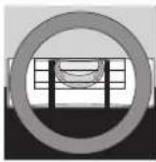
- For a correct operation of the refrigerator unit, it is necessary to grant a good air circulation in the back of the equipment and to have a room temperature not exceeding 45°C. Place the equipment in a perfectly horizontal position in order to allow the anti-flood feeler, very useful in case of a possible water leakage, to operate in a correct way (to activate the alarm, the feeler must be completely immersed in water).
- The Dispenser installation and the connection to the electric main, including any modification to the hydraulic system, if required, must be carried out only by qualified personnel.
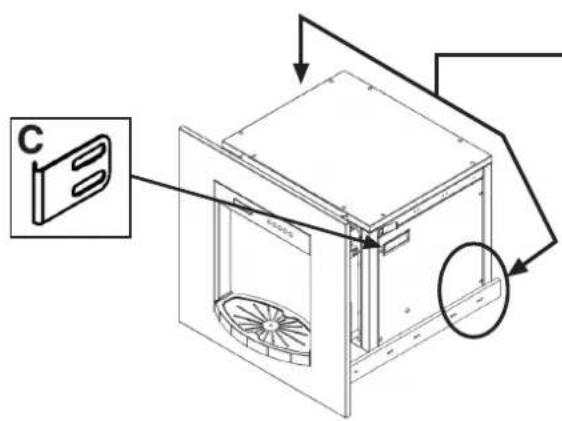
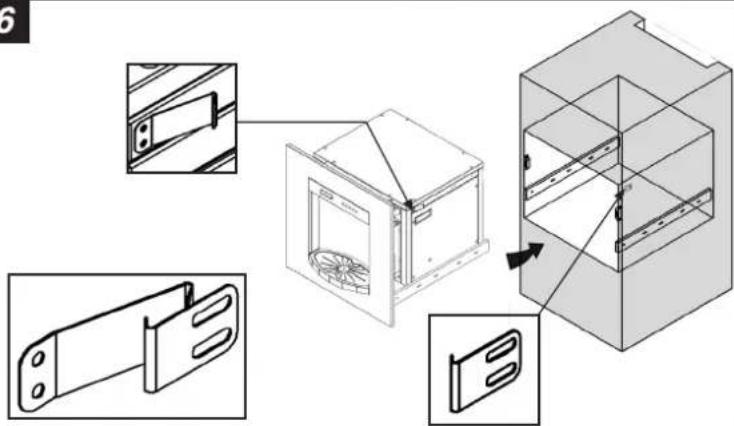
- Secure the cabinet that holds the water machine to the wall. This will prevent the cabinet from falling forward when pulling out the machine on its guides.
- The Dispenser is heavy; move it very carefully.
- Handle with care, by making sure never to turn it upside down.
- It is forbidden to modify or to attempt to modify the features of the Dispenser.
- The manufacturer declines any responsibility for possible damages caused to people or objects because of possible modifications, accessories or devices of any type installed on the equipment and not expressly foreseen in this manual.
- Make sure to grant a good air circulation around the Dispenser: ask a technician to check that air intakes allow a good air circulation and that they are not obstructed.
START UP

WARNING – it is necessary that this operation is carried out by qualified technical people.
- When starting up the unit for the first time, it is necessary to eliminate every type of produced water (still, cold, hot and sparkling) for the first 5 minutes of production in order to eliminate the protection anti-bacterial agent introduced at the end of the testing cycle.
During this stage, the produced water could have an unpleasant smell and/or an altered colour: such symptoms will disappear after the supply of 2 or 3 litres of water that needs to be eliminated.
Warning: in case the equipment is first used in a selling point or during an exhibition, carry out a complete sanitization cycle before installing it for a private user.
TECHNICAL SERVICE

Before calling the Technical Service
In case the equipment would not operate, we suggest to:
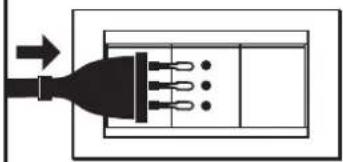
— verify that the plug is correctly connected;
— verify that the connection to the hydraulic main is not interrupted and/or obstructed.
In case the causes for the malfunctioning cannot be found, switch off the equipment, do not tamper with it and call the Technical Service.
It is important to communicate the Authorized Technical Service the product model and its serial number (16 digit starting by number 3) that can be found on the guarantee certificate or on the nameplate. In this way, you can contribute to avoid useless transfers of the technician, thus saving relevant costs.
STARTING
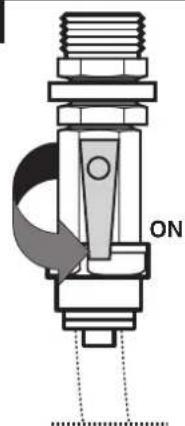
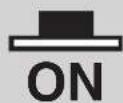
After switching the unit on by means of the switch ON/OFF (pag. 37) the following messages appear on the display:
Release 1.00 Good Morning
After 3 seconds the following messages are alternatively displayed:
Refrigerator 10 C° Filter Change 500 h
Boiler OFF Filter Change 500 h
By pressing button

"ON / OFF BOILER" the boiler heating element is activated and the following message is displayed:
Boiler 50 C° Filter Change 500 h
The display indicates the temperature of the boiler and the temperature of the refrigerator in Celsius. In case the displayed value is not included in the reading range, 3 lines are displayed.
DRINK SUPPLY
The built-in system foresees 4 types of drinks, with programmable supply (see paragraph “user programming” – pre-set value 15 seconds per each drink):
To stop the supply, press any dosing button. During the supply, four Leds are switched on.
| DRINK | DOSING BUTTON DISPLAY | NOTE | |
| STILL WATER | Still waterUV LIGHT ON | In case “UV LIGHT OFF” is displayed during the supply, this indicates an anomalous operation of the sterilizer. In such a case, get in contact with the technical assistance center. | |
| SPARKLING WATER | Carbonated waterUV LIGHT ON | ||
| COLD WATER | Cold waterUV LIGHT ON | ||
| HOT WATER | Hot waterUV LIGHT ON | ||
ALARMS

Unless otherwise stated in the column HOW CAN YOU STOP IT, the audible alarm can be switched off only by switching off the appliance.
| HOW CAN YOU STOP ITDISP | |||
| AllarmLow Pressure | During the supply, whenever a lack of inlet water or a too low pressure from the main occur. | Intervalli di 0,5 secondi. | The unit will not supply until the problem that has caused the starting of the alarm is solved. By pressing the 🎨 button, the alarm will be temporarily re-set to allow to solve the inconvenience. |
| Filter Allarm | Once the supply hours set on the display are reached. | Intervalli da 1 secondo. | This alarm warns the user that it is necessary to replace the pre-filter. After the filter replacement, in order not to have the same message displayed again, set at zero the operating hours (see paragraph user programming). |
| Anti- oodingAllarm | In case the anti-flood feelers sense a water presence. | Intervalli da 2 secondi. | The unit will not supply until the problem that has caused the starting of the alarm is solved. Switch the unit off and on to reset the alarm. Such an alarm, if leakages are not eliminated and if the inner sensor is not carefully dried, would not allow to start the unit. |
| Refrigeratorprobe allarm | In case the unit senses that one of the two feelers are disconnected or in short circuit . | Intervalli di 0,35 secondi. | By pressing a button, the acoustic alarm as well as the message on the LCD are re-set and the unit will not supply the drink associated with the feeler causing the alarm.The alarm is automatically disconnected when the malfunction is eliminated. |
| Boiler probeallarm | |||
| Charge TimeoutAllarm | In case, after 180 seconds of filling, the maximum level feeler is not covered | Intervalli da 0,25 secondi. | By pressing a button, the acoustic alarm as well as the message on the LCD are disconnected, the unit will not supply sparkling water.When the unit is started again, the filling |
The system is fitted with components that are subject to periodic replacement and for which it is not possible to foresee the actual life: one of the most important parameter is the quality of the water (the higher the quality of the inlet water, the longer the average life of the component). The components to be replaced can be bought by the technical assistance.
In case of a heavy use, the system will provide to inform the user about the need to replace a certain component subject to periodic replacement.
Instructions for component replacement are supplied together with the component itself.
| NOTEFREQUENCY WAT | |||
| 6 MONTHS | PREFILTER | USER | By only treating drinkable water with suspended solids not bigger than 5 micron. |
| 12 MONTHS | COMPOSITE FILTER | TECHNICAL ASSISTANCE | By only treating drinkable water with suspended solids not bigger than 5 micron.. |
| 12 MONTHSOr in case the unit has not been used for a period longer than 15 days. | SANITIZATION | TECHNICAL ASSISTANCE | The system sanitization must ALWAYS be carried out if the unit has not been used for a period longer than 15 days. |
| 12 MONTHS | WATER SEAL CHECK | TECHNICAL ASSISTANCE | Ultraviolet rays could damage the hydraulic fitting gaskets installed on the sterilizer. |
| 7000 hours | UV LAMP | TECHNICAL ASSISTANCE | The need to replace it is indicated by the system; even if it regularly turns on, it might not be in a position to grant the best sterilization of the discharged water any longer. |
| In case a remarkable lack of fizzing is noticed when dispensing the drink. | 2 BOTTLE | USERCO | It is advisable not to wait the complete consumption. |
USER PROGRAMMING

This paragraph indicates how to modify some parameters of the dispenser, such as the quantity of water to be supplied every time the buttons are pressed, the refrigerator temperature, and so on. Being very simple, these operations can be carried out very safely by the user.
To enter the programming functions, press buttons 2 and 3 at the same time.


User programming cycleButtons [2Y04] and  allow to scroll the menu.Button allow to scroll the menu.Button  allows to modify the parameter. By pressing it for a second time, after modifying the value, it saves the datum. allows to modify the parameter. By pressing it for a second time, after modifying the value, it saves the datum. | ||
| VISUALIZATION ON THE DISPLAY | OPERATIONMENU | |
| Visualization / zero setting supplied doses of still water | Total supplied doses [XXXX] | Given value indicates the total number of supplied doses |
| Visualization / zero setting supplied doses of sparkling water | Still water doses [XXXX] | Given value indicates the total number of supplied doses of still waterTo set at zero press at the same time buttons  [TA2K] [TA2K] |
| Visualization / zero setting supplied doses of sparkling water | Sparkling water doses [XXXX] | Given value indicates the total number of supplied doses of sparkling waterTo set at zero press at the same time buttons  [YX50] [YX50] |
| Visualization / zero setting supplied doses of sparkling water | Cold water doses [XXXX] | Given value indicates the total number of supplied doses of cold waterTo set at zero press at the same time buttons   |
| Visualization / zero setting supplied doses of sparkling water | Hot water doses [XXXX] | Given value indicates the total number of supplied doses of hot waterTo set at zero press at the same time buttons  [D4WS] [D4WS] |
| VISUALIZATION ON THE DISPLAY | OPERATIONMENU | |
| Refrigerator unit temperature adjustment. | Refrigeration Temperature [5] => C° | “5” indicates the pre-set temperature, in degrees Celsius, of the refrigerator unit; the values can be set between 1°C and 10°CPress button to allow the modification.Press button and to modify.Press button to save datum and exit. |
| Boiler temperature adjustment to produce hot water. | Boiler Temperature [85] => C° | “85” indicates the pre-set temperature, in degrees Celsius, of the boiler (to produce hot water); the values can be set between 50°C and 85°C.Press button to allow the modification.Press button and to modify.Press button to save datum and exit. |
| Still water dosing adjustment | Still water doses [15.0] => sec | “15.0” indicates the length (pre-set) in seconds of the water supply when pressing the supply button.Press button to allow the modification.Press button and to modify.Press button to save datum and exit |
| Sparkling water dosing adjustment | Sparkling water doses [15.0] => sec | “15.0” indicates the length (pre-set) in seconds of the water supply when pressing the supply button.Press button to allow the modification.Press button and to modify.Press button to save datum and exit |
| Cold water dosing adjustment | Cold water doses [15.0] => sec | “15.0” indicates the length (pre-set) in seconds of the water supply when pressing the supply button.Press button to allow the modification.Press button and to modify.Press button to save datum and exit |
| Hot water dosing adjustment | Hot water doses [15.0] => sec | “15.0” indicates the length (pre-set) in seconds of the water supply when pressing the supply button.Press button to allow the modification.Press button and to modify.Press button to save datum and exit |
To exit the user programming stage, press buttons 1 and 2 at the same time.


ADVERTÊNCIAS GERAIS

Manufacturer is member of WATER QUALITY ASSOCIATION
WAARSCHUWINGEN VOOR DE INSTALLATIE
INSCHAKELING VAN HET APPARAAT
Manufacturer is member of WATER QUALITY ASSOCIATION
Directive 2002/96/CE
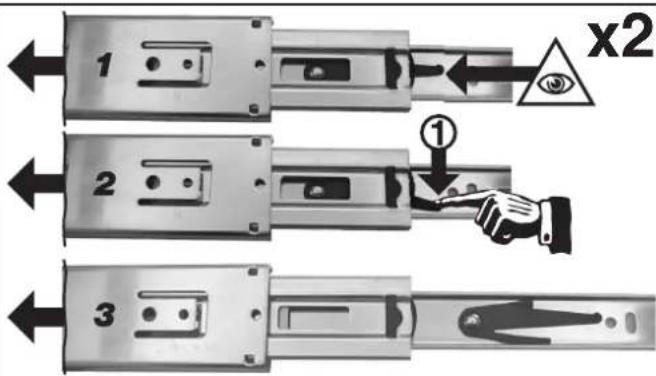
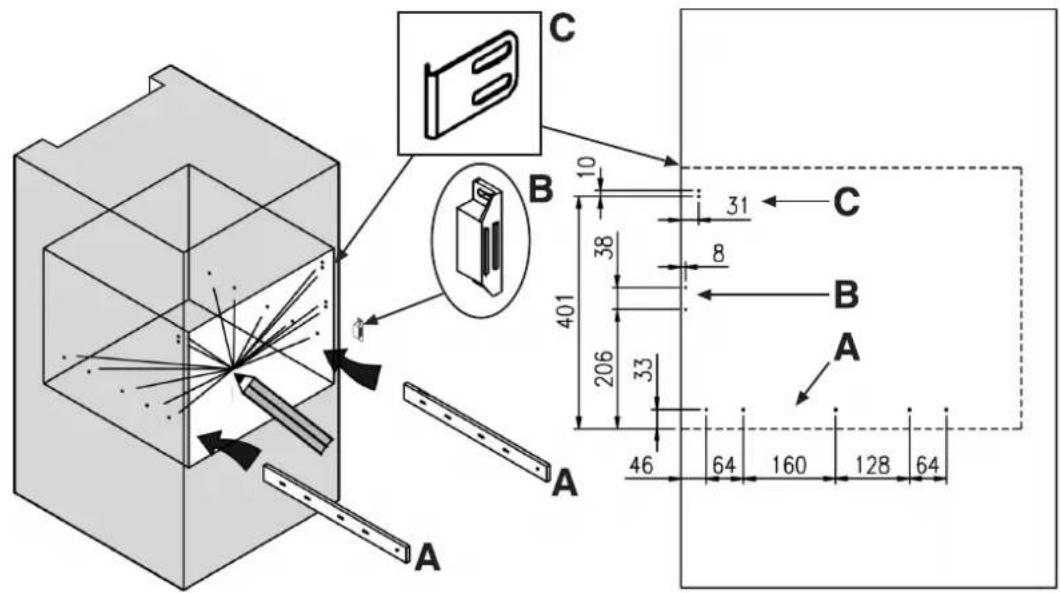
INSTALLATION (dimensions mm) GB
INSTALLATIE (afmetingen in mm) NL
INSTALLATION (dimensions en mm) FR
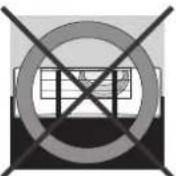
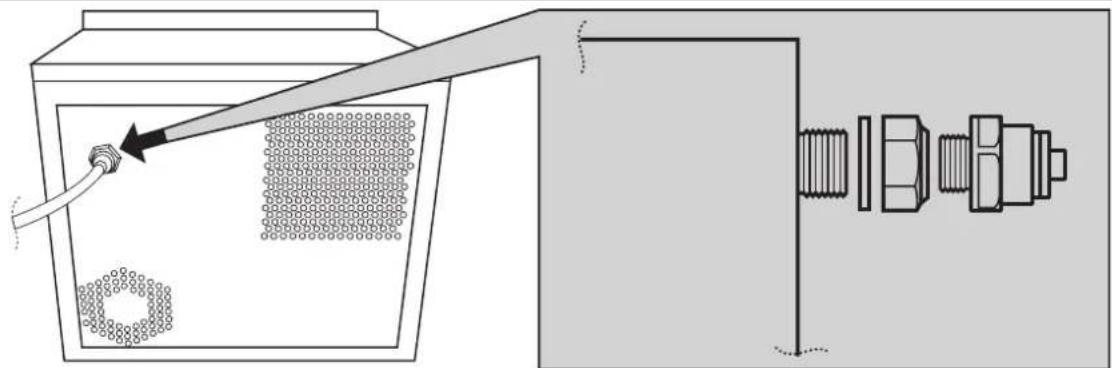
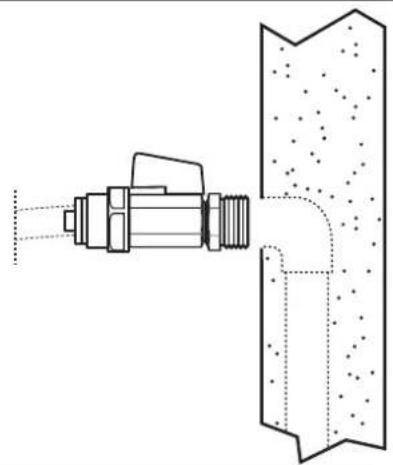
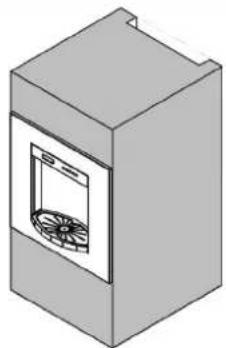
GB The back of the furniture cabinet must be completely open.
natural_image
Isometric illustration of a rectangular box with a window and fan-like pattern on the front panel (no text or symbols)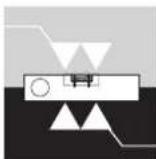
1
2

3
natural_image
Diagram showing a pipe connecting a component into a container with a bolted connector (no text or symbols present)4
natural_image
Technical line drawing of a mechanical valve assembly with internal components and dotted fill (no text or symbols)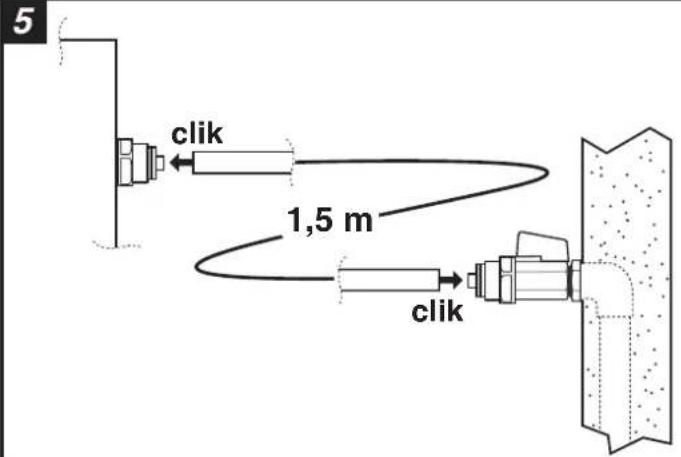
6
7
8
natural_image
Pure diagram of a plug with three ports and an arrow indicating direction (no text or symbols)9
ON - OFF


10
natural_image
Isometric illustration of a simple kitchen appliance with a vent and fan (no text or symbols)IT La Ditta costruttrice declina ogni responsabilità per eventuali errori di stampa contenuti nel presente libretto. Si riserva inoltre il diritto di apportare le modifiche che si renderanno utili ai propri prodotti senza compromettere le caratteristiche essenziali.
GB The manufacturer will not be responsible for any inaccuracy resulting from printing or transcript errors contained in this brochure. We reserve the right to carry out modifications to products as required, including the interests of consumption, without prejudice to the characteristics relating to safety or function.
PT O fabricante declina toda e qualquer responsabilidade por gralhas, erros tipográficos ou de transcrição/tradução contidos neste manual. Reservamo-nos o direito de introduzir alterações nos nossos produtos, conforme necessário, tendo inclusive em atenção os interesses relativos ao respectivo consumo, sem prejuízo das características associadas à segurança ou ao funcionamento dos electrodomésticos.
DE Der Hersteller übernimmt keine Hauftung für eventuelle Druck-oder Übersetzungsfehler dieser Bedienungsanleitung. Der Hersteller behält sich vor, technische Änderungen zur Verbesserung der Produktqualität im Interesse des Endverbrauchers vorzunehmen.
NL De fabrikant stelt zich niet aansprakelijk voor eventuele drukfouten in deze brochure. Kleine veranderingen en technische ontwikkelingen zijn voorbehouden.
FR Le constructeur décline toute responsabilité concernant d'éventuelles inexacitudes imputables à des erreurs d'impresion ou de transcription contenue dans cette notice. Le constructeur se réserve le droit de modifier les produits en cas de nécessité, même dans l'intérêt de l'utilisation, sans causer de préjudices aux caractéristiques de fonctionnement de sécurité des appareils.
ES La empresa constructora declina toda responsabilidad derivada de eventuales errores de impresión contenidos en el presente libro. Se reserva además el derecho de realizar las modificaciones que se consideren útiles a los productos sin comprometer las características esenciales.
- INSTALLATION, USE AND MAINTENANCE MANUAL
- LIVRO DE INSTRUÇÕES PARA USO E MANUTENÇÃO
- AVVERTENZE GENERALI
- These symbols will help you find in a quick way most important information.
- DICLARATION OF CONFORMITY
- FOR YOUR SAFETY
- Children safety
- During the use i
- Cleaning and maintenance
- Disposal - Packing
- EEC Directive 2002/96/CE
- WATER TREATMENT
- PRE-FILTRATION
- FILTRATION
- STERILIZATION
- COOLING/HEATING/FIZZING
- PRECAUTIONS FOR INSTALLATION
- START UP
- TECHNICAL SERVICE
- Before calling the Technical Service
- STARTING
- DRINK SUPPLY
- ALARMS
- USER PROGRAMMING
- ADVERTÊNCIAS GERAIS
- WAARSCHUWINGEN VOOR DE INSTALLATIE
- INSCHAKELING VAN HET APPARAAT
- Directive 2002/96/CE
Brand : CANDY
Model : CWP60X
Category : Water dispenser