
Enco W51 - Smartwatch OPPO - Free user manual and instructions
Find the device manual for free Enco W51 OPPO in PDF.
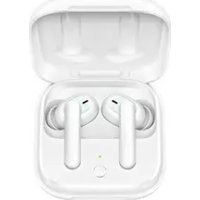


| Product type | True wireless earbuds |
| Model | ETI21 |
| Charging case model | ET122 |
| Brand | OPPO |
| Bluetooth version | 5.0 |
| Wireless range | 10 m |
| Driver | 7mm dynamic driver |
| Frequency response | 20 Hz – 20 kHz |
| Supported audio formats | AAC, SBC |
| Active noise cancellation | Yes |
| Battery capacity (earbuds) | 25 mAh each |
| Battery capacity (case) | 480 mAh |
| Battery life (with noise cancellation) | 3.5 h (earbuds) / 20 h (with case) |
| Battery life (without noise cancellation) | 4 h (earbuds) / 24 h (with case) |
| Charging time (earbuds) | 80 min |
| Charging time (case) | 80 min |
| Input voltage (case) | 5 V, 2 A |
| Touch controls | Yes (customizable) |
| In-ear detection | Yes (auto pause) |
| Voice assistant | Yes (triple tap) |
| Factory reset | Yes (long press 15 s) |
| Water resistance (IP rating) | Not specified |
Frequently Asked Questions - Enco W51 OPPO
User questions about Enco W51 OPPO
0 question about this device. Answer the ones you know or ask your own.
Ask a new question about this device
Download the instructions for your Smartwatch in PDF format for free! Find your manual Enco W51 - OPPO and take your electronic device back in hand. On this page are published all the documents necessary for the use of your device. Enco W51 by OPPO.
USER MANUAL Enco W51 OPPO
True Wireless Headphones
Quick start guide
NO.18 HaiBin Road, Wusha Village, Chong An Town, DongGuan City, Guangdong, China
Overview and Package Contents
XS
S
L

C

D

C
Quick Start Guide Safety Guide
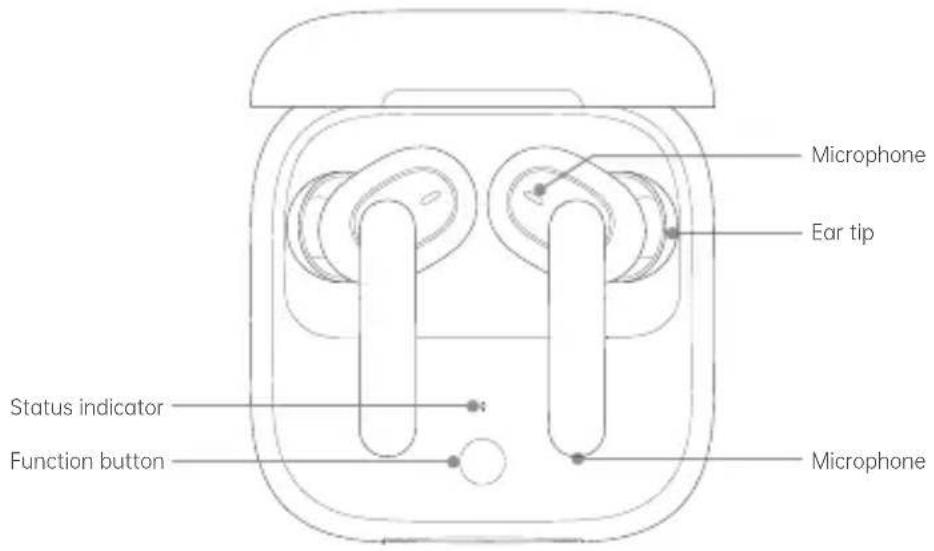
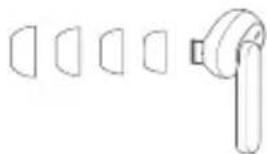
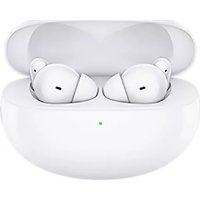
This box contains a pair of OPPO Enco W51 True Wireless Headphones, 4 pairs of ear tips in different sizes (the size M ear tips come mounted on the earbuds), a USB-C charging cable, a quick start guide, and a safety guide.
Bluetooth Pairing
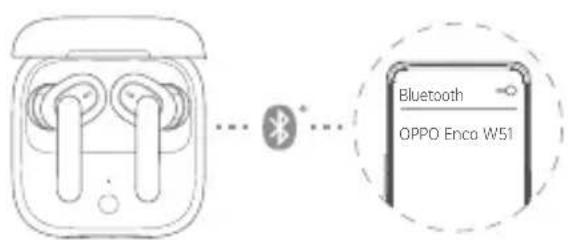
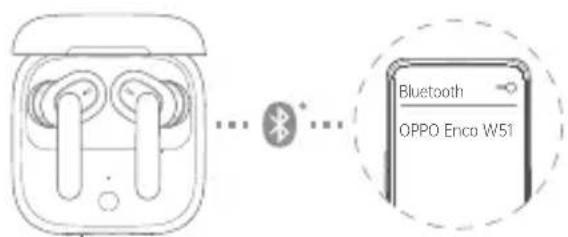
- If you are setting up your OPPO Enco W51 True Wireless Headphones for the first time, open the charging case with your earbuds inside. The earbuds will automatically start pairing with your phone.
- Turn on Bluetooth on your phone:
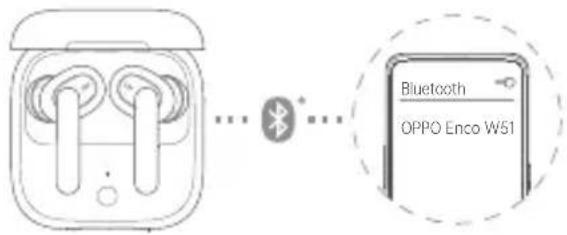
- Regular pairing: Search for and select "OPPO Enco W51" on your Bluetooth screen to complete pairing.
- Quick pairing: Hold the OPPO Enco W51 True Wireless Headphones near an OPPO phone that has Bluetooth turned on. A setup prompt will appear on your phone. Complete pairing according to the onscreen prompts. Only some OPPO phone models support quick pairing. For details, visit www.oppo.com.
Pairing with Other Devices
- Open the charging case with your earbuds inside, and press and hold the Function button for 2 seconds until the indicator blinks white. The earbuds are now ready for pairing.
- Complete pairing on the Bluetooth screen of your device.
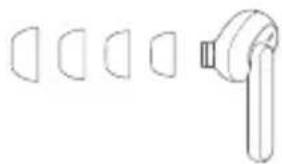
Ear Tip Fit
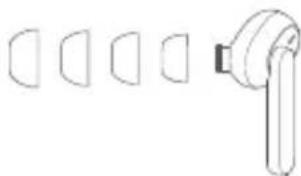
An ear tip that fits just right can provide better noise cancellation and sound quality while offering greater comfort. Try to pick a pair of ear tips that make a good seal with your ear canals. Please note that your left ear and right ear may require different sized tips.
Tap Controls
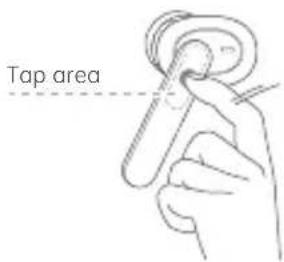
- Play the next track: Double tap the right earbud.
- Turn on/off noise cancellation: Double tap the left earbud.
- Answer calls/Hang up: Double tap the right earbud.
- Wake Voice Assistant: Triple tap the left or right earbud.
You can customize tap controls for the left and right earbuds on your OPPO phone. Tap control customization may not be supported on some OPPO phone models due to version compatibility issues. For details, visit www.oppo.com.
Voice Assistant may not be supported for some phone brands or models.
In Ear Detection
When listening to audio with OPPO Enco W51 True Wireless Headphones, removing either one of your earbuds will pause the audio. Reinsert it to resume playback.
Noise Cancellation
OPPO Enco W51 True Wireless Headphones detect ambient noise through the built-in microphones, and generate an equal-but-opposite signal through the speakers to reduce the ambient noise. Noise cancellation reduces unwanted noise and offers you a clearer and more immersive audio experience.
Notes:
The noise cancellation effects may not be pronounced in very quiet environments. The noise cancellation feature works better for low frequency noise. The noise cancellation feature reduces noise but does not completely cancel it out.
Restoring to Factory Settings
- Place your earbuds into the charging case and leave the lid open.
- Press and hold the Function button for 15 seconds. When the indicator blinks red three times, your earbuds have been restored to factory settings.
Charging
Charging status
- When your earbuds are inside the charging case, the indicator shows the battery level of the earbuds. When you remove your earbuds from the charging case, the indicator shows the battery level of the charging case.
- Different indicator colors are used to show the battery level. Specifically, red indicates low, yellow indicates medium, and green indicates full or sufficient.
Charging your earbuds
Place your earbuds into the charging case to start charging them.
Charging the charging case
- Wired charging: Use the USB-C charging cable included to charge the charging case.
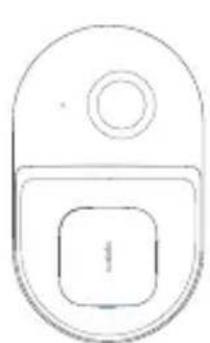
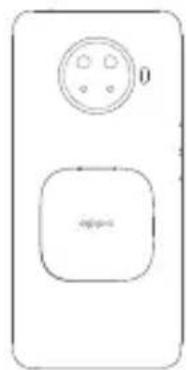
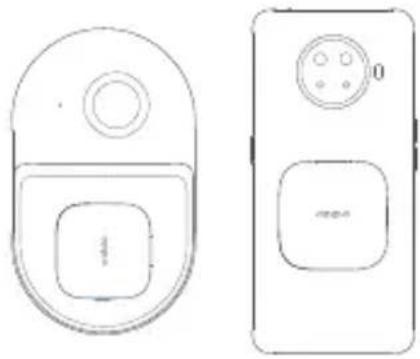
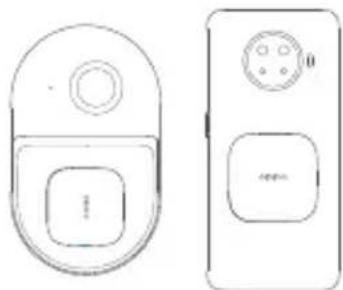
- Wireless charging: Use a compatible wireless charging pad to charge the charging case. Make sure the front side of the charging case faces upward during wireless charging. A phone that supports reverse wireless charging can also be used.
Specifications
Model: ETI21 - Charging case model: ET122 - Driver: 7 mm dynamic driver Frequency response range: 20 Hz ~ 20 kHz - Microphone sensitivity: -38 dBV/Pa Bluetooth codec: AAC/SBC - Bluetooth version: 5.0 - Bluetooth range: 10 m - Battery type: Rechargeable lithium-ion battery - Battery capacity: 25 mAh (Earbuds) / 480 mAh (Charging Case) - Playtime (50% volume)*
With noise cancellation on: 3.5 hours (single charge); 20 hours with charging case
With noise cancellation off: 4 hours (single charge); 24 hours with charging case
- Charging time (wired charging)*: 80 minutes (earbuds) / 80 minutes (earbuds + charging case)
- Charging input (charging case): 5V = 2A
Connecting to other devices
- Open the charging case with the earbuds inside, then press and hold the function button for 2 seconds until the indicator starts blinking white. After that, the earbuds are ready to pair. 2. Complete the pairing on the Bluetooth screen of your device.
Selecting ear tips
A good fit of the ear tips ensures not only comfort but also better noise cancellation and sound quality. Try to choose the ear tips with the optimal fit for your ear canals. Note that the left and right ears may require different sizes of ear tips.
To activate the voice assistant: double-tap the right earbud. To enable/disable noise cancellation: double-tap the left earbud. To answer a call and end/hang up: double-tap the right earbud. - To activate the voice assistant: triple-tap the left or right earbud. The function of the right earbud can be set to a different function. The settings of the functions on some models of phones may not be displayed due to compatibility issues. Additional information: on the website www.op0.com. On some models of phones, the voice assistant may not be supported.

Earbud response to removal
If during audio playback you remove one earbud from your ear, playback will be paused. To resume playback, put the earbud back in your ear.
Noise cancellation
The OPPO Enco W51 True Wireless earbuds capture ambient sounds through built-in microphones and generate inverted signals in the speakers, which cancel out ambient noise. Noise cancellation reduces interference and provides cleaner, more realistic sound. Note.
- The noise cancellation function is more effective against low-frequency noise. - The noise cancellation function reduces noise but cannot eliminate it completely.
Restore factory settings
- Place the earbuds in the charging case and close the lid.
- Press and hold the function button for 15 seconds. When the indicator flashes red three times, the factory settings of the earbuds will be restored.
Charging
Charging status
When the earbuds are inside the charging case, the indicator shows the battery level of the earbuds. When you take the earbuds out of the case, the indicator shows the battery level of the case. Different colors of the indicator are used to display the battery level. Red indicates low level, yellow indicates medium, and green indicates full or sufficient charge.
Charging the earbuds
Place the earbuds in the charging case and start charging them.
Charging case and charging
- Wired charging: Use the USB-C cable to charge the Futlar. - Wireless charging: A compatible wireless charger can be used to charge the Futlar. Make sure the Futlar's front panel is facing up during wireless charging. You can also use a phone that supports reverse wireless charging.
Specifications
- Model: ET121
- Model Futlar charging case: ETI22 - Driver: Dynamic driver 7mm - Impedance AUX: 20Ω~20kΩ
- Microphone sensitivity: -38 dBV/Pa
- Bluetooth codec: AAC/SBC Bluetooth version: 5.0
- Bluetooth range: 10 m Battery type: rechargeable, lithium-ion
- Battery capacity: 25 mAh (earbuds) / 480 mAh (charging case) - Playback duration (at 50% volume)*
With noise cancellation: 3.5 hours (one charge); 20 hours with charging case
With noise cancellation: 4 hours (one charge); 24 hours with charging case
Charging time (wired charging)*: 80 minutes (earbuds) / 80 minutes (earbuds and charging case) - Charging port voltage (case): 5 V = 2 A
User manual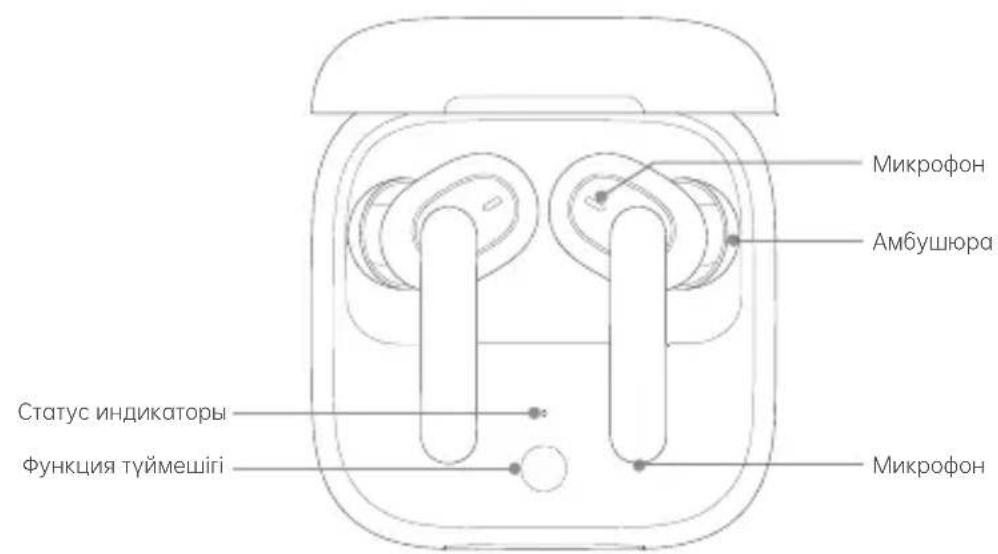
XS


Warranty card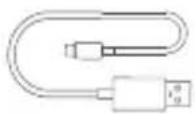
In the box: OPPO Enco W51 wireless earbuds, charging case, USB-C charging cable, user guide and warranty card.
Bluetooth pairing
- If the OPPO Enco W51 wireless earbuds fail to pair with your device, please follow the steps below. The earbuds will automatically enter pairing mode when you open the case.
- Turn on the Bluetooth function on your phone:
- Fast pairing: For fast pairing, search and select OPPO Enco W51. Slow pairing: If the OPPO Enco W51 wireless earbuds do not appear in the Bluetooth list on your phone, please follow the steps below. If the earbuds are not found, please charge them first. The fast pairing function is only available on some OPPO phone models. For other devices, please visit www.oppo.com for more information.
Pairing with other devices
- Open the charging case with the earbuds inside, and press and hold the function button for 2 seconds until the indicator light blinks white. The earbuds are now in pairing mode.
- Search for the earbuds on your device's Bluetooth screen and pair.
Charging the earbuds
The earbuds and the charging case have built-in batteries. Please charge them before first use. If the earbuds are not in use for a long time, they may need to be charged. Please note that the charging case and the earbuds may become warm during charging.
Charging the case
Connect the earbuds: Turn on the earbuds. - Pair with a new device: Turn on the earbuds. To give commands to the voice assistant / Voice assistant: Turn on the earbuds. - Answer a call: Turn on the earbuds.
When the battery is low, the earbuds will play a low battery warning sound before turning off. If the earbuds are not used for a long time, they will automatically turn off to save power. For more information, visit www.op0.com.
Answering calls and making calls are supported by the earbuds.

Earbuds touch control function
When the OPPO Enco W51 earbuds are worn, the touch controls can be used to control audio playback. To customize the touch controls, please refer to the instructions.
This is the touch control function.
The OPPO Enco W51 earbuds have a built-in microphone that can be used for calls. The microphone is located at the bottom of the earbuds. The touch controls can be used to answer or end calls, and to adjust the volume.
Note:
- The touch control function may not work properly in some situations.
- Do not use the touch controls while wearing gloves.
- If the touch controls do not work, restart the earbuds.
Resetting the earbuds
- Place the earbuds in the charging case, close the lid, and wait for 15 seconds. When the indicator light flashes, the earbuds have been reset.
Troubleshooting
Troubleshooting
The charging case indicator shows the battery level of the case. When the charging case is opened, the indicator shows the battery level of the case. The battery level of the case is shown in three levels. When the case is opened, if the indicator shows red, the battery is low; if it shows yellow, the battery is medium; if it shows green, the battery is full or high.
Charging the case
To start charging, connect the charging case to a power source.
Charging the earbuds
- Charging via cable: Connect the USB-C charging cable to the charging case and plug it into a power source. Charging wirelessly: Place the charging case on a wireless charging pad. When charging wirelessly, the indicator light on the case will turn on. The case can also be charged wirelessly when the earbuds are placed inside.
Specifications
Model: ET121 - Charging case model: ET122 Driver: 7 mm dynamic driver - Frequency response: 20 Hz to 20 kHz Microphone sensitivity: -38 dB - Bluetooth codec: AAC/SBC - Bluetooth version: 5.0 - Bluetooth range: 10 m - Battery type: rechargeable lithium-ion battery - Battery capacity: 25 mAh (earbuds) / 480 mAh (charging case) Playback time (at 50% volume): 3.5 hours (single charge); with charging case - 20 hours Playback time with ANC on: 4 hours (single charge); with charging case - 24 hours Charging time (via cable): 80 minutes (earbuds) / 80 minutes (earbuds + charging case) Input power (charging case): 5 V = 2 A
- TRUE WIRELESS HEADPHONES
- OVERVIEW AND PACKAGE CONTENTS
- BLUETOOTH PAIRING
- PAIRING WITH OTHER DEVICES
- EAR TIP FIT
- TAP CONTROLS
- IN EAR DETECTION
- NOISE CANCELLATION
- RESTORING TO FACTORY SETTINGS
- CHARGING
- CHARGING STATUS
- CHARGING YOUR EARBUDS
- CHARGING THE CHARGING CASE
- SPECIFICATIONS
- CONNECTING TO OTHER DEVICES
- SELECTING EAR TIPS
- EARBUD RESPONSE TO REMOVAL
- RESTORE FACTORY SETTINGS
- CHARGING THE EARBUDS
- CHARGING CASE AND CHARGING
- CHARGING THE CASE
- EARBUDS TOUCH CONTROL FUNCTION
- THIS IS THE TOUCH CONTROL FUNCTION
- RESETTING THE EARBUDS
- TROUBLESHOOTING
Brand : OPPO
Model : Enco W51
Category : Smartwatch