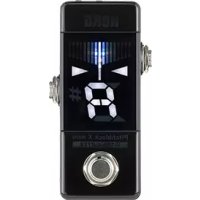
USER MANUAL Pitchblack X mini KORG
Parts of the Pitchblack X mini....3
Connections 3
Tuning procedure....4
Reference pitch settings....5
Display mode settings....6
Bright mode (brightness) settings....7
Specifications 8
Parts of the Pitchblack X mini
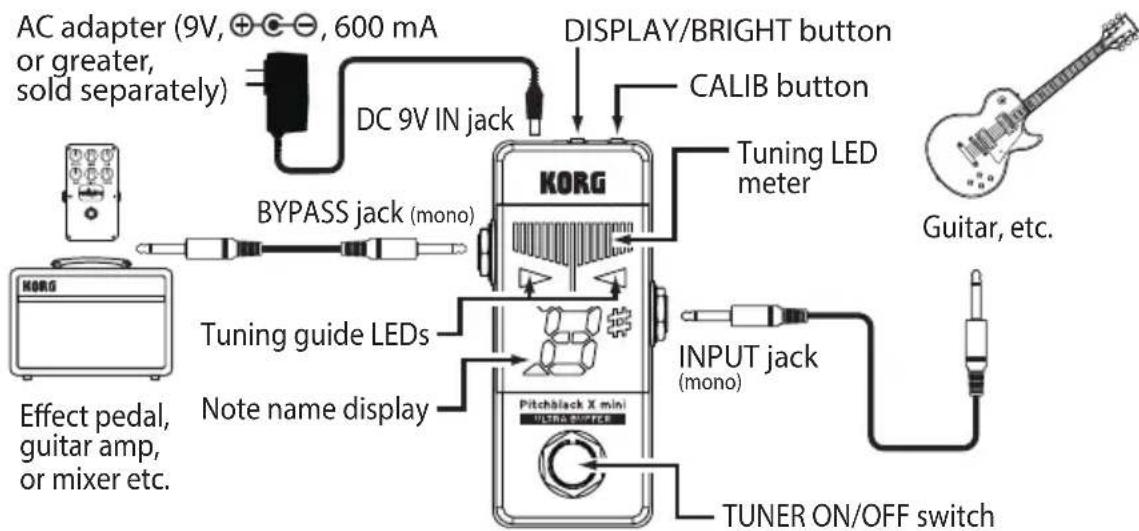
Connections
Turn off the power of all devices before you make any connections to avoid damaging your equipment.
The INPUT and BYPASS jacks are mono. Stereo (TRS) cables will not work.
DC 9V IN jack
Connect a separately sold AC adapter (9 V,⊕-⊖) here. Using an AC adapter other than what Korg recommends may cause a malfunction or damage.
Connect a cable from your instrument to the INPUT jack of the tuner. The power turns on when you connect a cable to the INPUT jack, and the reference pitch setting blinks in the note name display for several seconds. Connecting a cable to the INPUT jack will turn the power on, but the tuner will not be in tuner mode. Press the TUNER ON/OFF switch to engage tuner mode.
BYPASS jack
Connect a cable from the BYPASS jack to your other effect pedals or amp. When the tuner is switched on, the signal from the INPUT jack will be muted for silent tuning.
When the tuner is off, it will act as an ultra-buffer bypass. The ultra-buffer circuit features zero signal degradation, preventing the sound from thinning out.
Tuning procedure
- Press the TUNER ON/OFF switch to activate the tuner.
The center of the LED meter will light.
The signal from the INPUT jack will not be output from the BYPASS jack.
Tip: The TUNER ON/OFF switch only functions if an instrument is connected to the INPUT jack.
- If necessary, set the reference pitch and the display mode. (page 5)
"Reference pitch settings", page 6 "Display mode settings")
- Play a single note on your instrument and tune it so that the desired note appears in the note name display.
The note name closest to the entered note appears in the note name display.
- Tune your instrument using the tuning LED meter.
The method for indicating whether your instrument is in tune, sharp or flat depends on which display mode you choose (page 6 “Display mode settings”).
- After you finish tuning your instrument, press the TUNER ON/OFF switch to turn the tuner off.
The tuning LED meter turns off. The signal from the INPUT jack will be output from the BYPASS jack (ultra-buffer bypass).
Tip: The reference pitch, display mode and bright mode settings will be preserved even if you remove the AC adapter.
Tip: To reset the settings to the factory defaults (reference pitch = 440 Hz, display mode = regular, bright mode = brighter), hold down the CALIB button and press the TUNER ON/OFF switch when you turn on the tuner.
Reference pitch settings
Set the reference pitch for tuning (the A note in the middle of the piano keyboard=A4) within the 436–445 Hz range. The Pitchblack X mini comes from the factory with the reference pitch set to A=440 Hz.
- Press the CALIB button.
The current setting will blink for several seconds in the note name display.
- While the setting is shown, press the CALIB button to set the reference pitch.
Each time you press the CALIB button you will cycle through the following settings.
0: 440Hz
1: 441Hz
2: 442Hz
3: 443Hz
4: 444Hz
5: 445Hz
6: 436Hz
7:437Hz
8: 438Hz
9: 439Hz
- When you finish making the setting, wait for about two seconds without pressing any buttons.
The note name display blinks three times to indicate that the reference pitch has been set. The Pitchblack X mini will automatically return to tuner mode.
Tip: The reference pitch settings will be preserved even if you remove the AC adapter.
Display mode settings
Set one of the four display patterns that shows whether your instrument is out of tune. The factory setting is Regular mode.
- Press the DISPLAY/BRIGHT button.
The current setting will blink for several seconds in the note name display.
- When the setting is shown in the note name display, press the DISPLAY/BRIGHT button again to set the display mode.
Each time you press the DISPLAY/BRIGHT button you will cycle through the following settings.
With all display modes, the tuning guide LEDs indicate whether the pitch is high or low. When the tuning is correct, both ▷ and ◁ light up. If the pitch is flat, the ▷ lights up; and if the pitch is sharp, the ◁ lights up.
1: Regular
Tune your instrument until the LED at the center of the LED meter lights up brightly.
The right-hand LEDs in the LED meter light up if the pitch is high, and the left-hand LEDs light up if the pitch is low.

The pitch is flat.
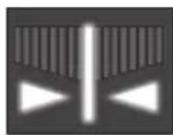
In tune.

The pitch is sharp.
2: Strobe
Tune your instrument until the LEDs stop running. Since the strobe meter has a higher precision, it allows you to tune with greater accuracy.
The LEDs light up, running from left to right if the pitch is high and from right to left if the pitch is low.

The pitch is flat.

In tune.

The pitch is sharp.
3: Half-strobe
Tune your instrument until the LEDs stop running and only the center LED is lit. The right-hand LEDs will strobe if the pitch is high, and the left-hand LEDs will strobe if the pitch is low.

The pitch is flat.

In tune.

The pitch is sharp.
4: Mirror
Tune your instrument until the LED at the center of the LED meter lights up brightly.
The larger the pitch variation, the more that the LEDs towards either side light up.



The pitch is sharp.
- When you finish making the setting, wait for about two seconds without pressing any buttons.
The note name display blinks twice to indicate that the display mode has been set. The Pitchblack X mini will automatically return to tuner mode.
Tip: The display mode settings will be preserved even if you remove the AC adapter.
Bright mode (brightness) settings
This sets the brightness (in two levels) of the display. The indicator is set to a brighter setting by factory default.
- Hold down the DISPLAY/BRIGHT button.
The brightness of the display will change. The Pitchblack X mini will automatically return to tuner mode.
Tip: The bright mode settings will be preserved even if you remove the AC adapter.
Specifications
Scale: 12-note equal temperament
Detection range: E0 (20.60 Hz)-C8 (4,186 Hz)
Reference pitch: A4=436-445 Hz (1 Hz steps)
Detection accuracy: + / - 0.1 cent (display mode: Strobe)
Input impedance: 1 M-ohm (tuner on)
Connection jacks: INPUT jack (6.3 mm monaural phone jack)
BYPASS jack (6.3 mm monaural phone jack)
DC 9V IN jack
Power supply: AC adapter (9 V, , 600 mA or greater)
(sold separately)
Current consumption: maximum 30 mA
Dimensions (W x D x H): 45 x 93 x 43 mm / 1.77" x 3.66" x 1.69" (including protrusions)
Weight: 124 g / 4.37 oz.
Included items: Customer Notice (Dear Customer), Precautions,
Rubber feet (1 sheet)
Accessories (sold separately): AC adapter (9 V+, 100 mA)
* Specifications and appearance are subject to change without notice for improvement.
* All product names and company names are the trademarks or registered trademarks of their respective owners.
Sommaire
This warranty is valid only in Japan.
This Product is only suitable for sale in Japan. Properly qualified service is not available for this product if purchased elsewhere. Any unauthorised modification or removal of original serial number will disqualify this product from warranty protection.
お客様相談窓口

0570-666-569