HT8050 - Projector BENQ - Free user manual and instructions
Find the device manual for free HT8050 BENQ in PDF.




| Product type | 4K UHD video projector |
| Native resolution | 3840 x 2160 pixels |
| Brightness | 2000 ANSI lumens |
| Contrast ratio | 100,000:1 |
| Lamp life | 4000 hours (normal mode), 10,000 hours (eco mode) |
| Throw ratio | 1.36 to 2.18:1 |
| Zoom | 1.3x optical |
| Keystone correction | Vertical ±30°, horizontal ±30° |
| Lens Shift | Vertical ±60%, Horizontal ±23% |
| Dimensions (W x D x H) | 411 x 286 x 124 mm |
| Weight | 4.2 kg |
| Power supply | 100-240 V AC, 50/60 Hz |
| Power consumption | 330 W max |
| Connectivity | HDMI (2 inputs), USB-A, RS-232, composite video, S-Video |
| HDR support | HDR10, HLG |
| 3D support | Yes, via HDMI 1.4a |
| Ceiling mount | Compatible with BenQ mount (max load 30 kg) |
| Maintenance | Clean air filter every 500 hours |
| Security | Kensington lock, screen password |
| Package contents | Projector, remote control, power cable, ceiling mount guide |
| Warranty | 2 years parts and labor |
Frequently Asked Questions - HT8050 BENQ
User questions about HT8050 BENQ
0 question about this device. Answer the ones you know or ask your own.
Ask a new question about this device
Download the instructions for your Projector in PDF format for free! Find your manual HT8050 - BENQ and take your electronic device back in hand. On this page are published all the documents necessary for the use of your device. HT8050 by BENQ.
USER MANUAL HT8050 BENQ
Takmonteringsguide for digital projector
- For your own safety please read and observe this Installation Guideline carefully before installing your product. Keep this Guideline in an easily accessible place for later reference.
2.BenQ shall not be held liable for any damage or injury caused by incorrect product installation. - This ceiling bracket is designed for easy installation and removal. BenQ shall not be held liable for any damage or injury caused by human or natural disasters including earthquakes and typhoons.
- Please have a qualified technician to install your projector's ceiling bracket.
- Please have at least two workers install or remove the product. Failure to do so may result in falling of this heavy object and, in turn, cause personal injury or property damage.
- DO NOT install the product in a hot or humid environment or a place near water. DO NOT install the product close to an air inlet or outlet of air conditioning equipment and places with heavy dusts and fumes. DO NOT install the product on a slanted wall or place suffering vibration and impact. INSTALL the product at level ceiling only.
Please check carefully the areas around where the hanger is to be installed
- Avoid any pleaces with high temperature or humidity or subject to contact with water.
- Do not install the product near the vents of air conditioners and avoid places where it is dusty and fumy.
- Only install on vertical walls and avoid slanted surfaces.
-
Do not install in places subject to vibrations and shocks.
-
Maintain adequate clearance around your projector to ensure free air flow.
- Ensure the target location of projector installation is robust enough to support your projector. Failure to do so may lead to unexpected safety and other accidents.
- Target ceiling location of projector installation shall be robust enough to support more than four folds of weight of the projector and hanger in case of earthquake and other external vibration forces.
10.DO NOT change any component. DO NOT use damaged components. In case of any trouble with the product call your dealer first.
11. Fasten screws. (DO NOT overfasten the screws as this may lead to broken screws or damaged threads.)
12. This ceiling bracket can support a projector weighing less than 30kg (66 Lbs).
13.Hang nothing but your projector from this ceiling bracket.
Do not hang any other objects except the projector on this hanger. Hanging on this hanger by any personnel is strictly prohibited.
14.Bores of screw and bolts shall be left in your ceiling after the projector and ceiling bracket have been removed. Dirt marks may show on your ceiling after long-term use of the projector.
15. Warranty of this product is limited to the ceiling bracket itself as types of ceilings and installation construction quality are beyond control of the manufacturer. Warranty of this product lasts five years from the date is was purchased.
16. In case of any dispute the English Guideline prevails.
Specifications
| Substance | Steel/aluminum alloy |
| Weight | 3.39 kg (7.47 lbs) |
| Length | 98mm, 372.8mm~547.8mm(in unit of 25mm) |
| Rotation angle | 360° |
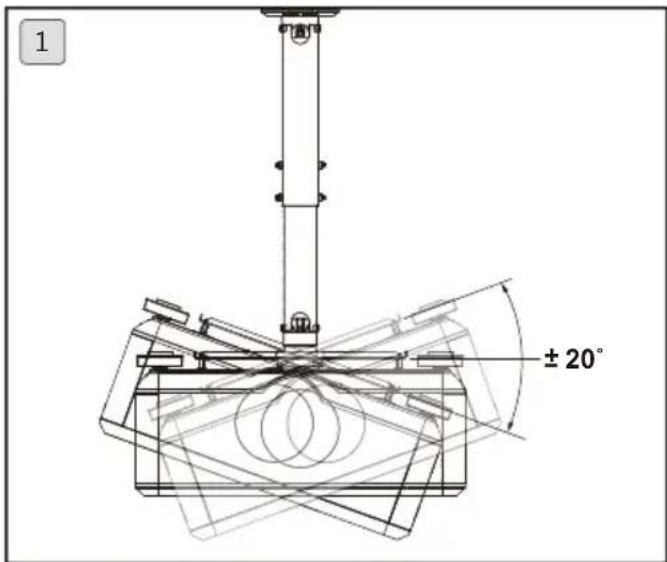
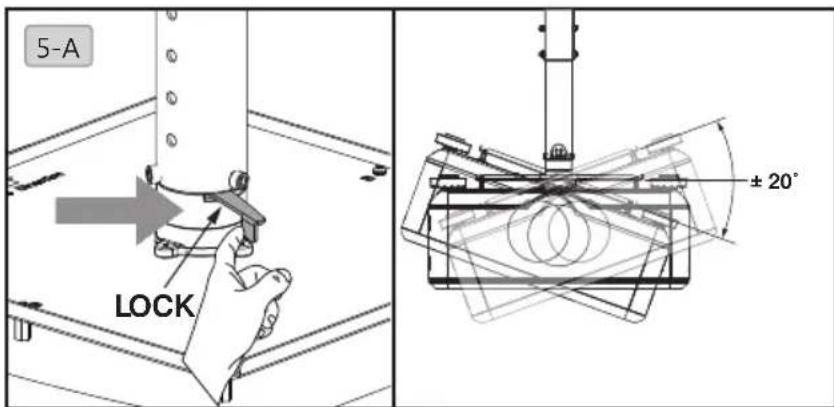
| Tilt angle | +/-20° |
| Load | 30kg (66 lbs) |
| Screws | M4,M6 |
Length
- Variable length in range of 98mm 547.8mm (in unit of 25mm ).
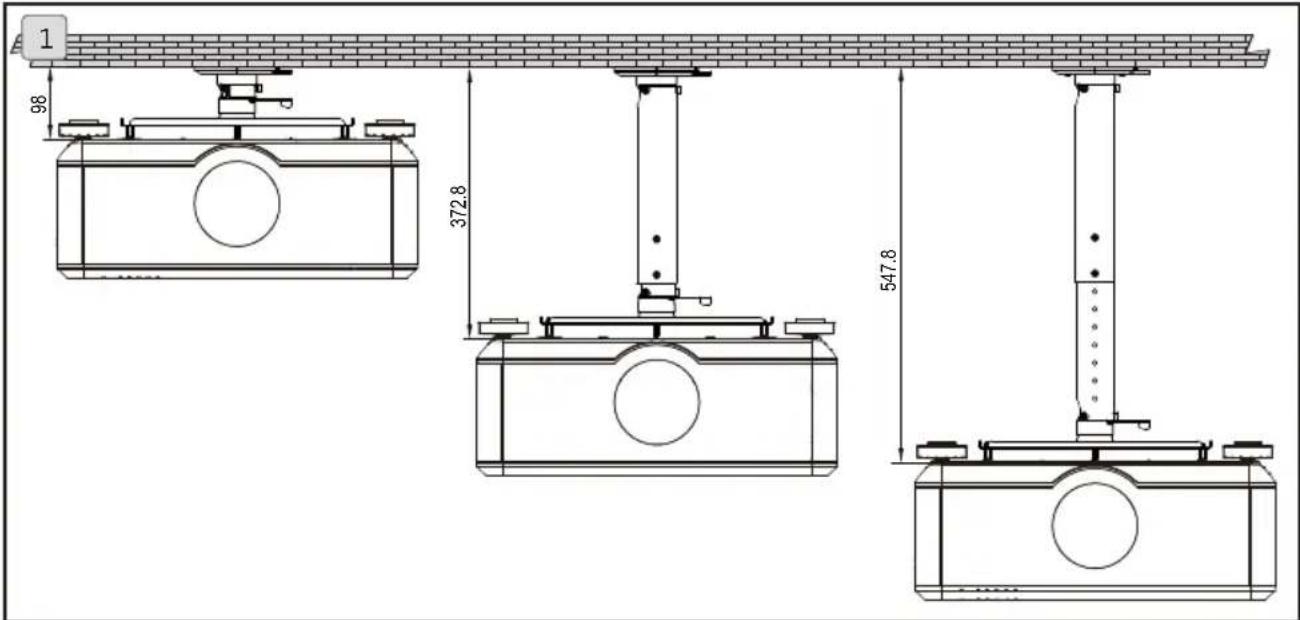
Adjustment angle
- Tilt angle in range of -20^ +20^ .
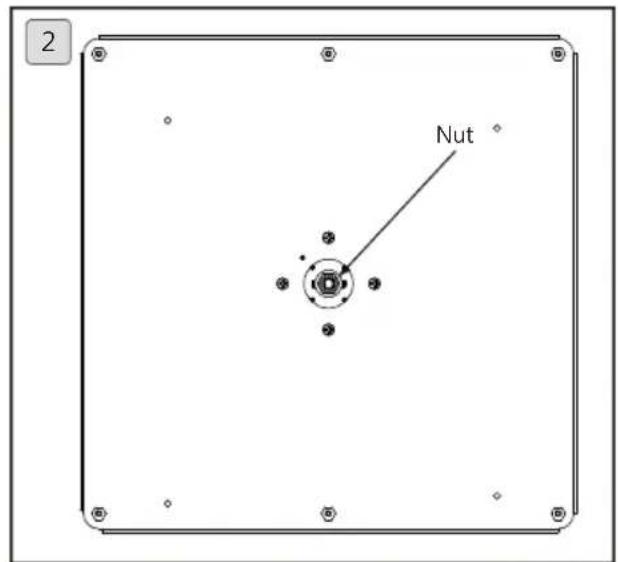
- The nut is designed to adjust slackness of projector angle.
Have qualified technician to adjust the nuts.
Accessory pack
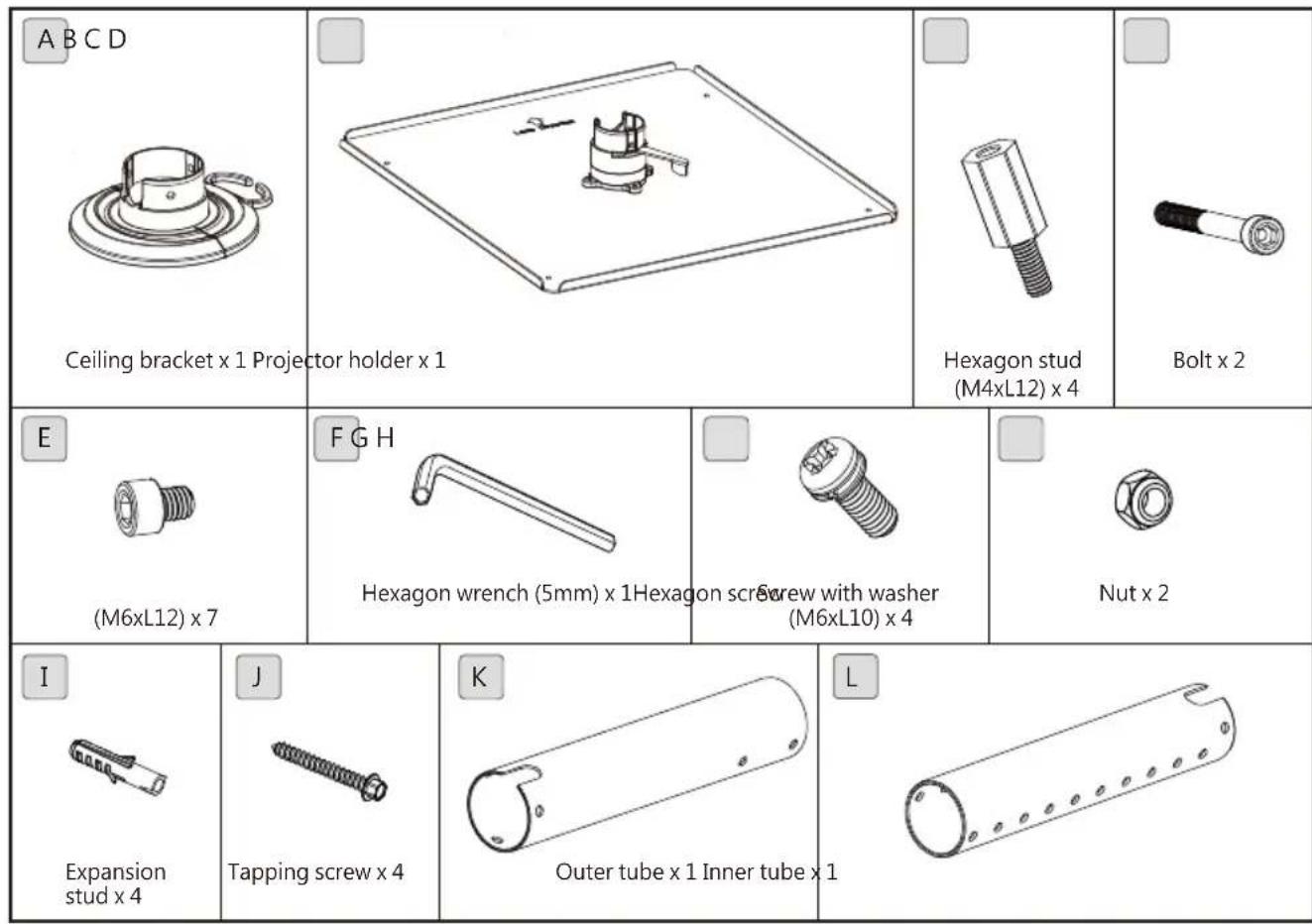
Tools needed for installation

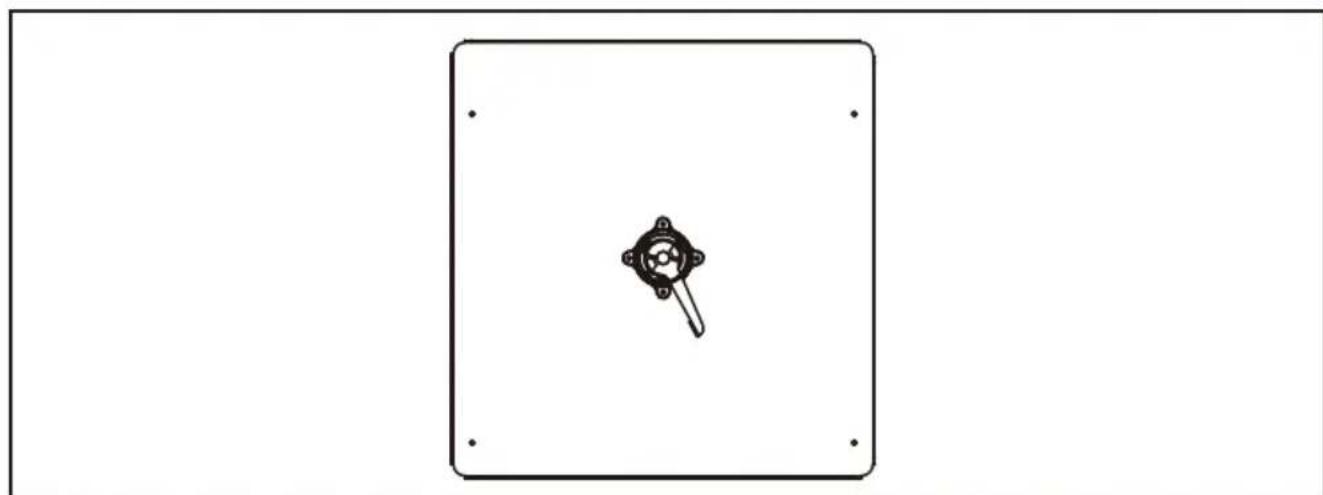
Bore location
Please visit site www.benq.com
Installation steps
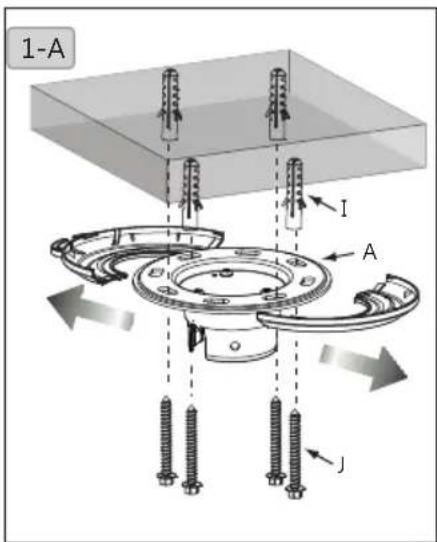
1. Install the hanger to your ceiling
1-A. Pull open the plastic cover to the right and left. Place the ceiling bracket (A) close to target location to your ceiling. Mark the bracket hole with pencil. Drill holes at marked location of diameter x depth of 10mm (0.39^) x 55mm (2.17^) for concrete and 4.5mm (0.17^) x 55mm (2.17^) for wood ceilings. Hammer the plastic expansion stud I in the hole and tapping screw J in the stud then cover the hole with plastic cap.
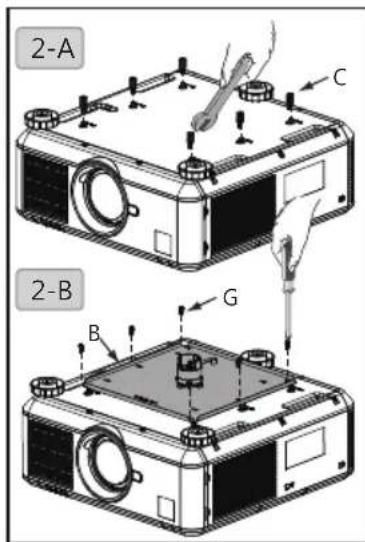
2. Install projector holder to the projector
2-A. Fasten hexagon stud (M4xL12) (C) to your projector with 8mm wrench.
2-B. Fasten projector holder (B) to your projector by locking the screws with washer (G) with Philip screwdriver.
3. Select length of projector holder
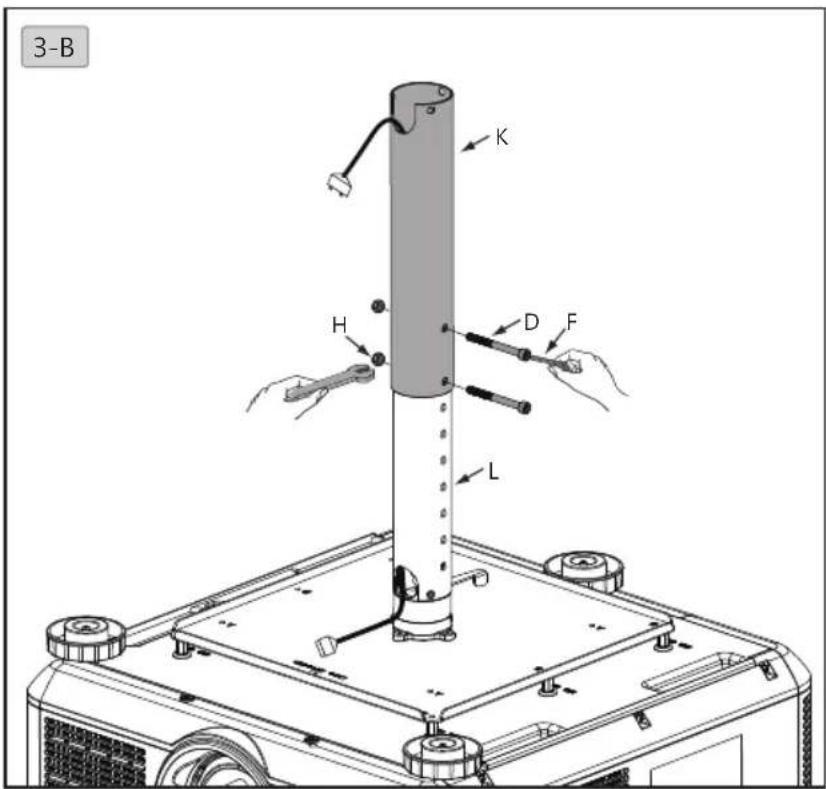
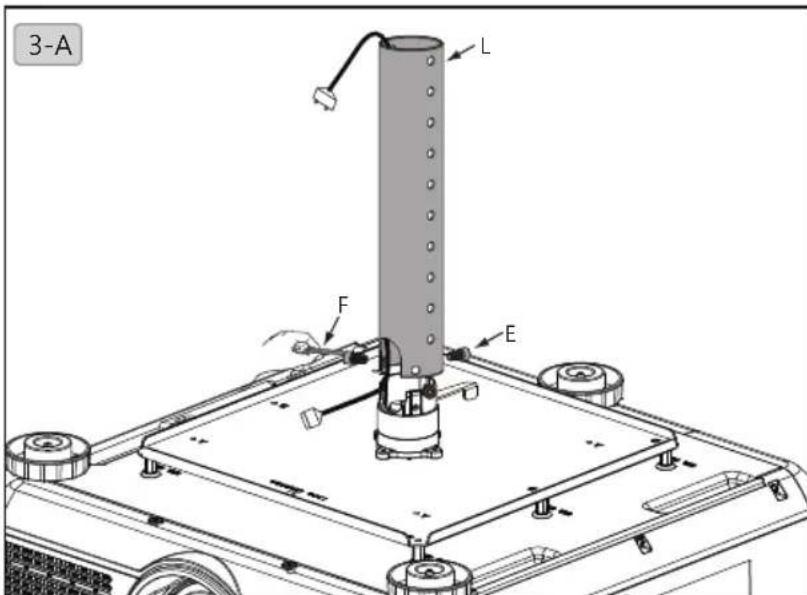
3-A. Length of projector holder can be adjusted in range of 372.8mm~547.8mm. Place power cable in the inner tube (L), fix it to the projector holder with hexagon screw (M6xL12) (E) and 5mm hexagon wrench (F).
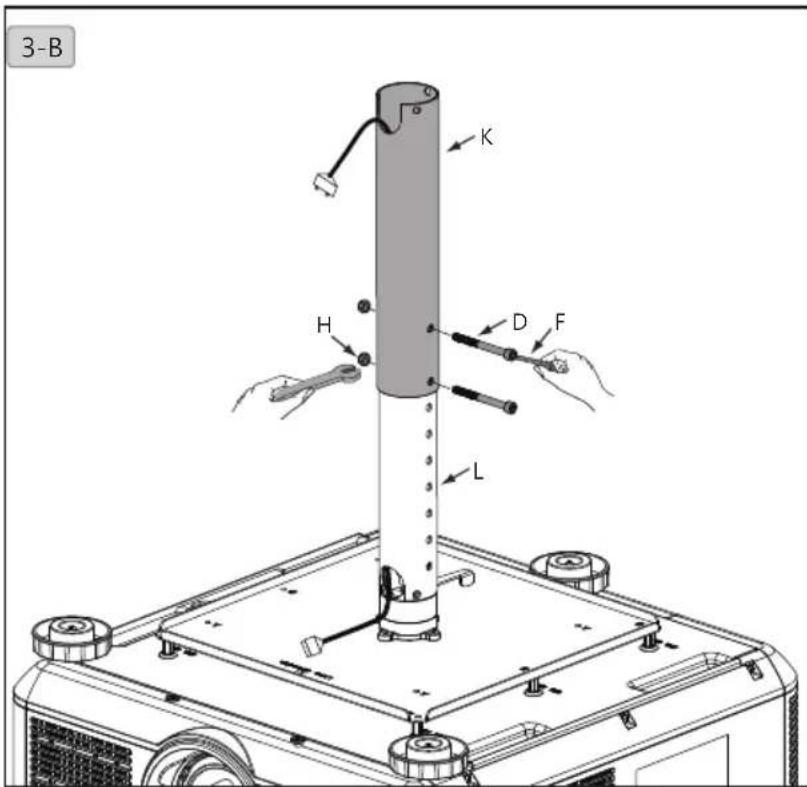
3-B.Pull power cable out of outer tube K) and connect it to your projector. Assemble the inner tube unit (L and projector) and external tube K with 10mm and 5mm wrenches F) and bolt D and nut H).
Installation steps
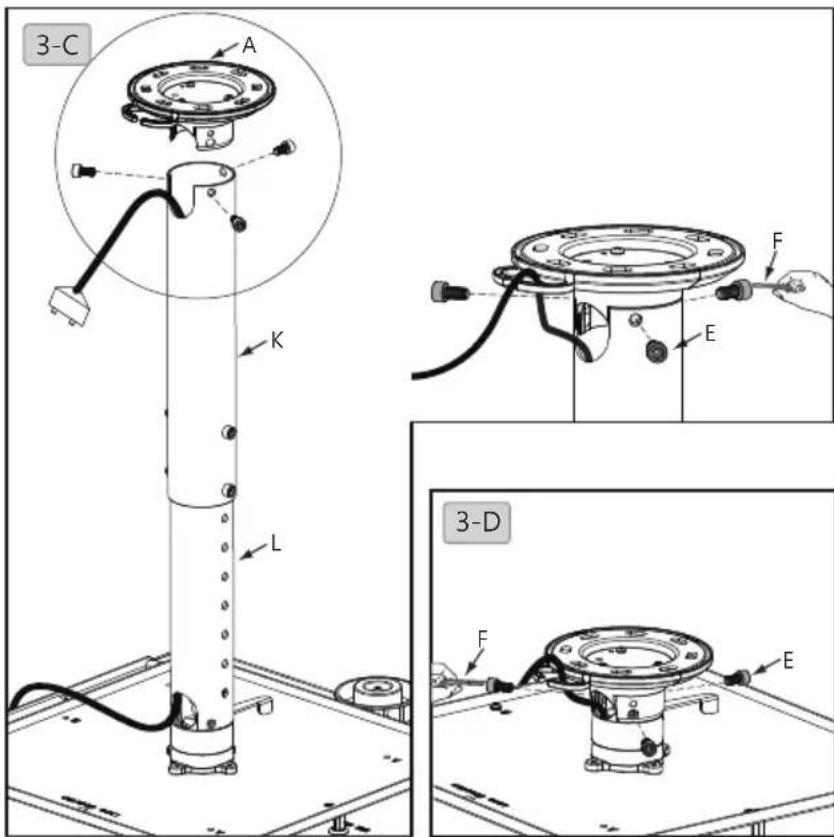
3-C. Fasten inner and outer tube (K + L) and ceiling bracket (A) with hexagon screw (M6xL12) (E) and 5mm wrench (F).
3-D. Set projector length to 98mm. Fasten ceiling bracket (A) and projector holder with hexagon screw (M6xL12) (E) and 5mm wrench (F).
usll6u3
4. Cable management
4-A.Pull power cable from top of external tube (K) to fix it to the ceiling bracket A).
4-B. Pull power cable through ceiling bracket (A).

5. Adjust projector angle
5-A. Release the handle, move projector holder to desired angle, push the handle backward to lock it up afterwards.

安全警告
3-B. 1E E E E E E E E E E E E E E E E E E E E E E E E E E E E E E E E E E E E E E E E E E E E E E E E E E E E E E E E E E E E E E E E E E E E E E E E E E E E E E E E