DOS199 - Beard trimmer LIVOO - Free user manual and instructions
Find the device manual for free DOS199 LIVOO in PDF.


| Product type | Beard trimmer with suction system |
| Brand | Livoo |
| Model | DOS199 |
| Power supply | 5Vdc 1A via USB cable (adapter not included) |
| Battery | Lithium-ion 3.7V / 800 mAh, non-user-replaceable |
| Runtime | 50 minutes with suction activated |
| Charge time | Approximately 2 hours for first charge |
| Main motor | 4800 rpm |
| Suction motor | 12000 rpm |
| Protection rating | IPX7 (immersion up to 1 meter for 30 minutes) |
| Use in water | Can be used in shower or bath |
| Cutting combs | 4 combs for cut lengths: 0, 3, 6, 9 and 12 mm |
| Charge indicator | Red light (charging), white light (charged) |
| Blade | Steel blade, replaceable |
| Cleaning | Cleaning brush included; rinse under running water (with caution) |
| Lubrication | Oil supplied; apply 1 to 2 drops between blades |
| Maintenance | Clean regularly; disinfect blade for hygiene |
| Safety | For household use only; do not use on wounds or irritated skin |
| Recycling | Lithium batteries to be recycled separately; device according to WEEE directive |
Frequently Asked Questions - DOS199 LIVOO
User questions about DOS199 LIVOO
0 question about this device. Answer the ones you know or ask your own.
Ask a new question about this device
Download the instructions for your Beard trimmer in PDF format for free! Find your manual DOS199 - LIVOO and take your electronic device back in hand. On this page are published all the documents necessary for the use of your device. DOS199 by LIVOO.
USER MANUAL DOS199 LIVOO
natural_image
Black and white photo of a hairless electric shaver with a button and power button (no visible text or symbols)g g
text_image
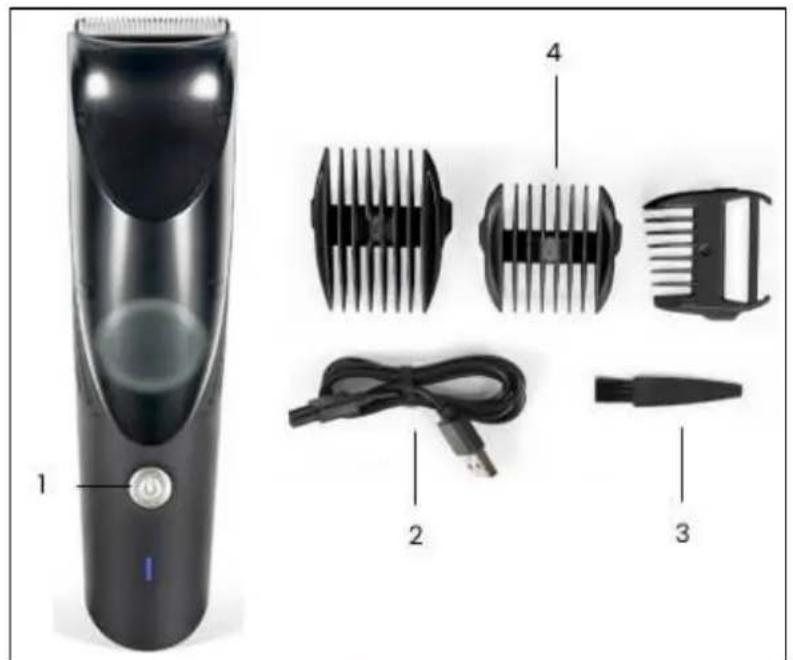
Product diagram of a hairbrush with labeled parts including a single digit, four different designs, and a cable.Figure 1
natural_image
Line drawing of a hand holding a tool near a cylindrical device (no text or symbols)Figure 2
natural_image
Diagram showing a hand operating a tool with a circular component labeled 'U' (no text or symbols present)Figure 3
natural_image
Diagram of a curved mechanical component with a rotation arrow indicating motion (no text or symbols)Figure 4
natural_image
Illustration of a hand holding a tool with a circular inset showing a mechanical component (no text or symbols)Figure 5
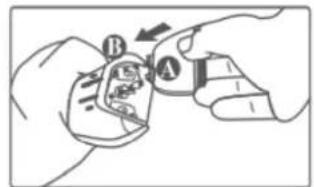
text_image
Diagram showing two hands holding a small object with labeled parts A and B, indicating a mechanical or electrical component.Figure 6
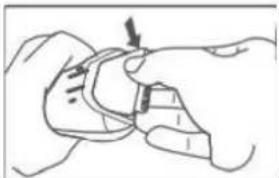
natural_image
Line drawing of a hand holding a small object with arrows indicating motion (no text or symbols)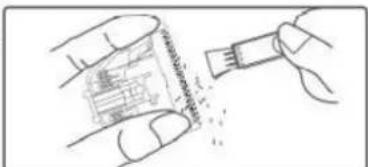
text_image
Diagram showing a hand holding a small electronic component with text labels and a magnified view of its internal structure.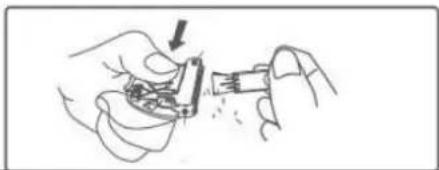
natural_image
Illustration of hands assembling electronic components with a tool (no text or symbols visible)Figure 7
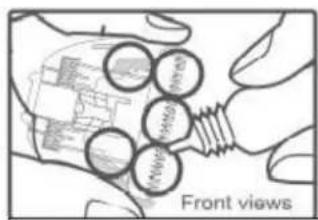
text_image
Front viewsFigure 8
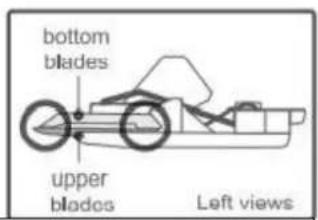
text_image
bottom blades upper blodes Left viewsThank you for choosing a Livoo product!
ó÷r üõeÇder, y÷r üarüeß·e, aÇd y÷r òeadÁðÃÇes are ÇÃë 'së Ãü'eßës, ëeey are exëeÇsÊÃÇs ÃÖ y÷rseõÖ, aõõÃwÊÇ„ y÷ ëÄ „eë ßõÃser ëÄ y÷r ÖrÈeÇds aÇd ÕaÊÊõy, ëÄ ûrÊÇ„, ëeõÊ ëÄeëöer, ëÄ õa·„ò aÇd ëÄ sòaí exÁerÈeÇBesç LÈvÃÄ's aÊÊ Ès ëÄ òeõà y÷ õÈve y÷r õÊÕe ëÄ ëeö Ö-õõesë, wòaëever wÊsòes y÷ òave ëèr÷„ð÷ë ëè yearç "ÊÇëer raßõeëëe, s-ÊÊer üarüeß·eç Or ëeö Äëöer way arÃ-Çdç Éë's - ëÄ yÃ-ç Taâe advaÇëa„e ÃÖ ëoÈs ÖreedÃÊ ÔÄr Öeeõ „ÃÄd ÊÃÊeÇës every dayç
Tòaë's wòy we're ßÃÇsëaÇëöy ÈÇÇÃvaëÈÇ„ aÇd ßreaëÈÇ„ ßõever ÁrÃd-Îsës Ö-õõ ÃÖ zesë, ü-ë ÊÃsë ÃÖ aõõ, aßÎses FËÇd Ã-r eÇëÈre ßÃõõeßëÈÃÇ ÃÇ Ã-r weüsÈëe wwwçõÈvÃÃçeÇç
Livoo, your daily companion till social networks

@LÈvÃÃ

@õÈvÄÄöÄÖÖH
û

@LÈvÃÎ
ÃafetyûInstructionsûû
«õease, ëaãe ëʈe ëà read weõõ ëøe ÊÇsër·ÎßêÊÂÇ sòeeë üeÖÃre ëøe Öˆrsë ·se aÇd âee ëøeÊ ÖÃr a Ö-ˆre ·sec
A Ès·se Äö ëe e aÁõEaÇße ßaç daÊa„e Èë Ár òr òë ëe ·serç Ass·re ëoäë yÄ· se ëe aÁõEaÇße ÖÄr ëe ·se ÖÄr wòÈßò Èe ës desÈ„Çedç “e reÖ·se aÇy resÁÃÇsÉüÉöÈëÈes as ÖÄr ëe daÊa„es üy aç ÈÇßÄrreßë ·se Är a üad ÉaÇÉÀ·õaëÈÄÇç
WóÇêlêßû!ûôoûreduceûtheûriskûofûelectricûshock:û
1ç Aõways ·ÇÂõ·,, ëèe UûB βaüõe ÖrÂÊ ëèe ·ÇÈë ĖʈedĖaëeõy aÖëer ·se ·Çõess Èë Ès üeĖÇ„ βòar„edç êç UÇÂõ·„ ëèe ·ÇÈë üeÖÃre ßõeaÇĖÇ„ Èëç
WóÇêlêßû!ûôoûreduceûtheûriskûofûburns,ûfire,ûelec shockûorûinjuryûtoûpersons:û
3ç TòÈs aÁÁõÈaÇße Ès ÖÄr ò÷seòÃõd ·se ÃÇõyç 4ç CõÃse s-ÁervÈsÈÃÇ Ès Çeßessary wòeÇ ëðÈs aÁÁõÈaÇße Ès ·sed üy, ÃÇ, Är Çear ßòÈõdreÇ Är ÈÇvaõÈc 5ç «õease read ëèe ÈÇsër·BëÈÃÇ BareÖ·õöy üeÖÃre ·sÈÇ 6ç Dà ÇÃë dÈsasseÊüõe Är reÖÈë ëèe ÁrÃd·Bëç èç ÉÖ ëèe ÁrÃd·Bë Är aÇy Áarë Ès daÊa„ed, dà ÇÃë re- ·seç
8ç Dà ÇÃë · se ëe ÁrÃd·ßë Çear w÷Çd, ÈÇÕõaÊÊaëÃry Âr aõõer„Èß areasç
9ç KeeÁ ëòÈs ÁrÃd•ßë ÷ë ÃÖ reaßò ÃÖ ìòÈôdreÇç
Îâç HaÈr ßõËÁAer ßaÇ üe ·sed üy ßòÈõdreÇ a„ed ÖrÃÊ 3 years ·Çder s·ÁervÈsËÄÇç
11ç ûòaver, weë sòaver, aÇÈÊaõ ìõÉÁAer, òaÈr ìõÉÁAer, aÇd aÁÁõÈaÇßes ÖÄr ÊaÇÈß·re aÇd ÁedÈß·re ìaÇ üe ·sed üy ìòÈõdreÇ a„ed ÖrÂÊ 8 years aÇd aüÃve aÇd ÁersÃÇs wÈëò red·ßed ÁòysÈßaõ, seÇsÃry Är ÊeÇëaõ ìaÁaüÈõÈëÈes Är õaßã ÄÖ exÁerÈeÇße aÇd ãÇÃwõed„e ÊÖ ëèey òave üeeÇ „ÈveÇ s·ÁervÈsÈÃÇ Är ÊÇsër·ßëÉÃÇ ìÃÇßerÇÈÇ„ ·se ÂÖ ëèe aÁÁõÈaÇße ÊÇ a saÖe way aÇd ·ÇdersëaÇd ëèe òazards ÊÇvÃõvedç CòÈõdreÇ sòaõõ ÇÃë Áõay ëèe aÁÁõÈaÇßeç CõeaÇÈÇ„, aÇd ·ser ÊaÈÇëeÇaÇße sòaõõ ÇÃë üe Êade üy ìòÈõdreÇ wÈëò÷ë s·ÁervÈsÈÃÇ
lêç TòÈs ÁrÃd•ßë Ès ÇÃë a ëÃyç
13ç "AùÎÉÎG: FÃr ëe Á·rÁÃses ÃÖ ßòar„ÈÇ„, ÃÇÕy · se ëe deëaßòaüõe UûB ßaüõe ÁrÃvÈdedç
14ç ûwÈëßò èòe aÁÁõÈaÇße ÃÖÖö aÇd ·ÇÁõ·„ Èë aÖëer e se aÇd üeÖÄre ßõeaÇÈÇ„ç
15ç îever õeave ëèe aÁÁõÈaÇße ·Çs·ÁervÈsed, ÁarëÈß·õarõy ÈÖ ÞòÈõdreÇ are ar÷Çdç
Wóçêlêßû
16ç KeeÁ ëòe aÁÁõÈaÇße dryç
lèç “AùÎÉÎG: Deëaßò ëðe òaÇd-òeõd Áarë ÖrÃÊ ëðe ·sd Âr adaÁëÃr ( ÇÃë s·ÁÁÕÈed) s·ÁÁÕy ßÃrd üeÖÃre ßõeaÇÈÇ,, Èë ÈÇ waëerç
18ç TòÈs aÁÁõÈaÇße ßÃÇëaÈÇs üaëëerÈes ëðaë are Ç reÃõaßeaüõeç
19ç TòÈs aÁÁõÈaÇße Ê·së ĀÇõy üe s·ÁÁõÈed aë saÖe exëra õÃw vÃõëa„e ßÄrresÁÄÇdÈÇ„, ëà ëèe ÊarãÈÇ„, ÃÇ ëèe aÁÁõÈaÇßeç
êâç ÉÖ y÷ se adaÃëÃr ( ÇÃë s·ÁÃõÈed), ÃÇõy ·sed adaÃëÃr wÈëò ÁÃwer s·ÁÁÕy 5V/1Aç AdaÃëÃrs wÈëò ÂÈÇs ÖÃr ÈÇserëÊÃÇ ÈÇëà sÃßãeë-÷ëõeës sòaõõ üe ( õeasë É«"4ç
êlç TòÈs aÁÁõÈaÇße Ès ÈÇëeÇded ëà üe ·sed ÈÇ ò÷seòÃõd aÇd sÈÊÊõar aÁÁõÈßaëÈÃÇs s·ßò as:
- ûëaÖÖ ãÈëßòeÇ areas ÈÇ sòÃÁs, ÃÖÖÈßes aÇd Ãë wÃrãÈÇ,, eÇvÈrÃÇÊeÇës
- FarÊ ò÷ses
- By ßõÈeÇës ÈÇ òÄëeõs, ÊÄëeõs aÇd Äëèer resÈdeÇëÈaõ ëyÁe eÇvÈrÃÇÊeÇës
- Bed aÇd üreaãÕasë ëyÁe eÇvÈrÃÇÊeÇës
ôechnicalÛÃpecificationsû
«Äwer : 5Vdß 1A, 5"
Baëëery : LË-ËÄÇ DC 3çèV 8ââ ÊAò
MÃëÃr: 48ââ ùÂÊ/ vaß...Ê ÊÃëÃr 1êâââûÂÊ
A·ëÃÇÃÊy : 5â ÊÈÇ·ëes sòaver wÈèò vaß·Ê
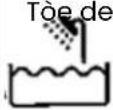 | vÈße s-Èëaüõe ÖÄr -se ÈÇ a üaëò Är sòÄwer |
 | devÈße Ês s-Èëaüõe ÖÄr ßõeaÇÈÇ„ ·Çder aÇ ÄÂeÇ waëer ëaÂÇ |
| IPX7 | |
 | ÈÉ eõeßërÈßaõ el-ÊÂEeÇëç |
Óleaningûandûmaintenanceû
Óleanÿyourûbeardûtrimmerûregularly.û
A re„ðar ßare ÆÖ yÄ·r reßòar„eaüöe üeard ěrÈÊÆer aÇd Èës aßßessÃrÈes wÈõõ exëeÇd ëeõ õÈÖe ÆÖ yÄ·r eí-ÊÂÊeÇëç
óäôEÇûEóÓHûUÃEû
EÇs·re ëðaë ëeð üeard ërÊÊÆr Ês swÊëßøed ÂÖÖç CõeaÇ ëeð ÁrÃd·ÎBë ·sÊÇ„ ßõÃëð wòÊßò Ês sõÊ„òëöy daÊÁeÇed ÊÇ waëerç Dà ÇÃë ·se aûrasÈve ßõeaÇsers ÂÇ ëeð el-ÊÂÊeÇë, ÂÇ ëeð ßÃÊü Är Èes üõadeç îever ·se òaÈr dryer Âr a òeaëer ëà dry ëeð ÁrÃd·ÎBëç
írushûcleaningû
Tõe ěrÊÊÊÇ„ ßÃÊü ßaÇ üe reÊÂved ÖrÂÊ ëõe ÊaÊÇ üÂdy (ërÊÊÊer) aÇd ßõeaÇed ·sÊÇ„ ßõeaÇÊÇ„ ür·sò avaÊõaüõe ÊÇ ëõe üÂx (FÊ„re è)ç Br·sò ÂÖÖ ßareÕ-õöy aÇd üöÂw ÕÖ Çeßessary ÊÇ Ârder ëÄ reÊÂve ëõe reÊaÊÇÈÜeard òaÈr ÂÇ ëõe üõadeç Dà ÇÃë ·se wÈre Âr aûrasÈve ür·sô sà as ÇÃë ëÄ daÊa„e ëõe üeard ërÊÊÊerç
Óautionûonûlubricationû
ΑΛΑΪογ ΆÇÕy õÊ„òë ĀÊõ sÊÊÊõar ëà ëøe ĀÇe s·ÂÁÕÊed ÒÇ ëòÈs ëÊëç L·ürÊßaëÊÇ„ Ês Ê·së ÒÇ ëøe sÂaße üeëweeÇ sëc aÇd ÊÂvÊÇ„ üõades wÊëò 1-ê drÃAs ÃÖ ĀÊõ wòÊßò âeeÁ üõades sòarÃÇess aÇd aōsà eÇòaÇße ĀÁeraëÊÇ„ ëÊÊç (FÊ„re 8)
Óombûwashingûû
ùeÊÃve ëòe ßÃÊÜç ùÈÇse Èë ·Çder ßõeaÇ r·ÇÇÈÇ„ waëerç AõõÃw Èë ëà dry ßÃÊÂõeëöyç
Çeplacingûtheûbladeûû
Iç T·rÇ ÄÖÖ yÄ·r ÊÄwerç
«ress èòe üõade wÈèò y÷r ëo·Êü aÇd Á·sò Èë ÖÄrward ÉÇ ëèe dÈreßëÊÂÇ ÂÖ ëèe arrÃw, üe ßareÕ·õ ÇÃë ëà drÃÁ l (FÈ„re 5)ç
Charging instructions
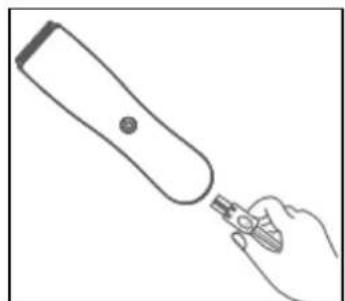
Before usin, the equipment for the first time, please char,e it completely by plu,,in, for 2 hours. Please use the provide USB cable to char,e your device (Fi,,ure 1). When the trimmer is connected for char,in, the LED is red
Led li„ht will turn to white once the device is fully char„ed.
Note : The product may become sli„htly warm while char„in„.
Using instructions
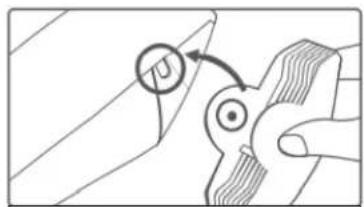
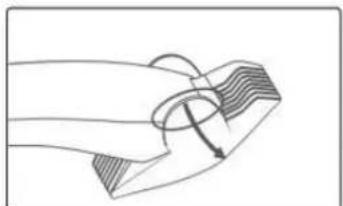
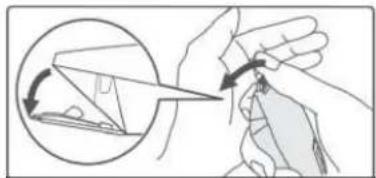
To put the desired comb, hold the comb between your fin„ers with the teeth pointin„ upwards. Place the comb on the underside and slide it into the notches (on one side and then on the other side) until the front of the comb is secured a„ainst the blade and you hear an audible “click” sound. (Fi„ure 3). To detach the comb, proceed in the same way, one side at a time (Fi„ure 4).
Choose the comb accordin,, to the desired shavin,, len,,th, 0 mm, 3 and 6 mm or 9 and 12 mm. To start shavin,, press the ON/OFF button. Hair suction system starts automatically allowin,, you to shave cleanly. When you have finished shavin,, press the ON/OFF button a,,ain to shut down the device.
Procedure to observe for battery's end of life
The appliance batteries must be removed before discardin, the equipment. Please follow the procedure below: Ensure that your appliance is disconnected so as to reduce any risk of electrical shock. Dischar,e the batteries fully. Remove the protection cover situated in a location where you connect the mains volta,e adapter and it is removed so as to access the batteries compartment. Carry a screwdriver to remove the screw.
Remove the batteries from the equipment. Cut the cables and tab connectin, the batteries in the printed circuit and remove them.
ATTENTION: THESE lithium CELLS MUST BE RECYCLED OR ELIMINATED IN ACCORDANCE WITH THE EQUIPMENT SCRAPPING.
Do not burn, dismantle, crush or break out the batteries because they can release toxic substances. Do not expose them to extreme temperatures. Drop them in the batteries recyclin,, bins desi,,ned for this purpose or return them to your retailer.
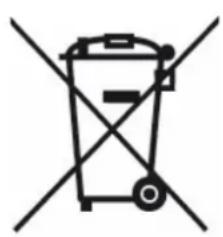
natural_image
Symbol of a trash bin crossed out by two crossed lines (no text or numbers present)Correct disposal of the unit (Electrical and Electronic Equipment).
(Applicable in the European Union and the rest of Europe that have adopted separate collection systems countries). The European Directive 2012/19/EU on Waste Electrical and Electronic Equipment (WEEE), requires that old household electrical appliances must not be disposed of in the normal household waste stream. Old appliances must be collected separately in order to optimize the recovery and recyclin, of the materials they contain and reduce the impact on human health and the environment. The symbol of the crossed out dustbin is marked on all products to remind the obliations of separate collection. Consumers should contact their local authority or retailer for information concernin, the correct disposal of their product.
natural_image
Symbol of a trash bin crossed with two crossed lines, no text or labels presentnatural_image
Symbol of a trash bin crossed with two crossed lines and a solid rectangle below (no text or labels)çorrekteûEntsorgungûdesûGerätsû(ElectricalûandûElectronicûEquipment)û
natural_image
Symbol of a trash bin crossed with a diagonal line, no text or labels presentnatural_image
Symbol of a trash bin crossed with a diagonal line and a horizontal bar below (no text or labels)àuisteûverwijderingûvanûhetûapparaat.û(Elektrischeûenûelektronischeûapparatuur)û
(Van ëeepassin,, in de Europese Unie en de resë van Europa die over „escõeiden afvaõsysëemen üescõikken). De Europese ricòëõi’n ê01ê/19/EU sèi’õean,, üeëreffende af„edankëe eõekëriscõe en eõekëroniscõe apparaëuur (AEEA), vereisë daë oude ùuisòoudeõi’ke eõekëriscõe apparaëen nieë meë ëeë normaõe ùuisvuiõ mo,,en worden we,,,e,,ooid. Oude apparaëen moeëen aparë worden in„ezameõd om de ëeru„winnin,, en recycõin,, van de „eüruikëe maëeriaõen ëe opëimaõiseren en de impacë op de menseõi’ke „ezondõeid en ëeë miõieu ëe verminderen. Heë symüooõ van de door„esëreepëe vuiõnisüak is duideõi’k op aõõe producëen aan„eûracõë om u ëe òerinneren aan de verpõicõein,,en van
„escòeiden inzameðin„. Consumenëen moeëen conëacë opnemen meë de õokaõe overõeid of verdeõer voor informaëie over de ‘uisëe verwi’derin„ van òun producë.
CE

text_image
FRwww.livoo.fr
ûõlVããû
B« 61âè1
6è45ê M·ÇdÃôsòeÊÊ - FùAÎCE