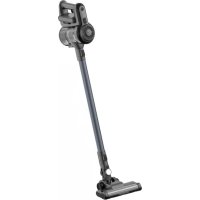
SC1 - Vacuum Cleaner AENO - Free user manual and instructions
Find the device manual for free SC1 AENO in PDF.



| Product Type | Cordless Stick Vacuum |
| Brand | AENO |
| Model | SC1 |
| Dimensions (L × H × D) | 1060 mm × 230 mm × 218 mm |
| Net Weight | 1.4 kg |
| Power Supply | Rechargeable lithium-ion battery 22.2 V, 2200 mAh; AC adapter 100-240 V AC, 50/60 Hz, output 26.5 V DC |
| Rated Power | 120 W |
| Suction Power | 6 kPa (low power), 12 kPa (high power) |
| Noise Level | 68 dB |
| Runtime | Up to 25 min (turbo mode), up to 40 min (normal mode) |
| Charging Time | 4 to 5 hours |
| Dustbin Capacity | Not specified in the manual |
| Package Contents | Extension tube, battery pack, main brush, round brush, crevice tool, wall mount, power adapter, screws and wall plugs, quick start guide, warranty card |
| Key Features | Two modes (normal and turbo), cordless operation, wall mount for storage |
| Maintenance and Cleaning | Clean the MIF filter regularly (washable with water), clean the main brush roller with the provided brush, empty the dustbin |
| Safety | Use only the original adapter; do not immerse in water; avoid vacuuming liquids, flammable or sharp objects; unplug after charging |
| General Information | 2-year warranty; made in China; imported by ASBISc Enterprises PLC (Cyprus) |
Frequently Asked Questions - SC1 AENO
User questions about SC1 AENO
0 question about this device. Answer the ones you know or ask your own.
Ask a new question about this device
Download the instructions for your Vacuum Cleaner in PDF format for free! Find your manual SC1 - AENO and take your electronic device back in hand. On this page are published all the documents necessary for the use of your device. SC1 by AENO.
USER MANUAL SC1 AENO
natural_image
Line drawing of a single vacuum cleaner against a black background (no text or symbols)User Manual
Cordless
Vacuum
Cleaner SC1
(Model: ASC0001)
15.04.2022 | v 1.0.6
EN....7
RU.... 12
AR....18
BG....21
CS 27
DE.... 32
ET 38
FR 43
HR....49
HU....54
HY....59
IT....64
KA....69
KK....75
LT 80
LV....85
PL 90
RO....95
SK....100
SR....105
UK 110
UZ.... 116
ZH....122

4 aeno.com/documents

EN AENO SCI Vertical Vacuum Cleaner is a household appliance designed to clean dust and small rubbish from all types of household surfaces.
Specifications
Power adapter input voltage: 100–240 V AC, 50/60 Hz. Power adapter output voltage: 26.5 V DC. Nominal battery voltage: 22.2 V DC. Power: 120 W. Battery: li-ion. Battery capacity: 2200 mAh. Charging time: 4–5 hours. Net weight: 1.4 kg. Thrust power: 6 kPa (low power), 12 kPa (high power). Noise level: 68 dB. Operating time: up to 25 minutes (in turbo mode), up to 45 minutes (in normal mode). Dimensions: 1060 mm × 230 mm × 218 mm.
Package Contents
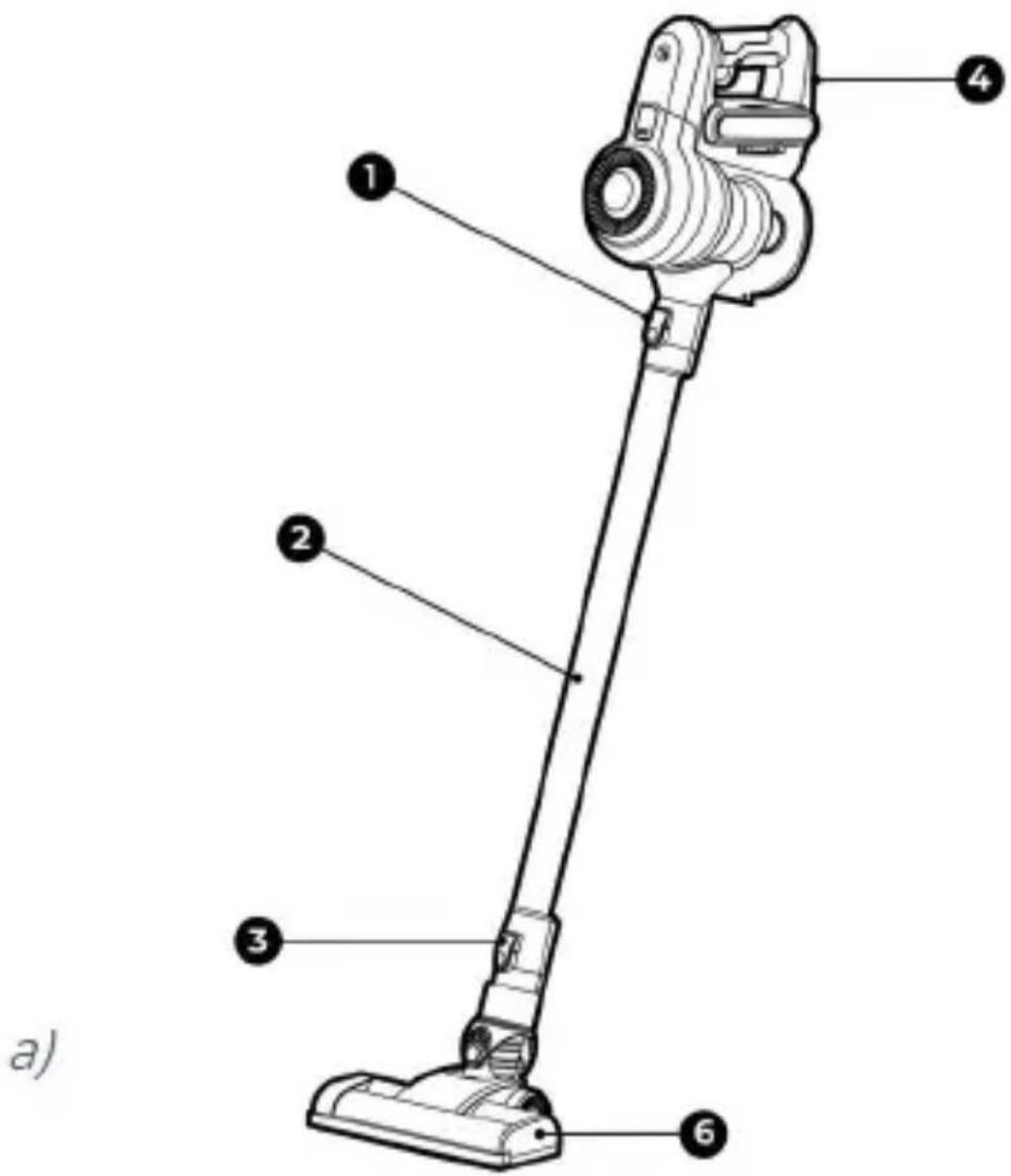
See Figures a, b and d: ① extension tube lock, ② extension tube, ③ main brush lock, ④ battery pack, ⑤ dustbin housing, ⑥ main brush, ⑦ 3M tape, ⑧ power adapter, ⑨ round brush, ⑩ crevice brush, ⑪ screw (3 pcs), ⑫ mounting panel, ⑬ plastic dowels, ⑭ quick start guide, warranty card, ⑮ removable battery.
Limitations and Warnings
WARNING! The battery can only be charged using the original power adapter. Use of a non-original power adapter (charger) voids the manufacturer's warranty. Do not use the charger to power or recharge any and all incompatible devices. The manufacturer is not liable for any consequences caused by the use of the power adapter for purposes other than its intended use or for powering or recharging a device not included in the scope of delivery. Make sure the cleaner is disconnected from the power adapter before performing maintenance. Do not immerse the cleaner or any part of it in water or any other liquid. Do not use aggressive or easily flammable detergents to care for the vacuum cleaner. Clean the vacuum cleaner filter regularly.
Disconnect the power adapter after fully charging. Do not install the wall bracket in locations exposed to direct sunlight or excessive heat. Do not use the power adapter if the plug or cord is damaged. Do not attempt to vacuum flammable objects (cigarette butts, matches, ashes) or excessively crushed construction debris (e.g., lime, cement, plaster powder), large sharp objects and fragments (e.g., glass, nails, needles), aggressive liquids (solvent, cleaner, acids), flammable or explosive liquids (e.g., gasoline, alcoholic products). Keep hair, loose clothing, fingers and other body parts away from the air duct and moving parts of the cleaner. Do not point vacuum cleaner air tube, handle or other tools at eyes, ears or other sensitive areas of the body. Carefully examine the area to be cleaned before turning on the vacuum cleaner. If it contains large pieces or lumps of paper, plastic or cloth, sharp objects, or objects larger than the diameter of the vacuum cleaner tube, remove them from the cleaning area beforehand. Otherwise, the tube of the vacuum cleaner may get clogged, which will decrease its suction power. If the cleaner gets too hot, you hear an abnormal sound, the suction power has decreased, or there is an unpleasant odor, stop using it immediately. Inspect the dust container regularly. If there is a lot of rubbish and dust in it, clean it out.
Assembly and Operation
Attach the battery pack 4 the dustbin housing (See picture c). Attach the power adapter to the battery pack . Plug the power adapter into a power outlet (See figure d). The battery LED will light up red until fully charged (from 4 to 5 hours). When fully charged, the light will turn blue.
NOTE. You can remove the battery from the battery pack by pressing the button 25
When fully charged, disconnect the power adapter from the battery pack and attach the metal extension tube to the dustbin housing (see picture a). To
8 aeno.com/documents
the other end of the metal extension tube attach one of the brushes of the kit: 6, 9. You can also attach the brushes directly to the dustbin housing (without the metal extension tube).
To turn the cleaner on or off, press the switch on the handle of the battery pack. Use the button on the handle of the battery pack to change the vacuum cleaner's operating mode when the device is already on.
The vacuum cleaner operates in two modes: normal mode and turbo mode. The modes are switched one by one with a button.
Table of vacuum cleaner operation modes
| Vacuum cleaner state | User actions | Result |
| The battery is charged, but the vacuum cleaner motor does not run | Press the switch | The vacuum cleaner turns on and operates in normal mode |
| The vacuum cleaner operates in normal mode | Click | The vacuum cleaner operates in turbo mode |
 Click[A7YB] | The vacuum cleaner operates in normal mode |
| The vacuum cleaner operates in one of two modes | Press the switch | The vacuum cleaner turns off |
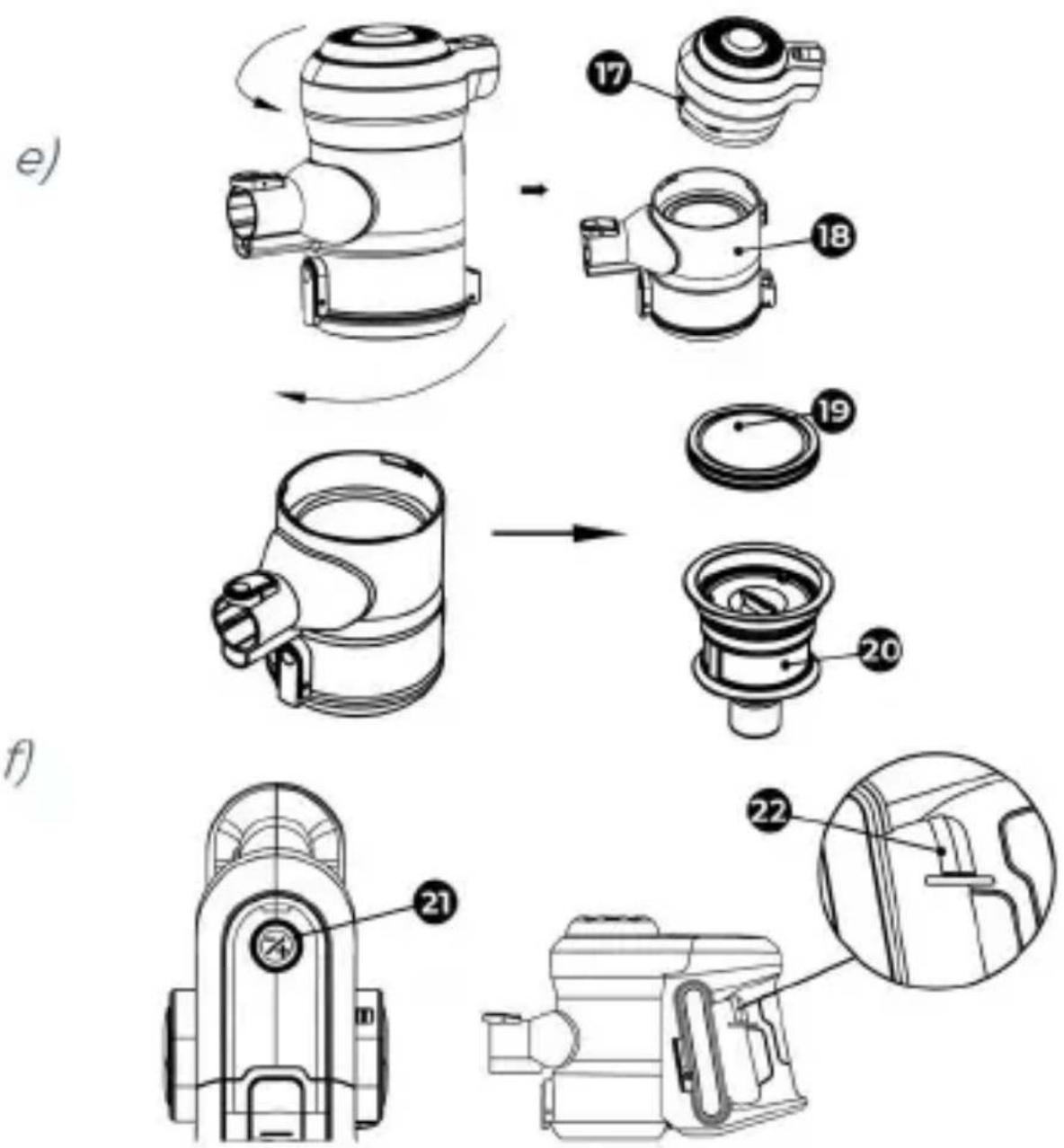
Before cleaning the dustbin housing, disconnect the battery pack by pressing the rectangular button 23 (see figure c). The bottom lid of the dustbin is opened by pressing the latch 24 you can also remove the MIF filter from the housing and rinse it with water. To do this, unscrew the top part of the aeno.com/documents 9
dustbin housing 17 counterclockwise (see picture e). Pull out the MIF filter with its holder by pulling the loop labeled "UP". Clean rubbish from the dustbin housing, holder and MIF filter. Rinse the MIF filter and its holder in running water and dry. After that, insert the MIF-filter into the holder, insert the holder into the body of the dustbin housing and screw the cap.
The main brush and the roller inside it require regular cleaning of trapped hair and other rubbish. To remove rubbish, remove the roller from the brush housing. To do this, pull out the brush lock located on the right side. Push back the brush retainer latch and pull the roller out of the slot. Do not clean the roller with your fingers, use only special brush. Do not wash the roller with water or cleaning detergents.
Troubleshooting
The vacuum cleaner does not turn on. Possible causes: low charge level, clogging. Solution: charge the battery, clean the clogs.
Weak suction power. Possible causes: overfilled dustbin, clogged brush.
Solution: clean the dustbin, filters and the brush.
Strong noise, extraneous sounds. Possible causes: clogged metal extension tube. Solution: clean the tube.
The main brush roll does not rotate. Possible causes: clogging. Solution: disassemble the main brush, remove the roller and the clog.
The LED indicator lights up blue, then it starts blinking red and the cleaner shuts off. Possible causes: the battery has overheated or overcooled because the room temperature is too high or too low. Solution: use the vacuum cleaner at temperatures between 0 °C and +40 °C.
While charging, the LED indicator lights up red. Possible causes: non-original power adapter is used, the battery is out of order. Solution: Use only the original power adapter to charge the vacuum cleaner.
10 aeno.com/documents
ATTENTION! If your problem persists, please contact your local supplier or the service center for support. Please do not disassemble the device or try to repair it on your own.
Recycling information

natural_image
Pure electrical circuit lines without any symbolsThese symbols indicate that you must follow the Waste Electrical and Electronic Equipment (WEEE) and Waste Battery and Battery Regulations when disposing of the device, its batteries and accumulators, and its electrical and electronic accessories. According to the rules, this equipment must be disposed of separately at the end of its service life.
Do not dispose of the device, its batteries and accumulators, or
its electrical and electronic accessories together with unsorted municipal waste, as this will harm the environment.
To dispose of this equipment, it must be returned to the point of sale or turned in to a local recycling facility.
You should contact your local household waste disposal service for details.
The warranty period and service life shall be 2 years as from the date of purchase of the device. Manufacturer: ASBISc Enterprises PLC, 43 Kolonakiou Street, Diamond Court, Ayios Athanasios, 4103 Limassol, Cyprus. Made in China.
For current information and details on the device description and specification, as well as connection process, certificates, warranty and quality issues, see relevant Installation and Operation Manuals available for downloading ataeno.com/documents. All trademarks and names herein are the property of their respective owners.
aeno.com/documents 11
natural_image
Simple line drawing of a trash bin with no text or symbolsnatural_image
Simple line drawing of a trash bin with crossed lines indicating no waste or plastic (no text or symbols)natural_image
Simple line drawing of a trash bin with crossed lines indicating no text or symbols (no text or labels)natural_image
Simple line drawing of a trash bin with crossed lines indicating no waste or discharge (no text or symbols)natural_image
Simple line drawing of a trash bin with crossed lines indicating no waste or discharge (no text or symbols)natural_image
Simple line drawing of a trash bin with crossed lines indicating no waste or discharge (no text or symbols)natural_image
Simple line drawing of a trash bin with crossed lines indicating no waste or discharge (no text or symbols)natural_image
Simple line drawing of a trash bin with crossed lines indicating no waste or plastic discharge (no text or symbols)Ovaj simbol znači da prilikom odlaganja uređaja, njegovih baterija i akumulatora te njegovog električnog i elektroničkog pribora morate slijediti propise o zbrinjavanja otpada električne i elektroničke opreme (WEEE) te o zbrinjavanju otpadnih baterija i akumulatora. Prema propisima, ova oprema podliježe posebnom prikupljanju na kraju radnog vijeka. Uređaj, njegove baterije i akumulatori te njegov električni i elektronički pribor
ne smiju se odlagati skupa s nerazvrstanim komunalnim otpadom jer to nanosi štetu okolišu.
natural_image
Pure electrical circuit lines without any symbolsnatural_image
Simple line drawing of a trash bin with crossed lines indicating no waste or plastic discharge (no text or symbols)Uju junphpnuwuh2utpn u2wuwlnu tú, np uwppn, dpu wupwnlngutpú ni lynunwuhzutpn l u hthynpwulwú l u hthynpnnuwjhú wupnwquutpn nlunhhqugutihu wtinp t htunutp hthynpwulwú l hthynpnnuwjhú wupnwlpnnulutph wpunwnprjewu rəwhnufutph (WEEE) l u upwnlngh l u upwnlngh rəwhnfutph htn u upnultni lqwánfuwlqwpntphú: <wuwawjú lqwánufutph, umjwi wupnwlpnnlún dwnwnprjewu dwudytunh wluwnhg htunn túpəwlu t puudwú nlunhhqughwyh:
Uwnpp, uwnpunlyngutpp l. lynumulhyutpp, huswatu ewu htywnpulquu l. tktlyunpnnuuju wupwquutpp zh luyntih niunhihquuguti zuntuwulwulnpulud puunwpuyhu pauuhnuutph htun, puuh np nu hyluuuh 2pzuluw uhwulwujnhu:
Uju uwnpn hnlnhjhqwghwjh hwufwn, wja wtunp t yltnwwnwnduh yuwwnph lhtun lww hwu dduh untnwulwu yltnwudzwlpuwu lhtun: Uwupnwuuu uhtnlynlajnldutn unuwwni hwuwn wahpwudt2un t nhutl untnwulwu yltagwnwnjhu pwhnndutnh nsaswguwu dwnwynlajnlu:
Gnu2huhpwjh dwuyltunp l. dwnwnjnjwju dwuyltunp - 2 unuph wynwuph qduwlu onluwuhg:
"UUФHUL Ефэпнчнүүүүү" (ASBISc Enterprises PLC), Uqhnu UФшішішну, Qhuwúnān lynnu, Unpñawihmi Uphhī, 43, 4103 Lhuwunq, Qhuynu: "Wuupwunluid l, Qhuwunwūnlu":
Uwnph wnph untntlynprjnlutppn l uwupwuwu ulywnwqnprjnlup, hysytu dwu uhwuguwu hpuwhwqutppn, huuwwwnwqptppn, npwlh l tpu2huhph utnwptpyw uwhwqutp nputnn pulttpmprjnluttph uwwh untntlynprjnlutppn hwwutgh tu utpptniudwu hwufw aeno.com/documents hnnlund: U2qud pnnp wypwupwuhztpni m npwug wtywunlutppn hptug hwwwwwnwwuhwu uthuwlpwuntptph uthuwlpwnrjejnliu ti:
natural_image
Pure electrical circuit lines without any symbolsnatural_image
Simple line drawing of a trash bin with crossed lines indicating no waste or plastic discharge (no text or symbols)natural_image
Simple line drawing of a trash bin with crossed lines indicating no waste or plastic (no text or symbols)natural_image
Simple line drawing of a trash bin with crossed lines indicating no waste or discharge (no text or symbols)natural_image
Simple line drawing of a trash bin with crossed lines indicating no waste or plastic discharge (no text or symbols)natural_image
Simple line drawing of a trash bin with crossed lines indicating no waste or discharge (no text or symbols)natural_image
Simple line drawing of a trash bin with crossed lines indicating no waste or discharge (no text or symbols)natural_image
Simple line drawing of a trash bin with crossed lines indicating no waste or discharge (no text or symbols)natural_image
Simple line drawing of a trash bin with no text or symbolsnatural_image
Simple line drawing of a trash bin with crossed lines indicating no waste or discharge (no text or symbols)natural_image
Simple line drawing of a trash bin with no text or symbolsUshbu belgilar qurilma, uning batareyalari va akkumulyatorlari, shuningdek elektr va elektron aksessuarlarini utilisatsiya qilishda (WEEE) elektr va elektron uskunalarning hamda batareyalar va akkumulyatorlarning chqindilaridan foydali narsalar olish qoidalariga amal qilish kerak. Qoidalarga ko'ra, ushbu uskunaning ishlash muddati tugagandan so'ng alohida utilizatsiyaga yotadi. Qurilmani, uning batareyalari va akkumulyatorlari, shuningdek, unung elektrik va elektron aksessuarlarini shahar chiqindilari bilan bir qatorda utilizatsiya qilishga yo'l qo'yilmaydi, chunki bu atrof-muhitga zarar etkazadi. Ushbu uskunani utilizatsiya qilish uchun uni sotish yoki mahalliy qayta ishlash nuqtalariga qaytarish kerak. Batafsil tafsilotlarni olish uchun maishiy chiqindilarni yo'qotish xizmatiga murojaat qilish kerak.
Kafolat muddati va xizmat muddati mahsulot sotib olingan kundan boshlab 2 yil.
Ishlab chiqaruvchi haqida ma'lumotlar: "ASBISc Enterprises PLC (DMK-Dasturlashtiriladigan mantiqiy kontrollyor), Agios Afanasios, Diamond Cort, Kolonakiu Strit, 43, 4103 Limassol, Kipr. Xitoyda ishlab chiqarilgan.
natural_image
Simple line drawing of a trash bin with crossed lines indicating no waste or discharge (no text or symbols)


Brand : AENO
Model : SC1
Category : Vacuum Cleaner