CH510AC - Heating Vonroc - Free user manual and instructions
Find the device manual for free CH510AC Vonroc in PDF.


| Brand | Vonroc |
| Model | CH510AC |
| Product type | Electric glass panel convector |
| Power supply | 230 V ~ / 50-60 Hz |
| Rated power | 1000 W |
| Power levels | 500 W / 1000 W |
| Thermostat temperature range | 5 °C – 50 °C |
| Protection class (IP) | IP24 |
| Wi-Fi frequency | 2.4 GHz |
| Operating modes | Comfort (100%), Eco (50%), Frost protection (5 °C) |
| Manual control | Touch control panel with display |
| Remote control | Smart Life app (iOS/Android) |
| Electronic thermostat | Yes, maintains constant temperature |
| Timer | Yes, via app (weekly programming) |
| Overheat protection | Automatic shut-off in case of overheating |
| Tip-over protection | Automatic detection and shut-off |
| Control lock | Yes, to prevent accidental adjustments |
| Installation | Floor (feet included) or wall (kit included) |
| Area of use | Indoor only |
| Safety distance | At least 1 m from flammable materials |
| Cleaning | Soft dry cloth; do not immerse |
| Warranty | Legal, contact VONROC |
Frequently Asked Questions - CH510AC Vonroc
User questions about CH510AC Vonroc
0 question about this device. Answer the ones you know or ask your own.
Ask a new question about this device
Download the instructions for your Heating in PDF format for free! Find your manual CH510AC - Vonroc and take your electronic device back in hand. On this page are published all the documents necessary for the use of your device. CH510AC by Vonroc.
USER MANUAL CH510AC Vonroc
natural_image
Simple icon of a heating unit with steam rising from its side (no text or symbols)EN Original Instructions
natural_image
Close-up of a black plastic enclosure with ventilation grilles and mounting holes (no text or symbols visible)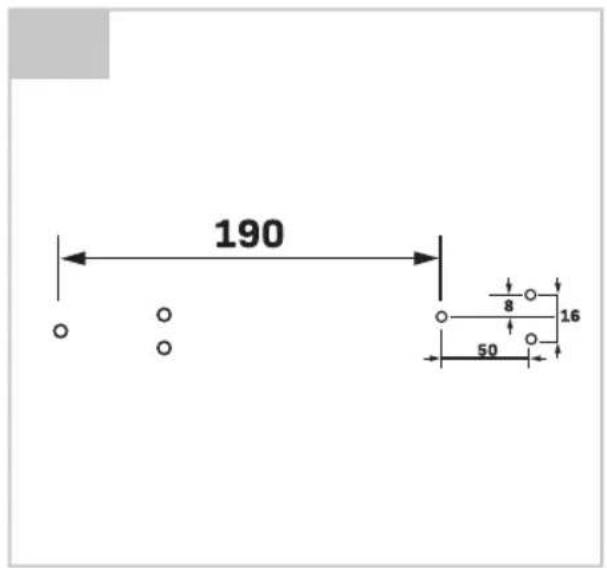
natural_image
Close-up of a wooden door with two metal handles and visible grain patterns (no text or symbols)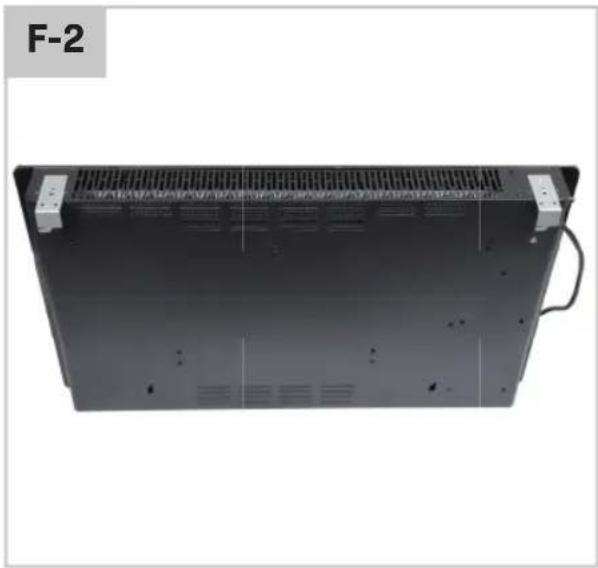
natural_image
Back view of a black electronic device with ventilation grilles and a cable, labeled F-2 (no readable text or symbols on the device itself)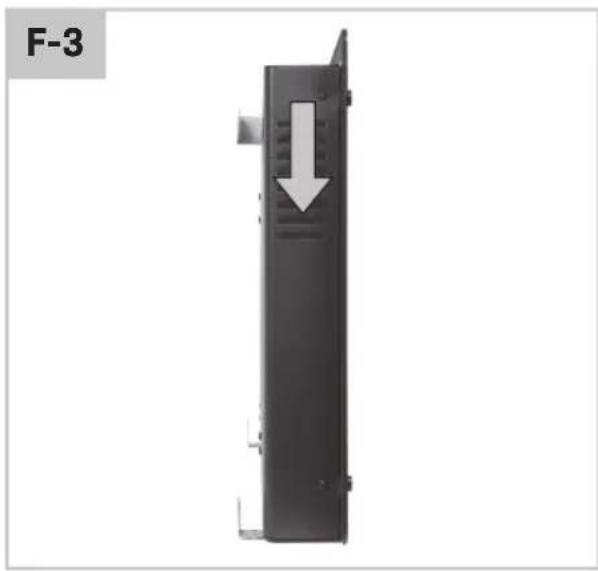
natural_image
Black rectangular device with a white arrow pointing downward, labeled F-3 (no text or symbols on the device itself)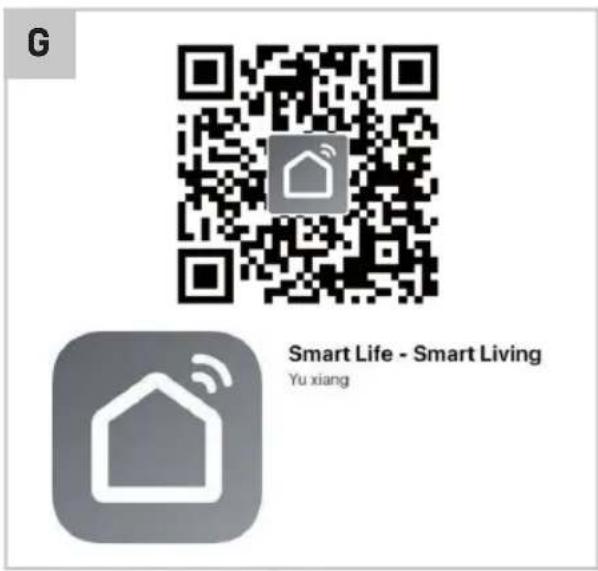
1. SAFETY INSTRUCTIONS
Read the enclosed safety warnings, the additional safety warnings and the instructions. Failure to follow the safety warnings and the instructions may result in electric shock, fire and/or serious injury. Save the safety warnings and the instructions for future reference.
The following symbols are used in the user manual or on the product:

Read the user manual.

Denotes risk of personal injury, loss of life or damage to the tool in case of non-observance of the instructions in this manual.

Denotes risk of electrical shock.

Important! WARNING: In order to avoid overheating, do not cover the heater.

Do not dispose of the product in unsuitable containers.

The product is in accordance with the applicable safety standards in the European directives.
GENERAL SAFETY WARNINGS
This appliance can be used by children aged from 8 years and above and persons with reduced physical, sensory or mental capabilities or lack of experience and knowledge if they have been given supervision or instruction concerning use of the appliance in a safe way and understand the hazards involved. Children shall not play with the appliance. Cleaning and user maintenance shall not be made by children without supervision.
Children of less than 3 years should be kept away unless continuously supervised.
Children aged from 3 years and less than 8 years shall only switch on/off the appliance provided that it has been placed or installed in its intended normal operating position and they have been given supervision or instruction concerning use of the appliance in a safe way and understand the hazards involved. Children aged from 3 years and less than 8 years shall not plug in, regulate and clean the appliance or perform user maintenance.

CAUTION — Some parts of this product can become very hot and cause burns.
Particular attention has to be given where children and vulnerable people are present.
ADDITIONAL SAFETY WARNINGS FOR CONVECTOR PANEL HEATER
- Children should be kept away unless continuously supervised to ensure that they do not play with the machine.
- Children shall not plug in, position, operate, regulate and clean the appliance or perform user maintenance.
- CAUTION - some parts of this product can become very hot and cause burns. Particular attention has to be given where children and vulnerable people are present.
- The machine is not suitable for use outdoors, in bathrooms or in other wet or damp environments.
- Please note that the machine can become very hot and should, therefore, be placed at a safe distance from flammable object such as furniture, curtains and similar.
- Do not cover the heater.
- The machine must not be located immediately below a socket outlet
- Do not connect the machine using an on/off timer or other external equipment which can automatically switch the device on.
- The machine must not be placed/used in rooms where flammable liquids or gases are present.
- If an extension cord is used, it must be as short as possible and always be fully extended.
- You must not connect other appliances to the same mains socket as the machine
- Do not use the machine in immediate surroundings of a bath, a shower or a swimming pool.
- If the supply cord is damaged, it must be replaced by the manufacturer, its service agent or similarly qualified persons in order to avoid a hazard.
- Make sure the machine is always under surveillance and keep children and animals away from it.
-
Do not place/use the machine on moving vehicles or somewhere easy to be tripped over.
-
When the machine is not used for a long time, unplug the machine form its means. Pull by the plug, never remove the plug by pulling the cord.
- Keep the machine far from curtain or places where the air inlet van easily be blocked.
- In order to prevent possible electric shock or leakage current, never use the machine with wet hand or operate the machine when there is water on the power cord.
- Do not dispose of electrical appliances as unsorted municipal waste, use separate collection facilities. Contact your local government for information regarding the collection systems available. If electrical appliance are disposed of in landfills or dumps, hazardous substances can leak into the groundwater and get into the food chain, damaging your health and well-being.
- This appliance is not intended for use by persons (including children) with reduced physical, sensory or mental capabilities, or lack of experience and knowledge, unless they have been given supervision or instruction concerning use of the appliance by a person responsible for their safety.
Electrical safety
When using electric machines always observe the safety regulations applicable in your country to reduce the risk of fire, electric shock and personal injury. Read the following safety instructions and also the enclosed safety instructions. Always check that the voltage of the power supply corresponds to the voltage on the rating plate label.
If operating a power tool in a damp location is unavoidable, use a residual current device (RCD) protected supply. Use of an RCD reduces the risk of electric shock.
2. MACHINE INFORMATION
Intended use
The glass panel convector heater is intended for indoor use only. The machine must be placed on a stable surface or securely mounted to a wall using the included brackets. The machine can be operated via the manual controls on the front panel, or it can be operated remotely over a Wifi network. The heater is equipped with a thermostat and safety features such as tip-over protection and over-heat protection.
TECHNICAL SPECIFICATIONS
| Model No. | CH510ACCH510AC_GREYCH510AC_WHITE |
| Power supply 230V~ / 50/60Hz | |
| Power rating 1000W | |
| Heater settings 500W / 1000W | |
| Thermostat range 5°C - 50°C | |
| IP rating IP24 | |
| WiFi frequency 2.4Ghz |
| Model No. | CH511ACCH511AC_GREYCH511AC_WHITE |
| Power supply 230V~ / 50/60Hz | |
| Power rating 1500W | |
| Heater settings 750W / 1500W | |
| Thermostat range 5°C - 50°C | |
| IP rating IP24 | |
| WiFi frequency 2.4Ghz |
| Model No. | CH512ACCH512AC_GREYCH512AC_WHITE |
| Power supply 230V~ / 50/60Hz | |
| Power rating 2000W | |
| Heater settings 1000W / 2000W | |
| Thermostat range 5°C - 50°C | |
| IP rating IP24 | |
| WiFi frequency 2.4Ghz |
DESCRIPTION
The numbers in the text below refer to the numbers used in figures A1, A2, A3, B, C on page 2-3.
- Glass panel convector heater
- Control buttons
A. Down
B. Up
C. WiFi / Brightness
D. Mode
E. Timer
F. On / Off
- Status display
A. Temperature / Timer setting
B. Temperature indicator
C. Control lock
D. WiFi
- Operating mode indicators
A. Comfort mode
B. Eco mode
C. Anti-frost mode
- Screw
- Floor stand
- Wall mounting screw
- Wall plug
- Wall mounting bracket
3. OPERATION

Check the device for damage before use and only use in good working condition.
When using the heater for the first time, you may notice a slight smell originating from the heating element. This is quite normal and it should disappear after using the heater for some time.
Placing the convector panel heater on the floor (fig. D)
- Install the floor stands (6) on the underside of the heater (1) using the supplied screws (5) (fig. D)
- Place the heater upright on a firm and level surface.
- Keep a minimum distance of 1m from combustible materials (furniture, curtains, etc.). Keep away from wet environments.

Warning! Make sure to place the heater in a safe spot, so you cannot easily trip over the machine and cable. Make sure to place the heater where it cannot fall down.
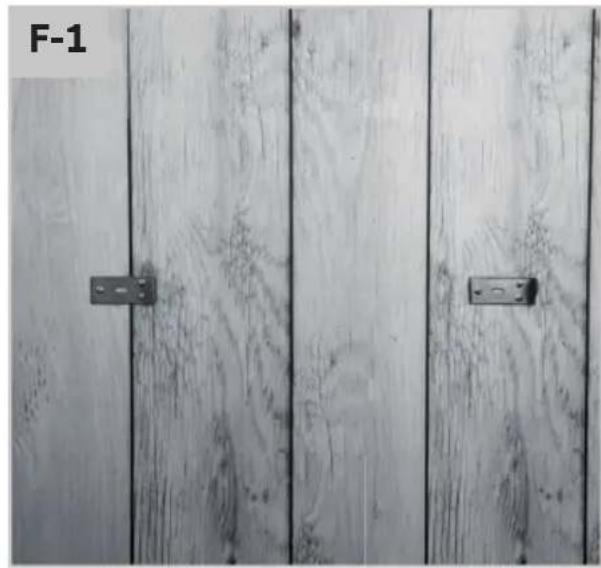
Mounting the convector panel heater on the wall (fig. E-1, E-2, E-3, F-1, F-2, F-3)
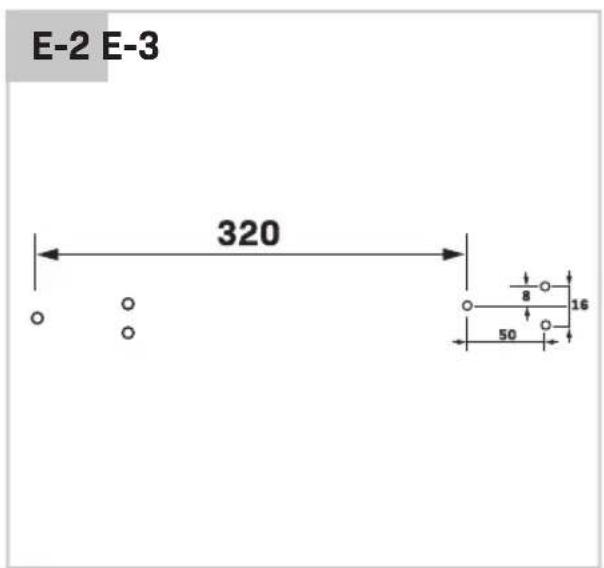
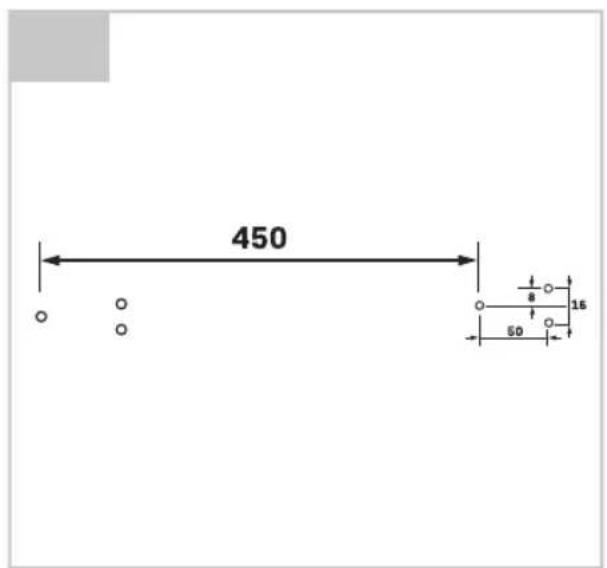
- Observe the hole patterns in fig. E-1, E-2, E-3. Find the hole pattern that corresponds to your heater.
- For CH510AC / CH510AC_GREY / CH510AC_WHITE see fig. E-1
- For CH511AC / CH511AC_GREY / CH511AC_WHITE see fig. E-2
-
For CH512AC / CH512AC_GREY / CH512AC_WHITE see fig. E-3
-
Install two wall mounting brackets (9) on the wall using the included screws (7) (fig. F-1). Use the included wall plugs (8) when installing onto a concrete/brick wall. Refer to the aforementioned hole pattern to ensure the correct spacing between the brackets.
- Install two wall mounting brackets (9) on the underside of the heater (1) using the included screws (5) (fig. F-2). The installed brackets will act as a stand-off to ensure the heater will be positioned at the correct distance from the wall.
- Mount the convector heater panel to the wall by sliding it onto wall brackets (fig. F-3).
Starting the convector panel heater (fig. B)
- Plug in the cable to the mains power outlet.
- Press the On/Off button (2F) on the control panel. The control panel will now be activated.
- Use the Mode button (2D) to cycle between operating modes. The selected operating mode is displayed by the indicators 4A, 4B or 4C on the control panel. The available modes are:
4A Comfort mode Heating at full power
4B Eco mode Heating at 50% power
4C Anti-frost mode Heating off, unless
ambient temperature drops below 5°C
Adjusting the temperature (fig. B)
- By default, the ambient temperature is shown on the display. Press the Down or Up button (2A or 2B) once to display the target temperature. The target temperature will flash.
- While the target temperature is flashing, it may be adjusted between 5°C and 50°C by pressing the Down or Up buttons (2A or 2B).
- The target temperature will keep flashing for 5 seconds after the last button press, then the display will revert to the default state showing the ambient temperature.
- Note that the target temperature can not be adjusted while the heater is in Anti-frost mode. The target temperature is fixed to 5°C in this operating mode. The operating mode must first be changed to Comfort mode or Eco mode before the target temperature can be adjusted.
Control panel lock (fig. B)
The control panel may be locked to prevent accidental or unauthorized adjustments to the heater settings. To lock the control panel, press and hold the Up button (2B) for 3 seconds.
The heater will beep and the Control lock indicator (3C) will light up to signal that the control panel is locked. To disable the control panel lock, press and hold the Down button (2A) for 3 seconds.
Constant room temperature
The heater starts and stops automatically to keep the room temperature constant. Once the ambient temperature in the room reaches the desired target temperature, the heating element will be switched off. Once the ambient temperature starts to decrease, the heating element will be switched on again.
Automatic overheat-safety control
This heater is equipped with an internal safety thermostat and overheat protection circuit. When a potential overheat temperature is reached, the system will automatically shut the heater off.
Stopping the convector panel heater (Fig. B)
Press the On/Off button (2F) on the control panel. The heater will be put into standby-mode. The heating element will be switched off and the control panel will be de-activated.
Storing the convector panel heater
Always let the heater cool down completely before moving or storing the heater. Make sure the heater is unplugged from mains power while in storage.

Warning. Do not store the machine in a wet environment. Protect the machine from dust while in storage.
After a prolonged time in storage, always check to make sure the heating element is clean and free from dust before using the heater again.
4. REMOTE OPERATION
In addition to the aforementioned manual operation, the panel convector heater can also be operated remotely over a WiFi network using your smart phone or tablet. The required app can be downloaded and used free of charge.
Downloading the app to your phone or tablet (fig. G)
- Scan the QR-code (fig. G) on your phone or tablet to download and install the "Smart Life" app.
- If you can't or don't want to use the QR-code you may also install the app manually. To do this, visit the Google Play Store or Apple App Store on your phone or tablet. Search for the "Smart Life" app (fig. G)
- After the app has been installed you will need a “Smart Life” account to login. If you do not yet have an account, you may create one (free of charge) by tapping the ‘Register’ button in the app.
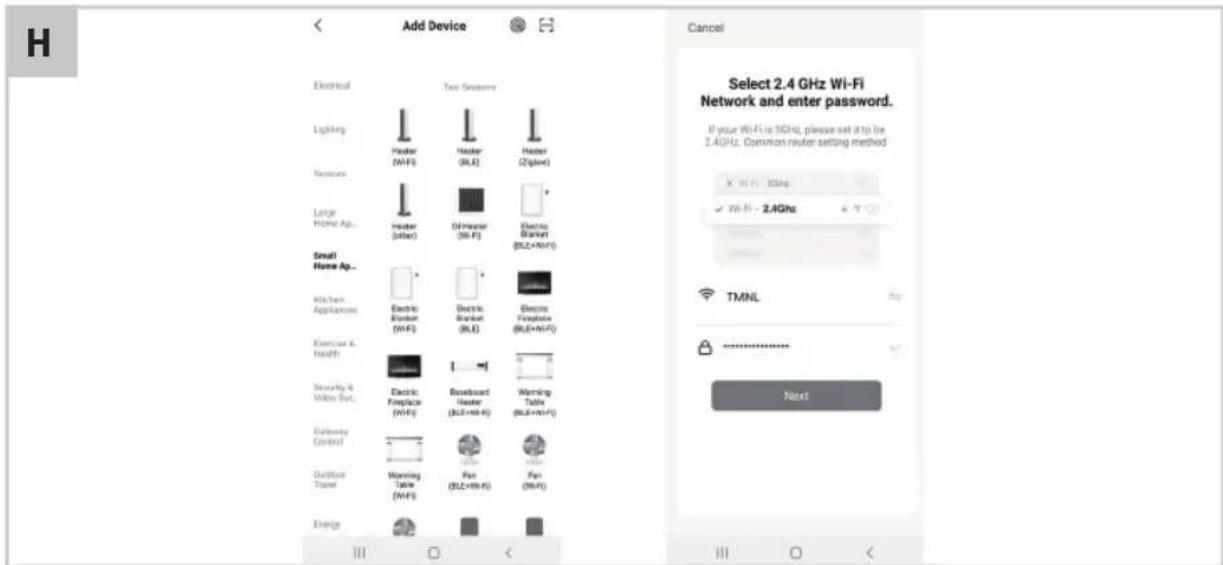
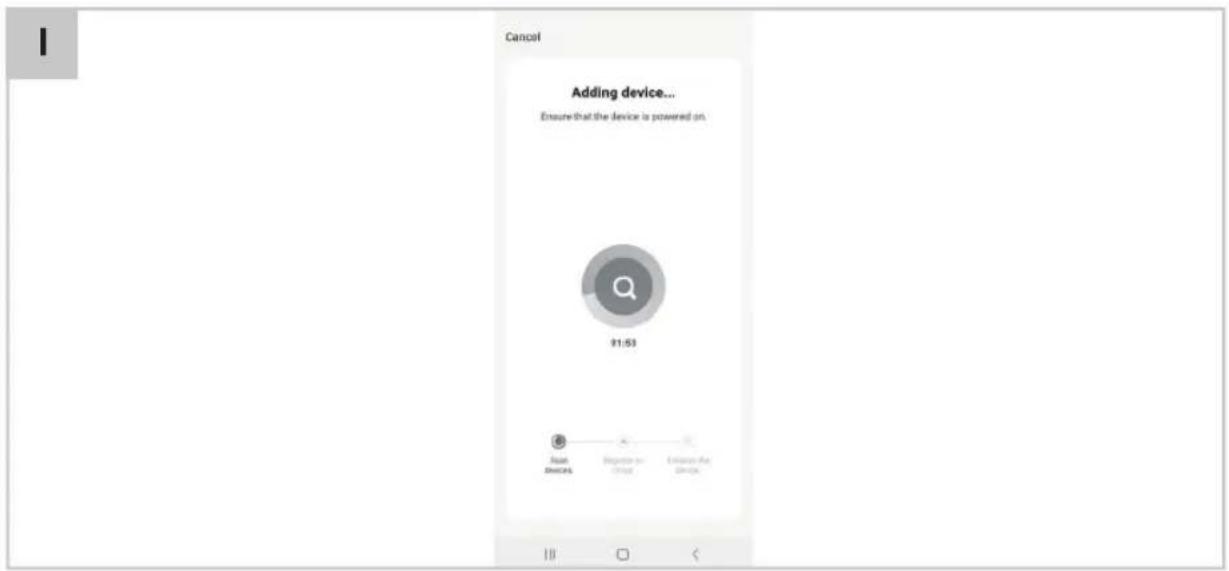
Pairing your panel convector heater with the "Smart Life" app (fig. H, I)
- Put the heater into standby-mode by pressing the On/Off button (2F). The heater display will be switched off, only the On/Off button will remain lit.
- Press and hold the WiFi/Brightness button (2C) for at least 3 seconds. The WiFi status indicator (3D) will start flashing.
- While the WiFi status indicator is flashing, open the app on your phone or tablet and press Add a Device.
- Select the device type, in this case Small appliances -> Heater. Confirm in the app that the WiFi status indicator on the heater is flashing.
- You will be prompted by the app to select a WiFi network and enter the WiFi password. The app will send these details to the heater, allowing the heater to establish a connection to your WiFi network.
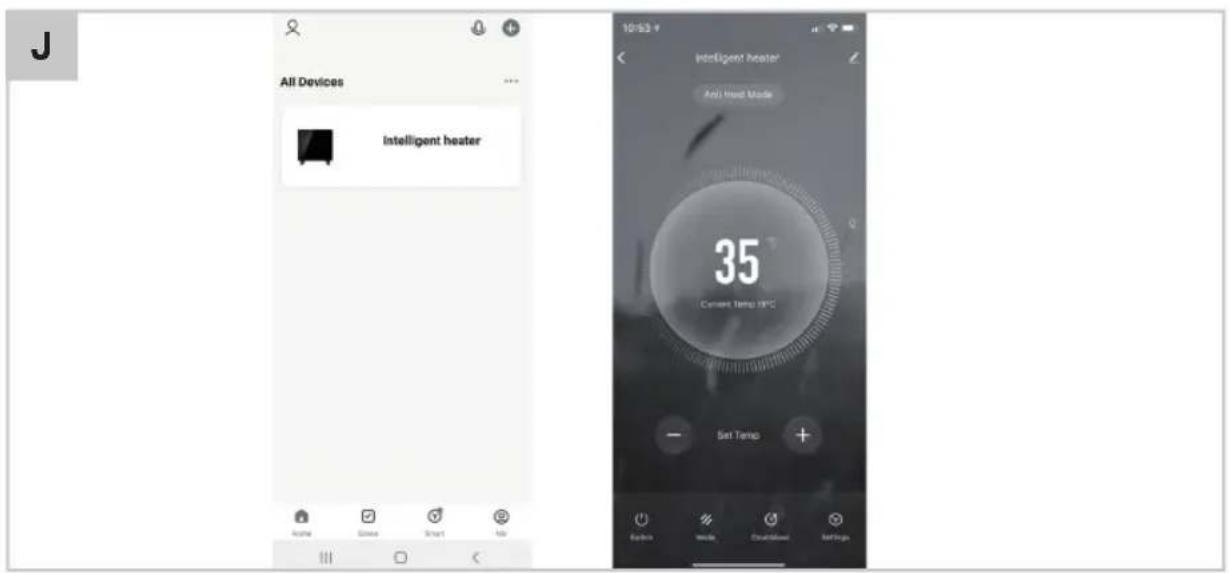
Using the "Smart Life" app (fig. J)
The “Smart Life” app can be used to control many different devices. The status of each device is displayed on the device list. The following states are possible for the convector panel heater:
- Offline (The device is not powered, or not connected to the WiFi network)
- Turned Off (Power and network connection are available, heating is currently disabled)
- Turned On (Power and network connection are available, heating is enabled)
When the heater is online (either Turned Off or Turned On) tap the device name in the app to open the control interface.
Note: when the heater is offline you will not be able to open the control interface.
- Use the Mode button to change the operating mode of the heater. The available modes are:
Comfort mode Heating at full power
Eco mode Heating at 50% power
Anti-frost mode Heating off, unless ambient temperature drops below 5°C - Use the ‘+’ and ‘-’ buttons to adjust the target temperature.
5. MAINTENANCE

Before cleaning and maintenance, always switch off the machine and remove the mains plug from the mains.
Cleaning

Let the machine cool down completely before cleaning.
- Wipe the enclosure with a soft cloth. For very dirty parts, wipe with a damp cloth, then use a clean, dry cloth to fully dry. Be careful not to let any water enter the inside of the appliance
- In order to protect the heater, don't splash water onto the heater, and never use chemical solvents or aggressive cleaning products.
Storage
- Allow the heater to cool down completely before storing it.
- Store the heater in a dry, well ventilated space
ENVIRONMENT

ulty and/or discarded electrical or electronic apparatus have to be collected at the appropriate recycling locations.
Only for EC countries
Do not dispose of power tools into domestic waste. According to the European Guideline 2012/19/EU for Waste Electrical and Electronic Equipment and its implementation into national right, power tools that are no longer usable must be collected separately and disposed of in an environmentally friendly way.
WARRANTY
VONROC products are developed to the highest quality standards and are guaranteed free of defects in both materials and workmanship for the period lawfully stipulated starting from the date of original purchase. Should the product develop any failure during this period due to defective material and/or workmanship then contact VONROC directly.
The following circumstances are excluded from this guarantee:
- Repairs and or alterations have been made or attempted to the machine by unauthorized service centers;
- Normal wear and tear;
- The tool has been abused, misused or improperly maintained;
- Non-original spare parts have been used.
This constitutes the sole warranty made by company either expressed or implied. There are no other warranties expressed or implied which extend beyond the face hereof, herein, including the implied warranties of merchantability and fitness for a particular purpose. In no event shall VONROC be liable for any incidental or consequential damages. The dealers remedies shall be limited to repair or replacement of nonconforming units or parts.
The product and the user manual are subject to change. Specifications can be changed without further notice.
| Model identifier(s): CH510AC, CH510AC_GREY, CH510AC_WHITE | |||||
| Item Symbol Value Unit | Item Unit | ||||
| Heat output | Type of heat input, for electric storage local space heaters only (select one) | ||||
| Nominal heat output | Pnom 1.0 kW | manual heat charge control, with integrated thermostat | No | ||
| Minimum heat output (indicative) | Pmin 0.5 kW | manual heat charge control with room and/or outdoor temperature feedback | No | ||
| Maximum continuous heat output | Pmax,c 1.0 kW | electronic heat charge control with room and/or outdoor temperature feedback | No | ||
| Auxiliary electricity consumption | fan assisted heat output No | ||||
| At nominal heat output | elmax N/A kW | Type of heat output/room temperature control (select one) | |||
| At minimum heat output | elmin | N/A kW | single stage heat output and no room temperature control | No | |
| In standby mode | eISB | 0.00173 | kW | Two or more manual stages, no room temperature control | No |
| with mechanic thermostat room temperature control | No | ||||
| with electronic room temperature control | No | ||||
| electronic room temperature control plus day timer | No | ||||
| electronic room temperature control plus week timer | Yes | ||||
| Other control options (multiple selections possible) | |||||
| room temperature control, with presence detection | No | ||||
| room temperature control, with open window detection | Yes | ||||
| with distance control option | Yes | ||||
| with adaptive start control | No | ||||
| with working time limitation | Yes | ||||
| with black bulb sensor | No | ||||
| Contact details | VONROC • Lingenstraat 6 • 8028 PM • Zwolle • The Netherlands | ||||
| Model identifier(s): CH511AC, CH511AC_GREY, CH511AC_WHITE | |||||
| Item Symbol Value Unit | Item Unit | ||||
| Heat output | Type of heat input, for electric storage local space heaters only (select one) | ||||
| Nominal heat output Pnom 1.5 kW | manual heat charge control, with integrated thermostat | No | |||
| Minimum heat output (indicative) | Pmin 0.75 kW | manual heat charge control with room and/or outdoor temperature feedback | No | ||
| Maximum continuous heat output | Pmax,c 1.5 kW | electronic heat charge control with room and/or outdoor temperature feedback | No | ||
| Auxiliary electricity consumption | fan assisted heat output No | ||||
| At nominal heat output | elmax N/A | kW | Type of heat output/room temperature control (select one) | ||
| At minimum heat output | elmin | N/A | kW | single stage heat output and no room temperature control | No |
| In standby mode | eISB | 0.00173 | kW | Two or more manual stages, no room temperature control | No |
| with mechanic thermostat room temperature control | No | ||||
| with electronic room temperature control | No | ||||
| electronic room temperature control plus day timer | No | ||||
| electronic room temperature control plus week timer | Yes | ||||
| Other control options (multiple selections possible) | |||||
| room temperature control, with presence detection | No | ||||
| room temperature control, with open window detection | Yes | ||||
| with distance control option | Yes | ||||
| with adaptive start control | No | ||||
| with working time limitation | Yes | ||||
| with black bulb sensor | No | ||||
| Contact details | VONROC • Lingenstraat 6 • 8028 PM • Zwolle • The Netherlands | ||||
| Model identifier(s): CH512AC, CH512AC_GREY, CH512AC_WHITE | |||||
| Item Symbol Value Unit | Item Unit | ||||
| Heat output | Type of heat input, for electric storage local space heaters only (select one) | ||||
| Nominal heat output | Pnom 2.0 kW | manual heat charge control, with integrated thermostat | No | ||
| Minimum heat output (indicative) | Pmin 1.0 kW | manual heat charge control with room and/or outdoor temperature feedback | No | ||
| Maximum continuous heat output | Pmax,c 2.0 kW | electronic heat charge control with room and/or outdoor temperature feedback | No | ||
| Auxiliary electricity consumption | fan assisted heat output No | ||||
| At nominal heat output | elmax N/A kW | Type of heat output/room temperature control (select one) | |||
| At minimum heat output | elmin | N/A kW | single stage heat output and no room temperature control | No | |
| In standby mode | eISB | 0.00173 | kW | Two or more manual stages, no room temperature control | No |
| with mechanic thermostat room temperature control | No | ||||
| with electronic room temperature control | No | ||||
| electronic room temperature control plus day timer | No | ||||
| electronic room temperature control plus week timer | Yes | ||||
| Other control options (multiple selections possible) | |||||
| room temperature control, with presence detection | No | ||||
| room temperature control, with open window detection | Yes | ||||
| with distance control option | Yes | ||||
| with adaptive start control | No | ||||
| with working time limitation | Yes | ||||
| with black bulb sensor | No | ||||
| Contact details | VONROC • Lingenstraat 6 • 8028 PM • Zwolle • The Netherlands | ||||