One Zone - Thermostat Atag - Free user manual and instructions
Find the device manual for free One Zone Atag in PDF.



| Product type | Wired connected room thermostat (BUS) |
| Brand | Atag |
| Model | One Zone |
| Dimensions (W x H x D) | 103 x 103 x 19.1 mm |
| Weight | Approximately 150 g (with batteries) |
| Power supply | BUS 8-24 V max or integrated lithium-ion battery (3.7 V, 500 mAh) |
| Power consumption | ≤ 30 mA |
| Operating temperature | From 0 to 40 °C |
| Storage temperature (with batteries) | From 10 to 45 °C |
| Storage temperature (without batteries) | From -20 to 70 °C |
| Operating humidity | 20% RH to 80% RH |
| Temperature accuracy | ± 0.5 °C |
| Insulation class | III |
| Protection rating | IP 20 |
| Connectivity | Wi-Fi 2.4 GHz (channels 1-13), compatible WEP/WPA/WPA2 |
| Main functions | Remote control via ATAG Zone app or web portal, scheduling, ambient temperature detection, energy monitoring, remote assistance |
| Compatibility | ATAG heat generator with BUS, compatible with HomeKit (iOS) |
| Care and cleaning | Clean with a dry cloth. Do not use solvents, insecticides, or harsh products. Disconnect power before cleaning. |
| Safety | Use by children aged 8 and above under supervision. Risk of explosion if batteries of incorrect type. Disconnect before servicing. |
| Spare parts and repairability | Use only original parts. Any intervention must be carried out by a qualified professional. |
| General information | Wall installation at about 1.5 m from the floor, away from heat sources and drafts. Maximum BUS cable length: 50 m (minimum cross-section 0.5 mm²). |
| Contribution to energy efficiency | Class V (+3%) without outdoor sensor; class VI (+4%) with outdoor sensor or internet weather; class VIII (+5%) in a 3-zone system with 2 room sensors |
Frequently Asked Questions - One Zone Atag
User questions about One Zone Atag
0 question about this device. Answer the ones you know or ask your own.
Ask a new question about this device
Download the instructions for your Thermostat in PDF format for free! Find your manual One Zone - Atag and take your electronic device back in hand. On this page are published all the documents necessary for the use of your device. One Zone by Atag.
USER MANUAL One Zone Atag
Thank you for choosing ATAG zone, the system designed and manufactured by ATAG to provide a whole new experience in using a domestic heating and water system. ATAG zone allows you to start, stop and check the temperature of domestic heating and water anytime, anywhere from a smartphone or PC.
It constantly monitors energy consumption to cut your gas bills and notifies you in real time of boiler malfunctions.
Also, when the teleassistance service is activated, the service centre will be able to solve most problems remotely. For further information, go to the ATAG zone website:
www.ataqzone or call us on 0800 680 0100 .
2. SAFETY RULES
WARNING
The following manual is an integral and essential part of the product and must always be kept with care and attached to the product, even if it is transferred to another owner or user, or when it is used with a different application.
Do not use the product for any purpose other than that specified in this manual. The manufacturer is not liable for damage resulting from improper use of the product or failure to install it as instructed herein. All maintenance on the product must be carried out exclusively by qualified staff using solely original spare parts.
The manufacturer is not liable for damage resulting from failure to observe this instruction, which may compromise the safety of the installation.
SYMBOL LEGEND:
Failure to comply with this warning may result in personal injury or even death.
Failure to comply with this warning may result in serious damage to property and plants or injury to animals.
The manufacturer is not liable for damage resulting from improper use of the product or failure to install it as instructed herein.
Do not perform operations that involve removing the appliance from its installation location.
Damage to the device.
Do not climb onto chairs, stools, ladders or unstable supports to clean the device.
Personal injuries due to falling from a height or shearing (double stepladders).
Do not use any insecticides, solvents or aggressive detergents to clean the appliance.
Damage to plastic or painted parts.
Do not use the appliance for any purpose other than normal domestic use.
Damage to the appliance caused by operational overload.
Damage to objects caused by improper use.
Ro not allow children or inexperienced people to operate the appliance.
Damage to the appliance due to improper use.
During the cleaning, maintenance and connection operations, it is necessary to isolate the appliance from the mains supply by removing the plug from the mains.
Personal injury due to electrocution.
WARNING!
The appliance can be used by children older than 8 years and by people with reduced physical, sensory or mental abilities, or who lack adequate experience and the necessary knowledge, provided that they are supervised or have been instructed on how to use the appliance safely and on the attendant risks.
Children must not play with the appliance. Do not allow unsupervised children to clean or service the appliance.
WARNING!
There is a risk of explosion if the batteries are replaced by new ones of the wrong type. The batteries must be disposed of separately from normal waste for special treatment.
3. ATAG One zone
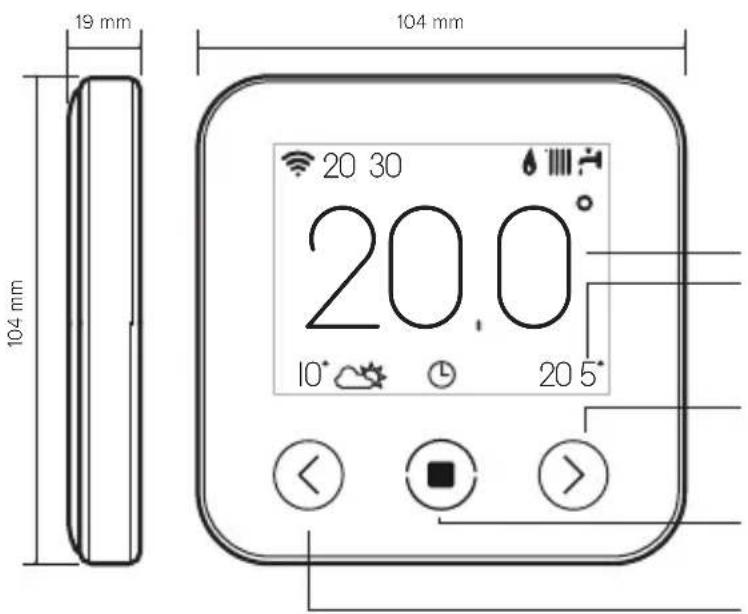
LEGEND:
DISPLAY:
- ACTUAL ROOM TEMPERATURE
- ROOM TEMPERATURE SETPOINT
RIGHT ARROW:
WiFi signal / activity
"OWinter
Summer
Heating only
Cooling mode active
"System mode: OFF
Zone mode: schedule
Zone mode: manual
Zone mode: override
Holiday function enabled
" Flame present indication
Outdoor temperature
" Internet weather condition
“”Error indication
" Screen locked
Resistance (Heat pump)
Use the following link to download a digital version of the manual: www.atag-zone
Installing ATAG One zone and activating the ATAG zone services is quick and easy: it takes just 3 steps!

The term "Telediagnosis" (TD) means the Technical Assistance Centre service, which can provide remote support functions. The term "Telecontrol" (TC) means the end user service controlling, monitoring and configuring the ATAG appliance with a smartphone app or web portal.
4. ATAG One zone INSTALLATION
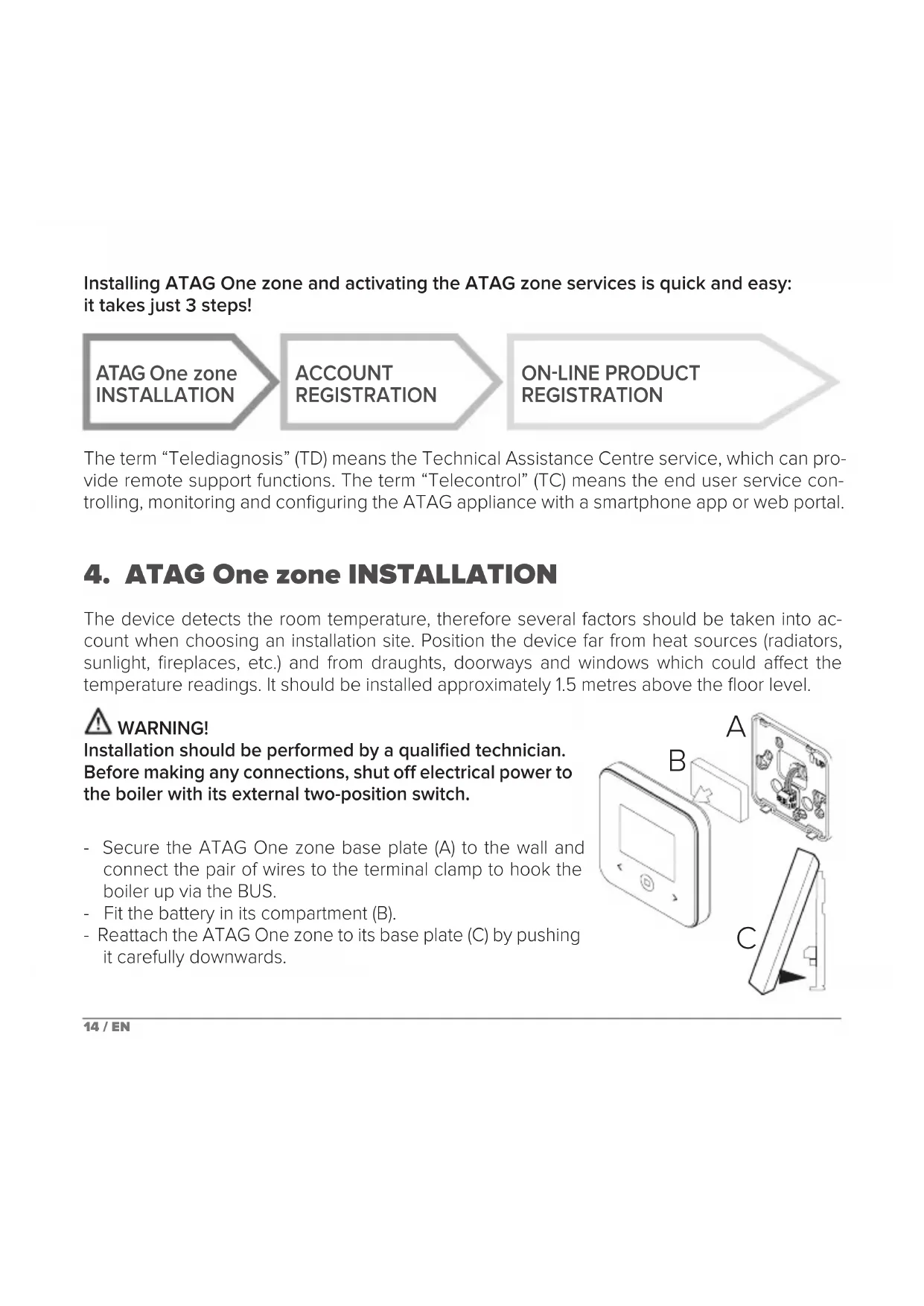
The device detects the room temperature, therefore several factors should be taken into account when choosing an installation site. Position the device far from heat sources (radiators, sunlight, fireplaces, etc.) and from draughts, doorways and windows which could affect the temperature readings. It should be installed approximately 1.5 metres above the floor level.
WARNING!
Installation should be performed by a qualified technician.
Before making any connections, shut off electrical power to the boiler with its external two-position switch.
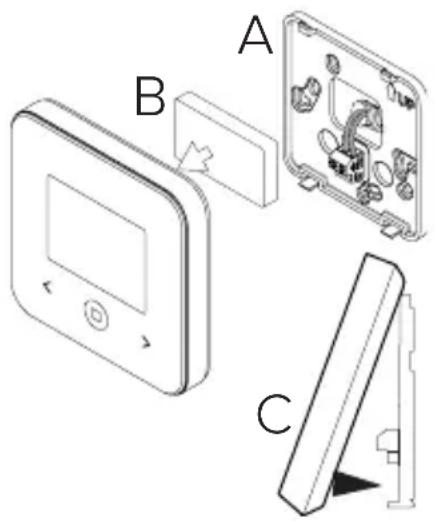
- Secure the ATAG One zone base plate (A) to the wall and connect the pair of wires to the terminal clamp to hook the boiler up via the BUS.
- Fit the battery in its compartment (B).
- Reattach the ATAG One zone to its base plate (C) by pushing it carefully downwards.
5. ACCOUNT REGISTRATION
- Before starting the Wi-Fi configuration procedure, check that ATAG zone service is available in your country and that your internet connection is on-line.
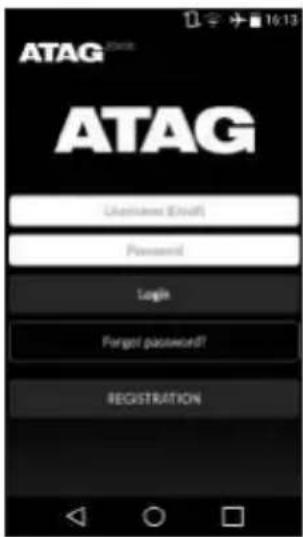
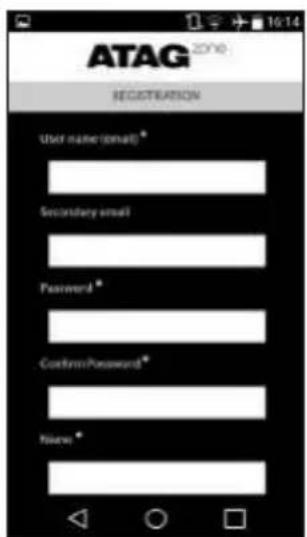
- Download the ATAG zone app from the Store. Open the app and register your account by entering the requested information.
- Click on the link in the welcome email to activate the new account.
WARNING! ATAG zone supports the following Wi-Fi security protocols: WEP, WPA/WPA2 Personal
6. CONNECTING TO THE INTERNET AND REGISTERING THE PRODUCT
- After you have installed the product, switch on the heating system. ATAG One zone turns on and the display reads "Select language"; follow the guided basic configuration procedure until you are prompted to configure the Wi-Fi network.
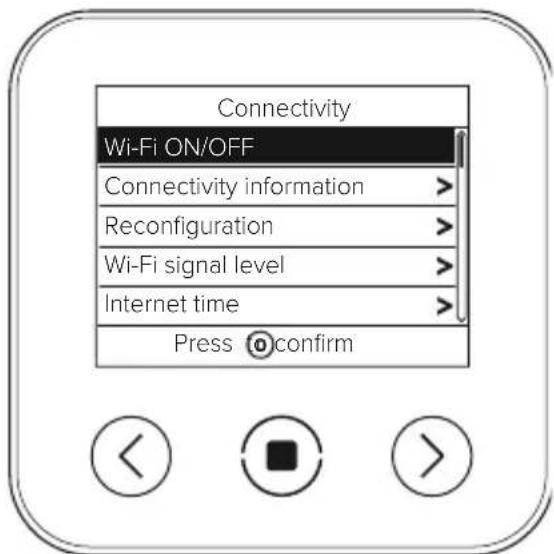
- If you have not configured the Wi-Fi connection during the first startup, go to the "Connectivity" menu, select "Wi-Fi ON/OFF" and then select "ON". The connectivity menu will display the new menu option "network configuration"; select this and follow the instructions.
IMPORTANT!
When running the procedures described in this booklet, it is best to
leave the default setting DHCP = ON unchanged.
The setting DHCP=OFF must be selected for networks configured in static IP mode.
6.1 Guided procedure for TELECONTROL (TC)
- Open the app, login to your account and follow the guided procedure. The app for iOS will proceed with the HomeKit connection procedure and afterwards return to the app automatically.
-
The product is properly connected to internet and registered if:
-
the display indicates a successful connection to the router and internet
- the app displays a message confirming that the product has been registered.
-
the display shows the home screen with the “ ” on steady
-
You can now control your ATAG zone system remotely using the smartphone app or on the web portal my.atag.zone.
IMPORTANT:
You can use ATAG zone with several smart devices at once: simply use the same credentials to log in. The app includes an option for registering more than one ATAG One zone with a single user account.
ANDROID iOS
- VIA APP: open the ATAG zone app, without logging in, and follow the guided procedure.
- VIA BROWSER: open the web browser, enter 192.168.1.1 in the address bar, select the wifi network and enter the password.
We recommend leaving the default settings unchanged
- The iOS operating system will automatically suggest the next steps required to connect the product to the internet
WARNING:
After confirming the procedure, your device (smartphone, PC, tablet ...) will automatically disconnect from the Remote GW Thermo network; an error page may appear in the browser window that can be ignored.
6.2 Configuration unsuccessful or requiring update
If the configuration is not successful, ATAG One zone will display the “icon. Repeat the procedures described previously.
The network configuration must be repeated every time you make a change to the internet network in your home (change of password, operator, router).
LEGEND:
"AP" One zone in Access Point mode
No connection to the service or thermostat not configured correctly
“Thermostat connected to the router or internet but not to the Cloud
Thermostat configured correctly and connected to the internet and Cloud
" Software update in progress
6.3 Time scheduling
Setting a schedule or clock program cannot be done from the ATAG One zone, but is done from either the ATAG zone app or the my.atag.zone portal.
7. SERIAL NUMBER AND WI-FI INFORMATION
This information can be found in the "Connectivity" menu.
To access the menu, press the "按钮 on the ATAG One zone and scroll down to the "Connectivity" option. Then select "Connectivity information".
8. ATAG SERVICE CENTRES
ATA Service Centres can access the Teleassistance platform by entering their credentials on the ATAG Zone Portal: www.atag.zone or my.atag.zone
For more information about ATAG services and support, please contact the ATAG Heating service center 0800 680 0100.
PRODUCT CONFORMING TO EU DIRECTIVE 2012/19/EU
The barred wheeled bin symbol appearing on the appliance or on its packaging indicates that the product must be collected separately from other waste at the end of its useful life. The user must therefore deliver the decommissioned product to an appropriate local facility for separate collection of electrotechnical and electronic waste. Alternatively, the appliance to be scrapped can be delivered to the dealer when purchasing a new equivalent appliance. Electronic products measuring less than 25cm can also be delivered for disposal, at no cost, to electronic equipment
retail shops having a surface area of at least 400m^2 without having to purchase other products. Proper separated collection of the decommissioned appliance for its subsequent recycling, treatment and eco-compatible disposal helps to prevent negative effects on the environment and human health, besides encouraging reuse and/or recycling of its constituent materials.
Install the product in a room with a normal level of pollution.
Technical specifications
| Power supply | BUS 8 to 24V max; lithium ion battery |
| Battery 3.7 VDC 500 mAh | --- |
| Current draw ≤30mA | |
| Operating temperature 0 to 40°C | |
| Storage temperature with battery -10 to 45°C | |
| Storage temperature without battery -20 to 70°C | |
| Humidity 20% RH to 80% RH | |
| Temperature reading precision +/- 0.5°C | |
| Bus wire length and cross-sectional area NOTE: TO AVOID INTERFERENCE PROBLEMS, USE A SHIELDED CABLE OR TWISTED PAIR CABLE. | max. 50 m ø min. 0.6 mm² |
| Insulation class III | |
| Protection rating IP 20 | |
| Dimensions 103mm x 103mm x 19.1mm | |
| Frequency band used 2400 MHz - 2483.5 MHz | |
| Maximum power in the band +19 dBm - 802.11 b, g, n | |
| Wi-Fi channels 1-13 |
| Product card (with ATAG zone bus system only) | |
| Supplier name | ATAG |
| Supplier identification model | ATAG One zone |
| Temperature control class | V |
| Energy efficiency contribution (%) for space heating | +3% |
| With an optional outdoor sensor or internet weather data: | |
| Temperature control class | VI |
| Energy efficiency contribution (%) for space heating | +4% |
| In a system with 3 zones and at least 2 room controllers: | |
| Temperature control class | VIII |
| Energy efficiency contribution (%) for space heating | +5% |
1. GÉNÉRALITÉS
Specifications Techniques
- TEMPERATURA INTERNA RLEVATA
- TEMPERATURA INTERNA IMPOSTATA (SET POINT)
FRECCIA A DESTRA:
-AUMENTO DI UN VALORE
-SCORRI IN BASSO
TASTO CENTRALE (BLU):
- CONFERMA A UNA DOMANDA O SCELTA
- LUCE LAMPEGGIANTE: ERRORE O BATTERIA IN CARICA
- PREMERE A LUNG PER TORNARE A HOME SCREEN
FRECCIA A SINISTRA:
SUBJECT: CE Declaration of Conformity
With the present document, ATA Thermo S.p.A. (viale A.Merloni 45, 60044-Fabriano (AN), ITALY) declares that this product is conforming with the essential requisites and other provisions of the RED Directive 2014/53/EU.
The complete Declaration of Conformity is available at the following address:
http://www.aristonthermo.com/en/download-area
Use of the Works with Apple HomeKit logo means that an electronic accessory has been designed to connect specifically to iPod touch, iPhone, or iPad, respectively, and has been certified by the developer to meet Apple performance standards. Apple is not responsible for the operation of this device or its compliance with safety and regulatory standards.
ATAG Heating Technology Ltd.
Sales department
47 Castle Street - Reading, Berkshire RG1 7SR
Changes reserved. E.& O.E.
Modifications reserved.