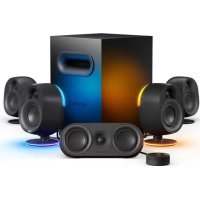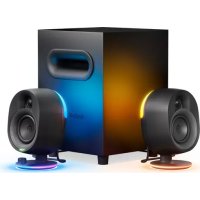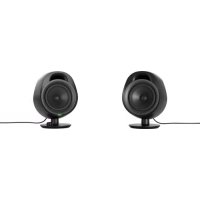
Arena 3 - Speaker STEELSERIES - Free user manual and instructions
Find the device manual for free Arena 3 STEELSERIES in PDF.



| Brand | SteelSeries |
| Model | Arena 3 |
| Product Type | 2.0 Stereo Speaker |
| Right Speaker | 4" (102 mm) Full-Range Driver |
| Left Speaker | 4" (102 mm) Full-Range Driver |
| Power | Power adapter with regional plug (included) |
| Audio Inputs | PC Input (3.5mm), Auxiliary Input (3.5mm), Bluetooth |
| Audio Output | Headphone jack (3.5mm) |
| Bluetooth | Unspecified version, pairing by long press on multifunction button |
| Controls | Volume wheel, multifunction button (mute/headphone, LED, Bluetooth) |
| LED Indicator | Yes, color depending on status (blue for Bluetooth, orange for mute, etc.) |
| Included Cable | 3.5mm audio cable (x2), speaker link cable |
| System Requirements | Windows 10+, any audio device with 3.5mm stereo output or Bluetooth |
| Customization Software | SteelSeries Sonar (download at steelseries.com/setup/arena-3) |
| Operating Temperature Range | 0 to +40 °C |
| Maximum Sound Level | Less than 70 dB(A) |
| Safety | Instructions: do not expose to water, do not block vents, unplug during thunderstorms |
| Maintenance | Clean with a dry cloth only |
| Spare Parts and Repairability | Available at steelseries.com/gaming-accessories |
Frequently Asked Questions - Arena 3 STEELSERIES
User questions about Arena 3 STEELSERIES
0 question about this device. Answer the ones you know or ask your own.
Ask a new question about this device
Download the instructions for your Speaker in PDF format for free! Find your manual Arena 3 - STEELSERIES and take your electronic device back in hand. On this page are published all the documents necessary for the use of your device. Arena 3 by STEELSERIES.
USER MANUAL Arena 3 STEELSERIES
4" Driver Right Speaker
4" Driver Left Speaker
Power Adapter
Regional Power Plug
3.5mm Audio Cable
Product Information Guide
SYSTEM REQUIREMENTS / COMPATIBILITY
Any audio device with a stereo 3.5 mm analog output or Bluetooth connectivity.
STEELSERIES AUDIO SOFTWARE SYSTEM REQUIREMENTS
Windows 10 +
STEELSERIES AUDIO CUSTOMIZATION SUITE
Get the powerful audio customization suite for virtual surround sound, EQ settings, and more by visiting steelseries.com/setup/arena-3
WELCOME TO THE ARENA
Game developers, sound designers, and composers spend thousands of hours creating the captivating soundscapes that transport you into your favorite games.
Whether you're revisiting old worlds or getting lost in new ones, we created the Arena speaker series to stay true to the masterfully-crafted audio experience.
Enjoy your gaming audio in pure and glorious detail.
PRODUCT OVERVIEW
1 Right Full-Range 4" Driver Speaker
2 Left Full-Range 4" Driver Speaker
3 Headset Audio Jack
4 Auxiliary Audio Input
5 PC Audio Input
6 Power Input
7 To Left Speaker Cable
8 Left Speaker Audio Input
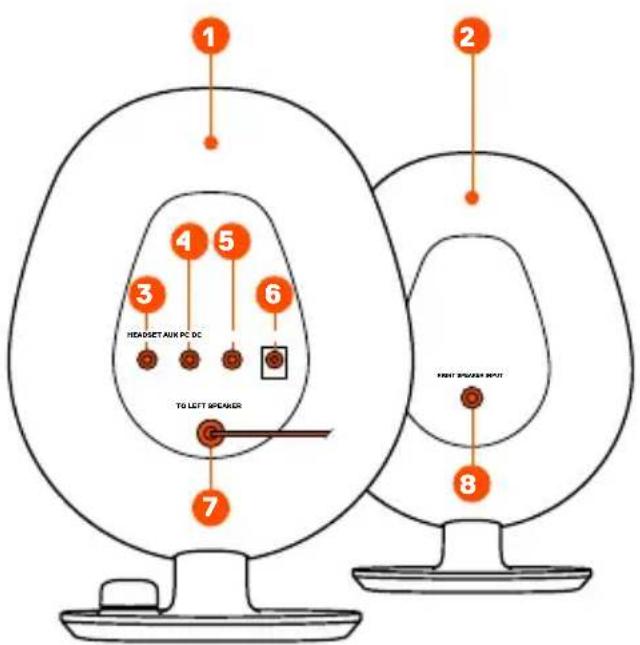
*Find replacement parts at steelseries.com/gaming-accessories
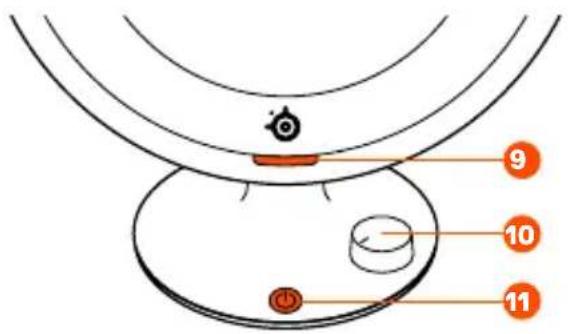
9 LED Indicator
10 Volume Dial
11 Multifunctional Button
Mute/Headset Toggle
Bluetooth Pairing
LED Toggle
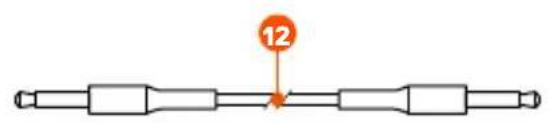
12 3.5mm Audio Cable
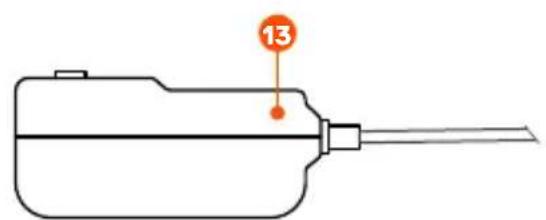
13 Power Adapter w/ Regional Plug*
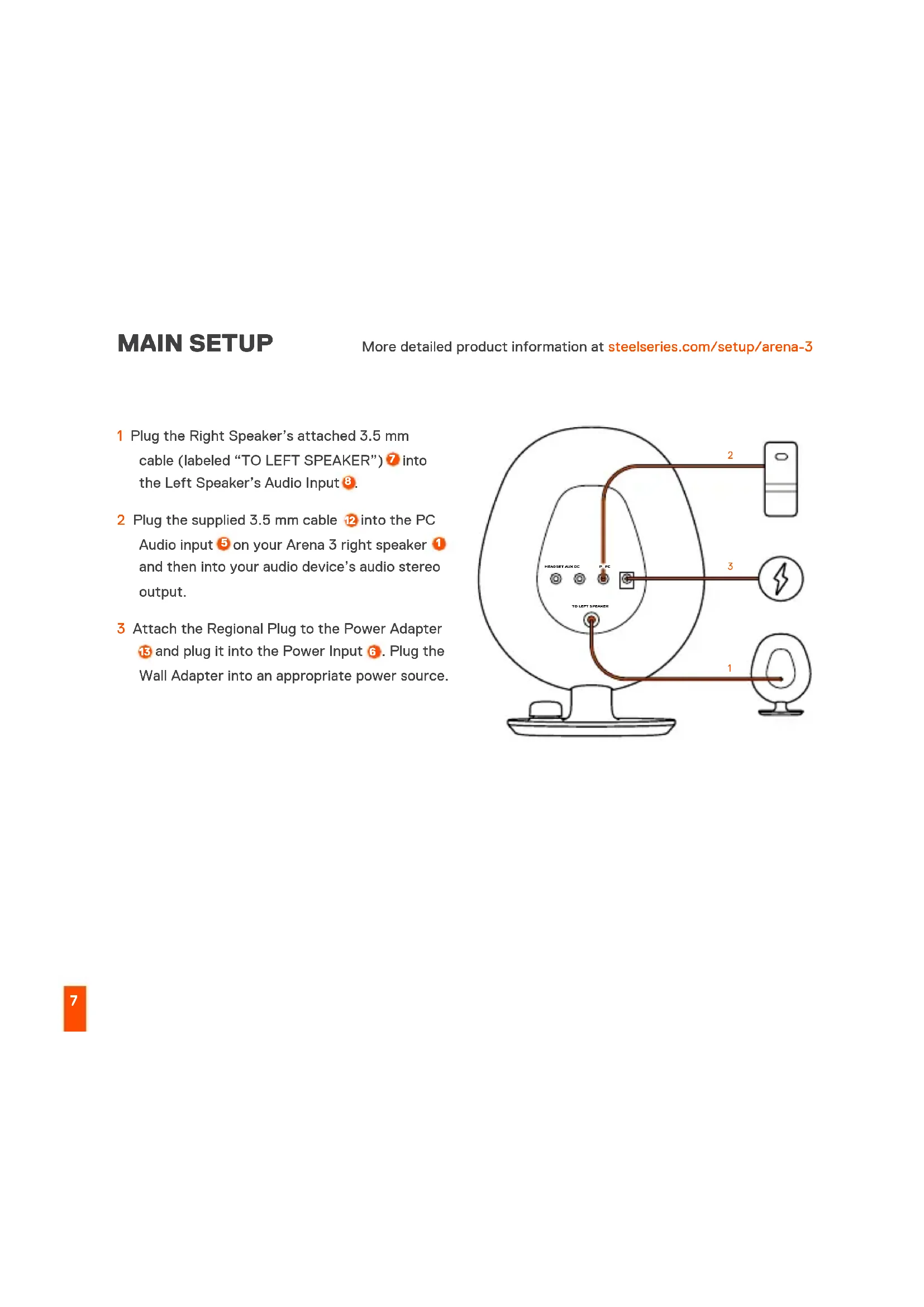
MAIN SETUP
More detailed product information at steelseries.com/setup/arena-3
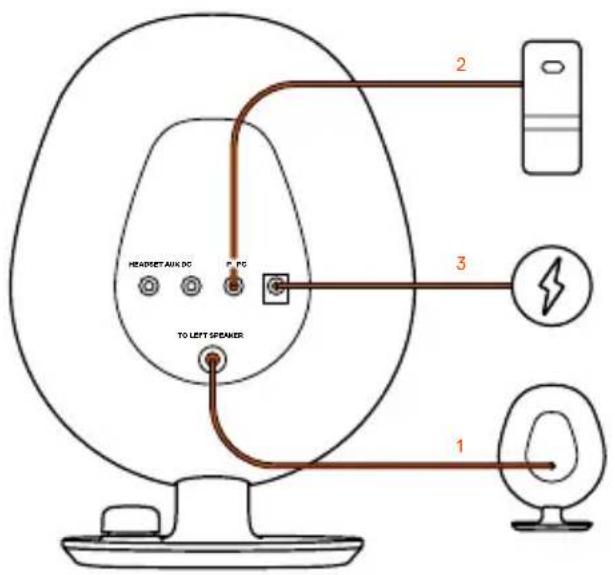
1 Plug the Right Speaker's attached 3.5 mm cable (labeled "TO LEFT SPEAKER") into the Left Speaker's Audio Input
2 Plug the supplied 3.5mm cable into the PC Audio input on your Arena 3 right speaker and then into your audio device's audio stereo output.
3 Attach the Regional Plug to the Power Adapter 13 and plug it into the Power Input 6. Plug the Wall Adapter into an appropriate power source.
EXTRA CONNECTIONS
BLUETOOTH
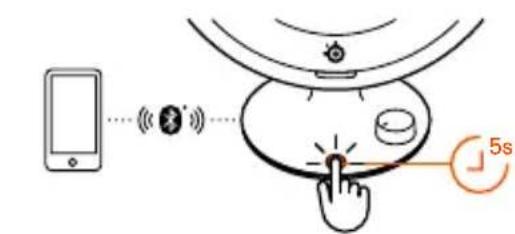
Hold the Multifunctional Button 1 for 5 seconds to pair with your Bluetooth enabled device. Please note Bluetooth audio will mix with other audio sources. The LED Indicator 9 will appear Blue.
AUXILIARY AUDIO INPUT
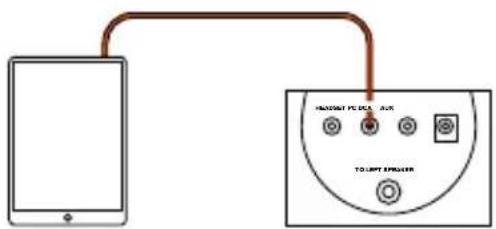
Plug a 3.5 mm Audio Cable into the AUX Audio Input on Arena 3 from your audio device. Please note: Auxiliary audio will mix with other audio sources.
HEADSET AUDIO JACK*
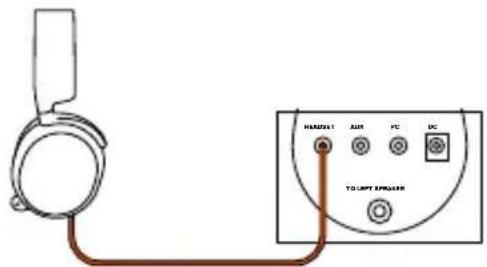
Plug your headset audio cable into the Arena 3 Headset Audio Jack 3. The speakers will automatically mute and activate your headset audio. To toggle back to speakers, press the Multifunctional Button 11.
CONTROLS
VOLUME DIAL
Turn the Volume Dial 6 to the right to increase speaker volume, and to the left to decrease speaker volume.
MULTI-FUNCTION BUTTON
Press the Multi-Function Button for the following functions.
Button Function LED
Single press Speakers mute and switch to headset Orange
Double press LED toggle on/off Brief LED indication when toggled off
Long press Bluetooth pairing mode Blinking blue for pairing
Solid blue for connected
ESPANOL
CONTENIDO DE LA CAJA
Get the powerful audio customization suite for virtual surround sound, EQ settings, and more by visiting
steelseries.com/setup/arena-3
DESCRIPCION GENERAL DEL PRODUCTO
steelseries.com/gaming-accessories
- 如需查找更换零件,请访问 steelseries.com/gaming-accessories
主要设置
steelseries.com/setup/arena-3
其他连接方式
蓝牙
| 한선贿赂사 퍼개 기재 해드심으로 전화 | 수상품mith |
| 류선贿赂사 LED 텐일 편기/ 고기 | 모름이 겨울 때 LED 출gan 페서 |
| 기재贿赂사 히무주스 텐어로 모드 | 테어로 사 썸라스트 증부일 (analgesi analogical analogical analogical analogical analogical analogical analogical analogical analogical analogical analogical analogical analogical analogical analogical analogical analogical analogical analogical analogical analogical analogical analogical analogical analogical analogICAL analogical analogical analogical analogical analogical analogical analogical analogical analogical analogical analogical analogical analogical analogical analogical analogical analogical analogical analogical analogical analogical analogical analogical analogical analogicial analogical analogical analogical analogical analogical analogical analogical analogical analogical analogical analogical analogical analogical analogical analogical analogical analogical analogical analogical analogical analogical analogical analogical analogical analogial analogical analogical analogical analogical analogical analogical analogical analogical analogical analogical analogical analogical analogical analogical analogical analogical analogical analogical analogical analogical analogical analogical analogical analogical analogrical analogical analogical analogical analogical analogical analogical analogical analogical analogical analogical analogical analogical analogical analogical analogical analogical analogical analogical analogical analogical analogical analogical analogical analogical analogicals analogical analogical analogical analogical analogical analogical analogical analogical analogical analogical analogical analogical analogical analogical analogical analogical analogical analogical analogical analogical analogical analogical analogical analogical analog化 analogical analogical analogical analogical analogical analogical analogical analogical analogical analogical analogical analogical analogical analogical analogical analogical analogical analogical analogical analogical analogical analogical analogical analogical analogikal analogical analogical analogical analogical analogical analogical analogical analogical analogical analogical analogical analogical analogical analogical analogical analogical analogical analogical analogical analogical analogical analogical analogical analogical analogtical analogical analogical analogical analogical analogical analogical analogical analogical analogical analogical analogical analogical analogical analogical analogical analogical analogical analogical analogical analogical analogical analogical analogical analogical analogiscal analogical analogical analogical analogical analogical analogical analogical analogical analogical analogical analogical analogical analogical analogical analogical analogical analogical analogical analogical analogical analogical analogical analogical analogical analogically analogical analogical analogical analogical analogical analogical analogical analogical analogical analogical analogical analogical analogical analogical analogical analogical analogical analogical analogical analogical analogical analogical analogical analogical analog性 analogical analogical analogical analogical analogical analogical analogical analogical analogical analogical analogical analogical analogical analogical analogical analogical analogical analogical analogical analogical analogical analogical analogical analogical analogice analogical analogical analogical analogical analogical analogical analogical analogical analogical analogical analogical analogical analogical analogical analogical analogical analogical analogical analogical analogical analogical analogical analogical analogical analogie analogical analogical analogical analogical analogical analogical analogical analogical analogical analogical analogical analogical analogical analogical analogical analogical analogical analogical analogical analogical analogical analogical analogical analogical analogica analogical analogical analogical analogical analogical analogical analogical analogical analogical analogical analogical analogical analogical analogical analogical analogical analogical analogical analogical analogical analogical analogical analogical analogical analogia analogical analogical analogical analogical analogical analogical analogical analogical analogical analogical analogical analogical analogical analogical analogical analogical analogical analogical analogical analogical analogical analogical analogical analogical analogik analogical analogical analogical analogical analogical analogical analogical analogical analogical analogical analogical analogical analogical analogical analogical analogical analogical analogical analogical analogical analogical analogical analogical analogical analogika analogical analogical analogical analogical analogical analogical analogical analogical analogical analogical analogical analogical analogical analogical analogical analogical analogical analogical analogical analogical analogical analogical analogical analogical analogl analogical analogical analogical analogical analogical analogical analogical analogical analogical analogical analogical analogical analogical analogical analogical analogical analogical analogical analogical analogical analogical analogical analogical analogical analogic analogical analogical analogical analogical analogical analogical analogical analogical analogical analogical analogical analogical analogical analogical analogical analogical analogical analogical analogical analogical analogical analogical analogical analogical analogitical analogical analogical analogical analogical analogical analogical analogical analogical analogical analogical analogical analogical analogical analogical analogical analogical analogical analogical analogical analogical analogical analogical analogical analogical analoglical analogical analogical analogical analogical analogical analogical analogical analogical analogical analogical analogical analogical analogical analogical analogical analogical analogical analogical analogical analogical analogical analogical analogical analogical analogll analogical analogical analogical analogical analogical analogical analogical analogical analogical analogical analogical analogical analogical analogical analogical analogical analogical analogical analogical analogical analogical analogical analogical analogical analoglc analogical analogical analogical analogical analogical analogical analogical analogical analogical analogical analogical analogical analogical analogical analogical analogical analogical analogical analogical analogical analogical analogical analogical analogical analogcal analogical analogical analogical analogical analogical analogical analogical analogical analogical analogical analogical analogical analogical analogical analogical analogical analogical analogical analogical analogical analogical analogical analogical analogical analogics analogical analogical analogical analogical analogical analogical analogical analogical analogical analogical analogical analogical analogical analogical analogical analogical analogical analogical analogical analogical analogical analogical analogical analogical analogcial analogical analogical analogical analogical analogical analogical analogical analogical analogical analogical analogical analogical analogical analogical analogical analogical analogical analogical analogical analogical analogical analogical analogical analogical analogly analogical analogical analogical analogical analogical analogical analogical analogical analogical analogical analogical analogical analogical analogical analogical analogical analogical analogical analogical analogical analogical analogical analogical analogical analoglogical analogical analogical analogical analogical analogical analogical analogical analogical analogical analogical analogical analogical analogical analogical analogical analogical analogical analogical analogical analogical analogical analogical analogical analogical analogral analogical analogical analogical analogical analogical analogical analogical analogical analogical analogical analogical analogical analogical analogical analogical analogical analogical analogical analogical analogical analogical analogical analogical analogical analogonal analogical analogical analogical analogical analogical analogical analogical analogical analogical analogical analogical analogical analogical analogical analogical analogical analogical analogical analogical analogical analogical analogical analogical analogical analogaly analogical analogical analogical analogical analogical analogical analogical analogical analogical analogical analogical analogical analogical analogical analogical analogical analogical analogical analogical analogical analogical analogical analogical analogical analogidal analogical analogical analogical analogical analogical analogical analogical analogical analogical analogical analogical analogical analogical analogical analogical analogical analogical analogical analogical analogical analogical analogical analogical analogical analogals analogical analogical analogical analogical analogical analogical analogical analogical analogical analogical analogical analogical analogical analogical analogical analogical analogical analogical analogical analogical analogical analogical analogical analogical analogeral analogical analogical analogical analogical analogical analogical analogical analogical analogical analogical analogical analogical analogical analogical analogical analogical analogical analogical analogical analogical analogical analogical analogical analogical analogocal analogical analogical analogical analogical analogical analogical analogical analogical analogical analogical analogical analogical analogical analogical analogical analogical analogical analogical analogical analogical analogical analogical analogical analogical analogital analogical analogical analogical analogical analogical analogical analogical analogical analogical analogical analogical analogical analogical analogical analogical analogical analogical analogical analogical analogical analogical analogical analogical analogical analogical analogICAL analogical analogical analogical analogical analogical analogical analogical analogical analogical analogical analogical analogical analogical analogical analogical analogical analogical analogical analogical analogical analogical analogical analogical analogical analogicals analogicals analogicals analogicals analogicals analogicals analogicals analogicals analogicals analogicals analogicals analogicals analogicals analogicals analogicals analogicals analogicals analogicals analogicals analogicals analogicals analogicals analogicals analogicals analogicals analogals analogals analogals analogals analogals analogals analogals analogals analogals analogals analogals analogals analogals analogals analogals analogals analogals analogals analogals analogals analogals analogals analogals analogals analogals analogalsa analogals analogals analogals analogals analogals analogals analogals analogals analogals analogals analogals analogals analogals analogals analogals analogals analogals analogals analogals analogals analogals analogals analogals analogals analogols analogals analogals analogals analogals analogals analogals analogals analogals analogals analogals analogals analogals analogals analogals analogals analogals analogals analogals analogals analogals analogals analogals analogals analogals analoggalstgns analogals analogals analogals analogals analogals analogals analogals analogals analogals analogals analogals analogals analogals analogals analogals analogals analogals analogals analogals analogals analogals analogals analogals analogals analogfalstgns analogals |
DEUTSCH
LIEFERUMFANG
aDpecy steelseries.com/setup/arena-3
OB3OP PPOyKTA
1 PpaBbI WnPOKOnOJIocHbI 4-IOHMOBbI DnHaMk
2 JeBbI uHPOKONOLOCHbI 4-IOJMOBbINuHaMnK
3 Pa3bemДЯ rapHNTypbI
4 AynOBXoAUX
5 AyuOBxOg PIK
6 Bxod nItaHna
7 Ka6eJb K JneBOI KOJIOHKe
8 AyuIOBxOJJeBOI KOJOHKn
9 CBeToIOnIDHbI INHdNkATOp
10 PeryjIaTOp rPOMKocTn
11 MHorOfoyHKUHOHaJIbHaN KaHONKa
IpeKlIOuataIb «OTKIOUHTb 3ByK /
「rApHNTypa》
COnpJxKeHne Bluetooth
IpeKlIOuataIb cBeToAnoJa
12 Aynoka6enb 3,5 MM
13 AanTep nntaHnC cTeBOB BnIKoN, npXoJauei dIperNoHa
*Для побoga заразсьх частей посядпerte на.
cTpaHnU steelseries.com/gaming-accessories
OCHOBHAR HACTPOIKA
1ПодклочиTe 3aKpeHnHeHHbI 3,5-MM Ka6eIb npaBoN KOLOHKn (NOMEueHHbI KaK «TO LEFT SPEAKER》/KJeBOuKOJOnHKe)7B aydIOvBXoD leBOu KOLOHKn 8.
2ПодключITEKOMПлeКТьИ 3,5-MMka6eIb BaynOBxOДЯПК 5Ha npaBoi KOLONKeArena 31,a3aTeMВ cTepeo BbIXoD BaWero aydnooycToIcTba.
3 CoeHnHte ceTeByo BnIky, noXoJyU yDЯ perNoHa, c aadTepom nITaHnY 13 N IodKlOHTe erO Ko BXOdy nITaHnY 6. IodKlOHTe ceTeBOi adanTep K COOTBeTCTByIOSeMy IVCTOHyNkU pNTaHnY.
Bolee noDpo6HyIO uHΦopMaciuO o NaCTpOiKaX CM. Ha caIte steelseries.com/setup/arena-3
DONOHHTeBhIE NOKIOUeyHn
BLUETOOTH
Дя coprajkeHЯ c BaHm BluetohyctpoiCTBOM ydepKnBaIteMHOROyHKUHOHaBHyO KHOJky 11 B TeueHne5cekyd.ObpaTnte BHMaHne,уTo ayDnoyepe3 Bluetooth 6ydt CMeuBaTbcraCdpyrMn nCToHnKaMn 3Byka.CBeTOINOHDInHHdNKaTOP 3arOpNTc CnHm ZBeTOM.
AUYNOXBQDAUX
IopKnIOUHTe 3,5-MM ayDnOKa6b b OT BaWero ayDnOyCtpoiCTBa B ayDnOBxOd AUX 4Ha KOJOnKe Arena 3.06paTnte BHNMaHne, yTO 3ByK C JInHeNHO BXoJa AUX 6yJeT CMeWNBaTBC C DpyrMM NCTOCHNKAMN 3ByKa.
PA3bEMДЯΓAPHHTPyI\*
IopKIOHTe Ka6bIgapHNTpybI Bpa3bEmIraIgapHNTpybI 3Ha KOLOHkAx Arena 3.ДиHamnKn aBTOMaTneCKN OTKIOUaTCs, IN BKIOHTcR 3ByK Ha raphNtpe. YTo6bl nepeKIOUHTbcr Ha DInHAMKIN, HaxMMTe MHOOFOyHKUHOHaJIbHyIO KHOKNY
- Ha HeKOTopbIX PIK MoKet IOTpe6oBaTbc8aBOHou 3,5-MM aDAnTeP OTdENo dIy HayuHnKOB u MmKpOΦoHa (He BXoJIT B KOMNJIeKT).
3IEMEHTbI YNPABJIEHNIA
PEYJIATOP FPOMKOCTN
IobepHnTepeyIaTOp rPOMKoCTuBnpaBO, UTo6bI yBeJIuNHTb rPOMKOCTb DnHaMnKOB, IIN BLeBO -dIyUMeHbWeHnra rPOMKOCTn.
MHOROΦYHKUHOHAJIbHARKHONKA
OTKJIIOUHTb 3BYK
HaKMnTe Ha MHOrOfoyHKUHOHaIbHyKHOKNy 10dIN pa3,TO6bl OTKIOOHNTb 3ByK.CBeToIDNoHbIn HNDKaTOp 3aGopntc opAHKeBbIM.
MHOTOΦYHKUHOHAJIbHAR KHONKA
MHorOΦyHKCuHOHaJIbHaJ KHONKa nCNoJIb3yeTcA cnEduoUm 6pa30m:
KhonkaФункцЯСбетоюн.
VUE D'ENSEMBLE DU PRODUIT
steelseries.com/gaming-accessories
Europe - EU Declaration of Conformity
Hereby, SteelSeries ApS. declares that the equipment which is compliance with directive RoHS 2.0 (2015/863/EU), R.E.D (2014/53/EU), EMC Directive (2014/30/EU), and LVD (2014/35/EU) which are issued by the Commission of the European Community.
The full text of the EU declaration of conformity is available at the following internet address: https://steelseries.com/
SteelSeries ApS. hereby confirms, to date, based on the feedback from our suppliers indicates that our products shipping to the EU territory comply with REACH (Registration, Evaluation, Authorization, and Restriction of Chemicals - (EC) 1907/2006) compliance program. We are fully committed to offering REACH compliance on the products and posting accurate REACH compliance status for the all of products.
Frequency bands and Powers
a. Frequency band(s) in which the radio equipment operates: 2.400 - 2.4835 GHz
b. Maximum radio-frequency power transmitted in the frequency band(s) in which the radio equipment operates:
EIRP:GFSK:6.51dBm
EIRP:8DPSK:6.97 dBm
c. Firmware Version: V2.3.5
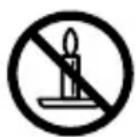
WARNING
To prevent the spread of fire, keep candles or other open flames away from this product at all times.
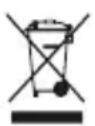
WEEE
This product must not be disposed of with your other household waste or treat them in compliance with the local regulations or contact your local city office, your household waste disposal service or the shop where you purchased the product.

Federal Communication Commission Interference Statement
This device complies with Part 15 of the FCC Rules. Operation is subject to the following two conditions: (1) This device may not cause harmful interference, and (2) this device must accept any interference received, including interference that may cause undesired operation.
This equipment has been tested and found to comply with the limits for a Class B digital device, pursuant to Part 15 of the FCC Rules. These limits are designed to provide reasonable protection against harmful interference in a residential installation. This equipment generates, uses and can radiate radio frequency energy and, if not installed and used in accordance with the instructions, may cause harmful interference to radio communications. However, there is no guarantee that interference will not occur in a particular installation. If this equipment does cause harmful interference to radio or television reception, which can be determined by turning the equipment off and on, the user is encouraged to try to correct the interference by one of the following measures:
Reorient or relocate the receiving antenna.
- Increase the separation between the equipment and receiver.
- Connect the equipment into an outlet on a circuit different from that to which the receiver is connected.
- Consult the dealer or an experienced radio/TV technician for help.
FCC Caution:
Any changes or modifications not expressly approved by the party responsible for compliance could void the user's authority to operate this equipment.
This transmitter must not be co-located or operating in conjunction with any other antenna or transmitter.
Radiation Exposure Statement:
This equipment complies with FCC radiation exposure limits set forth for an uncontrolled environment. This equipment should be installed and operated with minimum distance 5cm between the radiator & your body.
FCC ID: ZHK-SP00001
Frequency bands and Powers
a. Frequency band(s) in which the radio equipment operates: 2.400 - 2.4835 GHz
b. Maximum radio-frequency power transmitted in the frequency band(s) in which the radio equipment operates:
Conducted Peak Power/GFSK: 4.50 dBm
Conducted Peak Power/n/4-DQPSK: 6.62 dBm
Conducted Peak Power/8DPSK: 6.67 dBm
c. Firmware Version: V2.3.5
| Regions Contact Information | ||
| USA SteelSeries ApS., 656 W Randolph St., Suite 3E, Chicago, IL 60661, USA +1 312 258 9467 | ||
More information and support from https://steelseries.com/
IMPORTANT SAFETY INSTRUCTIONS
- READ these instructions.
- KEEP these instructions.
- HEED all warnings.
- FOLLOW all instructions.
- DO NOT use this apparatus near water.
- CLEAN ONLY with dry cloth.
- DO NOT block any ventilation openings. Allow sufficient distances for adequate ventilation and install in accordance with the manufacturer's instructions.
- DO NOT install near any heat sources such as open flames, radiators, heat registers, stoves, or other apparatus (including amplifiers) that produce heat. Do not place any open flame sources on the product.
- DO NOT defeat the safety purpose of the polarized or grounding type plug. A polarized plug has two blades with one wider than the other. A grounding type plug has two blades and a third grounding prong. The wider blade or the third prong are provided for your safety. If the provided plug does not fit into your outlet, consult an electrician for replacement of the obsolete outlet.
- PROTECT the power cord from being walked on or pinched, particularly at plugs, convenience receptacles, and the point where they exit from the apparatus.
- ONLY USE attachments/accessories specified by the manufacturer.
- USE only with a cart, stand, tripod, bracket, or table specified by the manufacturer, or sold with the apparatus. When a cart is used, use caution when moving the cart/apparatus combination to avoid injury from tip-over.

- UNPLUG this apparatus during lightning storms or when unused for long periods of time.
- REFER all servicing to qualified service personnel. Servicing is required when the apparatus has been damaged in any way, such as power supply cord or plug is damaged, liquid has been spilled or objects have fallen into the apparatus, the apparatus has been exposed to rain or moisture, does not operate normally, or has been dropped.
- DO NOT expose the apparatus to dripping and splashing. DO NOT put objects filled with liquids, such as vases, on the apparatus.
- The MAINS plug or an appliance coupler shall remain readily operable.
- The airborne noise of the Apparatus does not exceed 70dB (A).
- Operate this product within its specified operating temperature range 0 to +40^ .
- To reduce the risk of fire or electric shock, do not expose this apparatus to rain or moisture.
- Do not attempt to modify this product. Doing so could result in personal injury and/or product failure.

This lightning flash with arrowhead symbol within an equilateral triangle is intended to alert the user to the presence of uninsulated dangerous voltage within the product's enclosure that may be of sufficient magnitude to constitute a risk of electric shock to persons.

The exclamation point within an equilateral triangle is intended to alert the user to the presence of important operating and maintenance (servicing) instructions in the literature accompanying the product.
WARNING: Voltages in this equipment are hazardous to life. No user serviceable parts inside. Refer all servicing to qualified service personnel. The safety certifications do not apply when the operating voltage is changed from the factory setting.
Apparatus shall not be exposed to dripping or splashing and no objects filled with liquids, such as vases, shall be placed on the apparatus."
Industry Canada Statement:
This device complies with Industry Canada license-exempt RSS standard(s). Operation is subject to the following two conditions:
This Class B digital apparatus complies with Canadian ICES-003.
This device and its antenna(s) must not be co-located or operating in conjunction with any other antenna or transmitter, except tested built-in radios.
The County Code Selection feature is disabled for products marketed in the US/ Canada.
This equipment complies with IC RSS-102 radiation exposure limit set forth for an uncontrolled environment. This
equipment should be installed and operated with minimum distance 5 cm between the radiator and your body.
These servicing instructions are for use by qualified service personnel only. To reduce the risk of electric shock, do not perform any servicing other than that contained in the operating instructions unless you are qualified to do so."
The appliance must not be exposed to splashes or drops of water and it should not be used as a support for any object filled with liquid, such as a vase.
SteelSeries Products and Australian Consumer Law
Our goods come with guarantees that cannot be excluded under Australian consumer law. You are entitled to a repair, replacement, or refund for a major failure and compensation for any other reasonably foreseeable loss or damage. You are also entitled to have the goods repaired or replaced if the goods fail to be of acceptable quality and the failure does not amount to a major failure.
Should your product be defective, you can make a claim under Australian consumer law.
SteelSeries will provide its own remedies equivalent to those remedies in the consumer guarantee provisions of the Australian Consumer Law at any time within 24 months of the date of purchase. For the avoidance of doubt, SteelSeries acknowledges that the Australian Consumer Law may provide for remedies beyond 24 months for a number of its products.
Summary of Australian statutory consumer guarantees
Consumer guarantees in relation to goods
The goods will be of acceptable quality. The goods will be fit for a particular purpose, The goods will match their description, The goods will match the sample or demonstration model, You have title to the goods, You have undisturbed possession of the goods, There are no undisclosed securities on the goods.
Consumer guarantees in relation to services
We will provide the services with due care and skill. The services will be fit for a particular purpose. The services will be provided within a reasonable time.
For SteelSeries-branded goods, in addition to the above, we also guarantee that we will provide repairs or spare parts for a reasonable time. Under Australian consumer law, the remedy you are entitled to if a product fails to meet a consumer guarantee will depend on whether the failure to comply with the guarantee is major or minor.
Minor failures to comply with a consumer guarantee can normally be fixed or resolved in a reasonable amount of time. In this case, the seller can choose to offer you a refund, replacement, repair or, in the case of services, resupply. If the seller does not fix the problem or takes too long, you may be able to get it fixed by someone else and recover the costs from
the seller depending on the circumstances.
Remedies for major failure with goods
Return the product and ask for a refund. Return the product and ask for an identical replacement, or one of similar value if reasonably available. Keep the product and ask for compensation for the drop in value caused by the problem.
Remedies for major failure with services
Cancel the contract and pay a reasonable amount for the work done, or seek a refund. For money already paid, keep the contract and negotiate a reduced price for the drop in value of the service — this may mean asking for some of your money back if you have already paid.
For goods, there is a major failure to comply with a consumer guarantee when:
- You would not have purchased the product if you had known about the problem.
The product is significantly different from the description, sample or demonstration model you were shown.
The product is substantially unfit for its normal purpose and cannot easily be made fit within a reasonable time.
The product is substantially unfit for a purpose that you told the supplier about, and cannot easily be made fit within a reasonable time.
The product is unsafe.
For services, there is a major failure to comply with a consumer guarantee when:
- You would not have engaged the service if you had known the nature and extent of the problem.
- The service does not meet the reasonable expectations for that type of service, and the problem cannot be rectified within a reasonable time.
You told the supplier that you wanted the service for a specific purpose, which was not fulfilled, and the problem could not be easily rectified within a reasonable time.
You told the supplier that you wanted a specific result, yet the service and end result failed to meet your specifications and could not be easily rectified within a reasonable time.
The supply of the service has created an unsafe situation.
For information on Australian consumer laws, please visit Australian consumer law website at http://www.consumerlaw.gov.au.
Company name: TNS Distribution Pty Ltd,
Business address: Unit 1, 16 Aquatic Drive, Frenchs Forest NSW 2086 Australia
Telephone: (02) 9975 0900.
Email address: support@tnsdistribution.com.au
This product is compliant with requirements of Vietnam Circular No. 30/2011/TT-BCT Regulations "STIPULATING TEMPORARILY THE PERMISSIBLE CONTENT LIMITATION OF SOME TOXIC CHEMICALS IN THE ELECTRONIC, ELECTRICAL PRODUCTS"
The RoHS test method is based on the standards JIS C 0950 and CNS 15663.
ACMA Compliance (Australia/New-Zealand Approvals)

RED (2014/53/EU), EMCC (2014/30/EU) and LVD (2014/35/EU) Compliances (The Commission of the European Community.)

SIRIM Compliance. (Malaysia Approval)

Custom Union Compliance. (Russia / Belarus / Kazakhstan / Armenia / Kyrgyzstan)

Direct current

BSMI Compliance. (Taiwan Approval)

FCC Compliance. (USA Approval)
| Regions Contact Information | ||
| Asia 亞洲 | 16F, No.150, Jian-Yi Rd., Chung-Ho Dist, New Taipei City, Taiwan, R.O.C.(235) | +886 2 8226 3858 |
| 丹麥商賽容有限公司台灣分公司 新北市中和區建一路150號16樓 | ||
| USA 656 W Randolph St, Suite 3E, Chicago, IL 60661, USA +1 312 258 9467 | ||
| Europe Dirch Passers Allé 27, 5.Sal., 2000 Frederiksberg, Denmark +45 702 500 75 | ||
More information and support at steelseries.com
Product Name (產品名稱/产品名称): 2.0 Wireless Speaker System (2.0 聲道無線音箱系統/2.0 声道无线音箱系統)
Model No.(型號/型号): SP-00001
Rated(规格/规格):15V-2A
learn more at steelseries.com