Arena 7 - Speaker STEELSERIES - Free user manual and instructions
Find the device manual for free Arena 7 STEELSERIES in PDF.



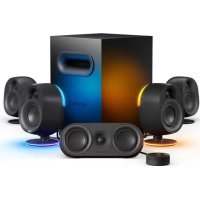
| Product type | 2.1 Speaker (satellites + subwoofer) |
| Brand | SteelSeries |
| Model | Arena 7 |
| Power | AC power cable |
| Connectivity | USB-C to PC, Bluetooth, Toslink optical input, 3.5 mm auxiliary input, optical passthrough output, 3.5 mm headphone jack |
| Main features | Immersive surround sound, customizable LED zones, automatic headphone switching, multi-source audio mixing |
| Controls | Volume wheel (rotation), multifunction button (mute/headphone switching, Bluetooth pairing, LED on/off) |
| Compatibility | Windows, Mac, PlayStation, Bluetooth devices, optical and 3.5 mm audio devices |
| Care and cleaning | Clean only with a dry cloth |
| Safety | Do not expose to water or moisture; do not block ventilation openings; unplug during thunderstorms; operating temperature 0 to +40 °C |
| Spare parts | Available at steelseries.com/gaming-accessories |
| Repairability | Refer to qualified personnel; do not attempt to modify the product |
| General information | Class B certified (NMB-003 Canada); IC ID: 9638A-SP00002; airborne noise <70 dB(A) |
| Included accessories | USB-C to USB-A cable, power cable, product information guide |
Frequently Asked Questions - Arena 7 STEELSERIES
User questions about Arena 7 STEELSERIES
0 question about this device. Answer the ones you know or ask your own.
Ask a new question about this device
Download the instructions for your Speaker in PDF format for free! Find your manual Arena 7 - STEELSERIES and take your electronic device back in hand. On this page are published all the documents necessary for the use of your device. Arena 7 by STEELSERIES.
USER MANUAL Arena 7 STEELSERIES
Optional Connections 8
Controls 10
Translations
Espanol 11
简体中文 13
繁體中文 15
日本語 17
19
Deutsch 22
Pycckn 24
Francais 27
Italiano 29
Portugues 32
Polski 34
Regulatory 37
PACKAGE CONTENTS
Right Speaker
Left Speaker
Subwoofer
Power Cable
USB-C to USB-A cable
Product Information Guide
COMPATIBILITY
Windows/Mac USB
PlayStation
Bluetooth
Audio Device with Optical Connection
Audio Device with Stereo 3.5 mm
STEELSERIES AUDIO CUSTOMIZATION SUITE
Get the powerful audio customization suite for virtual surround sound, EQ settings, and more by visiting steelseries.com/setup/arena-7
WELCOME TO THE ARENA
Game developers, sound designers, and composers spend thousands of hours creating the captivating soundscapes that transport you into your favorite games. Whether you're revisiting old worlds or getting lost in new ones, we created the Arena speaker series to stay true to the masterfully-crafted audio experience.
Enjoy your gaming audio in pure and glorious detail.
PRODUCT OVERVIEW
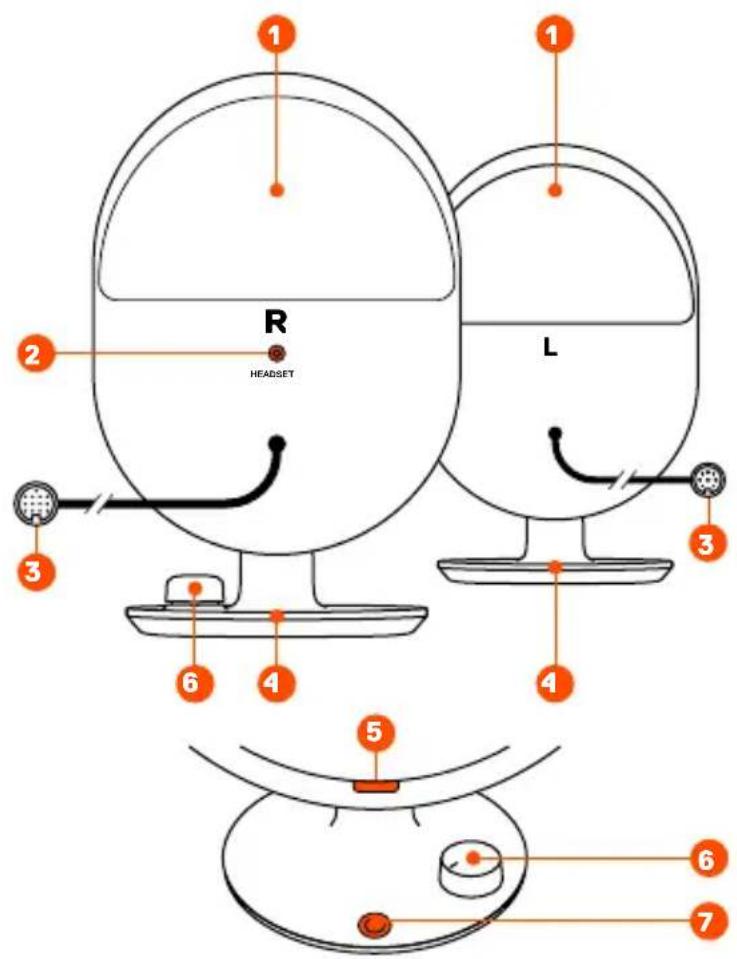
SATELLITE SPEAKERS
1 LED Zones Back
2 Headset Audio Jack
3 Speaker Cables (L & R)
4 LED Zones Base
5 LED Indicator
6 Volume Dial
7 Multi-Function Button
(Mute/Headset Toggle, Bluetooth Pairing, LED Toggle)
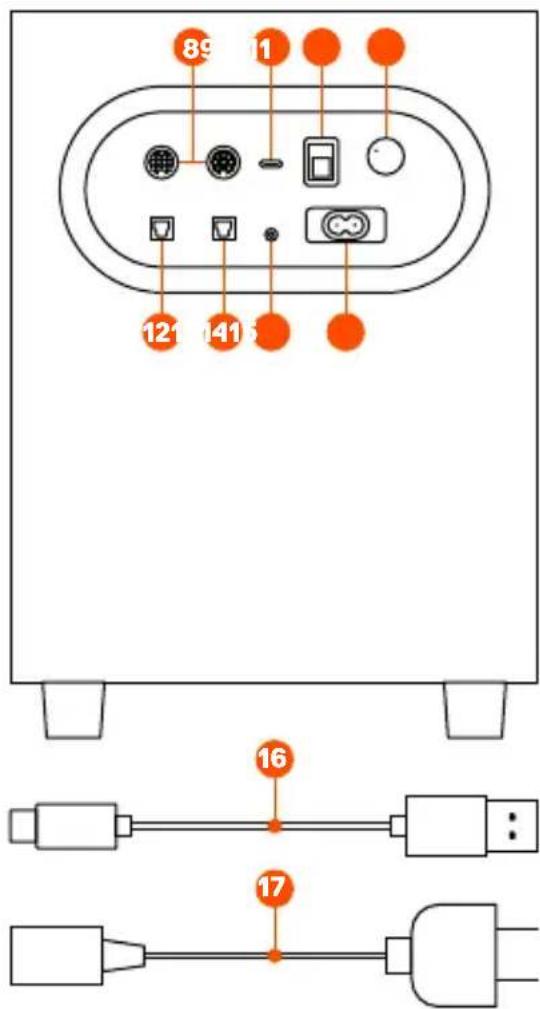
SUBWOOFER
8 Speaker Inputs (L & R)
9 USB-C PC Input
10 Power Switch
11 Subwoofer Volume Control
12 Optical Audio Input
13 Optical Audio Passthrough Jack
14 Auxiliary Input
15 Power Cable Input
CABLES
16 USB-C to USB-A Cable
17 Power Cable
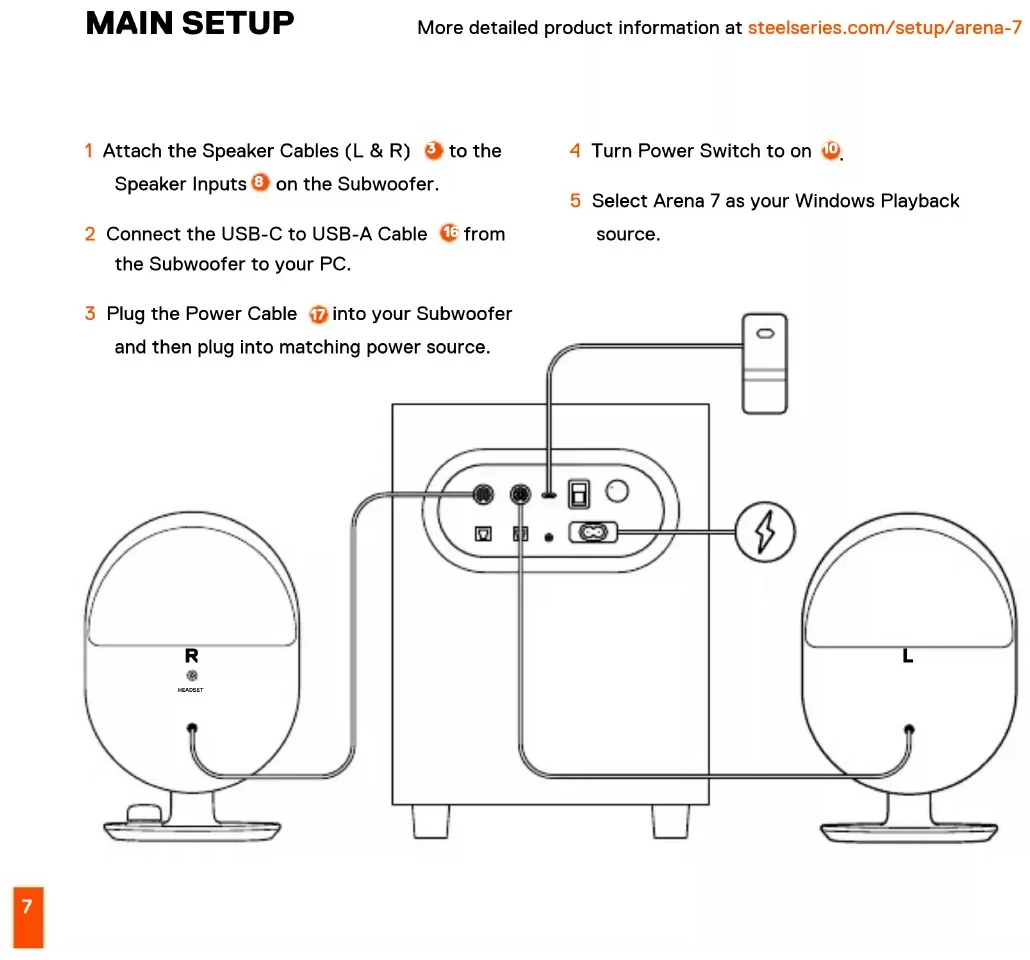
MAIN SETUP
More detailed product information at steelseries.com/setup/arena-7
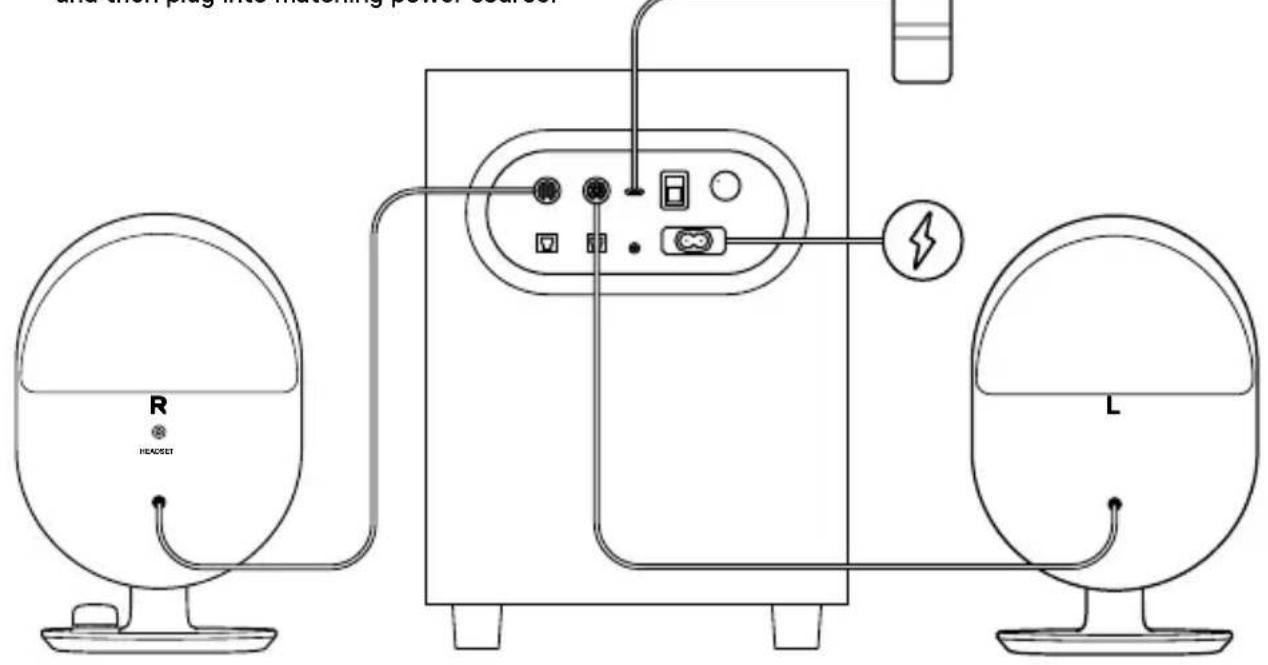
1 Attach the Speaker Cables (L & R) to the Speaker Inputs on the Subwoofer.
4 Turn Power Switch to on 10
2 Connect the USB-C to USB-A Cable from the Subwoofer to your PC.
5 Select Arena 7 as your Windows Playback source.
3 Plug the Power Cable into your Subwoofer and then plug into matching power source.
OPTIONAL CONNECTIONS
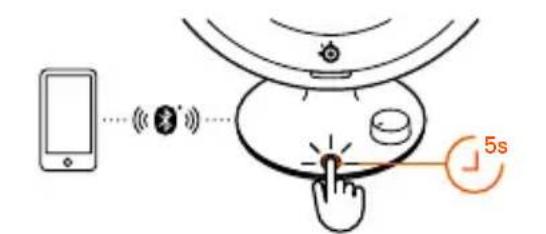
BLUETOOTH
Hold the Multi-Function Button 7 for 5 seconds to pair with your Bluetooth enabled device. Please note Bluetooth audio will mix with other audio sources. The LED Indicator will appear Blue.
HEADSET AUDIO JACK
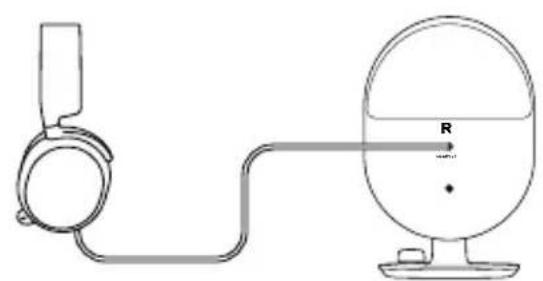
Plug your headset audio cable into the Arena 7 Headset Audio Jack ② . The speakers will automatically mute and activate your headset audio. To toggle back to speakers, press the Multi-Function Button ⑦ . Arena 7 supports wired headset microphone usage. Make sure Arena 7 is selected as your Recording Device in Windows.
AUXILIARY AUDIO INPUT
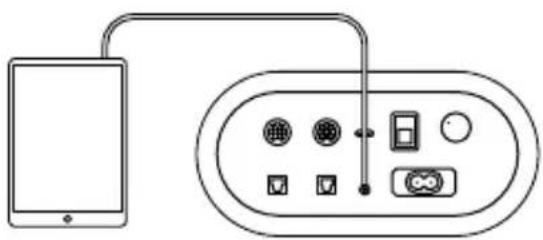
Plug a 3.5 mm Audio Cable into the Auxiliary Input on Arena 7 subwoofer from your audio device.
Please note: Auxiliary audio will mix with other audio sources.
OPTICAL AUDIO INPUT
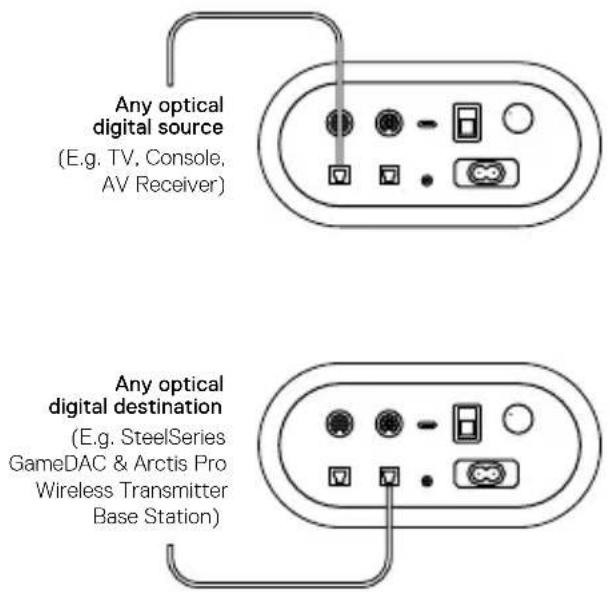
Connect a Toslink optical cable (not included) from your audio device to the Optical Audio Input on the subwoofer. Please note: Optical audio will mix with other audio sources.
OPTICAL PASSTHROUGH AUDIO OUTPUT
Connect a second Toslink optical cable (not included) from the subwoofer Optical Audio Pass through Jack to another audio device. When in headset mode, optical audio will pass to the connected audio device.
CONTROLS
VOLUME DIAL
Turn the Volume Dial 6 to the right to increase speaker volume, and to the left to decrease speaker volume.
MULTI-FUNCTION BUTTON
Press the Multi-Function Button for the following functions.
Button Function LED
Single press Speakers mute and switch to headset Orange
Double press LED toggle on/off Brief LED indication when toggled off
Long press Bluetooth pairing mode Blinking blue for pairing
Solid blue for connected
ESPÁÑOL
steelseries.com/gaming-accessories
主设置
steelseries.com/setup/arena-7
可选连接
蓝牙
steelseries.com/gaming-accessories
主設定
steelseries.com/setup/arena-7
可選連接
蓝牙
support.steelseries.com
てル予を参照てくさい
商品概要
☆テ现代农业卜S比一力一
1 LEDジーニルバック
2 个卜才一才
3 Sb一力一克一R
support.steelseries.com
将通过本回录将中音在
中国
VoIeS S#IeK
1 LED读取
2 ト連亰はスリドリ
3 SππKeIeB(驭&U)
4 LED 存 剩
5 LED indiDcIeIer
6 唯壹日
7 daigun b
(音:/hε)
SerBw
8 SπFfIILK(7&U)
9 USB-C PC 信赖
10 朝元神戸
steelseries.com/gaming-accessories
對詞,即「對」。
基本准则
steelseries.com/setup/arena-7
表 1.2.3 资讯的分类
樂士
早早
support.steelseries.com
OB3OP PPOyKTA
KOLIOHKN-CATEJIINITbI
1 3aHЯ nAHeIb CO CBeToIOnHOI NOcBETKoI
2Aynopa3bemIpaKluueHnraPHTypbl
3 AkyctneecKe Ka6eIi IJI KIoHOK (JeBOI n npaBOI)
4 Ba3a co CBeTOIOHOI NOCBETKoi
5 CBeToIONoHbI INHdNKaTOP
6 PeryJrTop rpoMkoCTn
7 MhorofoyHKuHOHaJIbHaK Honka (OrkIouHeNe 3Byka / nepeKIOUaTeIb Ira raphNtpyb,coPRAKeHne Bluetooth, nepeKIOUaTeIb CBeToIONoHOn NoCDBeTKn)
CA6ByΦEP
8Pa3bEmblIJIIOKJIIOUeHnKoHOHK (neBOu n npaBoU)
9BxoADUSB-CdnaIHK
10 BbIKIIOuOaTeIb
11 PerylaTOp rpoMkoctn ca6Byfepa
12 OnTnueckn aydnoBxOa
13 OnTueckn npoxoHno aydnopa3bem
14 DOnOJIHnTeJIbHbI BXoD
15 Pa3bem nHTaHn
KABEJIIN
16 Ka6eIb USB-C - USB-A
17 甲Hyp nHTaHn
3aapchbte yactm moxho haTn Ha caTe steeleries.com/gaming-accessories
OCHOBHbIE HACTPOKNI
1 POKJIIOHTe akyCTnueckne Ka6eIIN JIa KOLHOK (JIeBOH n npaBOH) 3 K pa3bEmam IJIa POKJIIOUeHna KOLOHOK Ha ca6Byfepe.
2ПОДКЛЮЧИТЕca6ByферкПКспомоцью Ka6eЯUSB-C-USB-A 16.
3Подключite shyp nHTaHn 7K ca6Byfepy, a 3aTeM K COOTBeTCTByIOUeMy nCTOuHNky nHTaHn.
4 BkHIOUHTe NITaHHe, HaaB Ha nepeKIOUaTeJIb 10.
5 BbI6epnte Arena 7 B KaueCTBe nCToHnKa BocnpOn3BedeHnB Windows.
Bolee noIpo6HyIO nHΦopMaunO npOyKTe MoXHO HauTn Ha caTne steelseries.com/setup/arena-7
DOnOJIHHTeJIbHbI E BAPNAHTbI NOKJIIOUcEHn
BLUETOOTH
Haxmte u yepKnBaTe MHOrOfoyHKUHOHaIbHyIO KONKy 7B TeyeHne 5cekynd, YTo6bl BbINOHNtB cOpJxKeHne C Bluetooth ycTpoiCTBOM. O6paTNe BHMaHne, yTO 3ByK, nepeDaembl uepe3 Bluetooth, 6ydt CmeuBaTbC aDpyrMn NcTOHnKaMn. CBeToNDnHb INdNkATOp cTaHe TcHIM.
AUYINOPA3bEM IJIa IIOKJIIOUeHnI TAPHHTyPbI
IopKJIIOHTe ayINOKa6eJb OT rapHNTpybIKayINOPa3bemyДЯ rapHNTpybIArena72.3ByK B KOLOHKax ABTOMaTNUeCKNOTKIIIOyaeTcA IN BKIOUaeTcA 3ByK B rAPHNType.YTo6bI BepHyTb 3ByK KOLOHOK,HaKMITEMHOROfoYHKUHOHaJIbHyIO KONKy 7.Arena7IPODEPKINBAET NcPOnJIb3OBAHne MKNPOFOHAOT PPOBOHOr rapHNTpyb.Iy6eINTecb,yTOArena 7 BB6paHaB KaueCTBe 3aNNcBiBAIOUeero
yctpoicTbBWindows.
DONOHINHbHbI AYNOXBOD
IopKJIIOHTe ayDnOka6eJb 3,5 MM OT ayDnOyCTpoiCTBa K DOnOJIHNTeJbHOMy BXOdy 14 Ha ca6Byfepe Arena 7. 06paTne
BHHMaHHe:3ByK,nepeaBaembI uepe3 DOnONHnTeNbHbI ayINOBXoD,6yDet CMeWNBaTbCnDpyrIMN NCTOCHNKAMN.
ONTNUeCKN AYdNOXBOD
IopKnIOHTe ONTNUeCKN Ka6eBb Toslink (He BXoJNT B KOMnJIeKT)OT BaWero ayNDNoYcTPOINCTBa K ONTNUeCKOMy ayDnOBXOy 2Ha c6Bypepe.06paTne BHNMaHHe:3ByK, nepeDaBaEMbI Yepe3 ONTNUeCKN ayDnOBXoD, 6ydt CMeWNBaTbcraC dpyrMn NCTOCHKaMn.
ONTNUECKN IPOXOHOH AYDNOBbIXOa
IopKJIIOUHTe BTOPO ONTNUeCKn Ka6eNb Toslink (He BXoDIT B KOMNKeKT)OT ONTNUeCKOrO npoxoHoro ayuNOpa3bema 5 ca6Byepa Kpyromy ayuNooCTpoiCTBy. BpeKIme rapHNTpybl ONTNUeCKn 3Byk 6ydt nepeDaBaTbcra Ha NODKJIIOUeHHoe ayuNooCTpoiCTBO.
JIO60IIOCTOCHNK OINTUeCKORO UΦPOBOGOrCnHnAHA (Haipmep,TeBEN3Op,KoHcONb,AV-peCNBep)
IIO60 npHemHK ONTUeCKO rΦpOBORo CnHaJa (HaPmep,doK-CTaHcN IJI 6ecnpOBODHOr RapHHTpyi SteelSeries GameDAC & Arctis Pro)
OPRAhblyYPABJIeHnA
PEYJIATOP FPOMKOCTN
IobepHnte peryIaTOp rPOMKoCTn 6BnpaBO, yTo6bl yBeJIuNHTb rPOMKOCTb, IIN BLeBO, yTo6bl yMeHbUHTb rPOMKOCTb.
MHOROΦYHKUHOHAJIbHAR KHONKA
MHorOΦyHKUHOHaJIbHaJ KHONKa IcNoJIb3yeTcA cnEduoIUM o6pa30m:
Khonnka FyHKnna CBeToaNo
steelseries.com/gaming-accessories
USCITA AUDIO PASSTHROUGH OTTICO
support.steelseries.com
OPIS PRODUKTU
GLOSNIKI SATELITARNE
Europe - EU Declaration of Conformity
Hereby, SteelSeries ApS. declares that the equipment which is compliance with directive RoHS 2.0 (2015/863/EU), R.E.D (2014/53/EU), EMC Directive (2014/30/EU), and LVD (2014/35/EU) which are issued by the Commission of the European Community.
The full text of the EU declaration of conformity is available at the following internet address: https://steelseries.com/ SteelSeries ApS, hereby confirms, to date, based on the feedback from our suppliers indicates that our products shipping to the EU territory comply with REACH (Registration, Evaluation, Authorization, and Restriction of Chemicals - (EC) 1907/2006) compliance program. We are fully committed to offering REACH compliance on the products and posting accurate REACH compliance status for the all of products.
Frequency bands and Powers
a. Frequency band(s) in which the radio equipment operates: 2.400 - 2.4835 GHz
b. Maximum radio-frequency power transmitted in the frequency band(s) in which the radio equipment operates:
EIRP:GFSK:5.86dBm
EIRP:8DPSK:5.67 dBm
c. Firmware Version: V4.0.1

UK Declaration of Conformity
Hereby, SteelSeries ApS. declares that the following equipment which is compliance with Electromagnetic Compatibility Regulations 2016, Electrical Equipment (Safety) Regulations 2016, Radio Equipment Regulations 2017 and The Restriction of the Use of Certain Hazardous Substances in Electrical and Electronic Equipment Regulations 2012 issued by the Department for Business, Energy& Industrial Strategy.
The full text of the UK declaration of conformity is available at the following internet address: https://steelseries.com/
WARNING
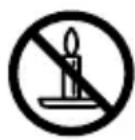
To prevent the spread of fire, keep candles or other open flames away from this product at all times.
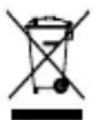
WEEE
This product must not be disposed of with your other household waste or treat them in compliance with the local regulations or contact your local city office, your household waste disposal service or the shop where you purchased the product.

Federal Communication Commission Interference Statement
This device complies with Part 15 of the FCC Rules. Operation is subject to the following two conditions: (1) This device may not cause harmful interference, and (2) this device must accept any interference received, including interference that may cause undesired operation.
This equipment has been tested and found to comply with the limits for a Class B digital device, pursuant to Part 15 of the FCC Rules. These limits are designed to provide reasonable protection against harmful interference in a residential installation. This equipment generates, uses and can radiate radio frequency energy and, if not installed and used in accordance with the instructions, may cause harmful interference to radio communications. However, there is no guarantee that interference will not occur in a particular installation. If this equipment does cause harmful interference to radio or television reception, which can be determined by turning the equipment off and on, the user is encouraged to try to correct the interference by one of the following measures:
Reorient or relocate the receiving antenna.
- Increase the separation between the equipment and receiver.
Connect the equipment into an outlet on a circuit different from that to which the receiver is connected.
- Consult the dealer or an experienced radio/TV technician for help.
FCC Caution:
Any changes or modifications not expressly approved by the party responsible for compliance could void the user's authority to operate this equipment.
This transmitter must not be co-located or operating in conjunction with any other antenna or transmitter.
Radiation Exposure Statement:
This equipment complies with FCC radiation exposure limits set forth for an uncontrolled environment. This equipment should be installed and operated with minimum distance 5cm between the radiator & your body.
FCC ID: ZHK-SP00002
Frequency bands and Powers
a. Frequency band(s) in which the radio equipment operates: 2.400 - 2.4835 GHz
b. Maximum radio-frequency power transmitted in the frequency band(s) in which the radio equipment operates:
Conducted Peak Power/GFSK: 4.04 dBm
Conducted Peak Power/8DPSK: 5.54 dBm.
c. Firmware Version: V4.0.1
Regions Contact Information
USA SteelSeries ApS., 656 W Randolph St., Suite 3E, Chicago, IL 60661, USA +1 312 258 9467
More information and support from https://steelseries.com/
IMPORTANT SAFETY INSTRUCTIONS
- READ these instructions.
- KEEP these instructions.
- HEED all warnings.
- FOLLOW all instructions.
- DO NOT use this apparatus near water.
- CLEAN ONLY with dry cloth.
- DO NOT block any ventilation openings. Allow sufficient distances for adequate ventilation and install in accordance with the manufacturer's instructions.
- DO NOT install near any heat sources such as open flames, radiators, heat registers, stoves, or other apparatus (including amplifiers) that produce heat. Do not place any open flame sources on the product.
- DO NOT defeat the safety purpose of the polarized or grounding type plug. A polarized plug has two blades with one wider than the other. A grounding type plug has two blades and a third grounding prong. The wider blade or the third prong are provided for your safety. If the provided plug does not fit into your outlet, consult an electrician for replacement of the obsolete outlet.
- PROTECT the power cord from being walked on or pinched, particularly at plugs, convenience receptacles, and the point where they exit from the apparatus.
- ONLY USE attachments/accessories specified by the manufacturer.
- USE only with a cart, stand, tripod, bracket, or table specified by the manufacturer, or sold with the apparatus. When a cart is used, use caution when moving the cart/apparatus combination to avoid injury from tip-over.

- UNPLUG this apparatus during lightning storms or when unused for long periods of time.
- REFER all servicing to qualified service personnel. Servicing is required when the apparatus has been damaged in any way, such as power supply cord or plug is damaged, liquid has been spilled or objects have fallen into the apparatus, the apparatus has been exposed to rain or moisture, does not operate normally, or has been dropped.
- DO NOT expose the apparatus to dripping and splashing. DO NOT put objects filled with liquids, such as vases, on the apparatus.
- The MAINS plug or an appliance coupler shall remain readily operable.
-
The airborne noise of the Apparatus does not exceed 70dB (A).
-
Operate this product within its specified operating temperature range 0 to +40^ .
-
To reduce the risk of fire or electric shock, do not expose this apparatus to rain or moisture.
Do not attempt to modify this product. Doing so could result in personal injury and/or product failure.
| A | This lightning flash with arrowhead symbol within an equilateral triangle is intended to alert the user to the presence of uninsulated dangerous voltage within the product's enclosure that may be of sufficient magnitude to constitute a risk of electric shock to persons. |
| ! | The exclamation point within an equilateral triangle is intended to alert the user to the presence of important operating and maintenance (servicing) instructions in the literature accompanying the product. |
WARNING: Voltages in this equipment are hazardous to life. No user serviceable parts inside. Refer all servicing to qualified service personnel. The safety certifications do not apply when the operating voltage is changed from the factory setting.
Apparatus shall not be exposed to dripping or splashing and no objects filled with liquids, such as vases, shall be placed on the apparatus."
Industry Canada Statement:
This device complies with Industry Canada license-exempt RSS standard(s). Operation is subject to the following two conditions:
- This device may not cause interference, and
- This device must accept any interference, including interference that may cause undesired operation of the device.
Le present appeareil est conforme aux CNR d'Industrie Canada applicables aux apparreils radio exempts de licence.
This Class B digital apparatus complies with Canadian ICES-003.
This device and its antenna(s) must not be co-located or operating in conjunction with any other antenna or transmitter, except tested built-in radios.
The County Code Selection feature is disabled for products marketed in the US/ Canada.
This equipment complies with IC RSS-102 radiation exposure limit set forth for an uncontrolled environment. This equipment should be installed and operated with minimum distance 5 cm between the radiator and your body.
These servicing instructions are for use by qualified service personnel only. To reduce the risk of electric shock, do not perform any servicing other than that contained in the operating instructions unless you are qualified to do so."
"The mains plug or appliance coupler is used as the disconnect device, the disconnect device shall remain readily operable." or equivalent.
SteelSeries Products and Australian Consumer Law
Our goods come with guarantees that cannot be excluded under Australian consumer law. You are entitled to a repair, replacement, or refund for a major failure and compensation for any other reasonably foreseeable loss or damage. You are also entitled to have the goods repaired or replaced if the goods fail to be of acceptable quality and the failure does not amount to a major failure.
Should your product be defective, you can make a claim under Australian consumer law.
SteelSeries will provide its own remedies equivalent to those remedies in the consumer guarantee provisions of the Australian Consumer Law at any time within 24 months of the date of purchase. For the avoidance of doubt, SteelSeries acknowledges that the Australian Consumer Law may provide for remedies beyond 24 months for a number of its products.
Summary of Australian statutory consumer guarantees
Consumer guarantees in relation to goods
The goods will be of acceptable quality. The goods will be fit for a particular purpose, The goods will match their description. The goods will match the sample or demonstration model. You have title to the goods, You have undisturbed possession of the goods. There are no undisclosed securities on the goods.
Consumer guarantees in relation to services
We will provide the services with due care and skill, The services will be fit for a particular purpose, The services will be provided within a reasonable time.
For SteelSeries-branded goods, in addition to the above, we also guarantee that we will provide repairs or spare parts for a reasonable time. Under Australian consumer law, the remedy you are entitled to if a product fails to meet a consumer guarantee will depend on whether the failure to comply with the guarantee is major or minor.
Minor failures to comply with a consumer guarantee can normally be fixed or resolved in a reasonable amount of time. In this case, the seller can choose to offer you a refund, replacement, repair or, in the case of services, resupply. If the seller does not fix the problem or takes too long, you may be able to get it fixed by someone else and recover the costs from the seller depending on the circumstances.
Remedies for major failure with goods
Return the product and ask for a refund, Return the product and ask for an identical replacement, or one of similar value if reasonably available, Keep the product and ask for compensation for the drop in value caused by the problem.
Remedies for major failure with services
Cancel the contract and pay a reasonable amount for the work done, or seek a refund. For money already paid, keep the contract and negotiate a reduced price for the drop in value of the service — this may mean asking for some of your money back if you have already paid.
For goods, there is a major failure to comply with a consumer guarantee when:
- You would not have purchased the product if you had known about the problem.
The product is significantly different from the description, sample or demonstration model you were shown.
The product is substantially unfit for its normal purpose and cannot easily be made fit within a reasonable time.
The product is substantially unfit for a purpose that you told the supplier about, and cannot easily be made fit within a reasonable time.
The product is unsafe.
For services, there is a major failure to comply with a consumer guarantee when: - You would not have engaged the service if you had known the nature and extent of the problem.
- The service does not meet the reasonable expectations for that type of service, and the problem cannot be rectified within a reasonable time.
-
You told the supplier that you wanted the service for a specific purpose, which was not fulfilled, and the problem could not be easily rectified within a reasonable time.
-
You told the supplier that you wanted a specific result, yet the service and end result failed to meet your specifications and could not be easily rectified within a reasonable time.
- The supply of the service has created an unsafe situation.
For information on Australian consumer laws, please visit Australian consumer law website at http://www.consumerlaw.gov.au.
Importer Name and Address: Ingram Micro Pty LTD / Level1, 61 Dunning Avenue. Rosebery NSW 2018 Telephone technical support: +61-2-9381-6000
This product is compliant with requirements of Vietnam Circular No. 30/2011/TT-BCT Regulations "STIPULATING TEMPORARILY THE PERMISSIBLE CONTENT LIMITATION OF SOME TOXIC CHEMICALS IN THE ELECTRONIC, ELECTRICAL PRODUCTS"
微功率设备产品使用说明:
(Australia/ New-Zealand Approvals)

EMC Directives 2014/30/EU and Low Voltage
Directives 2014/35/EU Compliance. (European)
Commission)

该电子电气产品含与某些有害物质,在环保
SIRIM Compliance. (Malaysia Approval)

Custom Union Compliance. (Russia)
/ Belarus / Kazakhstan / Armenia /
Kyrgyzstan Approvals)

Alternating Current

FCC Compliance. (USA Approval)
Complies with
IMDA Standards
DA 106032
Singapore approval
(IMDA)
| Regions Contact Information | ||
| Asia 亞洲 | 4F and 4F-4, No.186, Jian 1st Rd., Zhonghe Dist., New Taipei City 235, Taiwan (R.O.C.)新北市中和區建一路186號4F及4F-4 | +886 2 8226 3858 |
| USA 656 W Randolph St, Suite 3E, Chicago, IL 60661, USA +1 312 258 9467 | ||
| Europe | Havneholmen 8, 1st Floor, 2450 Copenhagen SV, Denmark | +45 702 500 75 |
More information and support at steeleries.com
learn more at steelseries.com