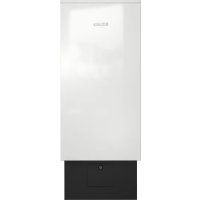
PAC 1080 - Air purifier MIELE - Free user manual and instructions
Find the device manual for free PAC 1080 MIELE in PDF.


| Product type | Air purifier |
| Brand | Miele |
| Model | PAC 1080 |
| Dimensions (W x D x H) | 500 x 500 x 1 270 mm |
| Net weight | 77 kg |
| Power supply | 230 V, 16 A (fuse protection ≥ 10 A) |
| Motor power | 780 W |
| Heating power (ThermoControl) | 1 300 W |
| Total power consumption | 1 350 W |
| Max air flow | Up to 1 300 m³/h |
| Sound level (LpA) | < 70 dB re 20 μPa |
| Main filtration | Coarse pre-filter ISO ePM2.5 60% (F7) + HEPA H14 filter (efficiency ≥ 99.995%) |
| Activated carbon filter | Integrated, replace every 6-12 months |
| Pre-filters (4) | Filtration of spores, pollen, fibers, lint |
| Post-filter | Post-filter mat in front of air outlet |
| Sensor | CO₂ (air quality assessment) |
| Operating modes | Manual, Manual+Timer, CO₂, CO₂+Timer |
| ThermoControl function | Inactivation of pathogens by heating to 70 °C for 20 min |
| Display | Screen with backlight |
| Key lock | Automatic after 60 s of inactivity |
| Screw-in feet included | Yes, for floor fixing |
| Optional wall mount | Available for securing |
| Casters | Integrated for mobility |
| Operating temperature | 0 to 40 °C |
| Pre-filter maintenance | Weekly vacuuming or as needed |
| Main filter replacement | Every 2 years approximately (depending on saturation) |
Frequently Asked Questions - PAC 1080 MIELE
User questions about PAC 1080 MIELE
0 question about this device. Answer the ones you know or ask your own.
Ask a new question about this device
Download the instructions for your Air purifier in PDF format for free! Find your manual PAC 1080 - MIELE and take your electronic device back in hand. On this page are published all the documents necessary for the use of your device. PAC 1080 by MIELE.
USER MANUAL PAC 1080 MIELE
natural_image
Exterior view of a white and black industrial refrigerator unit (no visible text or symbols)PAC 1045/1080/1200
de Gebrauchsanweisung Gewerblicher Luftreiniger en Operating instructions Commercial air purifier fr Mode d'emploi Purificateur d'air professionnel it Istruzioni d'uso Purificatore d'aria industriale nl Gebruiksaanwijzing Professionele luchtreiniger
de 4
en 37
fr 70
it 104
nl 139
natural_image
Technical line drawing of a mechanical or architectural component with mounting holes and internal grating (no text or symbols)natural_image
Illustration of a hand using a tool to adjust a component with directional arrows (no text or symbols)natural_image
Technical line drawing of a mechanical assembly with a pin and bracket (no text or symbols)① Serviceklappe
④ Vorfilter (links)
② Vorfilter (vorne)
Caring for the environment 37
Disposing of filters.... 37
Warning and Safety instructions.... 39
Appropriate use.... 39
Foreseeable misuse.... 40
Technical safety 40
Product description.... 42
Functional description 43
Using the machine.... 44
Initial commissioning.... 44
Operating the air purifier.... 44
Control panel.... 44
Overview of operating modes 45
Overview of operating statuses.... 45
Button functions.... 45
Setting the operating mode/calling up the Settings menu.... 47
Changing the operating status 48
Displaying operating values 48
Deactivating the keypad lock.... 48
Settings 49
Settings menu for "Manual mode" 49
Settings menu for "Manual+time mode" 49
Settings menu for "CO2 mode" 50
Settings menu for "CO2+time mode" 51
Settings menu for "Language/Time/Date/Service" 52
Settings menu for "Change filter/Factory defaults/Display contrast" 52
Installation.... 53
Transport and installation 53
Mounting the adjustable feet.... 54
Wall bracket (optional) 55
Electrical connection 56
Cleaning and care 57
Filter saturation check 57
Removing fluff and dust from the pre-filter 59
Cleaning the housing.... 59
Filter replacement.... 59
Replacing the pre-filters 59
Replacing the main filter and active charcoal filter.... 61
Problem solving guide 64
Problem solving guide.... 64
Contact in case of malfunction 64
Troubleshooting.... 65
Technical data.... 68
Disposal of the packaging material
The packaging material protects the air purifier from transport damage. The packaging materials used are selected from materials which are environmentally friendly for disposal and can therefore be recycled.
Recycling the packaging material reduces the use of raw materials in the manufacturing process and also reduces the amount of waste in landfill sites. You can return the packaging to your Miele dealer.
Disposal of your old appliance
Electrical and electronic appliances often contain valuable materials. They also contain materials which, if handled or disposed of incorrectly, could be potentially hazardous to human health and to the environment. They are, however, essential for the correct functioning of your appliance. Please do not therefore dispose of it with your household waste.
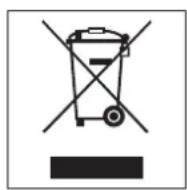
Please dispose of it at your local community waste collection / recycling centre.
Ensure that it presents no danger to children while being stored for disposal.
Disposing of filters
Any filters that have been used and are contaminated with particulate as well as filters that are potentially toxic and/or contaminated with pathogens should be placed in a sealable bag immediately after removal from the appliance. Please follow local regulations and laws when disposing of the filters.
Disposing of old batteries
In many cases, electrical and electronic appliances contain batteries which must not be disposed of with household waste after use. You are legally obliged to remove any old batteries which are not securely enclosed by the appliance and take them to a suitable collection point (e.g. retailer) where they can be handed in free of charge. Batteries may contain substances which can be hazardous to human health and the environment. If batteries containing lithium (Li-) are removed, the poles must be covered with adhesive tape, for example, in order to prevent an external short circuit.
The labelling on the battery will provide further information. The bin symbol with a cross through it means that the batteries must not be disposed of in household waste. A bin with a cross through it which also has one or more chemical symbols on it indicates that the battery contains lead (Pb), cadmium (Cd) and/or mercury (Hg).
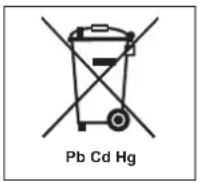
Old batteries contain valuable raw materials which can be recycled. Disposing of batteries separately makes them easier to handle and recycle.
Please read the operating instructions before using the air purifier for the first time. They contain important information for your safety, as well as information on using and maintaining the air purifier.
To avoid the risk of accidents or damage, it is essential to read the operating instructions carefully before using the appliance for the first time.
If other persons are being shown how to operate the air purifier, they must be given and/or made aware of these important safety notes.
Keep these operating instructions in a safe place and pass them on to any future owner.
In order to ensure your personal safety and prevent damage from occurring or the air purifier from malfunctioning, it is essential to comply with the safety notes listed below. Failure to observe the instructions will invalidate any warranty or performance claims.
Appropriate use
The air purifier cleans atmospheric air in frequently used areas and workspaces. Particles such as pollen, dust, bacteria and viruses are filtered at a rate of up to 99.995 %.
The air purifier is intended for installation in a commercial environment.
The air purifier is not intended for outdoor use.
Do not install the air purifier in areas where there is a risk of frost. The appliance components must be protected against direct sunlight, impact and vibrations, hose water and splash water. Only use the appliance in indoor environments with ambient temperatures of 0–40 °C.
▶ Only trained or qualified personnel may operate the air purifier. If the air purifier is used in a publicly accessible area (e.g. in schools, nurseries), the supervisor must ensure that it can be operated safely without risk of danger.
This air purifier can only be used by people with reduced physical, sensory or mental capabilities, or lack of experience or knowledge, if they are supervised whilst using it or have been shown how to use it in a safe way by an authorised person.
Children under 3 years of age must be kept away from the appliance unless they are constantly supervised.
Children under 8 years of age may only switch the air purifier on or off if supervised.
Children aged 8 and older may only use the air purifier without supervision if they have been shown how to use it in a safe manner. Children must be able to understand and recognise the possible dangers caused by incorrect operation.
The pre-filters must be vacuumed and/or dust must be removed from them on a regular basis or as required.
Foreseeable misuse
The air purifier must not be used outdoors.
The air purifier must not be used to filter explosive gases, aggressive atmospheres (vapours) or liquid media.
Do not lean on the air purifier. Otherwise, the air purifier may roll away or tip over, causing injury to yourself or others.
Do not block the gap between the bottom of the appliance and the floor with plinth facings, deep pile carpet etc.
The air purifier must not be used at a non-stationary installation site (e.g. on a ship).
No objects may be placed inside the air purifier. The air intake vents and air outlet must remain unobstructed at all times and must not be covered by any objects.
Do not set down or store other objects on the air purifier. Do not lean ladders or other objects against the air purifier as it may tip over.
In order to prevent a filter or appliance fire, the appliance must not draw in any sources of danger such as aggressive gases, flammable media and/or ignition sources (e.g. glowing particles, sparks, smouldering embers, etc.).
Do not operate the air purifier in humid areas at risk of explosion and/or areas with aggressive atmospheres.
Do not make any alterations to the air purifier, unless authorised to do so by Miele.
To ensure the correct performance of the air purifier and to prevent the risk of faults, it is important to carry out maintenance on a regular basis.
Do not use a pressure washer or water jet to clean the air purifier.
Contaminated filters must not be washed and reused. Cleaning with fluids that contain solvents presents a risk of fire. Contaminated filters must always be replaced with new ones.
▶ Never operate the air purifier without pre-filters or with damaged pre-filters. This could lead to malfunctions. Dust and fluff can clog the air channels and heater element, which could result in a fire. In this case, stop the air purifier immediately and replace the damaged filters.
Technical safety
Before installing the air purifier, check it for visible signs of damage. Do not use a damaged air purifier.
Do not connect the air purifier to the power supply by an extension cable (fire hazard due to overheating).
▶ Repairs should only be undertaken by a Miele authorised technician, otherwise any subsequent damage will not be covered by the warranty. Unauthorised repairs could result in unforeseen dangers for the user, for which Miele cannot accept liability.
▶ Faulty components may only be replaced by genuine Miele spare parts. Miele can only guarantee the safety standards of the appliance when Miele spare parts are used.
In the event of a fault and for cleaning and maintenance purposes, the air purifier must be disconnected from the power supply. The air purifier is only disconnected from the power supply if
- the plug has been removed from the socket or
- the mains fuse is disconnected or
- the screw-out fuse is removed (in countries where this is applicable).
See also "Installation – Electrical connection".
▶ Follow the instructions in “Installation” and “Technical data”.
The plug must be easily accessible so that the air purifier can be disconnected from the power supply.
If the mains connection cable is faulty it must always be replaced by a Miele authorised technician to protect the user from danger.
If the air purifier is damaged or if odours during operation indicate that components are charred, stop using the air purifier immediately.
All filter inserts must be checked/maintained on a regular basis in accordance with applicable regulations and specifications. Failure to carry out maintenance will invalidate warranty and performance claims. Please ask Miele if you require information about maintenance intervals.
▶ Accessory parts may only be fitted when expressly approved by Miele. If other parts are used, warranty, performance and product liability claims will be invalidated.
▶ Permanently mounted appliance components must not be removed. Otherwise there is a danger of mechanical and/or electrical injury due to rotating and/or live components.
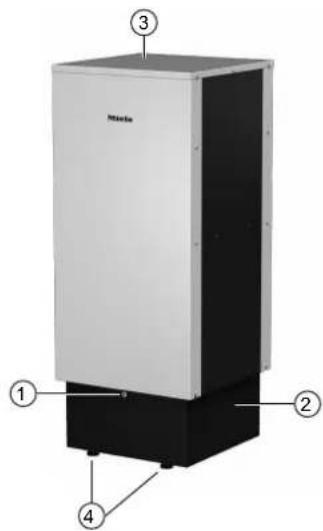
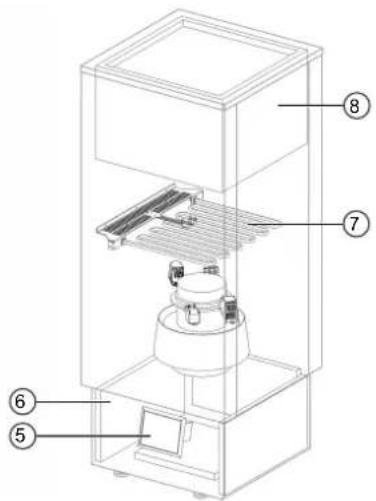
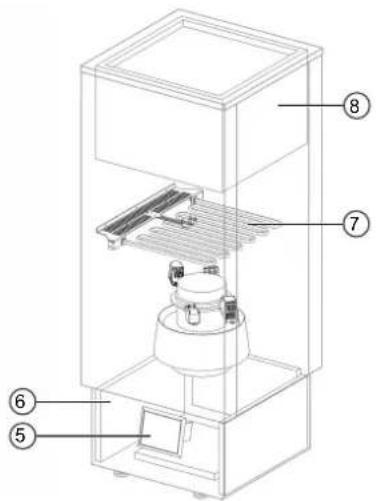
① Lockable access flap Protects the air purifier controls against unauthorised access.
② Air intake vents On the left and right sides, rear and bottom of the plinth
③ Lid with air outlet vents
④ 4 adjustable feet 4 adjustable feet are supplied for optional stabilisation
⑤ Control panel with display Operation with timed and manual control. The air quality is evaluated via the CO2 sensor.
⑥ 4 pre-filters For separating e.g. spores, pollen, fibres, fluff
⑦ Heater element for deactivating relevant pathogens With thermal sensor for temperature monitoring
⑧ Main filter (particulate pre-filter ISO ePM2.5 60 % (F7) and high-performance filter HEPA H14) With filtration efficiency of ≥99.995 % for particles including viruses (e.g. coronavirus)
Functional description
- The Miele air purifier draws in atmospheric air at the bottom via the air intake vents in the plinth (②).
- The pre-filters (⑥) filter coarse dust out of the air.
- The air is conveyed upwards by the fan inside the air purifier and is pushed through the main filter and the active charcoal filter (⑧). Up to 99.995 % of particles are filtered out of the air during this process.
- The cleaned air is released back into the room via the air outlet vents (③) in the lid.
The control panel (⑤) behind the lockable access flap is used to control the various operating modes (e.g. Manual mode). The fan can be regulated according to the room size. It is also possible to operate the appliance based on specified times.
After every use, air heated to 70 °C flows through the bottom of the main filter (⑧) for 20 minutes.
All components are installed in a high-quality metal housing with acoustic and thermal insulation. The castors on the bottom of the air purifier make it easy to move around.
Initial commissioning
Before carrying out initial commissioning, it is important to check that the air purifier is installed in accordance with appropriate use guidelines. After installation, allow the air purifier to adjust to room temperature.
Check the air purifier, the plug and the mains connection cable for damage. If there is any damage, the air purifier must not be used. Check the fuse rating of the socket before connecting the plug.
Operating the air purifier
The control panel for controlling the air purifier is located behind the lockable access flap on the front of the plinth.
- Check that the mains connection cable and the plug are intact.
■ Insert the plug into the socket.
■ Open the lockable access flap on the plinth of the air purifier and wait for the controls to complete the self-test.
After the self-test, the Mode menu appears.
| Mode |
| Use previous setting |
| Manual mode |
| Manual+time mode |
In the Mode menu, the operating mode can be selected using the ∧ and ∨ buttons. You can use the previous setting (in the factory default settings, the previous setting is Manual mode) or select a different operating mode. To confirm the selected operating mode, hold down the ∧ and ∨ buttons for at least 3 seconds.
Depending on which operating mode you select, further selectable options (e.g. flow, clock control, room size) may be displayed. You can select these options or skip past them by pressing the ∧ and ∨ buttons briefly at the same time. The appliance will then switch to the Ready for operation operating status.
When the appliance is ready for operation, it can be switched on via the ⏻ button. If an operating mode with clock (timer) is selected, the appliance will switch on automatically at the set time.
If you do not select a menu option within 60 seconds, the previous setting will be adopted automatically and the appliance will switch to the Ready for operation operating status.
After this step, the operating mode can only be changed in the Settings menu.
Further selectable options relating to the operating modes may be available in the Settings menu.
Tip: The previous setting can be selected more quickly in the Mode menu by simply pressing the ⏻ button or by pressing the ∧ and ∨ buttons briefly at the same time.
Control panel
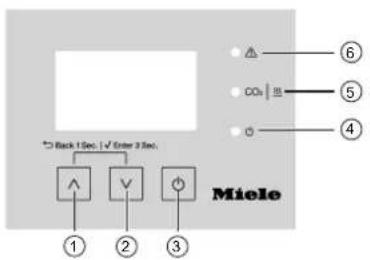
Control panel behind the lockable access flap
① ∧ button
② ∨ button
③ ⏻ button
④ Green LED ⏻
Flashes when starting/ready for use, lights up during operation.
⑤ Yellow LED CO₂ |
Flashes in the event of a CO_2 warning, lights up when heating is active.
⑥ Red LED
Flashes in the event of a fault.
Overview of operating modes
| Manual mode | During operation, the fan speed can be changed individually between 20–100 % in 5 % increments via the ∧ and ∨ buttons.Optional initial flow can be switched on before normal operation. |
| Manual+time mode | Same as Manual mode but with additional clock function (timer) which can be used to set a switch-on time and switch-off time for each day. |
| CO2 mode | The fan speed is automatically regulated according to the set room size. The need for ventilation is indicated via an LED and a display message.Optional initial flow can be switched on before normal operation and a circulation function can be activated. |
| CO2+time mode | Same as CO2 mode but with additional clock function (timer) which can be used to set a switch-on time and switch-off time for each day. |
Overview of operating statuses
The following operating statuses are shown in the display:
| Ready for operation | The power supply has been connected and the appliance is ready for operation. |
| Flow | The fan runs at a set flow rate and duration to clean the air before the air purifier switches to normal operation. |
| Manual operationManual+time operationCO2 operationCO2+time operation | The appliance is in normal operation. |
| ThermoControl active | Relevant pathogens are deactivated automatically by Miele ThermoControl after every use. |
| Fan run-on | The fan keeps running after Miele ThermoControl in order to cool the filter. |
| Intensive circ. active | The fan runs at a higher speed for a short period in order to quickly circulate the air within the room. |
Button functions
The following button functions apply during operation. The logic function varies depending on the operating status, as detailed below:
| Button Type of actu-ation | Button function | Logic function | |
| ⏻ Press, release | Switch on, next or switch off | Switch between operating statuses (see “Changing the op-erating status”). | |
| Cancel | In the Intensive circulation menu: cancel intensive circula-tion | ||
| ∧ and ∨ (simultan-eously) | Short press (<1 sec) | Exit Go back one menu level | |
| Long press (>3 sec) | Confirm | Access to Settings menu | |
| Select a menu element | |||
| Deactivate the keypad lock | |||
| When entering a value: save the current value entry | |||
| ∧ Short press (<1 sec) | Up Select the previous menu element | ||
| ∨ Short press (<1 sec) | Down Select the next menu element | ||
Setting the operating mode/calling up the Settings menu
You can change the set operating mode in any operating status by holding down the ∧ and ∨ buttons at the same time for at least 3 seconds. You will then be prompted to enter the following access code:
User code
3377
In order to change a digit in the access code, the cursor must be placed under the relevant digit. The cursor position is changed by pressing and holding the ∧ or ∨ arrow button.
■ To increase the value of the digit (+1), briefly press the ∧ button.
■ To decrease the value of the digit (-1), briefly press the ∨ button.
■ To move the cursor one position to the right, press the ∨ button for 3 seconds.
■ To move the cursor one position to the left, press the ∧ button for 3 seconds.
- When all of the code digits are set correctly, confirm the entry by pressing and holding the ∧ and ∨ buttons at the same time for at least 3 seconds.
You are now in the Settings menu.
■ Select the required operating mode by holding down the ∧ and ∨ buttons at the same time for at least 3 seconds.
■ Depending on which operating mode you select, further selectable options (e.g. Flow, clock control, Room size) may be displayed. You can select these options or skip past them by pressing the ∧ and ∨ buttons briefly at the same time.
The appliance switches back to the previous operating status with the newly selected operating mode. If no actions are carried out in the Settings menu within 60 seconds, the menu is exited automatically.
Changing the operating status
If you wish to change the operating status, you can switch between Ready for operation, Flow (if selected via option), Manual operation/CO2 operation, ThermoControl active and Fan run-on at any time.
■ Press the ⏻ button repeatedly until you reach the desired operating status.
Tip: If you wish to clean the filter manually via Miele ThermoControl, press the ⏻ button repeatedly until you reach the ThermoControl active operating status. Relevant pathogens will then be deactivated in the filter by Miele ThermoControl. After Miele ThermoControl, the fan keeps running automatically in order to cool down the filter safely, after which the appliance switches back to the Ready for operation operating status.
Displaying operating values
The operating values of the air purifier can be displayed via the Operating values display menu.
■ Press and hold the ∨ button for more than 3 seconds.
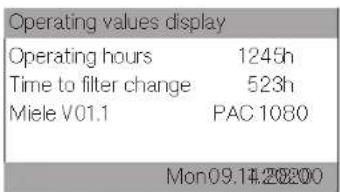
The Operating values display menu is now displayed.
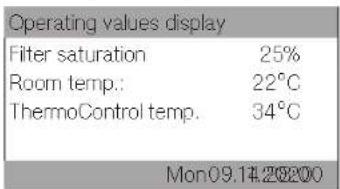
■ Press the ∧ or ∨ button briefly to scroll through the pages of the Operating values display menu.
■ To exit the operating values display, briefly press the ∧ and ∨ buttons at the same time (<1 sec) or wait 10 seconds.
Deactivating the keypad lock
If the display lighting is switched off, the keypad lock is activated. You can deactivate the keypad lock by holding down the ∧ and ∨ buttons for at least 3 seconds.
If no buttons are pressed within 60 seconds of deactivating the keypad lock, it will be reactivated again automatically.
Settings
Settings menu for "Manual mode"
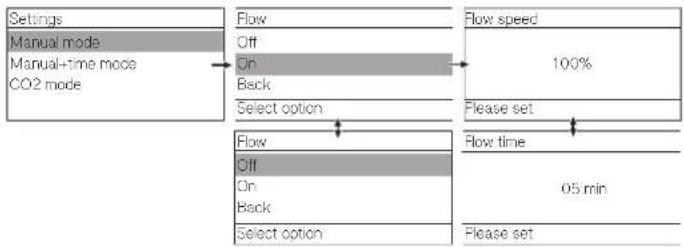
flowchart
graph TD
    A["Settings"] --> B["Manual mode"]
    B --> C["Manual+time mode"]
    C --> D["CO2 mode"]
    D --> E["Flow Off On Back Select option"]
    E --> F["Flow speed 100%"]
    F --> G["Please set"]
    G --> H["Flow time 05 min"]
    H --> I["Select option"]
    I --> J["Flow Off On Back Select option"]
    J --> K["Please set"]
If settings are configured for the Flow, these settings will automatically be adopted for the other operating modes.
Tip: If you do not wish to make any changes to the Flow, you can exit the Settings menu quickly by pressing the ∧ and ∨ buttons briefly at the same time.
Settings menu for "Manual+time mode"
If initial flow is switched on, the air purifier will start the running before the actual switch-on time: if, for example, the switch-on time is set for 6:00 am with 5 minutes of initial flow time, the air purifier will start at 5:55 am.
After the switch-off time, Miele ThermoControl is started with a running time of 20 minutes. This is followed by a 10-minute fan run-on phase.
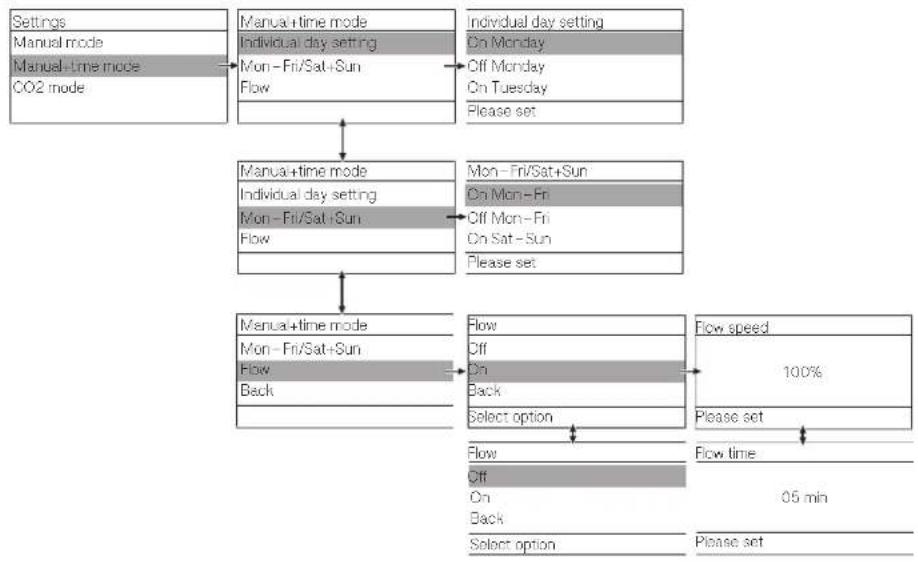
flowchart
graph TD
    A["Settings"] --> B["Manual-mode"]
    B --> C["Manual-time mode"]
    C --> D["CO2 mode"]
    A --> E["Manual+time mode"]
    E --> F["Individual day setting"]
    F --> G["Mon-Fri/Sat+Sun Flow"]
    G --> H["Flow"]
    H --> I["Individual day setting On Monday Off Monday On Tuesday Please set"]
    I --> J["Mon-Fri/Sat+Sun"]
    J --> K["On Mon-Fri Off Mon-Fri On Sat-Sun Please set"]
    K --> L["Flow"]
    L --> M["Off Off Back Select option"]
    M --> N["Flow speed 100% Please set"]
    N --> O["Flow time 0.5 min"]
If settings are configured, these settings will automatically be adopted for the other operating modes.
- If you do not wish to make any changes, you can exit the Settings menu quickly by pressing the ∧ and ∨ buttons briefly at the same time.
- If you do not want to set a separate switch-on time and switch-off time for each day, you can set the times for the whole week quickly via Mon-Fri/Sat+Sun. If the switch-on time and switch-off time are set to 00:00, the appliance will not switch on on the selected day.
Settings menu for "CO2 mode"
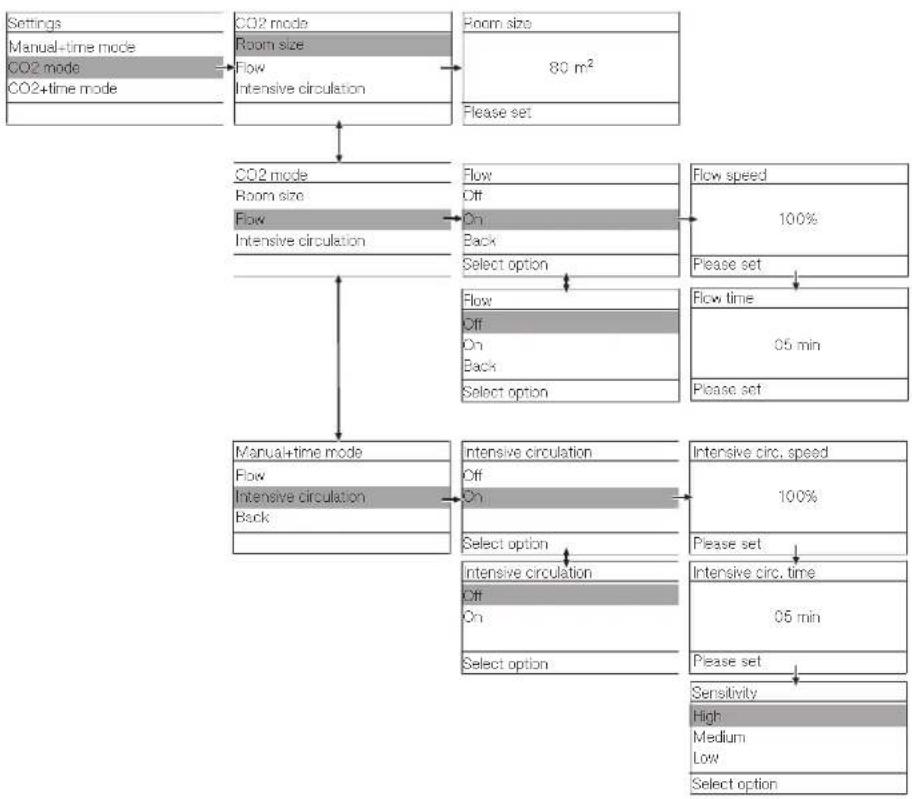
flowchart
graph TD
    A["Settings\nManual+time mode\nCO2 mode\nCO2+time mode"] --> B["CO2 mode\nRoom size\nFlow\nIntensive circulation"]
    B --> C["Room size\n80 m²\nPlease set"]
    C --> D["CO2 mode\nRoom size\nFlow\nIntensive circulation"]
    D --> E["Flow\nOff\nOn\nBack\nSelect option"]
    E --> F["Flow speed\n100%\nPlease set"]
    F --> G["Flow time\n05 min\nPlease set"]
    G --> H["Manual+time mode\nFlow\nIntensive circulation\nBack"]
    H --> I["Intensive circulation\nOff\nOn\nSelect option"]
    I --> J["Intensive circ. speed\n100%\nPlease set"]
    J --> K["Intensive circ. time\n05 min\nPlease set"]
    K --> L["Sensitivity\nHigh\nMedium\nLow\nSelect option"]
The Sensitivity sub-menu is used to set the sensitivity with which the controls respond to open windows when activating intensive circulation.
When High is selected, intensive circulation is activated more quickly. When Low is selected, it takes longer for intensive circulation to be activated when a window is open.
If settings are configured, these settings will automatically be adopted for the other operating modes.
Tip: If you do not wish to make any changes to the initial flow, you can exit the Settings menu quickly by pressing the ∧ and ∨ buttons briefly at the same time.
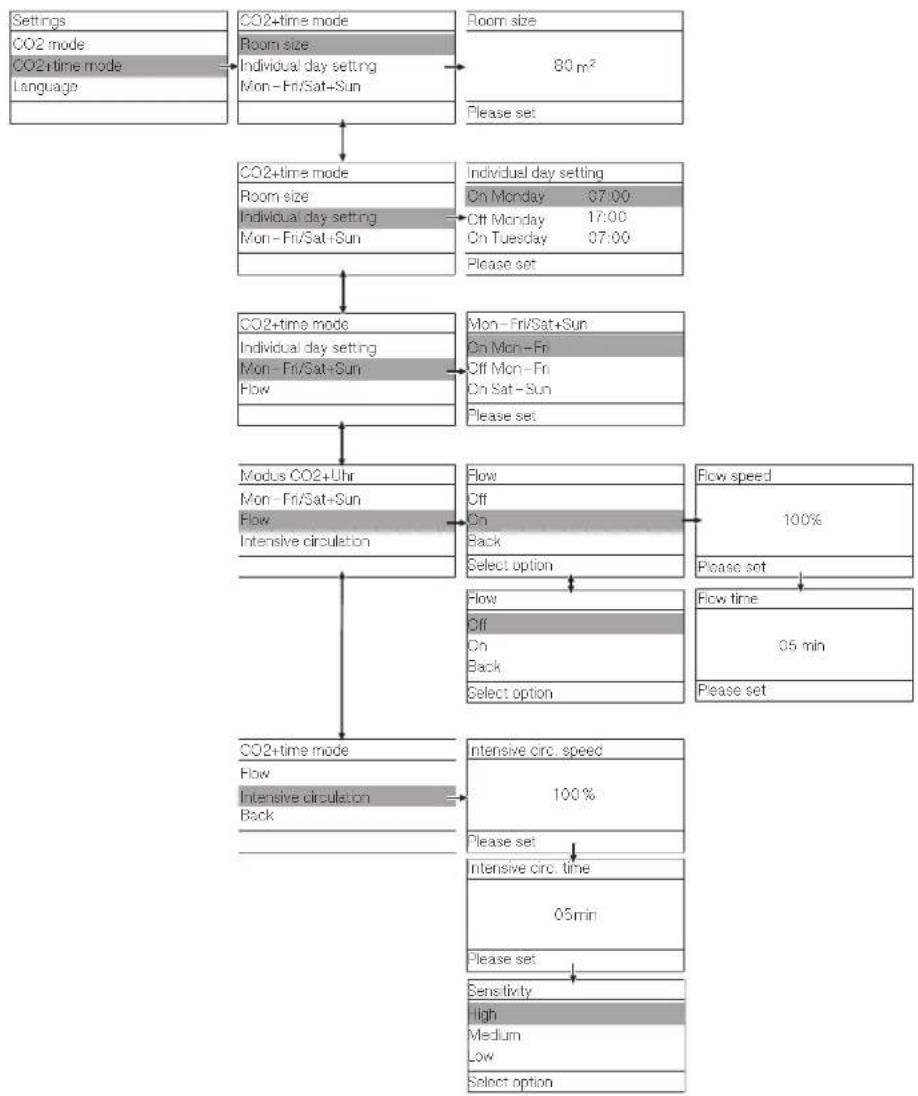
Settings menu for "CO2+time mode"
If initial flow is switched on, the air purifier will start the running before the actual switch-on time: if, for example, the switch-on time is set for 6:00 am with 5 minutes of initial flow time, the air purifier will start at 5:55 am.
After the switch-off time, Miele ThermoControl is started with a running time of 20 minutes. This is followed by a 10-minute fan run-on phase.
flowchart
graph TD
    A["Settings"] --> B["CO2+time mode"]
    B --> C["Room size: Individual day setting Mon-Fri/Sat+Sun"]
    C --> D["80 m²"]
    D --> E["Room size"]
    E --> F["Please set"]

    B --> G["CO2+time mode"]
    G --> H["Room size: Individual day setting Mon-Fri/Sat+Sun"]
    H --> I["On Monday 07:00 Off Monday 17:00 On Tuesday 07:00"]
    I --> J["Individuel day setting"]
    J --> K["On Monday 07:00 Off Monday 17:00 On Tuesday 07:00"]
    K --> L["Please set"]

    G --> M["CO2+time mode"]
    M --> N["Individual day setting Mon-Fri/Sat+Sun Flow"]
    N --> O["On Mon-Fri Off Mon-Fri On Sat-Sun"]
    O --> P["Mon-Fri/Sat+Sun"]
    P --> Q["On Mon-Fri Off Mon-Fri On Sat-Sun"]
    Q --> R["Please set"]

    M --> S["Modus CO2+Uhr Mon-Fri/Sat+Sun Flow Intensive circulation"]
    S --> T["Flow Off On Black Select option"]
    T --> U["Flow Off On Black Select option"]
    U --> V["Flow speed 100%"]
    V --> W["Please set"]
    W --> X["Flow time 05 min"]
    X --> Y["Please set"]

    S --> Z["CO2+time mode"]
    Z --> AA["Flow Intensive circulation Back"]
    AA --> AB["Intensive circ. speed 100%"]
    AB --> AC["Please set"]
    AC --> AD["Intensive circ. time 05min"]
    AD --> AE["Please set"]
    AE --> AF["Sensitivity High Medium Low Select option"]
The Sensitivity sub-menu is used to set the sensitivity with which the controls respond to open windows when activating intensive circulation.
When High is selected, intensive circulation is activated more quickly. When Low is selected, it takes longer for intensive circulation to be activated when a window is open.
If settings are configured, these settings will automatically be adopted for the other operating modes.
Tip: If you do not wish to make any changes to the initial flow, you can exit the Settings menu quickly by pressing the ∧ and ∨ buttons briefly at the same time.
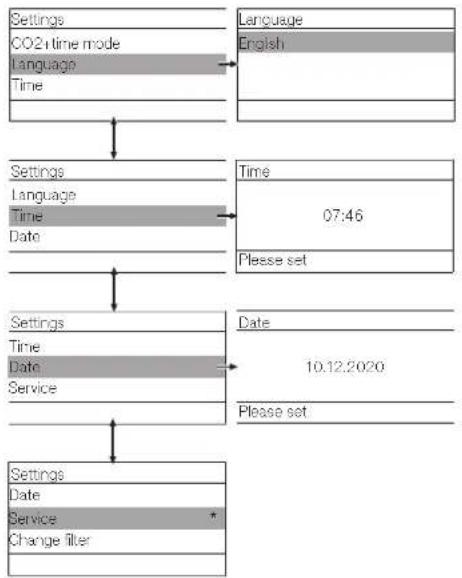
Settings menu for "Language/Time/Date/Service"
flowchart
graph TD
    A["Settings\nCO2 time mode\nLanguage\nTime"] --> B["Settings\nLanguage\nTime\nDate"]
    B --> C["Settings\nTime\nDate\nService"]
    C --> D["Settings\nDate\nService\nChange filter"]
    E["Language\nEnglish"] --> F["Time\n07:46\nPlease set"]
    G["Date\n10.12.2020\nPlease set"] --> H["Settings\nDate\nService\nChange filter"]
* For the Miele Customer Service Department only
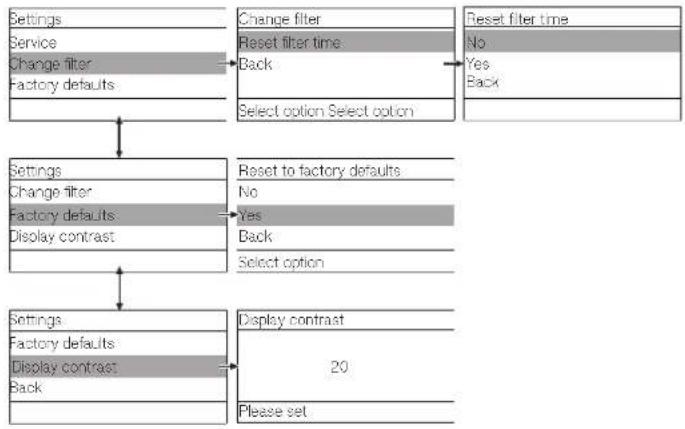
Settings menu for "Change filter/Factory defaults/Display contrast"
flowchart
graph TD
    A["Settings"] --> B["Service"]
    B --> C["Change filter"]
    C --> D["Factory defaults"]
    D --> E["Change filter"]
    E --> F["Reset filter time"]
    F --> G["Back"]
    G --> H["Select option Select option"]
    I["Reset filter time"] --> J["No"]
    I --> K["Yes"]
    I --> L["Back"]
    M["Settings"] --> N["Change filter"]
    N --> O["Factory defaults"]
    O --> P["Display contrast"]
    P --> Q["Reset to factory defaults"]
    Q --> R["No"]
    Q --> S["Yes"]
    S --> T["Back"]
    U["Settings"] --> V["Factory defaults"]
    V --> W["Display contrast"]
    W --> X["Back"]
    Y["Display contrast"] --> Z["20"]
    AA["Please set"] --> AB
Transport and installation
Only personnel who have received instruction from the supervisor may transport and install the air purifier.

Risk of tipping during unsecured transport.
There is a risk that the air purifier may tip over in the event of unsecured transport with incorrect transport equipment or lifting equipment.
The air purifier may only be transported by personnel who have received appropriate instruction.
The air purifier must be installed upright on a firm and secure surface. The castors on the bottom of the air purifier can be used to move it around the room. When moving the air purifier, make sure that the surface is level and the air purifier is secured to prevent it tipping over. To prevent damage and accidents, always remove the plug from the socket before moving the air purifier.

Risk of tripping if the appliance is moved without disconnecting mains connection cable.
If the air purifier is moved without disconnecting the mains connection cable, there is a risk that someone will trip over the tensioned cable and sustain an injury. This may also damage the mains connection cable.
Remove the plug from the socket before moving the air purifier.

Risk of tipping if care is not taken when moving.
Uneven floors or objects on the floor can cause the air purifier to tip over.
When moving the air purifier, make sure that the surface is level and the air purifier is secured to prevent it tipping over.
Always move the air purifier in a forward direction to ensure that it cannot tip towards you.
Make sure you do not roll the appliance over the mains connection cable.
Mounting the adjustable feet
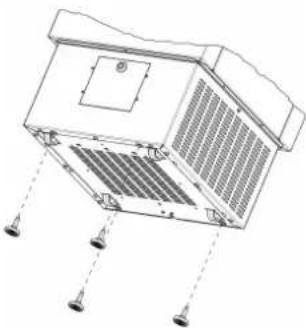
The air purifier is supplied with 4 adjustable feet which can be mounted on the bottom of the plinth in order to stabilise the appliance. At least 2 people are required to fit the adjustable feet.
■ To fit the adjustable feet to the bottom of the air purifier, tilt the air purifier sideways or lay the appliance down completely. Make sure you do not lay the air purifier on the mains connection cable.
Risk of crushing if the air purifier tips over.
When tilting or laying down the air purifier, there is a risk that body parts will be crushed and/or trapped accidentally.
Work to fit the adjustable feet must be carried out by at least 2 people.
Take great care when tilting the appliance.
natural_image
Technical line drawing of a mechanical or electrical component with mounting holes and internal grating (no text or symbols)■ Screw the 4 adjustable feet in a clockwise direction into the designated holes on the bottom of the air purifier.
Risk of trapping if care is not taken when fitting the feet.
When fitting the adjustable feet, there is a risk that fingers will be trapped accidentally.
Take care not to trap your fingers when fitting the adjustable feet.
■ Screw the adjustable feet out far enough that the air purifier stands entirely on the feet when in its upright position (castors not in contact with the floor).
■ Adjust the adjustable feet until the air purifier is level. Use a spirit level to ensure correct alignment.
natural_image
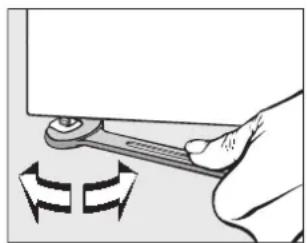
Illustration of a hand using a tool to adjust a component with rotational arrows (no text or symbols)■ After the appliance has been aligned, screw the nuts on the adjustable feet tightly to the base plate using an open spanner (17 mm). Check the stability of the appliance once it has been installed.
⚠️ Risk of tipping if the air purifier is moved with the adjustable feet attached.
When the adjustable feet are attached, the castors on the air purifier can no longer be used to move it around. The air purifier must not be moved with the adjustable feet attached due to the risk of tipping.
Remove the adjustable feet before moving the air purifier to a different location.
Wall bracket (optional)
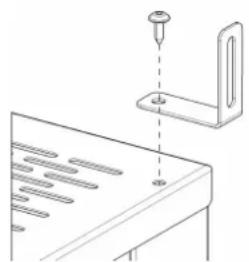
To provide extra protection against the air purifier tipping over, you can secure it to a wall using the bracket provided if necessary.
natural_image
Technical line drawing of a mechanical assembly with a pin inserted into a bracket (no text or symbols)Mounting the wall bracket (optional)
Electrical connection
The air purifier is supplied with a mains cable with moulded plug ready for connection to an earthed socket as standard.
The socket must be easily accessible after the air purifier has been installed. If the socket is not easily accessible, ensure that a suitable means of disconnection is provided on the installation side for each pole.
⚠️ Risk of fire from overheating.
Connecting the air purifier to multi-socket adapters or extension cables can overload the cables.
For safety reasons, do not use an extension cable or multi-socket adapter.
The electrical installation must comply with VDE 0100 requirements.
For safety reasons, we recommend using a type A residual current device (RCD) in the assigned electrical installation for connecting the air purifier.
If the mains connection cable is damaged, it must only be replaced with a specific mains connection cable of the same type (available from the Miele Customer Service Department). For safety reasons, such replacement may only be carried out by a qualified specialist or the Miele Customer Service Department.
These operating instructions and the data plate indicate the nominal power consumption and the appropriate fuse rating. Compare this information with the data of the on-site electrical connection. If in any doubt, consult a qualified electrician.
Do not connect the air purifier to a stand-alone inverter such as those used with an autonomous energy source, e.g. solar power. When the air purifier is switched on, power surges could result in an auto switch off. This could damage the electronic module.
Filter saturation check
The air exchange rate is based on the room size (air volume in the room) and how frequently this air volume is filtered per unit of time.
The air exchange rate is set to 6 air changes in the factory default settings and after a filter replacement (with the appropriate room size, where the maximum room dimensions must not exceed the size equivalent to the nominal capacity). Due to the constant filtering of the room air via the filter, the air exchange rate decreases over time. The filtration efficiency of the filter is not reduced. A reduced air exchange rate is identified in the air purifier via a differential pressure measurement. If the air exchange rate drops below 4 air changes, this is signalled by the red LED lighting up and a warning message appearing.
Miele recommends checking the saturation of the filter regularly by setting the fan setting to 100 % for at least 20 seconds in Manual mode.
If the red LED lights up and the fault message F4029 warning appears in the display when the fan setting is set to 100 %, the filter is saturated.
In order to maintain the air exchange rate of 6 air changes when the filter is saturated, the fan setting must be increased. The table below shows how much the fan setting needs to be increased when the filter is saturated. The air purifier must be in Manual mode for this purpose. The filter is expected to reach saturation after approx. 1–2 years (depending on site conditions, individual particle ingress and regular cleaning of the pre-filters). Miele therefore recommends regular maintenance by the Miele Customer Service Department.
Fan settings for PAC 1045
| Room size Flow rate for 6 air changes* | Fan setting for 6 air changes (new filter) | Fan setting (%) for 6 air changes (filter saturated – red LED lights up at 100 %) |
| 10 m^2 156 m^3/h 30 % 40 % | ||
| 15 m^2 234 m^3/h 40 % 55 % | ||
| 20 m^2 312 m^3/h 50 % 70 % | ||
| 25 m^2 390 m^3/h 60 % 85 % | ||
| 30 m^2 468 m^3/h 70 % 95 % | ||
| 35 m^2 546 m^3/h 80 % 100 % | ||
| 40 m^2 624 m^3/h 85 % 100 % | ||
| 45 m^2 700 m^3/h 95 % 100 % |
* The specified flow rates are based on an average room height of 2.6 m.
Fan settings for PAC 1080
| Room size Flow rate for 6 air changes* | Fan setting for 6 air changes (new filter) | Fan setting (%) for 6 air changes (filter saturated - red LED lights up at 100 %) | |
| 25 m^2413 | m^3/h45% 60% | ||
| 30 m^2495 | m^3/h50% 65% | ||
| 35 m^2578 | m^3/h55% 75% | ||
| 40 m^2660 | m^3/h60% 80% | ||
| 45 m^2743 | m^3/h65% 85% | ||
| 50 m^2825 | m^3/h70% 95% | ||
| 55 m^2908 | m^3/h75% 100% | ||
| 60 m^2990 | m^3/h80% 100% | ||
| 65 m^21073 | m^3/h85% 100% | ||
| 70 m^21155 | m^3/h90% 100% | ||
| 75 m^21238 | m^3/h95% 100% | ||
| 80 m^21300 | m^3/h100% 100% | ||
* The specified flow rates are based on an average room height of 2.75 m.
Fan settings for PAC 1200
| Room size Flow rate for 6 air changes* | Fan setting for 6 air changes (new filter) | Fan setting (%) for 6 air changes (filter saturated - red LED lights up at 100 %) | |
| 60 m^2 900 | m^3/h 30 % 45 % | ||
| 70 m^2 1050 | m^3/h 35 % 55 % | ||
| 80 m^2 1200 | m^3/h 40 % 60 % | ||
| 90 m^2 1350 | m^3/h 45 % 70 % | ||
| 100 m^2 1500 | m^3/h 50 % 75 % | ||
| 110 m^2 1650 | m^3/h 55 % 85 % | ||
| 120 m^2 1800 | m^3/h 60 % 90 % | ||
| 130 m^2 1950 | m^3/h 65 % 100 % | ||
| 140 m^2 2100 | m^3/h 70 % 100 % | ||
| 150 m^2 2250 | m^3/h 75 % 100 % | ||
| 160 m^2 2400 | m^3/h 80 % 100 % | ||
| 170 m^2 2550 | m^3/h 85 % 100 % | ||
| 180 m^2 2700 | m^3/h 90 % 100 % | ||
| 190 m^2 2850 | m^3/h 95 % 100 % | ||
| 200 m^2 3000 | m^3/h 100 % 100 % | ||
* The specified flow rates are based on an average room height of 2.5 m.
Removing fluff and dust from the pre-filter
The pre-filters in the plinth of the air purifier prevent dust and fluff from getting into the air filter during operation of the appliance. In order to optimise operation of the air filter, the soiling that accumulates in front of the pre-filter must be removed on a weekly basis or as required.
■ Remove the plug from the socket and ensure that the air purifier is de-energised.
■ Clean the pre-filters through the air intake vents from the outside using a vacuum cleaner.
Cleaning the housing
■ Remove the plug from the socket and ensure that the air purifier is de-energised.
■ If the appliance was in operation before it was unplugged, wait approx. 10 minutes to allow it to cool down fully.
The housing may still be warm immediately after operation.
■ When the air purifier housing has cooled down, clean it with a soft, damp cleaning cloth. Make sure that you do not touch any electrical components.
■ Do not use solvent-based liquid cleaning agents and/or sprays.
Filter replacement
⚠️ Risk of fire if washed filters are reused.
Contaminated filters must not be cleaned with solvent-based fluids and then reused in the air purifier.
Contaminated filters must always be replaced with new ones.
When replacing filters, only use accessory parts approved by Miele.
If other parts are used, warranty, performance and/or product liability claims will be invalidated.
Wear suitable personal protective equipment (e.g. mask, gloves, goggles) when replacing the filters.
Any filters that have been used and are contaminated with particulate as well as filters that are potentially toxic and/or contaminated with pathogens should be placed in a sealable bag immediately after removal from the appliance.
Replacing the pre-filters
The pre-filters mounted behind the air intake vents must be replaced roughly every 6–12 months. The pre-filters must be replaced if they are contaminated or if the suction power is too low. The pre-filters can be replaced via the service flap at the bottom of the air purifier.
■ Remove the plug from the socket and ensure that the air purifier is de-energised.
■ If the appliance was in operation before it was unplugged, wait approx. 10 minutes to allow it to cool down fully.
The housing may still be warm immediately after operation.
■ Remove the screws from the service flap on the rear of the air purifier. Remove the service flap and the pre-filter behind it.
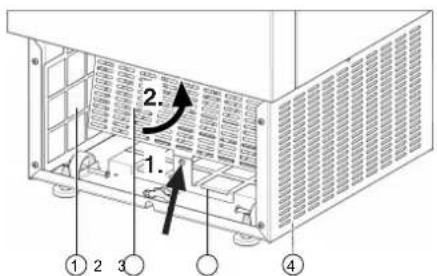
① Pre-filter (left) with holding plate
② Contact protection
③ Pre-filter (bottom) with holding plate
④ Pre-filter (right) with holding plate
■ Remove the screw in the middle (1.) and fold the contact protection forwards (2.).
■ Remove the screws from the holding plates of the pre-filters.
■ Remove the used pre-filters and place them in a sealable bag.
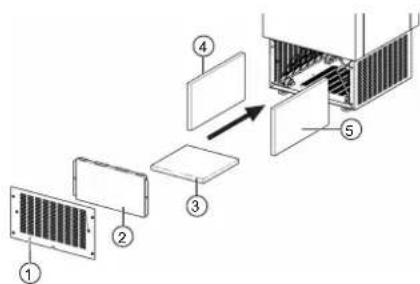
① Service flap
④ Pre-filter (left)
② Pre-filter (front)
⑤ Pre-filter (right)
③ Pre-filter (bottom)
■ Insert the new pre-filters. The flame-scarfed (coloured) side of the pre-filters must face outwards (in the direction of the air intake vents).
■ Screw the holding plates of the pre-filters back into place.
■ Pull the contact protection downwards and screw it back into place.
■ Close the service flap and retighten the screws.
Replacing the main filter and active charcoal filter
Miele recommends having the main filter and the active charcoal filter replaced by the Miele Customer Service Department.
PAC 1045/1080 PAC 1200
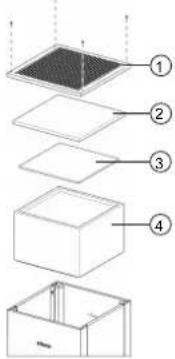
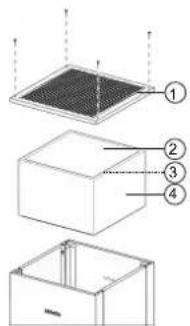
① Lid
② Exhaust filter gauze
③ Active charcoal filter
④ Main filter (particulate pre-filter ISO ePM2.5 60 % (F7) and high-performance filter HEPA H14)
Replacing the ex- haust filter mat (PAC 1045/1080)
An exhaust filter mat is fitted in front of the air outlet. The exhaust filter mat must be replaced following a visual inspection and/or when damaged. Miele recommends having the exhaust filter mat replaced by the Miele Customer Service Department.
■ Remove the plug from the socket and ensure that the air purifier is de-energised.
■ If the appliance was in operation before it was unplugged, wait approx. 10 minutes to allow it to cool down fully.

Risk of burns due to hot surfaces.
The air purifier will still be hot immediately after operation. Allow the appliance to cool down fully.
■ Remove the 4 screws from the top of the appliance and remove the lid.
■ Remove the exhaust filter mat under the lid and replace it with a new one.
■ Place the lid back on the appliance and screw it into place.
Replacing the active charcoal filter (PAC 1045/1080)
An active charcoal filter is fitted above the main filter. The active charcoal filter must be replaced roughly every 6–12 months. Miele recommends having the active charcoal filter replaced by the Miele Customer Service Department.
■ Remove the plug from the socket and ensure that the air purifier is de-energised (display is off).
■ If the appliance was in operation before it was unplugged, wait approx. 10 minutes to allow it to cool down fully.
Replacing the main filter
⚠️ Risk of burns due to hot surfaces.
The air purifier will still be hot immediately after operation. Allow the appliance to cool down fully.
■ Remove the 4 screws from the top of the appliance and remove the lid.
■ Remove the exhaust filter mat.
■ Remove the active charcoal filter above the main filter and replace it with a new one.
■ Insert the exhaust filter mat.
■ Place the lid back on the appliance and screw it into place.
The main filter (comprising particulate pre-filter ISO ePM2.5 60 % (F7) and high-performance filter HEPA H14) must be replaced roughly every 2 years in order to optimise operation of the air purifier. Miele recommends having the main filter replaced by the Miele Customer Service Department in order to guarantee that the air purifier is properly sealed afterwards.
The main filter is monitored via a differential pressure switch. The main filter must be replaced when a defined level of saturation is reached. The saturation level is shown on the display. Please note that the displayed saturation level only applies with a fan speed of 100 %.
■ Remove the plug from the socket and ensure that the air purifier is de-energised (display is off).
■ If the appliance was in operation before it was unplugged, wait approx. 10 minutes to allow it to cool down fully.
⚠️ Risk of burns due to hot surfaces.
The air purifier will still be hot immediately after operation. Allow the air purifier to cool down fully.
■ Remove the 4 screws from the top of the appliance and remove the lid.
■ Remove the active charcoal filter and the exhaust filter mat.
■ Remove the main filter by lifting it vertically upwards by the lugs.
■ Place the used main filter in a sealable bag and dispose of the filter in line with local regulations.
■ Place a new main filter in the appliance with the seal facing downwards. Once it has been fitted, the filter must rest entirely on the filter holding plate.
■ Place the active charcoal filter and the exhaust filter mat back in the original position.
■ Place the lid back on the appliance and screw it into place.
Resetting the filter life
Before switching on the air purifier, check that the lid is screwed tight.
After changing the main filter, the filter life must be reset manually in the settings menu.
■ Select the Change filter option in the Settings menu.
■ Select the Reset filter time option in the Change filter sub-menu.
■ Select the Yes option and confirm by holding down the ∧ and ∨ buttons at the same time for at least 3 seconds.
The main filter life is reset to the default value.
Problem solving guide
Most faults can be resolved by yourself. The following guide may help you to find the reason for a fault, and to correct it. However, please note:

Danger due to incorrect repairs.
Incorrect repairs can cause considerable danger to users.
Repair work to electrical appliances should only be carried out by an authorised technician.
Contact in case of malfunction
In the event of any faults which you cannot remedy yourself, please contact your Miele Dealer or Miele Service.
Contact information for Miele Service can be found at the end of this document.
Please quote the model and serial number of your appliance when contacting Miele Service. This information can be found on the data plate.
Troubleshooting
| Problem Cause and remedy | |
| The air purifier will not start or has failed. | An on-site fuse or a residual current device has tripped.■ Have all on-site fuses and residual current devices checked by a qualified electrician. |
| The mains connection cable is damaged.■ Remove the plug from the socket immediately. Have the mains connection cable replaced by a qualified electrician. | |
| The fan motor is overloaded or has overheated. The motor protection device has switched off the fan motor.■ Remove the plug from the socket. Allow the appliance to cool down for 10 minutes.■ Check the condition of the filters. Replace soiled filters with new ones.■ Check whether the fault occurs again. If the fault occurs again, have the fan checked by the Miele Customer Service Department or a qualified electrician. | |
| The required air volume is not reached. | The set fan speed or room size is too low.■ Check the speed setting or the set room size. |
| The intake vents or the air outlet is/are covered.■ Remove deposits/objects from the intake vents or the air outlet.■ Remove dust/fluff from the intake vents using a vacuum cleaner. | |
| The filters are soiled.■ Have the Miele Customer Service Department replace the filters. | |
| The air purifier is making unusual noises, vibrating or getting warm. | The intake vents and/or the air outlet is/are covered.■ Remove deposits/objects from the intake vents or the air outlet. |
| The fan impeller is rubbing or is imbalanced.■ Contact the Miele Customer Service Department. | |
| The air purifier does not respond when a button is pressed and the display lighting is switched off. | The automatic keypad lock is active. Deactivate the keypad lock by holding down the ∧ and ∨ buttons for at least 3 seconds. |
| The saturation level of the main filter is not displayed correctly. | The displayed saturation level only applies when a speed of 100 % is set in Manual mode. Check the saturation level of the main filter by setting the fan speed to 100 %. |
| After an interruption to the power supply, the air purifier loses data that has been set (e.g. time, timer values). | The button battery on the controls is flat.■ Contact the Miele Customer Service Department.■ You can keep using the air purifier until the battery is replaced by the Miele Customer Service Department. Reset the lost data via the Settings menu. |
| The yellow LED flashes and the message F2066 warning is shown on the display. | The CO2 limit has been reached or exceeded.This message can be hidden temporarily by pressing the ∧ and ∨ buttons briefly at the same time (<1 sec).■ Ventilate the room in order to introduce fresh air and reduce the CO2 value. If the message persists after the room has been thoroughly ventilated multiple times, contact the Miele Customer Service Department. |
| The red LED flashes and the message F476 Thermo-Control is shown on the display. | The temperature of the heater element is not increasing as expected.■ Disconnect the air purifier from the power supply. Allow the appliance to cool down for 10 minutes and check whether the fault occurs again. If the fault occurs again, contact the Miele Customer Service Department. |
| The red LED flashes and the message F4029 warning is shown on the display. | Filters are heavily soiled or the air intake vents are covered.■ Disconnect the air purifier from the power supply. Check whether the air intake vents are clear and clean the air intake vents using a vacuum cleaner. Put the air purifier back into operation. If the fault occurs again, contact the Miele Customer Service Department or replace the pre-filters and/or the main filter. In order to temporarily achieve the original air throughput, the air throughput rate can be manually increased until the filter is replaced (e.g. by changing the room size from 60 m2 to 80 m2 in the Settings menu or by manually increasing the fan speed). |
| This message can be hidden temporarily by pressing the ∧ and ∨ buttons briefly at the same time (<1 sec). | |
| The red LED flashes and the message F2081 warning is shown on the display. | The main filter no longer works and must be replaced.■ Contact the Miele Customer Service Department or replace the main filter (see “Cleaning and care – Filter replacement”). In order to temporarily achieve the original air throughput when the main filter has stopped working, the air throughput rate can be manually increased until the filter is replaced (e.g. by changing the room size from 60 m2 to 80 m2 in the Settings menu or by manually increasing the fan speed). |
| This message can be hidden temporarily by pressing the ∧ and ∨ buttons briefly at the same time (<1 sec). | |
| The red LED flashes and the message F1 fault is shown on the display. | The internal thermal sensor is defective.■ Contact the Miele Customer Service Department. |
| This message can be hidden temporarily by pressing the ∧ and ∨ buttons briefly at the same time (<1 sec). |
Model PAC 1045 PAC 1080 PAC 1200
| Supply voltage 230 V 230 V 230 V | |||
| Fuse rating (on site) 16 A ≥ 10 A 16 A ≥ 10 A 16 A ≥ 10 A | |||
| Motor 780 W 780 W 1300 W | |||
| Heating 1300 W 1300 W 1800 W | |||
| Power rating (total) 1350 W 1350 W 1850 W | |||
| Air filter rating Can be regulated up to ap-prox. 740 m3/h | Can be regulated up to ap-prox. 1300 m3/h | Can be regulated up to ap-prox. 3000 m3/h | |
| Dimensions (length x width x height) | 500 x 500 x 1270 mm | 500 x 500 x 1270 mm | 670 x 670 x 1420 mm |
| Net weight | 77 kg | 77 kg | 118 kg |
| Maximum floor load | 760 N | 760 N | 1160 N |
| A-rated emission sound pressure level Lpa in accordance with EN ISO 11204/11203 | < 70 dB re 20 μPa | < 70 dB re 20 μPa | < 73,5 dB re 20 μPa |
* All values are approximate and depend on the installation and room conditions.
Complies with Machinery Directive 2006/42/EC
Transport et installation
natural_image
Technical line drawing of a mechanical or electrical component with mounting holes and internal grating (no text or symbols)natural_image
Illustration of a hand using a wrench to adjust a component, with no visible text or symbolsnatural_image
Technical line drawing of a mechanical assembly with a pin and bracket (no text or symbols)natural_image
Technical line drawing of a mechanical or electrical component with mounting holes and internal grating (no text or symbols)natural_image
Illustration of a hand using a tool to adjust a component with rotation arrows (no text or symbols)natural_image
Technical line drawing of a mechanical assembly with a pin and bracket (no text or symbols)⑤ Gele led CO₂ | 2cm
natural_image
Technical line drawing of a mechanical or electrical component with mounting holes and internal grating (no text or symbols)natural_image
Hand holding a mechanical tool with rotational arrows indicating motion (no text or symbols)natural_image
Technical line drawing of a mechanical assembly with a pin inserted into a bracket (no text or symbols)Controle filterverzadiging
① Inspectiepaneel
④ Voorfilter (links)
② Voorfilter (voor)
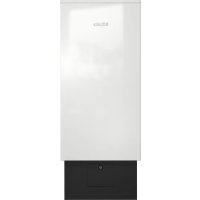
- PAC 1045/1080/1200
- Disposal of the packaging material
- Disposal of your old appliance
- Disposing of filters
- Disposing of old batteries
- Appropriate use
- Foreseeable misuse
- Technical safety
- Functional description
- Initial commissioning
- Operating the air purifier
- Control panel
- Overview of operating modes
- Overview of operating statuses
- Button functions
- Changing the operating status
- Displaying operating values
- Deactivating the keypad lock
- Settings
- Settings menu for "Manual mode"
- Settings menu for "Manual+time mode"
- Settings menu for "CO2 mode"
- Settings menu for "CO2+time mode"
- Transport and installation
- Mounting the adjustable feet
- Wall bracket (optional)
- Electrical connection
- Filter saturation check
- Removing fluff and dust from the pre-filter
- Cleaning the housing
- Filter replacement
- Replacing the main filter and active charcoal filter
- Replacing the main filter
- Resetting the filter life
- Problem solving guide
- Contact in case of malfunction
- Transport et installation
- Controle filterverzadiging
Brand : MIELE
Model : PAC 1080
Category : Air purifier