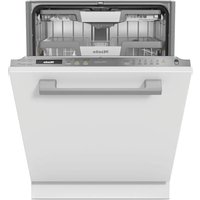
G7114SCUCLST - Dishwasher MIELE - Free user manual and instructions
Find the device manual for free G7114SCUCLST MIELE in PDF.


Pick your language and provide your email: we'll send you a specifically translated version.
| Product Type | Built-in Dishwasher |
| Brand | Miele |
| Model | G7114SCUCLST |
| Dimensions (H x W x D) | 84.5 cm x 59.8 cm x 57 cm |
| Weight | Approx. 50 kg |
| Power Supply | 230 V, 50/60 Hz, 10 A |
| Energy Efficiency Class | A (EU 2019/2017) |
| Place Settings | 14 place settings |
| Noise Level | 44 dB(A) re 1 pW |
| Programs | Eco, Intensive, Normal, Quick, Rinse, Auto |
| Special Features | PerfectGlass, AutoOpen, ComfortClose |
| Water Protection System | Miele Waterproof System |
| Child Lock | Yes - button lock |
| Display | Digital display with time remaining |
| Interior Lighting | LED interior light |
| Cutlery Tray | Third rack for cutlery |
| Adjustable Racks | Height-adjustable upper basket |
| Drying System | Automatic open drying with sensor |
| Salt and Rinse Aid Indicator | Yes |
| Filter System | Self-cleaning micro filter |
| Service/Spare Parts | Available via Miele customer service |
| Guarantee | 2 years standard, extended options |
Frequently Asked Questions - G7114SCUCLST MIELE
How do I reset the Miele G7114SCUCLST dishwasher?
To reset, press and hold the 'Start' button for 3 seconds until the display shows '0:01' and then release. If that doesn't work, switch off the main power for 1 minute.
Why is the dishwasher not draining?
Check if the drain hose is kinked. Clean the filter (located at the bottom) and ensure the sink drain is not blocked. If issue persists, inspect the pump for debris.
How do I add rinse aid?
Open the rinse aid dispenser on the inside door. Fill until 'max' line is reached. Close cap. Adjust dosage via the 'r' setting in program selection (1-6).
What does the 'E' error code mean?
An 'E' code indicates a fault. Example: E01 – water intake issue, E02 – heating problem. Refer to the manual for specific codes. For persistent errors, contact Miele customer service.
Can I use regular dishwasher tablets?
Yes, use any standard tablet. However, for best results with drying, use a product containing rinse aid. Miele recommends their own tabs or any good quality brand.
How do I clean the filters?
Remove the lower rack. Twist the coarse filter counterclockwise and lift out. Rinse under running water. Remove the fine filter. Clean both with a soft brush. Reassemble.
The dishwasher is noisy – what can I do?
Ensure dishes are not rattling against each other. Check that spray arms rotate freely. Inspect for any foreign objects in the pump. If noise persists, a bearing may need replacement (contact service).
How do I start a delayed start?
Select a program. Press the 'Delayed Start' button (clock icon). Use +/- to set hours (1-24). Press 'Start'. The dishwasher will begin at the set time.
What is the recommended detergent amount?
For standard soil, use 20-25g of powder or 1 tablet. For heavily soiled loads, increase to 30g. Avoid overfilling as it can leave residue. Adjust based on water hardness.
How do I adjust the water hardness setting?
Press and hold the 'Start' button and turn on the machine. Release when 'S' appears. The display shows current hardness (e.g., '0'). Use +/- to set from 0 (soft) to 6 (very hard). Confirm with 'Start'.
User questions about G7114SCUCLST MIELE
0 question about this device. Answer the ones you know or ask your own.
Ask a new question about this device
No questions yet. Be the first to ask one.
Download the instructions for your Dishwasher in PDF format for free! Find your manual G7114SCUCLST - MIELE and take your electronic device back in hand. On this page are published all the documents necessary for the use of your device. G7114SCUCLST by MIELE.
USER MANUAL G7114SCUCLST MIELE

Manual assistant
Powered by Anthropic
Waiting for your message
Product information
Brand : MIELE
Model : G7114SCUCLST
Category : Dishwasher