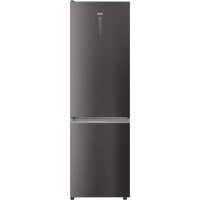
HDW3620DNPD - Fridge HAIER - Free user manual and instructions
Find the device manual for free HDW3620DNPD HAIER in PDF.


| Type of product | Refrigerator-freezer |
| Brand | Haier |
| Model | HDW3620DNPD |
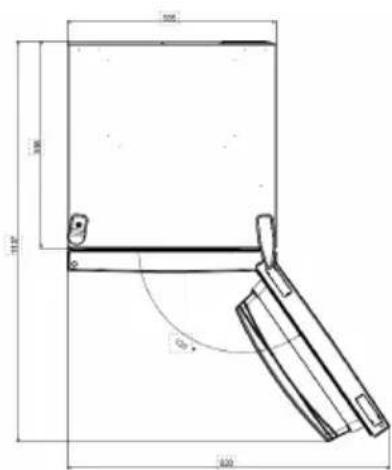
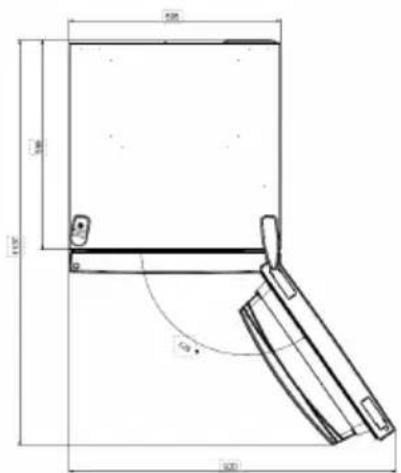
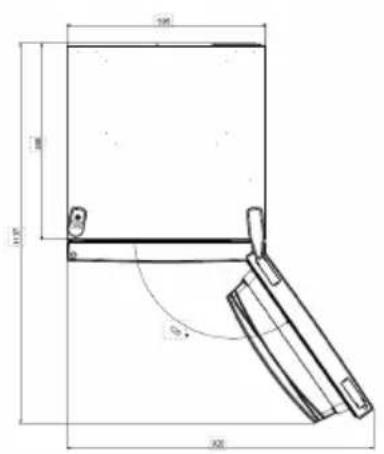
| Required space (W x D) | 920 mm x 1137 mm |
| Weight | ~85 kg (estimated) |
| Power supply | 220-240 V, 50 Hz |
| Climate class | SN-T (estimated) |
| Refrigerator temperature | 2 °C to 8 °C |
| Freezer temperature | -16 °C to -24 °C |
| Refrigerator capacity | Not specified |
| Freezer capacity | Not specified |
| Super cool function | Yes, refrigerator at 2 °C |
| Super freeze function | Yes, freezer at -24 °C |
| Eco mode | Yes, 5 °C / -18 °C |
| Holiday function | Yes, refrigerator off |
| Defrost | Automatic |
| Integrated Wi-Fi | Yes, hOn app |
| Door reversibility | Yes |
| Display | LED touch control panel |
| Error codes | Communication, fan |
Frequently Asked Questions - HDW3620DNPD HAIER
User questions about HDW3620DNPD HAIER
0 question about this device. Answer the ones you know or ask your own.
Ask a new question about this device
Download the instructions for your Fridge in PDF format for free! Find your manual HDW3620DNPD - HAIER and take your electronic device back in hand. On this page are published all the documents necessary for the use of your device. HDW3620DNPD by HAIER.
USER MANUAL HDW3620DNPD HAIER
Discover extra contents andcreate your inventory list


| EN | 1 |
| BG | 11 |
| CS | 21 |
| DA | 31 |
| DE | 41 |
| EL | 51 |
| ES | 61 |
| FI | 71 |
| FR | 81 |
| HR | 91 |
| HU | 101 |
| IT | 111 |
| NL | 121 |
| NO | 131 |
| PL | 141 |
| PT | 151 |
| RO | 161 |
| RU | 171 |
| SK | 181 |
| SL | 191 |
| SR | 201 |
| SV | 211 |
| UK | 221 |
| AR | 231 |
| TR | 241 |
| ET | 251 |
| LT | 261 |
| LV | 271 |
Summary
PRODUCT DESCRIPTION 2
USE. 3
Space requirements 2
Use 3
Customized temperature 4
Super Cool function 4
Super Freeze function 5
Eco mode 5
Holiday function 5
Defrosting 5
Demo mode 6
Error Codes 6
App connection. 7
Step 1 7
Step 2 7
Step 3 7
Wi-Fi Use. 8
DOOR REVERSIBILITY 9
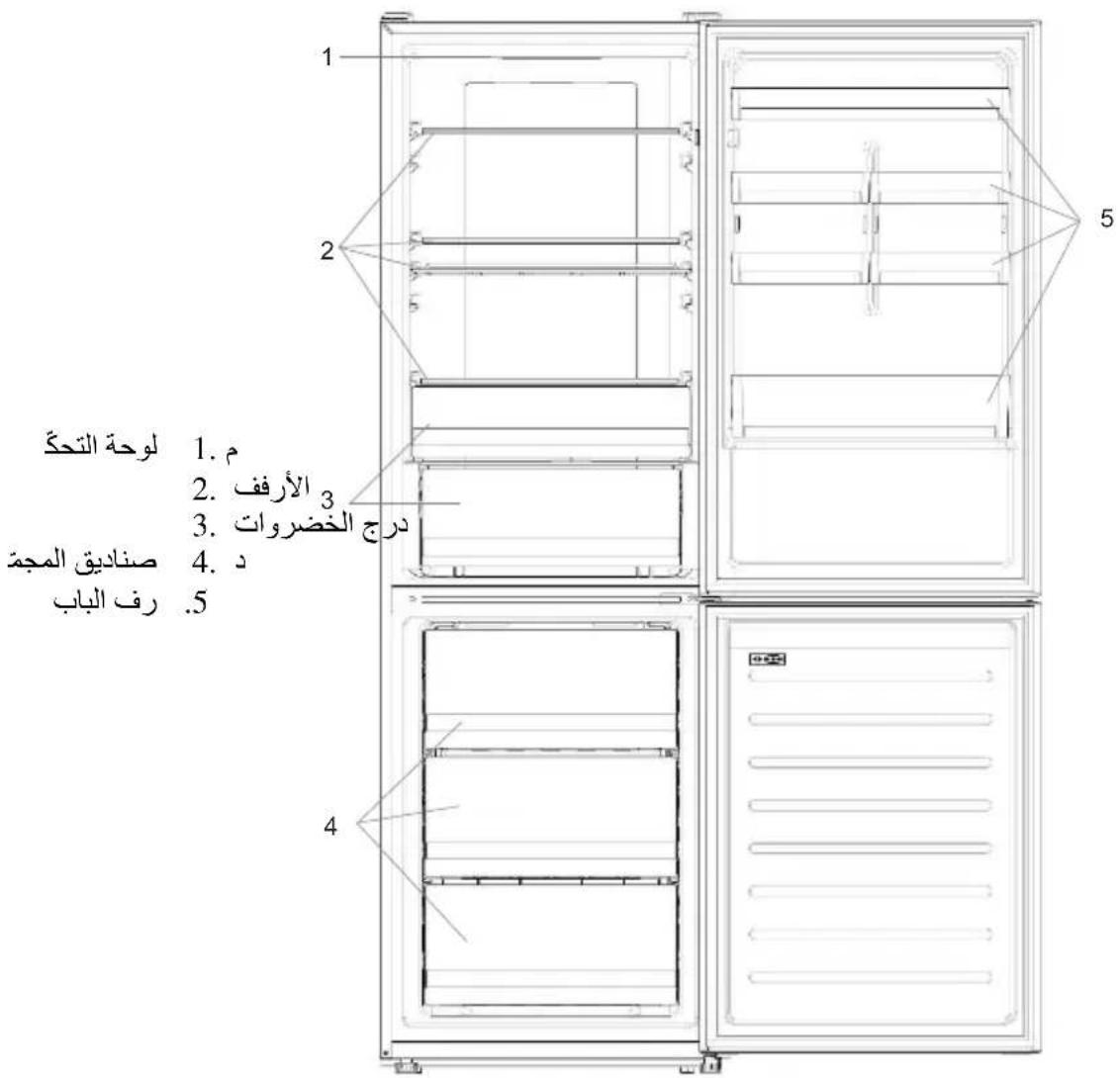
PRODUCT DESCRIPTION
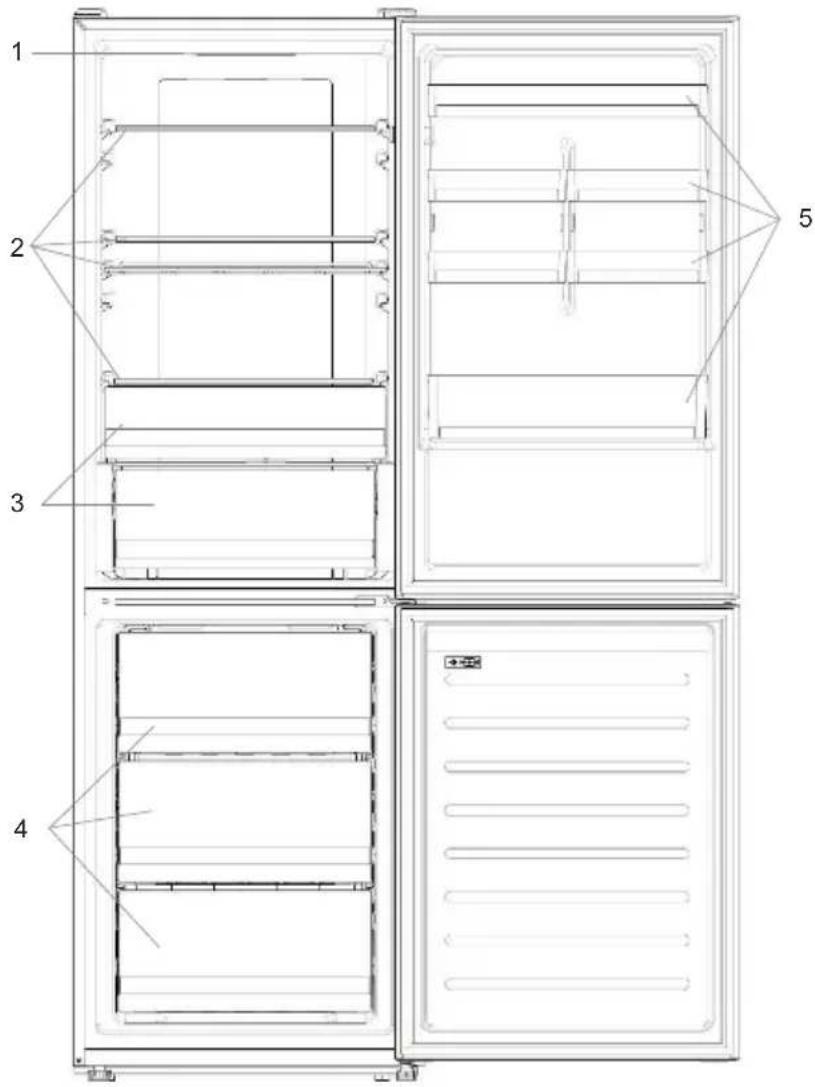
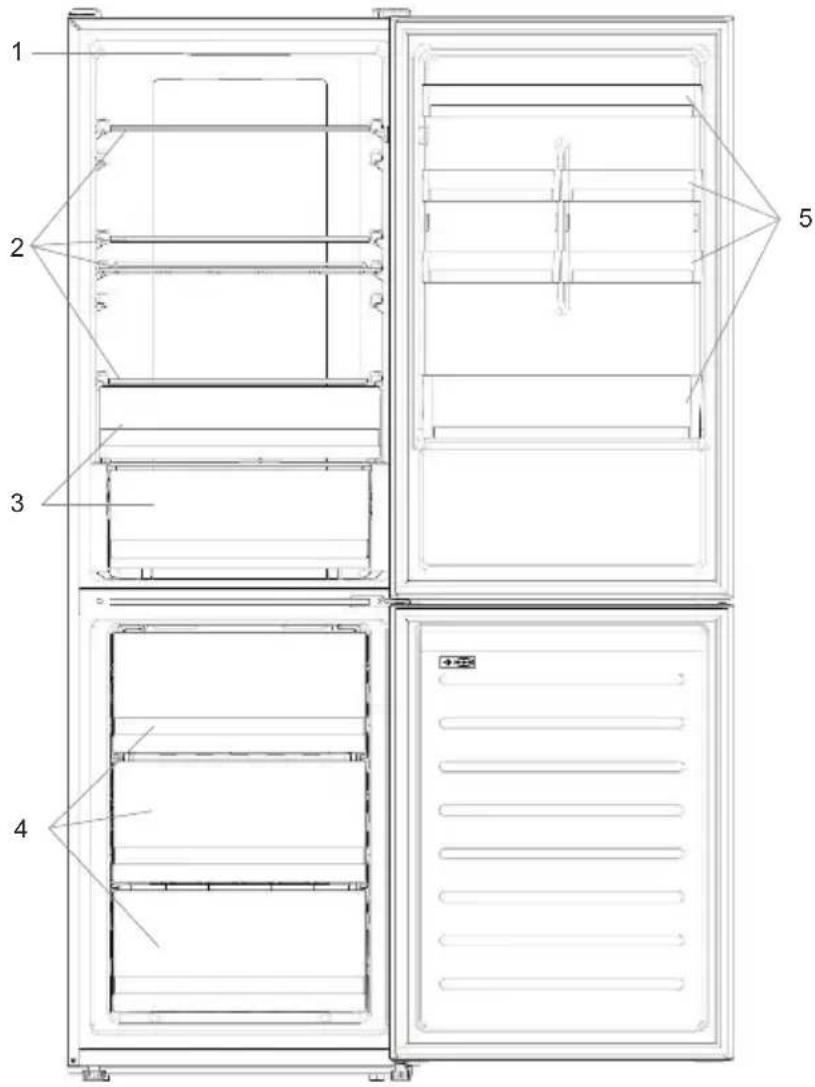
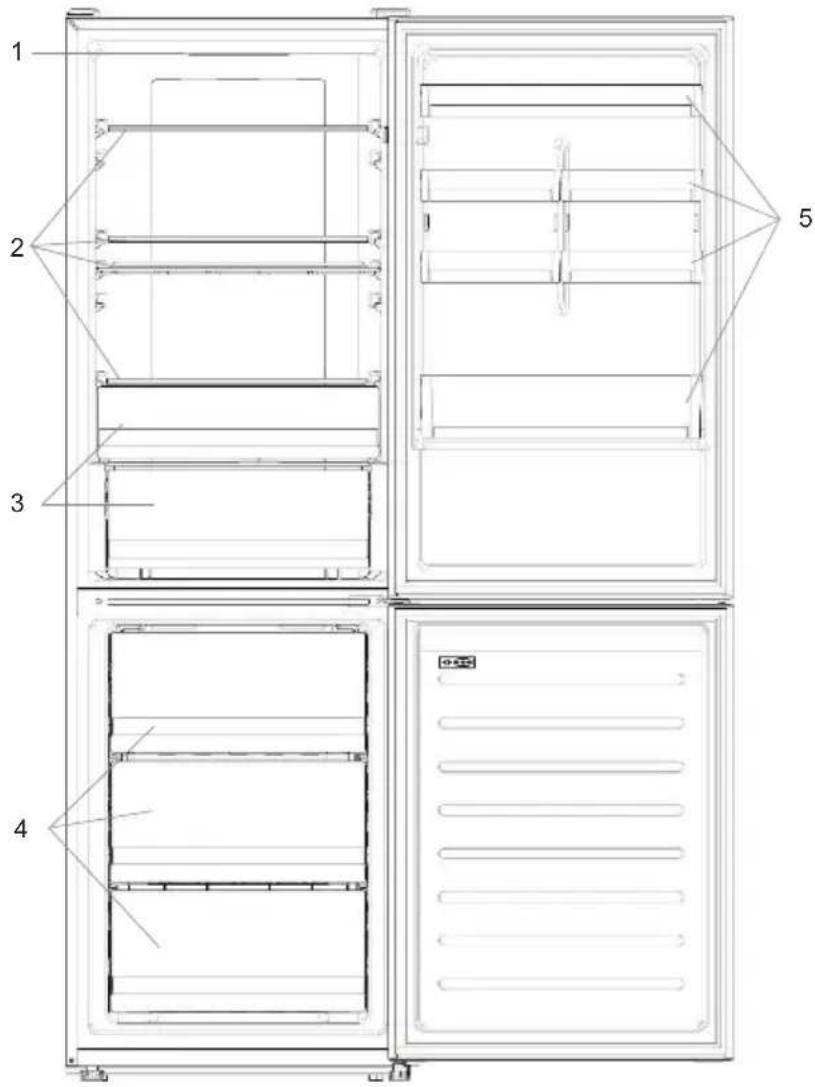
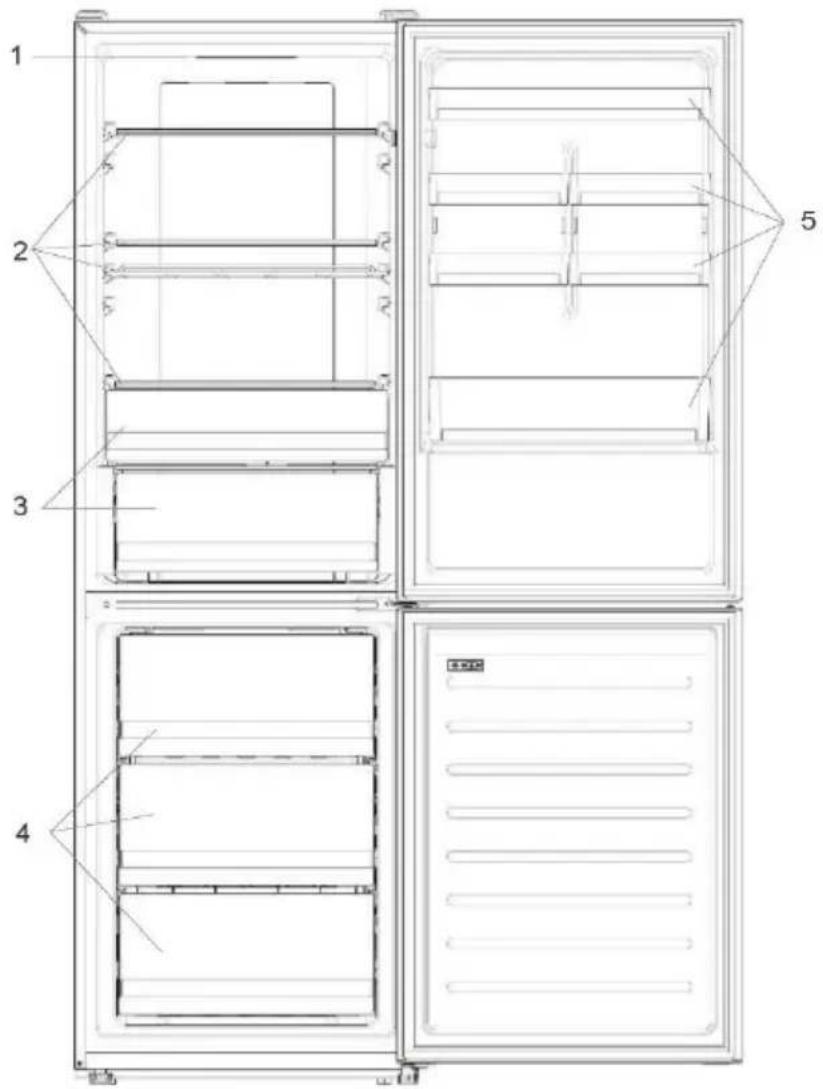
- Control Panel
2.Shelves - Crispers
- Freezer Boxes
-
Door rack
-
The most energy-saving configuration requires drawers, food box and shelves to be positioned in the product, please refer to the above pictures.
** The pictures above are only for reference. The actual configuration will depend on the physical product or statement by the distributor.
Space requirements
The unit's door must be able to fully open as shown. Spare enough space for convenient opening of the doors and drawers.
Keep a distance of at least 50mm between the side walls of the product and adjacent parts.
Width: min. 920~mm
Depth: min. 1137mm
USE
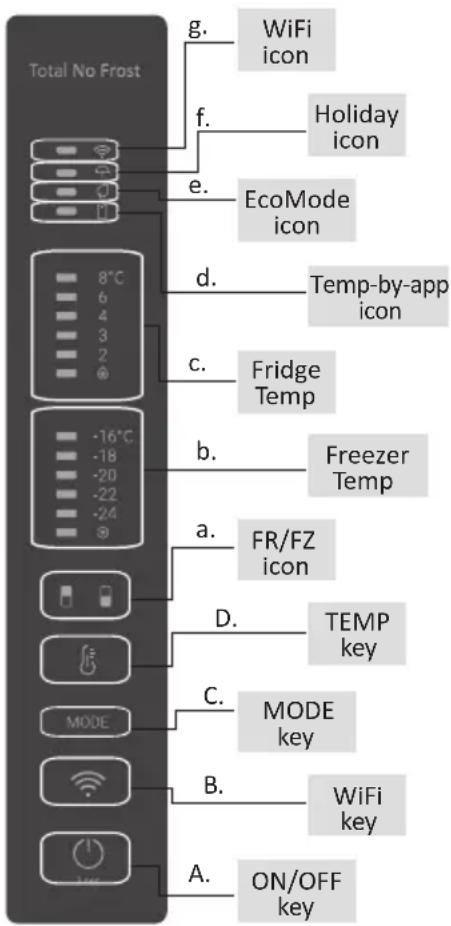
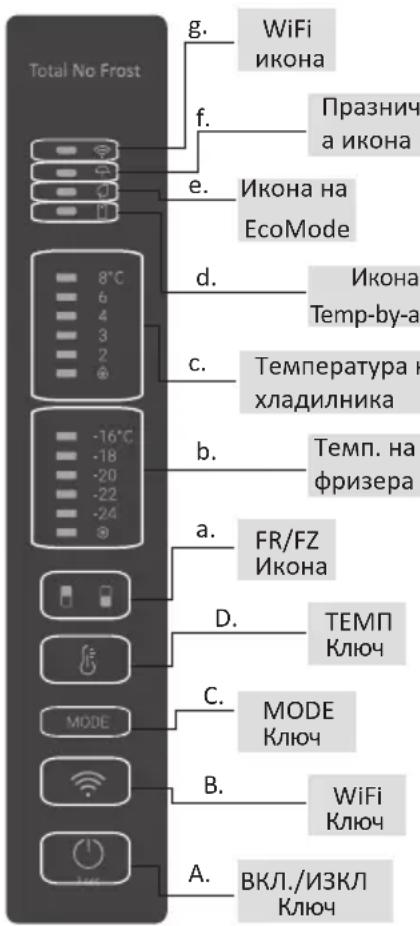
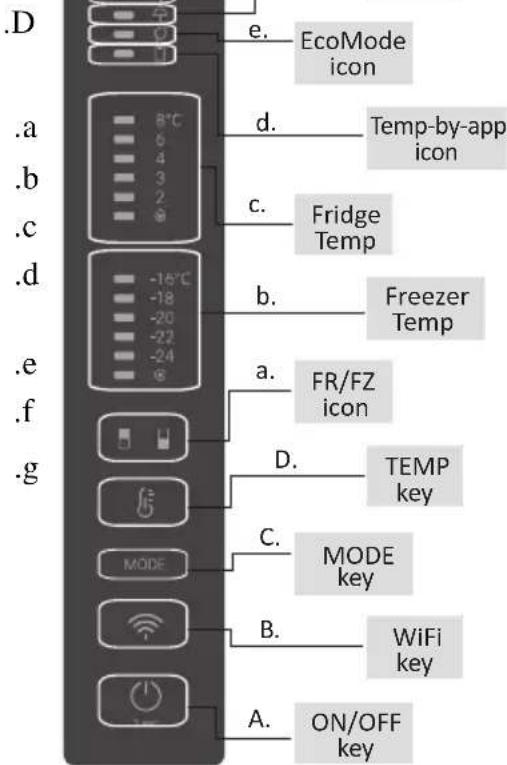
A. ON/OFF key, used to switch on/off the appliance
B. Wi-Fi key, used to switch on/off the Wi-Fi
C. Mode key, used to selected the desired function
D. TEMP key, used to selected the fridge and freezer temperature
a. Fridge /freezer area icon, shows which compartment of the appliance is selected
b. Freezer temperature levels, show which is the selected temperature in the freezer
c. Fridge temperature levels, show which is the selected temperature
d. Customized temperature icon, show if the temperature has been selected by app
e. Eco mode icon, shows whether the eco mode is activated
f. Holiday function icon, show whether the holiday function is activated
g. Wi-Fi Icon, shows whether the Wi-Fi is working and the appliance is connected
Use
- Plug on the appliance, it automatically turns on. The temperature will automatically set at 4^ in the fridge and -18^ in the freezer.
- To change the temperature, press the TEMP key for 5 seconds, an acoustic signal is made and the icon of the selected compartment (fridge or freezer) as well as all the temperature LEDs of the corresponding compartment turn on for 2s, after 2s the selection of the compartment is confirmed. With the selected compartment icon on, quick press the TEMP key to change the temperature. When the setting increases, the corresponding LED light will turn on. An acoustic signal is made every time the TEMP key is pressed and the temperature is changed, after 5 seconds the selection is confirmed. After 30s without operation the fridge/freezer icon area turns off, while the LEDs of the selected temperatures stay on. When the TEMP key is touched again, the icon of the last are selected (Fridge or freezer) turns on.
-
In case of power loss, the last cooling level set will be restored
-
To restore the default setting, long press the Temp key button and click the ON/OFF key button 5 times (in 5 seconds)
- Under the normal operating condition (in spring and autumn), it is recommended to set the temperature at 4^ . In summer when the ambient temperature is high, it is recommended to set temperature at 6 8^ , so as to guarantee the fridge and freezer temperatures and reduce the refrigerator continuous running time; and in winter when the ambient temperature is low, it is recommended to set temperature at 3 4^ to avoid frequent start/stop of the refrigerator.
Customized temperature
From the app it is possible to customize the temperature for both fridge and freezer. The temperature can be set with 1^ sensitivity. It is possible to select a temperature from 2^ to 8^ in the fridge, and from -16^ to -24^ in the freezer.
When the temperature is selected by the app, the customized temperature icon turns on, while all the temperature LED lights of the affected compartment are turned off (i.e. if the refrigerator temperature is selected from the app, LEDs from 2^ to 8^ are turned off. If the freezer temperature is selected from the app, LEDs from -16^ to -24^ are turned off). If only a single area (freezer or fridge) has the customized temperature, the temperature selection of the other area is not changed and the LED light of the selected temperature of that area remains on. An acoustic signal is made every time the temperature is changed.
Super Cool function
It is suggested to switch on the Super Cool function if a large quantity of food should be stored (for example after the purchase). The Super-Cool function accelerates the cooling of fresh food and protects the goods already stored from undesirable warming. When the function is activated, the temperature of the fridge is automatically set at 2^ . How to use the Super Cool function:
- The function can be activated by long pressing TEMP key to select the fridge compartment, and then quick pressing the TEMP key until the Super Cool icon led is turned on, or it can be turned on from the app. When the function is activated, the Super Cool LED is always ON.
- To exit the Super Cool function, press the TEMP key or turn it off from the app.
- The Super Cool function automatically ends when the function has lasted for more than 30 hours.
- When the Super Cool ends, the icon of the control panel is switched off and the previously set cooling level is restored.
Note: Super Cool and Super Freeze function cannot be activated simultaneously
Super Freeze function
The super freezing function accelerates the freezing of fresh food and protects the goods already stored from undesirable warming. If a large amount of food has to be freeze, it is recommended to set the Super-Freeze function on 24h before the usage. When the function is activated, the temperature is automatically set at -24^ .
How to use the Super Freeze function:
- The function can be launched by long pressing TEMP key to select the freezer compartment, and then quick pressing TEMP key until the Super Freeze icon led is turned on, or it can be turned on from the app. When the function is activated, the Super Freeze LED is always ON.
- To exit the Super Freeze function, press the TEMP key or turn it off from the app.
- The Super Freeze function automatically ends when the function has lasted for more than 50 hours.
- When the Super Freeze ends, the icon of the control panel is switched off and the previously set freezing level is restored.
Note: Super Cool and Super Freeze function cannot be activated simultaneously
Eco mode
The Eco mode can be activated to optimize the performance of the appliance, whereas obtaining the best food storage. The Eco mode will automatically set the temperature at 5^ in fridge and at -18^ in the freezer
How to use the Eco mode:
- The function can be activated from control panel by pressing the "mode" key until the Eco mode icon turns on (an acoustic signal confirms the selection), or by selecting the function from the app. When the function is activated, the Eco mode icon is always ON.
- To exit the Eco turn it off from the app or chose another function from the control panel.
- When the Eco Mode ends, the icon of the control panel is switched off and the previously set cooling levels are restored.
Holiday function
The Holiday function can be used to reduce the energy consumption of the appliance, when it is not used regularly. When the function is on, the LED lights are off (even if the door is open) and the fridge is turned off, whereas the freezer will keep working normally.
How to use the Holiday function:
- The function can be activated from control panel by pressing the "mode" key until the Holiday icon turns on (an acoustic signal confirms the selection), or by selecting the function from the app. When the function is activated, the Holiday icon is always ON.
- To exit the Holiday function, turn it off from the app or chose another function from the control panel.
- When the Holiday function ends, the icon of the control panel is switched off and the previously set cooling levels are restored.
Defrosting
The defrosting of the refrigerator and freezer compartment are done automatically: no manual operation is needed.
HCS
When a certain moisture level is reached, the HCS filter fibers open causing moisture to decrease and then close again.
Demo mode
To enter the demo mode, with the display unlocked, keep pressed the SET key and press the WiFi key 5 times within 5 seconds. To exit the demo mode, perform the same operation or power off the refrigerator.
Error Codes
- Communication error
[-16^; - 18^; - 20^; - 22^; - 24^] lights in the freezer turn on sequentially, it means there has been a communication error between the main control board and the display board. Please, contact the technical assistance to help solve the problem
Fan
[-16^; -20^; -22^; -24^] lights in the freezer flashing simultaneously if the fan is not working properly. Please, contact the technical assistance to help solve the problem
APP CONNECTION
IN APP PAIRING PROCEDURE
Step 1
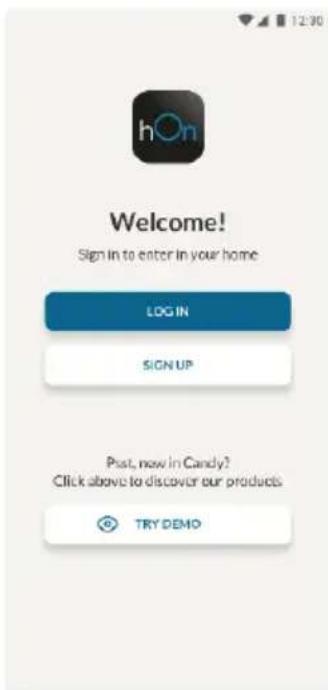
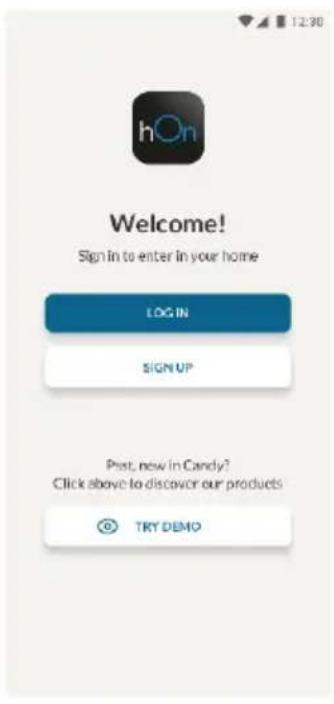
Download the hOn app on the stores


Step 2
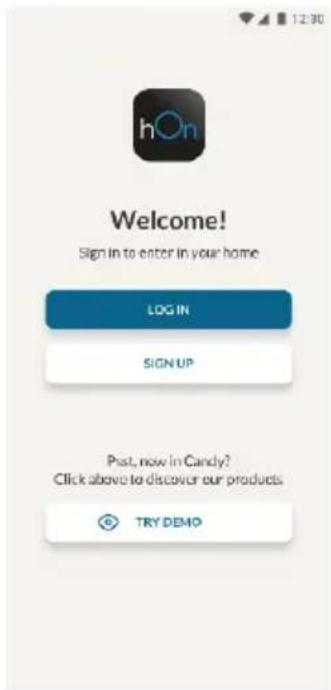
- Create your account on the hOn App or log in if you already have an account
Step 3
- Follow pairing instructions in the hOn App
Wi-Fi Use
If the Wi-Fi has not been configured yet, when the refrigerator turns on, it will automatically enter the configuration mode and keep this status for 30 minutes. The Wi-Fi icon blinks and product enrollment can start.
- Follow in app instructions to configure the Wi-Fi (see above)
- Once the Wi-Fi is configured and the connection established, the Wi-Fi icon is on and fixed.
- After 30 minutes without performing any operation, the Wi-Fi will automatically exit the configuration mode
- If the Wi-Fi has already been configured, it will automatically reconnect according to the configuration information.
To reset the Wi-Fi, press Wi-Fi key and SET key for 2s.
To turn off the Wi-Fi, press Wi-Fi key for 3s.
Radio-module - Technical data
| Frequency rate (OFR) | 2400 MHz-2843.5 MHz |
| Channel frequencies | 2412...2472 MHz(step size 5 MHz) |
| Maximum power(EIRP) | 100 mW |
Radio equipment type is in compliance with Directive 2014/53/EU.
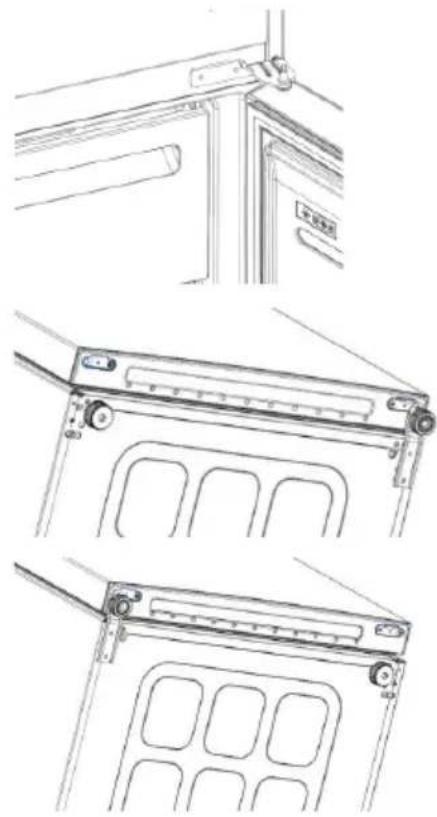
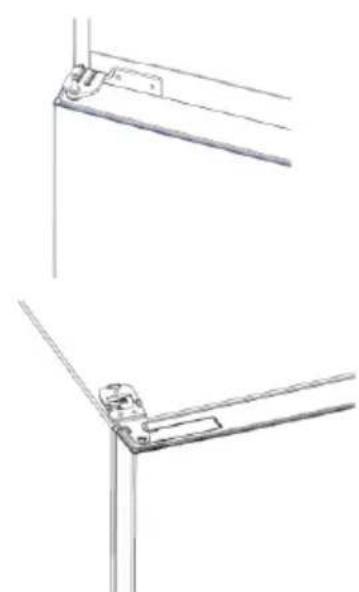
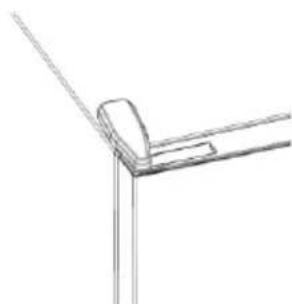
DOOR REVERSIBILITY
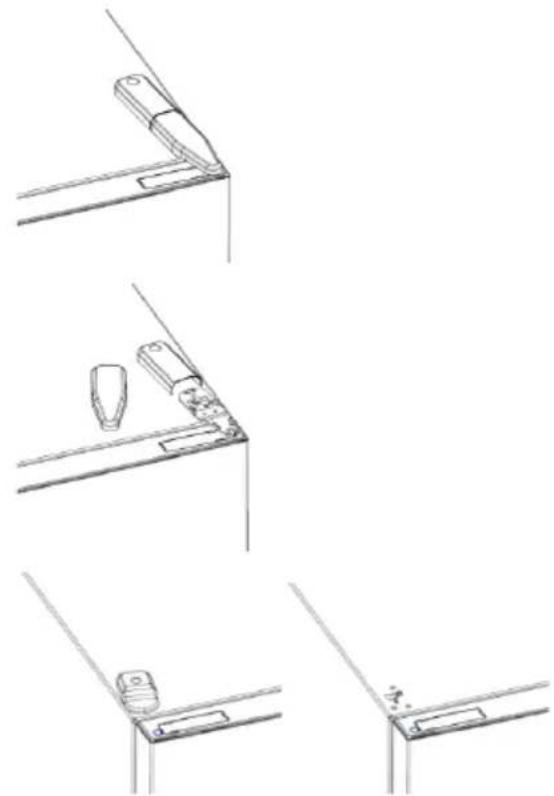
Tools needed: Electric screwdriver
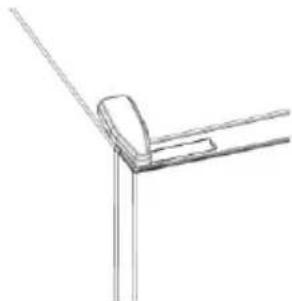
- Remove the top hinge cover
- Unscrew the top hinge
- Remove the top hinge cover (left)
- Remove middle hinge
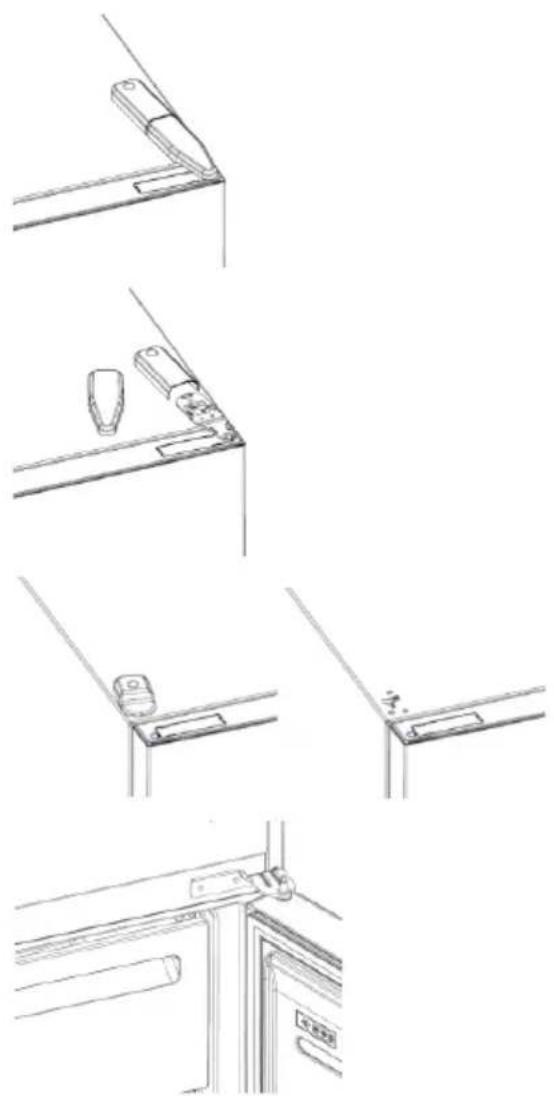
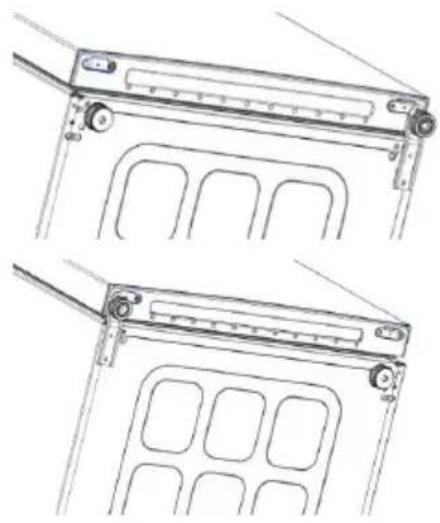
- Remove lower hinge
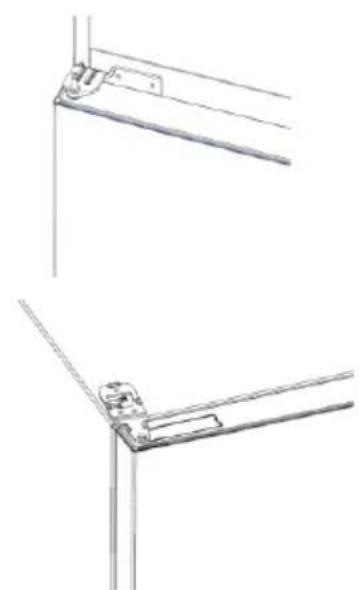
- Mount hinge foot
- Mount middle hinge
- Mount the upper hinge plate
- Mount the upper hinge cover
Pe3HMe
ONICAHNE HA IPOyKTA 12
I3nckBaHna 3a npoctpaHCTBO 12
yNOTPEBA 13
YnoTe6a 13
IepcoHaJIu3npaHa TeMpepaTypa 14
Функця „Super Cool" 14
Функця „Super Freeze" 15
PexnM ,Eco" 15
Функця „Holiday" 16
Pa3mpa3BaHe. 16
Демонстрацноен ржим 16
KoIOBe 3a rpeuKn 16
Bp3KA C PUNIOXEHNETO 17
CTbPkca 1 17
CTbPk2 17
CTbPk3 17
I3noJ3BaHe Ha Wi-Fi. 18
OBPbUaHE HA BPATNTE 19
Опиcaне HA порукTA
1.ПанелзaynpaBneHne
2. PaΦToBe
3. YeKMeJxKe 3a NO- DbJIroTpaHc CBExeCT
4.Фпизерншkaфовe
5. PaΦTOBE Ha BpaTaTa
N3nCKBaHn 3a npocTpaHCTBO
BpaTata Ha ypeDa Tp6Ba Da MoKe Da ce OTbapra DOKpa, KaKTo e Noka3aHo. OcTaBeTe DOCTaTBuHO MRCTO 3a YDo6Ho OTbapraHe Ha BpaTne I YekMeJKeTata.Cna3BaIte pa3CToHnE OT Ha-NMaIKo 50 MM MeKdY CTpaHnUHnTe CTeHN Ha NpOdykTa n CbCeDnTe Yaactn.
ShinpouhHa:MnH.920MM
Дьлбочина: МИH. 1137 MM
yNOTPE6A
A.Бутон „ON/OFF" 3a BключBaHe/ИЗКлючBaHe Ha ypeда
B. ByToH „Wi-Fi" 3a BkIIOUBAHe/ɪn3KIIIOUBAHe Ha Wi-Fi
C. BytoH „Mode" 3a n36op Ha keJanaHaTa φyHKuJia
D.Бутон TEMP 3a n36op Ha Tempepatypata B XlaДиИнka И ВьВ ФрИЗера
a. IkoHaTa 3a 3oHaTa Ha XnaIINHka/φpN3epa, NOKa3Ba KOe OTdJIeHne Ha ypea e n36paHO
b. TemnepaTyprHnte HnBa BvB 0pN3epa NOKa3BaT KOe n36paHaTa TemnepaTypa 3a OTDeJeHneTo
c. TemnepaTpHnTe HnBa Ha XlaIINHnKa NOKa3BaT KOe n36paHaTa TemnepaTypa
d. ИкогаТа 3a НрсоганИЗираНa Temперatype pOKa3Ba ДАП N TeMперatypeTa e n3бранa OТ npINIOJOKeHNeTO
e.ИконаТаЗа рекиМ „Eco"пока3Ва дал e aKTINBиран ekOLOrHnIrТ рекиM
f. Икona на Функши „Holiday“, поka3Ba далуфункцята e akтувирана
g. Икога „Wi-Fi“, пoka3ba дади Wi-Fi мрекаразункцонира и уретьт ecBbp3aH
Ynotpe6a
- YpeBt 3aNoUHe da pa6OTn aBTOMaTnUHO, CJIeI KaTO rO BKIOuHTe B KOHTaKT. TempeatypaTa Ha XJaINHnKa aBTOMaTnUHO ige ce 3aJaDe Ha 4^ C, a Ha np3epa Ha -18° C.
3a da npomeHnte TemnepaTypata, HATncheTe 6yToH "TEMP" 3a 5 ceKyni, ue yyeTe cInHaI nIKoHaTa Ha n36paHOTo OTdeJeHne (XnaDnIHNK IIN φpns3ep), KaKTO n BCnUKN TeMnpaTpyHn CBeToOnOHN INdNkATOpn Ha cbOTBeTHOTO OTdeJeHne ige CBETHaT 3a 2 ceKyni, cNeI KOeTO n36opbT Ha OTdeJeHneTo ige ce NotBbpDn. Korato IKoHaTa Ha n36paHOTo OTdeJeHne CBeThe, HATncHeTe 6bp30 6yToHa TEMP, 3a da npomeHnte TemnepaTypata. Korato HAcTpOkaTa ce yBelenu, cbOTBeTHaTa LED cBETnHa ce BKnIOUBya. Ppn BCsKO HAtnckaHe Ha 6yToHa ,TEMP" ce noDaBa 3BykoB cInHaI TeMnpaTypata ce npomeHn, cNeI 5 ceKyni n36opbT ce notBbpKdaBa. Ako He paBoTN B
IpoDJIxKeHne Ha 30 cekyHn IN KOHaTa 3a 3OHaTa Ha XlaAnIHnKa/ΦpN3ep Ce N3KJIIOUBA, DOKATO CBeTOnIOJNTe Ha N36paHNTe TempePaTyPn OCTaBaT BKIOUeHN. Korato OTHOBO DOKOChTe 6yToHa ,TEMP" ce BKNIOUba INKOHATA Ha NOcJIeDHOTo OTdJeHne (XlaAnIHNK nIN ΦpN3ep).
BcnyaHa 3ary6a Ha MoUHocT NocneHaTa HAcTPOKa Ha HNBOTO Ha oxJaKdaHe 6bDe Bb3CTaHOBeHa
3a Da Bb3cTaHOBnTe HAcTpoKaTa No Nopda36npaHe, HaTncHeTe 6yToHa "Temp" npOdbJnxIeJIHo n HaTncHeTe 6yToHa ,ON/OFF" 5 nbTu (3a 5 ceKyuHn)
- Прн Нормални pa60THn yCNoBn (пpe3 npoJeTTa n eceHTa) ce npenopbUba Да 3aJaTe Tempepatypata Na 4^ .Пpe3ЯТOTO, korato Tempepatypata Na OKoJHaTа cpeDa e BncoKa, e npenopbUHTeHdo 3aJaTe Tempepatypata Na 6 8^ , 3aДa ce rapaHTnpaT Tempepatypte Ha xJaIINnKuN iФpns3epa N da Ce HamaJI npOdbJnxIeHTo BpeMe Ha pa6To Na xJaIINnKu. Пpe3ЗmATA, Korato Tempepatypata Na OKoJHaTа cpeDa e HnCKa, e npenopbUHTeHdo 3aJaTe Tempepatypata Na 3 4^ , 3aДa ce n36eHne YecTO BKIOUBAHe/N3KIOUBAHe Na XJaIINnKu.
IepcoHaJIn3IpaHa TeMnepaTypa
OT npnloxehno e Bb3MOxHO da ce nepcoHaJIn3npa TempepaTpaTa Ha DbTe OTdeJeHna - xnaDnHTo n 0 pns3epa. TemepaTpaTa MoKe da ce hacTpOn cbc CTbNka 1^ C. Bb3MOxHO e da ce n36epe TemepaTpa oT 2^ C do 8^ CB XnAaINHnKa n ot- 16^ C do- 24^ C BbB 0pns3epa.
Korato TemnepaTypa e n3bpaHa ot npinoxeHneTo, IKoHaTa 3a nepcoHaInn3npaHaTa TemnepaTypa ce BkIIOUBA, DOKATO BCNUKn LED Iamnn 3a TemnepaTypa Ha daJeHTo OTdJIeHne Ce n3KIOUBAr (T.e. aKO TemnepaTypaHa XnaDnHnka e n3bpaHa ot npinoxeHneTo, CBETODNODITE ot 2^ do 8^ ce n3KIOUBAr. Ako TemnepaTypaHa 3aMPa3BaHe e n3bpaHa ot npinoxeHneTo, CBETODNODTe ot-16° C do -24° C ue ce n3KIOUAT)
Ako cmo eHa 3oHa (pH3ep nIIN XnAINHnK) IMa npcoHaJIIN3npaHa TeMnepaTpa, H36opbT Ha TempePaTpaTa Ha DpyraTa 3oHa He ce npomeHa n LED INnKaTOBt Ha H36paHaTa TempePaTpa Ha Ta3N 3OHa OCTaba BkInoueH. BCEKn PbT KOrato TempePaTpaTa Ce npomeHa, Ce IOnaBA 3ByKOB CnHaJ.
Функця „Super Cool"
IpenopbnteHno e da BkHouHTe cyHKnraTa "Super Cool", ako Tp6Ba da cbxpanBaTe roJMO KOJIueCTBO xpaHa (HanpImep cIeN nOKynpKa). CyHKnraTa "Super Cool" yckopraBa oxJaXdHeTo Ha npcHata xpaHa N npedna3Ba BececbxpanHeNTe npodyKTn OT HeKeJanoHO 3aTOnJnHe. Korato cyHKnraTa eakTNBnPaHa, Tempepatypata Ha XnaDnHnKa ce 3aJaBa ABTomatNoHo Ha 2 ^ C KaK ce n3no3Ba cyHKnraTa "Super Cool":
Download on the App Store

EXPLORE IT ON AppGallery
CTbnka 2
Cb3aTe cBoi npoBn B npuOxHneTo hOn nn BJe3Te, aKo Beue mATE TaKB
CTbnka 3
CneBaTe HnctpyKunTe 3a cDBOBAHe B npINOKeHNeTo hOn
N3noJ3BaHe Ha Wi-Fi
Ako Wi-Fi BCE OSe He e KOHcHypnpaHo, KOraTO XnaJINHKbT Ce BkIouN, Toa ABToMaTuHNo Ie BNe3e BpeKIM Ha KOHcHypnpaHe N Ie 3aNa3n TOBa CbCTOraHne 3a 30 MNHTN. IKoHaTa "Wi-Fi" Mura n MoKe da 3anoHe perncTpnpaHeto Ha npoDyKtA.
CneBbAitte HnctpykunTe B npuOKeHneTo, 3a da KOHpIpypapTe Wi-Fi (Bx. no-rope)
Cnei KaTo Wi-Fi e KOHcHpypnpaHO n Bpb3KaTa e yCTaHOBeHa, IKoHaTa 3a Wi-Fi e BKIOUeHa n cKcnpaHa.
Cnei 30 MNHytn, 6e3 da ce n3BbPwBa HnkaKBO DeiCTBne, Wi-Fi mpekata aBTOMaTHUHO ige n3Ie3e OT peKIMa Ha KOHcHypnpaHe
Ako Wi-Fi Beue e KOHcHpynpaHo, To aBtOMaTnUHO ue ce cBbpxe, n3noJ3Baikn INOpMaunra 3a KOHcHpypaunra.
3a da hynpate Wi-Fi Bpb3kata, haTnchete 6yToHa „Wi-Fi" u 6yToHa „SET" 3a 2 cekyHdN.
3a da n3knIOHTe Wi-Fi Bpb3kata, HATINCHete 6yToHa ,Wi-Fi"i 3a 3 cekyn.
Papnoomodyn - TexHnueckn daHHN
APP-FORBINDELSFREMGANGSMADEVEDPARRINGIAPP
Trin 1
Kwokoi opaalatoos 56
SYN△EESHΦAPMOrH57
Bnua 1 .57
Bnua 2 57
Bnua 3 .57
Xpnoa WI-FI 58
ANAETPEVIMOTHTA NOPTAE. 59
NEPIIgPAΦHIIPOIONTO
1.Πινακας ελέγχου
2. Páφíα
3. Uptapi KAI a x a v i k v
4. Koutia aTioθnkeuonc kataψuktn
5. Páφi πóptaç
- H TIO O WOTÍ TAKTIKÍ YIA TNY EξOIKOVóμNON EYEpyεIaç attaIeI TNY TOnoθEtnon Ouprapiwv, Doxéiwv YIA Ta Tpóφiμa KAI paφiwv σTo Tpoiov, Tapakaλouμe avatpeETE OTIC TApattavω EIKOVEc.
** OI napatavw eikovc ivai mvo yia avapopa. H npaymuikn puthetaion napaetpwv th eapntnei aTo quaiko Tpoiov n aTOn dhnawon Tou diavopea.
AnaiTnoeis Xwpou
H nopTa TnC movadac npeTc va mtope va avoiyi PAnpwos OTWg paivetai. Na utapxepaektoe uEepoc wpoq ia aveto aoiymu Twv thupw kai twv ouptapiw.
AiaTnpnOte aTIOoTaON TouLaxioTov 50 mm
MuTeaTuV TAAeupIKWv ToIXwMaTow TU
TPOIOVTOc KAI TOW TApakEIEMVv EApTnMaTowV.
Download on the App Store

EXPLORE IT ON AppGallery
Bnμa 2
Download on the App Store

EXPLORE IT ON AppGallery
Paso 2
Download on the App Store

EXPLORE IT ON AppGallery
Fase 2
APP-TILKOBLING I APP-PARINGSPROSEDYREN
Trinn 1
Download on the App Store

EXPLORE IT ON AppGallery
2. korak
- Ustvarite svoj račun v aplikaciji hOn ali se prijavite, Če račun Že imate
3. korak
APP-ANSLUTNING I APP-HOPKOPPLINGSLAGE
Steg 1
JrBnKOpncToByBaTuФyHkuio Holiday:
- Φункцию можна akтувати 3 панелі керваимь, натуckанчи Кногку "mode", пон He BBIMKHeTbcя пiktorpama Функцii Holiday (Звковий сизалпдеверджус ВИбip); a60 можна вьбрази Функцio BdoDAТКу. Колл Функцию akтувоваго, пiktorpama Holiday 6уde 3abЖДn BBIMKHeHa.
- Κόb BιΜΚΗγΤη φυΗκίΙΟ Ḍολί, BιΜΚΗΙΤβ Ⅱ B ἀδαΤΚΑ Αόθ ΒυδερίΤβ έῦς ΦυΗκίΙΟ Ḥα Ανηδι ΚέργΒαΗΝ.
- PicnB BmKHeHHa yHKuH Holiday niktorpama Ha naHeni KepyBaHH BIMKaEcBcA, i BiHOBIOHTbcpaHiWe BCTaHOBJeHi pIBHi OXOJODKeHH.
Po3MopoKyuBaHHa
Po3MopoxyBaHHxOIOuINbHOro Ta MOp03nIbHOro BiDcIKIB 3dIChIOeTbcra ABTomaTHUHO:pyHe KepyBaHHr He noTpiohe.
HCS
KoNn DoCraTaBcR neBnH pIBeHb BOnorocTi, BoNOKHa fInbTp a HCS BiDkPnBaIOTbcR, 10 np3BOdntb Do 3MeHsEHHa BOnorocTi, a Notim 3HOBy 3AkPnBaETbcR.
dEmohctpauiHn pexm
Uo6 yBInTu B DeMOHCTpauiHn peXm i3 He3a6JOKOBaHM dncJIeEM, UtpmyTe HATNCHYTOK Honky SET i HaTNCHTb KHonky Wi-Fi 5 pa3iB npotrarom 5 ceKyND. Uo6 BuHTu 3 DeMOHCTpauiHoro peXmMy, BUKOHaIte Ti cami di a6o BUMKHITb XOJODINbHNK.
KoI n oMnJok
- Tomnka o6miHy daHmN
Cbitnoi iHikatopn (-16°C;-18°C;-20°C;-22°C;-24°C) y mopo3nblhni kamepi BMKAIObCS IocJIIOBHO; ue 03Nauea, loMIX rOIOBHO nIaTOHO ynpabNInHra Ta IIaTOO dncnpe BHHKla nomnka o6miHy daHmN. 3BepHiTbcr do cnyx6n TexhiHoI DonOMOrn, 0o6 OTPmuATn donomory y BnpiuHeHHI npo6nemn
- BeHTnJIaTOp
Cbitnoi iHdkaTopn (-16°C; -20°C; -22°C; -24°C) y mopo3nIbHiK kamepi 6nmaIOt b OndOuchHO, kUO BeHTnIaTOp He npaIOe HaneXHM YHOM. 3BepHITbcr Do cnJx6n TexHIOI DonOMOrn, o6 OTpIMaTN DonOMORY y BnpiJeHHI npo6nemn
3'ЕДHAHHЯ 3 ДОДATKOM
Heo6xidiHInCtpyMeHTn: EJeKTpnuHa BnKpyTka
- 3HimiTb KpUshky BepXhboi netnI
- BnKpyTb BepxHIO neTIO
- 3himiTb KpNsKy BepXHboi neTJI (3niBa)
- 3HIMITb cepeHIO neTJIIO
- 3HimiTb HxKHO nTeTIO
- BctaHOBiB onopy netnI
- BctaHOBiBt bcepeHIO neTIO
- BctaHOBITb pnaCTnHy BepXHboi netni
- BcTaHOBItb KpUShky BepXHboi netnI
232
232
233
233
234.
234 "Super Cool
235."Super Freeze
235 .."ECO
235
235.
236
236
237 1
237 1
237 1
237 2
237. 3
238. Wi-Fi
238
i
1 1
alwaii ciibio
a a a a a a a a a a a a a a
a a a a a a a a a a a a a a a a a a a a
aill
y 1
a 1
JiWi-Fi J
A. jiu liang liang / liang / liang / liang / liang / liang /
B Total No Frost
C. = a - bx + y = 1 即 y = 1
4 15 15 15 15 15 15 15 15 15 18-
T 5 5 5 5 5 5 5 5 5 5 5 5 5 5 5 5 5 5 5 5 5 5 5 5 5 5 5 5 5 5 5 5 5 5 5 5 5 5 5 5 5 5 5 5 5 5 5 5 5 5 4 4 4 4 4 4 4 4 4 4 4 4 4 4 4 4 4 4 4 4 4 4 4 4 4 4 4 4 4 4 4 4 4 4 4 4 4 4 4 4 4 4 4 4 4 4 4 4 4 4 1
(204 )
y jil ginal bia jai oaii pi aal lai
.
15 15
4 36 4 4 4 4 4 4 4 4 4 4 4 4 4 4 4 4 4 4 4 4 4 4 4 4 4 4 4 4 4 4 4 4 4 4 4 4 4 4 4 4 4 4 4 4 4 4 4 4 4 4 150
.
aaiiaai
1 1 1 1 1 1 1 1 1 1 1 1 1 1 1 1 1 1 1 1 1 1 1 1 1 1 1 1 1 1 1 1 1 1 1 1 1 1 1 1 1 1 1
L 10000000000000000000000000000000000000000000000000000000000000000000000000000000
1.
"Super Cool
Joo. (el jll Jlll l) plaln no s y S k a k j n jn Super Cool 1g Supr Coot g h
Super Cool
bll aLLI bTTEMP cLg 1a g s jial bia lal qy BnBSSS S
.
Super Cool LED
Super Cool
•
aclu 30 jia jyjai yjai Super Cool
•
Sper Cool 1
•
a a
Super Freeze Super Cool
PRODUKTAAPRAKSTS 272
LIETOSANA 273
Nepiecesamavieta 272
Lietošana. 273
Pielagota temperatura. 274
Funkcija Super Cool 274
Funkcija Super Freeze. 275
Eco rezims. 275
Funkcija Holiday. 275
Atkausešana 275
Demonstracijas rezims. 276
Kludukodi 276
LIETOTNESSAVIENOJUMS. 277
1.darbiba 277
2.darbiba 277
3.darbiba 277
Wi-Fi izmantošana. 278
DURVJU APVERsANA. 279
PRODUKTA APRAKSTS
- Summary
- PRODUCT DESCRIPTION 2
- 3
- PRODUCT DESCRIPTION
- Space requirements
- USE
- Customized temperature
- Super Cool function
- Super Freeze function
- Eco mode
- Holiday function
- Defrosting
- HCS
- Demo mode
- Error Codes
- APP CONNECTION
- IN APP PAIRING PROCEDURE
- Step 1
- Step 2
- Step 3
- Wi-Fi Use
- Radio-module - Technical data
- DOOR REVERSIBILITY
- Pe3HMe
- Опиcaне HA порукTA
- N3nCKBaHn 3a npocTpaHCTBO
- yNOTPE6A
- IepcoHaJIn3IpaHa TeMnepaTypa
- Функця „Super Cool"
- CTbnka 2
- CTbnka 3
- N3noJ3BaHe Ha Wi-Fi
- Papnoomodyn - TexHnueckn daHHN
- APP-FORBINDELSFREMGANGSMADEVEDPARRINGIAPP
- Trin 1
- NEPIIgPAΦHIIPOIONTO
- AnaiTnoeis Xwpou
- Bnμa 2
- Paso 2
- Fase 2
- APP-TILKOBLING I APP-PARINGSPROSEDYREN
- Trinn 1
- korak
- korak
- APP-ANSLUTNING I APP-HOPKOPPLINGSLAGE
- Steg 1
- Po3MopoKyuBaHHa
- dEmohctpauiHn pexm
- KoI n oMnJok
- 3'ЕДHAHHЯ 3 ДОДATKOM
- aaiiaai
- "Super Cool
- PRODUKTAAPRAKSTS 272
- LIETOSANA 273
- PRODUKTA APRAKSTS
Brand : HAIER
Model : HDW3620DNPD
Category : Fridge